mirror BMW 128I 2010 E81 User Guide
[x] Cancel search | Manufacturer: BMW, Model Year: 2010, Model line: 128I, Model: BMW 128I 2010 E81Pages: 250, PDF Size: 8.24 MB
Page 91 of 250
Controls
89Reference
At a glance
Driving tips
Communications
Navigation
Entertainment
Mobility
turn indicator lever toward the high beams
again.
>Use the headlamp flasher as usual with the
low beams switched on.
System limitations
The high-beam assistant cannot serve as
a substitute for the driver's personal judg-
ment of when to use the high beams. Therefore,
manually switch off the high beams in situations
where this is required to avoid a safety risk.<
The system is not fully functional in situations
such as the following, and driver intervention
may be necessary:
>In very unfavorable weather conditions,
such as fog or heavy precipitation
>In detecting poorly-lit road users, such as
pedestrians, cyclists, horseback riders and
wagons; when driving close to train or ship
traffic; and at animal crossings
>In tight curves, on hilltops or in depressions,
in cross traffic or half-obscured oncoming
traffic on highways
>In poorly lit towns and cities and in the pres-
ence of highly reflective signs
>At low speeds
>When the windshield in front of the interior
rearview mirror is fogged over, dirty or cov-
ered with stickers, etc.
>If the sensor is dirty. Clean the sensor on
the front of the interior rearview mirror using
a cloth moistened with a small amount of
glass cleaner.
Switching off via iDrive
1."Settings"
2."Lighting"3."High beam assistant"
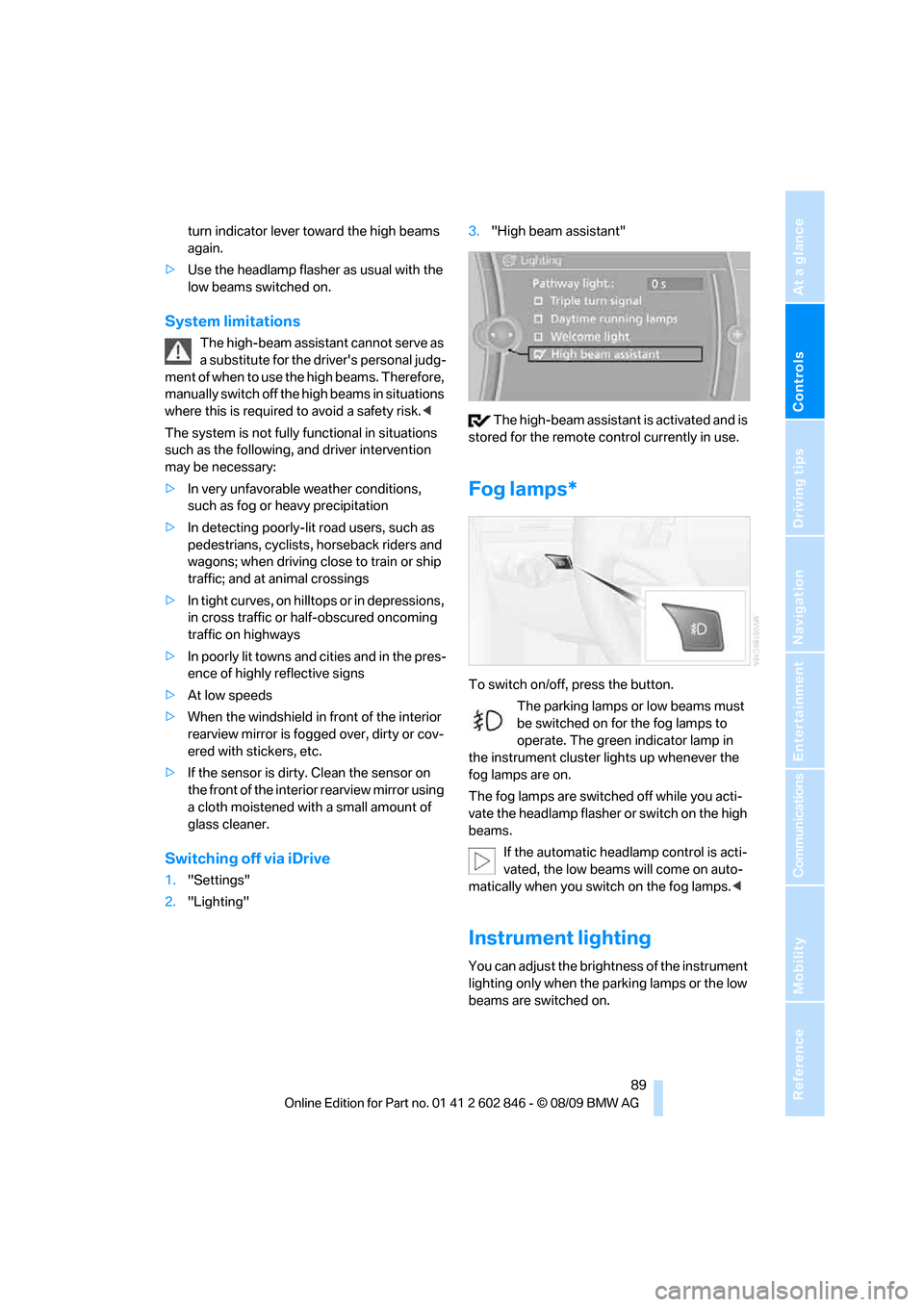
The high-beam assistant is activated and is
stored for the remote control currently in use.
Fog lamps*
To switch on/off, press the button.
The parking lamps or low beams must
be switched on for the fog lamps to
operate. The green indicator lamp in
the instrument cluster lights up whenever the
fog lamps are on.
The fog lamps are switched off while you acti-
vate the headlamp flasher or switch on the high
beams.
If the automatic headlamp control is acti-
vated, the low beams will come on auto-
matically when you switch on the fog lamps.<
Instrument lighting
You can adjust the brightness of the instrument
lighting only when the parking lamps or the low
beams are switched on.
Page 110 of 250
Things to remember when driving
108
Things to remember when driving
Break-in period
Moving parts need breaking-in time to adjust to
each other. Please follow the instructions below
in order to achieve the optimal service life and
economy of operation for your vehicle.
Engine and differential
Always obey all official speed limits.
Up to 1,200 miles/2,000 km
Drive at varying engine and road speeds, but do
not exceed an engine speed of 4,500 rpm or a
road speed of 100 mph/160 km/h.
Avoid full-throttle operation and use of the
transmission's kickdown mode.
After driving 1,200 miles/2,000 km
Engine and vehicle speeds can be gradually
increased.
Tires
Due to technical factors associated with their
manufacture, tires do not achieve their full trac-
tion potential until after an initial break-in
period. Therefore, drive cautiously during the
first 200 miles/300 km.
Brake system
Brakes require an initial break-in period of
approx. 300 miles/500 km to achieve optimized
contact and wear patterns between brake pads
and rotors. Drive cautiously during this break-in
period.
Clutch
The function of the clutch reaches its optimal
level only after a distance driven of approx.
300 miles/500 km. During this break-in period,
engage the clutch gently.
Following part replacement
The same break-in procedures should be
observed if any of the components mentioned
above have to be renewed in the course of the
vehicle's operating life.
Saving fuel
The fuel consumption of your vehicle depends
on several factors. You can lower fuel consump-
tion and the environmental impact by taking
certain measures, adjusting your driving style
and having the vehicle serviced regularly.
Remove any unneeded cargo
Additional weight increases fuel consumption.
Remove any mounted parts after you
have finished using them
Remove unneeded additional mirrors, the roof
rack and the rear luggage rack after use.
Mounted parts affect the vehicle's aerodynam-
ics and increase fuel consumption.
Close the windows and glass roof
An open glass roof or window causes higher air
resistance and thus increases fuel consump-
tion.
Check tire inflation pressure regularly
Check the tire inflation pressure at least twice a
month and before embarking on a long journey,
and correct it if necessary.
Low tire inflation pressure causes higher rolling
resistance and thus increases fuel consumption
and tire wear.
Set off immediately
Do not let the engine warm up while the car is
still standing, but set off immediately at moder-
ate engine speed. This is the fastest way for the
cold engine to reach its operating temperature.
Page 207 of 250
Mobility
205Reference
At a glance
Controls
Driving tips
Communications
Navigation
Entertainment
Care
Care products
Regular cleaning and care contributes signifi-
cantly to the value retention of your BMW.
BMW recommends cleaning and caring for your
vehicle with products that are approved by
BMW for this purpose.
Your BMW center will be happy to advise you on
the products and services available for cleaning
and caring for your BMW.
Original BMW CareProducts have been
material tested, laboratory checked and
proven in the field, and offer optimal care and
protection for your vehicle.<
Do not use cleaners that contain alcohol
or solvents as these may result in dam-
age.<
Cleaning agents can contain substances
that are dangerous or hazardous to your
health. Therefore, follow the warning and safety
instructions on the packaging. When cleaning
inside the vehicle, always open the doors or
windows of the vehicle. In enclosed areas, pro-
vide for sufficient ventilation. Only use products
designed for cleaning vehicles.<
Exterior care
Washing the vehicle
Especially during the winter months,
ensure that the vehicle is washed more
frequently. Heavy soiling and road salt can lead
to vehicle damage.<
After washing the vehicle, apply the
brakes briefly to dry them; otherwise,
water can reduce braking efficiency over the
short term and brake discs can corrode.<
Automatic car washes
Preference should be given to cloth car washes.Do not use high-pressure car washes;
otherwise, water may drip into the vehicle
around the windows.<
Before driving into a car wash, ensure that it is
suitable for your BMW. Check the following:
>Dimensions of your vehicle, refer to
page223.
>If necessary, fold in the outside rearview
mirrors, refer to page50.
>Maximum permissible tire width.
Avoid car washes with guide rail heights
over 4 in/10 cm; otherwise, there is the
danger of damaging chassis parts.<
>In Convertibles, do not treat the convertible
top with wax. Ensure that a program is avail-
able that does not apply wax or is designed
specifically for convertibles.
Preparations before driving into an automatic
car wash:
>Unscrew the rod antenna
*.
>Deactivate the rain sensor
* to prevent unin-
tentional wiping.
>Remove additional attachments, e.g. spoil-
ers or telephone antennas, if there is a pos-
sibility that they could be damaged.
Automatic transmission
Before driving into an automatic car wash, per-
form the following steps to ensure that the vehi-
cle can roll:
1.Insert the remote control into the ignition
lock, even with Comfort Access.
2.Engage transmission position N.
3.Release the parking brake.
4.Switch off the engine.
5.Leave the remote control in the ignition lock
so that the vehicle can roll.
Page 208 of 250
Care
206
Steam jets/high-pressure washers
When using steam jets or high-pressure
washers, ensure that you maintain suffi-
cient clearance to the vehicle and do not exceed
a temperature of 1407/606.
Insufficient clearance or excessive pressure or
temperature can lead to component damage or
water penetration. Follow the operating instruc-
tions for the steam jet or high-pressure
washer.<
When using high-pressure washers, do
not spray against the sensors and cam-
eras, e.g. of the Park Distance Control or Rear
View Camera, for an extended period and main-
tain a distance of at least 1 ft/30 cm.<
Manual car wash
When washing the vehicle by hand, use large
quantities of water and car shampoo if neces-
sary. Clean the vehicle with a sponge or wash-
ing brush, applying light pressure only.
Before cleaning the windshield, deacti-
vate the rain sensor or switch off the igni-
tion to prevent unintentional activation of the
wipers.<
Observe local regulations pertaining to
washing vehicles by hand.<
Headlamps
Do not rub them dry and do not use abrasive or
corrosive cleaning agents.
Loosen dirt, e.g. insects, with shampoo or
insect remover and wash away with copious
quantities of water.
Thaw ice with a windshield deicer and do not
use an ice scraper.
Windows
Clean the inside and outside surfaces of the
windows and the mirrors with window cleaner.
Do not clean the mirrors with cleaners
containing quartz.<
Convertible top care
The appearance and life of the convertible top
depend on proper care and operation.Follow these instructions:
>Do not fold the convertible top into the con-
vertible top box when the top is wet or fro-
zen, as this may cause water spots, mold
stains or chafed areas.
>If water spots occur on the inside headliner
despite precautions, remove them using a
microfiber cloth and interior cleaner.
>If the vehicle is parked in enclosed areas for
extended periods, ensure that there is suffi-
cient ventilation.
>Remove bird droppings immediately, as
their corrosive ingredients attack the con-
vertible top and damage the rubber seals.
To remove stains from the convertible
top, do not use stain removers, paint thin-
ners, solvents, benzine or similar substances.
These substances may damage the rubber
parts. Improper care and cleaning may cause
the convertible top and convertible top seams
to become leaky.<
To remove heavy soiling, use a special convert-
ible top cleaner.
Follow the manufacturer's instructions for use.
After washing the convertible top three to five
times, treat it with an impregnating agent.
Paintwork care
Regular care contributes to value retention and
protects the paintwork against the long-term
effects of damaging substances.
Region-specific environmental influences can
damage the vehicle paintwork. Therefore, it is
important to adapt the frequency and scope of
car care accordingly.
Immediately remove aggressive materials such
as spilled fuel, oil, grease, brake fluid, tree sap or
bird droppings to prevent damage to the paint-
work.
Repairing paintwork damage
Immediately repair scratches or similar
damage, such as that caused by stones
hitting the vehicle, where necessary to prevent
rusting.<
Page 215 of 250
Mobility
213Reference
At a glance
Controls
Driving tips
Communications
Navigation
Entertainment
When mounting new tires or changing over
from summer to winter tires and vice versa,
mount run-flat tires for your own safety. In the
event of a flat, no spare wheel is available. Your
BMW center will be glad to advise you. Refer
also to New wheels and tires, page196.
The tools for changing wheels are avail-
able as optional accessories from your
BMW center.<
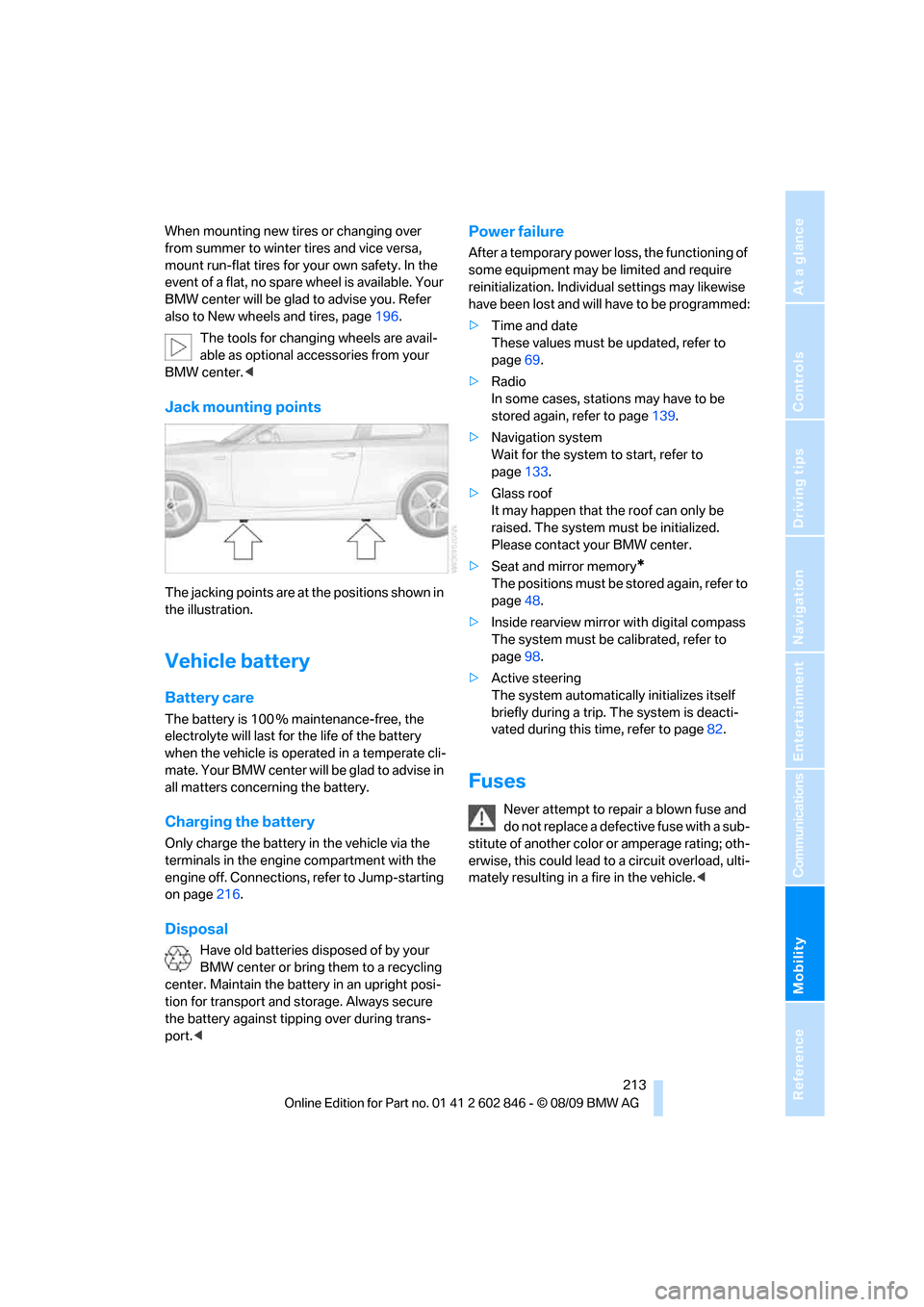
Jack mounting points
The jacking points are at the positions shown in
the illustration.
Vehicle battery
Battery care
The battery is 100 % maintenance-free, the
electrolyte will last for the life of the battery
when the vehicle is operated in a temperate cli-
mate. Your BMW center will be glad to advise in
all matters concerning the battery.
Charging the battery
Only charge the battery in the vehicle via the
terminals in the engine compartment with the
engine off. Connections, refer to Jump-starting
on page216.
Disposal
Have old batteries disposed of by your
BMW center or bring them to a recycling
center. Maintain the battery in an upright posi-
tion for transport and storage. Always secure
the battery against tipping over during trans-
port.<
Power failure
After a temporary power loss, the functioning of
some equipment may be limited and require
reinitialization. Individual settings may likewise
have been lost and will have to be programmed:
>Time and date
These values must be updated, refer to
page69.
>Radio
In some cases, stations may have to be
stored again, refer to page139.
>Navigation system
Wait for the system to start, refer to
page133.
>Glass roof
It may happen that the roof can only be
raised. The system must be initialized.
Please contact your BMW center.
>Seat and mirror memory
*
The positions must be stored again, refer to
page48.
>Inside rearview mirror with digital compass
The system must be calibrated, refer to
page98.
>Active steering
The system automatically initializes itself
briefly during a trip. The system is deacti-
vated during this time, refer to page82.
Fuses
Never attempt to repair a blown fuse and
do not replace a defective fuse with a sub-
stitute of another color or amperage rating; oth-
erwise, this could lead to a circuit overload, ulti-
mately resulting in a fire in the vehicle.<
Page 238 of 250
Everything from A - Z
236 DTC Dynamic Traction
Control76
– indicator lamps76
DVD
– country codes149
– settings150
– video playback149
DVD menu150
DVD player, refer to CD
player147
DVD video149
Dynamic Brake Control
DBC76
Dynamic destination
guidance127
Dynamic Stability Control
DSC76
Dynamic Traction Control
DTC
– indicator lamps77
E
EBV Electronic brake-force
distribution76
Eject button, refer to Buttons
on the CD / DVD player136
Electrical malfunction
– door lock30
– fuel filler flap188
– glass roof37
Electronic brake-force
distribution EBV76
Electronic oil level check199
Electronic Stability Program
ESP, refer to Dynamic
Stability Control DSC76
Emergency operation, refer to
Manual operation
– door lock30
– fuel filler flap188
– glass roof37
– transmission lock, automatic
transmission59
Emergency release, trunk
lid31
Emergency Request215
Emergency services, refer to
Roadside Assistance215Energy, saving
– saving fuel108
Engine
– breaking in108
– data222
– speed222
– starting56
– starting, Comfort Access33
– switching off56
Engine compartment199
Engine coolant, refer to
Coolant201
Engine oil
– adding201
– additives201
– BMW Maintenance
System203
– checking level199
– intervals between changes,
refer to Service
requirements67
– specified engine oils201
Engine output, refer to Engine
data222
Engine speed, refer to Engine
data222
Engine starting, refer to
Starting the engine56
Entry map for destination122
Equalizer, tone setting137
ESP Electronic Stability
Program, refer to Dynamic
Stability Control DSC76
Event data recorders204
Exhaust system, refer to Hot
exhaust system109
Extended connectivity of the
music player in the mobile
phone159
Exterior mirrors49
– adjusting49
– automatic dimming
feature51
– automatic heating50
– folding in and out50
External devices
– random sequence161Eyes
– for tow-starting and towing
away217
– for tying down loads112
F
Failure messages, refer to
Check Control71
Failure of an electrical
consumer213
False alarm, refer to Avoiding
unintentional alarms33
Fastening safety belts, refer to
Safety belts49
Fastest route for
navigation126
Fast forward
– CD changer149
– CD player149
Filter of automatic climate
control, refer to Microfilter/
activated charcoal filter94
First aid pouch215
Fixture for remote control,
refer to Ignition lock55
Flash when locking/
unlocking28
Flat tire
– run-flat tires196
– Tire Pressure Monitor
TPM79
Flat Tire Monitor FTM77
– indicating a flat tire78
– initializing the system77
– system limits77
Flat tires, refer to Tire
condition195
FM, waveband139
Fog lamps89
– indicator lamp13,89
Footbrake, refer to Braking
safely110
Footwell lamps90
For your own safety5
Free memory capacity, music
collection157
Front airbags83
Front seat setting43
Page 239 of 250
Reference 237
At a glance
Controls
Driving tips
Communications
Navigation
Entertainment
Mobility
Frost, removing from
windows, refer to Defrosting
windows93
FTM, refer to Flat Tire
Monitor77
Fuel188
– gauge64
– high-quality brands188
– quality188
– specifications188
– tank contents, refer to
Capacities226
Fuel clock, refer to Fuel
gauge64
Fuel consumption display,
refer to Average fuel
consumption65
Fuel consumption statistics,
refer to Average fuel
consumption65
Fuel display, refer to Fuel
gauge64
Fuel filler flap188
– releasing in the event of
electrical malfunction188
Fuses213
G
Garage door opener, refer to
Integrated universal remote
control96
Gasoline, refer to Required
fuel188
Gasoline display, refer to Fuel
gauge64
Gas station
recommendations127
Gear change
– with automatic
transmission58
– with manual transmission57
Gear display, with automatic
transmission57
Gearshift lever
– automatic transmission with
Steptronic58
– manual transmission57
General driving notes109Glass roof, electric36
– closing after electrical
malfunction37
– Convenient operation29
– opening, closing36
– operation with Comfort
Access34
– pinch protection system37
– raising36
– remote control28
Glove compartment99
GPS navigation, refer to
Navigation system116
Grills, refer to Air vents91
Gross vehicle weight, refer to
Weights225
H
Halogen lamps
– replacing bulbs210
Handbrake, refer to Parking
brake57
Hands-free system, refer to
Microphone for hands-free
mode14
Hazard warning flashers14
HD Radio140
Head airbags83
Headlamp control,
automatic86
Headlamp cover210
Headlamp flasher59
– indicator lamp13
Headlamps
– replacing bulbs210
Head restraints45
Heated
– seats48
– steering wheel51
Heated mirrors50
Heating
– mirrors50
– seats48
– steering wheel51
Heating, rear window93
Heating and ventilation91
Heavy loads, refer to Stowing
cargo111Height, refer to
Dimensions223
Height adjustment
– steering wheel51
High-beam assistant88
High beams88
– indicator lamp13
– replacing bulbs210
High beams and low beams,
automatic, refer to High-
beam assistant88
High-pressure
washer205,206
High water, refer to Driving
through water110
Highways, refer to Route
criteria126
Hills110
Holders for cups100
Hood198
Hot exhaust system109
Hydraulic brake assist, refer to
Dynamic Brake Control76
Hydroplaning109
I
IBOC, refer to HD Radio140
Ice warning, refer to Outside
temperature
warning63
Identification marks
– tire coding194
iDrive16
– adjusting brightness74
– changing date and time70
– changing language73
– menu guidance17
– operating principle16
– setting the date and time70
– status information19
Ignition55
– switched off55
– switched on55
Ignition key, refer to
Integrated key/remote
control26
Ignition key position 1, refer to
Radio readiness55
Page 240 of 250
Everything from A - Z
238 Ignition key position 2, refer to
Ignition on55
Ignition lock55
Imprint2
Indicator and warning
lamps13
– Tire Pressure Monitor
TPM80
Indicator lighting, refer to
Instrument lighting89
Individual settings, refer to
Personal Profile26
Inflation pressure, tires190
Inflation pressure monitoring,
refer to Tire Pressure
Monitor TPM79
Initializing
– compass, refer to
Calibrating98
– radio, refer to Station,
storing139
– refer to Setting the time and
date70
Initializing, Flat Tire Monitor
FTM77
Instructions for navigation
system, refer to Voice
instructions127
Instrument cluster12
Instrument lighting89
Integrated key26
Integrated universal remote
control96
Interactive map122
Interior lamps90
– remote control28
Interior motion sensor32
Interior rearview mirror50
– automatic dimming
feature51
– compass98
Intermittent mode of the
wipers60
Intersection, entering,
navigation118
iPod, connecting, refer to
AUX-IN port159
iPod, connecting, refer to USB
audio interface159
J
Jacking points213
Jets, refer to Air vents91
Joystick, refer to iDrive16
Jumpering, refer to Jump-
starting216
Jump-starting216
K
Key, refer to Integrated key/
remote control26
Keyless go, refer to Comfort
Access33
Keyless opening and closing,
refer to Comfort Access33
Key Memory, refer to Personal
Profile26
Kickdown58
Knock control188
L
Lamps
– adaptive light control87
– instrument lighting89
– interior lighting90
Lamps, refer to Parking lamps/
low beams86
Lamps and bulbs, replacing
bulbs209
Lashing eyes, refer to
Securing cargo112
Last destinations120
LATCH child restraint fixing
system53
Leather care207
LED Light-emitting
diodes209
Length, refer to
Dimensions223
License plate lamp, replacing
bulb212
Light
– refer to High-beam
assistant88
Light-alloy wheels207Light control
– refer to High-beam
assistant88
Light-emitting diodes
LED209
Lighter101
– socket101
Lighting
– lamps and bulbs209
– of instruments89
– of vehicle, refer to Lamps86
Light switch86
Limit, refer to Speed limit73
Load111
Load securing equipment,
refer to Securing cargo112
Lock buttons of doors, refer to
Locking30
Locking
– adjusting confirmation
signal28
– from inside30
– from outside28
– without remote control, refer
to Comfort Access33
Locking and unlocking doors
– from inside30
– from outside27
Low beam control, refer to
High-beam assistant88
Low-beam headlamps86
– automatic86
– replacing bulbs210
Lower back support, refer to
Lumbar support45
Luggage compartment, refer
to Cargo area
Luggage rack, refer to Roof-
mounted luggage rack112
Lumbar support45
M
M+S tires, refer to Winter
tires197
Maintenance, refer to
– BMW Maintenance
System203
– Service booklet
Page 241 of 250
Reference 239
At a glance
Controls
Driving tips
Communications
Navigation
Entertainment
Mobility
Maintenance system203
Malfunction warnings, refer to
Check Control71
Manual car wash206
Manual operation
– door lock30
– fuel filler flap188
– glass roof37
– transmission lock, automatic
transmission59
Manual operation with
automatic transmission58
Manual transmission57
Map for navigation
– changing scale129
– entering destination122
Map view128
Maximum cooling92
Maximum speed
– for winter tires197
Menus, refer to iDrive16
Messages172
Messages from the concierge
service173
Microfilter/activated-charcoal
filter for automatic climate
control94
Microphone for telephone14
Mirror dimming feature51
Mirrors49
– automatic curb monitor50
– exterior mirrors49
– heating50
– interior rearview mirror50
Mobile phone
– adjusting volume169
– connecting, refer to Mobile
phone, pairing166
– operation via iDrive169
– pairing166
Mobile phone, installation
location, refer to Center
armrest100
Mobile phone, refer to
Telephone166
Mobile phone, refer to the
separate Owner's Manual
Modifications, technical, refer
to For your own safety5Monitor, refer to iDrive16
Monitoring system for tire
pressures, refer to Flat Tire
Monitor77
MP3 player, connecting, refer
to AUX-IN port159
MP3 player, connecting, refer
to USB audio interface159
Multi-channel playback137
Multifunctional steering
wheel, refer to Buttons on
the steering wheel11
Multifunction switch
– refer to Turn signals/
headlamp flasher59
– refer to Wiper system60
Music, managing
157
Music collection154
– backup158
– deleting158
– random sequence157
– restoring158
Music player, connecting,
refer to AUX-IN port159
Music player, connecting,
refer to USB audio
interface159
Music search155
My Info173
N
Navigation
– starting destination
guidance after entering a
destination119
– storing a destination119
– storing current position119
– voice activation123
Navigation announcements,
refer to Switching voice
instructions on/off127
Navigation data116Navigation system116
– address book119
– bypassing a route
section127
– continuing destination
guidance126
– destination entry117
– dynamic destination
guidance127
– entering a destination by
voice123
– entering a destination
manually117
– frequently asked
questions133
– gas station
recommendations127
– planning a trip124
– route list127
– selecting destination via
map122
– selecting route criteria126
– special destinations120
– starting destination
guidance126
– terminating destination
guidance126
– traffic bulletins129
– voice instructions127
– volume adjustment128
Neck support, refer to Head
restraints45
Nets, refer to Storage
compartments100
New tires196
North-facing map128
Number of cylinders, refer to
Engine data222
O
OBD socket, refer to Socket
for Onboard Diagnosis204
Octane ratings, refer to Fuel
specifications188
Odometer63
Oil, refer to Engine oil199
Oil consumption199
Oil level199
Page 242 of 250
Everything from A - Z
240 Old batteries, refer to
Disposal213
Onboard vehicle tool kit209
Opening and closing
– Comfort Access33
– from inside30
– from outside27
– using the door lock29
– via the remote control27
Options, selecting for
navigation126
Orientation menu, refer to
Start menu17
Outlets, refer to Ventilation94
Output, refer to Engine
data222
Outside temperature
display63
– changing unit of measure67
– on computer67
Outside temperature
warning63
Overriding selector lever
lock59
Overview
– radio control136
P
Paintwork care206
Park assistant, refer to Park
Distance Control75
Park Distance Control PDC75
Parked car ventilation94
– preselecting switch-on
times95
– switching on and off
directly94
Parking
– vehicle56
Parking aid, refer to Park
Distance Control PDC75
Parking brake57
– indicator lamp57
Parking lamps/low beams86
– replacing bulbs210
Parts and accessories, refer to
The individual vehicle5Passenger-side mirror tilt
function50
Pathway lighting87
Personal Profile26
Phone book169
Phone numbers
– dialing170
Pinch protection system
– glass roof, electric37
– windows36
Placing a call, refer to
telephone owner's manual
Playing music155
Polish208
Pollen, refer to Microfilter/
activated-charcoal filter94
Postal code, entering for
navigation118
Power windows35
Power windows, refer to
Windows35
Pressure, tires190
Pressure monitoring of tires,
refer to Flat Tire Monitor77
Pressure monitoring of tires,
refer to Tire Pressure
Monitor TPM79
Programmable buttons on the
steering wheel11
Programmable memory
keys20
Protection function, refer to
Pinch protection system
– glass roof, electric37
– windows36
Providing medical assistance,
refer to First add pouch215
Puncture
– Flat Tire Monitor77
R
Radio
– controls136
– HD Radio140
– satellite radio142
– selecting a waveband139
– storing stations139
– switching on/off136
– tone control136
– volume136
Radio position, refer to Radio
readiness55
Radio readiness55
– switched off55
– switched on55
Rain sensor60
Random sequence
– external devices161
– music collection157
Reading lamps90
Rear lamps, refer to Tail
lamps211
Rear luggage rack112
Rear seats
– adjusting head restraints46
– folding down backrests102
Rearview mirror, refer to
Mirrors49
Rear window defroster93
Receiving level of mobile
phone, refer to Status
information19
Reception
– quality140
– radio station140
Recirculated-air mode93
Recirculation of air, refer to
Recirculated-air mode93
Reflectors, refer to Tail
lamps211
Refueling188
Releasing
– hood198
Remaining distance, refer to
Computer65
Remaining distance, refer to
Cruising range65