trunk BMW 128I 2010 E81 User Guide
[x] Cancel search | Manufacturer: BMW, Model Year: 2010, Model line: 128I, Model: BMW 128I 2010 E81Pages: 250, PDF Size: 8.24 MB
Page 41 of 250
Controls
39Reference
At a glance
Driving tips
Communications
Navigation
Entertainment
Mobility
these could prevent the hardtop from closing
properly.<
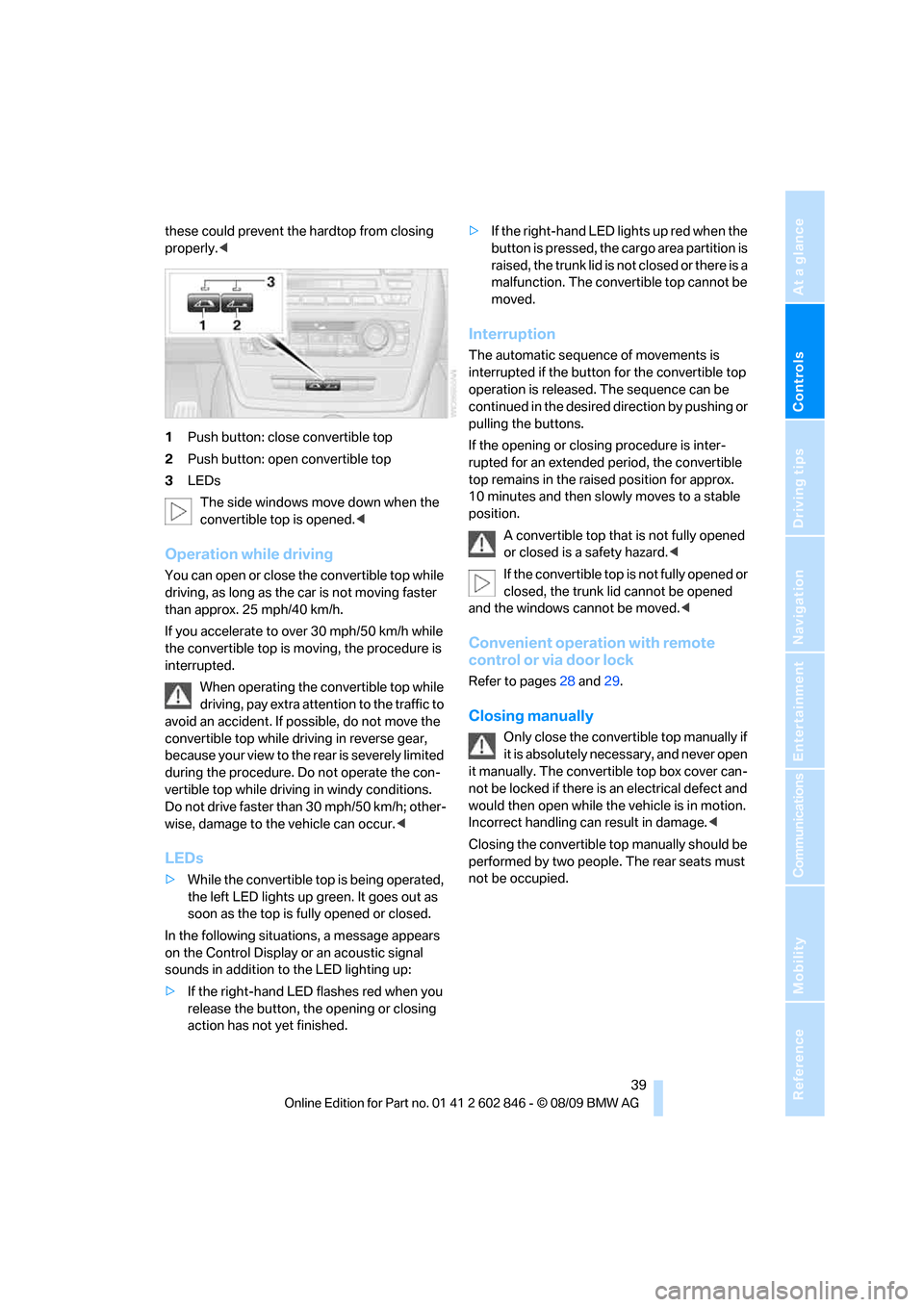
1Push button: close convertible top
2Push button: open convertible top
3LEDs
The side windows move down when the
convertible top is opened.<
Operation while driving
You can open or close the convertible top while
driving, as long as the car is not moving faster
than approx. 25 mph/40 km/h.
If you accelerate to over 30 mph/50 km/h while
the convertible top is moving, the procedure is
interrupted.
When operating the convertible top while
driving, pay extra attention to the traffic to
avoid an accident. If possible, do not move the
convertible top while driving in reverse gear,
b e c a u s e yo u r v ie w t o t h e r ea r is s e v e re ly li m i t ed
during the procedure. Do not operate the con-
vertible top while driving in windy conditions.
Do not drive faster than 30 mph/50 km/h; other-
wise, damage to the vehicle can occur.<
LEDs
>While the convertible top is being operated,
the left LED lights up green. It goes out as
soon as the top is fully opened or closed.
In the following situations, a message appears
on the Control Display or an acoustic signal
sounds in addition to the LED lighting up:
>If the right-hand LED flashes red when you
release the button, the opening or closing
action has not yet finished.>If the right-hand LED lights up red when the
button is pressed, the cargo area partition is
raised, the trunk lid is not closed or there is a
malfunction. The convertible top cannot be
moved.
Interruption
The automatic sequence of movements is
interrupted if the button for the convertible top
operation is released. The sequence can be
continued in the desired direction by pushing or
pulling the buttons.
If the opening or closing procedure is inter-
rupted for an extended period, the convertible
top remains in the raised position for approx.
10 minutes and then slowly moves to a stable
position.
A convertible top that is not fully opened
or closed is a safety hazard.<
If the convertible top is not fully opened or
closed, the trunk lid cannot be opened
and the windows cannot be moved.<
Convenient operation with remote
control or via door lock
Refer to pages28 and29.
Closing manually
Only close the convertible top manually if
it is absolutely necessary, and never open
it manually. The convertible top box cover can-
not be locked if there is an electrical defect and
would then open while the vehicle is in motion.
Incorrect handling can result in damage.<
Closing the convertible top manually should be
performed by two people. The rear seats must
not be occupied.
Page 42 of 250
Opening and closing
40
Before closing
1.Open the trunk lid.
2.Take the screwdriver out of the onboard
vehicle tool kit, refer to page209.
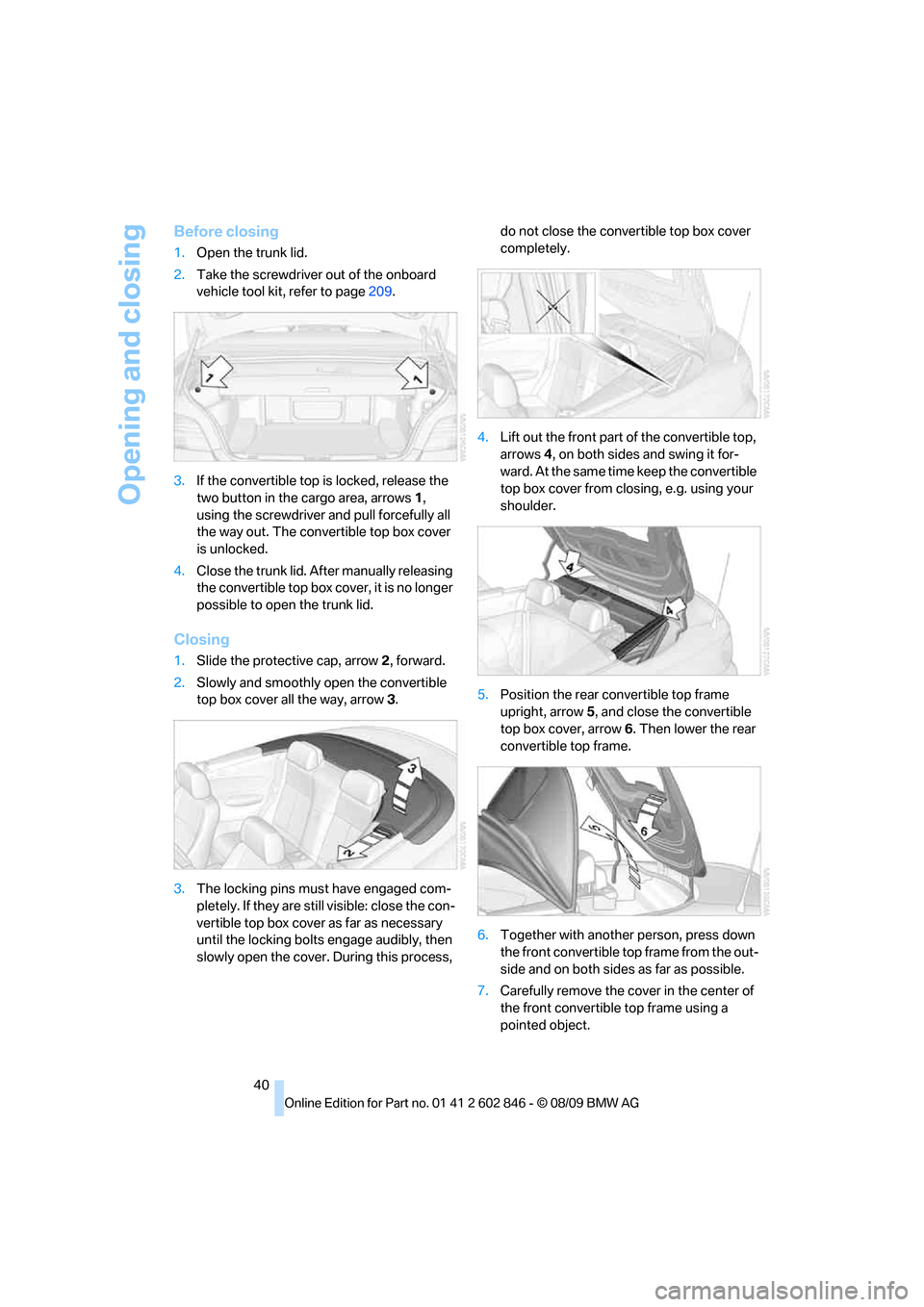
3.If the convertible top is locked, release the
two button in the cargo area, arrows1,
using the screwdriver and pull forcefully all
the way out. The convertible top box cover
is unlocked.
4.Close the trunk lid. After manually releasing
the convertible top box cover, it is no longer
possible to open the trunk lid.
Closing
1.Slide the protective cap, arrow2, forward.
2.Slowly and smoothly open the convertible
top box cover all the way, arrow3.
3.The locking pins must have engaged com-
pletely. If they are still visible: close the con-
vertible top box cover as far as necessary
until the locking bolts engage audibly, then
slowly open the cover. During this process, do not close the convertible top box cover
completely.
4.Lift out the front part of the convertible top,
arrows 4, on both sides and swing it for-
ward. At the same time keep the convertible
top box cover from closing, e.g. using your
shoulder.
5.Position the rear convertible top frame
upright, arrow5, and close the convertible
top box cover, arrow6. Then lower the rear
convertible top frame.
6.Together with another person, press down
the front convertible top frame from the out-
side and on both sides as far as possible.
7.Carefully remove the cover in the center of
the front convertible top frame using a
pointed object.
Page 111 of 250
Driving tips
109Reference
At a glance
Controls
Communications
Navigation
Entertainment
Mobility
Drive defensively
Avoid unnecessary acceleration and braking
maneuvers. To do so, keep an adequate dis-
tance between you and the vehicle in front of
you. A defensive and smooth driving style
keeps fuel consumption down.
Avoid high engine speeds
Only use first gear when setting off. In second
and higher gears, accelerate without hesitation
or pauses. When accelerating, shift up before
reaching high engine speeds.
When you reach the desired speed, shift into
the highest applicable gear and drive with the
engine speed as low as possible and at a con-
stant speed.
As a rule: driving at low engine speeds lowers
fuel consumption and reduces wear.
Coasting
When approaching a red light, take your foot off
the accelerator and coast to a stop in the high-
est applicable gear.
O n a d o w n h il l s lo p e , t a k e y o u r f o o t o f f t h e a c c el -
erator and coast in a suitable gear.
The fuel supply is interrupted when coasting.
Switch off the engine during lengthy
stops
Switch off the engine when stopping for lengthy
periods, e.g. at traffic lights, railroad crossings
or in traffic congestions. You achieve fuel sav-
ings even if standing time is as short as approx.
4 seconds.
Switch off functions you do not need at
the moment
Functions such as the air conditioner, seat
heating or rear window defroster draw large
amounts of power and consume additional fuel.
Especially in city traffic and in stop-and-go driv-
ing they have a considerable impact. Therefore,
switch these functions off when they are not
really needed.
Have the vehicle serviced
Have the vehicle serviced regularly to achieve
good economy and a long vehicle life. BMW
recommends having the vehicle serviced at a
BMW center. Also note the BMW service sys-
tem, refer to page203.
General driving notes
Close the trunk lid
Operate the vehicle only when the trunk
lid is closed. Otherwise, exhaust fumes
could enter the interior of the vehicle.<
If the vehicle must be driven with the trunk lid
open:
1.Close all windows and the glass roof.
2.Greatly increase the air volume of the auto-
matic climate control system, refer to
page93.
Hot exhaust system
In all vehicles, extremely high tempera-
tures are generated in the exhaust sys-
tem. Do not remove the heat shields installed in
its vicinity, and never apply undercoating to
them. When driving, standing at idle and while
parking, take care to avoid possible contact
between the hot exhaust system and any highly
flammable materials such as hay, leaves, grass,
etc. Such contact could lead to a fire, with the
risk of serious personal injuries and property
damage. Do not touch hot exhaust tail pipes.
Otherwise, there is a risk of burns.<
Hydroplaning
When driving on wet or slushy roads,
reduce road speed. If you do not, a wedge
of water can form between tires and road sur-
face. This situation, known as hydroplaning,
means that the tire can completely lose contact
with the road surface, so that neither the car can
be steered nor the brake be properly applied.<
The risk of hydroplaning increases with declin-
ing tread depth on the tires, refer also to Mini-
mum tread depth on page195.
Page 114 of 250
Things to remember when driving
112
Securing cargo
>Secure smaller and lighter items using
retaining straps
*, a cargo area net* or draw
straps
*.
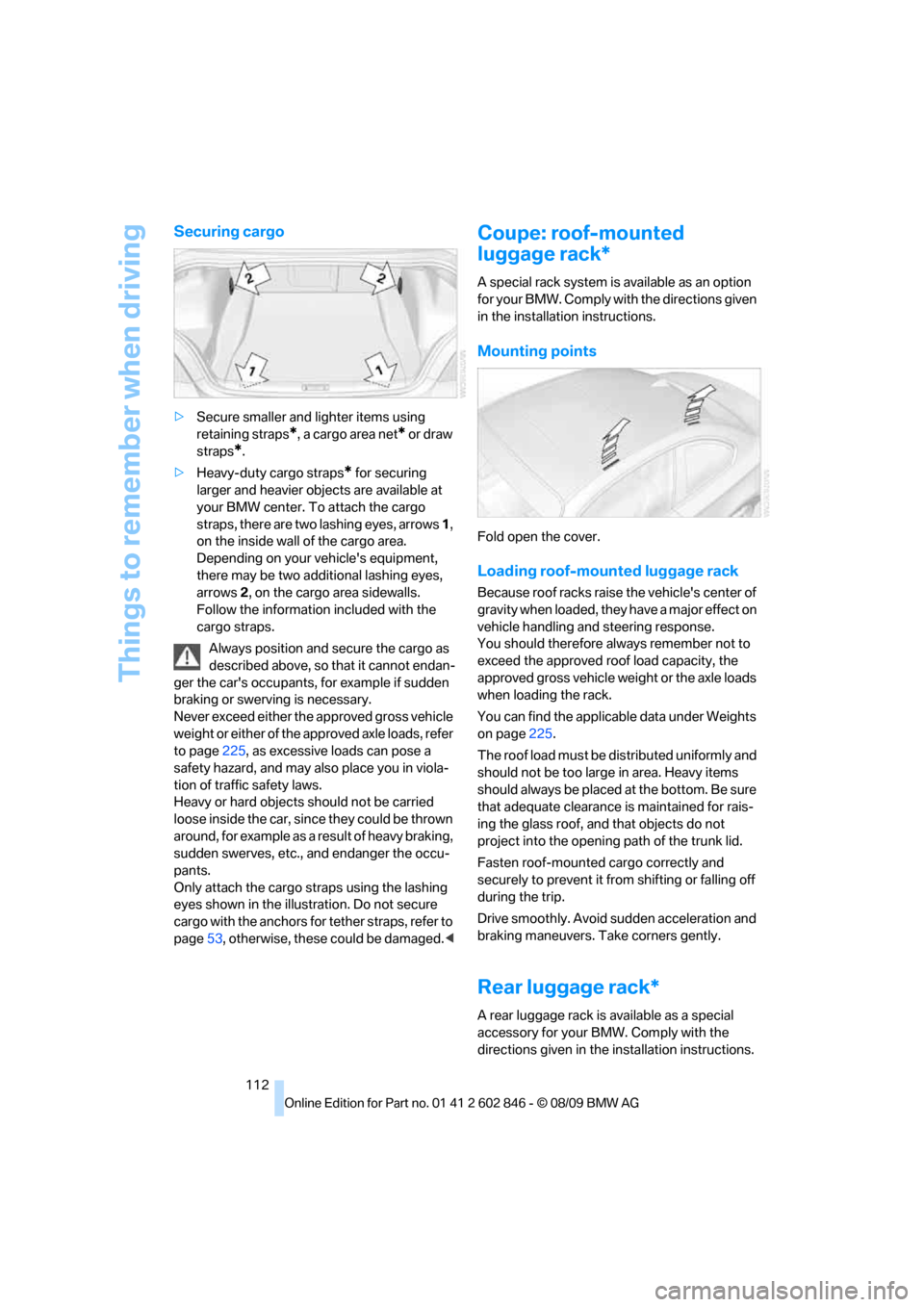
>Heavy-duty cargo straps
* for securing
larger and heavier objects are available at
your BMW center. To attach the cargo
straps, there are two lashing eyes, arrows 1,
on the inside wall of the cargo area.
Depending on your vehicle's equipment,
there may be two additional lashing eyes,
arrows2, on the cargo area sidewalls.
Follow the information included with the
cargo straps.
Always position and secure the cargo as
described above, so that it cannot endan-
ger the car's occupants, for example if sudden
braking or swerving is necessary.
Never exceed either the approved gross vehicle
weight or either of the approved axle loads, refer
to page225, as excessive loads can pose a
safety hazard, and may also place you in viola-
tion of traffic safety laws.
Heavy or hard objects should not be carried
loose inside the car, since they could be thrown
around, for example as a result of heavy braking,
sudden swerves, etc., and endanger the occu-
pants.
Only attach the cargo straps using the lashing
eyes shown in the illustration. Do not secure
cargo with the anchors for tether straps, refer to
page53, otherwise, these could be damaged.<
Coupe: roof-mounted
luggage rack*
A special rack system is available as an option
f o r y o u r B M W . C o m p l y w i t h t h e d i r e c t i o n s g i v e n
in the installation instructions.
Mounting points
Fold open the cover.
Loading roof-mounted luggage rack
Because roof racks raise the vehicle's center of
gravity when loaded, they have a major effect on
vehicle handling and steering response.
You should therefore always remember not to
exceed the approved roof load capacity, the
approved gross vehicle weight or the axle loads
when loading the rack.
You can find the applicable data under Weights
on page225.
The roof load must be distributed uniformly and
should not be too large in area. Heavy items
should always be placed at the bottom. Be sure
that adequate clearance is maintained for rais-
ing the glass roof, and that objects do not
project into the opening path of the trunk lid.
Fasten roof-mounted cargo correctly and
securely to prevent it from shifting or falling off
during the trip.
Drive smoothly. Avoid sudden acceleration and
braking maneuvers. Take corners gently.
Rear luggage rack*
A rear luggage rack is available as a special
accessory for your BMW. Comply with the
directions given in the installation instructions.
Page 218 of 250
Giving and receiving assistance
216 ularly and replace any items in good time, if nec-
essary.
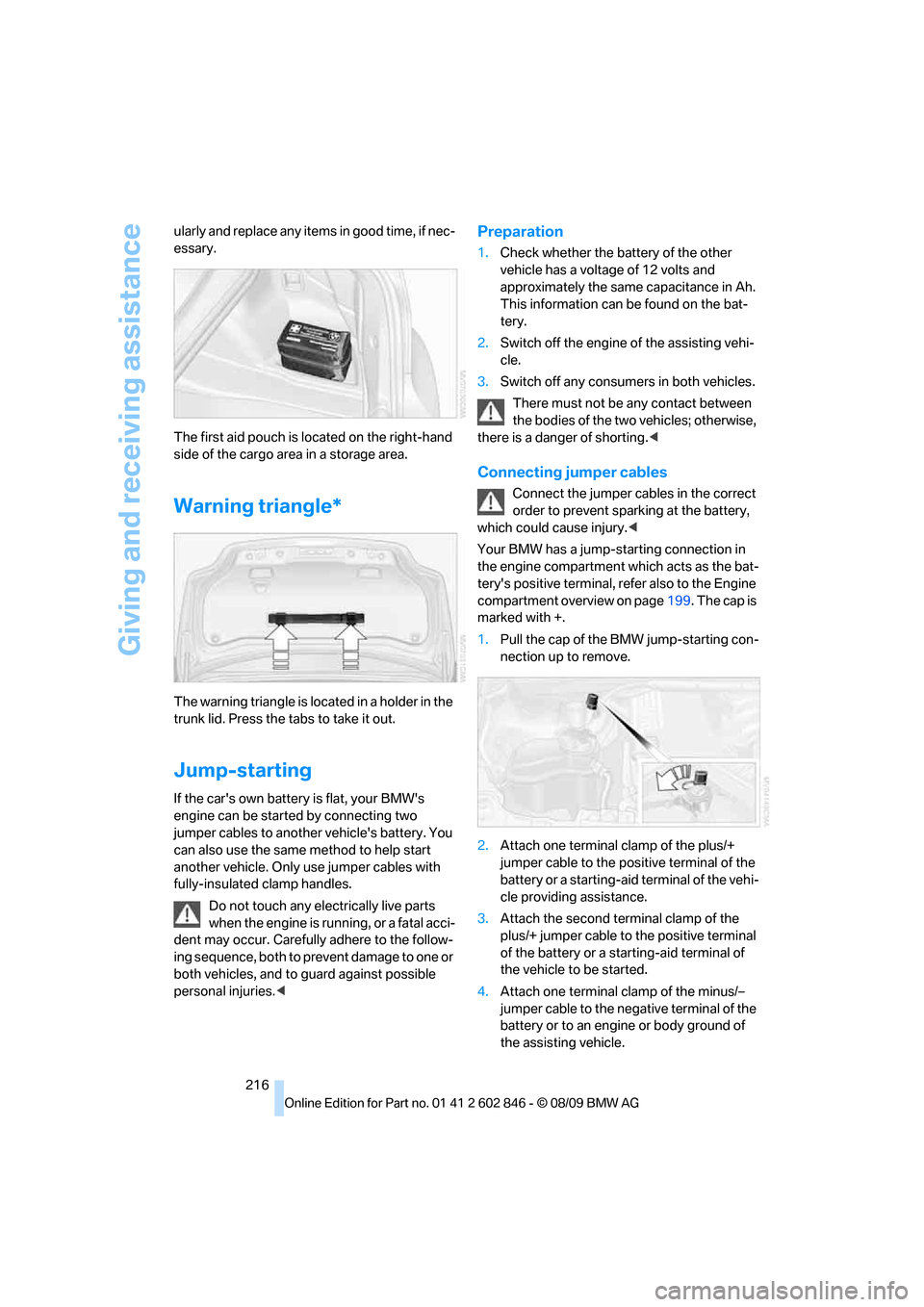
The first aid pouch is located on the right-hand
side of the cargo area in a storage area.
Warning triangle*
The warning triangle is located in a holder in the
trunk lid. Press the tabs to take it out.
Jump-starting
If the car's own battery is flat, your BMW's
engine can be started by connecting two
jumper cables to another vehicle's battery. You
can also use the same method to help start
another vehicle. Only use jumper cables with
fully-insulated clamp handles.
Do not touch any electrically live parts
when the engine is running, or a fatal acci-
dent may occur. Carefully adhere to the follow-
ing sequence, both to prevent damage to one or
both vehicles, and to guard against possible
personal injuries.<
Preparation
1.Check whether the battery of the other
vehicle has a voltage of 12 volts and
approximately the same capacitance in Ah.
This information can be found on the bat-
tery.
2.Switch off the engine of the assisting vehi-
cle.
3.Switch off any consumers in both vehicles.
There must not be any contact between
the bodies of the two vehicles; otherwise,
there is a danger of shorting.<
Connecting jumper cables
Connect the jumper cables in the correct
order to prevent sparking at the battery,
which could cause injury.<
Your BMW has a jump-starting connection in
the engine compartment which acts as the bat-
tery's positive terminal, refer also to the Engine
compartment overview on page199. The cap is
marked with +.
1.Pull the cap of the BMW jump-starting con-
nection up to remove.
2.Attach one terminal clamp of the plus/+
jumper cable to the positive terminal of the
battery or a starting-aid terminal of the vehi-
cle providing assistance.
3.Attach the second terminal clamp of the
plus/+ jumper cable to the positive terminal
of the battery or a starting-aid terminal of
the vehicle to be started.
4.Attach one terminal clamp of the minus/–
jumper cable to the negative terminal of the
battery or to an engine or body ground of
the assisting vehicle.
Page 235 of 250
Reference 233
At a glance
Controls
Driving tips
Communications
Navigation
Entertainment
Mobility
Base plate for telephone or
mobile phone
– refer to Snap-in adapter176
Bass, tone setting136
Battery213
– charging213
– disposal35,213
– jump-starting216
– temporary power failure213
Battery for mobile phone177
Battery renewal
– remote control for vehicle34
Being towed217
Belts, refer to Safety belts49
Belt tensioner, refer to Safety
belts49
Beverage holders, refer to
Cupholders100
Blower, refer to Air volume93
Bluetooth, activating/
deactivating168
BMW
– car shampoo208
BMW Assist,
activating182,184
BMW Assist180
BMW Maintenance
System203
BMW Search182
Bottle holders, refer to
Cupholders100
Brake Assist, refer to Dynamic
Brake Control76
Brake fluid
– service requirements67
Brake Force Display82
Brake lamps
– Brake Force Display82
– replacing bulb212
Brake pads, breaking in108
Brake rotors110
– brakes108
– breaking in108Brakes
– ABS76
– BMW Maintenance
System203
– braking safely110
– breaking in108
– parking brake57
– service requirements67
Brake system108
– BMW Maintenance
System203
– breaking in108
– disc brakes110
Breakdown services, refer to
Roadside Assistance
215
Breaking in the clutch108
Break-in period108
Bulb changing, refer to Lamps
and bulbs209
Bulbs, changing209
Button for starting the
engine55
Buttons on the steering
wheel11
C
California Proposition 65
warning5
Call
– accepting169
– ending170
– rejecting170
Calling, refer to Phone
numbers, dialing170
Can holders, refer to
Cupholders100
Capacities226
Capacity of the cargo area225
Car battery, refer to Vehicle
battery213
Car care, refer to Care205Care205
– automatic car washes205
– care products205
– carpets207
– CD/DVD drives208
– chrome parts207
– convertible top206
– displays208
– exterior205
– fine wood parts208
– headlamps206
– high-pressure washer206
– interior207
– leather207
– light-alloy wheels207
– paintwork206
– plastic parts208
– rubber seals207
– safety belts208
– sensors and cameras208
– upholstery and cloth
trim207
– washing the car
manually206
– windows206
Cargo, securing112
Cargo area
– capacity225
– Comfort Access34
– enlarging, refer to Through-
loading system102
– lamp, refer to Interior
lamps90
– lid, refer to Trunk lid30
– opening from outside31
Cargo area lid, refer to Trunk
lid30
Cargo area net, refer to
Securing cargo112
Cargo loading111
– securing cargo112
– stowing cargo
111
– vehicle110
Car jack
– jacking points213
Car key, refer to Integrated
key/remote control26
Page 238 of 250
Everything from A - Z
236 DTC Dynamic Traction
Control76
– indicator lamps76
DVD
– country codes149
– settings150
– video playback149
DVD menu150
DVD player, refer to CD
player147
DVD video149
Dynamic Brake Control
DBC76
Dynamic destination
guidance127
Dynamic Stability Control
DSC76
Dynamic Traction Control
DTC
– indicator lamps77
E
EBV Electronic brake-force
distribution76
Eject button, refer to Buttons
on the CD / DVD player136
Electrical malfunction
– door lock30
– fuel filler flap188
– glass roof37
Electronic brake-force
distribution EBV76
Electronic oil level check199
Electronic Stability Program
ESP, refer to Dynamic
Stability Control DSC76
Emergency operation, refer to
Manual operation
– door lock30
– fuel filler flap188
– glass roof37
– transmission lock, automatic
transmission59
Emergency release, trunk
lid31
Emergency Request215
Emergency services, refer to
Roadside Assistance215Energy, saving
– saving fuel108
Engine
– breaking in108
– data222
– speed222
– starting56
– starting, Comfort Access33
– switching off56
Engine compartment199
Engine coolant, refer to
Coolant201
Engine oil
– adding201
– additives201
– BMW Maintenance
System203
– checking level199
– intervals between changes,
refer to Service
requirements67
– specified engine oils201
Engine output, refer to Engine
data222
Engine speed, refer to Engine
data222
Engine starting, refer to
Starting the engine56
Entry map for destination122
Equalizer, tone setting137
ESP Electronic Stability
Program, refer to Dynamic
Stability Control DSC76
Event data recorders204
Exhaust system, refer to Hot
exhaust system109
Extended connectivity of the
music player in the mobile
phone159
Exterior mirrors49
– adjusting49
– automatic dimming
feature51
– automatic heating50
– folding in and out50
External devices
– random sequence161Eyes
– for tow-starting and towing
away217
– for tying down loads112
F
Failure messages, refer to
Check Control71
Failure of an electrical
consumer213
False alarm, refer to Avoiding
unintentional alarms33
Fastening safety belts, refer to
Safety belts49
Fastest route for
navigation126
Fast forward
– CD changer149
– CD player149
Filter of automatic climate
control, refer to Microfilter/
activated charcoal filter94
First aid pouch215
Fixture for remote control,
refer to Ignition lock55
Flash when locking/
unlocking28
Flat tire
– run-flat tires196
– Tire Pressure Monitor
TPM79
Flat Tire Monitor FTM77
– indicating a flat tire78
– initializing the system77
– system limits77
Flat tires, refer to Tire
condition195
FM, waveband139
Fog lamps89
– indicator lamp13,89
Footbrake, refer to Braking
safely110
Footwell lamps90
For your own safety5
Free memory capacity, music
collection157
Front airbags83
Front seat setting43
Page 243 of 250
Reference 241
At a glance
Controls
Driving tips
Communications
Navigation
Entertainment
Mobility
Remote control26
– battery renewal34
– Comfort Access33
– garage door opener96
– malfunctions29,34
– removing from the ignition
lock55
– service data203
– trunk lid28
Remote control key, refer to
Integrated key/remote
control26
Replacement fuses, refer to
Fuses213
Replacement remote
control26
Replacing bulbs, refer to
Lamps and bulbs209
Replacing tires, refer to New
wheels and tires196
Reporting safety defects7
Reserve warning, refer to Fuel
gauge64
Reservoir for washer
systems61
Reset, refer to Resetting tone
settings138
Restraint systems, refer to
Safety belts49
Restraint systems for
children52
Retreaded tires196
Reverse
– CD changer149
– CD player149
Reverse gear
– automatic transmission with
Steptronic58
– manual transmission57
Road map128
Roadside
Assistance181,215
Roadside parking lamps88
– replacing bulbs210
Roadworthiness test, refer to
Service requirements67
Rollover protection system,
Convertible84
– resetting85Roof load capacity225
Roof-mounted luggage
rack112
Rope, refer to Tow-starting,
towing away218
Rotary/pushbutton control,
refer to Controller16
Route126,127
– bypassing sections127
– changing
126,127
– changing criteria126
– displaying streets or towns/
cities127
– map view128
– selecting126
Route instructions, refer to
Destination guidance
through voice
instructions127
Route map, refer to Map
view128
Route section, changing127
Route selection126
RSC Runflat System
Component, refer to Run-
flat tires196
Runflat System Component
RSC, refer to Run-flat
tires196
Run-flat tires196
– continuing driving with a
damaged tire78
– flat tire78
– new tires196
– remaining driving distance,
refer to Indication of a flat
tire78
– tire inflation pressure190
– winter tires197
Runflat tyres, refer to Run-flat
tires196
S
Safety-belt height
adjustment49Safety belts49
– damage49
– indicator lamp49
– reminder49
– sitting safely43
Safety systems
– airbags83
– Antilock Brake System
ABS76
– Dynamic Stability Control
DSC76
– rollover protection system,
Convertible84
– safety belts49
Safety tires, refer to Run-flat
tires196
Satellite radio142
– enabling or unsubscribing
from a channel142
– favorites144
– selecting channel143
– storing channel143
– timeshift144
– Traffic Jump145
Saving fuel108
Screen, refer to iDrive16
Screw thread for tow
fitting217
SDARS, refer to Satellite
radio142
Seat and mirror memory48
Seat belt reminder, refer to
"Fasten safety belts"
reminder49
Seats43
– heating48
– sitting safely43
Securing cargo103,104
Selecting a detour132
Selecting new scale for
navigation129
Selector lever, automatic
transmission with
Steptronic58
Service, refer to Roadside
Assistance215
Service car, refer to Roadside
Assistance215
Page 245 of 250
Reference 243
At a glance
Controls
Driving tips
Communications
Navigation
Entertainment
Mobility
Switching on
– audio136
– CD changer136
– CD player136
– radio136
Switching the cooling function
on and off93
Switch-on times of parked car
ventilation, preselecting95
Symbols4
– status information19
T
Tachometer63
Tailgate, refer to Trunk lid30
Tail lamp, refer to Tail
lamps211
– replacing bulb212
Tail lamps211
– replacing bulb212
Tank contents, refer to
Capacities226
Technical changes5
Technical data222
Telephone166
– voice commands173
Telephone, installation
location, refer to Center
armrest100
Telephone, refer to separate
Owner's Manual
TeleService180
TeleService Diagnosis182
TeleService Help182
Temperature, setting for
automatic climate control92
Temperature display
– outside temperature63
– outside temperature
warning63
– setting the units67
Tempomat, refer to Cruise
control61
Thigh support44
Third brake lamp, refer to
Center brake lamp212
Three-point safety belt49
Through-loading system102Tilt alarm sensor32
Tilt function, passenger-side
mirror50
Timer, refer to Preselecting
switch-on times95
Tire inflation pressure190
– loss78,79
Tire pressure monitoring,
refer to Flat Tire Monitor77
Tire Pressure Monitor
TPM79
– resetting the system79
– system limitations79
– warning lamp80
Tire puncture, refer to Flat Tire
Monitor78
Tire Quality Grading194
Tires
– age194
– air loss80
– breaking in108
– changing, refer to Changing
wheels212
– condition195
– damage
195
– inflation pressure190
– labels194
– minimum tread depth195
– new tires196
– pressure monitoring, refer to
Flat Tire Monitor77
– pressure monitoring, refer to
Tire Pressure Monitor
TPM79
– puncture78
– retreaded196
– run-flat tires196
– size194
– wear indicators, refer to
Minimum tread depth195
– winter tires197
TMC station, refer to Traffic
bulletins129
Tone
– control136
– middle setting138
Tools, refer to Onboard
vehicle tool kit209Top 50 of music
collection156
Torque, refer to Engine
data222
Tow bar218
Tow fitting217
Tow fittings for tow-starting
and towing away217
Towing217
– car with automatic
transmission217
– methods218
Towing and tow-starting217
Town/city, for navigation117
Tow rope218
Tow-starting217
TPM, refer to Tire Pressure
Monitor79
Track
– selecting on CD147
Traction control, refer to
Dynamic Stability Control
DSC76
Traffic bulletins
– categories131
Traffic bulletins, filtering131
Traffic bulletins for
navigation129
– during destination
guidance131
– in map view131
Traffic jam
– displaying traffic
bulletins129
Transmission
– automatic transmission with
Steptronic57
– manual transmission57
Transporting children
safely52
Transport securing devices,
refer to Securing cargo112
Travel instructions, refer to
Voice instructions127
Tread depth, refer to Minimum
tire tread195
Trip, deleting125
Trip, storing124
Page 246 of 250
Everything from A - Z
244 Trip-distance counter, refer to
Trip odometer63
Triple turn signal activation60
Trip odometer63
Trips, changing125
Trunk, refer to Cargo area
Trunk lid30
– Comfort Access34
– emergency release31
– opening from outside31
– unlocking with remote
control28
Turning circle, refer to
Dimensions223
Turn signals59
– indicator lamp12
– replacing bulbs211
– triple turn signal60
Tying down loads, refer to
Cargo loading112
U
Underbody protection, refer to
Caring for your vehicle
Uniform Tire Quality Grading/
UTQR194
Units of measure
– average fuel
consumption67
– temperature67
Universal garage door opener,
refer to Integrated universal
remote control96
Universal remote control96
Unlatching, refer to
Unlocking27
Unlocking
– from inside30
– from outside27
– trunk lid34
– without remote control, refer
to Comfort Access33
Unlocking without a key, refer
to Comfort Access33
Updating the navigation
data116
USB audio interface159
V
VCD149
Vehicle
– battery213
– breaking in108
– cargo loading110
– decommissioning, refer to
Vehicle storage
– dimensions223
– Identification Number, refer
to Engine compartment199
– parking56
– weight225
Vehicle jack213
Vehicle storage208
Ventilation94
– draft-free94
Ventilation when parked, refer
to Parked car ventilation94
Vents, refer to Ventilation94
Video menu150
Video playback149
Voice, refer to Destination
guidance through voice
instructions127
Voice commands
– overview22
– short commands227
– telephone173
Voice instructions from
navigation system127
– repeating128
– switching on/off127
– volume128
Voice phone book175
Volume136
– audio sources136
– fuel tank, refer to
Capacities226
– mobile phone169
– voice instructions128
Volume balance, tone
setting137
W
Warning and indicator
lamps13Warning messages, refer to
Check Control71
Warning triangle216
Washer fluid61
– content of the reservoir61
Washer fluid filler neck61
Waste tray, refer to
Ashtray101
Water on roads, refer to
Driving through water110
Water penetration205,206
Waveband with the radio139
Wear indicators in tires, refer
to Minimum tread depth195
Weights225
Welcome lamps86
Wheelbase, refer to
Dimensions223
Wheels, new196
Wheels and tires190
Width, refer to
Dimensions223
Windows35
– Convenient operation28
– Convenient operation with
Comfort Access34
– opening, closing35
– pinch protection system36
Windshield
– cleaning61
– defrosting and removing
condensation93
Windshield wash
– filling capacity, reservoir226
Windshield washer reservoir,
refer to Washer fluid filler
neck61
Windshield washer system60
– washer fluid61
– washer nozzles61
Windshield wiper blades,
changing209
Windshield wipers, refer to
Wiper system60
Winter tires197
– setting speed limit73
– storage197
Wiper blade replacement209
Wiper system60