auto hold BMW 128I 2012 E88 User Guide
[x] Cancel search | Manufacturer: BMW, Model Year: 2012, Model line: 128I, Model: BMW 128I 2012 E88Pages: 272, PDF Size: 8.49 MB
Page 178 of 272
Telephone
176
Telephone
At a glance
The concept
Mobile phones or other external devices, e.g.
audio players, can be connected to the vehicle
via Bluetooth.
Bluetooth® is a registered trademark of Blue-
tooth® SIG, Inc.
After being paired once, when the ignition is
switched on, these devices are automatically
detected as soon as they are present in the
vehicle and can be controlled via iDrive, the but-
tons on the steering wheel, and by voice
*.
Depending on whether they are functioning as a
telephone and/or as an audio source, external
devices can be used via the vehicle. The tele-
phone functions will be described below. Oper-
ation of audio functions, refer to page169.
Up to four external devices can be paired.
It may be necessary for some functions to be
activated by the mobile phone provider or ser-
vice provider.
Only make entries when traffic conditions
permit. Do not hold the mobile phone in
your hand while you are driving; use the hands-
free system instead. Otherwise, you may
endanger vehicle occupants and other road
users.<
Snap-in adapter*
The snap-in adapter makes it possible:
>Accommodate the mobile phone.
>Recharge its battery.
>Connect it to an external antenna of the
vehicle.
This assures a better network connection
and constant sound quality.
Suitable mobile phones
For precise information about which mobile
phones and external devices with a Bluetooth interface are supported by the mobile phone
preparation, go to www.bmwusa.com/blue-
tooth.
Displaying vehicle identification
number and software part number
Checking which mobile phones are supported
by the mobile phone preparation requires the
vehicle identification number and software part
number. The software version of the mobile
phone may also be required.
1."Telephone"
2.Open "Options".
3."Bluetooth® info"
4."Display system information"
With a certain software version, these suitable
mobile phones support the vehicle functions
described below.
With other mobile phones or software versions,
malfunctions may occur.
A mobile phone that is connected to the vehicle
should not be operated via the mobile phone
keypad; otherwise, malfunctions may occur.
It is possible to perform a software update, refer
to page172.
Pairing/unpairing mobile
phone
General information
The following functions are available:
>Using the mobile phone as a telephone.
>Using the mobile phone as an auxiliary
phone
*.
>Using the mobile phone as an audio source.
>Using an audio device as an audio source,
refer to page169.
*
Page 183 of 272
181
Entertainment
Reference
At a glance
Controls
Driving tips Communications
Navigation
Mobility
With calls to the auxiliary phone*, only the num-
ber is displayed if it is transmitted by the net-
work.
An incoming call to the auxiliary phone is auto-
matically rejected if a call with the phone is cur-
rently active.
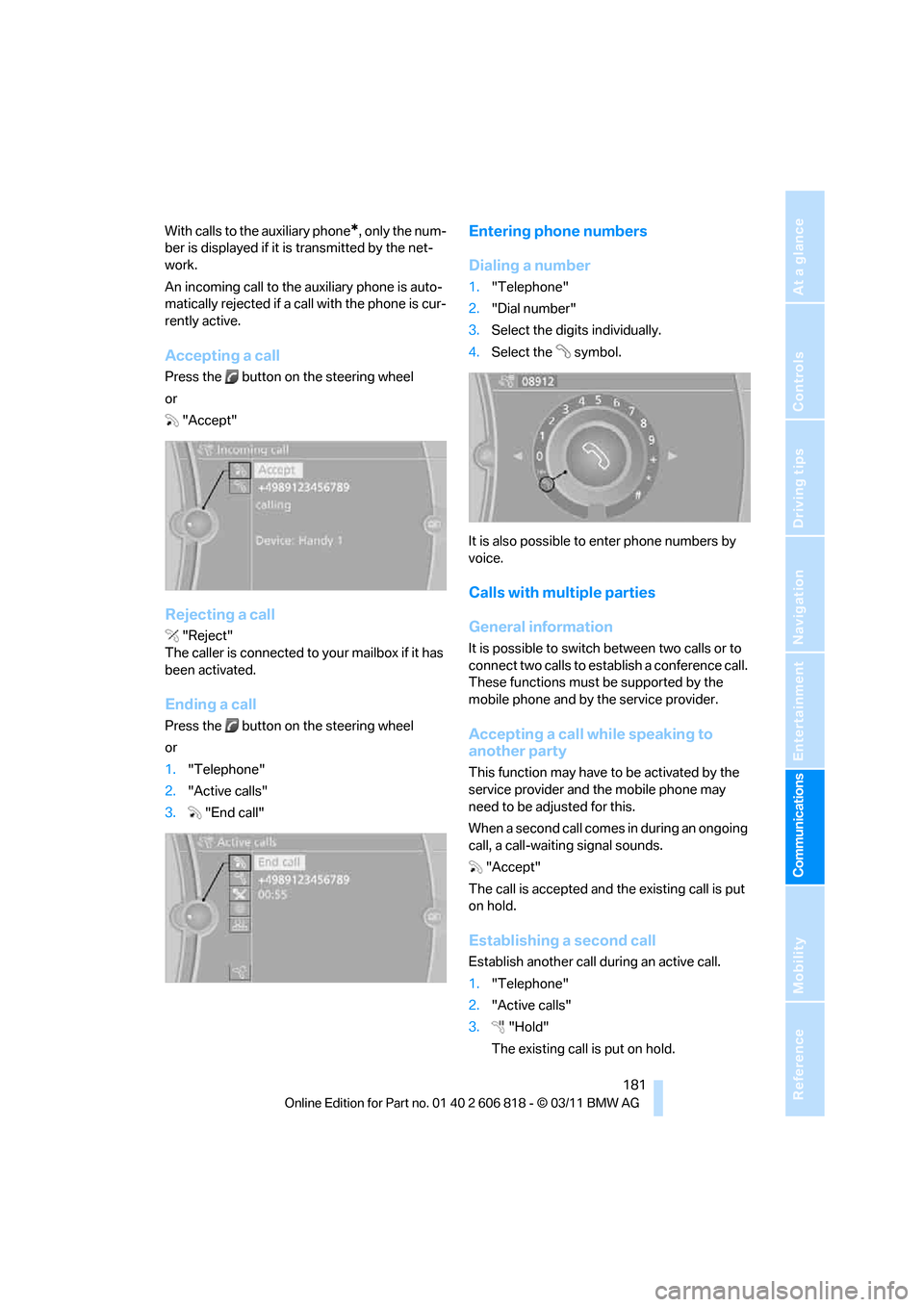
Accepting a call
Press the button on the steering wheel
or
"Accept"
Rejecting a call
"Reject"
The caller is connected to your mailbox if it has
been activated.
Ending a call
Press the button on the steering wheel
or
1."Telephone"
2."Active calls"
3."End call"
Entering phone numbers
Dialing a number
1."Telephone"
2."Dial number"
3.Select the digits individually.
4.Select the symbol.
It is also possible to enter phone numbers by
voice.
Calls with multiple parties
General information
It is possible to switch between two calls or to
connect two calls to establish a conference call.
These functions must be supported by the
mobile phone and by the service provider.
Accepting a call while speaking to
another party
This function may have to be activated by the
service provider and the mobile phone may
need to be adjusted for this.
When a second call comes in during an ongoing
call, a call-waiting signal sounds.
"Accept"
The call is accepted and the existing call is put
on hold.
Establishing a second call
Establish another call during an active call.
1."Telephone"
2."Active calls"
3."Hold"
The existing call is put on hold.
Page 184 of 272
Telephone
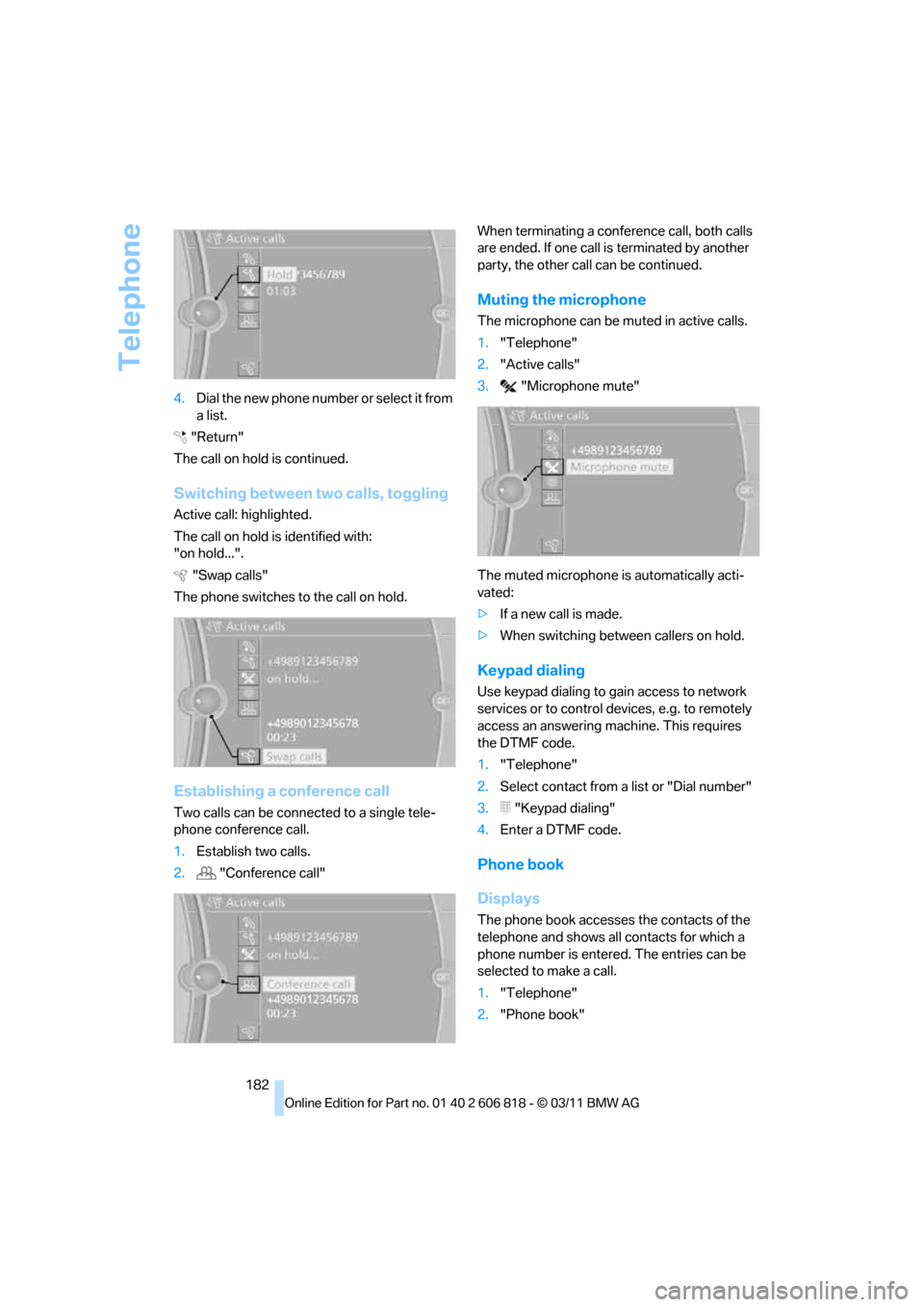
182 4.Dia l the ne w pho ne numbe r o r sele c t it from
a list.
"Return"
The call on hold is continued.
Switching between two calls, toggling
Active call: highlighted.
The call on hold is identified with:
"on hold...".
"Swap calls"
The phone switches to the call on hold.
Establishing a conference call
Two calls can be connected to a single tele-
phone conference call.
1.Establish two calls.
2."Conference call"When terminating a conference call, both calls
are ended. If one call is terminated by another
party, the other call can be continued.
Muting the microphone
The microphone can be muted in active calls.
1."Telephone"
2."Active calls"
3."Microphone mute"
The muted microphone is automatically acti-
vated:
>If a new call is made.
>When switching between callers on hold.
Keypad dialing
Use keypad dialing to gain access to network
services or to control devices, e.g. to remotely
access an answering machine. This requires
the DTMF code.
1."Telephone"
2.Select contact from a list or "Dial number"
3."Keypad dialing"
4.Enter a DTMF code.
Phone book
Displays
The phone book accesses the contacts of the
telephone and shows all contacts for which a
phone number is entered. The entries can be
selected to make a call.
1."Telephone"
2."Phone book"
Page 257 of 272
Reference 255
At a glance
Controls
Driving tips
Communications
Navigation
Entertainment
Mobility
Backup lamp, replacing
bulb231
Bag for skis, refer to Ski
bag110
Band-aids, refer to First aid
pouch235
Bar, refer to Tow-starting,
towing away237
Base plate for telephone or
mobile phone
– refer to Snap-in adapter186
Bass, tone setting144
Battery232
– charging232
– disposal37,232
– jump-starting235
– replacing232
– temporary power failure232
Battery renewal
– remote control for vehicle37
Being towed237
Belts, refer to Safety belts50
Belt tensioner, refer to Safety
belts50
Beverage holders, refer to
Cupholders108
Blower, refer to Air
volume101
Bluetooth, activating/
deactivating177
Bluetooth audio169
– disconnecting an audio
connection171
– pairing a device169
– playback170
– unpairing device171
– What to do if...171
BMW
– car shampoo224
BMW Assist198
– updating202
BMW Maintenance
System221
BMW Online*200
BMW TeleServices199
Bottle holders, refer to
Cupholders108
Brake Assist, refer to Dynamic
Brake Control83Brake fluid
– service requirements74
Brake Force Display90
Brake lamps
– Brake Force Display90
– replacing bulb231
Brake pads, breaking in116
Brake pedal, refer to Braking
safely118
Brake rotors118
– brakes116
– breaking in116
Brakes
– ABS83
– BMW Maintenance
System221
– braking safely118
– breaking in116
– parking brake59
– service requirements74
Brake system116
– BMW Maintenance
System221
– breaking in116
– disc brakes118
Breakdown services, refer to
Roadside Assistance234
Breaking in the clutch116
Break-in period116
Bulb changing, refer to Lamps
and bulbs227
Button for starting the
engine57
Buttons on the steering
wheel11
C
Calendar193
– displaying appointment193
– selecting calendar day193
California Proposition 65
warning6
Call
– accepting181
– ending181
– muting the microphone182
– rejecting181Calling, refer to Phone
numbers, dialing181
Calling, refer to Telephone
owner's manual
Calls
– with multiple parties181
Can holders, refer to
Cupholders108
Capacities246
Capacity of the cargo area245
Car battery, refer to Vehicle
battery232
Car care, refer to Care223
Care223
– automatic car washes223
– care products223
– carpets226
– CD/DVD drives226
– chrome parts225
– convertible top224
– displays226
– exterior223
– fine wood parts226
– headlamps224
– high-pressure washer224
– interior225
– leather225
– light-alloy wheels225
– paintwork225
– plastic parts226
– rubber seals225
– safety belts226
– sensors and cameras226
– upholstery and cloth
trim225
– washing the car
manually224
– windows224
Cargo, securing120
Cargo area
– capacity245
– Comfort Access36
– enlarging, refer to Through-
loading system109
– lamp, refer to Interior
lamps98
– lid, refer to Trunk lid
33
– opening from outside33
Page 261 of 272
Reference 259
At a glance
Controls
Driving tips
Communications
Navigation
Entertainment
Mobility
FM, waveband147
Fog lamps97
– indicator lamp13,97
Footwell lamps98
For your own safety5
Free memory capacity, music
collection164
Front airbags90
Front seat adjustment46
Frost on windows, refer to
Defrosting windows101
FTM, refer to Flat Tire
Monitor84
Fuel207
– gauge71
– high-quality brands207
– quality207
– specifications207
– tank contents, refer to
Capacities246
Fuel clock, refer to Fuel
gauge71
Fuel consumption indicator,
refer to Average fuel
consumption72
Fuel consumption statistics,
refer to Average fuel
consumption72
Fuel display, refer to Fuel
gauge71
Fuel filler flap206
– releasing in the event of
electrical malfunction206
Fuses232
G
Garage door opener, refer to
Integrated universal remote
control104
Gasoline, refer to Required
fuel207
Gasoline display, refer to Fuel
gauge71
Gas station
recommendations136
Gear display, with automatic
transmission60Gear shifting
– automatic transmission60
– manual transmission59
Gearshift lever62
– automatic transmission with
Steptronic60
– manual transmission59
General driving notes117
Glass roof, electric39
– closing after electrical
malfunction40
– convenient opening and
closing32
– convenient opening and
closing with Comfort
Access36
– opening, closing39
– pinch protection system39
– remote control30
– tilting39
Glove compartment107
GPS navigation, refer to
Navigation system124
Grills, refer to Air vents99
Gross vehicle weight, refer to
Weights245
H
Halogen lamps
– replacing bulbs228
Handbrake, refer to Parking
brake59
Hands-free system184
Hands-free system, refer to
Microphone for hands-free
mode14
Hazard warning flashers14
HD Radio148
Head airbags90
Headlamp control,
automatic94
Headlamp cover228
Headlamp flasher66
– indicator lamp13
Headlamps
– replacing bulbs228Head Light, refer to Adaptive
Light Control95
Head restraints48
Heated
– seats50
– steering wheel53
Heated mirrors52
Heating
– mirrors52
– seats50
– steering wheel53
Heating, rear window101
Heating and ventilation99
Heavy loads, refer to Stowing
cargo120
Height, refer to
Dimensions243
Height adjustment
– steering wheel52
High-beam Assistant96
High beams96
– indicator lamp13
– replacing bulbs228
High beams and low beams,
automatic, refer to High-
beam Assistant96
High-pressure
washer223,224
High water, refer to Driving
through water118
Highways, refer to Route
criteria134
Hills118
Holders for cups108
Hood216
Hot exhaust system117
Hydraulic brake assist, refer to
Dynamic Brake Control83
Hydroplaning117