reset BMW 128I 2012 E88 User Guide
[x] Cancel search | Manufacturer: BMW, Model Year: 2012, Model line: 128I, Model: BMW 128I 2012 E88Pages: 272, PDF Size: 8.49 MB
Page 94 of 272
Technology for driving comfort and safety
92 detected and that the front passenger air-
bags are deactivated.<
>The indicator lamp does n o t c o m e o n w h e n ,
for example, a person of sufficient size and
in a correct sitting position is detected on
the seat.
The front and side airbags for the front pas-
senger are activated.
>The indicator lamp does not light up if the
seat is empty.
The front and side airbags for the front pas-
senger are not activated.
Operational readiness of airbag system
As of radio readiness, refer to page57, the
warning lamp lights up briefly to indicate that
the entire airbag system and the belt tensioners
are operational.
Airbag system malfunction
>Warning lamp does not light up at radio
readiness or beyond.
>Warning lamp remains permanently on.
In the event of a fault in the airbag system,
have it checked without delay; otherwise,
there is the risk that the system will not function
as intended even if a sufficiently severe acci-
dent occurs.<
Convertible: rollover
protection system
The rollover protection system is activated
automatically in the event of an accident, a crit-
ical driving situation, an extreme tilt in the car's
longitudinal axis or upon loss of ground contact. The protection bars behind the rear head
restraints deploy within fractions of a second.
As a supplementary system to the reinforced
windshield frame, the rollover protection sys-
tem ensures that the necessary headroom is
maintained for all vehicle occupants.
Always keep the area of movement of the
rollover protection system clear.
In minor accidents, you are protected by the
fastened safety belt and, depending on acci-
dent severity, by the safety belt tensioner and
multi-phase airbag retention system.<
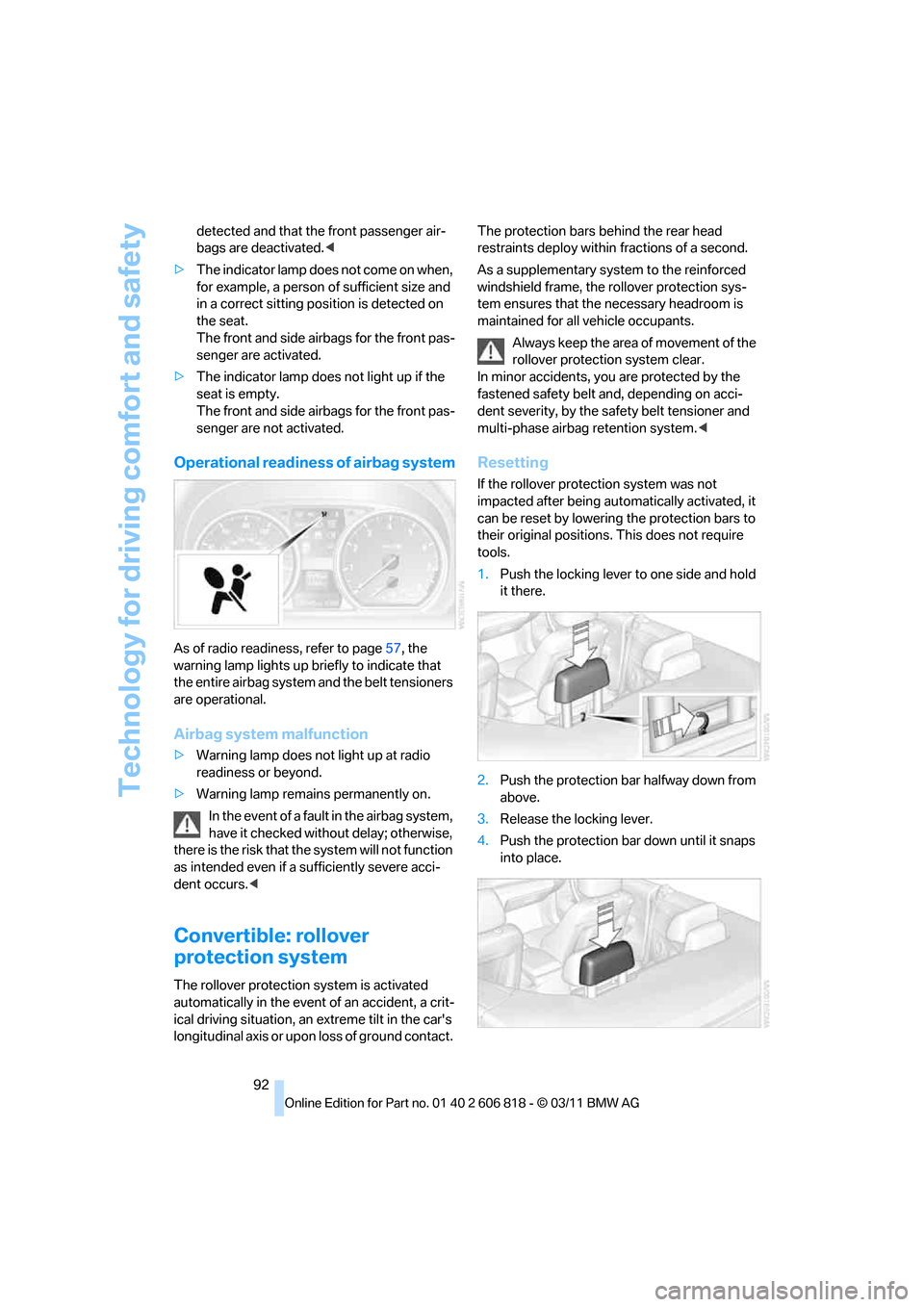
Resetting
If the rollover protection system was not
impacted after being automatically activated, it
can be reset by lowering the protection bars to
their original positions. This does not require
tools.
1.Push the locking lever to one side and hold
it there.
2.Push the protection bar halfway down from
above.
3.Release the locking lever.
4.Push the protection bar down until it snaps
into place.
Page 148 of 272
On/off and tone
146
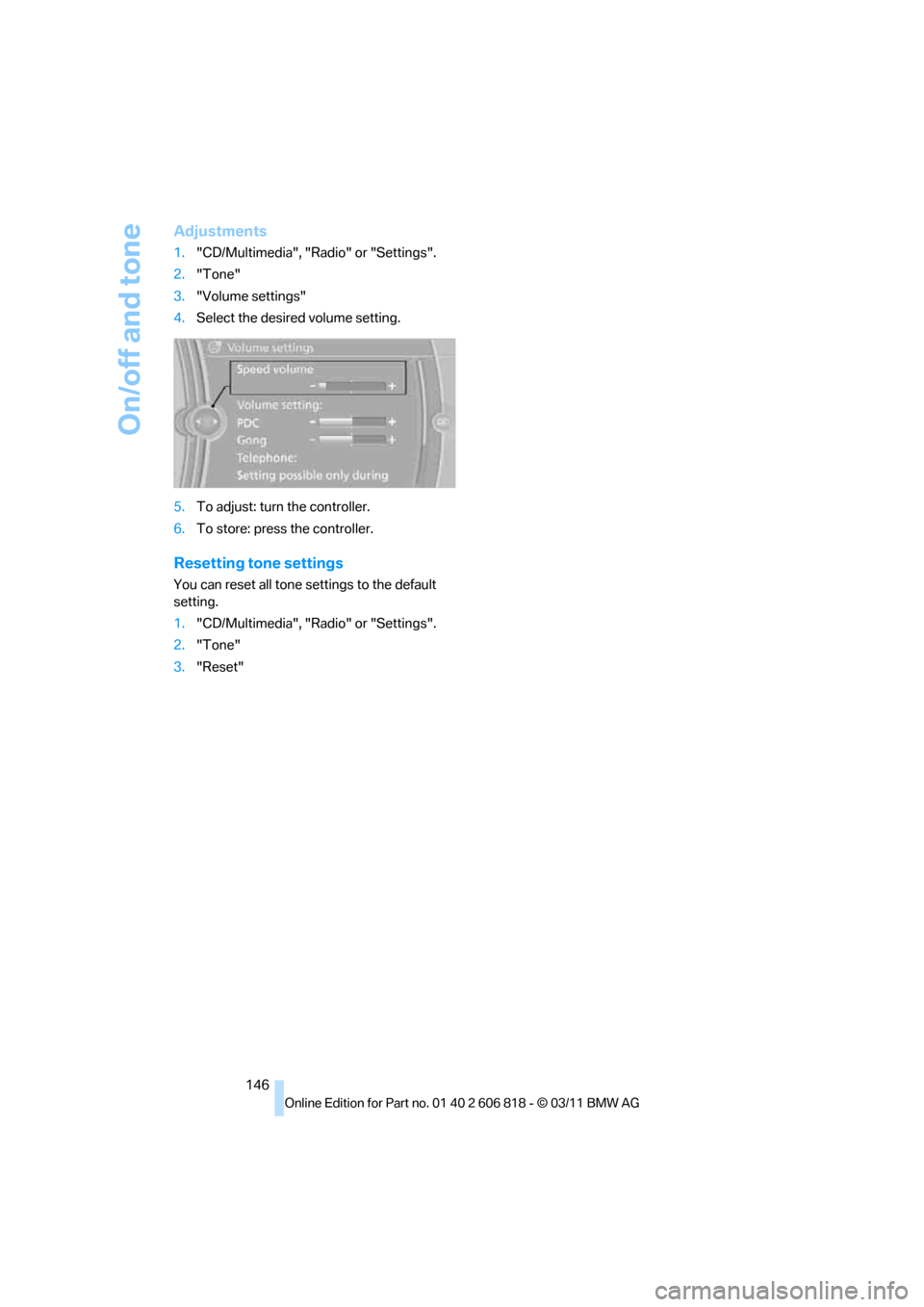
Adjustments
1."CD/Multimedia", "Radio" or "Settings".
2."Tone"
3."Volume settings"
4.Select the desired volume setting.
5.To adjust: turn the controller.
6.To store: press the controller.
Resetting tone settings
You can reset all tone settings to the default
setting.
1."CD/Multimedia", "Radio" or "Settings".
2."Tone"
3."Reset"
Page 151 of 272
Navigation
Entertainment
Driving tips
149Reference
At a glance
Controls
Communications
Mobility
station names of the subchannels end with
HD2, HD3, etc.
1.Select the desired station.
2.Press the controller.
3.Select the substation.
In the event of poor reception, the substation is
muted for several seconds. If reception is inter-
rupted for a longer period of time, then the sys-
tem switches back to the main station.
Presets
It is possible to store up to 40 stations.
Calling up a station
1."Radio"
2."Presets"
3.Select the desired station.
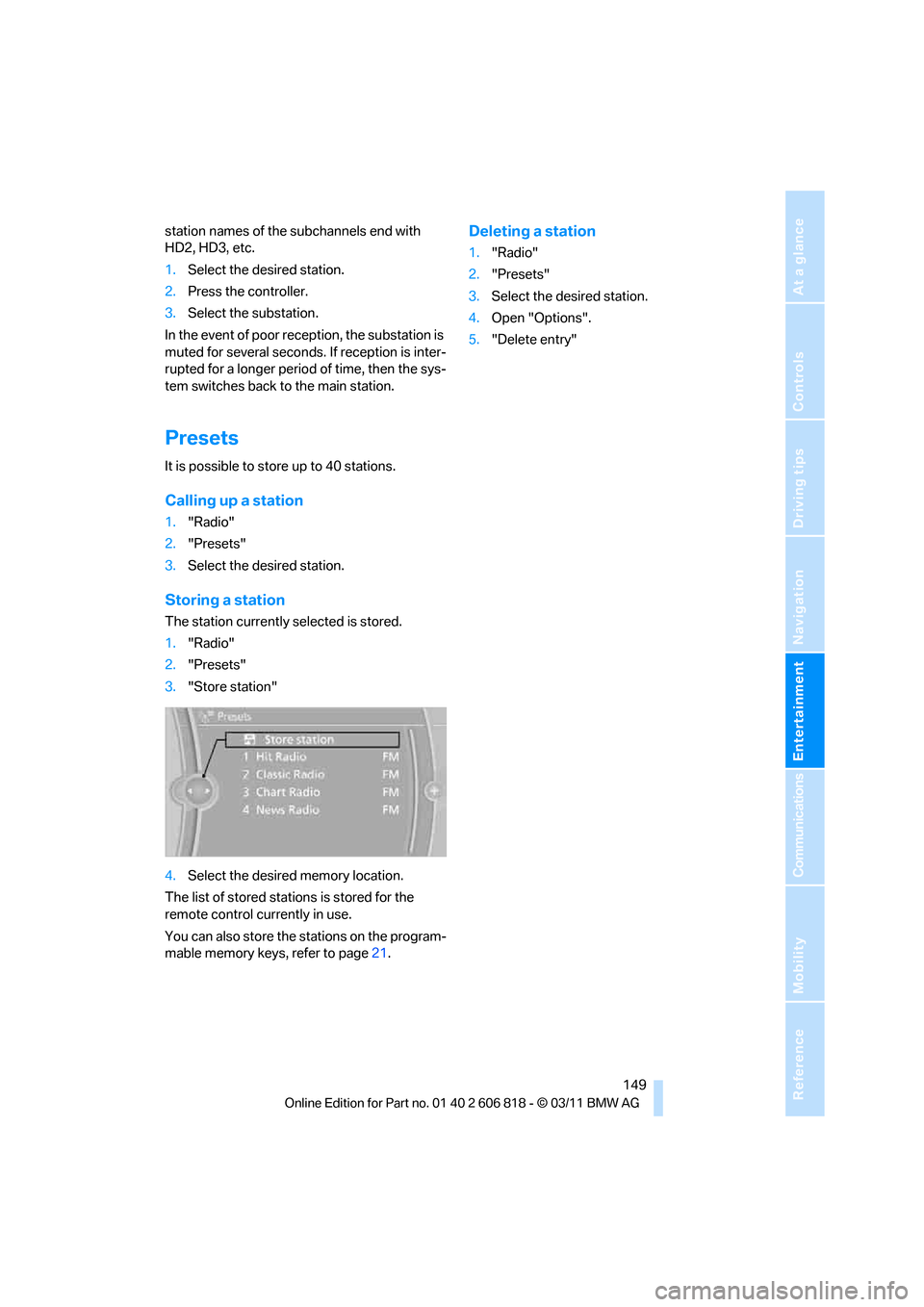
Storing a station
The station currently selected is stored.
1."Radio"
2."Presets"
3."Store station"
4.Select the desired memory location.
The list of stored stations is stored for the
remote control currently in use.
You can also store the stations on the program-
mable memory keys, refer to page21.
Deleting a station
1."Radio"
2."Presets"
3.Select the desired station.
4.Open "Options".
5."Delete entry"
Page 171 of 272
Navigation
Entertainment
Driving tips
169Reference
At a glance
Controls
Communications
Mobility
1."CD/Multimedia"
2."External devices"
3.Select the symbol.
4."Video"
5.Select the directory, if necessary.
To change to a higher level directory: move
the controller to the left.
6.Select the desired video file to begin play-
back.
Video menu
Notes
Do not expose the audio device to extreme
environmental conditions, e.g. very high tem-
peratures, refer to the operating instructions of
the audio device.
Depending on the configuration of the audio
files, e.g. bit rates greater than 256 KBit/s, the
files may not play back correctly in every case.
Notes on connecting
>The connected audio device is supplied
with a maximum current of 500 mA, if the
device supports this. For this reason, do not
connect the device to a charging socket in
the vehicle; otherwise, it may not be possi-
ble to ensure correct playback.
>Do not forcibly connect the plug to the USB
interface.
>Do not connect devices such as fans or
lamps to the USB audio interface.
>Do not connect USB hard drives.
>Do not use the USB audio interface to
charge external devices.
Bluetooth audio*
Overview
>It is possible to use Bluetooth to play music
files from external devices, e.g. audio
devices or mobile phones.
Using a mobile phone as an audio source,
refer to page166.
>Bluetooth® is a registered trademark of
Bluetooth® SIG, Inc.
>Sound is output over the vehicle speakers.
>The volume of the sound output depends
on the device. If necessary, change the vol-
ume setting on the device.
>Up to four external devices can be paired
with the vehicle.
Requirements
>Suitable device. For information, go to
www.bmwusa.com/bluetooth.
>Device operational.
>Ignition switched on.
>Bluetooth activated in vehicle, refer to
page178, and in the device.
>Activating Bluetooth audio, refer to
page177.
>Bluetooth presets in the device are
required, e.g. connection not confirmed or
visible, refer to owner's manual for the
device.
>A number with at least 4 and at most
16 digits has been established as the Blue-
tooth passkey. Only required once for pair-
ing.
Pairing and connecting
Only pair the device when the vehicle is
stopped; otherwise, inattention may lead
to endangerment of passengers or other road
users.<
1."CD/Multimedia"
2."Bluetooth® (audio)"
3."Bluetooth® audio" if applicable
4."Add new phone"
SymbolFormat
Next video file
Previous video file
It may be necessary to click the
symbol twice in order to play the
previous video file.
Page 179 of 272
177
Entertainment
Reference
At a glance
Controls
Driving tips Communications
Navigation
Mobility
Requirements
>Suitable mobile phone, refer to page176.
>Mobile phone operational.
>Bluetooth activated in vehicle, refer to
page178, and in the mobile phone.
>Bluetooth presets in the mobile phone are
required, e.g. connection not confirmed or
visible, refer to owner's manual for the
mobile phone.
>Deactivating Bluetooth audio, refer to
page177.
>A number with at least 4 and at most
16 digits has been established as the Blue-
tooth passkey. Only required once for pair-
ing.
>Ignition switched on.
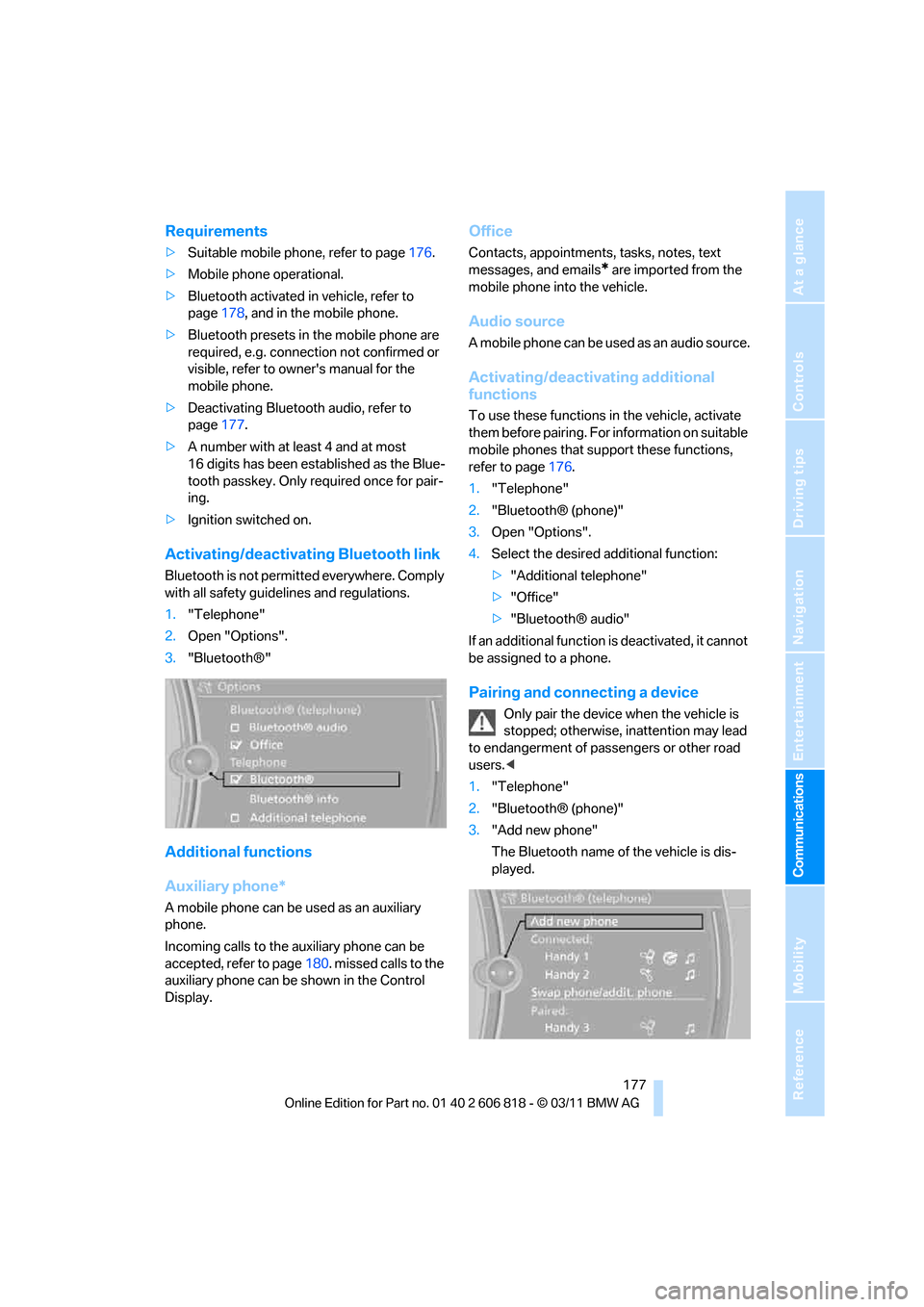
Activating/deactivating Bluetooth link
Bluetooth is not permitted everywhere. Comply
with all safety guidelines and regulations.
1."Telephone"
2.Open "Options".
3."Bluetooth®"
Additional functions
Auxiliary phone*
A mobile phone can be used as an auxiliary
phone.
Incoming calls to the auxiliary phone can be
accepted, refer to page180. missed calls to the
auxiliary phone can be shown in the Control
Display.
Office
Contacts, appointments, tasks, notes, text
messages, and emails
* are imported from the
mobile phone into the vehicle.
Audio source
A mobile phone can be used as an audio source.
Activating/deactivating additional
functions
To use these functions in the vehicle, activate
them before pairing. For information on suitable
mobile phones that support these functions,
refer to page176.
1."Telephone"
2."Bluetooth® (phone)"
3.Open "Options".
4.Select the desired additional function:
>"Additional telephone"
>"Office"
>"Bluetooth® audio"
If an additional function is deactivated, it cannot
be assigned to a phone.
Pairing and connecting a device
Only pair the device when the vehicle is
stopped; otherwise, inattention may lead
to endangerment of passengers or other road
users.<
1."Telephone"
2."Bluetooth® (phone)"
3."Add new phone"
The Bluetooth name of the vehicle is dis-
played.
Page 188 of 272
Telephone
186
Storing the entry
Deleting the entry
Deleting all entries
Listening to and selecting entries
Selecting an entry
Adjusting volume
Turn knob during announcement.
>The volume remains the same, even if the
volume of other audio sources is changed.
>The volume is stored for the remote control
currently in use.
Notes
Notes on Emergency Requests
Do not use the voice activation system to ini-
tiate an Emergency Request. In stressful situa-
tions, the voice and vocal pitch can change.
This can unnecessarily delay the establishment
of a telephone connection.
Instead, use the SOS button
*, refer to
page234, in the vicinity of the interior rearview
mirror.
Ambient conditions
>Say the commands, numbers and letters
smoothly and with normal volume, empha-
sis and speed.
>Always say commands in the language of
the system. The language of the voice acti-
vation of the mobile phone is preset and
cannot be changed via the Control Display.
>Keep the doors, windows, glass sunroof
*,
and convertible top
* closed to prevent
interference from ambient noise.
>Avoid ambient noise in the vehicle while
speaking.
Snap-in adapter*
Installation location
In the center armrest.
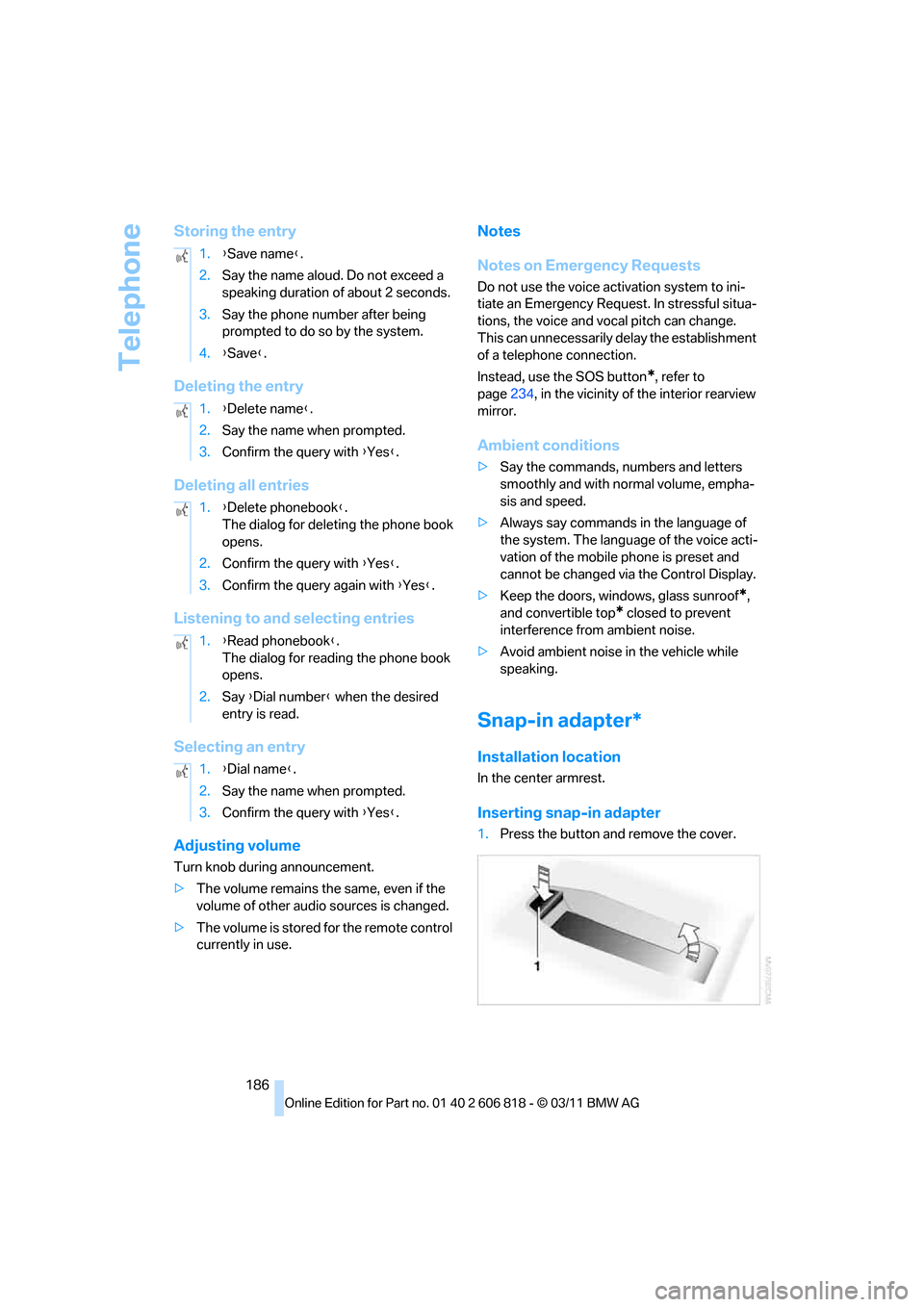
Inserting snap-in adapter
1.Press the button and remove the cover. 1.{Save name}.
2.Say the name aloud. Do not exceed a
speaking duration of about 2 seconds.
3.Say the phone number after being
prompted to do so by the system.
4.{Save}.
1.{Delete name}.
2.Say the name when prompted.
3.Confirm the query with {Yes}.
1.{Delete phonebook}.
The dialog for deleting the phone book
opens.
2.Confirm the query with {Yes}.
3.Confirm the query again with {Yes}.
1.{Read phonebook}.
The dialog for reading the phone book
opens.
2.Say {Dial number} when the desired
entry is read.
1.{Dial name}.
2.Say the name when prompted.
3.Confirm the query with {Yes}.
Page 210 of 272
Wheels and tires
208
Wheels and tires
Tire inflation pressures
Information for your safety
It is not merely the tires' service life, but also
driving comfort and, to a great extent, driving
safety that depend on the condition of the tires
and the maintenance of the specified tire pres-
sure.
Check the tire inflation pressure regularly
and correct it, if necessary: at least twice a
month and before starting long trips. If you fail
to observe this precaution you may be driving
on tires with incorrect tire pressures, a condi-
tion that can not only compromise your vehi-
cle's driving stability, but also lead to tire dam-
age and the risk of an accident. Do not drive
with deflated, i.e. flat tires, except when using
run-flat tires. A flat tire will seriously impair your
vehicle's handling and braking response.
Attempts to drive on a flat tire can lead to loss of
control over the vehicle.<
Checking pressure
Only check tire inflation pressure when the
tires are cold. This means after a maximum of
1.25 miles/2 km driving or when the vehicle has
been parked for at least 2 hours. When tires are
warm, the tire inflation pressure is higher.
After correcting the tire inflation pressure,
reset the Tire Pressure Monitor, refer to
page87, or reinitialize the Flat Tire Monitor,
refer to page85.<
Inflation pressure specifications
The tables below provide all the correct inflation
pressures for the specified tire sizes at ambient
temperature.
The inflation pressures apply to the tire
sizes approved and tire brands recom-
mended by BMW; a list of these is available
from your BMW center.<
For correct identification of the right tire infla-
tion pressures, observe the following:>Tire sizes for your vehicle
>Maximum allowable driving speed
Tire inflation pressures for driving up to
100 mph or 160 km/h
For normal driving up to 100 mph or 160 km/h
and to achieve optimum driving comfort, adjust
pressures to the respective tire inflation pres-
sures listed on the following pages in the col-
umns for traveling speeds up to a maximum of
100 mph or 160 km/h.
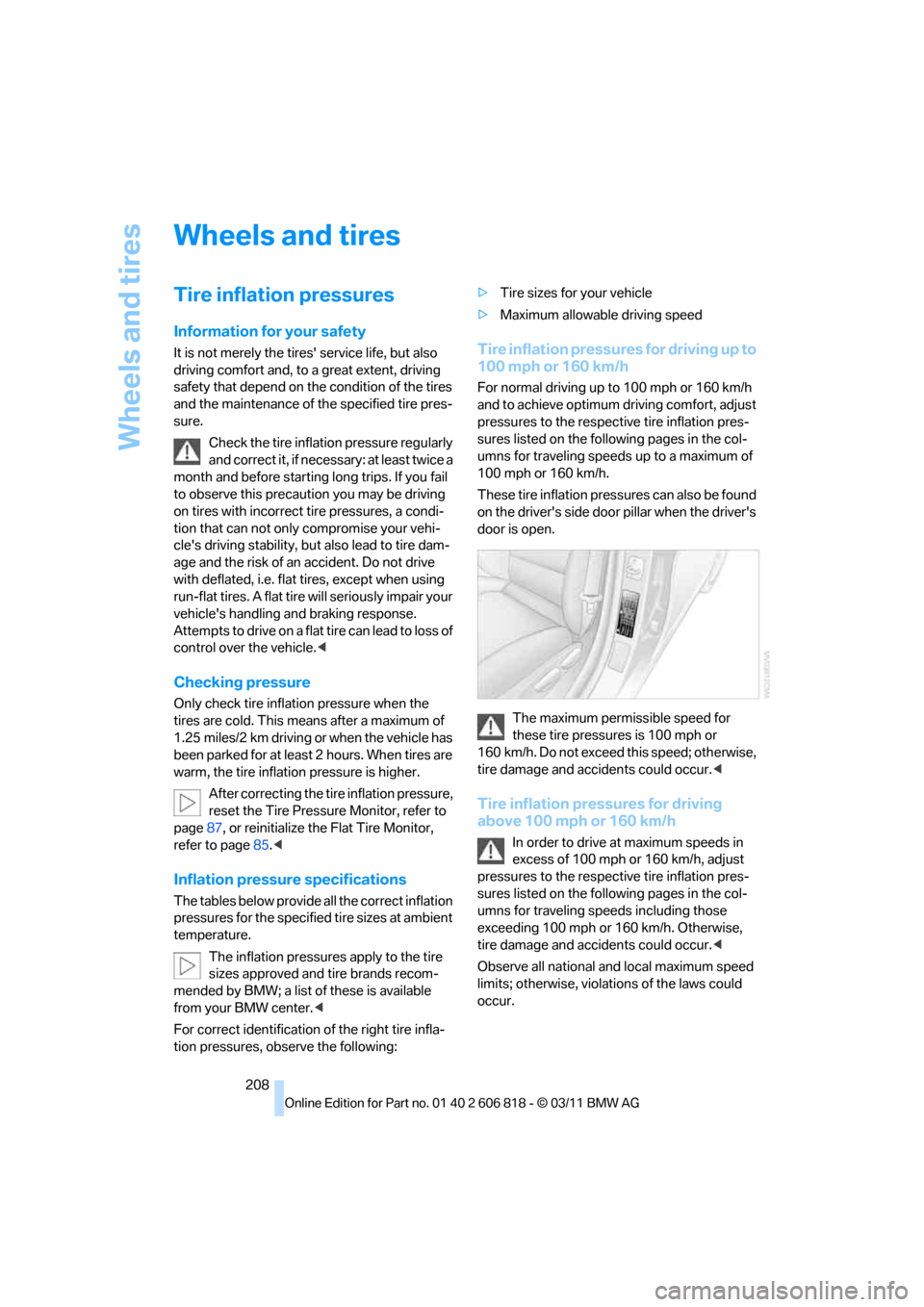
These tire inflation pressures can also be found
on the driver's side door pillar when the driver's
door is open.
The maximum permissible speed for
these tire pressures is 100 mph or
160 km/h. Do not exceed this speed; otherwise,
tire damage and accidents could occur.<
Tire inflation pressures for driving
above 100 mph or 160 km/h
In order to drive at maximum speeds in
excess of 100 mph or 160 km/h, adjust
pressures to the respective tire inflation pres-
sures listed on the following pages in the col-
umns for traveling speeds including those
exceeding 100 mph or 160 km/h. Otherwise,
tire damage and accidents could occur.<
Observe all national and local maximum speed
limits; otherwise, violations of the laws could
occur.
Page 251 of 272
Reference 249
At a glance
Controls
Driving tips
Communications
Navigation
Entertainment
Mobility
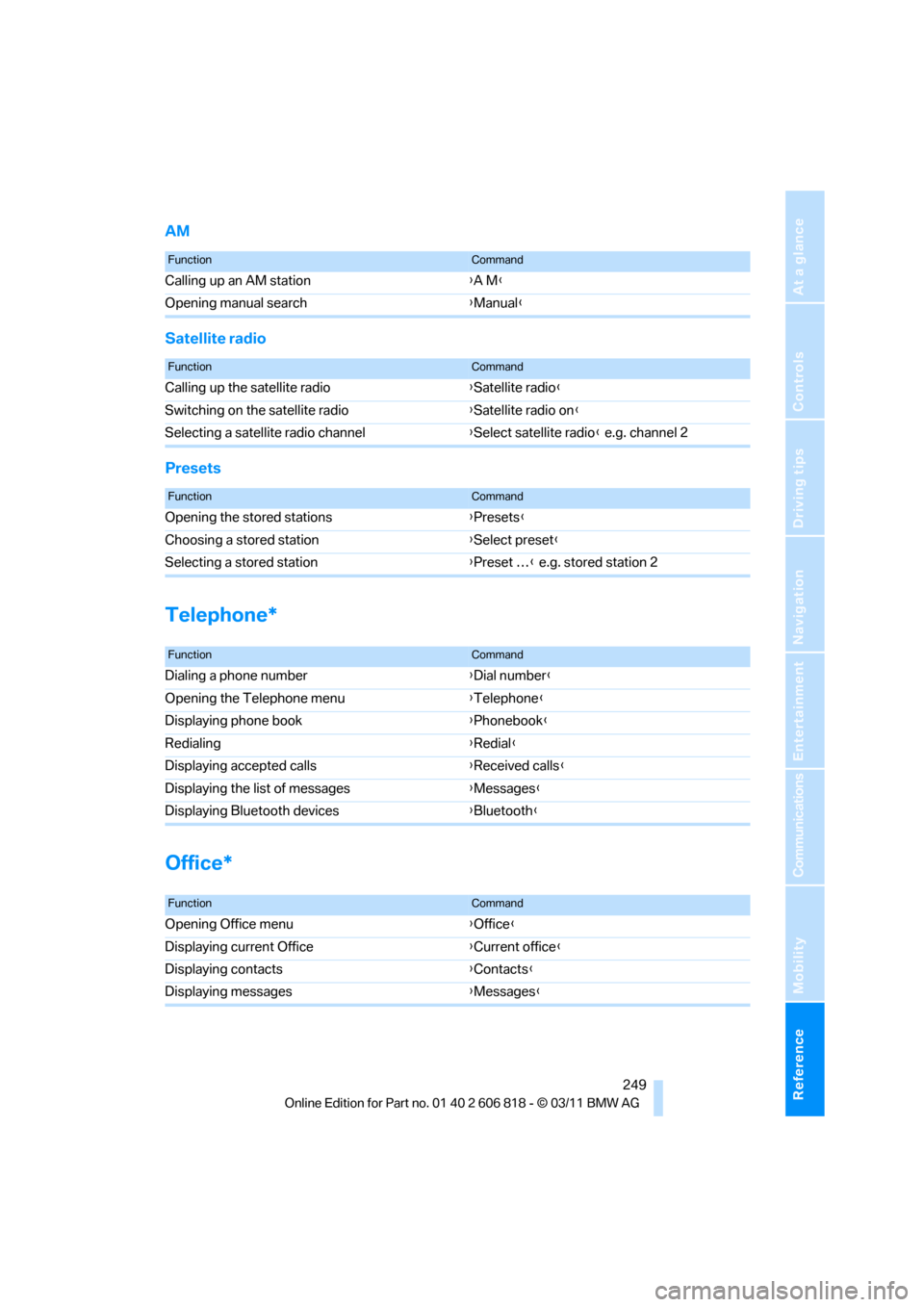
AM
Satellite radio
Presets
Telephone*
Office*
FunctionCommand
Calling up an AM station{A M}
Opening manual search{Manual}
FunctionCommand
Calling up the satellite radio{Satellite radio}
Switching on the satellite radio{Satellite radio on}
Selecting a satellite radio channel{Select satellite radio} e.g. channel 2
FunctionCommand
Opening the stored stations{Presets}
Choosing a stored station{Select preset}
Selecting a stored station{Preset …} e.g. stored station 2
FunctionCommand
Dialing a phone number{Dial number}
Opening the Telephone menu{Telephone}
Displaying phone book{Phonebook}
Redialing{Redial}
Displaying accepted calls{Received calls}
Displaying the list of messages{Messages}
Displaying Bluetooth devices{Bluetooth}
FunctionCommand
Opening Office menu{Office}
Displaying current Office{Current office}
Displaying contacts{Contacts}
Displaying messages{Messages}
Page 265 of 272
Reference 263
At a glance
Controls
Driving tips
Communications
Navigation
Entertainment
Mobility
Providing medical assistance,
refer to First aid pouch235
Puncture
– Flat Tire Monitor84
R
Radio
– controls144
– HD Radio148
– satellite radio150
– selecting waveband147
– storing stations147
– switching on/off144
– tone control144
– volume144
Radio position, refer to Radio
readiness57
Radio readiness57
– switched off58
– switched on57
Rain sensor67
Random play sequence
– external devices168
Random sequence
– music collection164
Reading aloud194
Reading lamps98
Rear lamps, refer to Tail
lamps230
Rear seats
– adjusting head restraints48
– folding down backrests109
Rearview mirror, refer to
Mirrors51
Rear window defroster101
Reception
– quality148
– radio station148
Recirculated air mode101
Recirculation of air, refer to
Recirculated air mode101
Redialing183
Reflectors, refer to Tail
lamps230
Refueling206
Releasing
– hood216Remaining distance, refer to
Computer72
Remaining distance, refer to
Cruising range72
Reminders194
Remote control28
– battery renewal37
– Comfort Access35
– garage door opener104
– malfunctions31,36
– removing from the ignition
lock57
– service data221
– trunk lid30
Remote control key, refer to
Integrated key/remote
control
28
Replacement fuses, refer to
Fuses232
Replacement remote
control28
Replacing bulbs, refer to
Lamps and bulbs227
Replacing tires, refer to New
wheels and tires214
Reporting safety defects7
Reserve warning, refer to Fuel
gauge71
Reservoir for washer
systems68
Reset, refer to Resetting tone
settings146
Restraint systems, refer to
Safety belts50
Restraint systems for
children54
Retreaded tires214
Reverse
– CD changer157
– CD player157
Reverse gear63
– automatic transmission with
Steptronic60
– manual transmission59
Road map136
Roadside
Assistance199,234Roadside parking lamps96
– replacing bulbs228
Roadworthiness test, refer to
Service requirements74
Rollover protection system,
Convertible92
– resetting92
Roof load capacity245
Roof-mounted luggage
rack120
Rope, refer to Tow-starting,
towing away237
Rotary/pushbutton control,
refer to Controller16
Route134,135
– bypassing sections135
– changing134,135
– changing criteria134
– displaying streets or towns/
cities135
– map view136
– selecting134
Route instructions, refer to
Destination guidance
through voice
instructions136
Route map, refer to Map
view136
Route section, changing135
Route selection134
RSC Runflat System
Component, refer to Run-
flat tires214
Runflat System Component
RSC, refer to Run-flat
tires214
Run-flat tires214,215
– flat tire85
– inflation pressure208
– new tires214
– remaining driving distance,
refer to Indication of a flat
tire85
– tire replacement214
Runflat tyres, refer to Run-flat
tires214
Page 267 of 272
Reference 265
At a glance
Controls
Driving tips
Communications
Navigation
Entertainment
Mobility
Sport program, automatic
transmission with
Steptronic61
Sport program with 7-gear
Sport automatic
transmission with double
clutch63
Stability control, refer to
Driving stability control
systems83
Start/Stop button57
– starting the engine58
– switching off the engine58
Starting, refer to Starting the
engine58
Starting assistance, refer to
Jump-starting235
Starting the engine
– Start/Stop button57
Start menu17
State/province, for
navigation125
Station, selecting
– radio147
Status information on the
Control Display19
Status of this Owner's Manual
at time of printing5
Steam jet223,224
Steering wheel52
– adjustment52
– buttons on steering
wheel11
– heating53
– shift paddles64
Steering wheel buttons, refer
to Shift paddles64
Steering with variable ratio,
refer to Active steering89
Steptronic, refer to Automatic
transmission with
Steptronic59
Storage226
Storage compartment
package108
Storage compartments108
Stored trip, calling up132Storing
– seat position, refer to Seat
and mirror memory50
– telephone numbers, refer to
separate Owner's Manual
Storing a destination in the
address book127
Storing music161
Storing tires215
Stowage, refer to Storage
compartments108
Street, entering,
navigation126
Suitable mobile phones176
Summer tires, refer to Wheels
and tires208
Surround
145
SVCD157
SW, waveband147
Switches, refer to Cockpit10
Switching off
– engine58
Switching off the engine
– Start/Stop button57
Switching on
– audio144
– CD changer144
– CD player144
– radio144
Switching the cooling function
on and off101
Switch-on times of parked car
ventilation, preselecting103
Symbols4
– status information19
T
Tachometer70
Tailgate, refer to Trunk lid33
Tail lamp, refer to Tail
lamps230
– replacing bulb231
Tail lamps230
– replacing bulb231
Tank contents, refer to
Capacities246
Tasks193Technical data242
– dimensions243
Technical modifications5
Telephone176
– hands-free system184
– phone book182
– received calls183
– redialing183
– voice commands184
Telephone, installation
location, refer to Center
armrest108
Telephone, refer to separate
Owner's Manual
Teleservice Diagnosis200
Teleservice Help200
Temperature display
– outside temperature70
– outside temperature
warning70
– setting the units74
Tempomat, refer to Cruise
control68
Text message191
Thigh support46
Third brake lamp, refer to
Center brake lamp231
Three-point safety belt50
Through-loading system109
Tilt alarm sensor35
Tilt function, passenger side
mirror52
Timer, refer to Preselecting
switch-on times103
Tire inflation pressure208
– loss85,87
Tire pressure monitoring,
refer to Flat Tire Monitor84
Tire Pressure Monitor
TPM86
– resetting the system87
– system limitations86
– warning lamp87
Tire puncture, refer to Flat Tire
Monitor85
Tire Quality Grading212