seats BMW 128I 2012 E88 User Guide
[x] Cancel search | Manufacturer: BMW, Model Year: 2012, Model line: 128I, Model: BMW 128I 2012 E88Pages: 272, PDF Size: 8.49 MB
Page 93 of 272
Controls
91Reference
At a glance
Driving tips
Communications
Navigation
Entertainment
Mobility
adhesive labels or coverings, and do not attach
holders such as for navigation instruments and
mobile phones.
Do not attach seat covers, cushions or other
objects not specifically approved for seats with
integral side airbags to the front seats. Do not
hang items of clothing such as coats or jackets
over the backrests. Do not attempt to remove
the airbag retention system from the vehicle. Do
not modify the individual components of the
system or its wiring in any way. This includes
the upholstered covers on the steering wheel,
instrument panel, seats and roof posts, as well
as the sides of the roof lining. Do not attempt to
remove or dismantle the steering wheel.
Do not touch the individual components imme-
diately after the system has been triggered,
because there is a danger of burns.
In the event of malfunctions, deactivation or
triggering of the airbag restraint system, have
the testing, repair, removal and disposal of air-
bag generators executed only by a BMW center
or a workshop that works according to repair
procedures of BMW with correspondingly
trained personnel and that has the required
explosives licenses. Unprofessional attempts to
work on the system could lead to failure in an
emergency or to undesired airbag activation,
either of which could result in personal injury.<
Warning notices and information about the air-
bags can also be found on the sun visors.
Automatic deactivation of the front
passenger airbags
An analysis of the impression in the front pas-
senger seat cushion determines whether and
how the seat is occupied. The front and side air-
bags for the front passenger are activated or
deactivated by the system accordingly.
The indicator lamp above the interior
rearview mirror shows the current status
of the front passenger airbags, deactivated or
activated, refer to Status of front passenger air-
bags below.<
Before transporting a child on the front
passenger seat, read the safety precau-
tions and handling instructions under Trans-
porting children safely, refer to page54.The front and side airbags can also be deacti-
vated by adolescents and adults sitting in cer-
tain positions; the indicator lamp for the front
passenger airbags lights up. In such cases, the
passenger should change his or her sitting
position so that the front passenger airbags are
activated and the indicator lamp goes out. If the
desired airbag status cannot be achieved by
changing the sitting position, transport the rele-
vant passenger on a rear seat. Do not attach
seat covers, seat cushion padding, ball mats or
other items to the front passenger seat unless
they are specifically recommended by BMW.
Do not place any items under the seat which
could press against the seat from below. Other-
wise, a correct analysis of the seat cushion is
not ensured.<
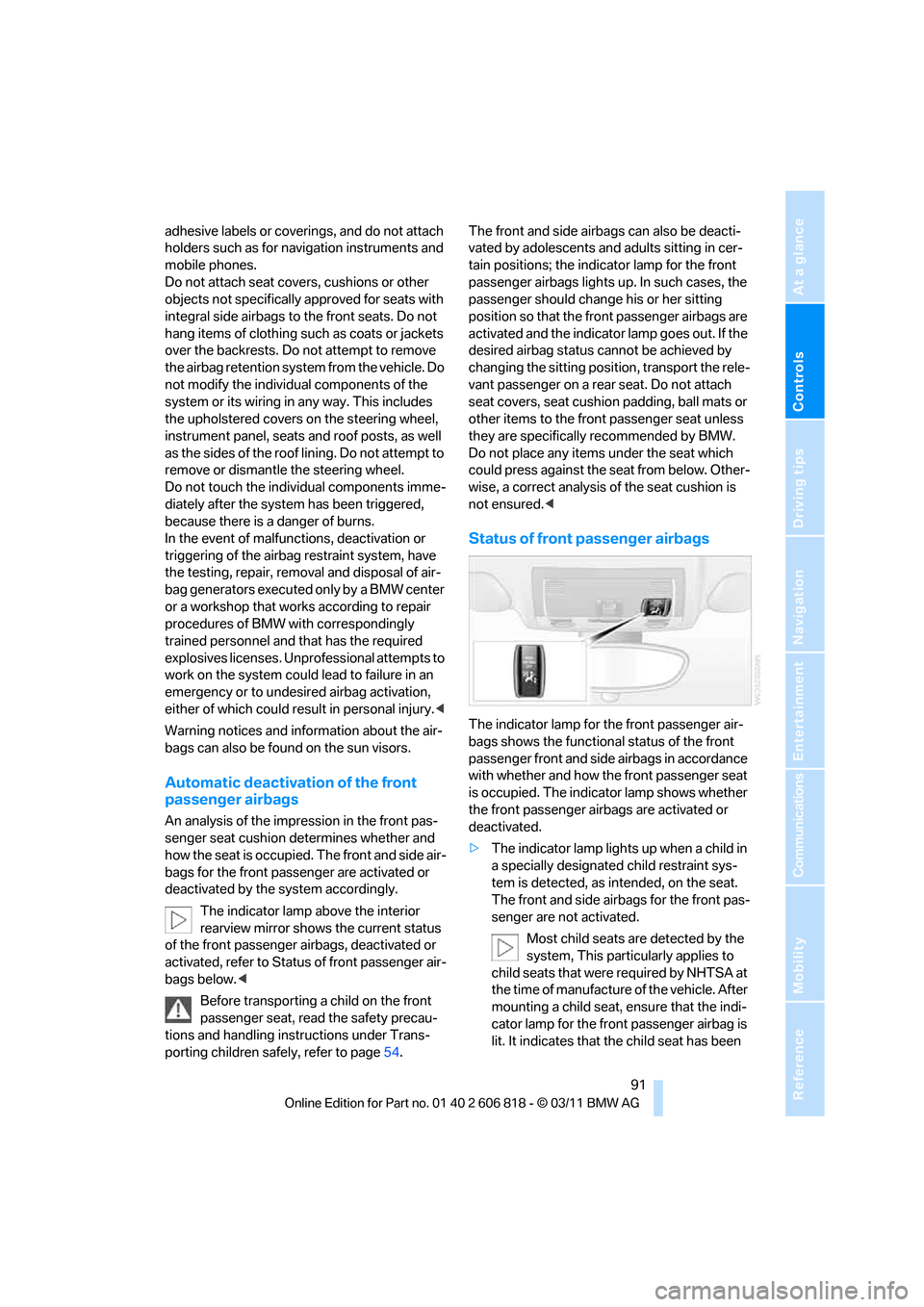
Status of front passenger airbags
The indicator lamp for the front passenger air-
bags shows the functional status of the front
passenger front and side airbags in accordance
with whether and how the front passenger seat
is occupied. The indicator lamp shows whether
the front passenger airbags are activated or
deactivated.
>The indicator lamp lights up when a child in
a specially designated child restraint sys-
tem is detected, as intended, on the seat.
The front and side airbags for the front pas-
senger are not activated.
Most child seats are detected by the
system, This particularly applies to
child seats that were required by NHTSA at
the time of manufacture of the vehicle. After
mounting a child seat, ensure that the indi-
cator lamp for the front passenger airbag is
lit. It indicates that the child seat has been
Page 110 of 272
Practical interior accessories
108 >Do not connect USB hard discs.
>Do not use the USB interface to recharge
external devices.
Center armrest
Storage compartment
The center armrest between the front seats
contains a credit card holder and, depending on
the equipment version, a compartment or a
snap-in adapter
*.
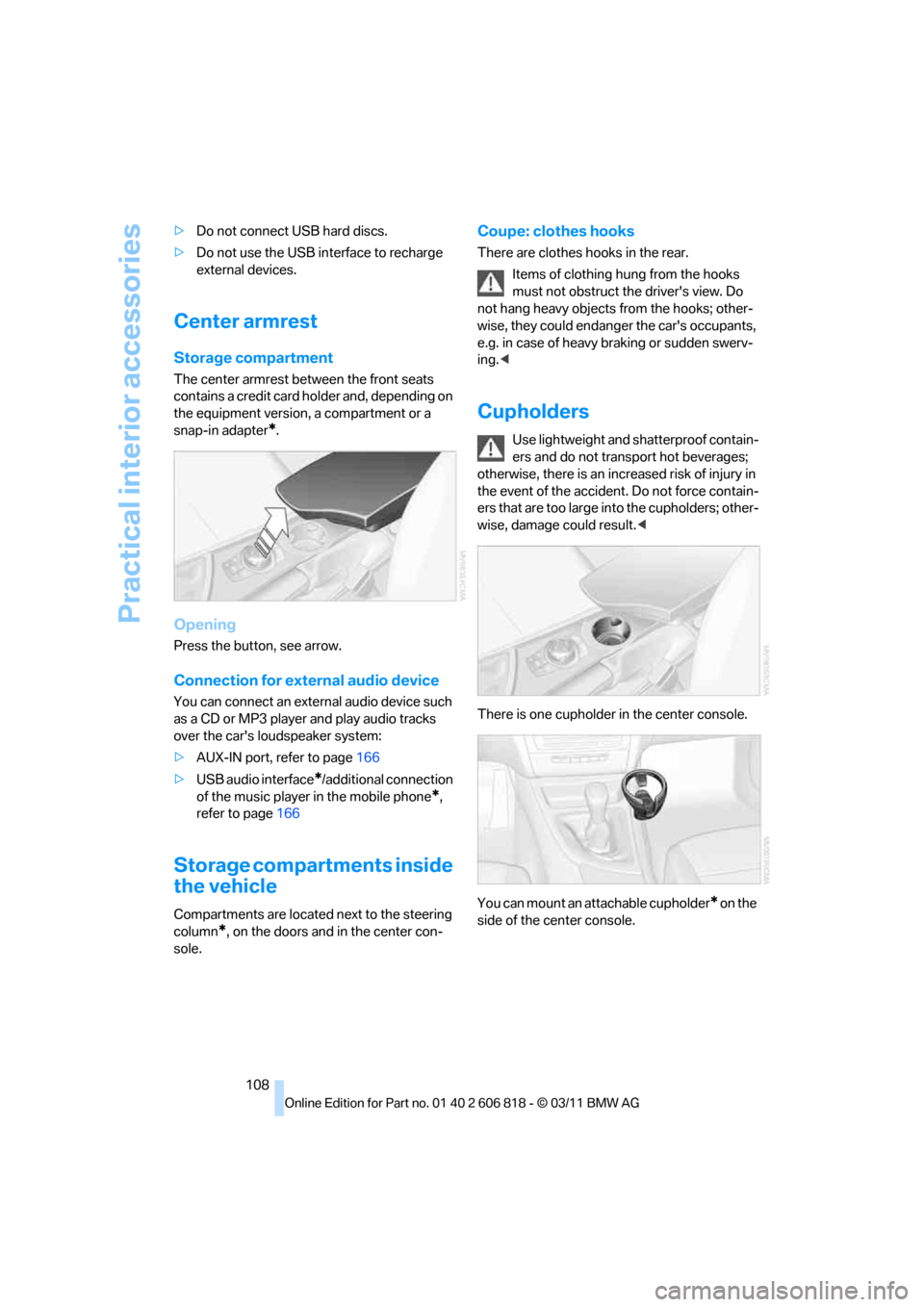
Opening
Press the button, see arrow.
Connection for external audio device
You can connect an external audio device such
as a CD or MP3 player and play audio tracks
over the car's loudspeaker system:
>AUX-IN port, refer to page166
>USB audio interface
*/additional connection
of the music player in the mobile phone
*,
refer to page166
Storage compartments inside
the vehicle
Compartments are located next to the steering
column
*, on the doors and in the center con-
sole.
Coupe: clothes hooks
There are clothes hooks in the rear.
Items of clothing hung from the hooks
must not obstruct the driver's view. Do
not hang heavy objects from the hooks; other-
wise, they could endanger the car's occupants,
e.g. in case of heavy braking or sudden swerv-
ing.<
Cupholders
Use lightweight and shatterproof contain-
ers and do not transport hot beverages;
otherwise, there is an increased risk of injury in
the event of the accident. Do not force contain-
ers that are too large into the cupholders; other-
wise, damage could result.<
There is one cupholder in the center console.
You can mount an attachable cupholder
* on the
side of the center console.
Page 113 of 272
Controls
111Reference
At a glance
Driving tips
Communications
Navigation
Entertainment
Mobility
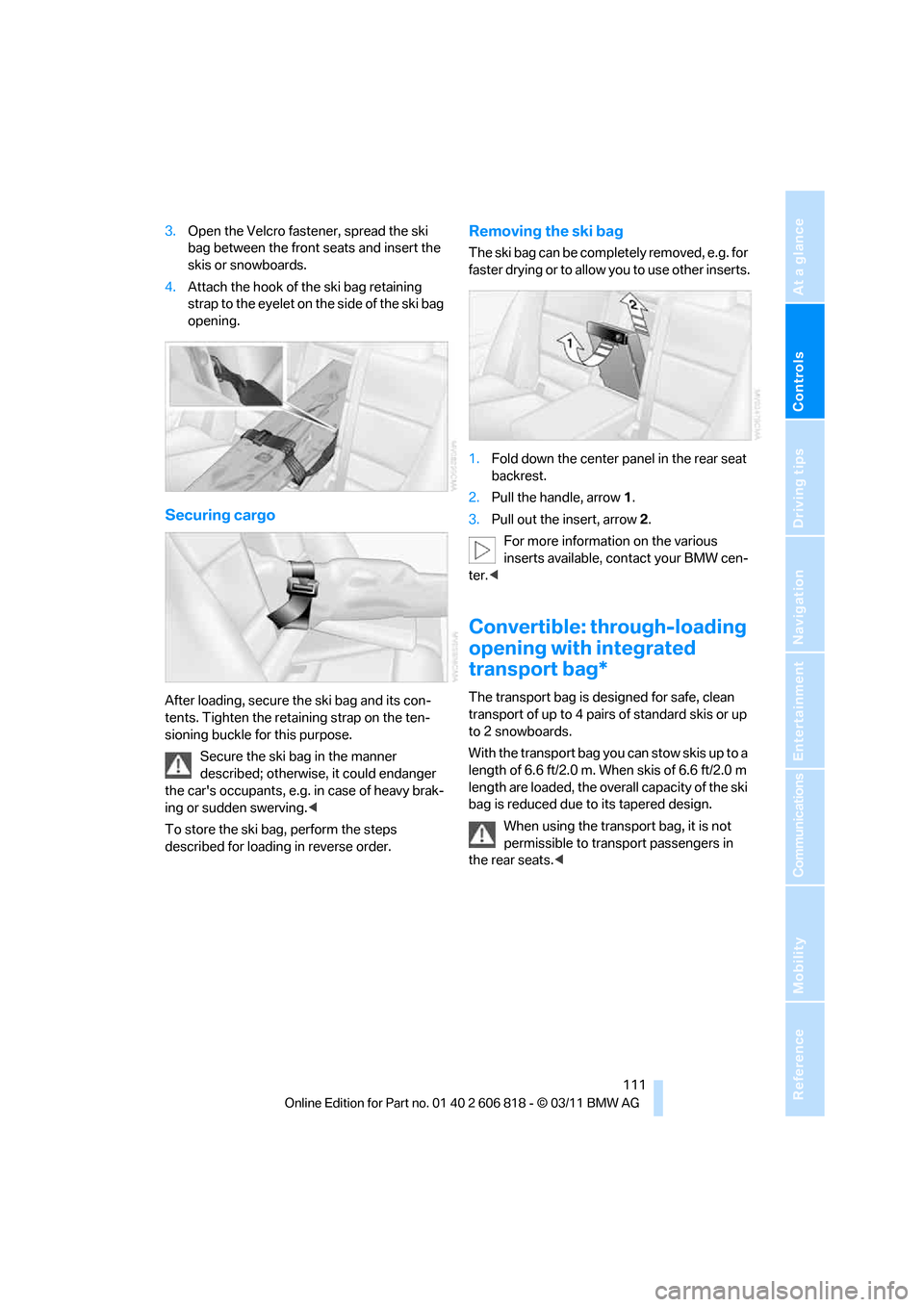
3.Open the Velcro fastener, spread the ski
bag between the front seats and insert the
skis or snowboards.
4.Attach the hook of the ski bag retaining
strap to the eyelet on the side of the ski bag
opening.
Securing cargo
After loading, secure the ski bag and its con-
tents. Tighten the retaining strap on the ten-
sioning buckle for this purpose.
Secure the ski bag in the manner
described; otherwise, it could endanger
the car's occupants, e.g. in case of heavy brak-
ing or sudden swerving.<
To store the ski bag, perform the steps
described for loading in reverse order.
Removing the ski bag
The ski bag can be completely removed, e.g. for
faster drying or to allow you to use other inserts.
1.Fold down the center panel in the rear seat
backrest.
2.Pull the handle, arrow1.
3.Pull out the insert, arrow 2.
For more information on the various
inserts available, contact your BMW cen-
ter.<
Convertible: through-loading
opening with integrated
transport bag*
The transport bag is designed for safe, clean
transport of up to 4 pairs of standard skis or up
to 2 snowboards.
With the transport bag you can stow skis up to a
length of 6.6 ft/2.0 m. When skis of 6.6 ft/2.0 m
length are loaded, the overall capacity of the ski
bag is reduced due to its tapered design.
When using the transport bag, it is not
permissible to transport passengers in
the rear seats.<
Page 114 of 272
Practical interior accessories
112
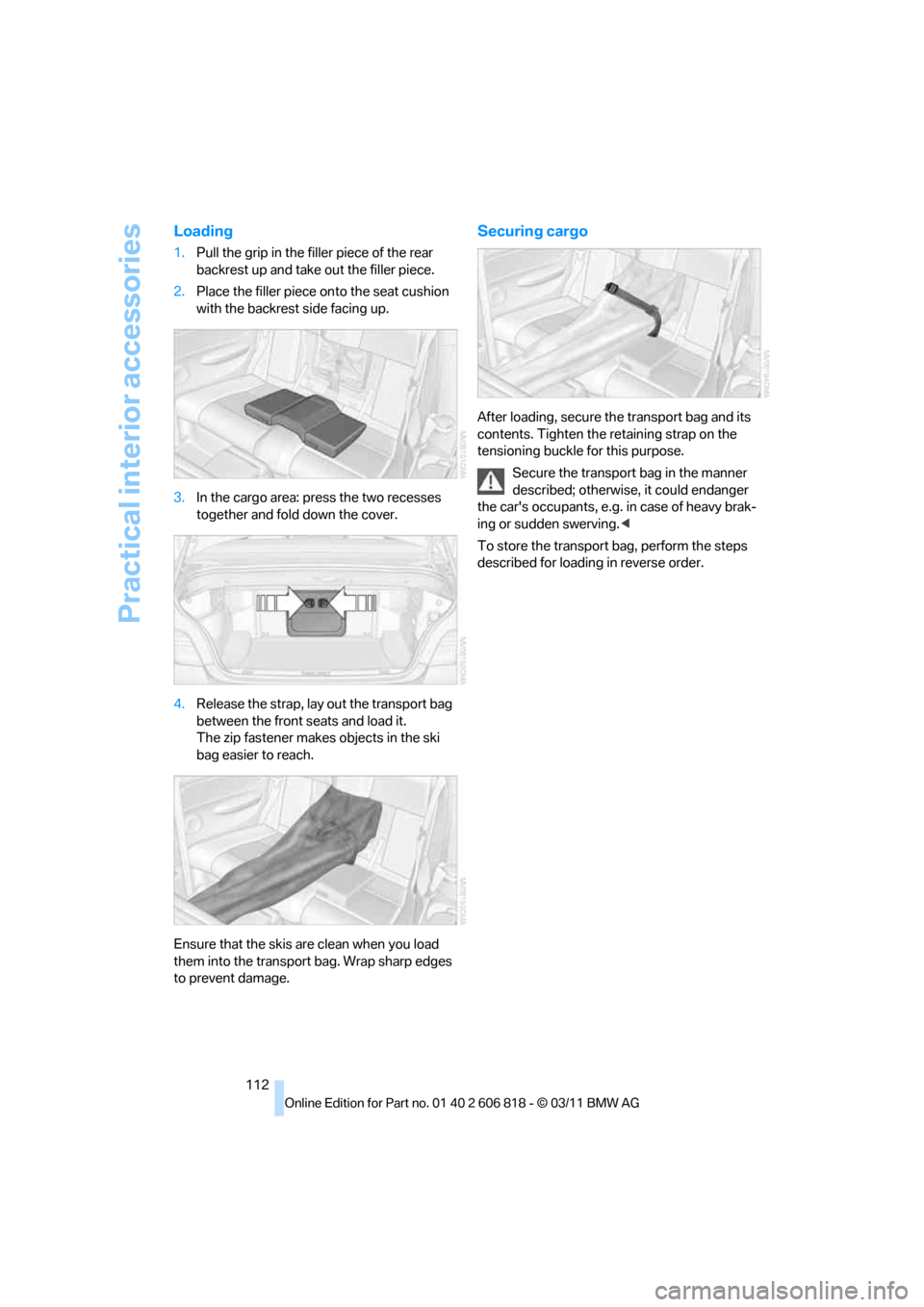
Loading
1.Pull the grip in the filler piece of the rear
backrest up and take out the filler piece.
2.Place the filler piece onto the seat cushion
with the backrest side facing up.
3.In the cargo area: press the two recesses
together and fold down the cover.
4.Release the strap, lay out the transport bag
between the front seats and load it.
The zip fastener makes objects in the ski
bag easier to reach.
Ensure that the skis are clean when you load
them into the transport bag. Wrap sharp edges
to prevent damage.
Securing cargo
After loading, secure the transport bag and its
contents. Tighten the retaining strap on the
tensioning buckle for this purpose.
Secure the transport bag in the manner
described; otherwise, it could endanger
the car's occupants, e.g. in case of heavy brak-
ing or sudden swerving.<
To store the transport bag, perform the steps
described for loading in reverse order.
Page 256 of 272
Everything from A to Z
254
Everything from A to Z
Index
A
ABS Antilock Brake
System83
Acceleration assistant, refer to
Launch Control66
Accessories, refer to Your
individual vehicle5
Accident, reporting, refer to
Emergency Request234
Activated-charcoal filter102
Active steering89
Adaptive Light Control95
Additives
– coolant219
– engine oil219
Address, entering125,131
Address for navigation
– entering125
Adjusting temperature100
Airbags90
– sitting safely45
– warning lamp92
Air conditioner99
Air distribution
– automatic100
Airing, refer to Ventilation102
Air outlets, refer to Air
vents99
Air pressure, checking, refer
to Tire inflation
pressure208
Air recirculation, refer to
Recirculated air mode101
Air vents99
Air volume101
AKI, refer to Fuel grade207
Alarm system34
– avoiding unintentional
alarms35
– interior motion sensor35
– switching off an alarm34
– tilt alarm sensor35Albums of music
collection163
ALL program101
All-season tires, refer to
Winter tires215
AM, waveband147
Ambient air, refer to
Recirculated air mode101
Antifreeze
– coolant219
– washer fluid68
Antilock Brake System
ABS83
Anti-theft alarm system, refer
to Alarm system34
Anti-theft system29
Appointments, refer to
Calendar193
Approved axle loads, refer to
Weights245
Approved engine oils219
Approved gross vehicle
weight, refer to Weights245
Apps202
Armrest, refer to Center
armrest108
Arrival time
– computer72
Ashtray109
Assistance systems, refer to
Dynamic Stability Control
DSC83
AUC Automatic recirculated
air control101
Audible instructions, refer to
Voice instructions136
Audio144
– controls144
– switching on/off144
– tone control144
– volume144Automatic
– air distribution100
– air volume100
– cruise control68
– headlamp control94
Automatic car washes223
Automatic climate control99
Automatic curb monitor52
Automatic high beams and
low beams, refer to High-
beam Assistant96
Automatic lamps
– refer to Welcome lamps94
Automatic recirculated air
control AUC101
Automatic Service
Request202
Automatic transmission with
Steptronic59
– selector lever lock60
– shiftlock60
– towing236
– tow-starting236
AUTO program for automatic
climate control100
AUX-IN port166
Available services202
Average fuel consumption72
– setting the units74
Average speed72
Avoid highways in
navigation134
Avoiding unintentional
alarms35
Axle loads, refer to
Weights245
B
Backrests, refer to Seats46
Backrest width adjustment47
Back seats, refer to Rear seats
– adjusting head restraints48
Page 258 of 272
Everything from A to Z
256 Cargo area lid, refer to Trunk
lid33
Cargo area net, refer to
Securing cargo120
Cargo loading119
– securing cargo120
– stowing cargo120
– vehicle119
Car jack
– jacking points232
Car key, refer to Integrated
key/remote control28
Car phone
– installation location, refer to
Center armrest108
– refer to separate Owner's
Manual
Car phone, refer to
Telephone176
Car radio, refer to Radio147
Car shampoo224
Car wash223
Catalytic converter, refer to
Hot exhaust system117
CD, audio playback155
CD changer155,159
– controls144
– fast forward/reverse157
– filling or emptying the
magazine159
– random play sequence156
– selecting a track155
– switching on/off144
– tone control144
– volume144
CD player155
– controls144
– fast forward/reverse157
– random order156
– selecting a track155
– switching on/off144
– tone control144
– volume144
Center armrest108
Center brake lamp, replacing
bulb231
Center console, refer to
Around the center
console14Central key, refer to Integrated
key/remote control28
Central locking
– from inside32
– from outside29
Central locking system29
– Comfort Access35
Changes, technical, refer to
For your own safety5
Changing bulbs227
Changing gears64
Changing the language on the
Control Display81
Changing wheels231
Chassis number, refer to
Engine compartment217
Check Control78
Child restraint fixing system
LATCH55
Child restraint systems54
Child seats54
Chrome parts225
Chrome polish225
Cigarette lighter109
Cleaning headlamps67
– washer fluid68
Cleaning your BMW, refer to
Care223
Climate control
– automatic air
distribution100
Clock70
– 12h/24h mode77
– setting the time and date77
– setting time76
Closing
– from inside32
– from outside29
Clothes hooks108
Cold start, refer to Starting the
engine58
Comfort Access35
– replacing the battery37
Comfort access, refer to
Comfort Access35
Comfort area, refer to Around
the center console14Compartment for remote
control, refer to Ignition
lock57
Compass106
Computer71
– displays on Control
Display72
Computer, refer to iDrive16
Concierge service199
Condensation, refer to When
the vehicle is parked119
Condition Based Service
CBS221
Configuring settings, refer to
Personal Profile28
Confirmation signals for
locking/unlocking the
vehicle30
ConnectedDrive198
Connecting vacuum cleaner,
refer to Connecting
electrical appliances109
Consumption, refer to
Average fuel
consumption72
Contacts188
– deleting190,197
– exporting/importing197
– new contact189
Control Center, refer to
iDrive16
Control Display16,17
Control Display, refer to iDrive
– switching on/off17
Controller, refer to iDrive16
Controls and displays10
Convenient opening and
closing
– windows30
– windows with Comfort
Access36
– with Comfort Access36
Convenient start, refer to
Starting the engine58
Convertible
– rollover protection
system92
– top40
– wind deflector43
Page 261 of 272
Reference 259
At a glance
Controls
Driving tips
Communications
Navigation
Entertainment
Mobility
FM, waveband147
Fog lamps97
– indicator lamp13,97
Footwell lamps98
For your own safety5
Free memory capacity, music
collection164
Front airbags90
Front seat adjustment46
Frost on windows, refer to
Defrosting windows101
FTM, refer to Flat Tire
Monitor84
Fuel207
– gauge71
– high-quality brands207
– quality207
– specifications207
– tank contents, refer to
Capacities246
Fuel clock, refer to Fuel
gauge71
Fuel consumption indicator,
refer to Average fuel
consumption72
Fuel consumption statistics,
refer to Average fuel
consumption72
Fuel display, refer to Fuel
gauge71
Fuel filler flap206
– releasing in the event of
electrical malfunction206
Fuses232
G
Garage door opener, refer to
Integrated universal remote
control104
Gasoline, refer to Required
fuel207
Gasoline display, refer to Fuel
gauge71
Gas station
recommendations136
Gear display, with automatic
transmission60Gear shifting
– automatic transmission60
– manual transmission59
Gearshift lever62
– automatic transmission with
Steptronic60
– manual transmission59
General driving notes117
Glass roof, electric39
– closing after electrical
malfunction40
– convenient opening and
closing32
– convenient opening and
closing with Comfort
Access36
– opening, closing39
– pinch protection system39
– remote control30
– tilting39
Glove compartment107
GPS navigation, refer to
Navigation system124
Grills, refer to Air vents99
Gross vehicle weight, refer to
Weights245
H
Halogen lamps
– replacing bulbs228
Handbrake, refer to Parking
brake59
Hands-free system184
Hands-free system, refer to
Microphone for hands-free
mode14
Hazard warning flashers14
HD Radio148
Head airbags90
Headlamp control,
automatic94
Headlamp cover228
Headlamp flasher66
– indicator lamp13
Headlamps
– replacing bulbs228Head Light, refer to Adaptive
Light Control95
Head restraints48
Heated
– seats50
– steering wheel53
Heated mirrors52
Heating
– mirrors52
– seats50
– steering wheel53
Heating, rear window101
Heating and ventilation99
Heavy loads, refer to Stowing
cargo120
Height, refer to
Dimensions243
Height adjustment
– steering wheel52
High-beam Assistant96
High beams96
– indicator lamp13
– replacing bulbs228
High beams and low beams,
automatic, refer to High-
beam Assistant96
High-pressure
washer223,224
High water, refer to Driving
through water118
Highways, refer to Route
criteria134
Hills118
Holders for cups108
Hood216
Hot exhaust system117
Hydraulic brake assist, refer to
Dynamic Brake Control83
Hydroplaning117
Page 265 of 272
Reference 263
At a glance
Controls
Driving tips
Communications
Navigation
Entertainment
Mobility
Providing medical assistance,
refer to First aid pouch235
Puncture
– Flat Tire Monitor84
R
Radio
– controls144
– HD Radio148
– satellite radio150
– selecting waveband147
– storing stations147
– switching on/off144
– tone control144
– volume144
Radio position, refer to Radio
readiness57
Radio readiness57
– switched off58
– switched on57
Rain sensor67
Random play sequence
– external devices168
Random sequence
– music collection164
Reading aloud194
Reading lamps98
Rear lamps, refer to Tail
lamps230
Rear seats
– adjusting head restraints48
– folding down backrests109
Rearview mirror, refer to
Mirrors51
Rear window defroster101
Reception
– quality148
– radio station148
Recirculated air mode101
Recirculation of air, refer to
Recirculated air mode101
Redialing183
Reflectors, refer to Tail
lamps230
Refueling206
Releasing
– hood216Remaining distance, refer to
Computer72
Remaining distance, refer to
Cruising range72
Reminders194
Remote control28
– battery renewal37
– Comfort Access35
– garage door opener104
– malfunctions31,36
– removing from the ignition
lock57
– service data221
– trunk lid30
Remote control key, refer to
Integrated key/remote
control
28
Replacement fuses, refer to
Fuses232
Replacement remote
control28
Replacing bulbs, refer to
Lamps and bulbs227
Replacing tires, refer to New
wheels and tires214
Reporting safety defects7
Reserve warning, refer to Fuel
gauge71
Reservoir for washer
systems68
Reset, refer to Resetting tone
settings146
Restraint systems, refer to
Safety belts50
Restraint systems for
children54
Retreaded tires214
Reverse
– CD changer157
– CD player157
Reverse gear63
– automatic transmission with
Steptronic60
– manual transmission59
Road map136
Roadside
Assistance199,234Roadside parking lamps96
– replacing bulbs228
Roadworthiness test, refer to
Service requirements74
Rollover protection system,
Convertible92
– resetting92
Roof load capacity245
Roof-mounted luggage
rack120
Rope, refer to Tow-starting,
towing away237
Rotary/pushbutton control,
refer to Controller16
Route134,135
– bypassing sections135
– changing134,135
– changing criteria134
– displaying streets or towns/
cities135
– map view136
– selecting134
Route instructions, refer to
Destination guidance
through voice
instructions136
Route map, refer to Map
view136
Route section, changing135
Route selection134
RSC Runflat System
Component, refer to Run-
flat tires214
Runflat System Component
RSC, refer to Run-flat
tires214
Run-flat tires214,215
– flat tire85
– inflation pressure208
– new tires214
– remaining driving distance,
refer to Indication of a flat
tire85
– tire replacement214
Runflat tyres, refer to Run-flat
tires214
Page 266 of 272
Everything from A to Z
264
S
Safety-belt height
adjustment51
Safety belts50
– damage51
– indicator lamp51
– reminder51
– sitting safely45
Safety systems
– airbags90
– Antilock Brake System
ABS83
– Dynamic Stability Control
DSC83
– rollover protection system,
Convertible92
– safety belts50
Safety tires, refer to Run-flat
tires214
Satellite radio150
– enabling or unsubscribing
from a channel150
– favorites152
– selecting channel151
– storing channel151
– timeshift152
– Traffic Jump153
Saving fuel116
Screen, refer to iDrive16
Screw thread for tow
fitting236
SDARS, refer to Satellite
radio150
Seat and mirror memory50
Seat belt reminder, refer to
'Fasten safety belts'
reminder51
Seats46
– heating50
– sitting safely45
Securing cargo111,112
Selecting new scale for
navigation137
Selector lever, automatic
transmission with
Steptronic60
Selector lever positions62Service, refer to Roadside
Assistance234
Service car, refer to Roadside
Assistance234
Service data in remote
control221
Service Interval Display, refer
to Condition Based Service
CBS221
Service Request201
Service requirements74
Service status202
Settings
– clock, 12h/24h format77
– date format78
– DVD158
– language81
Settings for the map view137
Setting times, refer to
Preselecting switch-on
times103
Shifting64
– 7-gear Sport automatic
transmission with double
clutch63
Shifting gears with automatic
transmission with
Steptronic61
Shift into a drive position, refer
to selector lever
positions62
Shiftlock, refer to Changing
selector lever positions60
Shift paddles on the steering
wheel64
Short commands for the voice
activation system247
Short route in navigation, refer
to Selecting route134
Shuffled, refer to Random
– CD changer156
– CD player156
Side airbags90
Side windows, refer to
Windows37
Signal horn, refer to Horn10
Sitting safely45
– airbags45
– safety belts45Ski bag110
Sliding/tilt sunroof, refer to
Glass roof, electric39
Slot for remote control57
Smokers' package, refer to
Ashtray109
Snap-in adapter176
– inserting/removing186
Snap-in adapter, refer to
Center armrest108
Snow chains215
Socket, refer to Connecting
electrical appliances109
Socket for Onboard Diagnosis
OBD222
Software update172
Sound, adjusting during audio
playback, refer to Tone
control144
Sound output for
entertainment on/off144
Spare fuses232
Special destinations128
Special destinations,
displaying129
Special oils, refer to Approved
engine oils219
Specified engine oils, refer to
Approved engine oils219
Speed
– for winter tires215
Speed limit warning, refer to
Speed limit80
Speedo, refer to
Speedometer12
Speedometer12
Speed Volume145
Split screen content, refer to
Selecting the display for the
split screen content20
Sport automatic transmission
with double clutch62
– driving dynamics control64
– kickdown63
– Launch Control66
– manually unlocking parking
lock65
– neutral63
– reverse gear63