tow BMW 128I 2012 E88 Owner's Guide
[x] Cancel search | Manufacturer: BMW, Model Year: 2012, Model line: 128I, Model: BMW 128I 2012 E88Pages: 272, PDF Size: 8.49 MB
Page 127 of 272
Navigation
Driving tips
125Reference
At a glance
Controls
Communications
Entertainment
Mobility
Destination entry
In entering your destination you can select from
the following options:
>Entering a destination manually, see below
>Selecting destination from address book,
refer to page127
>Last destinations, refer to page128
>Special destinations, refer to page128
>Entering a destination on the map, refer to
page130
>Selecting home address, refer to page128
>Destination entry via voice*, refer to
page131
>Destination entry via BMW Assist
*, refer to
page129
You can also store a navigation destination on
the programmable memory keys, refer to
page21.
Entering a destination
manually
To make it easier to enter town/city names and
street names, the system assists you with auto-
matic name completion and entry comparison,
refer to page134. This makes it possible to
enter different spellings and completes your
entry automatically so that stored town/city
names and street names can be accessed
quickly.
1.Press the button.
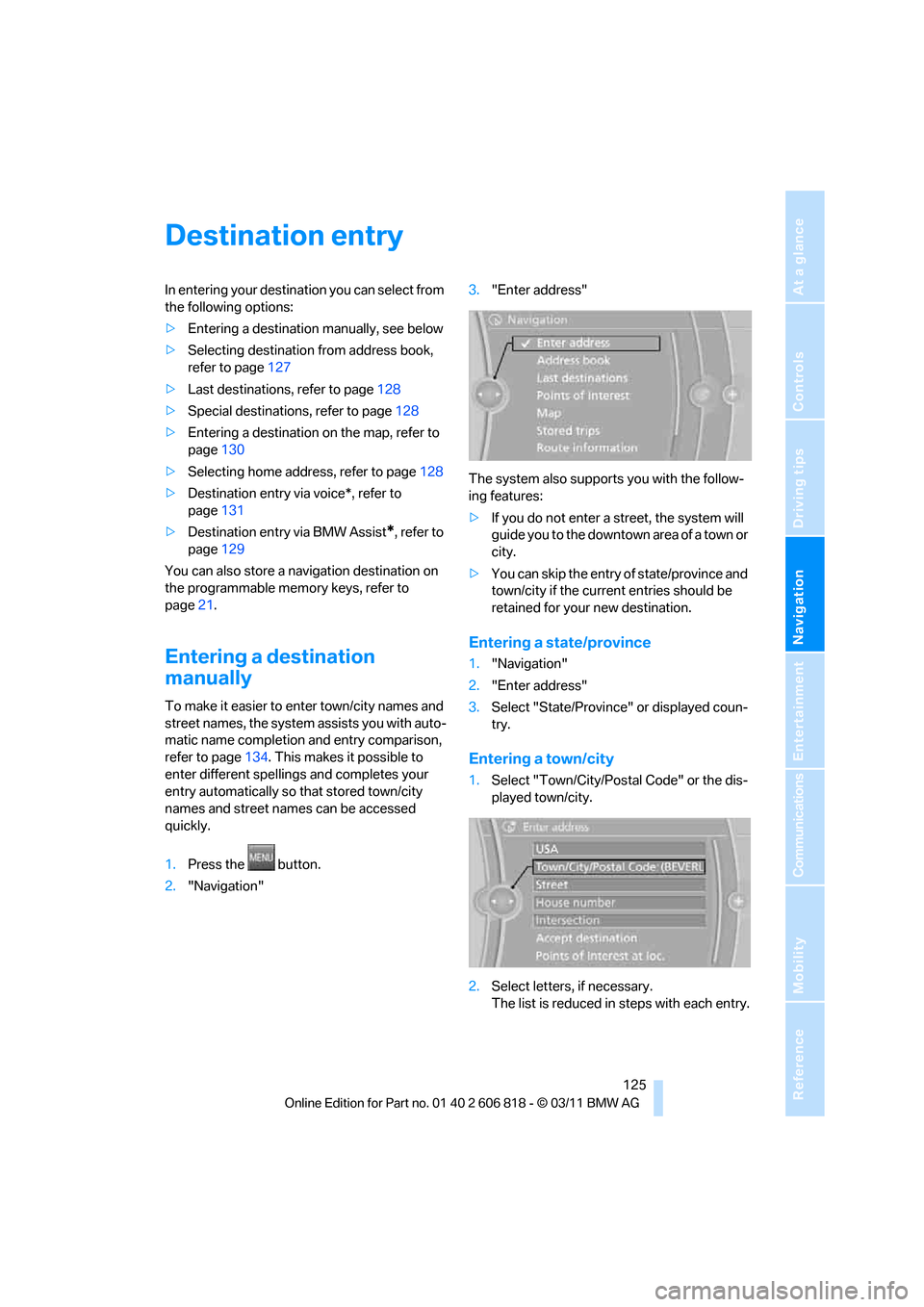
2."Navigation"3."Enter address"
The system also supports you with the follow-
ing features:
>If you do not enter a street, the system will
guide you to the downtown a r e a o f a t o w n o r
city.
>You can skip the entry of state/province and
town/city if the current entries should be
retained for your new destination.
Entering a state/province
1."Navigation"
2."Enter address"
3.Select "State/Province" or displayed coun-
try.
Entering a town/city
1.Select "Town/City/Postal Code" or the dis-
played town/city.
2.Select letters, if necessary.
The list is reduced in steps with each entry.
Page 128 of 272
Destination entry
126 To delete letters:
>To delete individual letters:
Turn the controller to select , and
then press the controller.
>To delete all letters:
Turn the controller to select , and
then press the controller for an extended
period.
To enter spaces:
>Select the symbol.
The list gradually grows smaller each time
you enter a new letter.
3.Move the controller to the right.
4.Select the name of the town/city from the
list.
If there are several towns/cities with the same
name:
1.Change to the list of town/city names.
2.Highlight the town/city.
3.Select the town/city.
Entering the postal code*
1.Select "Town/City/Postal Code" or dis-
played city.
2.Select the symbol.
3.Select the digits.
4.Change to the list of postal codes and
towns/cities.
5.Highlight the entry.
6.Select an entry.
Entering street and intersection
1.Select "Street" or displayed street.
2.Enter the street and cross-street the same
way you entered the town/city.
After you enter the street, you can also enter
the cross street or the house number.
If there are several streets with the same name:
1.Change to the list of street names.
2.Highlight street.
3.Select the street.
Alternative: entering street and house
number
1.Select "Street" or displayed street.
2.Enter the street the same way you entered
the town/city.
3."House number"
4.Select the digits.
5.Change to the list of house numbers.
6.Select a house number or range of house
numbers.
No such street at the destination
The desired street is not in the entered town/
city because it belongs to another district of the
town/city.
1."Navigation"
2."Enter address"
3.Select "Street" or displayed street.
4.Change to the list of street names.
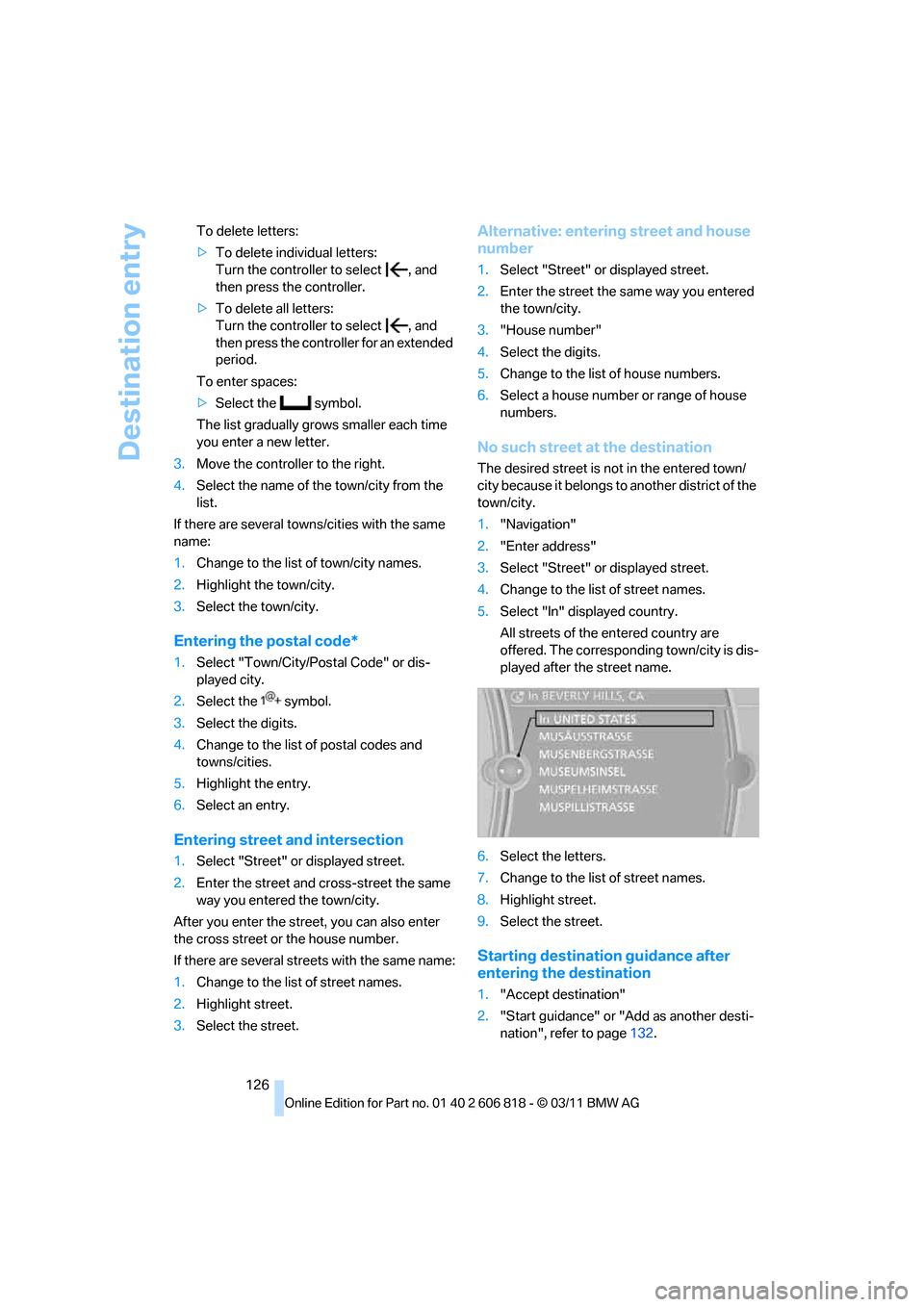
5.Select "In" displayed country.
All streets of the entered country are
offered. The corresponding town/city is dis-
played after the street name.
6.Select the letters.
7.Change to the list of street names.
8.Highlight street.
9.Select the street.
Starting destination guidance after
entering the destination
1."Accept destination"
2."Start guidance" or "Add as another desti-
nation", refer to page132.
Page 131 of 272
Navigation
Driving tips
129Reference
At a glance
Controls
Communications
Entertainment
Mobility
>"Along route"
A-Z search
1."A-Z search"
2."Town/City"
3.Select or enter town/city.
4."Category"
5.Select category.
6."Category details"
For some special destinations, it is possible
to select several category details.
Move the controller toward the left to exit
category details.
7."Keyword"
8.Enter keyword.
A list of the special destinations is dis-
played.
9.Select the special destination.
Details are displayed.
If several details are stored, then you can
scroll through the pages.
If a phone number is available, a connection
can be established, if desired.
10.Select the symbol.
11."Start guidance" or "Add as another desti-
nation". Adding destination as another des-
tination, refer to page132.
"Start search": without entering a search term,
the search is repeated with the last stored
search term.
Category search
1."Category search"
2."Town/City"
3.Select or enter town/city.
4."Category"
5.Select category.
6."Category details"
For some special destinations, it is possible
to select several category details.
Move the controller toward the left to exit
category details.7."Start search"
A list of the special destinations is dis-
played.
8.Select the special destination.
Details are displayed.
If several details are stored, then you can
scroll through the pages.
If a phone number is available, a connection
can be established, if desired.
9.Select the symbol.
10."Start guidance" or "Add as another desti-
nation". Adding destination as another des-
tination, refer to page132.
Displaying special destinations
List of special destinations: the special destina-
tions are displayed in order of their distance and
are displayed with a direction arrow pointing
toward the destination.
With the Professional navigation system:
In the split screen, special destinations from the
selected category are displayed as symbols in
the map view. The display depends on the map
scale and the category.
Destination entry via BMW Assist*
A connection to the BMW Concierge service is
established, refer to page199.
1."Navigation"
2."Enter address"
3.Open "Options".
4."BMW Assist dest. entry"
Displaying special destinations in the
map
To display symbols of the special destinations
in the map:
1."Navigation"
2."Map"
3.Open "Options".
Page 133 of 272
Navigation
Driving tips
131Reference
At a glance
Controls
Communications
Entertainment
Mobility
Destination entry via voice*
General information
For instructions on the voice activation system,
refer to page23.
>During the destination entry by voice, you
can switch between voice entry and entry
via iDrive at any time. To do so, reactivate
the voice activation system if necessary.
>Having the possible spoken commands
read aloud: {Voice commands}
Saying the entries
>With the Professional navigation system:
City/town, street, and house number can be
entered with a single command
*.
>Countries, towns and cities, streets and
intersections can be spoken as whole
words
* in the system language, refer to
page81, or can be spelled.
Example: to enter a destination in a US state
as a complete word, the system language
must be English.
>Spell the entry if the language spoken in the
area is different from the system language.
>Say the letters smoothly, and avoid exag-
gerating the pronunciation and inserting
lengthy pauses between the letters.
>The methods of entry depend on the navi-
gation data in use and on the country and
language settings.
Entering an address in a command*
1.Press the button on the steering wheel.
3.Wait for a request from the system.
4.Say the address aloud in the suggested
order.
5.Continue making the entry as prompted by
the system.
If necessary, individually name the separate
components of the address, e.g. the town/city.
Entering a town/city
The town/city name can be spoken as a com-
plete word
* or spelled.
With the destination entry menu displayed:
1.Press the button on the steering wheel.
3.Wait for the system to prompt you for the
town/city.
4.Say the name of the town/city or say at least
the first three letters.
Depending on the entry, up to 20 towns/cit-
ies may be suggested.
6.Continue making the entry as prompted by
the system.
If there are several towns/cities with the same
name:
Towns/cities that sound the same are compiled
in a separate list and are displayed as one town/
city followed by three dots.
1.Select an entry:
2.Select the desired town/city.
The town/city can also be selected from the list
via iDrive: turn the controller until the town/city
is selected and press the controller.
Entering a street or intersection
The street or intersection is entered in the same
manner as the town/city. 2.{Enter address}
2.{City} or {Spell city}.
5.Select a location:
>To select a recommended town/city:
{Yes}
>To select other town/city: {New
entry}
>To select an entry, e. g. {Entry …}
>To spell an entry: {Spell city}
{Yes} or {Entry …} e.g. entry 2.
Page 143 of 272
Navigation
Driving tips
141Reference
At a glance
Controls
Communications
Entertainment
Mobility
What to do if …
What to do if…
>The current position cannot be displayed?
The position is in an unrecognized region, in
a poor reception area, or the system is in the
process of determining the position.
Reception is generally available when you
are in the open.
>The destination guidance does not accept a
destination without a street name?
A downtown area cannot be determined for
the town or city that has been entered. Input
any street in the selected town/city and
start destination guidance.
>The destination guidance does not accept a
destination?
The destination data is not contained in the
navigation data. Choose a destination as
close as possible to the original one.
>The letters for a destination cannot be
selected during destination entry?
The stored data do not contain the data of
the destination. Select a destination that is
as close as possible to the original.
>The map view is displayed in grayscale?
"Traffic conditions/gray map" active: the
Control Display changes to a grayscale dis-
play. This enables a better view of the traffic
bulletins.
>Voice instructions are no longer issued
before intersections during destination
guidance?
The area has not been fully recorded yet, or
you have left the recommended route and
the system requires a few seconds to calcu-
late a new route suggestion.
Page 189 of 272
187
Entertainment
Reference
At a glance
Controls
Driving tips Communications
Navigation
Mobility
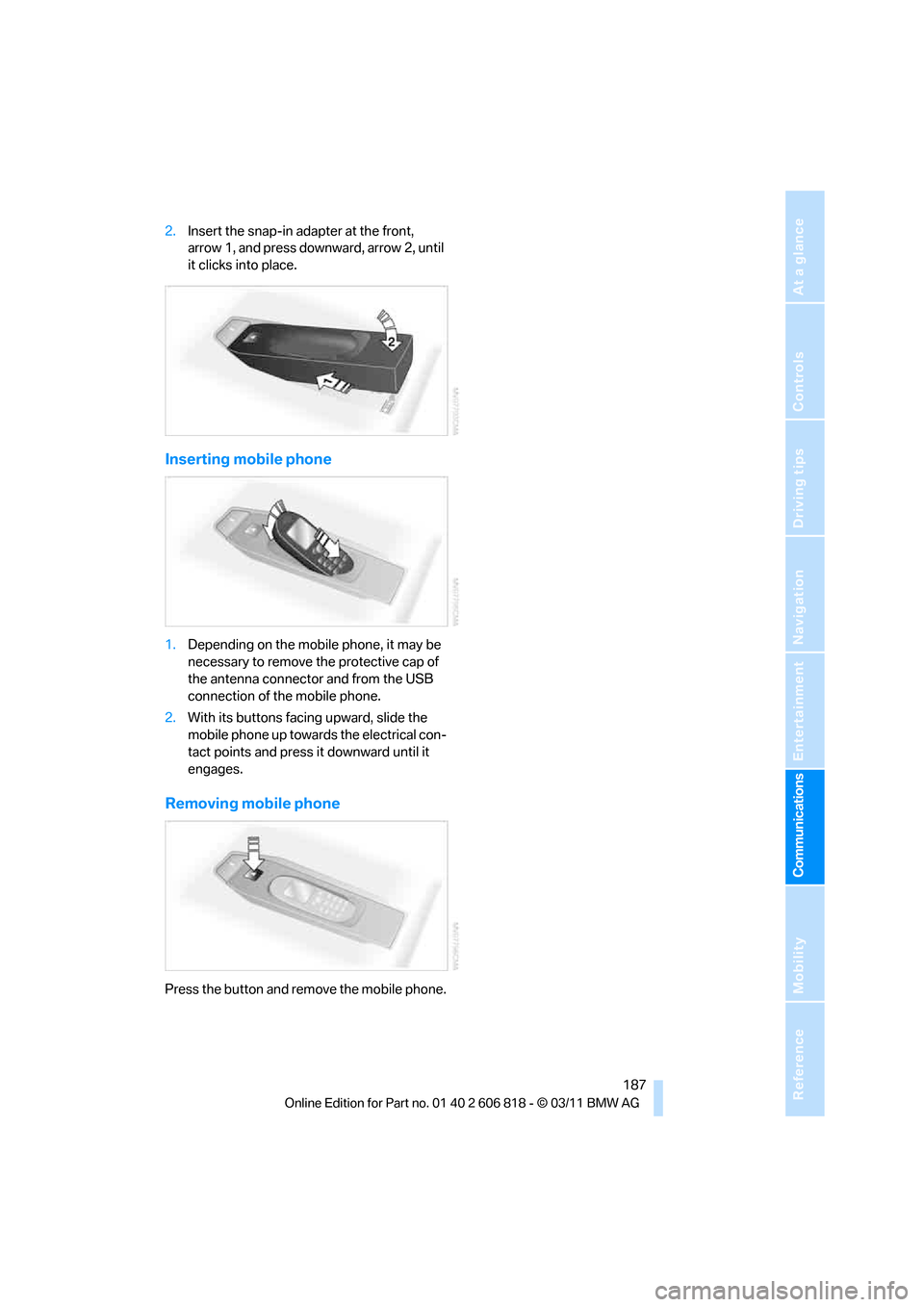
2.Insert the snap-in adapter at the front,
arrow 1, and press downward, arrow 2, until
it clicks into place.
Inserting mobile phone
1.Depending on the mobile phone, it may be
necessary to remove the protective cap of
the antenna connector and from the USB
connection of the mobile phone.
2.With its buttons facing upward, slide the
mobile phone up towards the electrical con-
tact points and press it downward until it
engages.
Removing mobile phone
Press the button and remove the mobile phone.
Page 197 of 272
195
Entertainment
Reference
At a glance
Controls
Driving tips Communications
Navigation
Mobility
Interrupt the reading. Select again to
resume the reading.
>"Back to beginning"
Read message again from the beginning.
>Select the symbol.
Skip back one paragraph.
>Select the symbol.
Skip over a paragraph.
>To terminate the reading, move the control-
ler toward the left.
What to do if…
For information on suitable mobile phones,
refer to page176.
>Appointments, tasks, notes, texts, or
emails
* from the mobile phone are not dis-
played?
The mobile phone is not suitable for the
missing function or is not correctly con-
nected.
The mobile phone has not been assigned
the Office function.
The mobile phone is connected as an auxil-
iary phone.
The appointments are older than 20 days
and are more than 50 days in the future.
The tasks have been marked as completed
or are more than 90days in the future.
Depending on the number of appointments,
tasks, notes, and messages stored in the
mobile phone, not all of them are displayed
in the vehicle.
>Appointments or tasks from the mobile
phone are not being displayed at the correct
time?
The time zone, time, or date is incorrectly
set in the Control Display and in the mobile
phone.
>Texts of entries are not displayed com-
pletely?
Texts are already shortened by the mobile
phone.Synchronization between the mobile phone
and vehicle can take a few minutes.
>Contact pictures are not being displayed?
Up to max. 200 contact pictures can be
stored in the vehicle.
>If you have gone through all items in the list
and still cannot activate the desired func-
tion please contact Customer Relations or a
BMW center.
Page 215 of 272
Mobility
213Reference
At a glance
Controls
Driving tips
Communications
Navigation
Entertainment
Temperature
The temperature grades are A, the highest, B,
and C, representing the tire's resistance to the
generation of heat and its ability to dissipate
heat when tested under controlled conditions
on a specified indoor laboratory test wheel.
Sustained high temperature can cause the
material of the tire to degenerate and reduce
tire life, and excessive temperature can lead to
sudden tire failure. The grade C corresponds to
a level of performance which all passenger car
tires must meet under the Federal Motor Vehi-
cle Safety Standard No. 109. Grades B and A
represent higher levels of performance on the
laboratory test wheel than the minimum
required by law.
The temperature grade for this tire is
established for a tire that is properly
inflated and not overloaded. Excessive speed,
underinflation, or excessive loading, either sep-
arately or in combination, can cause heat
buildup and possible tire failure.<
RSC – run-flat tires
You will recognize run-flat tires by a circular
symbol containing the letters RSC on the side
of the tire, refer to page214.
M+S
Winter and all-season tires.
These have better winter properties than sum-
mer tires.
XL
Designation for specially reinforced tires.
Tire condition
Inspect your tires frequently for tread wear,
signs of damage and for foreign objects lodged
in the tread. Check the tread depth.
Minimum tread depth
The tread depth should not drop below 0.12 in/
3 mm, although, for example, European legisla-
tion only specifies a minimum tread depth of 0.063 in/1.6 mm. At tread depths below 0.12 in/
3 mm there is an increased risk of high-speed
hydroplaning, even when only small amounts of
water are present on the road surface.
When winter tires wear down past a tread depth
of 0.16 in/4 mm, they become perceptibly less
suitable for winter conditions. In the interest of
safety, new tires should be installed.
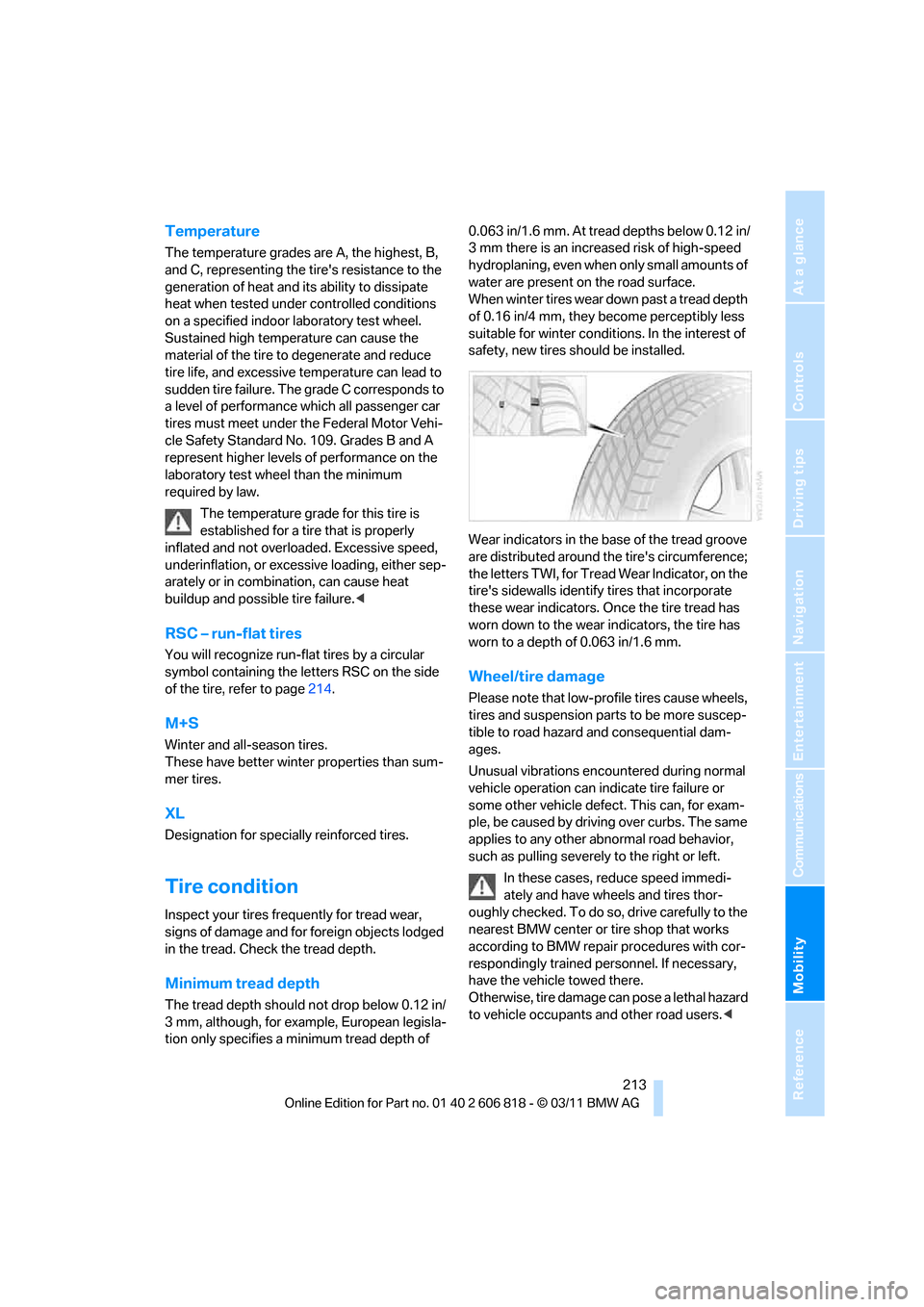
Wear indicators in the base of the tread groove
are distributed around the tire's circumference;
the letters TWI, for Tread Wear Indicator, on the
tire's sidewalls identify tires that incorporate
these wear indicators. Once the tire tread has
worn down to the wear indicators, the tire has
worn to a depth of 0.063 in/1.6 mm.
Wheel/tire damage
Please note that low-profile tires cause wheels,
tires and suspension parts to be more suscep-
tible to road hazard and consequential dam-
ages.
Unusual vibrations encountered during normal
vehicle operation can indicate tire failure or
some other vehicle defect. This can, for exam-
ple, be caused by driving over curbs. The same
applies to any other abnormal road behavior,
such as pulling severely to the right or left.
In these cases, reduce speed immedi-
ately and have wheels and tires thor-
oughly checked. To do so, drive carefully to the
nearest BMW center or tire shop that works
according to BMW repair procedures with cor-
respondingly trained personnel. If necessary,
have the vehicle towed there.
Otherwise, tire damage can pose a lethal hazard
to vehicle occupants and other road users.<
Page 226 of 272
Care
224
Sport automatic transmission with
double clutch
Before driving into an automatic car wash, per-
form the following steps to ensure that the vehi-
cle can roll:
1.Insert the remote control into the ignition
lock, even with Comfort Access.
2.Engage transmission position N.
3.Release the parking brake.
4.Switch off the engine.
5.Leave the remote control in the ignition lock
so that the vehicle can roll.
The transmission is switched into position P:
>Automatically after approx. 30 minutes
>If you remove the infrared remote control
from the ignition lock
Steam jets/high-pressure washers
When using steam jets or high-pressure
washers, make sure to maintain sufficient
distance from the vehicle and do not exceed a
temperature of 1407/606.
Insufficient clearance or excessive pressure or
temperature can lead to component damage or
water penetration. Follow the operating instruc-
tions for the steam jet or high-pressure
washer.<
When using high-pressure washers, do
not spray the sensors, e.g. of the Park
Distance Control, for an extended period and
maintain a distance of at least 1 ft/30 cm from
them.<
Manual car wash
When washing the vehicle by hand, use large
quantities of water and car shampoo if neces-
sary. Clean the vehicle with a sponge or wash-
ing brush, applying light pressure only.
Before cleaning the windshield, deacti-
vate the rain sensor or switch off the igni-
tion to prevent unintentional activation of the
wipers.<
Observe local regulations pertaining to
washing vehicles by hand.<
Headlamps
Do not rub them dry and do not use abrasive or
corrosive cleaning agents.
Loosen dirt, e.g. insects, with shampoo or
insect remover and wash away with copious
quantities of water.
Thaw ice with a windshield deicer and do not
use an ice scraper.
Windows
Clean the inside and outside surfaces of the
windows and the mirrors with window cleaner.
Do not clean the mirrors with cleaners
containing quartz.<
Convertible top care
The appearance and service life of the convert-
ible top largely depends on its proper care and
operation.
Please follow these instructions:
>Never attempt to fold and stow the convert-
ible top in the convertible compartment
when the top is wet or frozen. Otherwise,
water stains, mildew, and chafe marks may
occur.
>If water spots occur on the inside headliner
despite precautions, remove them using a
microfiber cloth and interior cleaner.
>If the vehicle is parked in an enclosed area
for a longer period of time, make sure that
there is sufficient ventilation.
>Remove any bird droppings immediately,
since they have corrosive properties which
will corrode the convertible top and damage
the rubber seals.
To remove stains from the convertible
top, do not use stain removers, paint thin-
ners, solvents, benzine or similar substances.
These cleaners may damage the rubber seals.
The improper care or cleaning methods may
cause the convertible top and its seams to
leak.<
To remove heavy soiling, use a special convert-
ible top cleaner.
Page 229 of 272
Mobility
227Reference
At a glance
Controls
Driving tips
Communications
Navigation
Entertainment
Replacing components
Onboard vehicle tool kit
The onboard vehicle tool kit is stored below the
floor mat in the cargo area.
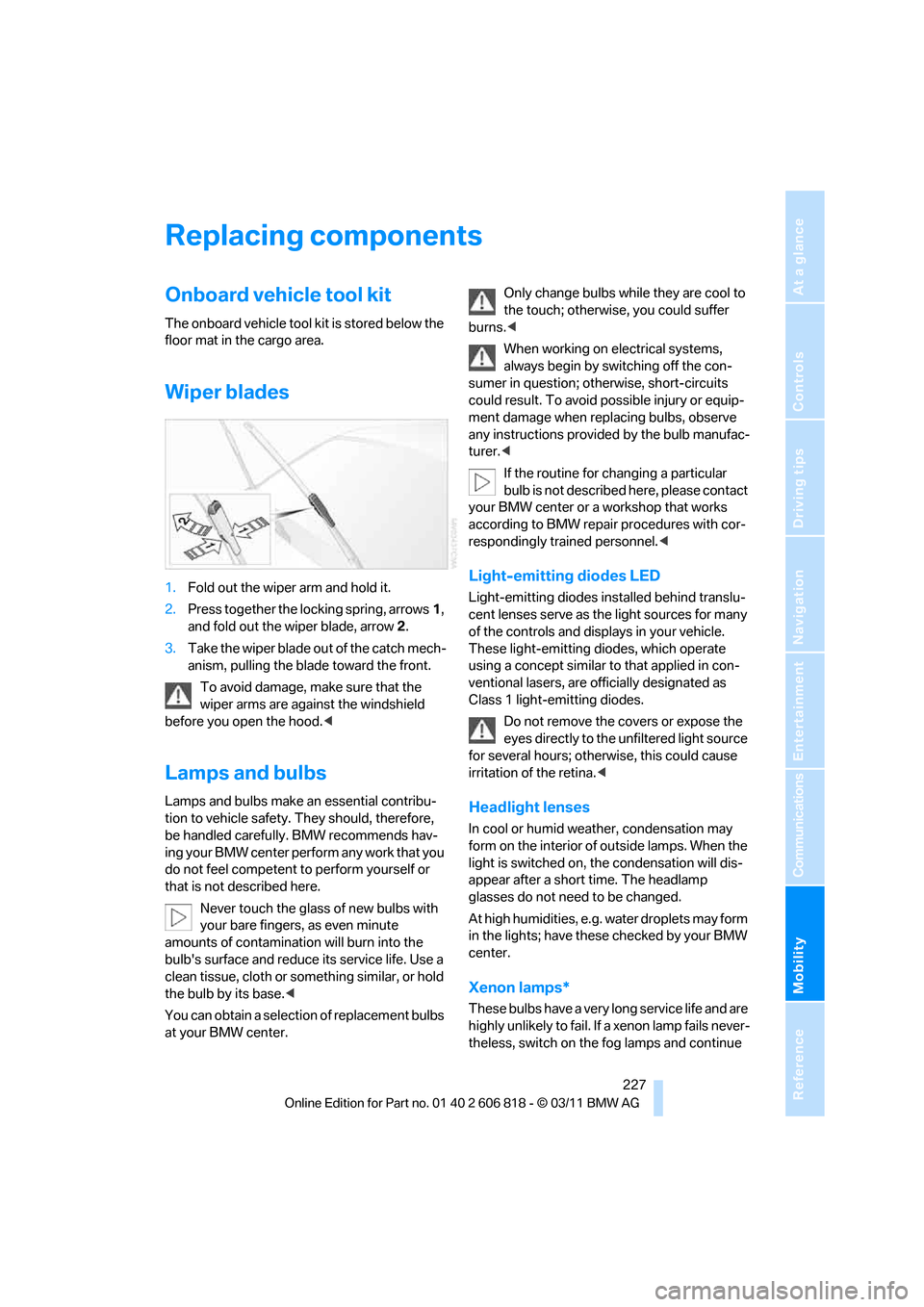
Wiper blades
1.Fold out the wiper arm and hold it.
2.Press together the locking spring, arrows1,
and fold out the wiper blade, arrow2.
3.Take the wiper blade out of the catch mech-
anism, pulling the blade toward the front.
To avoid damage, make sure that the
wiper arms are against the windshield
before you open the hood.<
Lamps and bulbs
Lamps and bulbs make an essential contribu-
tion to vehicle safety. They should, therefore,
be handled carefully. BMW recommends hav-
ing your BMW center perform any work that you
do not feel competent to perform yourself or
that is not described here.
Never touch the glass of new bulbs with
your bare fingers, as even minute
amounts of contamination will burn into the
bulb's surface and reduce its service life. Use a
clean tissue, cloth or something similar, or hold
the bulb by its base.<
You can obtain a selection of replacement bulbs
at your BMW center.Only change bulbs while they are cool to
the touch; otherwise, you could suffer
burns.<
When working on electrical systems,
always begin by switching off the con-
sumer in question; otherwise, short-circuits
could result. To avoid possible injury or equip-
ment damage when replacing bulbs, observe
any instructions provided by the bulb manufac-
turer.<
If the routine for changing a particular
bulb is not described here, please contact
your BMW center or a workshop that works
according to BMW repair procedures with cor-
respondingly trained personnel.<
Light-emitting diodes LED
Light-emitting diodes installed behind translu-
cent lenses serve as the light sources for many
of the controls and displays in your vehicle.
These light-emitting diodes, which operate
using a concept similar to that applied in con-
ventional lasers, are officially designated as
Class 1 light-emitting diodes.
Do not remove the covers or expose the
eyes directly to the unfiltered light source
for several hours; otherwise, this could cause
irritation of the retina.<
Headlight lenses
In cool or humid weather, condensation may
form on the interior of outside lamps. When the
light is switched on, the condensation will dis-
appear after a short time. The headlamp
glasses do not need to be changed.
At high humidities, e.g. water droplets may form
in the lights; have these checked by your BMW
center.
Xenon lamps*
These bulbs have a very long service life and are
highly unlikely to fail. If a xenon lamp fails never-
theless, switch on the fog lamps and continue