Settings BMW 128I 2012 E88 Service Manual
[x] Cancel search | Manufacturer: BMW, Model Year: 2012, Model line: 128I, Model: BMW 128I 2012 E88Pages: 272, PDF Size: 8.49 MB
Page 175 of 272
Navigation
Entertainment
Driving tips
173Reference
At a glance
Controls
Communications
Mobility
1."Settings"
2."Software update"
3."Restore previous version"
4.Click "OK" twice.
All of the listed software updates are removed.
Note
BMW Assist*, Office functions, and connected
devices may be temporarily unavailable during a
software update or while restoring to the previ-
ous version. Wait a few minutes until the func-
tions are available once more.
Page 180 of 272
Telephone
178 4.To perform other operations on the mobile
phone, refer to the owner's manual for the
device: e.g. search for and connect Blue-
tooth device or a new device.
The Bluetooth name of the vehicle appears
on the mobile phone display.
5.Select the Bluetooth name of the vehicle on
the mobile phone display.
You will be prompted by iDrive or the mobile
phone to enter the same Bluetooth pass-
key.
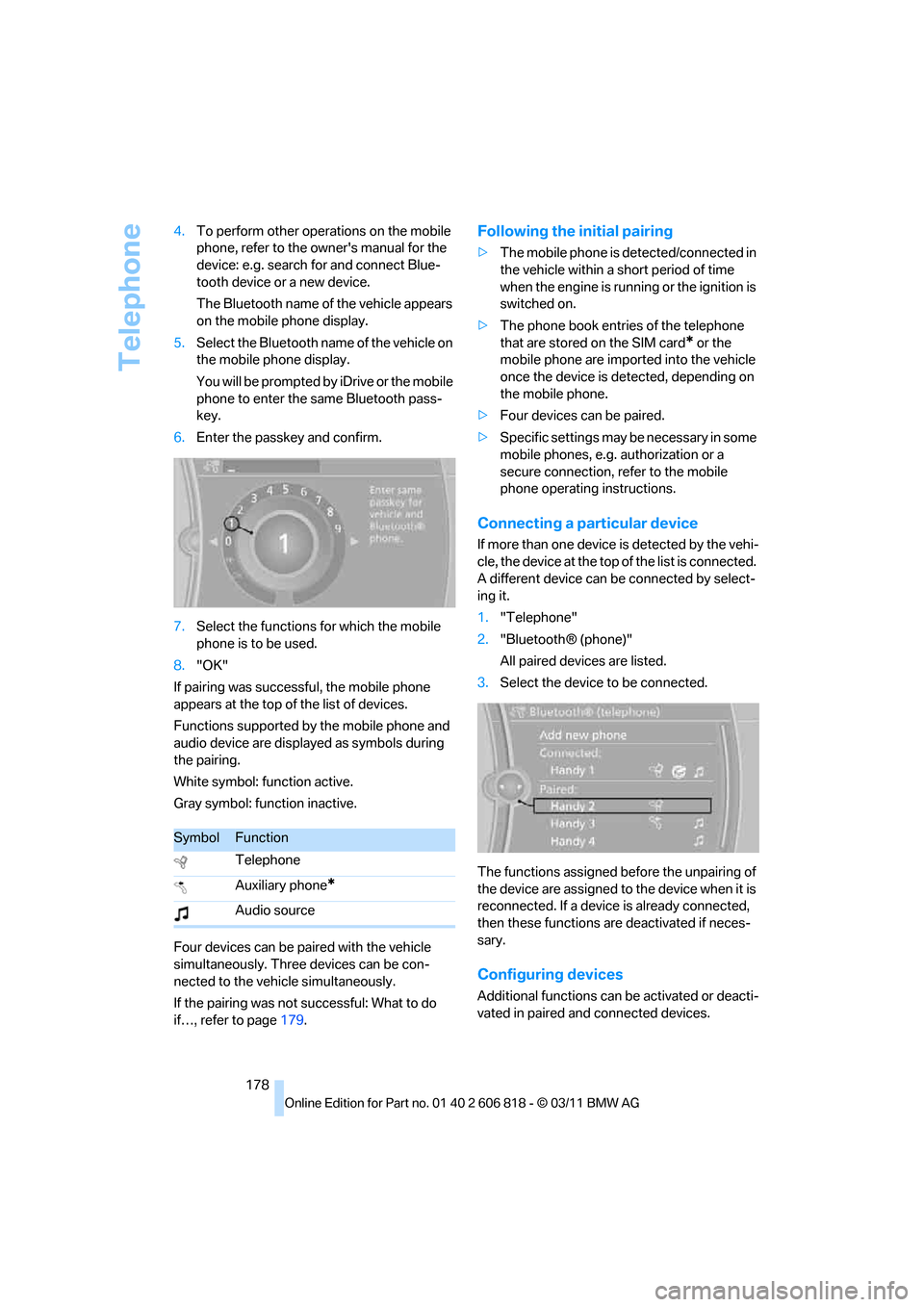
6.Enter the passkey and confirm.
7.Select the functions for which the mobile
phone is to be used.
8."OK"
If pairing was successful, the mobile phone
appears at the top of the list of devices.
Functions supported by the mobile phone and
audio device are displayed as symbols during
the pairing.
White symbol: function active.
Gray symbol: function inactive.
Four devices can be paired with the vehicle
simultaneously. Three devices can be con-
nected to the vehicle simultaneously.
If the pairing was not successful: What to do
if…, refer to page179.
Following the initial pairing
>The mobile phone is detected/connected in
the vehicle within a short period of time
when the engine is running or the ignition is
switched on.
>The phone book entries of the telephone
that are stored on the SIM card
* or the
mobile phone are imported into the vehicle
once the device is detected, depending on
the mobile phone.
>Four devices can be paired.
>Specific settings may be necessary in some
mobile phones, e.g. authorization or a
secure connection, refer to the mobile
phone operating instructions.
Connecting a particular device
If more than one device is detected by the vehi-
cle, the device at the top of the list is connected.
A different device can be connected by select-
ing it.
1."Telephone"
2."Bluetooth® (phone)"
All paired devices are listed.
3.Select the device to be connected.
The functions assigned before the unpairing of
the device are assigned to the device when it is
reconnected. If a device is already connected,
then these functions are deactivated if neces-
sary.
Configuring devices
Additional functions can be activated or deacti-
vated in paired and connected devices.
SymbolFunction
Telephone
Auxiliary phone
*
Audio source
Page 182 of 272
Telephone
180 >Is the mobile phone paired as an auxiliary
phone and is the auxiliary phone function
deactivated? Activate the function.
>Outgoing call not possible? Connect the
mobile phone as a telephone.
Phone book entries are not displayed, not all of
them are displayed, or they are displayed
incompletely.
>The transfer of phone book entries has not
yet completed.
>It is possible that only the phone book
entries of the mobile phone or the SIM
card
* are transferred.
>Phone book entries with special characters
may not be displayed.
>The number of phone book entries to be
stored is too high.
>The data volume of the phone book entry is
too great, e.g. due to additionally stored
information such as notes? Reduce the data
volume.
>Is the mobile phone connected as an audio
source or auxiliary phone? The mobile
phone must be connected as a telephone.
The telephone connection quality is low.
>Depending on the mobile phone, it is possi-
ble to adjust the strength of the Bluetooth
signal.
>Insert the mobile phone into the snap-in
adapter
* or place it in the vicinity of the cen-
ter console.
>Adjust the volume of the microphone and
speaker separately.
If you have gone through all items in the list and
still cannot activate the desired function, please
check the website www.bmw.com/bluetooth
for further notes or contact Customer Relations
or a BMW center.
Operation
Adjusting the volume
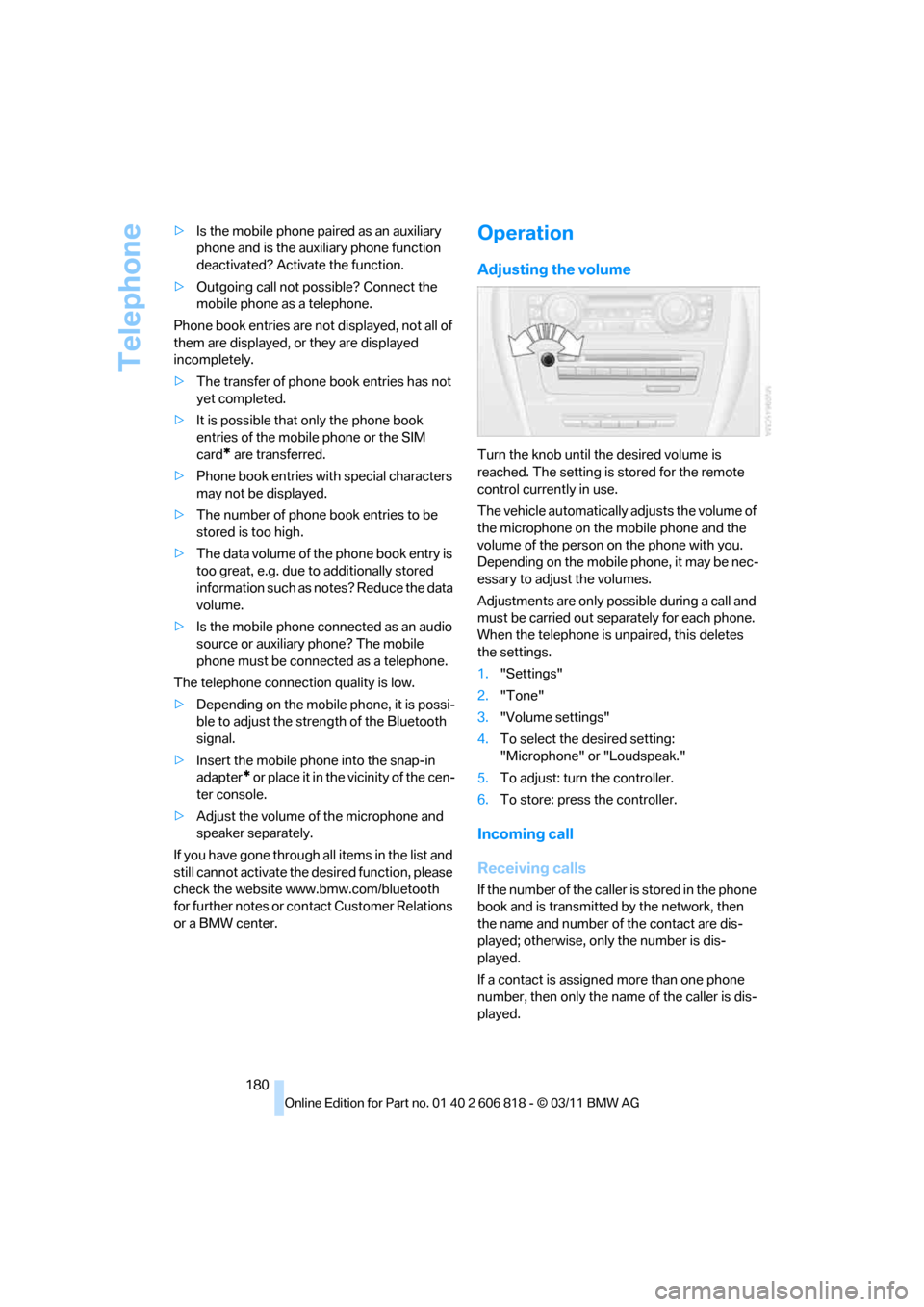
Turn the knob until the desired volume is
reached. The setting is stored for the remote
control currently in use.
The vehicle automatically adjusts the volume of
the microphone on the mobile phone and the
volume of the person on the phone with you.
Depending on the mobile phone, it may be nec-
essary to adjust the volumes.
Adjustments are only possible during a call and
must be carried out separately for each phone.
When the telephone is unpaired, this deletes
the settings.
1."Settings"
2."Tone"
3."Volume settings"
4.To select the desired setting:
"Microphone" or "Loudspeak."
5.To adjust: turn the controller.
6.To store: press the controller.
Incoming call
Receiving calls
If the number of the caller is stored in the phone
book and is transmitted by the network, then
the name and number of the contact are dis-
played; otherwise, only the number is dis-
played.
If a contact is assigned more than one phone
number, then only the name of the caller is dis-
played.
Page 224 of 272
Maintenance
222
Socket for Onboard
Diagnosis OBD
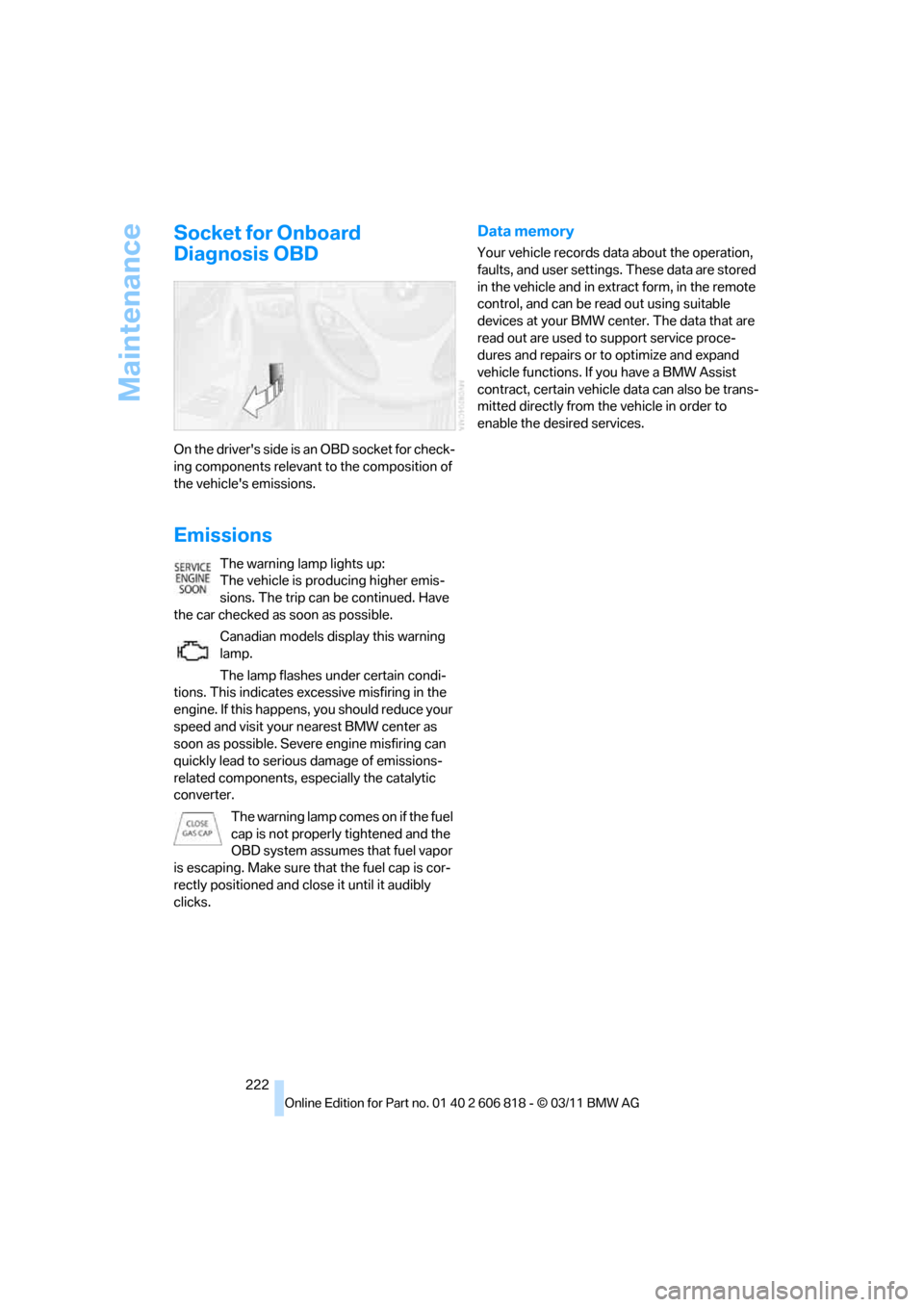
On the driver's side is an OBD socket for check-
ing components relevant to the composition of
the vehicle's emissions.
Emissions
The warning lamp lights up:
The vehicle is producing higher emis-
sions. The trip can be continued. Have
the car checked as soon as possible.
Canadian models display this warning
lamp.
The lamp flashes under certain condi-
tions. This indicates excessive misfiring in the
engine. If this happens, you should reduce your
speed and visit your nearest BMW center as
soon as possible. Severe engine misfiring can
quickly lead to serious damage of emissions-
related components, especially the catalytic
converter.
The warning lamp comes on if the fuel
cap is not properly tightened and the
OBD system assumes that fuel vapor
is escaping. Make sure that the fuel cap is cor-
rectly positioned and close it until it audibly
clicks.
Data memory
Your vehicle records data about the operation,
faults, and user settings. These data are stored
in the vehicle and in extract form, in the remote
control, and can be read out using suitable
devices at your BMW center. The data that are
read out are used to support service proce-
dures and repairs or to optimize and expand
vehicle functions. If you have a BMW Assist
contract, certain vehicle data can also be trans-
mitted directly from the vehicle in order to
enable the desired services.
Page 234 of 272
Replacing components
232
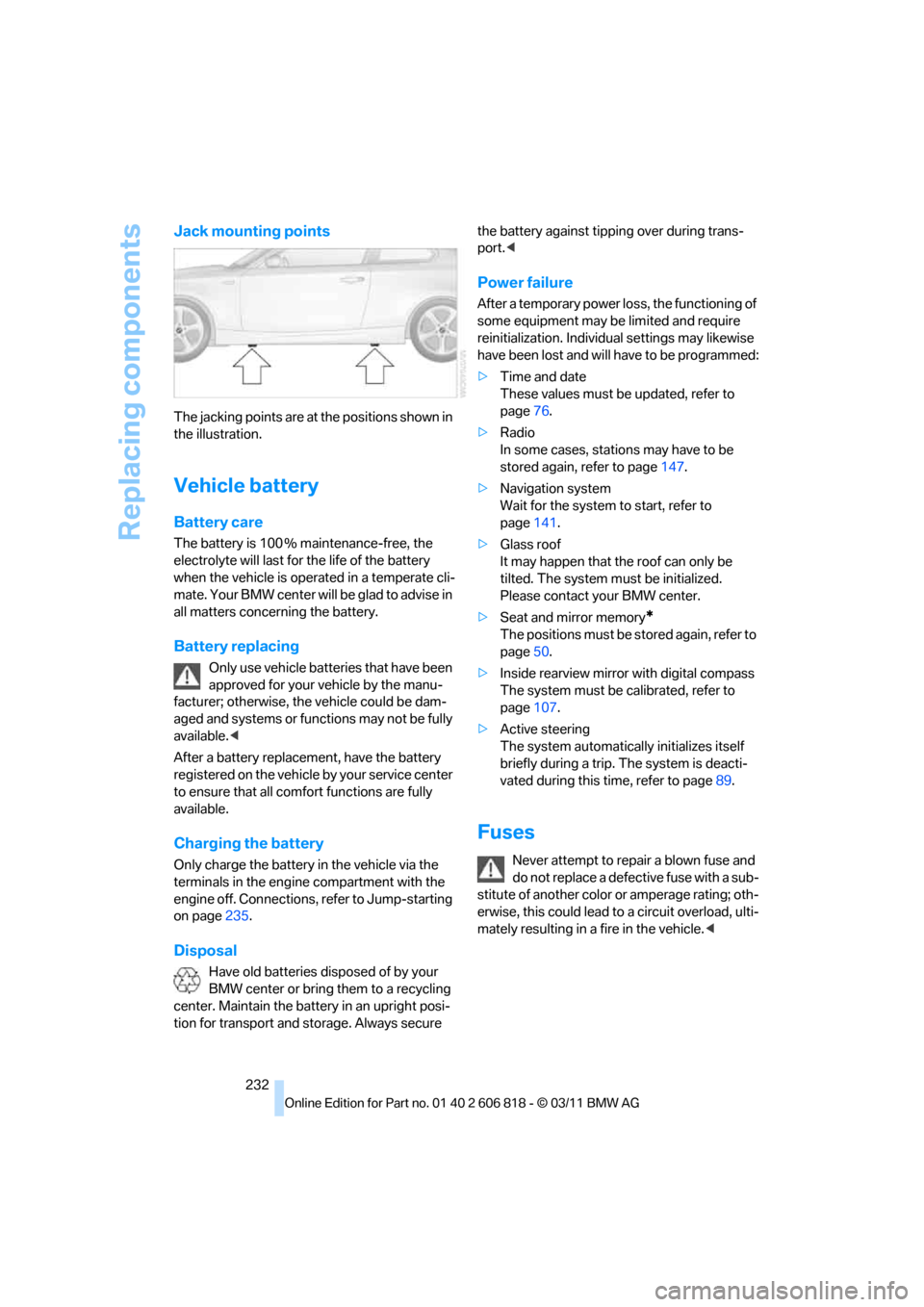
Jack mounting points
The jacking points are at the positions shown in
the illustration.
Vehicle battery
Battery care
The battery is 100 % maintenance-free, the
electrolyte will last for the life of the battery
when the vehicle is operated in a temperate cli-
mate. Your BMW center will be glad to advise in
all matters concerning the battery.
Battery replacing
Only use vehicle batteries that have been
approved for your vehicle by the manu-
facturer; otherwise, the vehicle could be dam-
aged and systems or functions may not be fully
available.<
After a battery replacement, have the battery
registered on the vehicle by your service center
to ensure that all comfort functions are fully
available.
Charging the battery
Only charge the battery in the vehicle via the
terminals in the engine compartment with the
engine off. Connections, refer to Jump-starting
on page235.
Disposal
Have old batteries disposed of by your
BMW center or bring them to a recycling
center. Maintain the battery in an upright posi-
tion for transport and storage. Always secure the battery against tipping over during trans-
port.<
Power failure
After a temporary power loss, the functioning of
some equipment may be limited and require
reinitialization. Individual settings may likewise
have been lost and will have to be programmed:
>Time and date
These values must be updated, refer to
page76.
>Radio
In some cases, stations may have to be
stored again, refer to page147.
>Navigation system
Wait for the system to start, refer to
page141.
>Glass roof
It may happen that the roof can only be
tilted. The system must be initialized.
Please contact your BMW center.
>Seat and mirror memory
*
The positions must be stored again, refer to
page50.
>Inside rearview mirror with digital compass
The system must be calibrated, refer to
page107.
>Active steering
The system automatically initializes itself
briefly during a trip. The system is deacti-
vated during this time, refer to page89.
Fuses
Never attempt to repair a blown fuse and
do not replace a defective fuse with a sub-
stitute of another color or amperage rating; oth-
erwise, this could lead to a circuit overload, ulti-
mately resulting in a fire in the vehicle.<
Page 249 of 272
Reference 247
At a glance
Controls
Driving tips
Communications
Navigation
Entertainment
Mobility
Short commands for the voice activation
system
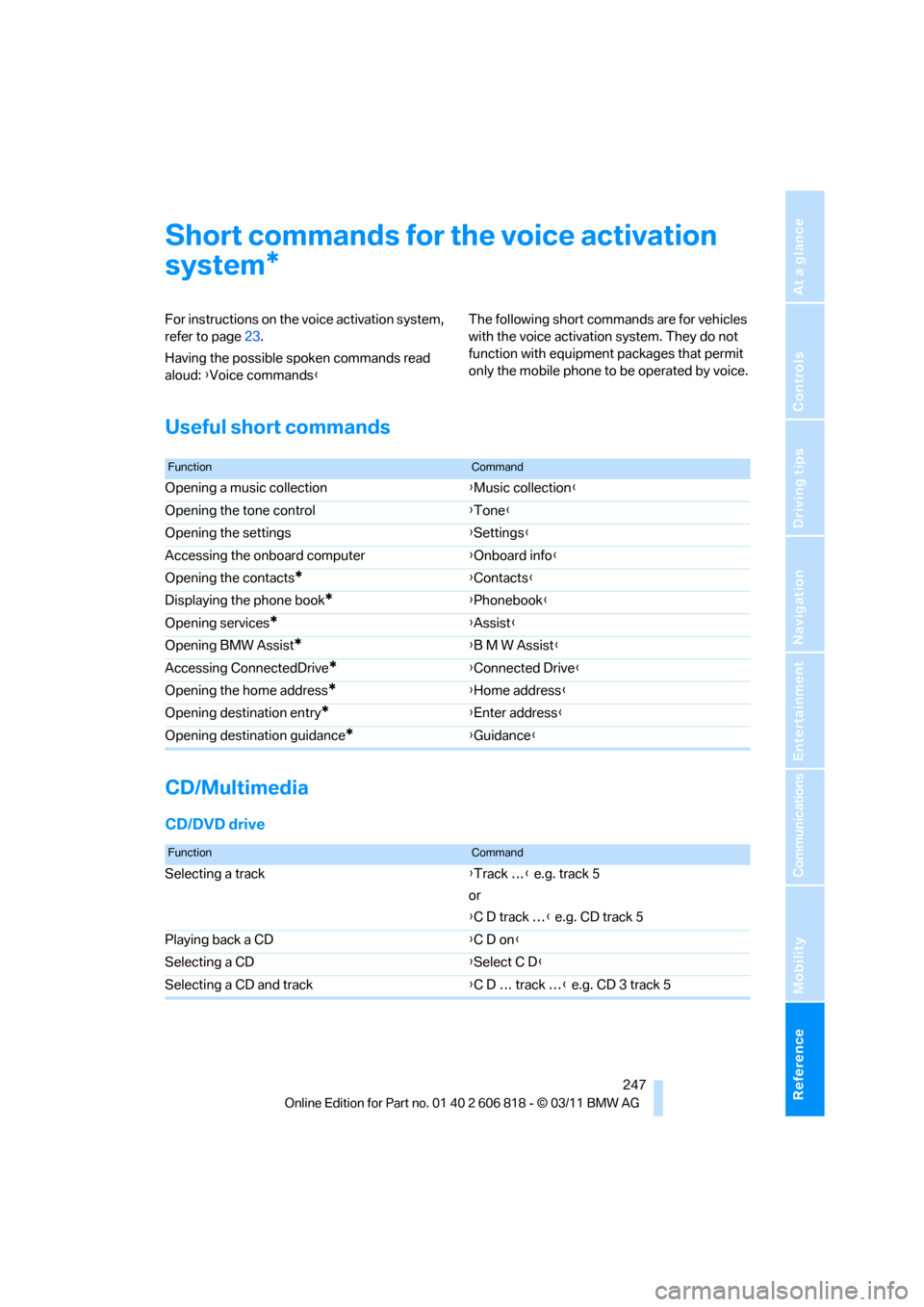
For instructions on the voice activation system,
refer to page23.
Having the possible spoken commands read
aloud: {Voice commands}The following short commands are for vehicles
with the voice activation system. They do not
function with equipment packages that permit
only the mobile phone to be operated by voice.
Useful short commands
CD/Multimedia
CD/DVD drive
*
FunctionCommand
Opening a music collection{Music collection}
Opening the tone control{Tone}
Opening the settings{Settings}
Accessing the onboard computer{Onboard info}
Opening the contacts
*{Contacts}
Displaying the phone book
*{Phonebook}
Opening services
*{Assist}
Opening BMW Assist
*{B M W Assist}
Accessing ConnectedDrive
*{Connected Drive}
Opening the home address
*{Home address}
Opening destination entry
*{Enter address}
Opening destination guidance
*{Guidance}
FunctionCommand
Selecting a track{Track …} e.g. track 5
or
{C D track …} e.g. CD track 5
Playing back a CD{C D on}
Selecting a CD{Select C D}
Selecting a CD and track{C D … track …} e.g. CD 3 track 5
Page 253 of 272
Reference 251
At a glance
Controls
Driving tips
Communications
Navigation
Entertainment
Mobility
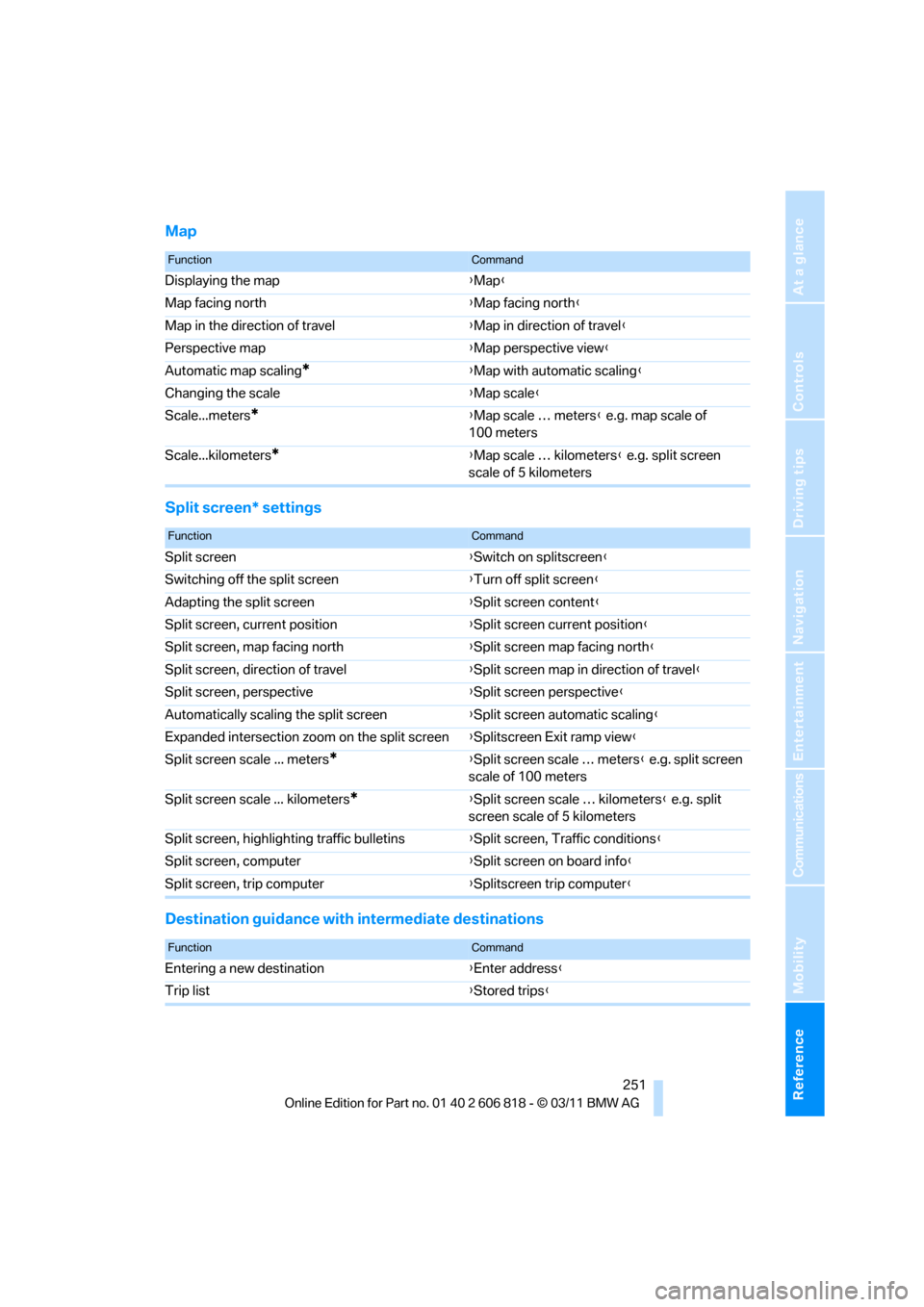
Map
Split screen* settings
Destination guidance with intermediate destinations
FunctionCommand
Displaying the map{Map}
Map facing north{Map facing north}
Map in the direction of travel{Map in direction of travel}
Perspective map{Map perspective view}
Automatic map scaling
*{Map with automatic scaling}
Changing the scale{Map scale}
Scale...meters
*{Map scale … meters} e.g. map scale of
100 meters
Scale...kilometers
*{Map scale … kilometers} e.g. split screen
scale of 5 kilometers
FunctionCommand
Split screen{Switch on splitscreen}
Switching off the split screen{Turn off split screen}
Adapting the split screen{Split screen content}
Split screen, current position{Split screen current position}
Split screen, map facing north{Split screen map facing north}
Split screen, direction of travel{Split screen map in direction of travel}
Split screen, perspective{Split screen perspective}
Automatically scaling the split screen{Split screen automatic scaling}
Expanded intersection zoom on the split screen{Splitscreen Exit ramp view}
Split screen scale ... meters
*{Split screen scale … meters} e.g. split screen
scale of 100 meters
Split screen scale ... kilometers
*{Split screen scale … kilometers} e.g. split
screen scale of 5 kilometers
Split screen, highlighting traffic bulletins{Split screen, Traffic conditions}
Split screen, computer{Split screen on board info}
Split screen, trip computer{Splitscreen trip computer}
FunctionCommand
Entering a new destination{Enter address}
Trip list{Stored trips}
Page 254 of 272
Short commands for the voice activation system
252
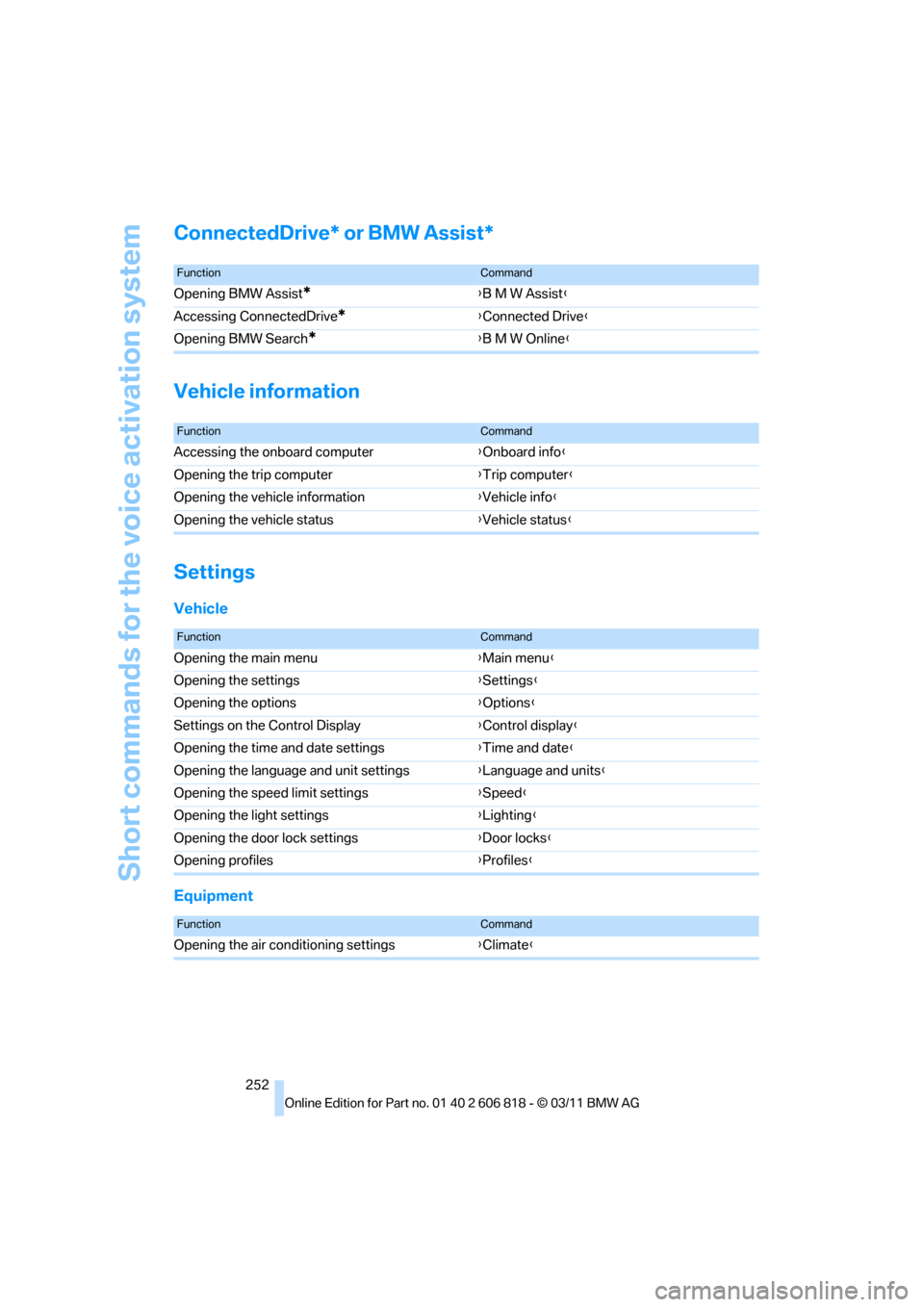
ConnectedDrive* or BMW Assist*
Vehicle information
Settings
Vehicle
Equipment
FunctionCommand
Opening BMW Assist*{B M W Assist}
Accessing ConnectedDrive
*{Connected Drive}
Opening BMW Search
*{B M W Online}
FunctionCommand
Accessing the onboard computer{Onboard info}
Opening the trip computer{Trip computer}
Opening the vehicle information{Vehicle info}
Opening the vehicle status{Vehicle status}
FunctionCommand
Opening the main menu{Main menu}
Opening the settings{Settings}
Opening the options{Options}
Settings on the Control Display{Control display}
Opening the time and date settings{Time and date}
Opening the language and unit settings{Language and units}
Opening the speed limit settings{Speed}
Opening the light settings{Lighting}
Opening the door lock settings{Door locks}
Opening profiles{Profiles}
FunctionCommand
Opening the air conditioning settings{Climate}
Page 258 of 272
Everything from A to Z
256 Cargo area lid, refer to Trunk
lid33
Cargo area net, refer to
Securing cargo120
Cargo loading119
– securing cargo120
– stowing cargo120
– vehicle119
Car jack
– jacking points232
Car key, refer to Integrated
key/remote control28
Car phone
– installation location, refer to
Center armrest108
– refer to separate Owner's
Manual
Car phone, refer to
Telephone176
Car radio, refer to Radio147
Car shampoo224
Car wash223
Catalytic converter, refer to
Hot exhaust system117
CD, audio playback155
CD changer155,159
– controls144
– fast forward/reverse157
– filling or emptying the
magazine159
– random play sequence156
– selecting a track155
– switching on/off144
– tone control144
– volume144
CD player155
– controls144
– fast forward/reverse157
– random order156
– selecting a track155
– switching on/off144
– tone control144
– volume144
Center armrest108
Center brake lamp, replacing
bulb231
Center console, refer to
Around the center
console14Central key, refer to Integrated
key/remote control28
Central locking
– from inside32
– from outside29
Central locking system29
– Comfort Access35
Changes, technical, refer to
For your own safety5
Changing bulbs227
Changing gears64
Changing the language on the
Control Display81
Changing wheels231
Chassis number, refer to
Engine compartment217
Check Control78
Child restraint fixing system
LATCH55
Child restraint systems54
Child seats54
Chrome parts225
Chrome polish225
Cigarette lighter109
Cleaning headlamps67
– washer fluid68
Cleaning your BMW, refer to
Care223
Climate control
– automatic air
distribution100
Clock70
– 12h/24h mode77
– setting the time and date77
– setting time76
Closing
– from inside32
– from outside29
Clothes hooks108
Cold start, refer to Starting the
engine58
Comfort Access35
– replacing the battery37
Comfort access, refer to
Comfort Access35
Comfort area, refer to Around
the center console14Compartment for remote
control, refer to Ignition
lock57
Compass106
Computer71
– displays on Control
Display72
Computer, refer to iDrive16
Concierge service199
Condensation, refer to When
the vehicle is parked119
Condition Based Service
CBS221
Configuring settings, refer to
Personal Profile28
Confirmation signals for
locking/unlocking the
vehicle30
ConnectedDrive198
Connecting vacuum cleaner,
refer to Connecting
electrical appliances109
Consumption, refer to
Average fuel
consumption72
Contacts188
– deleting190,197
– exporting/importing197
– new contact189
Control Center, refer to
iDrive16
Control Display16,17
Control Display, refer to iDrive
– switching on/off17
Controller, refer to iDrive16
Controls and displays10
Convenient opening and
closing
– windows30
– windows with Comfort
Access36
– with Comfort Access36
Convenient start, refer to
Starting the engine58
Convertible
– rollover protection
system92
– top40
– wind deflector43
Page 260 of 272
Everything from A to Z
258 Driving through water118
Driving tips, refer to Driving
notes116
Dry air, refer to Cooling
function101
DSC Dynamic Stability
Control83
DTC Dynamic Traction
Control84
– indicator lamps84
DVD
– country codes157
– settings158
– video playback157
DVD menu158
DVD player, refer to CD
player155
DVD video157
Dynamic Brake Control
DBC83
Dynamic destination
guidance140
Dynamic Stability Control
DSC83
Dynamic Traction Control
DTC84
– indicator lamps84
E
EBV Electronic brake-force
distribution83
Eject button, refer to Buttons
on the CD/DVD player144
Electrical defect
– 7-gear Sport automatic
transmission with double
clutch65
Electrical malfunction
– door lock32
– fuel filler flap206
– glass roof40
Electronic brake-force
distribution EBV83
Electronic oil level check217
Electronic Stability Program
ESP, refer to Dynamic
Stability Control DSC83
Email192Emergency operation, refer to
Manual operation
– door lock32
– fuel filler flap206
– glass roof40
– transmission lock, automatic
transmission61
Emergency release, trunk
lid34
Emergency Request234
Emergency services, refer to
Roadside Assistance234
Energy, saving
– saving fuel116
Engine
– breaking in116
– data242
– speed242
– starting58
– starting, Comfort Access35
– switching off58
Engine compartment217
Engine coolant, refer to
Coolant219
Engine oil
– adding219
– additives219
– alternative oil types219
– approved engine oils219
– BMW Maintenance
System221
– checking level217
– intervals between changes,
refer to Service
requirements74
Engine oil level, checking217
Engine output, refer to Engine
data242
Engine speed, refer to Engine
data242
Engine starting, refer to
Starting the engine58
Entering the postal code for
navigation126
Entry map for destination130
Equalizer, tone setting145
ESP Electronic Stability
Program, refer to Dynamic
Stability Control DSC83Exhaust system, refer to Hot
exhaust system117
Exterior mirrors51
– adjusting51
– automatic dimming
feature52
– automatic heating52
– folding in and out51
External devices
– random play sequence168
– software update172
Eyes
– for tow-starting and towing
away236
– for tying down loads120
F
Failure messages, refer to
Check Control78
Failure of an electrical
consumer232
False alarm, refer to Avoiding
unintentional alarms35
Fastening safety belts, refer to
Safety belts50
Fastest route for
navigation134
Fast forward
– CD changer157
– CD player157
Filter of automatic climate
control, refer to Microfilter/
activated charcoal filter102
First aid pouch235
Fixture for remote control,
refer to Ignition lock57
Flash when locking/
unlocking30
Flat tire
– run-flat tires214
– Tire Pressure Monitor
TPM86
Flat Tire Monitor FTM84
– indicating a flat tire85
– initializing the system85
– system limits84
Flat tires, refer to Tire
condition213