warning light BMW 128I 2013 User Guide
[x] Cancel search | Manufacturer: BMW, Model Year: 2013, Model line: 128I, Model: BMW 128I 2013Pages: 284, PDF Size: 6.93 MB
Page 96 of 284
95
Technology for driving comfort and safety
Controls
Message for unsuc
cessful system
reset
Yellow warning lamp lights up. A
message appears on the Control
Display.
The system has detected a wheel change, but
was not reset. A reliable warning is not possible
at the current inflation pressures.
Check the tire inflation pressure and reset the
system, refer to page 93.
Malfunction
The small warning lamp flashes in
yellow and then lights up continu-
ously; the large warning lamp lights
up in yellow. The tires appear in gray
in the Control Display. No punctures can be
detected.
Display in the following situations:
> A wheel without TPM electronics has been
installed:
Have it checked by your BMW center.
> Malfunction
Have the system checked
> Tire Pressure Monitor was unable to
complete the resetting process. Reset the
system again.
The small warning lamp flashes in
yellow and then lights up continu-
ously; the large warning lamp lights
up in yellow. The tires appear in gray
in the Control Display.
Display in the following situations:
Interference from systems or devices that use
the same radio frequency. The system auto-
matically becomes active again when the vehi-
cle moves out of the interference zone.
Declaration according to NHTSA/
FMVSS 138
Tire Pressure Monitoring Systems
Each tire should be checked monthly when cold
and inflated to the inflation pressure recom-
mended by the vehicle manufacturer on the vehicle placard or tire infl
ation pressure label. If
your vehicle has tires of a different size than the
size indicated on the vehi cle placard or tire infla-
tion pressure label, you should determine the
proper tire inflation pressure for those tires. As
an added safety feature, your vehicle has been
equipped with a tire pr essure monitoring sys-
tem, TPMS, that illuminate s a low tire pressure
t e l l t a l e w h e n o n e o r m o r e o f y o u r t i r e s a r e s i g n i f -
icantly underinflated. Accordingly, when the
low tire pressure telltal e illuminates, you should
stop and check your tires as soon as possible,
and inflate them to the proper pressure. Driving
on a significantly underinflated tire causes the
tire to overheat and ca n lead to tire failure.
Underinflation also reduces fuel efficiency and
tire tread life and may a ffect the vehicle's han-
dling and stopping ability. Please note that the
TPMS is not a substitute for proper tire mainte-
nance, and it is the driver's responsibility to
maintain correct tire pr essure, even if underin-
flation has not reached th e level to trigger illumi-
nation of the TPMS low tire pressure indicator.
The TPMS malfunction indicator is combined
with the low tire pressure telltale. When the sys-
tem detects a malfunction, the telltale will flash
for approximately one minute and then remain
continuously lit. This sequence will continue
upon subsequent vehicle startups as long as
the malfunction exists. When the malfunction
indicator is illuminated, the system may not be
able to detect or signal low tire pressure as
intended. TPMS malfunctions may occur for a
variety of reasons, includ ing the installation of
replacement or alternate tires or wheels on the
vehicle that prevent the TPMS from functioning
properly. Always check the TPMS malfunction
telltale after replacing one or more tires or
wheels on your vehicle to ensure that the
replacement or alternate tires and wheels allow
the TPMS to continue to function properly.
00320051004F004C00510048000300280047004C0057004C005200510003
Page 97 of 284
96
ControlsTechnology for driving comfort and safety
Active steering
The concept
Active steering varies the turning angle of the
front wheels in relation to steering wheel move-
ments. It also varies the steering force required
to turn the wheels depending on the speed at
which you are driving.
When you are driving in the low speed range,
e.g. in a town or when parking, the steering
angle is increased, i.e. steering becomes very
direct and less effort is required to turn the
wheels. In the higher speed range, on the other
hand, the steering angle is reduced as the
speed increases. This improves the handling of
your BMW over the entire speed range.
In critical situations, the system can make tar-
geted corrections to th e steering angle pro-
vided by the driver and thus stabilize the vehicle
before the driver intervenes. This stabilizing
intervention is simult aneously deactivated
when DSC is switched off, refer to page 89.
Malfunction
The warning lamps come on. Active
steering is malfunctioning or is tem-
porarily deactivate d. At low speeds,
greater steering wheel movements
are required, whereas at higher speeds the
vehicle reacts more sensitively to steering
wheel movements. Th e stability-enhancing
feature may also be deactivated. Drive cau-
tiously and think well ahead.
Deactivation
Active steering is deacti vated to perform an ini-
tialization. A message indicates that the feature
is deactivated. Initializ ation may take several
minutes.
If the message does not disappear during the
current trip, have the system checked.
Defect
If there is a defect, a corresponding text mes-
sage appears. Have the system checked.
Servotronic
The concept
The Servotronic varies the steering force
required to turn the wh eels relative to the
vehicle speed.
At low speeds, the steering force is strongly
assisted, i.e. less force is needed for steering.
As the vehicle speed increases, the steering
assisting power is reduced.
This system functions automatically.
Malfunctions
The warning lamp lights up. A mes-
sage appears on the Control Display.
Servotronic is malfunctioning or has
failed. Steering response will be different. You
can continue your journey, but moderate your
speed and exercise due caution. Have the
system checked as soon as possible.
Brake Force Display
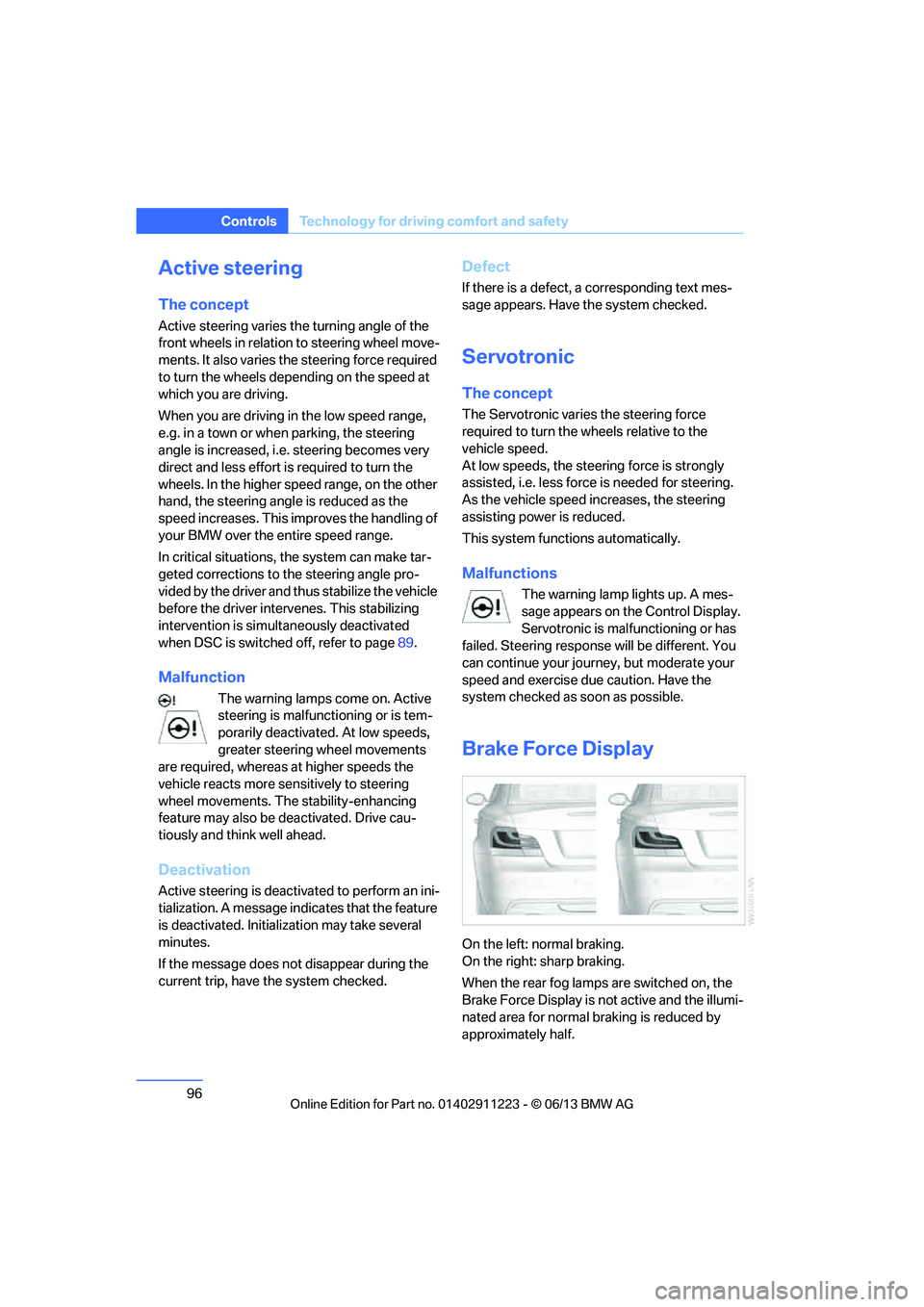
On the left: normal braking.
On the right: sharp braking.
When the rear fog lamps are switched on, the
Brake Force Display is no t active and the illumi-
nated area for normal braking is reduced by
approximately half.
00320051004F004C00510048000300280047004C0057004C005200510003
Page 99 of 284
98
ControlsTechnology for driving comfort and safety
Before transporting a child on the front
passenger seat, read the safety precau-
tions and handling inst ructions under Trans-
porting children safely, refer to page 58.
The front and side airbags can also be deacti-
vated by adolescents and adults sitting in cer-
tain positions; the indi cator lamp for the front
passenger airbags lights up. In such cases, the
passenger should change his or her sitting
position so that the fr ont passenger airbags are
activated and the indicator lamp goes out. If the
desired airbag status cannot be achieved by
changing the sitting position, transport the rele-
vant passenger on a rear seat. Do not attach
seat covers, seat cushion padding, ball mats or
other items to the front passenger seat unless
they are specifically recommended by BMW.
Do not place any items under the seat which
could press against the seat from below. Other-
wise, a correct analysis of the seat cushion is
not ensured. <
Status of front passenger airbags
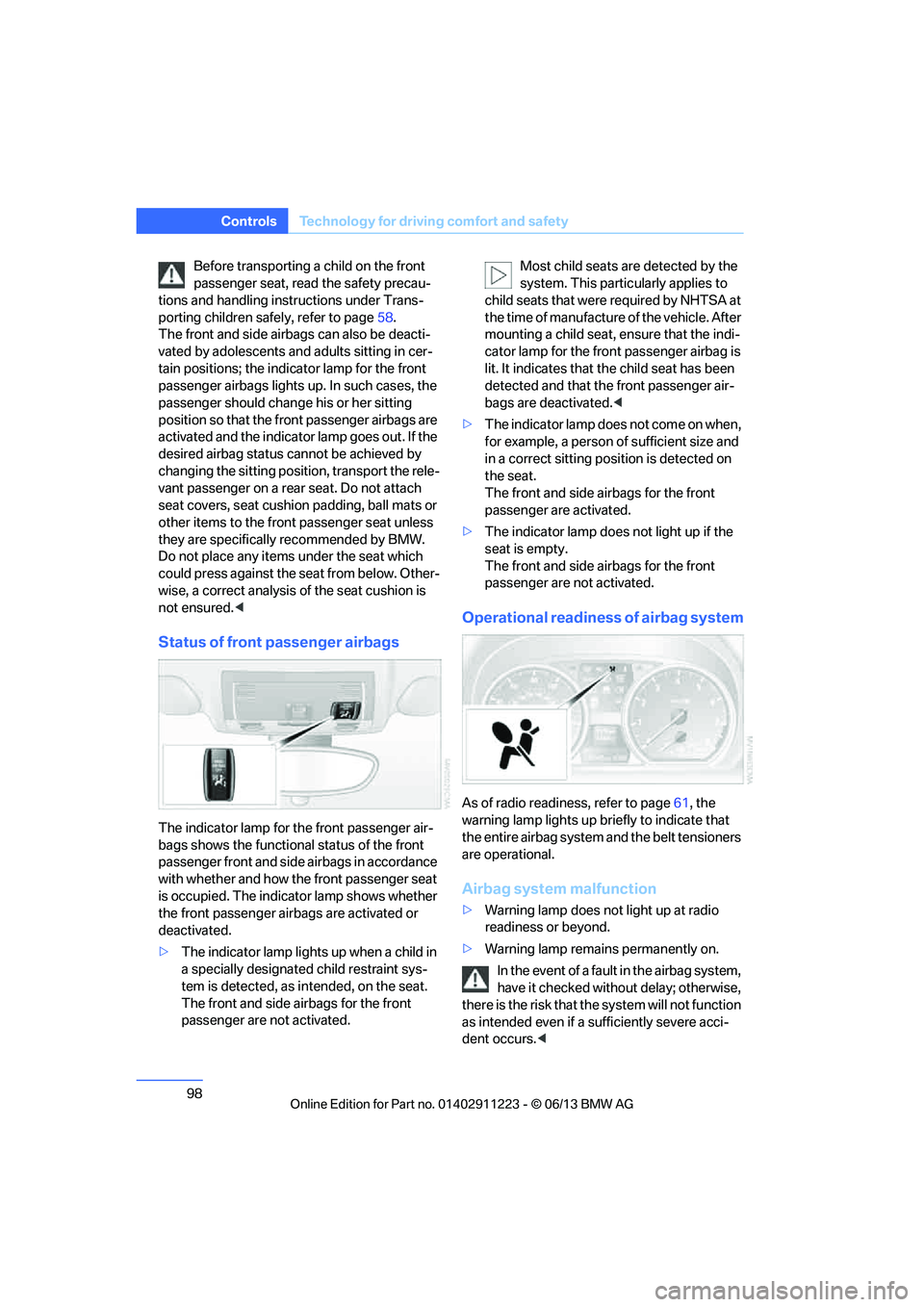
The indicator lamp for the front passenger air-
bags shows the functional status of the front
passenger front and side airbags in accordance
with whether and how the front passenger seat
is occupied. The indicator lamp shows whether
the front passenger airbags are activated or
deactivated.
>The indicator lamp lights up when a child in
a specially designated child restraint sys-
tem is detected, as in tended, on the seat.
The front and side airbags for the front
passenger are not activated. Most child seats are detected by the
system. This partic
ularly applies to
child seats that were required by NHTSA at
the time of manufacture of the vehicle. After
mounting a child seat, ensure that the indi-
cator lamp for the fron t passenger airbag is
lit. It indicates that th e child seat has been
detected and that the front passenger air-
bags are deactivated. <
> The indicator lamp does n o t c o m e o n w h e n ,
for example, a person of sufficient size and
in a correct sitting position is detected on
the seat.
The front and side airbags for the front
passenger are activated.
> The indicator lamp does not light up if the
seat is empty.
The front and side airbags for the front
passenger are not activated.
Operational readine ss of airbag system
As of radio readiness, refer to page 61, the
warning lamp lights up br iefly to indicate that
the entire airbag system and the belt tensioners
are operational.
Airbag system malfunction
> Warning lamp does not light up at radio
readiness or beyond.
> Warning lamp remains permanently on.
In the event of a fault in the airbag system,
have it checked withou t delay; otherwise,
there is the risk that th e system will not function
as intended even if a sufficiently severe acci-
dent occurs. <
00320051004F004C00510048000300280047004C0057004C005200510003
Page 103 of 284
102
ControlsLamps
angle and other parameters, the light from the
headlamp follows the course of the road.
In tight curves such as on switchbacks or when
turning, at speeds up to approx. 40 mph/
70 km/h, an additional, cornering light is
switched on that lights up the area inside the
curve.
Activating Adaptive Light Control
With the ignition switched on, turn the light
switch to position 3, refer to page 100.
The corner-illuminating lamp is switched on
automatically, depending on the steering wheel
angle or turn signal indicator.
Standstill function: to avoid blinding oncoming
traffic, the Adaptive Light Control does not
direct light toward the driver's side when the
vehicle is at a standstill.
When you are reversing, only the corner-illumi-
nating lamps are switched on and active on
both sides.
Malfunction
The warning lamp lights up. A mes-
sage appears on the Control Display.
The Adaptive Light Control is mal-
functioning or failed. Ha ve the system checked
as soon as possible.
High beams/roadside parking
lamps
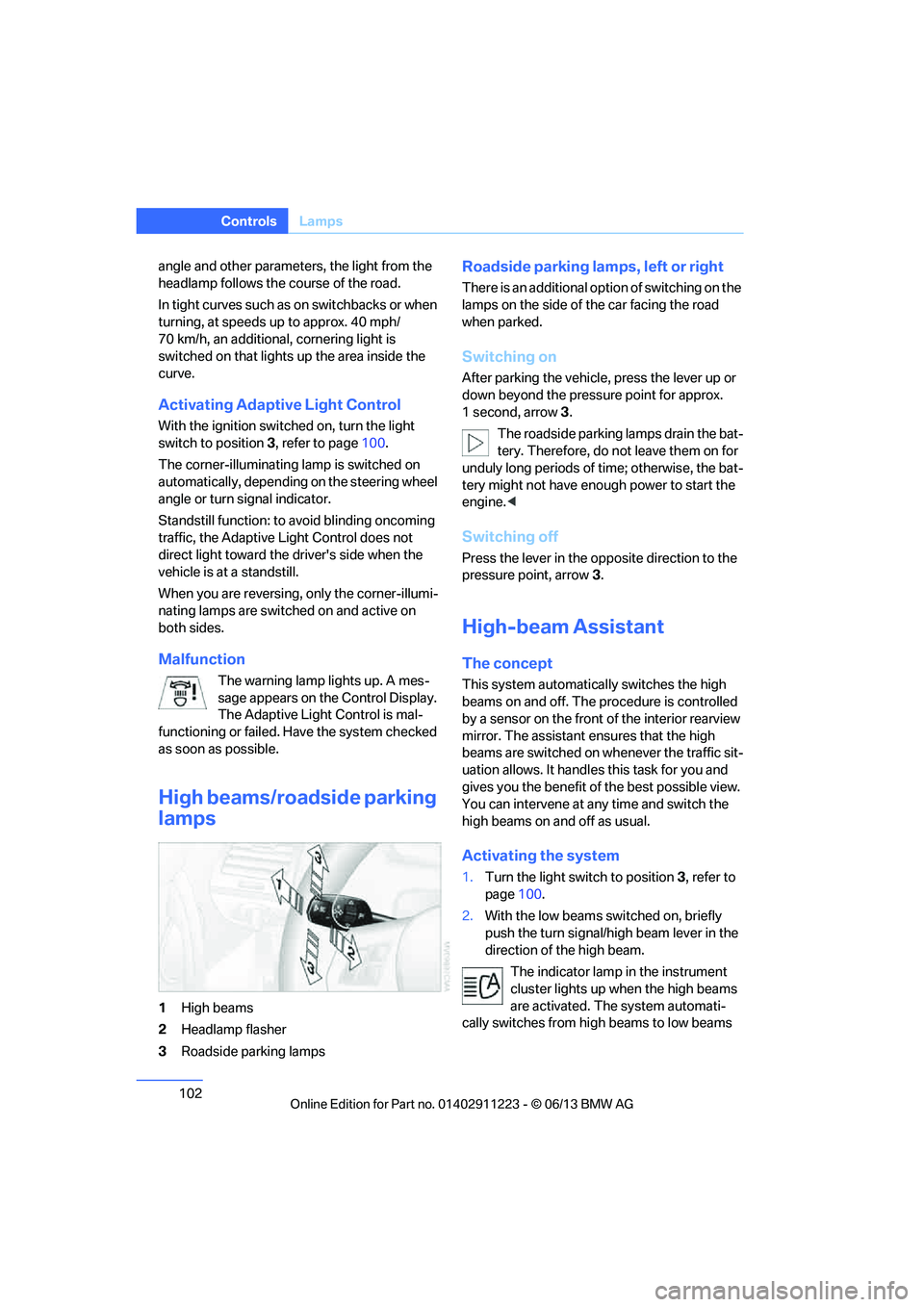
1 High beams
2 Headlamp flasher
3 Roadside parking lamps
Roadside parking lamps, left or right
There is an additional option of switching on the
lamps on the side of the car facing the road
when parked.
Switching on
After parking the vehicle, press the lever up or
down beyond the pressu re point for approx.
1 second, arrow 3.
The roadside parking lamps drain the bat-
tery. Therefore, do not leave them on for
unduly long periods of time; otherwise, the bat-
tery might not have enou gh power to start the
engine. <
Switching off
Press the lever in the o pposite direction to the
pressure point, arrow 3.
High-beam Assistant
The concept
This system automatically switches the high
beams on and off. The procedure is controlled
by a sensor on the front of the interior rearview
mirror. The assistant ensures that the high
beams are switched on whenever the traffic sit-
uation allows. It handle s this task for you and
gives you the benefit of the best possible view.
You can intervene at any time and switch the
high beams on and off as usual.
Activating the system
1. Turn the light switch to position 3, refer to
page 100.
2. With the low beams switched on, briefly
push the turn signal/high beam lever in the
direction of the high beam.
The indicator lamp in the instrument
cluster lights up when the high beams
are activated. The system automati-
cally switches from hi gh beams to low beams
00320051004F004C00510048000300280047004C0057004C005200510003
Page 237 of 284
236
MobilityEngine compartment
Coolant temperature
If the coolant and therefore the engine over-
heats, a warning lamp lights up. A message
appears on the Control Display.
Checking coolant level
Do not add coolant to the cooling system
when the engine is ho t. Escaping coolant
can cause burns. <
1. Do not open the engine hood before the
engine has cooled down.
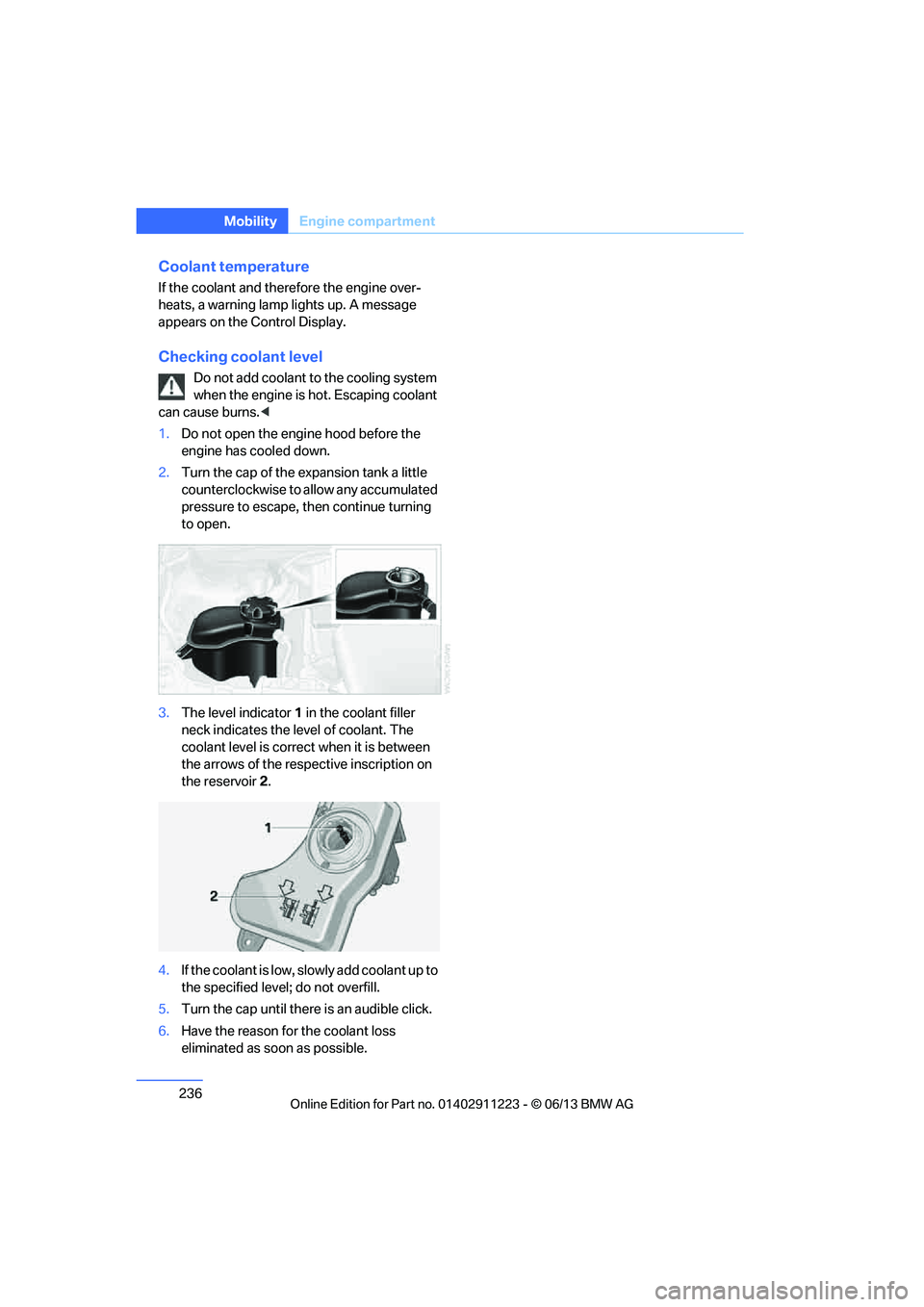
2. Turn the cap of the expansion tank a little
counterclockwise to allow any accumulated
pressure to escape, th en continue turning
to open.
3. The level indicator 1 in the coolant filler
neck indicates the level of coolant. The
coolant level is correct when it is between
the arrows of the respective inscription on
the reservoir 2.
4. If the coolant is low, sl owly add coolant up to
the specified level; do not overfill.
5. Turn the cap until there is an audible click.
6. Have the reason for the coolant loss
eliminated as so on as possible.
00320051004F004C00510048000300280047004C0057004C005200510003
Page 239 of 284
238
MobilityMaintenance
Socket for Onboard
Diagnosis OBD
The socket for onboard diagnosis should
only be used by your BMW center or at a
workshop that works according to BMW repair
procedures with correspondingly trained per-
sonnel and by otherwise authorized personnel;
otherwise, use can result in malfunctioning of
the vehicle.<
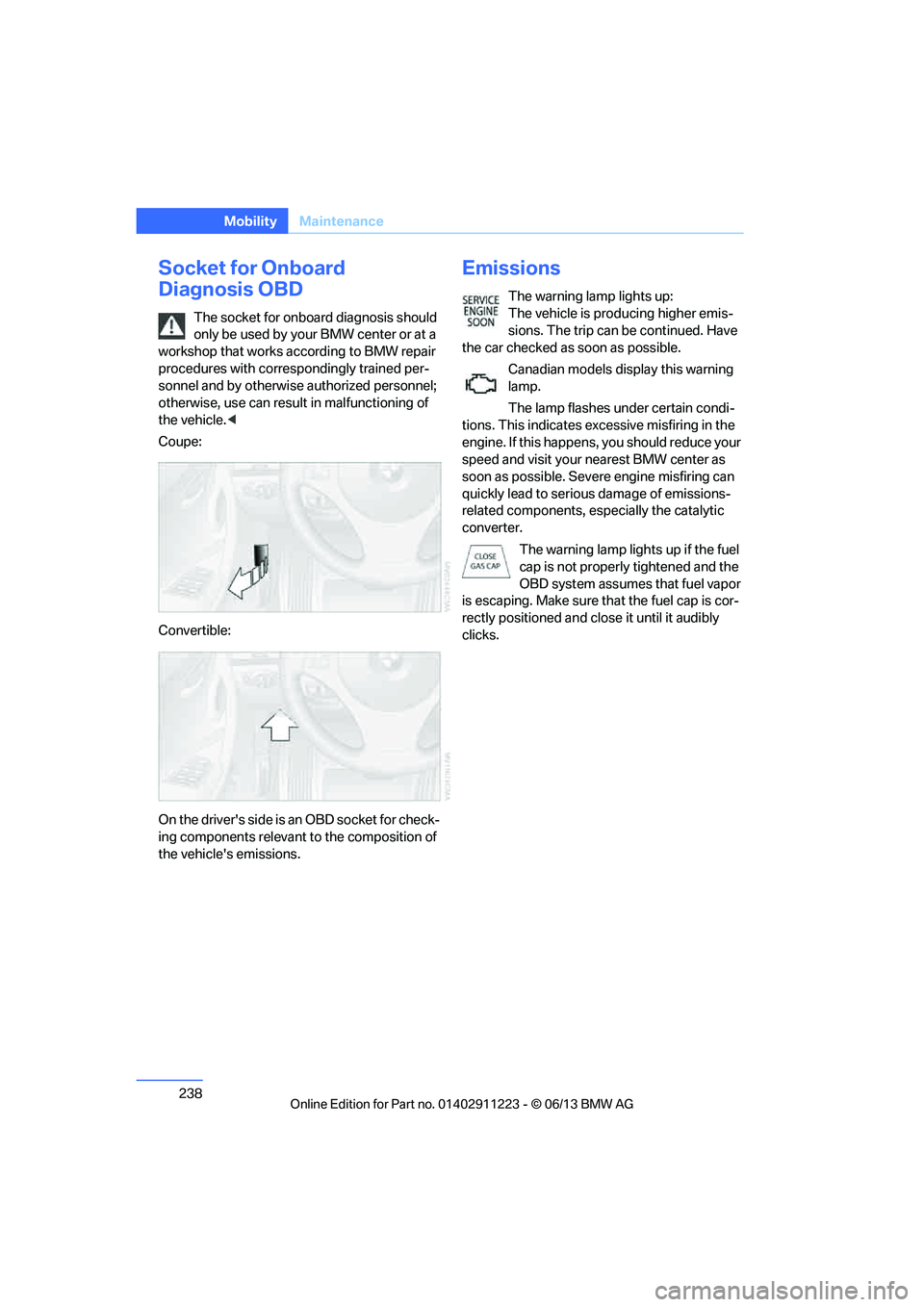
Coupe:
Convertible:
On the driver's side is an OBD socket for check-
ing components relevant to the composition of
the vehicle's emissions.
Emissions
The warning lamp lights up:
The vehicle is producing higher emis-
sions. The trip can be continued. Have
the car checked as soon as possible.
Canadian models display this warning
lamp.
The lamp flashes under certain condi-
tions. This indicates ex cessive misfiring in the
engine. If this happens, you should reduce your
speed and visit your nearest BMW center as
soon as possible. Severe engine misfiring can
quickly lead to serious damage of emissions-
related components, especially the catalytic
converter.
The warning lamp lights up if the fuel
cap is not properly tightened and the
OBD system assumes that fuel vapor
is escaping. Make sure that the fuel cap is cor-
rectly positioned and cl ose it until it audibly
clicks.
00320051004F004C00510048000300280047004C0057004C005200510003
Page 269 of 284
268
ReferenceEverything from A to Z
Everything from A to Z
Index
A
ABS Antilock Brake
System 89
Acceleration assistant, refer to Launch Control 70
Accessories, refer to Vehicle equipment 5
Accident, reporting, refer to
Emergency Request 250
Activated-charcoal filter 109
Active steering 96
Adaptive Light Control 101
Additives
– coolant 235
– engine oil 235
Address, entering 134,140
Address for navigation
– entering 134
Adjusting temperature 107
Airbags 97
– sitting safely 49
– warning lamp 98
Air conditioner 106
Air distribution
– automatic 107
Airing, refer to Ventilation 109
Air outlets, refer to Air vents 106
Air pressure, checking, refer to Tire inflation
pressure 223
Air recirculation, refer to Recirculated air mode 108
Air vents 106
Air volume 108
AKI, refer to Fuel grade 221Alarm system
38
– avoiding unintentional alarms 40
– interior motion sensor 39
– switching off an alarm 39
– tilt alarm sensor 39
Albums in music collection 175
ALL program 108
All-season tires, refer to Winter tires 231
AM, waveband 157
Ambient air, refer to Recirculated air mode 108
Antifreeze
– coolant 235
– washer fluid 72
Antilock Brake System
ABS 89
Anti-theft alarm system, refer
to Alarm system 38
Appointments, refer to Calendar 207
Approved axle loads, refer to Weights 259
Approved engine oils 235
Approved gross vehicle weight, refer to W
eights259
Apps 216
Armrest, refer to Center armrest 115
Arrival time
– computer 78
Ashtray 116
Assistance systems, refer to
Dynamic Stability Control
DSC 89 AUC Automatic recirculated
air control 108
Audible instructions, refer to
Voice instructions 145
Audio 154
– controls 154
– switching on/off 154
– tone control 155
– volume 155
Automatic
– air distribution 107
– air volume 107
– cruise control 73
– headlamp control 100
Automatic car washes 239
Automatic climate control 106
Automatic curb monitor 56
Automatic high beams and
low beams, refer to High-
beam Assistant 102
Automatic lamps
– refer to Welcome lamps 101
Automatic recirculated air
control AUC 108
Automatic Service Request 215
Automatic transmission with Steptronic 64
– selector lever lock 64
– shiftlock 64
– towing 252
– tow-starting 252
AUTO program for automatic climate control 107
AUX-In connection 177
Available services 216
Average fuel consumption 77
– setting the units 80
00320051004F004C00510048000300280047004C0057004C005200510003
Page 273 of 284
272
ReferenceEverything from A to Z
Directory for navigation, refer
to Address book 136
Display, refer to Control Display 20
Displaying contact
pictures 203
Display lighting, refer to Instrument lighting 104
Displays, refer to Instrument cluster 14
Displays and controls 12
Disposal
– of coolant 235
– remote control battery 42
– vehicle battery 249
Distance, refer to
Computer 78
Distance remaining to service, refer to Service
requirements 80
Distance to destination, refer to Computer 78
Distance warning, refer to Park Distance Control
PDC 88
Door key, refer to Integrated key/remote control 32
Door lock 36
Door lock, confirmation signals 35
Doors, manual operation 36
DOT Quality Grades 228
Draft-free ventilation 109
Drinks holders, refer to
Cupholders 116
Drive mode 68
Drive-off assistance, refer to
DSC 89
Drive-off assistant 90
Driving dynamics control 69
Driving lamps, refer to Parking lamps/low beams 100
Driving notes 124
Driving off on hills, refer to Drive-off assistant 90Driving stability control
systems 89
Driving through water 126
Driving tips, refer to Driving notes 124
Dry air, refer to Air conditioning 109
DSC Dynamic Stability
Control 89
DTC Dynamic Traction Control 90
– indicator lamps 90
DVD
– country codes 168
– settings 169
– video playback 168
DVD menu 169
DVD player, refer to CD player 166
DVD video 168
D y
namic Brake Control
DBC 89
Dynamic destination guidance 149
Dynamic Stability Control
DSC 89
Dynamic Traction Control DTC 90
– indicator lamps 90
E
EBV Electronic brake-force
distribution 89
Eject button, see buttons on the CD/DVD player 154
Electrical defect
– 7-gear Sport automatic transmission with double
clutch 69
Electrical malfunction
– door lock 36
– fuel filler flap 221
Electronic brake-force distribution EBV 89Electronic oil level check
233
Electronic Stability Program
ESP, refer to Dynamic
Stability Control DSC 89
E-mail 206
Emergency operation, refer to Manual operation
– door lock 36
– fuel filler flap 221
– transmission lock, automatic transmission 66
Emergency release, trunk lid 38
Emergency Request 250
Emergency services, refer to Roadside Assistance 251
Energy, saving
– saving fuel 124
Engine
– breaking in 124
– starting 62
– starting, Comfort Access 40
– switching off 63
Engine compartment 232
Engine coolant, refer to
Coolant 235
Engine oil
– adding 235
– additives 235
– alternative oil types 235
– approved engine oils 235
– BMW Maintenance System 237
– checking level 233
– intervals between changes, refer to Service
requirements 80
Engine oil level, checking 233
Engine starting, refer to Starting the engine 62
Entering the postal code for navigation 135
Entry map for destination 139
Equalizer, tone control 155
00320051004F004C00510048000300280047004C0057004C005200510003
Page 275 of 284
274
ReferenceEverything from A to Z
Headlamp control,
automatic 100
Headlamp cover 244
Headlamp flasher 71
– indicator lamp 15
Headlamps
– replacing bulbs 244
Head Light, refer to Adaptive
Light Control 101
Head restraints 52
Heated
– seats 54
– steering wheel 57
Heated mirrors 56
Heating
– mirrors 56
– seats 54
– steering wheel 57
Heating, rear window 109
Heating and ventilation 106
Heavy loads, refer to Stowing cargo 128
Height, refer to Dimensions 258
Height adjustment
– steering wheel 57
High-beam Assistant 102
High beams 102
– indicator lamp 15
– replacing bulbs 244
High beams and low beams,
automatic, refer to High-
beam Assistant 102
High-pressure washer 239
High water, refer to Driving through water 126
Highways, refer to Route
criteria 143
Hills 127
Holders for cups 116
Hood 232
Hot exhaust system 126
Hydraulic brake assist, refer to
Dynamic Brake Control 89
Hydroplaning 126I
IBOC, refer to HD radio 159
Ice warning, refer to Outside temperature warning 75
Identification marks
– tire coding 228
iDrive 20
– adjusting brightness 87
– changing date and time 83
– changing language 87
– menu guidance 21
– operating principle 20
– status information 23
Ignition 62
– switched off 62
– switched on 62
Ignition key, refer to Integrated key/remote
control 32
Ignition key position 1, refer to Radio readiness 61
Ignition key position 2, refer to Ignition on 62
Ignition lock 61
Incoming call 193
Indicator and warning lamps 15
– tire pressure monitor TPM 94
Individual settings, refer to
Personal Profile 32
Inflation pressure monitoring, refer to Tire Pressure
Monitor TPM 92
Initializing
– compass, refer to
Calibrating 114
– radio, refer to Storing stations 158
– refer to Setting the time and date 83
Initializing, Flat Tire Monitor
FTM 91 Instructions for navigation
system, refer to Voice
instructions 145
Instrument cluster 14
Instrument combination, refer
to Instrument cluster 14
Instrument lighting 104
Integrated key 32
Integrated universal remote control 111
Interactive map 139
Interior lamps 104
– remote control 35
Interior motion sensor 39
Interior rearview mirror 56
– automatic dimming
feature 56
– compass 113
Intermittent mode of the
wipers 72
Intersection, entering,
navigation 135
J
Jacking points
248
Jets, refer to Air vents 106
Jets, refer to Window washer
nozzles 72
Joystick, refer to iDrive 20
Jumpering, refer to Jump
starting 251
Jump starting 251
K
Key, refer to Integrated key/
remote control 32
Keyless go, refer to Comfort Access 40
Keyless opening and closing, refer to Comfort Access 40
Key Memory, refer to Personal
Profile 32
00320051004F004C00510048000300280047004C0057004C005200510003
Page 276 of 284
275
Everything from A to Z
Reference
Keypad dialing
195
Kickdown 65
Knock control 221
L
Lamps
– adaptive light control 101
– interior lighting 104
Lamps, refer to Parking lamps/ Low beams 100
Lamps and bulbs, replacing bulbs 243
Lashing eyes, refer to
Securing cargo 128
Last destinations 137
LATCH child restraint fixing system 59
Launch Control 70
Leather care 240
LED Light-emitting diodes 243
Length, refer to Dimensions 258
License plate lamp, replacing
bulb 247
Light
– instrument lighting 104
– refer to High-beam Assistant 102
Light-alloy wheels 241
Light control
– refer to High-beam Assistant 102
Light-emitting diodes LED 243
Lighter 117
– socket 117
Lighting
– lamps and bulbs 243
– of the instruments 104
– of vehicle, refer to Lamps 100
Light switch 100 Limit, refer to Speed limit
86
Load 127
Load securing equipment, refer to Securing cargo 128
Lock buttons of doors, refer to
Locking 37
Locking
– adjusting confirmation
signal 35
– from inside 37
– from outside 34
– without remote control, refer to Comfort Access 40
Locking and unlocking doors
– from inside 37
– from outside 34
Low beam control, refer to High-beam Assistant 102
Low-beam headlamps 100
– automatic 100
– replacing bulbs 244
Lower back support, refer to
Lumbar support 51
Luggage compartment
– lid, refer to Trunk lid 37
Luggage compartment, refer to Trunk
Luggage rack, refer to Roof-
mounted luggage rack 129
Lu mbar su
pport51
M
M+S tires, refer to Winter
tires 231
Maintenance, refer to
– BMW Maintenance
System 237
– Service and Warranty Information Booklet for US
models or in the Warranty
and Service Guide Booklet
for Canadian models
Maintenance system 237Malfunction warnings, refer to
Check Control 84
Managing music 175
Manually unlocking parking lock 69
Manual operation
– door lock 36
– fuel filler flap 221
– parking lock 69
– transmission lock, automatic transmission 66
Manual operation with automatic transmission 65
Manual transmission 64
Map for navigation
– changing scale 146
– entering destination 139
Map view 145
Maximum cooling 107
Maximum speed
– for winter tires 231
Menus, refer to iDrive 20
Messages 204
Messages from the Concierge service 205
Microfilter/activated-charcoal filter for automatic climate
control 109
Microphone for telephone 16
Mirror dimming feature 56
Mirrors 55
– automatic curb monitor 56
– exterior mirrors 55
– heating 56
– interior rearview mirror 56
Mobile phone
– adjusting volume 193
– connecting, refer to Mobile phone, pairing 189
– operation 193
– pairing 189
– suitable mobile phones 188
– unpairing 191
– what to do if…. 192
00320051004F004C00510048000300280047004C0057004C005200510003