Adaptive light control BMW 128I COUPE 2011 E82 Owner's Manual
[x] Cancel search | Manufacturer: BMW, Model Year: 2011, Model line: 128I COUPE, Model: BMW 128I COUPE 2011 E82Pages: 256, PDF Size: 8.41 MB
Page 12 of 256
Dashboard
10
Dashboard
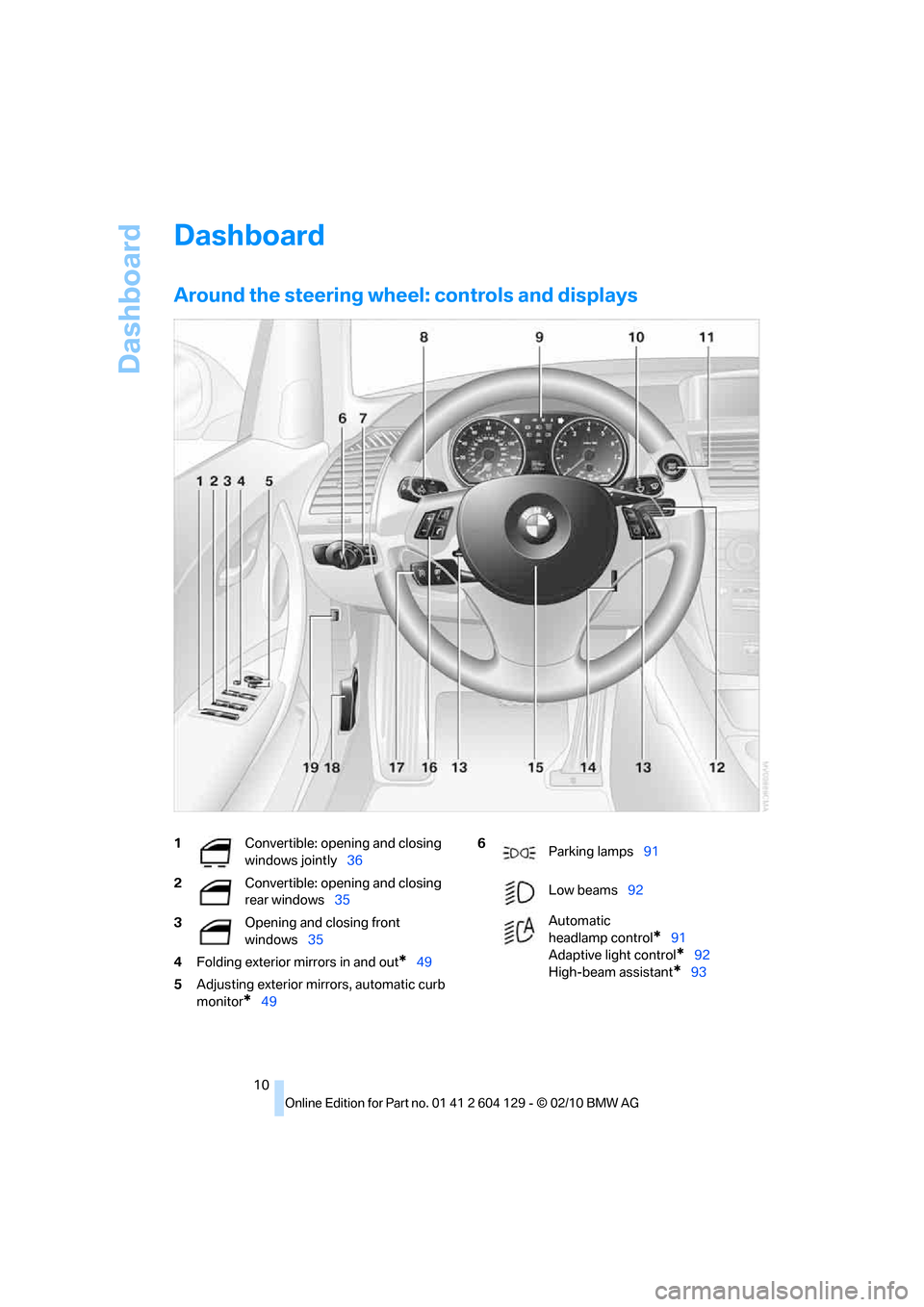
Around the steering wheel: controls and displays
1Convertible: opening and closing
windows jointly36
2Convertible: opening and closing
rear windows35
3Opening and closing front
windows35
4Folding exterior mirrors in and out
*49
5Adjusting exterior mirrors, automatic curb
monitor
*49
6
Parking lamps91
Low beams92
Automatic
headlamp control
*91
Adaptive light control
*92
High-beam assistant
*93
Page 93 of 256
Controls
91Reference
At a glance
Driving tips
Communications
Navigation
Entertainment
Mobility
Lamps
Parking lamps/low beams
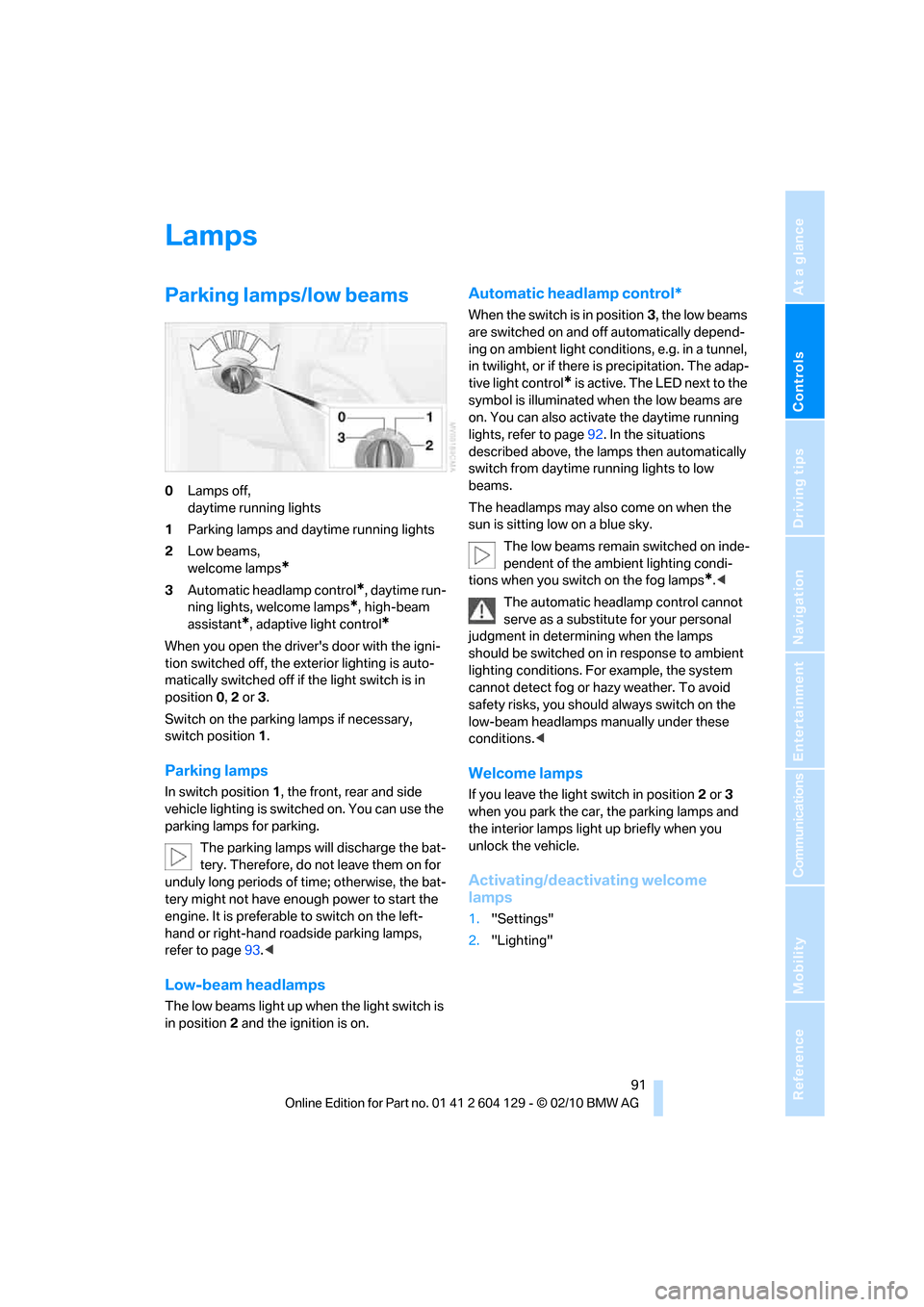
0Lamps off,
daytime running lights
1Parking lamps and daytime running lights
2Low beams,
welcome lamps
*
3Automatic headlamp control*, daytime run-
ning lights, welcome lamps
*, high-beam
assistant
*, adaptive light control*
When you open the driver's door with the igni-
tion switched off, the exterior lighting is auto-
matically switched off if the light switch is in
position 0, 2 or 3.
Switch on the parking lamps if necessary,
switch position 1.
Parking lamps
In switch position1, the front, rear and side
vehicle lighting is switched on. You can use the
parking lamps for parking.
The parking lamps will discharge the bat-
tery. Therefore, do not leave them on for
unduly long periods of time; otherwise, the bat-
tery might not have enough power to start the
engine. It is preferable to switch on the left-
hand or right-hand roadside parking lamps,
refer to page93.<
Low-beam headlamps
The low beams light up when the light switch is
in position 2 and the ignition is on.
Automatic headlamp control*
When the switch is in position3, the low beams
are switched on and off automatically depend-
ing on ambient light conditions, e.g. in a tunnel,
in twilight, or if there is precipitation. The adap-
tive light control
* is active. The LED next to the
symbol is illuminated when the low beams are
on. You can also activate the daytime running
lights, refer to page92. In the situations
described above, the lamps then automatically
switch from daytime running lights to low
beams.
The headlamps may also come on when the
sun is sitting low on a blue sky.
The low beams remain switched on inde-
pendent of the ambient lighting condi-
tions when you switch on the fog lamps
*.<
The automatic headlamp control cannot
serve as a substitute for your personal
judgment in determining when the lamps
should be switched on in response to ambient
lighting conditions. For example, the system
cannot detect fog or hazy weather. To avoid
safety risks, you should always switch on the
low-beam headlamps manually under these
conditions.<
Welcome lamps
If you leave the light switch in position 2 or 3
when you park the car, the parking lamps and
the interior lamps light up briefly when you
unlock the vehicle.
Activating/deactivating welcome
lamps
1."Settings"
2."Lighting"
Page 94 of 256
Lamps
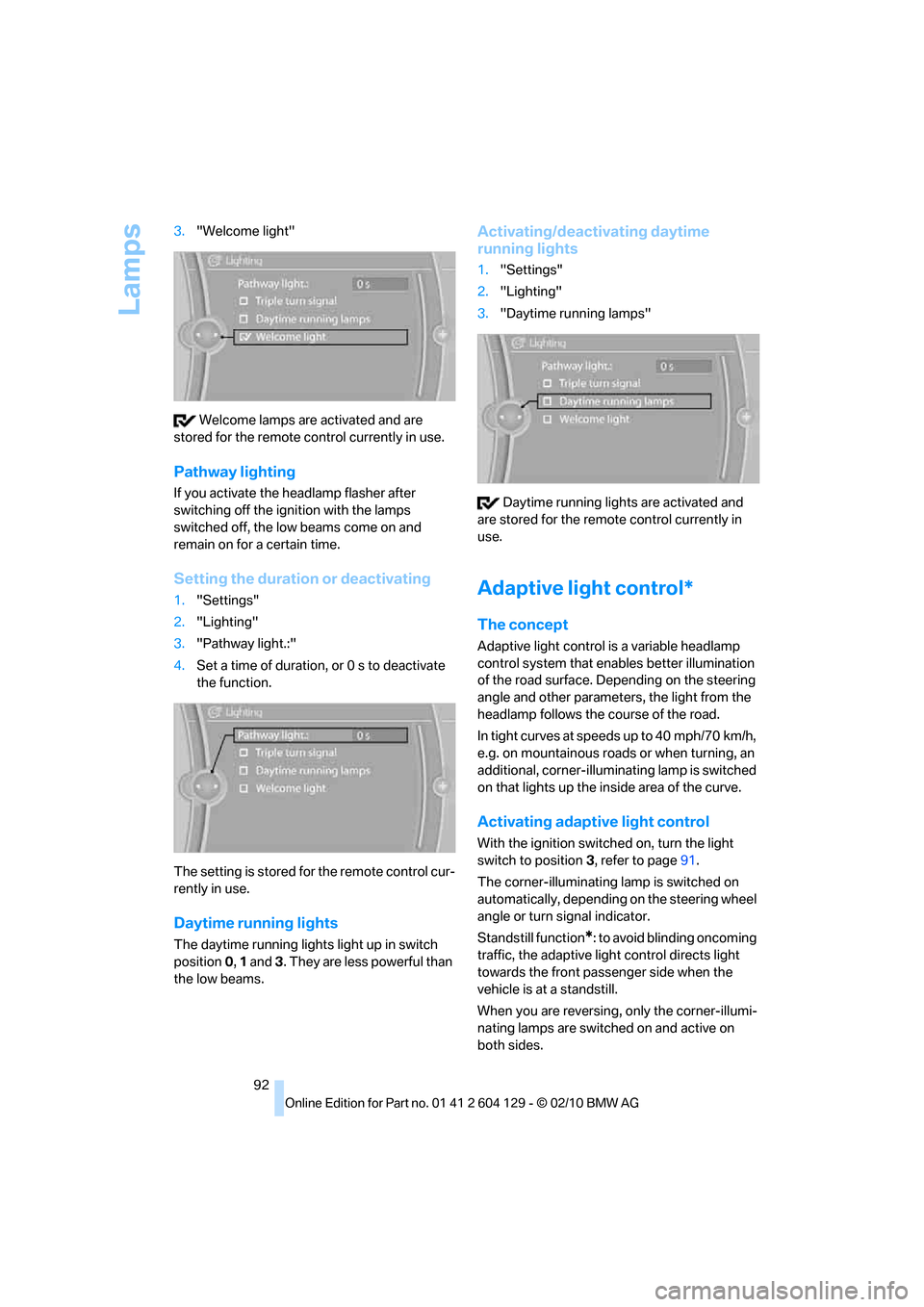
92 3."Welcome light"
Welcome lamps are activated and are
stored for the remote control currently in use.
Pathway lighting
If you activate the headlamp flasher after
switching off the ignition with the lamps
switched off, the low beams come on and
remain on for a certain time.
Setting the duration or deactivating
1."Settings"
2."Lighting"
3."Pathway light.:"
4.Set a time of duration, or 0 s to deactivate
the function.
The setting is stored for the remote control cur-
rently in use.
Daytime running lights
The daytime running lights light up in switch
position0, 1 and 3. They are less powerful than
the low beams.
Activating/deactivating daytime
running lights
1."Settings"
2."Lighting"
3."Daytime running lamps"
Daytime running lights are activated and
are stored for the remote control currently in
use.
Adaptive light control*
The concept
Adaptive light control is a variable headlamp
control system that enables better illumination
of the road surface. Depending on the steering
angle and other parameters, the light from the
headlamp follows the course of the road.
In tight curves at speeds up to 40 mph/70 km/h,
e.g. on mountainous roads or when turning, an
additional, corner-illuminating lamp is switched
on that lights up the inside area of the curve.
Activating adaptive light control
With the ignition switched on, turn the light
switch to position 3, refer to page91.
The corner-illuminating lamp is switched on
automatically, depending on the steering wheel
angle or turn signal indicator.
Standstill function
*: to avoid blinding oncoming
traffic, the adaptive light control directs light
towards the front passenger side when the
vehicle is at a standstill.
When you are reversing, only the corner-illumi-
nating lamps are switched on and active on
both sides.
Page 95 of 256
Controls
93Reference
At a glance
Driving tips
Communications
Navigation
Entertainment
Mobility
Malfunction
The LED next to the symbol for automatic head-
lamp control flashes. Adaptive light control is
malfunctioning or has failed. Have the system
checked as soon as possible.
High beams/roadside parking
lamps*
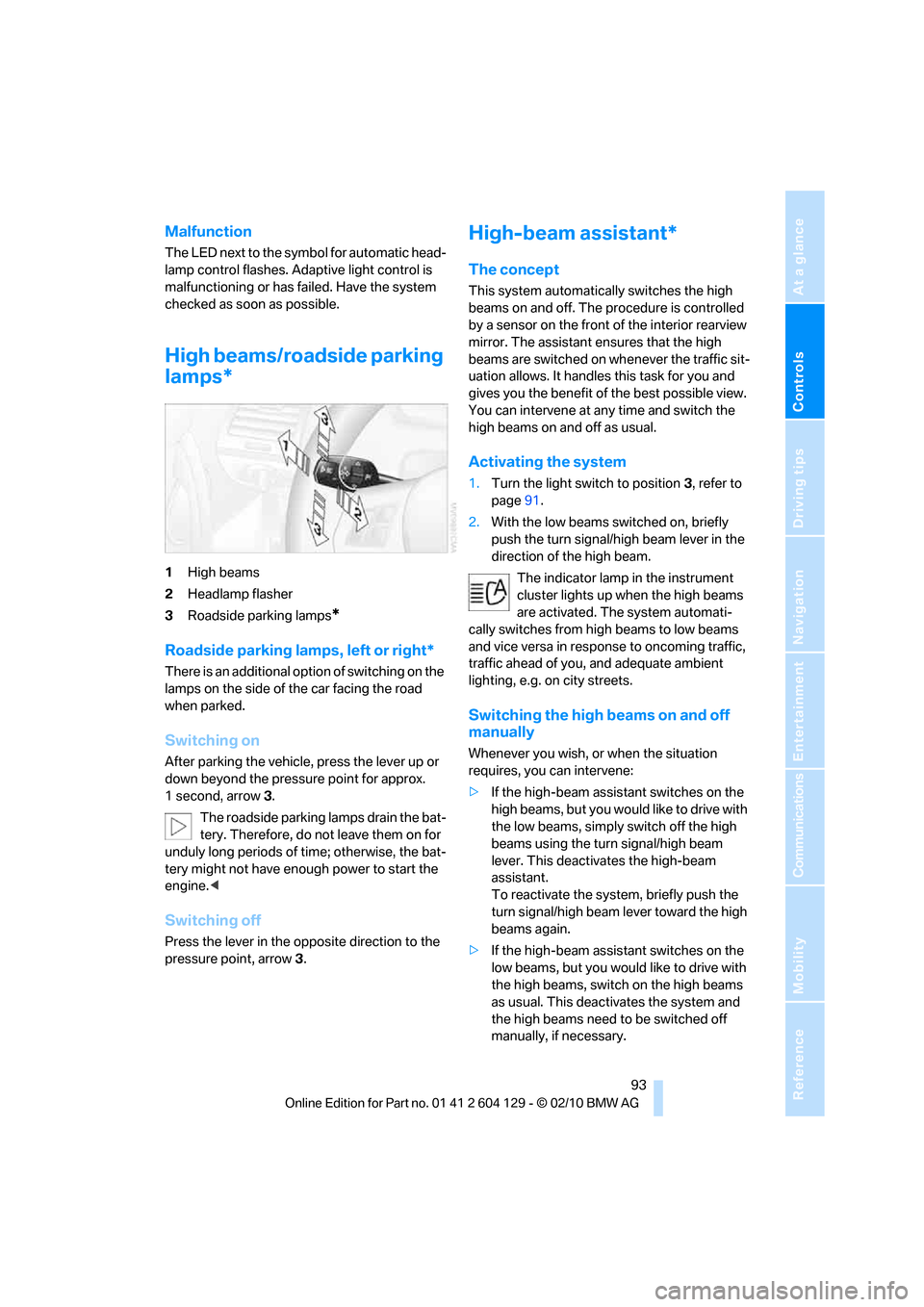
1High beams
2Headlamp flasher
3Roadside parking lamps
*
Roadside parking lamps, left or right*
There is an additional option of switching on the
lamps on the side of the car facing the road
when parked.
Switching on
After parking the vehicle, press the lever up or
down beyond the pressure point for approx.
1 second, arrow 3.
The roadside parking lamps drain the bat-
tery. Therefore, do not leave them on for
unduly long periods of time; otherwise, the bat-
tery might not have enough power to start the
engine.<
Switching off
Press the lever in the opposite direction to the
pressure point, arrow 3.
High-beam assistant*
The concept
This system automatically switches the high
beams on and off. The procedure is controlled
by a sensor on the front of the interior rearview
mirror. The assistant ensures that the high
beams are switched on whenever the traffic sit-
uation allows. It handles this task for you and
gives you the benefit of the best possible view.
You can intervene at any time and switch the
high beams on and off as usual.
Activating the system
1.Turn the light switch to position3, refer to
page91.
2.With the low beams switched on, briefly
push the turn signal/high beam lever in the
direction of the high beam.
The indicator lamp in the instrument
cluster lights up when the high beams
are activated. The system automati-
cally switches from high beams to low beams
and vice versa in response to oncoming traffic,
traffic ahead of you, and adequate ambient
lighting, e.g. on city streets.
Switching the high beams on and off
manually
Whenever you wish, or when the situation
requires, you can intervene:
>If the high-beam assistant switches on the
high beams, but you would like to drive with
the low beams, simply switch off the high
beams using the turn signal/high beam
lever. This deactivates the high-beam
assistant.
To reactivate the system, briefly push the
turn signal/high beam lever toward the high
beams again.
>If the high-beam assistant switches on the
low beams, but you would like to drive with
the high beams, switch on the high beams
as usual. This deactivates the system and
the high beams need to be switched off
manually, if necessary.
Page 240 of 256
Everything from A to Z
238
Everything from A to Z
Index
A
ABS Antilock Brake
System81
Acceleration assistant, refer to
Launch Control64
Accessories, refer to The
individual vehicle5
Accident, reporting, refer to
Emergency Request219
Activated-charcoal filter99
Activating
BMW Assist186,188
Active steering86
Adaptive light control92
Additives
– coolant205
– engine oil205
Address, entering121,127
Address for navigation
– entering121
Adjusting temperature97
Airbags88
– sitting safely43
– warning lamp89
Air conditioner96
Air distribution
– automatic97
Airing, refer to Ventilation99
Air outlets, refer to Air
vents96
Air pressure, checking, refer
to Tire inflation
pressure194
Air recirculation, refer to
Recirculated-air mode98
Air vents96
Air volume98
AKI, refer to Fuel
specifications193Alarm system32
– avoiding unintentional
alarms33
– interior motion sensor33
– switching off an alarm32
– tilt alarm sensor33
Albums of music
collection160
ALL program98
All-season tires, refer to
Winter tires201
AM, waveband143
Ambient air, refer to
Recirculated-air mode98
Antenna for mobile phone170
Antifreeze
– coolant205
– washer fluid66
Antilock Brake System
ABS81
Anti-theft alarm system, refer
to Alarm system
32
Anti-theft system27
Approved axle loads, refer to
Weights229
Approved engine oils205
Approved gross vehicle
weight, refer to Weights229
Armrest, refer to Center
armrest105
Arrival time
– computer70
Ashtray106
Assistance systems, refer to
Dynamic Stability Control
DSC81
AUC Automatic recirculated-
air control98
Audible instructions, refer to
Spoken instructions132Audio140
– controls140
– switching on/off140
– tone control140
– volume140
Automatic
– air distribution97
– air volume97
– cruise control66
– headlamp control91
Automatic car washes209
Automatic climate control96
Automatic curb monitor50
Automatic high beams and
low beams, refer to High-
beam assistant93
Automatic lamps
– refer to Welcome lamps91
Automatic recirculated-air
control AUC98
Automatic Service
Request188
Automatic transmission with
Steptronic57
– selector lever lock58
– shiftlock58
– towing221
– tow-starting221
AUTO program for automatic
climate control97
AUX-IN port163
Available services188
Average fuel consumption70
– setting the units72
Average speed70
Avoid highways in
navigation130
Avoiding unintentional
alarms33
Axle loads, refer to
Weights229
Page 243 of 256
Reference 241
At a glance
Controls
Driving tips
Communications
Navigation
Entertainment
Mobility
Corner-illuminating lamps,
refer to Adaptive light
control92
Cornering lamps, refer to
Adaptive light control92
Country codes DVD153
Courtesy lamps95
Criteria for route130
Cross-hairs in navigation126
Cruise control66
Cruising range70
Cupholders105
Curb weight, refer to
Weights229
Current fuel consumption70
Current playback
– external devices165
– of music collection160
Customer Relations187
D
Dashboard, refer to
Dashboard10
Dashboard lighting, refer to
Instrument lighting95
Data, technical226
– capacities230
– dimensions227
– engine226
– sizes227
– weights229
Data memory208
Data transfer188
Date
– setting75
– setting format76
Daytime running lights, switch
positions92
DBC Dynamic Brake
Control81
Deactivating front passenger
airbags88
Deadlocking, refer to
Locking28
Defect
– door lock30
– fuel filler flap192
– glass roof37Defogging windows98
Defrosting the windows98
Defrosting windows and
removing condensation98
Defrosting windshield, refer to
Defrosting windows98
Defrost position, refer to
Defrosting windows98
Destination, entering by town/
city name121
Destination address
– entering121,127
Destination entry via BMW
Assist125
Destination for navigation
– entering by voice127
– entering via map126
– entry121
– home address124
– manual entry121
Destination guidance130
– bypassing a route
section131
– changing specified
route130
– continuing130
– starting130
– voice instructions132
– volume of voice
instructions132
Differential, breaking in112
Digital clock68,
74
Digital compass103
Digital radio, refer to HD
Radio144
Dimensions227
Directional indicators, refer to
Turn signals64
Direction instructions, refer to
Voice instructions132
Directory for navigation, refer
to Address book123
Displacement, refer to Engine
data226
Display, refer to Control
Display16
Display lighting, refer to
Instrument lighting95Displays, refer to Instrument
cluster12
Displays and controls10
Disposal
– of coolant205
– remote control battery35
– vehicle battery218
Distance, refer to
Computer70
Distance remaining to service,
refer to Service
requirements72
Distance to destination, refer
to Computer70
Distance warning, refer to
Park Distance Control
PDC80
Door key, refer to Integrated
key/remote control26
Door lock29
Door lock, confirmation
signals28
Doors, emergency
operation30
DOT Quality Grades198
Draft-free ventilation99
Drinks holders, refer to
Cupholders105
Drive mode61
Drive-off assistance, refer to
DSC81
Drive-off assistant82
Driving dynamics control62
Driving lamps, refer to Parking
lamps/low beams91
Driving notes112
Driving off on hills, refer to
Drive-off assistant82
Driving stability control
systems81
Driving through water114
Driving tips, refer to Driving
notes112
Dry air, refer to Cooling
function98
DSC Dynamic Stability
Control81
Page 246 of 256
Everything from A to Z
244 iDrive16
– adjusting brightness79
– changing date and time75
– changing language79
– menu guidance17
– operating principle16
– status information19
Ignition55
– switched off56
– switched on55
Ignition key, refer to
Integrated key/remote
control26
Ignition key position 1, refer to
Radio readiness55
Ignition key position 2, refer to
Ignition on55
Ignition lock55
Imprint2
Indicator and warning
lamps13
– Tire Pressure Monitor
TPM85
Individual settings, refer to
Personal Profile26
Inflation pressure, tires194
Inflation pressure monitoring,
refer to Tire Pressure
Monitor TPM84
Initializing
– compass, refer to
Calibrating104
– radio, refer to Station,
storing143
– refer to Setting the time and
date75
Initializing, Flat Tire Monitor
FTM83
Instructions for navigation
system, refer to Voice
instructions132
Instrument cluster12
Instrument combination, refer
to Instrument cluster12
Instrument lighting95
Integrated key26
Integrated universal remote
control101
Interactive map126Interior lamps95
– remote control28
Interior motion sensor33
Interior rearview mirror50
– automatic dimming
feature51
– compass103
Intermittent mode of the
wipers65
Intersection, entering,
navigation122
iPod, connecting, refer to
AUX-IN port163
iPod, connecting, refer to USB
audio interface163
J
Jacking points217
Jets, refer to Air vents96
Joystick, refer to iDrive16
Jumpering, refer to Jump-
starting220
Jump-starting220
K
Key, refer to Integrated key/
remote control26
Keyless go, refer to Comfort
Access33
Keyless opening and closing,
refer to Comfort Access33
Key Memory, refer to Personal
Profile26
Kickdown58
Knock control193
L
Lamps
– adaptive light control92
– interior lighting95
Lamps, refer to Parking lamps/
low beams91
Lamps and bulbs, replacing
bulbs213
Lashing eyes, refer to
Securing cargo116Last destinations124
LATCH child restraint fixing
system53
Launch Control64
Leather care211
LED Light-emitting
diodes213
Length, refer to
Dimensions227
License plate lamp, replacing
bulb217
Light
– instrument lighting95
– refer to High-beam
assistant93
Light-alloy wheels211
Light control
– refer to High-beam
assistant93
Light-emitting diodes
LED213
Lighter106
– socket106
Lighting
– lamps and bulbs213
– of instruments95
– of vehicle, refer to Lamps91
Light switch91
Limit, refer to Speed limit78
Load115
Load securing equipment,
refer to Securing cargo116
Lock buttons of doors, refer to
Locking30
Locking
– adjusting confirmation
signal28
– from inside30
– from outside28
– without remote control, refer
to Comfort Access33
Locking and unlocking doors
– from inside30
– from outside27
Low beam control, refer to
High-beam assistant93
Low-beam headlamps91
– automatic91
– replacing bulbs214