Video playback BMW 128I COUPE 2011 E82 Owner's Manual
[x] Cancel search | Manufacturer: BMW, Model Year: 2011, Model line: 128I COUPE, Model: BMW 128I COUPE 2011 E82Pages: 256, PDF Size: 8.41 MB
Page 153 of 256
Navigation
Entertainment
Driving tips
151Reference
At a glance
Controls
Communications
Mobility
CD/DVD player and CD changer
CD/DVD playback
Inserting a CD / DVD
Insert the CD/DVD into the drive with the
labeled side facing up. The CD/DVD is drawn in
automatically.
Playback starts automatically if the sound out-
put is on. For CDs/DVDs with compressed
audio files, it can take several minutes to read in
the data, depending on the directory structure.
Playable formats
CD/DVD player
>DVD: DVD-ROM, DVD-R, DVD+R, DVD-
RW, DVD+RW, DVD-R DL, DVD+R DL, DVD
audio (video part only), DVD video
>CD: CD-ROM, CD-R, CD-RW, CD-DA,
VCD, SVCD
>Compressed audio files: MP3, WMA, AAC
CD changer
*
>CD: CD-ROM, CD-R, CD-RW, CD-DA
Starting playback
Via iDrive
Fill the CD/DVD magazine and insert it, refer to
page155.To start playback if a CD is already located in
the player or changer:
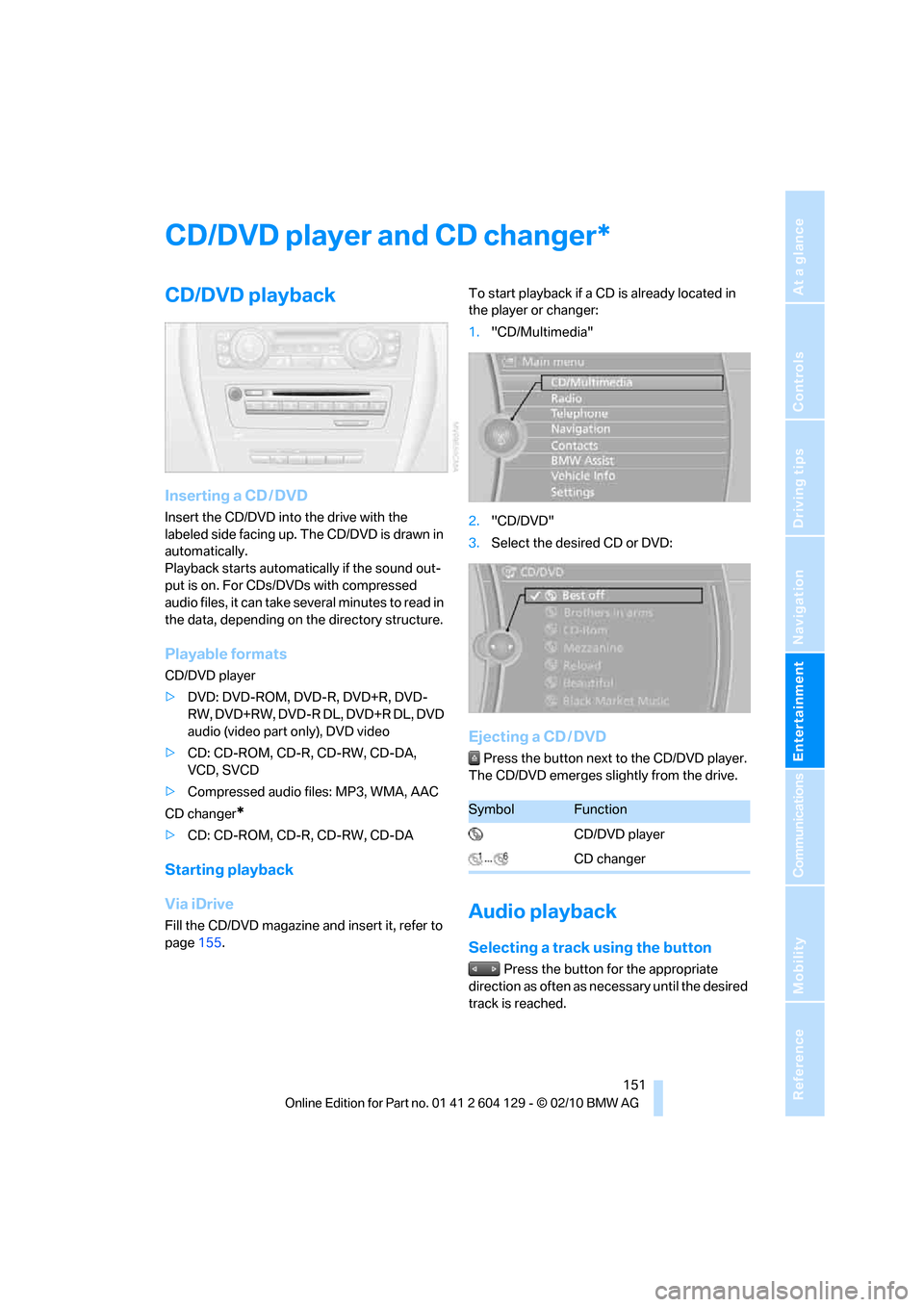
1."CD/Multimedia"
2."CD/DVD"
3.Select the desired CD or DVD:
Ejecting a CD / DVD
Press the button next to the CD/DVD player.
The CD/DVD emerges slightly from the drive.
Audio playback
Selecting a track using the button
Press the button for the appropriate
direction as often as necessary until the desired
track is reached.
*
SymbolFunction
CD/DVD player
CD changer
Page 155 of 256
Navigation
Entertainment
Driving tips
153Reference
At a glance
Controls
Communications
Mobility
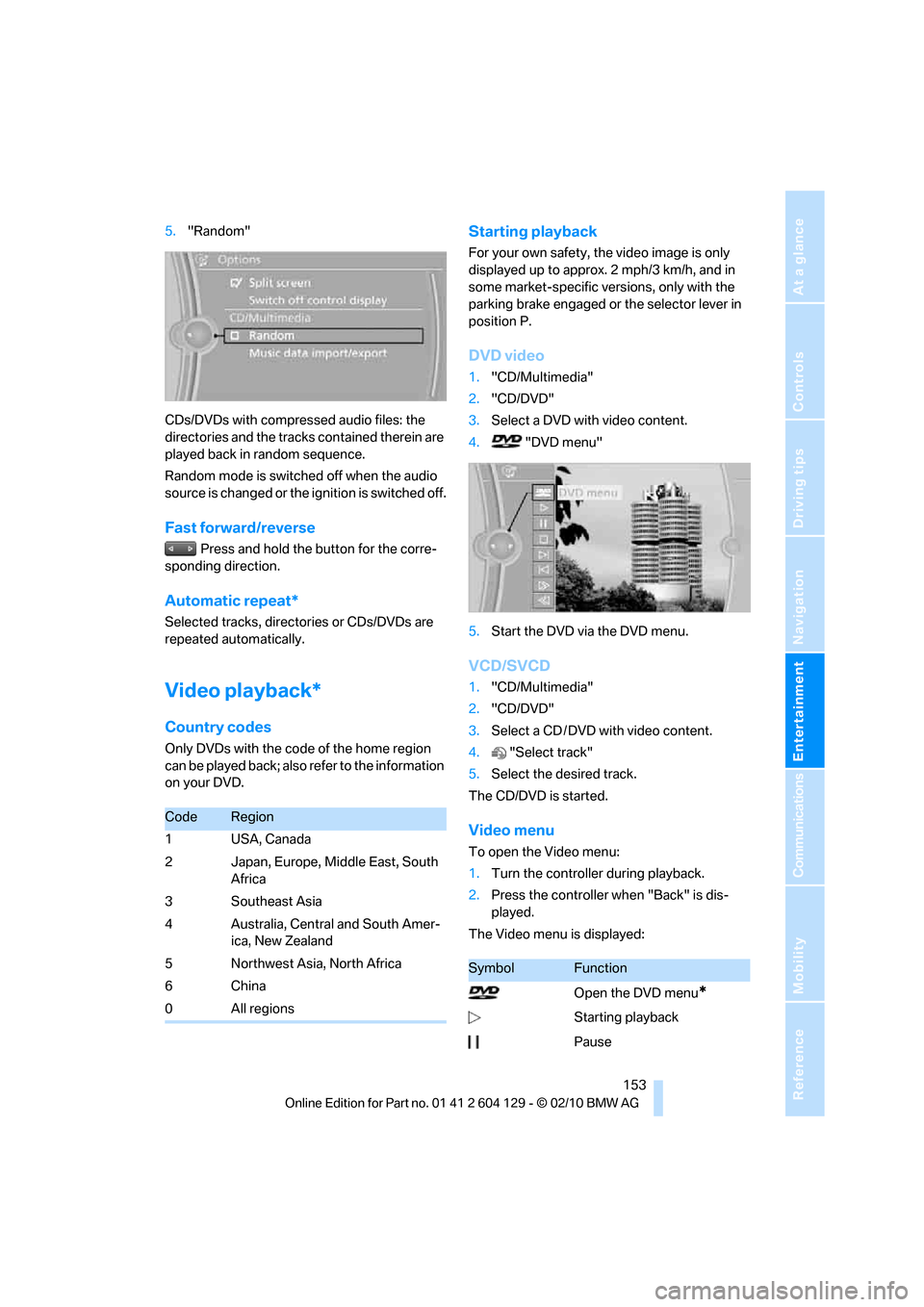
5."Random"
CDs/DVDs with compressed audio files: the
directories and the tracks contained therein are
played back in random sequence.
Random mode is switched off when the audio
source is changed or the ignition is switched off.
Fast forward/reverse
Press and hold the button for the corre-
sponding direction.
Automatic repeat*
Selected tracks, directories or CDs/DVDs are
repeated automatically.
Video playback*
Country codes
Only DVDs with the code of the home region
can be played back; also refer to the information
on your DVD.
Starting playback
For your own safety, the video image is only
displayed up to approx. 2 mph/3 km/h, and in
some market-specific versions, only with the
parking brake engaged or the selector lever in
position P.
DVD video
1."CD/Multimedia"
2."CD/DVD"
3.Select a DVD with video content.
4."DVD menu"
5.Start the DVD via the DVD menu.
VCD/SVCD
1."CD/Multimedia"
2."CD/DVD"
3.Select a CD / DVD with video content.
4."Select track"
5.Select the desired track.
The CD/DVD is started.
Video menu
To open the Video menu:
1.Turn the controller during playback.
2.Press the controller when "Back" is dis-
played.
The Video menu is displayed:
CodeRegion
1USA, Canada
2 Japan, Europe, Middle East, South
Africa
3Southeast Asia
4 Australia, Central and South Amer-
ica, New Zealand
5Northwest Asia, North Africa
6China
0All regions
SymbolFunction
Open the DVD menu
*
Starting playback
Pause
Page 156 of 256
CD/DVD player and CD changer
154 In fast forward/reverse: the speed increases
every time the controller is pressed. To stop,
start playback.
DVD menu
1.If necessary, turn the controller to open the
Video menu.
2. "DVD menu"
The DVD menu is displayed. The display
depends on the contents of the DVD.
>To select menu items: move and press the
controller.
>To change to the Video menu: turn the con-
troller and select "Back".
DVD/VCD settings
For some DVDs, settings can only be made via
the DVD menu; refer also to the information on
your DVD.
Language*
1.Turn the controller during playback.
2.Open "Options".
3."Audio/language"
4.Select the desired language.The languages that are available depend on the
DVD.
Subtitles*
Subtitles can be selected if they are contained
on the DVD.
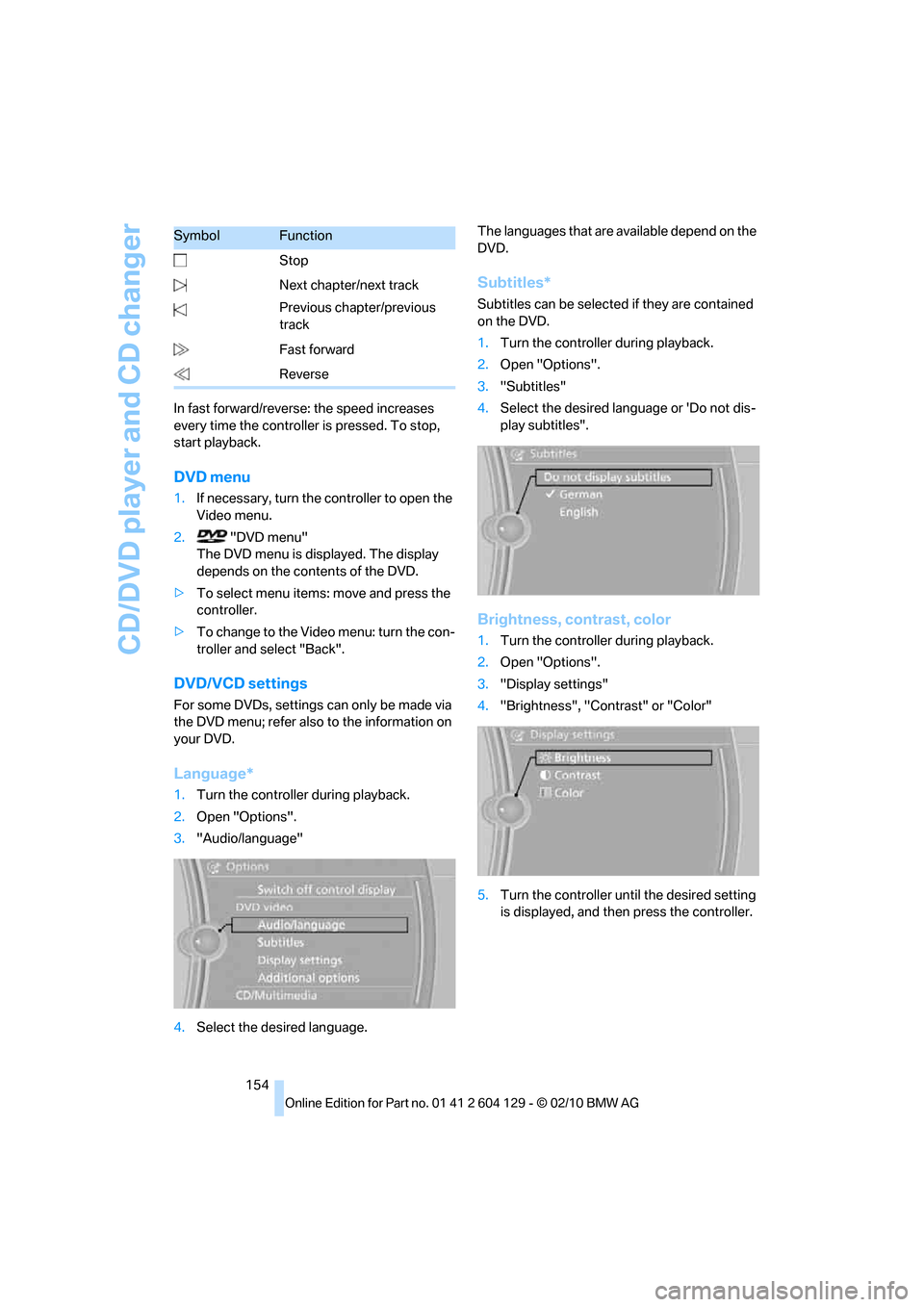
1.Turn the controller during playback.
2.Open "Options".
3."Subtitles"
4.Select the desired language or 'Do not dis-
play subtitles".
Brightness, contrast, color
1.Turn the controller during playback.
2.Open "Options".
3."Display settings"
4."Brightness", "Contrast" or "Color"
5.Turn the controller until the desired setting
is displayed, and then press the controller. Stop
Next chapter/next track
Previous chapter/previous
track
Fast forward
Reverse
SymbolFunction
Page 157 of 256
Navigation
Entertainment
Driving tips
155Reference
At a glance
Controls
Communications
Mobility
Zoom
Display the video image on the full screen.
1.Turn the controller during playback.
2.Open "Options".
3."Additional options"
4."Zoom mode"
Selecting track
DVD video:
1.turn the controller when the DVD menu is
displayed.
2.Open "Options".
3."Additional options"
4."Select title"
5.Select the desired track.
VCD/SVCD:
1."Select track"
2.Select the desired track.
Camera angle*
The camera angle depends on the DVD.
1.Turn the controller during playback.
2.Open "Options".
3."Additional options"
4."Viewing angle"
5.Select the desired camera angle.
Opening the main menu, back
These functions are not contained on every
DVD. Therefore, they may not be available for
use.
CD changer*
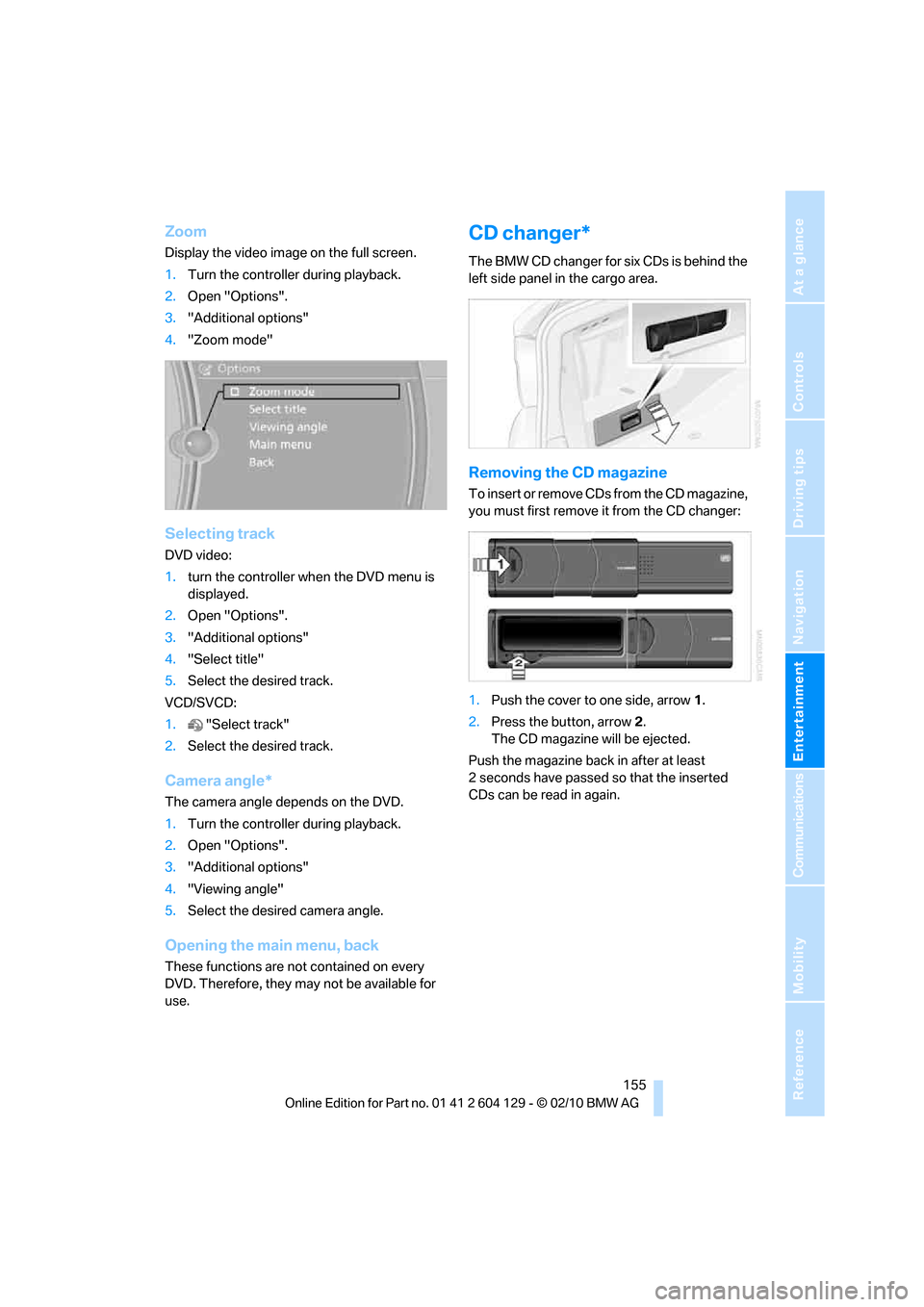
The BMW CD changer for six CDs is behind the
left side panel in the cargo area.
Removing the CD magazine
T o i n s e r t o r r e m o v e C D s f r o m t h e C D m a g a z i n e ,
you must first remove it from the CD changer:
1.Push the cover to one side, arrow 1.
2.Press the button, arrow2.
The CD magazine will be ejected.
Push the magazine back in after at least
2 seconds have passed so that the inserted
CDs can be read in again.
Page 244 of 256
Everything from A to Z
242 DTC Dynamic Traction
Control81
– indicator lamps81
DVD
– country codes153
– settings154
– video playback153
DVD menu154
DVD player, refer to CD
player151
DVD video153
Dynamic Brake Control
DBC81
Dynamic destination
guidance131
Dynamic Stability Control
DSC81
Dynamic Traction Control
DTC
– indicator lamps82
E
EBV Electronic brake-force
distribution81
Eject button, refer to Buttons
on the CD / DVD player140
Electrical defect
– 7-gear sports automatic
transmission with double
clutch63
Electrical malfunction
– door lock30
– fuel filler flap192
– glass roof37
Electronic brake-force
distribution EBV81
Electronic oil level check203
Electronic Stability Program
ESP, refer to Dynamic
Stability Control DSC81
Emergency operation, refer to
Manual operation
– door lock30
– fuel filler flap192
– glass roof37
– transmission lock, automatic
transmission59Emergency release, trunk
lid31
Emergency Request219
Emergency services, refer to
Roadside Assistance219
Energy, saving
– saving fuel112
Engine
– breaking in112
– data226
– speed226
– starting56
– starting, Comfort Access33
– switching off56
Engine compartment203
Engine coolant, refer to
Coolant205
Engine oil
– adding205
– additives205
– alternative oil grades205
– approved engine oils205
– BMW Maintenance
System207
– checking level203
– intervals between changes,
refer to Service
requirements72
Engine output, refer to Engine
data226
Engine speed, refer to Engine
data226
Engine starting, refer to
Starting the engine56
Entering the postal code for
navigation122
Entry map for destination126
Equalizer, tone setting141
ESP Electronic Stability
Program, refer to Dynamic
Stability Control DSC81
Exhaust system, refer to Hot
exhaust system113
Extended connectivity of the
music player in the mobile
phone163Exterior mirrors49
– adjusting49
– automatic dimming
feature51
– automatic heating50
– folding in and out50
External devices
– random sequence165
Eyes
– for tow-starting and towing
away221
– for tying down loads116
F
Failure messages, refer to
Check Control76
Failure of an electrical
consumer218
False alarm, refer to Avoiding
unintentional alarms33
Fastening safety belts, refer to
Safety belts49
Fastest route for
navigation130
Fast forward
– CD changer153
– CD player153
Filter of automatic climate
control, refer to Microfilter/
activated charcoal filter99
First aid pouch219
Fixture for remote control,
refer to Ignition lock55
Flash when locking/
unlocking28
Flat tire
– run-flat tires200
– Tire Pressure Monitor
TPM84
Flat Tire Monitor FTM82
– indicating a flat tire83
– initializing the system83
– system limits82
Flat tires, refer to Tire
condition199
FM, waveband143
Page 252 of 256
Everything from A to Z
250 Town/city, for navigation121
Tow rope222
Tow-starting221
TPM, refer to Tire Pressure
Monitor84
Track
– selecting on CD151
Traction control, refer to
Dynamic Stability Control
DSC81
Traffic bulletins
– categories135
Traffic bulletins, filtering135
Traffic bulletins for
navigation133
– display in map view135
– during destination
guidance135
Traffic jam
– displaying traffic
bulletins133
Transmission
– 7-gear Sports automatic
transmission with double
clutch60
– automatic transmission with
Steptronic57
– idle position61
– Launch Control64
– manually unlocking parking
lock63
– manual transmission57
– reverse gear61
Transporting children
safely52
Transport securing devices,
refer to Securing cargo116
Tread depth, refer to Minimum
tire tread199
Trip, deleting129
Trip, storing128
Trip-distance counter, refer to
Trip odometer68
Triple turn signal activation64
Trip odometer68Trips, changing129
Trunk, refer to Cargo area
Trunk lid31
– Comfort Access34
– emergency release31
– opening from outside31
– unlocking with remote
control28
Turning circle, refer to
Dimensions227
Turn signals64
– indicator lamp12
– replacing bulbs215
– triple turn signal64
Tying down loads, refer to
Cargo loading116
U
Underbody protection, refer to
Caring for your vehicle209
Uniform Tire Quality Grading/
UTQR198
Units
– average fuel
consumption72
Units of measure
– temperature72
Universal garage door opener,
refer to Integrated universal
remote control101
Unlatching, refer to
Unlocking27
Unlocking
– from inside30
– from outside27
– trunk lid34
– without remote control, refer
to Comfort Access33
Unlocking without a key, refer
to Comfort Access33
Updating the navigation
data120
USB audio interface163
V
VCD153
Vehicle
– battery217
– breaking in112
– cargo loading114
– decommissioning, refer to
Vehicle storage212
– dimensions227
– Identification Number, refer
to Engine compartment203
– parking56
– weight229
Vehicle jack217
Vehicle storage212
Ventilation99
– draft-free99
Ventilation when parked, refer
to Parked car ventilation99
Vents, refer to Ventilation99
Video menu153
Video playback153
Voice, refer to Destination
guidance through voice
instructions132
Voice-activated phone
book179
Voice commands
– overview22
– short commands231
– telephone177
Voice instructions from
navigation system132
– repeating132
– switching on/off132
– volume132
Volume140
– audio sources140
– fuel tank, refer to
Capacities230
– mobile phone173
– voice instructions132
Volume balance, tone
setting141