lamps BMW 128I COUPE 2011 E82 Owner's Manual
[x] Cancel search | Manufacturer: BMW, Model Year: 2011, Model line: 128I COUPE, Model: BMW 128I COUPE 2011 E82Pages: 256, PDF Size: 8.41 MB
Page 5 of 256
Reference
At a glance
Controls
Driving tips
Communications
Navigation
Entertainment
Mobility
Contents
The quickest way to find special topics is to
consult the index, refer to page238.
Using this Owner's Manual
4Notes
7Reporting safety defects
At a glance
10Dashboard
16iDrive
21Letters and numbers
22Voice activation system
Controls
26Opening and closing
43Adjustments
52Transporting children safely
55Driving
68Controls overview
80Technology for driving comfort and
safety
91Lamps
96Climate
101Practical interior accessories
Driving tips
112Things to remember when driving
Navigation
120Navigation system
121Destination entry
130Destination guidance
137What to do if …
Entertainment
140On/off and tone
143Radio
146Satellite radio
151CD/DVD player and CD changer
158Music collection
163External devices
Communications
170Telephone
182Contacts
184BMW Assist
Mobility
192Refueling
194Wheels and tires
202Under the hood
207Maintenance
209Care
213Replacing components
219Giving and receiving assistance
Reference
226Technical data
231Short commands for the voice activation
system
238Everything from A to Z
Page 12 of 256
Dashboard
10
Dashboard
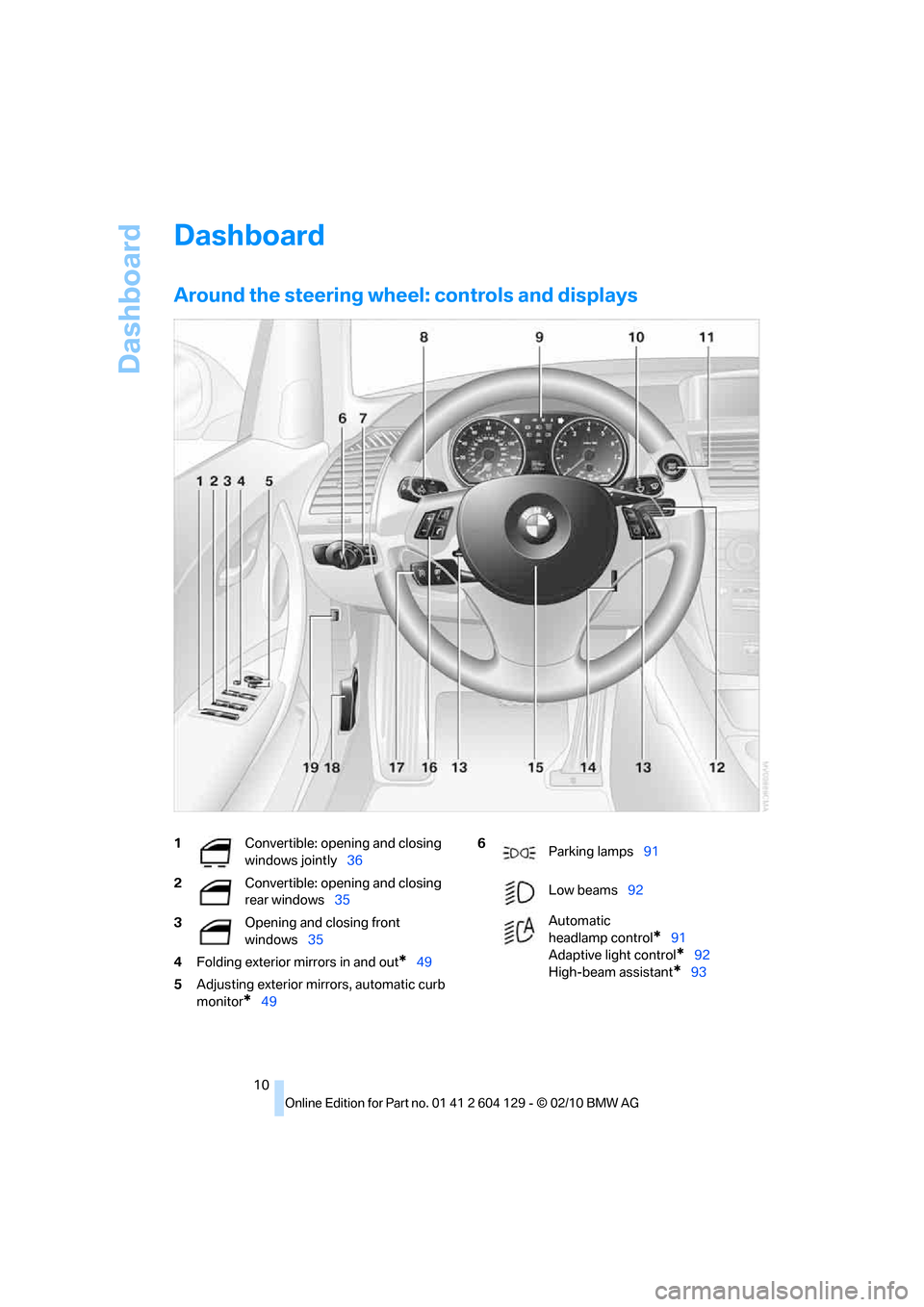
Around the steering wheel: controls and displays
1Convertible: opening and closing
windows jointly36
2Convertible: opening and closing
rear windows35
3Opening and closing front
windows35
4Folding exterior mirrors in and out
*49
5Adjusting exterior mirrors, automatic curb
monitor
*49
6
Parking lamps91
Low beams92
Automatic
headlamp control
*91
Adaptive light control
*92
High-beam assistant
*93
Page 13 of 256
At a glance
11Reference
Controls
Driving tips
Communications
Navigation
Entertainment
Mobility
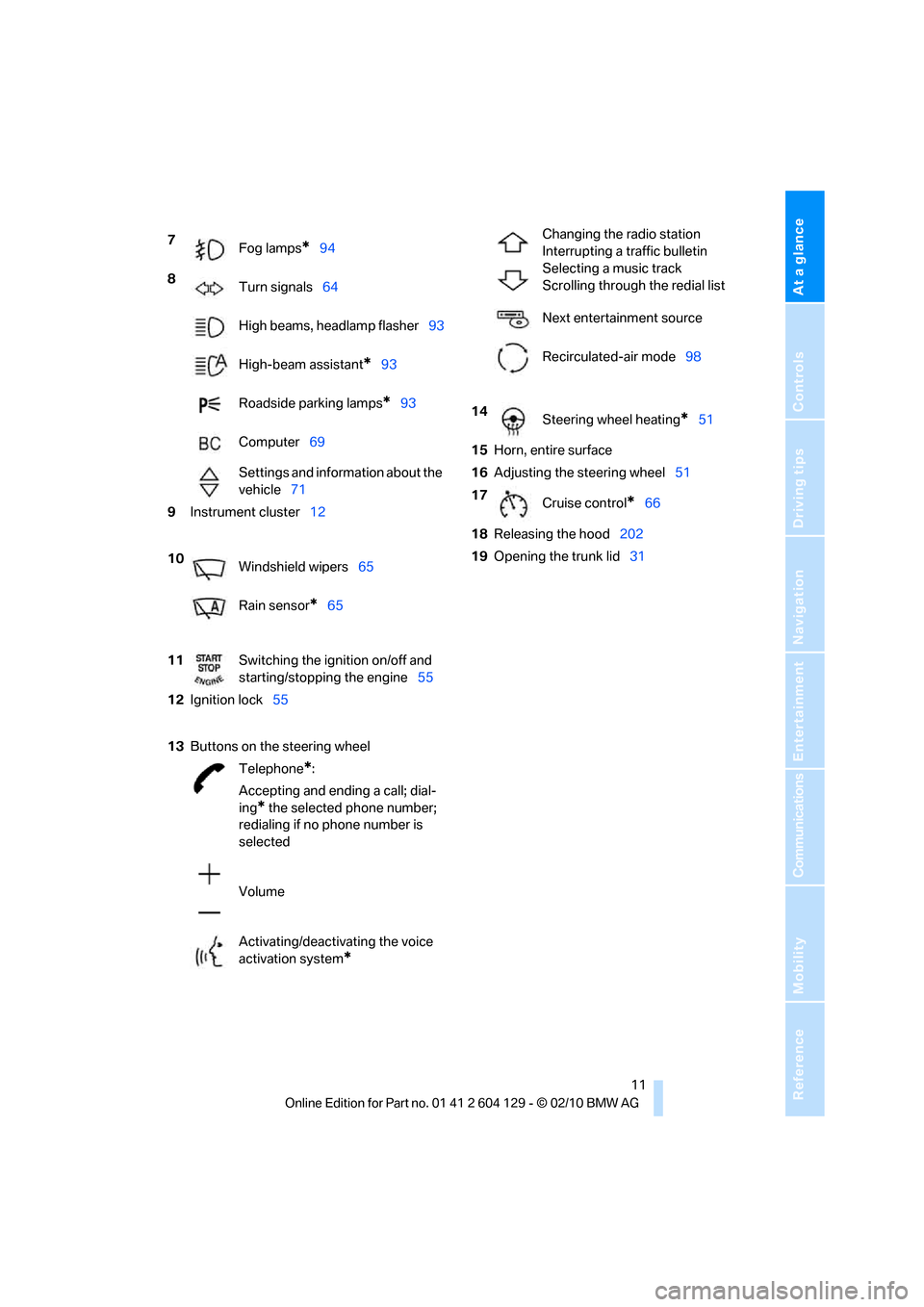
7
Fog lamps*94
8
Turn signals64
High beams, headlamp flasher93
High-beam assistant
*93
Roadside parking lamps
*93
Computer69
Settings and information about the
vehicle71
9Instrument cluster12
10
Windshield wipers65
Rain sensor
*65
11Switching the ignition on/off and
starting/stopping the engine55
12Ignition lock55
13Buttons
on the steering wheel
Telephone
*:
Accepting and ending a call; dial-
ing
* the selected phone number;
redialing if no phone number is
selected
Volume
Activating/deactivating the voice
activation system
*
Changing the radio station
Interrupting a traffic bulletin
Selecting a music track
Scrolling through the redial list
Next entertainment source
Recirculated-air mode98
14
Steering wheel heating
*51
15Horn, entire surface
16Adjusting the steering wheel51
17
Cruise control
*66
18Releasing the hood202
19Opening the trunk lid31
Page 14 of 256
Dashboard
12
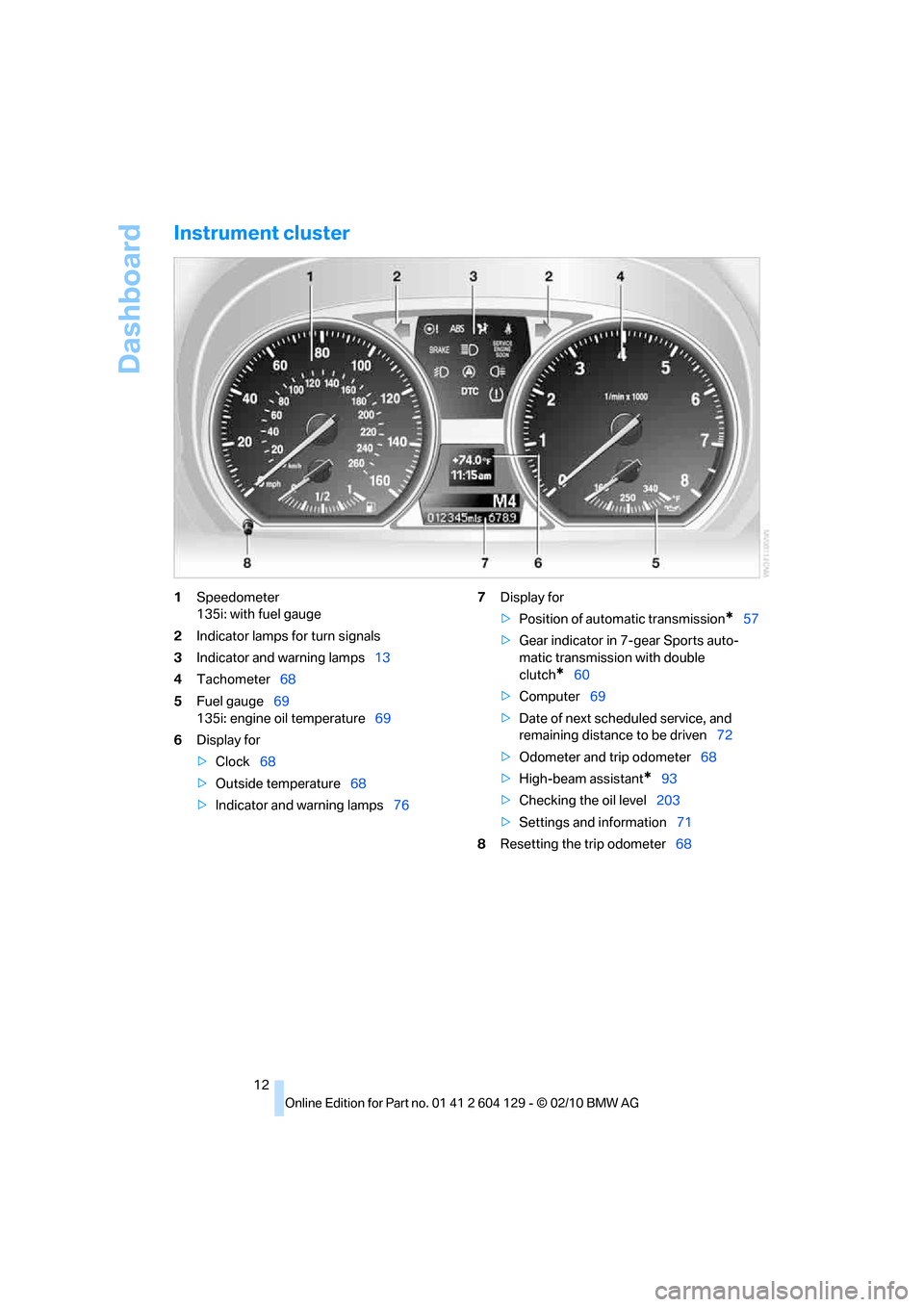
Instrument cluster
1Speedometer
135i: with fuel gauge
2Indicator lamps for turn signals
3Indicator and warning lamps13
4Tachometer68
5Fuel gauge69
135i: engine oil temperature69
6Display for
>Clock68
>Outside temperature68
>Indicator and warning lamps767Display for
>Position of automatic transmission
*57
>Gear indicator in 7-gear Sports auto-
matic transmission with double
clutch
*60
>Computer69
>Date of next scheduled service, and
remaining distance to be driven72
>Odometer and trip odometer68
>High-beam assistant
*93
>Checking the oil level203
>Settings and information71
8Resetting the trip odometer68
Page 15 of 256
At a glance
13Reference
Controls
Driving tips
Communications
Navigation
Entertainment
Mobility
Indicator and warning lamps
The concept
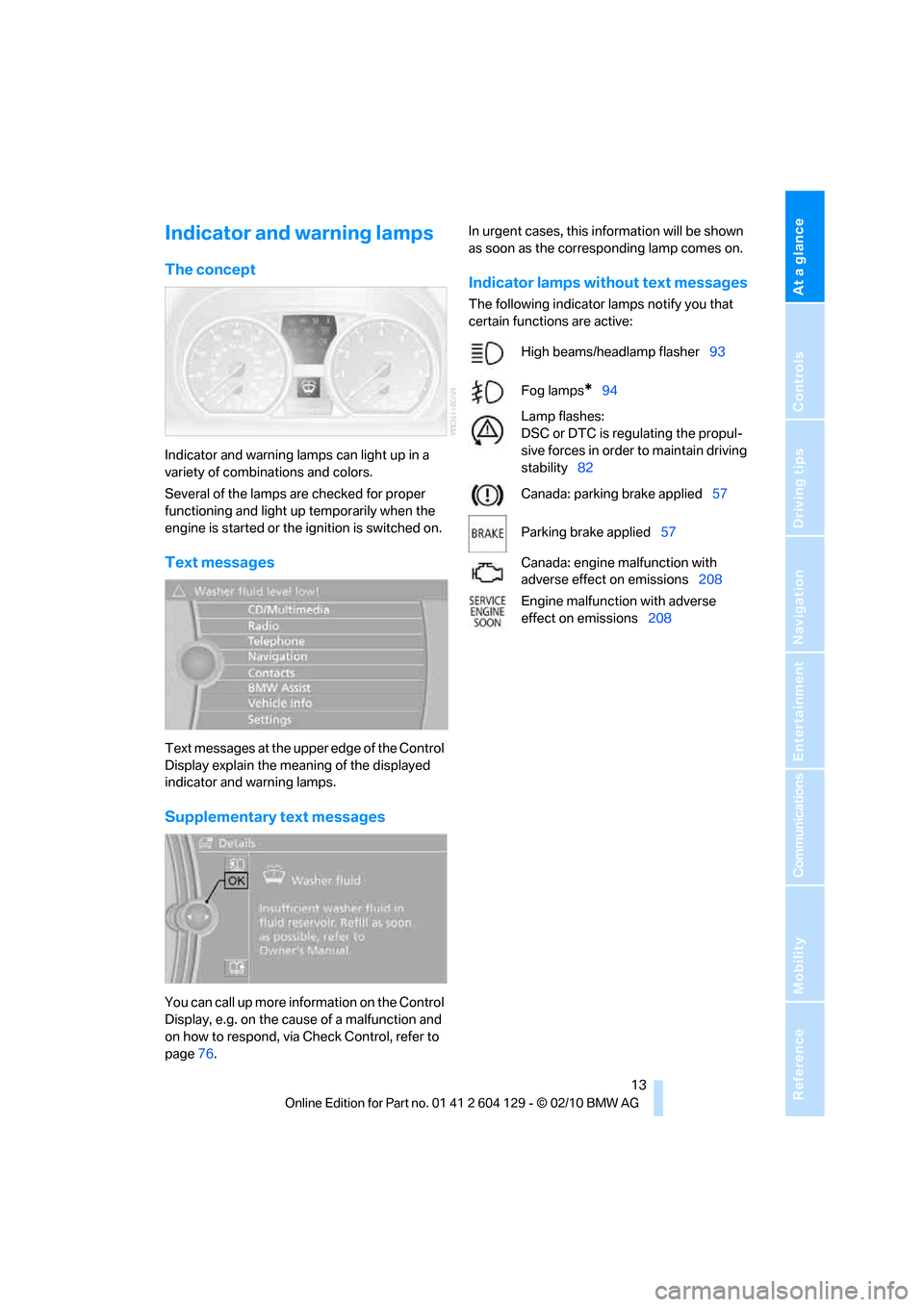
Indicator and warning lamps can light up in a
variety of combinations and colors.
Several of the lamps are checked for proper
functioning and light up temporarily when the
engine is started or the ignition is switched on.
Text messages
Text messages at the upper edge of the Control
Display explain the meaning of the displayed
indicator and warning lamps.
Supplementary text messages
You can call up more information on the Control
Display, e.g. on the cause of a malfunction and
on how to respond, via Check Control, refer to
page76.In urgent cases, this information will be shown
as soon as the corresponding lamp comes on.
Indicator lamps without text messages
The following indicator lamps notify you that
certain functions are active:
High beams/headlamp flasher93
Fog lamps
*94
Lamp flashes:
DSC or DTC is regulating the propul-
sive forces in order to maintain driving
stability82
Canada: parking brake applied57
Parking brake applied57
Canada: engine malfunction with
adverse effect on emissions208
Engine malfunction with adverse
effect on emissions208
Page 17 of 256
At a glance
15Reference
Controls
Driving tips
Communications
Navigation
Entertainment
Mobility
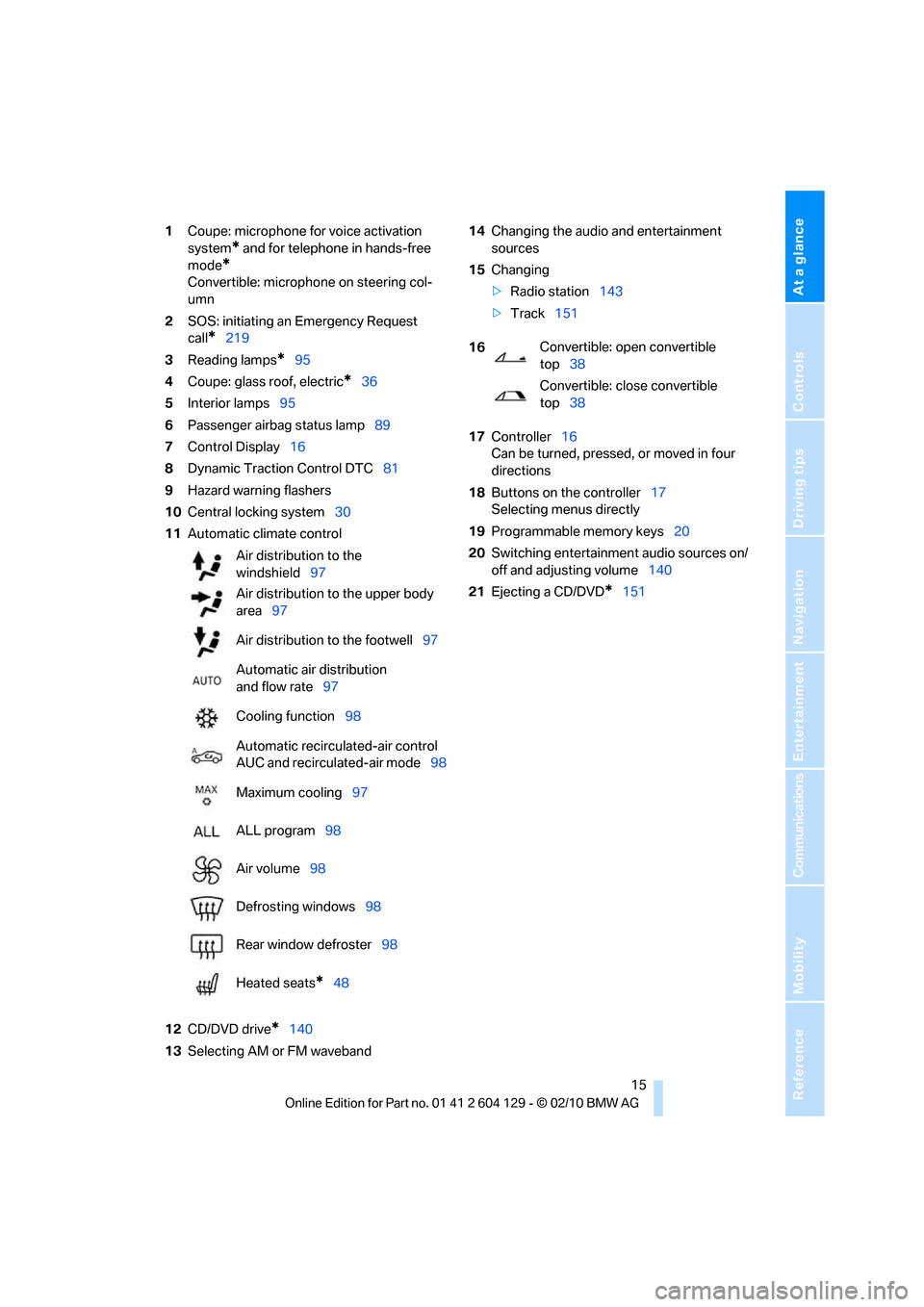
1Coupe: microphone for voice activation
system
* and for telephone in hands-free
mode
*
Convertible: microphone on steering col-
umn
2SOS: initiating an Emergency Request
call
*219
3Reading lamps
*95
4Coupe: glass roof, electric
*36
5Interior lamps95
6Passenger airbag status lamp89
7Control Display16
8Dynamic Traction Control DTC81
9Hazard warning flashers
10Central locking system30
11Automatic climate control
12CD/DVD drive
*140
13Selecting AM or FM waveband14Changing the audio and entertainment
sources
15Changing
>Radio station143
>Track151
17Controller16
Can be turned, pressed, or moved in four
directions
18Buttons on the controller17
Selecting menus directly
19Programmable memory keys20
20Switching entertainment audio sources on/
off and adjusting volume140
21Ejecting a CD/DVD
*151 Air distribution to the
windshield97
Air distribution to the upper body
area97
Air distribution to the footwell97
Automatic air distribution
and flow rate97
Cooling function98
Automatic recirculated-air control
AUC and recirculated-air mode98
Maximum cooling97
ALL program98
Air volume98
Defrosting windows98
Rear window defroster98
Heated seats
*48
16Convertible: open convertible
top38
Convertible: close convertible
top38
Page 29 of 256
Controls
27Reference
At a glance
Driving tips
Communications
Navigation
Entertainment
Mobility
>Settings for the display on the Control Dis-
play and in the instrument cluster:
>12h/24h format of the clock, refer to
page74
>Date format, refer to page76
>Brightness of the Control Display, refer
to page79
>Language of the Control Display, refer to
page79
>Units of measure for fuel consumption,
distance covered/remaining distances,
and temperature, refer to page72
>Show visual warning for Park Distance Con-
trol PDC, refer to page80
>Light settings:
>Welcome lamps, refer to page91
>Pathway lighting, refer to page92
>Daytime running lights, refer to page92
>High-beam assistant
*, refer to page93
>Automatic climate control: activating/deac-
tivating AUTO program, cooling function
and automatic recirculated-air control, set-
ting temperature, air volume and distribu-
tion, refer to page97 ff
>Entertainment:
>Tone control, refer to page140
>Speed-dependent volume control, refer
to page140
Central locking system
The concept
The central locking system functions when the
driver's door is closed.
The system simultaneously engages and
releases the locks on the following:
>Doors
>Trunk lid
>Fuel filler flap
Operating from outside
>Via the remote control
>Via the door lock
*
>In cars with Comfort Access*, via the han-
dles on the driver's and front passenger
doors
In addition, if the remote control is used, the
welcome lamps
*, interior lamps and the door's
courtesy lamps
* are switched on or off. The
alarm system
* is also armed or disarmed.
For further details on the alarm system
*, refer
to page32.
Operating from inside
By means of the button for central locking, refer
to page30.
In the event of a sufficiently severe accident, the
central locking system unlocks automatically. In
addition, the hazard warning flashers and inte-
rior lamps come on.
Opening and closing:
Using the remote control
Persons or animals in a parked vehicle
could lock the doors from the inside. You
should therefore take the remote control with
you when you leave the vehicle so that the latter
can be opened from outside.<
Convertible: to operate the convertible
top with the remote control, the doors and
trunk lid must be closed and the cargo area par-
tition must be folded down and engaged on
both sides. Refer also to page40.<
Unlocking
Press the button.
The interior lamps, the courtesy lamps
* and the
welcome lamps come on.
Setting unlocking characteristics
You can set whether only the driver's door or
the entire vehicle is to be unlocked when the
button is pressed for the first time.
Page 30 of 256
Opening and closing
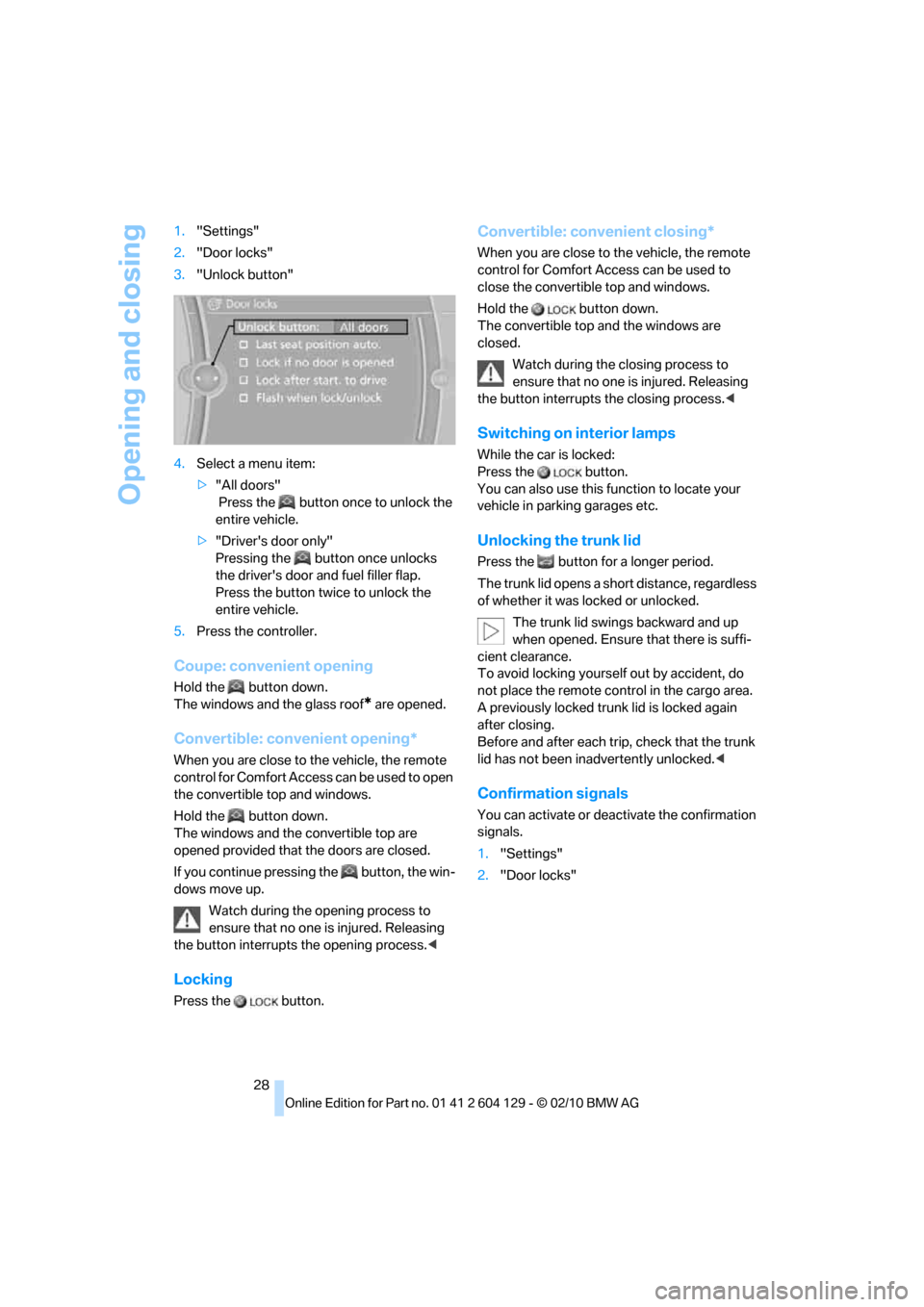
28 1."Settings"
2."Door locks"
3."Unlock button"
4.Select a menu item:
>"All doors"
Press the button once to unlock the
entire vehicle.
>"Driver's door only"
Pressing the button once unlocks
the driver's door and fuel filler flap.
Press the button twice to unlock the
entire vehicle.
5.Press the controller.
Coupe: convenient opening
Hold the button down.
The windows and the glass roof
* are opened.
Convertible: convenient opening*
When you are close to the vehicle, the remote
control for Comfort Access can be used to open
the convertible top and windows.
Hold the button down.
The windows and the convertible top
are
opened provided that the doors are closed.
If you continue pressing the button, the win-
dows move up.
Watch during the opening process to
ensure that no one is injured. Releasing
the button interrupts the opening process.<
Locking
Press the button.
Convertible: convenient closing*
When you are close to the vehicle, the remote
control for Comfort Access can be used to
close the convertible top and windows.
Hold the button down.
The convertible top and the windows are
closed.
Watch during the closing process to
ensure that no one is injured. Releasing
the button interrupts the closing process.<
Switching on interior lamps
While the car is locked:
Press the button.
You can also use this function to locate your
vehicle in parking garages etc.
Unlocking the trunk lid
Press the button for a longer period.
The trunk lid opens a short distance, regardless
of whether it was locked or unlocked.
The trunk lid swings backward and up
when opened. Ensure that there is suffi-
cient clearance.
To avoid locking yourself out by accident, do
not place the remote control in the cargo area.
A previously locked trunk lid is locked again
after closing.
Before and after each trip, check that the trunk
lid has not been inadvertently unlocked.<
Confirmation signals
You can activate or deactivate the confirmation
signals.
1."Settings"
2."Door locks"
Page 36 of 256
Opening and closing
34
Unlocking
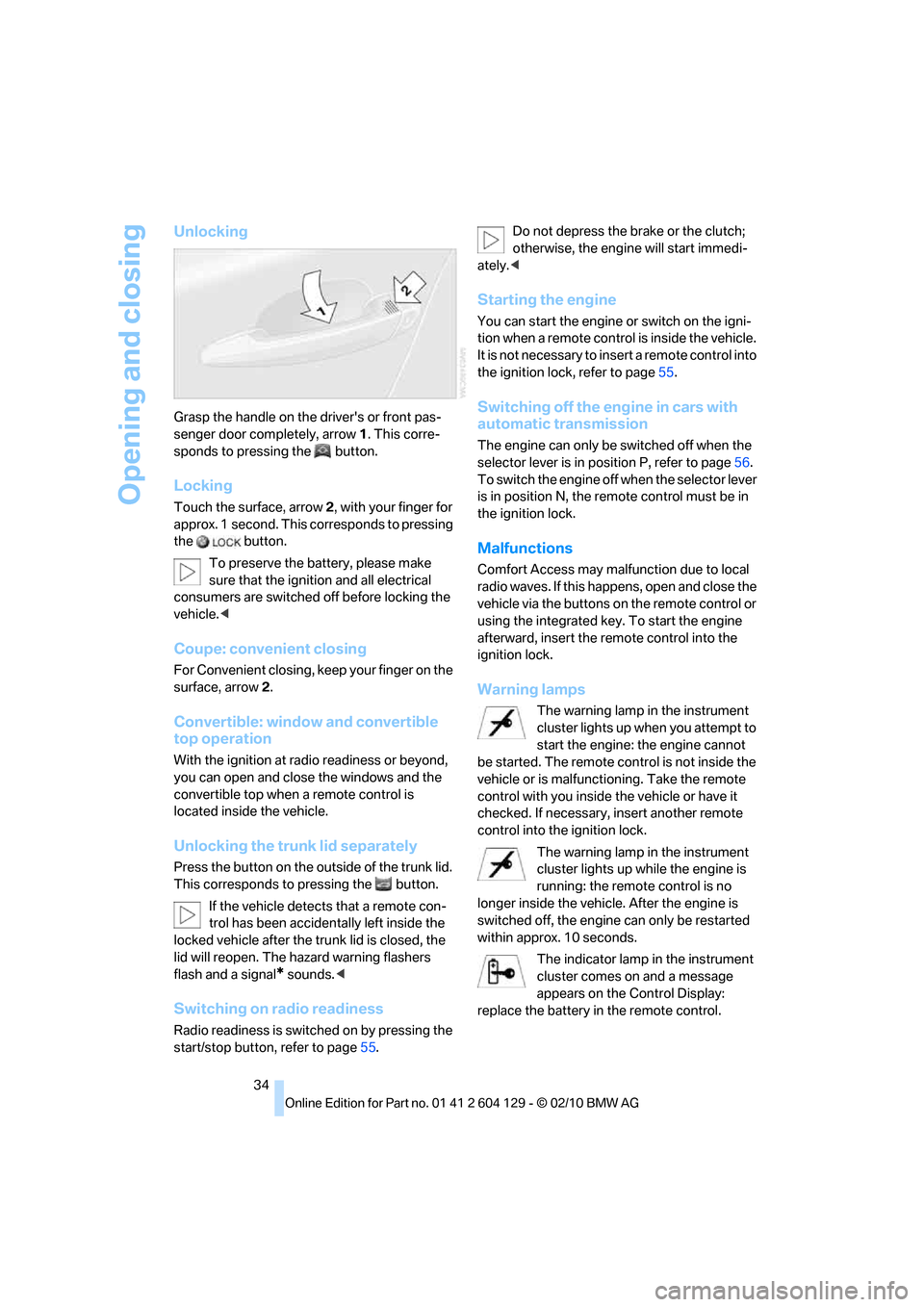
Grasp the handle on the driver's or front pas-
senger door completely, arrow 1. This corre-
sponds to pressing the button.
Locking
Touch the surface, arrow 2, with your finger for
approx. 1 second. This corresponds to pressing
the button.
To preserve the battery, please make
sure that the ignition and all electrical
consumers are switched off before locking the
vehicle.<
Coupe: convenient closing
For Convenient closing, keep your finger on the
surface, arrow 2.
Convertible: window and convertible
top operation
With the ignition at radio readiness or beyond,
you can open and close the windows and the
convertible top when a remote control is
located inside the vehicle.
Unlocking the trunk lid separately
Press the button on the outside of the trunk lid.
This corresponds to pressing the button.
If the vehicle detects that a remote con-
trol has been accidentally left inside the
locked vehicle after the trunk lid is closed, the
lid will reopen. The hazard warning flashers
flash and a signal
* sounds.<
Switching on radio readiness
Radio readiness is switched on by pressing the
start/stop button, refer to page55.Do not depress the brake or the clutch;
otherwise, the engine will start immedi-
ately.<
Starting the engine
You can start the engine or switch on the igni-
tion when a remote control is inside the vehicle.
It is not necessary to insert a remote control into
the ignition lock, refer to page55.
Switching off the engine in cars with
automatic transmission
The engine can only be switched off when the
selector lever is in position P, refer to page56.
To switch the engine off when the selector lever
is in position N, the remote control must be in
the ignition lock.
Malfunctions
Comfort Access may malfunction due to local
radio waves. If this happens, open and close the
vehicle via the buttons on the remote control or
using the integrated key. To start the engine
afterward, insert the remote control into the
ignition lock.
Warning lamps
The warning lamp in the instrument
cluster lights up when you attempt to
start the engine: the engine cannot
be started. The remote control is not inside the
vehicle or is malfunctioning. Take the remote
control with you inside the vehicle or have it
checked. If necessary, insert another remote
control into the ignition lock.
The warning lamp in the instrument
cluster lights up while the engine is
running: the remote control is no
longer inside the vehicle. After the engine is
switched off, the engine can only be restarted
within approx. 10 seconds.
The indicator lamp in the instrument
cluster comes on and a message
appears on the Control Display:
replace the battery in the remote control.
Page 39 of 256
Controls
37Reference
At a glance
Driving tips
Communications
Navigation
Entertainment
Mobility
Opening, closing
>Press the switch backwards to the resis-
tance point.
The glass roof and the sliding visor open
together as long as you hold the switch in
this position.
>Press the switch backwards past the resis-
tance point.
The glass roof and the sliding visor open
automatically. Briefly press the switch again
to stop the opening movement.
You can close the glass roof in a similar manner
by pressing the switch forwards. The sliding
visor remains open and can be closed by hand.
For information on Convenient operation via the
remote control or the door lock, refer to page27
or30. For information on Convenient closing
with Comfort Access, refer to Locking on
page34.
After switching off the ignition
When the remote control is removed or the igni-
tion is switched off, you can still operate the roof
for approx. 1 minute as long as no door has
been opened.
Pinch protection system
If the glass roof encounters an obstruction dur-
ing closing from approximately the middle of
the opening in the roof, or during closing from
the raised position, the closing movement is
interrupted and the glass roof is opened again
slightly.
Despite the pinch protection system
check and clear the roof's travel path prior
to closing it; otherwise, the safety system might
fail to detect certain kinds of obstructions, such
as very thin objects, and the roof would con-
tinue closing.<
Closing without pinch protection
If there is an external danger, press the switch
forward past the resistance point and hold it
there. The roof closes without pinch protection.
Following interruptions in electrical
power supply
After a power failure, there is a possibility that
the glass roof can only be raised. The system
must be initialized. BMW recommends having
this work done by your BMW center.
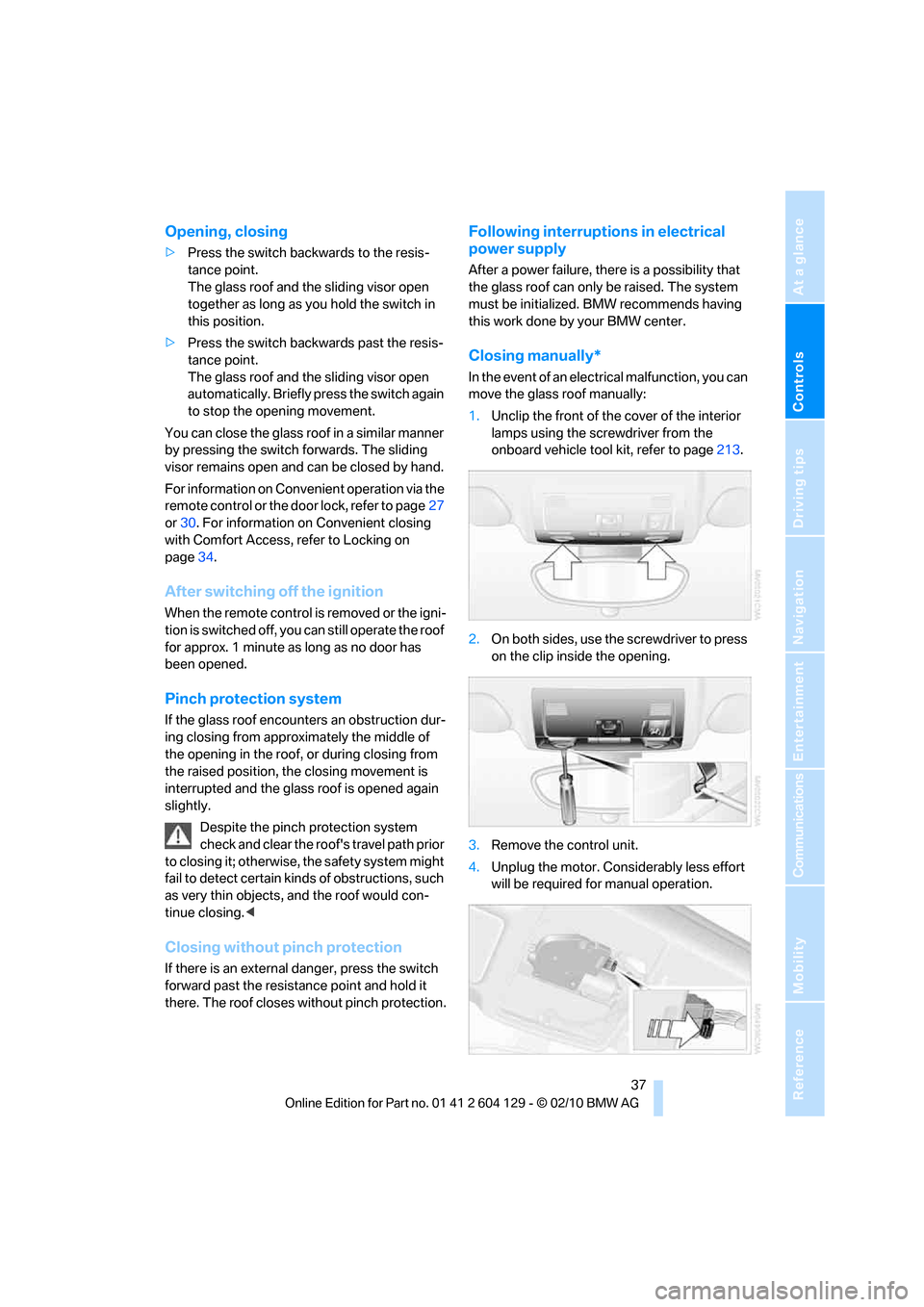
Closing manually*
In the event of an electrical malfunction, you can
move the glass roof manually:
1.Unclip the front of the cover of the interior
lamps using the screwdriver from the
onboard vehicle tool kit, refer to page213.
2.On both sides, use the screwdriver to press
on the clip inside the opening.
3.Remove the control unit.
4.Unplug the motor. Considerably less effort
will be required for manual operation.