lights BMW 135I 2010 E81 Owner's Guide
[x] Cancel search | Manufacturer: BMW, Model Year: 2010, Model line: 135I, Model: BMW 135I 2010 E81Pages: 250, PDF Size: 8.24 MB
Page 217 of 250
Mobility
215Reference
At a glance
Controls
Driving tips
Communications
Navigation
Entertainment
Giving and receiving assistance
Emergency Request*
Conditions for an Emergency Request:
>Full preparation package mobile phone: this
equipment makes it possible to send an
Emergency Request even if no mobile
phone is paired with the vehicle.
>BMW Assist is activated. Activating BMW
Assist, refer to page182.
>Radio readiness is on.
>The BMW Assist system is logged on to a
mobile phone network.
>The Emergency Request system is opera-
ble.
Once your service contract for BMW Assist
expires, the BMW Assist system can be deacti-
vated by a BMW center without you having to
visit a workshop. Once the BMW Assist system
has been deactivated, Emergency Requests
are not possible. The BMW Assist system can
be reactivated by a BMW center after a new
contract has been signed.
Sending an Emergency Request
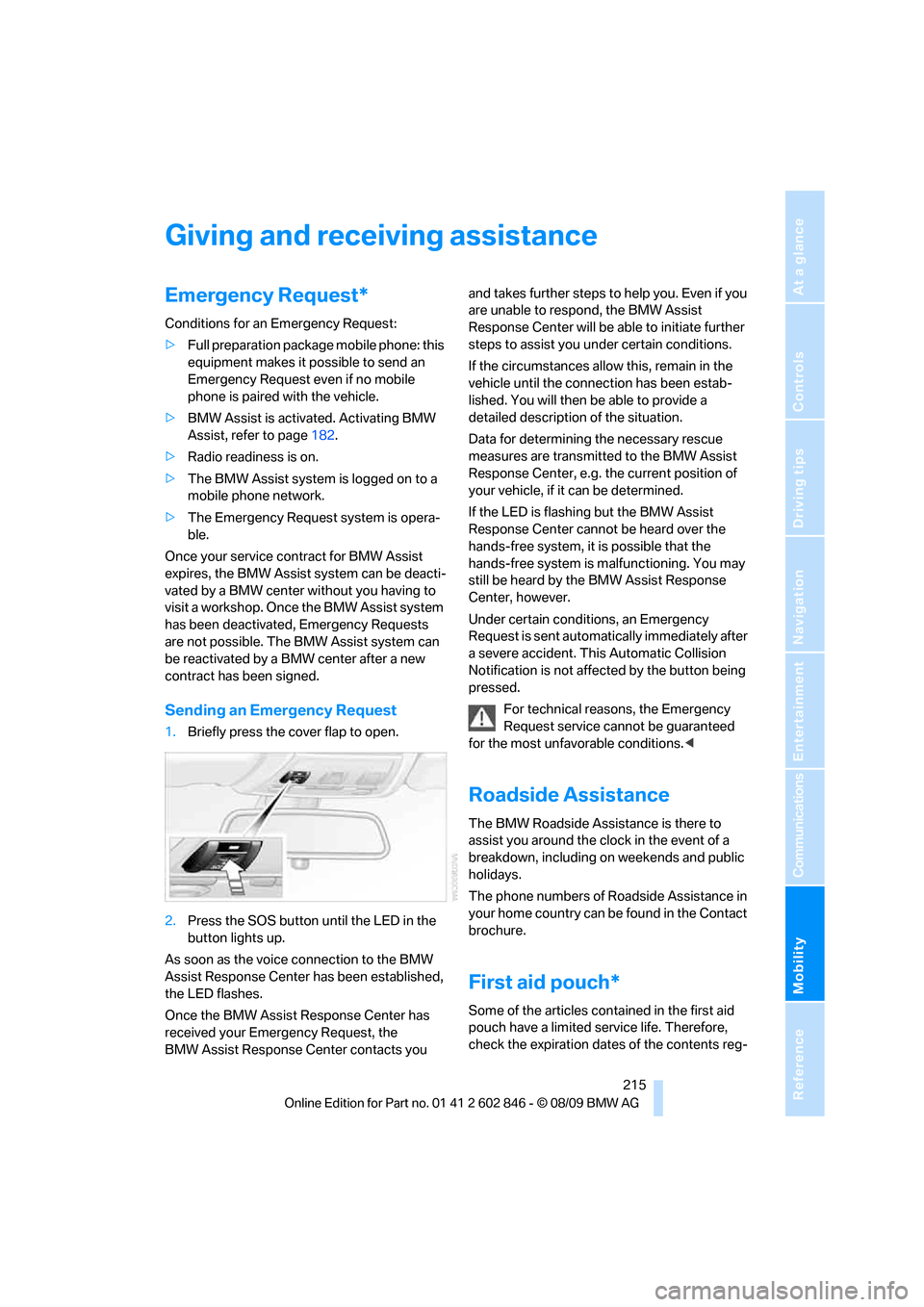
1.Briefly press the cover flap to open.
2.Press the SOS button until the LED in the
button lights up.
As soon as the voice connection to the BMW
Assist Response Center has been established,
the LED flashes.
Once the BMW Assist Response Center has
received your Emergency Request, the
BMW Assist Response Center contacts you and takes further steps to help you. Even if you
are unable to respond, the BMW Assist
Response Center will be able to initiate further
steps to assist you under certain conditions.
If the circumstances allow this, remain in the
vehicle until the connection has been estab-
lished. You will then be able to provide a
detailed description of the situation.
Data for determining the necessary rescue
measures are transmitted to the BMW Assist
Response Center, e.g. the current position of
your vehicle, if it can be determined.
If the LED is flashing but the BMW Assist
Response Center cannot be heard over the
hands-free system, it is possible that the
hands-free system is malfunctioning. You may
still be heard by the BMW Assist Response
Center, however.
Under certain conditions, an Emergency
Request is sent automatically immediately after
a severe accident. This Automatic Collision
Notification is not affected by the button being
pressed.
For technical reasons, the Emergency
Request service cannot be guaranteed
for the most unfavorable conditions.<
Roadside Assistance
The BMW Roadside Assistance is there to
assist you around the clock in the event of a
breakdown, including on weekends and public
holidays.
The phone numbers of Roadside Assistance in
your home country can be found in the Contact
brochure.
First aid pouch*
Some of the articles contained in the first aid
pouch have a limited service life. Therefore,
check the expiration dates of the contents reg-
Page 237 of 250
Reference 235
At a glance
Controls
Driving tips
Communications
Navigation
Entertainment
Mobility
Corner-illuminating lamps,
refer to Adaptive light
control87
Cornering lamps, refer to
Adaptive light control87
Country codes DVD149
Courtesy lamps90
Criteria for route126
Cross-hairs in navigation122
Cruise control61
Cruising range65
Cupholders100
Curb weight, refer to
Weights225
Current fuel consumption65
Current playback
– external devices161
– of music collection156
Customer Relations183
D
Dashboard, refer to
Cockpit10
Dashboard lighting, refer to
Instrument lighting89
Data
– dimensions223
– sizes223
Data, technical222
– capacities226
– engine222
– weights225
Data transfer184
Date
– setting70
– setting format71
Daytime running lights, switch
positions87
DBC Dynamic Brake
Control76
Deactivating front passenger
airbags83
Deadlocking, refer to
Locking28
Decommissioning the vehicle,
refer to Caring for your
vehicleDefect
– door lock30
– fuel filler flap188
– glass roof37
Defogging windows93
Defrosting the windows93
Defrosting windows and
removing condensation93
Defrosting windshield, refer to
Defrosting windows93
Defrost position, refer to
Defrosting windows93
Destination, entering by town/
city name117
Destination address
– entering117,123
Destination entry via BMW
Assist121
Destination for navigation
– entering by voice123
– entering via map122
– entry117
– home address120
– manual entry117
Destination guidance126
– bypassing a route
section127
– changing specified
route126
– continuing126
– starting126
– voice instructions127
– volume of voice
instructions128
Differential, breaking in108
Digital clock
63
Digital compass98
Digital radio, refer to HD
Radio140
Dimensions223
Directional indicators, refer to
Turn signals59
Direction instructions, refer to
Voice instructions127
Directory for navigation, refer
to Address book119
Displacement, refer to Engine
data222Display, refer to Control
Display16
Display lighting, refer to
Instrument lighting89
Displays, refer to Instrument
cluster12
Displays and controls10
Disposal
– of coolant201
– remote control battery35
– vehicle battery213
Distance, refer to
Computer65
Distance remaining to service,
refer to Service
requirements67
Distance to destination, refer
to Computer65
Distance warning, refer to
Park Distance Control
PDC75
Door key, refer to Integrated
key/remote control26
Door lock29
Door lock, confirmation
signals28
Doors, emergency
operation30
DOT Quality Grades194
Draft-free ventilation94
Drinks holders, refer to
Cupholders100
Drive-off assistance, refer to
DSC76
Drive-off assistant77
Driving lamps, refer to Parking
lamps/low beams86
Driving notes108
Driving off on hills, refer to
Drive-off assistant77
Driving stability control
systems76
Driving through water110
Driving tips, refer to Driving
notes108
Dry air, refer to Cooling
function93
DSC Dynamic Stability
Control76