parking brake BMW 135I 2012 E88 User Guide
[x] Cancel search | Manufacturer: BMW, Model Year: 2012, Model line: 135I, Model: BMW 135I 2012 E88Pages: 272, PDF Size: 8.49 MB
Page 225 of 272
Mobility
223Reference
At a glance
Controls
Driving tips
Communications
Navigation
Entertainment
Care
Care products
Regular cleaning and care contributes signifi-
cantly to the value retention of your BMW.
BMW recommends cleaning and caring for your
vehicle with products that are approved by
BMW for this purpose.
Your BMW center will be happy to advise you on
the products and services available for cleaning
and caring for your BMW.
Original BMW CareProducts have been
material-tested, laboratory-checked and
proven in the field, and offer optimal care and
protection for your vehicle.<
Do not use cleaners that contain alcohol
or solvents as these may result in dam-
age.<
Cleaning agents can contain substances
that are dangerous or hazardous to your
health. Therefore, follow the warning and safety
instructions on the packaging. When cleaning
inside the vehicle, always open the doors or
windows of the vehicle. In enclosed areas, pro-
vide for sufficient ventilation. Only use products
designed for cleaning vehicles.<
Exterior care
Washing the vehicle
Especially during the winter months,
ensure that the vehicle is washed more
frequently. Heavy soiling and road salt can lead
to vehicle damage.<
After washing the vehicle, apply the
brakes briefly to dry them; otherwise,
water can reduce braking efficiency over the
short term and brake discs can corrode.<
Automatic car washes
Preference should be given to cloth car washes.Do not use high-pressure car washes;
otherwise, water may drip into the vehicle
around the windows.<
Before driving into a car wash, ensure that it is
suitable for your BMW. Check the following:
>Dimensions of your vehicle, refer to
page243.
>If necessary, fold in the outside rearview
mirrors, refer to page51.
>Maximum permissible tire width.
Avoid car washes with guide rail heights
over 4 in/10 cm; otherwise, there is the
danger of damaging chassis parts.<
>In Convertibles, do not treat the convertible
top with wax. Ensure that a program is avail-
able that does not apply wax or is designed
specifically for Convertibles.
Preparations before driving into an automatic
car wash:
>Unscrew the rod antenna
*.
>Deactivate the rain sensor
* to prevent unin-
tentional wiping.
>Remove additional attachments, e.g. spoil-
ers or telephone antennas, if there is a pos-
sibility that they could be damaged.
>Leave the remote control in the ignition
lock.
Automatic transmission
Before driving into an automatic car wash, per-
form the following steps to ensure that the vehi-
cle can roll:
1.Insert the remote control into the ignition
lock, even with Comfort Access.
2.Move the selector lever to position N.
3.Release the parking brake.
4.Switch off the engine.
5.Leave the remote control in the ignition lock
so that the vehicle can roll.
Page 226 of 272
Care
224
Sport automatic transmission with
double clutch
Before driving into an automatic car wash, per-
form the following steps to ensure that the vehi-
cle can roll:
1.Insert the remote control into the ignition
lock, even with Comfort Access.
2.Engage transmission position N.
3.Release the parking brake.
4.Switch off the engine.
5.Leave the remote control in the ignition lock
so that the vehicle can roll.
The transmission is switched into position P:
>Automatically after approx. 30 minutes
>If you remove the infrared remote control
from the ignition lock
Steam jets/high-pressure washers
When using steam jets or high-pressure
washers, make sure to maintain sufficient
distance from the vehicle and do not exceed a
temperature of 1407/606.
Insufficient clearance or excessive pressure or
temperature can lead to component damage or
water penetration. Follow the operating instruc-
tions for the steam jet or high-pressure
washer.<
When using high-pressure washers, do
not spray the sensors, e.g. of the Park
Distance Control, for an extended period and
maintain a distance of at least 1 ft/30 cm from
them.<
Manual car wash
When washing the vehicle by hand, use large
quantities of water and car shampoo if neces-
sary. Clean the vehicle with a sponge or wash-
ing brush, applying light pressure only.
Before cleaning the windshield, deacti-
vate the rain sensor or switch off the igni-
tion to prevent unintentional activation of the
wipers.<
Observe local regulations pertaining to
washing vehicles by hand.<
Headlamps
Do not rub them dry and do not use abrasive or
corrosive cleaning agents.
Loosen dirt, e.g. insects, with shampoo or
insect remover and wash away with copious
quantities of water.
Thaw ice with a windshield deicer and do not
use an ice scraper.
Windows
Clean the inside and outside surfaces of the
windows and the mirrors with window cleaner.
Do not clean the mirrors with cleaners
containing quartz.<
Convertible top care
The appearance and service life of the convert-
ible top largely depends on its proper care and
operation.
Please follow these instructions:
>Never attempt to fold and stow the convert-
ible top in the convertible compartment
when the top is wet or frozen. Otherwise,
water stains, mildew, and chafe marks may
occur.
>If water spots occur on the inside headliner
despite precautions, remove them using a
microfiber cloth and interior cleaner.
>If the vehicle is parked in an enclosed area
for a longer period of time, make sure that
there is sufficient ventilation.
>Remove any bird droppings immediately,
since they have corrosive properties which
will corrode the convertible top and damage
the rubber seals.
To remove stains from the convertible
top, do not use stain removers, paint thin-
ners, solvents, benzine or similar substances.
These cleaners may damage the rubber seals.
The improper care or cleaning methods may
cause the convertible top and its seams to
leak.<
To remove heavy soiling, use a special convert-
ible top cleaner.
Page 232 of 272
Replacing components
230
Side turn signals
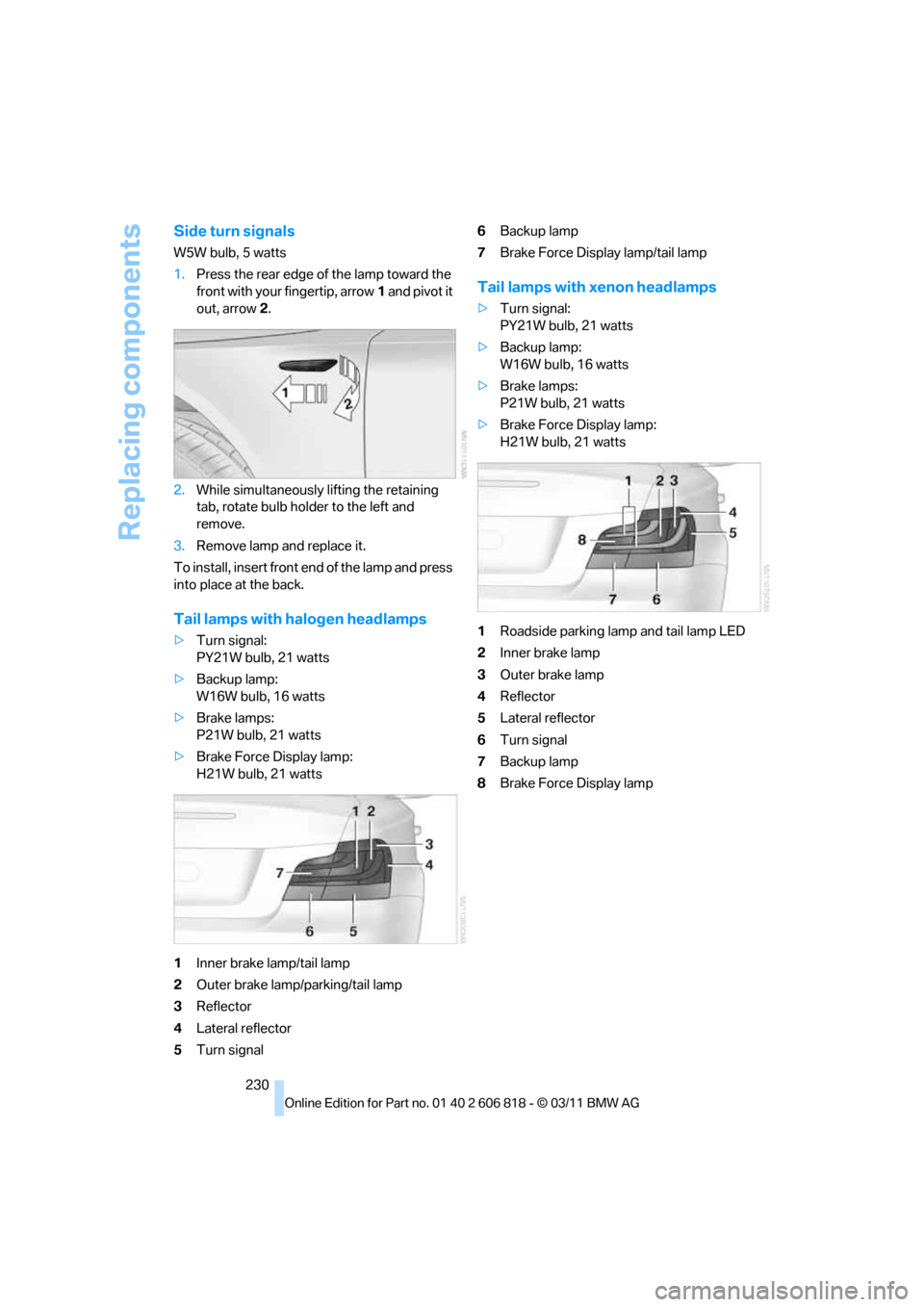
W5W bulb, 5 watts
1.Press the rear edge of the lamp toward the
front with your fingertip, arrow1 and pivot it
out, arrow2.
2.While simultaneously lifting the retaining
tab, rotate bulb holder to the left and
remove.
3.Remove lamp and replace it.
To install, insert front end of the lamp and press
into place at the back.
Tail lamps with halogen headlamps
>Turn signal:
PY21W bulb, 21 watts
>Backup lamp:
W16W bulb, 16 watts
>Brake lamps:
P21W bulb, 21 watts
>Brake Force Display lamp:
H21W bulb, 21 watts
1Inner brake lamp/tail lamp
2Outer brake lamp/parking/tail lamp
3Reflector
4Lateral reflector
5Turn signal6Backup lamp
7Brake Force Display lamp/tail lamp
Tail lamps with xenon headlamps
>Turn signal:
PY21W bulb, 21 watts
>Backup lamp:
W16W bulb, 16 watts
>Brake lamps:
P21W bulb, 21 watts
>Brake Force Display lamp:
H21W bulb, 21 watts
1Roadside parking lamp and tail lamp LED
2Inner brake lamp
3Outer brake lamp
4Reflector
5Lateral reflector
6Turn signal
7Backup lamp
8Brake Force Display lamp
Page 233 of 272
Mobility
231Reference
At a glance
Controls
Driving tips
Communications
Navigation
Entertainment
Replacing tail lamps
Outer brake lamp
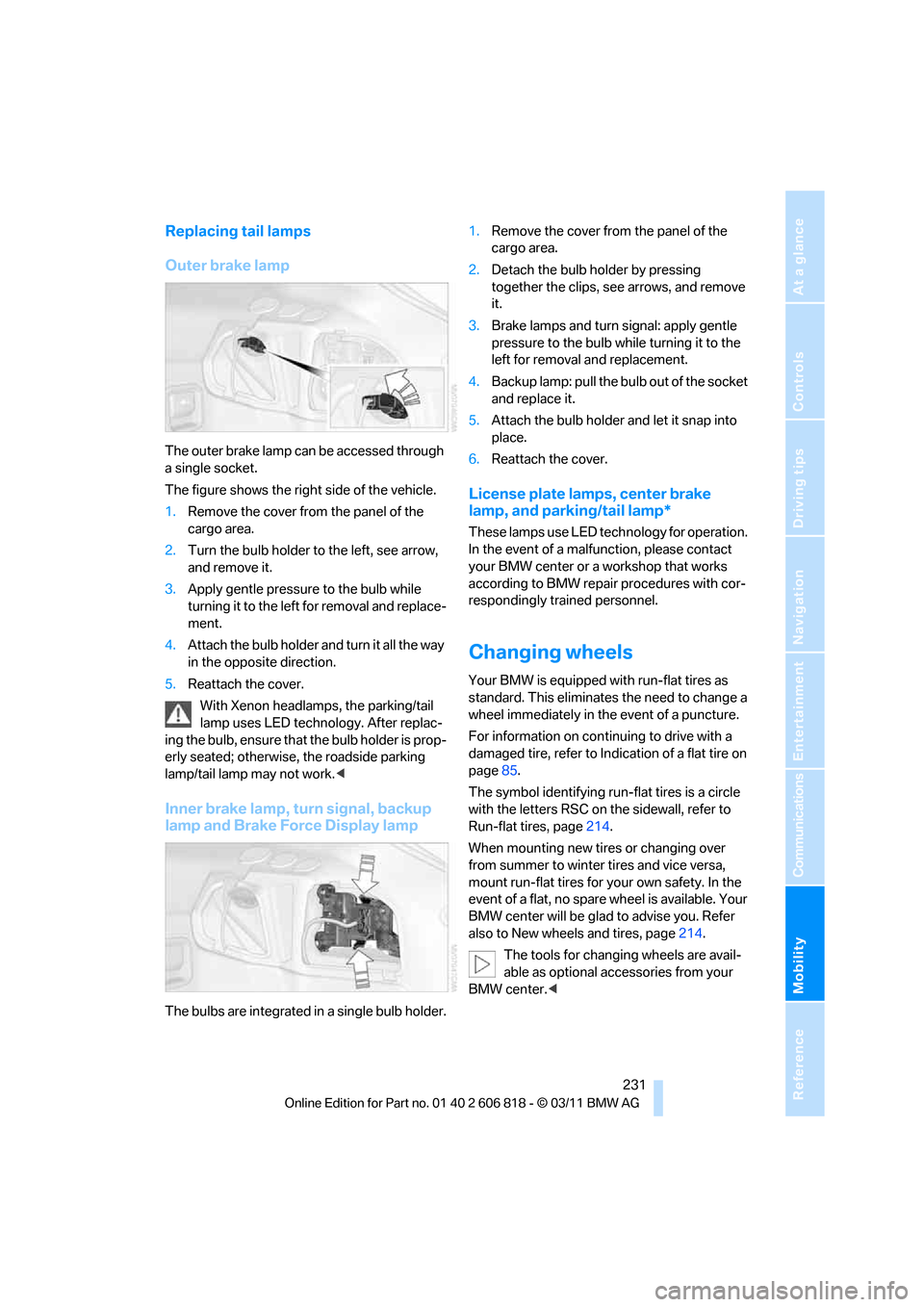
The outer brake lamp can be accessed through
a single socket.
The figure shows the right side of the vehicle.
1.Remove the cover from the panel of the
cargo area.
2.Turn the bulb holder to the left, see arrow,
and remove it.
3.Apply gentle pressure to the bulb while
turning it to the left for removal and replace-
ment.
4.Attach the bulb holder and turn it all the way
in the opposite direction.
5.Reattach the cover.
With Xenon headlamps, the parking/tail
lamp uses LED technology. After replac-
ing the bulb, ensure that the bulb holder is prop-
erly seated; otherwise, the roadside parking
lamp/tail lamp may not work.<
Inner brake lamp, turn signal, backup
lamp and Brake Force Display lamp
The bulbs are integrated in a single bulb holder.1.Remove the cover from the panel of the
cargo area.
2.Detach the bulb holder by pressing
together the clips, see arrows, and remove
it.
3.Brake lamps and turn signal: apply gentle
pressure to the bulb while turning it to the
left for removal and replacement.
4.Backup lamp: pull the bulb out of the socket
and replace it.
5.Attach the bulb holder and let it snap into
place.
6.Reattach the cover.
License plate lamps, center brake
lamp, and parking/tail lamp*
These lamps use LED technology for operation.
In the event of a malfunction, please contact
your BMW center or a workshop that works
according to BMW repair procedures with cor-
respondingly trained personnel.
Changing wheels
Your BMW is equipped with run-flat tires as
standard. This eliminates the need to change a
wheel immediately in the event of a puncture.
For information on continuing to drive with a
damaged tire, refer to Indication of a flat tire on
page85.
The symbol identifying run-flat tires is a circle
with the letters RSC on the sidewall, refer to
Run-flat tires, page214.
When mounting new tires or changing over
from summer to winter tires and vice versa,
mount run-flat tires for your own safety. In the
event of a flat, no spare wheel is available. Your
BMW center will be glad to advise you. Refer
also to New wheels and tires, page214.
The tools for changing wheels are avail-
able as optional accessories from your
BMW center.<
Page 257 of 272
Reference 255
At a glance
Controls
Driving tips
Communications
Navigation
Entertainment
Mobility
Backup lamp, replacing
bulb231
Bag for skis, refer to Ski
bag110
Band-aids, refer to First aid
pouch235
Bar, refer to Tow-starting,
towing away237
Base plate for telephone or
mobile phone
– refer to Snap-in adapter186
Bass, tone setting144
Battery232
– charging232
– disposal37,232
– jump-starting235
– replacing232
– temporary power failure232
Battery renewal
– remote control for vehicle37
Being towed237
Belts, refer to Safety belts50
Belt tensioner, refer to Safety
belts50
Beverage holders, refer to
Cupholders108
Blower, refer to Air
volume101
Bluetooth, activating/
deactivating177
Bluetooth audio169
– disconnecting an audio
connection171
– pairing a device169
– playback170
– unpairing device171
– What to do if...171
BMW
– car shampoo224
BMW Assist198
– updating202
BMW Maintenance
System221
BMW Online*200
BMW TeleServices199
Bottle holders, refer to
Cupholders108
Brake Assist, refer to Dynamic
Brake Control83Brake fluid
– service requirements74
Brake Force Display90
Brake lamps
– Brake Force Display90
– replacing bulb231
Brake pads, breaking in116
Brake pedal, refer to Braking
safely118
Brake rotors118
– brakes116
– breaking in116
Brakes
– ABS83
– BMW Maintenance
System221
– braking safely118
– breaking in116
– parking brake59
– service requirements74
Brake system116
– BMW Maintenance
System221
– breaking in116
– disc brakes118
Breakdown services, refer to
Roadside Assistance234
Breaking in the clutch116
Break-in period116
Bulb changing, refer to Lamps
and bulbs227
Button for starting the
engine57
Buttons on the steering
wheel11
C
Calendar193
– displaying appointment193
– selecting calendar day193
California Proposition 65
warning6
Call
– accepting181
– ending181
– muting the microphone182
– rejecting181Calling, refer to Phone
numbers, dialing181
Calling, refer to Telephone
owner's manual
Calls
– with multiple parties181
Can holders, refer to
Cupholders108
Capacities246
Capacity of the cargo area245
Car battery, refer to Vehicle
battery232
Car care, refer to Care223
Care223
– automatic car washes223
– care products223
– carpets226
– CD/DVD drives226
– chrome parts225
– convertible top224
– displays226
– exterior223
– fine wood parts226
– headlamps224
– high-pressure washer224
– interior225
– leather225
– light-alloy wheels225
– paintwork225
– plastic parts226
– rubber seals225
– safety belts226
– sensors and cameras226
– upholstery and cloth
trim225
– washing the car
manually224
– windows224
Cargo, securing120
Cargo area
– capacity245
– Comfort Access36
– enlarging, refer to Through-
loading system109
– lamp, refer to Interior
lamps98
– lid, refer to Trunk lid
33
– opening from outside33
Page 259 of 272
Reference 257
At a glance
Controls
Driving tips
Communications
Navigation
Entertainment
Mobility
Convertible top
– convenient opening30
Convertible top care224
Coolant219
– checking level220
– filling220
Coolant temperature219
Cooling, maximum100
Cooling fluid, refer to
Coolant219
Copyright2
Corner-illuminating lamps95
Cornering light, refer to
Adaptive Light Control95
Country codes DVD157
Courtesy lamps98
Criteria for route134
Cross-hairs in navigation130
Cruise control68
Cruising range72
Cupholders108
Curb weight, refer to
Weights245
Current fuel consumption72
Current playback
– external devices168
– of music collection163
Customer Relations201
D
Dashboard, refer to
Cockpit10
Dashboard lighting, refer to
Instrument lighting98
Data, technical242
– capacities246
– dimensions243
– engine242
– weights245
Data memory222
Data transfer202
Date
– setting78
– setting format78
Daytime running lights, switch
positions95
DBC Dynamic Brake
Control83Deactivating front passenger
airbags91
Deadlocking, refer to
Locking30
Defect
– door lock32
– fuel filler flap206
– glass roof40
Defining a home address190
Defogging windows101
Defrosting windows101
Defrosting windows and
removing condensation101
Defrosting windshield, refer to
Defrosting windows101
Defrost position, refer to
Defrosting windows101
Destination, entering by town/
city name125
Destination address
– entering125,131
Destination entry via BMW
Assist129
Destination for navigation
– entering by voice131
– entering via map130
– entry125
– home address128
– manual entry125
Destination guidance134
– bypassing a route
section135
– changing specified
route134
– continuing134
– starting134
– voice instructions136
– volume of voice
instructions136
Differential, breaking in116
Digital clock70
,76
Digital compass106
Digital radio, refer to HD
Radio148
Dimensions243
Directional indicators, refer to
Turn signals66
Direction instructions, refer to
Voice instructions136Directory for navigation, refer
to Address book127
Displacement, refer to Engine
data242
Display, refer to Control
Display16
Displaying contact
pictures190
Display lighting, refer to
Instrument lighting98
Displays, refer to Instrument
cluster12
Displays and controls10
Disposal
– of coolant219
– remote control battery37
– vehicle battery232
Distance, refer to
Computer72
Distance remaining to service,
refer to Service
requirements74
Distance to destination, refer
to Computer72
Distance warning, refer to
Park Distance Control
PDC82
Door key, refer to Integrated
key/remote control28
Door lock32
Door lock, confirmation
signals30
Doors, manual operation32
DOT Quality Grades212
Draft-free ventilation102
Drinks holders, refer to
Cupholders108
Drive mode63
Drive-off assistance, refer to
DSC83
Drive-off assistant84
Driving dynamics control64
Driving lamps, refer to Parking
lamps/low beams94
Driving notes116
Driving off on hills, refer to
Drive-off assistant84
Driving stability control
systems83
Page 261 of 272
Reference 259
At a glance
Controls
Driving tips
Communications
Navigation
Entertainment
Mobility
FM, waveband147
Fog lamps97
– indicator lamp13,97
Footwell lamps98
For your own safety5
Free memory capacity, music
collection164
Front airbags90
Front seat adjustment46
Frost on windows, refer to
Defrosting windows101
FTM, refer to Flat Tire
Monitor84
Fuel207
– gauge71
– high-quality brands207
– quality207
– specifications207
– tank contents, refer to
Capacities246
Fuel clock, refer to Fuel
gauge71
Fuel consumption indicator,
refer to Average fuel
consumption72
Fuel consumption statistics,
refer to Average fuel
consumption72
Fuel display, refer to Fuel
gauge71
Fuel filler flap206
– releasing in the event of
electrical malfunction206
Fuses232
G
Garage door opener, refer to
Integrated universal remote
control104
Gasoline, refer to Required
fuel207
Gasoline display, refer to Fuel
gauge71
Gas station
recommendations136
Gear display, with automatic
transmission60Gear shifting
– automatic transmission60
– manual transmission59
Gearshift lever62
– automatic transmission with
Steptronic60
– manual transmission59
General driving notes117
Glass roof, electric39
– closing after electrical
malfunction40
– convenient opening and
closing32
– convenient opening and
closing with Comfort
Access36
– opening, closing39
– pinch protection system39
– remote control30
– tilting39
Glove compartment107
GPS navigation, refer to
Navigation system124
Grills, refer to Air vents99
Gross vehicle weight, refer to
Weights245
H
Halogen lamps
– replacing bulbs228
Handbrake, refer to Parking
brake59
Hands-free system184
Hands-free system, refer to
Microphone for hands-free
mode14
Hazard warning flashers14
HD Radio148
Head airbags90
Headlamp control,
automatic94
Headlamp cover228
Headlamp flasher66
– indicator lamp13
Headlamps
– replacing bulbs228Head Light, refer to Adaptive
Light Control95
Head restraints48
Heated
– seats50
– steering wheel53
Heated mirrors52
Heating
– mirrors52
– seats50
– steering wheel53
Heating, rear window101
Heating and ventilation99
Heavy loads, refer to Stowing
cargo120
Height, refer to
Dimensions243
Height adjustment
– steering wheel52
High-beam Assistant96
High beams96
– indicator lamp13
– replacing bulbs228
High beams and low beams,
automatic, refer to High-
beam Assistant96
High-pressure
washer223,224
High water, refer to Driving
through water118
Highways, refer to Route
criteria134
Hills118
Holders for cups108
Hood216
Hot exhaust system117
Hydraulic brake assist, refer to
Dynamic Brake Control83
Hydroplaning117
Page 264 of 272
Everything from A to Z
262 Navigation system124
– address book127
– bypassing a route
section135
– continuing destination
guidance134
– destination entry125
– dynamic destination
guidance140
– entering a destination by
voice131
– entering a destination
manually125
– frequently asked
questions141
– gas station
recommendations136
– planning a trip132
– route list135
– selecting destination via
map130
– selecting route criteria134
– special destinations128
– starting destination
guidance134
– terminating destination
guidance134
– traffic bulletins138
– voice instructions136
– volume adjustment136
Neck support, refer to Head
restraints48
Nets, refer to Storage
compartments108
Neutral63
New tires214
Next Service indicator, refer to
Condition Based Service
CBS221
North-facing map136
Notes194
Number of cylinders, refer to
Engine data242
O
OBD socket, refer to Socket
for Onboard Diagnosis222
Octane ratings, refer to Fuel
specifications207
Odometer70
Office188
– current office188
– What to do if…195
Oil, refer to Engine oil217
Oil consumption217
Oil level217
Old batteries, refer to
Disposal232
Onboard vehicle tool kit227
Opening and closing
– Comfort Access35
– from inside32
– from outside29
– using the door lock32
– using the remote control29
Options, selecting for
navigation134
Orientation menu, refer to
Start menu17
Outlets, refer to
Ventilation102
Output, refer to Engine
data242
Outside temperature
display70
– changing unit of measure74
– in computer74
Outside temperature
warning70
Overriding selector lever
lock61
Overview
– radio control144
P
Paintwork care225
Park assistant, refer to Park
Distance Control82
Park Distance Control PDC82Parked car ventilation102
– preselecting switch-on
times103
– switching on and off
directly102
Parking
– vehicle58
Parking aid, refer to Park
Distance Control PDC82
Parking brake59
– indicator lamp59
Parking lamps/low beams94
– replacing bulbs228
Parts and accessories, refer to
Your individual vehicle5
Passenger side mirror tilt
function52
Pathway lighting95
Personal information, refer to
Office188
Personal Profile28
Phone numbers
– dialing181
Phone reception level, refer to
Status information19
Pinch protection system
– glass roof, electric39
– windows38
Playing music162
Polish225
Pollen, refer to Microfilter/
activated-charcoal filter102
Power windows37
Power windows, refer to
Windows37
Pressure, tires208
Pressure monitoring of tires,
refer to Flat Tire Monitor84
Pressure monitoring of tires,
refer to Tire Pressure
Monitor TPM86
Programmable buttons on the
steering wheel11
Programmable memory
keys21
Protection function, refer to
Pinch protection system
– glass roof, electric39
– windows38
Page 266 of 272
Everything from A to Z
264
S
Safety-belt height
adjustment51
Safety belts50
– damage51
– indicator lamp51
– reminder51
– sitting safely45
Safety systems
– airbags90
– Antilock Brake System
ABS83
– Dynamic Stability Control
DSC83
– rollover protection system,
Convertible92
– safety belts50
Safety tires, refer to Run-flat
tires214
Satellite radio150
– enabling or unsubscribing
from a channel150
– favorites152
– selecting channel151
– storing channel151
– timeshift152
– Traffic Jump153
Saving fuel116
Screen, refer to iDrive16
Screw thread for tow
fitting236
SDARS, refer to Satellite
radio150
Seat and mirror memory50
Seat belt reminder, refer to
'Fasten safety belts'
reminder51
Seats46
– heating50
– sitting safely45
Securing cargo111,112
Selecting new scale for
navigation137
Selector lever, automatic
transmission with
Steptronic60
Selector lever positions62Service, refer to Roadside
Assistance234
Service car, refer to Roadside
Assistance234
Service data in remote
control221
Service Interval Display, refer
to Condition Based Service
CBS221
Service Request201
Service requirements74
Service status202
Settings
– clock, 12h/24h format77
– date format78
– DVD158
– language81
Settings for the map view137
Setting times, refer to
Preselecting switch-on
times103
Shifting64
– 7-gear Sport automatic
transmission with double
clutch63
Shifting gears with automatic
transmission with
Steptronic61
Shift into a drive position, refer
to selector lever
positions62
Shiftlock, refer to Changing
selector lever positions60
Shift paddles on the steering
wheel64
Short commands for the voice
activation system247
Short route in navigation, refer
to Selecting route134
Shuffled, refer to Random
– CD changer156
– CD player156
Side airbags90
Side windows, refer to
Windows37
Signal horn, refer to Horn10
Sitting safely45
– airbags45
– safety belts45Ski bag110
Sliding/tilt sunroof, refer to
Glass roof, electric39
Slot for remote control57
Smokers' package, refer to
Ashtray109
Snap-in adapter176
– inserting/removing186
Snap-in adapter, refer to
Center armrest108
Snow chains215
Socket, refer to Connecting
electrical appliances109
Socket for Onboard Diagnosis
OBD222
Software update172
Sound, adjusting during audio
playback, refer to Tone
control144
Sound output for
entertainment on/off144
Spare fuses232
Special destinations128
Special destinations,
displaying129
Special oils, refer to Approved
engine oils219
Specified engine oils, refer to
Approved engine oils219
Speed
– for winter tires215
Speed limit warning, refer to
Speed limit80
Speedo, refer to
Speedometer12
Speedometer12
Speed Volume145
Split screen content, refer to
Selecting the display for the
split screen content20
Sport automatic transmission
with double clutch62
– driving dynamics control64
– kickdown63
– Launch Control66
– manually unlocking parking
lock65
– neutral63
– reverse gear63