sport button BMW 135I 2012 E88 User Guide
[x] Cancel search | Manufacturer: BMW, Model Year: 2012, Model line: 135I, Model: BMW 135I 2012 E88Pages: 272, PDF Size: 8.49 MB
Page 110 of 272
Practical interior accessories
108 >Do not connect USB hard discs.
>Do not use the USB interface to recharge
external devices.
Center armrest
Storage compartment
The center armrest between the front seats
contains a credit card holder and, depending on
the equipment version, a compartment or a
snap-in adapter
*.
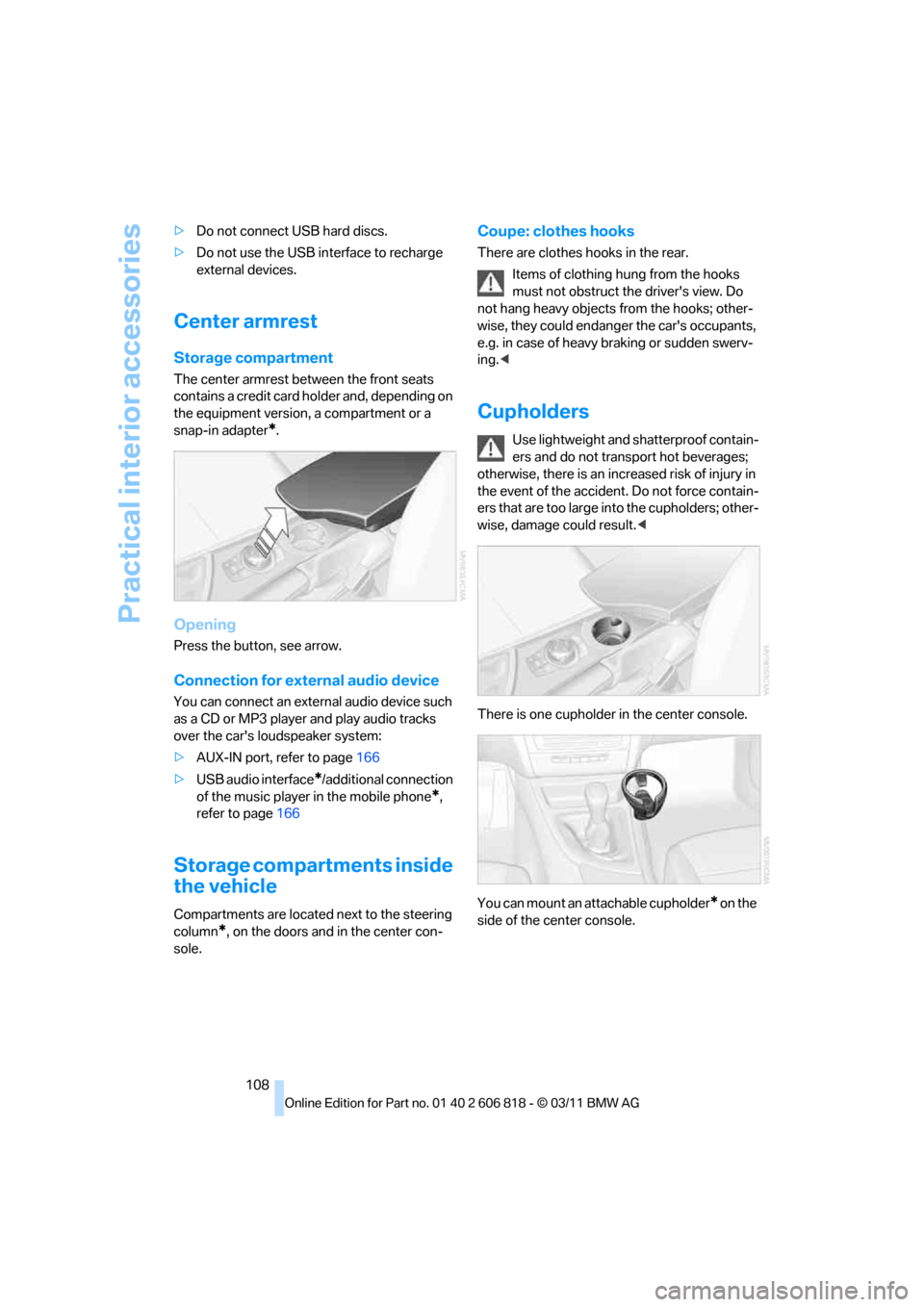
Opening
Press the button, see arrow.
Connection for external audio device
You can connect an external audio device such
as a CD or MP3 player and play audio tracks
over the car's loudspeaker system:
>AUX-IN port, refer to page166
>USB audio interface
*/additional connection
of the music player in the mobile phone
*,
refer to page166
Storage compartments inside
the vehicle
Compartments are located next to the steering
column
*, on the doors and in the center con-
sole.
Coupe: clothes hooks
There are clothes hooks in the rear.
Items of clothing hung from the hooks
must not obstruct the driver's view. Do
not hang heavy objects from the hooks; other-
wise, they could endanger the car's occupants,
e.g. in case of heavy braking or sudden swerv-
ing.<
Cupholders
Use lightweight and shatterproof contain-
ers and do not transport hot beverages;
otherwise, there is an increased risk of injury in
the event of the accident. Do not force contain-
ers that are too large into the cupholders; other-
wise, damage could result.<
There is one cupholder in the center console.
You can mount an attachable cupholder
* on the
side of the center console.
Page 112 of 272
Practical interior accessories
110
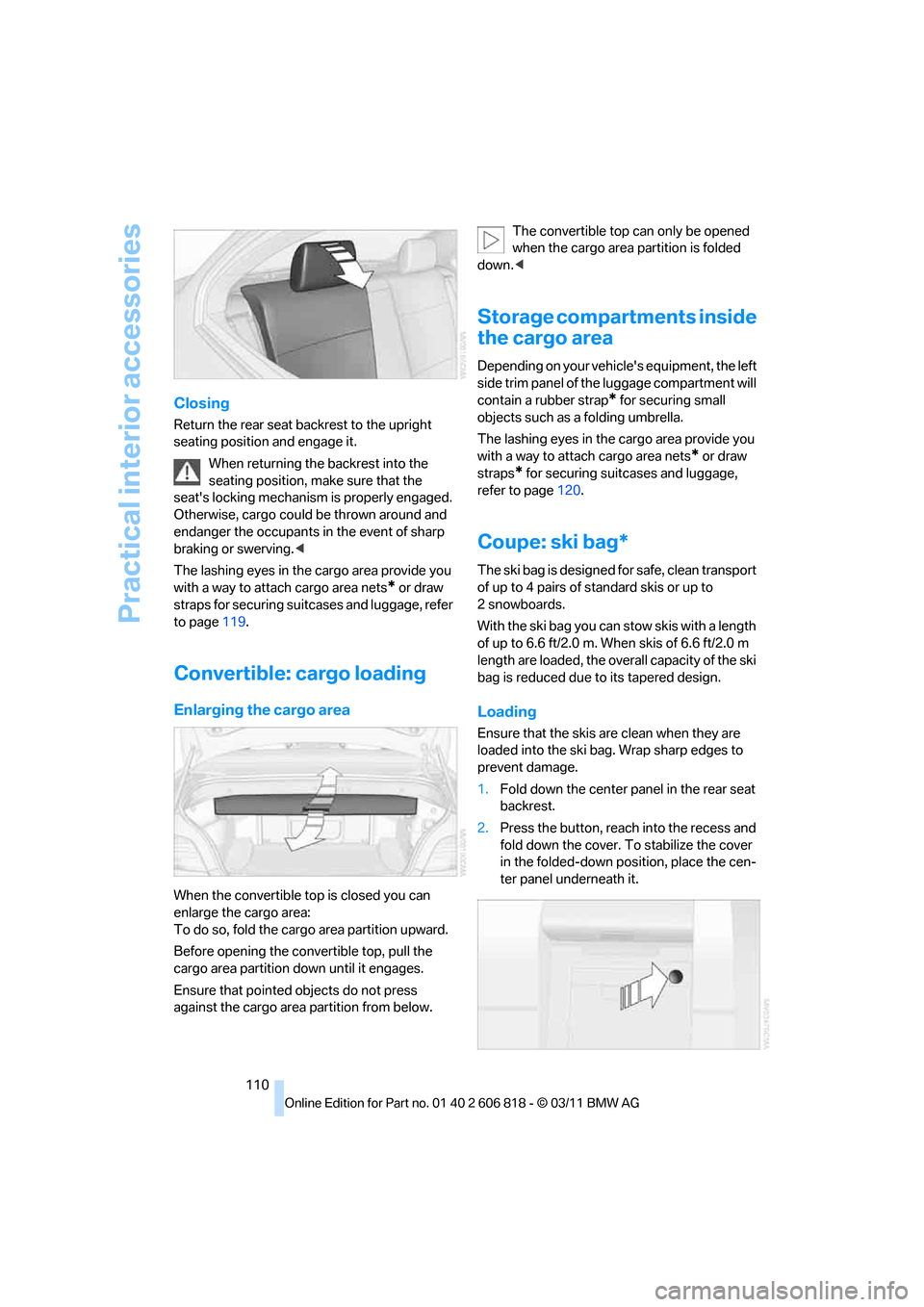
Closing
Return the rear seat backrest to the upright
seating position and engage it.
When returning the backrest into the
seating position, make sure that the
seat's locking mechanism is properly engaged.
Otherwise, cargo could be thrown around and
endanger the occupants in the event of sharp
braking or swerving.<
The lashing eyes in the cargo area provide you
with a way to attach cargo area nets
* or draw
straps for securing suitcases and luggage, refer
to page119.
Convertible: cargo loading
Enlarging the cargo area
When the convertible top is closed you can
enlarge the cargo area:
To do so, fold the cargo area partition upward.
Before opening the convertible top, pull the
cargo area partition down until it engages.
Ensure that pointed objects do not press
against the cargo area partition from below.The convertible top can only be opened
when the cargo area partition is folded
down.<
Storage compartments inside
the cargo area
Depending on your vehicle's equipment, the left
side trim panel of the luggage compartment will
contain a rubber strap
* for securing small
objects such as a folding umbrella.
The lashing eyes in the cargo area provide you
with a way to attach cargo area nets
* or draw
straps
* for securing suitcases and luggage,
refer to page120.
Coupe: ski bag*
The ski bag is designed for safe, clean transport
of up to 4 pairs of standard skis or up to
2snowboards.
With the ski bag you can stow skis with a length
of up to 6.6 ft/2.0 m. When skis of 6.6 ft/2.0 m
length are loaded, the overall capacity of the ski
bag is reduced due to its tapered design.
Loading
Ensure that the skis are clean when they are
loaded into the ski bag. Wrap sharp edges to
prevent damage.
1.Fold down the center panel in the rear seat
backrest.
2.Press the button, reach into the recess and
fold down the cover. To stabilize the cover
in the folded-down position, place the cen-
ter panel underneath it.
Page 260 of 272
Everything from A to Z
258 Driving through water118
Driving tips, refer to Driving
notes116
Dry air, refer to Cooling
function101
DSC Dynamic Stability
Control83
DTC Dynamic Traction
Control84
– indicator lamps84
DVD
– country codes157
– settings158
– video playback157
DVD menu158
DVD player, refer to CD
player155
DVD video157
Dynamic Brake Control
DBC83
Dynamic destination
guidance140
Dynamic Stability Control
DSC83
Dynamic Traction Control
DTC84
– indicator lamps84
E
EBV Electronic brake-force
distribution83
Eject button, refer to Buttons
on the CD/DVD player144
Electrical defect
– 7-gear Sport automatic
transmission with double
clutch65
Electrical malfunction
– door lock32
– fuel filler flap206
– glass roof40
Electronic brake-force
distribution EBV83
Electronic oil level check217
Electronic Stability Program
ESP, refer to Dynamic
Stability Control DSC83
Email192Emergency operation, refer to
Manual operation
– door lock32
– fuel filler flap206
– glass roof40
– transmission lock, automatic
transmission61
Emergency release, trunk
lid34
Emergency Request234
Emergency services, refer to
Roadside Assistance234
Energy, saving
– saving fuel116
Engine
– breaking in116
– data242
– speed242
– starting58
– starting, Comfort Access35
– switching off58
Engine compartment217
Engine coolant, refer to
Coolant219
Engine oil
– adding219
– additives219
– alternative oil types219
– approved engine oils219
– BMW Maintenance
System221
– checking level217
– intervals between changes,
refer to Service
requirements74
Engine oil level, checking217
Engine output, refer to Engine
data242
Engine speed, refer to Engine
data242
Engine starting, refer to
Starting the engine58
Entering the postal code for
navigation126
Entry map for destination130
Equalizer, tone setting145
ESP Electronic Stability
Program, refer to Dynamic
Stability Control DSC83Exhaust system, refer to Hot
exhaust system117
Exterior mirrors51
– adjusting51
– automatic dimming
feature52
– automatic heating52
– folding in and out51
External devices
– random play sequence168
– software update172
Eyes
– for tow-starting and towing
away236
– for tying down loads120
F
Failure messages, refer to
Check Control78
Failure of an electrical
consumer232
False alarm, refer to Avoiding
unintentional alarms35
Fastening safety belts, refer to
Safety belts50
Fastest route for
navigation134
Fast forward
– CD changer157
– CD player157
Filter of automatic climate
control, refer to Microfilter/
activated charcoal filter102
First aid pouch235
Fixture for remote control,
refer to Ignition lock57
Flash when locking/
unlocking30
Flat tire
– run-flat tires214
– Tire Pressure Monitor
TPM86
Flat Tire Monitor FTM84
– indicating a flat tire85
– initializing the system85
– system limits84
Flat tires, refer to Tire
condition213
Page 267 of 272
Reference 265
At a glance
Controls
Driving tips
Communications
Navigation
Entertainment
Mobility
Sport program, automatic
transmission with
Steptronic61
Sport program with 7-gear
Sport automatic
transmission with double
clutch63
Stability control, refer to
Driving stability control
systems83
Start/Stop button57
– starting the engine58
– switching off the engine58
Starting, refer to Starting the
engine58
Starting assistance, refer to
Jump-starting235
Starting the engine
– Start/Stop button57
Start menu17
State/province, for
navigation125
Station, selecting
– radio147
Status information on the
Control Display19
Status of this Owner's Manual
at time of printing5
Steam jet223,224
Steering wheel52
– adjustment52
– buttons on steering
wheel11
– heating53
– shift paddles64
Steering wheel buttons, refer
to Shift paddles64
Steering with variable ratio,
refer to Active steering89
Steptronic, refer to Automatic
transmission with
Steptronic59
Storage226
Storage compartment
package108
Storage compartments108
Stored trip, calling up132Storing
– seat position, refer to Seat
and mirror memory50
– telephone numbers, refer to
separate Owner's Manual
Storing a destination in the
address book127
Storing music161
Storing tires215
Stowage, refer to Storage
compartments108
Street, entering,
navigation126
Suitable mobile phones176
Summer tires, refer to Wheels
and tires208
Surround
145
SVCD157
SW, waveband147
Switches, refer to Cockpit10
Switching off
– engine58
Switching off the engine
– Start/Stop button57
Switching on
– audio144
– CD changer144
– CD player144
– radio144
Switching the cooling function
on and off101
Switch-on times of parked car
ventilation, preselecting103
Symbols4
– status information19
T
Tachometer70
Tailgate, refer to Trunk lid33
Tail lamp, refer to Tail
lamps230
– replacing bulb231
Tail lamps230
– replacing bulb231
Tank contents, refer to
Capacities246
Tasks193Technical data242
– dimensions243
Technical modifications5
Telephone176
– hands-free system184
– phone book182
– received calls183
– redialing183
– voice commands184
Telephone, installation
location, refer to Center
armrest108
Telephone, refer to separate
Owner's Manual
Teleservice Diagnosis200
Teleservice Help200
Temperature display
– outside temperature70
– outside temperature
warning70
– setting the units74
Tempomat, refer to Cruise
control68
Text message191
Thigh support46
Third brake lamp, refer to
Center brake lamp231
Three-point safety belt50
Through-loading system109
Tilt alarm sensor35
Tilt function, passenger side
mirror52
Timer, refer to Preselecting
switch-on times103
Tire inflation pressure208
– loss85,87
Tire pressure monitoring,
refer to Flat Tire Monitor84
Tire Pressure Monitor
TPM86
– resetting the system87
– system limitations86
– warning lamp87
Tire puncture, refer to Flat Tire
Monitor85
Tire Quality Grading212