change time BMW 135I CONVERTIBLE 2008 E88 User Guide
[x] Cancel search | Manufacturer: BMW, Model Year: 2008, Model line: 135I CONVERTIBLE, Model: BMW 135I CONVERTIBLE 2008 E88Pages: 264, PDF Size: 8.68 MB
Page 139 of 264
Navigation
Driving tips
137Reference
At a glance
Controls
Communications
Entertainment
Mobility
2.Select "Stop guidance" and press the con-
troller.
If you did not reach the destination before the
end of the last journey, the following question
will appear in the display at the start of the next
journey:
"Continue guidance to destination?".
The destination guidance starts automatically
after a short time.
To start destination guidance immediately:
Select "Yes" and press the controller.
Route display
You can have the route during destination guid-
ance displayed in various ways.
From another menu, you can switch
directly to the screen last displayed, refer
to Convenient call-up of menu items on
page18.<
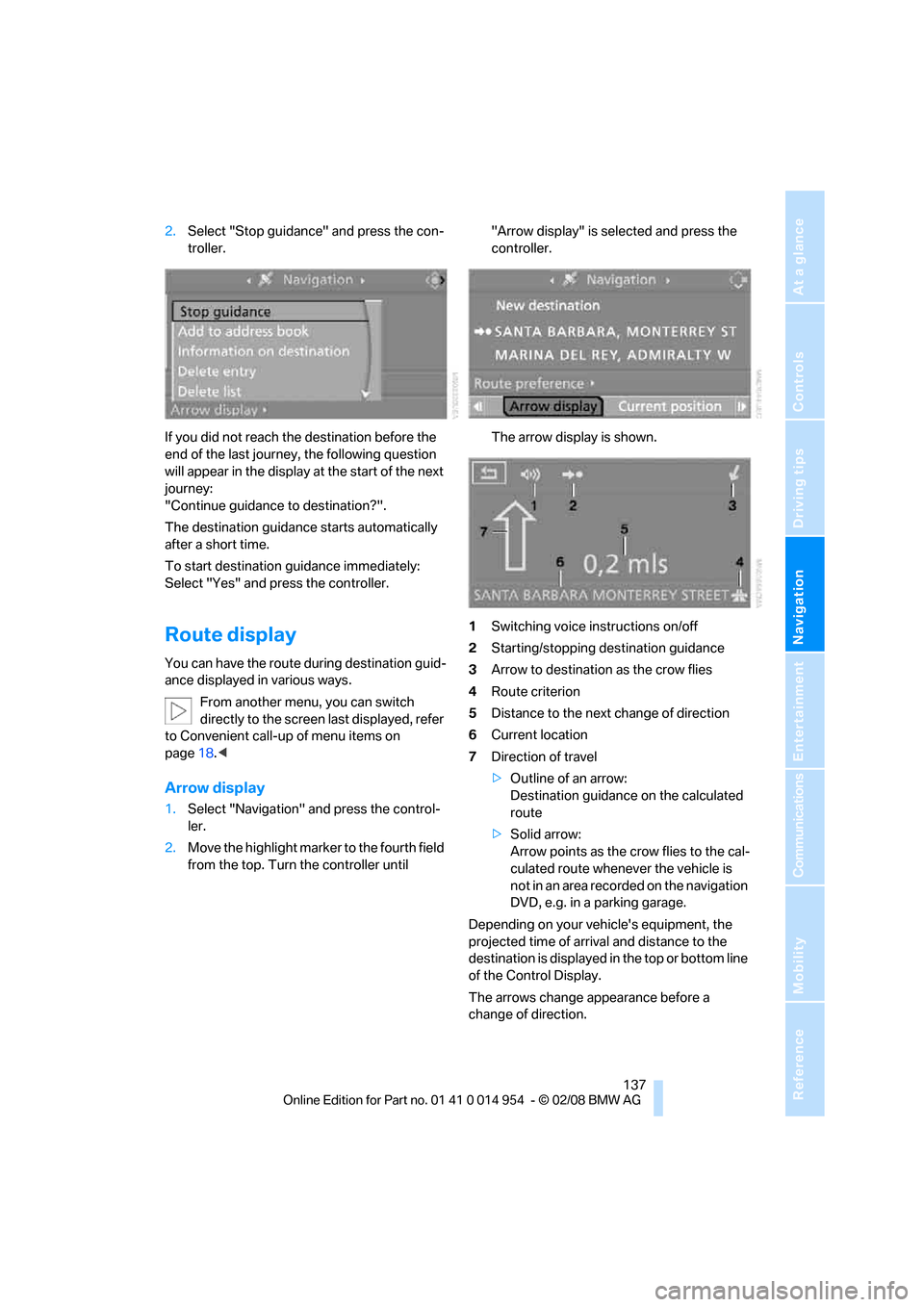
Arrow display
1.Select "Navigation" and press the control-
ler.
2.Move the highlight marker to the fourth field
from the top. Turn the controller until "Arrow display" is selected and press the
controller.
The arrow display is shown.
1Switching voice instructions on/off
2Starting/stopping destination guidance
3Arrow to destination as the crow flies
4Route criterion
5Distance to the next change of direction
6Current location
7Direction of travel
>Outline of an arrow:
Destination guidance on the calculated
route
>Solid arrow:
Arrow points as the crow flies to the cal-
culated route whenever the vehicle is
not in an area recorded on the navigation
DVD, e.g. in a parking garage.
Depending on your vehicle's equipment, the
projected time of arrival and distance to the
destination is displayed in the top or bottom line
of the Control Display.
The arrows change appearance before a
change of direction.
Page 140 of 264
Destination guidance
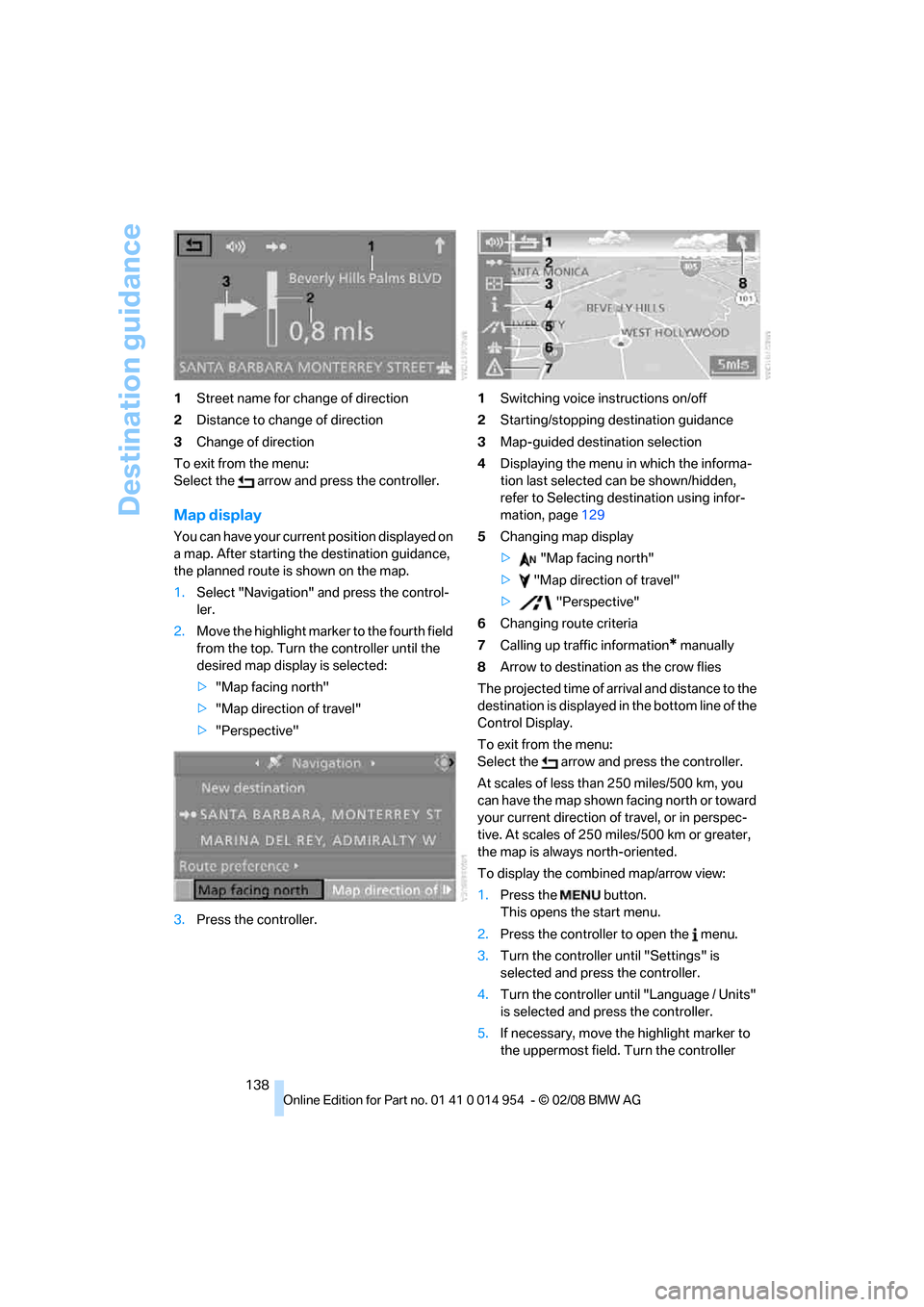
138 1Street name for change of direction
2Distance to change of direction
3Change of direction
To exit from the menu:
Select the arrow and press the controller.
Map display
You can have your current position displayed on
a map. After starting the destination guidance,
the planned route is shown on the map.
1.Select "Navigation" and press the control-
ler.
2.Move the highlight marker to the fourth field
from the top. Turn the controller until the
desired map display is selected:
>"Map facing north"
>"Map direction of travel"
>"Perspective"
3.Press the controller.1Switching voice instructions on/off
2Starting/stopping destination guidance
3Map-guided destination selection
4Displaying the menu in which the informa-
tion last selected can be shown/hidden,
refer to Selecting destination using infor-
mation, page129
5Changing map display
> "Map facing north"
> "Map direction of travel"
> "Perspective"
6Changing route criteria
7Calling up traffic information
* manually
8Arrow to destination as the crow flies
The projected time of arrival and distance to the
destination is displayed in the bottom line of the
Control Display.
To exit from the menu:
Select the arrow and press the controller.
At scales of less than 250 miles/500 km, you
can have the map shown facing north or toward
your current direction of travel, or in perspec-
tive. At scales of 250 miles/500 km or greater,
the map is always north-oriented.
To display the combined map/arrow view:
1.Press the button.
This opens the start menu.
2.Press the controller to open the menu.
3.Turn the controller until "Settings" is
selected and press the controller.
4.Turn the controller until "Language / Units"
is selected and press the controller.
5.If necessary, move the highlight marker to
the uppermost field. Turn the controller
Page 157 of 264
Navigation
Entertainment
Driving tips
155Reference
At a glance
Controls
Communications
Mobility
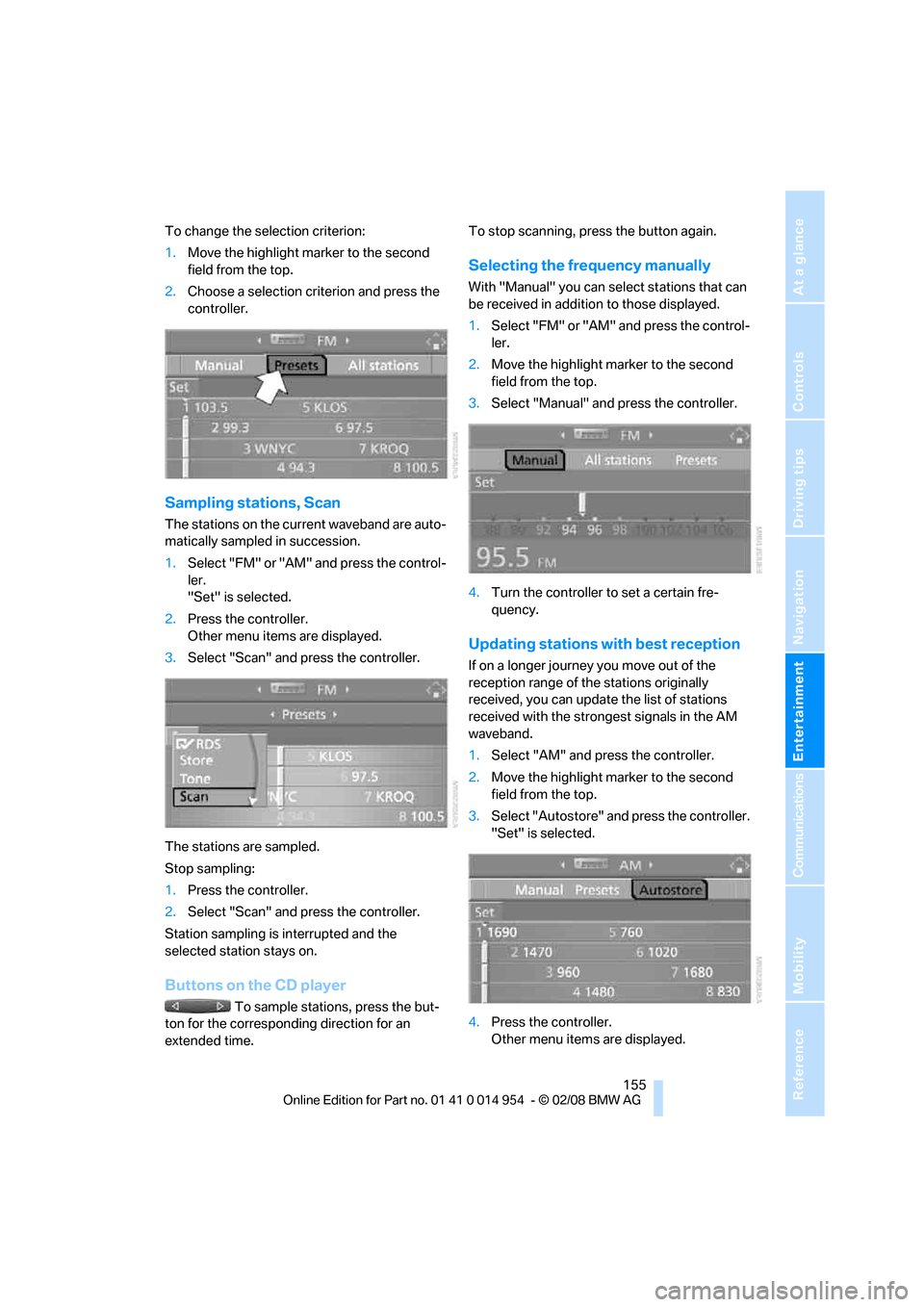
To change the selection criterion:
1.Move the highlight marker to the second
field from the top.
2.Choose a selection criterion and press the
controller.
Sampling stations, Scan
The stations on the current waveband are auto-
matically sampled in succession.
1.Select "FM" or "AM" and press the control-
ler.
"Set" is selected.
2.Press the controller.
Other menu items are displayed.
3.Select "Scan" and press the controller.
The stations are sampled.
Stop sampling:
1.Press the controller.
2.Select "Scan" and press the controller.
Station sampling is interrupted and the
selected station stays on.
Buttons on the CD player
To sample stations, press the but-
ton for the corresponding direction for an
extended time.To stop scanning, press the button again.
Selecting the frequency manually
With "Manual" you can select stations that can
be received in addition to those displayed.
1.Select "FM" or "AM" and press the control-
ler.
2.Move the highlight marker to the second
field from the top.
3.Select "Manual" and press the controller.
4.Turn the controller to set a certain fre-
quency.
Updating stations with best reception
If on a longer journey you move out of the
reception range of the stations originally
received, you can update the list of stations
received with the strongest signals in the AM
waveband.
1.Select "AM" and press the controller.
2.Move the highlight marker to the second
field from the top.
3.Select "Autostore" and press the controller.
"Set" is selected.
4.Press the controller.
Other menu items are displayed.
Page 182 of 264
Telephoning
180 time, the mobile phone at the top of the list can
be operated via the vehicle.
You can change the order of the mobile phones
on the list. As long as a mobile phone from this
list is selected, you cannot operate the mobile
phones via the vehicle.
iDrive, for operating principle refer to page16.
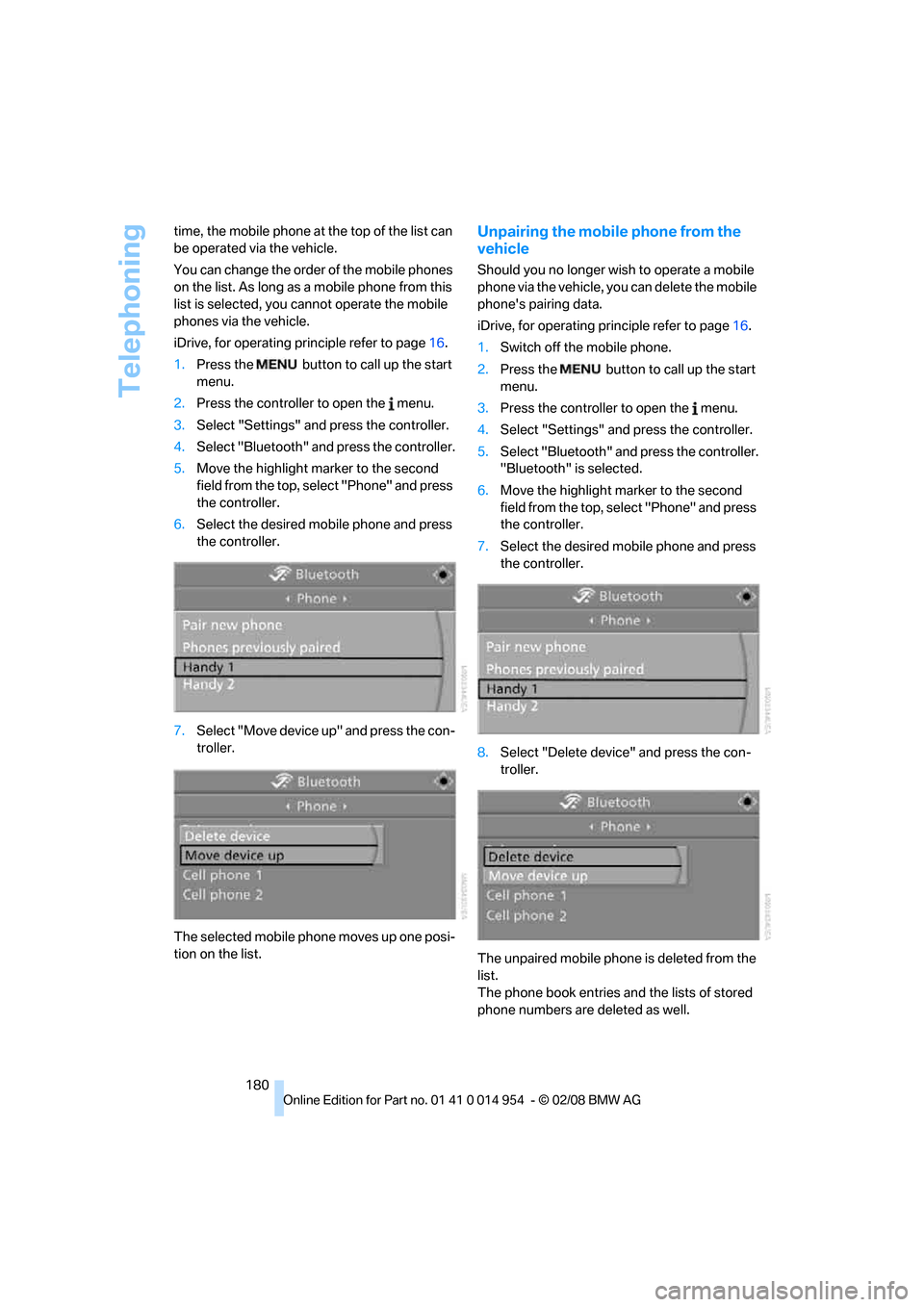
1.Press the button to call up the start
menu.
2.Press the controller to open the menu.
3.Select "Settings" and press the controller.
4.Select "Bluetooth" and press the controller.
5.Move the highlight marker to the second
field from the top, select "Phone" and press
the controller.
6.Select the desired mobile phone and press
the controller.
7.Select "Move device up" and press the con-
troller.
The selected mobile phone moves up one posi-
tion on the list.
Unpairing the mobile phone from the
vehicle
Should you no longer wish to operate a mobile
phone via the vehicle, you can delete the mobile
phone's pairing data.
iDrive, for operating principle refer to page16.
1.Switch off the mobile phone.
2.Press the button to call up the start
menu.
3.Press the controller to open the menu.
4.Select "Settings" and press the controller.
5.Select "Bluetooth" and press the controller.
"Bluetooth" is selected.
6.Move the highlight marker to the second
field from the top, select "Phone" and press
the controller.
7.Select the desired mobile phone and press
the controller.
8.Select "Delete device" and press the con-
troller.
The unpaired mobile phone is deleted from the
list.
The phone book entries and the lists of stored
phone numbers are deleted as well.
Page 249 of 264
Reference 247
At a glance
Controls
Driving tips
Communications
Navigation
Entertainment
Mobility
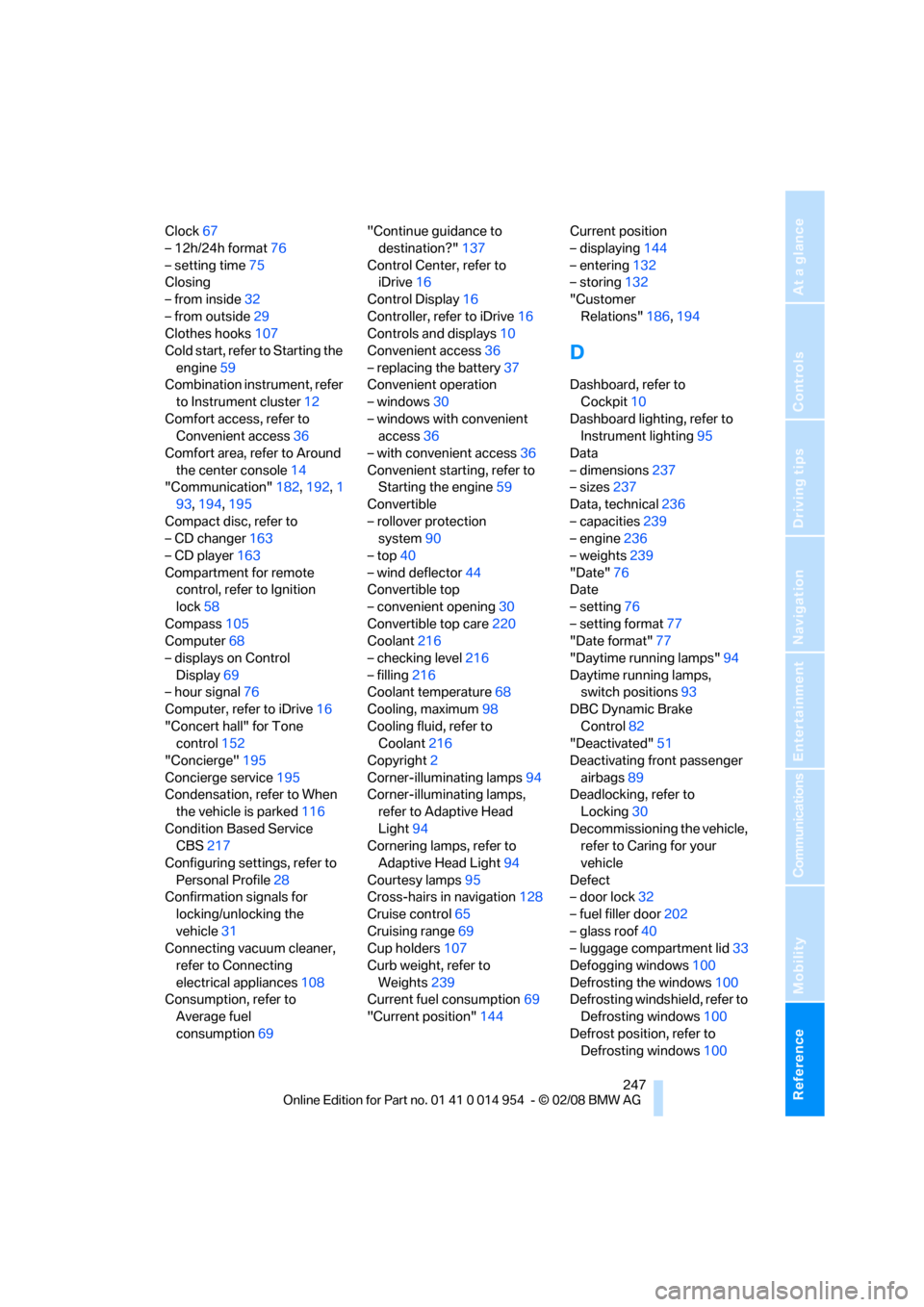
Clock67
– 12h/24h format76
– setting time75
Closing
– from inside32
– from outside29
Clothes hooks107
Cold start, refer to Starting the
engine59
Combination instrument, refer
to Instrument cluster12
Comfort access, refer to
Convenient access36
Comfort area, refer to Around
the center console14
"Communication"182,192,1
93,194,195
Compact disc, refer to
– CD changer163
– CD player163
Compartment for remote
control, refer to Ignition
lock58
Compass105
Computer68
– displays on Control
Display69
– hour signal76
Computer, refer to iDrive16
"Concert hall" for Tone
control152
"Concierge"195
Concierge service195
Condensation, refer to When
the vehicle is parked116
Condition Based Service
CBS217
Configuring settings, refer to
Personal Profile28
Confirmation signals for
locking/unlocking the
vehicle31
Connecting vacuum cleaner,
refer to Connecting
electrical appliances108
Consumption, refer to
Average fuel
consumption69"Continue guidance to
destination?"137
Control Center, refer to
iDrive16
Control Display16
Controller, refer to iDrive16
Controls and displays10
Convenient access36
– replacing the battery37
Convenient operation
– windows30
– windows with convenient
access36
– with convenient access36
Convenient starting, refer to
Starting the engine59
Convertible
– rollover protection
system90
– top40
– wind deflector44
Convertible top
– convenient opening30
Convertible top care220
Coolant216
– checking level216
– filling216
Coolant temperature68
Cooling, maximum98
Cooling fluid, refer to
Coolant216
Copyright2
Corner-illuminating lamps94
Corner-illuminating lamps,
refer to Adaptive Head
Light94
Cornering lamps, refer to
Adaptive Head Light94
Courtesy lamps95
Cross-hairs in navigation128
Cruise control65
Cruising range69
Cup holders107
Curb weight, refer to
Weights239
Current fuel consumption69
"Current position"144Current position
– displaying144
– entering132
– storing132
"Customer
Relations"186,194
D
Dashboard, refer to
Cockpit10
Dashboard lighting, refer to
Instrument lighting95
Data
– dimensions237
– sizes237
Data, technical236
– capacities239
– engine236
– weights239
"Date"76
Date
– setting76
– setting format77
"Date format"77
"Daytime running lamps"94
Daytime running lamps,
switch positions93
DBC Dynamic Brake
Control82
"Deactivated"51
Deactivating front passenger
airbags89
Deadlocking, refer to
Locking30
Decommissioning the vehicle,
refer to Caring for your
vehicle
Defect
– door lock32
– fuel filler door202
– glass roof40
– luggage compartment lid33
Defogging windows100
Defrosting the windows100
Defrosting windshield, refer to
Defrosting windows100
Defrost position, refer to
Defrosting windows100
Page 252 of 264
Everything from A - Z
250 Fuel consumption statistics,
refer to Average fuel
consumption69
Fuel display, refer to Fuel
gauge68
Fuel filler door202
– releasing in the event of
electrical malfunction202
Fuses227
G
Garage door opener, refer to
Integrated universal remote
control103
Gasoline, refer to Required
fuel202
Gasoline display, refer to Fuel
gauge68
Gear change
– with automatic
transmission61
– with manual transmission60
Gear display, with automatic
transmission60
Gearshift lever
– automatic transmission with
Steptronic61
– manual transmission60
General driving notes115
Glass roof, electric39
– closing after electrical
malfunction40
– convenient operation32
– opening, closing39
– operation with convenient
access36
– pinch protection system40
– raising39
– remote control30
Glove compartment106
GPS navigation, refer to
Navigation system122
Grills, refer to Air vents97
Gross vehicle weight, refer to
Weights239
H
Halogen lamps
– replacing bulbs224
Handbrake, refer to Parking
brake59
Hands-free system, refer to
Microphone for hands-free
mode14
Hazard warning flashers14
"HD radio"157
HD radio, refer to High
Definition Radio157
Head airbags89
Headlamp control,
automatic92
Headlamp cover224
Headlamp flasher62
– indicator lamp13
Headlamps
– replacing bulbs224
Head restraints47
Heated
– seats49
Heated mirrors52
Heating
– mirrors52
– seats49
Heating, rear window100
Heating and ventilation97
Heating during a stop100
Heavy loads, refer to Stowing
cargo117
Height, refer to
Dimensions237
Height adjustment
– steering wheel53
High beams94
– indicator lamp13
– replacing bulbs224
High Definition Radio157
High-pressure
washer219,220
High water, refer to Driving
through water116
Highways, refer to Route
criteria134
Hills116
Holders for cups107Home address133
"Home address" in
navigation134
Hood212
Hot exhaust system115
"Hour memo"76
"House number" in
destination entry126
Hydraulic brake assist, refer to
Dynamic Brake Control82
Hydroplaning115
I
IBOC, refer to High Definition
Radio157
Ice warning, refer to Outside
temperature
warning67
ID3 tag, refer to Information
about the track165
Identification marks
– tire coding208
iDrive16
– adjusting brightness80
– automatic climate control98
– changing date and time75
– changing language80
– confirming selection or
entry19
– displays, menus17
– lists19
– menu guidance17
– operating principle16
– selecting a menu item19
– status information20
– switching menu pages19
– symbols18
Ignition58
– switched off58
– switched on58
Ignition key, refer to
Integrated key/remote
control28
Ignition key position 1, refer to
Radio readiness58
Ignition key position 2, refer to
Ignition on58
Ignition lock58
Page 253 of 264
Reference 251
At a glance
Controls
Driving tips
Communications
Navigation
Entertainment
Mobility
Imprint2
Indicator and warning
lamps13
– Tire Pressure Monitor
TPM87
Indicator lighting, refer to
Instrument lighting95
Individually programmable
buttons on steering
wheel53
Individual settings, refer to
Personal Profile28
Inflation pressure, tires204
Inflation pressure monitoring,
refer to Tire Pressure
Monitor TPM85
Information
– on another location129
– on country129
– on current position129
– on destination location129
"Information on
destination"131
"Info sources"73
Initializing
– compass, refer to
Calibrating106
Initializing, Flat Tire Monitor
FTM84
"Input map"128
Installation location
– CD changer167
Instructions for navigation
system, refer to Voice
instructions140
Instrument cluster12
Instrument lighting95
Integrated key28
Integrated universal remote
control103
Interesting destination for
navigation129
"Interim time"79
Interior lamps95
– remote control30
Interior motion sensor35Interior rearview mirror52
– automatic dimming
feature53
– compass105
Interlock61
Intermittent mode of the
wipers63
J
Jacking points227
Jets, refer to Air vents97
Joystick, refer to iDrive16
Jumpering, refer to Jump
starting230
Jump starting230
K
Key, refer to Integrated key/
remote control28
Keyless go, refer to
Convenient access36
Keyless opening and closing,
refer to Convenient
access36
Key Memory, refer to Personal
Profile28
Kick-down61
Knock control202
L
Lamps
– Adaptive Head Light94
– instrument lighting95
– interior lighting95
Lamps, refer to Parking lamps/
low beams92
Lamps and bulbs, replacing
bulbs223
"Language / Units"71,80
"Language / Units" in
navigation138,140
"Languages"80
"Languages" in
navigation138,140
Lashing eyes, refer to
Securing cargo118Last destinations, refer to
Destination list130
"Last seat pos."50
LATCH child-restraint fixing
system56
Leather care221
LED Light-emitting
diodes223
Length, refer to
Dimensions237
License plate lamp, replacing
bulb226
Light-alloy wheels221
Light-emitting diodes
LED223
Lighter108
– socket108
"Lighting"63,93
Lighting
– lamps and bulbs223
– of instruments95
– of vehicle, refer to Lamps92
Light switch92
"Limit", refer to Speed limit79
Limit, refer to Speed limit79
Load securing equipment,
refer to Securing cargo118
Lock buttons of doors, refer to
Locking33
Locking
– adjusting confirmation
signal31
– from inside33
– from outside30
– without remote control, refer
to Convenient access36
Locking and unlocking doors
– from inside32
– from outside29
Low-beam headlamps92
– automatic92
– replacing bulbs224
Lower back support, refer to
Lumbar support47
Luggage compartment, refer
to Cargo bay
Page 256 of 264
Everything from A - Z
254
R
Radio
– autostore155
– controls150
– High Definition Radio157
– listening to stations154
– sampling stations155
– satellite radio160
– selecting a
waveband150,154
– selecting the frequency
manually155
– station search155
– stations with best
reception155
– storing stations156
– switching on/off150
– tone control151
– volume151
Radio position, refer to Radio
readiness58
Radio readiness58
– switched off58
– switched on58
Rain sensor63
"Random", refer to Random
play166
"Random all" for audio
mode167
"Random directory" for audio
mode167
Random play166
"RDS" Radio Data
System157
Reading lamps96
Rear fog lamps
– replacing bulb226
Rear lamps, refer to Tail
lamps225
Rear-mounted luggage
rack119
Rear seats
– adjusting head restraints48
– folding down backrests108
Rearview mirror, refer to
Mirrors51
Rear window defroster100
"Received calls"184Receiving level of mobile
phone, refer to Status
information20
Recirculated-air mode99
Recirculation of air, refer to
Recirculated-air mode99
Recording times, refer to
Stopwatch79
"Redial" on the mobile
phone184
Reflectors, refer to Tail
lamps225
Refueling202
Releasing
– hood212
Remaining distance, refer to
Computer69
Remaining distance, refer to
Cruising range69
Remote control28
– battery renewal37
– convenient access36
– garage door opener103
– luggage compartment lid30
– malfunctions31,37
– removing from the ignition
lock58
– service data217
Remote control key, refer to
Integrated key/remote
control28
"Repeat directory" for audio
mode166
"Repeat" for audio mode166
"Repeat track" for audio
mode166
Replacement fuses, refer to
Fuses227
Replacement remote
control28
Replacing bulbs, refer to
Lamps and bulbs223
Replacing tires, refer to New
wheels and tires210
Reporting safety defects6
Reserve warning, refer to Fuel
gauge68
Reservoir for washer
systems64"Reset"84,86
– tone settings153
Reset, refer to Resetting tone
settings152
"Reset" for stopwatch79
Residual heat100
Restraint systems, refer to
Safety belts51
Restraint systems for
children55
Retreaded tires210
Reverse
– CD changer167
– CD player167
Reverse gear
– automatic transmission with
Steptronic61
– manual transmission60
Road map138
"Roadside Assistance"192
Roadside
Assistance192,229
Roadside parking lamps94
– replacing bulbs224
Roadworthiness test, refer to
Service requirements72
Rollover protection system,
convertible90
– resetting91
Roof load capacity239
Roof-mounted luggage
rack118
Rope, refer to Tow-starting,
towing away232
Rotary/pushbutton control,
refer to Controller16
Route134
– arrow display137
– changing141
– display137
– displaying streets and
towns/cities139
– displaying town139
– list139
– map display138
– selecting134
– selecting criteria134
Page 257 of 264
Reference 255
At a glance
Controls
Driving tips
Communications
Navigation
Entertainment
Mobility
RSC Runflat System
Component, refer to Run-
Flat Tires210
Runflat System Component
RSC, refer to Run-Flat
Tires210
Run-Flat Tires210
– continuing driving with a
damaged tire85
– flat tire85
– new tires210
– remaining driving distance,
refer to Indication of a flat
tire85
– tire inflation pressure204
– winter tires211
Runflat Tyres, refer to Run-
Flat Tires210
S
Safety-belt height
adjustment51
Safety belts51
– damage51
– indicator lamp51
– reminder51
– sitting safely45
Safety systems
– airbags89
– Antilock Brake System
ABS82
– Dynamic Stability Control
DSC82
– rollover protection system,
convertible90
– safety belts51
Safety tires, refer to Run-Flat
Tires210
"SAT"150,160
Satellite radio160
– displaying additional
information161
– enabling160
– selecting channel161
– storing channel161
Saving fuel114"Scan"
– sampling radio stations155
– sampling tracks on CD165
Scan
– CD changer165
– CD player165
– radio155
"Scan all" for audio mode165
"Scan directory" for audio
mode165
Screen, refer to iDrive16
Screw thread for tow
fitting231
SDARS, refer to Satellite
radio160
Seat and mirror memory49
Seat belt reminder, refer to
'Fasten safety belts'
reminder51
Seats45
– heating49
– sitting safely45
Securing cargo110,111
"Select as
destination"130,195
"Select current speed"79
Selecting a country for
navigation124
Selecting an audio source150
Selecting menu items19
Selecting new scale for
navigation139
Selector lever, automatic
transmission with
Steptronic61
"Service"214
Service, refer to Roadside
Assistance229
Service car, refer to Roadside
Assistance229
Service data in remote
control217
"Service Info"73,193
Service Interval Display, refer
to Condition Based Service
CBS217
"Service Request"186,193Service requirement display,
refer to Condition Based
Service CBS217
"Service
requirements"73,193,214
Service requirements72
"Set date"76
"Set time"76
"Settings"197
Settings
– clock, 12h/24h format76
– date format77
"Settings" for unlocking30
Setting times, refer to
Preselecting switch-on
times101
Shifting gears with automatic
transmission with
Steptronic61
Shiftlock, refer to Changing
selector lever positions61
Short commands for the voice
command system240
Shortest route in navigation,
refer to Selecting route134
"Short route" in
navigation134
"Show current position"129
"Show destination
position"129
Shuffled, refer to Random
– CD changer166
– CD player166
Side airbags89
Side windows, refer to
Windows38
Signal horn, refer to Horn10
Sitting safely45
– airbags45
– safety belt45
Ski bag109
Sliding/tilt sunroof, refer to
Glass roof, electric39
Slot for remote control58
Smokers' package, refer to
Ashtray107,108
Snap-in adapter189
Snap-in adapter, refer to
Center armrest107
Page 258 of 264
Everything from A - Z
256 Snow chains211
Socket, refer to Connecting
electrical appliances108
Socket for On-Board
Diagnosis OBD218
Song search, refer to Playing a
track165
Sound, adjusting during audio
playback, refer to Tone
control151
Sound output for
entertainment on/off150
Spare fuses227
Speaking, refer to Voice
instructions from navigation
system140
Special oils, refer to Specified
engine oils215
Specified engine oils215
Speed
– for winter tires211
Speed-dependent volume
control151
Speed display, refer to
Speedometer12
Speed limit79
Speed limit warning, refer to
Speed limit79
Speedometer12
"Speed volume", refer to Tone
control152
Sport program, automatic
transmission with
Steptronic61
Spray nozzles, refer to
Windshield washer
nozzles64
Stability control,
refer to Driving stability
control systems82
Start/stop button58
– starting the engine59
– switching off the engine59
"Start guidance"126
Starting, refer to Starting the
engine59
Starting assistance, refer to
Jump starting230Starting the engine
– start/stop button58
Start menu17
"Start service"192
"Start service" for BMW
Assist195
"State / Province" in
destination entry124
Station
– refer to Radio154
"Status"73
Status of this Owner's Manual
at time of printing5
Steam jet219,220
Steering wheel53
– adjustment53
– buttons on steering
wheel11
– freely programmable
buttons53
"Steering wheel buttons"53
Steering with variable ratio,
refer to Active steering88
Steptronic, refer to Automatic
transmission with
Steptronic60
"Stopwatch"79
Stopwatch79
Storage222
Storage compartment
package107
Storage compartments107
"Store" for satellite radio162
"Store in address book" in
navigation132
"Store" on the radio156
Storing
– seat position, refer to Seat
and mirror memory49
– telephone numbers, refer to
separate Owner's Manual
Storing current position132
Storing radio stations156
Storing tires211
Stowage, refer to Storage
compartments107
"Street" in destination
entry126Summer tires, refer to Wheels
and tires204
"Surround Settings", refer to
Tone control152
Switches, refer to Cockpit10
Switching off
– engine59
Switching off the engine
– start/stop button58
Switching on
– audio150
– CD changer150
– CD player150
– radio150
Switching on the hour
signal76
Switching the cooling function
on and off100
Switch-on times of parked car
ventilation, preselecting101
Symbols4
– navigation system143
– status information20
– traffic info for navigation
system141
T
Tachometer67
Tail lamp, refer to Tail
lamps225
– replacing bulb226
Tail lamps225
– replacing bulb226
Tank contents, refer to
Capacities239
Technical changes5
Technical data236
Telematics, refer to BMW
TeleServices, BMW
Assist191
Telephone, installation
location, refer to Center
armrest107
Telephone, refer to Mobile
phone176
Telephone, refer to separate
Owner's Manual
"Telephone list"54