ECO BMW 135I CONVERTIBLE 2013 Manual PDF
[x] Cancel search | Manufacturer: BMW, Model Year: 2013, Model line: 135I CONVERTIBLE, Model: BMW 135I CONVERTIBLE 2013Pages: 284, PDF Size: 6.93 MB
Page 238 of 284
237
Maintenance
Mobility
Maintenance
Vehicle equipment
In this chapter, all production, country, and
optional equipment that is offered in the model
range is described. For this reason, descrip-
tions will be given of some equipment that may
not be available in a vehi
cle, for example due to
the special options or national-market version
selected. This also app lies to safety related
functions and systems.
BMW Maintenance System
The BMW Maintenance System advises you of
necessary maintenance measures and helps
you maintain the traffic and operating safety of
the vehicle.
Condition Based Service CBS
Sensors and special algo rithms take the differ-
ent driving conditions of your BMW into
account. Condition Based Service uses this to
determine the current and future service
requirements. By letting you define a service
and maintenance regimen that reflects your
own individual requirements, the system builds
the basis for trouble-free driving.
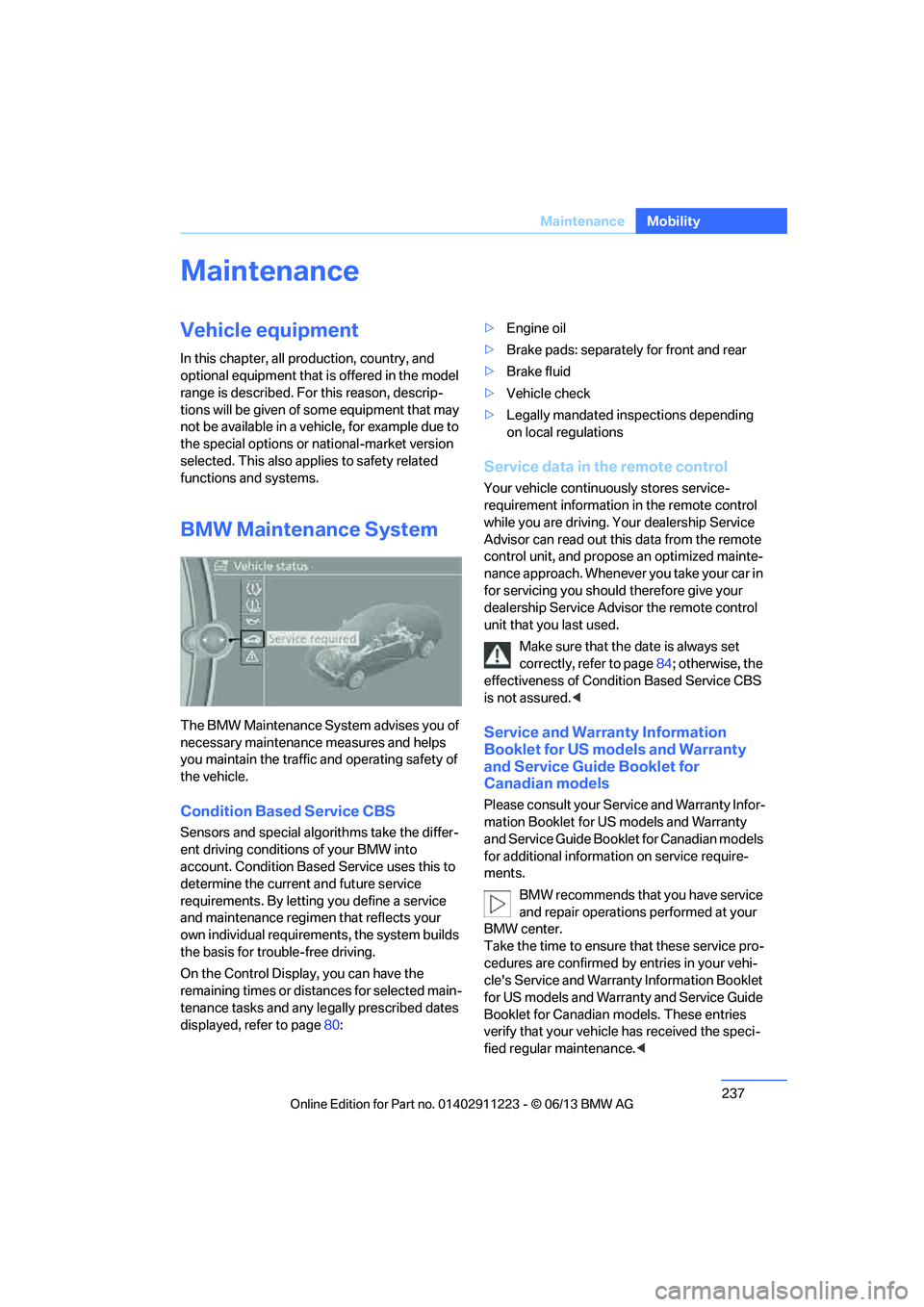
On the Control Display, you can have the
remaining times or distan ces for selected main-
tenance tasks and any le gally prescribed dates
displayed, refer to page 80: >
Engine oil
> Brake pads: separately for front and rear
> Brake fluid
> Vehicle check
> Legally mandated in spections depending
on local regulations
Service data in the remote control
Your vehicle continuously stores service-
requirement information in the remote control
while you are driving. Your dealership Service
Advisor can read out this data from the remote
control unit, and propose an optimized mainte-
nance approach. Whenever you take your car in
for servicing you should therefore give your
dealership Service Advisor the remote control
unit that you last used.
Make sure that the date is always set
correctly, refer to page 84; otherwise, the
effectiveness of Condit ion Based Service CBS
is not assured. <
Service and Warranty Information
Booklet for US models and Warranty
and Service Guide Booklet for
Canadian models
Please consult your Service and Warranty Infor-
mation Booklet for US models and Warranty
and Service Guide Booklet for Canadian models
for additional information on service require-
ments.
BMW recommends that you have service
and repair operations performed at your
BMW center.
Take the time to ensure that these service pro-
cedures are confirmed by entries in your vehi-
cle's Service and Warranty Information Booklet
for US models and Warranty and Service Guide
Booklet for Canadian models. These entries
verify that your vehicle has received the speci-
fied regular maintenance. <
00320051004F004C00510048000300280047004C0057004C005200510003
Page 241 of 284
240
MobilityCare
Driving into an automatic car wash
Perform the following steps to ensure that the
vehicle can roll:
Manual transmission:
1.Shift into neutral.
2. Release parking brake, refer to page 63.
3. Switch off the engine.
4. Leave the remote control in the ignition
lock.
Automatic transmission:
1. Insert the remote cont rol into the ignition
lock, even with Comfort Access.
2. Shift selector lever into position N.
3. Release parking brake, refer to page 63.
4. Switch off the engine.
5. Leave the remote control in the ignition
lock.
Sport automatic transmission with double
clutch:
1. Insert the remote cont rol into the ignition
lock, even with Comfort Access.
2. Shift selector lever into position N.
3. Release parking brake, refer to page 63.
4. Switch off the engine.
5. Leave the remote control in the ignition
lock.
The transmission is switched into position P:
> Automatically after approx. 30 minutes
> If you remove the infrared remote control
from the ignition lock
Headlamps
Do not rub them dry and do not use abrasive or
corrosive cleaning agents.
Loosen dirt, e.g. insects, with shampoo and
rinse away with water.
Thaw ice with a de-icer and do not use an ice
scraper.
After washing the vehicle
After washing the vehicle, apply the
brakes briefly to dry them; otherwise,
water can reduce braking efficiency over the
short term and the brake discs can corrode. <
R e m o v e r e s i d u e s o n t h e windows completely in
order to prevent impaired vision due to smear
formation and to reduce wiper noise and wiper
blade wear.
Vehicle care
Care products
BMW recommends using BMW cleaning and
care products since they have been tested and
approved for this purpose.
Follow the instructions on the packaging.
When cleaning inside the vehicle, always
open the doors and windows. Only use prod-
ucts designed for cleaning vehicles. Cleaning
agents can contain substa nces that are danger-
ous or hazardous to your health. <
Vehicle paintwork
Regular care contributes to driving safety and
value retention. Environmental influences in
regions with elevated levels of air pollution or
natural contaminants such as tree sap or pollen
can impact vehicle paintwork. The frequency
and scope of car care should be adapted
accordingly.
Immediately remove particularly corrosive sub-
stances such as spilled fuel, oil, grease, or bird
droppings to prevent damage to the paintwork.
Leather care
Frequently remove dust from the leather using
a cloth or vacuum cleaner.
Otherwise, dust and road grit in the pores and
folds of the leather will otherwise have an abra-
sive effect, resulting in increased wear and
causing the leather surf ace to become brittle
prematurely.
00320051004F004C00510048000300280047004C0057004C005200510003
Page 243 of 284
242
MobilityCare
Carpet and floor mats
Keep floor mats, carpet, and other objects
out of the movement range of the pedals;
otherwise, they may inhi bit the function of the
pedals during driving.
Do not place additional floor mats onto an
existing one or onto other objects.
Only use floor mats that have been approved for
the vehicle and can be appropriately fastened.
Make sure that the floo r mats are securely fas-
tened again after they ha ve been removed, e.g.
for cleaning. <
Floor mats can be removed for the cleaning of
the passenger compartment.
When inserting the floor mats, secure them
again to prevent slippage.
When carpets are heavily soiled, clean with a
microfibre cloth and water or textile cleaner.
When doing so, rub back and forth in the direc-
tion of travel; otherwise, the carpet may
become matted.
Sensors/cameras
Use a microfibre cloth moistened with some
glass cleaner for cleani ng sensors or cameras.
Displays/screens
Use an antistatic microfibre cloth for cleaning
displays.
Do not use chemical or abrasive house-
hold cleaning agents. Keep all types of
fluid and moisture away from the device. Other-
wise, surfaces or electrical components may be
corroded or damaged. When cleaning, avoid
excessive pressure and do not use abrasive
materials; otherwise, you may damage them. <
Convertible top care
The appearance and service life of the convert-
ible top largely depends on its proper care and
operation.
Please follow these instructions:
>Never attempt to fold and stow the convert-
ible top in the convertible compartment
when the top is wet or frozen. Otherwise,
water stains, mildew, and chafe marks may
occur.
> If water spots occur on the inside headliner
despite precautions, remove them using a
microfiber cloth and interior cleaner.
> If the vehicle is parked in an enclosed area
for a longer period of time, make sure that
there is sufficient ventilation.
> Remove any bird droppings immediately,
since they have corrosive properties which
will corrode the conver tible top and damage
the rubber seals.
To remove stains from the convertible
top, do not use stain removers, paint thin-
ners, solvents, benzine or similar substances.
These cleaners may damage the rubber seals.
The improper care or cleaning methods may
cause the convertible top and its seams to
leak. <
To remove heavy soiling, use a special convert-
ible top cleaner.
Always read and follow the manufacturer's
instructions.
After washing the convertible top three to five
times, treat it with an impregnating agent.
Vehicle storage
Your BMW center will be happy to advise you on
preparatory steps for parking the vehicle for
more than three months.
00320051004F004C00510048000300280047004C0057004C005200510003
Page 244 of 284
243
Replacing components
Mobility
Replacing components
Vehicle equipment
In this chapter, all production, country, and
optional equipment that is offered in the model
range is described. For this reason, descrip-
tions will be given of some equipment that may
not be available in a vehi
cle, for example due to
the special options or national-market version
selected. This also app lies to safety related
functions and systems.
Onboard vehicle tool kit
The onboard vehicle tool kit is stored below the
floor mat in the trunk.
Wiper blades
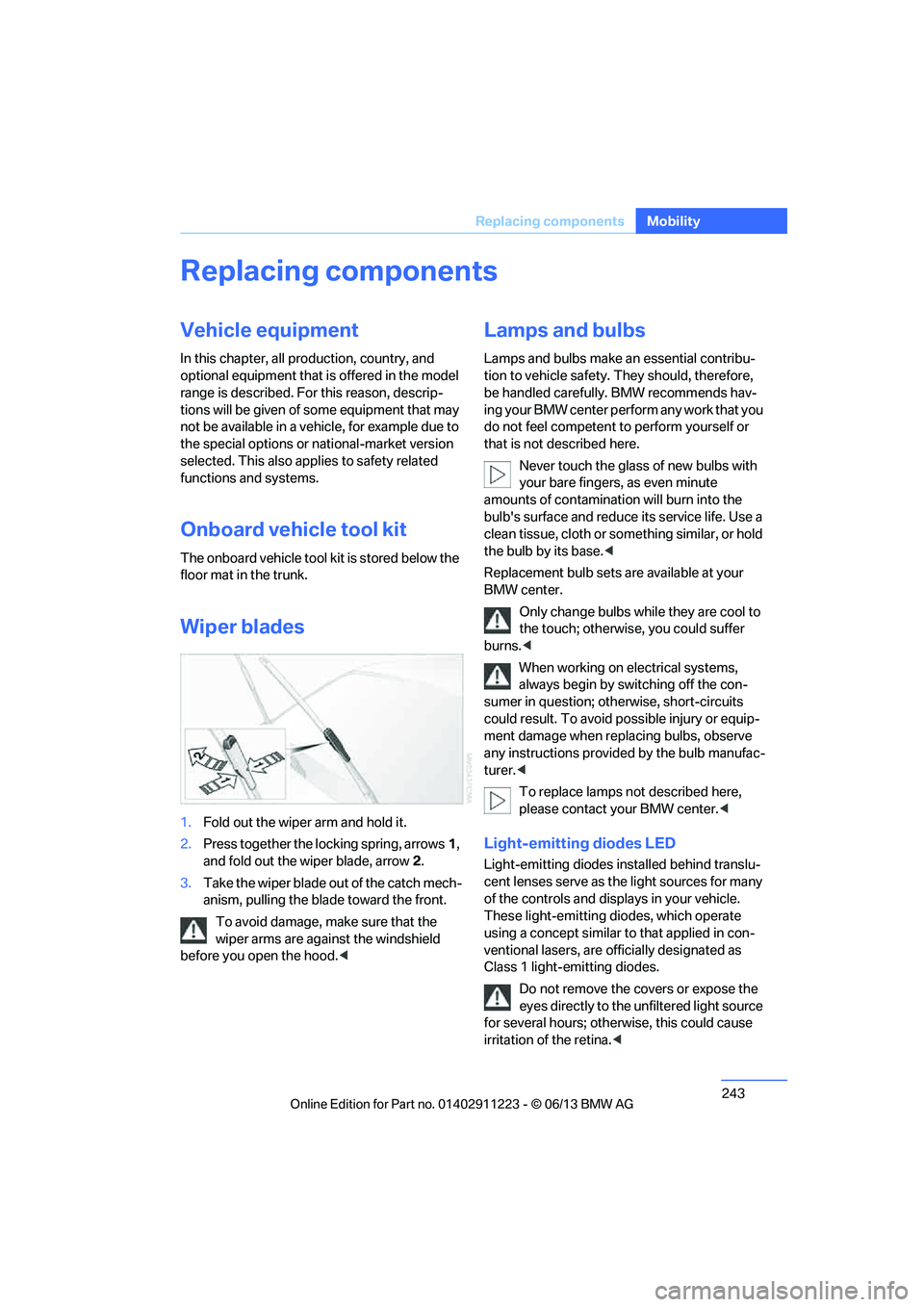
1. Fold out the wiper arm and hold it.
2. Press together the locking spring, arrows 1,
and fold out the wiper blade, arrow 2.
3. Take the wiper blade out of the catch mech-
anism, pulling the blade toward the front.
To avoid damage, make sure that the
wiper arms are against the windshield
before you open the hood. <
Lamps and bulbs
Lamps and bulbs make an essential contribu-
tion to vehicle safety. They should, therefore,
be handled carefully. BMW recommends hav-
ing your BMW center perform any work that you
do not feel competent to perform yourself or
that is not described here.
Never touch the glass of new bulbs with
your bare fingers, as even minute
amounts of contamination will burn into the
bulb's surface and reduce its service life. Use a
clean tissue, cloth or some thing similar, or hold
the bulb by its base. <
Replacement bulb sets are available at your
BMW center.
Only change bulbs while they are cool to
the touch; otherwise, you could suffer
burns. <
When working on electrical systems,
always begin by switching off the con-
sumer in question; otherwise, short-circuits
could result. To avoid possible injury or equip-
ment damage when replacing bulbs, observe
any instructions provided by the bulb manufac-
turer. <
To replace lamps not described here,
please contact your BMW center. <
Light-emitting diodes LED
Light-emitting diodes installed behind translu-
cent lenses serve as the light sources for many
of the controls and displays in your vehicle.
These light-emitting diodes, which operate
using a concept similar to that applied in con-
ventional lasers, are officially designated as
Class 1 light-emitting diodes.
Do not remove the co vers or expose the
eyes directly to the unfiltered light source
for several hours; otherwise, this could cause
irritation of the retina. <
00320051004F004C00510048000300280047004C0057004C005200510003
Page 253 of 284
252
MobilityGiving and receiving assistance
Connecting jumper cables
Connect the jumper cables in the correct
order to prevent sparking at the battery,
which could cause injury. <
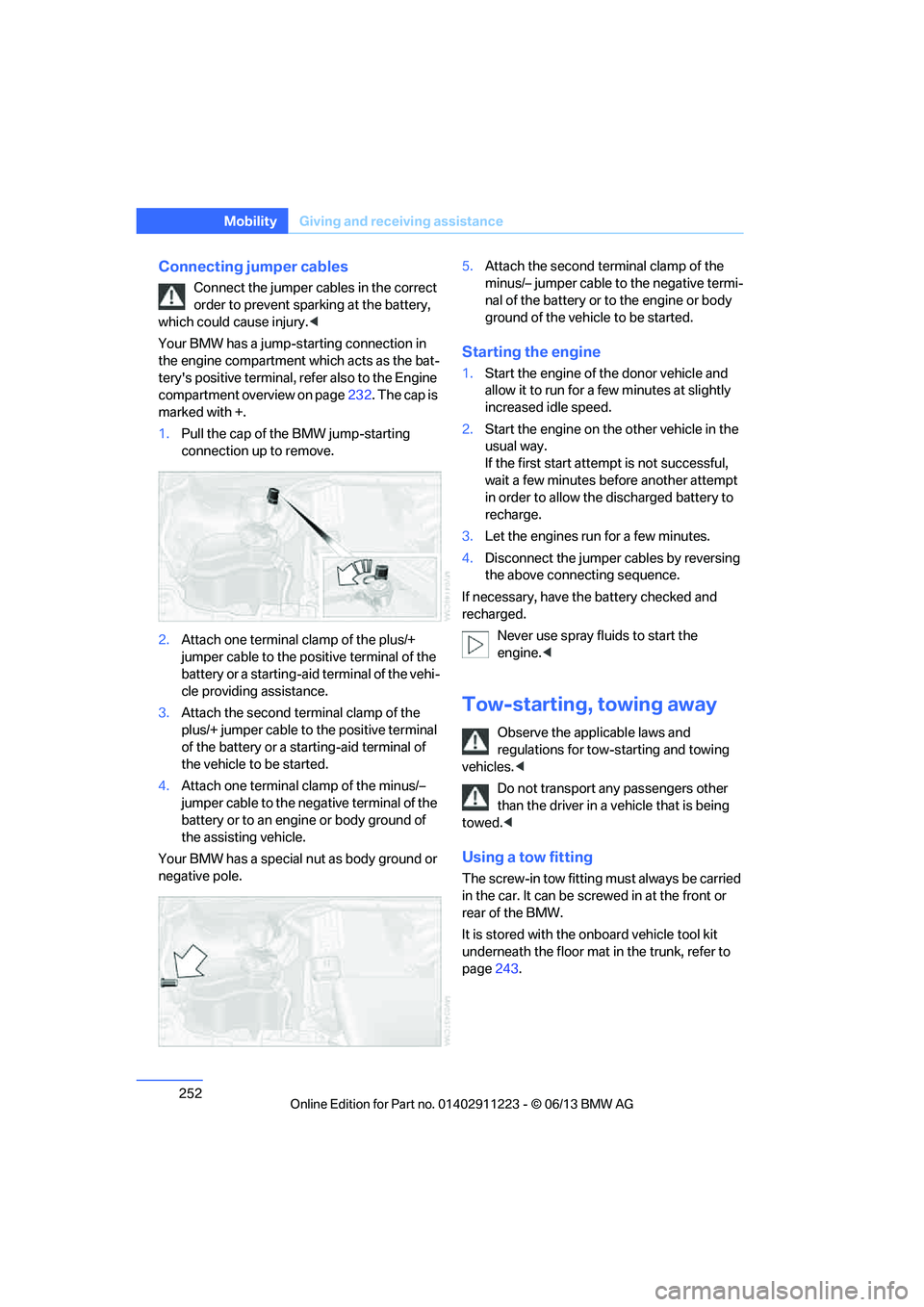
Your BMW has a jump-starting connection in
the engine compartment which acts as the bat-
tery's positive terminal, refer also to the Engine
compartment overview on page 232. The cap is
marked with +.
1. Pull the cap of the BMW jump-starting
connection up to remove.
2. Attach one terminal clamp of the plus/+
jumper cable to the positive terminal of the
battery or a starting-aid terminal of the vehi-
cle providing assistance.
3. Attach the second te rminal clamp of the
plus/+ jumper cable to the positive terminal
of the battery or a star ting-aid terminal of
the vehicle to be started.
4. Attach one terminal clamp of the minus/–
jumper cable to the nega tive terminal of the
battery or to an engine or body ground of
the assisting vehicle.
Your BMW has a special nut as body ground or
negative pole. 5.
Attach the second te rminal clamp of the
minus/– jumper cable to the negative termi-
nal of the battery or to the engine or body
ground of the vehicle to be started.
Starting the engine
1. Start the engine of the donor vehicle and
allow it to run for a few minutes at slightly
increased idle speed.
2. Start the engine on the other vehicle in the
usual way.
If the first start attempt is not successful,
wait a few minutes be fore another attempt
in order to allow the discharged battery to
recharge.
3. Let the engines run for a few minutes.
4. Disconnect the jumper cables by reversing
the above connecting sequence.
If necessary, have the battery checked and
recharged. Never use spray fluids to start the
engine. <
Tow-starting, towing away
Observe the applicable laws and
regulations for tow-starting and towing
vehicles. <
Do not transport any passengers other
than the driver in a vehicle that is being
towed. <
Using a tow fitting
The screw-in tow fitting must always be carried
in the car. It can be screwed in at the front or
rear of the BMW.
It is stored with the onboard vehicle tool kit
underneath the floor mat in the trunk, refer to
page 243.
00320051004F004C00510048000300280047004C0057004C005200510003
Page 260 of 284
259
Te c h n i c a l d a t a
Reference
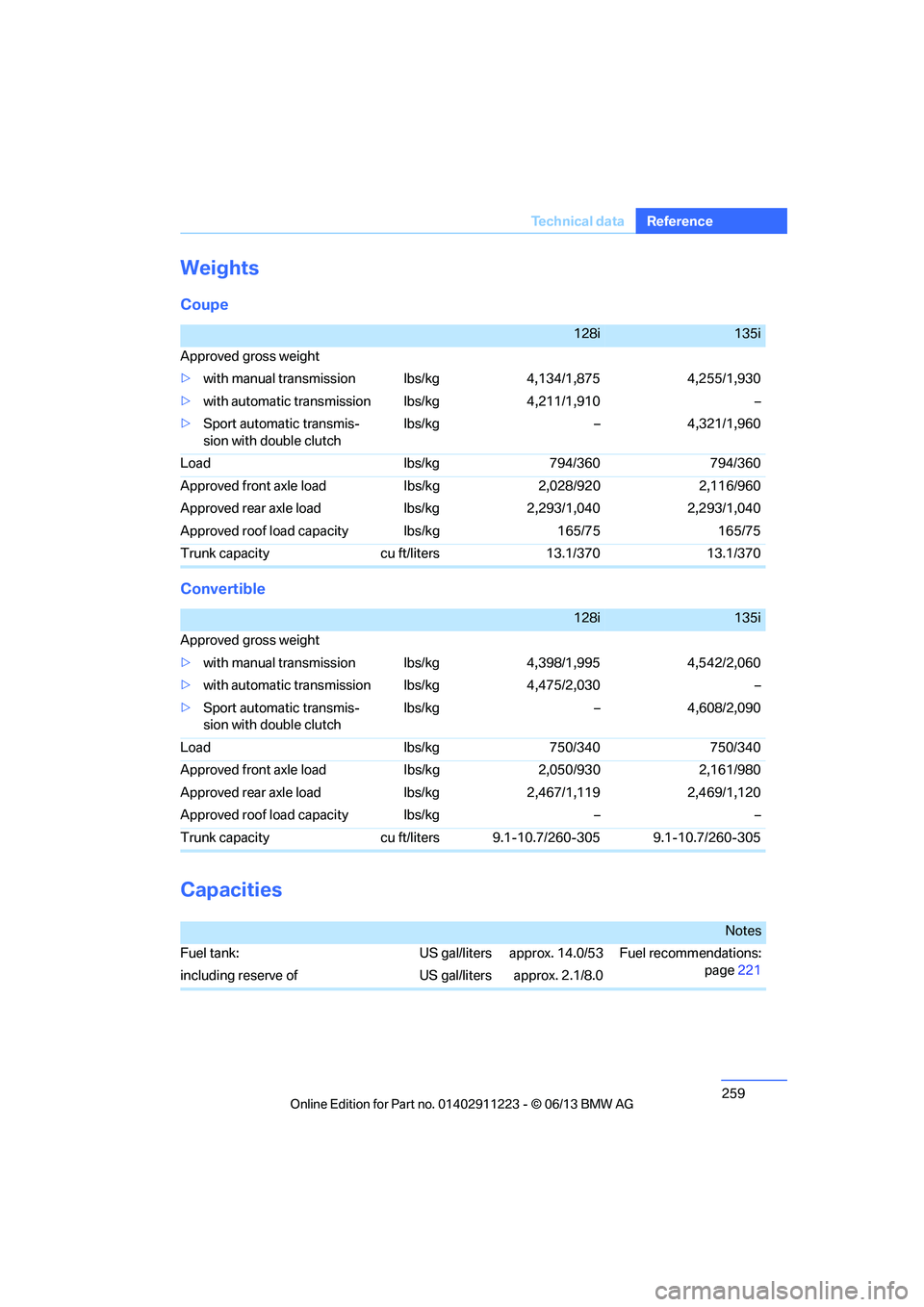
Weights
Coupe
Convertible
Capacities
128i135i
Approved gross weight
> with manual transmission lbs/kg 4,134/1,875 4,255/1,930
> with automatic transmi ssion lbs/kg 4,211/1,910 –
> Sport automatic transmis-
sion with double clutch lbs/kg – 4,321/1,960
Load lbs/kg 794/360 794/360
Approved front axle load lbs/kg 2,028/920 2,116/960
Approved rear axle load lbs/kg 2,293/1,040 2,293/1,040
Approved roof load capacity lbs/kg 165/75 165/75
Trunk capacity cu ft/liters 13.1/370 13.1/370
128i135i
Approved gross weight
> with manual transmission lbs/kg 4,398/1,995 4,542/2,060
> with automatic transmi ssion lbs/kg 4,475/2,030 –
> Sport automatic transmis-
sion with double clutch lbs/kg – 4,608/2,090
Load lbs/kg 750/340 750/340
Approved front axle load lbs/kg 2,050/930 2,161/980
Approved rear axle load lbs/kg 2,467/1,119 2,469/1,120
Approved roof load capacity lbs/kg – –
Trunk capacity cu ft/liters 9.1-10.7/260-305 9.1-10.7/260-305
Notes
Fuel tank: US gal/liters approx. 14.0/53 Fuel recommendations: page221
including reserve of US gal/liters approx. 2.1/8.0
00320051004F004C00510048000300280047004C0057004C005200510003
Page 274 of 284
273
Everything from A to Z
Reference
ESP Electronic Stability
Program, refer to Dynamic
Stability Control DSC 89
Exhaust system, refer to Hot exhaust system 126
Exterior mirrors 55
– adjusting 55
– automatic dimming
feature 56
– automatic heating 56
– folding in and out 55
External devices 177
– random sequence 180
Eyes
– for tow-starting and towing away 252
– for tying down loads 128
F
Failure messages, refer to
Check Control 84
Failure of an electrical consumer 249
False alarm, refer to Avoiding
unintentional alarms 40
Fastening safety belts, refer to Safety belts 54
Fastest route for navigation 143
Fast forward
– CD player 168
Filter of automatic climate control, refer to Microfilter/
activated charcoal filter 109
First aid pouch 251
Fixture for remote control,
refer to Ignition lock 61
Flash when locking/ unlocking 35
Flat tire
– run-flat tires 231
– tire pressure monitor
TPM 92 Flat Tire Monitor FTM
91
– indicating a flat tire 92
– initializing the system 91
– system limits 91
Flat tires, refer to Tire
condition 229
FM, waveband 157
Fog lamps 103
– indicator lamp 15,104
Footwell lamps 104
For your own safety 5
Free memory capacity, music collection 176
Front airbags 97
Front seat adjustment 50
Frost on windows, refer to
Defrosting windows 109
FTM, refer to Flat Tire Monitor 91
Fuel 221
– gauge 76
– high-quality brands 221
– quality 221
– specifications 221
– tank contents, refer to
Capacities 259
Fuel clock, refer to Fuel gauge 76
Fuel consumption indicator, refer to Average fuel
consumption 77
Fuel consumption statistics, refer to Average fuel
consumption 77
Fuel display, refer to Fuel gauge 76
Fuel filler flap 220
– releasing in the event of electrical malfunction 221
Fuses 249
G
Garage door opener, refer to
Integrated universal remote
control 111 Gasoline, refer to Required
fuel 221
Gasoline display, refer to Fuel gauge 76
Gas station
recommendations 145
Gear indicator, automatic transmission 64
Gear shifting
– automatic transmission 64
– manual transmission 64
Gearshift lever 67
– automatic transmission with Steptronic 64
– manual transmission 64
General driving notes 125
Glass roof, electric 43
– convenient opening and closing with Comfort
Access 40
– opening, closing 43
– pinch protection system 44
– remote control 34
– tilting 43
Glove compartment 115
GPS navigation, refer to Navigation system 132
Grills, refer to Air vents 106
Gross vehicle weight, refer to Weights 259
H
Halogen lamps
– replacing bulbs 244
Handbrake, refer to Parking brake 63
Hands-free system 197
Hands-free system, refer to Microphone for hands-free
mode 16
Hazard warning flashers 16
HD Radio 159
Head airbags 97
00320051004F004C00510048000300280047004C0057004C005200510003
Page 277 of 284
276
ReferenceEverything from A to Z
Mobile phone, installation
location, refer to Center
armrest 115
Mobile phone, refer to Telephone 188
Modifications, te chnical, refer
to For your own safety 5
Monitor, refer to iDrive 20
Monitoring system for tire pressures, refer to Flat Tire
Monitor 91
Multi-channel playback 156
Multifunctional steering wheel, refer to Buttons on
the steering wheel 13
Multifunction switch
– refer to Turn signals/ headlamp flasher 71
– refer to Wiper system 71
Music collection 172
– backing up 176
– deleting 176
– random sequence 175
– restoring 176
Music interface for
smartphones 178
Music search 174
My Info 205
N
Navigation
– starting destination
guidance after entering a
destination 136
– storing current position 136
– voice activation 140
Navigation announcements, refer to Switching voice
instructions on/off 145
Navigation data 132 Navigation system
132
– address book 136
– bypassing a route section 144
– continuing destination
guidance 143
– destination entry 134
– dynamic destination
guidance 149
– entering a destination by voice 140
– entering a destination manually 134
– frequently asked
questions 151
– gas station
recommendations 145
– planning a trip 141
– route list 144
– selecting destination via map 139
– selecting route criteria 143
– special destinations 137
– starting destination guidance 143
– terminating destination guidance 143
– traffic bulletins 147
– voice instructions 145
– volume adjustment 145
Neck support, refer to Head
restraints 52
Nets, refer to Storage compartments 116
Neutral 67
New tires 230
Next Service indicator, refer to
Condition Based Service
CBS 237
North-facing map 145
Notes 208
O
OBD socket, refer to Socket
for Onboard Diagnosis 238
Octane ratings, refer to Fuel
specifications 221
Odometer 75
Office 201
– current office 201
– what to do if…. 209
Oil, refer to Engine oil 233
Oil consumption 233
Oil level 233
Old batteries, refer to
Disposal 249
Onboard vehicle tool kit 243
Opening and closing
– comfort access 40
– from inside 37
– from outside 34
– using the door lock 36
– using the remote control 34
Options, selecting for navigation 143
Orientation menu, refer to
Start menu 21
Outlets, refer to Ventilation 109
Outside temperature display 75
– changing unit of measure 80
– in computer 80
Outside temperature warning 75
Overriding selector lever lock 66
Overview
– radio operation 154
P
Paintwork care240
Park assistant, refer to Park
Distance Control 88
00320051004F004C00510048000300280047004C0057004C005200510003
Page 282 of 284
281
Everything from A to Z
Reference
Transmission
– 7-gear Sport automatic
transmission with double
clutch 66
– automatic transmission with
Steptronic 64
– idle position 67
– launch control 70
– manually unlocking parking lock 69
– manual transmission 64
– reverse gear 67
Transporting children safely 58
Transport securing devices, refer to Securing cargo 128
Tread depth, refer to Minimum tire tread 229
Trip, deleting 142
Trip, storing 142
Trip-distance counter, refer to Trip odometer 75
Triple turn signal activation 71
Trip odometer 75
Trips, changing 142
Trunk
– capacity 259
– comfort access 41
– enlarging, refer to Through- loading system 117
– lamp, refer to Interior
lamps 104
– opening from outside 38
Trunk lid 37
– comfort access 41
– emergency release 38
– opening from outside 38
– unlocking with remote control 35
Trunk net, refer to Securing
cargo 128 Turning circle, refer to
Dimensions 258
Turn signal 71
– indicator lamp 14
Turn signals
– replacing bulbs 246
– triple turn signal 71
Tying down loads, refer to
Cargo loading 128
U
Underbody protection, refer to
Caring for your vehicle 239
Uniform Tire Quality Grading/ UTQR 228
Units
– average fuel consumption 80
Units of measure
– temperature 80
Universal garage door opener,
refer to Integrated universal
remote control 111
Unlatching, refer to
Unlocking 34
Unlocking
– from inside 37
– from outside 34
– trunk lid 41
– without remote control, refer
to Comfort Access 40
Unlocking without a key, refer to Comfort Access 40
Updating software 184
Updating the navigation data 132
USB audio interface 178
USB interface 115
Using contact data 208
V
VCD168
Vehicle
– battery 248
– breaking in 124
– cargo loading 127
– decommissioning, refer to
Vehicle storage 242
– dimensions 258
– identification number, refer
to Engine compartment 232
– parking 63
– weight 259
Vehicle equipment 5
Vehicle jack 248
Vehicle storage 242
Ventilation 109
– draft-free 109
Ventilation when parked, refer to Parked car ventilation 110
Vents, refer to Ventilation 109
Video menu 168
Video playback 168,180
Voice, refer to Destination
guidance through voice
instructions 145
Voice commands
– overview 27
– short commands 260
– telephone 197
Voice instructions from navigation system 145
– repeating 145
– switching on/off 145
– volume 145
Voice phone book 198
Volume 154
– audio sources 154
– fuel tank, refer to
Capacities 259
– mobile phone 193
– voice instructions 145
Volume compensation, tone control 156
00320051004F004C00510048000300280047004C0057004C005200510003