vehicle battery BMW 135I COUPE 2008 E82 User Guide
[x] Cancel search | Manufacturer: BMW, Model Year: 2008, Model line: 135I COUPE, Model: BMW 135I COUPE 2008 E82Pages: 260, PDF Size: 8.61 MB
Page 178 of 260
Telephoning
176
Telephoning
The concept
Your BMW is equipped with a full mobile phone
preparation package. After pairing a suitable
mobile phone with the vehicle once, you can
operate the mobile phone via iDrive, the buttons
on the steering wheel or via voice commands.
Once a mobile phone has been paired with your
vehicle, it is automatically recognized as soon
as it is inside the vehicle while the engine is run-
ning or the ignition is switched on. You can
store the pairing data for up to four mobile
phones simultaneously. If several mobile
phones are detected at the same time, the
mobile phone last paired can be operated via
the vehicle.
Using the telephone inside
the vehicle
Using the snap-in adapter*
The so-called snap-in adapter, a holder for
mobile phones, allows you to charge the mobile
phone's battery and connect the mobile phone
to your vehicle's outside antenna. This ensures
better network reception and consistent repro-
duction quality. Please contact your
BMW center to find out for which mobile
phones there are snap-in adapters available.
For your safety
A car phone makes life more convenient in
many ways, and can even save lives in an emer-
gency. While you should consult your mobile
phone's separate Owner's Manual for a detailed
description of safety precautions and informa-
tion, we request that you direct your particular
attention to the following:
Only make entries when the traffic situa-
tion allows you to do so. Do not hold the
mobile phone in your hand while you are driving;
use the hands-free system instead. If you do
not observe this precaution, your being dis-tracted can endanger vehicle occupants and
other road users.<
Suitable mobile phones
Please ask your BMW center which mobile
phones with Bluetooth interface are supported
by the mobile phone preparation package and/
or which mobile phones are compatible with the
snap-in adapter. By virtue of their particular
software versions, these mobile phones sup-
port the functions described in this Owner's
Manual. Malfunctions may occur with other
mobile phones.
Care instructions
You can find what you need to know about car-
ing for your mobile phone in the separate Caring
for your vehicle brochure and in the mobile
phone Owner's Manual.
Operating options
You can operate the mobile phone* using:
>Buttons on the steering wheel, refer to
page11
>iDrive, refer to page181
>Voice commands, refer to page187
>Programmable memory keys, refer to
page21
Avoid operating a mobile phone recognized by
the vehicle via the mobile phone's keypad, oth-
erwise malfunctions may result.
Making phone calls with the
BMW Assist system*: BMW Assist
calls
You can use the BMW Assist System via the
hands-free unit for BMW Assist calls.
*
Page 191 of 260
189
Entertainment
Reference
At a glance
Controls
Driving tips Communications
Navigation
Mobility
Notes
Important for voice commands
For voice commands, bear in mind the follow-
ing:
>Pronounce the commands smoothly and at
normal volume, avoiding excessive empha-
ses and pauses.
>Keep the doors, windows and glass roof
closed to prevent interference from outside
noise.
>Avoid ambient noise in the vehicle while
speaking.
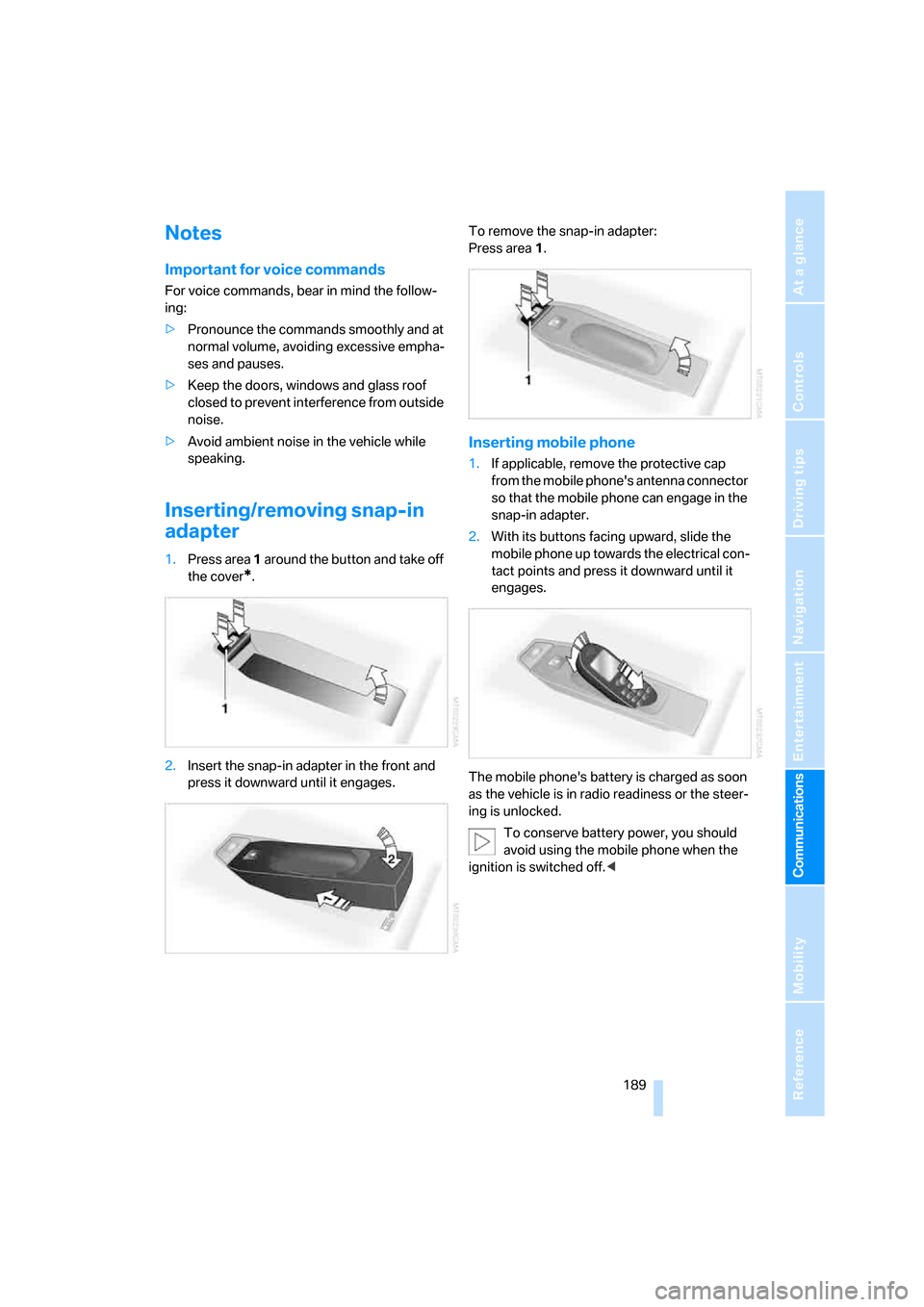
Inserting/removing snap-in
adapter
1.Press area 1 around the button and take off
the cover
*.
2.Insert the snap-in adapter in the front and
press it downward until it engages.To remove the snap-in adapter:
Press area 1.
Inserting mobile phone
1.If applicable, remove the protective cap
from the mobile phone's antenna connector
so that the mobile phone can engage in the
snap-in adapter.
2.With its buttons facing upward, slide the
mobile phone up towards the electrical con-
tact points and press it downward until it
engages.
The mobile phone's battery is charged as soon
as the vehicle is in radio readiness or the steer-
ing is unlocked.
To conserve battery power, you should
avoid using the mobile phone when the
ignition is switched off.<
Page 222 of 260
Replacing components
220 For information on continuing to drive with a
damaged tire, refer to Indication of a flat tire on
page84.
The symbol identifying Run-Flat Tires is a circle
with the letters RSC on the sidewall, refer to
Run-Flat Tires, page207.
When mounting new tires or changing over
from summer to winter tires and vice versa,
mount Run-Flat Tires for your own safety. In the
event of a flat, no spare wheel is available. Your
BMW center will be glad to advise you. Refer
also to New wheels and tires, page207.
The tools for changing wheels are avail-
able as optional accessories from your
BMW center.<
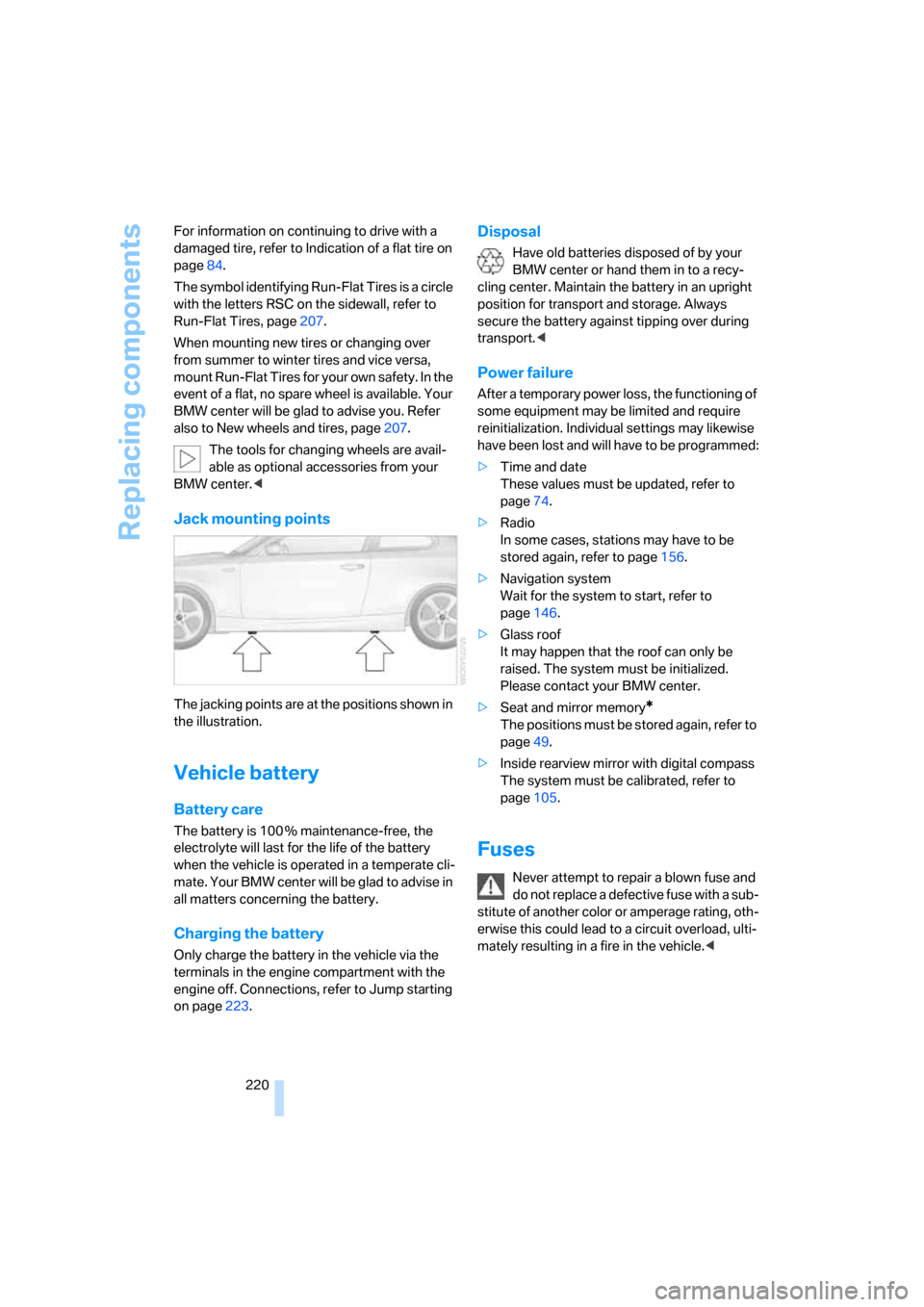
Jack mounting points
The jacking points are at the positions shown in
the illustration.
Vehicle battery
Battery care
The battery is 100 % maintenance-free, the
electrolyte will last for the life of the battery
when the vehicle is operated in a temperate cli-
ma te. Your BM W center will be glad to advise in
all matters concerning the battery.
Charging the battery
Only charge the battery in the vehicle via the
terminals in the engine compartment with the
engine off. Connections, refer to Jump starting
on page223.
Disposal
Have old batteries disposed of by your
BMW center or hand them in to a recy-
cling center. Maintain the battery in an upright
position for transport and storage. Always
secure the battery against tipping over during
transport.<
Power failure
After a temporary power loss, the functioning of
some equipment may be limited and require
reinitialization. Individual settings may likewise
have been lost and will have to be programmed:
>Time and date
These values must be updated, refer to
page74.
>Radio
In some cases, stations may have to be
stored again, refer to page156.
>Navigation system
Wait for the system to start, refer to
page146.
>Glass roof
It may happen that the roof can only be
raised. The system must be initialized.
Please contact your BMW center.
>Seat and mirror memory
*
The positions must be stored again, refer to
page49.
>Inside rearview mirror with digital compass
The system must be calibrated, refer to
page105.
Fuses
Never attempt to repair a blown fuse and
do not replace a defective fuse with a sub-
stitute of another color or amperage rating, oth-
erwise this could lead to a circuit overload, ulti-
mately resulting in a fire in the vehicle.<
Page 225 of 260
Mobility
223Reference
At a glance
Controls
Driving tips
Communications
Navigation
Entertainment
First aid pouch*
Some of the articles contained in the first aid
pouch have a limited service life. Therefore,
check the expiration dates of the contents reg-
ularly and replace any items in good time, if nec-
essary.
The first aid pouch is located on the right-hand
side of the cargo bay in a storage area.
Warning triangle*
The warning triangle is located in a holder in the
luggage compartment lid. Press the tabs to take
it out.
Jump starting
If the car's own battery is flat, your BMW's
engine can be started by connecting two
jumper cables to another vehicle's battery. You
can also use the same method to help start
another vehicle. Only use jumper cables with
fully-insulated clamp handles.
Do not touch any electrically live parts
when the engine is running, or a fatal acci-
dent may occur. Carefully adhere to the follow-ing sequence, both to prevent damage to one or
both vehicles, and to guard against possible
personal injuries.<
Preparation
1.Check whether the battery of the other
vehicle has a voltage of 12 volts and
approximately the same capacitance in Ah.
This information can be found on the bat-
tery.
2.Switch off the engine of the assisting vehi-
cle.
3.Switch off any consumers in both vehicles.
There must not be any contact between
the bodies of the two vehicles, otherwise
there is a danger of shorting.<
Connecting jumper cables
Connect the jumper cables in the correct
order to prevent sparking at the battery,
which could cause injury.<
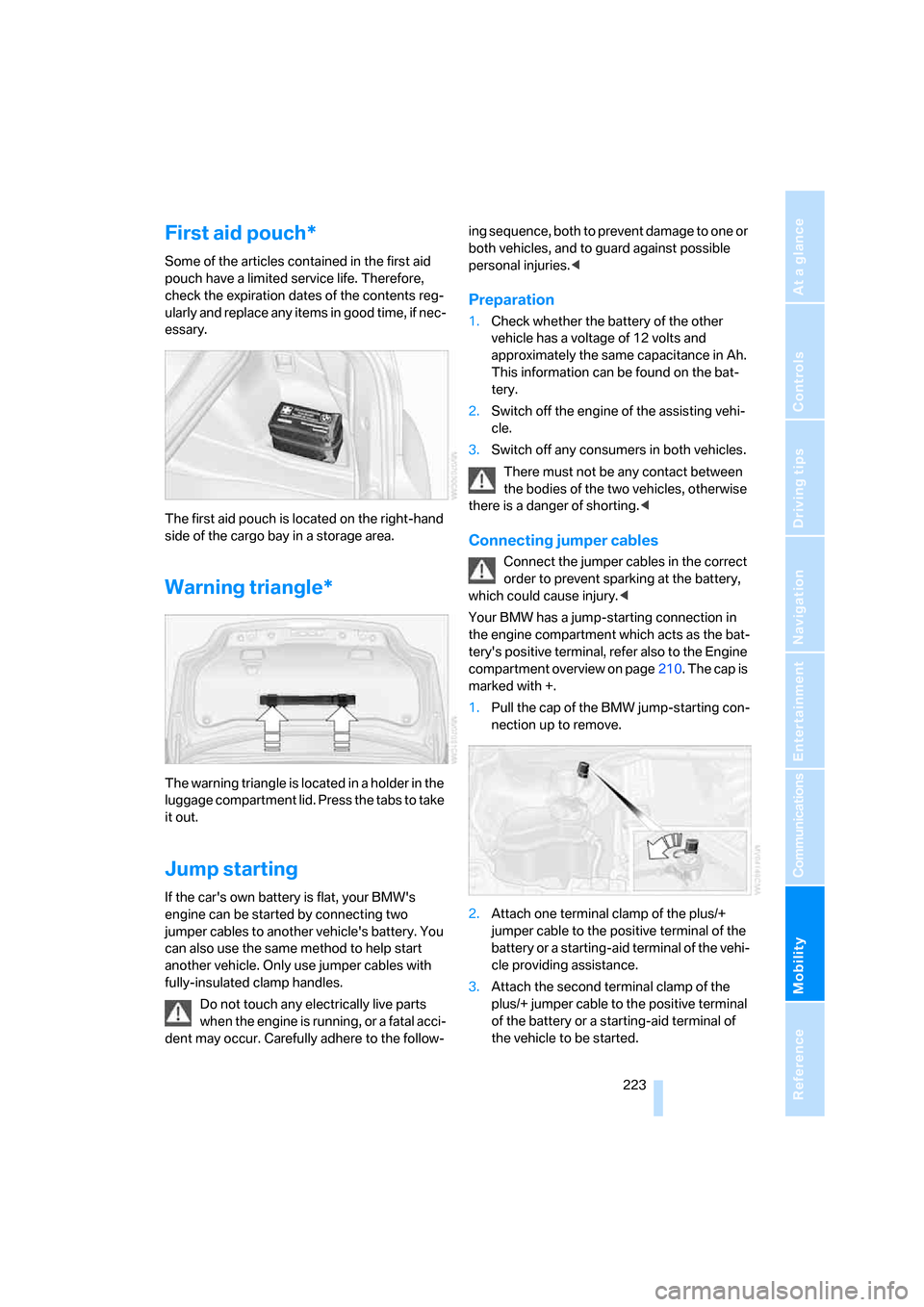
Your BMW has a jump-starting connection in
the engine compartment which acts as the bat-
tery's positive terminal, refer also to the Engine
compartment overview on page210. The cap is
marked with +.
1.Pull the cap of the BMW jump-starting con-
nection up to remove.
2.Attach one terminal clamp of the plus/+
jumper cable to the positive terminal of the
battery or a starting-aid terminal of the vehi-
cle providing assistance.
3.Attach the second terminal clamp of the
plus/+ jumper cable to the positive terminal
of the battery or a starting-aid terminal of
the vehicle to be started.
Page 226 of 260
Giving and receiving assistance
224 4.Attach one terminal clamp of the minus/–
jumper cable to the negative terminal of the
battery or to an engine or body ground of
the assisting vehicle.
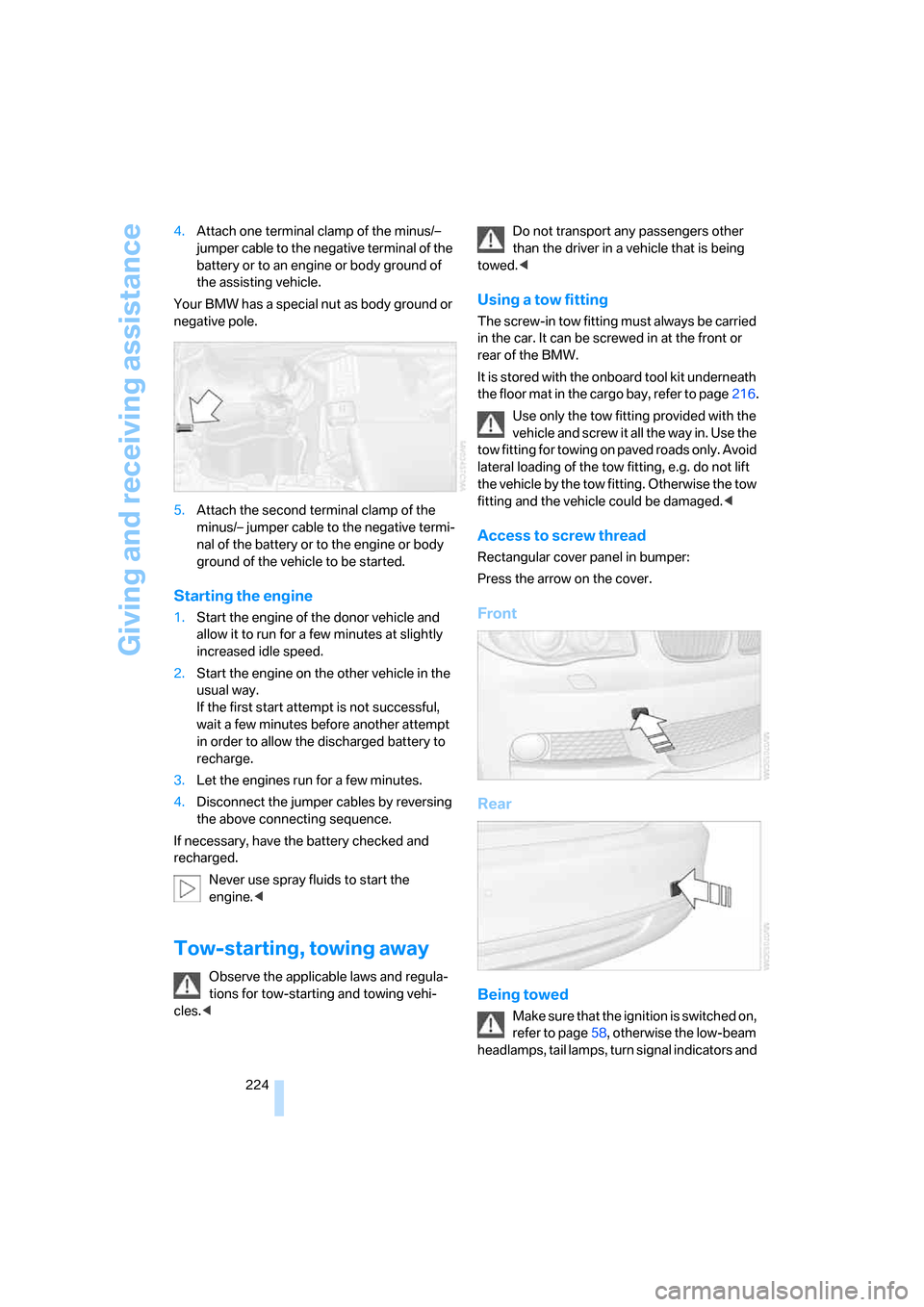
Your BMW has a special nut as body ground or
negative pole.
5.Attach the second terminal clamp of the
minus/– jumper cable to the negative termi-
nal of the battery or to the engine or body
ground of the vehicle to be started.
Starting the engine
1.Start the engine of the donor vehicle and
allow it to run for a few minutes at slightly
increased idle speed.
2.Start the engine on the other vehicle in the
usual way.
If the first start attempt is not successful,
wait a few minutes before another attempt
in order to allow the discharged battery to
recharge.
3.Let the engines run for a few minutes.
4.Disconnect the jumper cables by reversing
the above connecting sequence.
If necessary, have the battery checked and
recharged.
Never use spray fluids to start the
engine.<
Tow-starting, towing away
Observe the applicable laws and regula-
tions for tow-starting and towing vehi-
cles.
towed.<
Using a tow fitting
The screw-in tow fitting must always be carried
in the car. It can be screwed in at the front or
rear of the BMW.
It is stored with the onboard tool kit underneath
the floor mat in the cargo bay, refer to page216.
Use only the tow fitting provided with the
vehicle and screw it all the way in. Use the
tow fitting for towing on paved roads only. Avoid
lateral loading of the tow fitting, e.g. do not lift
the vehicle by the tow fitting. Otherwise the tow
fitting and the vehicle could be damaged.<
Access to screw thread
Rectangular cover panel in bumper:
Press the arrow on the cover.
Front
Rear
Being towed
Make sure that the ignition is switched on,
refer to page58, otherwise the low-beam
headlamps, tail lamps, turn signal indicators and
Page 243 of 260
Reference 241
At a glance
Controls
Driving tips
Communications
Navigation
Entertainment
Mobility
Automatic transmission with
Steptronic60
– interlock61
– selector lever lock61
– shiftlock61
– towing224
– tow-starting224
"Automatic ventilation" for
parked car ventilation100
AUTO program for automatic
climate control98
"Auto Request"193
"Autostore"
– on the radio156
"AUX"150,169,171
– AUX-In port169
– USB-audio interface170
AUX-In port169
Average fuel consumption68
– setting the units70
Average speed68
"Avoid ferries" in
navigation134
"Avoid highways" in
navigation134
Avoid highways in
navigation134
Avoiding unintentional
alarms35
"Avoid tollroads" in
navigation134
Axle loads, refer to
Weights233
"A - Z"183,184
B
Backrests, refer to Seats46
Backrest width adjustment47
Back seats, refer to Rear seats
– adjusting head restraints48
Backup lamp, replacing
bulb219
Bag for skis, refer to Ski
bag109
Balance, tone control151
Band-aids, refer to First-aid
pouch223Bar, refer to Tow-starting,
towing away225
Bass, tone control151
Bass sounds, refer to Treble
and bass151
Battery220
– charging220
– disposal37,220
– jump starting223
– temporary power failure220
Battery renewal
– remote control for vehicle37
Being towed224
Belts, refer to Safety belts51
Belt tensioner, refer to Safety
belts51
Beverage holders, refer to
Cup holders106
Blower, refer to Air flow
rate98
"BMW Assist"192,193,194
BMW Assist
– activating196
– Concierge service194
– contacting BMW Customer
Relations194
– Roadside Assistance192
– services offered191
– TeleService193
"BMW Contact"186
"BMW Contact
Numbers"186
BMW Maintenance
System214
"BMW Service settings"197
Bottle holders, refer to Cup
holders106
Brake assist, refer to Dynamic
Brake Control81
Brake fluid
– service requirements71
Brake Force Display87
Brake lamps
– Brake Force Display87
– replacing bulb219
Brake pads, breaking in114
Brake rotors116
– brakes114
– breaking in114Brakes
– ABS81
– BMW Maintenance
System214
– braking safely116
– breaking in114
– parking brake59
– service requirements71
Brake system114
– BMW Maintenance
System214
– breaking in114
– disc brakes116
Breakdown services, refer to
Roadside Assistance222
Breaking in the clutch114
Break-in period114
"Brightness"79
Bulb changing, refer to Lamps
and bulbs216
Bulbs, changing216
Button for starting the
engine58
Buttons on the steering
wheel11
C
California Proposition 65
warning6
"Call"184,195
Call
– accepting182
– displaying accepted184
– ending183
– missed184
– starting183
Calling
– from phone book183
– from Top 8 list184
– redialing184
Can holders, refer to Cup
holders106
Capacities234
Capacity of the cargo bay233
Car battery, refer to Vehicle
battery220
Car care, refer to Caring for
your vehicle brochure
Page 245 of 260
Reference 243
At a glance
Controls
Driving tips
Communications
Navigation
Entertainment
Mobility
Compact disc, refer to
– CD changer163
– CD player163
Compartment for remote
control, refer to Ignition
lock58
Compass104
Computer67
– displays on Control
Display68
– hour signal75
Computer, refer to iDrive16
"Concert hall" for Tone
control152
"Concierge"194
Concierge service194
Condensation, refer to When
the vehicle is parked116
Condition Based Service
CBS214
Configuring settings, refer to
Personal Profile28
Confirmation signals for
locking/unlocking the
vehicle31
Connecting vacuum cleaner,
refer to Connecting
electrical appliances107
Consumption, refer to
Average fuel
consumption68
"Continue guidance to
destination?"137
Control Center, refer to
iDrive16
Control Display16
Controller, refer to iDrive16
Controls and displays10
Convenient access36
– replacing the battery37
Convenient operation
– windows30
– windows with convenient
access36
– with convenient access36
Convenient starting, refer to
Starting the engine59Convertible
– rollover protection
system89
– top40
– wind deflector44
Convertible top
– convenient opening30
Coolant213
– checking level213
– filling213
Coolant temperature67
Cooling, maximum97
Cooling fluid, refer to
Coolant213
Copyright2
Corner-illuminating lamps93
Corner-illuminating lamps,
refer to Adaptive Head
Light93
Cornering lamps, refer to
Adaptive Head Light93
Courtesy lamps94
Cross-hairs in navigation128
Cruise control64
Cruising range68
Cup holders106
Curb weight, refer to
Weights233
Current fuel consumption68
"Current position"144
Current position
– displaying144
– entering132
– storing132
"Customer
Relations"186,194
D
Dashboard, refer to
Cockpit10
Dashboard lighting, refer to
Instrument lighting94
Data
– dimensions231
– sizes231Data, technical230
– capacities234
– engine230
– weights233
"Date"75,76
Date
– setting75
– setting format76
"Date format"76
"Daytime running lamps"93
Daytime running lamps,
switch positions92
DBC Dynamic Brake
Control81
"Deactivated"51
Deactivating front passenger
airbags88
Deadlocking, refer to
Locking30
Decommissioning the vehicle,
refer to Caring for your
vehicle brochure
Defect
– door lock32
– fuel filler door200
– glass roof40
– luggage compartment lid33
Defogging windows99
Defrosting the windows99
Defrosting windshield, refer to
Defrosting windows99
Defrost position, refer to
Defrosting windows99
"Delete address book" in
navigation133
"Delete all numbers" on the
mobile phone185
"Delete data" in
navigation133
"Delete" for mobile
phone185
Destination address
– deleting133
– entering123,127
Page 246 of 260
Everything from A - Z
244 Destination for navigation
– destination list130
– entry123
– home address133
– manual entry123,127
– selecting from address
book132
– selecting using
information129
– selecting via language127
– selecting via map128
– storing131
Destination guidance136
– canceling voice
instructions54
– changing specified
route134
– displaying route137
– distance and arrival136
– starting136
– terminating/continuing136
– voice instructions140
– volume of voice
instructions140
Destination list for navigation
system130
Destinations recently driven
to130
"Details" for audio mode171
"Dial" for mobile phone183
"Dial number"183
Differential, breaking in114
Digital clock66
Digital compass104
Digital radio, refer to High
Definition Radio157
Digital Versatile Disc, refer to
– Drive for navigation DVD150
Dimensions231
Directional indicators, refer to
Turn signals62
Direction instructions, refer to
Voice instructions140
Directory for navigation, refer
to Address book131
Displacement, refer to Engine
data230
"Display"20Display, refer to Control
Display16
Display lighting, refer to
Instrument lighting94
Displays, refer to Instrument
cluster12
Displays and controls10
"Display settings"79
Disposal
– of coolant213
– remote control battery37
– vehicle battery220
Distance, refer to
Computer68
Distance remaining to service,
refer to Service
requirements71
"Distance to dest."69
Distance to destination, refer
to Computer68
Distance warning, refer to
Park Distance Control
PDC80
Door key, refer to Integrated
key/remote control28
Door lock32
Door lock, confirmation
signals31
"Door locks"30,32,72
Doors, emergency
operation32
DOT Quality Grades205
Draft-free ventilation99
Drinks holders, refer to Cup
holders106
Drive for navigation DVD150
Drive-off assistance, refer to
DSC81
Drive-off assistant82
Driving around a traffic
congestion144
Driving lamps, refer to Parking
lamps/low beams91
Driving notes114
Driving off on hills, refer to
Drive-off assistant82
Driving route, refer to
Displaying route137Driving stability control
systems81
Driving through water116
Driving tips, refer to Driving
notes114
Dry air, refer to Cooling
function99
DTC Dynamic Traction
Control82
– indicator lamps82
DVD
– drive for navigation DVD150
DVD for navigation122
Dynamic Brake Control
DBC81
"Dynamic route" in
navigation134
Dynamic Stability Control
DSC81
Dynamic Traction Control
DTC
– indicator lamps82
E
EBV Electronic brake-force
distribution81
Eject button, refer to Buttons
on the CD player150
Electrical malfunction
– door lock32
– fuel filler door200
– glass roof40
– luggage compartment lid33
Electronic brake-force
distribution EBV81
Electronic oil level check210
Electronic Stability Program
ESP, refer to Dynamic
Stability Control DSC81
Emergency operation, refer to
Manual operation
– door lock32
– fuel filler door200
– glass roof40
– transmission lock, automatic
transmission62
Emergency release, luggage
compartment lid34
Page 256 of 260
Everything from A - Z
254 Trunk lid, refer to Luggage
compartment lid33
Turning circle, refer to
Dimensions231
Turn signal
– indicator lamp12
Turn signal indicators
– replacing bulbs218
Turn signals62
– triple turn signal63
Tying down loads, refer to
Cargo loading118
U
Underbody protection, refer to
Caring for your vehicle
brochure
Uniform Tire Quality Grading/
UTQR205
"Units"70
Units of measure
– average fuel
consumption70
– temperature70
Universal garage door opener,
refer to Integrated universal
remote control102
Universal remote control102
Unlatching, refer to
Unlocking29
"Unlock button"30
Unlocking
– from inside33
– from outside29
– luggage compartment lid37
– without remote control, refer
to Convenient access36
Unlocking without a key, refer
to Convenient access36
"Update services"195
USB-audio interface170
"USB" for audio
mode169,171
V
Vehicle
– battery220
– breaking in114
– care, refer to Caring for your
vehicle brochure
– cargo loading117
– dimensions231
– Identification Number, refer
to Engine compartment210
– parking59
– washing, refer to Caring for
your vehicle brochure
– weight233
"Vehicle / Tires" for
unlocking29
Vehicle decommissioning
– refer to Caring for your
vehicle brochure
Vehicle jack220
Vehicle position, refer to
Displaying current
position144
Ventilation99
– draft-free99
Ventilation when parked, refer
to Parked car ventilation100
Vents, refer to Ventilation99
"Vent settings"97
Voice commands
– overview23
– short commands235
Voice instructions from
navigation system140
– muting54,140
– repeating54,140
– switching on/off54,140
– volume140
Voice phone book188
Volume150
– audio sources150
– fuel tank, refer to
Capacities234
– mobile phone181
– speed-dependent
control151
– voice instructions140Volume distribution
– front/rear151
– left/right151
W
Warning and indicator
lamps13
Warning messages, refer to
Check Control76
Warning triangle223
Washer fluid64
– content of the reservoir64
Washer fluid filler neck64
Washing the car, refer to
Caring for your vehicle
brochure
Waste tray, refer to
Ashtray107
Water on roads, refer to
Driving through water116
Waveband with the radio154
Wear indicators in tires, refer
to Minimum tread depth206
Weights233
Welcome lamps91
Wheelbase, refer to
Dimensions231
Wheels, new207
Wheels and tires202
Width, refer to
Dimensions231
Windows38
– convenient operation30
– convenient operation with
convenient access36
– opening, closing38
– pinch protection system39
Windows, defrosting and
removing condensation99
Windshield
– cleaning64
– defrosting and removing
condensation99
Windshield wash
– filling capacity, reservoir234
Windshield washer reservoir,
refer to Washer fluid filler
neck64