flash BMW 135I COUPE 2008 E82 Owner's Guide
[x] Cancel search | Manufacturer: BMW, Model Year: 2008, Model line: 135I COUPE, Model: BMW 135I COUPE 2008 E82Pages: 260, PDF Size: 8.61 MB
Page 217 of 260
Mobility
215Reference
At a glance
Controls
Driving tips
Communications
Navigation
Entertainment
Socket for On-Board
Diagnosis OBD
Primary components that make up exhaust
emissions can be checked by a device via the
OBD socket.
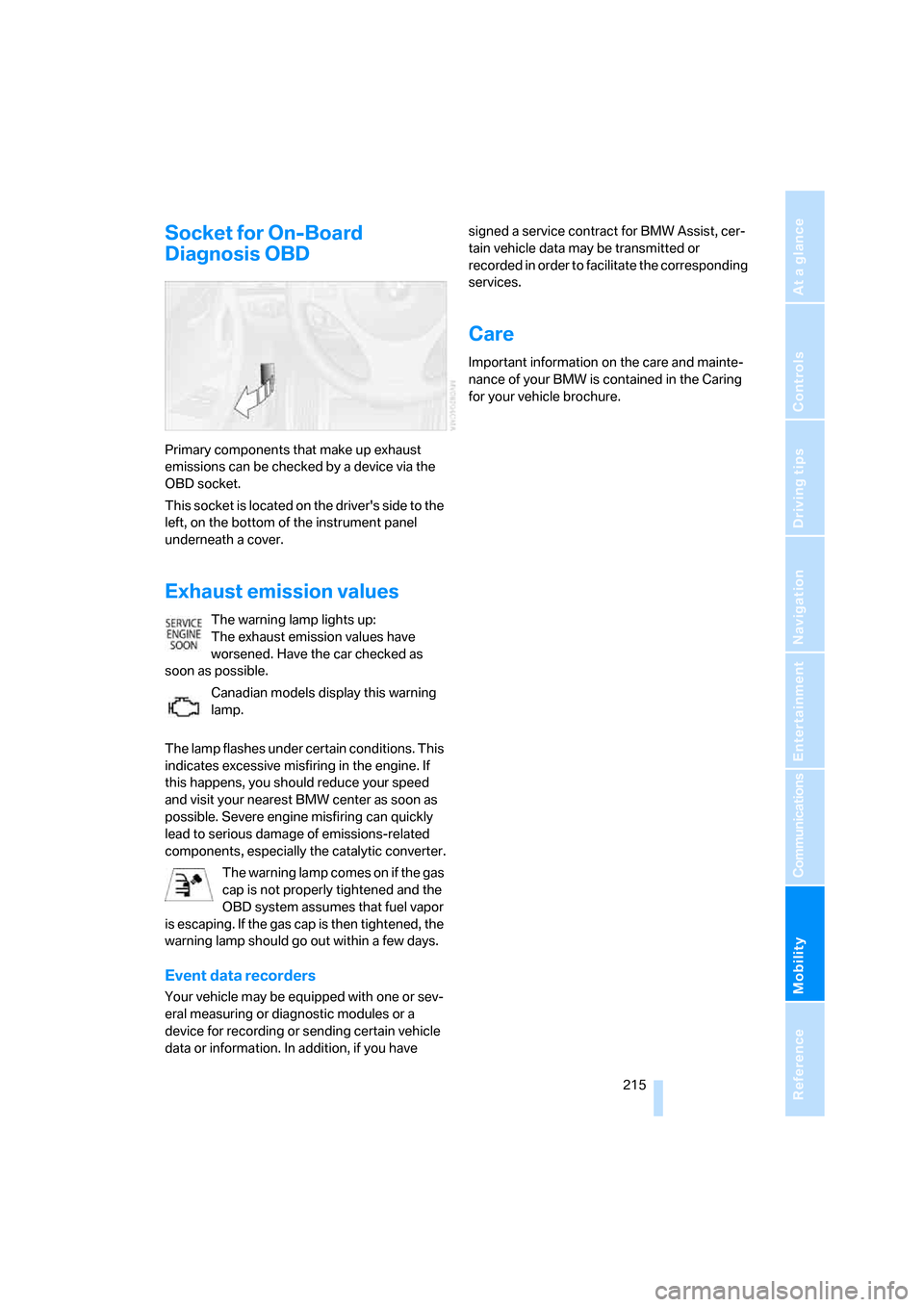
This socket is located on the driver's side to the
left, on the bottom of the instrument panel
underneath a cover.
Exhaust emission values
The warning lamp lights up:
The exhaust emission values have
worsened. Have the car checked as
soon as possible.
Canadian models display this warning
lamp.
The lamp flashes under certain conditions. This
indicates excessive misfiring in the engine. If
this happens, you should reduce your speed
and visit your nearest BMW center as soon as
possible. Severe engine misfiring can quickly
lead to serious damage of emissions-related
components, especially the catalytic converter.
The warning lamp comes on if the gas
cap is not properly tightened and the
OBD system assumes that fuel vapor
is escaping. If the gas cap is then tightened, the
warning lamp should go out within a few days.
Event data recorders
Your vehicle may be equipped with one or sev-
eral measuring or diagnostic modules or a
device for recording or sending certain vehicle
data or information. In addition, if you have signed a service contract for BMW Assist, cer-
tain vehicle data may be transmitted or
recorded in order to facilitate the corresponding
services.
Care
Important information on the care and mainte-
nance of your BMW is contained in the Caring
for your vehicle brochure.
Page 224 of 260
Giving and receiving assistance
222
Giving and receiving assistance
Emergency Request*
Conditions for an Emergency Request:
>Full preparation package mobile phone:
This equipment makes it possible to send
an Emergency Request even if no mobile
phone is paired with the vehicle.
>BMW Assist is activated. Activating
BMW Assist, refer to page196.
>Radio readiness is on.
>The BMW Assist system is logged on to a
mobile phone network.
>The Emergency Request system is opera-
ble.
Once your service contract for BMW Assist
expires, the BMW Assist system can be deacti-
vated by a BMW center without you having to
visit a workshop. Once the BMW Assist system
has been deactivated, Emergency Requests
are not possible. The BMW Assist system can
be reactivated by a BMW center after a new
contract has been signed.
Sending an Emergency Request
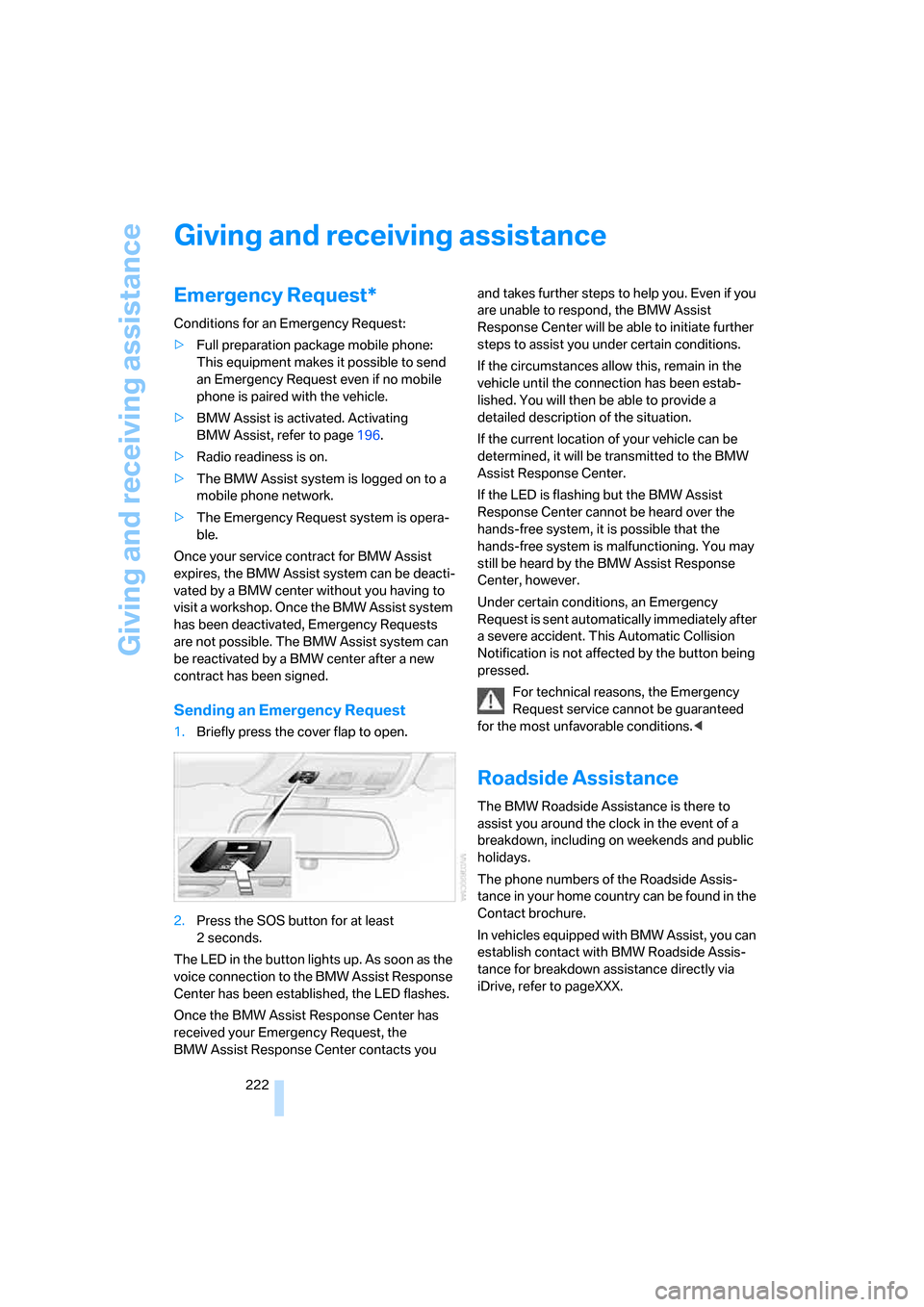
1.Briefly press the cover flap to open.
2.Press the SOS button for at least
2seconds.
The LED in the button lights up. As soon as the
voice connection to the BMW Assist Response
Center has been established, the LED flashes.
Once the BMW Assist Response Center has
received your Emergency Request, the
BMW Assist Response Center contacts you and takes further steps to help you. Even if you
are unable to respond, the BMW Assist
Response Center will be able to initiate further
steps to assist you under certain conditions.
If the circumstances allow this, remain in the
vehicle until the connection has been estab-
lished. You will then be able to provide a
detailed description of the situation.
If the current location of your vehicle can be
determined, it will be transmitted to the BMW
Assist Response Center.
If the LED is flashing but the BMW Assist
Response Center cannot be heard over the
hands-free system, it is possible that the
hands-free system is malfunctioning. You may
still be heard by the BMW Assist Response
Center, however.
Under certain conditions, an Emergency
Request is sent automatically immediately after
a severe accident. This Automatic Collision
Notification is not affected by the button being
pressed.
For technical reasons, the Emergency
Request service cannot be guaranteed
for the most unfavorable conditions.<
Roadside Assistance
The BMW Roadside Assistance is there to
assist you around the clock in the event of a
breakdown, including on weekends and public
holidays.
The phone numbers of the Roadside Assis-
tance in your home country can be found in the
Contact brochure.
In vehicles equipped with BMW Assist, you can
establish contact with BMW Roadside Assis-
tance for breakdown assistance directly via
iDrive, refer to pageXXX.
Page 227 of 260
Mobility
225Reference
At a glance
Controls
Driving tips
Communications
Navigation
Entertainment
windshield wipers may be unavailable. Power
steering assistance is not available when the
engine is not running. Thus, braking and steer-
ing will require increased effort. Active steering
is not active and it will be necessary to turn the
steering wheel further.<
Switch on the hazard warning flashers, depend-
ing on local regulations.
Manual transmission
Gearshift lever in idle position.
Automatic transmission
Selector lever in position N.
Changing the selector lever position, refer to
page61.
Do not exceed a towing speed of 45 mph/
70 km/h and a towing distance of
90 miles/150 km, otherwise the automatic
transmission may be damaged.<
Towing methods
I n s o m e c o u n t r i e s , i t i s i l l e g a l t o t o w y o u r v e h i c l e
with a tow bar or tow rope on public highways.
Please familiarize yourself with the relevant
towing regulations for the country in which you
are driving.
With a tow bar
The towing vehicle must not be lighter
than the towed vehicle, otherwise it may
be impossible to maintain control.<
The tow fittings used should be on the same
side on both vehicles. Should it prove impossi-
ble to avoid mounting the tow bar at an angle,
please observe the following:
>Clearance and maneuvering capability will
be sharply limited during cornering.
>The tow bar will generate lateral forces if it is
attached offset.
Attach the tow bar to the tow fittings only,
as attaching it to other parts of the vehicle
could result in damage.<
With a tow rope
When starting off in the towing vehicle, make
sure that the tow rope is taut.
To avoid jerking and the associated
stresses on vehicle components when
towing, always use nylon ropes or nylon straps.
Attach the tow rope to the tow fittings only, as
attaching it to other parts of the vehicle could
result in damage.<
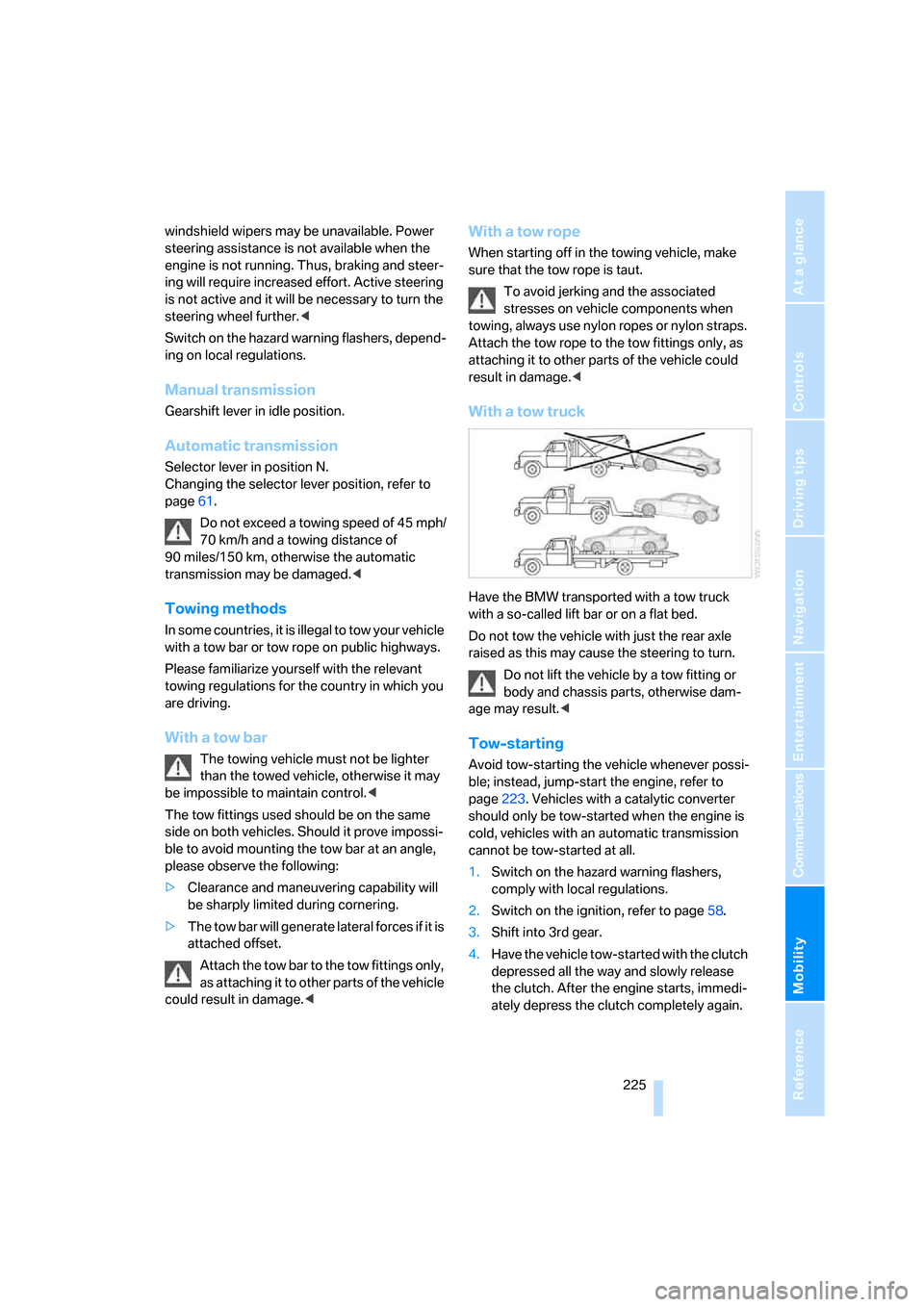
With a tow truck
Have the BMW transported with a tow truck
with a so-called lift bar or on a flat bed.
Do not tow the vehicle with just the rear axle
raised as this may cause the steering to turn.
Do not lift the vehicle by a tow fitting or
body and chassis parts, otherwise dam-
age may result.<
Tow-starting
Avoid tow-starting the vehicle whenever possi-
ble; instead, jump-start the engine, refer to
page223. Vehicles with a catalytic converter
should only be tow-started when the engine is
cold, vehicles with an automatic transmission
cannot be tow-started at all.
1.Switch on the hazard warning flashers,
comply with local regulations.
2.Switch on the ignition, refer to page58.
3.Shift into 3rd gear.
4.Have the vehicle tow-started with the clutch
depressed all the way and slowly release
the clutch. After the engine starts, immedi-
ately depress the clutch completely again.
Page 228 of 260

Giving and receiving assistance
226 5.Stop at a suitable location, remove the tow
bar or rope and switch off the hazard warn-
ing flashers.
6.Have the vehicle checked.
Page 247 of 260
Reference 245
At a glance
Controls
Driving tips
Communications
Navigation
Entertainment
Mobility
Emergency Request222
Emergency services, refer to
Roadside Assistance222
"Enabled services"196
"Enable services"197
"End call"183
Energy, saving
– saving fuel114
Engine
– breaking in114
– data230
– speed230
– starting59
– starting, convenient
access36
– switching off59
Engine compartment210
Engine coolant, refer to
Coolant213
Engine oil
– adding212
– additives212
– BMW Maintenance
System214
– checking level210
– intervals between changes,
refer to Service
requirements71
– specified engine oils212
"Engine oil level"211
Engine output, refer to Engine
data230
Engine speed, refer to Engine
data230
Engine starting, refer to
Starting the engine59
"Enter address"124
Entering a destination124
Entering a destination
country124
Entering a house number or
intersection126
Entering an intersection125
Entering a street125
"Entertainment"150
"Equalizer", refer to Tone
control152
Equalizer, refer to Tone
control152"ESN"160
ESP Electronic Stability
Program, refer to Dynamic
Stability Control DSC81
Event data recorders215
Exhaust system, refer to Hot
exhaust system115
Exterior mirrors51
– adjusting51
– automatic dimming
feature53
– automatic heating52
– folding in and out52
External audio device, refer to
AUX-In port169
Eyes
– for tow-starting and towing
away224
– for tying down loads118
F
Fader, tone control151
Failure messages, refer to
Check Control76
Failure of an electrical
consumer220
False alarm, refer to Avoiding
unintentional alarms35
Fastening safety belts, refer to
Safety belts51
Fastest route for
navigation134
Fast forward
– CD changer167
– CD player167
"Fast route" in navigation134
Filter of automatic climate
control, refer to Microfilter/
activated charcoal filter100
First aid pouch223
Fixture for remote control,
refer to Ignition lock58
Flash when locking/
unlocking31
Flat tire
– Run-Flat Tires207
– Tire Pressure Monitor
TPM84Flat Tire Monitor FTM83
– indicating a flat tire84
– initializing the system83
– malfunction84
– system limits83
Flat tires, refer to Tire
condition206
"FM", waveband150,154
FM, waveband154
Fog lamps94
– indicator lamp13,94
Footbrake, refer to Braking
safely116
Footwell lamps94
For your own safety5
Frequency, selecting
manually155
Front airbags88
Front seat setting45
Frost, removing from
windows, refer to Defrosting
windows99
FTM, refer to Flat Tire
Monitor83
Fuel200
– gauge67
– high-quality brands200
– quality200
– specifications200
– tank contents, refer to
Capacities234
Fuel clock, refer to Fuel
gauge67
Fuel consumption display,
refer to Average fuel
consumption68
Fuel consumption statistics,
refer to Average fuel
consumption68
Fuel display, refer to Fuel
gauge67
Fuel filler door200
– releasing in the event of
electrical malfunction200
Fuses220
Page 248 of 260
Everything from A - Z
246
G
Garage door opener, refer to
Integrated universal remote
control102
Gasoline, refer to Required
fuel200
Gasoline display, refer to Fuel
gauge67
Gear change
– with automatic
transmission61
– with manual transmission60
Gear display, with automatic
transmission60
Gearshift lever
– automatic transmission with
Steptronic61
– manual transmission60
General driving notes115
Glass roof, electric39
– closing after electrical
malfunction40
– convenient operation32
– opening, closing39
– operation with convenient
access36
– pinch protection system40
– raising39
– remote control30
Glove compartment105
GPS navigation, refer to
Navigation system122
Grills, refer to Air vents96
Gross vehicle weight, refer to
Weights233
H
Halogen lamps
– replacing bulbs217
Handbrake, refer to Parking
brake59
Hands-free system, refer to
Microphone for hands-free
mode14
Hazard warning flashers14
"HD radio"157HD radio, refer to High
Definition Radio157
Head airbags88
Headlamp control,
automatic91
Headlamp cover217
Headlamp flasher62
– indicator lamp13
Headlamps
– care, refer to Caring for your
vehicle brochure
– replacing bulbs217
Head restraints47
Heated
– seats49
Heated mirrors52
Heating
– mirrors52
– seats49
Heating, rear window99
Heating and ventilation96
Heating during a stop99
Heavy loads, refer to Stowing
cargo118
Height, refer to
Dimensions231
Height adjustment
– steering wheel53
High beams93
– indicator lamp13
– replacing bulbs217
High Definition Radio157
High water, refer to Driving
through water116
Highways, refer to Route
criteria134
Hills116
Holders for cups106
Home address133
"Home address" in
navigation134
Hood209
Hot exhaust system115
"Hour memo"75
"House number" in
destination entry126
Hydraulic brake assist, refer to
Dynamic Brake Control81
Hydroplaning115
I
IBOC, refer to High Definition
Radio157
Ice warning, refer to Outside
temperature
warning66
ID3 tag, refer to Information
about the track165
Identification marks
– tire coding205
iDrive16
– adjusting brightness79
– automatic climate control97
– changing date and time74
– changing language79
– confirming selection or
entry19
– displays, menus17
– lists19
– menu guidance17
– operating principle16
– selecting a menu item19
– status information20
– switching menu pages19
– symbols18
Ignition58
– switched off58
– switched on58
Ignition key, refer to
Integrated key/remote
control28
Ignition key position 1, refer to
Radio readiness58
Ignition key position 2, refer to
Ignition on58
Ignition lock58
Imprint2
Indicator and warning
lamps13
– Tire Pressure Monitor
TPM86
Indicator lighting, refer to
Instrument lighting94
Individually programmable
buttons on steering
wheel53
Individual settings, refer to
Personal Profile28
Page 250 of 260
Everything from A - Z
248 Maintenance, refer to
– BMW Maintenance
System214
– Service booklet
Maintenance system214
Malfunction warnings, refer to
Check Control76
"Manual" on the radio155
Manual operation
– door lock32
– fuel filler door200
– glass roof40
– luggage compartment lid33
– transmission lock, automatic
transmission62
Manual operation with
automatic transmission61
Manual transmission60
Map
– changing scale139
– destination entry128
"Map direction of travel"138
"Map facing north"138
Maximum cooling97
Maximum speed
– for winter tires208
Memory keys,
programmable21
Menus, refer to iDrive16
Message list, traffic
information142
Microfilter/activated-charcoal
filter for automatic climate
control100
Microphone for telephone14
Mirror dimming feature53
Mirrors51
– automatic curb monitor52
– exterior mirrors51
– heating52
– interior rearview mirror52
"Missed calls"184
Missed calls184Mobile phone
– accepted calls184
– adjusting volume181
– calling183
– ending call183
– missed calls184
– operation via iDrive181
– redialing184
– Top 8184
– touch tone dialing186
Mobile phone, installation
location, refer to Center
armrest106
Mobile phone, refer to the
separate Owner's Manual
Modifications, technical, refer
to For your own safety
5
Monitor, refer to iDrive16
Monitoring system for tire
pressures, refer to Flat Tire
Monitor83
"Monitor on / off"54
Most recent mobile phone
numbers184
MP3, refer to Compressed
audio files163
Multifunctional steering
wheel, refer to Buttons on
the steering wheel11
Multifunction switch
– refer to Turn signals/
headlamp flasher62
– refer to Wiper system63
Music tracks, refer to
Tracks164
"Mute on / off"54
N
"Navigation"123,129
Navigation announcements,
refer to Switching voice
instructions on/off140
Navigation drive, location122
Navigation DVD122
– drive150Navigation system122
– address book131
– changing a route141
– destination entry123
– destination list130
– displaying current
position144
– entering a destination
manually123,127
– last destinations130
– navigation DVD122
– opening123
– route display137
– route list139
– searching for a special
destination129
– selecting destination using
information129
– selecting destination via
map128
– selecting route criteria134
– starting destination
guidance136
– switching off, refer to
Terminating/continuing
destination guidance136
– terminating/continuing
destination guidance136
– voice instructions140
– volume adjustment140
"Navigation voice
instructions"139
"Navigation voice
instructions" via buttons on
steering wheel53
Neck support, refer to Head
restraints47
Nets, refer to Storage
compartments106
"New address" in
navigation132
"New destination"124,128
"New route"141
New tires207
"Next entertainment
source"54
North-facing map138
Number of cylinders, refer to
Engine data230