Adaptive Light Control BMW 135I COUPE 2008 E82 Owner's Manual
[x] Cancel search | Manufacturer: BMW, Model Year: 2008, Model line: 135I COUPE, Model: BMW 135I COUPE 2008 E82Pages: 260, PDF Size: 8.61 MB
Page 12 of 260
Cockpit
10
Cockpit
Around the steering wheel: controls and displays
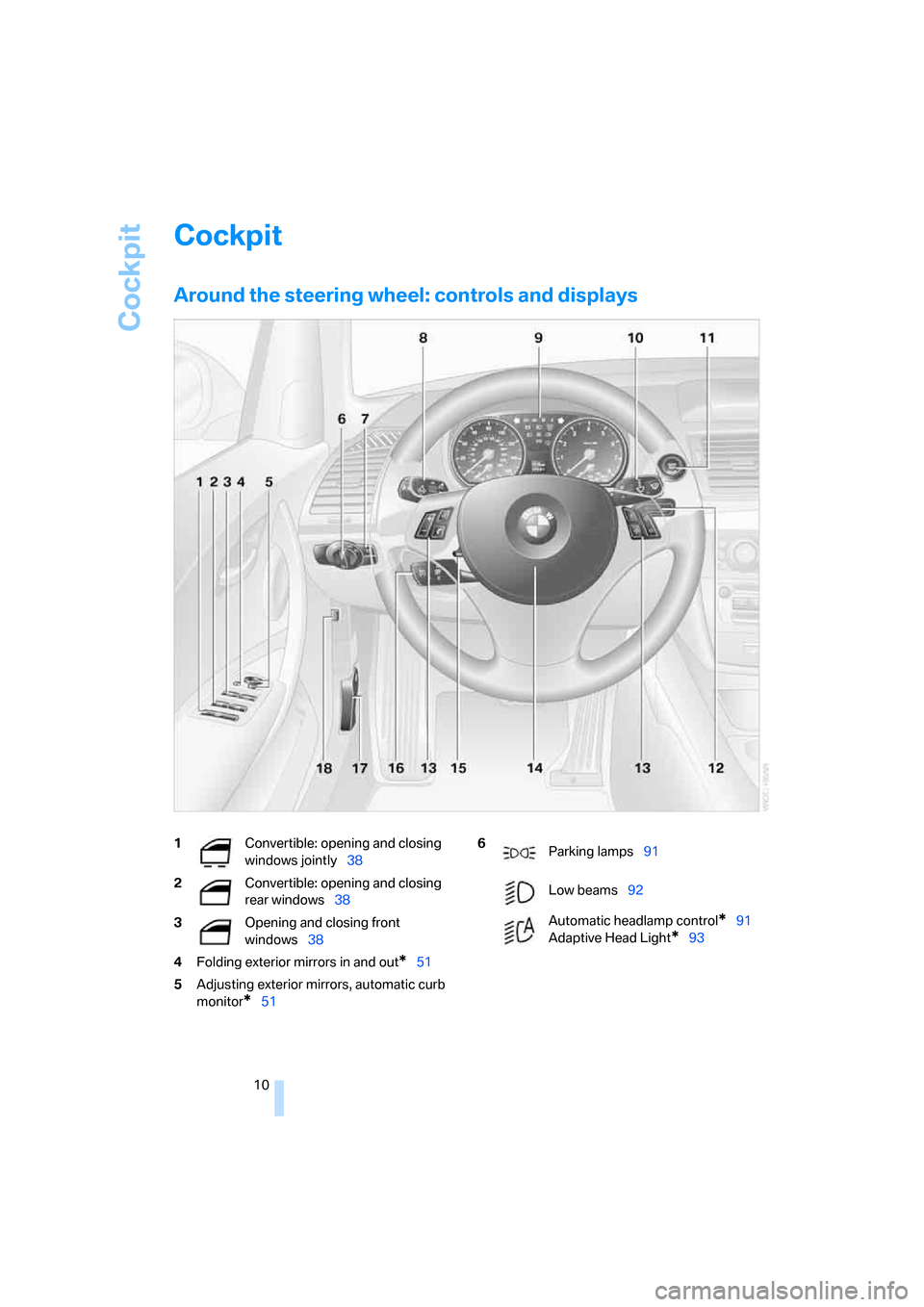
1Convertible: opening and closing
windows jointly38
2Convertible: opening and closing
rear windows38
3Opening and closing front
windows38
4Folding exterior mirrors in and out
*51
5Adjusting exterior mirrors, automatic curb
monitor
*51
6
Parking lamps91
Low beams92
Automatic headlamp control
*91
Adaptive Head Light
*93
Page 93 of 260
Controls
91Reference
At a glance
Driving tips
Communications
Navigation
Entertainment
Mobility
Lamps
Parking lamps/low beams
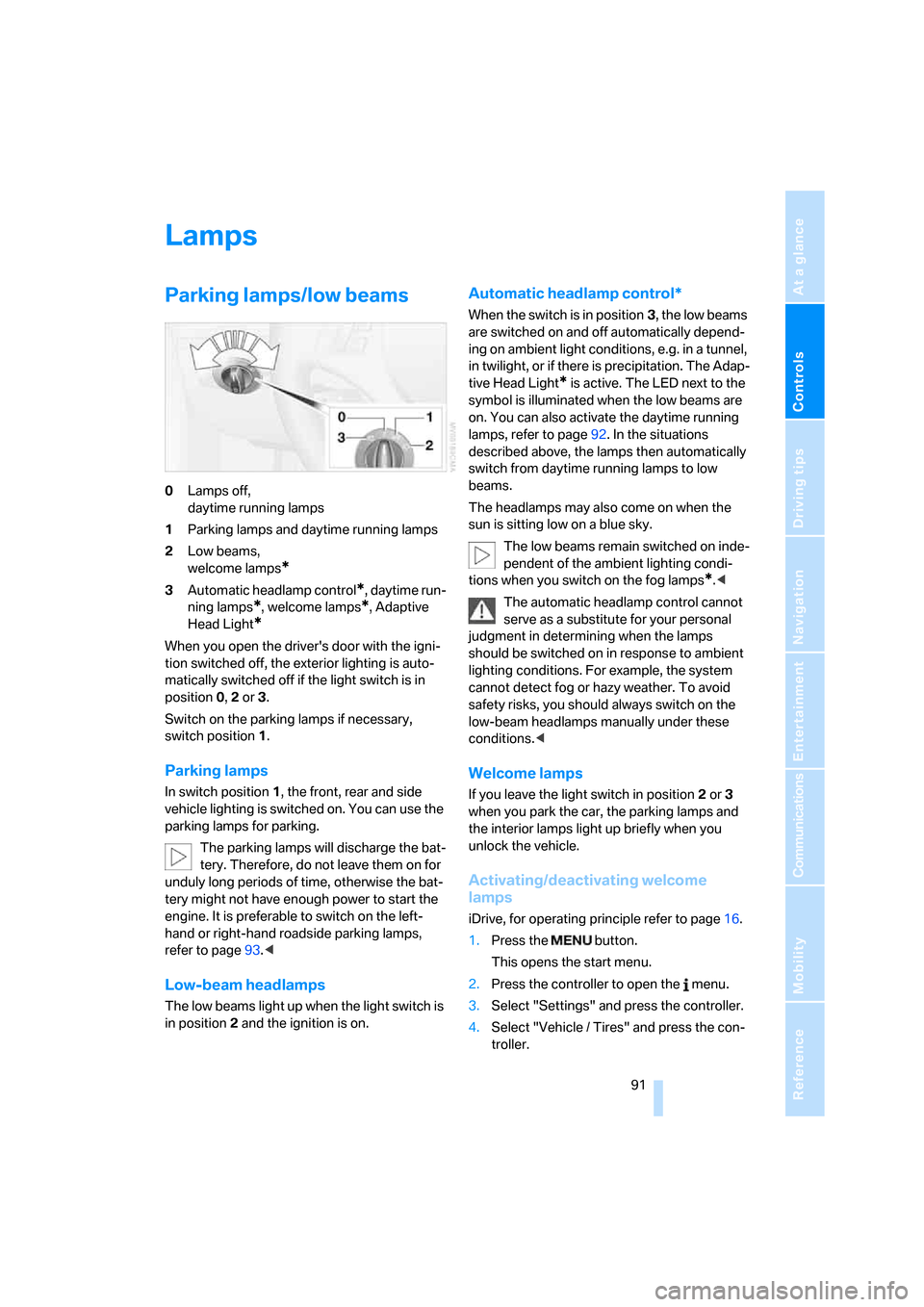
0Lamps off,
daytime running lamps
1Parking lamps and daytime running lamps
2Low beams,
welcome lamps
*
3Automatic headlamp control*, daytime run-
ning lamps
*, welcome lamps*, Adaptive
Head Light
*
When you open the driver's door with the igni-
tion switched off, the exterior lighting is auto-
matically switched off if the light switch is in
position 0, 2 or 3.
Switch on the parking lamps if necessary,
switch position 1.
Parking lamps
In switch position1, the front, rear and side
vehicle lighting is switched on. You can use the
parking lamps for parking.
The parking lamps will discharge the bat-
tery. Therefore, do not leave them on for
unduly long periods of time, otherwise the bat-
tery might not have enough power to start the
engine. It is preferable to switch on the left-
hand or right-hand roadside parking lamps,
refer to page93.<
Low-beam headlamps
The low beams light up when the light switch is
in position 2 and the ignition is on.
Automatic headlamp control*
When the switch is in position3, the low beams
are switched on and off automatically depend-
ing on ambient light conditions, e.g. in a tunnel,
in twilight, or if there is precipitation. The Adap-
tive Head Light
* is active. The LED next to the
symbol is illuminated when the low beams are
on. You can also activate the daytime running
lamps, refer to page92. In the situations
described above, the lamps then automatically
switch from daytime running lamps to low
beams.
The headlamps may also come on when the
sun is sitting low on a blue sky.
The low beams remain switched on inde-
pendent of the ambient lighting condi-
tions when you switch on the fog lamps
*.<
The automatic headlamp control cannot
serve as a substitute for your personal
judgment in determining when the lamps
should be switched on in response to ambient
lighting conditions. For example, the system
cannot detect fog or hazy weather. To avoid
safety risks, you should always switch on the
low-beam headlamps manually under these
conditions.<
Welcome lamps
If you leave the light switch in position 2 or 3
when you park the car, the parking lamps and
the interior lamps light up briefly when you
unlock the vehicle.
Activating/deactivating welcome
lamps
iDrive, for operating principle refer to page16.
1.Press the button.
This opens the start menu.
2.Press the controller to open the menu.
3.Select "Settings" and press the controller.
4.Select "Vehicle / Tires" and press the con-
troller.
Page 95 of 260
Controls
93Reference
At a glance
Driving tips
Communications
Navigation
Entertainment
Mobility
until "Lighting" is selected and press the
controller.
7.Select "Daytime running lamps" and press
the controller.
The daytime running lamps are
switched on.
The setting is stored for the remote control cur-
rently in use.
Adaptive Head Light*
The concept
Adaptive Head Light is a variable headlamp
control system that enables better illumination
of the road surface. Depending on the steering
angle and other parameters, the light from the
headlamp follows the course of the road.
In tight curves at speeds up to 40 mph/70 km/h,
e.g. on mountainous roads or when turning, an
additional, corner-illuminating lamp is switched
on that lights up the inside area of the curve.
Activating Adaptive Head Light
With the ignition switched on, turn the light
switch to position 3, refer to page91.
The corner-illuminating lamp is switched on
automatically, depending on the steering wheel
angle or turn signal indicator.
To avoid blinding oncoming traffic, the Adaptive
Head Light directs light towards the front pas-
senger side when the vehicle is at a standstill.
When you are reversing, only the corner-illumi-
nating lamps are active and switched on on
both sides.
Malfunction
The LED next to the symbol for automatic head-
lamp control flashes. Adaptive Head Light is
malfunctioning or has failed. Have the system
checked as soon as possible.
High beams/roadside parking
lamps
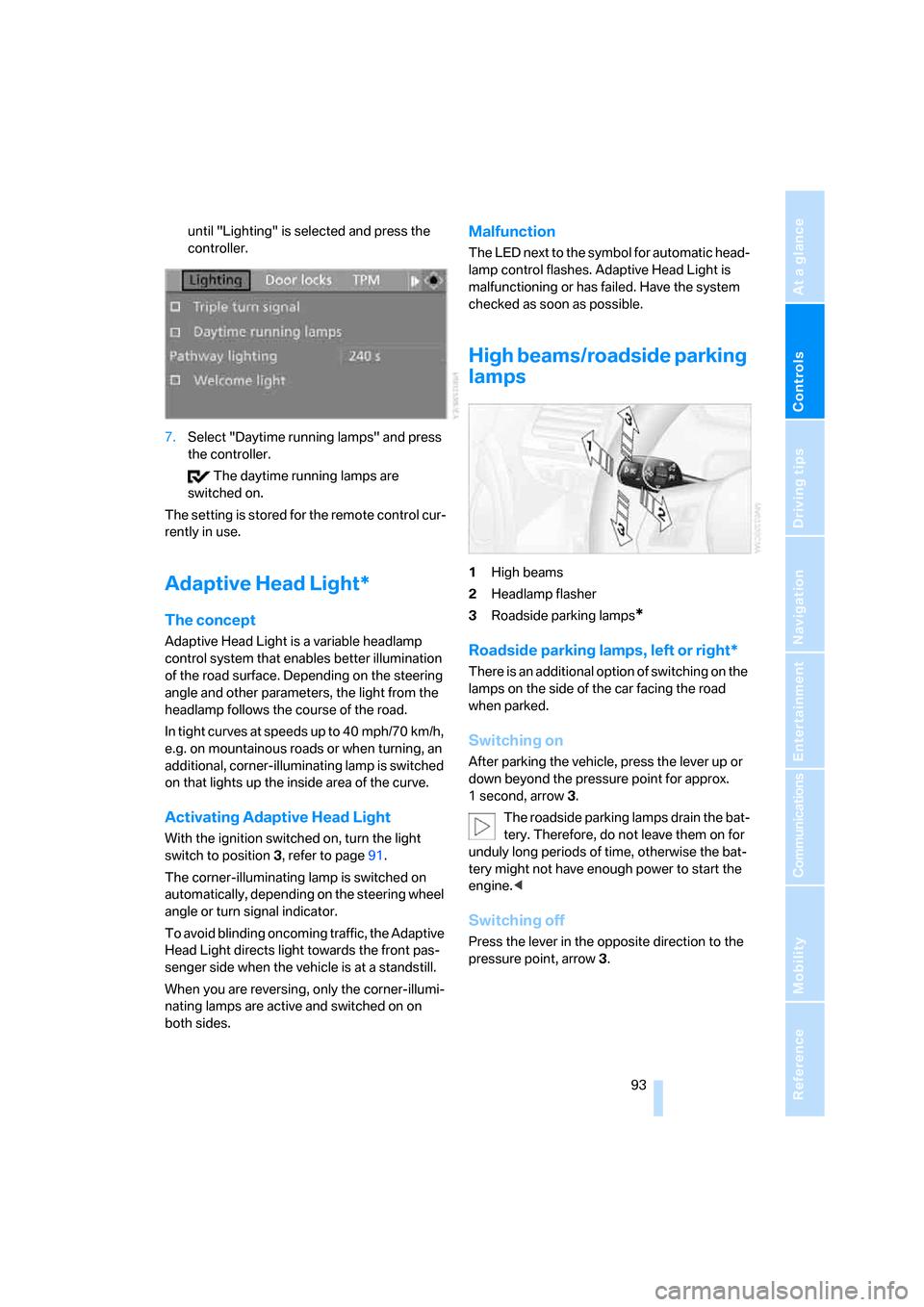
1High beams
2Headlamp flasher
3Roadside parking lamps
*
Roadside parking lamps, left or right*
There is an additional option of switching on the
lamps on the side of the car facing the road
when parked.
Switching on
After parking the vehicle, press the lever up or
down beyond the pressure point for approx.
1 second, arrow 3.
The roadside parking lamps drain the bat-
tery. Therefore, do not leave them on for
unduly long periods of time, otherwise the bat-
tery might not have enough power to start the
engine.<
Switching off
Press the lever in the opposite direction to the
pressure point, arrow 3.
Page 242 of 260
Everything from A - Z
240
Everything from A - Z
Index
"..." Identifies Control Display
texts used to select
individual functions and
refers you to the page where
these texts can be found.
A
Accessories, refer to The
individual vehicle5
Accident, reporting, refer to
Emergency Request222
Activated-charcoal filter100
"Activation time" for parked
car ventilation100
Active steering87
Adaptive Head Light93
"Add digits" on the mobile
phone184
Additives
– coolant213
– engine oil212
"Address book" in
navigation131
Address for navigation
– deleting133
– entering123,131
– selecting132
– storing131
– storing current position132
"Add to destination list"126
Airbags88
– sitting safely45
– warning lamp89
Air conditioner96
Air distribution
– automatic98
Air flow rate98
Airing, refer to Ventilation99
Air outlets, refer to Air
vents96Air pressure, checking, refer
to Tire inflation
pressure202
Air recirculation, refer to
Recirculated-air mode98
"Air recirculation on / off"53
Air vents96
AKI, refer to Fuel
specifications200
Alarm system34
– avoiding unintentional
alarms35
– interior motion sensor35
– switching off an alarm35
– tilt alarm sensor35
"All channels" for satellite
radio161
All-season tires, refer to
Winter tires208
"All stations", displaying with
the radio154
"AM", waveband150,154
Ambient air, refer to
Recirculated-air mode98
Antenna for mobile phone176
Antifreeze
– coolant213
– washer fluid64
Antilock Brake System
ABS81
Anti-theft alarm system, refer
to Alarm system34
Anti-theft system29
Approved axle loads, refer to
Weights233
Approved gross vehicle
weight, refer to Weights233
Armrest, refer to Center
armrest106
Arrival time
– computer68
Arrival time, refer to Starting
destination guidance136Arrow display for
navigation137
"Arrow display" in
navigation137
Ashtray107
Assistance systems, refer to
Dynamic Stability Control
DSC81
AUC Automatic recirculated-
air control98
"Audio"153,157
Audio150
– controls150
– switching on/off150
– tone control151
– volume151
"Audio", refer to Tone
control151
Automatic
– air distribution98
– air flow rate98
– cruise control64
– headlamp control91
– service notification193
– storing of stations155
Automatic car wash, refer to
Car wash116
Automatic climate control96
– automatic air distribution98
– settings via iDrive97
Automatic curb monitor52
Automatic lamps
– refer to Welcome lamps91
"Automatic programs" with
automatic climate control98
Automatic recirculated-air
control AUC98
Automatic station search155
Page 245 of 260
Reference 243
At a glance
Controls
Driving tips
Communications
Navigation
Entertainment
Mobility
Compact disc, refer to
– CD changer163
– CD player163
Compartment for remote
control, refer to Ignition
lock58
Compass104
Computer67
– displays on Control
Display68
– hour signal75
Computer, refer to iDrive16
"Concert hall" for Tone
control152
"Concierge"194
Concierge service194
Condensation, refer to When
the vehicle is parked116
Condition Based Service
CBS214
Configuring settings, refer to
Personal Profile28
Confirmation signals for
locking/unlocking the
vehicle31
Connecting vacuum cleaner,
refer to Connecting
electrical appliances107
Consumption, refer to
Average fuel
consumption68
"Continue guidance to
destination?"137
Control Center, refer to
iDrive16
Control Display16
Controller, refer to iDrive16
Controls and displays10
Convenient access36
– replacing the battery37
Convenient operation
– windows30
– windows with convenient
access36
– with convenient access36
Convenient starting, refer to
Starting the engine59Convertible
– rollover protection
system89
– top40
– wind deflector44
Convertible top
– convenient opening30
Coolant213
– checking level213
– filling213
Coolant temperature67
Cooling, maximum97
Cooling fluid, refer to
Coolant213
Copyright2
Corner-illuminating lamps93
Corner-illuminating lamps,
refer to Adaptive Head
Light93
Cornering lamps, refer to
Adaptive Head Light93
Courtesy lamps94
Cross-hairs in navigation128
Cruise control64
Cruising range68
Cup holders106
Curb weight, refer to
Weights233
Current fuel consumption68
"Current position"144
Current position
– displaying144
– entering132
– storing132
"Customer
Relations"186,194
D
Dashboard, refer to
Cockpit10
Dashboard lighting, refer to
Instrument lighting94
Data
– dimensions231
– sizes231Data, technical230
– capacities234
– engine230
– weights233
"Date"75,76
Date
– setting75
– setting format76
"Date format"76
"Daytime running lamps"93
Daytime running lamps,
switch positions92
DBC Dynamic Brake
Control81
"Deactivated"51
Deactivating front passenger
airbags88
Deadlocking, refer to
Locking30
Decommissioning the vehicle,
refer to Caring for your
vehicle brochure
Defect
– door lock32
– fuel filler door200
– glass roof40
– luggage compartment lid33
Defogging windows99
Defrosting the windows99
Defrosting windshield, refer to
Defrosting windows99
Defrost position, refer to
Defrosting windows99
"Delete address book" in
navigation133
"Delete all numbers" on the
mobile phone185
"Delete data" in
navigation133
"Delete" for mobile
phone185
Destination address
– deleting133
– entering123,127
Page 249 of 260
Reference 247
At a glance
Controls
Driving tips
Communications
Navigation
Entertainment
Mobility
Inflation pressure, tires202
Inflation pressure monitoring,
refer to Tire Pressure
Monitor TPM84
Information
– on another location129
– on country129
– on current position129
– on destination location129
"Information on
destination"131
"Info sources"72
Initializing
– compass, refer to
Calibrating105
Initializing, Flat Tire Monitor
FTM83
"Input map"128
Installation location
– CD changer167
Instructions for navigation
system, refer to Voice
instructions140
Instrument cluster12
Instrument lighting94
Integrated key28
Integrated universal remote
control102
Interesting destination for
navigation129
"Interim time"78
Interior lamps94
– remote control30
Interior motion sensor35
Interior rearview mirror52
– automatic dimming
feature53
– compass104
Interlock61
Intermittent mode of the
wipers63
J
Jacking points220
Jets, refer to Air vents96
Joystick, refer to iDrive16
Jumpering, refer to Jump
starting223Jump starting223
K
Key, refer to Integrated key/
remote control28
Keyless go, refer to
Convenient access36
Keyless opening and closing,
refer to Convenient
access36
Key Memory, refer to Personal
Profile28
Kick-down61
Knock control200
L
Lamps
– Adaptive Head Light93
– instrument lighting94
– interior lighting94
Lamps, refer to Parking lamps/
low beams91
Lamps and bulbs, replacing
bulbs216
"Language / Units"70,79
"Language / Units" in
navigation138,140
"Languages"79
"Languages" in
navigation138,140
Lashing eyes, refer to
Securing cargo118
Last destinations, refer to
Destination list130
"Last seat pos."50
LATCH child-restraint fixing
system56
LED Light-emitting
diodes216
Length, refer to
Dimensions231
License plate lamp, replacing
bulb219
Light-emitting diodes
LED216
Lighter107
– socket107"Lighting"63,92
Lighting
– lamps and bulbs216
– of instruments94
– of vehicle, refer to Lamps91
Light-metal alloy wheels, care,
refer to Caring for your
vehicle brochure
Light switch91
"Limit", refer to Speed limit78
Limit, refer to Speed limit78
Load securing equipment,
refer to Securing cargo118
Lock buttons of doors, refer to
Locking33
Locking
– adjusting confirmation
signal31
– from inside33
– from outside30
– without remote control, refer
to Convenient access36
Locking and unlocking doors
– from inside32
– from outside29
Low-beam headlamps91
– automatic91
– replacing bulbs
217
Lower back support, refer to
Lumbar support47
Luggage compartment, refer
to Cargo bay
Luggage compartment lid33
– convenient access37
– emergency release34
– opening from outside33
– unlocking manually33
– unlocking with remote
control30
Luggage rack, refer to Roof-
mounted luggage
rack118,119
Lumbar support47
M
M+S tires, refer to Winter
tires208