clutch BMW 135I COUPE 2011 E82 User Guide
[x] Cancel search | Manufacturer: BMW, Model Year: 2011, Model line: 135I COUPE, Model: BMW 135I COUPE 2011 E82Pages: 256, PDF Size: 8.41 MB
Page 173 of 256
171
Entertainment
Reference
At a glance
Controls
Driving tips Communications
Navigation
Mobility
>Bluetooth has been activated in the vehicle,
refer to page172, and on the mobile phone.
>Depending on the mobile phone, certain
settings may be necessary on the mobile
phone, e.g. via the following menu items:
>Bluetooth switched on
>Connection must be allowed without
requiring further confirmation
>Reconnection
>Depending on the mobile phone type, the
power-saving mode setting, for example,
may result in a paired mobile phone not
being detected by the vehicle.
>For pairing purposes, define any 4 to 16-
digit number as a Bluetooth passkey,
e.g. 25081107. A long and complex number
offers the best protection against unautho-
rized access. This Bluetooth passkey is no
longer required after pairing is successful.
>The ignition is switched on.
Pair the mobile phone with the vehicle
only when the car is stationary, to avoid
endangering the car's occupants and other
road users by being distracted.<
Switch on ignition
1.Insert remote control all the way into the
ignition lock.
2.Switch on ignition without operating the
brake or clutch or pressing the start/stop
button.
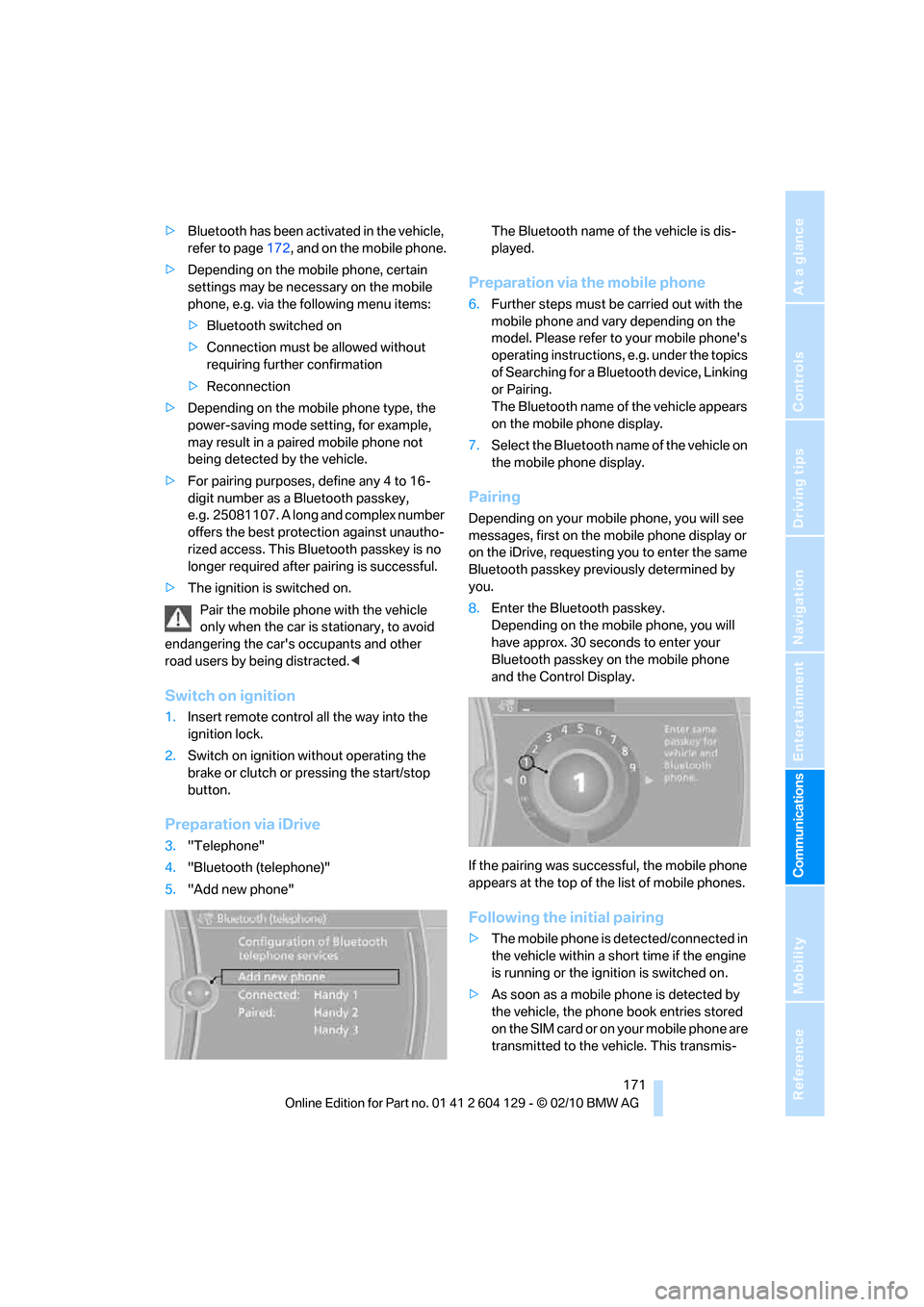
Preparation via iDrive
3."Telephone"
4."Bluetooth (telephone)"
5."Add new phone"The Bluetooth name of the vehicle is dis-
played.
Preparation via the mobile phone
6.Further steps must be carried out with the
mobile phone and vary depending on the
model. Please refer to your mobile phone's
operating instructions, e.g. under the topics
of Searching for a Bluetooth device, Linking
or Pairing.
The Bluetooth name of the vehicle appears
on the mobile phone display.
7.Select the Bluetooth name of the vehicle on
the mobile phone display.
Pairing
Depending on your mobile phone, you will see
messages, first on the mobile phone display or
on the iDrive, requesting you to enter the same
Bluetooth passkey previously determined by
you.
8.Enter the Bluetooth passkey.
Depending on the mobile phone, you will
have approx. 30 seconds to enter your
Bluetooth passkey on the mobile phone
and the Control Display.
If the pairing was successful, the mobile phone
appears at the top of the list of mobile phones.
Following the initial pairing
>The mobile phone is detected/connected in
the vehicle within a short time if the engine
is running or the ignition is switched on.
>As soon as a mobile phone is detected by
the vehicle, the phone book entries stored
on the SIM card or on your mobile phone are
transmitted to the vehicle. This transmis-
Page 212 of 256
Care
210
Sports automatic transmission with
double clutch
Before driving into an automatic car wash, per-
form the following steps to ensure that the vehi-
cle can roll:
1.Insert the remote control into the ignition
lock, even with Comfort Access.
2.Engage transmission position N.
3.Release the parking brake.
4.Switch off the engine.
5.Leave the remote control in the ignition lock
so that the vehicle can roll.
The transmission is switched into position P:
>automatically after approx. 30 minutes
>if you remove the infrared remote control
from the ignition lock
Steam jets/high-pressure washers
When using steam jets or high-pressure
washers, make sure to maintain sufficient
distance from the vehicle and do not exceed a
temperature of 1407/606.
Insufficient clearance or excessive pressure or
temperature can lead to component damage or
water penetration. Follow the operating instruc-
tions for the steam jet or high-pressure
washer.<
When using high-pressure washers, do
not spray against the sensors and cam-
eras, e.g. of the Park Distance Control or Rear
View Camera, for an extended period and main-
tain a distance of at least 1 ft/30 cm.<
Manual car wash
When washing the vehicle by hand, use large
quantities of water and car shampoo if neces-
sary. Clean the vehicle with a sponge or wash-
ing brush, applying light pressure only.
Before cleaning the windshield, deacti-
vate the rain sensor or switch off the igni-
tion to prevent unintentional activation of the
wipers.<
Observe local regulations pertaining to
washing vehicles by hand.<
Headlamps
Do not rub them dry and do not use abrasive or
corrosive cleaning agents.
Loosen dirt, e.g. insects, with shampoo or
insect remover and wash away with copious
quantities of water.
Thaw ice with a windshield deicer and do not
use an ice scraper.
Windows
Clean the inside and outside surfaces of the
windows and the mirrors with window cleaner.
Do not clean the mirrors with cleaners
containing quartz.<
Convertible top care
The appearance and life of the convertible top
depend on proper care and operation.
Follow these instructions:
>Do not fold the convertible top into the con-
vertible top box when the top is wet or fro-
zen, as this may cause water spots, mold
stains or chafed areas.
>If water spots occur on the inside headliner
despite precautions, remove them using a
microfiber cloth and interior cleaner.
>If the vehicle is parked in enclosed areas for
extended periods, ensure that there is suffi-
cient ventilation.
>Remove bird droppings immediately, as
their corrosive ingredients attack the con-
vertible top and damage the rubber seals.
To remove stains from the convertible
top, do not use stain removers, paint thin-
ners, solvents, benzine or similar substances.
These substances may damage the rubber
parts. Improper care and cleaning may cause
the convertible top and convertible top seams
to become leaky.<
To remove heavy soiling, use a special convert-
ible top cleaner.
Follow the manufacturer's instructions for use.
After washing the convertible top three to five
times, treat it with an impregnating agent.
Page 224 of 256
Giving and receiving assistance
222
Being towed
Make sure that the ignition is switched on,
refer to page55; otherwise, the low-beam
headlamps, tail lamps, turn signal indicators and
windshield wipers may be unavailable. Power
steering assistance is not available when the
engine is not running. Thus, braking and steer-
ing will require increased effort. Active steering
is not active and it will be necessary to turn the
steering wheel further.<
Manual transmission
Gearshift lever in neutral position.
Automatic transmission
Selector lever in position N.
Changing selector lever position, refer to
page58.
Do not exceed a towing speed of 45 mph/
70 km/h and a towing distance of
90 miles/150 km; otherwise, the automatic
transmission may be damaged.<
Sports automatic transmission with
double clutch
Make sure that the parking lock P is not
engaged; otherwise, the rear wheels are
immobilized.
When using the car wash function, refer to
page210, make sure that after approx.
30 minutes, the parking lock P is automatically
engaged and thus immobilizes the rear wheels.
In the event of an electrical malfunction or if the
vehicle must be towed for more than approx.
20 minutes, unlock the parking lock manually,
refer to page63.<
When towing, do not exceed a maximum
speed of 30 mph or 50 km/h and a maxi-
mum distance traveled of 30 miles/50 km; oth-
erwise, the transmission may be damaged.<
BMW recommends transporting the vehicle on
a tow truck with a flatbed or towing with the rear
axle raised.
Towing methods
Do not lift the vehicle by a tow fitting or
body and chassis parts; otherwise, dam-
age may result.<
With a tow bar
The towing vehicle must not be lighter
than the towed vehicle; otherwise, it may
be impossible to maintain control.<
The tow fittings used should be on the same
side on both vehicles. Should it prove impossi-
ble to avoid mounting the tow bar at an angle,
please observe the following:
>Clearance and maneuvering capability will
be sharply limited during cornering.
>The tow bar will generate lateral forces if it is
attached offset.
Attach the tow bar to the tow fittings only,
as attaching it to other parts of the vehicle
could result in damage.<
With a tow rope
When starting off in the towing vehicle, make
sure that the tow rope is taut.
To avoid jerking and the associated
stresses on vehicle components when
towing, always use nylon ropes or nylon straps.
Attach the tow rope to the tow fittings only, as
attaching it to other parts of the vehicle could
result in damage.<
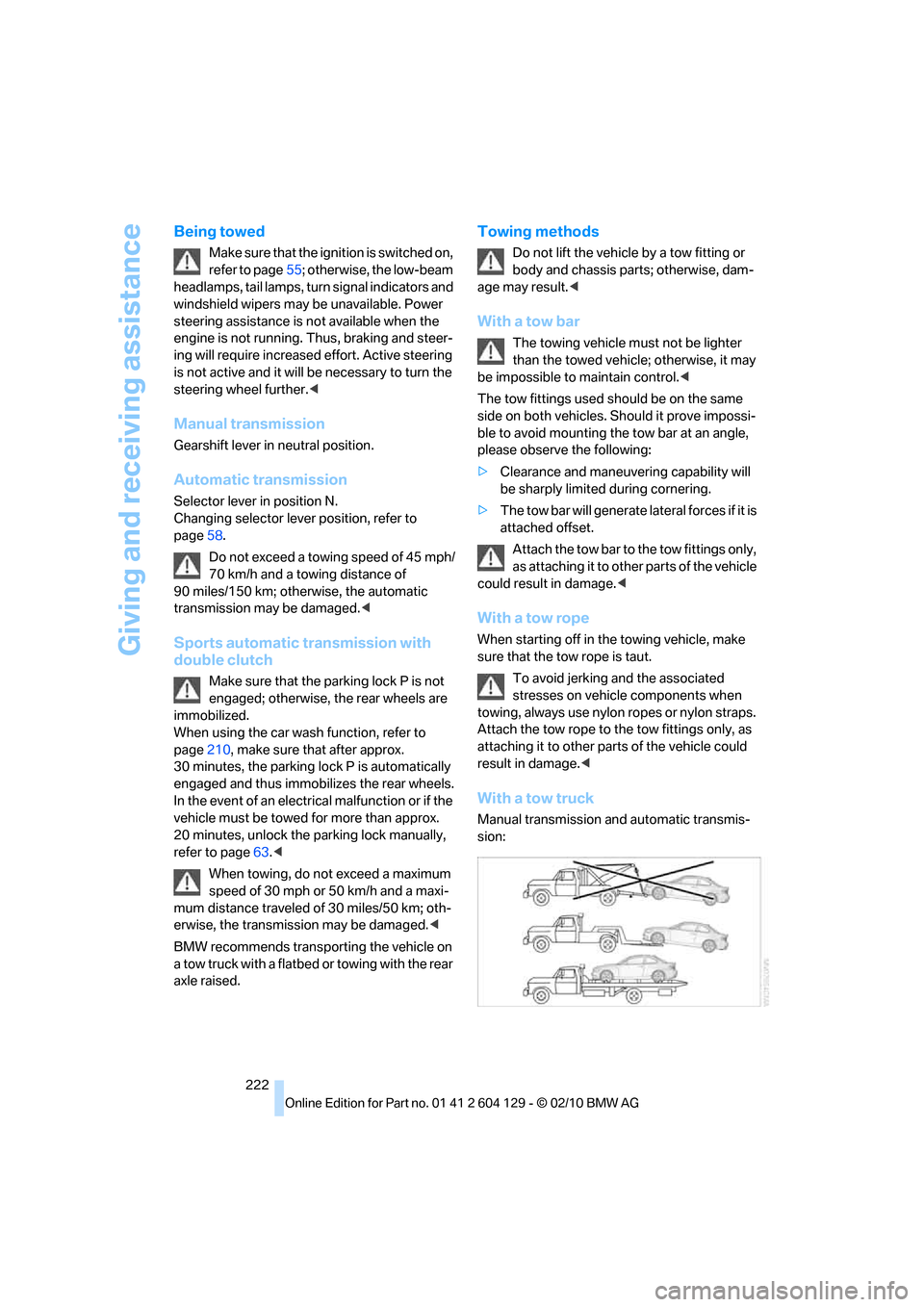
With a tow truck
Manual transmission and automatic transmis-
sion:
Page 225 of 256
Mobility
223Reference
At a glance
Controls
Driving tips
Communications
Navigation
Entertainment
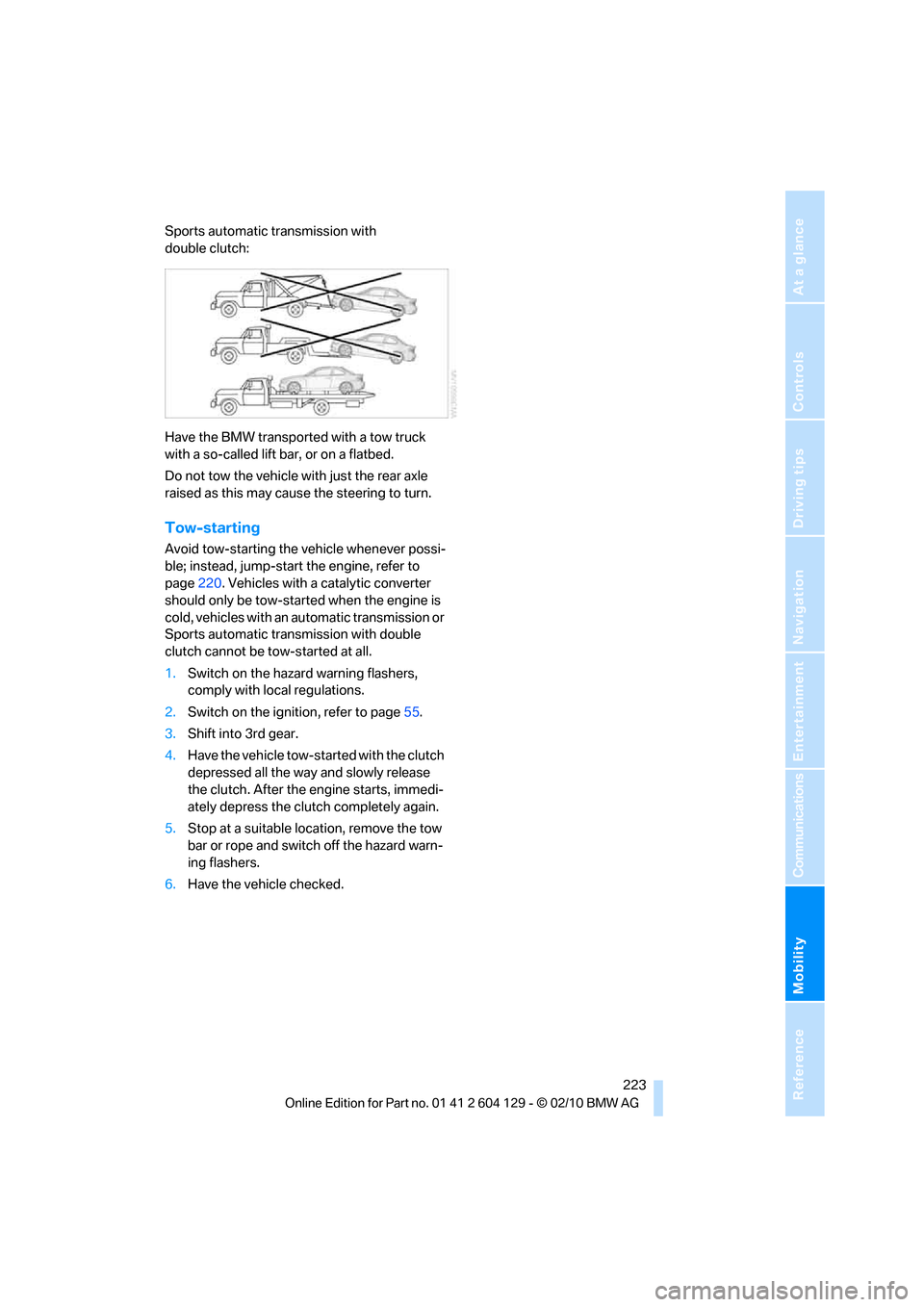
Sports automatic transmission with
double clutch:
Have the BMW transported with a tow truck
with a so-called lift bar, or on a flatbed.
Do not tow the vehicle with just the rear axle
raised as this may cause the steering to turn.
Tow-starting
Avoid tow-starting the vehicle whenever possi-
ble; instead, jump-start the engine, refer to
page220. Vehicles with a catalytic converter
should only be tow-started when the engine is
cold, vehicles with an automatic transmission or
Sports automatic transmission with double
clutch cannot be tow-started at all.
1.Switch on the hazard warning flashers,
comply with local regulations.
2.Switch on the ignition, refer to page55.
3.Shift into 3rd gear.
4.Have the vehicle tow-started with the clutch
depressed all the way and slowly release
the clutch. After the engine starts, immedi-
ately depress the clutch completely again.
5.Stop at a suitable location, remove the tow
bar or rope and switch off the hazard warn-
ing flashers.
6.Have the vehicle checked.
Page 231 of 256
Reference 229
At a glance
Controls
Driving tips
Communications
Navigation
Entertainment
Mobility
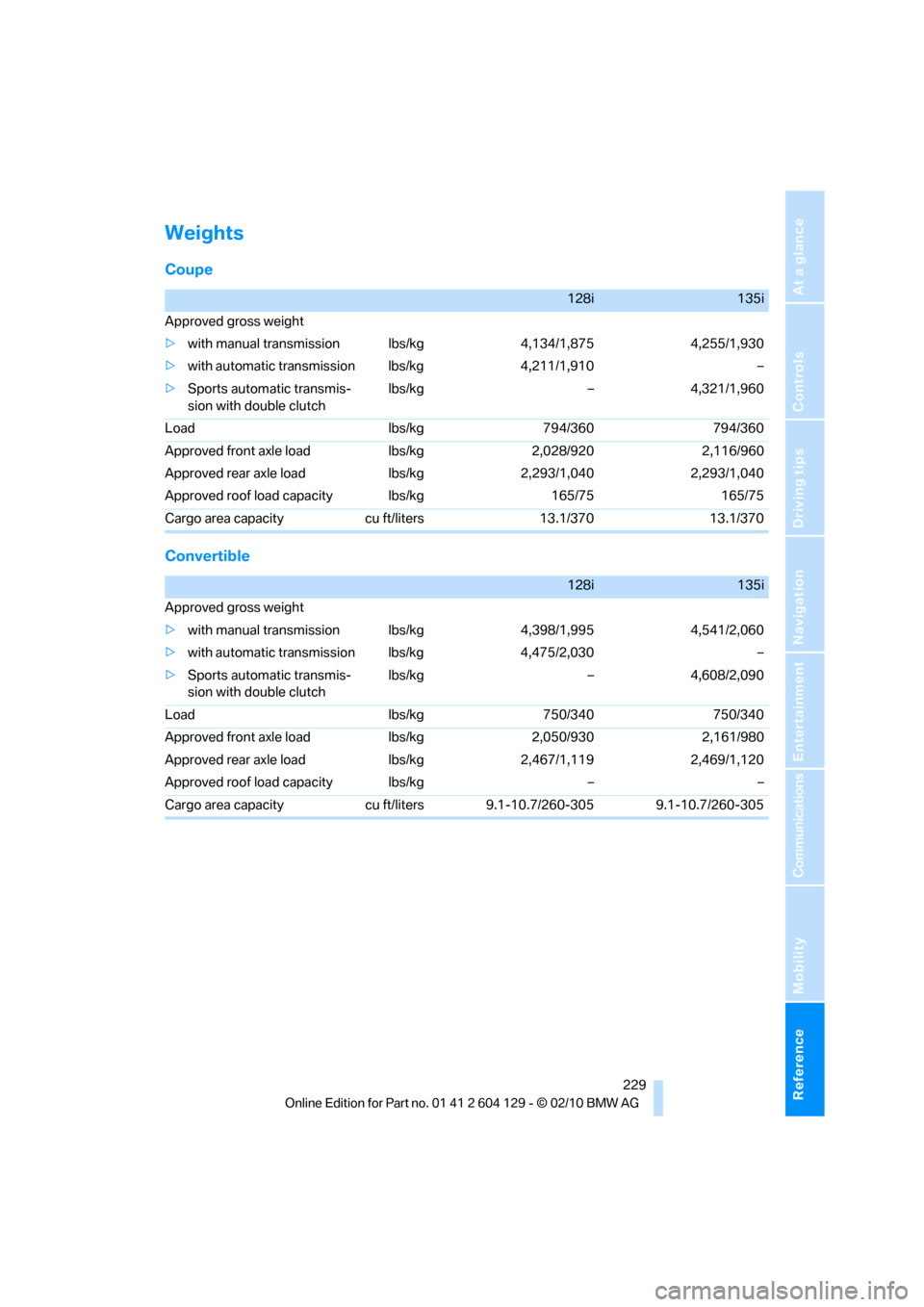
Weights
Coupe
Convertible
128i135i
Approved gross weight
>with manual transmission lbs/kg 4,134/1,875 4,255/1,930
>with automatic transmission lbs/kg 4,211/1,910 –
>Sports automatic transmis-
sion with double clutchlbs/kg – 4,321/1,960
Load lbs/kg 794/360 794/360
Approved front axle load lbs/kg 2,028/920 2,116/960
Approved rear axle load lbs/kg 2,293/1,040 2,293/1,040
Approved roof load capacity lbs/kg 165/75 165/75
Cargo area capacity cu ft/liters 13.1/370 13.1/370
128i135i
Approved gross weight
>with manual transmission lbs/kg 4,398/1,995 4,541/2,060
>with automatic transmission lbs/kg 4,475/2,030 –
>Sports automatic transmis-
sion with double clutchlbs/kg – 4,608/2,090
Load lbs/kg 750/340 750/340
Approved front axle load lbs/kg 2,050/930 2,161/980
Approved rear axle load lbs/kg 2,467/1,119 2,469/1,120
Approved roof load capacity lbs/kg – –
Cargo area capacity cu ft/liters 9.1-10.7/260-305 9.1-10.7/260-305
Page 241 of 256
Reference 239
At a glance
Controls
Driving tips
Communications
Navigation
Entertainment
Mobility
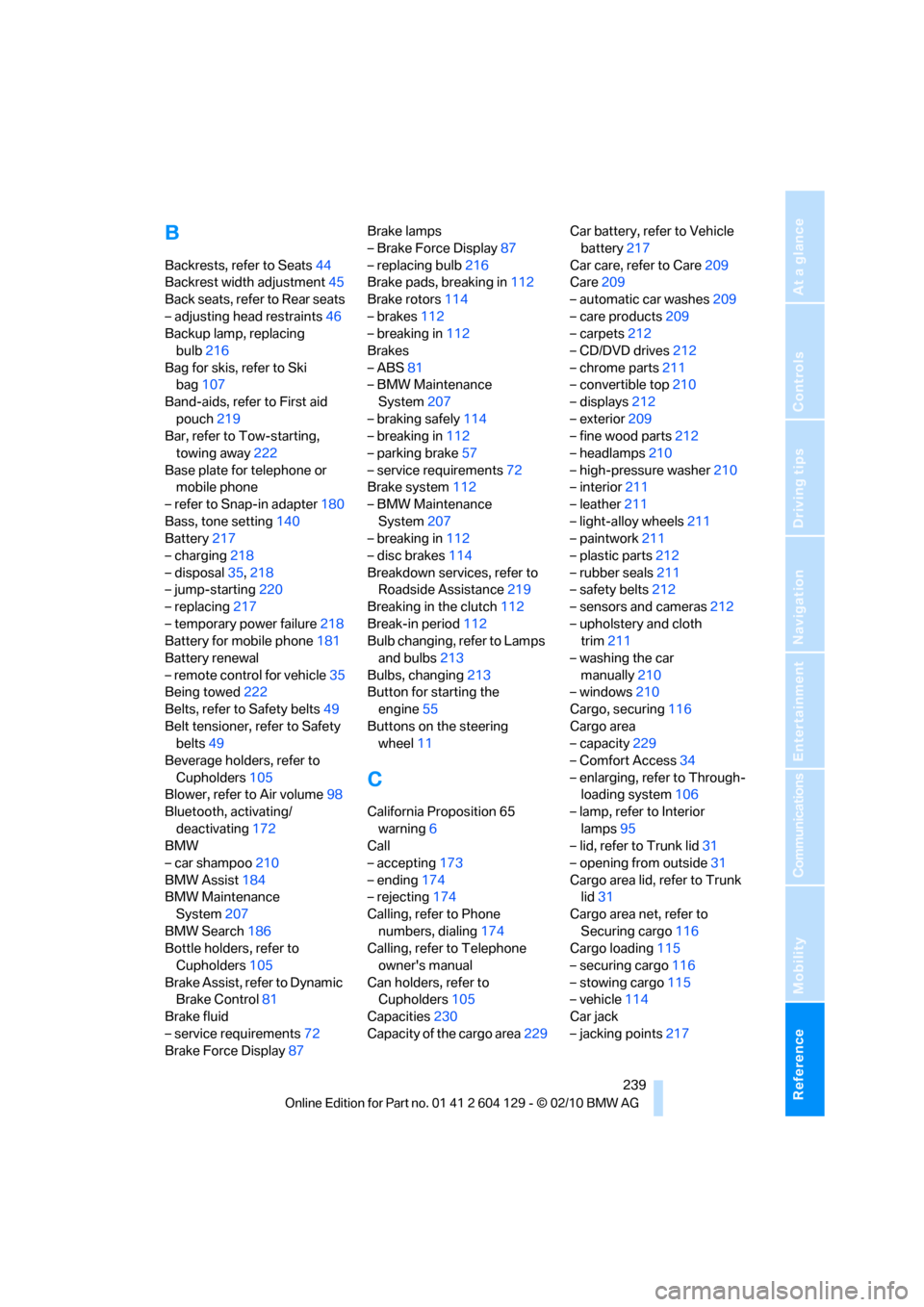
B
Backrests, refer to Seats44
Backrest width adjustment45
Back seats, refer to Rear seats
– adjusting head restraints46
Backup lamp, replacing
bulb216
Bag for skis, refer to Ski
bag107
Band-aids, refer to First aid
pouch219
Bar, refer to Tow-starting,
towing away222
Base plate for telephone or
mobile phone
– refer to Snap-in adapter180
Bass, tone setting140
Battery217
– charging218
– disposal35,218
– jump-starting220
– replacing217
– temporary power failure218
Battery for mobile phone181
Battery renewal
– remote control for vehicle35
Being towed222
Belts, refer to Safety belts49
Belt tensioner, refer to Safety
belts49
Beverage holders, refer to
Cupholders105
Blower, refer to Air volume98
Bluetooth, activating/
deactivating172
BMW
– car shampoo210
BMW Assist184
BMW Maintenance
System207
BMW Search186
Bottle holders, refer to
Cupholders105
Brake Assist, refer to Dynamic
Brake Control81
Brake fluid
– service requirements72
Brake Force Display87Brake lamps
– Brake Force Display87
– replacing bulb216
Brake pads, breaking in112
Brake rotors114
– brakes112
– breaking in112
Brakes
– ABS81
– BMW Maintenance
System207
– braking safely114
– breaking in112
– parking brake57
– service requirements72
Brake system112
– BMW Maintenance
System207
– breaking in112
– disc brakes114
Breakdown services, refer to
Roadside Assistance219
Breaking in the clutch112
Break-in period112
Bulb changing, refer to Lamps
and bulbs213
Bulbs, changing213
Button for starting the
engine55
Buttons on the steering
wheel11
C
California Proposition 65
warning6
Call
– accepting173
– ending174
– rejecting174
Calling, refer to Phone
numbers, dialing174
Calling, refer to Telephone
owner's manual
Can holders, refer to
Cupholders105
Capacities230
Capacity of the cargo area229Car battery, refer to Vehicle
battery217
Car care, refer to Care209
Care209
– automatic car washes209
– care products209
– carpets212
– CD/DVD drives212
– chrome parts211
– convertible top210
– displays212
– exterior209
– fine wood parts212
– headlamps210
– high-pressure washer210
– interior211
– leather211
– light-alloy wheels211
– paintwork211
– plastic parts212
– rubber seals211
– safety belts212
– sensors and cameras212
– upholstery and cloth
trim211
– washing the car
manually210
– windows210
Cargo, securing116
Cargo area
– capacity229
– Comfort Access34
– enlarging, refer to Through-
loading system106
– lamp, refer to Interior
lamps95
– lid, refer to Trunk lid31
– opening from outside31
Cargo area lid, refer to Trunk
lid31
Cargo area net, refer to
Securing cargo116
Cargo loading115
– securing cargo
116
– stowing cargo115
– vehicle114
Car jack
– jacking points217
Page 244 of 256
Everything from A to Z
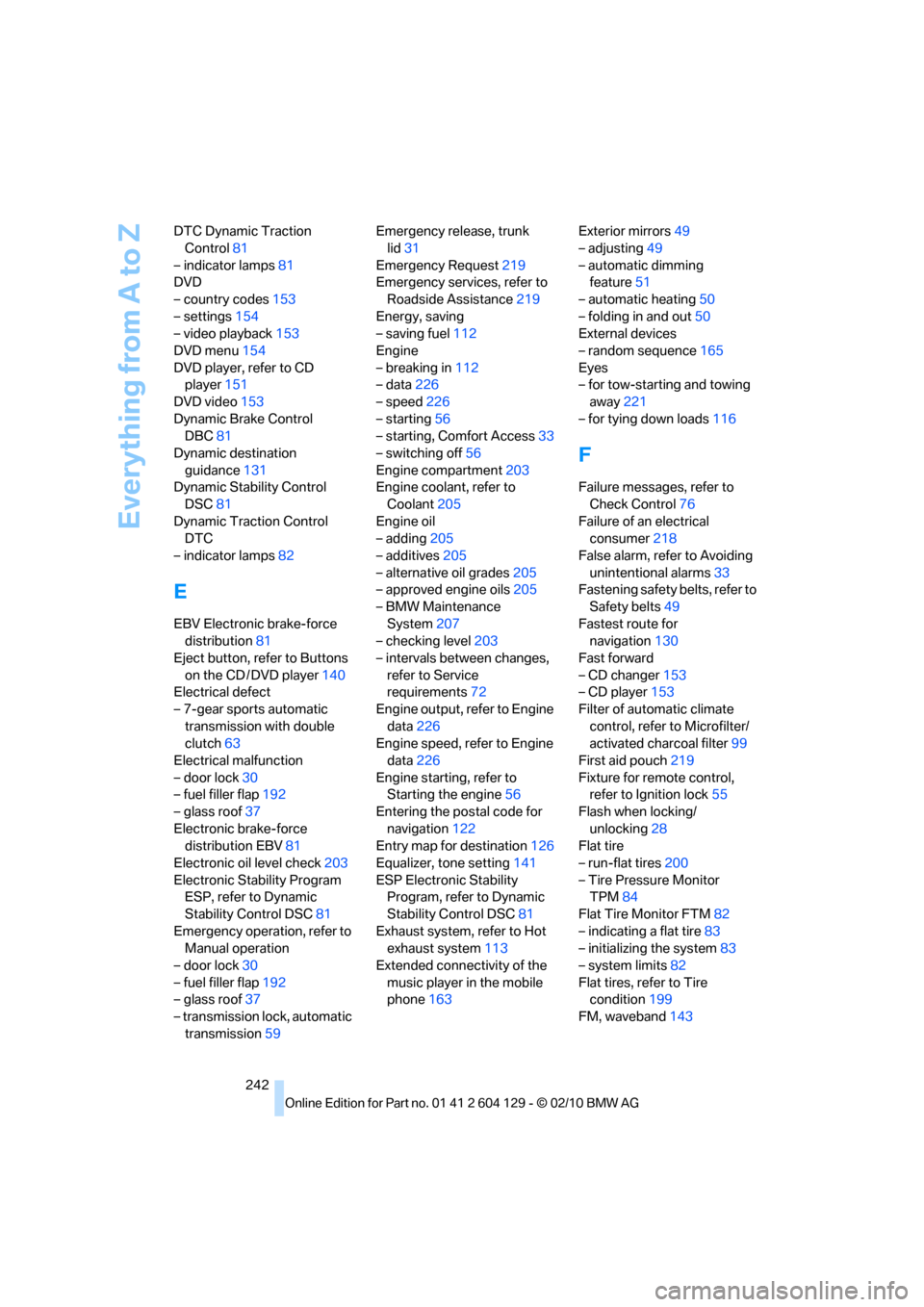
242 DTC Dynamic Traction
Control81
– indicator lamps81
DVD
– country codes153
– settings154
– video playback153
DVD menu154
DVD player, refer to CD
player151
DVD video153
Dynamic Brake Control
DBC81
Dynamic destination
guidance131
Dynamic Stability Control
DSC81
Dynamic Traction Control
DTC
– indicator lamps82
E
EBV Electronic brake-force
distribution81
Eject button, refer to Buttons
on the CD / DVD player140
Electrical defect
– 7-gear sports automatic
transmission with double
clutch63
Electrical malfunction
– door lock30
– fuel filler flap192
– glass roof37
Electronic brake-force
distribution EBV81
Electronic oil level check203
Electronic Stability Program
ESP, refer to Dynamic
Stability Control DSC81
Emergency operation, refer to
Manual operation
– door lock30
– fuel filler flap192
– glass roof37
– transmission lock, automatic
transmission59Emergency release, trunk
lid31
Emergency Request219
Emergency services, refer to
Roadside Assistance219
Energy, saving
– saving fuel112
Engine
– breaking in112
– data226
– speed226
– starting56
– starting, Comfort Access33
– switching off56
Engine compartment203
Engine coolant, refer to
Coolant205
Engine oil
– adding205
– additives205
– alternative oil grades205
– approved engine oils205
– BMW Maintenance
System207
– checking level203
– intervals between changes,
refer to Service
requirements72
Engine output, refer to Engine
data226
Engine speed, refer to Engine
data226
Engine starting, refer to
Starting the engine56
Entering the postal code for
navigation122
Entry map for destination126
Equalizer, tone setting141
ESP Electronic Stability
Program, refer to Dynamic
Stability Control DSC81
Exhaust system, refer to Hot
exhaust system113
Extended connectivity of the
music player in the mobile
phone163Exterior mirrors49
– adjusting49
– automatic dimming
feature51
– automatic heating50
– folding in and out50
External devices
– random sequence165
Eyes
– for tow-starting and towing
away221
– for tying down loads116
F
Failure messages, refer to
Check Control76
Failure of an electrical
consumer218
False alarm, refer to Avoiding
unintentional alarms33
Fastening safety belts, refer to
Safety belts49
Fastest route for
navigation130
Fast forward
– CD changer153
– CD player153
Filter of automatic climate
control, refer to Microfilter/
activated charcoal filter99
First aid pouch219
Fixture for remote control,
refer to Ignition lock55
Flash when locking/
unlocking28
Flat tire
– run-flat tires200
– Tire Pressure Monitor
TPM84
Flat Tire Monitor FTM82
– indicating a flat tire83
– initializing the system83
– system limits82
Flat tires, refer to Tire
condition199
FM, waveband143
Page 250 of 256
Everything from A to Z
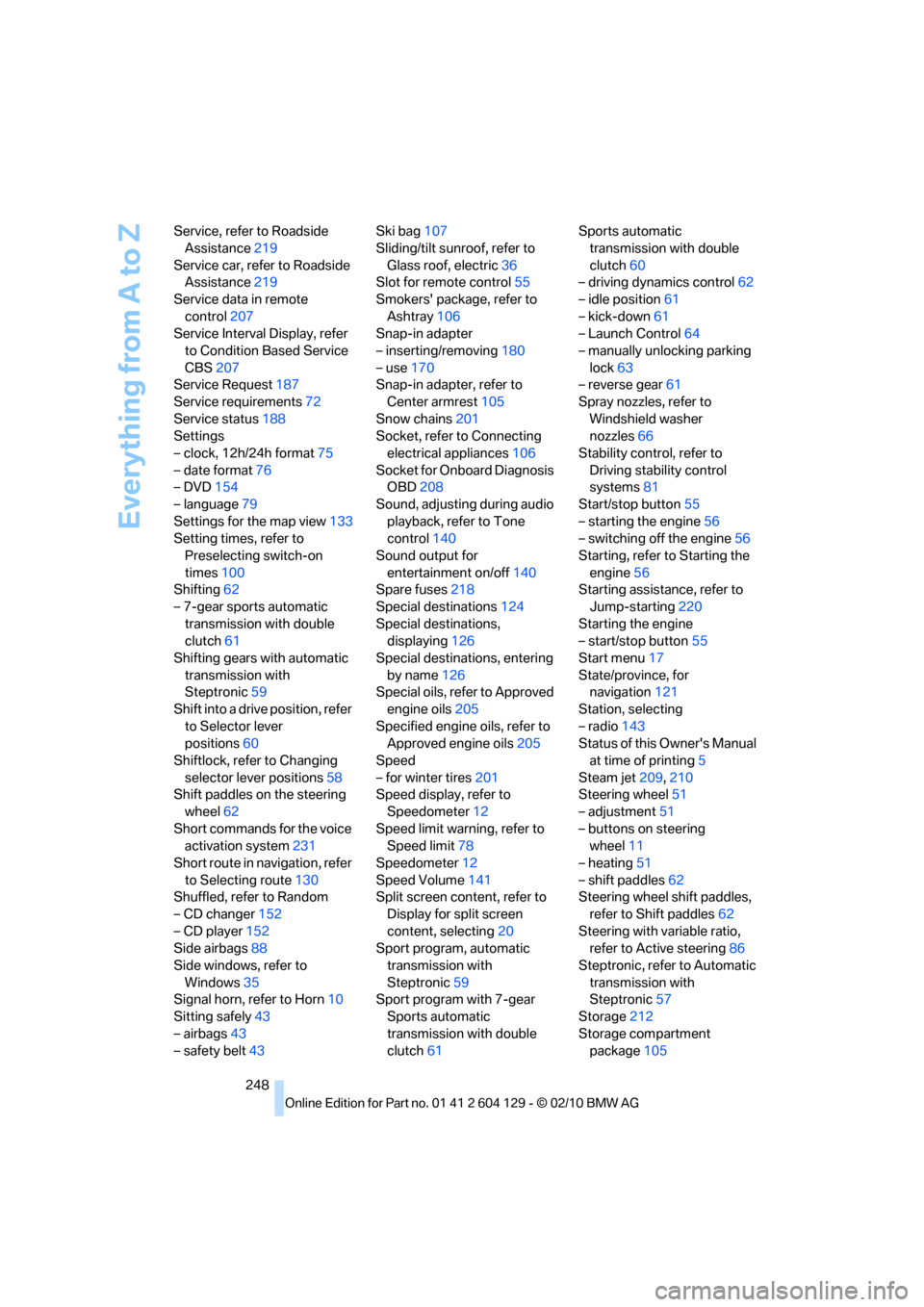
248 Service, refer to Roadside
Assistance219
Service car, refer to Roadside
Assistance219
Service data in remote
control207
Service Interval Display, refer
to Condition Based Service
CBS207
Service Request187
Service requirements72
Service status188
Settings
– clock, 12h/24h format75
– date format76
– DVD154
– language79
Settings for the map view133
Setting times, refer to
Preselecting switch-on
times100
Shifting62
– 7-gear sports automatic
transmission with double
clutch61
Shifting gears with automatic
transmission with
Steptronic59
Shift into a drive position, refer
to Selector lever
positions60
Shiftlock, refer to Changing
selector lever positions58
Shift paddles on the steering
wheel62
Short commands for the voice
activation system231
Short route in navigation, refer
to Selecting route130
Shuffled, refer to Random
– CD changer152
– CD player152
Side airbags88
Side windows, refer to
Windows35
Signal horn, refer to Horn10
Sitting safely43
– airbags43
– safety belt43Ski bag107
Sliding/tilt sunroof, refer to
Glass roof, electric36
Slot for remote control55
Smokers' package, refer to
Ashtray106
Snap-in adapter
– inserting/removing180
– use170
Snap-in adapter, refer to
Center armrest105
Snow chains201
Socket, refer to Connecting
electrical appliances106
Socket for Onboard Diagnosis
OBD208
Sound, adjusting during audio
playback, refer to Tone
control140
Sound output for
entertainment on/off140
Spare fuses218
Special destinations124
Special destinations,
displaying126
Special destinations, entering
by name126
Special oils, refer to Approved
engine oils205
Specified engine oils, refer to
Approved engine oils205
Speed
– for winter tires201
Speed display, refer to
Speedometer12
Speed limit warning, refer to
Speed limit78
Speedometer12
Speed Volume141
Split screen content, refer to
Display for split screen
content, selecting20
Sport program, automatic
transmission with
Steptronic59
Sport program with 7-gear
Sports automatic
transmission with double
clutch61Sports automatic
transmission with double
clutch60
– driving dynamics control62
– idle position61
– kick-down61
– Launch Control64
– manually unlocking parking
lock63
– reverse gear61
Spray nozzles, refer to
Windshield washer
nozzles66
Stability control, refer to
Driving stability control
systems81
Start/stop button55
– starting the engine56
– switching off the engine56
Starting, refer to Starting the
engine56
Starting assistance, refer to
Jump-starting220
Starting the engine
– start/stop button55
Start menu17
State/province, for
navigation121
Station, selecting
– radio143
Status of this Owner's Manual
at time of printing5
Steam jet209,210
Steering wheel
51
– adjustment51
– buttons on steering
wheel11
– heating51
– shift paddles62
Steering wheel shift paddles,
refer to Shift paddles62
Steering with variable ratio,
refer to Active steering86
Steptronic, refer to Automatic
transmission with
Steptronic57
Storage212
Storage compartment
package105
Page 251 of 256
Reference 249
At a glance
Controls
Driving tips
Communications
Navigation
Entertainment
Mobility
Storage compartments105
Storing
– seat position, refer to Seat
and mirror memory48
– telephone numbers, refer to
separate Owner's Manual
Storing a destination in the
address book123
Storing music158
Storing tires201
Stowage, refer to Storage
compartments105
Street, entering,
navigation122
Summer tires, refer to Wheels
and tires194
Surround141
SVCD153
SW, waveband143
Switches, refer to
Dashboard10
Switching off
– engine56
Switching off the engine
– start/stop button55
Switching on
– audio140
– CD changer140
– CD player140
– radio140
Switching the cooling function
on and off98
Switch-on times of parked car
ventilation, preselecting100
Symbols4
– status information19
T
Tachometer68
Tailgate, refer to Trunk lid31
Tail lamp, refer to Tail
lamps216
– replacing bulb216Tail lamps216
– replacing bulb216
Tank contents, refer to
Capacities230
Technical changes5
Technical data226
Telephone170
– voice commands177
Telephone, installation
location, refer to Center
armrest105
Telephone, refer to separate
Owner's Manual
TeleService185
TeleService Diagnosis186
TeleService Help186
Temperature display
– outside temperature68
– outside temperature
warning68
– setting the units72
Tempomat, refer to Cruise
control66
Thigh support44
Third brake lamp, refer to
Center brake lamp217
Three-point safety belt49
Through-loading system106
Tilt alarm sensor33
Tilt function, passenger-side
mirror50
Timer, refer to Preselecting
switch-on times100
Tire inflation pressure194
– loss83,84
Tire pressure monitoring,
refer to Flat Tire Monitor82
Tire Pressure Monitor
TPM84
– resetting the system85
– system limitations84
– warning lamp85
Tire puncture, refer to Flat Tire
Monitor83
Tire Quality Grading198Tires
– age198
– air loss85
– breaking in112
– changing, refer to Changing
wheels217
– condition199
– damage199
– inflation pressure
194
– labels198
– minimum tread depth199
– new tires200
– pressure monitoring, refer to
Flat Tire Monitor82
– pressure monitoring, refer to
Tire Pressure Monitor
TPM84
– puncture83
– retreaded200
– size198
– wear indicators, refer to
Minimum tread depth199
– winter tires201
TMC station, refer to Traffic
bulletins133
Tone
– control140
– middle setting142
Tools, refer to Onboard
vehicle tool kit213
Top 50 of music
collection160
Torque, refer to Engine
data226
Tow bar222
Tow fitting221
Tow fittings for tow-starting
and towing away221
Towing221
– car with automatic
transmission221
– methods222
– with 7-gear Sports
automatic transmission with
double clutch222
Towing and tow-starting221
Page 252 of 256
Everything from A to Z
250 Town/city, for navigation121
Tow rope222
Tow-starting221
TPM, refer to Tire Pressure
Monitor84
Track
– selecting on CD151
Traction control, refer to
Dynamic Stability Control
DSC81
Traffic bulletins
– categories135
Traffic bulletins, filtering135
Traffic bulletins for
navigation133
– display in map view135
– during destination
guidance135
Traffic jam
– displaying traffic
bulletins133
Transmission
– 7-gear Sports automatic
transmission with double
clutch60
– automatic transmission with
Steptronic57
– idle position61
– Launch Control64
– manually unlocking parking
lock63
– manual transmission57
– reverse gear61
Transporting children
safely52
Transport securing devices,
refer to Securing cargo116
Tread depth, refer to Minimum
tire tread199
Trip, deleting129
Trip, storing128
Trip-distance counter, refer to
Trip odometer68
Triple turn signal activation64
Trip odometer68Trips, changing129
Trunk, refer to Cargo area
Trunk lid31
– Comfort Access34
– emergency release31
– opening from outside31
– unlocking with remote
control28
Turning circle, refer to
Dimensions227
Turn signals64
– indicator lamp12
– replacing bulbs215
– triple turn signal64
Tying down loads, refer to
Cargo loading116
U
Underbody protection, refer to
Caring for your vehicle209
Uniform Tire Quality Grading/
UTQR198
Units
– average fuel
consumption72
Units of measure
– temperature72
Universal garage door opener,
refer to Integrated universal
remote control101
Unlatching, refer to
Unlocking27
Unlocking
– from inside30
– from outside27
– trunk lid34
– without remote control, refer
to Comfort Access33
Unlocking without a key, refer
to Comfort Access33
Updating the navigation
data120
USB audio interface163
V
VCD153
Vehicle
– battery217
– breaking in112
– cargo loading114
– decommissioning, refer to
Vehicle storage212
– dimensions227
– Identification Number, refer
to Engine compartment203
– parking56
– weight229
Vehicle jack217
Vehicle storage212
Ventilation99
– draft-free99
Ventilation when parked, refer
to Parked car ventilation99
Vents, refer to Ventilation99
Video menu153
Video playback153
Voice, refer to Destination
guidance through voice
instructions132
Voice-activated phone
book179
Voice commands
– overview22
– short commands231
– telephone177
Voice instructions from
navigation system132
– repeating132
– switching on/off132
– volume132
Volume140
– audio sources140
– fuel tank, refer to
Capacities230
– mobile phone173
– voice instructions132
Volume balance, tone
setting141