change time BMW 135I COUPE 2011 E82 Owner's Guide
[x] Cancel search | Manufacturer: BMW, Model Year: 2011, Model line: 135I COUPE, Model: BMW 135I COUPE 2011 E82Pages: 256, PDF Size: 8.41 MB
Page 155 of 256
Navigation
Entertainment
Driving tips
153Reference
At a glance
Controls
Communications
Mobility
5."Random"
CDs/DVDs with compressed audio files: the
directories and the tracks contained therein are
played back in random sequence.
Random mode is switched off when the audio
source is changed or the ignition is switched off.
Fast forward/reverse
Press and hold the button for the corre-
sponding direction.
Automatic repeat*
Selected tracks, directories or CDs/DVDs are
repeated automatically.
Video playback*
Country codes
Only DVDs with the code of the home region
can be played back; also refer to the information
on your DVD.
Starting playback
For your own safety, the video image is only
displayed up to approx. 2 mph/3 km/h, and in
some market-specific versions, only with the
parking brake engaged or the selector lever in
position P.
DVD video
1."CD/Multimedia"
2."CD/DVD"
3.Select a DVD with video content.
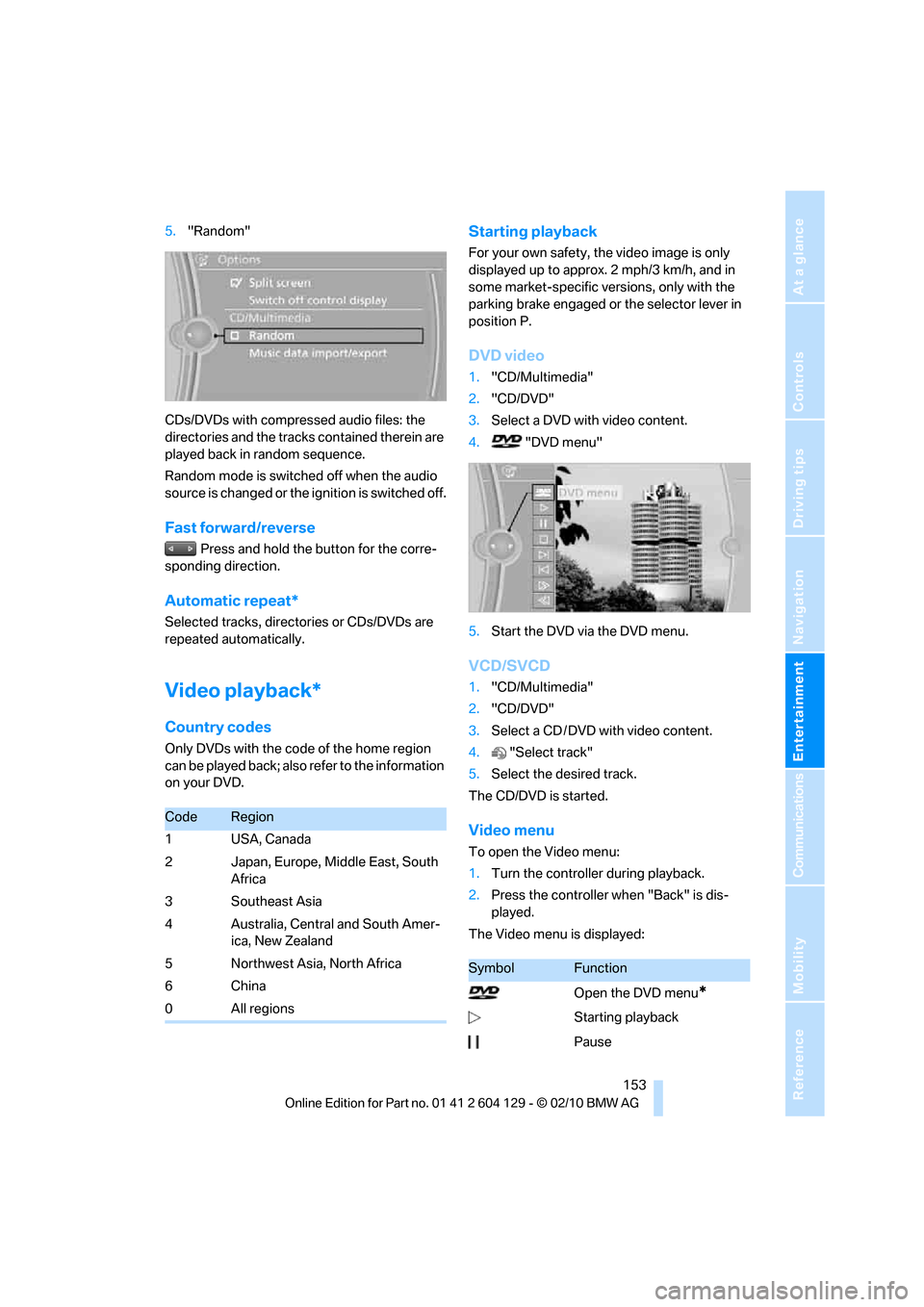
4."DVD menu"
5.Start the DVD via the DVD menu.
VCD/SVCD
1."CD/Multimedia"
2."CD/DVD"
3.Select a CD / DVD with video content.
4."Select track"
5.Select the desired track.
The CD/DVD is started.
Video menu
To open the Video menu:
1.Turn the controller during playback.
2.Press the controller when "Back" is dis-
played.
The Video menu is displayed:
CodeRegion
1USA, Canada
2 Japan, Europe, Middle East, South
Africa
3Southeast Asia
4 Australia, Central and South Amer-
ica, New Zealand
5Northwest Asia, North Africa
6China
0All regions
SymbolFunction
Open the DVD menu
*
Starting playback
Pause
Page 156 of 256
CD/DVD player and CD changer
154 In fast forward/reverse: the speed increases
every time the controller is pressed. To stop,
start playback.
DVD menu
1.If necessary, turn the controller to open the
Video menu.
2. "DVD menu"
The DVD menu is displayed. The display
depends on the contents of the DVD.
>To select menu items: move and press the
controller.
>To change to the Video menu: turn the con-
troller and select "Back".
DVD/VCD settings
For some DVDs, settings can only be made via
the DVD menu; refer also to the information on
your DVD.
Language*
1.Turn the controller during playback.
2.Open "Options".
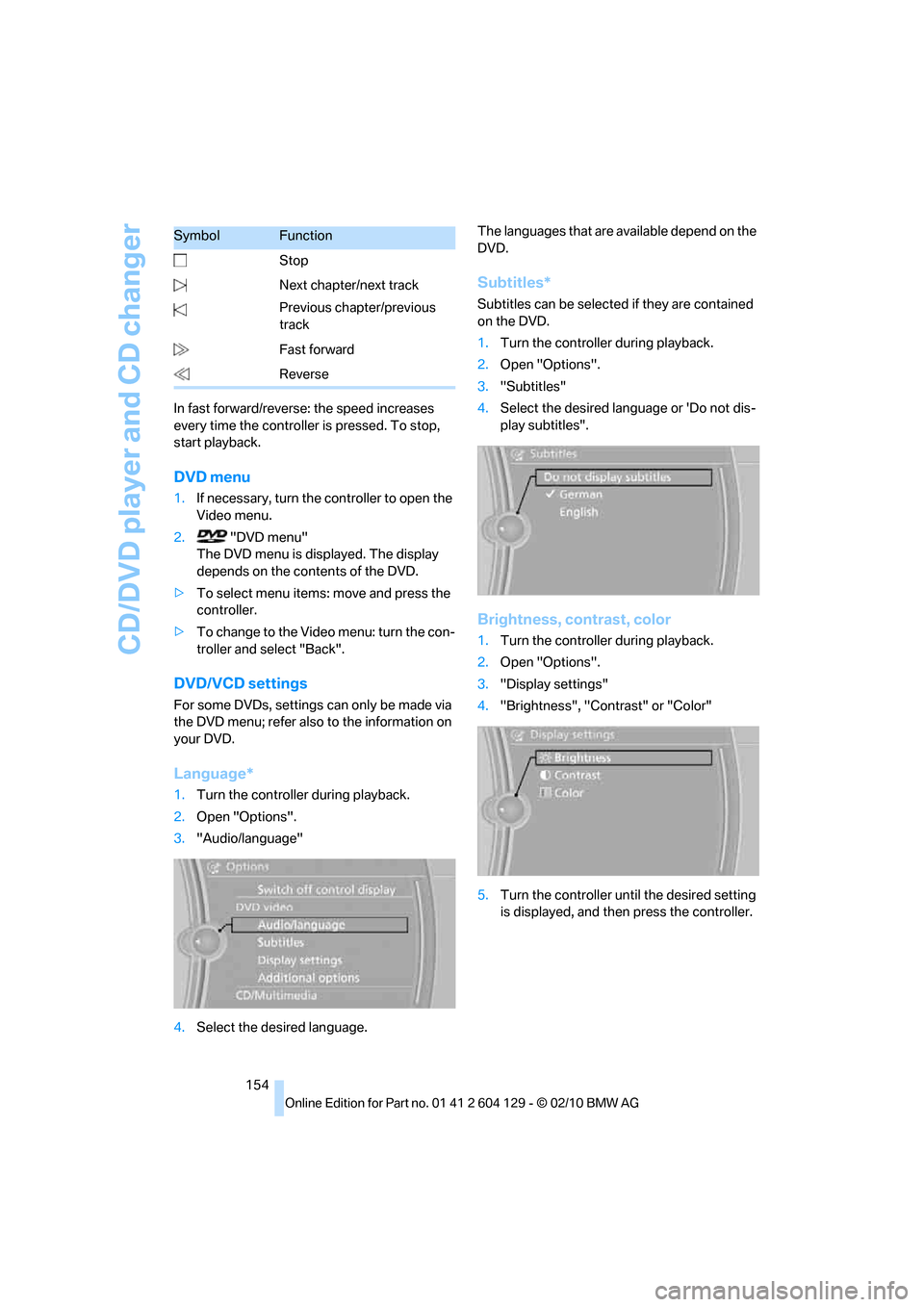
3."Audio/language"
4.Select the desired language.The languages that are available depend on the
DVD.
Subtitles*
Subtitles can be selected if they are contained
on the DVD.
1.Turn the controller during playback.
2.Open "Options".
3."Subtitles"
4.Select the desired language or 'Do not dis-
play subtitles".
Brightness, contrast, color
1.Turn the controller during playback.
2.Open "Options".
3."Display settings"
4."Brightness", "Contrast" or "Color"
5.Turn the controller until the desired setting
is displayed, and then press the controller. Stop
Next chapter/next track
Previous chapter/previous
track
Fast forward
Reverse
SymbolFunction
Page 163 of 256
Navigation
Entertainment
Driving tips
161Reference
At a glance
Controls
Communications
Mobility
Depending on the album, the tracks or the
subdirectories of the album are displayed.
The first track is played automatically, if
possible.
4.To select tracks, change directories if
needed. To go up one level in the directory,
move the controller to the left.
Random play sequence
All tracks of the selection are played back in
random order.
1."CD/Multimedia"
2."Music collection"
3.Open "Options".
4."Random"
Managing music
Albums
Renaming an album
The name of the album, if available, is automat-
ically entered when the album is stored. If the
name is unknown, it can be changed later.
An album cannot be renamed while a track from
that album is being played.
1."CD/Multimedia"
2."Music collection"
3.Highlight the desired album.
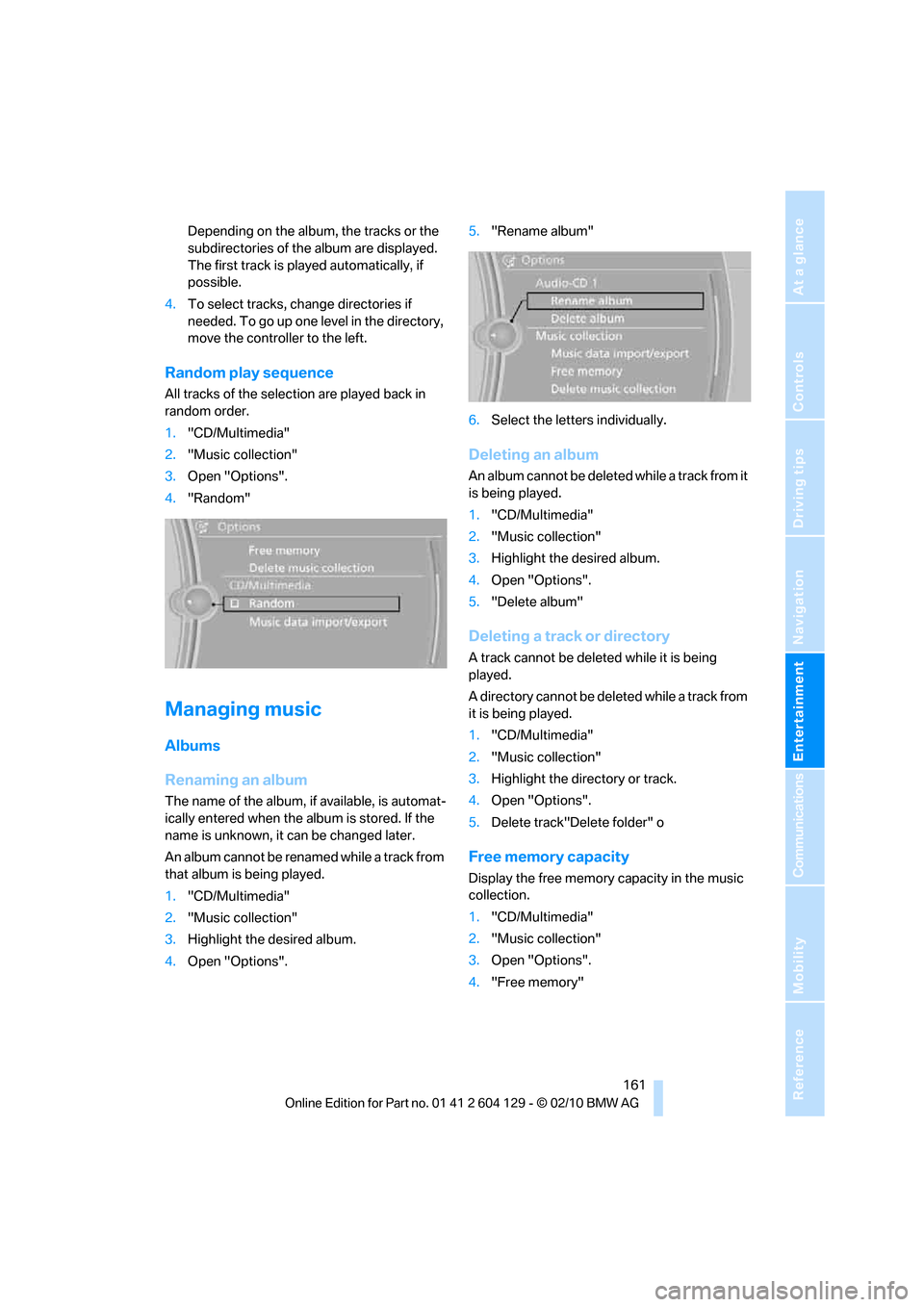
4.Open "Options".5."Rename album"
6.Select the letters individually.
Deleting an album
An album cannot be deleted while a track from it
is being played.
1."CD/Multimedia"
2."Music collection"
3.Highlight the desired album.
4.Open "Options".
5."Delete album"
Deleting a track or directory
A track cannot be deleted while it is being
played.
A directory cannot be deleted while a track from
it is being played.
1."CD/Multimedia"
2."Music collection"
3.Highlight the directory or track.
4.Open "Options".
5.Delete track"Delete folder" o
Free memory capacity
Display the free memory capacity in the music
collection.
1."CD/Multimedia"
2."Music collection"
3.Open "Options".
4."Free memory"
Page 215 of 256
Mobility
213Reference
At a glance
Controls
Driving tips
Communications
Navigation
Entertainment
Replacing components
Onboard vehicle tool kit
The onboard vehicle tool kit is stored below the
floor mat in the cargo area.
Wiper blades
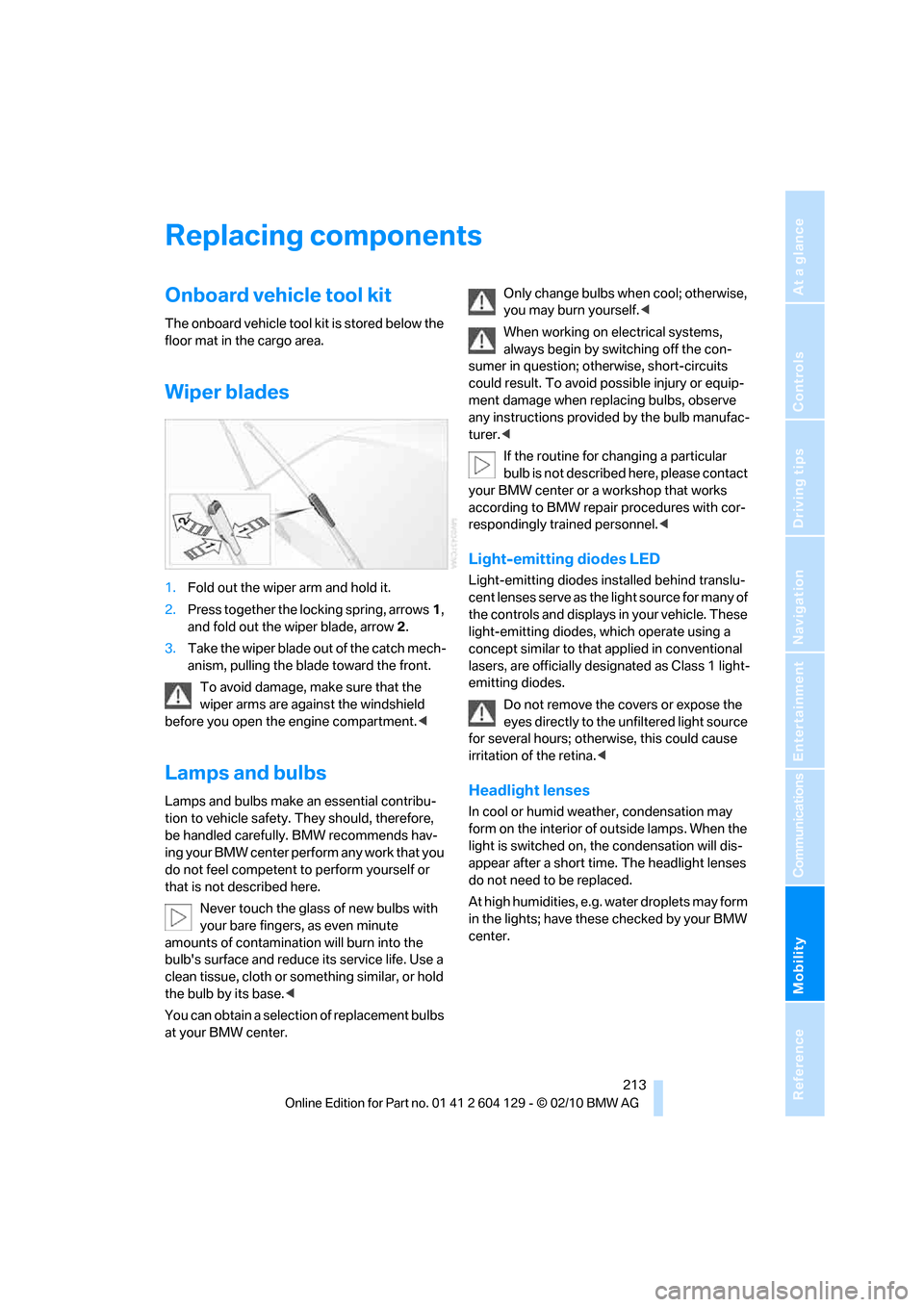
1.Fold out the wiper arm and hold it.
2.Press together the locking spring, arrows1,
and fold out the wiper blade, arrow2.
3.Take the wiper blade out of the catch mech-
anism, pulling the blade toward the front.
To avoid damage, make sure that the
wiper arms are against the windshield
before you open the engine compartment.<
Lamps and bulbs
Lamps and bulbs make an essential contribu-
tion to vehicle safety. They should, therefore,
be handled carefully. BMW recommends hav-
ing your BMW center perform any work that you
do not feel competent to perform yourself or
that is not described here.
Never touch the glass of new bulbs with
your bare fingers, as even minute
amounts of contamination will burn into the
bulb's surface and reduce its service life. Use a
clean tissue, cloth or something similar, or hold
the bulb by its base.<
You can obtain a selection of replacement bulbs
at your BMW center.Only change bulbs when cool; otherwise,
you may burn yourself.<
When working on electrical systems,
always begin by switching off the con-
sumer in question; otherwise, short-circuits
could result. To avoid possible injury or equip-
ment damage when replacing bulbs, observe
any instructions provided by the bulb manufac-
turer.<
If the routine for changing a particular
bulb is not described here, please contact
your BMW center or a workshop that works
according to BMW repair procedures with cor-
respondingly trained personnel.<
Light-emitting diodes LED
Light-emitting diodes installed behind translu-
cent lenses serve as the light source for many of
the controls and displays in your vehicle. These
light-emitting diodes, which operate using a
concept similar to that applied in conventional
lasers, are officially designated as Class 1 light-
emitting diodes.
Do not remove the covers or expose the
eyes directly to the unfiltered light source
for several hours; otherwise, this could cause
irritation of the retina.<
Headlight lenses
In cool or humid weather, condensation may
form on the interior of outside lamps. When the
light is switched on, the condensation will dis-
appear after a short time. The headlight lenses
do not need to be replaced.
At high humidities, e.g. water droplets may form
in the lights; have these checked by your BMW
center.
Page 217 of 256
Mobility
215Reference
At a glance
Controls
Driving tips
Communications
Navigation
Entertainment
Xenon headlamps
Parking lamps, roadside parking
lamps, daytime running lights
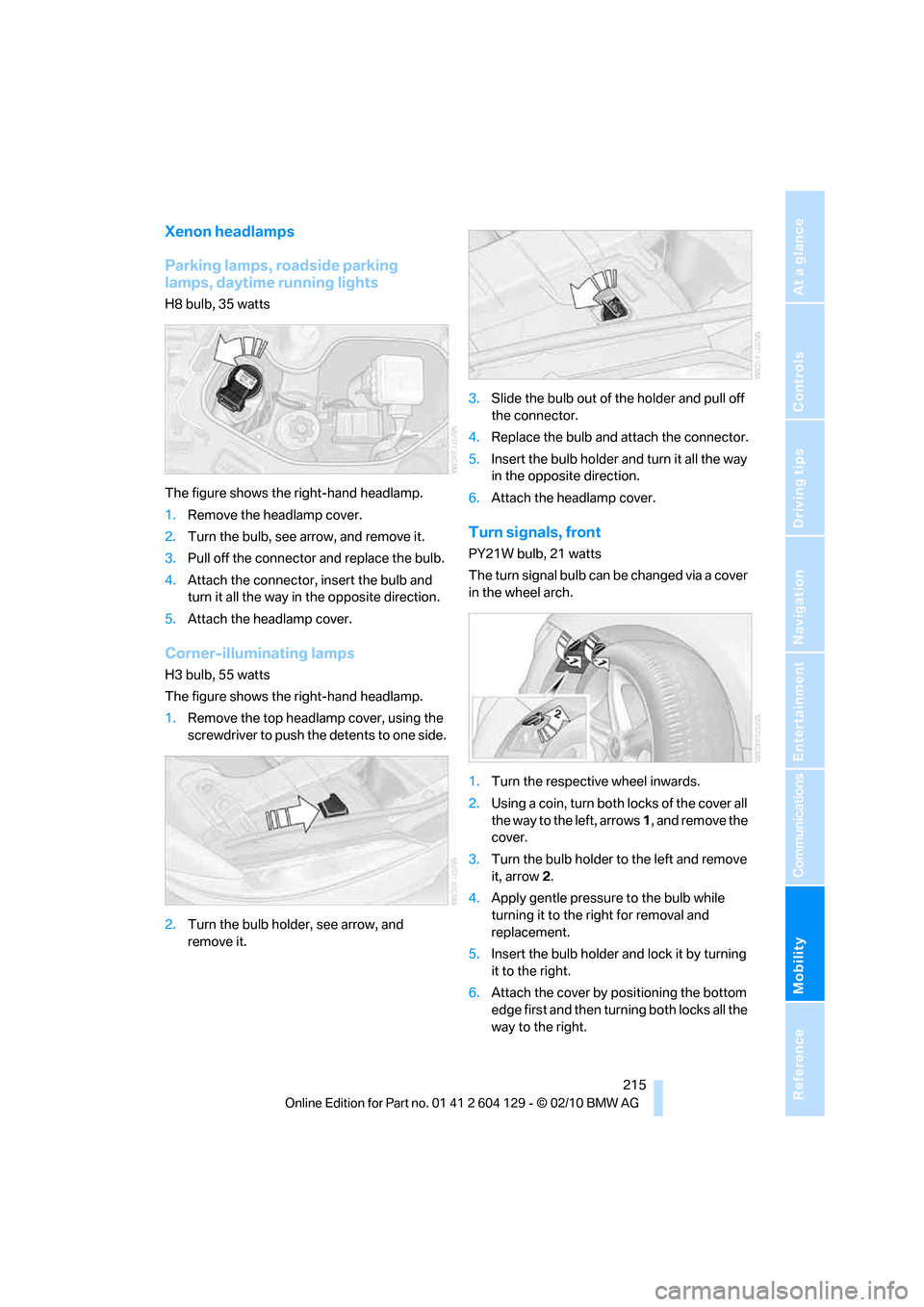
H8 bulb, 35 watts
The figure shows the right-hand headlamp.
1.Remove the headlamp cover.
2.Turn the bulb, see arrow, and remove it.
3.Pull off the connector and replace the bulb.
4.Attach the connector, insert the bulb and
turn it all the way in the opposite direction.
5.Attach the headlamp cover.
Corner-illuminating lamps
H3 bulb, 55 watts
The figure shows the right-hand headlamp.
1.Remove the top headlamp cover, using the
screwdriver to push the detents to one side.
2.Turn the bulb holder, see arrow, and
remove it.3.Slide the bulb out of the holder and pull off
the connector.
4.Replace the bulb and attach the connector.
5.Insert the bulb holder and turn it all the way
in the opposite direction.
6.Attach the headlamp cover.
Turn signals, front
PY21W bulb, 21 watts
The turn signal bulb can be changed via a cover
in the wheel arch.
1.Turn the respective wheel inwards.
2.Using a coin, turn both locks of the cover all
the way to the left, arrows 1, and remove the
cover.
3.Turn the bulb holder to the left and remove
it, arrow2.
4.Apply gentle pressure to the bulb while
turning it to the right for removal and
replacement.
5.Insert the bulb holder and lock it by turning
it to the right.
6.Attach the cover by positioning the bottom
edge first and then turning both locks all the
way to the right.
Page 242 of 256
Everything from A to Z
240 Car key, refer to Integrated
key/remote control26
Car phone
– installation location, refer to
Center armrest105
– refer to separate Owner's
Manual
Car phone, refer to
Telephone170
Car radio, refer to Radio143
Car shampoo210
Car wash209
Catalytic converter, refer to
Hot exhaust system113
CD, audio playback151
CD changer151,155
– controls140
– fast forward/reverse153
– filling or emptying the
magazine156
– random play sequence152
– selecting a track151
– switching on/off140
– tone control140
– volume140
CD player151
– controls140
– fast forward/reverse153
– random play sequence152
– selecting a track151
– switching on/off140
– tone control140
– volume140
Center armrest105
Center brake lamp, replacing
bulb217
Center console, refer to
Around the center
console14
Central key, refer to Integrated
key/remote control26
Central locking
– from inside30
– from outside27
Central locking system27
– Comfort Access33
Changes, technical, refer to
For your own safety5Changing the language on the
Control Display79
Changing wheels217
Chassis number, refer to
Engine compartment203
Check Control76
Checking oil level203
Child restraint fixing system
LATCH53
Child restraint systems52
Child seats52
Chrome parts211
Chrome polish211
Cigarette lighter106
Cleaning headlamps65
– washer fluid66
Cleaning your BMW, refer to
Care209
Climate control
– automatic air distribution97
Clock68
– 12h/24h mode75
– setting the time and date75
– setting time74
Closing
– from inside30
– from outside27
clothes hooks105
Cold start, refer to Starting the
engine56
Comfort Access33
– replacing the battery35
Comfort access, refer to
Comfort Access33
Comfort area, refer to Around
the center console14
Compartment for remote
control, refer to Ignition
lock55
Compass103
Computer69
– displays on Control
Display70
Computer, refer to iDrive16
Concierge service185
Condensation, refer to When
the vehicle is parked114
Condition Based Service
CBS207Configuring settings, refer to
Personal Profile26
Confirmation signals for
locking/unlocking the
vehicle28
Congestion
– refer to Route, bypassing
sections131
Connecting vacuum cleaner,
refer to Connecting
electrical appliances106
Consumption, refer to
Average fuel
consumption70
Contacts
– creating182
Control Center, refer to
iDrive16
Control Display16
Control Display, refer to iDrive
– switching on/off19
Controller, refer to iDrive16
Controls and displays10
Convenient operation
– windows
28
– windows with Comfort
Access34
– with Comfort Access34
Convenient starting, refer to
Starting the engine56
Convertible
– rollover protection
system90
– top38
– wind deflector41
Convertible top
– convenient opening28
Convertible top care210
Coolant205
– checking level206
– filling206
Coolant temperature69
Cooling, maximum97
Cooling fluid, refer to
Coolant205
Copyright2
Corner-illuminating lamps92
Page 249 of 256
Reference 247
At a glance
Controls
Driving tips
Communications
Navigation
Entertainment
Mobility
Reflectors, refer to Tail
lamps216
Refueling192
Releasing
– hood202
Remaining distance, refer to
Computer70
Remaining distance, refer to
Cruising range70
Remote control26
– battery renewal35
– Comfort Access33
– garage door opener101
– malfunctions29,34
– removing from the ignition
lock55
– service data207
– trunk lid28
Remote control key, refer to
Integrated key/remote
control26
Replacement fuses, refer to
Fuses218
Replacement remote
control26
Replacing bulbs, refer to
Lamps and bulbs213
Replacing tires, refer to New
wheels and tires200
Reporting safety defects7
Reserve warning, refer to Fuel
gauge69
Reservoir for washer
systems66
Reset, refer to Resetting tone
settings142
Restraint systems, refer to
Safety belts49
Restraint systems for
children52
Retreaded tires200
Reverse
– CD changer153
– CD player153
Reverse gear61
– automatic transmission with
Steptronic58
– manual transmission57
Road map132Roadside
Assistance185,219
Roadside parking lamps93
– replacing bulbs214
Roadworthiness test, refer to
Service requirements72
Rollover protection system,
Convertible90
– resetting90
Roof load capacity229
Roof-mounted luggage
rack116
Rope, refer to Tow-starting,
towing away222
Rotary/pushbutton control,
refer to Controller16
Route130,131
– bypassing sections131
– changing130,131
– changing criteria130
– displaying streets or towns/
cities131
– map view132
– selecting130
Route instructions, refer to
Destination guidance
through voice
instructions132
Route map, refer to Map
view132
Route section, changing131
Route selection130
RSC Runflat System
Component, refer to Run-
flat tires200
Runflat System Component
RSC, refer to Run-flat
tires200
Run-flat tires200,201
– flat tire83
– Inflation pressure194
– new tires200
– remaining driving distance,
refer to Indication of a flat
tire83
– tire replacement200
Runflat tyres, refer to Run-flat
tires200
S
Safety-belt height
adjustment49
Safety belts49
– damage49
– indicator lamp49
– reminder49
– sitting safely43
Safety systems
– airbags88
– Antilock Brake System
ABS81
– Dynamic Stability Control
DSC81
– rollover protection system,
Convertible90
– safety belts49
Safety tires, refer to Run-flat
tires200
Satellite radio146
– enabling or unsubscribing
from a channel146
– favorites148
– selecting channel147
– storing channel147
– timeshift148
– Traffic Jump149
Saving fuel112
Screen, refer to iDrive16
Screw thread for tow
fitting221
SDARS, refer to Satellite
radio146
Seat and mirror memory48
Seat belt reminder, refer to
"Fasten safety belts"
reminder49
Seats44
– heating48
– sitting safely43
Securing cargo108,109
Selecting a detour136
Selecting new scale for
navigation133
Selector lever, automatic
transmission with
Steptronic58
Selector lever positions60
Page 250 of 256
Everything from A to Z
248 Service, refer to Roadside
Assistance219
Service car, refer to Roadside
Assistance219
Service data in remote
control207
Service Interval Display, refer
to Condition Based Service
CBS207
Service Request187
Service requirements72
Service status188
Settings
– clock, 12h/24h format75
– date format76
– DVD154
– language79
Settings for the map view133
Setting times, refer to
Preselecting switch-on
times100
Shifting62
– 7-gear sports automatic
transmission with double
clutch61
Shifting gears with automatic
transmission with
Steptronic59
Shift into a drive position, refer
to Selector lever
positions60
Shiftlock, refer to Changing
selector lever positions58
Shift paddles on the steering
wheel62
Short commands for the voice
activation system231
Short route in navigation, refer
to Selecting route130
Shuffled, refer to Random
– CD changer152
– CD player152
Side airbags88
Side windows, refer to
Windows35
Signal horn, refer to Horn10
Sitting safely43
– airbags43
– safety belt43Ski bag107
Sliding/tilt sunroof, refer to
Glass roof, electric36
Slot for remote control55
Smokers' package, refer to
Ashtray106
Snap-in adapter
– inserting/removing180
– use170
Snap-in adapter, refer to
Center armrest105
Snow chains201
Socket, refer to Connecting
electrical appliances106
Socket for Onboard Diagnosis
OBD208
Sound, adjusting during audio
playback, refer to Tone
control140
Sound output for
entertainment on/off140
Spare fuses218
Special destinations124
Special destinations,
displaying126
Special destinations, entering
by name126
Special oils, refer to Approved
engine oils205
Specified engine oils, refer to
Approved engine oils205
Speed
– for winter tires201
Speed display, refer to
Speedometer12
Speed limit warning, refer to
Speed limit78
Speedometer12
Speed Volume141
Split screen content, refer to
Display for split screen
content, selecting20
Sport program, automatic
transmission with
Steptronic59
Sport program with 7-gear
Sports automatic
transmission with double
clutch61Sports automatic
transmission with double
clutch60
– driving dynamics control62
– idle position61
– kick-down61
– Launch Control64
– manually unlocking parking
lock63
– reverse gear61
Spray nozzles, refer to
Windshield washer
nozzles66
Stability control, refer to
Driving stability control
systems81
Start/stop button55
– starting the engine56
– switching off the engine56
Starting, refer to Starting the
engine56
Starting assistance, refer to
Jump-starting220
Starting the engine
– start/stop button55
Start menu17
State/province, for
navigation121
Station, selecting
– radio143
Status of this Owner's Manual
at time of printing5
Steam jet209,210
Steering wheel
51
– adjustment51
– buttons on steering
wheel11
– heating51
– shift paddles62
Steering wheel shift paddles,
refer to Shift paddles62
Steering with variable ratio,
refer to Active steering86
Steptronic, refer to Automatic
transmission with
Steptronic57
Storage212
Storage compartment
package105
Page 251 of 256
Reference 249
At a glance
Controls
Driving tips
Communications
Navigation
Entertainment
Mobility
Storage compartments105
Storing
– seat position, refer to Seat
and mirror memory48
– telephone numbers, refer to
separate Owner's Manual
Storing a destination in the
address book123
Storing music158
Storing tires201
Stowage, refer to Storage
compartments105
Street, entering,
navigation122
Summer tires, refer to Wheels
and tires194
Surround141
SVCD153
SW, waveband143
Switches, refer to
Dashboard10
Switching off
– engine56
Switching off the engine
– start/stop button55
Switching on
– audio140
– CD changer140
– CD player140
– radio140
Switching the cooling function
on and off98
Switch-on times of parked car
ventilation, preselecting100
Symbols4
– status information19
T
Tachometer68
Tailgate, refer to Trunk lid31
Tail lamp, refer to Tail
lamps216
– replacing bulb216Tail lamps216
– replacing bulb216
Tank contents, refer to
Capacities230
Technical changes5
Technical data226
Telephone170
– voice commands177
Telephone, installation
location, refer to Center
armrest105
Telephone, refer to separate
Owner's Manual
TeleService185
TeleService Diagnosis186
TeleService Help186
Temperature display
– outside temperature68
– outside temperature
warning68
– setting the units72
Tempomat, refer to Cruise
control66
Thigh support44
Third brake lamp, refer to
Center brake lamp217
Three-point safety belt49
Through-loading system106
Tilt alarm sensor33
Tilt function, passenger-side
mirror50
Timer, refer to Preselecting
switch-on times100
Tire inflation pressure194
– loss83,84
Tire pressure monitoring,
refer to Flat Tire Monitor82
Tire Pressure Monitor
TPM84
– resetting the system85
– system limitations84
– warning lamp85
Tire puncture, refer to Flat Tire
Monitor83
Tire Quality Grading198Tires
– age198
– air loss85
– breaking in112
– changing, refer to Changing
wheels217
– condition199
– damage199
– inflation pressure
194
– labels198
– minimum tread depth199
– new tires200
– pressure monitoring, refer to
Flat Tire Monitor82
– pressure monitoring, refer to
Tire Pressure Monitor
TPM84
– puncture83
– retreaded200
– size198
– wear indicators, refer to
Minimum tread depth199
– winter tires201
TMC station, refer to Traffic
bulletins133
Tone
– control140
– middle setting142
Tools, refer to Onboard
vehicle tool kit213
Top 50 of music
collection160
Torque, refer to Engine
data226
Tow bar222
Tow fitting221
Tow fittings for tow-starting
and towing away221
Towing221
– car with automatic
transmission221
– methods222
– with 7-gear Sports
automatic transmission with
double clutch222
Towing and tow-starting221