vin BMW 135I COUPE 2012 User Guide
[x] Cancel search | Manufacturer: BMW, Model Year: 2012, Model line: 135I COUPE, Model: BMW 135I COUPE 2012Pages: 272, PDF Size: 8.49 MB
Page 21 of 272
At a glance
19Reference
Controls
Driving tips
Communications
Navigation
Entertainment
Mobility
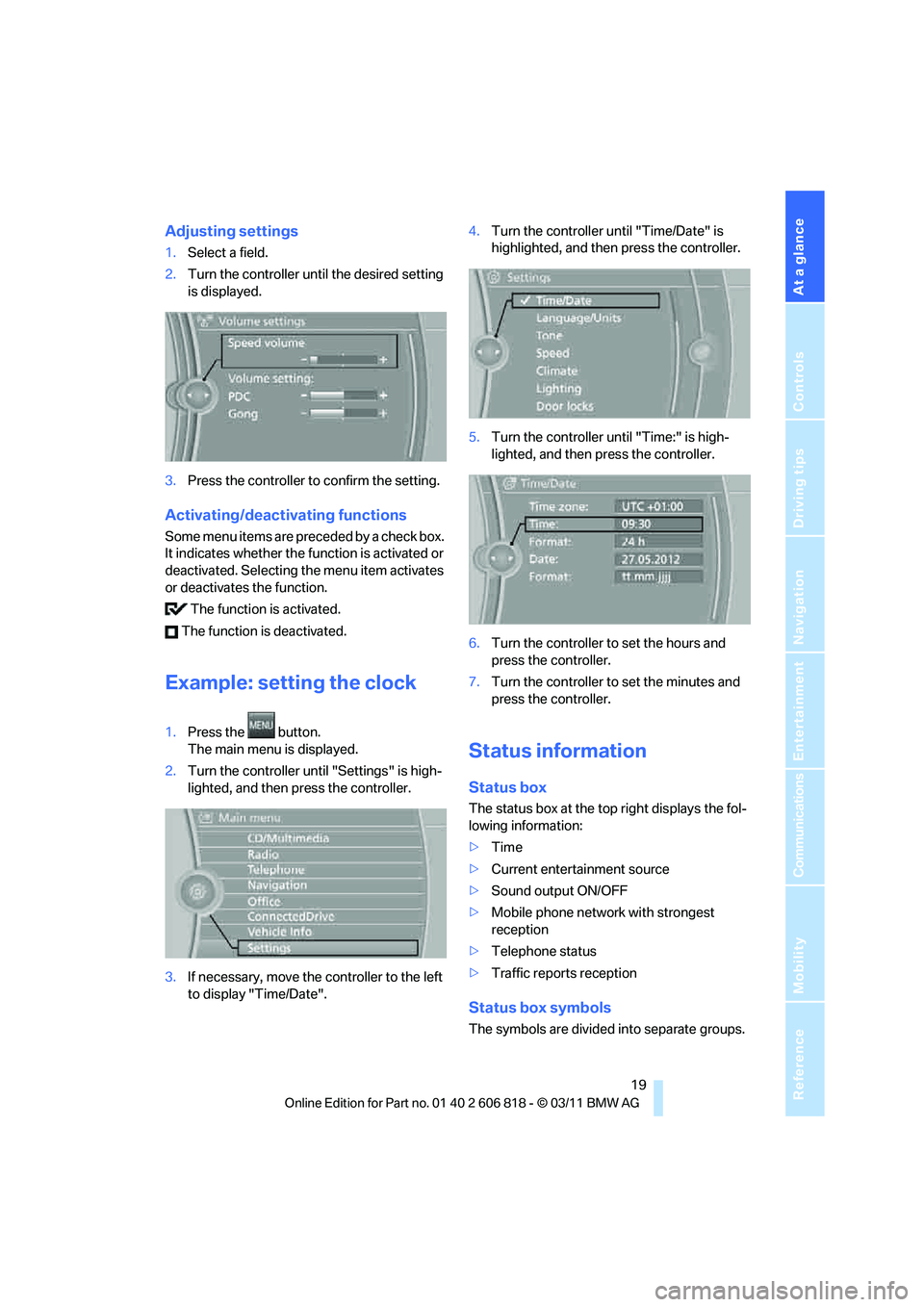
Adjusting settings
1.Select a field.
2.Turn the controller until the desired setting
is displayed.
3.Press the controller to confirm the setting.
Activating/deactivating functions
Some menu items are preceded by a check box.
It indicates whether the function is activated or
deactivated. Selecting the menu item activates
or deactivates the function.
The function is activated.
The function is deactivated.
Example: setting the clock
1.Press the button.
The main menu is displayed.
2.Turn the controller until "Settings" is high-
lighted, and then press the controller.
3.If necessary, move the controller to the left
to display "Time/Date".4.Turn the controller until "Time/Date" is
highlighted, and then press the controller.
5.Turn the controller until "Time:" is high-
lighted, and then press the controller.
6.Turn the controller to set the hours and
press the controller.
7.Turn the controller to set the minutes and
press the controller.
Status information
Status box
The status box at the top right displays the fol-
lowing information:
>Time
>Current entertainment source
>Sound output ON/OFF
>Mobile phone network with strongest
reception
>Telephone status
>Traffic reports reception
Status box symbols
The symbols are divided into separate groups.
Page 22 of 272
iDrive
20
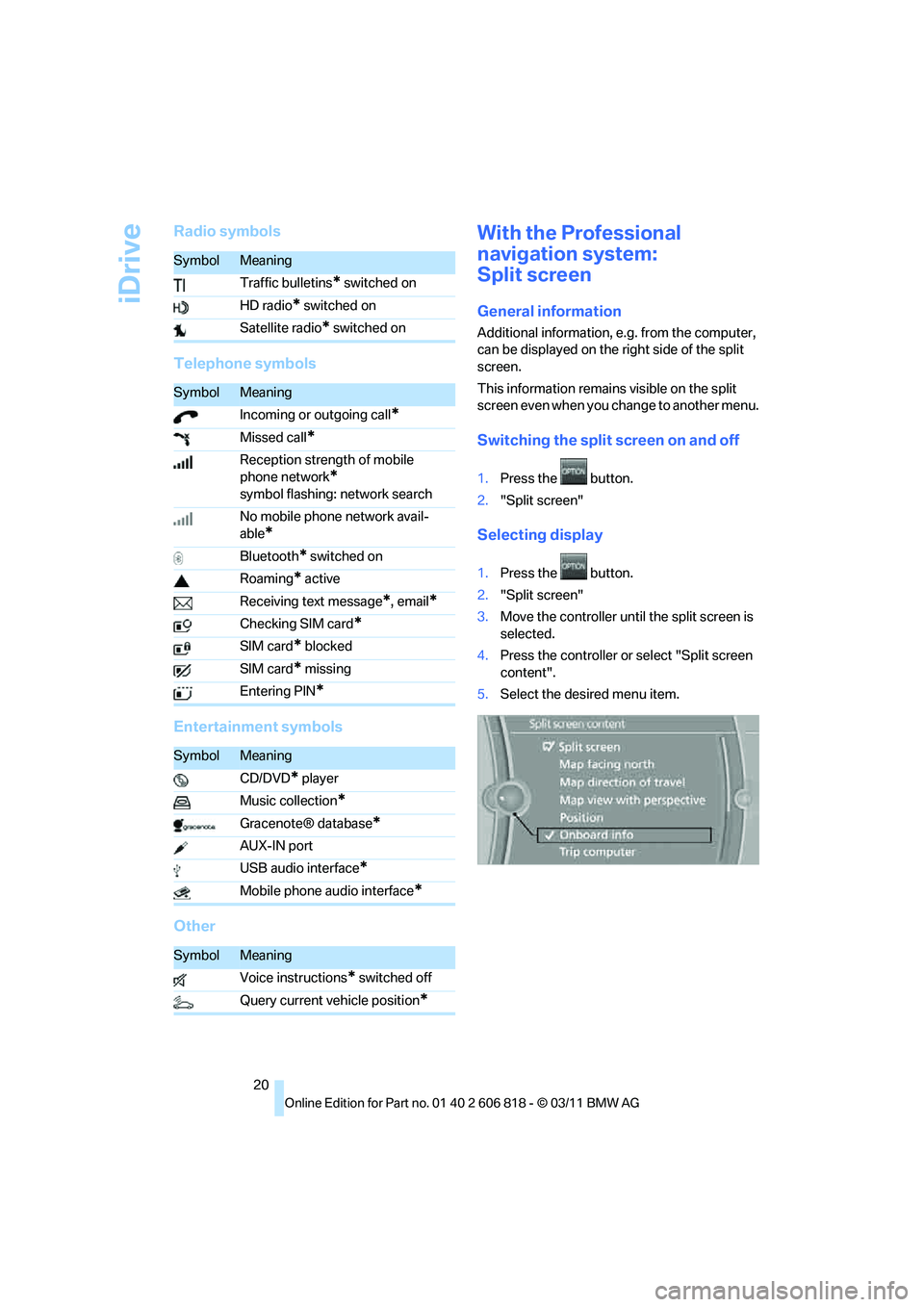
Radio symbols
Telephone symbols
Entertainment symbols
OtherWith the Professional
navigation system:
Split screen
General information
Additional information, e.g. from the computer,
can be displayed on the right side of the split
screen.
This information remains visible on the split
screen even when you change to another menu.
Switching the split screen on and off
1.Press the button.
2."Split screen"
Selecting display
1.Press the button.
2."Split screen"
3.Move the controller until the split screen is
selected.
4.Press the controller or select "Split screen
content".
5.Select the desired menu item.
SymbolMeaning
Traffic bulletins
* switched on
HD radio
* switched on
Satellite radio
* switched on
SymbolMeaning
Incoming or outgoing call
*
Missed call*
Reception strength of mobile
phone network
*
symbol flashing: network search
No mobile phone network avail-
able
*
Bluetooth* switched on
Roaming
* active
Receiving text message
*, email*
Checking SIM card*
SIM card* blocked
SIM card
* missing
Entering PIN
*
SymbolMeaning
CD/DVD
* player
Music collection
*
Gracenote® database*
AUX-IN port
USB audio interface
*
Mobile phone audio interface*
SymbolMeaning
Voice instructions
* switched off
Query current vehicle position
*
Page 23 of 272
At a glance
21Reference
Controls
Driving tips
Communications
Navigation
Entertainment
Mobility
Programmable memory keys
General information
iDrive functions can be stored on the program-
mable memory keys and called up directly, e.g.
radio stations, navigation destinations, phone
numbers and entry points into the menu.
The settings are stored for the remote control
currently in use.
Storing functions
1.Highlight the function via the iDrive.
2.Press the desired button ...
for longer than two seconds.
Executing a function
Press the ... button.
The function is executed immediately. This
means, for example, that the number is dialed
when a phone number is selected.
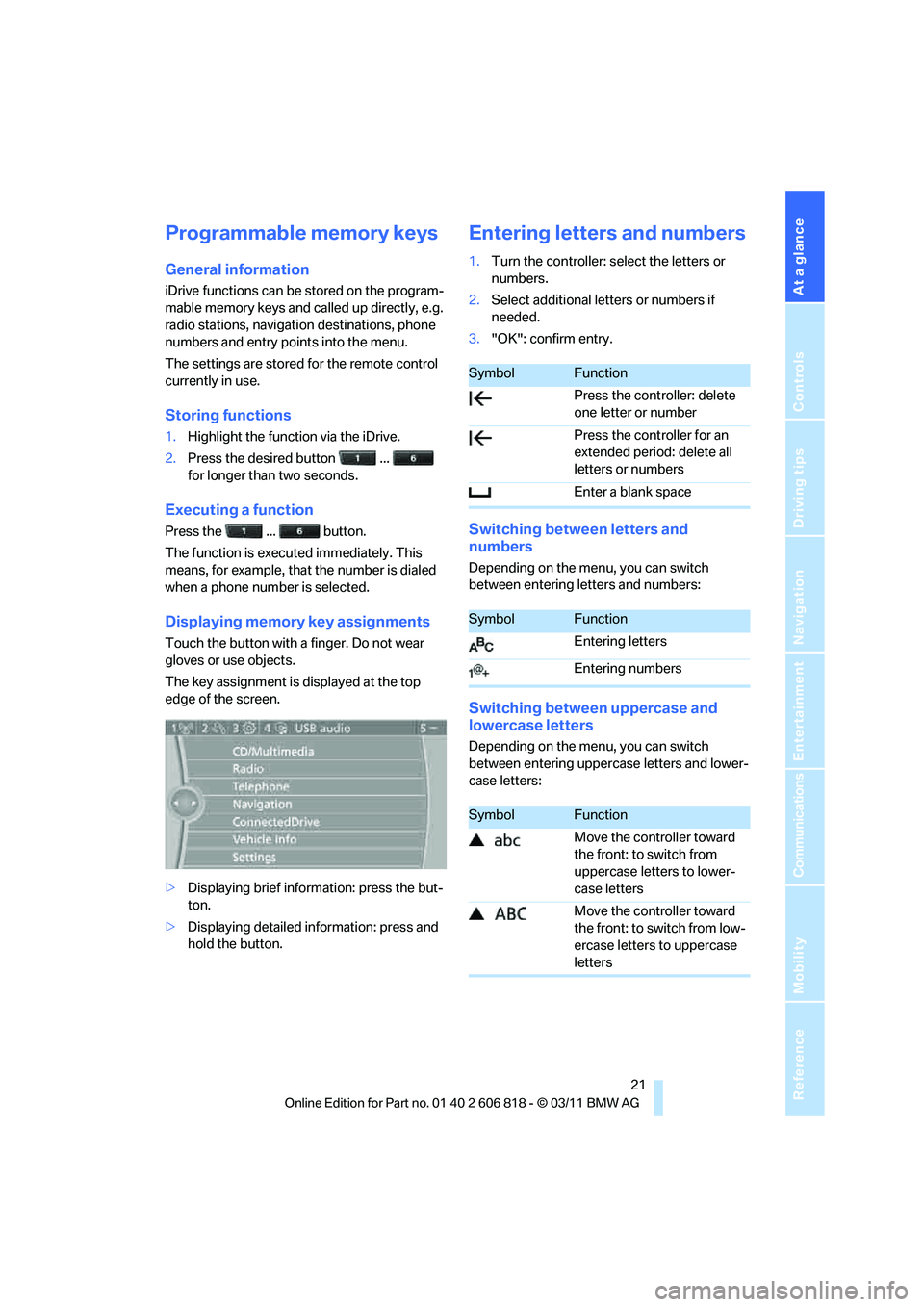
Displaying memory key assignments
Touch the button with a finger. Do not wear
gloves or use objects.
The key assignment is displayed at the top
edge of the screen.
>Displaying brief information: press the but-
ton.
>Displaying detailed information: press and
hold the button.
Entering letters and numbers
1.Turn the controller: select the letters or
numbers.
2.Select additional letters or numbers if
needed.
3."OK": confirm entry.
Switching between letters and
numbers
Depending on the menu, you can switch
between entering letters and numbers:
Switching between uppercase and
lowercase letters
Depending on the menu, you can switch
between entering uppercase letters and lower-
case letters:
SymbolFunction
Press the controller: delete
one letter or number
Press the controller for an
extended period: delete all
letters or numbers
Enter a blank space
SymbolFunction
Entering letters
Entering numbers
SymbolFunction
Move the controller toward
the front: to switch from
uppercase letters to lower-
case letters
Move the controller toward
the front: to switch from low-
ercase letters to uppercase
letters
Page 25 of 272
At a glance
23Reference
Controls
Driving tips
Communications
Navigation
Entertainment
Mobility
Voice activation system
The concept
>The voice activation system can be used to
control functions by spoken commands.
>Functions that can only used when the vehi-
cle is stopped cannot be operated using the
voice activation system.
>The system includes a special microphone
on the driver's side.
>In the Owner's Manual, {...} indicates com-
mands for the voice activation system.
>In the Owner's Manual, {{...}} indicates the
answers from the voice activation system.
Prerequisite
On the Control Display, set a language that is
also supported by the voice activation system
to permit identification of the commands to be
spoken.
Setting the language, refer to page81.
Saying commands
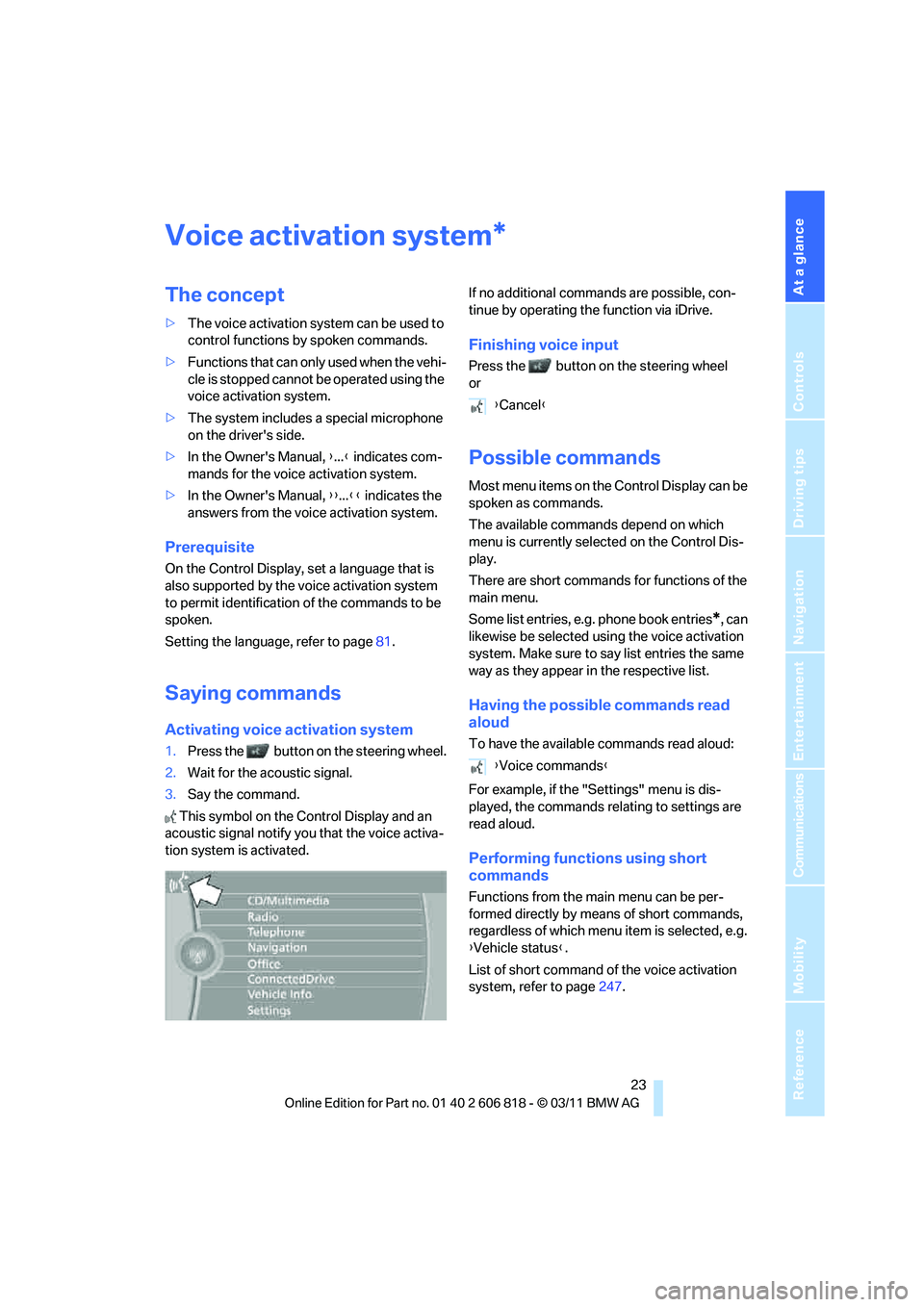
Activating voice activation system
1.Press the button on the steering wheel.
2.Wait for the acoustic signal.
3.Say the command.
This symbol on the Control Display and an
acoustic signal notify you that the voice activa-
tion system is activated.If no additional commands are possible, con-
tinue by operating the function via iDrive.
Finishing voice input
Press the button on the steering wheel
or
Possible commands
Most menu items on the Control Display can be
spoken as commands.
The available commands depend on which
menu is currently selected on the Control Dis-
play.
There are short commands for functions of the
main menu.
Some list entries, e.g. phone book entries
*, can
likewise be selected using the voice activation
system. Make sure to say list entries the same
way as they appear in the respective list.
Having the possible commands read
aloud
To have the available commands read aloud:
For example, if the "Settings" menu is dis-
played, the commands relating to settings are
read aloud.
Performing functions using short
commands
Functions from the main menu can be per-
formed directly by means of short commands,
regardless of which menu item is selected, e.g.
{Vehicle status}.
List of short command of the voice activation
system, refer to page247.
*
{Cancel}
{Voice commands}
Page 27 of 272
At a glance
25Reference
Controls
Driving tips
Communications
Navigation
Entertainment
Mobility
>Keep the doors, windows, glass roof*/pan-
oramic glass roof
* closed to prevent inter-
ference from ambient noise.
>Avoid ambient noise in the vehicle while
speaking.
Page 29 of 272
Controls
This chapter is intended to provide you with
information for complete control of your vehicle.
All features and accessories that are useful for
driving and your safety, comfort and
convenience, are described here.
Controls
Page 31 of 272
Controls
29Reference
At a glance
Driving tips
Communications
Navigation
Entertainment
Mobility
>Settings for the display on the Control Dis-
play and in the instrument cluster:
>12h/24h format of the clock, refer to
page76
>Date format, refer to page78
>Brightness of the Control Display, refer
to page81
>Language of the Control Display, refer to
page81
>Units of measure for fuel consumption,
distance covered/remaining distances,
and temperature, refer to page74
>Show visual warning for Park Distance Con-
trol PDC, refer to page82
>Light settings:
>Welcome lamps, refer to page94
>Pathway lighting, refer to page95
>Daytime running lights, refer to page95
>High-beam Assistant
*, refer to page96
>Automatic climate control: activating/deac-
tivating AUTO program, cooling function
and automatic recirculated air control, set-
ting temperature, air volume and distribu-
tion, refer to page100 ff
>Entertainment:
>Tone control, refer to page144
>Speed-dependent volume control, refer
to page144
Central locking system
The concept
The central locking system functions when the
driver's door is closed.
The system simultaneously engages and
releases the locks on the following:
>Doors
>Trunk lid
>Fuel filler flap
Operating from outside
>Via the remote control
>Via the door lock
*
>In cars with Comfort Access*, via the han-
dles on the driver's and front passenger
doors
In addition, if the remote control is used, the
welcome lamps
*, interior lamps and the door's
courtesy lamps
* are switched on or off. The
alarm system
* is also armed or disarmed.
For further details on the alarm system
*, refer
to page34.
Operating from inside
By means of the button for central locking, refer
to page32.
In the event of a sufficiently severe accident, the
central locking system unlocks automatically. In
addition, the hazard warning flashers and inte-
rior lamps come on.
Opening and closing:
Using the remote control
Persons or animals in a parked vehicle
could lock the doors from the inside. You
should therefore take the remote control with
you when you leave the vehicle so that the latter
can be opened from outside.<
Convertible: to operate the convertible
top with the remote control, the doors and
trunk lid must be closed and the cargo area par-
tition must be folded down and engaged on
both sides. Refer also to page42.<
Unlocking
Press the button.
The interior lamps, the courtesy lamps
* and the
welcome lamps come on.
Setting unlocking characteristics
You can set whether only the driver's door or
the entire vehicle is to be unlocked when the
button is pressed for the first time.
Page 33 of 272
Controls
31Reference
At a glance
Driving tips
Communications
Navigation
Entertainment
Mobility
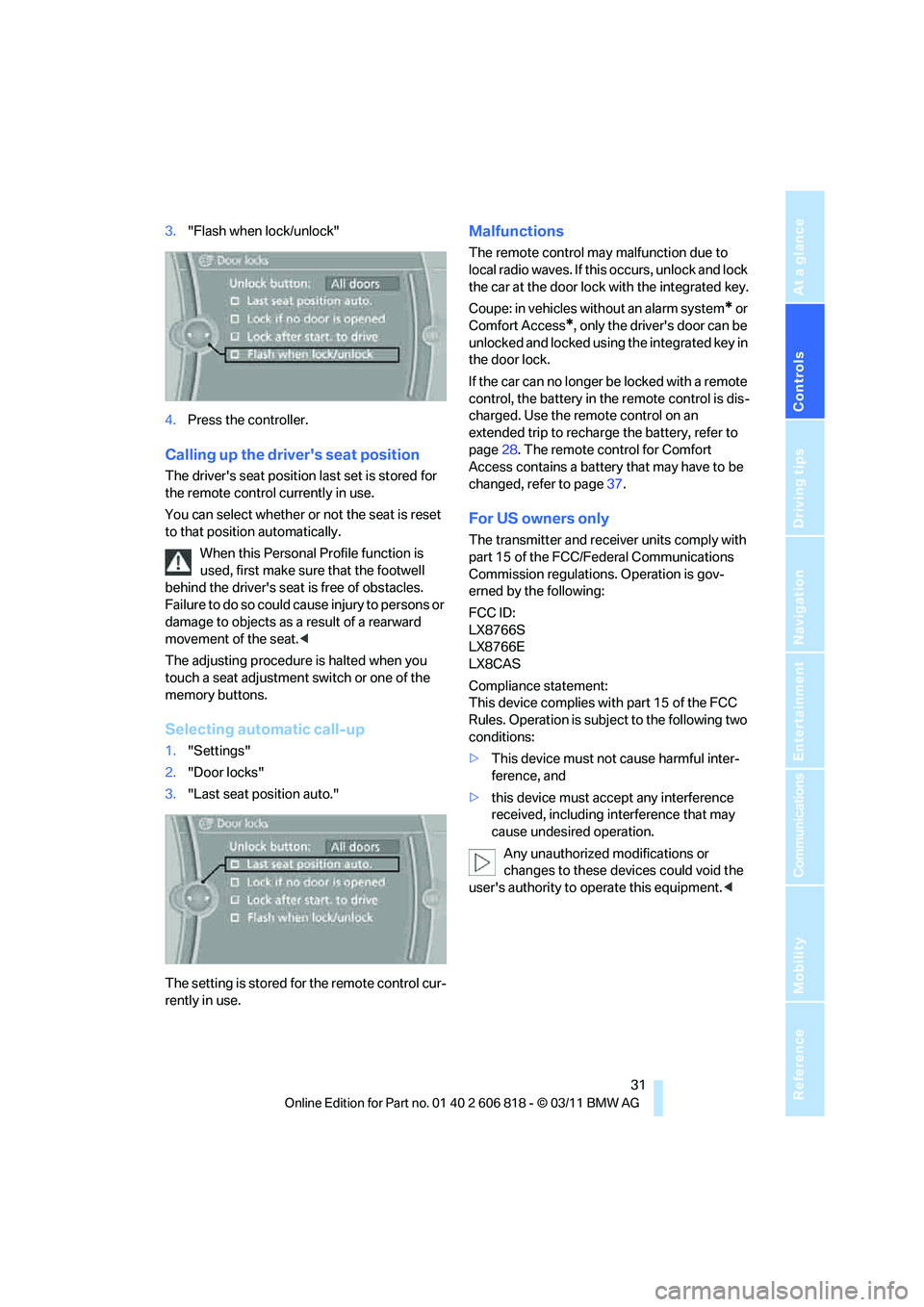
3."Flash when lock/unlock"
4.Press the controller.
Calling up the driver's seat position
The driver's seat position last set is stored for
the remote control currently in use.
You can select whether or not the seat is reset
to that position automatically.
When this Personal Profile function is
used, first make sure that the footwell
behind the driver's seat is free of obstacles.
Failure to do so could cause injury to persons or
damage to objects as a result of a rearward
movement of the seat.<
The adjusting procedure is halted when you
touch a seat adjustment switch or one of the
memory buttons.
Selecting automatic call-up
1."Settings"
2."Door locks"
3."Last seat position auto."
The setting is stored for the remote control cur-
rently in use.
Malfunctions
The remote control may malfunction due to
local radio waves. If this occurs, unlock and lock
the car at the door lock with the integrated key.
Coupe: in vehicles without an alarm system
* or
Comfort Access
*, only the driver's door can be
unlocked and locked using the integrated key in
the door lock.
If the car can no longer be locked with a remote
control, the battery in the remote control is dis-
charged. Use the remote control on an
extended trip to recharge the battery, refer to
page28. The remote control for Comfort
Access contains a battery that may have to be
changed, refer to page37.
For US owners only
The transmitter and receiver units comply with
part 15 of the FCC/Federal Communications
Commission regulations. Operation is gov-
erned by the following:
FCC ID:
LX8766S
LX8766E
LX8CAS
Compliance statement:
This device complies with part 15 of the FCC
Rules. Operation is subject to the following two
conditions:
>This device must not cause harmful inter-
ference, and
>this device must accept any interference
received, including interference that may
cause undesired operation.
Any unauthorized modifications or
changes to these devices could void the
user's authority to operate this equipment.<
Page 35 of 272
Controls
33Reference
At a glance
Driving tips
Communications
Navigation
Entertainment
Mobility
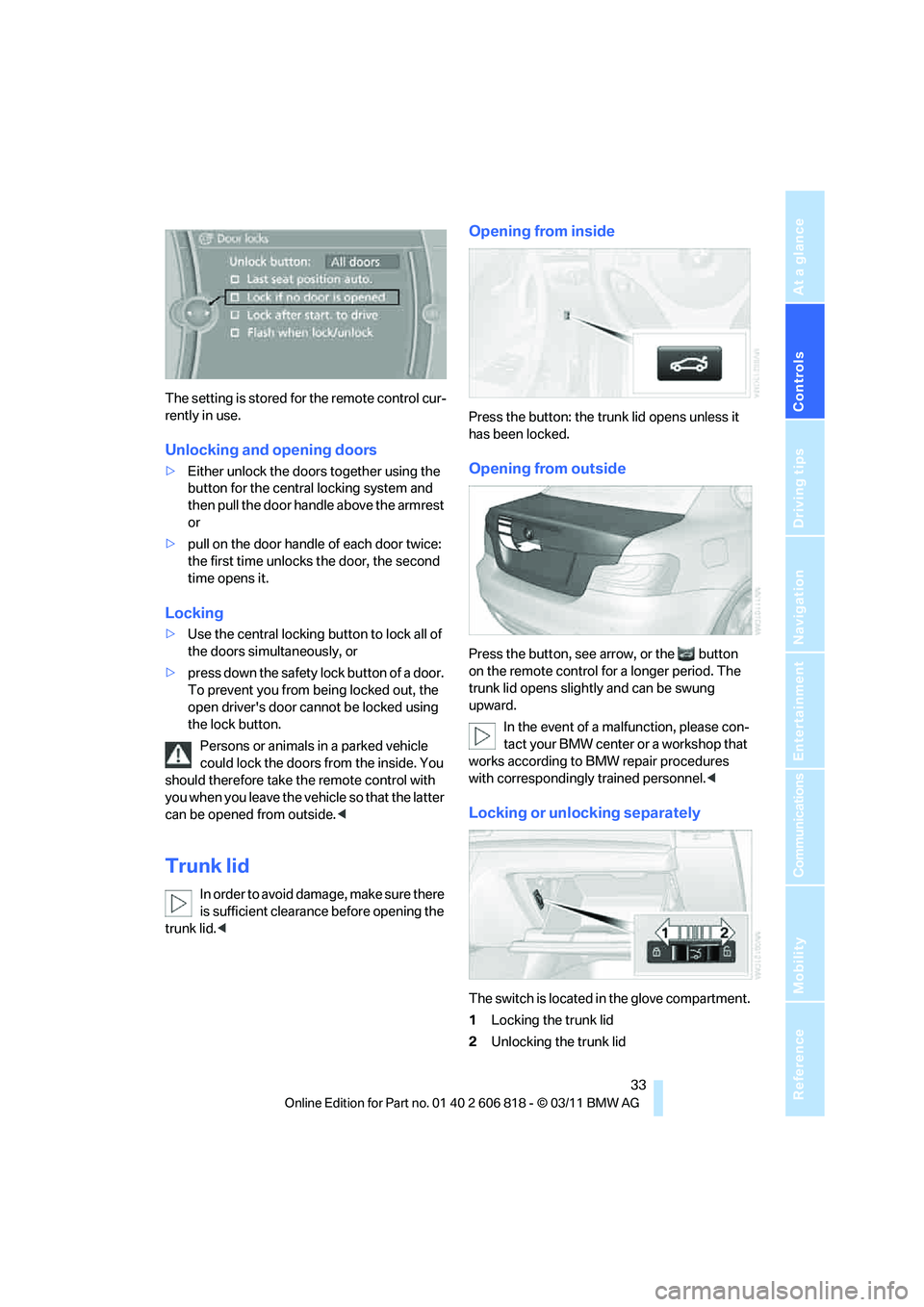
The setting is stored for the remote control cur-
rently in use.
Unlocking and opening doors
>Either unlock the doors together using the
button for the central locking system and
then pull the door handle above the armrest
or
>pull on the door handle of each door twice:
the first time unlocks the door, the second
time opens it.
Locking
>Use the central locking button to lock all of
the doors simultaneously, or
>press down the safety lock button of a door.
To prevent you from being locked out, the
open driver's door cannot be locked using
the lock button.
Persons or animals in a parked vehicle
could lock the doors from the inside. You
should therefore take the remote control with
you when you leave the vehicle so that the latter
can be opened from outside.<
Trunk lid
In order to avoid damage, make sure there
is sufficient clearance before opening the
trunk lid.<
Opening from inside
Press the button: the trunk lid opens unless it
has been locked.
Opening from outside
Press the button, see arrow, or the button
on the remote control for a longer period. The
trunk lid opens slightly and can be swung
upward.
In the event of a malfunction, please con-
tact your BMW center or a workshop that
works according to BMW repair procedures
with correspondingly trained personnel.<
Locking or unlocking separately
The switch is located in the glove compartment.
1Locking the trunk lid
2Unlocking the trunk lid
Page 37 of 272
Controls
35Reference
At a glance
Driving tips
Communications
Navigation
Entertainment
Mobility
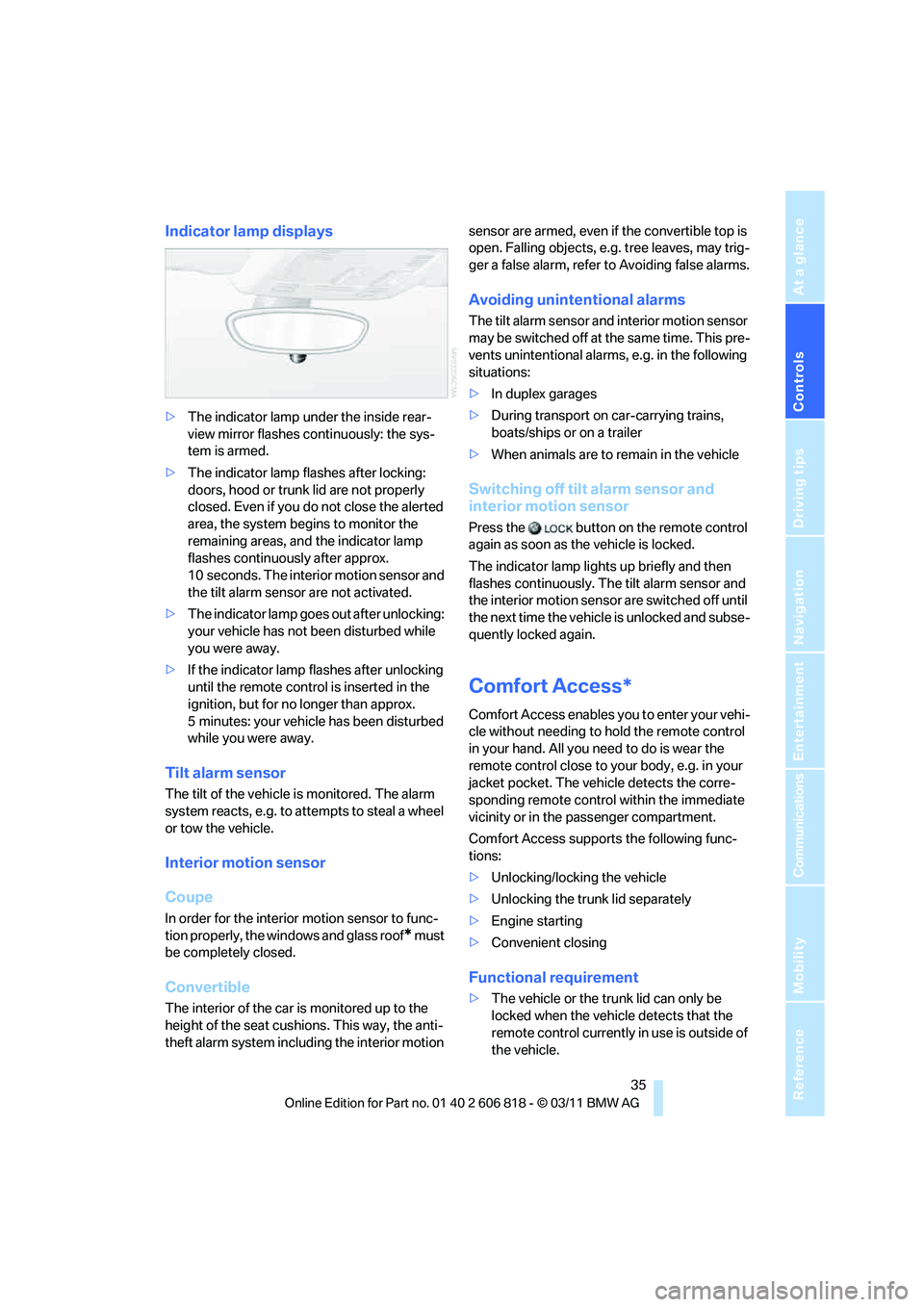
Indicator lamp displays
>The indicator lamp under the inside rear-
view mirror flashes continuously: the sys-
tem is armed.
>The indicator lamp flashes after locking:
doors, hood or trunk lid are not properly
closed. Even if you do not close the alerted
area, the system begins to monitor the
remaining areas, and the indicator lamp
flashes continuously after approx.
10 seconds. The interior m o t i o n s e n s o r a n d
the tilt alarm sensor are not activated.
>The indicator lamp goes out after unlocking:
your vehicle has not been disturbed while
you were away.
>If the indicator lamp flashes after unlocking
until the remote control is inserted in the
ignition, but for no longer than approx.
5 minutes: your vehicle has been disturbed
while you were away.
Tilt alarm sensor
The tilt of the vehicle is monitored. The alarm
system reacts, e.g. to attempts to steal a wheel
or tow the vehicle.
Interior motion sensor
Coupe
In order for the interior motion sensor to func-
tion properly, the windows and glass roof
* must
be completely closed.
Convertible
The interior of the car is monitored up to the
height of the seat cushions. This way, the anti-
theft alarm system including the interior motion sensor are armed, even if the convertible top is
open. Falling objects, e.g. tree leaves, may trig-
ger a false alarm, refer to Avoiding false alarms.
Avoiding unintentional alarms
The tilt alarm sensor and interior motion sensor
may be switched off at the same time. This pre-
vents unintentional alarms, e.g. in the following
situations:
>In duplex garages
>During transport on car-carrying trains,
boats/ships or on a trailer
>When animals are to remain in the vehicle
Switching off tilt alarm sensor and
interior motion sensor
Press the button on the remote control
again as soon as the vehicle is locked.
The indicator lamp lights up briefly and then
flashes continuously. The tilt alarm sensor and
the interior motion sensor are switched off until
the next time the vehicle is unlocked and subse-
quently locked again.
Comfort Access*
Comfort Access enables you to enter your vehi-
cle without needing to hold the remote control
in your hand. All you need to do is wear the
remote control close to your body, e.g. in your
jacket pocket. The vehicle detects the corre-
sponding remote control within the immediate
vicinity or in the passenger compartment.
Comfort Access supports the following func-
tions:
>Unlocking/locking the vehicle
>Unlocking the trunk lid separately
>Engine starting
>Convenient closing
Functional requirement
>The vehicle or the trunk lid can only be
locked when the vehicle detects that the
remote control currently in use is outside of
the vehicle.