navigation system BMW 228I 2014 User Guide
[x] Cancel search | Manufacturer: BMW, Model Year: 2014, Model line: 228I, Model: BMW 228I 2014Pages: 218, PDF Size: 6.6 MB
Page 83 of 218
Gear shift indicatorThe conceptThe system recommends the most fuel effi‐
cient gear for the current driving situation.
Depending on how the vehicle is equipped and
the country-specific version of the vehicle, the
gear shift indicator is active in the manual
mode of the automatic transmission and in the
manual transmission.
Indicators to shift up or down are displayed in
the instrument cluster.
On vehicles without a gear shift indicator, the
engaged gear is displayed.
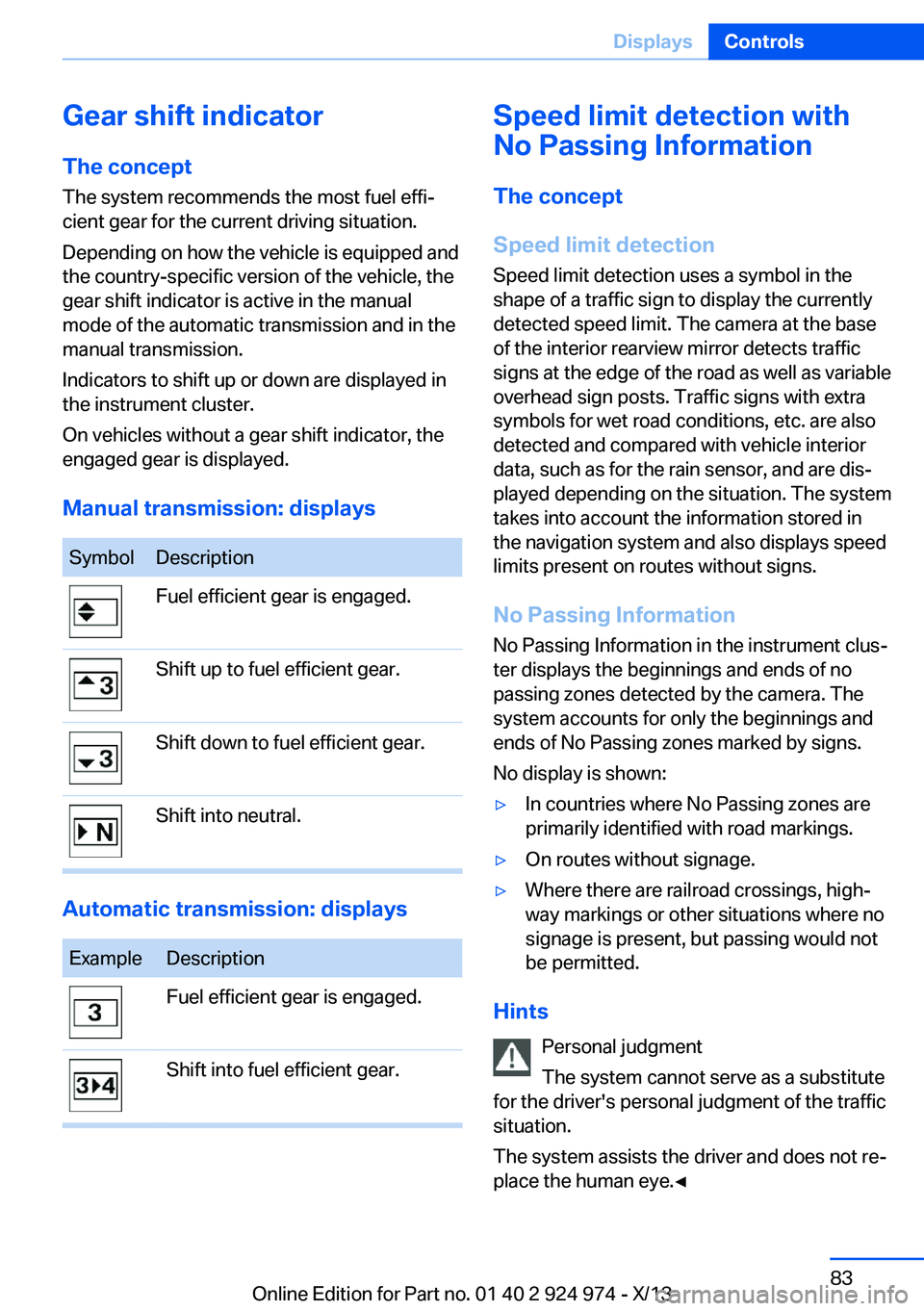
Manual transmission: displaysSymbolDescriptionFuel efficient gear is engaged.Shift up to fuel efficient gear.Shift down to fuel efficient gear.Shift into neutral.
Automatic transmission: displays
ExampleDescriptionFuel efficient gear is engaged.Shift into fuel efficient gear.Speed limit detection with
No Passing Information
The concept
Speed limit detection Speed limit detection uses a symbol in the
shape of a traffic sign to display the currently
detected speed limit. The camera at the base
of the interior rearview mirror detects traffic
signs at the edge of the road as well as variable
overhead sign posts. Traffic signs with extra
symbols for wet road conditions, etc. are also
detected and compared with vehicle interior
data, such as for the rain sensor, and are dis‐
played depending on the situation. The system
takes into account the information stored in
the navigation system and also displays speed
limits present on routes without signs.
No Passing Information No Passing Information in the instrument clus‐
ter displays the beginnings and ends of no
passing zones detected by the camera. The
system accounts for only the beginnings and
ends of No Passing zones marked by signs.
No display is shown:▷In countries where No Passing zones are
primarily identified with road markings.▷On routes without signage.▷Where there are railroad crossings, high‐
way markings or other situations where no
signage is present, but passing would not
be permitted.
Hints
Personal judgment
The system cannot serve as a substitute
for the driver's personal judgment of the traffic
situation.
The system assists the driver and does not re‐
place the human eye.◀
Seite 83DisplaysControls83
Online Edition for Part no. 01 40 2 924 974 - X/13
Page 84 of 218
At a glance
Camera
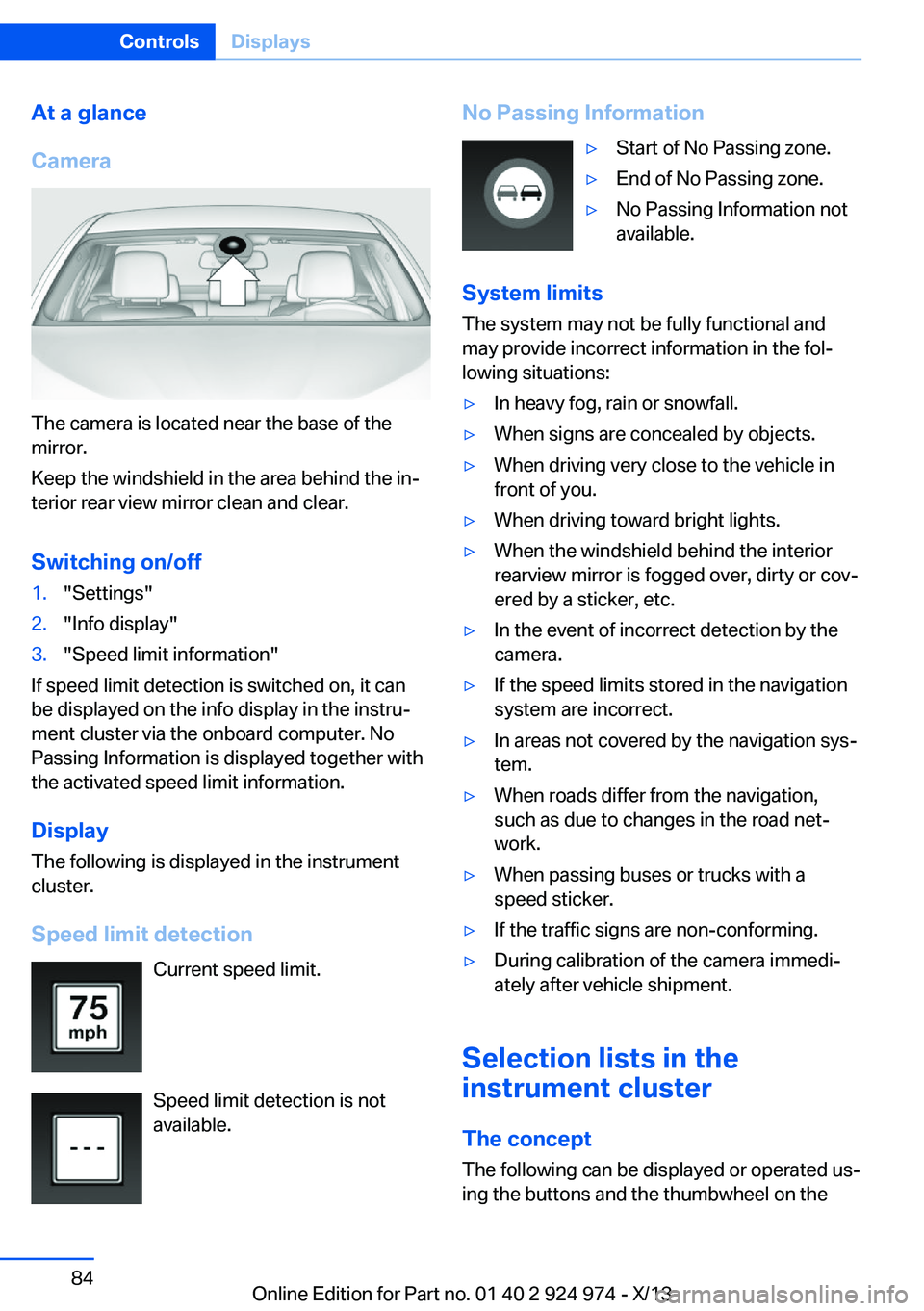
The camera is located near the base of the
mirror.
Keep the windshield in the area behind the in‐
terior rear view mirror clean and clear.
Switching on/off
1."Settings"2."Info display"3."Speed limit information"
If speed limit detection is switched on, it can
be displayed on the info display in the instru‐
ment cluster via the onboard computer. No
Passing Information is displayed together with
the activated speed limit information.
Display The following is displayed in the instrument
cluster.
Speed limit detection Current speed limit.
Speed limit detection is not available.
No Passing Information▷Start of No Passing zone.▷End of No Passing zone.▷No Passing Information not
available.
System limits
The system may not be fully functional and
may provide incorrect information in the fol‐
lowing situations:
▷In heavy fog, rain or snowfall.▷When signs are concealed by objects.▷When driving very close to the vehicle in
front of you.▷When driving toward bright lights.▷When the windshield behind the interior
rearview mirror is fogged over, dirty or cov‐
ered by a sticker, etc.▷In the event of incorrect detection by the
camera.▷If the speed limits stored in the navigation
system are incorrect.▷In areas not covered by the navigation sys‐
tem.▷When roads differ from the navigation,
such as due to changes in the road net‐
work.▷When passing buses or trucks with a
speed sticker.▷If the traffic signs are non-conforming.▷During calibration of the camera immedi‐
ately after vehicle shipment.
Selection lists in the
instrument cluster
The concept The following can be displayed or operated us‐
ing the buttons and the thumbwheel on the
Seite 84ControlsDisplays84
Online Edition for Part no. 01 40 2 924 974 - X/13
Page 86 of 218
Information at a glance
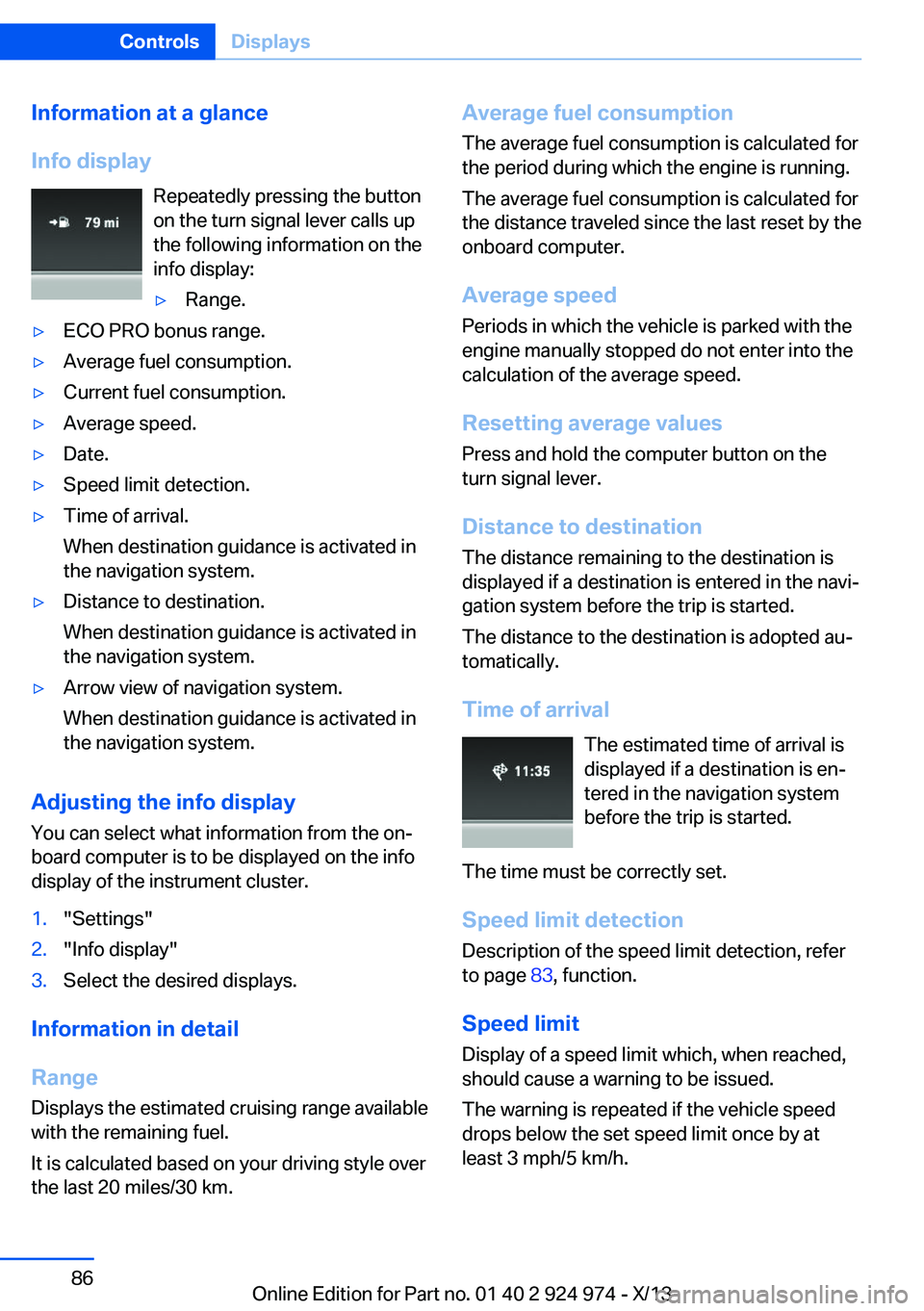
Info display Repeatedly pressing the button
on the turn signal lever calls up
the following information on the
info display:▷Range.▷ECO PRO bonus range.▷Average fuel consumption.▷Current fuel consumption.▷Average speed.▷Date.▷Speed limit detection.▷Time of arrival.
When destination guidance is activated in
the navigation system.▷Distance to destination.
When destination guidance is activated in
the navigation system.▷Arrow view of navigation system.
When destination guidance is activated in
the navigation system.
Adjusting the info display
You can select what information from the on‐
board computer is to be displayed on the info
display of the instrument cluster.
1."Settings"2."Info display"3.Select the desired displays.
Information in detail
Range
Displays the estimated cruising range available
with the remaining fuel.
It is calculated based on your driving style over
the last 20 miles/30 km.
Average fuel consumption
The average fuel consumption is calculated for
the period during which the engine is running.
The average fuel consumption is calculated for
the distance traveled since the last reset by the
onboard computer.
Average speed
Periods in which the vehicle is parked with the
engine manually stopped do not enter into the
calculation of the average speed.
Resetting average values
Press and hold the computer button on the
turn signal lever.
Distance to destination
The distance remaining to the destination is
displayed if a destination is entered in the navi‐
gation system before the trip is started.
The distance to the destination is adopted au‐
tomatically.
Time of arrival The estimated time of arrival is
displayed if a destination is en‐
tered in the navigation system
before the trip is started.
The time must be correctly set. Speed limit detection
Description of the speed limit detection, refer
to page 83, function.
Speed limit
Display of a speed limit which, when reached, should cause a warning to be issued.
The warning is repeated if the vehicle speed
drops below the set speed limit once by at
least 3 mph/5 km/h.Seite 86ControlsDisplays86
Online Edition for Part no. 01 40 2 924 974 - X/13
Page 118 of 218
At a glance
Button in the vehicle
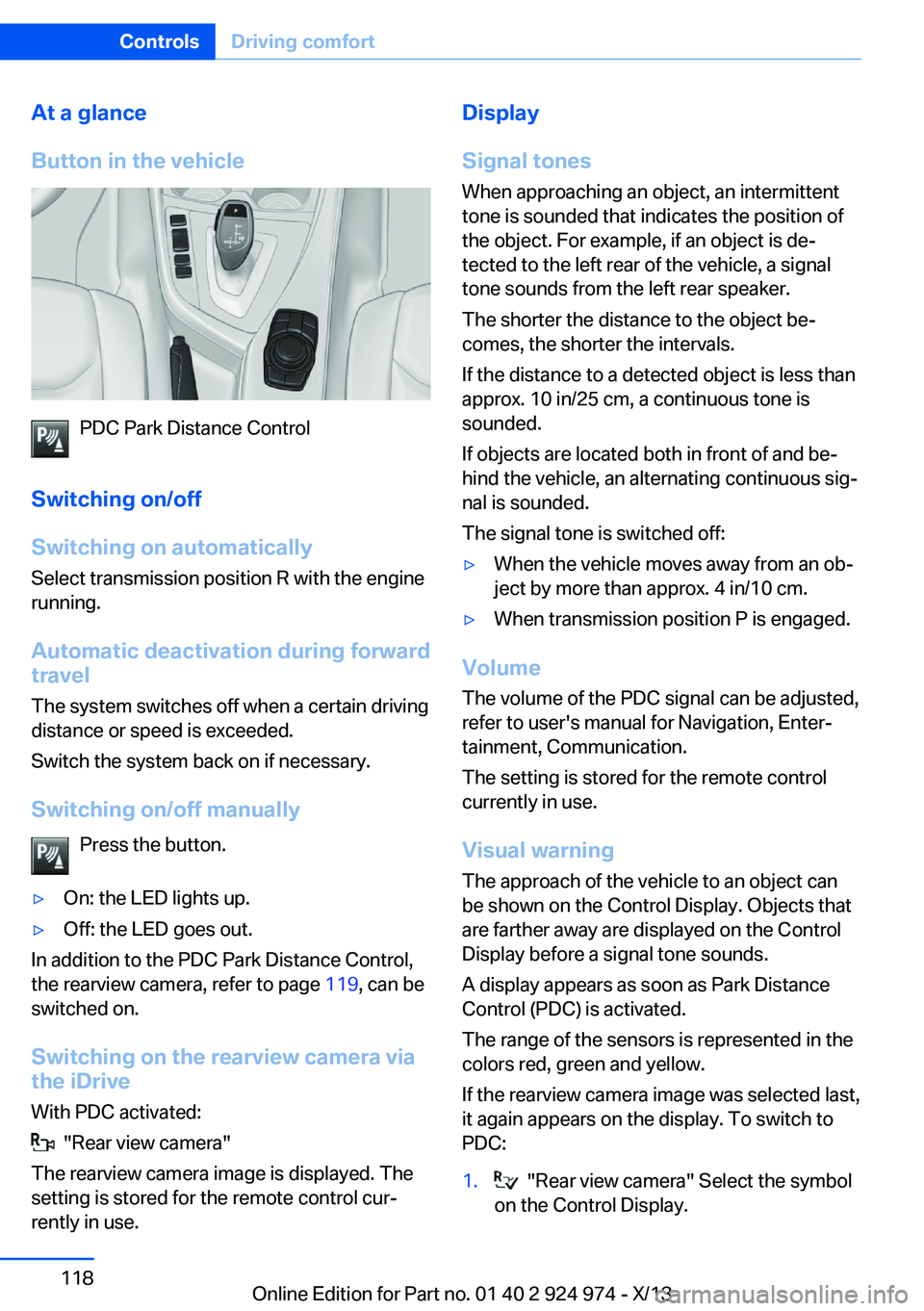
PDC Park Distance Control
Switching on/off
Switching on automatically Select transmission position R with the engine
running.
Automatic deactivation during forward
travel
The system switches off when a certain driving
distance or speed is exceeded.
Switch the system back on if necessary.
Switching on/off manually Press the button.
▷On: the LED lights up.▷Off: the LED goes out.
In addition to the PDC Park Distance Control,
the rearview camera, refer to page 119, can be
switched on.
Switching on the rearview camera viathe iDrive
With PDC activated:
"Rear view camera"
The rearview camera image is displayed. The
setting is stored for the remote control cur‐
rently in use.
Display
Signal tones When approaching an object, an intermittent
tone is sounded that indicates the position of
the object. For example, if an object is de‐
tected to the left rear of the vehicle, a signal
tone sounds from the left rear speaker.
The shorter the distance to the object be‐
comes, the shorter the intervals.
If the distance to a detected object is less than
approx. 10 in/25 cm, a continuous tone is
sounded.
If objects are located both in front of and be‐
hind the vehicle, an alternating continuous sig‐
nal is sounded.
The signal tone is switched off:▷When the vehicle moves away from an ob‐
ject by more than approx. 4 in/10 cm.▷When transmission position P is engaged.
Volume
The volume of the PDC signal can be adjusted,
refer to user's manual for Navigation, Enter‐
tainment, Communication.
The setting is stored for the remote control
currently in use.
Visual warning
The approach of the vehicle to an object can
be shown on the Control Display. Objects that
are farther away are displayed on the Control
Display before a signal tone sounds.
A display appears as soon as Park Distance
Control (PDC) is activated.
The range of the sensors is represented in the
colors red, green and yellow.
If the rearview camera image was selected last,
it again appears on the display. To switch to
PDC:
1. "Rear view camera" Select the symbol
on the Control Display.Seite 118ControlsDriving comfort118
Online Edition for Part no. 01 40 2 924 974 - X/13
Page 139 of 218
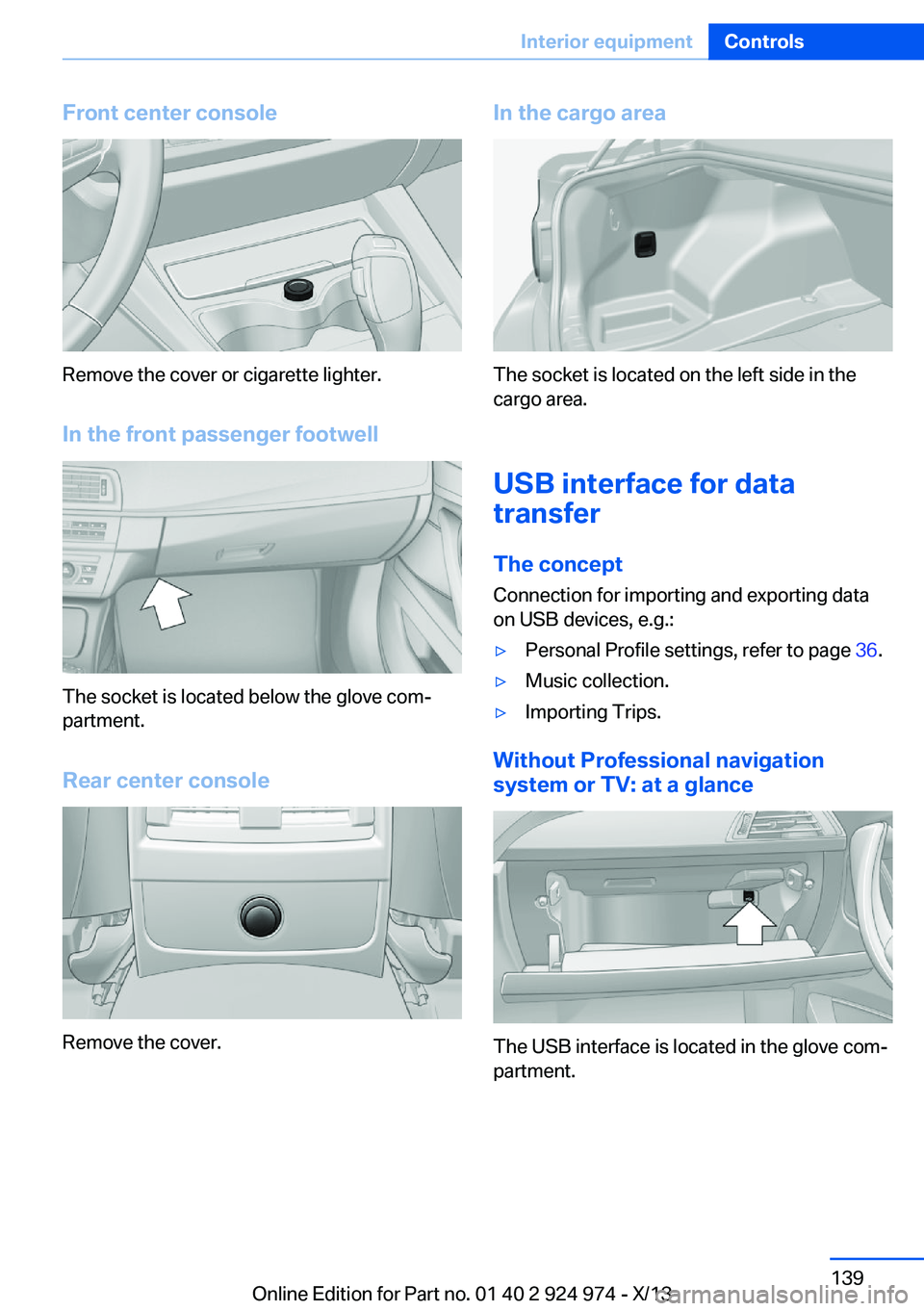
Front center console
Remove the cover or cigarette lighter.
In the front passenger footwell
The socket is located below the glove com‐
partment.
Rear center console
Remove the cover.
In the cargo area
The socket is located on the left side in the
cargo area.
USB interface for data
transfer
The concept Connection for importing and exporting data
on USB devices, e.g.:
▷Personal Profile settings, refer to page 36.▷Music collection.▷Importing Trips.
Without Professional navigation
system or TV: at a glance
The USB interface is located in the glove com‐
partment.
Seite 139Interior equipmentControls139
Online Edition for Part no. 01 40 2 924 974 - X/13
Page 140 of 218
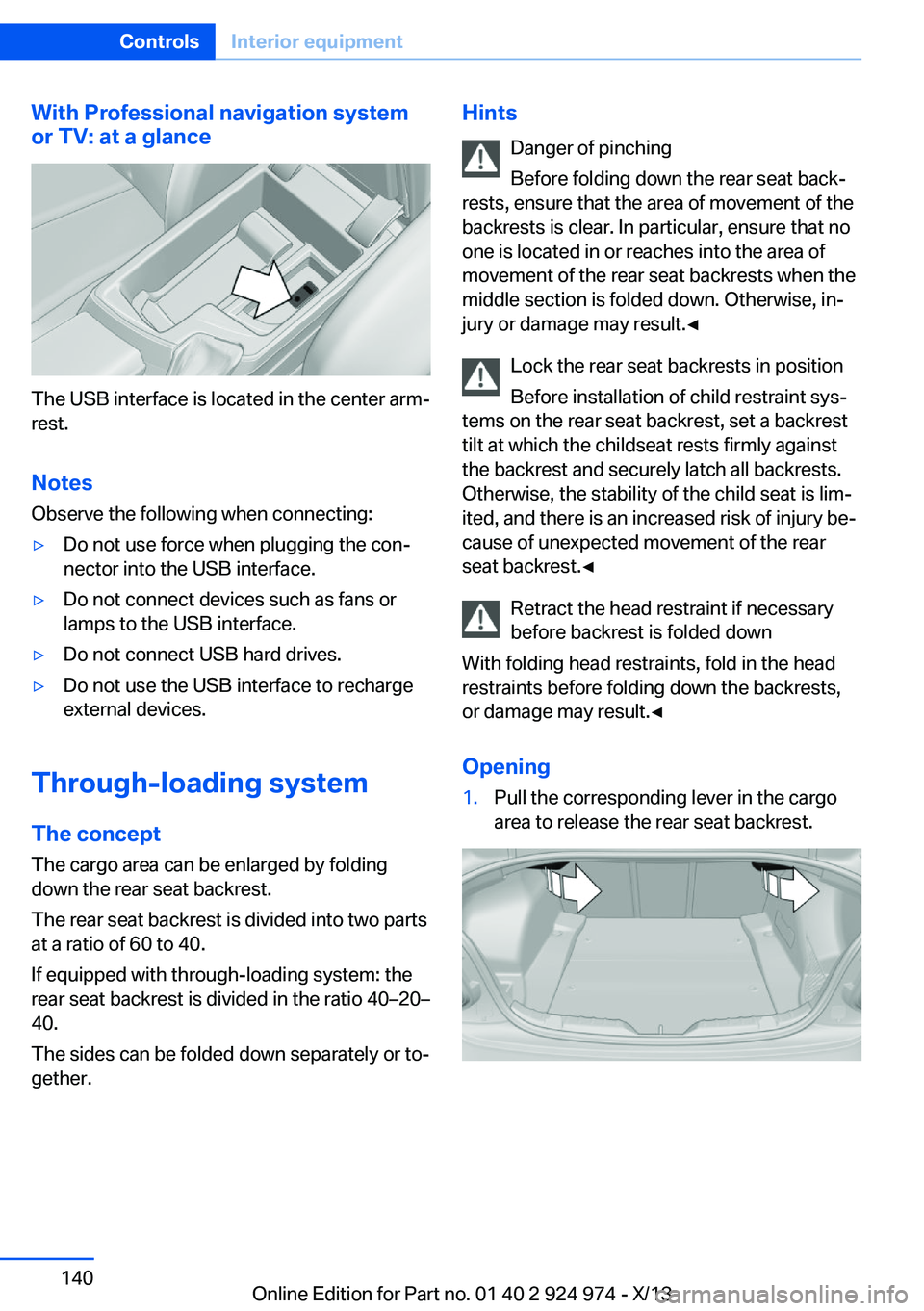
With Professional navigation system
or TV: at a glance
The USB interface is located in the center arm‐
rest.
Notes Observe the following when connecting:
▷Do not use force when plugging the con‐
nector into the USB interface.▷Do not connect devices such as fans or
lamps to the USB interface.▷Do not connect USB hard drives.▷Do not use the USB interface to recharge
external devices.
Through-loading system
The concept The cargo area can be enlarged by folding
down the rear seat backrest.
The rear seat backrest is divided into two parts at a ratio of 60 to 40.
If equipped with through-loading system: the
rear seat backrest is divided in the ratio 40–20– 40.
The sides can be folded down separately or to‐
gether.
Hints
Danger of pinching
Before folding down the rear seat back‐
rests, ensure that the area of movement of the
backrests is clear. In particular, ensure that no
one is located in or reaches into the area of
movement of the rear seat backrests when the
middle section is folded down. Otherwise, in‐
jury or damage may result.◀
Lock the rear seat backrests in position
Before installation of child restraint sys‐
tems on the rear seat backrest, set a backrest
tilt at which the childseat rests firmly against
the backrest and securely latch all backrests.
Otherwise, the stability of the child seat is lim‐
ited, and there is an increased risk of injury be‐
cause of unexpected movement of the rear
seat backrest.◀
Retract the head restraint if necessary
before backrest is folded down
With folding head restraints, fold in the head
restraints before folding down the backrests, or damage may result.◀
Opening1.Pull the corresponding lever in the cargo
area to release the rear seat backrest.Seite 140ControlsInterior equipment140
Online Edition for Part no. 01 40 2 924 974 - X/13
Page 190 of 218
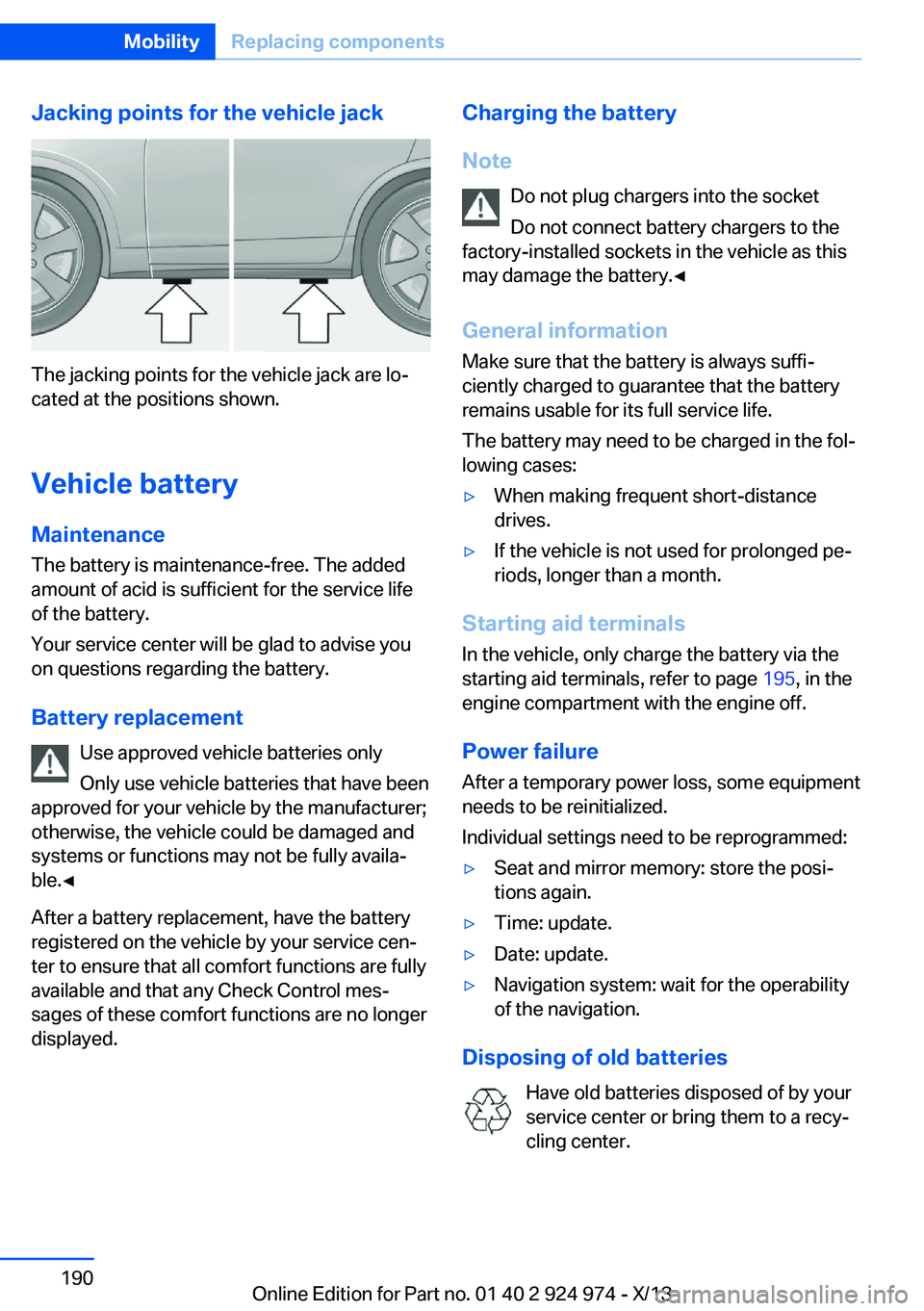
Jacking points for the vehicle jack
The jacking points for the vehicle jack are lo‐
cated at the positions shown.
Vehicle battery Maintenance
The battery is maintenance-free. The added
amount of acid is sufficient for the service life
of the battery.
Your service center will be glad to advise you
on questions regarding the battery.
Battery replacement Use approved vehicle batteries only
Only use vehicle batteries that have been
approved for your vehicle by the manufacturer;
otherwise, the vehicle could be damaged and
systems or functions may not be fully availa‐
ble.◀
After a battery replacement, have the battery
registered on the vehicle by your service cen‐
ter to ensure that all comfort functions are fully
available and that any Check Control mes‐
sages of these comfort functions are no longer
displayed.
Charging the battery
Note Do not plug chargers into the socketDo not connect battery chargers to the
factory-installed sockets in the vehicle as this
may damage the battery.◀
General information Make sure that the battery is always suffi‐
ciently charged to guarantee that the battery
remains usable for its full service life.
The battery may need to be charged in the fol‐
lowing cases:▷When making frequent short-distance
drives.▷If the vehicle is not used for prolonged pe‐
riods, longer than a month.
Starting aid terminals
In the vehicle, only charge the battery via the
starting aid terminals, refer to page 195, in the
engine compartment with the engine off.
Power failure After a temporary power loss, some equipment
needs to be reinitialized.
Individual settings need to be reprogrammed:
▷Seat and mirror memory: store the posi‐
tions again.▷Time: update.▷Date: update.▷Navigation system: wait for the operability
of the navigation.
Disposing of old batteries
Have old batteries disposed of by your
service center or bring them to a recy‐
cling center.
Seite 190MobilityReplacing components190
Online Edition for Part no. 01 40 2 924 974 - X/13
Page 208 of 218
Everything from A to Z
IndexA ABS, Antilock Brake Sys‐ tem 111
Acceleration Assistant, refer to Launch Control 73
Activated-charcoal filter 132
Adaptive brake lights, refer to Brake force display 110
Adaptive Light Control 91
Additives, oil 178
Adjustments, seats/head re‐ straints 48
After washing vehicle 200
Airbags 95
Airbags, indicator/warning light 96
Air circulation, refer to Recir‐ culated-air mode 128, 131
Air, dehumidifying, refer to Cooling function 128, 130
Air distribution, manual 128, 131
Air flow, air conditioner 128
Air flow, automatic climate control 131
Air pressure, tires 166
Air vents, refer to Ventila‐ tion 132
Alarm system 43
Alarm, unintentional 44
All around the center con‐ sole 16
All around the headliner 17
All around the steering wheel 14
All-season tires, refer to Win‐ ter tires 173
Alternating-code hand-held transmitter 135
Alternative oil types 179 Antifreeze, washer fluid 70
Antilock Brake System, ABS 111
Anti-slip control, refer to DSC 111
Approved axle load 206
Approved engine oils 178
Arrival time 86
Ash tray 138
Assistance, Roadside Assis‐ tance 194
Assistance when driving off 114
AUTO intensity 130
Automatic car wash 199
Automatic climate con‐ trol 127
Automatic climate control with enhanced features 129
Automatic Curb Monitor 56
Automatic deactivation, front passenger airbags 97
Automatic headlamp con‐ trol 91
Automatic locking 43
Automatic recirculated-air control 131
Automatic transmission with Steptronic 71
AUTO program, automatic cli‐ mate control 130
AUTO program, climate con‐ trol 128
AUTO program, intensity 130
Auto Start/Stop function 65
Average fuel consumption 86
Average speed 86
Axle loads, weights 206 B
Backrest curvature, refer to Lumbar support 50
Backrest, width 50
Band-aids, refer to First aid kit 194
Bar for tow-starting/ towing 197
Battery replacement, vehicle battery 190
Battery replacement, vehicle remote control 34
Battery, vehicle 190
Belts, safety belts 52
Beverage holder, cu‐ pholder 144
BMW Assist, see user's manual for Navigation, En‐
tertainment and Communi‐
cation
BMW Homepage 6
BMW Internet page 6
BMW maintenance sys‐ tem 181
Bonus range, ECO PRO 156
Bottle holder, refer to Cu‐ pholder 144
Brake assistant 111
Brake discs, breaking in 148
Brake force display 110
Brake lamps, brake force dis‐ play 110
Brake lights, adaptive 110
Brake pads, breaking in 148
Braking, hints 149
Breakdown assis‐ tance 193, 194
Breaking in 148
Brightness of Control Dis‐ play 88 Seite 208ReferenceEverything from A to Z208
Online Edition for Part no. 01 40 2 924 974 - X/13
Page 209 of 218
Bulb replacement 183
Bulb replacement, front 184
Bulb replacement, rear 188
Bulb replacement, xenon headlamps 186
Bulbs and lamps 183
Button, Start/Stop 63
Bypassing, refer to Jump- starting 194
C
California Proposition 65 Warning 7
Camera, care 202
Camera, rearview cam‐ era 120
Can holder, refer to Cu‐ pholder 144
Car battery 190
Car care products 200
Care, displays 202
Care, vehicle 200
Cargo 151
Cargo area, enlarging 140
Cargo area lid 40
Cargo area, storage compart‐ ments 144
Cargo, securing 152
Cargo straps, securing cargo 152
Car key, refer to Remote con‐ trol 34
Carpet, care 202
Car wash 199
Catalytic converter, refer to Hot exhaust system 149
CBS Condition Based Serv‐ ice 181
CD/Multimedia, see user's manual for Navigation, En‐
tertainment and Communi‐
cation
Center armrest 143
Center console 16 Center-Lock, see button for
central locking 37
Central locking system 37
Central screen, refer to Con‐ trol Display 18
Changes, technical, refer to Safety 7
Changing parts 183
Changing wheels 189
Changing wheels/tires 172
Check Control 78
Checking the oil level elec‐ tronically 177
Children, seating position 59
Children, transporting safely 59
Child restraint fixing sys‐ tem 59
Child restraint fixing system LATCH 60
Child restraint fixing systems, mounting 59
Child seat, mounting 59
Child seats 59
Chrome parts, care 201
Cigarette lighter 138
Cleaning, displays 202
Climate control 127, 129
Clock 81
Closing/opening from in‐ side 40
Closing/opening via door lock 39
Closing/opening with remote control 38
Clothes hooks 144
Coasting 158
Coasting with engine decou‐ pled, coasting 158
Coasting with idling en‐ gine 158
Cockpit 14
Collision warning with City Braking function 104
Combination switch, refer to Turn signals 68 Combination switch, refer to
Wiper system 68
Comfort Access 41
COMFORT program, Dy‐ namic Driving Control 113
Compartments in the doors 143
Compass 136
Computer 85
Condensation on win‐ dows 131
Condensation under the vehi‐ cle 150
Condition Based Service CBS 181
Configuring drive pro‐ gram 114
Confirmation signal 42
ConnectedDrive, see user's manual for Navigation, En‐
tertainment and Communi‐
cation
ConnectedDrive Services
Connecting electrical devi‐ ces 138
Control Display 18
Control Display, settings 87
Controller 18, 19
Control systems, driving sta‐ bility 111
Convenient opening 38
Coolant 180
Coolant temperature 80
Cooling function 128, 130
Cooling, maximum 130
Cooling system 180
Corrosion on brake discs 150
Cruise control 115
Cruising range 81
Cupholder 144
Current fuel consumption 81
D
Damage, tires 172
Data, technical 206 Seite 209Everything from A to ZReference209
Online Edition for Part no. 01 40 2 924 974 - X/13
Page 213 of 218

Minimum tread, tires 172
Mirror 56
Mirror memory 55
Mobile communication devi‐ ces in the vehicle 149
Modifications, technical, refer to Safety 7
Moisture in headlamp 184
Monitor, refer to Control Dis‐ play 18
Mounting of child restraint fix‐ ing systems 59
Multifunction steering wheel, buttons 14
N Navigation, see user's manual for Navigation, Entertain‐
ment and Communication
Neck restraints, front, refer to Head restraints 53
Neck restraints, rear, refer to Head restraints 54
Neutral cleaner, see wheel cleaner 201
New wheels and tires 172
No Passing Information 83
Nylon rope for tow-starting/ towing 197
O OBD Onboard Diagnosis 181
OBD, see OBD Onboard Di‐ agnosis 181
Obstacle marking, rearview camera 121
Octane rating, refer to Gaso‐ line quality 164
Odometer 80
Office, see user's manual for Navigation, Entertainment
and Communication
Oil 177
Oil, adding 178 Oil additives 178
Oil change 179
Oil change interval, service requirements 82
Oil filler neck 178
Oil types, alternative 179
Oil types, approved 178
Old batteries, disposal 190
Onboard monitor, refer to Control Display 18
Onboard vehicle tool kit 183
Opening and closing 34
Opening and closing, from in‐ side 40
Opening and closing via door lock 39
Opening and closing, with re‐ mote control 38
Operating concept, iDrive 18
Optional equipment, standard equipment 6
Outside air, refer to Auto‐ matic recirculated-air con‐
trol 131
Overheating of engine, refer to Coolant temperature 80
P Paint, vehicle 200
Parallel parking assistant 122
Park Distance Control PDC 117
Parked-car ventilation 132
Parked vehicle, condensa‐ tion 150
Parking aid, refer to PDC 117
Parking assistant 122
Parking brake 67
Parking lamps 90
Passenger side mirror, tilting downward 56
Pathway lines, rearview cam‐ era 121
PDC Park Distance Con‐ trol 117 Pedestrian warning with city
braking function 107
Personal Profile 35
Pinch protection system, glass sunroof 46
Pinch protection system, win‐ dows 45
Plastic, care 201
Power failure 190
Power sunroof, glass 46
Power windows 45
Pressure, tire air pres‐ sure 166
Pressure warning, tires 101
Profile, refer to Personal Pro‐ file 35
Programmable memory but‐ tons, iDrive 24
Protective function, glass sunroof 46
Protective function, win‐ dows 45
Push-and-turn switch, refer to Controller 18, 19
R Radiator fluid 180
Radio-operated key, refer to Remote control 34
Radio ready state 64
Radio, see user's manual for Navigation, Entertainment
and Communication
Rain sensor 69
Rear lamps 188
Rear socket 139
Rearview camera 119
Rearview mirror 56
Rear window de‐ froster 128, 131
Recirculated-air filter 132
Recirculated-air mode 128, 131
Recommended tire brands 173 Seite 213Everything from A to ZReference213
Online Edition for Part no. 01 40 2 924 974 - X/13