change time BMW 228I 2016 User Guide
[x] Cancel search | Manufacturer: BMW, Model Year: 2016, Model line: 228I, Model: BMW 228I 2016Pages: 234, PDF Size: 5.93 MB
Page 145 of 234
This filter should be replaced during scheduled
maintenance, refer to page 193, of your vehi‐
cle.
Ventilation
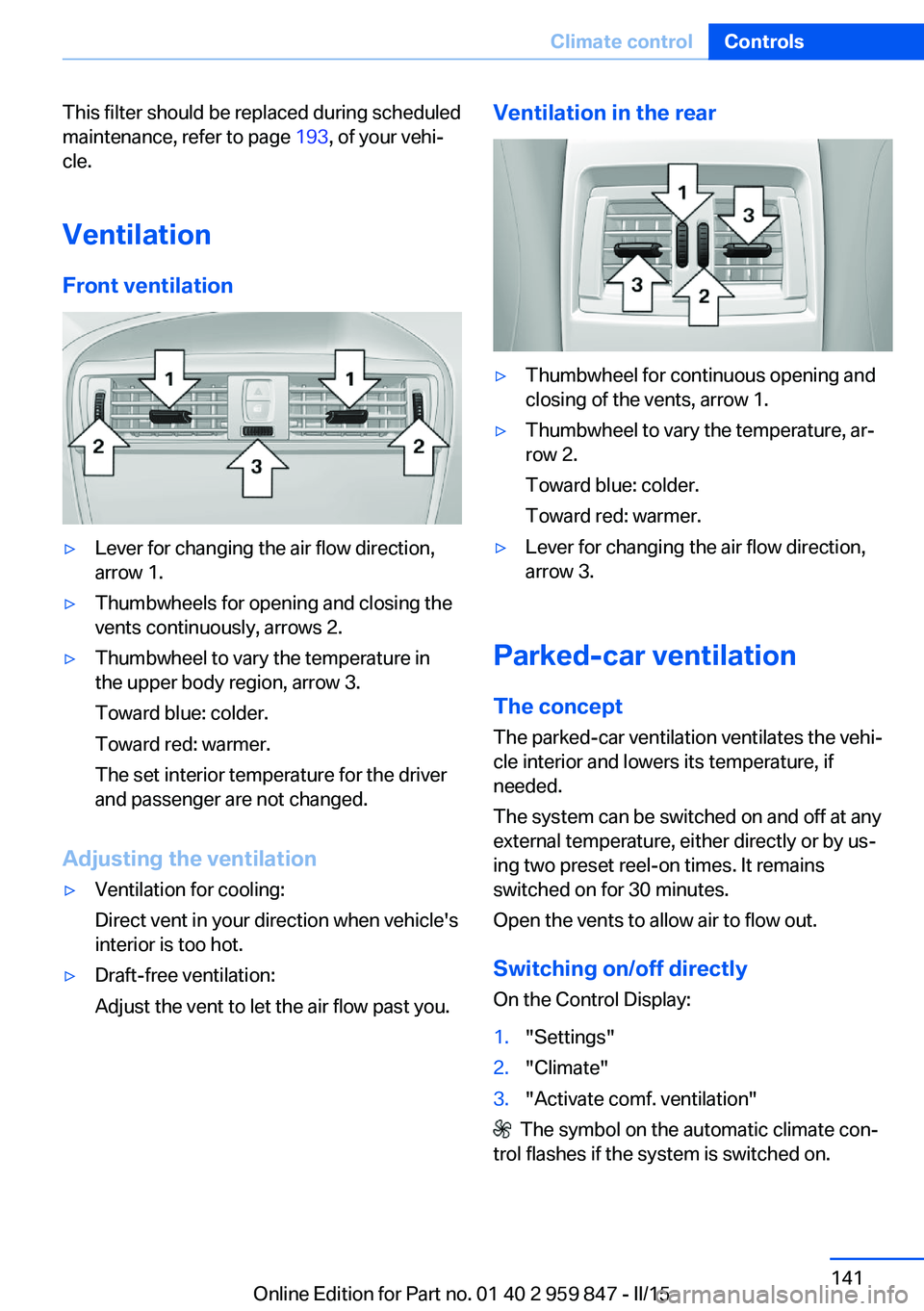
Front ventilation▷Lever for changing the air flow direction,
arrow 1.▷Thumbwheels for opening and closing the
vents continuously, arrows 2.▷Thumbwheel to vary the temperature in
the upper body region, arrow 3.
Toward blue: colder.
Toward red: warmer.
The set interior temperature for the driver
and passenger are not changed.
Adjusting the ventilation
▷Ventilation for cooling:
Direct vent in your direction when vehicle's
interior is too hot.▷Draft-free ventilation:
Adjust the vent to let the air flow past you.Ventilation in the rear▷Thumbwheel for continuous opening and
closing of the vents, arrow 1.▷Thumbwheel to vary the temperature, ar‐
row 2.
Toward blue: colder.
Toward red: warmer.▷Lever for changing the air flow direction,
arrow 3.
Parked-car ventilation
The concept The parked-car ventilation ventilates the vehi‐
cle interior and lowers its temperature, if
needed.
The system can be switched on and off at any
external temperature, either directly or by us‐
ing two preset reel-on times. It remains
switched on for 30 minutes.
Open the vents to allow air to flow out.
Switching on/off directly
On the Control Display:
1."Settings"2."Climate"3."Activate comf. ventilation"
The symbol on the automatic climate con‐
trol flashes if the system is switched on.
Seite 141Climate controlControls141
Online Edition for Part no. 01 40 2 959 847 - II/15
Page 148 of 234
erases all programming of the buttons on
the interior rearview mirror.3.Hold the hand-held transmitter for the sys‐
tem to be controlled approx. 1 to 3 in/2.5 to
8 cm away from the buttons of the interior
rearview mirror. The required distance de‐
pends on the manual transmitter.4.Simultaneously press and hold the button
of the desired function on the hand-held
transmitter and the button to be program‐
med on the interior rearview mirror. The
LED on the interior rearview mirror will be‐
gin flashing slowly.5.Release both buttons as soon as the LED
flashes more rapidly. The LED flashing
faster indicates that the button on the inte‐
rior rearview mirror has been programmed.
If the LED does not flash faster after at
least 60 seconds, change the distance be‐
tween the interior rearview mirror and the
hand-held transmitter and repeat the step.
Several more attempts at different distan‐
ces may be necessary. Wait at least
15 seconds between attempts.
Canada: if programming with the hand-
held transmitter was interrupted, hold
down the interior rearview mirror button
and repeatedly press and release the
hand-held transmitter button for 2 sec‐
onds.6.To program other functions on other but‐
tons, repeat steps 3 to 5.
The systems can be controlled using the inte‐
rior rearview mirror buttons.
Special feature of the alternating-
code wireless system
If you are unable to operate the system after
repeated programming, please check if the
system to be controlled features an alternat‐
ing-code system.
Read the system's operating manual, or press
the programmed button on the interior rear‐
view mirror longer. If the LED on the interior
rearview mirror starts flashing rapidly and then
stays lit constantly for 2 seconds, the system
features an alternating-code system. Flashing
and continuous illumination of the LED will re‐
peat for approximately 20 seconds.
For systems with an alternating-code system,
the universal garage door opener and the sys‐
tem also have to be synchronized.
Please read the operating manual to find out how to synchronize the system.
Synchronizing is easier with the aid of a sec‐
ond person.
To synchronize:1.Park the vehicle within range of the re‐
mote-controlled system.2.Program the relevant button on the interior
rearview mirror as described.3.Locate and press the synchronizing button
on the system being programmed. You
have approx. 30 seconds for the next step.4.Hold down the programmed button on the
interior rearview mirror for approximately
3 seconds and then release it. If necessary,
repeat this step up to three times in order
to finish synchronization. Once synchroni‐
zation is complete, the programmed func‐
tion will be carried out.
Reprogramming individual buttons
1.Switch on the ignition.2.Press and hold the interior rearview mirror
button to be programmed.3.As soon as the interior rearview mirror LED
starts flashing slowly, hold the hand-held
transmitter for the system to be controlled
approx. 1 to 3 in/2.5 to 8 cm away from the
buttons of the interior rearview mirror. The
required distance depends on the manual
transmitter.Seite 144ControlsInterior equipment144
Online Edition for Part no. 01 40 2 959 847 - II/15
Page 167 of 234
Overview
The system includes the following
EfficientDynamics functions and displays:▷ECO PRO bonus range, refer to page 163.▷ECO PRO tips driving instruction, refer to
page 164▷ECO PRO climate control, refer to
page 163.▷ECO PRO coasting driving status, refer to
page 165.▷ECO PRO driving style analysis, refer to
page 166.
Activate ECO PRO
Press button repeatedly until ECO
PRO is displayed in the instrument
cluster.
Configuring ECO PRO
Via the Driving Dynamics Control
1.Activate ECO PRO.2."Configure ECO PRO"3.Configure the program.
Via the iDrive
1."Settings"2."ECO PRO mode"
Or
1."Settings"2."Driving mode"3."Configure ECO PRO"
Configure the program.
ECO PRO Tip
▷"Tip at:":
Adjust the ECO PRO speed.▷"ECO PRO speed warning":
The output is reduced once the set ECO
PRO speed is reached.Coasting
Fuel-efficiency can be optimized by disengag‐
ing the engine and Coasting, refer to
page 165, with the engine idling.
This function is only available in ECO PRO
mode.
ECO PRO climate control
"ECO PRO climate control"
Climate control is set to be fuel-efficient.
By making a slight change to the set tempera‐
ture, or slowly adjusting the rate of heating or
cooling of the car's interior, fuel consumption
can be economized.
The mirror heating is made available when out‐
side temperatures are very cold.
ECO PRO potential Shows potential savings with the current set‐
tings in percentages.
Display in the instrument cluster
ECO PRO bonus range An adjusted driving style helps
you extend your driving range.
This may be displayed as the
bonus range in the instrument
cluster.
The bonus range is shown in the range display.
The bonus range is automatically reset every
time the vehicle is refueled.Seite 163Saving fuelDriving tips163
Online Edition for Part no. 01 40 2 959 847 - II/15
Page 200 of 234
Danger of burns
Only change bulbs when they are cool;
otherwise, there is a danger of getting
burned.◀
Working on the lighting system
When working on the lighting system,
you should always reel off the lights affected to
prevent short circuits.
To avoid possible injury or equipment damage
when replacing bulbs, observe any instructions
provided by the bulb manufacturer.◀
Do not perform work/bulb replacement
on xenon headlights
Have any work on the xenon lighting system,
including bulb replacement, performed only by
a service center. Due to the high voltage
present in the system, there is a danger of fatal
injuries if work is carried out improperly.◀
Do not touch the bulbs
Do not touch the glass of new bulbs with
your bare hands, as even minute amounts of
contamination will burn into the bulb's surface
and reduce its service life.
Use a clean tissue, cloth or something similar,
or hold the bulb by its base.◀
Light-emitting diodes (LEDs)
Some items of equipment use light-emitting
diodes installed behind a cover as a light
source.
These light-emitting diodes, which are related
to conventional lasers, are officially designated as Class 1 light-emitting diodes.
Do not remove the covers
Do not remove the covers, and never
stare into the unfiltered light for several hours;
otherwise, irritation of the retina could result.◀Headlight glass
Condensation can form on the inside of the ex‐
ternal lights in cool or humid weather. When
driving with the light switched on, the conden‐
sation evaporates after a short time. The head‐
light glass does not need to be changed.
If the headlights do not dim despite driving
with the light switched on, increasing humidity
forms, e. g. water droplets in the light, have the service center check this.
Headlight setting The headlight adjustments can be affected by
changing lights and bulbs. Have the head‐
lights' settings checked and corrected by serv‐
ice after a replacement.
Front lights, bulb replacement
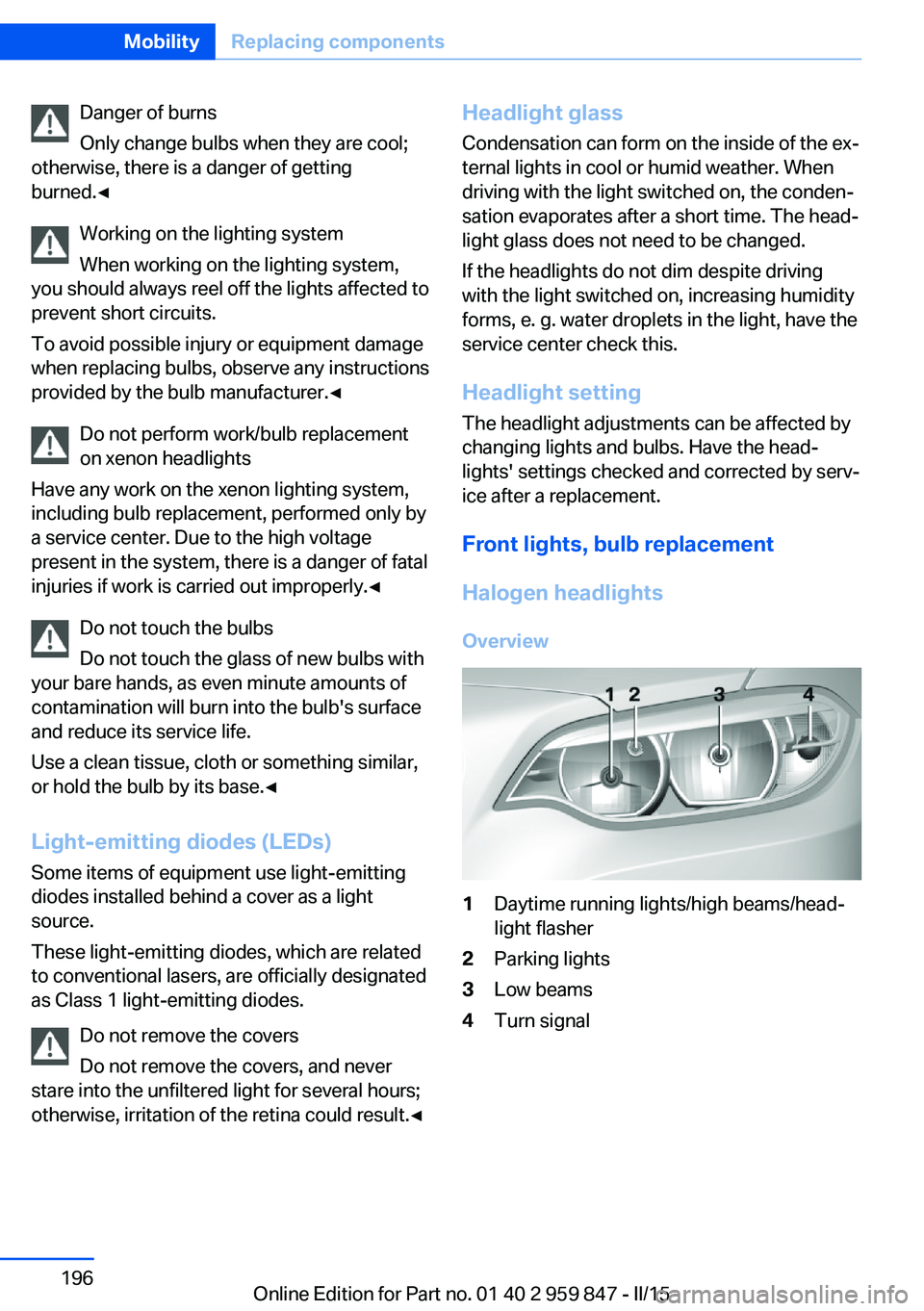
Halogen headlights
Overview1Daytime running lights/high beams/head‐
light flasher2Parking lights3Low beams4Turn signalSeite 196MobilityReplacing components196
Online Edition for Part no. 01 40 2 959 847 - II/15
Page 225 of 234
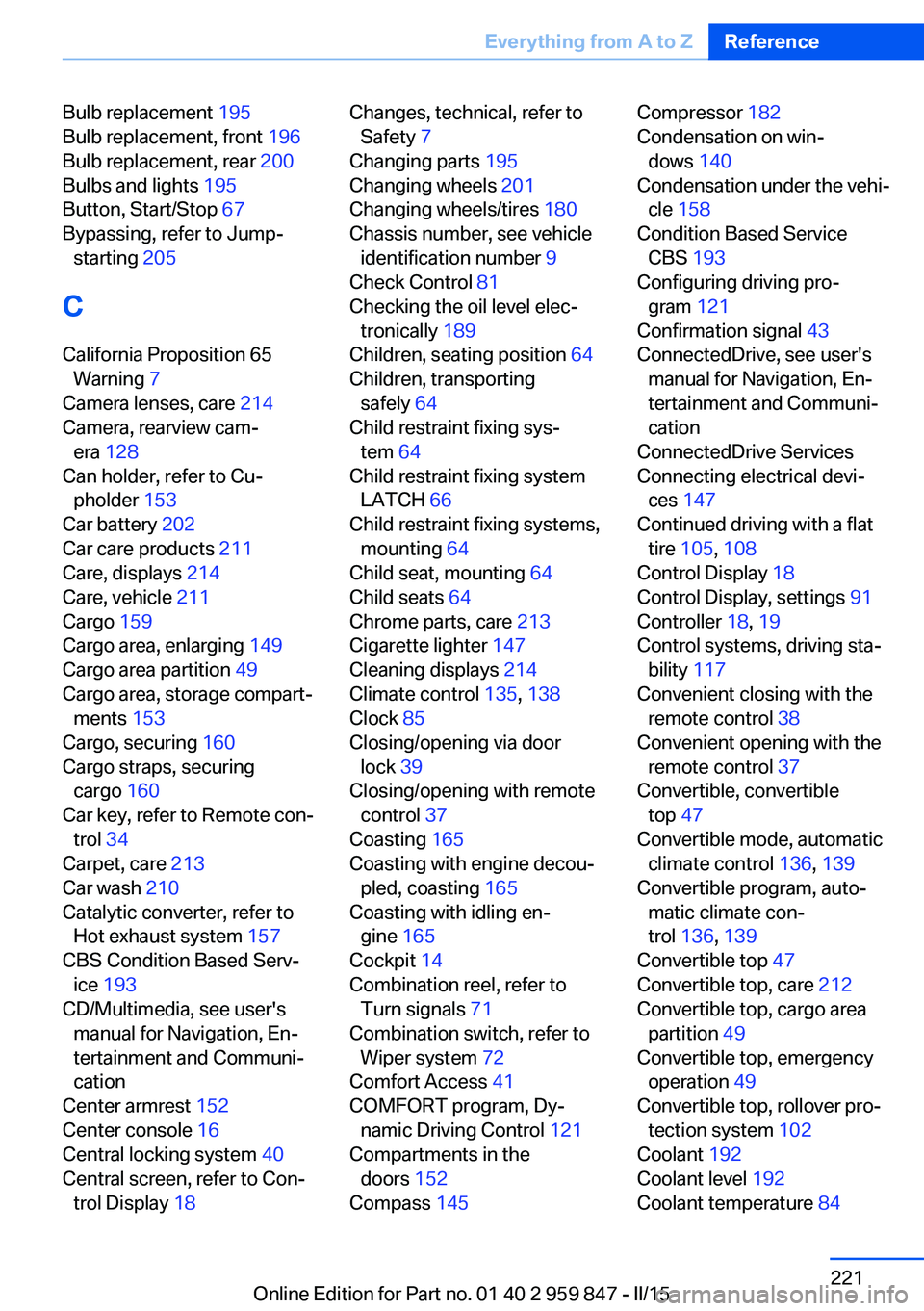
Bulb replacement 195
Bulb replacement, front 196
Bulb replacement, rear 200
Bulbs and lights 195
Button, Start/Stop 67
Bypassing, refer to Jump- starting 205
C
California Proposition 65 Warning 7
Camera lenses, care 214
Camera, rearview cam‐ era 128
Can holder, refer to Cu‐ pholder 153
Car battery 202
Car care products 211
Care, displays 214
Care, vehicle 211
Cargo 159
Cargo area, enlarging 149
Cargo area partition 49
Cargo area, storage compart‐ ments 153
Cargo, securing 160
Cargo straps, securing cargo 160
Car key, refer to Remote con‐ trol 34
Carpet, care 213
Car wash 210
Catalytic converter, refer to Hot exhaust system 157
CBS Condition Based Serv‐ ice 193
CD/Multimedia, see user's manual for Navigation, En‐
tertainment and Communi‐
cation
Center armrest 152
Center console 16
Central locking system 40
Central screen, refer to Con‐ trol Display 18 Changes, technical, refer to
Safety 7
Changing parts 195
Changing wheels 201
Changing wheels/tires 180
Chassis number, see vehicle identification number 9
Check Control 81
Checking the oil level elec‐ tronically 189
Children, seating position 64
Children, transporting safely 64
Child restraint fixing sys‐ tem 64
Child restraint fixing system LATCH 66
Child restraint fixing systems, mounting 64
Child seat, mounting 64
Child seats 64
Chrome parts, care 213
Cigarette lighter 147
Cleaning displays 214
Climate control 135, 138
Clock 85
Closing/opening via door lock 39
Closing/opening with remote control 37
Coasting 165
Coasting with engine decou‐ pled, coasting 165
Coasting with idling en‐ gine 165
Cockpit 14
Combination reel, refer to Turn signals 71
Combination switch, refer to Wiper system 72
Comfort Access 41
COMFORT program, Dy‐ namic Driving Control 121
Compartments in the doors 152
Compass 145 Compressor 182
Condensation on win‐ dows 140
Condensation under the vehi‐ cle 158
Condition Based Service CBS 193
Configuring driving pro‐ gram 121
Confirmation signal 43
ConnectedDrive, see user's manual for Navigation, En‐
tertainment and Communi‐
cation
ConnectedDrive Services
Connecting electrical devi‐ ces 147
Continued driving with a flat tire 105 , 108
Control Display 18
Control Display, settings 91
Controller 18, 19
Control systems, driving sta‐ bility 117
Convenient closing with the remote control 38
Convenient opening with the remote control 37
Convertible, convertible top 47
Convertible mode, automatic climate control 136, 139
Convertible program, auto‐ matic climate con‐
trol 136 , 139
Convertible top 47
Convertible top, care 212
Convertible top, cargo area partition 49
Convertible top, emergency operation 49
Convertible top, rollover pro‐ tection system 102
Coolant 192
Coolant level 192
Coolant temperature 84 Seite 221Everything from A to ZReference221
Online Edition for Part no. 01 40 2 959 847 - II/15
Page 226 of 234
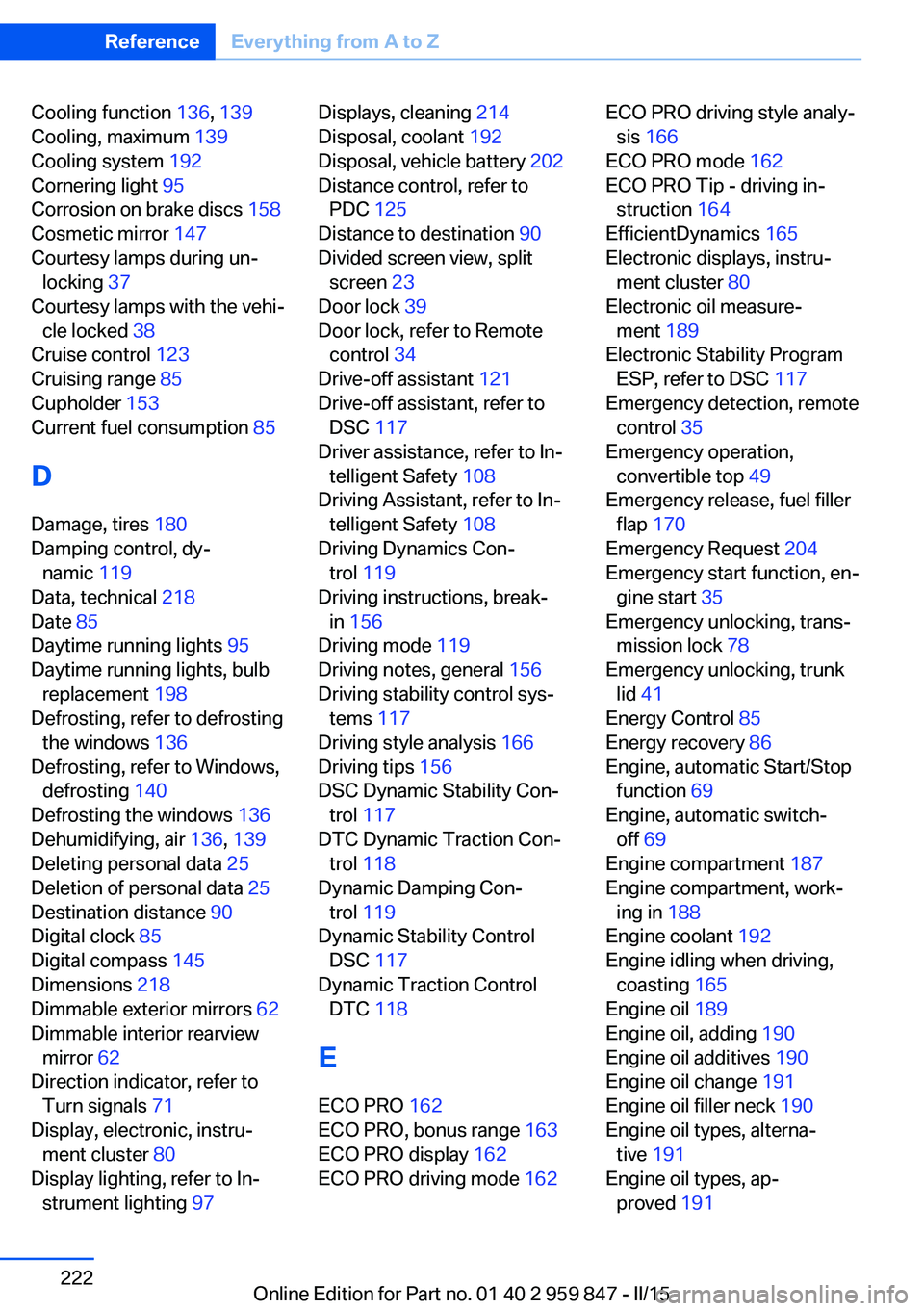
Cooling function 136, 139
Cooling, maximum 139
Cooling system 192
Cornering light 95
Corrosion on brake discs 158
Cosmetic mirror 147
Courtesy lamps during un‐ locking 37
Courtesy lamps with the vehi‐ cle locked 38
Cruise control 123
Cruising range 85
Cupholder 153
Current fuel consumption 85
D
Damage, tires 180
Damping control, dy‐ namic 119
Data, technical 218
Date 85
Daytime running lights 95
Daytime running lights, bulb replacement 198
Defrosting, refer to defrosting the windows 136
Defrosting, refer to Windows, defrosting 140
Defrosting the windows 136
Dehumidifying, air 136, 139
Deleting personal data 25
Deletion of personal data 25
Destination distance 90
Digital clock 85
Digital compass 145
Dimensions 218
Dimmable exterior mirrors 62
Dimmable interior rearview mirror 62
Direction indicator, refer to Turn signals 71
Display, electronic, instru‐ ment cluster 80
Display lighting, refer to In‐ strument lighting 97 Displays, cleaning 214
Disposal, coolant 192
Disposal, vehicle battery 202
Distance control, refer to PDC 125
Distance to destination 90
Divided screen view, split screen 23
Door lock 39
Door lock, refer to Remote control 34
Drive-off assistant 121
Drive-off assistant, refer to DSC 117
Driver assistance, refer to In‐ telligent Safety 108
Driving Assistant, refer to In‐ telligent Safety 108
Driving Dynamics Con‐ trol 119
Driving instructions, break- in 156
Driving mode 119
Driving notes, general 156
Driving stability control sys‐ tems 117
Driving style analysis 166
Driving tips 156
DSC Dynamic Stability Con‐ trol 117
DTC Dynamic Traction Con‐ trol 118
Dynamic Damping Con‐ trol 119
Dynamic Stability Control DSC 117
Dynamic Traction Control DTC 118
E
ECO PRO 162
ECO PRO, bonus range 163
ECO PRO display 162
ECO PRO driving mode 162 ECO PRO driving style analy‐
sis 166
ECO PRO mode 162
ECO PRO Tip - driving in‐ struction 164
EfficientDynamics 165
Electronic displays, instru‐ ment cluster 80
Electronic oil measure‐ ment 189
Electronic Stability Program ESP, refer to DSC 117
Emergency detection, remote control 35
Emergency operation, convertible top 49
Emergency release, fuel filler flap 170
Emergency Request 204
Emergency start function, en‐ gine start 35
Emergency unlocking, trans‐ mission lock 78
Emergency unlocking, trunk lid 41
Energy Control 85
Energy recovery 86
Engine, automatic Start/Stop function 69
Engine, automatic switch- off 69
Engine compartment 187
Engine compartment, work‐ ing in 188
Engine coolant 192
Engine idling when driving, coasting 165
Engine oil 189
Engine oil, adding 190
Engine oil additives 190
Engine oil change 191
Engine oil filler neck 190
Engine oil types, alterna‐ tive 191
Engine oil types, ap‐ proved 191 Seite 222ReferenceEverything from A to Z222
Online Edition for Part no. 01 40 2 959 847 - II/15
Page 231 of 234
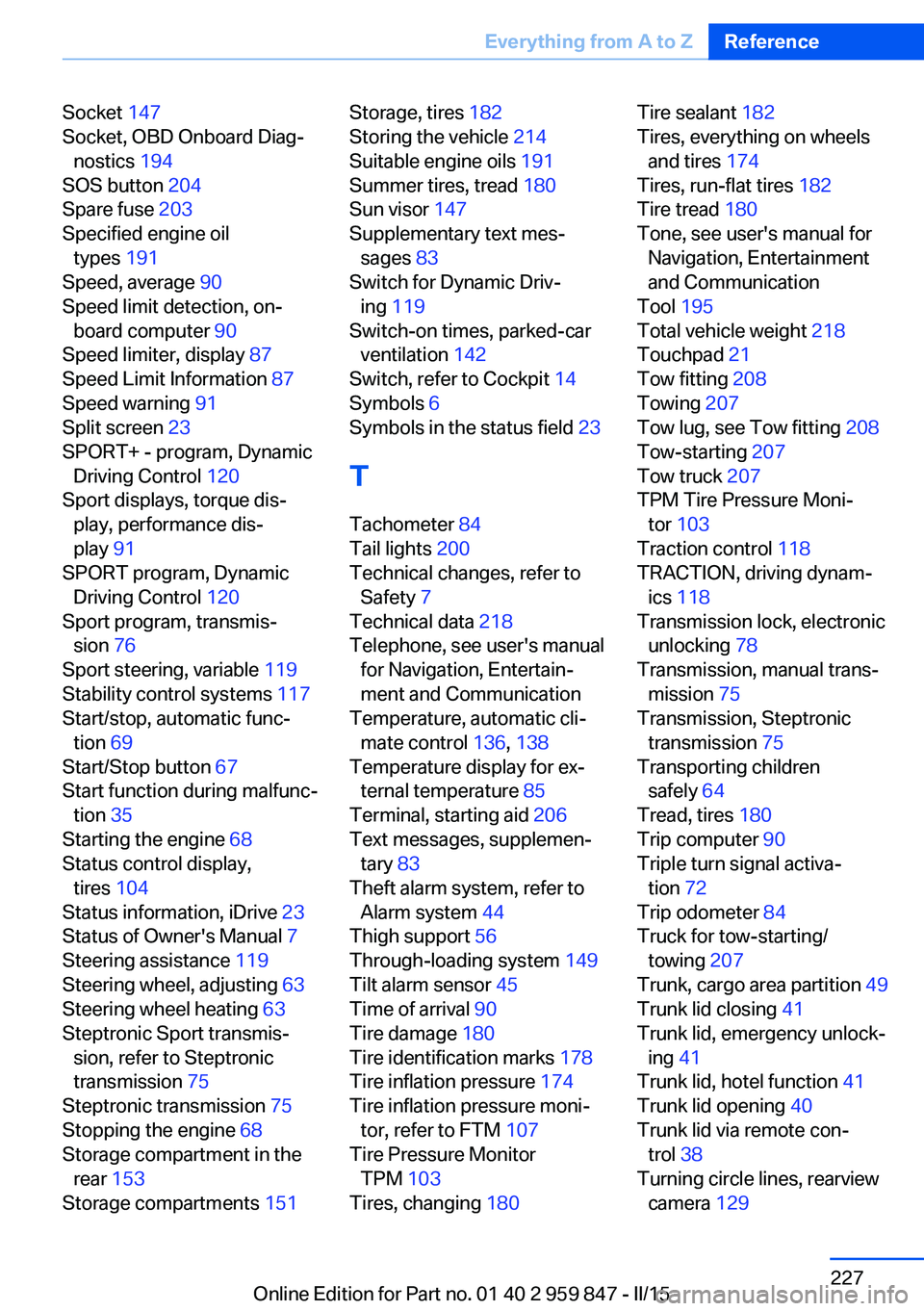
Socket 147
Socket, OBD Onboard Diag‐ nostics 194
SOS button 204
Spare fuse 203
Specified engine oil types 191
Speed, average 90
Speed limit detection, on- board computer 90
Speed limiter, display 87
Speed Limit Information 87
Speed warning 91
Split screen 23
SPORT+ - program, Dynamic Driving Control 120
Sport displays, torque dis‐ play, performance dis‐
play 91
SPORT program, Dynamic Driving Control 120
Sport program, transmis‐ sion 76
Sport steering, variable 119
Stability control systems 117
Start/stop, automatic func‐ tion 69
Start/Stop button 67
Start function during malfunc‐ tion 35
Starting the engine 68
Status control display, tires 104
Status information, iDrive 23
Status of Owner's Manual 7
Steering assistance 119
Steering wheel, adjusting 63
Steering wheel heating 63
Steptronic Sport transmis‐ sion, refer to Steptronic
transmission 75
Steptronic transmission 75
Stopping the engine 68
Storage compartment in the rear 153
Storage compartments 151 Storage, tires 182
Storing the vehicle 214
Suitable engine oils 191
Summer tires, tread 180
Sun visor 147
Supplementary text mes‐ sages 83
Switch for Dynamic Driv‐ ing 119
Switch-on times, parked-car ventilation 142
Switch, refer to Cockpit 14
Symbols 6
Symbols in the status field 23
T Tachometer 84
Tail lights 200
Technical changes, refer to Safety 7
Technical data 218
Telephone, see user's manual for Navigation, Entertain‐
ment and Communication
Temperature, automatic cli‐ mate control 136, 138
Temperature display for ex‐ ternal temperature 85
Terminal, starting aid 206
Text messages, supplemen‐ tary 83
Theft alarm system, refer to Alarm system 44
Thigh support 56
Through-loading system 149
Tilt alarm sensor 45
Time of arrival 90
Tire damage 180
Tire identification marks 178
Tire inflation pressure 174
Tire inflation pressure moni‐ tor, refer to FTM 107
Tire Pressure Monitor TPM 103
Tires, changing 180 Tire sealant 182
Tires, everything on wheels and tires 174
Tires, run-flat tires 182
Tire tread 180
Tone, see user's manual for Navigation, Entertainment
and Communication
Tool 195
Total vehicle weight 218
Touchpad 21
Tow fitting 208
Towing 207
Tow lug, see Tow fitting 208
Tow-starting 207
Tow truck 207
TPM Tire Pressure Moni‐ tor 103
Traction control 118
TRACTION, driving dynam‐ ics 118
Transmission lock, electronic unlocking 78
Transmission, manual trans‐ mission 75
Transmission, Steptronic transmission 75
Transporting children safely 64
Tread, tires 180
Trip computer 90
Triple turn signal activa‐ tion 72
Trip odometer 84
Truck for tow-starting/ towing 207
Trunk, cargo area partition 49
Trunk lid closing 41
Trunk lid, emergency unlock‐ ing 41
Trunk lid, hotel function 41
Trunk lid opening 40
Trunk lid via remote con‐ trol 38
Turning circle lines, rearview camera 129 Seite 227Everything from A to ZReference227
Online Edition for Part no. 01 40 2 959 847 - II/15