trunk BMW 3 SERIES 2010 User Guide
[x] Cancel search | Manufacturer: BMW, Model Year: 2010, Model line: 3 SERIES, Model: BMW 3 SERIES 2010Pages: 274, PDF Size: 8.69 MB
Page 119 of 274
Driving tips
117Reference
At a glance
Controls
Communications
Navigation
Entertainment
Mobility
Drive defensively
Avoid unnecessary acceleration and braking
maneuvers. To do so, keep an adequate dis-
tance between you and the vehicle in front of
you. A defensive and smooth driving style
keeps fuel consumption down.
Avoid high engine speeds
Only use first gear when setting off. In second
and higher gears, accelerate without hesitation
or pauses. When accelerating, shift up before
reaching high engine speeds.
When you reach the desired speed, shift into
the highest applicable gear and drive with the
engine speed as low as possible and at a con-
stant speed.
As a rule: driving at low engine speeds lowers
fuel consumption and reduces wear.
Coasting
When approaching a red light, take your foot off
the accelerator and coast to a stop in the high-
est applicable gear.
O n a d o w n h il l s lo p e , t a k e y o u r f o o t o f f t h e a c c el -
erator and coast in a suitable gear.
The fuel supply is interrupted when coasting.
Switch off the engine during lengthy
stops
Switch off the engine when stopping for lengthy
periods, e.g. at traffic lights, railroad crossings
or in traffic congestions. You achieve fuel sav-
ings even if standing time is as short as approx.
4 seconds.
Switch off functions you do not need at
the moment
Functions such as the air conditioner, seat
heating or rear window defroster draw large
amounts of power and consume additional fuel.
Especially in city traffic and in stop and go driv-
ing they have a considerable impact. Therefore,
switch these functions off when they are not
really needed.
Have the vehicle serviced
Have the vehicle serviced regularly to achieve
good economy and a long vehicle life. BMW
recommends having the vehicle serviced at a
BMW center. Also note the BMW service sys-
tem, refer to page223.
General driving notes
Close the trunk lid/tailgate
Operate the vehicle only when the trunk
lid/tailgate and rear window are closed.
Otherwise, exhaust fumes could enter the inte-
rior of the vehicle.<
If the vehicle must be driven with the trunk lid/
tailgate open:
1.Close all windows and the glass roof.
2.Greatly increase the air volume of the auto-
matic climate control system, refer to
page98.
Hot exhaust system
In all vehicles, extremely high tempera-
tures are generated in the exhaust sys-
tem. Do not remove the heat shields installed
adjacent to various sections of the exhaust sys-
tem, and never apply undercoating to them.
When driving, standing at idle and while park-
ing, take care to avoid possible contact
between the hot exhaust system and any highly
flammable materials such as hay, leaves, grass,
etc. Such contact could lead to a fire, with the
risk of serious personal injuries and property
damage. Do not touch hot exhaust tail pipes.
Otherwise, there is a risk of burns.<
Diesel particulate filter*
The diesel particulate filter collects soot parti-
cles and burns them periodically at high tem-
peratures. This cleaning process takes several
minutes. During cleaning, you may notice that
the engine temporarily runs less smoothly and
that a somewhat higher engine speed is neces-
sary to achieve the accustomed performance.
Also, noises may be heard and a slight amount
of smoke may emerge from the exhaust, even
Page 123 of 274

Driving tips
121Reference
At a glance
Controls
Communications
Navigation
Entertainment
Mobility
Loading roof-mounted luggage rack
Because roof racks raise the vehicle's center of
gravity when loaded, they have a major effect on
vehicle handling and steering response.
You should therefore always remember not to
exceed the approved roof load capacity, the
approved gross vehicle weight or the axle loads
when loading the rack.
You can find the applicable data under Weights
on page247.
The roof load must be distributed uniformly and
should not be too large in area. Heavy items
should always be placed at the bottom. Be sure
that adequate clearance is maintained for rais-
ing the glass roof, and that objects do not
project into the opening path of the trunk lid/
tailgate.
Fasten roof-mounted cargo correctly and
securely to prevent it from shifting or falling off
during the trip.
Drive smoothly. Avoid sudden acceleration and
braking maneuvers. Take corners gently.
Page 234 of 274
Replacing components
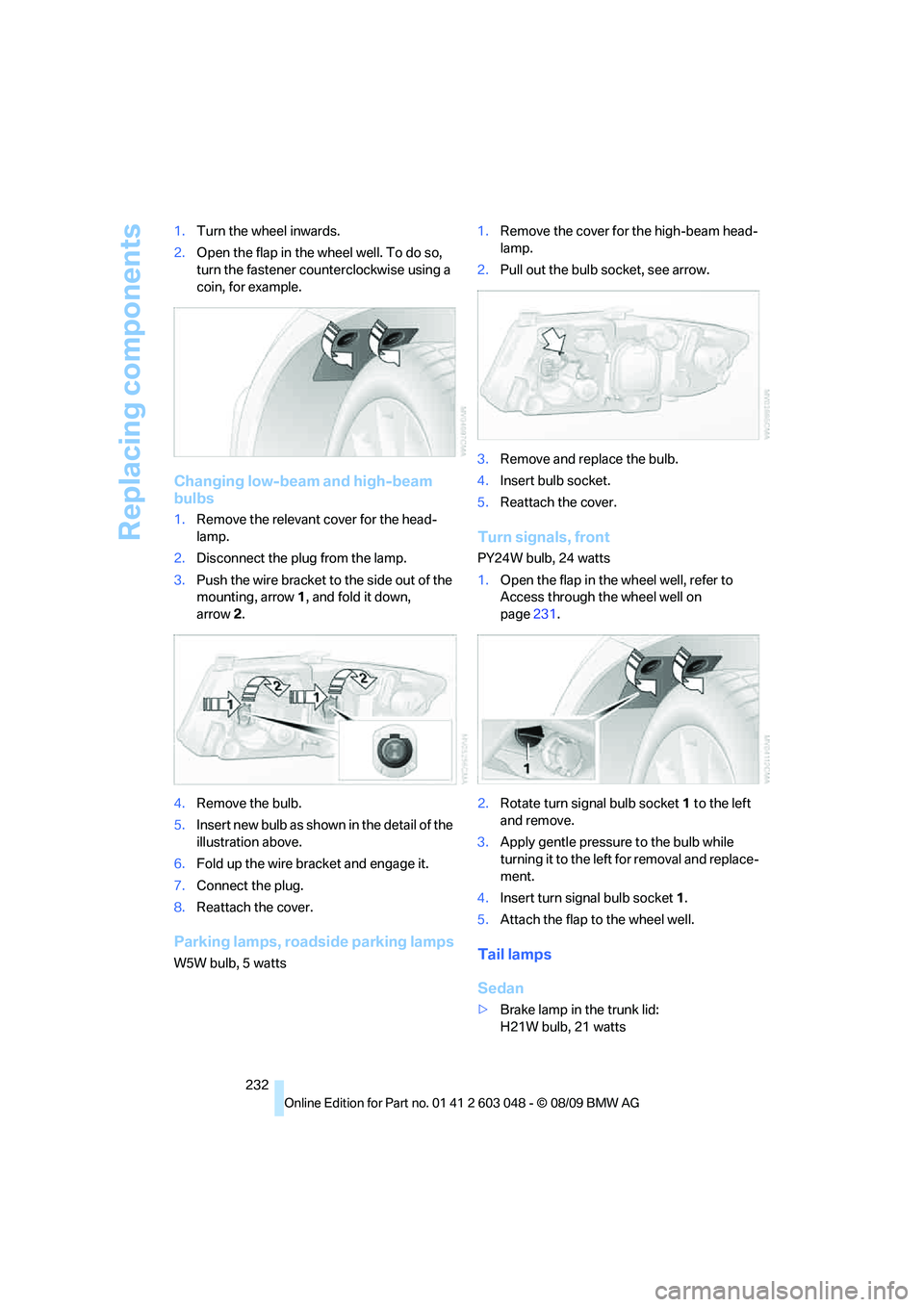
232 1.Turn the wheel inwards.
2.Open the flap in the wheel well. To do so,
turn the fastener counterclockwise using a
coin, for example.
Changing low-beam and high-beam
bulbs
1.Remove the relevant cover for the head-
lamp.
2.Disconnect the plug from the lamp.
3.Push the wire bracket to the side out of the
mounting, arrow1, and fold it down,
arrow2.
4.Remove the bulb.
5.Insert new bulb as shown in the detail of the
illustration above.
6.Fold up the wire bracket and engage it.
7.Connect the plug.
8.Reattach the cover.
Parking lamps, roadside parking lamps
W5W bulb, 5 watts1.Remove the cover for the high-beam head-
lamp.
2.Pull out the bulb socket, see arrow.
3.Remove and replace the bulb.
4.Insert bulb socket.
5.Reattach the cover.
Turn signals, front
PY24W bulb, 24 watts
1.Open the flap in the wheel well, refer to
Access through the wheel well on
page231.
2.Rotate turn signal bulb socket 1 to the left
and remove.
3.Apply gentle pressure to the bulb while
turning it to the left for removal and replace-
ment.
4.Insert turn signal bulb socket 1.
5.Attach the flap to the wheel well.
Tail lamps
Sedan
>Brake lamp in the trunk lid:
H21W bulb, 21 watts
Page 235 of 274
Mobility
233Reference
At a glance
Controls
Driving tips
Communications
Navigation
Entertainment
>Backup lamp:
W16W bulb, 16 watts
>Other lamps:
P21W bulb, 21 watts
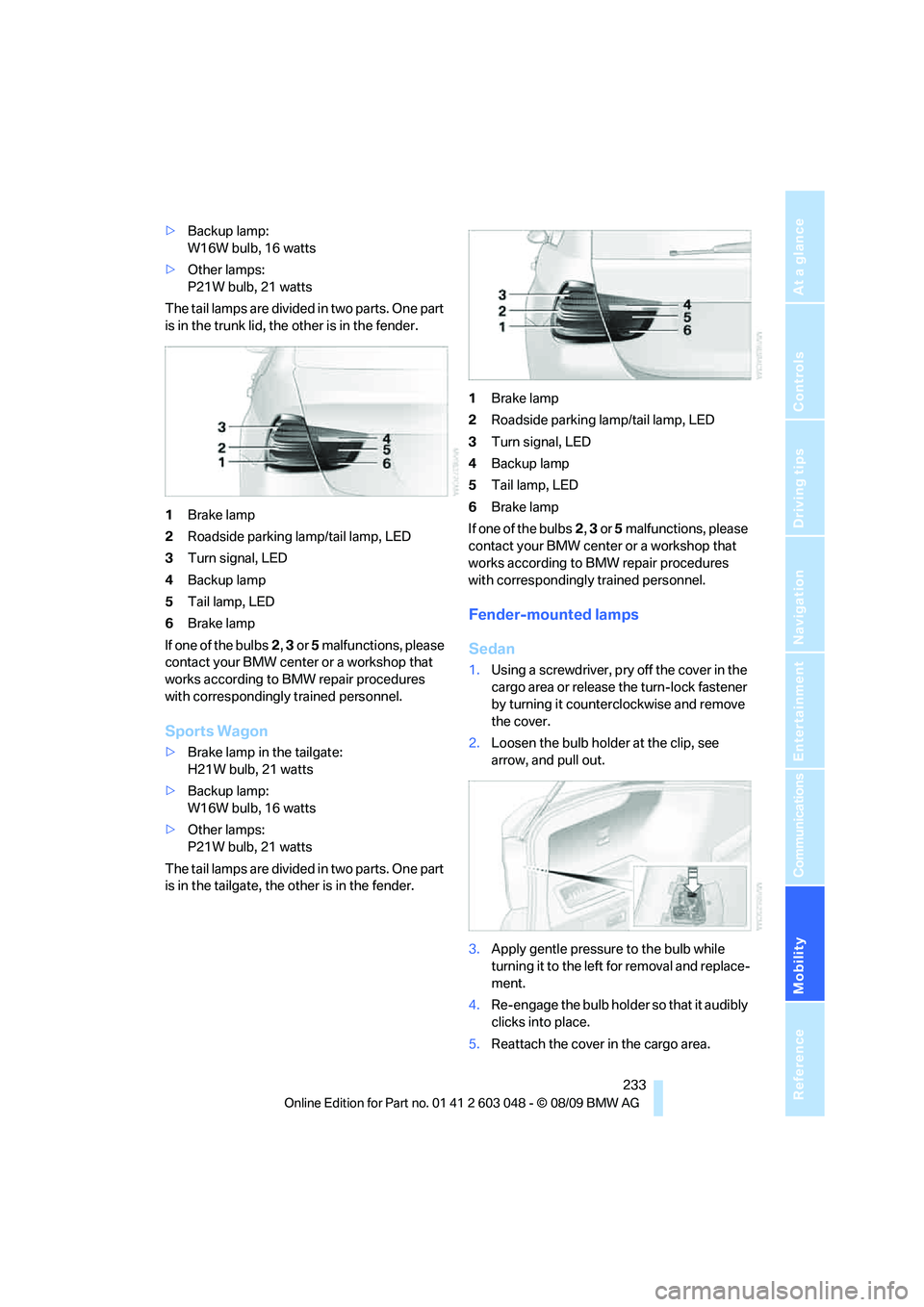
The tail lamps are divided in two parts. One part
is in the trunk lid, the other is in the fender.
1Brake lamp
2Roadside parking lamp/tail lamp, LED
3Turn signal, LED
4Backup lamp
5Tail lamp, LED
6Brake lamp
If one of the bulbs2, 3 or 5 malfunctions, please
contact your BMW center or a workshop that
works according to BMW repair procedures
with correspondingly trained personnel.
Sports Wagon
>Brake lamp in the tailgate:
H21W bulb, 21 watts
>Backup lamp:
W16W bulb, 16 watts
>Other lamps:
P21W bulb, 21 watts
The tail lamps are divided in two parts. One part
is in the tailgate, the other is in the fender.1Brake lamp
2Roadside parking lamp/tail lamp, LED
3Turn signal, LED
4Backup lamp
5Tail lamp, LED
6Brake lamp
If one of the bulbs2, 3 or 5 malfunctions, please
contact your BMW center or a workshop that
works according to BMW repair procedures
with correspondingly trained personnel.
Fender-mounted lamps
Sedan
1.Using a screwdriver, pry off the cover in the
cargo area or release the turn-lock fastener
by turning it counterclockwise and remove
the cover.
2.Loosen the bulb holder at the clip, see
arrow, and pull out.
3.Apply gentle pressure to the bulb while
turning it to the left for removal and replace-
ment.
4.Re-engage the bulb holder so that it audibly
clicks into place.
5.Reattach the cover in the cargo area.
Page 236 of 274
Replacing components
234
Sports Wagon
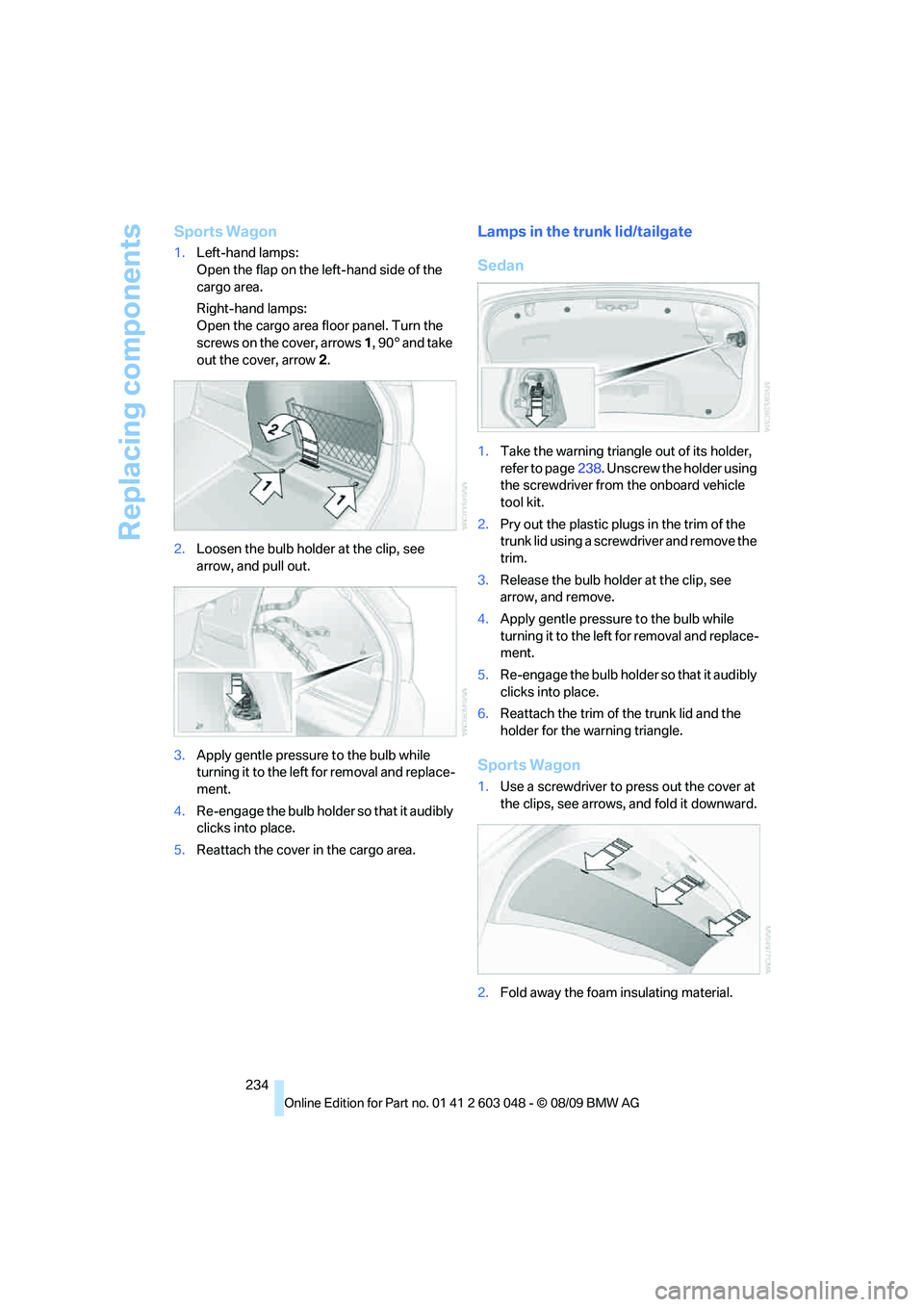
1.Left-hand lamps:
Open the flap on the left-hand side of the
cargo area.
Right-hand lamps:
Open the cargo area floor panel. Turn the
screws on the cover, arrows 1, 90° and take
out the cover, arrow 2.
2.Loosen the bulb holder at the clip, see
arrow, and pull out.
3.Apply gentle pressure to the bulb while
turning it to the left for removal and replace-
ment.
4.Re-engage the bulb holder so that it audibly
clicks into place.
5.Reattach the cover in the cargo area.
Lamps in the trunk lid/tailgate
Sedan
1.Take the warning triangle out of its holder,
refer to page238. Unscrew the holder using
the screwdriver from the onboard vehicle
tool kit.
2.Pry out the plastic plugs in the trim of the
trunk lid using a screwdriver and remove the
trim.
3.Release the bulb holder at the clip, see
arrow, and remove.
4.Apply gentle pressure to the bulb while
turning it to the left for removal and replace-
ment.
5.Re-engage the bulb holder so that it audibly
clicks into place.
6.Reattach the trim of the trunk lid and the
holder for the warning triangle.
Sports Wagon
1.Use a screwdriver to press out the cover at
the clips, see arrows, and fold it downward.
2.Fold away the foam insulating material.
Page 240 of 274
Giving and receiving assistance
238 ularly and replace any items in good time, if nec-
essary.
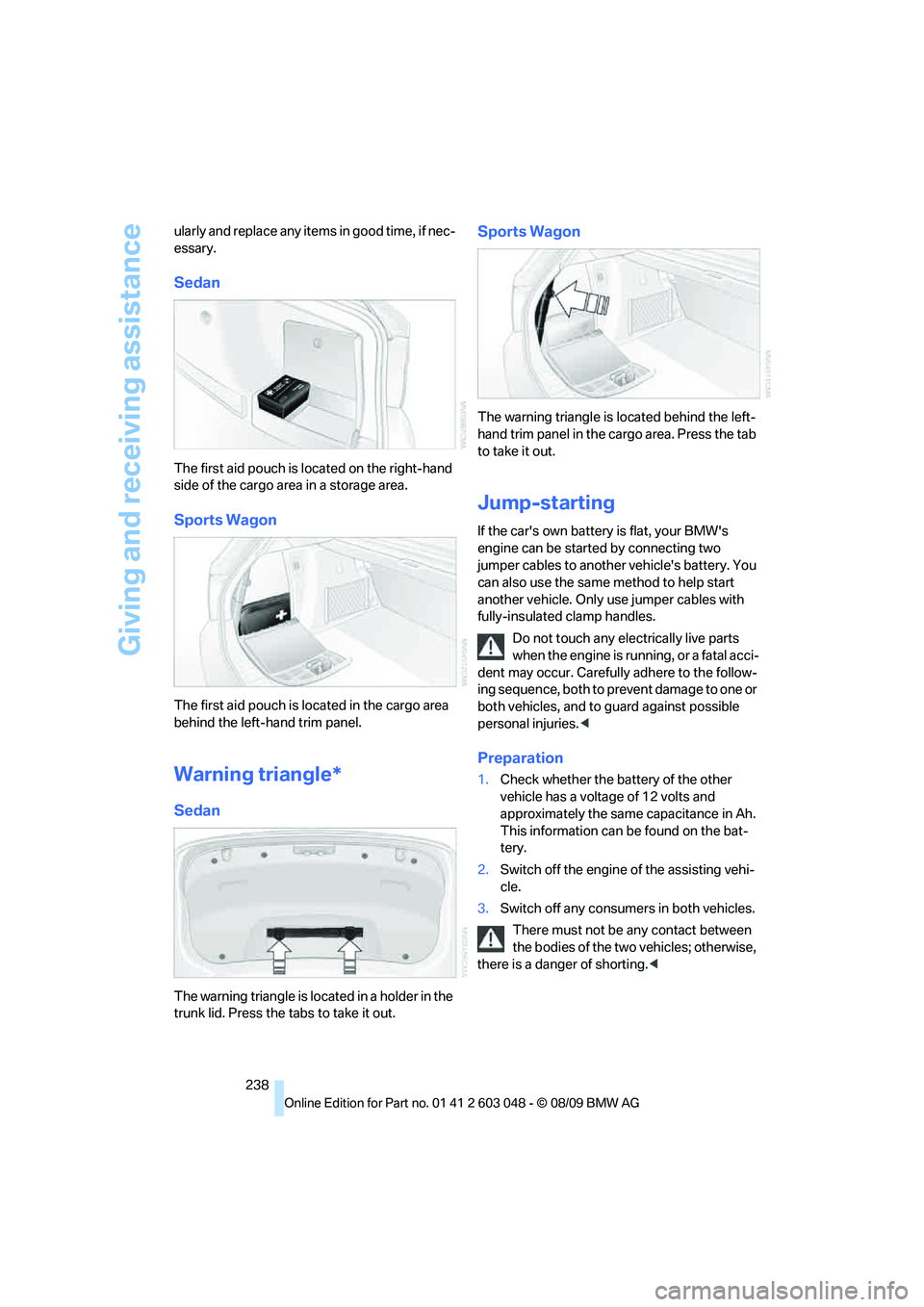
Sedan
The first aid pouch is located on the right-hand
side of the cargo area in a storage area.
Sports Wagon
The first aid pouch is located in the cargo area
behind the left-hand trim panel.
Warning triangle*
Sedan
The warning triangle is located in a holder in the
trunk lid. Press the tabs to take it out.
Sports Wagon
The warning triangle is located behind the left-
hand trim panel in the cargo area. Press the tab
to take it out.
Jump-starting
If the car's own battery is flat, your BMW's
engine can be started by connecting two
jumper cables to another vehicle's battery. You
can also use the same method to help start
another vehicle. Only use jumper cables with
fully-insulated clamp handles.
Do not touch any electrically live parts
when the engine is running, or a fatal acci-
dent may occur. Carefully adhere to the follow-
ing sequence, both to prevent damage to one or
both vehicles, and to guard against possible
personal injuries.<
Preparation
1.Check whether the battery of the other
vehicle has a voltage of 12 volts and
approximately the same capacitance in Ah.
This information can be found on the bat-
tery.
2.Switch off the engine of the assisting vehi-
cle.
3.Switch off any consumers in both vehicles.
There must not be any contact between
the bodies of the two vehicles; otherwise,
there is a danger of shorting.<
Page 258 of 274
Everything from A - Z
256 Care225
– automatic car washes225
– care products225
– carpets227
– CD/DVD drives228
– chrome parts226
– displays227
– exterior225
– fine wood parts227
– headlamps226
– high-pressure washer225
– interior227
– leather227
– light-alloy wheels226
– paintwork226
– plastic parts227
– rubber seals226
– safety belts227
– sensors and cameras227
– upholstery and cloth
trim227
– washing the car
manually226
– windows226
Cargo, securing120
Cargo area110
– capacity247
– Comfort Access35
– folding up the floor
panel112
– lamp, refer to Interior
lamps96
– opening from inside30
– opening from outside31
– partition net111
– roller cover110
Cargo area lid, refer to Trunk
lid/tailgate30
Cargo area net, refer to
Partition net111
Cargo loading119
– securing cargo120
– stowing cargo119
– vehicle119
Car jack
– jacking points235
Car key, refer to Integrated
key/remote control26Car phone
– installation location, refer to
Center armrest106
– refer to separate Owner's
Manual
Car phone, refer to
Telephone174
Car radio, refer to Radio147
Car shampoo
227
Catalytic converter, refer to
Hot exhaust system117
CD, audio playback155
CD changer155,159
– controls144
– fast forward/reverse157
– filling or emptying the
magazine160
– random play sequence156
– selecting a track155
– switching on/off144
– tone control144
– volume144
CD player155
– controls144
– fast forward/reverse157
– random play sequence156
– selecting a track155
– switching on/off144
– tone control144
– volume144
Center armrest106
Center brake lamp
– replacing bulb235
Center console, refer to
Around the center
console14
Central locking
– from inside30
– from outside27
Central locking system27
– Comfort Access34
– hotel function31
– setting unlocking
characteristics27
Changes, technical, refer to
For your own safety5
Changing bulbs, refer to
Lamps and bulbs229Changing the language on the
Control Display79
Changing the measurement
units on the Control
Display73
Changing wheels235
Chassis number, refer to
Engine compartment219
Check Control77
Check Gas Cap196
Child restraint fixing system
LATCH51
Child restraint systems50
Child safety locks53
Child seats, refer to
Transporting children
safely50
Chrome parts227
Chrome polish227
Cigarette lighter, refer to
Lighter108
Cleaning headlamps60
– washer fluid60
Cleaning your BMW, refer to
Care225
Clock69
– 12h/24h mode76
– setting the time and date76
– setting time75
Closing
– from inside30
– from outside27
Clothes hooks107
Cockpit10
Cold start, refer to Starting the
engine55
Combined instrument, refer to
Instrument cluster12
Comfort Access34
– replacing the battery35
Comfort access, refer to
Comfort Access34
Comfort area, refer to Around
the center console14
Compartment for remote
control, refer to Ignition
lock54
Compass104
Page 260 of 274
Everything from A - Z
258 Display, refer to iDrive
controls16
Display lighting, refer to
Instrument lighting95
Displays
– on the Control Display16
Displays, refer to Instrument
cluster12
Displays and controls10
Disposal
– coolant222
– remote control battery35
– vehicle battery236
Distance control, refer to
Active cruise control62
Distance remaining to service,
refer to Service
requirements73
Distance warning, refer to
Park Distance Control
PDC81
Door key, refer to Remote
control with integrated
key26
Door lock29
Doors, emergency
operation29
DOT Quality Grades214
Draft-free ventilation100
Drinks holders, refer to
Cupholders107
Drive-off assistance, refer to
Dynamic Stability Control
DSC82
Drive-off assistant84
Driving lamps, refer to Parking
lamps/low beams92
Driving notes116
Driving off on hills, refer to
Drive-off assistant84
Driving stability control
systems82
Driving through water118
Driving tips, refer to Driving
notes116
Dry air, refer to Cooling
function99
DSC Dynamic Stability
Control82DTC Dynamic Traction
Control82
– indicator/warning lamp82
DVD
– country codes157
– settings158
– video playback157
DVD menu158
DVD player, refer to CD
player155
DVD video157
Dynamic Brake Control
DBC82
Dynamic destination
guidance135
Dynamic Stability Control
DSC82
– indicator/warning lamp82
Dynamic Traction Control
DTC
– indicator/warning lamp83
E
EBV Electronic brake-force
distribution82
Eject button, refer to Buttons
on the CD/DVD player144
Electrical malfunction
– door lock29
– driver's door29
– fuel filler flap196
– glass roof37
– panorama glass roof39
– trunk lid31
Electric seat adjustment42
Electric steering wheel lock
– with Comfort Access34
Electronic brake-force
distribution EBV82
Electronic oil level check220
Electronic Stability Program
ESP, refer to Dynamic
Stability Control DSC82
Emergency actuation,
automatic transmission,
refer to Overriding selector
lever lock58Emergency operation
– fuel filler flap, manual
release196
Emergency operation, refer to
Closing manually
– glass roof37
– panorama glass roof39
Emergency operation, refer to
Manual operation
– door lock29
Emergency release
– trunk lid from inside32
Emergency Request237
Emergency services, refer to
Roadside Assistance237
Energy, saving
– saving fuel116
Energy-conscious driving,
refer to Energy Control70
Energy Control70
Engine
– breaking in116
– data244
– overheated, refer to Coolant
temperature70
– speed244
– starting55
– starting, Comfort Access34
– switching off55
Engine compartment219
Engine coolant, refer to
Coolant222
Engine oil
– adding221
– alternative oil types222
– BMW Maintenance
System223
– capacity248
– checking level219
– dipstick219
– intervals between changes,
refer to Service
requirements73
Engine output, refer to Engine
data244
Engine speed, refer to Engine
data244
Engine starting, refer to
Starting the engine55
Page 263 of 274
Reference 261
At a glance
Controls
Driving tips
Communications
Navigation
Entertainment
Mobility
Instructions for navigation
system, refer to Voice
instructions135
Instrument cluster12
Instrument lighting95
Instrument panel, refer to
Cockpit10
Integrated key26
Integrated universal remote
control102
Interactive map130
Interior lamps96
– remote control28
Interior motion sensor33
Interior rearview mirror48
– automatic dimming
feature48
– compass104
Interlock, refer to Disengaging
the remote control56
Intermittent mode of the
wipers59
Intersection, entering,
navigation126
iPod, connecting, refer to
AUX-IN port167
iPod, connecting, refer to USB
audio interface167
J
Jacking points235
Joystick, refer to iDrive16
Jumpering, refer to Jump-
starting238
Jump-starting238
K
Key, refer to Integrated key/
remote control26
Keyless go, refer to Comfort
Access34
Keyless opening and closing,
refer to Comfort Access34
Key Memory, refer to Personal
Profile26Kickdown57
– automatic transmission with
Steptronic57
Knock control197
L
Lamps
– automatic headlamp
control92
– parking lamps/low beams92
Lamps and bulbs, replacing
bulbs229
Lap-and-shoulder belt, refer
to Safety belts46
Lashing eyes, refer to
Securing cargo120
Last destinations128
LATCH child restraint fixing
system51
Leather care227
LED Light-emitting
diodes230
Length, refer to
Dimensions245
License plate lamp, replacing
bulb235
Light
– high-beam assistant94
Light-alloy wheels226
Light-emitting diodes
LED230
Lighter108
– connecting electrical
appliances108
Lighting
– instruments95
– lamps and bulbs229
– vehicle, refer to Lamps92
Light switch92
Limit, refer to Speed limit79
Load119
Load securing equipment,
refer to Securing cargo120
Lock buttons, doors, refer to
Locking30Locking
– adjusting confirmation
signal28
– from inside30
– from outside28
– without remote control, refer
to Comfort Access34
Locking and unlocking doors
– confirmation signals28
– from inside30
– from outside27
Low beam control, refer to
High-beam assistant94
Low-beam headlamps92
– automatic92
– replacing bulbs231
Lower back support, refer to
Lumbar support43
Luggage rack, refer to Roof-
mounted luggage rack120
Lumbar support43
M
M+S tires, refer to Winter
tires217
Maintenance, refer to Service
Booklet
Maintenance system223
Malfunction
– automatic transmission with
Steptronic58
– tires85
– trunk lid31
Malfunction warnings, refer to
Check Control77
Manual car wash226
Manual mode, automatic
transmission with
Steptronic57
Manual operation
– door lock29
– driver's door29
– fuel filler flap196
– glass roof37
– panorama glass roof39
– transmission lock, automatic
transmission58
– trunk lid31
Page 266 of 274
Everything from A - Z
264 Radio readiness54
– switched off55
– switched on54
Radio-remote key, refer to
Remote control with
integrated key26
Rain sensor59
Random sequence
– external devices169
– music collection165
Rapeseed-oil methyl ester
RME197
Reading lamps96
Rear lamps, refer to Tail
lamps232
Rear seat backrest,
folding110
Rear seats
– adjusting head restraints44
– folding110
– folding down
backrests109,110
– folding head restraint down
and up44
Rear ventilation100
Rearview mirror, refer to
Mirrors47
Rear window
– cleaning60
– opening32
Rear window blind, refer to
Roller sun blinds105
Rear window defroster99
Rear window safety switch36
Rear window wiper60
– changing rear wiper
blade229
Receiving level of mobile
phone, refer to Status
information19
Reception
– quality148
– radio station148
Recirculated-air mode99
Recirculation of air, refer to
Recirculated-air mode99
Reclining seat, refer to
Backrest42
Refueling196Releasing
– hood218
Remaining distance, refer to
Cruising range71
Remote control26
– battery renewal35
– Comfort Access34
– garage door opener102
– malfunction28,35
– removing from the ignition
lock54
– service data223
– tailgate28
– trunk lid28
Replacement fuses, refer to
Fuses236
Replacement remote
control26
Replacing bulbs, refer to
Lamps and bulbs229
Replacing tires216
Replacing tires, refer to New
wheels and tires216
Reporting safety defects6
Reserve warning, refer to Fuel
gauge70
Reset, refer to Resetting tone
settings146
Restraint systems
– for children50
– refer to Safety belts46
Reverse
– CD changer157
– CD player157
Reverse gear
– automatic transmission with
Steptronic57
– manual transmission56
RME, refer to Rapeseed-oil
methyl ester197
Road map136
Roadside
Assistance189,237
Roadside parking lamps94
– replacing bulbs230,232
Roadworthiness test, refer to
Service requirements73
Roller blind
– sun blinds105Roof load capacity247
Roof-mounted luggage
rack120
Rope, refer to Tow-starting,
towing away240
Rotary/pushbutton, refer to
iDrive16
Route134,135
– bypassing sections135
– changing134,135
– changing criteria134
– displaying streets or towns/
cities135
– map view136
– selecting134
Route instructions, refer to
Destination guidance
through voice
instructions135
Route map, refer to Map
view136
Route section, changing
135
Route selection134
RSC Runflat System
Component, refer to Run-
flat tires216
Runflat System Component
RSC, refer to Run-flat
tires216
Run-flat tires216
– continuing driving with a
damaged tire85
– flat tire85
– Flat Tire Monitor85
– new tires216
– replacing216
– tire inflation pressure201
– winter tires217
S
Safety-belt height
adjustment46
Safety belts46
– damage46
– indicator/warning lamp46
– reminder46
– sitting safely41