cruise control BMW 3 SERIES 2011 User Guide
[x] Cancel search | Manufacturer: BMW, Model Year: 2011, Model line: 3 SERIES, Model: BMW 3 SERIES 2011Pages: 325, PDF Size: 12.94 MB
Page 119 of 325
Cruise control
The concept
The system is functional at speeds beginning at
approx. 20 mph/30 km/h.
It maintains the speed that was set using the
control elements on the steering wheel.
The system brakes on downhill gradients if en‐
gine braking action is insufficient.
Unfavorable conditions
Do not use the system if unfavorable con‐
ditions make it impossible to drive at a constant
speed, for instance:
▷On curvy roads.
▷In heavy traffic.
▷On slippery roads, in fog, snow or rain, or on
a loose road surface.
Otherwise, you could lose control of the vehicle
and cause an accident.◀
Controls
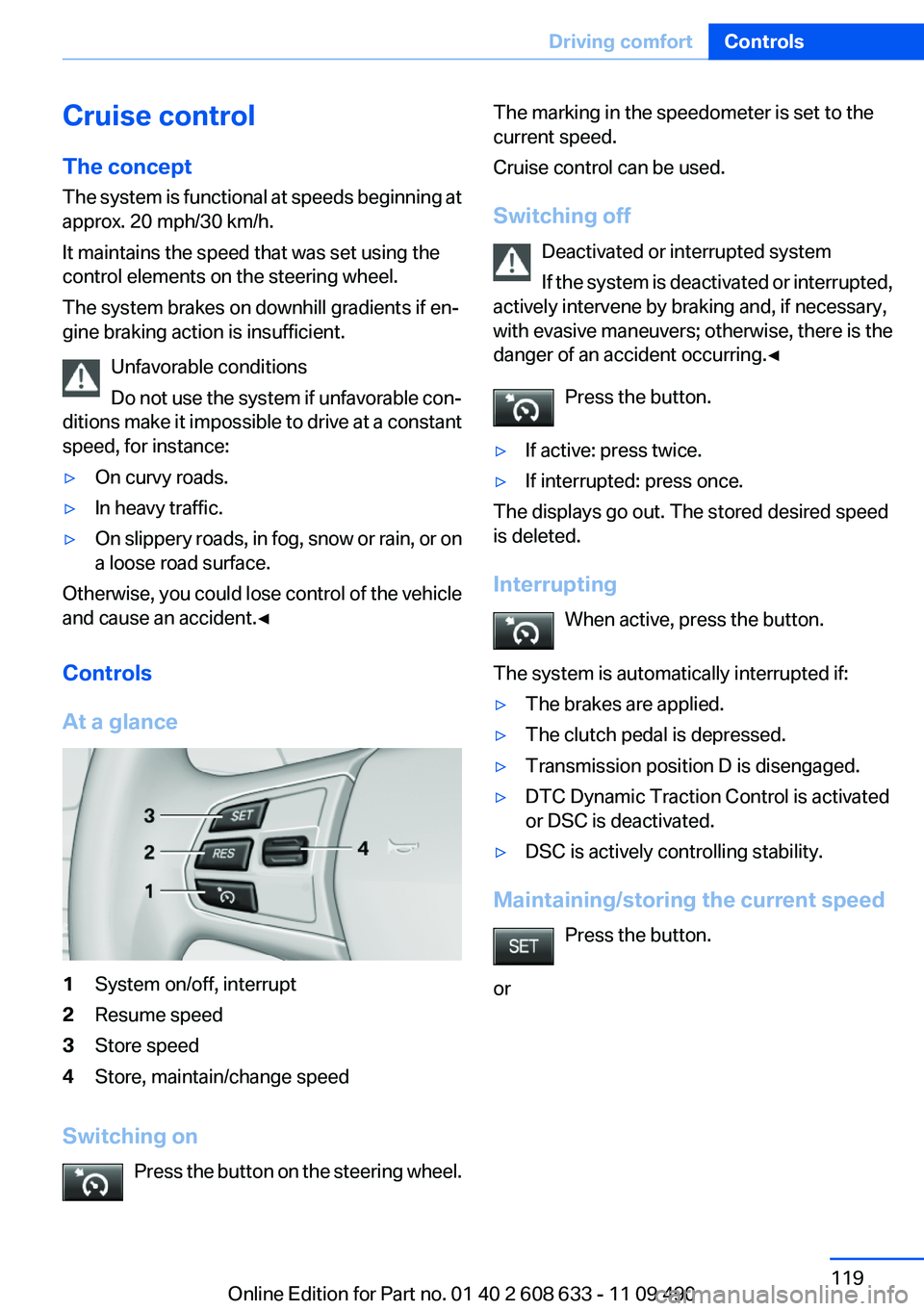
At a glance
1System on/off, interrupt
2Resume speed
3Store speed
4Store, maintain/change speed
Switching on
Press the button on the steering wheel.
The marking in the speedometer is set to the
current speed.
Cruise control can be used.
Switching off
Deactivated or interrupted system
If the system is deactivated or interrupted,
actively intervene by braking and, if necessary,
with evasive maneuvers; otherwise, there is the
danger of an accident occurring.◀
Press the button.
▷If active: press twice.
▷If interrupted: press once.
The displays go out. The stored desired speed
is deleted.
Interrupting
When active, press the button.
The system is automatically interrupted if:
▷The brakes are applied.
▷The clutch pedal is depressed.
▷Transmission position D is disengaged.
▷DTC Dynamic Traction Control is activated
or DSC is deactivated.
▷DSC is actively controlling stability.
Maintaining/storing the current speed
Press the button.
or
Seite 119
Driving comfortControls
119Online Edition for Part no. 01 40 2 608 633 - 11 09 490
Page 120 of 325
Press the rocker switch while the system is in‐
terrupted.
When the system is switched on, the current
speed is maintained and stored as the desired
speed.
It is displayed in the speedometer and briefly
displayed in the instrument cluster, Displays in
the speedometer, refer to page 120.
When cruise control is maintained or stored,
DSC Dynamic Stability Control is switched on, if
necessary.
Change, maintain speed
The rocker switch can be pressed while inter‐
rupted to maintain and store the current speed.
Adapting the desired speed
Adapt the desired speed to the road con‐
ditions and be ready to brake at all times; other‐
wise, there is the danger of an accident occur‐
ring.◀
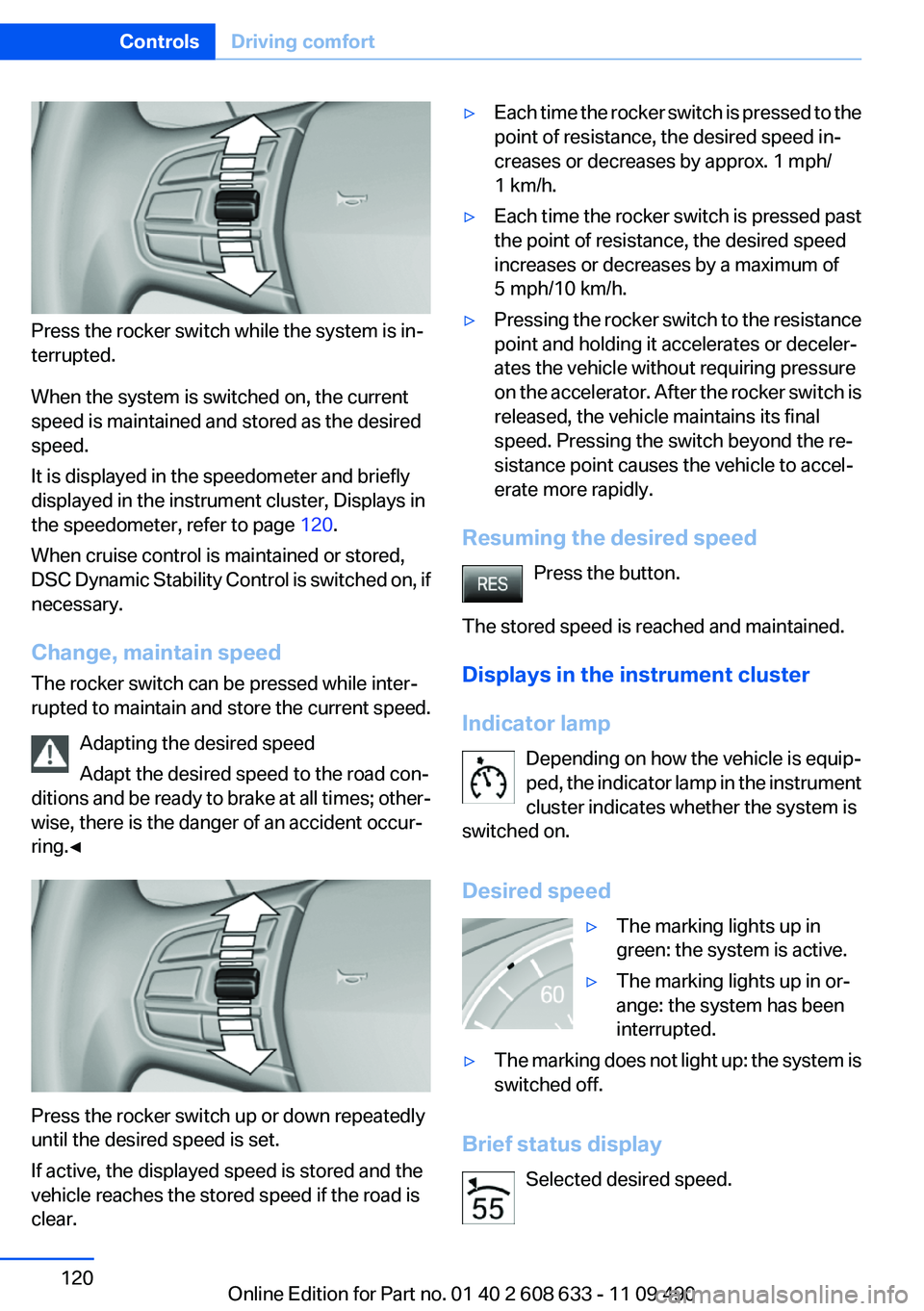
Press the rocker switch up or down repeatedly
until the desired speed is set.
If active, the displayed speed is stored and the
vehicle reaches the stored speed if the road is
clear.
▷Each time the rocker switch is pressed to the
point of resistance, the desired speed in‐
creases or decreases by approx. 1 mph/
1 km/h.
▷Each time the rocker switch is pressed past
the point of resistance, the desired speed
increases or decreases by a maximum of
5 mph/10 km/h.
▷Pressing the rocker switch to the resistance
point and holding it accelerates or deceler‐
ates the vehicle without requiring pressure
on the accelerator. After the rocker switch is
released, the vehicle maintains its final
speed. Pressing the switch beyond the re‐
sistance point causes the vehicle to accel‐
erate more rapidly.
Resuming the desired speed
Press the button.
The stored speed is reached and maintained.
Displays in the instrument cluster
Indicator lamp
Depending on how the vehicle is equip‐
ped, the indicator lamp in the instrument
cluster indicates whether the system is
switched on.
Desired speed
▷The marking lights up in
green: the system is active.
▷The marking lights up in or‐
ange: the system has been
interrupted.
▷The marking does not light up: the system is
switched off.
Brief status display
Selected desired speed.
Seite 120
ControlsDriving comfort
120Online Edition for Part no. 01 40 2 608 633 - 11 09 490
Page 129 of 325
▷Certain sitting positions.
▷Objects on the cover of the Head-up Dis‐
play.
▷Sunglasses with certain polarization filters.
▷Wet roads.
▷Unfavorable light conditions.
If the image is distorted, check the basic set‐
tings.
Switching on/off
1."Settings"
2."Head-up display"
3."Head-up display"
Switch the Head-up Display ON/OFF as re‐
quired.
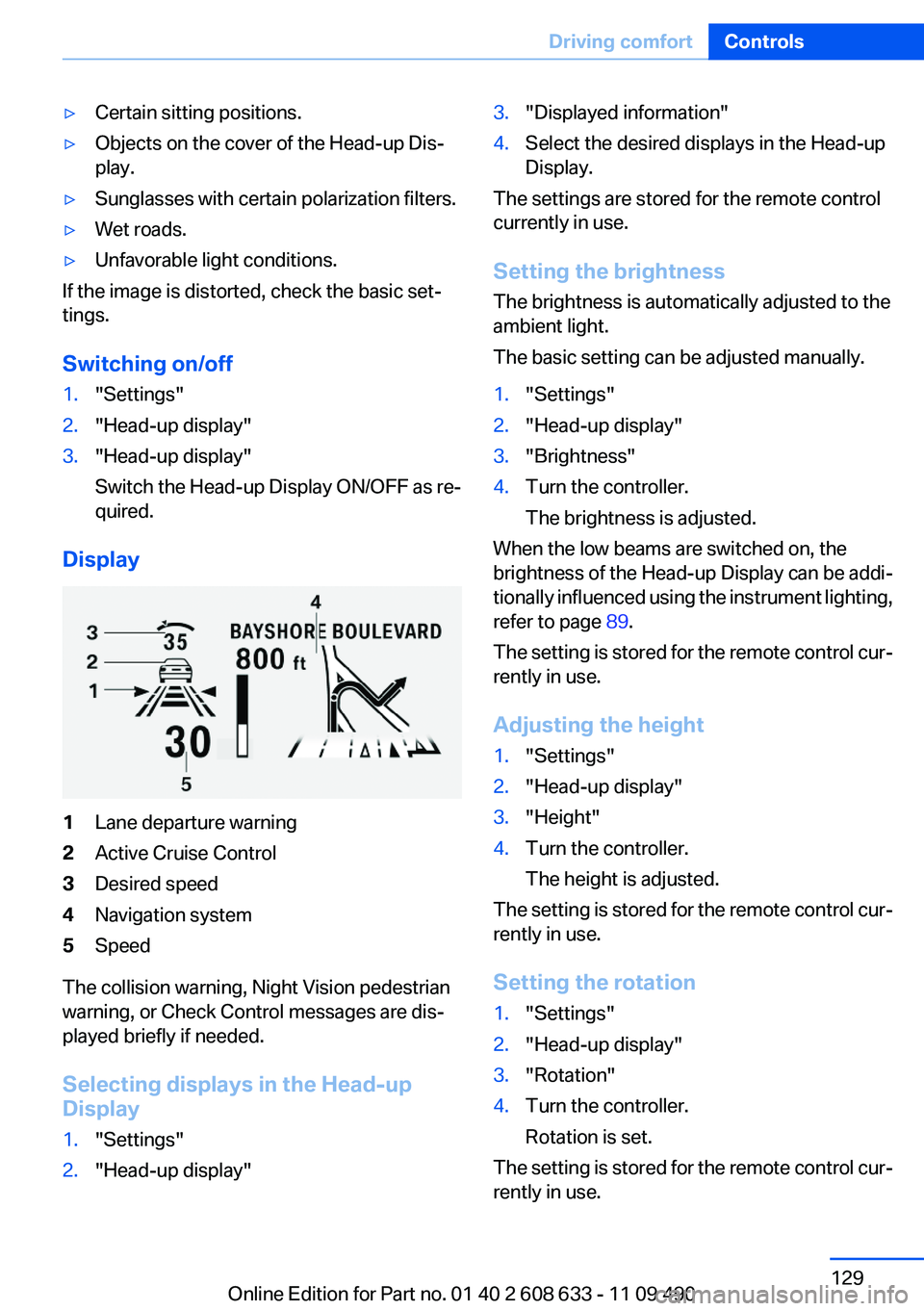
Display
1Lane departure warning
2Active Cruise Control
3Desired speed
4Navigation system
5Speed
The collision warning, Night Vision pedestrian
warning, or Check Control messages are dis‐
played briefly if needed.
Selecting displays in the Head-up
Display
1."Settings"
2."Head-up display"
3."Displayed information"
4.Select the desired displays in the Head-up
Display.
The settings are stored for the remote control
currently in use.
Setting the brightness
The brightness is automatically adjusted to the
ambient light.
The basic setting can be adjusted manually.
1."Settings"
2."Head-up display"
3."Brightness"
4.Turn the controller.
The brightness is adjusted.
When the low beams are switched on, the
brightness of the Head-up Display can be addi‐
tionally influenced using the instrument lighting,
refer to page 89.
The setting is stored for the remote control cur‐
rently in use.
Adjusting the height
1."Settings"
2."Head-up display"
3."Height"
4.Turn the controller.
The height is adjusted.
The setting is stored for the remote control cur‐
rently in use.
Setting the rotation
1."Settings"
2."Head-up display"
3."Rotation"
4.Turn the controller.
Rotation is set.
The setting is stored for the remote control cur‐
rently in use.
Seite 129
Driving comfortControls
129Online Edition for Part no. 01 40 2 608 633 - 11 09 490
Page 314 of 325
Everything from A to Z
Index
A
ABS, Antilock Brake Sys‐
tem 104
ACC, Active Cruise Control
with Stop & Go 109
Activated-charcoal filter 139
Active Blind Spot Detec‐
tion 101
Active Cruise Control with
Stop & Go, ACC 109
Active Protection 102
Adaptive brake lights, refer to
Brake force display 102
Adaptive light control 88
Additional telephone 228
Additives, oil 275
Adjustments, seats/head re‐
straints 45
After washing vehicle 297
Airbags 91
Airbags, indicator/warning
light 92
Air circulation, refer to Recir‐
culated-air mode 135, 138
Air distribution,
manual 135, 138
Air drying, refer to Cooling
function 135, 137
Air flow, air conditioner 135
Air pressure, tires 263
Air vents, refer to Ventila‐
tion 139
Air volume, automatic climate
control 138
Alarm system 40
Alarm, unintentional 41
All around the center con‐
sole 14
All around the headliner 15
All around the steering
wheel 12
All-season tires, refer to Win‐
ter tires 270
Alternating-code hand-held
transmitter 142
Alternative oil types 275
AM/FM station 190
Announcement, navigation,
refer to Spoken instruc‐
tions 178
Antifreeze, washer fluid 66
Antilock Brake System,
ABS 104
Anti-slip control, refer to
DSC 104
Applications 255
Appointments 243
Approved engine oils 275
Apps 255
Apps, video playback 213
Arrival time 82
Ash tray 145
Assistance, Roadside Assis‐
tance 291
Assistance when driving
off 108
Assist, BMW 250
Assist system information, on
Control Display 85
Audio playback 199
Audio playback, Blue‐
tooth 213
AUTO intensity 137
Automatic car wash 296
Automatic climate con‐
trol 134
Automatic climate control with
enhanced features 136
Automatic Cruise Control with
Stop & Go 109
Automatic Curb Monitor 52
Automatic deactivation, front
passenger airbags 93
Automatic headlamp con‐
trol 87
Automatic locking 37
Automatic recirculated-air
control 138
Automatic transmission with
Steptronic 67
AUTO program, automatic cli‐
mate control 137
AUTO program, climate con‐
trol 135
AUTO program, intensity 137
Auto Start/Stop function 61
AUX-IN port 210
Average fuel consumption 82
Average speed 82
Axle loads, weights 304
B
Backrest curvature, refer to
Lumbar support 47
Backrest, width 47
Backup camera 123
Balance 188
Band-Aids, refer to First aid
kit 291
Bar for tow-starting/tow‐
ing 294
Bass 188
Battery replacement, vehicle
battery 287
Battery replacement, vehicle
remote control 30
Battery, vehicle 287
Belts, safety belts 48
Beverage holder, cu‐
pholder 150
Seite 314
ReferenceEverything from A to Z
314Online Edition for Part no. 01 40 2 608 633 - 11 09 490
Page 316 of 325
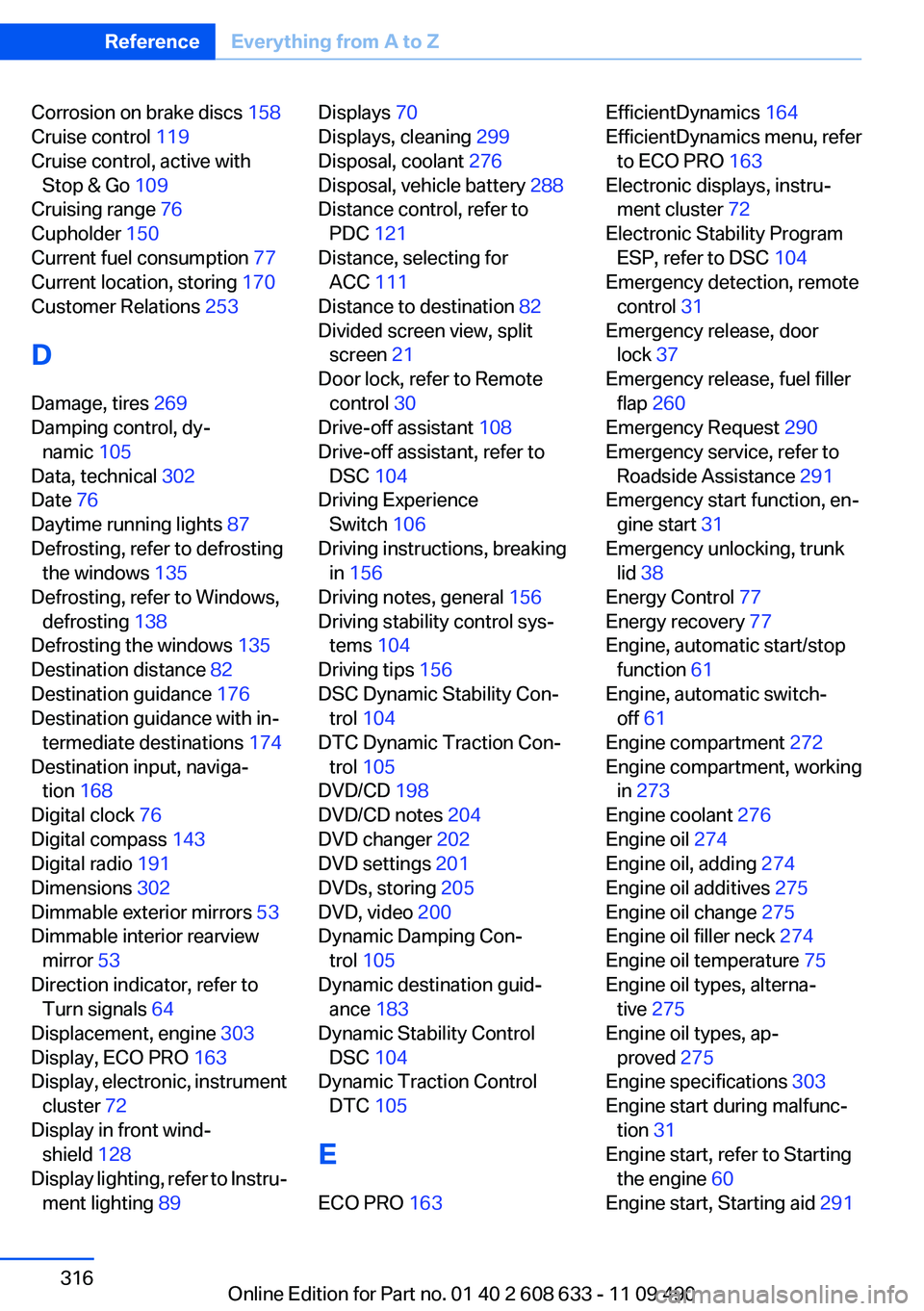
Corrosion on brake discs 158
Cruise control 119
Cruise control, active with
Stop & Go 109
Cruising range 76
Cupholder 150
Current fuel consumption 77
Current location, storing 170
Customer Relations 253
D
Damage, tires 269
Damping control, dy‐
namic 105
Data, technical 302
Date 76
Daytime running lights 87
Defrosting, refer to defrosting
the windows 135
Defrosting, refer to Windows,
defrosting 138
Defrosting the windows 135
Destination distance 82
Destination guidance 176
Destination guidance with in‐
termediate destinations 174
Destination input, naviga‐
tion 168
Digital clock 76
Digital compass 143
Digital radio 191
Dimensions 302
Dimmable exterior mirrors 53
Dimmable interior rearview
mirror 53
Direction indicator, refer to
Turn signals 64
Displacement, engine 303
Display, ECO PRO 163
Display, electronic, instrument
cluster 72
Display in front wind‐
shield 128
Display lighting, refer to Instru‐
ment lighting 89
Displays 70
Displays, cleaning 299
Disposal, coolant 276
Disposal, vehicle battery 288
Distance control, refer to
PDC 121
Distance, selecting for
ACC 111
Distance to destination 82
Divided screen view, split
screen 21
Door lock, refer to Remote
control 30
Drive-off assistant 108
Drive-off assistant, refer to
DSC 104
Driving Experience
Switch 106
Driving instructions, breaking
in 156
Driving notes, general 156
Driving stability control sys‐
tems 104
Driving tips 156
DSC Dynamic Stability Con‐
trol 104
DTC Dynamic Traction Con‐
trol 105
DVD/CD 198
DVD/CD notes 204
DVD changer 202
DVD settings 201
DVDs, storing 205
DVD, video 200
Dynamic Damping Con‐
trol 105
Dynamic destination guid‐
ance 183
Dynamic Stability Control
DSC 104
Dynamic Traction Control
DTC 105
E
ECO PRO 163
EfficientDynamics 164
EfficientDynamics menu, refer
to ECO PRO 163
Electronic displays, instru‐
ment cluster 72
Electronic Stability Program
ESP, refer to DSC 104
Emergency detection, remote
control 31
Emergency release, door
lock 37
Emergency release, fuel filler
flap 260
Emergency Request 290
Emergency service, refer to
Roadside Assistance 291
Emergency start function, en‐
gine start 31
Emergency unlocking, trunk
lid 38
Energy Control 77
Energy recovery 77
Engine, automatic start/stop
function 61
Engine, automatic switch-
off 61
Engine compartment 272
Engine compartment, working
in 273
Engine coolant 276
Engine oil 274
Engine oil, adding 274
Engine oil additives 275
Engine oil change 275
Engine oil filler neck 274
Engine oil temperature 75
Engine oil types, alterna‐
tive 275
Engine oil types, ap‐
proved 275
Engine specifications 303
Engine start during malfunc‐
tion 31
Engine start, refer to Starting
the engine 60
Engine start, Starting aid 291
Seite 316
ReferenceEverything from A to Z
316Online Edition for Part no. 01 40 2 608 633 - 11 09 490
Page 321 of 325
Service history 78
Service requirements, Condi‐
tion Based Service CBS 277
Service requirements, dis‐
play 77
Service, Roadside Assis‐
tance 291
Settings on Control Dis‐
play 83
Settings, storing for seat, mir‐
ror 51
Shifting, automatic transmis‐
sion 67
Shifting, manual transmis‐
sion 67
Shift paddles on steering
wheel 69
Short commands 306
Side airbags 91
Side View 127
Signaling, horn 12
Signals when unlocking 35
Sitting safely 45
Size 302
Slide/tilt glass roof 43
Smallest turning circle 303
Snap-in adapter, mobile
phone 236
Snow chains 271
Socket 145
Socket, OBD Onboard Diag‐
nostics 278
Software applications,
iPhone 255
Software update 217
Spare fuse 288
Special destinations, naviga‐
tion 171
Specified engine oil
types 275
Speed, average 82
Speed limit detection 79
Speed limit detection, com‐
puter 82
Speed limit, setting 82
Speed Volume, volume equal‐
ization 189
Split screen 21
Split screen map settings 180
Spoken instructions, naviga‐
tion 178
SPORT+ - program, Dynamic
Driving Control 106
Sport automatic transmis‐
sion 69
Sport displays, torque display,
performance display 83
SPORT program, Dynamic
Driving Control 106
Sport program, transmis‐
sion 68
Sport steering, variable 105
Stability control systems 104
Start/stop, automatic func‐
tion 61
Start/Stop button 59
Start function during malfunc‐
tion 31
Starting aid 291
Starting the engine 60
State/province, selecting for
navigation 168
Stations, stored 197
Station, storing 190
Status display, tires 94
Status information, iDrive 20
Status of Owner's Manual 6
Steering wheel, adjusting 53
Steering wheel heating 53
Steptronic, automatic trans‐
mission 67
Stopping the engine 61
Storage compartment in the
rear 150
Storage compartments 148
Storage compartments, loca‐
tions 148
Storage, tires 270
Storing the vehicle 299
Street, entering for naviga‐
tion 169
Summer tires, tread 268
Supplementary text mes‐
sage 75
Surround View 123
Switch-on times, parked-car
ventilation 140
Switch, refer to Cockpit 12
Symbols 6
T
Tachometer 75
Tailgate 37
Tailgate, opening with no-
touch activation 39
Tailgate via remote control 35
Tail lamps 285
Tasks 244
Technical changes, refer to
Safety 6
Technical data 302
Telephone 220, 228
TeleService 251
Temperature, automatic cli‐
mate control 135, 137
Temperature display, external
temperature 76
Temperature, engine oil 75
Tempomat, refer to Active
Cruise Control 109
Terminal, jump-starting 292
Text messages 241
Text message, supplemen‐
tary 75
Theft alarm system, refer to
Alarm system 40
Theft protection, refer to Cen‐
tral locking system 33
Thigh support 47
Through-loading system 146
Tilt alarm sensor 41
Time of arrival 82
Tire damage 269
Tire identification marks 267
Tire inflation pressure 263
Seite 321
Everything from A to ZReference
321Online Edition for Part no. 01 40 2 608 633 - 11 09 490