light BMW 3 SERIES 2011 Manual Online
[x] Cancel search | Manufacturer: BMW, Model Year: 2011, Model line: 3 SERIES, Model: BMW 3 SERIES 2011Pages: 325, PDF Size: 12.94 MB
Page 196 of 325
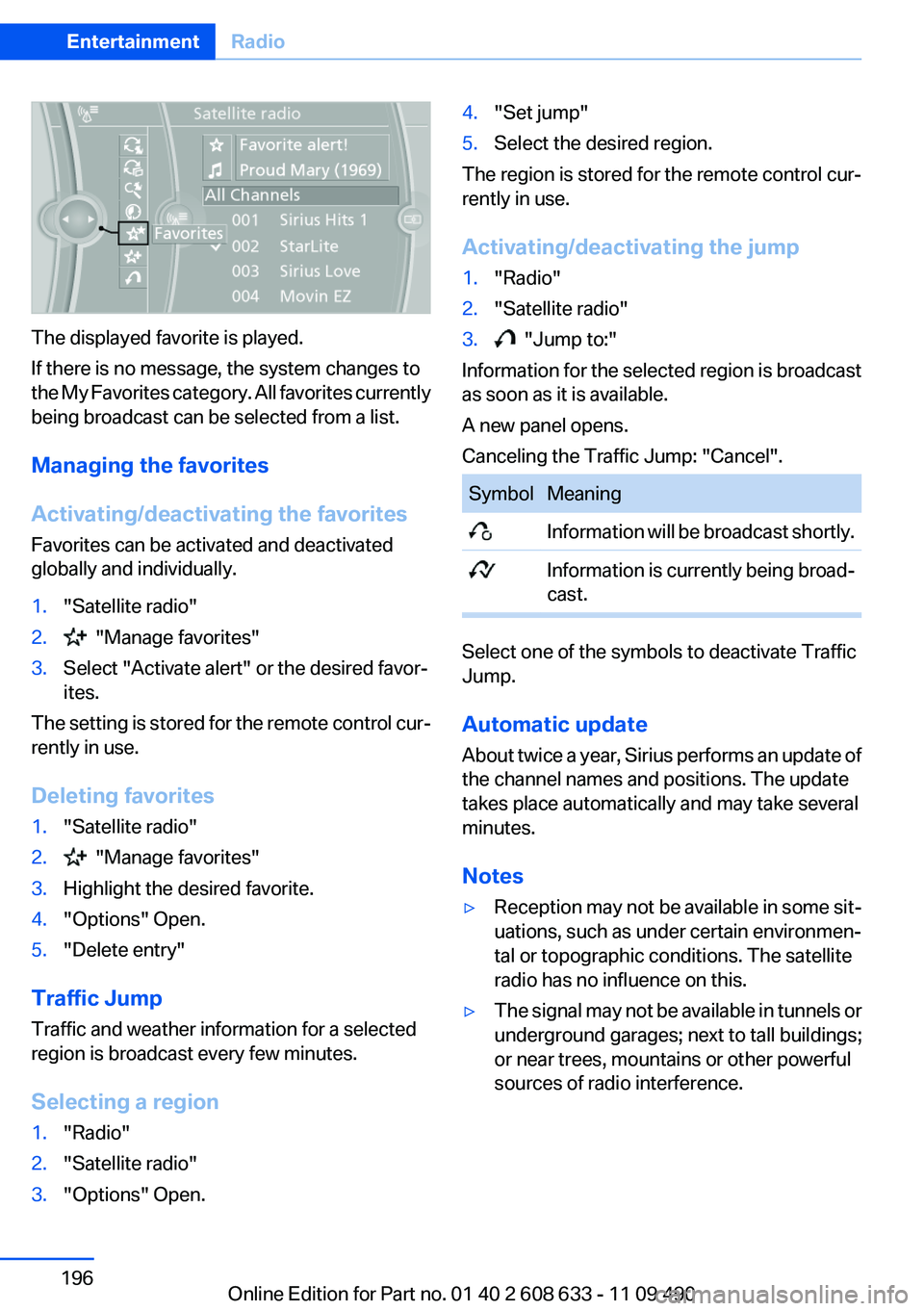
The displayed favorite is played.
If there is no message, the system changes to
the My Favorites category. All favorites currently
being broadcast can be selected from a list.
Managing the favorites
Activating/deactivating the favorites
Favorites can be activated and deactivated
globally and individually.
1."Satellite radio"
2. "Manage favorites"
3.Select "Activate alert" or the desired favor‐
ites.
The setting is stored for the remote control cur‐
rently in use.
Deleting favorites
1."Satellite radio"
2. "Manage favorites"
3.Highlight the desired favorite.
4."Options" Open.
5."Delete entry"
Traffic Jump
Traffic and weather information for a selected
region is broadcast every few minutes.
Selecting a region
1."Radio"
2."Satellite radio"
3."Options" Open.
4."Set jump"
5.Select the desired region.
The region is stored for the remote control cur‐
rently in use.
Activating/deactivating the jump
1."Radio"
2."Satellite radio"
3. "Jump to:"
Information for the selected region is broadcast
as soon as it is available.
A new panel opens.
Canceling the Traffic Jump: "Cancel".
Symbol Meaning
Information will be broadcast shortly.
Information is currently being broad‐
cast.
Select one of the symbols to deactivate Traffic
Jump.
Automatic update
About twice a year, Sirius performs an update of
the channel names and positions. The update
takes place automatically and may take several
minutes.
Notes
▷Reception may not be available in some sit‐
uations, such as under certain environmen‐
tal or topographic conditions. The satellite
radio has no influence on this.
▷The signal may not be available in tunnels or
underground garages; next to tall buildings;
or near trees, mountains or other powerful
sources of radio interference.
Seite 196
EntertainmentRadio
196Online Edition for Part no. 01 40 2 608 633 - 11 09 490
Page 205 of 325
Damage
▷Avoid fingerprints, dust, scratches and
moisture.
▷Store CDs/DVDs in a sleeve.
▷Do not subject CDs/DVDs to temperatures
over 122 ℉/50 ℃, high humidity or direct
sunlight.
CDs/DVDs with copy protection
CDs/DVDs are often provided with a copy pro‐
tection feature by the manufacturer. This can
mean that some CDs/DVDs cannot be played or
can only be played to a limited extent.
MACROVISION
This product contains copyrighted technology
that is based on multiple registered US patents
and the intellectual property of the Macrovision
Corporation and other manufacturers. The use
of this copy protection must be approved by
Macrovision. Media protected by this product -
unless otherwise agreed with Macrovision - may
only be used for private purposes. Copying of
this technology is prohibited.
DTS Digital Surround™
Manufactured under license under U.S.
Patent Numbers: 5,451,942;
5,956,674; 5,974,380; 5,978,762; 6,487,535 &
and other patents granted and registered in the
USA and worldwide. DTS and the logo are reg‐
istered trademarks & DTS Digital Surround and
the DTS logos are trademarks of DTS Inc. ©
DTS, Inc. All rights reserved.
Music collection
Storing music
General information
Music tracks from CDs/DVDs and USB devices
can be stored in the music collection on a hard
disc in the vehicle and played from there.
▷Audio CD: tracks are converted into a com‐
pressed audio format. If available, informa‐
tion on the album, such as the artist, is
stored as well.
▷CD/DVD or USB device with compressed
audio files: the entire content of the CD/DVD
or the USB device is stored in the vehicle as
an album. The WMA, MP3, M4A, and AAC
formats are stored. Individual tracks and di‐
rectories can be deleted later, Deleting a
track and directory, refer to page 209.
Tracks with DRM copy protection can be
stored but cannot be played back.
Backing up music data
Regularly back up the music data; other‐
wise, it could be lost if there is a fault on the hard
disk.◀
Music recognition technology and re‐
lated data are provided by Gracenote®.
Gracenote is the industry standard in music rec‐
ognition technology and related content deliv‐
ery. For more information, please visit
www.gracenote.com.
CD and music-related data from Gracenote, Inc.,
copyright © 2000-2009 Gracenote. Gracenote
Software, copyright © 2000-2009 Gracenote.
This product and service may practice one or
more of the following U.S. Patents: #5,987,525;
#6,061,680; #6,154,773, #6,161,132,
#6,230,192, #6,230,207, #6,240,459,
#6,330,593, and other patents issued or pend‐
ing. Some services supplied under license from
Open Globe, Inc. for U.S. Patent: #6,304,523.
Storing from a CD/DVD
1.Insert a CD or DVD into the CD/DVD player.
2."CD/Multimedia"
3."CD/DVD"
Seite 205
CD/multimediaEntertainment
205Online Edition for Part no. 01 40 2 608 633 - 11 09 490
Page 208 of 325
Albums
All stored albums, listed in order of their storage
dates.
Symbol Format
Audio CD
Compressed audio files
1."CD/Multimedia"
2."Music collection"
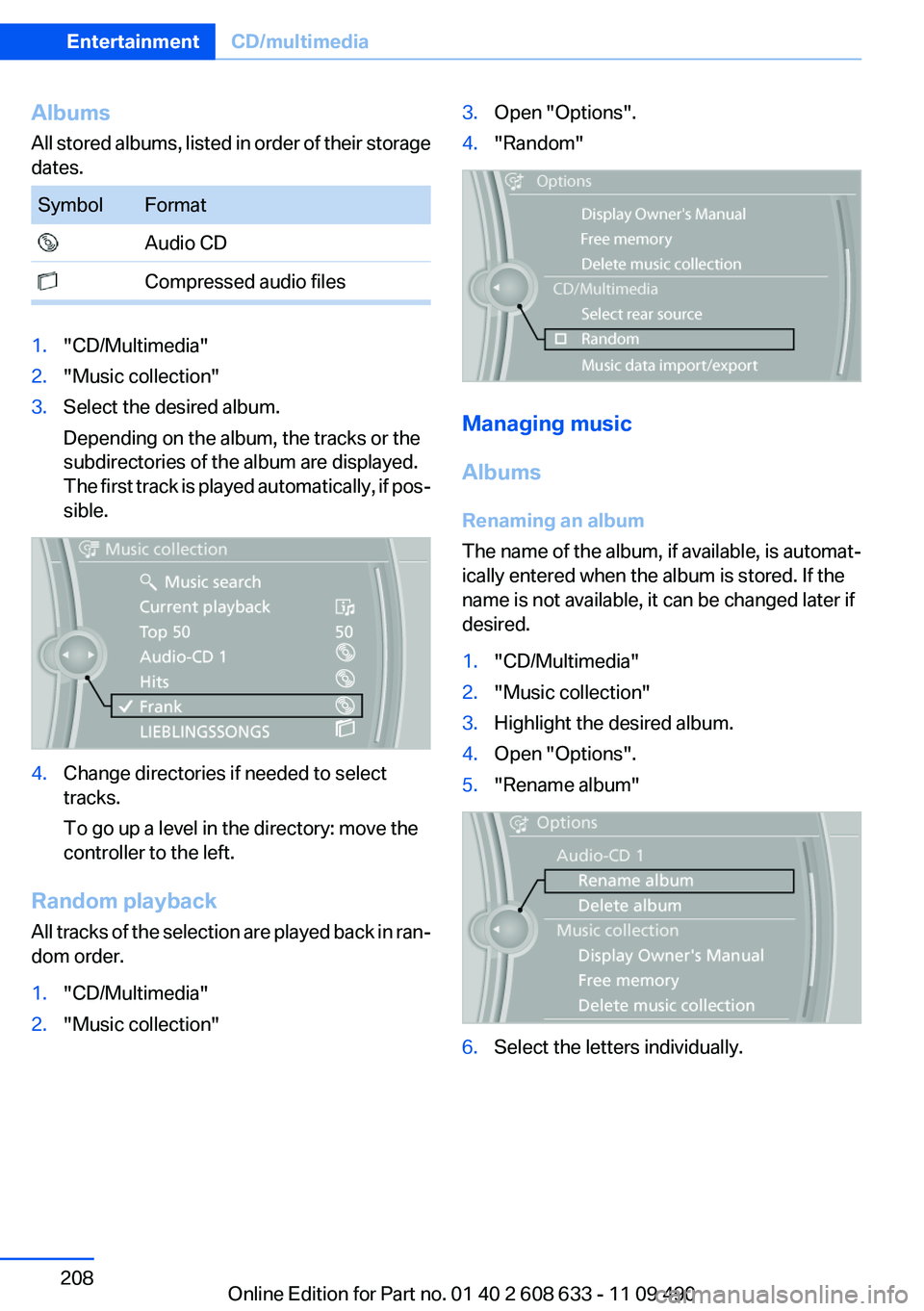
3.Select the desired album.
Depending on the album, the tracks or the
subdirectories of the album are displayed.
The first track is played automatically, if pos‐
sible.
4.Change directories if needed to select
tracks.
To go up a level in the directory: move the
controller to the left.
Random playback
All tracks of the selection are played back in ran‐
dom order.
1."CD/Multimedia"
2."Music collection"
3.Open "Options".
4."Random"
Managing music
Albums
Renaming an album
The name of the album, if available, is automat‐
ically entered when the album is stored. If the
name is not available, it can be changed later if
desired.
1."CD/Multimedia"
2."Music collection"
3.Highlight the desired album.
4.Open "Options".
5."Rename album"
6.Select the letters individually.
Seite 208
EntertainmentCD/multimedia
208Online Edition for Part no. 01 40 2 608 633 - 11 09 490
Page 209 of 325
Deleting an album
An album cannot be deleted while a track from
that album is being played.
1."CD/Multimedia"
2."Music collection"
3.Highlight the desired album.
4.Open "Options".
5."Delete album"
Deleting a track and directory
A track cannot be deleted while it is being
played.
A directory cannot be deleted while a track from
that directory is being played.
1."CD/Multimedia"
2."Music collection"
3.Highlight the directory or track.
4.Open "Options".
5."Delete folder" or "Delete track"
Free memory capacity
Display the free memory capacity in the music
collection.
1."CD/Multimedia"
2."Music collection"
3.Open "Options".
4."Free memory"
Music collection
Backing up the music collection
The entire music collection can be stored on a
USB device. Make sure there is enough free
memory capacity on the USB device.
Depending on the number of tracks, backing up
the music collection may take several hours.
Therefore, it is best to perform the backup dur‐
ing a long trip.
1.Starting the engine.
2.Connect the USB device to the USB inter‐
face in the glove compartment.
3."CD/Multimedia"
4."Music collection"
5.Open "Options".
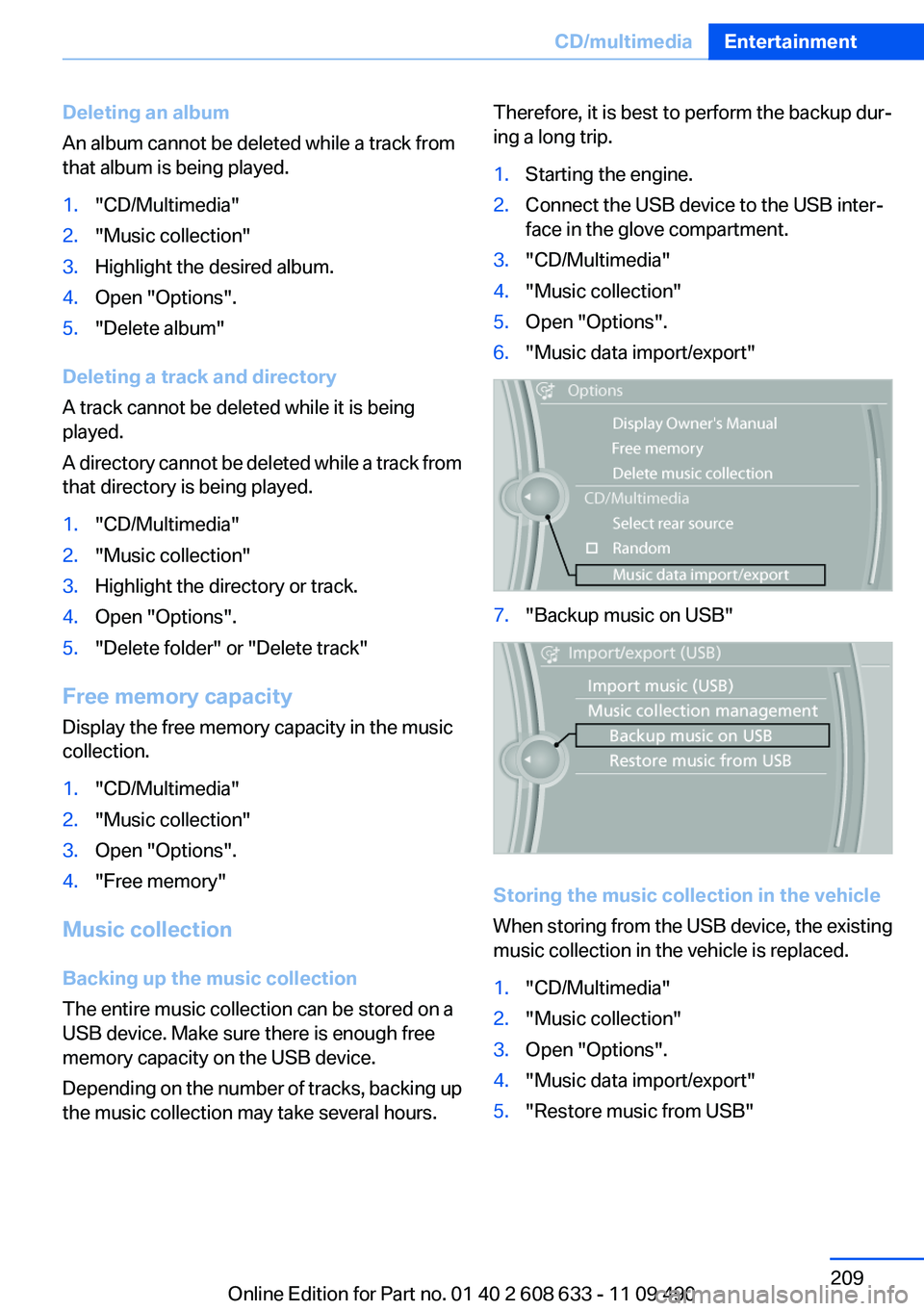
6."Music data import/export"
7."Backup music on USB"
Storing the music collection in the vehicle
When storing from the USB device, the existing
music collection in the vehicle is replaced.
1."CD/Multimedia"
2."Music collection"
3.Open "Options".
4."Music data import/export"
5."Restore music from USB"
Seite 209
CD/multimediaEntertainment
209Online Edition for Part no. 01 40 2 608 633 - 11 09 490
Page 216 of 325
Playback menu
Depending on the particular device, some of the
functions may not be available.
Symbol Function
Next track
Fast forward: press and hold the
symbol.
Previous music track
Reverse: press and hold the symbol.
Disconnecting the audio connection
1."CD/Multimedia"
2."Bluetooth® (audio)"
3.Highlight the desired device.
4.Open "Options".
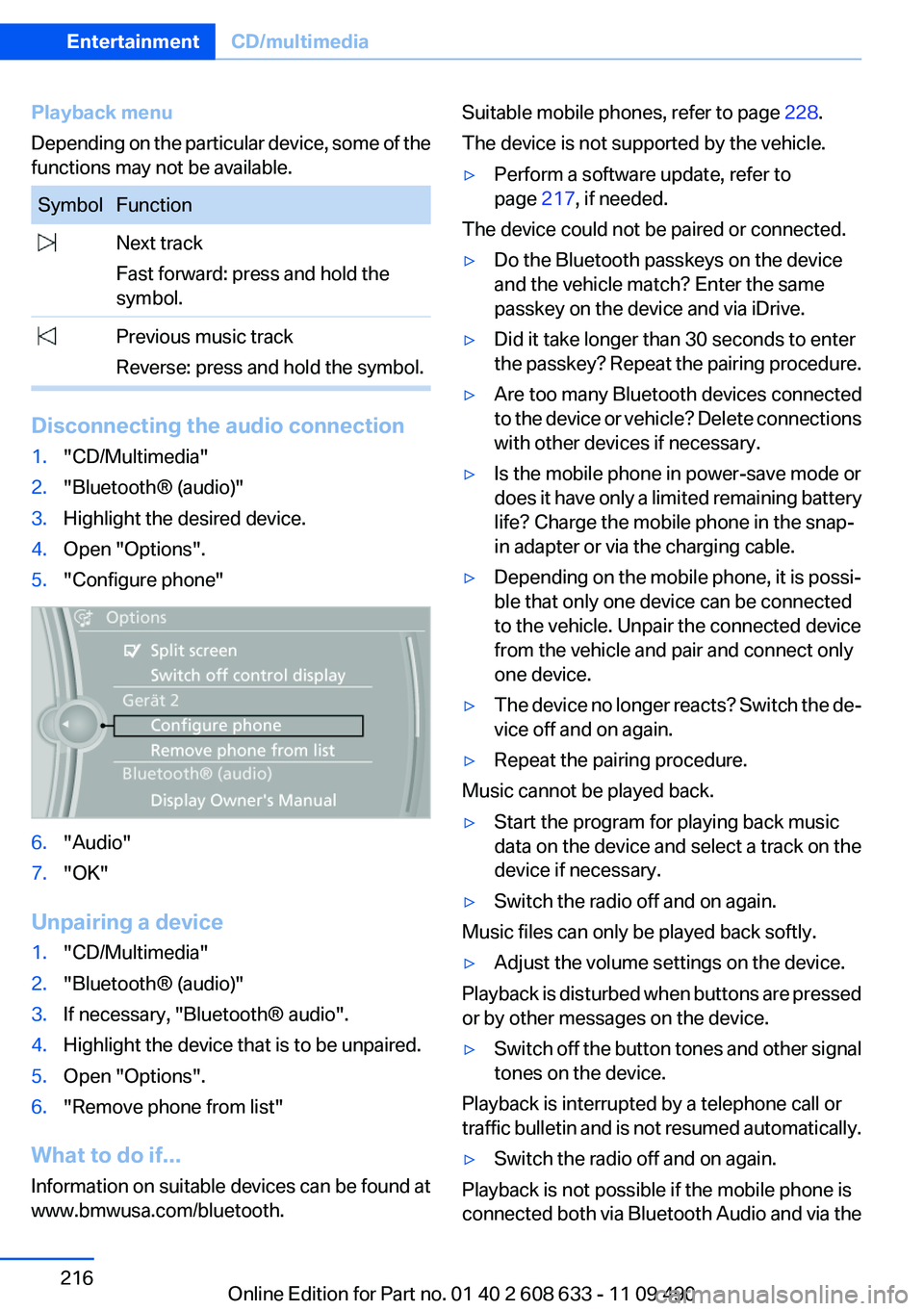
5."Configure phone"
6."Audio"
7."OK"
Unpairing a device
1."CD/Multimedia"
2."Bluetooth® (audio)"
3.If necessary, "Bluetooth® audio".
4.Highlight the device that is to be unpaired.
5.Open "Options".
6."Remove phone from list"
What to do if...
Information on suitable devices can be found at
www.bmwusa.com/bluetooth.
Suitable mobile phones, refer to page 228.
The device is not supported by the vehicle.
▷Perform a software update, refer to
page 217, if needed.
The device could not be paired or connected.
▷Do the Bluetooth passkeys on the device
and the vehicle match? Enter the same
passkey on the device and via iDrive.
▷Did it take longer than 30 seconds to enter
the passkey? Repeat the pairing procedure.
▷Are too many Bluetooth devices connected
to the device or vehicle? Delete connections
with other devices if necessary.
▷Is the mobile phone in power-save mode or
does it have only a limited remaining battery
life? Charge the mobile phone in the snap-
in adapter or via the charging cable.
▷Depending on the mobile phone, it is possi‐
ble that only one device can be connected
to the vehicle. Unpair the connected device
from the vehicle and pair and connect only
one device.
▷The device no longer reacts? Switch the de‐
vice off and on again.
▷Repeat the pairing procedure.
Music cannot be played back.
▷Start the program for playing back music
data on the device and select a track on the
device if necessary.
▷Switch the radio off and on again.
Music files can only be played back softly.
▷Adjust the volume settings on the device.
Playback is disturbed when buttons are pressed
or by other messages on the device.
▷Switch off the button tones and other signal
tones on the device.
Playback is interrupted by a telephone call or
traffic bulletin and is not resumed automatically.
▷Switch the radio off and on again.
Playback is not possible if the mobile phone is
connected both via Bluetooth Audio and via the
Seite 216
EntertainmentCD/multimedia
216Online Edition for Part no. 01 40 2 608 633 - 11 09 490
Page 222 of 325
Activating/deactivating Bluetooth
Bluetooth is not permitted everywhere. Comply
with all safety guidelines and regulations.
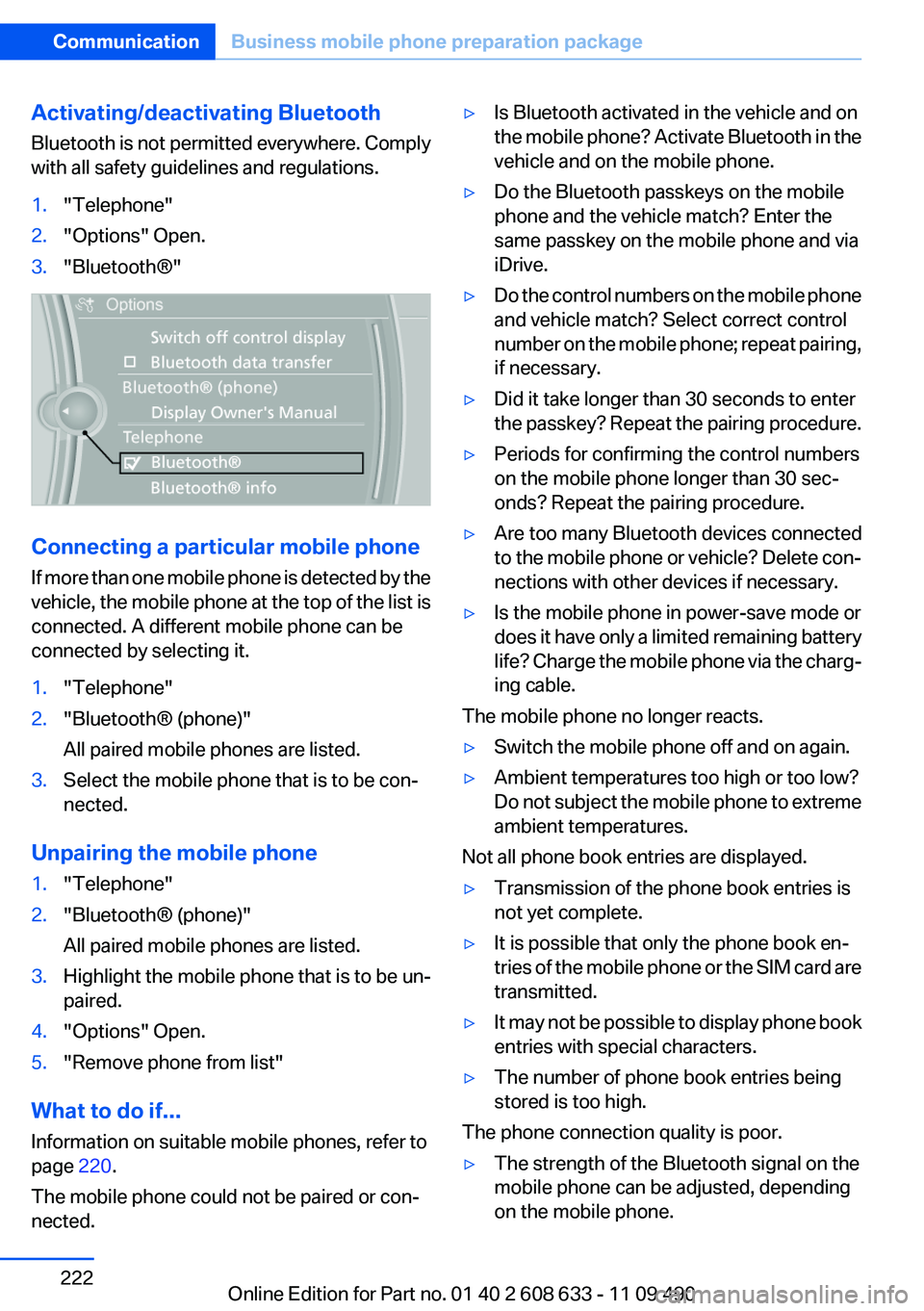
1."Telephone"
2."Options" Open.
3."Bluetooth®"
Connecting a particular mobile phone
If more than one mobile phone is detected by the
vehicle, the mobile phone at the top of the list is
connected. A different mobile phone can be
connected by selecting it.
1."Telephone"
2."Bluetooth® (phone)"
All paired mobile phones are listed.
3.Select the mobile phone that is to be con‐
nected.
Unpairing the mobile phone
1."Telephone"
2."Bluetooth® (phone)"
All paired mobile phones are listed.
3.Highlight the mobile phone that is to be un‐
paired.
4."Options" Open.
5."Remove phone from list"
What to do if...
Information on suitable mobile phones, refer to
page 220.
The mobile phone could not be paired or con‐
nected.
▷Is Bluetooth activated in the vehicle and on
the mobile phone? Activate Bluetooth in the
vehicle and on the mobile phone.
▷Do the Bluetooth passkeys on the mobile
phone and the vehicle match? Enter the
same passkey on the mobile phone and via
iDrive.
▷Do the control numbers on the mobile phone
and vehicle match? Select correct control
number on the mobile phone; repeat pairing,
if necessary.
▷Did it take longer than 30 seconds to enter
the passkey? Repeat the pairing procedure.
▷Periods for confirming the control numbers
on the mobile phone longer than 30 sec‐
onds? Repeat the pairing procedure.
▷Are too many Bluetooth devices connected
to the mobile phone or vehicle? Delete con‐
nections with other devices if necessary.
▷Is the mobile phone in power-save mode or
does it have only a limited remaining battery
life? Charge the mobile phone via the charg‐
ing cable.
The mobile phone no longer reacts.
▷Switch the mobile phone off and on again.
▷Ambient temperatures too high or too low?
Do not subject the mobile phone to extreme
ambient temperatures.
Not all phone book entries are displayed.
▷Transmission of the phone book entries is
not yet complete.
▷It is possible that only the phone book en‐
tries of the mobile phone or the SIM card are
transmitted.
▷It may not be possible to display phone book
entries with special characters.
▷The number of phone book entries being
stored is too high.
The phone connection quality is poor.
▷The strength of the Bluetooth signal on the
mobile phone can be adjusted, depending
on the mobile phone.
Seite 222
CommunicationBusiness mobile phone preparation package
222Online Edition for Part no. 01 40 2 608 633 - 11 09 490
Page 225 of 325
When terminating a conference call, both calls
are ended. If one call is terminated by another
party, the other call can be continued.
Switching the microphone to mute
When a call is active, the microphone can be
muted.
1."Telephone"
2."Active calls"
3. "Microphone mute"
A microphone that has been switched to mute
is automatically reactivated:
▷When a new connection is established.
▷When switching between call parties.
DTMF suffix dialing
DTMF suffix dialing can be used for gaining ac‐
cess to network services or for controlling devi‐
ces, e.g., to make a remote inquiry of an answer‐
ing machine. The DTMF code is needed for this
purpose.
1."Telephone"
2.Select the contact from a list or "Dial
number".
3. "Keypad dialing"
4.Enter the DTMF code via iDrive.
Phone book
Displays
The phone book accesses the contacts and
shows all contacts for which a phone number
has been stored. The entries can be selected to
make a call.
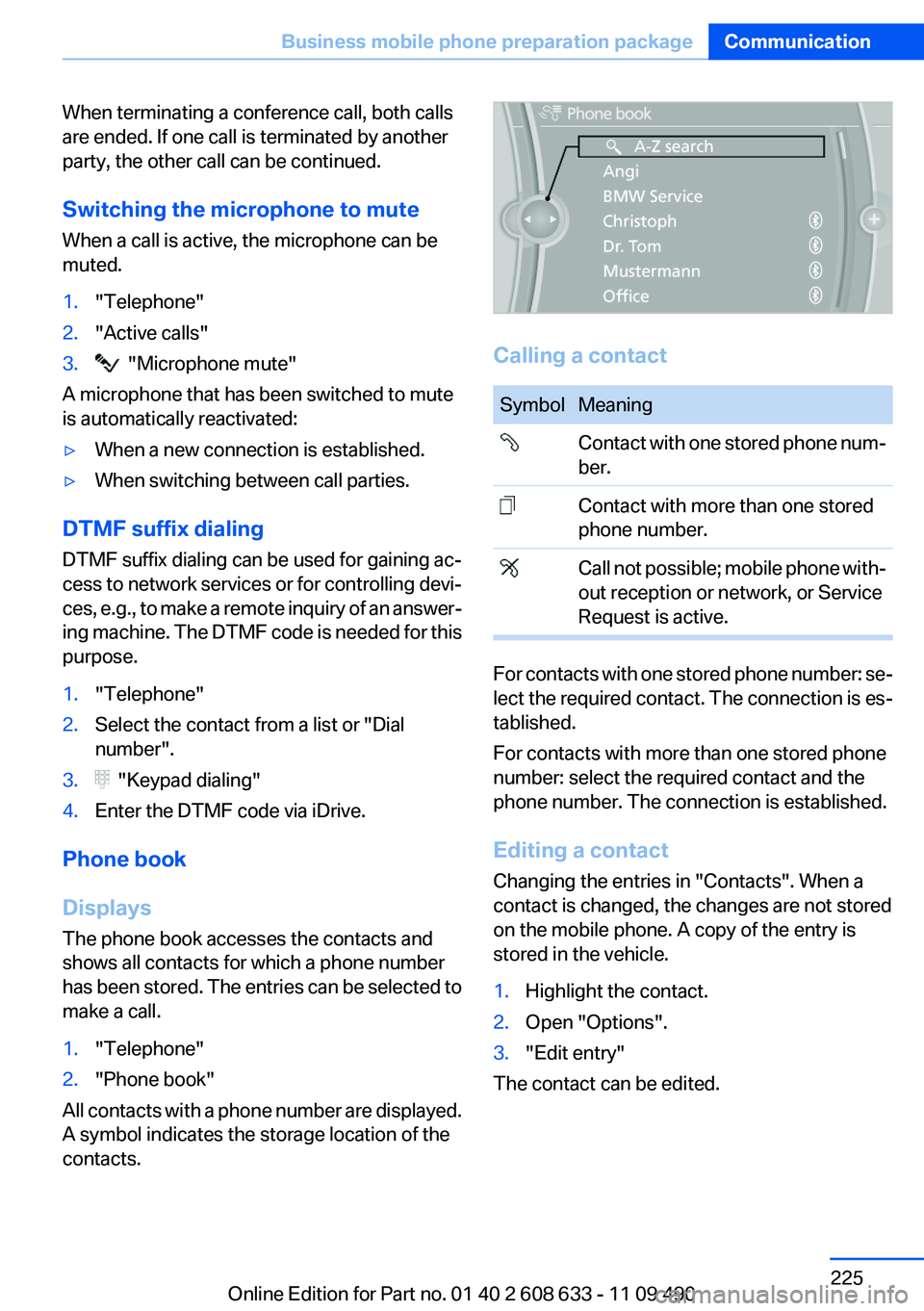
1."Telephone"
2."Phone book"
All contacts with a phone number are displayed.
A symbol indicates the storage location of the
contacts.
Calling a contact
Symbol Meaning
Contact with one stored phone num‐
ber.
Contact with more than one stored
phone number.
Call not possible; mobile phone with‐
out reception or network, or Service
Request is active.
For contacts with one stored phone number: se‐
lect the required contact. The connection is es‐
tablished.
For contacts with more than one stored phone
number: select the required contact and the
phone number. The connection is established.
Editing a contact
Changing the entries in "Contacts". When a
contact is changed, the changes are not stored
on the mobile phone. A copy of the entry is
stored in the vehicle.
1.Highlight the contact.
2.Open "Options".
3."Edit entry"
The contact can be edited.
Seite 225
Business mobile phone preparation packageCommunication
225Online Edition for Part no. 01 40 2 608 633 - 11 09 490
Page 226 of 325
Redialing
General information
The list of dialed numbers in the mobile phone
is transmitted to the vehicle depending on the
mobile phone. The 20 phone numbers dialed
last are displayed. The sorting order of the
phone numbers depends on the particular mo‐
bile phone.
Dialing the number via the instrument
cluster
This is possible when there is no active call.
1. Press the button on the steering
wheel.
2.Select the desired phone number.
The connection is established.
Dialing a number via iDrive
1."Telephone"
2."Redial"
3.Select the desired entry.
The connection is established.
Deleting a single entry or all entries
The erasure of entries depends on the mobile
phone.
1.Highlight the entry.
2."Options" Open.
3."Delete entry" or"Delete list"
Saving an entry in the contacts
1.Highlight the entry.
2."Options" Open.
3."Store as new contact" or "Add to existing
contact"
4.Select the contact, if necessary.
5.Select the type of number: "Home",
"Business", "Mobile" or "Other"
6.Complete the entries if necessary.
7."Store contact"
Received calls
Displaying calls
The list of incoming calls on the mobile phone is
transmitted to the vehicle, depending on the
mobile phone. The 20 telephone calls that were
last received are displayed. The sorting order
and display of the phone numbers depend on
the particular mobile phone.
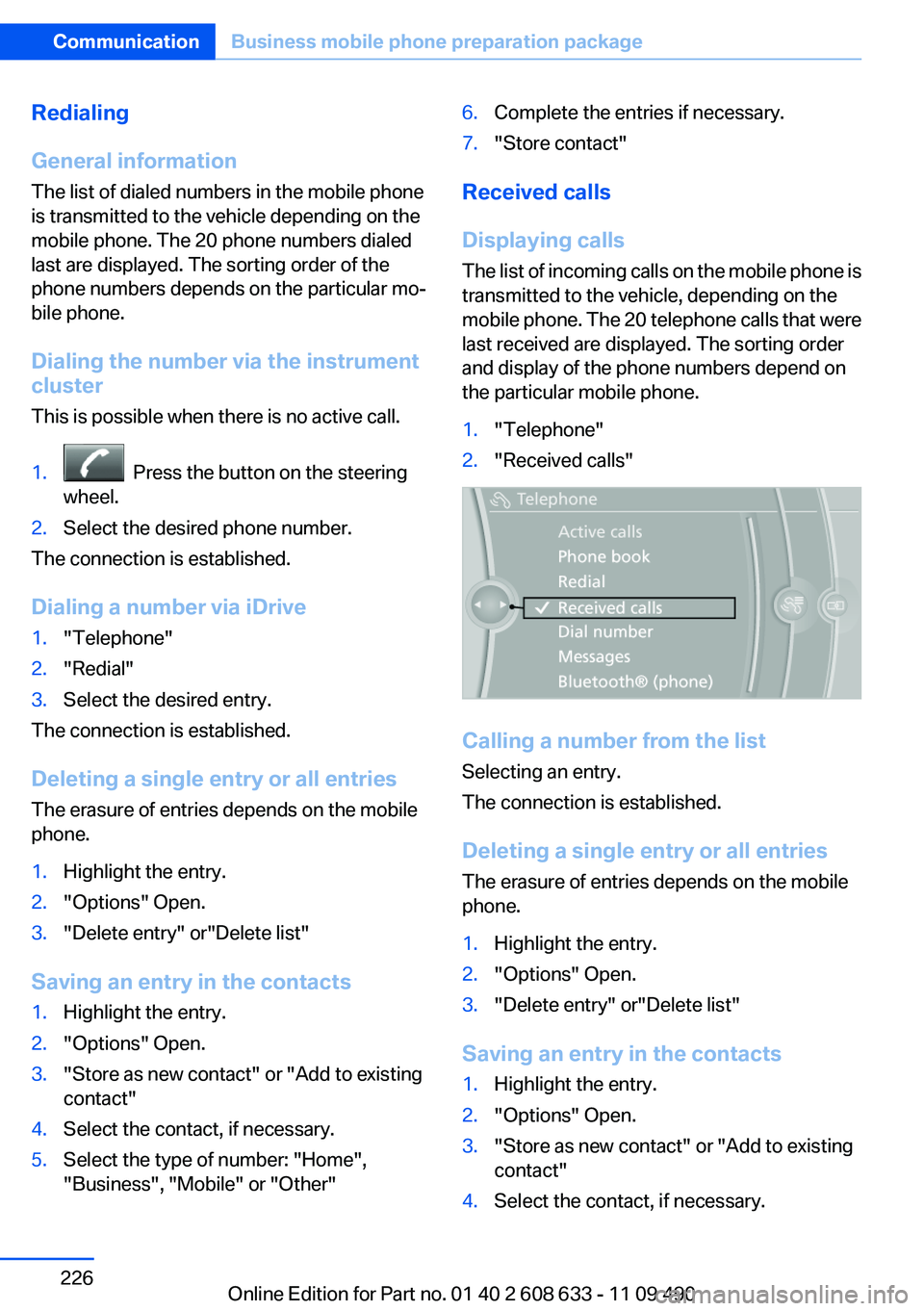
1."Telephone"
2."Received calls"
Calling a number from the list
Selecting an entry.
The connection is established.
Deleting a single entry or all entries
The erasure of entries depends on the mobile
phone.
1.Highlight the entry.
2."Options" Open.
3."Delete entry" or"Delete list"
Saving an entry in the contacts
1.Highlight the entry.
2."Options" Open.
3."Store as new contact" or "Add to existing
contact"
4.Select the contact, if necessary.
Seite 226
CommunicationBusiness mobile phone preparation package
226Online Edition for Part no. 01 40 2 608 633 - 11 09 490
Page 231 of 325
3.Highlight the mobile phone to be config‐
ured.
4."Options" Open.
5."Configure phone"
6.At least one function must be selected.
▷"Telephone"
▷"Additional telephone"
▷"Audio"
7."OK"
If a function is assigned to a mobile phone, the
function will be deactivated where appropriate
for a mobile phone that is already connected and
the mobile phone will be unpaired.
Swapping the telephone and additional
telephone
The function of the telephone and additional tel‐
ephone can be swapped automatically.
1."Telephone"
2."Bluetooth® (phone)"
3."Swap phone/addit. phone"
Unpairing the mobile phone
1."Telephone"
2."Bluetooth® (phone)"
3.Highlight the mobile phone that is to be un‐
paired.
4."Options" Open.
5."Remove phone from list"
What to do if...
Information on suitable mobile phones, refer to
page 228.
The mobile phone could not be paired or con‐
nected.
▷Is Bluetooth activated in the vehicle and on
the mobile phone? Activate Bluetooth in the
vehicle and on the mobile phone.
▷Do the Bluetooth passkeys on the mobile
phone and the vehicle match? Enter the
same passkey on the mobile phone and via
iDrive.
▷Did it take longer than 30 seconds to enter
the passkey? Repeat the pairing procedure.
▷Are too many Bluetooth devices connected
to the mobile phone or vehicle? Delete con‐
nections with other devices if necessary.
▷Is the audio connection activated? Deacti‐
vate the audio connection.
▷Is the mobile phone in power-save mode or
does it have only a limited remaining battery
life? Charge the mobile phone in the snap-
in adapter or via the charging cable.
▷Depending on the mobile phone, it is possi‐
ble that only one cell phone can be con‐
nected to the vehicle. Unpair the connected
cell phone from the vehicle and pair and con‐
nect only one cell phone.
The mobile phone no longer reacts.
▷Switch the mobile phone off and on again.
▷Ambient temperatures too high or too low?
Do not subject the mobile phone to extreme
ambient temperatures.
The telephone functions are not available.
▷Is the mobile phone paired as an additional
telephone and is the additional telephone
function deactivated? Activate the function.
▷Is an outgoing call not possible? Connect
the mobile phone as a telephone.
No or not all phone book entries are displayed,
or they are incomplete.
▷Transmission of the phone book entries is
not yet complete.
▷It is possible that only the phone book en‐
tries of the mobile phone or the SIM card are
transmitted.
▷It may not be possible to display phone book
entries with special characters.
▷The number of phone book entries being
stored is too high.
▷Is the data volume of the contact too large,
e.g., due to stored information such as
Seite 231
Professional mobile phone preparation packageCommunication
231Online Edition for Part no. 01 40 2 608 633 - 11 09 490
Page 235 of 325
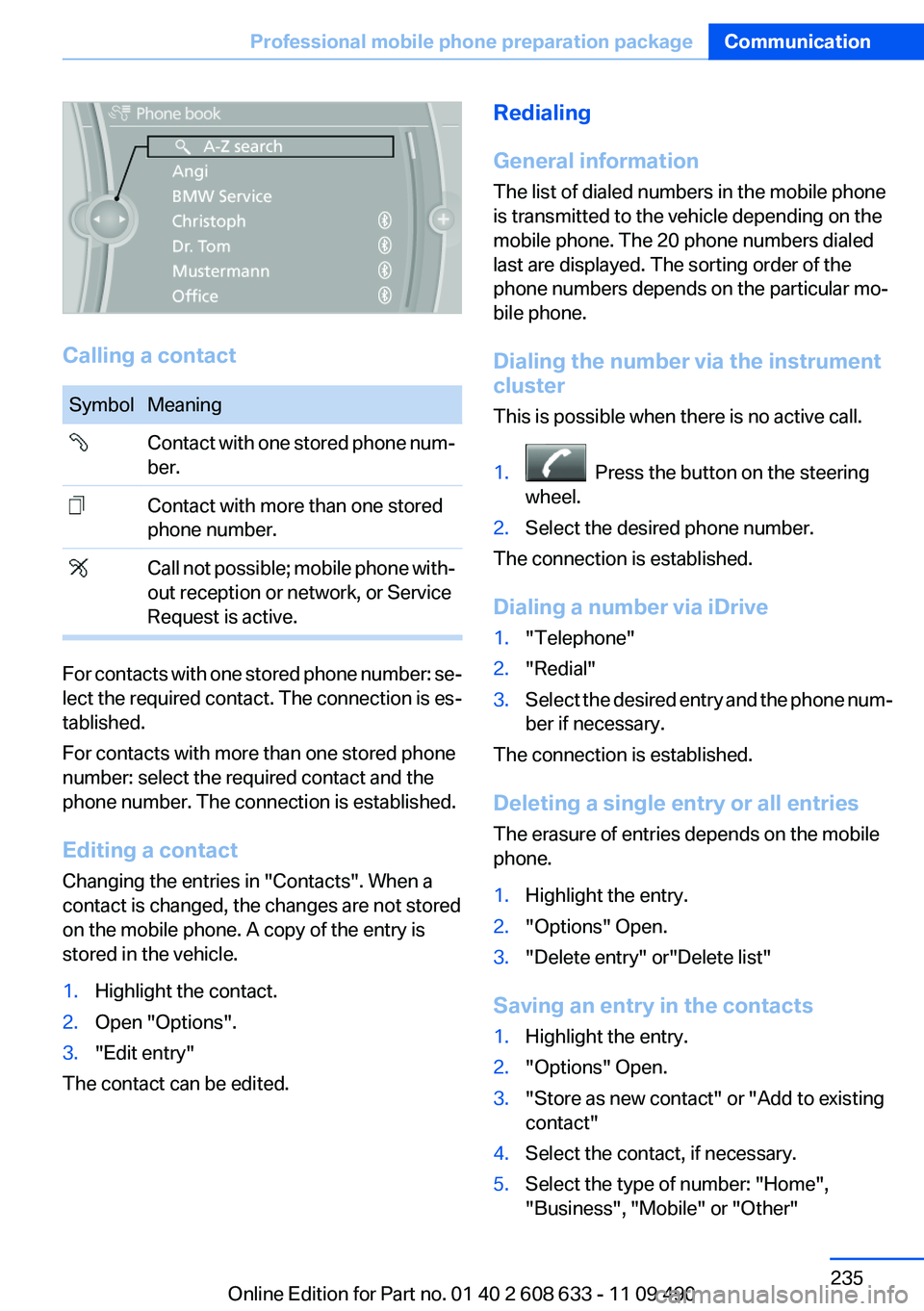
Calling a contact
Symbol Meaning
Contact with one stored phone num‐
ber.
Contact with more than one stored
phone number.
Call not possible; mobile phone with‐
out reception or network, or Service
Request is active.
For contacts with one stored phone number: se‐
lect the required contact. The connection is es‐
tablished.
For contacts with more than one stored phone
number: select the required contact and the
phone number. The connection is established.
Editing a contact
Changing the entries in "Contacts". When a
contact is changed, the changes are not stored
on the mobile phone. A copy of the entry is
stored in the vehicle.
1.Highlight the contact.
2.Open "Options".
3."Edit entry"
The contact can be edited.
Redialing
General information
The list of dialed numbers in the mobile phone
is transmitted to the vehicle depending on the
mobile phone. The 20 phone numbers dialed
last are displayed. The sorting order of the
phone numbers depends on the particular mo‐
bile phone.
Dialing the number via the instrument
cluster
This is possible when there is no active call.
1. Press the button on the steering
wheel.
2.Select the desired phone number.
The connection is established.
Dialing a number via iDrive
1."Telephone"
2."Redial"
3.Select the desired entry and the phone num‐
ber if necessary.
The connection is established.
Deleting a single entry or all entries
The erasure of entries depends on the mobile
phone.
1.Highlight the entry.
2."Options" Open.
3."Delete entry" or"Delete list"
Saving an entry in the contacts
1.Highlight the entry.
2."Options" Open.
3."Store as new contact" or "Add to existing
contact"
4.Select the contact, if necessary.
5.Select the type of number: "Home",
"Business", "Mobile" or "Other"
Seite 235
Professional mobile phone preparation packageCommunication
235Online Edition for Part no. 01 40 2 608 633 - 11 09 490