Storage BMW 3 SERIES CONVERTIBLE 2013 E93 User Guide
[x] Cancel search | Manufacturer: BMW, Model Year: 2013, Model line: 3 SERIES CONVERTIBLE, Model: BMW 3 SERIES CONVERTIBLE 2013 E93Pages: 311, PDF Size: 7.05 MB
Page 192 of 311
187
Music collection
Entertainment
Albums
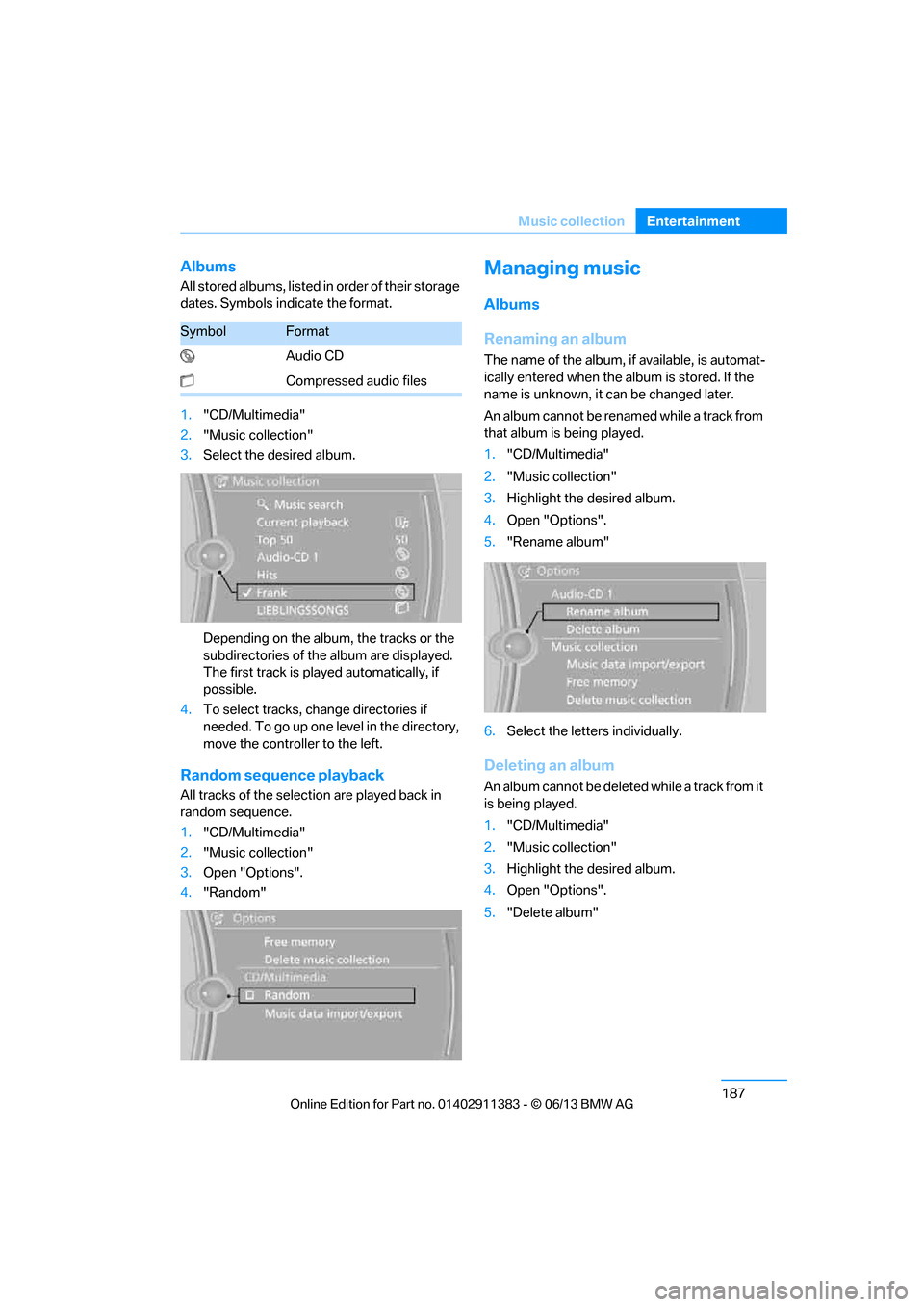
All stored albums, listed in
order of their storage
dates. Symbols indicate the format.
1. "CD/Multimedia"
2. "Music collection"
3. Select the desired album.
Depending on the album, the tracks or the
subdirectories of the album are displayed.
The first track is play ed automatically, if
possible.
4. To select tracks, ch ange directories if
needed. To go up one level in the directory,
move the controller to the left.
Random sequence playback
All tracks of the select ion are played back in
random sequence.
1. "CD/Multimedia"
2. "Music collection"
3. Open "Options".
4. "Random"
Managing music
Albums
Renaming an album
The name of the album, if available, is automat-
ically entered when the album is stored. If the
name is unknown, it can be changed later.
An album cannot be renamed while a track from
that album is being played.
1. "CD/Multimedia"
2. "Music collection"
3. Highlight the desired album.
4. Open "Options".
5. "Rename album"
6. Select the letters individually.
Deleting an album
An album cannot be delete d while a track from it
is being played.
1. "CD/Multimedia"
2. "Music collection"
3. Highlight the desired album.
4. Open "Options".
5. "Delete album"
SymbolFormat
Audio CD
Compressed audio files
00320051004F004C00510048000300280047004C0057004C005200510003
Page 201 of 311
196
EntertainmentExternal devices
Disconnect one of the two connections, e.g.
the audio connection, refer to page 195,
and start playback again.
If you have gone through all items in the list and
still cannot activate the de sired function, please
contact Customer Relations or your BMW
center.
Software update
The vehicle supports various external devices,
depending on the software it is currently using.
A software update can enable the vehicle to
support, for example, new mobile phones or
new external devices.
Software updates and associated, up-to-date
instructions are available on the web page
www.bmwusa.com/update.
Displaying cu rrent version
The currently installed software is displayed.
1."Settings"
2. "Software update"
3. "Show current version"
Select the desired versio n to display additional
information.
Updating software by USB
The software update can only be performed
when stopped.
1. Save the file for the so ftware update in the
main directory of a USB data storage
device.
2. Connect the USB data storage device to
the USB audio interface in the center
armrest. It is not possible to perform the
update using the USB interface in the glove
compartment.
3. "Settings"
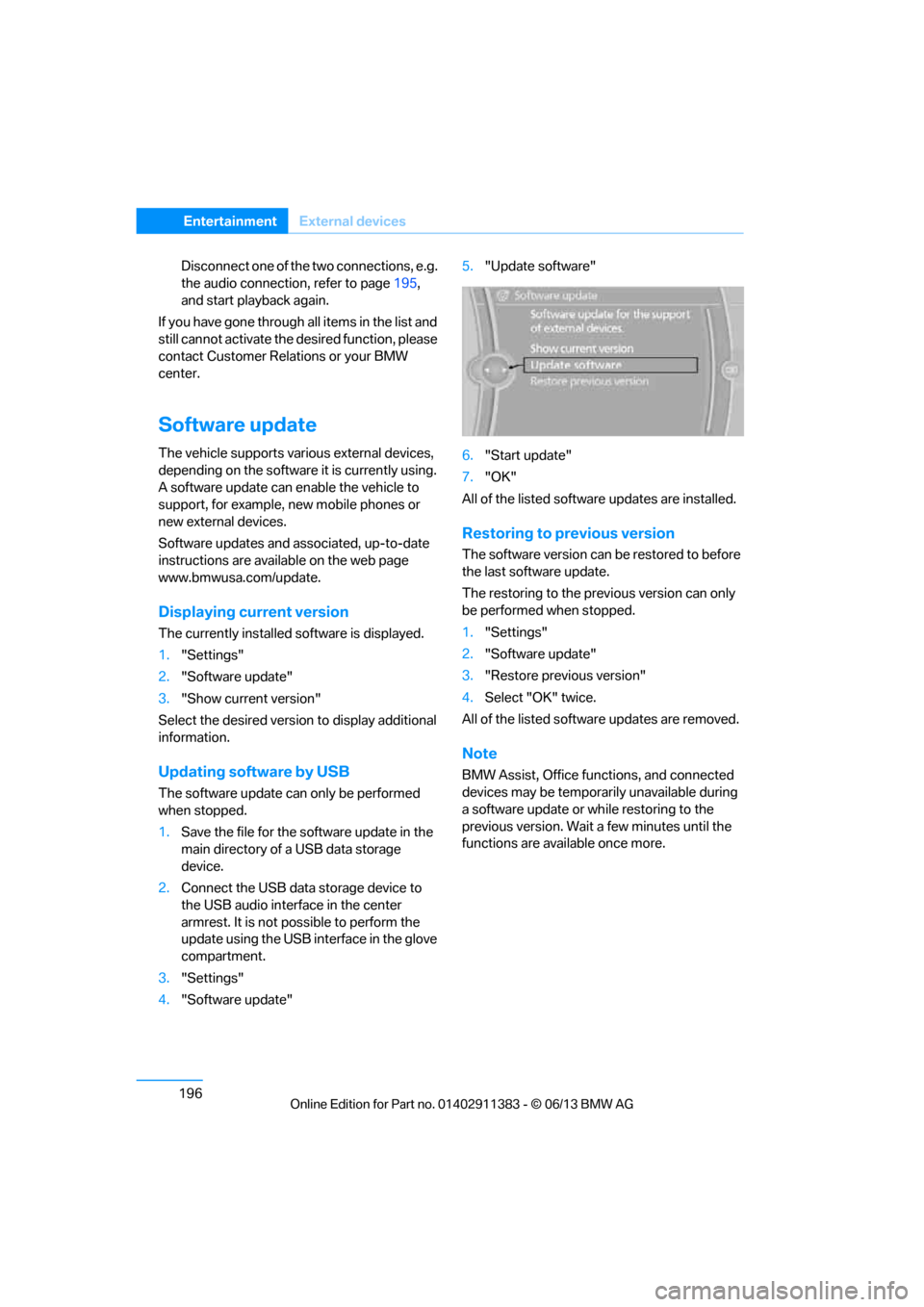
4. "Software update" 5.
"Update software"
6. "Start update"
7. "OK"
All of the listed software updates are installed.
Restoring to previous version
The software version can be restored to before
the last software update.
The restoring to the prev ious version can only
be performed when stopped.
1. "Settings"
2. "Software update"
3. "Restore previous version"
4. Select "OK" twice.
All of the listed softwa re updates are removed.
Note
BMW Assist, Office functions, and connected
devices may be temporar ily unavailable during
a software update or while restoring to the
previous version. Wait a few minutes until the
functions are available once more.
00320051004F004C00510048000300280047004C0057004C005200510003
Page 219 of 311
214
CommunicationsOffice
Contacts
General information
Contacts can be created and edited. The con-
tacts from the mobile phone are displayed as
well if this function is supported by the mobile
phone. The addresses can be used as destina-
tions for navigation and the phone numbers can
be dialed.
Displaying contacts
1. "Office"
2. "Contacts"
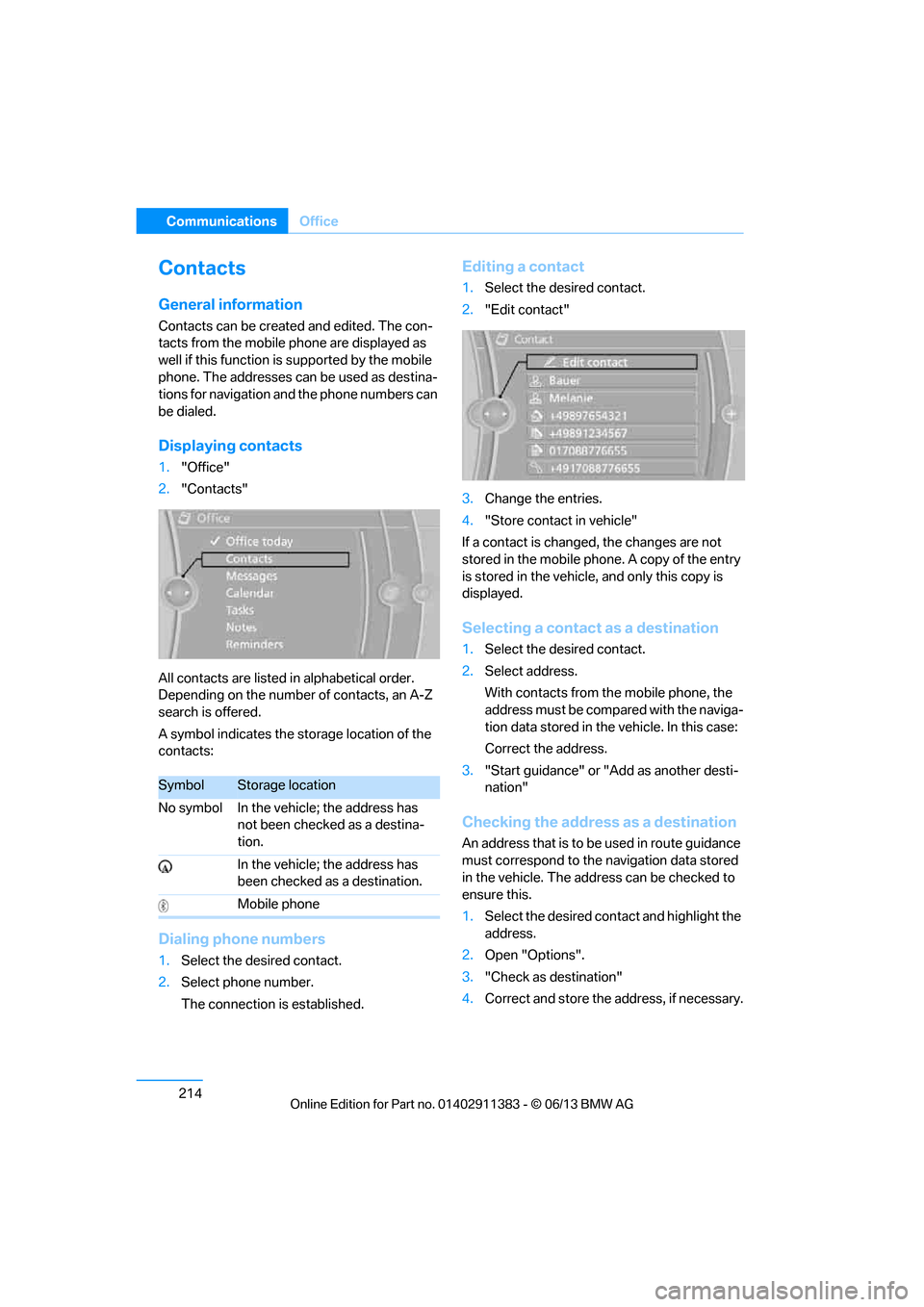
All contacts are listed in alphabetical order.
Depending on the number of contacts, an A-Z
search is offered.
A symbol indicates the storage location of the
contacts:
Dialing phone numbers
1. Select the desired contact.
2. Select phone number.
The connection is established.
Editing a contact
1.Select the desired contact.
2. "Edit contact"
3. Change the entries.
4. "Store contact in vehicle"
If a contact is changed, the changes are not
stored in the mobile phone. A copy of the entry
is stored in the vehicle, and only this copy is
displayed.
Selecting a contact as a destination
1. Select the desired contact.
2. Select address.
With contacts from the mobile phone, the
address must be compared with the naviga-
tion data stored in the vehicle. In this case:
Correct the address.
3. "Start guidance" or "Add as another desti-
nation"
Checking the address as a destination
An address that is to be used in route guidance
must correspond to the navigation data stored
in the vehicle. The address can be checked to
ensure this.
1. Select the desired contact and highlight the
address.
2. Open "Options".
3. "Check as destination"
4. Correct and store the address, if necessary.
SymbolStorage location
No symbol In the vehicle; the address has not been checked as a destina-
tion.
In the vehicle; the address has
been checked as a destination.
Mobile phone
00320051004F004C00510048000300280047004C0057004C005200510003
Page 228 of 311
223
Contacts
Communications
Displaying contacts
1.
"Contacts"
2. "My contacts"
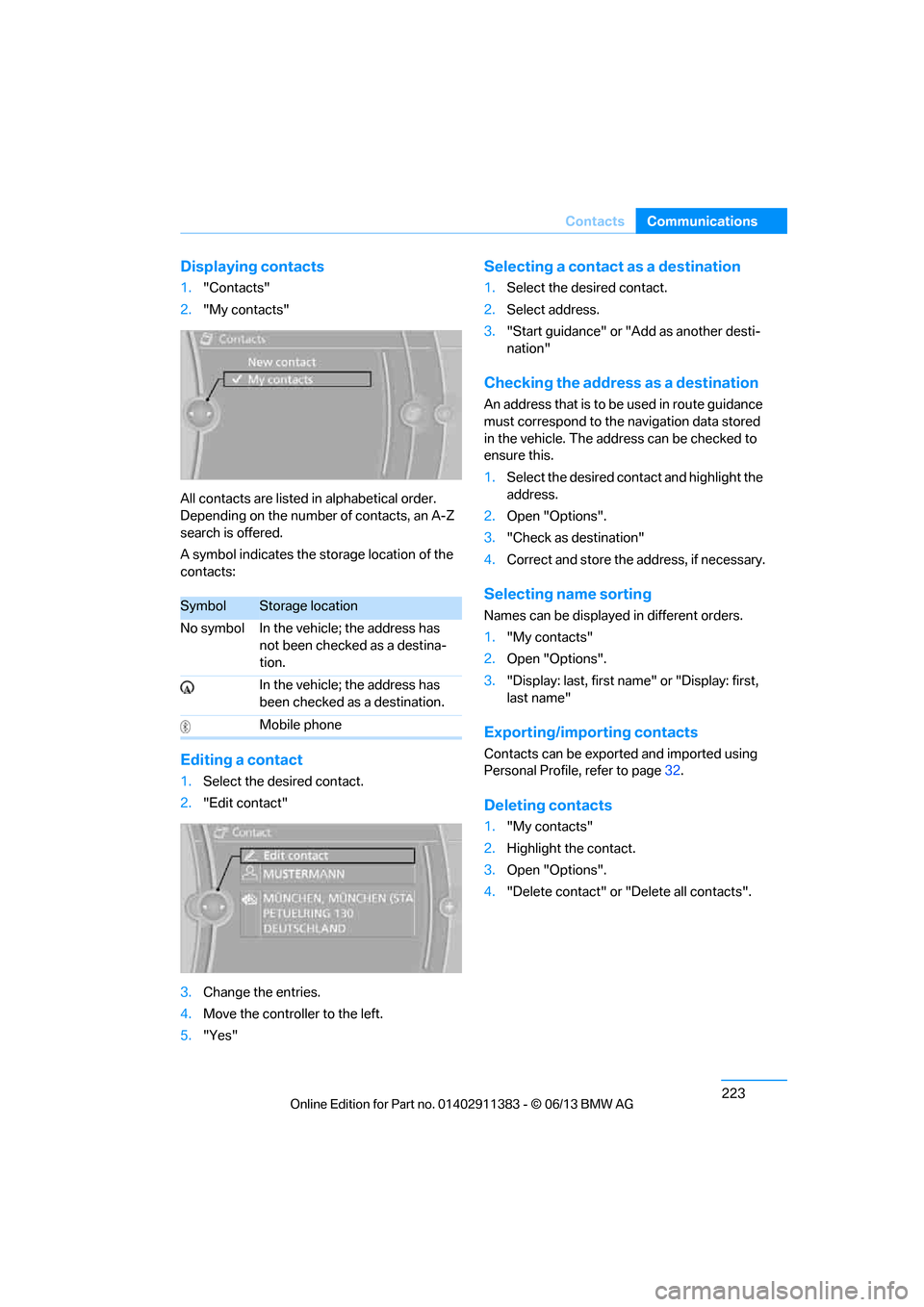
All contacts are listed in alphabetical order.
Depending on the number of contacts, an A-Z
search is offered.
A symbol indicates the storage location of the
contacts:
Editing a contact
1. Select the desired contact.
2. "Edit contact"
3. Change the entries.
4. Move the controller to the left.
5. "Yes"
Selecting a contact as a destination
1.Select the desired contact.
2. Select address.
3. "Start guidance" or "Add as another desti-
nation"
Checking the address as a destination
An address that is to be used in route guidance
must correspond to the na vigation data stored
in the vehicle. The address can be checked to
ensure this.
1. Select the desired contact and highlight the
address.
2. Open "Options".
3. "Check as destination"
4. Correct and store the address, if necessary.
Selecting name sorting
Names can be displayed in different orders.
1."My contacts"
2. Open "Options".
3. "Display: last, first name " or "Display: first,
last name"
Exporting/importing contacts
Contacts can be exported and imported using
Personal Profile, refer to page 32.
Deleting contacts
1."My contacts"
2. Highlight the contact.
3. Open "Options".
4. "Delete contact" or "Delete all contacts".
SymbolStorage location
No symbol In the vehicle; the address has not been checked as a destina-
tion.
In the vehicle; the address has
been checked as a destination.
Mobile phone
00320051004F004C00510048000300280047004C0057004C005200510003
Page 258 of 311
253
Wheels and tires
Mobility
Recommended tire brands
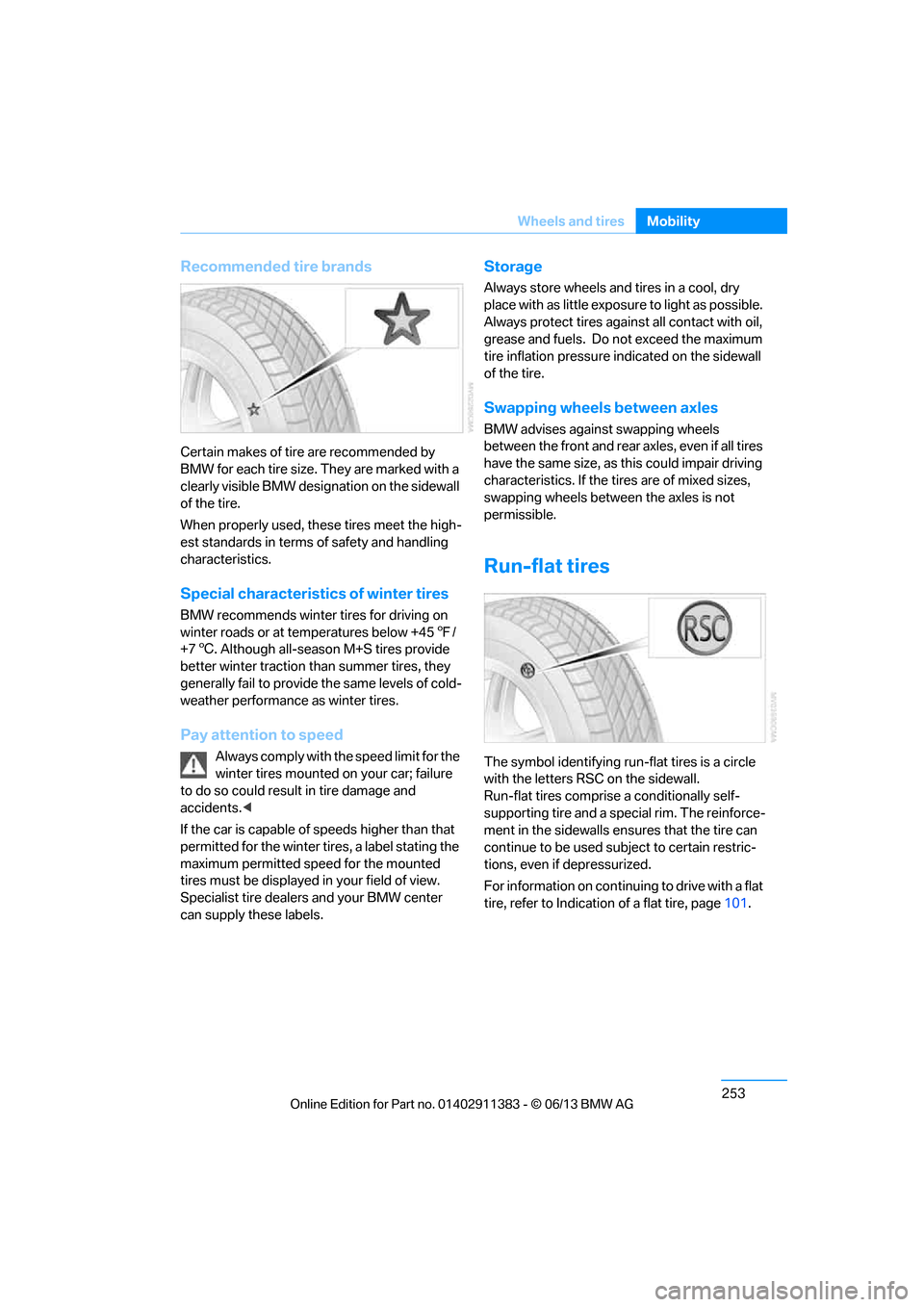
Certain makes of tire are recommended by
BMW for each tire size. They are marked with a
clearly visible BMW designation on the sidewall
of the tire.
When properly used, these tires meet the high-
est standards in terms of safety and handling
characteristics.
Special characteristics of winter tires
BMW recommends winter tires for driving on
winter roads or at temperatures below +45
7/
+7 6. Although all-season M+S tires provide
better winter traction th an summer tires, they
generally fail to provide the same levels of cold-
weather performance as winter tires.
Pay attention to speed
Always comply with the speed limit for the
winter tires mounted on your car; failure
to do so could result in tire damage and
accidents. <
If the car is capable of speeds higher than that
permitted for the winter ti res, a label stating the
maximum permitted speed for the mounted
tires must be displayed in your field of view.
Specialist tire dealers and your BMW center
can supply these labels.
Storage
Always store wheels and tires in a cool, dry
place with as little exposure to light as possible.
Always protect tires agains t all contact with oil,
grease and fuels. Do not exceed the maximum
tire inflation pressure indicated on the sidewall
of the tire.
Swapping wheels between axles
BMW advises against swapping wheels
between the front and rear axles, even if all tires
have the same size, as th is could impair driving
characteristics. If the tires are of mixed sizes,
swapping wheels between the axles is not
permissible.
Run-flat tires
The symbol identifying run- flat tires is a circle
with the letters RSC on the sidewall.
Run-flat tires comprise a conditionally self-
supporting tire and a special rim. The reinforce-
ment in the sidewalls en sures that the tire can
continue to be used su bject to certain restric-
tions, even if depressurized.
For information on continuing to drive with a flat
tire, refer to Indication of a flat tire, page 101.
00320051004F004C00510048000300280047004C0057004C005200510003
Page 270 of 311
265
Care
Mobility
Floor mats can be remove
d for the cleaning of
the passenger compartment.
When inserting the floor mats, secure them
again to prevent slippage.
When carpets are heavily soiled, clean with a
microfibre cloth and water or textile cleaner.
When doing so, rub back and forth in the
direction of travel; otherwise, the carpet may
become matted.
Sensors/cameras
Use a microfibre cloth moistened with some
glass cleaner for cleani ng sensors or cameras.
Displays/screens
Use an antistatic microfibre cloth for cleaning
displays.
Do not use chemical or abrasive house-
hold cleaning agents. Keep all types of
fluid and moisture away from the device. Other-
wise, surfaces or electrical components may be
corroded or damaged. When cleaning, avoid
excessive pressure and do not use abrasive
materials; otherwise, you may damage them. <
Vehicle storage
Your BMW center will be happy to advise you on
preparatory steps for parking the vehicle for
more than three months.
00320051004F004C00510048000300280047004C0057004C005200510003
Page 276 of 311
271
Replacing components
Mobility
>
Seat and mirror memory
The positions must be stored again, refer to
page 53.
> Inside rearview mirror with digital compass
The system must be calibrated, refer to
page 123.
> Active steering
The system automatically initializes itself
briefly during a trip. The system is deacti-
vated during this time, refer to page 105.
> xDrive
The system automatically initializes itself
during a trip. Indicator lamps light up during
this time. If the lamps do not go out during
the current trip, have the system checked.
Disposal of old battery
Have old batteries disposed of by your
BMW center or bring them to a recycling
center. Maintain the ba ttery in an upright
position for transport and storage. Always
secure the battery against tipping over during
transport.<
Fuses
Never attempt to repair a blown fuse and
do not replace a defective fuse with a
substitute of another co lor or amperage rating;
otherwise, this could lead to a circuit overload,
ultimately resulting in a fire in the vehicle. <
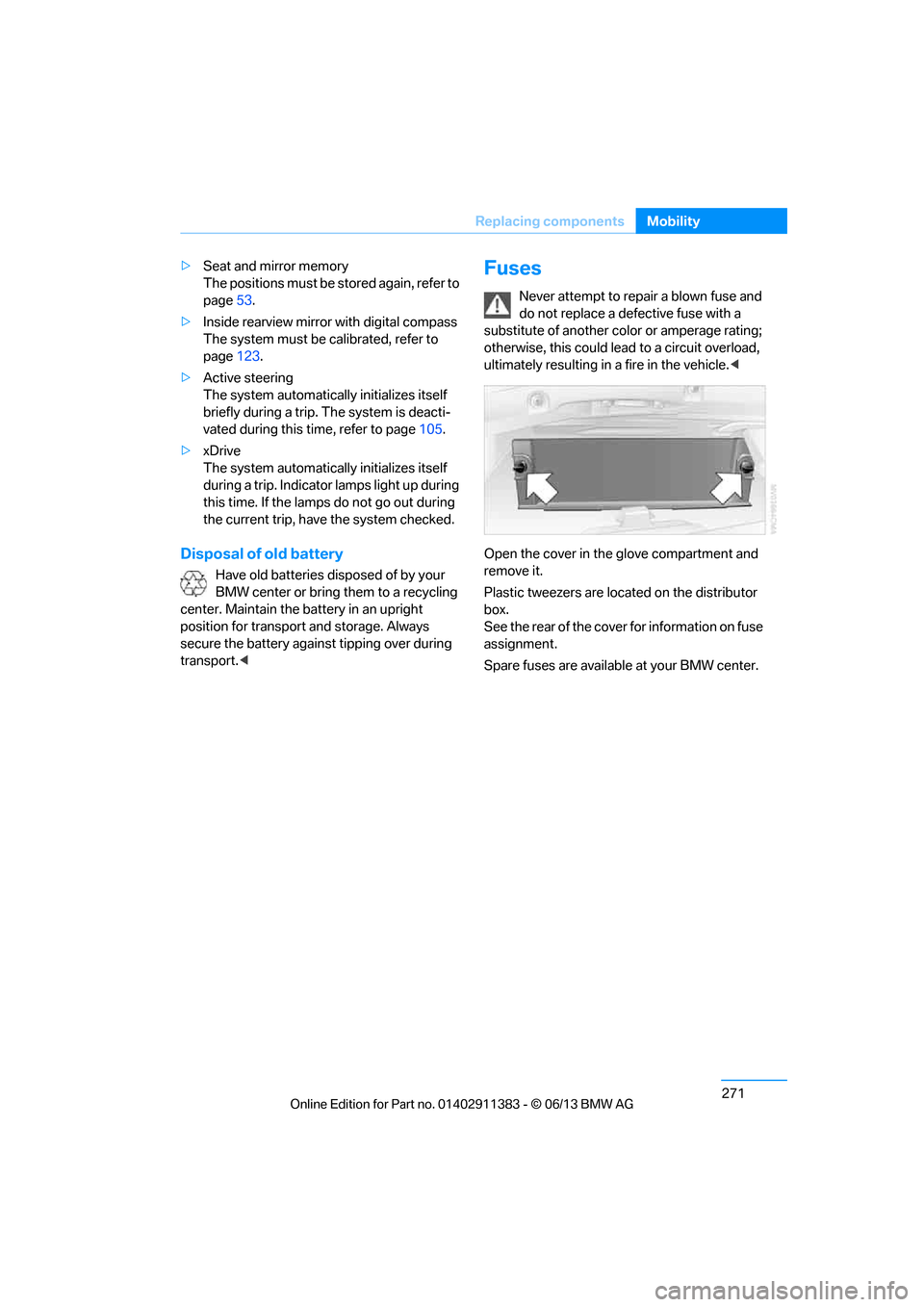
Open the cover in the glove compartment and
remove it.
Plastic tweezers are loca ted on the distributor
box.
See the rear of the cover for information on fuse
assignment.
Spare fuses are available at your BMW center.
00320051004F004C00510048000300280047004C0057004C005200510003
Page 278 of 311
273
Giving and receiving assistance
Mobility
Automatically triggering an Emergency
Request
Under certain conditions, an Emergency
Request is sent automatically immediately after
a severe accident. An automatic Emergency
Request is not affected by pressing the SOS
button.
Roadside Assistance
BMW Roadside Assistance is available by
phone around the clock in many countries.
You can obtain support there in the event of a
breakdown.
First aid pouch
Some of the articles co
ntained in the first aid
pouch have a limited service life. Therefore,
check the expiration dates of the contents
regularly and replace any items in good time, if
necessary.
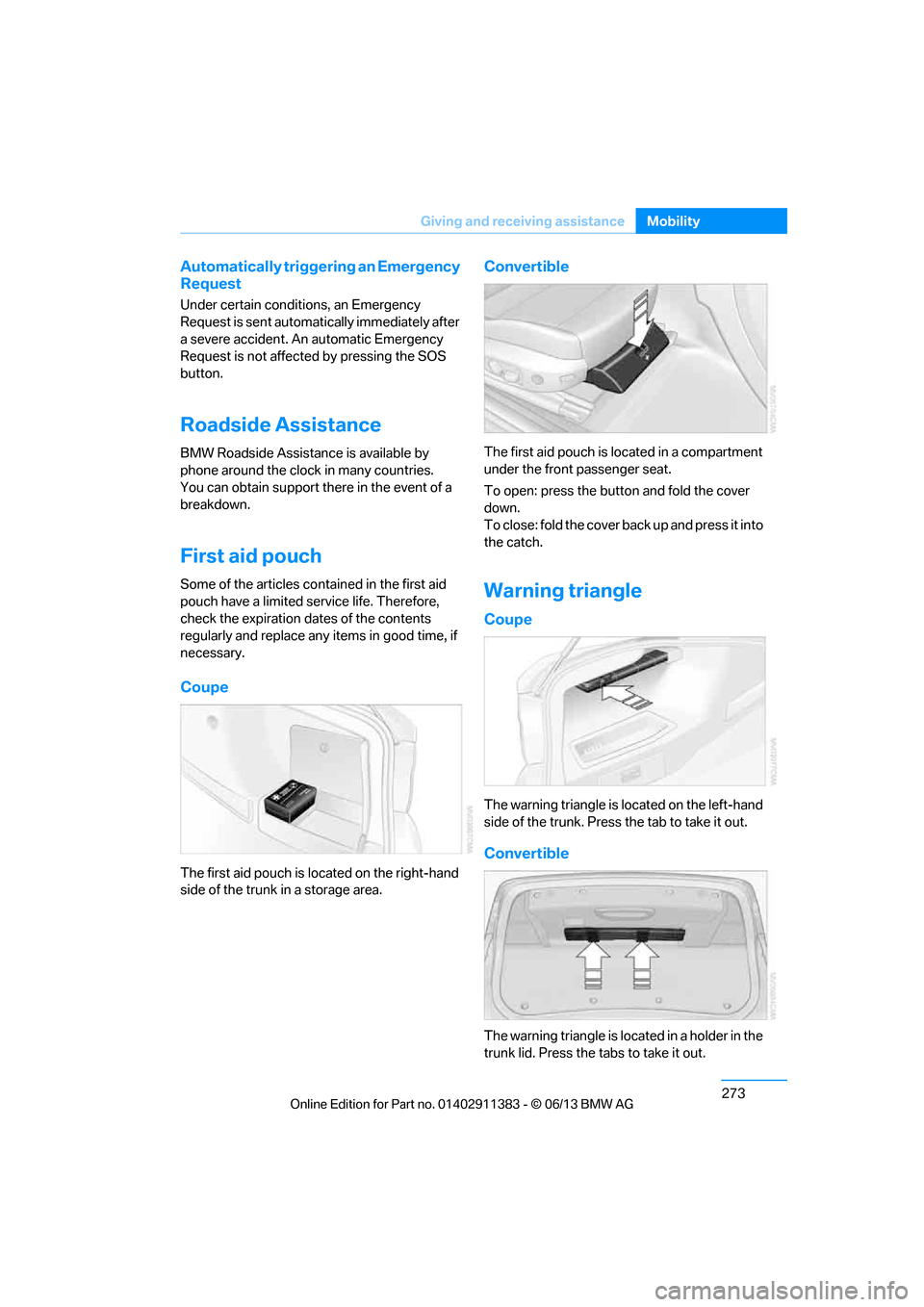
Coupe
The first aid pouch is located on the right-hand
side of the trunk in a storage area.
Convertible
The first aid pouch is located in a compartment
under the front passenger seat.
To open: press the button and fold the cover
down.
To close: fold the cover back up and press it into
the catch.
Warning triangle
Coupe
The warning triangle is located on the left-hand
side of the trunk. Press the tab to take it out.
Convertible
The warning triangle is lo cated in a holder in the
trunk lid. Press the tabs to take it out.
00320051004F004C00510048000300280047004C0057004C005200510003
Page 296 of 311
291
Everything from A to Z
Reference
Automatic recirculated air
control AUC 117
Automatic Service Request 227
Automatic transmission with
Steptronic 65
– interlock 65
– overriding selector lever
lock 67
– shiftlock, refer to Changing selector lever position 65
– sport program 66
– towing 275
– tow-starting 275
AUTO program for automatic climate control 116
AUX-In connection 125,189
Available services 228
Average fuel consumption 85
– setting the units 88
Average speed 85
Avoid highways in
navigation 155
Avoiding unintentional alarms 39
Axle loads, refer to Weights 281
B
Backing up the music
collection 188
Backrest contour, refer to Lumbar support 50
Backrests, refer to Seat adjustment 49
Backrest width adjustment 50
Back seats
– refer to Rear seats 52
Bag holder 129
Band-aids, refer to First aid pouch 273
Bar, refer to Towing
methods 276 Base plate for telephone or
mobile phone
– refer to Snap-in adapter 211
– refer to Snap-in adapter in the center armrest storage
compartment 124
Bass, tone control 167
Battery 270
– charging 270
– disposal 41,271
– jump starting 274
– remote control 32
– replacing 270
– temporary power failure 270
Battery renewal
– remote control 41
– remote control for vehicle 41
Being towed 275
Belt hand-over 54
– pinch protection system 55
Belts, refer to Safety belts 54
Belt tensioner, refer to Safety
belts 54
Beverage holders, refer to Cupholders 125
Black ice, refer to Outside temperature warning 83
Blinds, refer to Roller
sunblinds 124
Blower, refer to Air volume 117
Bluetooth, activating/ deactivating 201
Bluetooth audio 192
– disconnecting an audio connection 195
– pairing device 193
– playback 194
– unpairing device 195
– what to do if … 195
BMW Assist 224
– updating 228
BMW Homepage 4
BMW Info 218
BMW Maintenance
System 260
BM
W Online 226 BMW webpage
4
Bottle holders, refer to
Cupholders 125
Brake Assist, refer to Dynamic Brake Control DBC 97
Brake fluid, refer to Service requirements 88
Brake Force Display 106
Brake lights
– brake force display 106
Brake pads 136
– breaking in 136
Brake pedal, refer to Braking safely 138
Brake rotors 139
– brakes 136
– breaking in 136
Brakes
– ABS 97
– BMW Maintenance System 260
– brake force display 106
– breaking in 136
– parking brake 64
– service requirements 88
Brakes, refer to Braking safely 138
Brake system 136
– BMW Maintenance System 260
– breaking in 136
– disc brakes 139
Breakdown services, refer to Roadside Assistance 273
Breaking in the clutch 136
Breaking in the differential, refer to Engine and
differential 136
Break-in period 136
Brightness of the Control
Display 95
Bulb changing, refer to Lamps and bulbs 266
Button for starting the engine, refer to Start/Stop button 62
Buttons on the steering
wheel 13
00320051004F004C00510048000300280047004C0057004C005200510003
Page 304 of 311
299
Everything from A to Z
Reference
Navigation system
144
– address book 148
– bypassing a route section 156
– continuing destination
guidance 155
– destination entry 146
– dynamic destination
guidance 162
– entering a destination by voice 152
– entering a destination manually 146
– frequently asked
questions 163
– gas station
recommendations 157
– planning a trip 153
– route list 156
– selecting destination via map 151
– selecting route criteria 155
– special destinations 149
– starting destination guidance 155
– terminating destination guidance 155
– traffic bulletins 159
– voice instructions 157
– volume adjustment 157
Neck support, refer to Head
restraints 51
Nets, refer to Storage compartments 125
Neutral 69
Neutral cleaners, care 264
New tires 252
Next Service indicator, refer to Condition Based Service
CBS 260
North-facing map 157
Notes 220
Nozzles 115
Nylon rope, refer to Tow rope 276O
OBD socket, refer to Socket
for Onboard Diagnosis 261
Octane ratings, refer to Fuel
specifications 233
Odometer 83
Office 213
– current office 213
– what to do if…. 221
Oil, refer to Engine oil 256
Oil consumption 256
Oil level 256
Old batteries, refer to
Disposal 271
Onboard vehicle tool kit 266
Opening and closing
– comfort access 40
– from inside 36
– from outside 33
– using the door lock 36
– using the remote control 33
Opening and closing retractable hardtop 44
Options, selecting for
navigation 155
Orientation menu, refer to Start menu 21
Outlets
– refer to Ventilation 118
Outside-air mode
– automatic climate control 117
Outside temperature
display 83
– changing unit of measure 88
– in computer 88
Outside temperature warning 83
Overheated engine, refer to
Coolant temperature 259
Overriding selector lever lock 67
Overview
– radio operation 166
P
Paintwork care263
Park assistant, refer to Park Distance Control 96
Park Distance Control PDC 96
Parked car ventilation 119
– preselecting switch-on
times 119
– switching on and off directly 119
Parking
– vehicle 64
Parking aid, refer to Park
Distance Control PDC 96
Parking brake 64
– indicator lamp 64
Parking lamps 110
– replacing bulbs 267
Parking lamps/low beams 110
Parts and accessories, refer to Vehicle equipment 5
Passenger side mirror tilt function 56
Pathway lighting 111
Personal information, refer to Office 213
Personal Profile 32
Phone numbers
– dialing 206
Pinch protection system
– glass roof, electric 43
– windows 42
Playing music 185
Pollen
– refer to Microfilter/activated- charcoal filter for automatic
climate control 119
Power failure 270
Power windows 42
Power windows, refer to Windows 41
Pressure, tires 235
Pressure monitoring, tires 100
– flat Tire Monitor 100
00320051004F004C00510048000300280047004C0057004C005200510003