start BMW 3 SERIES CONVERTIBLE 2013 E93 Owner's Manual
[x] Cancel search | Manufacturer: BMW, Model Year: 2013, Model line: 3 SERIES CONVERTIBLE, Model: BMW 3 SERIES CONVERTIBLE 2013 E93Pages: 311, PDF Size: 7.05 MB
Page 2 of 311
3 SeriesM3Owner's Manual for Vehicle
Congratulations, and than k you for choosing a BMW.
Thorough familiarity with your vehicle will provide you with
enhanced control and security when you drive it. We therefore
have this request:
Please take the time to read this Owner's Manual and familiarize
yourself with the information that we have compiled for you
before starting off in your new ve hicle. It contains important data
and instructions intended to a ssist you in gaining maximum use
and satisfaction from your BMW' s unique range of technical fea-
tures. The manual also contai ns information on maintenance
designed to enhance operating sa fety and contribute to main-
taining the value of your BMW th roughout an extended service
life.
This manual is supplemented by a Service and Warranty Informa-
tion Booklet for US models or a Warranty and Service Guide
Booklet for Canadian models.
Please also read the other booklets of vehicle literature, e.g. the
Supplementary Owner's Handbook for the BMW M3.
We wish you an enjoyable driving experience.
BMW AG
00320051004F004C00510048000300280047004C0057004C005200510003
Page 18 of 311
13
Dashboard
At a glance
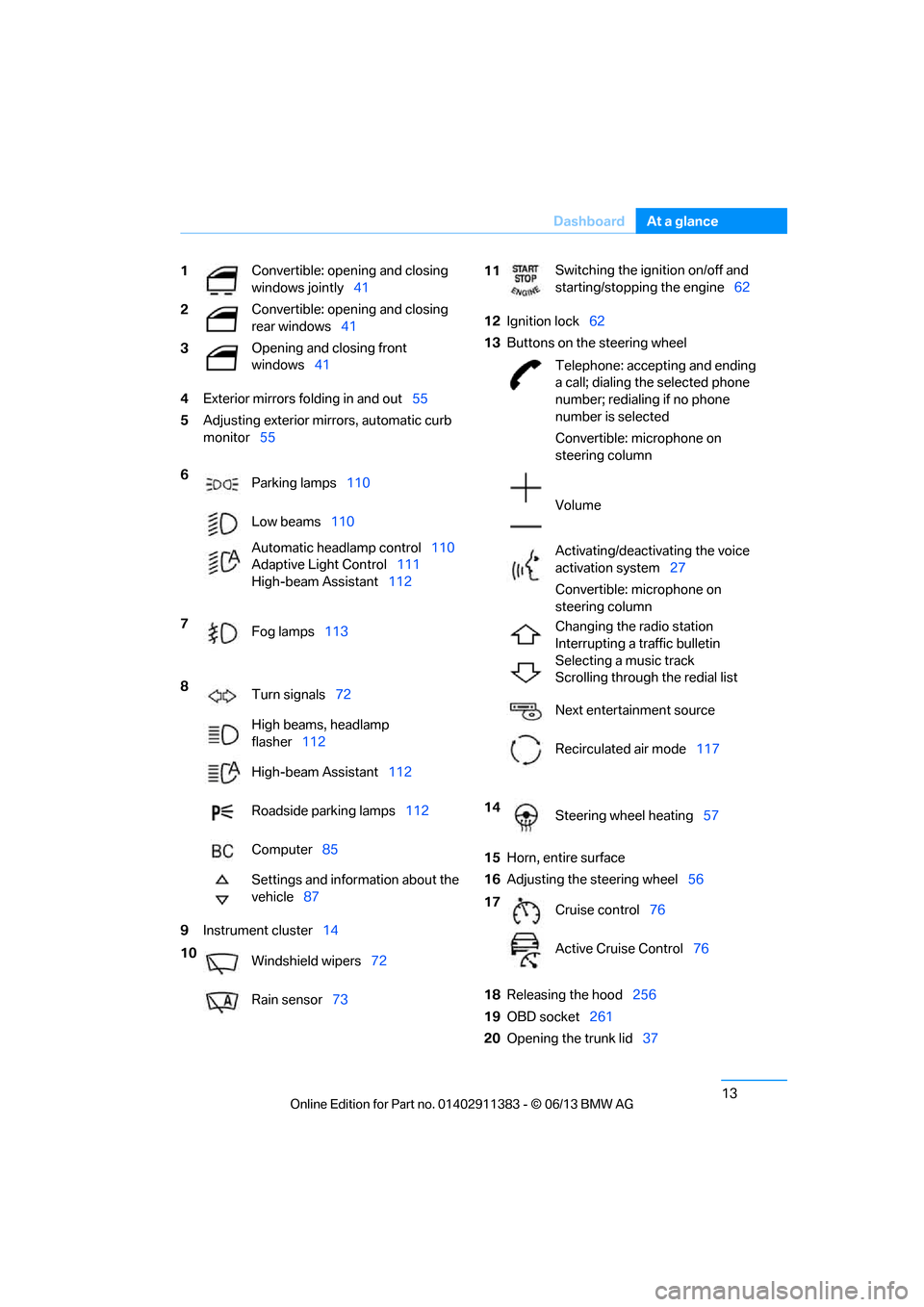
4
Exterior mirrors fo lding in and out55
5 Adjusting exterior mirrors, automatic curb
monitor 55
9 Instrument cluster 14 12
Ignition lock 62
13 Buttons on the steering wheel
15 Horn, entire surface
16 Adjusting the steering wheel 56
18 Releasing the hood 256
19 OBD socket 261
20 Opening the trunk lid 37
1
Convertible: opening and closing
windows jointly
41
2 Convertible: opening and closing
rear windows
41
3 Opening and closing front
windows
41
6 Parking lamps 110
Low beams 110
Automatic head lamp control110
Adaptive Light Control 111
High-beam Assistant 112
7 Fog lamps 113
8 Turn signals 72
High beams, headlamp
flasher 112
High-beam Assistant 112
Roadside parking lamps 112
Computer 85
Settings and information about the
vehicle 87
10 Windshield wipers 72
Rain sensor 73
11Switching the ignition on/off and
starting/stopping the engine
62
Telephone: accepting and ending
a call; dialing the selected phone
number; redialing if no phone
number is selected
Convertible: microphone on
steering column
Volume
Activating/deactivating the voice
activation system 27
Convertible: microphone on
steering column
Changing the radio station
Interrupting a traffic bulletin
Selecting a music track
Scrolling through the redial list
Next entertainment source
Recirculated air mode 117
14 Steering wheel heating 57
17 Cruise control 76
Active Cruise Control 76
00320051004F004C00510048000300280047004C0057004C005200510003
Page 20 of 311
15
Dashboard
At a glance
Indicator and warning lamps
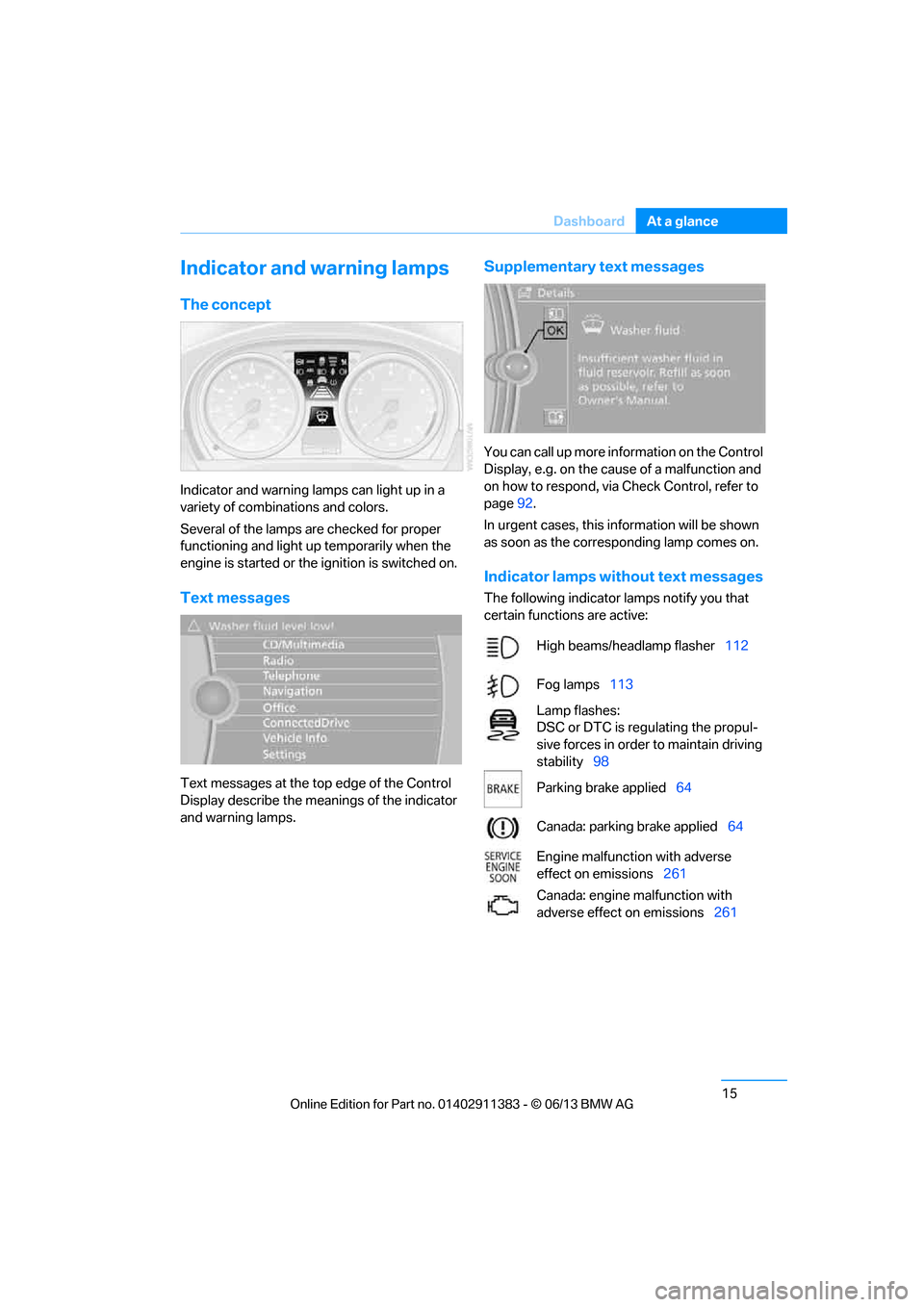
The concept
Indicator and warning lamps can light up in a
variety of combinations and colors.
Several of the lamps are checked for proper
functioning and light up temporarily when the
engine is started or the ignition is switched on.
Text messages
Text messages at the to
p edge of the Control
Display describe the mean ings of the indicator
and warning lamps.
Supplementary text messages
You can call up more information on the Control
Display, e.g. on the cause of a malfunction and
on how to respond, via Check Control, refer to
page 92.
In urgent cases, this information will be shown
as soon as the corresponding lamp comes on.
Indicator lamps without text messages
The following indicator lamps notify you that
certain functions are active:
High beams/headlamp flasher 112
Fog lamps 113
Lamp flashes:
DSC or DTC is regulating the propul-
sive forces in order to maintain driving
stability 98
Parking brake applied 64
Canada: parking brake applied 64
Engine malfunction with adverse
effect on emissions 261
Canada: engine malfunction with
adverse effect on emissions 261
00320051004F004C00510048000300280047004C0057004C005200510003
Page 26 of 311
21
iDrive
At a glance
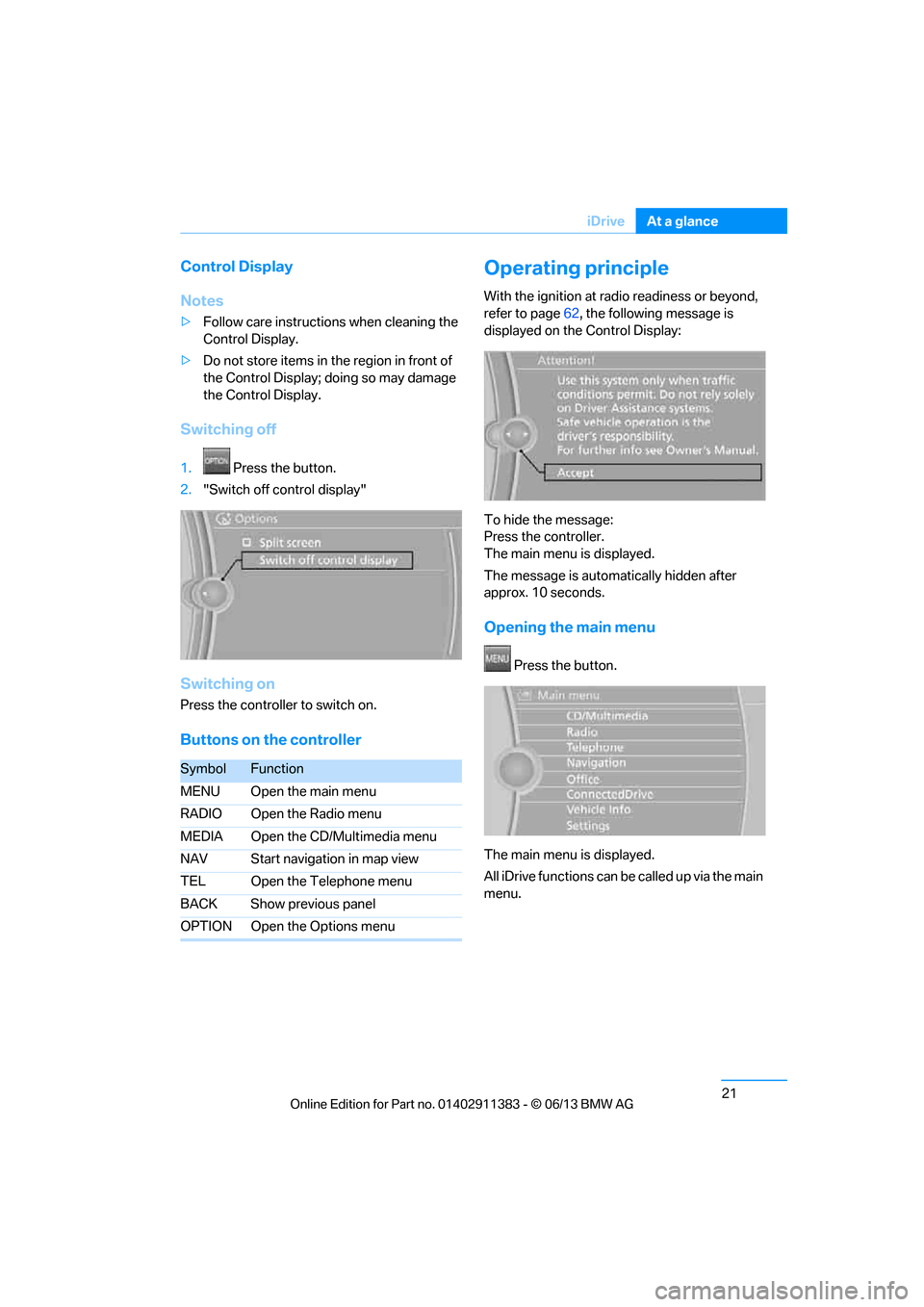
Control Display
Notes
>
Follow care instructions when cleaning the
Control Display.
> Do not store items in the region in front of
the Control Display; doing so may damage
the Control Display.
Switching off
1. Press the button.
2. "Switch off control display"
Switching on
Press the controller to switch on.
Buttons on the controller
Operating principle
With the ignition at radio readiness or beyond,
refer to page 62, the following message is
displayed on the Control Display:
To hide the message:
Press the controller.
The main menu is displayed.
The message is automatically hidden after
approx. 10 seconds.
Opening the main menu
Press the button.
The main menu is displayed.
All iDrive functions can be called up via the main
menu.
SymbolFunction
MENU Open the main menu
RADIO Open the Radio menu
MEDIA Open the CD/Multimedia menu
NAV Start navigation in map view
TEL Open the Telephone menu
BACK Show previous panel
OPTION Open the Options menu
00320051004F004C00510048000300280047004C0057004C005200510003
Page 33 of 311
28
At a glanceVoice activation system
For example, if the "Settings" menu is dis-
played, the commands relating to settings are
read aloud.
Performing functions using short
commands
Functions from the main menu can be per-
formed directly by means of short commands,
essentially regardless of which menu item is
selected, e.g. { Vehicle status}.
List of short command of the voice activation
system, refer to page 283.
Help dialog for voice activation system
Accessing help:
Other commands for the help dialog:
>{Help with examples }: information about
the current control options and the most
important commands relating to them are
read aloud.
> {Help with voice activation }: information
about the principle operation of the voice
activation system is read aloud.
Example: playing back a CD
Via the main menu
1. If necessary, switch on entertainment audio
output.
2. Press the button on the steering wheel.
Via short commands
The CD playback can also be started via a short
command.
1.If necessary, switch on entertainment audio
output.
2. Press the button on the steering wheel.
Setting the voice dialog
You can set whether the system uses the
standard dialog or a short version.
In the short version of the voice dialog, the
responses from the system are given in
abbreviated form.
On the Control Display:
1. "Settings"
2. "Language/Units"
3. "Speech mode:"
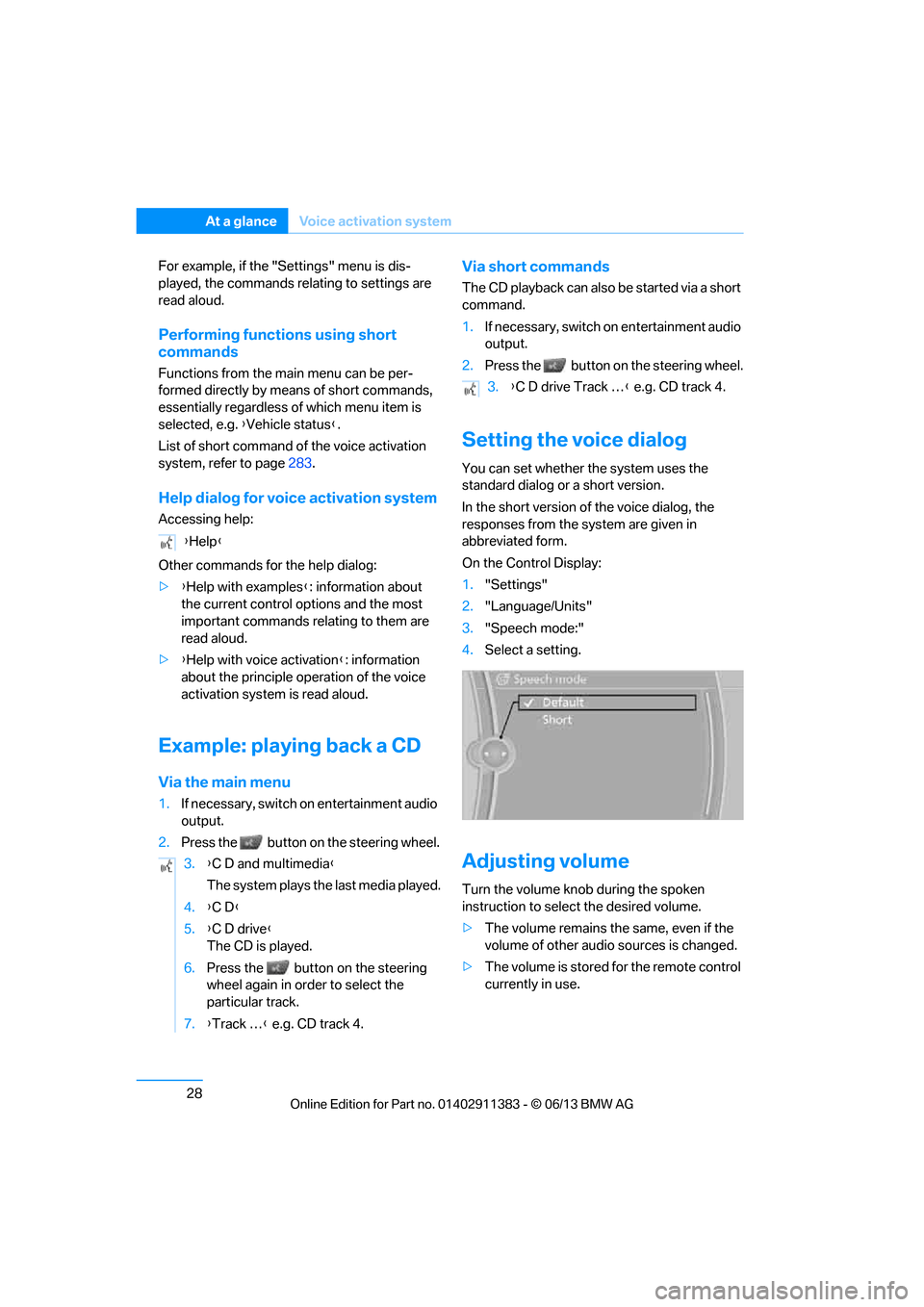
4. Select a setting.
Adjusting volume
Turn the volume knob during the spoken
instruction to select the desired volume.
>The volume remains the same, even if the
volume of other audio sources is changed.
> The volume is stored for the remote control
currently in use.
{
Help }
3. {C D and multimedia }
The system plays the last media played.
4. {C D }
5. {C D drive}
The CD is played.
6. Press the button on the steering
wheel again in order to select the
particular track.
7. {Track … } e.g. CD track 4.
3.{C D drive Track … } e.g. CD track 4.
00320051004F004C00510048000300280047004C0057004C005200510003
Page 41 of 311
36
ControlsOpening and closing
extended trip to rechar ge the battery, refer to
page 32. The remote control for Comfort
Access contains a battery that may have to be
changed, refer to page 41.
For US owners only
The transmitter and receiv er units comply with
part 15 of the FCC/Federal Communications
Commission regulations. Operation is
governed by the following:
FCC ID:
LX8766S
LX8766E
LX8CAS
Compliance statement:
This device complies wi th part 15 of the FCC
Rules. Operation is subject to the following two
conditions:
> This device must not cause harmful
interference, and
> this device must accept any interference
received, including in terference that may
cause undesired operation.
Any unauthorized modifications or
changes to these devi ces could void the
user's authority to operate this equipment. <
Opening and closing:
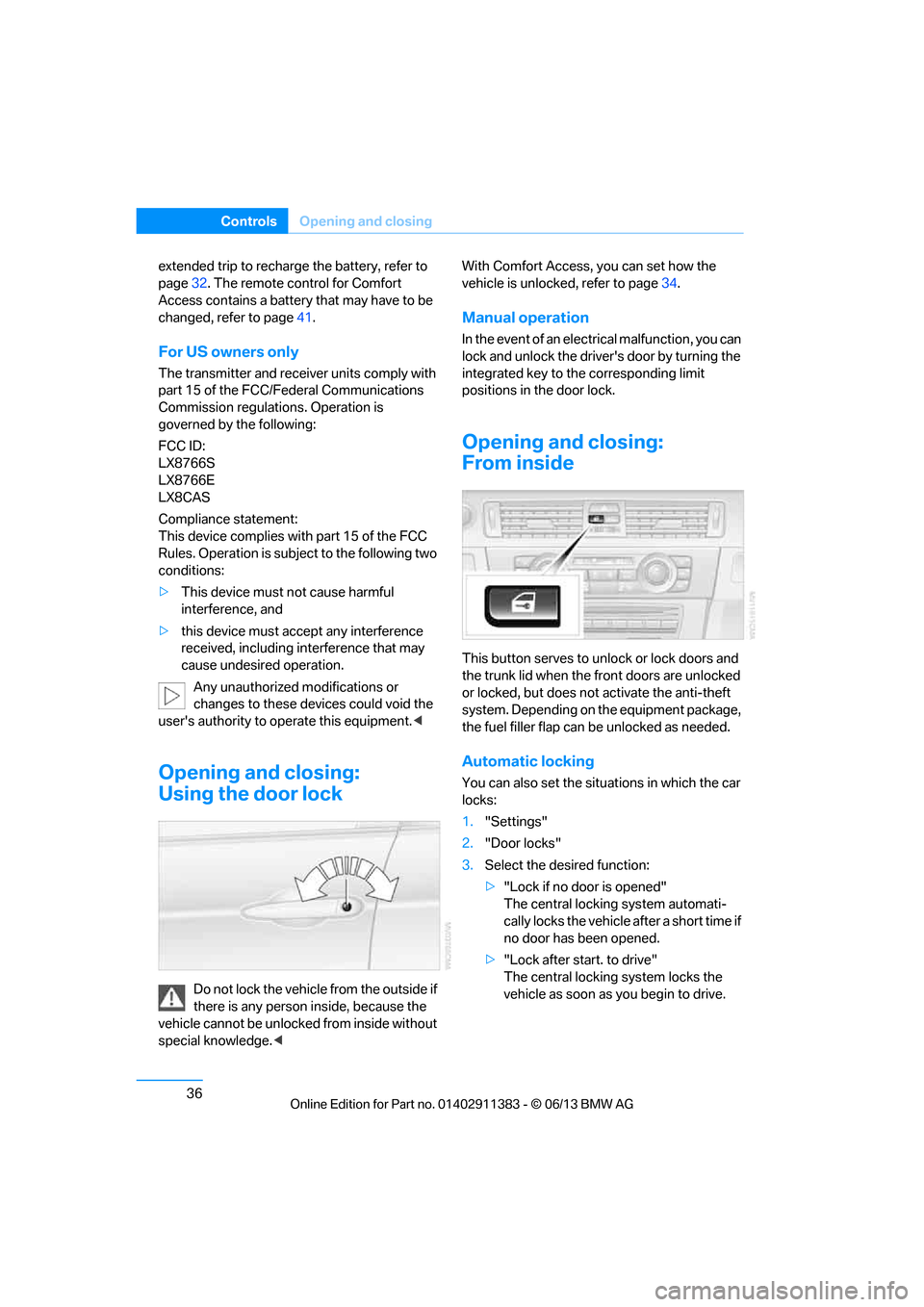
Using the door lock
Do not lock the vehicle from the outside if
there is any person inside, because the
vehicle cannot be unlocked from inside without
special knowledge. < With Comfort Access, you can set how the
vehicle is unlocked, refer to page
34.
Manual operation
In the event of an electrical malfunction, you can
lock and unlock the driver's door by turning the
integrated key to the corresponding limit
positions in the door lock.
Opening and closing:
From inside
This button serves to unlock or lock doors and
the trunk lid when the front doors are unlocked
or locked, but does not activate the anti-theft
system. Depending on the equipment package,
the fuel filler flap can be unlocked as needed.
Automatic locking
You can also set the situ ations in which the car
locks:
1. "Settings"
2. "Door locks"
3. Select the desired function:
>"Lock if no door is opened"
The central locking system automati-
cally locks the vehicle after a short time if
no door has been opened.
> "Lock after start. to drive"
The central locking system locks the
vehicle as soon as you begin to drive.
00320051004F004C00510048000300280047004C0057004C005200510003
Page 45 of 311
40
ControlsOpening and closing
Switching off tilt alarm sensor and
interior motion sensor
Once the vehicle is locked, press the
button on the remote control again
within approx. 10 seconds.
The indicator lamp light s up briefly and then
flashes continuously. The tilt alarm sensor and
the interior motion sensor are switched off until
the next time the vehicle is unlocked and subse-
quently locked again.
Comfort Access
The concept
It is possible to access the vehicle without actu-
ating the remote control. It is sufficient to have
the remote control with you, for example in your
jacket pocket. The vehicle automatically
detects the remote control in the vicinity or in
the passenger compartment.
Comfort Access supports the following
functions:
> Unlocking/locking the vehicle
> Convenient closing
> Unlocking the trunk lid separately
> Engine starting
Functional requirement
>There are no external sources of interfer-
ence in the vicinity.
> The remote control mu st be outside the
vehicle to lock it.
> The next unlocking and locking cycle is not
possible until after approx. 2 seconds.
> It is only possible to start the engine if the
remote control is inside the vehicle.
Comparison to the standard remote
control
The above functions can be controlled by
pressing the remote control buttons or by using
Comfort Access. If you notice a brief delay while opening or
closing windows, the glass roof or retract-
able hardtop, the system is checking whether a
remote control is inside the vehicle. Please
repeat the opening or closing procedure, if
necessary. <
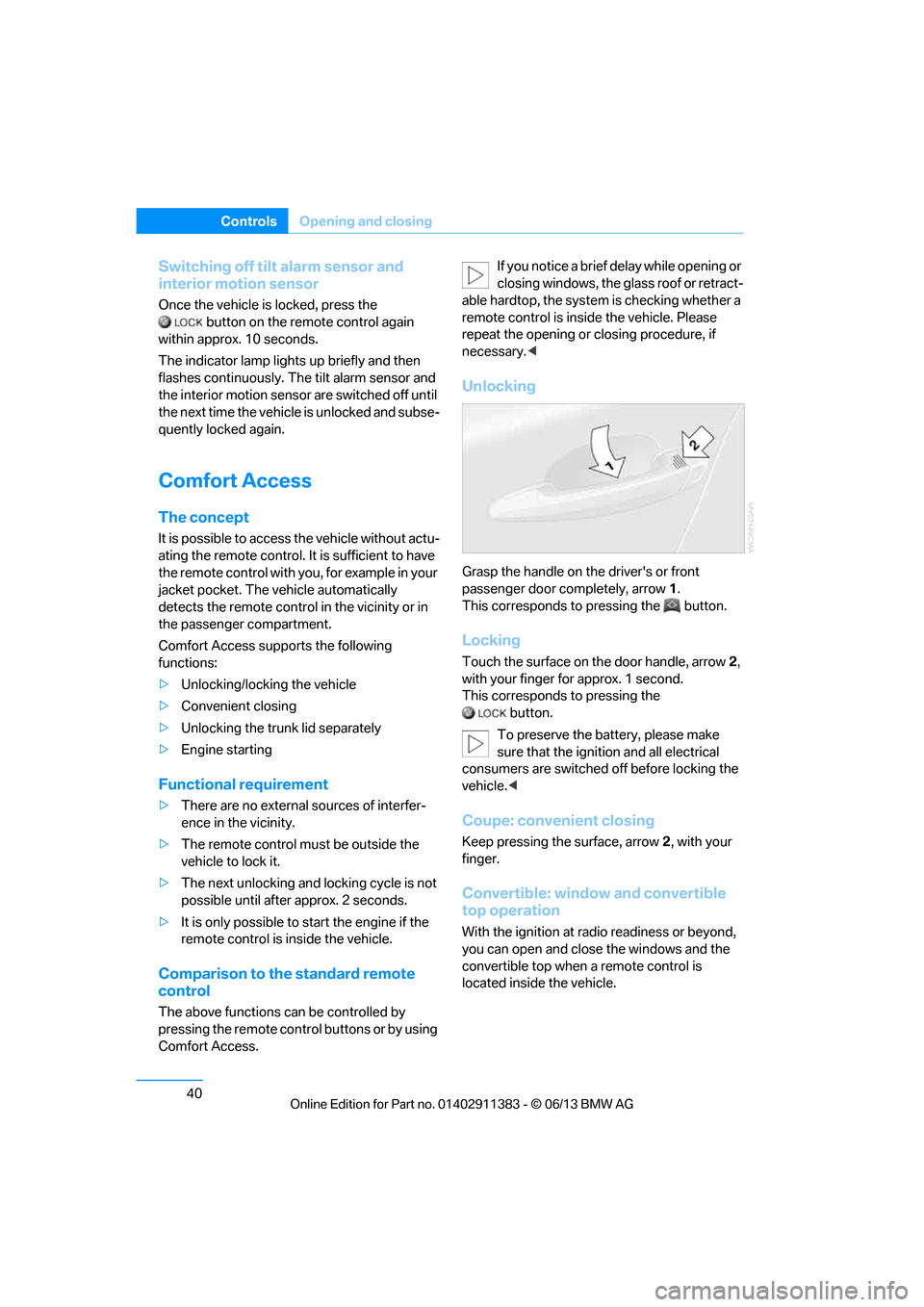
Unlocking
Grasp the handle on the driver's or front
passenger door completely, arrow 1 .
This corresponds to pressing the button.
Locking
Touch the surface on the door handle, arrow 2,
with your finger for approx. 1 second.
This corresponds to pressing the
button.
To preserve the battery, please make
sure that the ignition and all electrical
consumers are switched off before locking the
vehicle. <
Coupe: convenient closing
Keep pressing the surface, arrow 2, with your
finger.
Convertible: window and convertible
top operation
With the ignition at ra dio readiness or beyond,
you can open and close the windows and the
convertible top when a remote control is
located inside the vehicle.
00320051004F004C00510048000300280047004C0057004C005200510003
Page 46 of 311
41
Opening and closing
Controls
Unlocking the trunk lid separately
Press the button on the ou
tside of the trunk lid.
This corresponds to pressing the button.
If the vehicle detects that a remote
control has been accide ntally left inside
the locked vehicle's trunk after the trunk lid is
closed, the lid will reopen. The hazard warning
flashers flash and a signal sounds. <
Switching on radio readiness
Pressing the Start/Stop button switches on
radio readiness.
Do not depress the brake or the clutch; other-
wise, the engine will start immediately.
Starting the engine
The engine can be started or the ignition can be
switched on when a remote control is inside the
vehicle. It is not necessa ry to insert a remote
control into the ignition lock, refer to page 62.
Switching off the engine in cars with
automatic transmission
The engine can only be switched off when the
selector lever is in po sition P, refer to page 64.
To switch the engine off when the selector lever
is in position N, the remote control must be in
the ignition lock.
Malfunction
Local radio waves can in terfere with the func-
tion of Comfort Access, for example when a
mobile phone is in the immediate vicinity of the
remote control or by when a mobile phone is
being charged in the vehicle.
If this happens, open or close the vehicle via the
buttons on the remote co ntrol or using the inte-
grated key. To start the engine afterward, insert
the remote control into the ignition lock.
Warning lamps
The warning lamp in the instrument
cluster lights up when you attempt to
start the engine: the engine cannot
be started. The remote co ntrol is not inside the
vehicle or is malfunctioning. Take the remote contro
l with you inside the
vehicle or have it checked. If necessary, insert
another remote control in to the ignition lock.
The warning lamp in the instrument
cluster lights up wh ile the engine is
running: the remote control is no
longer inside the vehicle. After the engine is
switched off, the engine can only be restarted
within approx. 10 seconds.
The indicator lamp in the instrument
cluster lights up and a message
appears on the Control Display:
replace the battery in the remote control.
Replacing the battery
The remote control for Comfort Access con-
tains a battery that will need to be replaced from
time to time.
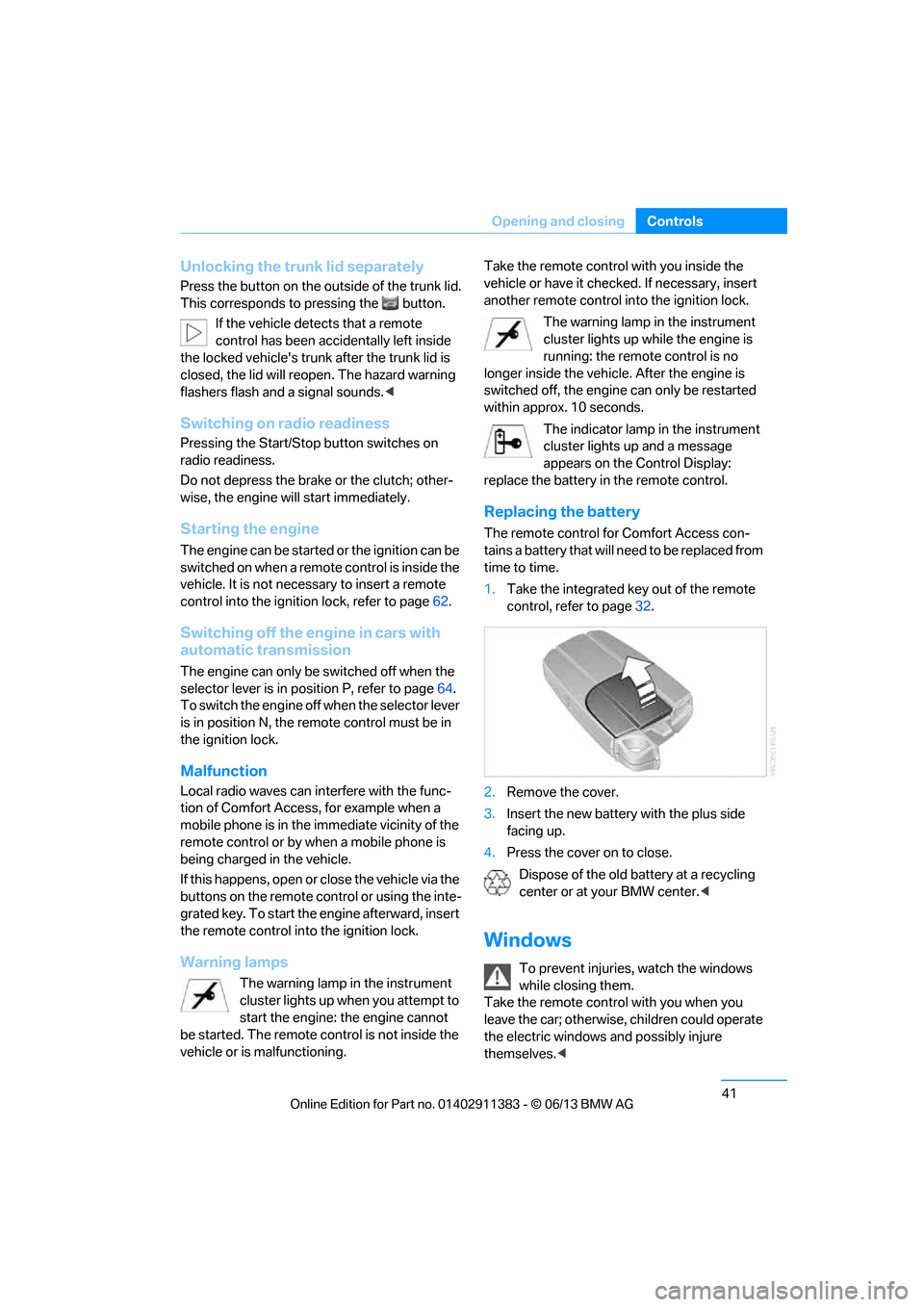
1. Take the integrated ke y out of the remote
control, refer to page 32.
2. Remove the cover.
3. Insert the new battery with the plus side
facing up.
4. Press the cover on to close.
Dispose of the old battery at a recycling
center or at your BMW center. <
Windows
To prevent injuries, watch the windows
while closing them.
Take the remote contro l with you when you
leave the car; otherwise, children could operate
the electric windows and possibly injure
themselves. <
00320051004F004C00510048000300280047004C0057004C005200510003
Page 60 of 311
55
Adjustments
Controls
Even if you have not yet fastened your safety
belt, the belt hand-over will retract if you:
>
Wait for more than approx. one minute
> Open the corresponding door
> Start driving.
Closing the respective do or reactivates the belt
hand-over if the ignition or radio readiness is on.
Front passenger seat
The belt hand-over will exte nd only if the seat is
occupied and after the front passenger door is
closed.
Pinch protection system
If the belt hand-over en counters resistance on
moving in or out, it moves back slightly in the
opposite direction and stops in this position. To
reactivate the belt hand -over: open and close
the door or switch the ignition off and on.
Although there is a pinch protection sys-
tem, always check that the maneuvering
area of the belt hand-ove r is clear. Otherwise it
cannot be ensured that the system will stop
moving in certain extreme situations. <
Mirrors
Exterior mirrors
The front passenger's mirror is more con-
vex than the driver's mirror. The objects
seen in the mirror are closer than they appear.
Do not gauge your distan ce from traffic behind you on the basis of what you see in the mirror;
otherwise, there is an increased risk of an
accident.
<
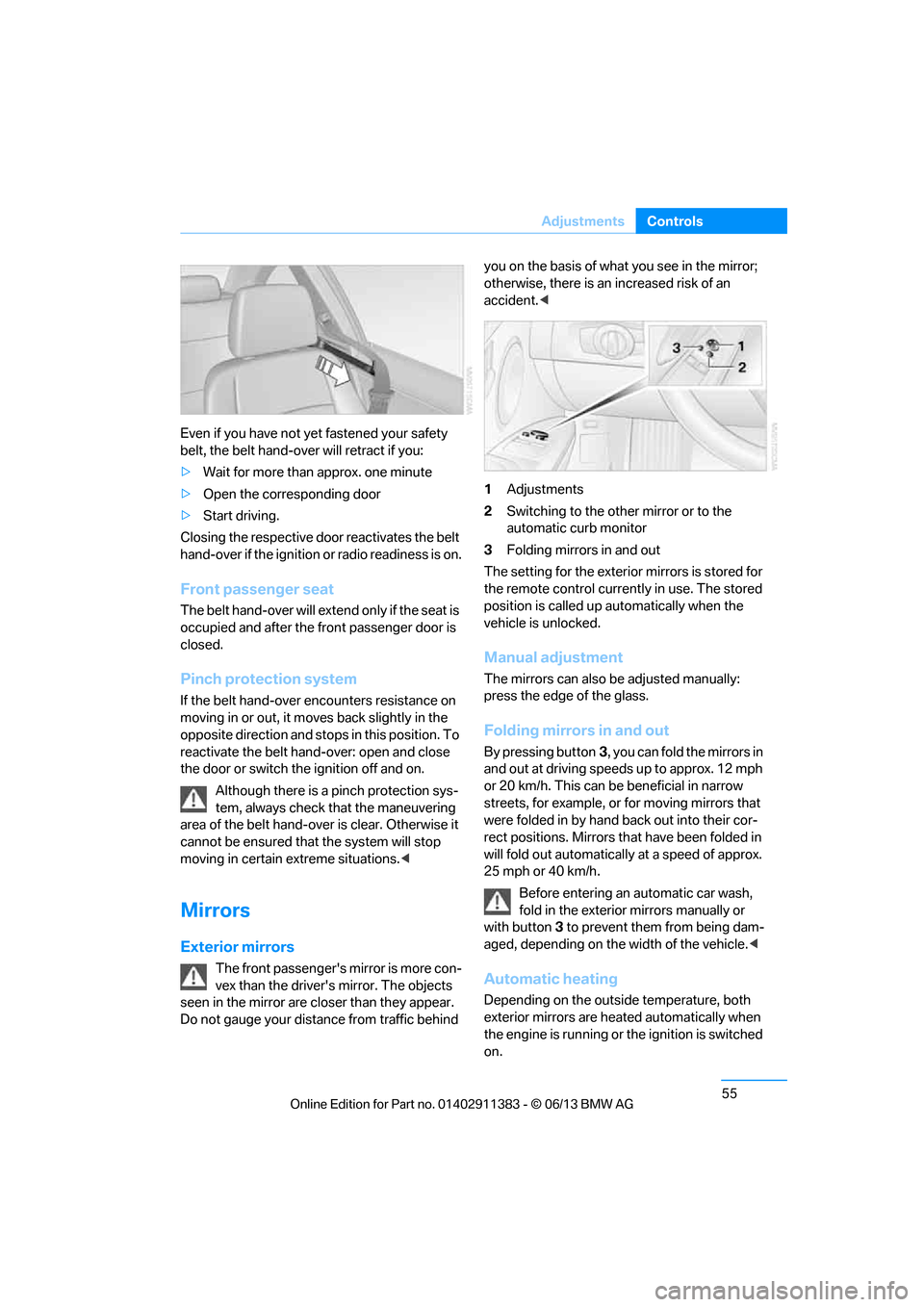
1 Adjustments
2 Switching to the other mirror or to the
automatic curb monitor
3 Folding mirrors in and out
The setting for the exterior mirrors is stored for
the remote control currently in use. The stored
position is called up automatically when the
vehicle is unlocked.
Manual adjustment
The mirrors can also be adjusted manually:
press the edge of the glass.
Folding mirrors in and out
By pressing button 3, you can fold the mirrors in
and out at driving speeds up to approx. 12 mph
or 20 km/h. This can be beneficial in narrow
streets, for example, or for moving mirrors that
were folded in by hand back out into their cor-
rect positions. Mirrors th at have been folded in
will fold out automatically at a speed of approx.
25 mph or 40 km/h.
Before entering an automatic car wash,
fold in the exterior mirrors manually or
with button 3 to prevent them from being dam-
aged, depending on the width of the vehicle. <
Automatic heating
Depending on the outside temperature, both
exterior mirrors are heated automatically when
the engine is running or the ignition is switched
on.
00320051004F004C00510048000300280047004C0057004C005200510003
Page 67 of 311
62
ControlsDriving
Driving
Vehicle equipment
In this chapter, all pr oduction, country, and
optional equipment that is offered in the model
range is described. For this reason, descrip-
tions will be given of some equipment that may
not be available in a vehi cle, for example due to
the special options or national-market version
selected. This also app lies to safety related
functions and systems.
Ignition lock
Insert the remote control into the
ignition lock
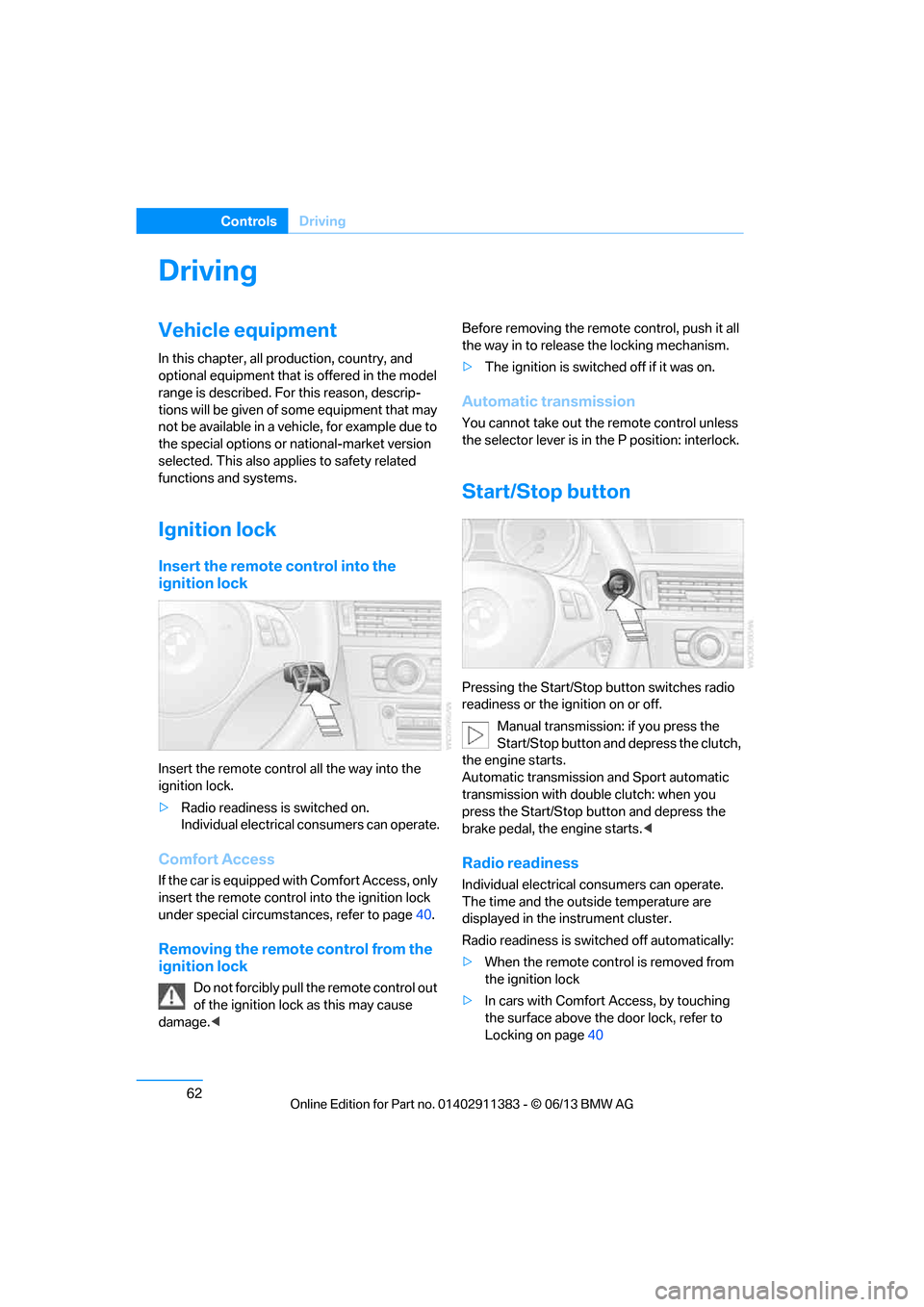
Insert the remote contro l all the way into the
ignition lock.
> Radio readiness is switched on.
Individual electrical consumers can operate.
Comfort Access
If the car is equipped wi th Comfort Access, only
insert the remote control into the ignition lock
under special circumstances, refer to page 40.
Removing the remote control from the
ignition lock
Do not forcibly pull the remote control out
of the ignition lock as this may cause
damage. < Before removing the remote
control, push it all
the way in to release the locking mechanism.
> The ignition is switched off if it was on.
Automatic transmission
You cannot take out the remote control unless
the selector lever is in the P position: interlock.
Start/Stop button
Pressing the Start/Stop button switches radio
readiness or the ignition on or off.
Manual transmission: if you press the
Start/Stop button and depress the clutch,
the engine starts.
Automatic transmission and Sport automatic
transmission with double clutch: when you
press the Start/Stop button and depress the
brake pedal, the engine starts. <
Radio readiness
Individual electrical consumers can operate.
The time and the outside temperature are
displayed in the instrument cluster.
Radio readiness is switched off automatically:
> When the remote cont rol is removed from
the ignition lock
> In cars with Comfort Access, by touching
the surface above the door lock, refer to
Locking on page 40
00320051004F004C00510048000300280047004C0057004C005200510003