code BMW 3 SERIES SEDAN 2013 F30 Owner's Manual
[x] Cancel search | Manufacturer: BMW, Model Year: 2013, Model line: 3 SERIES SEDAN, Model: BMW 3 SERIES SEDAN 2013 F30Pages: 248, PDF Size: 5.21 MB
Page 156 of 248
rearview mirror. The required distance de‐
pends on the manual transmitter.4.Simultaneously press and hold the button
of the desired function on the hand-held
transmitter and the button to be program‐
med on the interior rearview mirror. The
LED on the interior rearview mirror will be‐
gin flashing slowly.5.Release both buttons as soon as the LED
flashes more rapidly. When the LED is
flashing faster, this indicates that the but‐
ton on the interior rearview mirror has been
programmed.
If the LED does not flash faster after at
least 60 seconds, change the distance be‐
tween the interior rearview mirror and the
hand-held transmitter and repeat the step.
Several more attempts at different distan‐
ces may be necessary. Wait at least
15 seconds between attempts.
Canada: if programming with the hand-
held transmitter was interrupted, hold
down the interior rearview mirror button
and repeatedly press and release the
hand-held transmitter button for 2 sec‐
onds.6.To program other functions on other but‐
tons, repeat steps 3 to 5.
The systems can be controlled using the inte‐
rior rearview mirror buttons.
Special feature of the alternating-
code wireless system
If you are unable to operate the system after
repeated programming, please check if the
system to be controlled features an alternat‐
ing-code system.
Read the system's operating manual, or press
the programmed button on the interior rear‐
view mirror longer. If the LED on the interior
rearview mirror starts flashing rapidly and then
stays lit constantly for 2 seconds, the system
features an alternating-code system. Flashing
and continuous illumination of the LED will re‐
peat for approximately 20 seconds.
For systems with an alternating-code system,
the universal garage door opener and the sys‐
tem also have to be synchronized.
Please read the operating manual of the sys‐
tem being set up for information on how to
synchronize the system.
Synchronizing is easier with the aid of a sec‐
ond person.
To synchronize:1.Park the vehicle within range of the re‐
mote-controlled system.2.Program the relevant button on the interior
rearview mirror as described.3.Locate and press the synchronizing button
on the system being programmed. You
have approx. 30 seconds for the next step.4.Hold down the programmed button on the
interior rearview mirror for approximately
3 seconds and then release it. If necessary,
repeat this work step up to three times in
order to finish synchronization. Once syn‐
chronization is complete, the programmed
function will be carried out.
Reprogramming individual buttons
1.Switch on the ignition.2.Press and hold the interior rearview mirror
button to be programmed.3.As soon as the interior rearview mirror LED
starts flashing slowly, hold the hand-held
transmitter for the system to be controlled
approx. 1 to 3 in/2.5 to 8 cm away from the
buttons on the interior rearview mirror. The
required distance depends on the manual
transmitter.4.Likewise, press and hold the button of the
desired function on the hand-held trans‐
mitter.5.Release both buttons as soon as the inte‐
rior rearview mirror LED flashes more rap‐
idly. When the LED is flashing faster, thisSeite 152ControlsInterior equipment152
Online Edition for Part no. 01 40 2 926 810 - X/13
Page 181 of 248
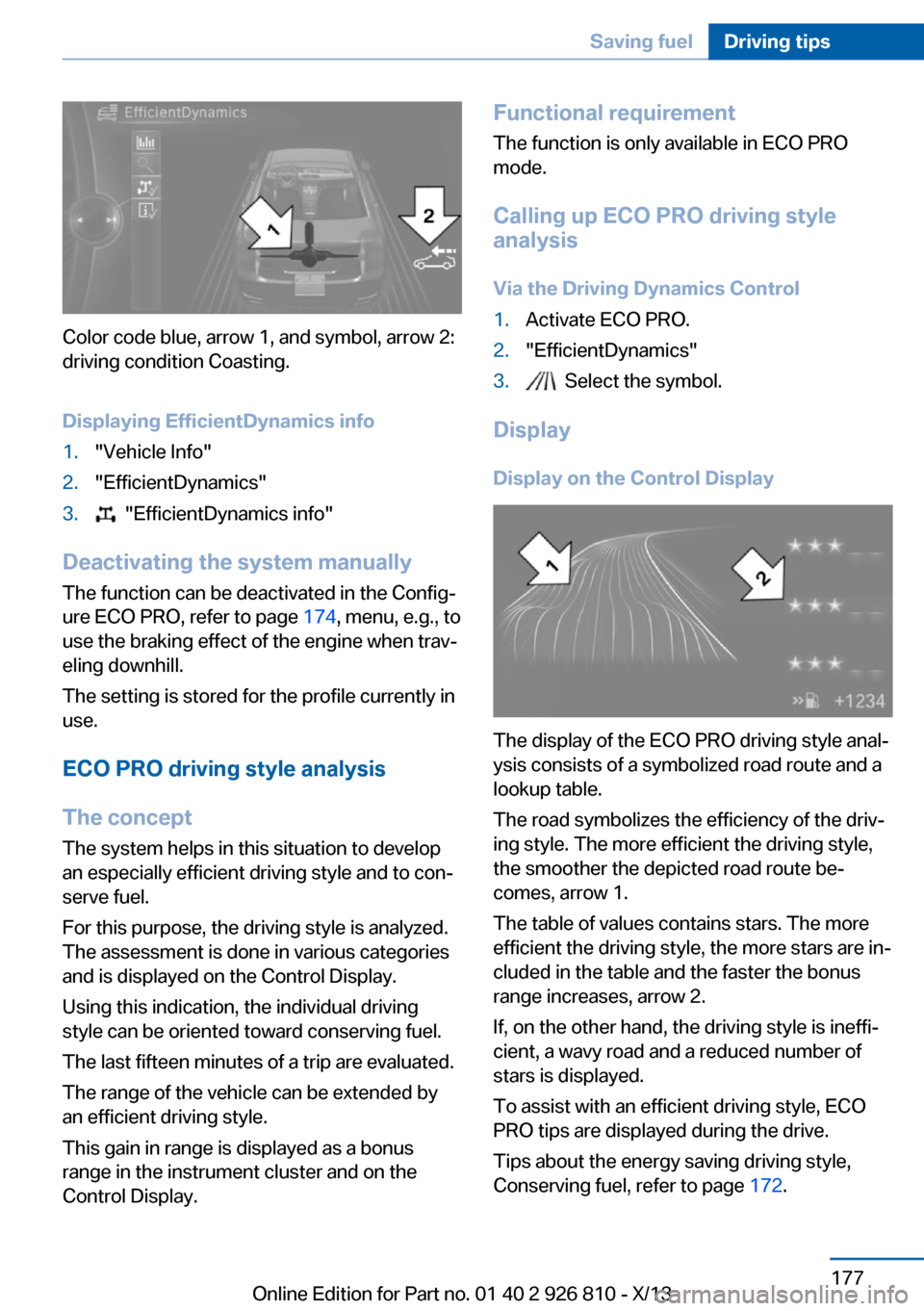
Color code blue, arrow 1, and symbol, arrow 2:
driving condition Coasting.
Displaying EfficientDynamics info
1."Vehicle Info"2."EfficientDynamics"3. "EfficientDynamics info"
Deactivating the system manually The function can be deactivated in the Config‐
ure ECO PRO, refer to page 174, menu, e.g., to
use the braking effect of the engine when trav‐
eling downhill.
The setting is stored for the profile currently in
use.
ECO PRO driving style analysis
The concept
The system helps in this situation to develop
an especially efficient driving style and to con‐
serve fuel.
For this purpose, the driving style is analyzed.
The assessment is done in various categories
and is displayed on the Control Display.
Using this indication, the individual driving
style can be oriented toward conserving fuel.
The last fifteen minutes of a trip are evaluated.
The range of the vehicle can be extended by
an efficient driving style.
This gain in range is displayed as a bonus
range in the instrument cluster and on the
Control Display.
Functional requirement
The function is only available in ECO PRO
mode.
Calling up ECO PRO driving style
analysis
Via the Driving Dynamics Control1.Activate ECO PRO.2."EfficientDynamics"3. Select the symbol.
Display
Display on the Control Display
The display of the ECO PRO driving style anal‐
ysis consists of a symbolized road route and a
lookup table.
The road symbolizes the efficiency of the driv‐
ing style. The more efficient the driving style,
the smoother the depicted road route be‐
comes, arrow 1.
The table of values contains stars. The more
efficient the driving style, the more stars are in‐
cluded in the table and the faster the bonus
range increases, arrow 2.
If, on the other hand, the driving style is ineffi‐
cient, a wavy road and a reduced number of
stars is displayed.
To assist with an efficient driving style, ECO
PRO tips are displayed during the drive.
Tips about the energy saving driving style,
Conserving fuel, refer to page 172.
Seite 177Saving fuelDriving tips177
Online Edition for Part no. 01 40 2 926 810 - X/13
Page 197 of 248
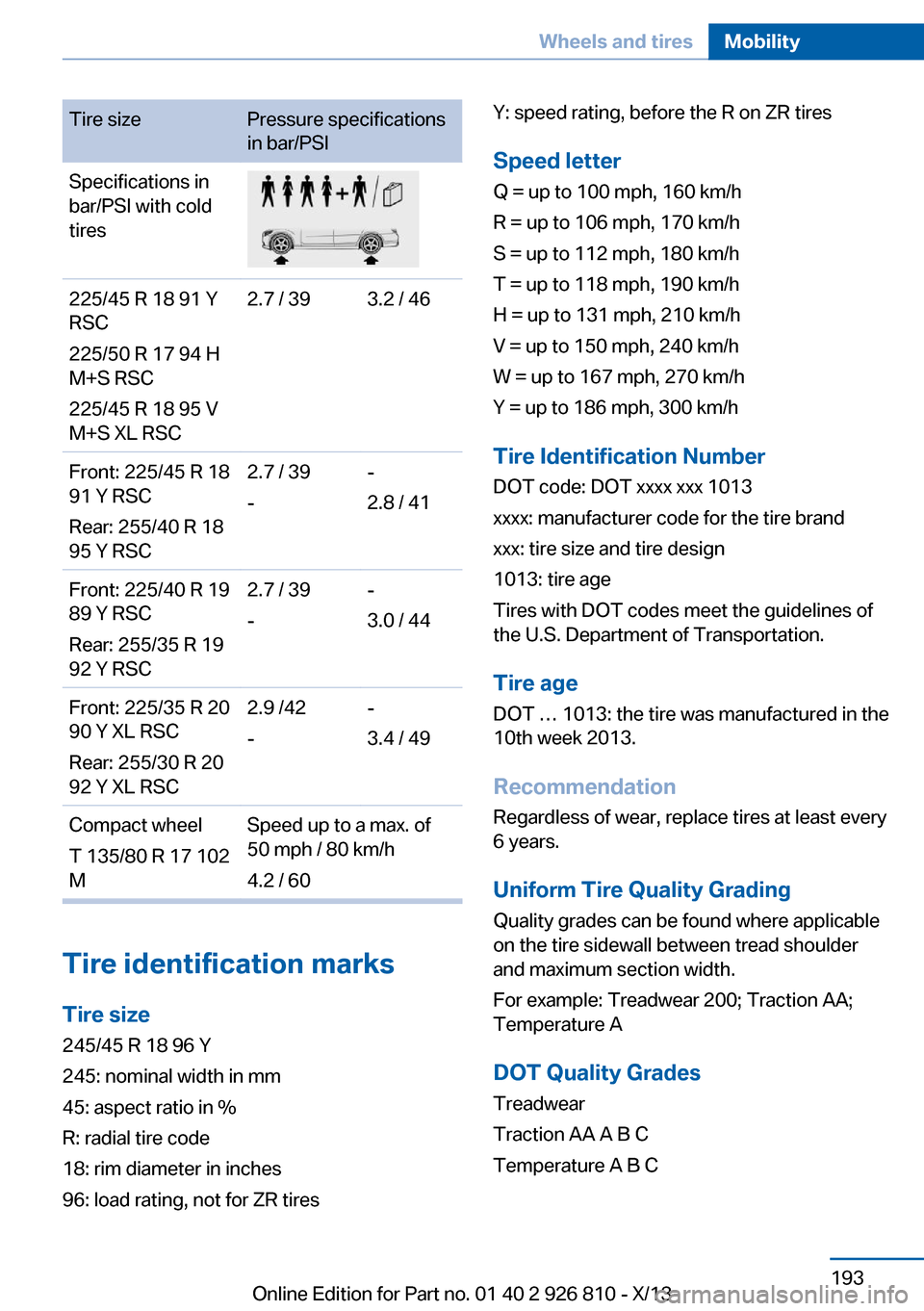
Tire sizePressure specifications
in bar/PSISpecifications in
bar/PSI with cold
tires225/45 R 18 91 Y
RSC
225/50 R 17 94 H
M+S RSC
225/45 R 18 95 V
M+S XL RSC2.7 / 393.2 / 46Front: 225/45 R 18
91 Y RSC
Rear: 255/40 R 18
95 Y RSC2.7 / 39
--
2.8 / 41Front: 225/40 R 19
89 Y RSC
Rear: 255/35 R 19
92 Y RSC2.7 / 39
--
3.0 / 44Front: 225/35 R 20
90 Y XL RSC
Rear: 255/30 R 20
92 Y XL RSC2.9 /42
--
3.4 / 49Compact wheel
T 135/80 R 17 102
MSpeed up to a max. of
50 mph / 80 km/h
4.2 / 60
Tire identification marks
Tire size 245/45 R 18 96 Y
245: nominal width in mm
45: aspect ratio in %
R: radial tire code
18: rim diameter in inches
96: load rating, not for ZR tires
Y: speed rating, before the R on ZR tires
Speed letter
Q = up to 100 mph, 160 km/h
R = up to 106 mph, 170 km/h
S = up to 112 mph, 180 km/h
T = up to 118 mph, 190 km/h
H = up to 131 mph, 210 km/h
V = up to 150 mph, 240 km/h
W = up to 167 mph, 270 km/h
Y = up to 186 mph, 300 km/h
Tire Identification NumberDOT code: DOT xxxx xxx 1013
xxxx: manufacturer code for the tire brand
xxx: tire size and tire design
1013: tire age
Tires with DOT codes meet the guidelines of
the U.S. Department of Transportation.
Tire age DOT … 1013: the tire was manufactured in the
10th week 2013.
Recommendation
Regardless of wear, replace tires at least every
6 years.
Uniform Tire Quality Grading Quality grades can be found where applicable
on the tire sidewall between tread shoulder
and maximum section width.
For example: Treadwear 200; Traction AA;
Temperature A
DOT Quality Grades Treadwear
Traction AA A B C
Temperature A B CSeite 193Wheels and tiresMobility193
Online Edition for Part no. 01 40 2 926 810 - X/13
Page 238 of 248
Everything from A to Z
IndexA ABS, Antilock Brake Sys‐ tem 116
ACC, Active Cruise Control with Stop & Go 121
Acceleration Assistant, refer to Launch Control 74
Activated-charcoal filter 149
Active Blind Spot Detec‐ tion 114
Active Cruise Control with Stop & Go, ACC 121
Adaptive brake lights, refer to Brake force display 115
Adaptive Light Control 92
Additives, oil 201
Adjustments, seats/head re‐ straints 49
After washing vehicle 224
Airbags 96
Airbags, indicator/warning light 97
Air circulation, refer to Recir‐ culated-air mode 145, 148
Air, dehumidifying, refer to Cooling function 145, 147
Air distribution, manual 145, 148
Air flow, air conditioner 145
Air flow, automatic climate control 148
Air pressure, tires 187
Air vents, refer to Ventila‐ tion 149
Alarm system 44
Alarm, unintentional 45
All around the center con‐ sole 16
All around the headliner 17 All around the steering
wheel 14
All-season tires, refer to Win‐ ter tires 196
All-wheel-drive 117
Alternating-code hand-held transmitter 152
Alternative oil types 202
Antifreeze, washer fluid 70
Antilock Brake System, ABS 116
Anti-slip control, refer to DSC 116
Approved axle load 230
Approved engine oils 202
Arrival time 87
Ash tray 155
Assistance, Roadside Assis‐ tance 218
Assistance when driving off 120
Assist system information, on Control Display 89
AUTO intensity 147
Automatic car wash 223
Automatic climate con‐ trol 144
Automatic climate control with enhanced features 146
Automatic Cruise Control with Stop & Go 121
Automatic Curb Monitor 57
Automatic deactivation, front passenger airbags 98
Automatic headlamp con‐ trol 92
Automatic locking 43
Automatic recirculated-air control 148
Automatic transmission with Steptronic 71 AUTO program, automatic cli‐
mate control 147
AUTO program, climate con‐ trol 145
AUTO program, intensity 147
Auto Start/Stop function 65
Average fuel consumption 86
Average speed 86
Axle loads, weights 230
B Backrest curvature, refer to Lumbar support 51
Backrest, width 51
Band-aids, refer to First aid kit 218
Bar for tow-starting/ towing 221
Battery replacement, vehicle battery 215
Battery replacement, vehicle remote control 34
Battery, vehicle 214
Belts, safety belts 52
Beverage holder, cu‐ pholder 161
Blinds, sun protection 47
BMW Advanced Diesel 183
BMW Assist, see user's manual for Navigation, En‐
tertainment and Communi‐
cation
BMW Homepage 6
BMW Internet page 6
BMW maintenance sys‐ tem 204
Bonus range, ECO PRO 174
Bottle holder, refer to Cu‐ pholder 161
Brake assistant 116 Seite 234ReferenceEverything from A to Z234
Online Edition for Part no. 01 40 2 926 810 - X/13
Page 241 of 248
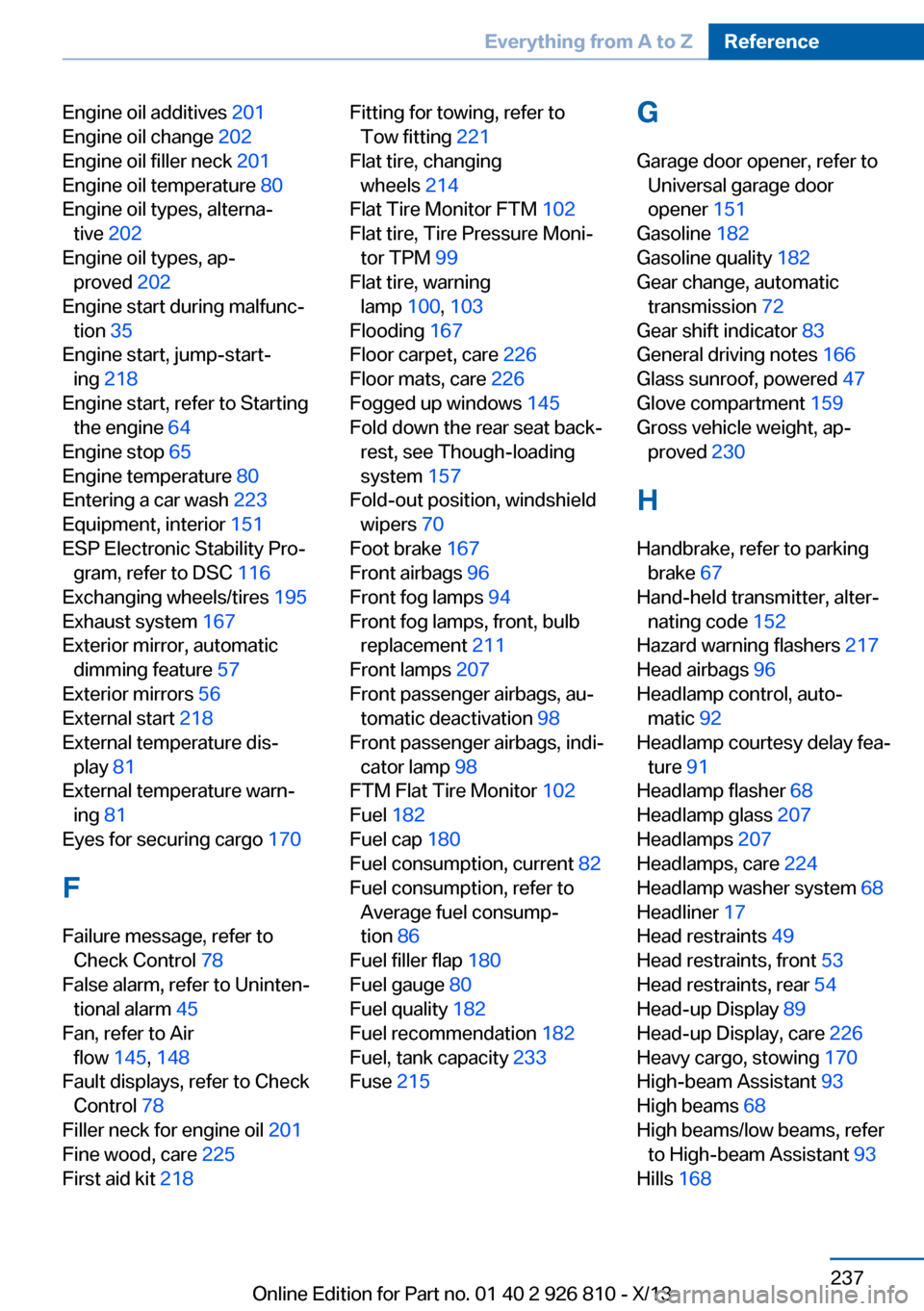
Engine oil additives 201
Engine oil change 202
Engine oil filler neck 201
Engine oil temperature 80
Engine oil types, alterna‐ tive 202
Engine oil types, ap‐ proved 202
Engine start during malfunc‐ tion 35
Engine start, jump-start‐ ing 218
Engine start, refer to Starting the engine 64
Engine stop 65
Engine temperature 80
Entering a car wash 223
Equipment, interior 151
ESP Electronic Stability Pro‐ gram, refer to DSC 116
Exchanging wheels/tires 195
Exhaust system 167
Exterior mirror, automatic dimming feature 57
Exterior mirrors 56
External start 218
External temperature dis‐ play 81
External temperature warn‐ ing 81
Eyes for securing cargo 170
F
Failure message, refer to Check Control 78
False alarm, refer to Uninten‐ tional alarm 45
Fan, refer to Air flow 145, 148
Fault displays, refer to Check Control 78
Filler neck for engine oil 201
Fine wood, care 225
First aid kit 218 Fitting for towing, refer to
Tow fitting 221
Flat tire, changing wheels 214
Flat Tire Monitor FTM 102
Flat tire, Tire Pressure Moni‐ tor TPM 99
Flat tire, warning lamp 100, 103
Flooding 167
Floor carpet, care 226
Floor mats, care 226
Fogged up windows 145
Fold down the rear seat back‐ rest, see Though-loading
system 157
Fold-out position, windshield wipers 70
Foot brake 167
Front airbags 96
Front fog lamps 94
Front fog lamps, front, bulb replacement 211
Front lamps 207
Front passenger airbags, au‐ tomatic deactivation 98
Front passenger airbags, indi‐ cator lamp 98
FTM Flat Tire Monitor 102
Fuel 182
Fuel cap 180
Fuel consumption, current 82
Fuel consumption, refer to Average fuel consump‐
tion 86
Fuel filler flap 180
Fuel gauge 80
Fuel quality 182
Fuel recommendation 182
Fuel, tank capacity 233
Fuse 215 G
Garage door opener, refer to Universal garage door
opener 151
Gasoline 182
Gasoline quality 182
Gear change, automatic transmission 72
Gear shift indicator 83
General driving notes 166
Glass sunroof, powered 47
Glove compartment 159
Gross vehicle weight, ap‐ proved 230
H
Handbrake, refer to parking brake 67
Hand-held transmitter, alter‐ nating code 152
Hazard warning flashers 217
Head airbags 96
Headlamp control, auto‐ matic 92
Headlamp courtesy delay fea‐ ture 91
Headlamp flasher 68
Headlamp glass 207
Headlamps 207
Headlamps, care 224
Headlamp washer system 68
Headliner 17
Head restraints 49
Head restraints, front 53
Head restraints, rear 54
Head-up Display 89
Head-up Display, care 226
Heavy cargo, stowing 170
High-beam Assistant 93
High beams 68
High beams/low beams, refer to High-beam Assistant 93
Hills 168 Seite 237Everything from A to ZReference237
Online Edition for Part no. 01 40 2 926 810 - X/13