Rear ventilation BMW 3 SERIES SEDAN 2016 F30 Owner's Manual
[x] Cancel search | Manufacturer: BMW, Model Year: 2016, Model line: 3 SERIES SEDAN, Model: BMW 3 SERIES SEDAN 2016 F30Pages: 257, PDF Size: 5.55 MB
Page 20 of 257
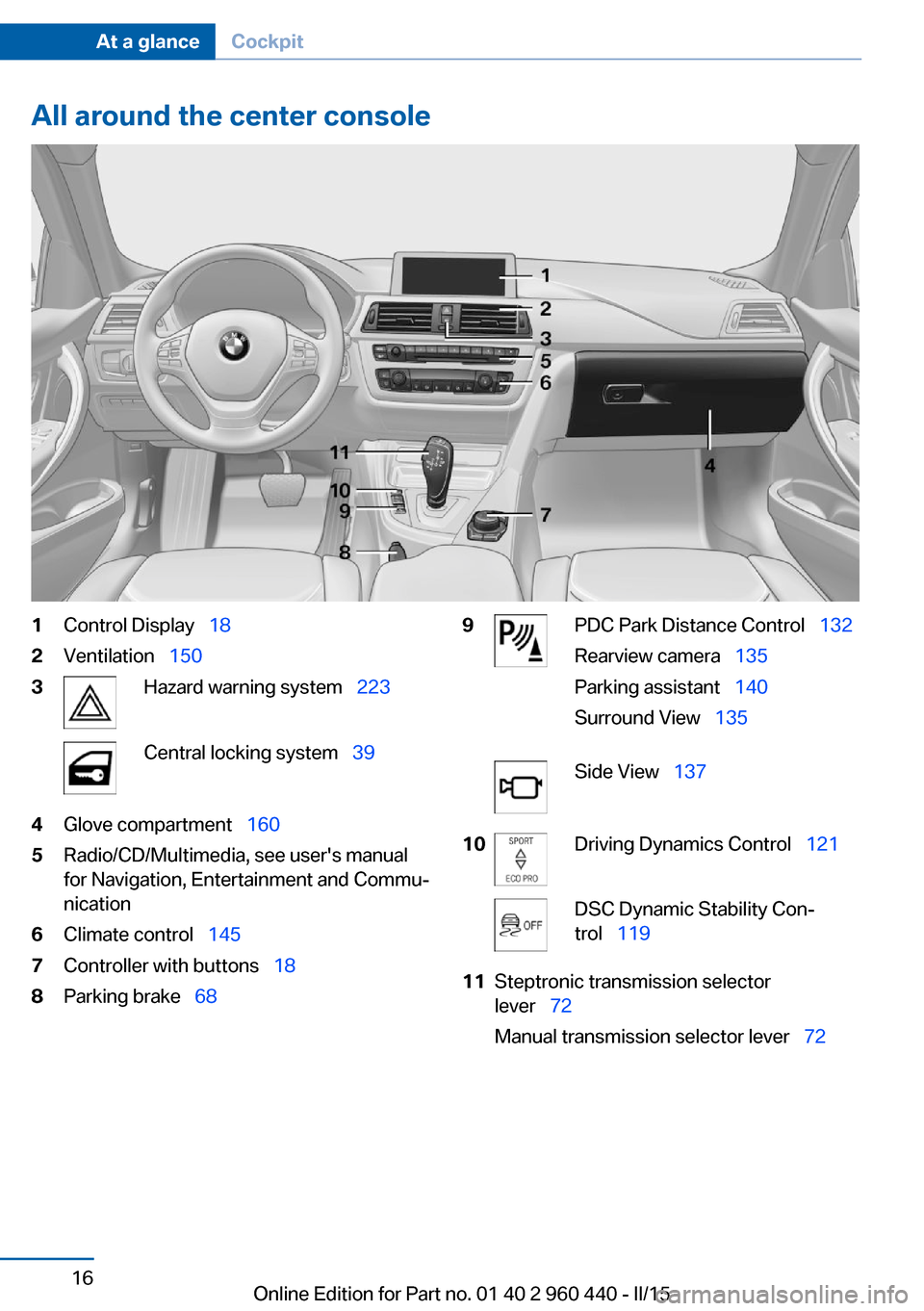
All around the center console1Control Display 182Ventilation 1503Hazard warning system 223Central locking system 394Glove compartment 1605Radio/CD/Multimedia, see user's manual
for Navigation, Entertainment and Commu‐
nication6Climate control 1457Controller with buttons 188Parking brake 689PDC Park Distance Control 132
Rearview camera 135
Parking assistant 140
Surround View 135Side View 13710Driving Dynamics Control 121DSC Dynamic Stability Con‐
trol 11911Steptronic transmission selector
lever 72
Manual transmission selector lever 72Seite 16At a glanceCockpit16
Online Edition for Part no. 01 40 2 960 440 - II/15
Page 149 of 257
Climate controlVehicle features and options
This chapter describes all standard, country-
specific and optional features offered with the
series. It also describes features that are not
necessarily available in your car, e. g., due tothe selected options or country versions. This
also applies to safety-related functions and
systems. The respectively applicable country
provisions must be observed when using the
respective features and systems.
Automatic climate control
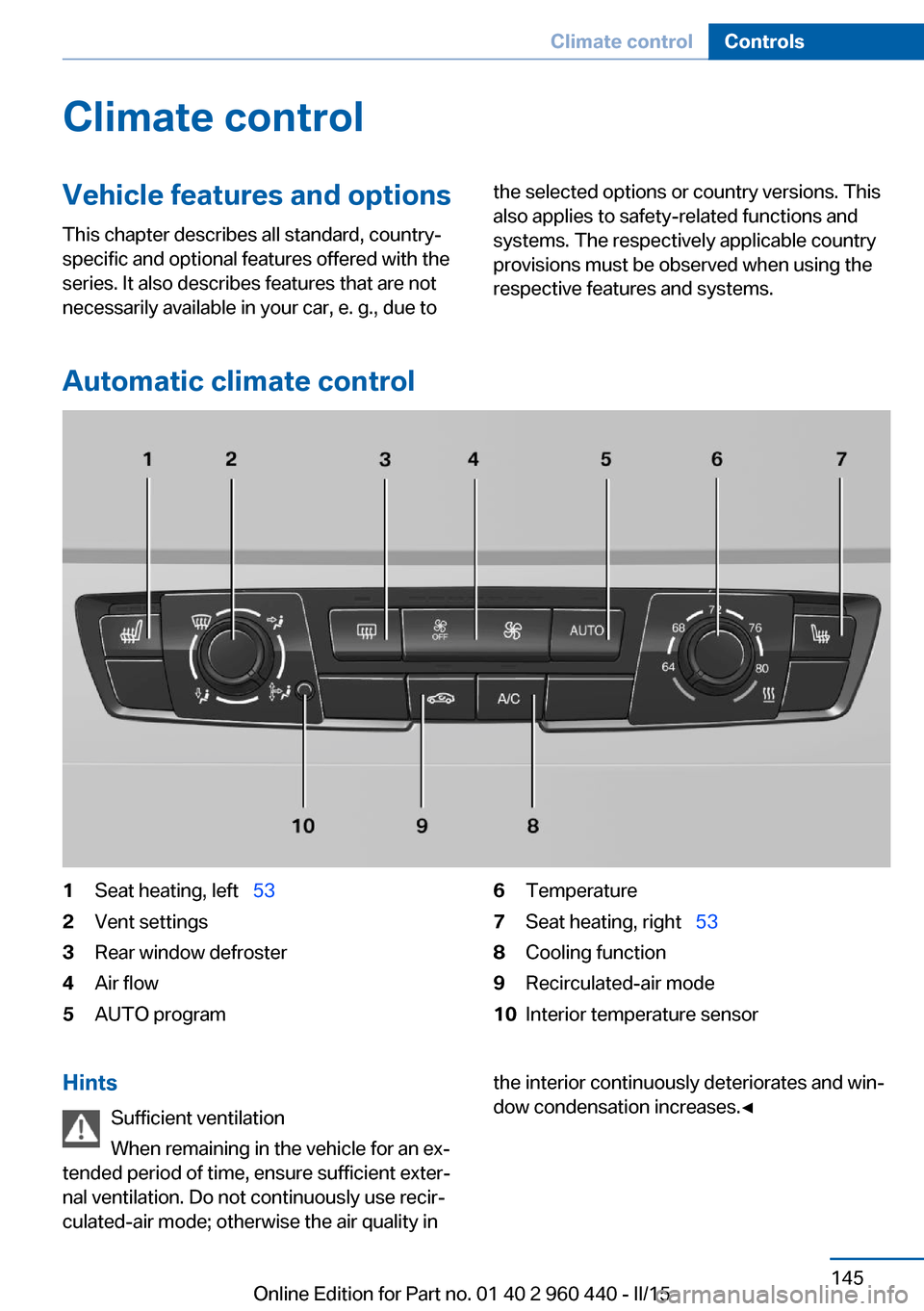
1Seat heating, left 532Vent settings3Rear window defroster4Air flow5AUTO program6Temperature7Seat heating, right 538Cooling function9Recirculated-air mode10Interior temperature sensorHints
Sufficient ventilation
When remaining in the vehicle for an ex‐
tended period of time, ensure sufficient exter‐
nal ventilation. Do not continuously use recir‐
culated-air mode; otherwise the air quality inthe interior continuously deteriorates and win‐
dow condensation increases.◀Seite 145Climate controlControls145
Online Edition for Part no. 01 40 2 960 440 - II/15
Page 151 of 257
Press button repeatedly to select an
operating mode:▷LED off: outside air flows in continuously.▷LED on, recirculated-air mode: the supply
of outside air into the vehicle is perma‐
nently blocked.
Recirculated air mode switches off automati‐
cally at low external temperatures after a cer‐
tain amount of time in order to avoid window
fogging.
If the windows fog over, switch off recircu‐
lated-air mode and increase the air flow, if
needed.
Sufficient ventilation
When remaining in the vehicle for an ex‐
tended period of time, ensure sufficient exter‐
nal ventilation. Do not continuously use recir‐
culated-air mode; otherwise the air quality in
the interior continuously deteriorates and win‐
dow condensation increases.◀
Switching the system on/off
Switch off Press the left button for the minimum
speed.
Switching on
Press any button except▷Rear window defroster.▷Seat heating.
Microfilter
In external and recirculated air mode the mi‐
crofilter filters dust and pollen from the air.
This filter should be replaced during scheduled
maintenance, refer to page 210, of your vehi‐
cle.
Automatic climate control with enhanced features
1Seat heating, left 532Temperature, leftSeite 147Climate controlControls147
Online Edition for Part no. 01 40 2 960 440 - II/15
Page 152 of 257
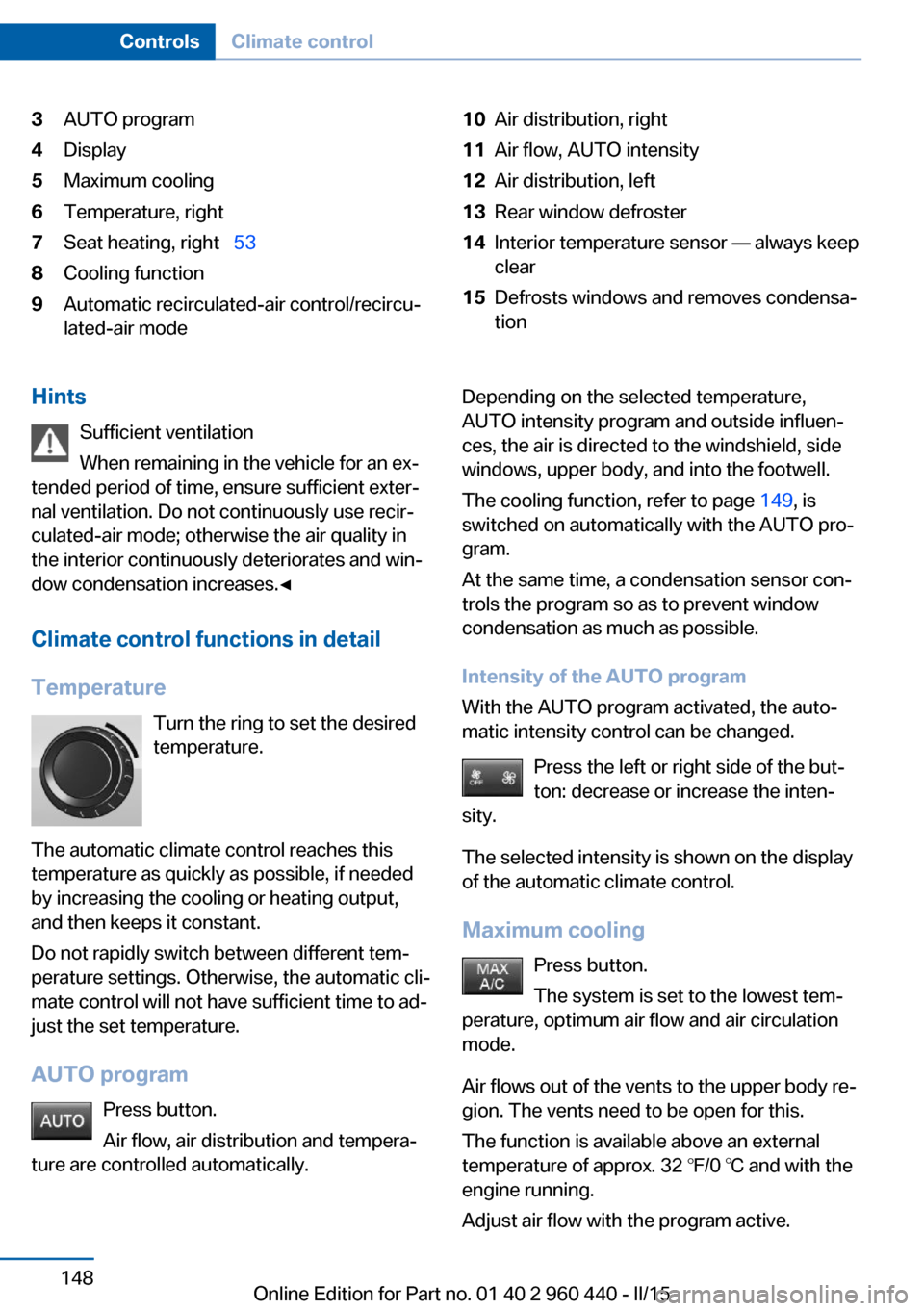
3AUTO program4Display5Maximum cooling6Temperature, right7Seat heating, right 538Cooling function9Automatic recirculated-air control/recircu‐
lated-air mode10Air distribution, right11Air flow, AUTO intensity12Air distribution, left13Rear window defroster14Interior temperature sensor — always keep
clear15Defrosts windows and removes condensa‐
tionHints
Sufficient ventilation
When remaining in the vehicle for an ex‐
tended period of time, ensure sufficient exter‐
nal ventilation. Do not continuously use recir‐
culated-air mode; otherwise the air quality in
the interior continuously deteriorates and win‐
dow condensation increases.◀
Climate control functions in detail
Temperature Turn the ring to set the desired
temperature.
The automatic climate control reaches this
temperature as quickly as possible, if needed
by increasing the cooling or heating output,
and then keeps it constant.
Do not rapidly switch between different tem‐
perature settings. Otherwise, the automatic cli‐
mate control will not have sufficient time to ad‐
just the set temperature.
AUTO program Press button.
Air flow, air distribution and tempera‐
ture are controlled automatically.Depending on the selected temperature,
AUTO intensity program and outside influen‐
ces, the air is directed to the windshield, side
windows, upper body, and into the footwell.
The cooling function, refer to page 149, is
switched on automatically with the AUTO pro‐
gram.
At the same time, a condensation sensor con‐
trols the program so as to prevent window
condensation as much as possible.
Intensity of the AUTO program
With the AUTO program activated, the auto‐
matic intensity control can be changed.
Press the left or right side of the but‐
ton: decrease or increase the inten‐
sity.
The selected intensity is shown on the display
of the automatic climate control.
Maximum cooling Press button.
The system is set to the lowest tem‐
perature, optimum air flow and air circulation
mode.
Air flows out of the vents to the upper body re‐
gion. The vents need to be open for this.
The function is available above an external
temperature of approx. 32 ℉/0 ℃ and with the
engine running.
Adjust air flow with the program active.Seite 148ControlsClimate control148
Online Edition for Part no. 01 40 2 960 440 - II/15
Page 153 of 257
Cooling functionThe car's interior can only be cooled with the
engine running.
Press button.
The air will be cooled and dehumidi‐
fied and, depending on the temperature set‐
ting, warmed again.
Depending on the weather, the windshield and
side windows may fog up briefly when the en‐
gine is started.
The cooling function is switched on automati‐
cally with the AUTO program.
When using the automatic climate control,
condensation water, refer to page 168, devel‐
ops that exits underneath the vehicle.
Automatic recirculated-air control/
recirculated-air mode
You may respond to unpleasant odors or pollu‐
tants in the immediate environment by tempo‐
rarily suspending the supply of outside air. The
system then recirculates the air currently
within the vehicle.
Press button repeatedly to select an
operating mode:▷LEDs off: outside air flows in continuously.▷Left LED on, automatic recirculated-air
control: a sensor detects pollutants in the
outside air and shuts off automatically.▷Right LED on, recirculated-air mode: the
supply of outside air into the vehicle is per‐
manently blocked.
Recirculated air mode switches off automati‐
cally at low external temperatures after a cer‐
tain amount of time in order to avoid window
fogging.
If the windows are fogged over, switch off the
recirculated-air mode and press the AUTO
button to utilize the condensation sensor.
Make sure that air can flow to the windshield.
Sufficient ventilation
When remaining in the vehicle for an ex‐
tended period of time, ensure sufficient exter‐
nal ventilation. Do not continuously use recir‐
culated-air mode; otherwise the air quality in
the interior continuously deteriorates and win‐
dow condensation increases.◀
Manual air distribution Press button repeatedly to select a
program:▷Upper body region.▷Upper body region and footwell.▷Footwell.▷Windows and footwell: driver's side only.▷Windows, upper body region and footwell:
driver's side only.
If the windows are fogged over, press the
AUTO button to utilize the condensation sen‐
sor.
Air flow, manual
To manually adjust air flow turn off AUTO pro‐
gram first.
Press the left or right side of the but‐
ton: decrease or increase air flow.
The selected air flow is shown on the display of
the automatic climate control.
The air flow of the automatic climate control
may be reduced automatically to save battery
power.
Rear window defroster Press button.
The rear window defroster switches
off automatically after a certain period of time.
Seite 149Climate controlControls149
Online Edition for Part no. 01 40 2 960 440 - II/15
Page 154 of 257
Defrosts windows and removes
condensation
Press button.
Ice and condensation are quickly re‐
moved from the windshield and the front side
windows.
For this purpose, point the side vents onto the
side windows as needed.
Adjust air flow with the program active.
If the windows are fogged over, you can also
switch on the cooling function or press the AUTO button to utilize the condensation sen‐
sor.
Switching the system on/off Switch off Press the left button for the minimum
speed.
Switching on
Press any button except▷Rear window defroster.▷Seat heating.
Microfilter/activated-charcoal filter
In external and recirculated air mode the mi‐
crofilter/activated charcoal filter filters dust,
pollen, and gaseous pollutants out of the air.
This filter should be replaced during scheduled
maintenance, refer to page 210, of your vehi‐
cle.
Ventilation
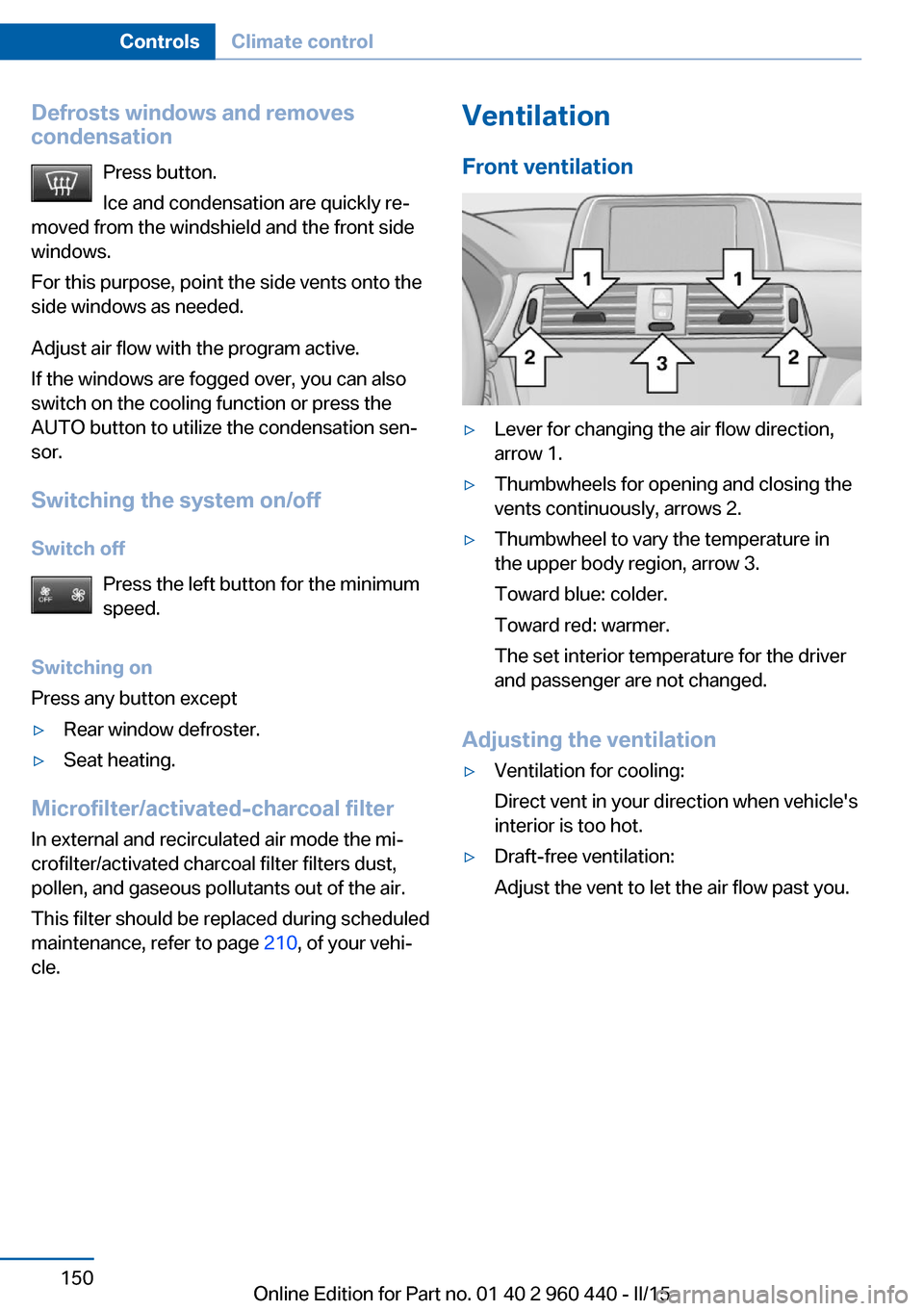
Front ventilation▷Lever for changing the air flow direction,
arrow 1.▷Thumbwheels for opening and closing the
vents continuously, arrows 2.▷Thumbwheel to vary the temperature in
the upper body region, arrow 3.
Toward blue: colder.
Toward red: warmer.
The set interior temperature for the driver
and passenger are not changed.
Adjusting the ventilation
▷Ventilation for cooling:
Direct vent in your direction when vehicle's
interior is too hot.▷Draft-free ventilation:
Adjust the vent to let the air flow past you.Seite 150ControlsClimate control150
Online Edition for Part no. 01 40 2 960 440 - II/15
Page 155 of 257
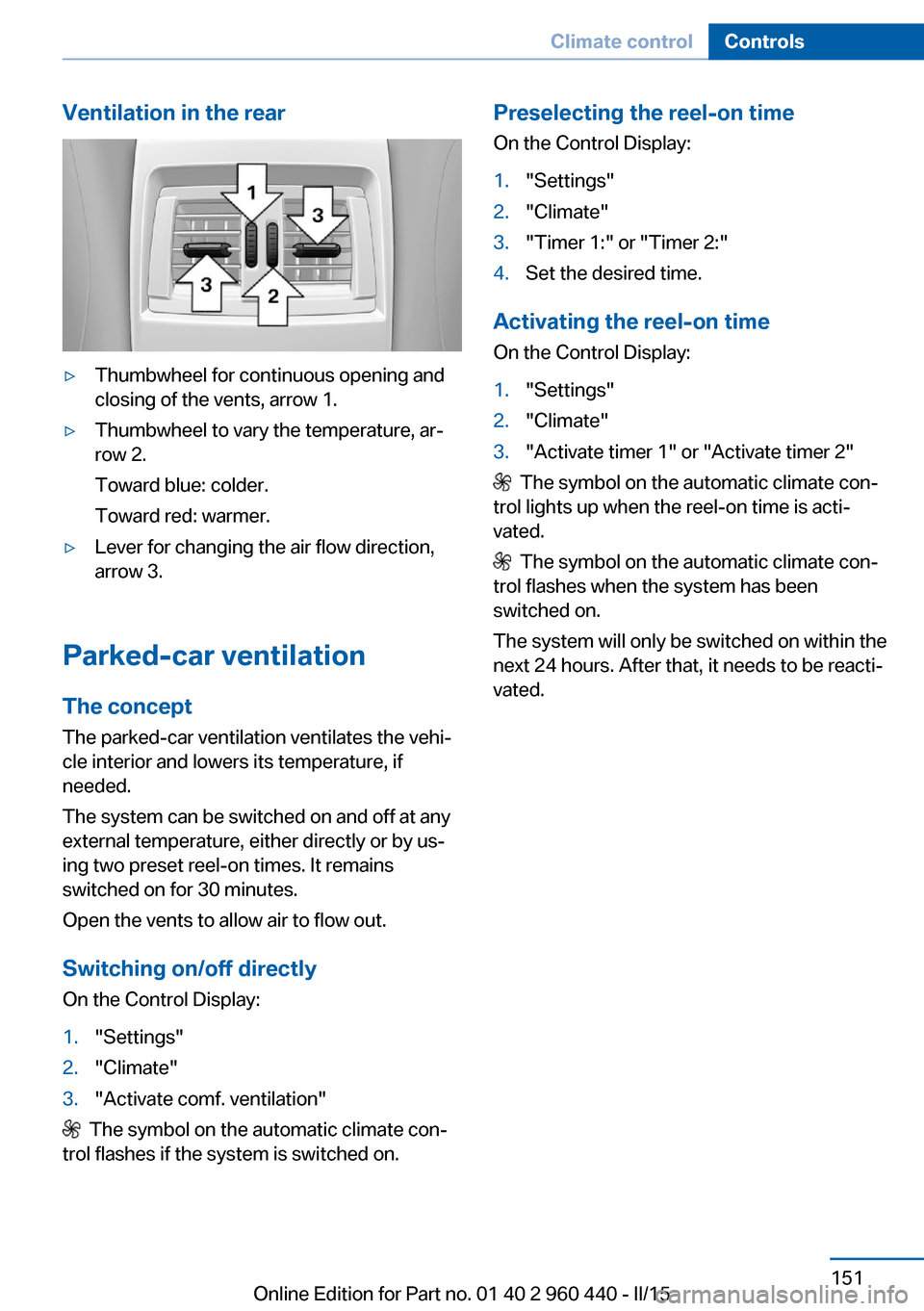
Ventilation in the rear▷Thumbwheel for continuous opening and
closing of the vents, arrow 1.▷Thumbwheel to vary the temperature, ar‐
row 2.
Toward blue: colder.
Toward red: warmer.▷Lever for changing the air flow direction,
arrow 3.
Parked-car ventilation
The concept The parked-car ventilation ventilates the vehi‐
cle interior and lowers its temperature, if
needed.
The system can be switched on and off at any
external temperature, either directly or by us‐
ing two preset reel-on times. It remains
switched on for 30 minutes.
Open the vents to allow air to flow out.
Switching on/off directly
On the Control Display:
1."Settings"2."Climate"3."Activate comf. ventilation"
The symbol on the automatic climate con‐
trol flashes if the system is switched on.
Preselecting the reel-on time
On the Control Display:1."Settings"2."Climate"3."Timer 1:" or "Timer 2:"4.Set the desired time.
Activating the reel-on time
On the Control Display:
1."Settings"2."Climate"3."Activate timer 1" or "Activate timer 2"
The symbol on the automatic climate con‐
trol lights up when the reel-on time is acti‐
vated.
The symbol on the automatic climate con‐
trol flashes when the system has been
switched on.
The system will only be switched on within the
next 24 hours. After that, it needs to be reacti‐
vated.
Seite 151Climate controlControls151
Online Edition for Part no. 01 40 2 960 440 - II/15
Page 252 of 257
Opening and closing, withoutremote control 39
Opening and closing, with re‐ mote control 37
Opening the trunk lid with no- touch activation 42
Operating concept, iDrive 18
Optional equipment, standard equipment 6
Outside air, refer to Auto‐ matic recirculated-air con‐
trol 149
Overheating of engine, refer to Coolant temperature 82
P Paint, vehicle 230
Parallel parking assistant 140
Park Distance Control PDC 132
Parked-car ventilation 151
Parked vehicle, condensa‐ tion 168
Parking aid, refer to PDC 132
Parking assistant 140
Parking brake 68
Parking lights 92
Particulate filter 167
Parts and accessories 7
Passenger side mirror, tilting downward 58
Pathway lines, rearview cam‐ era 136
PDC Park Distance Con‐ trol 132
Pedestrian warning with city braking function 112
Personal Profile 35
Personal Profile, exporting profiles 36
Personal Profile, importing profiles 37
Pinch protection system, glass sunroof 48 Pinch protection system, win‐
dows 46
Plastic, care 231
Power failure 221
Power sunroof, glass 47
Power windows 46
Pressure, tire air pres‐ sure 189
Pressure warning FTM, tires 104
Profile, refer to Personal Pro‐ file 35
Programmable memory but‐ tons, iDrive 24
Protective function, glass sunroof 48
Protective function, win‐ dows 46
Push-and-turn switch, refer to Controller 18, 19
R Radiator fluid 209
Radio-operated key, refer to Remote control 34
Radio ready state 64
Radio, see user's manual for Navigation, Entertainment
and Communication
Rain sensor 70
Rear lights 220
Rear socket 157
Rear turn signal, bulb replace‐ ment 218
Rearview camera 135
Rearview mirror 57
Rear window de‐ froster 146, 149
Recirculated-air filter 150
Recirculated-air mode 146, 149
Recommended fuel grade 184
Recommended tire brands 198 Refueling 182
Remaining range 82
Remote control/key 34
Remote control, malfunc‐ tion 38
Remote control, univer‐ sal 152
Replacement fuse 221
Replacing parts 212
Replacing wheels/tires 197
Reporting safety defects 9
RES button 127
RES button, see Active Cruise Control, ACC 124
RES button, see Cruise con‐ trol 130
Reserve warning, refer to Range 82
Reset, Tire Pressure Monitor TPM 101
Retaining straps, securing cargo 170
Retreaded tires 198
Roadside parking lights 93
Roller sunblinds 47
RON recommended fuel grade 184
Roofliner 17
Roof load lidacity 236
Roof-mounted luggage rack 171
Rope for tow-starting/ towing 227
RSC Run Flat System Com‐ ponent, refer to Run-flat
tires 199
Rubber components, care 231
Run-flat tires 199
S Safe braking 167
Safety 7 Seite 248ReferenceEverything from A to Z248
Online Edition for Part no. 01 40 2 960 440 - II/15
Page 253 of 257
Safety belt reminder for driv‐er's seat and front passen‐
ger seat 54
Safety belts 53
Safety belts, care 232
Safety switch, windows 47
Safety systems, airbags 97
Saving fuel 172
Screen, refer to Control Dis‐ play 18
Screwdriver, see Onboard ve‐ hicle tool kit 212
Screw thread, see screw thread for tow fitting, screw
thread for tow fitting 228
Sealant 199
Seat and mirror memory 56
Seat belts, refer to Safety belts 53
Seat heating, front 53
Seat heating, rear 53
Seating position for chil‐ dren 60
Seats 50
Selection list in instrument cluster 86
Selector lever, Steptronic transmission 73
Sensors, care 232
Service and warranty 8
Service requirements, Condi‐ tion Based Service
CBS 210
Service requirements, dis‐ play 83
Services, ConnectedDrive
Servotronic 123
SET button, see Active Cruise Control, ACC 124
SET button, see Cruise con‐ trol 130
Settings, locking/unlock‐ ing 43
Settings on Control Dis‐ play 89 Settings, storing for seat, mir‐
ror 56
Shift paddles on the steering wheel 74
Side airbags 97
Side View 137
Signaling, horn 14
Signals when unlocking 44
Sitting safely 50
Size 236
Slide/tilt glass roof 47
Smallest turning radius 236
Snow chains 202
Socket 156
Socket, OBD Onboard Diag‐ nostics 211
Soot particulate filter 167
SOS button 223
Spare fuse 221
Specified engine oil types 208
Speed, average 87
Speed limit detection, on- board computer 88
Speed limiter, display 85
Speed Limit Information 85
Speed warning 88
Split screen 23
SPORT+ - program, Dynamic Driving Control 122
Sport displays, torque dis‐ play, performance dis‐
play 88
SPORT program, Dynamic Driving Control 122
Sport program, transmis‐ sion 74
Sport steering, variable 121
Stability control systems 119
Start/stop, automatic func‐ tion 66
Start/Stop button 64
Start function during malfunc‐ tion 35
Starting the engine 65 Status control display,
tires 101
Status information, iDrive 23
Status of Owner's Manual 7
Steering assistance 123
Steering wheel, adjusting 59
Steering wheel heating 59
Steptronic Sport transmis‐ sion, refer to Steptronic
transmission 72
Steptronic transmission 72
Stopping the engine 66
Storage compartment in the rear 162
Storage compartments 160
Storage compartments, loca‐ tions 160
Storage, tires 199
Storing the vehicle 232
Suitable engine oils 208
Summer tires, tread 197
Sun visor 156
Supplementary text mes‐ sage 81
Surround View 135
Switch for Dynamic Driv‐ ing 121
Switch-on times, parked-car ventilation 151
Switch, refer to Cockpit 14
Symbols 6
Symbols in the status field 23
T Tachometer 81
Tail lights 218
Technical changes, refer to Safety 7
Technical data 236
Telephone, see user's manual for Navigation, Entertain‐
ment and Communication
Temperature, automatic cli‐ mate control 146, 148 Seite 249Everything from A to ZReference249
Online Edition for Part no. 01 40 2 960 440 - II/15
Page 254 of 257
Temperature display for ex‐ternal temperature 82
Temperature, engine oil 81
Tempomat, refer to Active Cruise Control 124
Terminal, starting aid 225
Text message, supplemen‐ tary 81
Theft alarm system, refer to Alarm system 44
Thigh support 52
Through-loading system 158
Tilt alarm sensor 45
Time of arrival 88
Tire damage 197
Tire identification marks 195
Tire inflation pressure 189
Tire inflation pressure moni‐ tor, refer to FTM 104
Tire Pressure Monitor TPM 100
Tires, changing 197
Tire sealant 199
Tires, everything on wheels and tires 189
Tires, run-flat tires 199
Tire tread 197
Tone, see user's manual for Navigation, Entertainment
and Communication
Tool 212
Top View 138
Total vehicle weight 236
Touchpad 21
Tow fitting 227
Towing 226
Tow lug, see Tow fitting 227
Tow-starting 226
Tow truck 226
TPM Tire Pressure Moni‐ tor 100
Traction control 120
TRACTION, driving dynam‐ ics 120
Transmission lock, electronic unlocking 75 Transmission, manual trans‐
mission 72
Transmission, Steptronic transmission 72
Transporting children safely 60
Tread, tires 197
Trip computer 88
Triple turn signal activa‐ tion 69
Trip odometer 82
Truck for tow-starting/ towing 226
Trunk lid closing 40
Trunk lid, emergency unlock‐ ing 41
Trunk lid, hotel function 41
Trunk lid opening 40
Trunk lid, opening with no- touch activation 42
Trunk lid via remote con‐ trol 38
Turning circle 236
Turning circle lines, rearview camera 136
Turn signals, operation 69
U Unintentional alarm 45
Units of measure 90
Universal remote control 152
Unlock button, Steptronic transmission 73
Unlocking/locking via door lock 39
Unlocking/locking with re‐ mote control 37
Unlocking, settings 43
Updates made after the edito‐ rial deadline 7
Upholstery care 231
USB interface 157 V
Vanity mirror 156
Variable sport steering 121
Vehicle battery 220
Vehicle battery, replac‐ ing 221
Vehicle, break-in 166
Vehicle care 230
Vehicle features and op‐ tions 6
Vehicle identification num‐ ber 9
Vehicle jack 220
Vehicle paint 230
Vehicle storage 232
Vehicle wash 229
Ventilation 150
Ventilation, refer to Parked- car ventilation 151
VIN, see vehicle identification number 9
Voice activation system 27
W Warning and indicator lamps, see Check Control 78
Warning displays, see Check Control 78
Warning messages, see Check Control 78
Warning triangle 224
Warranty 7
Washer fluid 71
Washer nozzles, wind‐ shield 71
Washer system 69
Washing, vehicle 229
Water on roads 167
Weights 236
Welcome lamps during un‐ locking 37
Welcome lights 92
Wheel base, vehicle 236
Wheel cleaner 231 Seite 250ReferenceEverything from A to Z250
Online Edition for Part no. 01 40 2 960 440 - II/15