change wheel BMW 3 WAGON 2011 User Guide
[x] Cancel search | Manufacturer: BMW, Model Year: 2011, Model line: 3 WAGON, Model: BMW 3 WAGON 2011Pages: 286, PDF Size: 8.61 MB
Page 152 of 286
On/off and tone
150
On/off and tone
The following audio and video sources share
the same control elements and adjustments:
>Radio
>CD/DVD player
>CD changer
*
>Video*
>External devices, e.g. MP3 player
Controls
The audio and video sources can be controlled
using the:
>Buttons near the CD/DVD player
>iDrive
>Buttons on the steering wheel, refer to
page10
>Programmable memory keys, refer to
page20
>Voice activation system
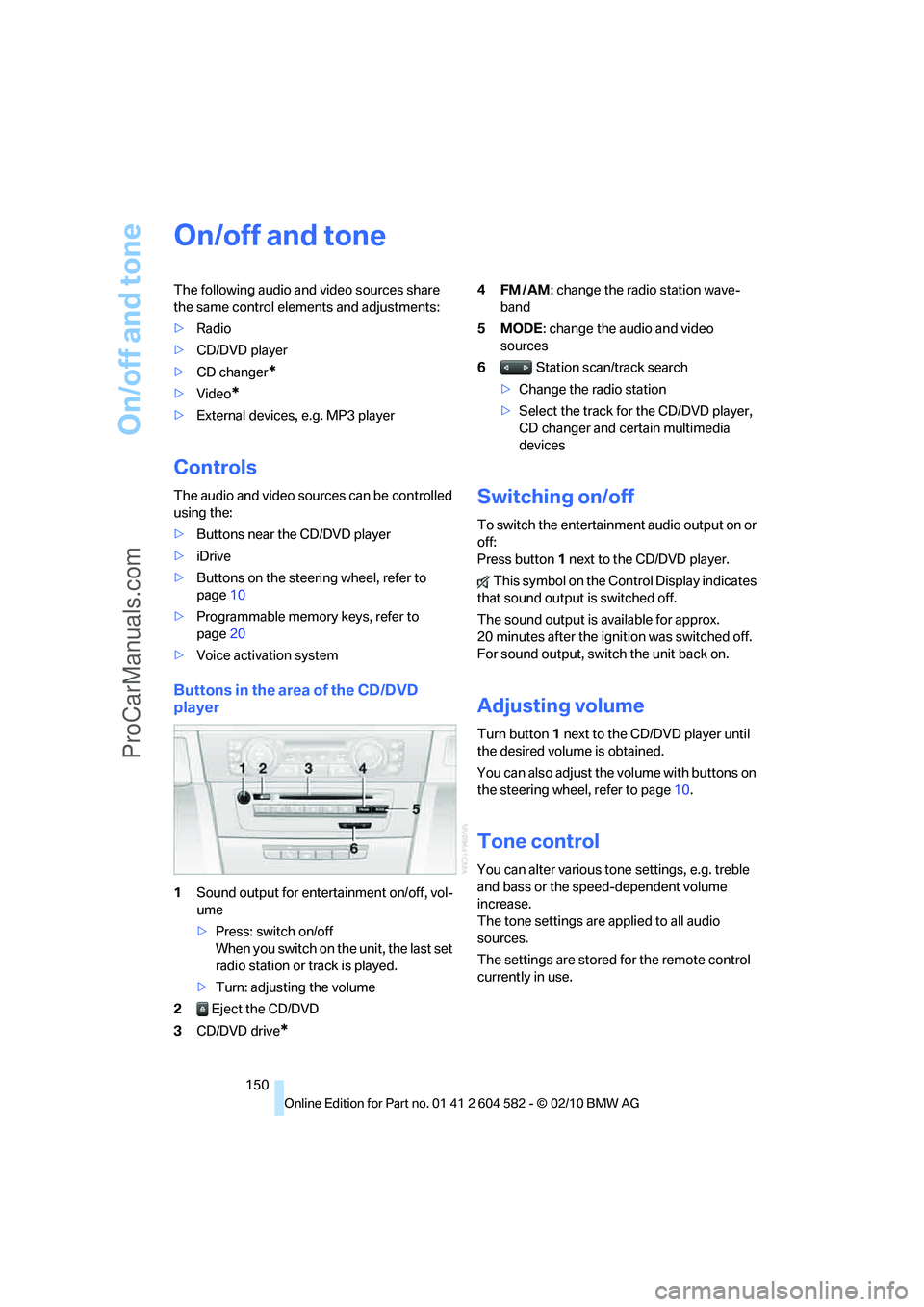
Buttons in the area of the CD/DVD
player
1Sound output for entertainment on/off, vol-
ume
>Press: switch on/off
When you switch on the unit, the last set
radio station or track is played.
>Turn: adjusting the volume
2 Eject the CD/DVD
3CD/DVD drive
*
4FM/AM: change the radio station wave-
band
5MODE: change the audio and video
sources
6 Station scan/track search
>Change the radio station
>Select the track for the CD/DVD player,
CD changer and certain multimedia
devices
Switching on/off
To switch the entertainment audio output on or
off:
Press button1 next to the CD/DVD player.
This symbol on the Control Display indicates
that sound output is switched off.
The sound output is available for approx.
20 minutes after the ignition was switched off.
For sound output, switch the unit back on.
Adjusting volume
Turn button1 next to the CD/DVD player until
the desired volume is obtained.
You can also adjust the volume with buttons on
the steering wheel, refer to page10.
Tone control
You can alter various tone settings, e.g. treble
and bass or the speed-dependent volume
increase.
The tone settings are applied to all audio
sources.
The settings are stored for the remote control
currently in use.
ProCarManuals.com
Page 246 of 286
Replacing components
244
Changing wheels
Your BMW is equipped with run-flat tires as
standard. This eliminates the need to change a
wheel immediately in the event of a puncture.
For information on continuing to drive with a
damaged tire, refer to Indication of a flat tire on
page89.
The symbol identifying run-flat tires is a circle
with the letters RSC on the sidewall, refer to
Run-flat tires, page223.
When mounting new tires or changing over
from summer to winter tires and vice versa,
mount run-flat tires for your own safety. In the
event of a flat, no spare wheel is available. Your
BMW center will be glad to advise you. Refer
also to New wheels and tires, page223.
The tools for changing wheels are avail-
able as optional accessories from your
BMW center.<
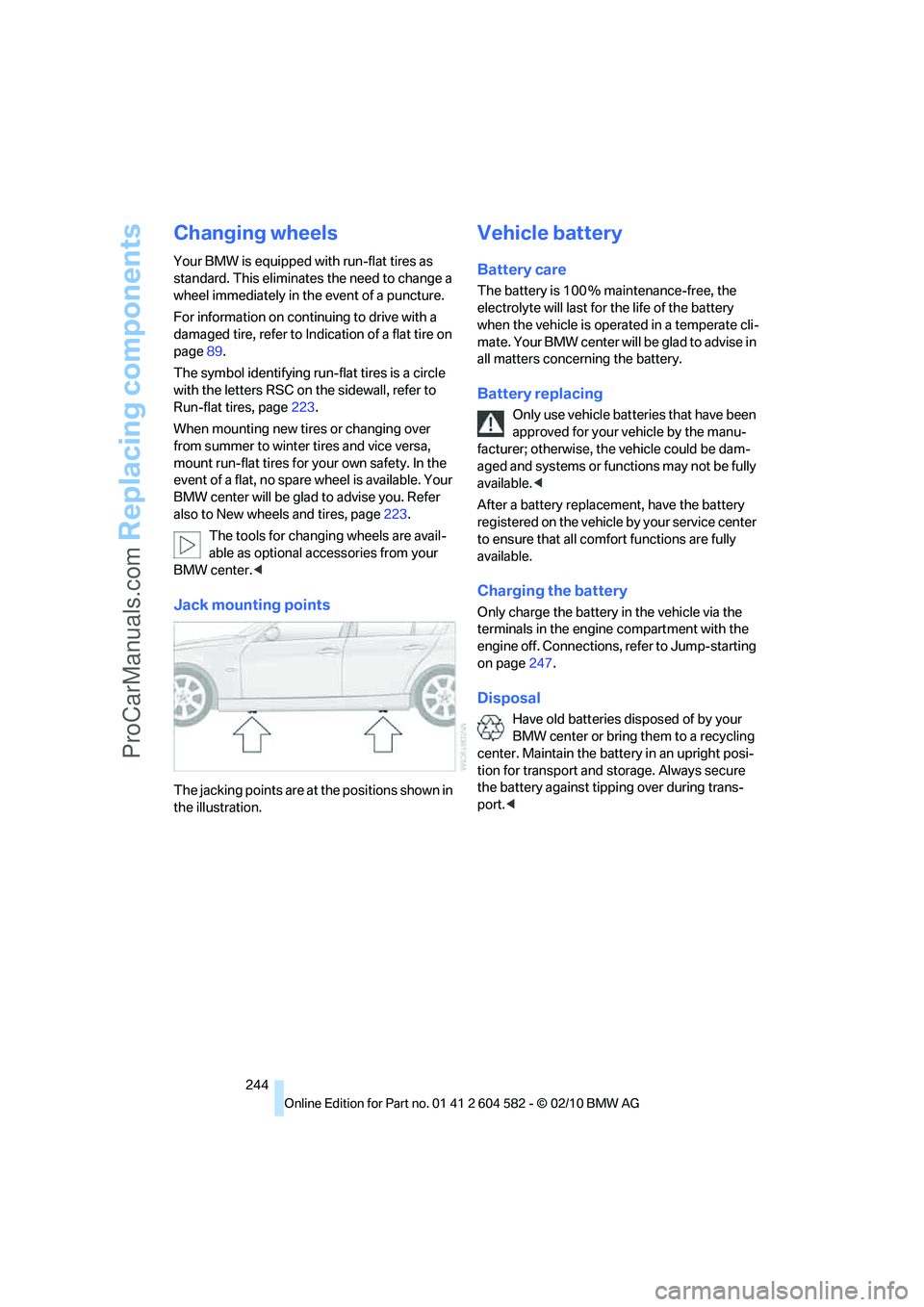
Jack mounting points
The jacking points are at the positions shown in
the illustration.
Vehicle battery
Battery care
The battery is 100 % maintenance-free, the
electrolyte will last for the life of the battery
when the vehicle is operated in a temperate cli-
mate. Your BMW center will be glad to advise in
all matters concerning the battery.
Battery replacing
Only use vehicle batteries that have been
approved for your vehicle by the manu-
facturer; otherwise, the vehicle could be dam-
aged and systems or functions may not be fully
available.<
After a battery replacement, have the battery
registered on the vehicle by your service center
to ensure that all comfort functions are fully
available.
Charging the battery
Only charge the battery in the vehicle via the
terminals in the engine compartment with the
engine off. Connections, refer to Jump-starting
on page247.
Disposal
Have old batteries disposed of by your
BMW center or bring them to a recycling
center. Maintain the battery in an upright posi-
tion for transport and storage. Always secure
the battery against tipping over during trans-
port.<
ProCarManuals.com
Page 270 of 286
Everything from A to Z
268 Care233
– automatic car washes233
– care products233
– carpets235
– CD/DVD drives236
– chrome parts234
– displays236
– exterior233
– fine wood parts235
– headlamps234
– high-pressure washer234
– interior235
– leather235
– light-alloy wheels235
– paintwork234
– plastic parts235
– rubber seals234
– safety belts235
– sensors and cameras235
– upholstery and cloth
trim235
– washing the car
manually234
– windows234
Cargo, securing126
Cargo area115
– capacity257
– Comfort Access35
– folding up the floor
panel117
– lamp, refer to Interior
lamps101
– opening from inside31
– opening from outside31
– partition net116
– roller cover115
Cargo area lid, refer to Trunk
lid/tailgate31
Cargo area net, refer to
Partition net116
Cargo loading125
– securing cargo126
– stowing cargo126
– vehicle125
Car jack
– jacking points244
Car key, refer to Integrated
key/remote control26Car phone
– installation location, refer to
Center armrest111
– refer to separate Owner's
Manual
Car phone, refer to
Telephone180
Car radio, refer to Radio153
Car shampoo235
Catalytic converter, refer to
Hot exhaust system123
CD, audio playback162
CD changer161,166
– controls150
– fast forward/reverse163
– filling or emptying the
magazine166
– random play sequence162
– selecting a track162
– switching on/off150
– tone control150
– volume150
CD player161
– controls150
– fast forward/reverse163
– random play sequence162
– selecting a track162
– switching on/off150
– tone control150
– volume150
Center armrest111
Center brake lamp
– replacing bulb243
Center console, refer to
Around the center
console14
Central locking
– from inside30
– from outside27
Central locking system27
– Comfort Access34
– hotel function32
– setting unlocking
characteristics28
Changes, technical, refer to
For your own safety5
Changing bulbs, refer to
Lamps and bulbs238Changing the language on the
Control Display83
Changing the measurement
units on the Control
Display76
Changing wheels244
Chassis number, refer to
Engine compartment226
Check Control80
Check Gas Cap202
Child restraint fixing system
LATCH52
Child restraint systems51
Child safety locks54
Child seats, refer to
Transporting children
safely51
Chrome parts235
Chrome polish235
Cigarette lighter, refer to
Lighter113
Cleaning headlamps61
– washer fluid62
Cleaning your BMW, refer to
Care233
Climate control
– automatic air
distribution103
Clock71
– 12h/24h mode79
– setting the time and date79
– setting time79
Closing
– from inside30
– from outside27
Clothes hooks112
Cockpit10
Cold start, refer to Starting the
engine56
Comfort Access34
– replacing the battery36
Comfort access, refer to
Comfort Access34
Comfort area, refer to Around
the center console14
Compartment for remote
control, refer to Ignition
lock55
Compass109
ProCarManuals.com
Page 272 of 286
Everything from A to Z
270 Displacement, refer to Engine
data254
Display, refer to iDrive
controls16
Display lighting, refer to
Instrument lighting101
Displays
– on the Control Display16
Displays, refer to Instrument
cluster12
Displays and controls10
Disposal
– coolant230
– remote control battery36
– vehicle battery244
Distance remaining to service,
refer to Service
requirements76
Distance warning, refer to
Park Distance Control
PDC84
Door key, refer to Remote
control with integrated
key26
Door lock29
Doors, emergency
operation30
DOT Quality Grades221
Draft-free ventilation105
Drinks holders, refer to
Cupholders112
Drive-off assistance, refer to
Dynamic Stability Control
DSC85
Drive-off assistant87
Driving lamps, refer to Parking
lamps/low beams97
Driving notes122
Driving off on hills, refer to
Drive-off assistant87
Driving stability control
systems85
Driving through water124
Driving tips, refer to Driving
notes122
Dry air, refer to Cooling
function104
DSC Dynamic Stability
Control85DTC Dynamic Traction
Control86
– indicator/warning lamp86
DVD
– country codes163
– settings164
– video playback163
DVD menu164
DVD player, refer to CD
player161
DVD video163
Dynamic Brake Control
DBC85
Dynamic destination
guidance141
Dynamic Stability Control
DSC85
– indicator/warning lamp86
Dynamic Traction Control
DTC
– indicator/warning lamp86
E
EBV Electronic brake-force
distribution85
Eject button, refer to Buttons
on the CD/DVD player150
Electrical malfunction
– door lock30
– driver's door30
– fuel filler flap202
– glass roof38
– panorama glass roof40
– trunk lid32
Electric seat adjustment43
Electric steering wheel lock
– with Comfort Access35
Electronic brake-force
distribution EBV85
Electronic oil level check227
Electronic Stability Program
ESP, refer to Dynamic
Stability Control DSC85
Emergency actuation,
automatic transmission,
refer to Overriding selector
lever lock60Emergency operation
– fuel filler flap, manual
release202
Emergency operation, refer to
Closing manually
– glass roof38
– panorama glass roof40
Emergency operation, refer to
Manual operation
– door lock30
Emergency release
– trunk lid from inside32
Emergency Request246
Emergency services, refer to
Roadside Assistance246
Energy, saving
– saving fuel122
Energy-conscious driving,
refer to Energy Control72
Energy Control72
Engine
– breaking in122
– data254
– overheated, refer to Coolant
temperature72
– speed254
– starting56
– starting, Comfort Access34
– switching off56
Engine compartment226
Engine coolant, refer to
Coolant230
Engine oil
– adding229
– alternative oil types229
– BMW Maintenance
System231
– capacity258
– checking level227
– dipstick
227
– intervals between changes,
refer to Service
requirements76
Engine output, refer to Engine
data254
Engine speed, refer to Engine
data254
Engine starting, refer to
Starting the engine56
ProCarManuals.com
Page 273 of 286
Reference 271
At a glance
Controls
Driving tips
Communications
Navigation
Entertainment
Mobility
Entering special destinations
by name136
Entering the postal code for
navigation132
Entry lamps, refer to Interior
lamps101
Entry map for destination136
Environmentally friendly
driving, refer to Energy
Control72
Equalizer, tone setting151
Error messages, refer to
Check Control80
ESP Electronic Stability
Program, refer to Dynamic
Stability Control DSC85
Exhaust system, refer to Hot
exhaust system123
Expanding the cargo area115
Extended connectivity of the
music player in the mobile
phone174
Exterior mirrors48
– adjusting48
– automatic dimming
feature49
– automatic heating48
– folding in and out48
External audio device111
External devices
– random sequence176
Eyes
– for tow-starting and towing
away249
– for tying down loads126
F
Failure messages, refer to
Check Control80
Failure of an electrical
consumer245
False alarm
– avoiding unintentional
alarm34
– switching off an alarm34
Fastening safety belts, refer to
Safety belts47Fastest route for
navigation140
Fast forward
– CD changer163
– CD player163
Filter
– refer to Microfilter/activated-
charcoal filter for automatic
climate control105
First aid pouch247
Fixture for remote control,
refer to Ignition lock55
Flash when locking/
unlocking28
Flat tire
– run-flat tires223
– Tire Pressure Monitor
TPM89
Flat Tire Monitor FTM88
– indicating a flat tire89
– indicator/warning lamp89
– initializing the system88
– snow chains88,224
– system limits88
Flat tires, refer to Tire
condition222
Fluid reservoir, refer to
Washer fluid reservoir62
FM, waveband153
Fog lamps100
– indicator lamp13,100
Folding rear seat backrest115
Folding up the floor panel117
Footbrake, refer to Braking
safely124
Footwell lamps, refer to
Interior lamps101
For your own safety5
Four-wheel drive, refer to
xDrive86
Free memory capacity, music
collection171
Front airbags94
FTM, refer to Flat Tire
Monitor88Fuel203
– additives204
– average consumption73
– gauge72
– high-quality brands
203
– quality203
– specifications203
– tank contents, refer to
Capacities258
Fuel clock, refer to Fuel
gauge72
Fuel consumption indicator
– average fuel
consumption73
Fuel display, refer to Fuel
gauge72
Fuel-efficient driving, refer to
Energy Control72
Fuel filler flap202
– releasing in the event of
electrical malfunction202
Fuses245
G
Garage door opener, refer to
Integrated universal remote
control107
Gasoline
– refer to Average
consumption73
Gasoline, refer to Required
fuel203
Gasoline display, refer to Fuel
gauge72
Gas station
recommendations142
Gear indicator, automatic
transmission with
Steptronic58
Gearshift lever
– automatic transmission with
Steptronic58
– manual transmission57
Gearshifts
– automatic transmission with
Steptronic58
– manual transmission57
General driving notes123
ProCarManuals.com
Page 278 of 286
Everything from A to Z
276 Radio position, refer to Radio
readiness55
Radio readiness55
– switched off56
– switched on55
Radio-remote key, refer to
Remote control with
integrated key26
Rain sensor61
Random sequence
– external devices176
– music collection171
Rapeseed-oil methyl ester
RME204
Reading lamps101
Rear lamps, refer to Tail
lamps241
Rear seat backrest,
folding115
Rear seats
– adjusting head restraints45
– folding115
– folding down
backrests114,115
– folding head restraint down
and up45
Rear ventilation105
Rearview mirror, refer to
Mirrors48
Rear window
– cleaning62
– opening33
Rear window blind, refer to
Roller sun blinds110
Rear window defroster104
Rear window safety switch37
Rear window wiper62
– changing rear wiper
blade237
Receiving level of mobile
phone, refer to Status
information19
Reception
– quality154
– radio station154
Recirculated-air mode104
Recirculation of air, refer to
Recirculated-air mode104Reclining seat, refer to
Backrest43
Refueling202
Releasing
– hood225
Remaining distance, refer to
Cruising range73
Remote control26
– battery renewal36
– Comfort Access34
– garage door opener107
– malfunction29,36
– removing from the ignition
lock55
– service data231
– tailgate28
– trunk lid28
Replacement fuses, refer to
Fuses245
Replacement remote
control26
Replacing bulbs, refer to
Lamps and bulbs238
Replacing tires223
Replacing tires, refer to New
wheels and tires223
Reporting safety defects7
Reserve warning, refer to Fuel
gauge72
Reset, refer to Resetting tone
settings152
Restraint systems
– for children51
– refer to Safety belts47
Reverse
– CD changer163
– CD player163
Reverse gear
– automatic transmission with
Steptronic58
– manual transmission57
RME, refer to Rapeseed-oil
methyl ester204
Road map142
Roadside
Assistance196,246
Roadside parking lamps99
– replacing bulbs238,240Roadworthiness test, refer to
Service requirements76
Roller blind
– sun blinds110
Roof load capacity257
Roof-mounted luggage
rack127
Rope, refer to Tow-starting,
towing away250
Rotary/pushbutton, refer to
iDrive16
Route140,141
– bypassing sections141
– changing140,141
– changing criteria140
– displaying streets or towns/
cities141
– map view142
– selecting140
Route instructions, refer to
Destination guidance
through voice
instructions142
Route map, refer to Map
view142
Route section, changing141
Route selection140
RSC Runflat System
Component, refer to Run-
flat tires223
Runflat System Component
RSC, refer to Run-flat
tires223
Run-flat tires223
– continuing driving with a
damaged tire89
– flat tire89
– Flat Tire Monitor89
– Inflation pressure208
– new tires223
– tire replacement223
– winter tires224
Runflat tyres, refer to Run-flat
tires223
ProCarManuals.com
Page 280 of 286
Everything from A to Z
278 Soot particulate filter, refer to
Diesel particulate filter124
SOS, refer to Sending an
Emergency Request246
Sound, adjusting during audio
playback, refer to Tone
control150
Sound output for
entertainment on/off150
Spare fuses245
Special destinations135
Special destinations,
displaying136
Speed
– Run-flat tires89
– with winter tires224
Speed limit82
Speed limit warning, refer to
Speed limit82
Speedometer12
Speed reading, refer to
Speedometer12
Speed Volume152
Split rear seat backrest, refer
to Expanding the cargo
area115
Split screen, refer to Control
Display, switching on/off19
Split screen content, refer to
Display for split screen
content, selecting20
Spray nozzles, refer to
Cleaning windshield and
headlamps61
Stability control, refer to
Driving stability control
systems85
Start/stop button55
– starting the engine56
– switching off the engine56
Starting, refer to Starting the
engine56
Starting assistance, refer to
Jump-starting247
Starting difficulties
– jump-starting247
Starting the engine
– start/stop button55Start menu17
State/province, for
navigation131
Station, selecting
– radio153
Status of this Owner's Manual
at time of printing5
Steam jet233,234
Steering wheel50
– adjustment50
– buttons on steering
wheel11
– heating50
– lock55
– locking with Comfort
Access35
Steering with variable ratio,
refer to Active steering
92
Steptronic, refer to Automatic
transmission with
Steptronic57
Storage236
Storage compartments112
Storage nets116
Stored trip, calling up139
Storing a destination in the
address book133
Storing music168
Storing seat positions, refer to
Seat and mirror memory46
Storing tires224
Stowage, refer to Storage
compartments112
Street, entering,
navigation132
Summer tires, refer to Wheels
and tires208
Sun blinds110
Surround151
SVCD163
SW, waveband153
Switches, refer to Cockpit10
Switching off
– engine56
Switching off the engine
– start/stop button55Switching on
– audio150
– CD changer150
– CD player150
– radio150
Switching the cooling function
on and off104
Switch-on times of parked car
ventilation, preselecting106
Symbols4
– status information19
T
Tachometer71
Tailgate31
– Comfort Access35
– emergency operation, refer
to Opening manually32
– opening from inside31
– opening from outside31
– opening manually32
– remote control28
Tailgate, refer to Trunk lid/
tailgate31
Tail lamp
– replacing bulb243
Tail lamp, refer to Tail
lamps241
Tail lamps241
– replacing bulb242,243
Tank contents, refer to
Capacities258
Technical data254
– dimensions255
Technical modifications, refer
to For your own safety5
Telephone180
– installation location, refer to
Center armrest111
– refer to separate Owner's
Manual
– voice commands189
TeleService196
TeleService Diagnosis197
TeleService Help197
ProCarManuals.com