EWS BMW 318i 1995 E36 Owners Manual
[x] Cancel search | Manufacturer: BMW, Model Year: 1995, Model line: 318i, Model: BMW 318i 1995 E36Pages: 759
Page 453 of 759
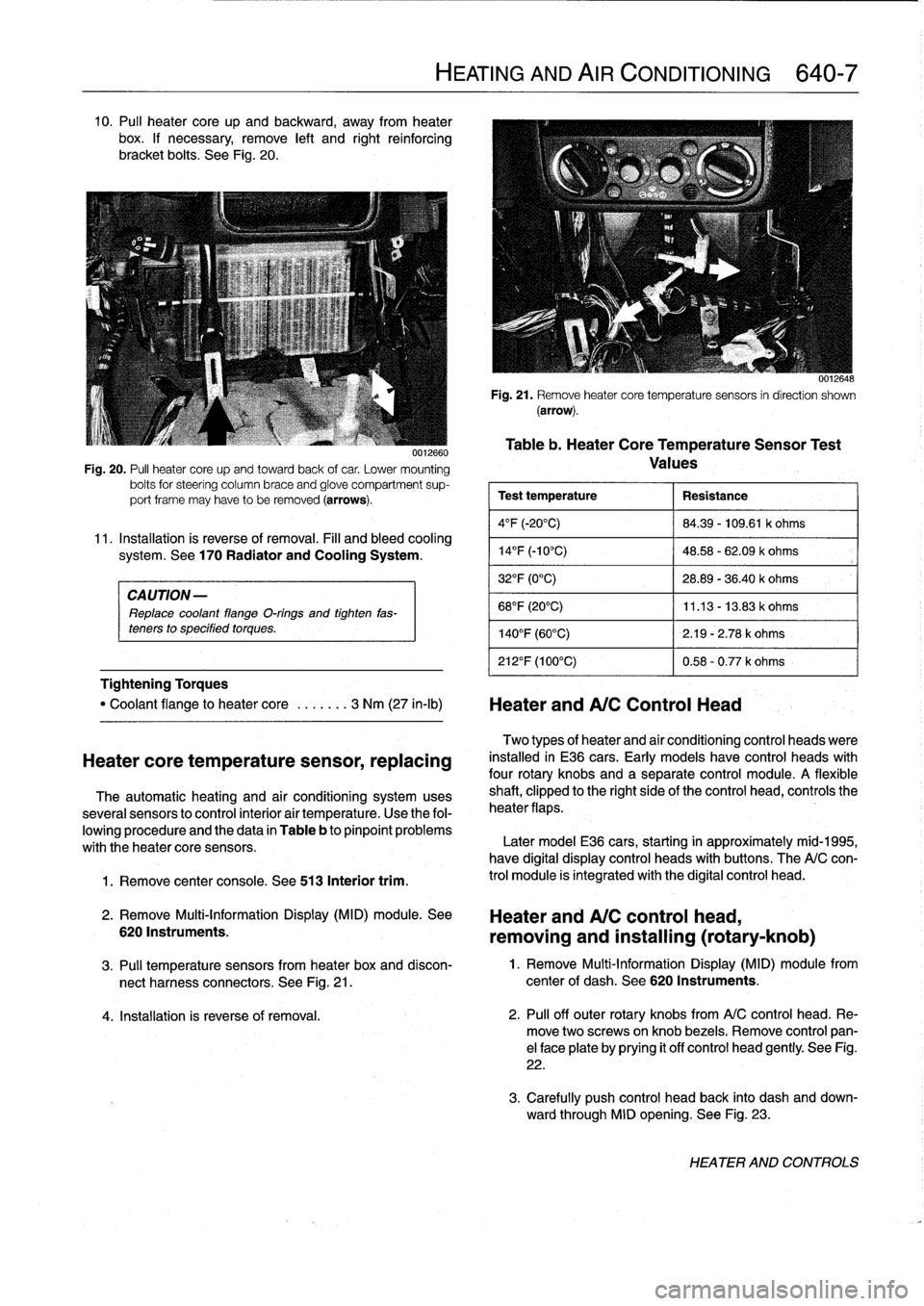
10
.
Pul¡
heater
core
up
and
backward,
away
from
heater
box
.
If
necessary,
remove
left
and
right
reinforcing
bracket
bolts
.
See
Fig
.
20
.
CAUTION-
Replace
coolant
flange
O-rings
and
tighten
fas-
teners
to
specified
torques
.
Tightening
Torques
1
.
Remove
center
console
.
See
513
Interior
trim
.
0012660
Fig
.
20
.
PA
heater
core
upand
towardback
of
car
.
Lower
mounting
bolts
for
steering
column
brace
and
glove
compartment
sup-
port
frame
may
have
to
be
removed
(arrows)
.
11
.
Installation
is
reverse
of
removal
.
Fill
and
bleed
cooling
system
.
See
170
Radiator
and
Cooling
System
.
"
Coolant
flange
to
heater
core
.
..
....
3
Nm
(27
in-lb)
Heater
andA/C
Control
Head
Heatercore
temperature
sensor,
replacing
The
automatic
heating
and
air
conditioning
systemuses
severa¡
sensors
to
control
interior
air
temperature
.
Use
the
fol-
lowing
procedure
and
the
data
in
Table
b
to
pinpoint
problems
with
theheater
core
sensors
.
2
.
Remove
Multi-Information
Display
(MID)
module
.
See
6201nstruments
.
HEATING
AND
AIR
CONDITIONING
640-7
0012648
Fig
.
21
.
Remove
heatercore
temperaturesensors
in
direction
shown
(arrow)
.
Table
b
.
Heater
CoreTemperatureSensor
Test
Values
Test
temperature
Resistance
4°F
(-20°C)
84
.39
-
109
.61
k
ohms
14
°
F
(-10°C)
48
.58
-
62
.09
k
ohms
32°F
(0°C)
28
.89
-
36
.40
k
ohms
68°F
(20°C)
11
.13
-
13
.83
k
ohms
140°F
(60°C)
2
.19
-
2
.78
k
ohms
212°F
(100°C)
0
.58
-
0
.77
k
ohms
Two
types
of
heater
and
aír
conditioning
control
heads
viere
installed
in
E36
cars
.
Early
models
have
control
heads
with
four
rotary
knobs
and
a
separate
control
module
.
A
flexible
shaft,
clipped
to
the
right
sideof
the
control
head,
controls
the
heater
flaps
.
Later
model
E36
cars,
starting
in
approximately
mid-1995,
have
digital
display
control
heads
with
buttons
.
The
A/C
con-
trol
module
is
integrated
with
the
digital
control
head
.
Heater
and
A/C
control
head,
removing
and
installing
(rotary-knob)
3
.
Pul¡
temperature
sensors
from
heater
box
and
discon-
1
.
Remove
Multi-Information
Display
(MID)
module
from
nect
harness
connectors
.
See
Fig
.
21
.
center
of
dash
.
See
620
Instruments
.
4
.
Installation
is
reverse
of
removal
.
2
.
Pul¡
off
outer
rotary
knobs
from
A/C
control
head
.
Re-
move
two
screwsonknob
bezels
.
Remove
control
pan-
el
face
plate
by
prying
it
off
control
head
gently
.
See
Fig
.
22
.
3
.
Carefully
push
control
head
back
into
dash
and
down-
ward
through
MID
opening
.
See
Fig
.
23
.
HEATER
AND
CONTROLS
Page 454 of 759
640-8
HEATING
AND
AIR
CONDITIONING
0012649
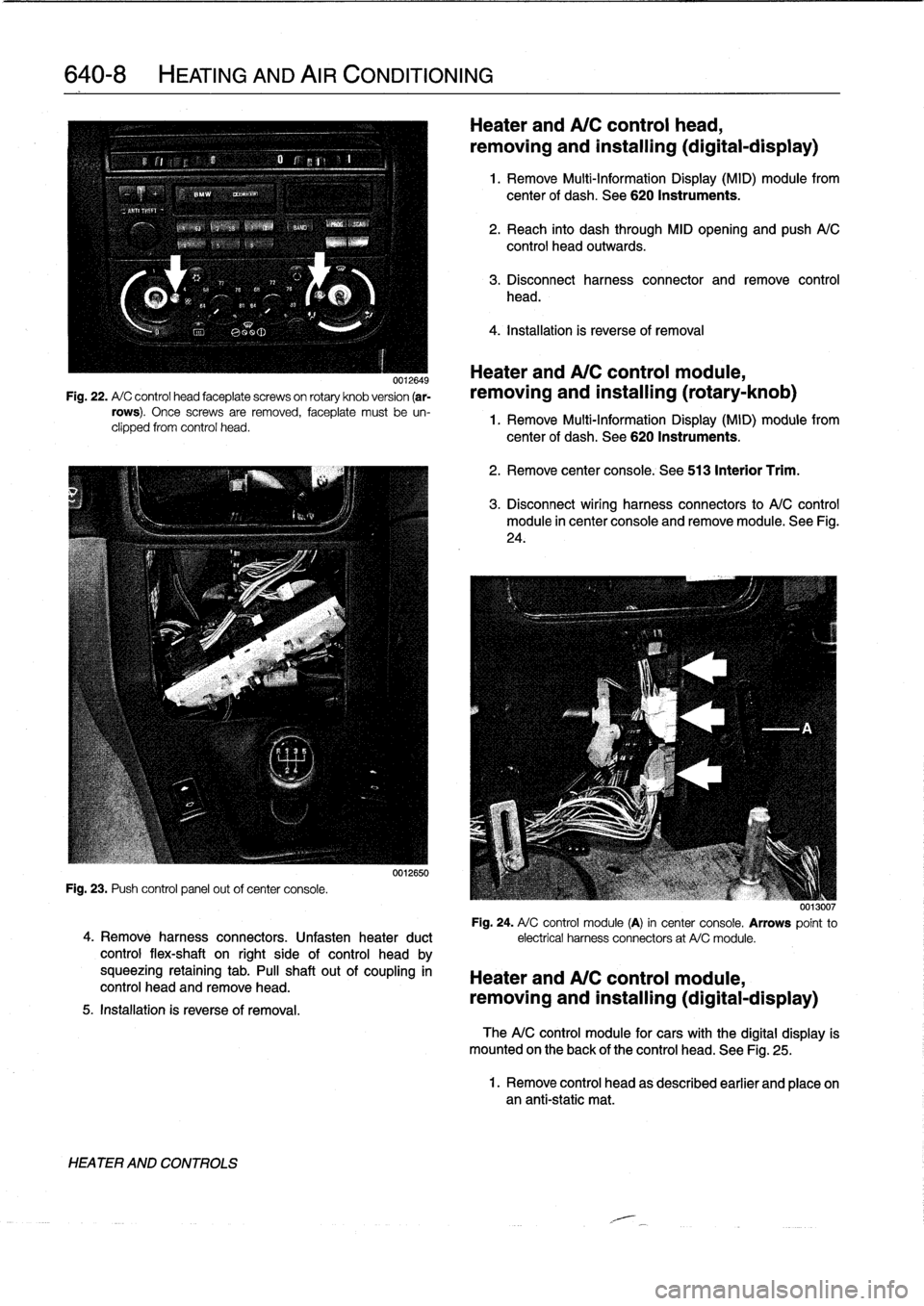
Fig
.
22
.
A/
C
control
head
faceplate
screwson
rotary
knob
version
(ar-
rows)
.
Once
screws
are
removed,
faceplate
must
be
un-
clipped
from
control
head
.
Fig
.
23
.
Push
control
panel
out
ofcenter
console
.
4
.
Remove
harness
connectors
.
Unfasten
heater
duct
control
flex-shaft
on
right
side
of
control
head
by
squeezing
retaining
tab
.
PA
shaftout
of
coupling
in
control
head
and
remove
head
.
5
.
Installation
is
reverseof
removal
.
HEATER
AND
CONTROLS
0012650
Heater
and
A/C
control
head,
removing
and
installing(digital-display)
1
.
Remove
Multi-Information
Display
(MID)
module
from
center
of
dash
.
See
620
Instruments
.
2
.
Reach
into
dash
through
MID
opening
and
push
A/C
control
head
outwards
.
3
.
Disconnect
harness
connector
and
remove
control
head
.
4
.
Installation
is
reverse
of
removal
Heater
andA/C
control
module,
removing
and
installing
(rotary-knob)
1
.
Remove
Multi-Information
Display
(MID)
module
from
center
of
dash
.
See
620
Instruments
.
2
.
Remove
center
console
.
See
513
Interior
Trim
.
3
.
Disconnect
wiring
harness
connectors
to
A/C
control
module
in
center
console
and
removemodule
.
See
Fig
.
24
.
0013007
Fig
.
24
.
A/
C
control
module
(A)
in
center
console
.
Arrows
point
to
electrical
harness
connectors
at
A/Cmodule
.
Heater
and
A/C
control
module,
removing
and
installing(digital-display)
TheA/C
control
module
for
cars
with
the
digital
display
is
mounted
on
the
back
of
the
control
head
.
See
Fig
.
25
.
1
.
Remove
control
head
as
described
earlier
and
place
onan
anti-static
mat
.
Page 455 of 759
Sensor
fan
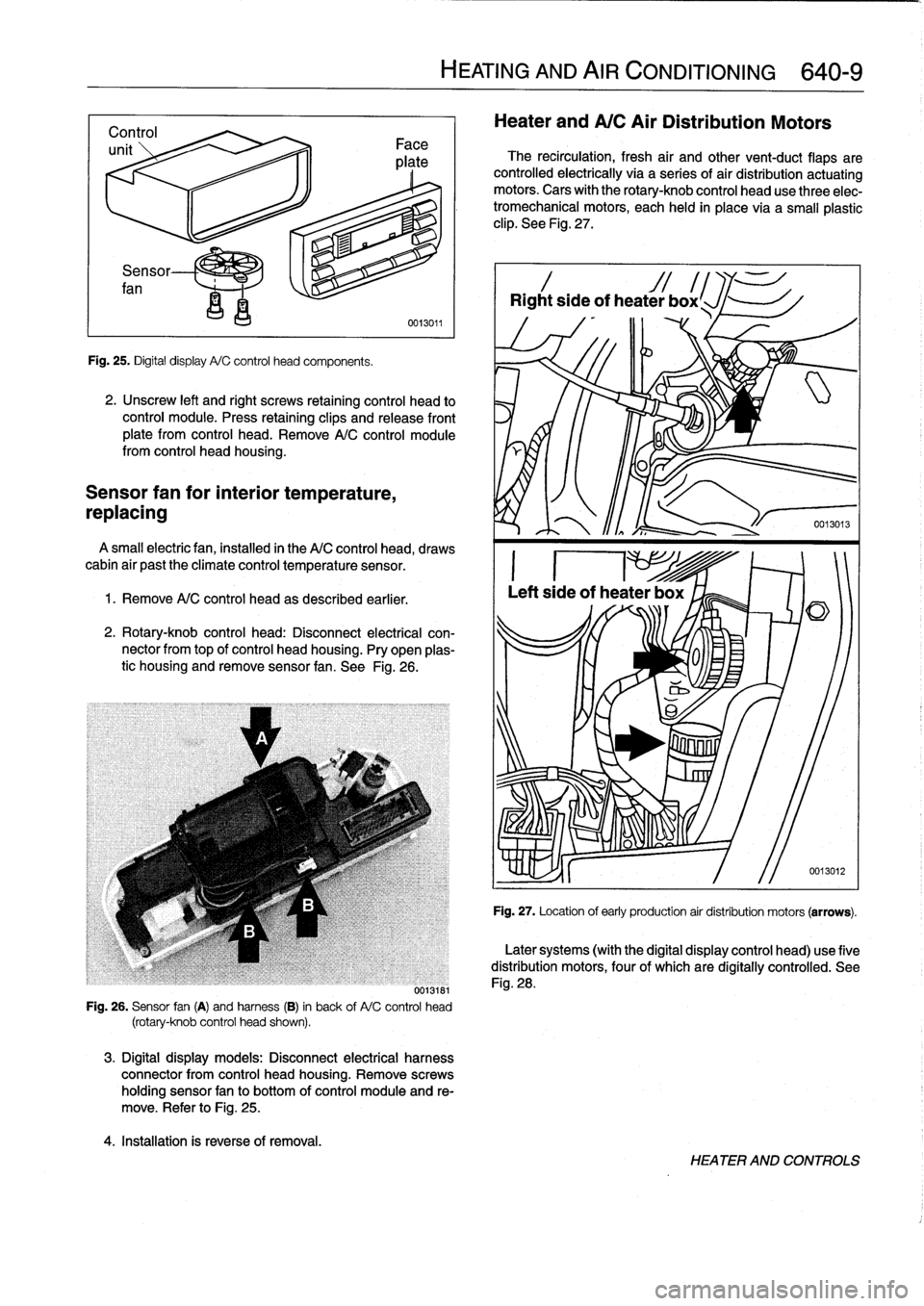
Fig
.
25
.
Digital
display
A/C
control
head
components
.
2
.
Unscrew
left
and
right
screws
retaining
control
head
to
control
module
.
Press
retaining
clips
and
release
front
plate
from
control
head
.
Remove
A/C
control
module
from
control
head
housing
.
Sensor
fan
for
interior
temperature,
repiacing
A
small
electricfan,installed
in
the
A/C
control
head,
draws
cabin
air
past
the
climate
control
temperature
sensor
.
1.
Remove
A/C
control
head
as
described
earlier
.
2
.
Rotary-knob
control
head
:
Disconnect
electrical
con-
nector
from
top
of
control
head
housing
.
Pry
open
plas-
tic
housing
and
remove
sensor
fan
.
See
Fig
.
26
.
0013181
Fig
.
26
.
Sensor
fan
(A)
and
harness
(B)
in
back
of
A/C
control
head
(rotary-knob
control
head
shown)
.
3
.
Digital
display
models
:
Disconnect
electrical
harness
connector
from
control
head
housing
.
Remove
screws
holding
sensor
fan
to
bottom
of
control
moduleand
re-
move
.
Refer
to
Fig
.
25
.
4
.
Installation
is
reverse
of
removal
.
HEATING
AND
AIR
CONDITIONING
640-
9
Heater
and
A/C
Air
Distribution
Motors
The
recirculation,
fresh
air
and
othervent-duct
flaps
are
controlled
electrically
via
a
series
of
air
distribution
actuating
motors
.
Cars
with
the
rotary-knob
control
head
use
three
elec-
tromechanical
motors,
each
held
in
place
via
a
small
plastic
clip
.
See
Fig
.
27
.
Rightside
of
heater
box
l
Fig
.
27
.
Location
of
early
production
air
distribution
motors
(arrows)
.
Later
systems
(with
the
digital
display
control
head)
use
five
distribution
motors,
four
of
which
are
digítally
controlled
.
See
Fig
.
28
.
HEATER
AND
CONTROLS
Page 456 of 759
640-10
HEATING
AND
AIR
CONDITIONING
i
El
Radio
Antenna
Rear
.
,
si,-
Left
side
I
d
1
.
Rear
vents
2
.
Fresh
air
3
.
Face-level
vents
4
.
Recirculation
5
.
Footwell
vents
0013017
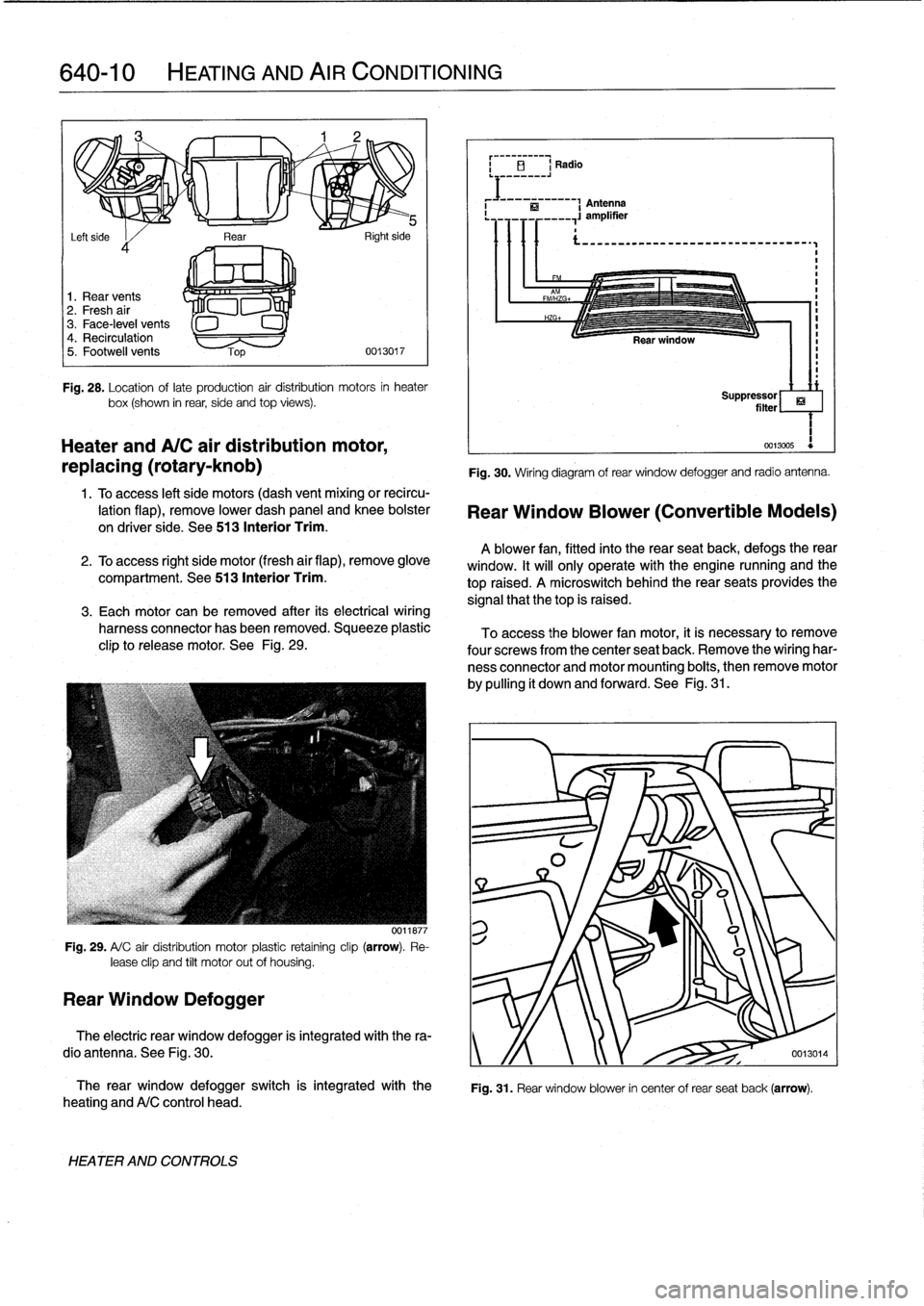
Fig
.
28
.
Location
oflate
production
air
distribution
motors
in
heater
box(shown
in
rear,
side
and
top
views)
.
Heater
andA/C
air
distribution
motor,
replacing
(rotary-knob)
1
.
Toaccess
left
side
motors
(dash
vent
mixing
or
recircu-
lation
flap),
remove
lower
dash
panel
and
knee
bolster
on
driver
side
.
See
513
Interior
Trim
.
2
.
To
access
right
side
motor
(fresh
air
flap),
remove
glove
compartment
.
See513
Interior
Trim
.
3
.
Each
motor
can
be
removed
after
its
electrical
wiring
harness
connector
has
been
removed
.
Squeeze
plastic
clip
to
release
motor
.
See
Fig
.
29
.
Fig
.
29
.
A/
C
air
distribution
motor
plastic
retaíning
clip
(arrow)
.
Re-
lease
clip
and
tilt
motor
out
of
housing
.
Rear
Window
Defogger
0011877
The
rear
window
defogger
switch
is
integrated
with
the
heating
andA/C
control
head
.
HEATER
AND
CONTROLS
Fig
.
30
.
Wiring
diagram
of
rear
window
defogger
and
radio
antenna
.
Rear
Window
Blower
(Convertible
Models)
A
blower
fan,
fitted
into
the
rear
seatback,
defogs
therear
window
.
It
will
only
operate
with
the
engine
nunning
and
the
top
raised
.
A
microswitch
behindthe
rear
seats
provides
the
signal
that
thetop
is
raised
.
To
access
the
blower
fan
motor,
it
is
necessary
to
remove
four
screwsfrom
the
center
seat
back
.
Remove
the
wiring
har-
ness
connector
and
motor
mounting
boits,
then
remove
motor
by
pulling
it
down
and
forward
.
See
Fig
.
31
.
ri
Suppressor
filter
1
0013005
Fig
.
31
.
Rear
window
blower
in
center
of
rear
seat
back
(arrow)
.
The
electric
rear
window
defogger
is
integrated
with
the
ra-
dio
antenna
.
See
Fig
.
30
.
y
/f
0013014
Page 461 of 759
Fig
.
42
.
Upper
A/C
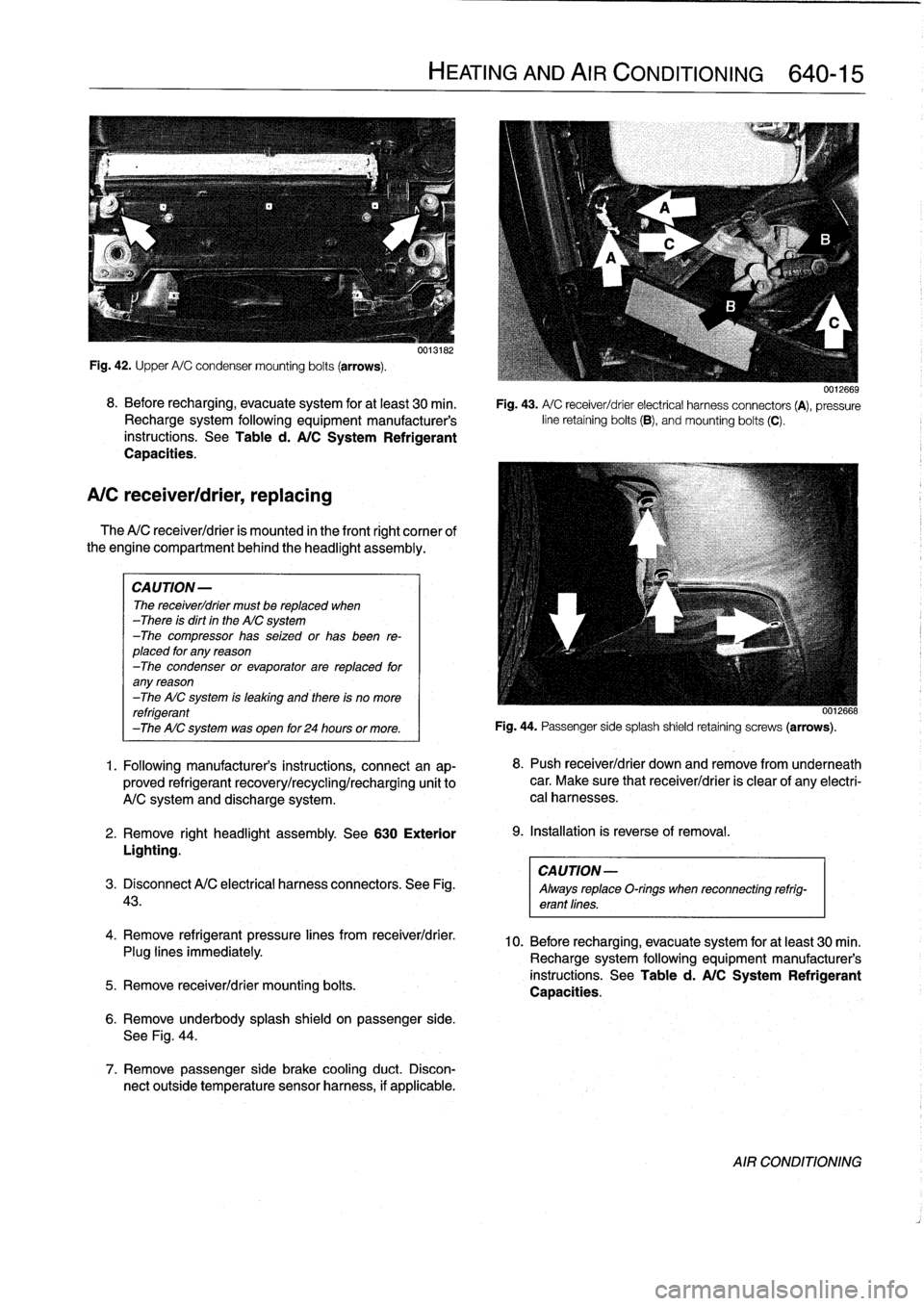
condensermounting
bolts
(arrows)
.
8
.
Before
recharging,
evacuate
system
for
at
least
30
min
.
Recharge
system
following
equipment
manufacturer's
instructions
.
See
Table
d
.
A/C
System
Refrigerant
Capacities
.
A/C
receiver/drier,
replacing
The
A/C
receiver/drier
is
mounted
in
the
front
right
cornee
of
the
engine
compartment
behind
the
headlight
assembly
.
CAUTION-
The
receiver/drier
must
be
replaced
when
-There
is
dirt
in
the
AIC
system
-The
compressor
has
seized
or
has
been
re-
placed
for
any
reason
-The
condenser
or
evaporator
are
replaced
for
any
reason
-The
AIC
system
is
leaking
and
there
is
no
more
refrigerant
-The
AIC
system
was
open
for
24
hours
or
more
.
1
.
Following
manufacturer's
instructions,
connectan
ap-
proved
refrigerant
recovery/recycling/recharging
unit
to
A/C
system
and
discharge
system
.
2
.
Remove
right
headlight
assembly
.
See
630
Exterior
Lighting
.
CAUTION-
3
.
Disconnect
A/C
electrical
harness
connectors
.
See
Fig
.
Always
replaceO-rings
when
reconnecting
refrig-
43
.
erant
lines
.
4
.
Remove
refrigerant
pressure
lines
from
receiver/drier
.
Plug
lines
immediately
.
5
.
Remove
receiver/drier
mounting
bolts
.
0013182
6
.
Remove
underbody
splash
shield
on
passenger
side
.
See
Fig
.
44
.
7
.
Remove
passenger
side
brake
cooling
duct
.
Discon-
nect
outside
temperature
sensor
harness,
if
applicable
.
HEATING
AND
AIR
CONDITIONING
640-15
0012669
Fig
.
43
.
A/
C
receiver/drier
electrical
harness
connectors
(A),
pressure
line
retaining
bolts
(B),
andmounting
bolts
(C)
.
0012668
Fig
.
44
.
Passenger
sidesplash
shield
retaining
screws
(arrows)
.
8
.
Push
receiver/drier
down
andremove
from
underneath
car
.
Make
sure
that
receiver/drier
is
clear
of
any
electri-
cal
harnesses
.
9
.
Installation
is
reverse
of
removal
.
10
.
Before
recharging,
evacuate
system
for
at
least
30
min
.
Recharge
system
following
equipment
manufacturer's
instructions
.
See
Table
d
.
A/C
System
Refrigerant
Capacities
.
AIR
CONDITIONING
Page 462 of 759
640-16
HEATING
AND
AIR
CONDITIONING
A/C
expansion
valve,
removing
and
installing
Fig
.
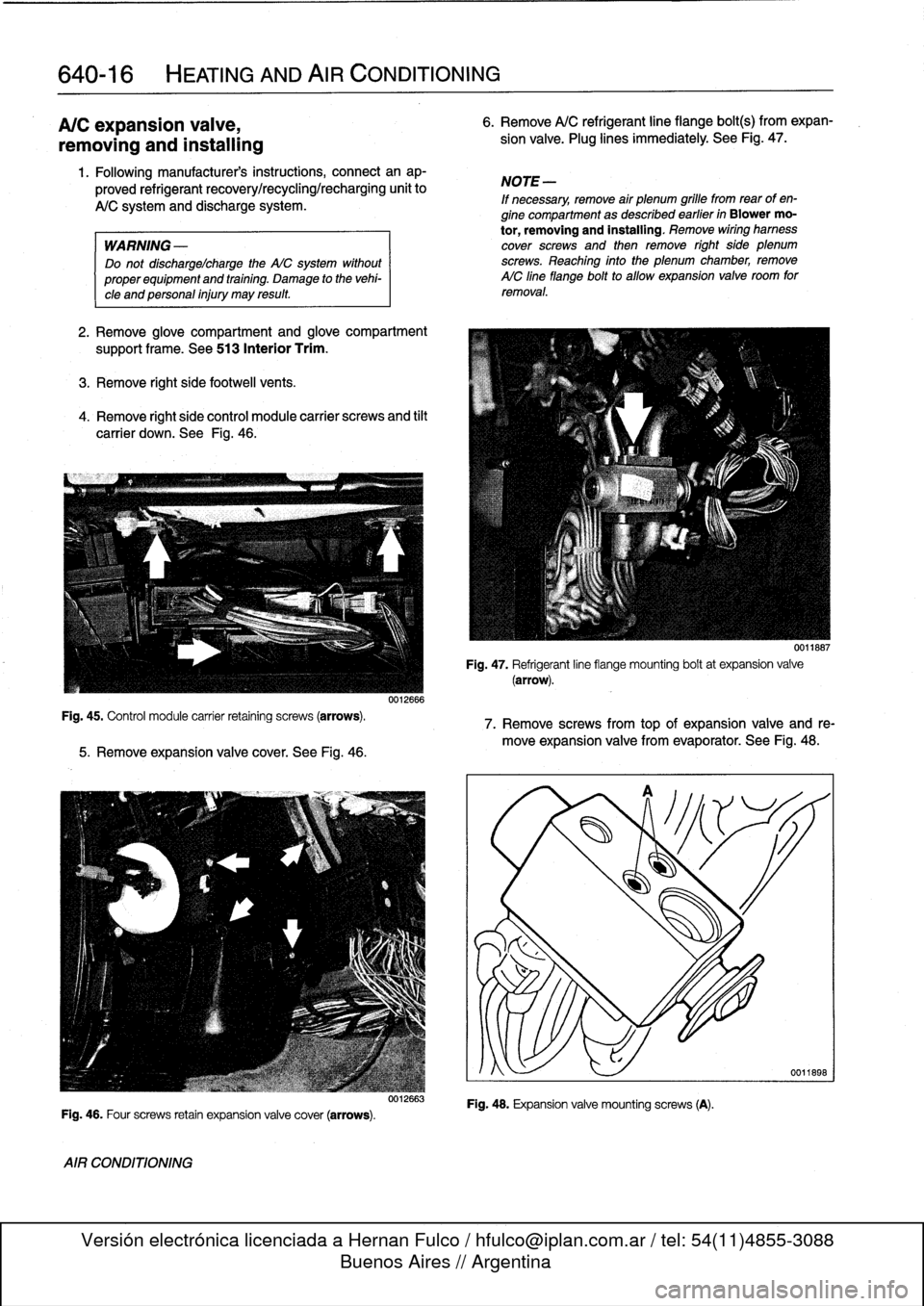
45
.
Control
module
carrier
retaining
screws
(arrows)
.
1
.
Following
manufacturers
instructions,
connectanap-
proved
refrigerant
recovery/recycling/recharging
unit
to
A/C
system
and
discharge
system
.
WARNING
-
Do
not
discharge%harge
the
WC
system
without
properequipmentand
training
.
Damage
to
the
vehi-
cle
and
personal
injury
may
result
.
2
.
Remove
glove
compartment
and
glove
compartment
support
frame
.
See513
Interior
Trim
.
3
.
Remove
right
side
footwell
vents
.
4
.
Remove
right
side
control
module
carrier
screws
and
tilt
carrier
down
.
See
Fig
.
46
.
5
.
Remove
expansion
valve
cover
.
See
Fig
.
46
.
Fig
.
46
.
Four
screws
retain
expansion
valve
cover
(arrows)
.
AIR
CONDITIONING
0012666
0012663
6
.
Remove
A/C
refrigerant
line
fiange
bolt(s)
from
expan-
sion
valve
.
Plug
lines
immediately
.
See
Fig
.
47
.
NOTE
-
If
necessary,
remove
air
plenum
grille
fromrear
of
en-
gine
compartment
as
described
earlier
in
Blower
mo-
tor,
removing
and
installing
.
Remove
wiring
hamess
cover
screws
and
then
remove
right
side
plenum
screws
.
Reaching
finto
the
plenum
chamber,
remove
AIC
fine
flange
bolt
to
allow
expansion
valve
room
for
removal
.
Fig
.
47
.
Refrigerant
line
fiange
mounting
boltat
expansion
valve(arrow)
.
7
.
Remove
screws
from
top
of
expansion
valve
and
re-
move
expansion
valve
from
evaporator
.
See
Fig
.
48
.
Fig
.
48
.
Expansion
valve
mountingscrews
(A)
.
0011667
Page 464 of 759
640-18
HEATING
AND
AIR
CONDITIONING
A/C
microfilter,
replacing
1
.
Remove
glove
compartment
.
See
513
Interior
Trim
.
2
.
Remove
right
footwell
ventilation
duct
.
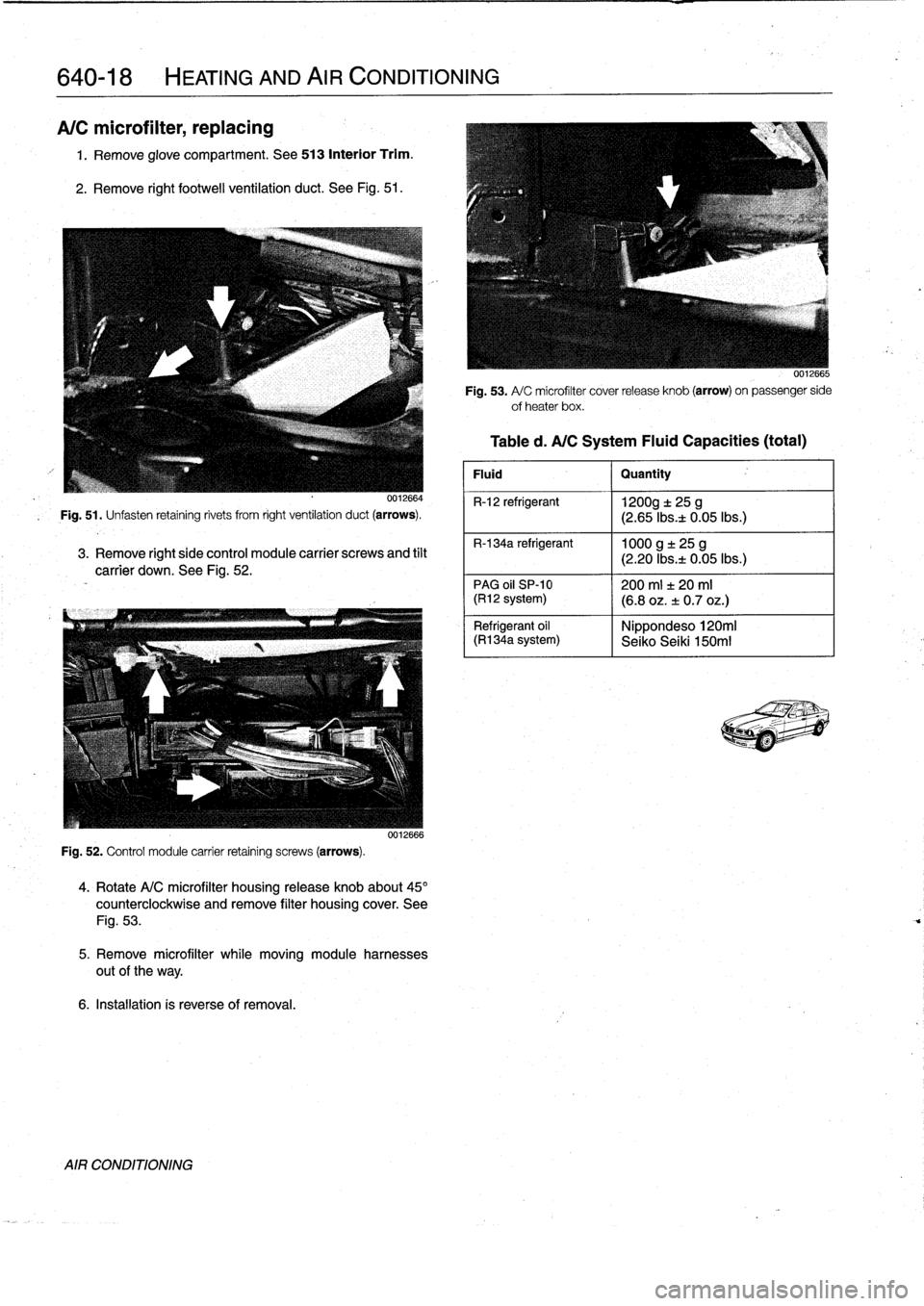
See
Fig
.
51
.
0012664
Fig
.
51
.
Unfasten
retaining
rivets
from
right
ventilation
duct
(arrows)
.
3
.
Remove
right
side
control
module
carrier
screws
and
tilt
carrier
down
.
See
Fig
.
52
.
Fig
.
52
.
Control
module
carrier
retaining
screws
(arrows)
.
0012666
4
.
Rotate
A/C
microfilter
housing
release
knob
about45°
counterclockwise
and
remove
filter
housing
cover
.
See
Fig
.
53
.
5
.
Remove
microfilter
while
moving
module
harnesses
out
of
the
way
.
6
.
Installation
is
reverse
of
removal
.
AIR
CONDITIONING
Fig
.
53
.
A/
C
microfilter
cover
release
knob
(arrow)
on
passenger
side
ofheater
box
.
Table
d
.
A/CSystem
Fluid
Capacities
(total)
Fluid
I
Quantity
R-12
refrigerant
1200g
t
25
g
(2
.65
Ibsa
0
.05lbs
.)
R-134a
refrigerant
1000
g
±
25
g
(2
.20
Ibs
.t
0
.05lbs
.)
PAG
oil
SP-10
1200
ml
f
20
ml(R12
system)
(6
.8
oz
.
±
0
.7
oz
.)
Nippondeso120mi
Refrigerant
oil
(R1
34a
system)
I
Seiko
Seiki
150m1
Page 467 of 759
2
.
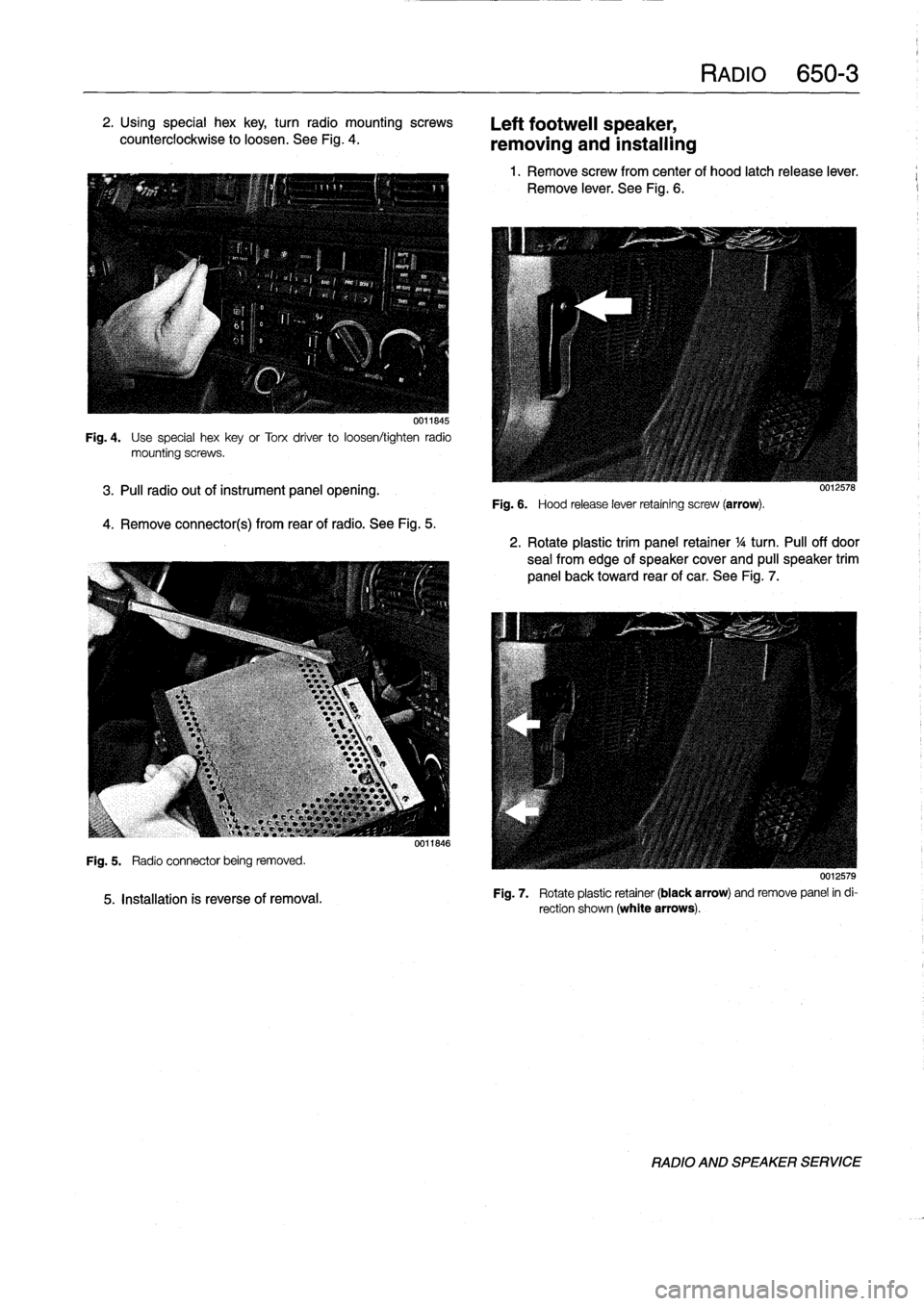
Using
special
hex
key,
turn
radio
mountingscrews
counterclockwise
to
loosen
.
See
Fig
.
4
.
0011845
Fig
.
4
.
Use
special
hexkey
or
Torx
driver
to
loosen/tighten
radio
mountingscrews
.
3
.
Pul¡
radio
out
of
instrument
panel
opening
.
4
.
Remove
connector(s)
from
rearof
radio
.
See
Fig
.
5
.
Fig
.
5
.
Radio
connector
being
removed
.
5
.
Installation
is
reverse
of
removal
.
0011846
Left
footweil
speaker,
removing
and
installing
Fig
.
6
.
Hood
release
lever
retaining
screw
(arrow)
.
RADIO
650-
3
1
.
Remove
screw
from
center
of
hood
latch
release
lever
.
Remove
lever
.
See
Fig
.
6
.
0012578
2
.
Rotate
plastic
trim
panel
retainer
1
/4
turn
.
Pul¡
off
door
sea¡
from
edge
of
speaker
cover
and
pull
speaker
trim
panel
back
toward
rear
of
car
.
See
Fig
.
7
.
0012579
Fig
.
7
.
Rotate
plastic
retainer
(black
arrow)
andremove
panel
in
di-
rection
shown
(white
arrows)
.
RADIO
AND
SPEAKER
SERVICE
Page 468 of 759
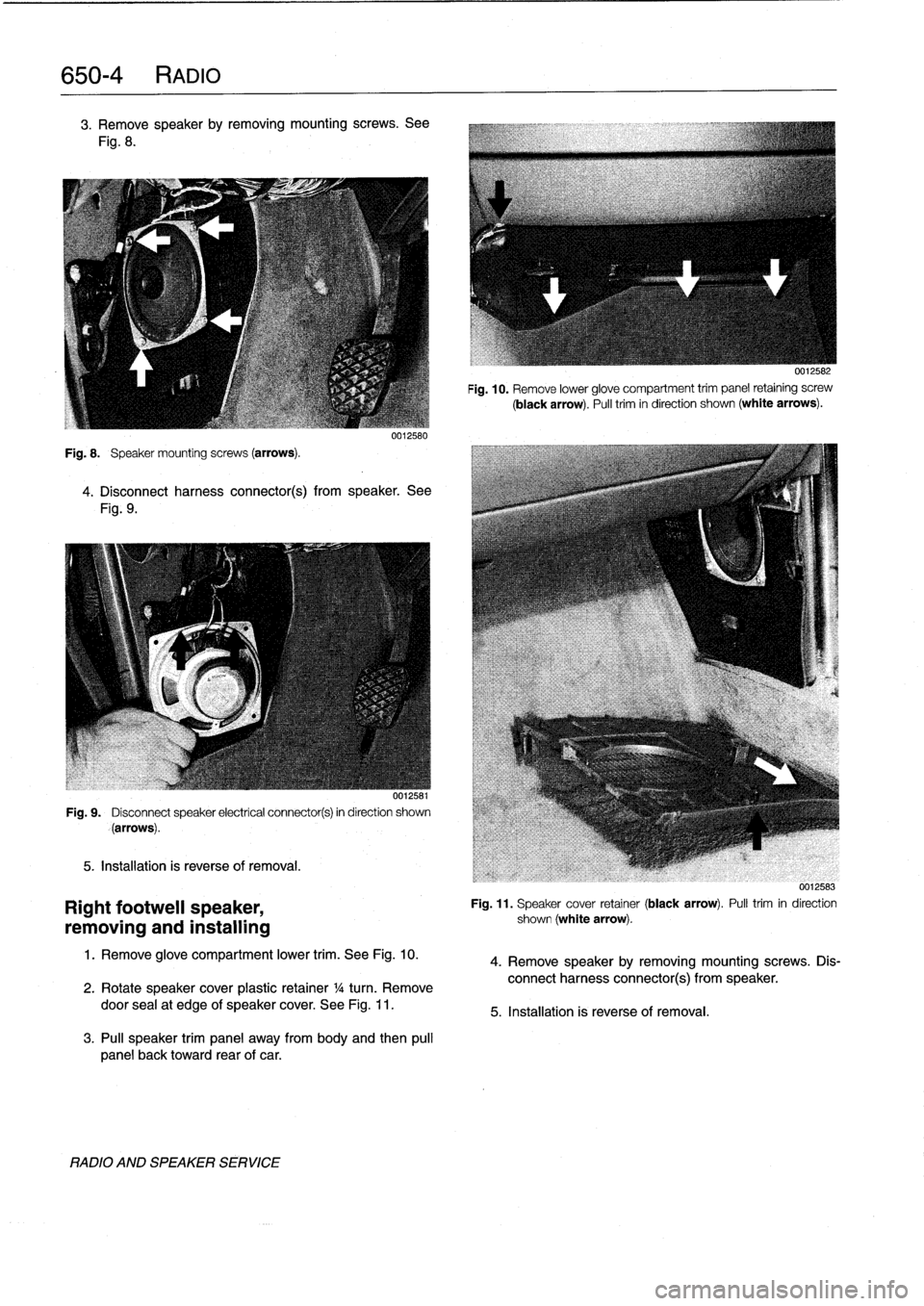
650-
4
RADIO
3
.
Remove
speakerby
removing
mountingscrews
.
See
Fig
.
8
.
Fig
.
8
.
Speaker
mounting
screws
(arrows)
.
0012580
4
.
Disconnect
harness
connector(s)
from
speaker
.
See
Fig
.
9
.
001,58
Fig
.
9
.
Disconnect
speaker
electrical
connector(s)
in
direction
shown
(arrows)
.
5
.
Installation
is
reverse
of
removal
.
Right
footwell
speaker,
removing
and
installing
1
.
Remove
glove
compartment
lower
trim
.
See
Fig
.
10
.
2
.
Rotate
speakercover
plastic
retainer
1
/a
turn
.
Remove
door
sea¡at
edge
of
speaker
cover
.
See
Fig
.
11
.
3
.
Pul¡
speaker
trim
panel
away
from
body
and
then
pul¡
panel
back
toward
rear
of
car
.
RADIO
AND
SPEAKER
SERVICE
0012582
Fig
.
10
.
Remove
lower
glove
compartment
trim
panel
retaining
screw
(black
arrow)
.
Pull
trim
in
direction
shown
(white
arrows)
.
0012583
Fig
.
11
.
Speaker
cover
retainer
(black
arrow)
.
Pulltrim
in
direction
shown
(white
arrow)
.
4
.
Remove
speaker
by
removing
mountingscrews
.
Dis-
connect
harness
connector(s)
from
speaker
.
5
.
Installation
is
reverse
of
removal
.
Page 469 of 759
Rear
speaker,
removing
and
installing
Door
panel
speaker,
removing
and
installing
NOTE
-
Rear
speakers
in
convertible
models
are
installed
un-
der
the
rear
side
panels
.
For
rearside
panelremoval
procedure,
see
411Doors
.
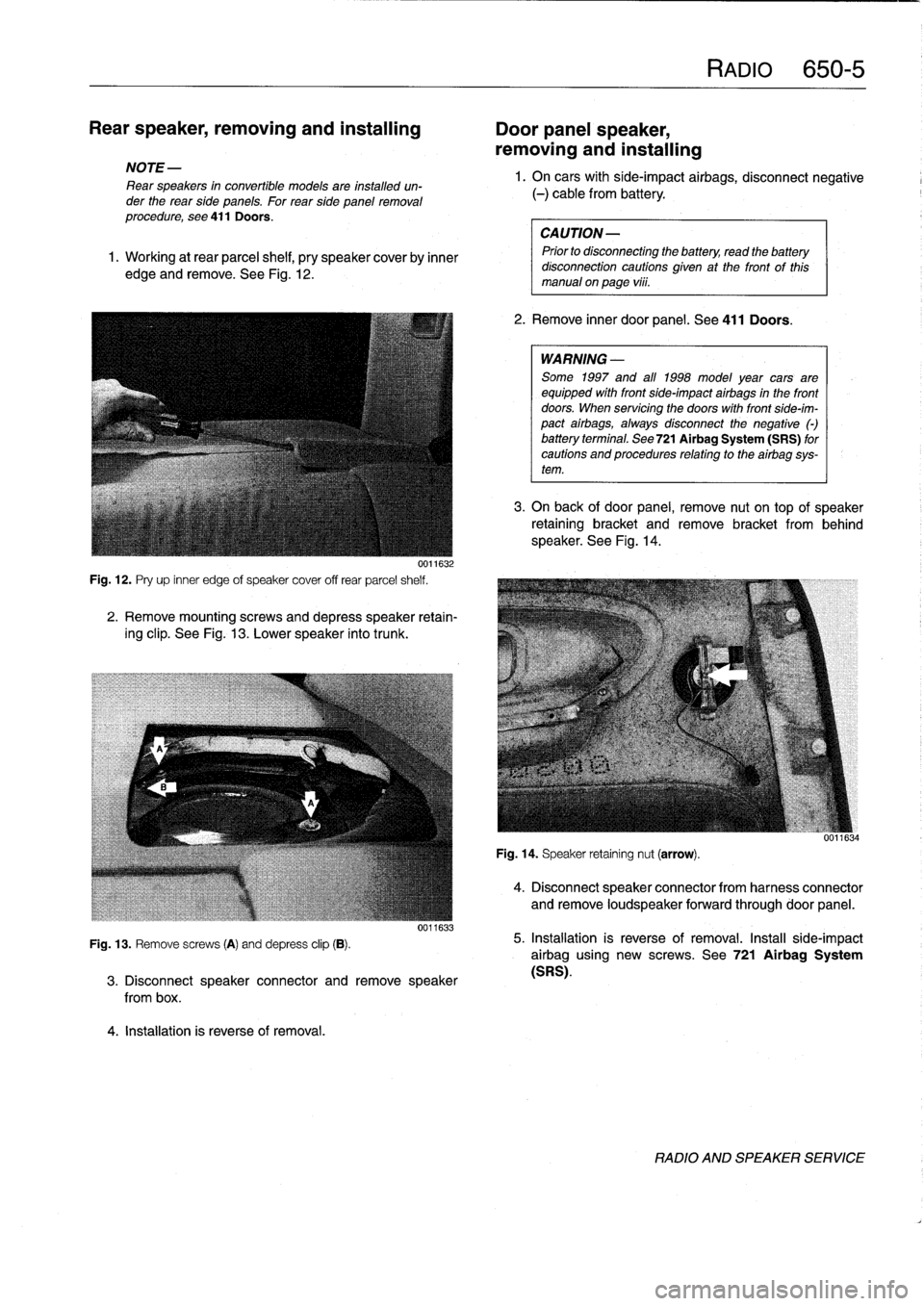
1
.
Working
at
rear
parcel
shelf,
pry
speakercoverby
inner
edge
and
remove
.
See
Fig
.
12
.
0011632
Fig
.
12
.
Pry
up
inner
edge
of
speaker
cover
off
rear
parcel
shelf
.
2
.
Remove
mountingscrews
and
depress
speaker
retain-
ing
clip
.
See
Fig
.
13
.
Lower
speaker
into
trunk
.
Fig
.
13
.
Remove
screws
(A)
and
depress
clip
(B)
.
4
.
Installation
is
reverse
of
removal
.
0011633
3
.
Disconnect
speaker
connector
andremove
speaker
from
box
.
RAM
650-5
1.
On
carswith
side-impact
airbags,
disconnect
negative
(-)
cable
from
battery
.
CAUTION-
Prior
to
disconnecttog
the
battery,
read
the
battery
disconnection
cautions
given
at
the
front
of
this
manual
on
page
vi¡¡
.
2
.
Remove
inner
door
panel
.
See
411
Doors
.
WARNING
-
Some
1997
and
all
1998
model
year
cars
are
equipped
with
front
side-impact
airbags
in
the
front
doors
.
When
servicing
the
doors
with
front
side-im-
pact
airbags,
alwaysdisconnect
the
negative
()
battery
terminal
.
See
721Airbag
System
(SRS)
for
cautions
and
procedures
relating
to
theairbag
sys-
tem
.
3
.
On
back
of
door
panel,
remove
nut
on
top
of
speaker
retaining
bracket
and
remove
bracket
from
behind
speaker
.
See
Fig
.
14
.
Fig
.
14
.
Speaker
retaining
nut
(arrow)
.
4
.
Disconnect
speaker
connector
from
harness
connector
and
remove
loudspeaker
forwardthrough
door
panel
.
5
.
Installation
is
reverse
of
removal
.
Install
side-impact
airbag
using
new
screws
.
See
721
Airbag
System
(SRS)
.
RADIO
AND
SPEAKER
SERVICE