cruise control BMW 320i 2001 Owners Manual
[x] Cancel search | Manufacturer: BMW, Model Year: 2001, Model line: 320i, Model: BMW 320i 2001Pages: 211, PDF Size: 2.1 MB
Page 10 of 211
Contents
Overview
Controls and features
Cockpit16
Instrument cluster18
Indicator and warning lamps20
Multifunction steering wheel
(MFL)24
Sports steering wheel with
multifunction buttons25
Hazard warning flashers26
Warning triangle26
First-aid kit26
Refueling27
Fuel specifications28
Tire inflation pressure28
Locks and security systems:
Keys32
Electronic vehicle
immobilizer33
Central locking system34
Opening and closing Ð from the
outside34
Opening and closing Ð from the
inside38
Luggage compartment lid39
Luggage compartment41
Alarm system42
Electric power windows44
Sliding/tilt sunroof45
Adjustments:
Seats47
Seat and mirror memory50
Steering wheel51
Mirrors52
Car Memory, Key Memory53
Passenger safety systems:
Safety belts54
Airbags55
Transporting children safely59
Driving:
Steering/Ignition lock62
Starting the engine62
Switching off the engine63
Parking brake64
Manual transmission65
Automatic transmission with
Steptronic66
Turn signal indicator/Headlamp
flasher69
Wiper/Washer system69
Rear window defroster71
Cruise control72
Everything under control:
Odometer74
Tachometer74
Energy Control74
Fuel gauge75
Temperature gauge75
Service Interval Display75
Check Control76
Clock76
Computer77
Technology for safety and
convenience:
Park Distance Control (PDC)79
Automatic Stability Control plus
Traction (ASC+T)80
Dynamic Stability Control
(DSC)82
Tire Pressure Control (RDC)86
Contents
Page 19 of 211
19n
IndexDataTechnologyRepairsCar careControlsOverview
Instrument cluster
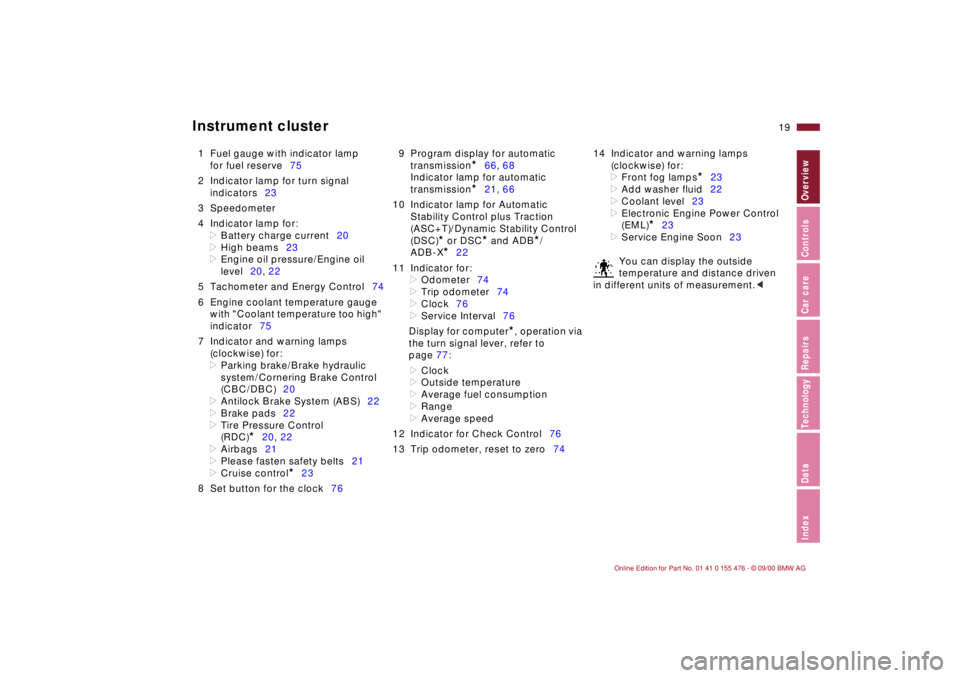
1 Fuel gauge with indicator lamp
for fuel reserve75
2 Indicator lamp for turn signal
indicators23
3 Speedometer
4 Indicator lamp for:
>
Battery charge current20
>
High beams23
>
Engine oil pressure/Engine oil
level20, 22
5 Tachometer and Energy Control74
6 Engine coolant temperature gauge
with "Coolant temperature too high"
indicator75
7 Indicator and warning lamps
(clockwise) for:
>
Parking brake/Brake hydraulic
system/Cornering Brake Control
(CBC/DBC)20
>
Antilock Brake System (ABS)22
>
Brake pads22
>
Tire Pressure Control
(RDC)
*
20, 22
>
Airbags21
>
Please fasten safety belts21
>
Cruise control
*
23
8 Set button for the clock769 Program display for automatic
transmission
*
66, 68
Indicator lamp for automatic
transmission
*
21, 66
10 Indicator lamp for Automatic
Stability Control plus Traction
(ASC+T)/Dynamic Stability Control
(DSC)
*
or DSC
*
and ADB
*
/
ADB-X
*
22
11 Indicator for:
>
Odometer74
>
Trip odometer74
>
Clock76
>
Service Interval76
Display for computer
*
, operation via
the turn signal lever, refer to
page 77:
>
Clock
>
Outside temperature
>
Average fuel consumption
>
Range
>
Average speed
12 Indicator for Check Control76
13 Trip odometer, reset to zero7414 Indicator and warning lamps
(clockwise) for:
>
Front fog lamps
*
23
>
Add washer fluid22
>
Coolant level23
>
Electronic Engine Power Control
(EML)
*
23
>
Service Engine Soon23
You can display the outside
temperature and distance driven
in different units of measurement.
<
Page 23 of 211
23n
IndexDataTechnologyRepairsCar careControlsOverview
Indicator and warning lamps
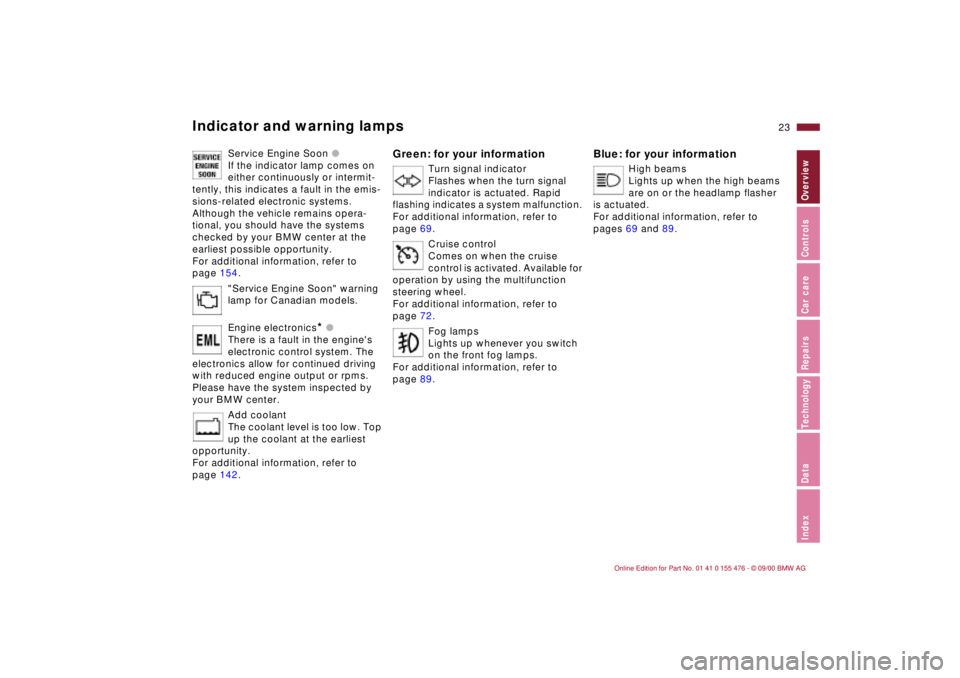
Service Engine Soon l
If the indicator lamp comes on
either continuously or intermit-
tently, this indicates a fault in the emis-
sions-related electronic systems.
Although the vehicle remains opera-
tional, you should have the systems
checked by your BMW center at the
earliest possible opportunity.
For additional information, refer to
page 154.
"Service Engine Soon" warning
lamp for Canadian models.
Engine electronics
* l
There is a fault in the engine's
electronic control system. The
electronics allow for continued driving
with reduced engine output or rpms.
Please have the system inspected by
your BMW center.
Add coolant
The coolant level is too low. Top
up the coolant at the earliest
opportunity.
For additional information, refer to
page 142.
Green: for your information
Turn signal indicator
Flashes when the turn signal
indicator is actuated. Rapid
flashing indicates a system malfunction.
For additional information, refer to
page 69.
Cruise control
Comes on when the cruise
control is activated. Available for
operation by using the multifunction
steering wheel.
For additional information, refer to
page 72.
Fog lamps
Lights up whenever you switch
on the front fog lamps.
For additional information, refer to
page 89.
Blue: for your information
High beams
Lights up when the high beams
are on or the headlamp flasher
is actuated.
For additional information, refer to
pages 69 and 89.
Page 24 of 211
24n
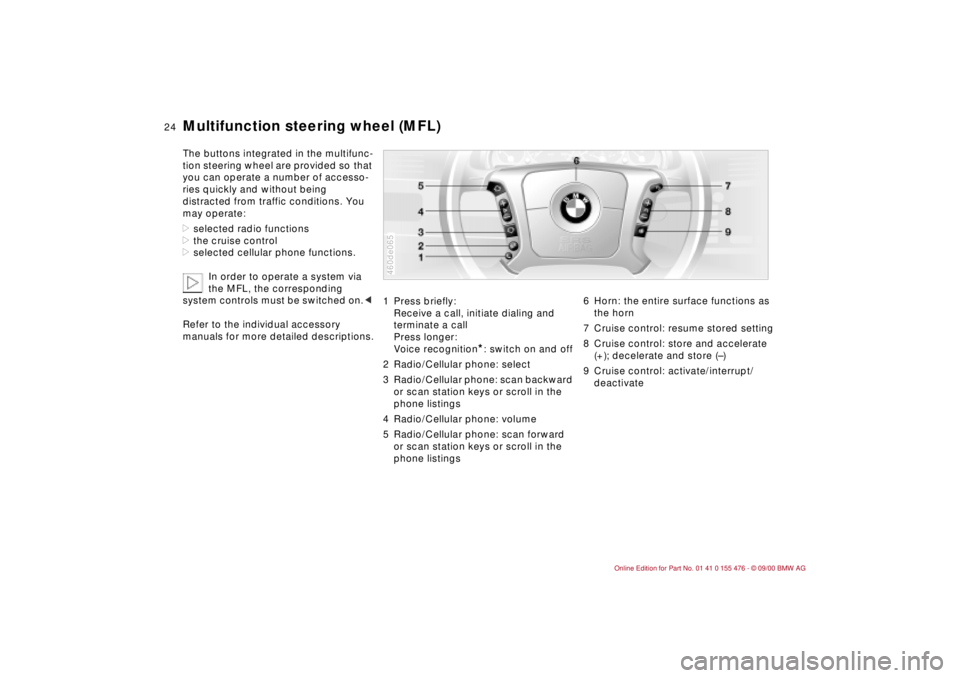
Multifunction steering wheel (MFL)The buttons integrated in the multifunc-
tion steering wheel are provided so that
you can operate a number of accesso-
ries quickly and without being
distracted from traffic conditions. You
may operate:
>selected radio functions
>the cruise control
>selected cellular phone functions.
In order to operate a system via
the MFL, the corresponding
system controls must be switched on.<
Refer to the individual accessory
manuals for more detailed descriptions.
1 Press briefly:
Receive a call, initiate dialing and
terminate a call
Press longer:
Voice recognition
*: switch on and off
2 Radio/Cellular phone: select
3 Radio/Cellular phone: scan backward
or scan station keys or scroll in the
phone listings
4 Radio/Cellular phone: volume
5 Radio/Cellular phone: scan forward
or scan station keys or scroll in the
phone listings
460de065
6 Horn: the entire surface functions as
the horn
7 Cruise control: resume stored setting
8 Cruise control: store and accelerate
(+); decelerate and store (Ð)
9 Cruise control: activate/interrupt/
deactivate
Page 25 of 211
25n
IndexDataTechnologyRepairsCar careControlsOverview
Sports steering wheel with multifunction buttons
*
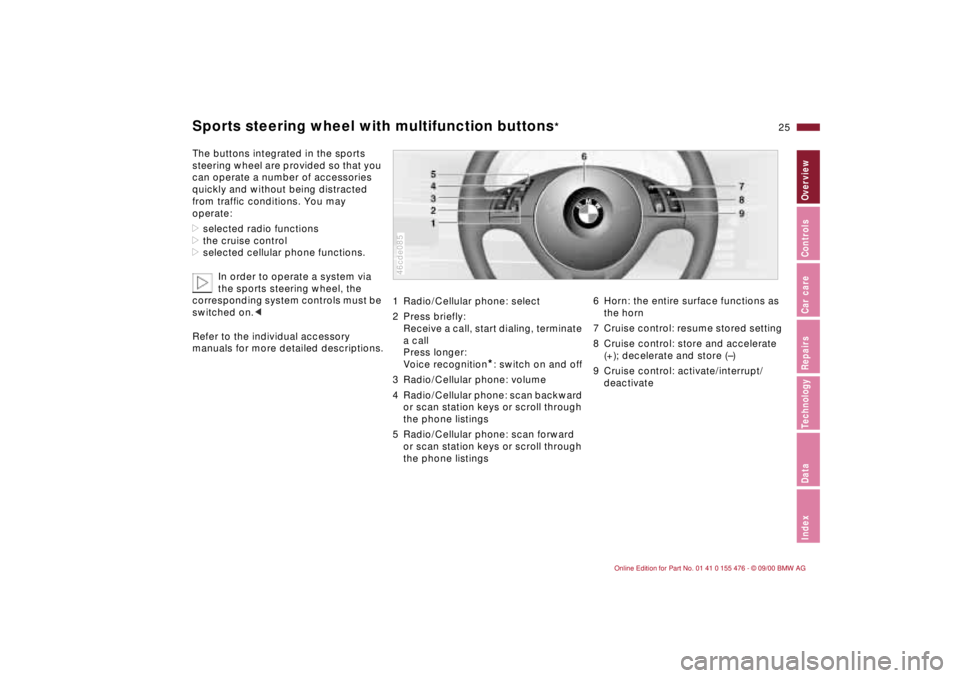
The buttons integrated in the sports
steering wheel are provided so that you
can operate a number of accessories
quickly and without being distracted
from traffic conditions. You may
operate:
>selected radio functions
>the cruise control
>selected cellular phone functions.
In order to operate a system via
the sports steering wheel, the
corresponding system controls must be
switched on.<
Refer to the individual accessory
manuals for more detailed descriptions.
1 Radio/Cellular phone: select
2 Press briefly:
Receive a call, start dialing, terminate
a call
Press longer:
Voice recognition
*: switch on and off
3 Radio/Cellular phone: volume
4 Radio/Cellular phone: scan backward
or scan station keys or scroll through
the phone listings
5 Radio/Cellular phone: scan forward
or scan station keys or scroll through
the phone listings
46cde085
6 Horn: the entire surface functions as
the horn
7 Cruise control: resume stored setting
8 Cruise control: store and accelerate
(+); decelerate and store (Ð)
9 Cruise control: activate/interrupt/
deactivate
Page 31 of 211
Overview
Controls and features
Operation, care
and maintenance
Owner service procedures
Technical data
Index Advanced technology
31n
IndexDataTechnologyRepairsCar careControlsOverview
Driving:
Steering/Ignition lock62
Starting the engine62
Switching off the engine63
Parking brake64
Manual transmission65
Automatic transmission with
Steptronic66
Turn signal indicator/Headlamp
flasher69
Wiper/Washer system69
Rear window defroster71
Cruise control72
Everything under control:
Odometer74
Tachometer74
Energy Control74
Fuel gauge75
Temperature gauge75
Service Interval Display75
Check Control76
Clock76
Computer77
Technology for safety and
convenience:
Park Distance Control (PDC)79
Automatic Stability Control plus
Traction (ASC+T)80
Dynamic Stability Control
(DSC)82
Tire Pressure Control (RDC)86Lamps:
Side lamps/Low beams88
Instrument lightning88
High beams/Parking lamps89
Fog lamps89
Interior lamps89
Controlling the climate for
pleasant driving:
Air conditioner92
Automatic climate control98
Seat heating103
Roller sun blind103
Interior conveniences:
HiFi system104
Glove compartment104
Storage compartments105
Cellular phones107
Ashtray, front107
Cigarette lighter108
Ashtray, rear108
Loading and transporting:
Through-loading system109
Ski bag110
Cargo loading112
Roof-mounted luggage rack113
Page 72 of 211
72n
Cruise control
*
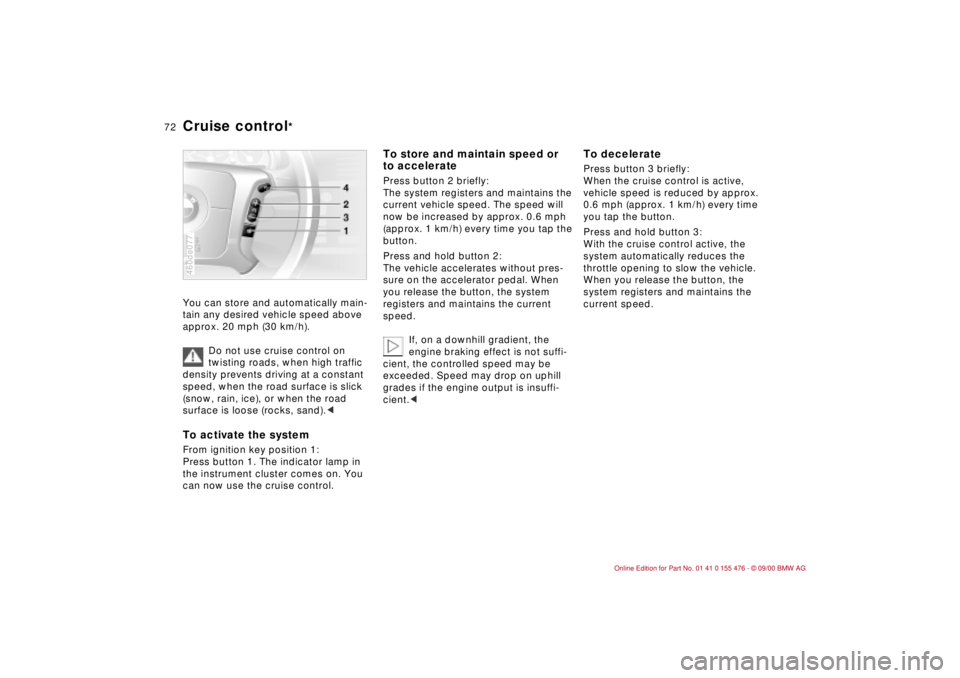
You can store and automatically main-
tain any desired vehicle speed above
approx. 20 mph (30 km/h).
Do not use cruise control on
twisting roads, when high traffic
density prevents driving at a constant
speed, when the road surface is slick
(snow, rain, ice), or when the road
surface is loose (rocks, sand).
the instrument cluster comes on. You
can now use the cruise control.460de077
To store and maintain speed or
to accelerate Press button 2 briefly:
The system registers and maintains the
current vehicle speed. The speed will
now be increased by approx. 0.6 mph
(approx. 1 km/h) every time you tap the
button.
Press and hold button 2:
The vehicle accelerates without pres-
sure on the accelerator pedal. When
you release the button, the system
registers and maintains the current
speed.
If, on a downhill gradient, the
engine braking effect is not suffi-
cient, the controlled speed may be
exceeded. Speed may drop on uphill
grades if the engine output is insuffi-
cient.<
To deceleratePress button 3 briefly:
When the cruise control is active,
vehicle speed is reduced by approx.
0.6 mph (approx. 1 km/h) every time
you tap the button.
Press and hold button 3:
With the cruise control active, the
system automatically reduces the
throttle opening to slow the vehicle.
When you release the button, the
system registers and maintains the
current speed.
Page 73 of 211
73n
IndexDataTechnologyRepairsCar careControlsOverview
Cruise control
*
To cancel the cruise control When the system is activated, press
and hold button 1. The indicator lamp
stays on. You can use the cruise control
again as desired.
In addition, cruise control is canceled
automatically:
>if the brakes are applied
>if the clutch is depressed or the auto-
matic transmission selector lever is
moved from "Drive" to "Neutral"
>if you exceed or fall below the
programmed speed for an extended
period (by depressing the acceler-
ator, for example).
To resume the stored settingPress button 4:
The vehicle accelerates to and main-
tains the last speed stored. When you
turn the ignition key to position 0, the
stored speed is deleted from the
system's memory and the system is
deactivated.
To deactivate the system When the cruise control has been
canceled, press button 1 again.
The indicator lamp goes off and the
stored speed is canceled.
Page 200 of 211
Everything from A to ZA
ABS (Antilock Brake
System)22,118
Accessories6
Activated-charcoal
filter102,171
Adaptive Transmission
Control (ATC)66,178
Adding engine oil139
Adding washer
fluid138,195
Adjusting the backrest48
Adjusting the steering
wheel51
Adjusting the
temperature94
Adjusting the thigh support
area49
Air conditioner92
Air distribution94,100
Air nozzles92,98
Air outlets92,98
ventilation92,98
Air pressure125
Air supply94,101
Airbags21,55,151,179
Alarm system42
Antenna124
Antenna, Diversity181
Antifreeze142
radiator122 Antilock Brake System
(ABS)22,118
Anti-theft alarm system42
Aquaplaning117,125
Armrest105
ASC+T (Automatic Stability
Control plus Traction)22
Ashtray107
front107
rear108
ATC (Adaptive Transmission
Control)66,178
Attach car vacuum
cleaner108
AUC (Automatic
recirculated-air
control)101
Automatic car washes146
Automatic climate
control98
removing condensation
from the windows101
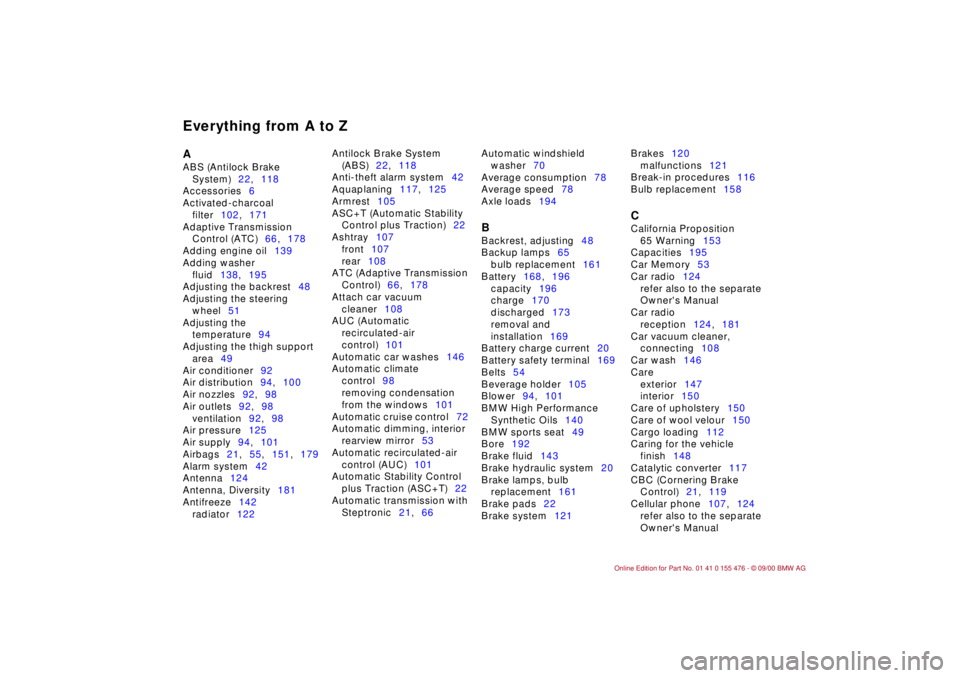
Automatic cruise control72
Automatic dimming, interior
rearview mirror53
Automatic recirculated-air
control (AUC)101
Automatic Stability Control
plus Traction (ASC+T)22
Automatic transmission with
Steptronic21,66 Automatic windshield
washer70
Average consumption78
Average speed78
Axle loads194
B
Backrest, adjusting48
Backup lamps65
bulb replacement161
Battery168,196
capacity196
charge170
discharged173
removal and
installation169
Battery charge current20
Battery safety terminal169
Belts54
Beverage holder105
Blower94,101
BMW High Performance
Synthetic Oils140
BMW sports seat49
Bore192
Brake fluid143
Brake hydraulic system20
Brake lamps, bulb
replacement161
Brake pads22
Brake system121 Brakes120
malfunctions121
Break-in procedures116
Bulb replacement158
C
California Proposition
65 Warning153
Capacities195
Car Memory53
Car radio124
refer also to the separate
Owner's Manual
Car radio
reception124,181
Car vacuum cleaner,
connecting108
Car wash146
Care
exterior147
interior150
Care of upholstery150
Care of wool velour150
Cargo loading112
Caring for the vehicle
finish148
Catalytic converter117
CBC (Cornering Brake
Control)21,119
Cellular phone107,124
refer also to the separate
Owner's Manual
A-Z
Page 201 of 211
Everything from A to Z
201n
IndexDataTechnologyRepairsCar careControlsOverview
Center (high-mount) brake
lamp163
Center 3-point-safety belt in
the rear109
Center armrest105
Central locking system34
button38
Changing a tire165
Changing a wheel165
Charge indicator lamp20
Check Control76
Child restraint
systems55,59,61
Child seat59
Child seat security61
Child-safety locks55
Cigarette lighter108
Clock76
refer also to the Radio or
Onboard Monitor Owner's
Manual
Cockpit16
Coin holder105
Combination switch69
Compression192
Computer77
Configure settings53
Consumption78
Consumption display75
Contents10
Coolant122,142,195
antifreeze122 Coolant temperature
gauge75
Cooling system195
Copyright4
Cornering Brake Control
(CBC)21,119
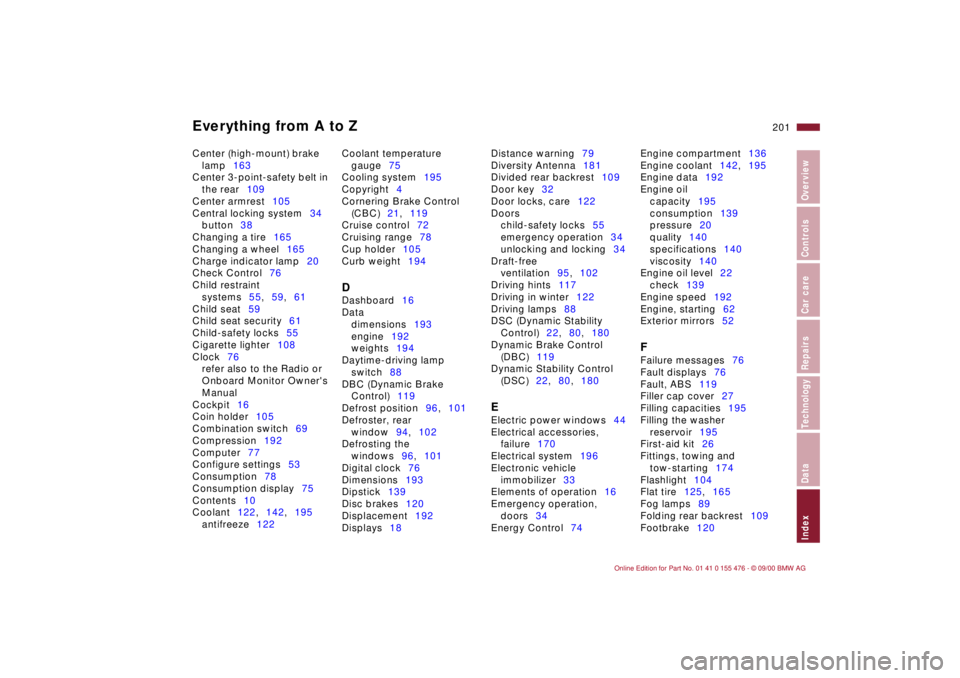
Cruise control72
Cruising range78
Cup holder105
Curb weight194
D
Dashboard16
Data
dimensions193
engine192
weights194
Daytime-driving lamp
switch88
DBC (Dynamic Brake
Control)119
Defrost position96,101
Defroster, rear
window94,102
Defrosting the
windows96,101
Digital clock76
Dimensions193
Dipstick139
Disc brakes120
Displacement192
Displays18 Distance warning79
Diversity Antenna181
Divided rear backrest109
Door key32
Door locks, care122
Doors
child-safety locks55
emergency operation34
unlocking and locking34
Draft-free
ventilation95,102
Driving hints117
Driving in winter122
Driving lamps88
DSC (Dynamic Stability
Control)22,80,180
Dynamic Brake Control
(DBC)119
Dynamic Stability Control
(DSC)22,80,180
E
Electric power windows44
Electrical accessories,
failure170
Electrical system196
Electronic vehicle
immobilizer33
Elements of operation16
Emergency operation,
doors34
Energy Control74 Engine compartment136
Engine coolant142,195
Engine data192
Engine oil
capacity195
consumption139
pressure20
quality140
specifications140
viscosity140
Engine oil level22
check139
Engine speed192
Engine, starting62
Exterior mirrors52
F
Failure messages76
Fault displays76
Fault, ABS119
Filler cap cover27
Filling capacities195
Filling the washer
reservoir195
First-aid kit26
Fittings, towing and
tow-starting174
Flashlight104
Flat tire125,165
Fog lamps89
Folding rear backrest109
Footbrake120