Hands free BMW 323I 2011 E90 Owner's Manual
[x] Cancel search | Manufacturer: BMW, Model Year: 2011, Model line: 323I, Model: BMW 323I 2011 E90Pages: 286, PDF Size: 8.25 MB
Page 17 of 286
At a glance
15Reference
Controls
Driving tips
Communications
Navigation
Entertainment
Mobility
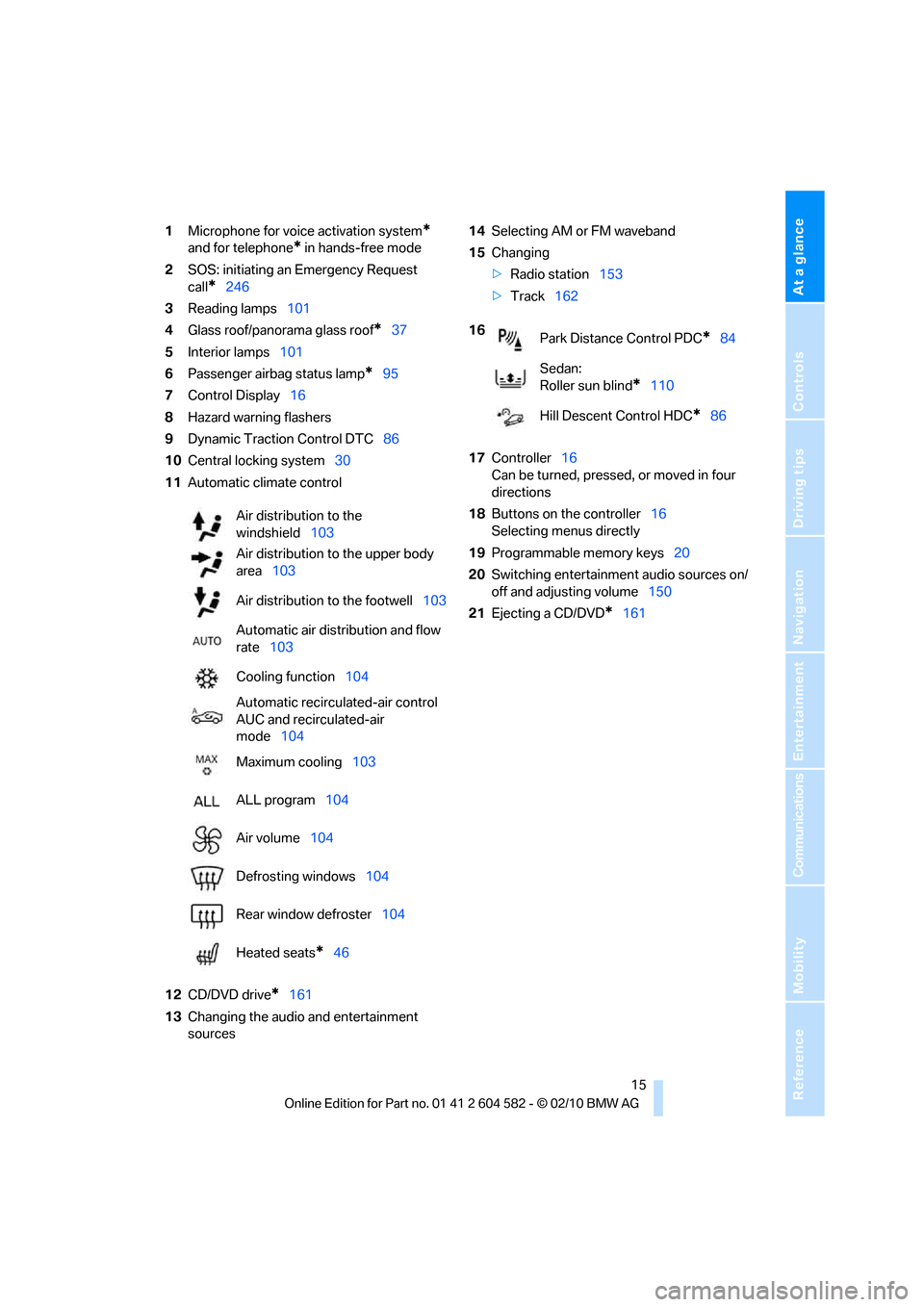
1Microphone for voice activation system*
and for telephone* in hands-free mode
2SOS: initiating an Emergency Request
call
*246
3Reading lamps101
4Glass roof/panorama glass roof
*37
5Interior lamps101
6Passenger airbag status lamp
*95
7Control Display16
8Hazard warning flashers
9Dynamic Traction Control DTC86
10Central locking system30
11Automatic climate control
12CD/DVD drive
*161
13Changing the audio and entertainment
sources14Selecting AM or FM waveband
15Changing
>Radio station153
>Track162
17Controller16
Can be turned, pressed, or moved in four
directions
18Buttons on the controller16
Selecting menus directly
19Programmable memory keys20
20Switching entertainment audio sources on/
off and adjusting volume150
21Ejecting a CD/DVD
*161 Air distribution to the
windshield103
Air distribution to the upper body
area103
Air distribution to the footwell103
Automatic air distribution and flow
rate103
Cooling function104
Automatic recirculated-air control
AUC and recirculated-air
mode104
Maximum cooling103
ALL program104
Air volume104
Defrosting windows104
Rear window defroster104
Heated seats
*46
16
Park Distance Control PDC*84
Sedan:
Roller sun blind
*110
Hill Descent Control HDC
*86
Page 44 of 286
Adjustments
42
Adjustments
Sitting safely
The ideal sitting position can make a vital con-
tribution to relaxed, fatigue-free driving. In con-
junction with the safety belts, the head
restraints and the airbags, the seated position
has a major influence on your safety in the event
of an accident. To ensure that the safety sys-
tems operate with optimal efficiency, we
strongly urge you to observe the instructions
contained in the following section.
For additional information on transporting chil-
dren safely, refer to page51.
Airbags
Always maintain an adequate distance
between yourself and the airbags. Always
grip the steering wheel on the rim, with your
hands in the 3 o'clock and 9 o'clock positions,
to minimize the risk of injury to the hands or
arms in the event of the airbag being triggered
off.
No one and nothing should come between the
airbags and the seat occupant.
Do not use the cover of the front airbag on the
front passenger side as a storage area. Make
sure that the front passenger is sitting correctly,
e.g. not resting feet or legs on the dashboard;
otherwise, leg injuries can occur if the front air-
bag deploys.
Make sure that passengers keep their heads
away from the side airbag and do not lean
against the cover of the head airbag; otherwise,
serious injuries can result if the airbag
deploys.<
Even if you follow all the instructions, injuries
resulting from contact with airbags cannot be
fully excluded, depending on the circum-
stances. The ignition and inflation noise may
provoke a mild hearing loss in extremely sensi-
tive individuals. This effect is usually only tem-
porary.
For airbag locations and additional information
on airbags, refer to page94.
Head restraint
A correctly adjusted head restraint reduces the
risk of neck injury in the event of an accident.
Adjust the head restraint in such a way
that its center is at approx. ear level.
Otherwise, there is an increased risk of injury in
the event of an accident.<
Head restraints, refer to page44.
Safety belt
Before every drive, make sure that all occupants
wear their safety belts. Airbags complement the
safety belt as an additional safety device, but
they do not represent a substitute.
Your vehicle has five seats, each of which is
equipped with a safety belt.
Never allow more than one person to
wear a single safety belt. Never allow
infants or small children to ride in a passenger's
lap. Make sure that the belt in the lap area sits
low across the hips and does not press against
the abdomen.
The safety belt must not rest against the throat,
run across sharp edges, pass over hard or frag-
ile objects or be pinched. Fasten the safety belt
so that it sits as snugly as possible against the
lap and shoulder without being twisted. Other-
wise, the belt could slide over your hips and
injure your abdomen in the event of a frontal
collision.
Avoid wearing bulky clothing and regularly pull
the belt in the upper-body area taut; otherwise,
its restraining effect could be impaired.
Sports Wagon: if the rear center safety belt is
used, the wider backrest must be locked in
place, refer to page115. Otherwise, the safety
belt will have no restraining effect.<
Safety belts, refer to page47.
Page 182 of 286
Telephone
180
Telephone
The concept
Your BMW is equipped with a full preparation
package mobile phone. After pairing a suitable
mobile phone with the vehicle once, you can
operate the mobile phone via the iDrive, the
buttons on the steering wheel or using voice
commands
*.
Once a mobile phone has been paired with your
vehicle, it is automatically recognized as soon
as it is inside the vehicle while the engine is run-
ning or the ignition is switched on. You can
store the pairing data for up to four mobile
phones simultaneously. If several mobile
phones are detected at the same time, the
mobile phone last paired can be operated via
the vehicle.
Using the telephone inside
the vehicle
Using the snap-in adapter*
The so-called snap-in adapter, a holder for
mobile phones, allows you to charge the mobile
phone's battery and connect the mobile phone
to your vehicle's outside antenna. This ensures
better network reception and consistent repro-
duction quality. Please contact your
BMW center to find out for which mobile
phones there are snap-in adapters available.
For your safety
A car phone makes life more convenient in
many ways, and can even save lives in an emer-
gency. While you should consult your mobile
phone's separate operating instructions for a
detailed description of safety precautions and
information, we request that you direct your
particular attention to the following:
Only make entries when the traffic situa-
tion allows you to do so. Do not hold the
mobile phone in your hand while you are driving;
use the hands-free system instead. If you do
not observe this precaution, your being dis-
tracted can endanger vehicle occupants and
other road users.<
Suitable mobile phones
Please ask your BMW center which mobile
phones with Bluetooth interface are supported
by the mobile phone preparation package and
which mobile phones are compatible with the
snap-in adapter. By virtue of their particular
software versions, these mobile phones sup-
port the functions described in this Owner's
Manual. Malfunctions may occur with other
mobile phones.
Operating options
You can operate the mobile phone using:
>Buttons on the steering wheel, refer to
page10
>iDrive, refer to page16
>Voice commands
*, refer to page189
>Programmable memory keys, refer to
page20
Avoid operating a mobile phone recognized
by the vehicle via the mobile phone's keypad;
otherwise, malfunctions may result.
*
Page 185 of 286
183
Entertainment
Reference
At a glance
Controls
Driving tips Communications
Navigation
Mobility
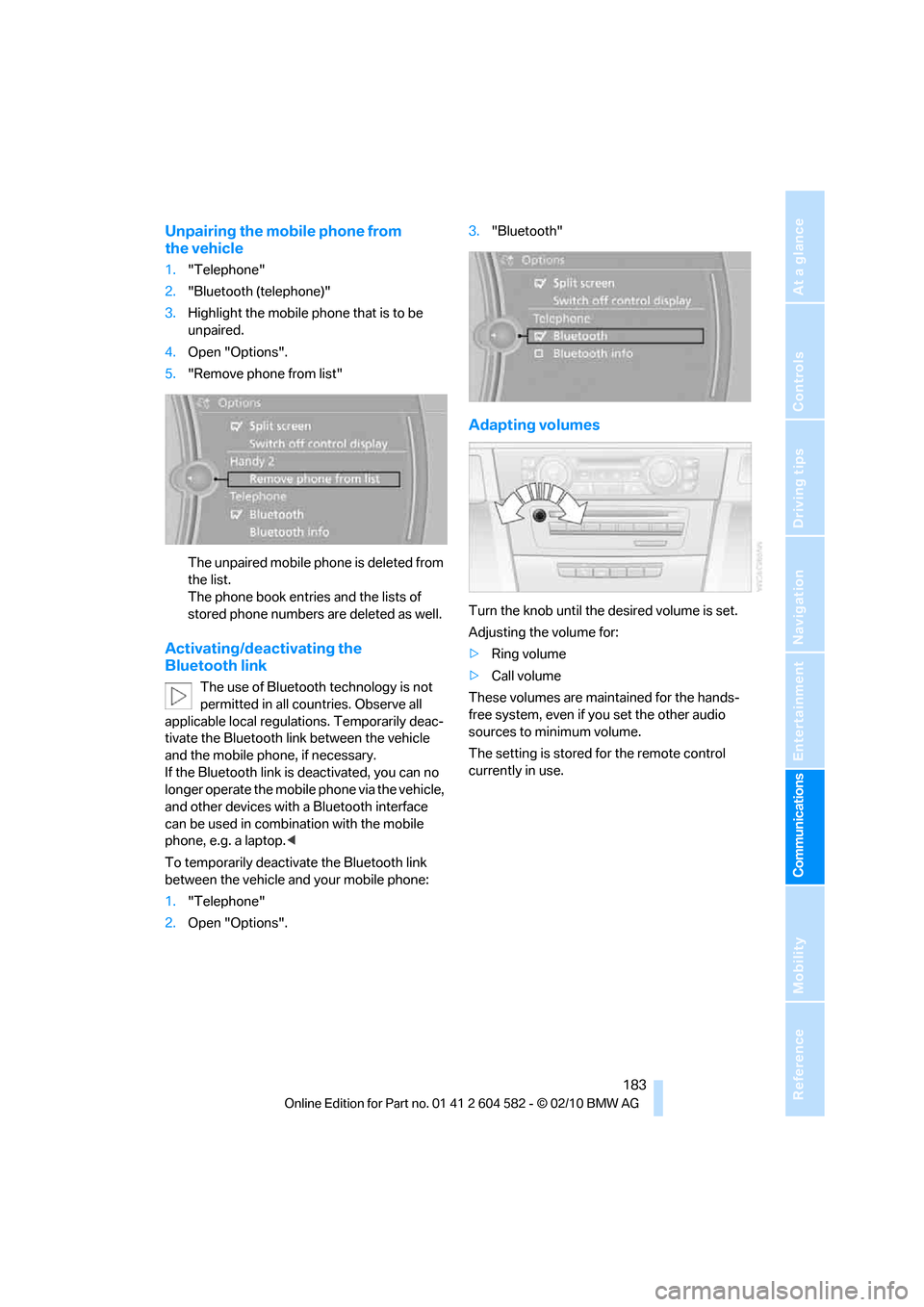
Unpairing the mobile phone from
the vehicle
1."Telephone"
2."Bluetooth (telephone)"
3.Highlight the mobile phone that is to be
unpaired.
4.Open "Options".
5."Remove phone from list"
The unpaired mobile phone is deleted from
the list.
The phone book entries and the lists of
stored phone numbers are deleted as well.
Activating/deactivating the
Bluetooth link
The use of Bluetooth technology is not
permitted in all countries. Observe all
applicable local regulations. Temporarily deac-
tivate the Bluetooth link between the vehicle
and the mobile phone, if necessary.
If the Bluetooth link is deactivated, you can no
longer operate the mobile phone via the vehicle,
and other devices with a Bluetooth interface
can be used in combination with the mobile
phone, e.g. a laptop.<
To temporarily deactivate the Bluetooth link
between the vehicle and your mobile phone:
1."Telephone"
2.Open "Options".3."Bluetooth"
Adapting volumes
Turn the knob until the desired volume is set.
Adjusting the volume for:
>Ring volume
>Call volume
These volumes are maintained for the hands-
free system, even if you set the other audio
sources to minimum volume.
The setting is stored for the remote control
currently in use.
Page 186 of 286
Telephone
184
Operation via iDrive
You can operate the following functions using
iDrive:
>Accepting/rejecting calls
>dialing phone numbers
>Selecting phone numbers from the phone
book
>Selecting stored phone numbers, e.g. from
the list of received calls
>Ending a call
When the ignition is switched off or in radio
readiness, e.g. after taking the remote control
out of the ignition lock, you can continue an
ongoing call via the hands-free system for sev-
eral minutes.
Voice quality
If the person you are talking to is having difficul-
ties understanding you, this may be due to
excessive background noise. The full prepara-
tion package mobile phone can compensate for
these noises to a certain extent. To optimize
voice quality during a call, we recommend that
you:
>Reduce background noise, e.g. by closing
the windows, reducing air flow from the
automatic climate control or pointing the
open front air vents downward.
>Reduce the volume of the hands-free sys-
tem.
Requirements
>The mobile phone's pairing data are stored
by the vehicle and the mobile phone is oper-
ational.
>The engine is running or the ignition is
switched on.
>The mobile phone is recognized by the
vehicle.
Receiving calls
If you have the phone number of the caller
stored in the phone book and the phone num-
ber has been transmitted, the name of the entry
is displayed.
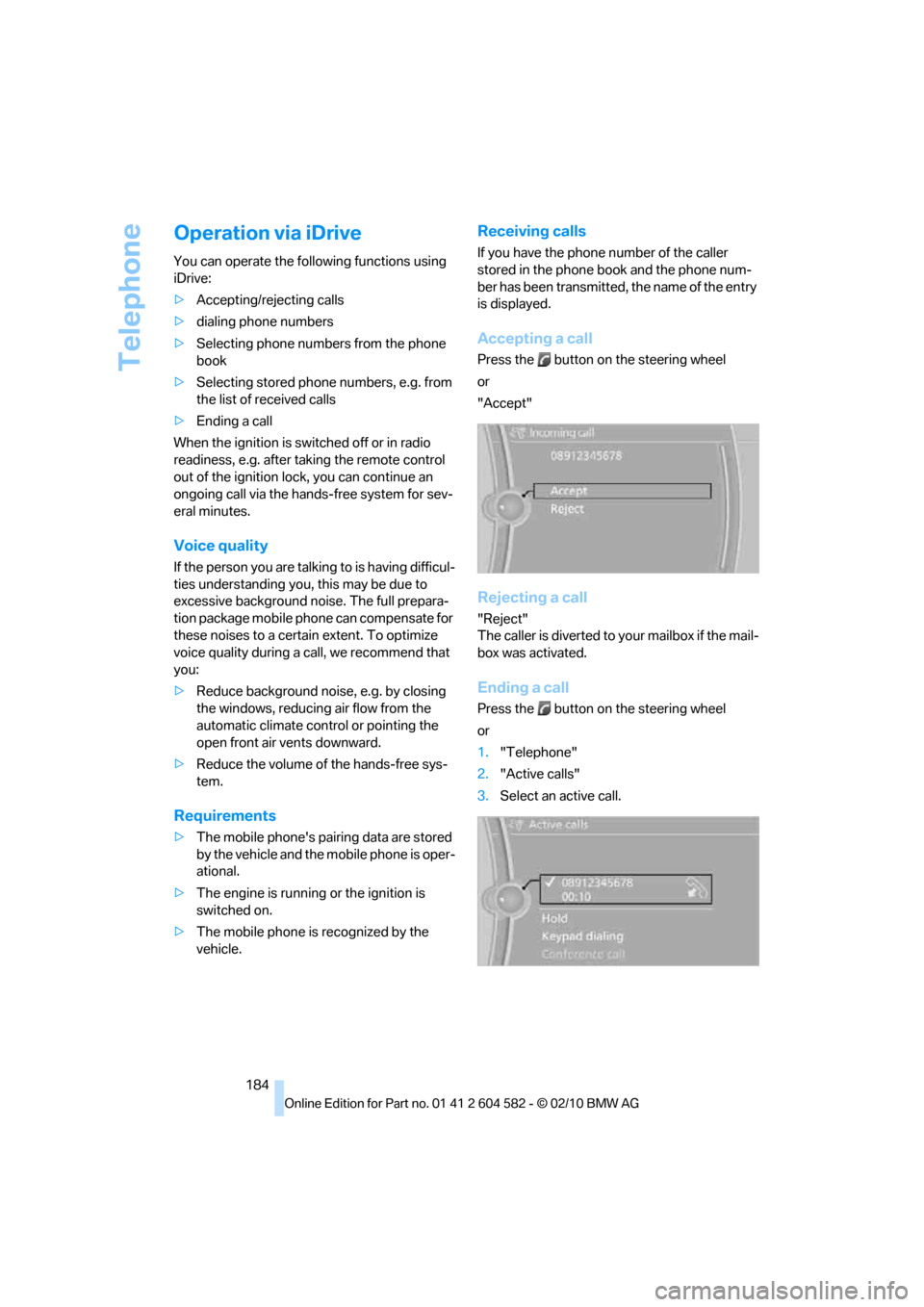
Accepting a call
Press the button on the steering wheel
or
"Accept"
Rejecting a call
"Reject"
The caller is diverted to your mailbox if the mail-
box was activated.
Ending a call
Press the button on the steering wheel
or
1."Telephone"
2."Active calls"
3.Select an active call.
Page 190 of 286
Telephone
188
Displaying messages
1."Telephone"
2."Messages"
3.Select the desired message.
My Info
To start destination guidance:
1.Select the message that contains the
desired destination.
2. "Start guidance" or "Add as another
dest.".
To dial the number in the message:
1.Select the message that contains the
desired number.
2. "Call"
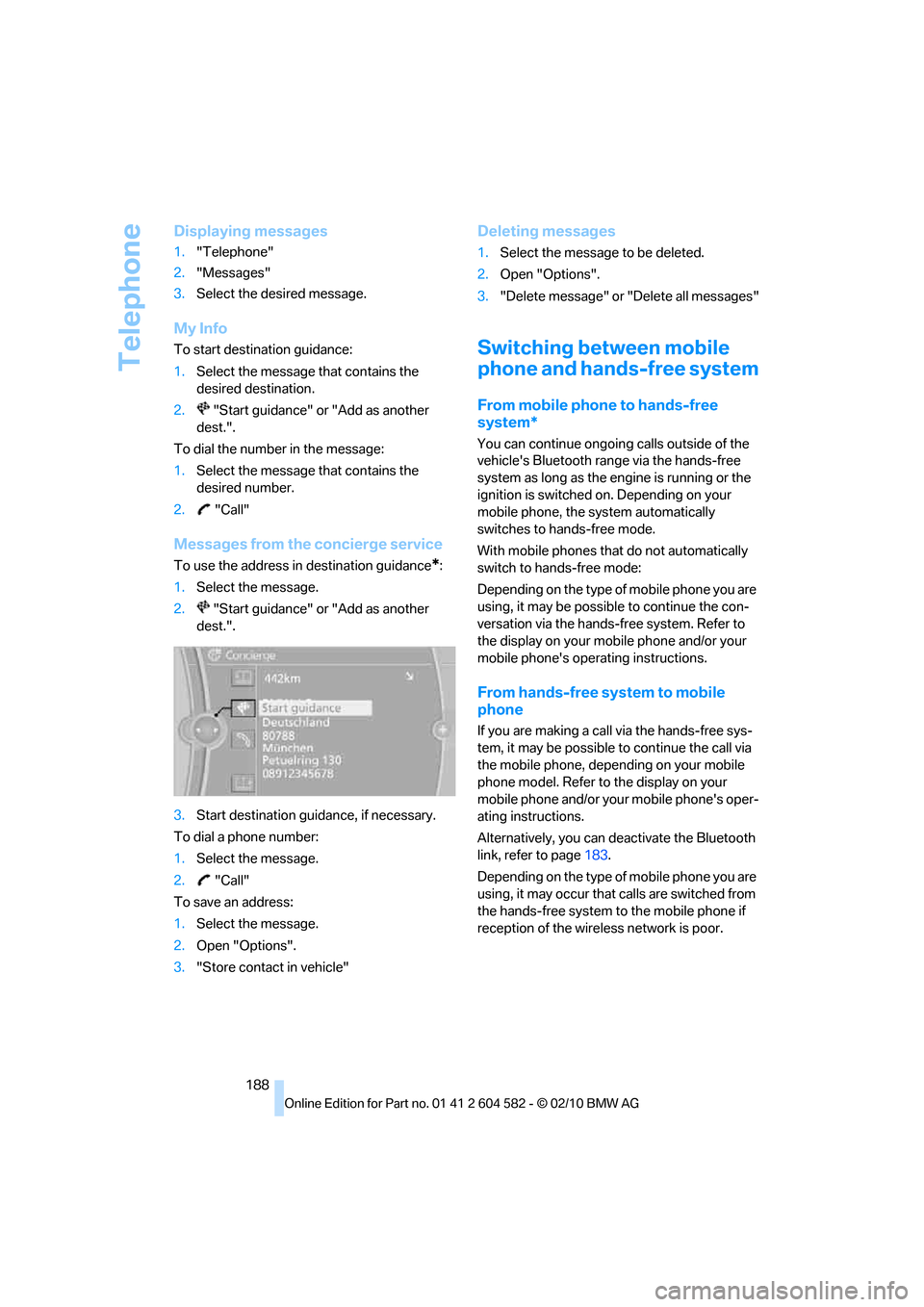
Messages from the concierge service
To use the address in destination guidance*:
1.Select the message.
2. "Start guidance" or "Add as another
dest.".
3.Start destination guidance, if necessary.
To dial a phone number:
1.Select the message.
2. "Call"
To save an address:
1.Select the message.
2.Open "Options".
3."Store contact in vehicle"
Deleting messages
1.Select the message to be deleted.
2.Open "Options".
3."Delete message" or "Delete all messages"
Switching between mobile
phone and hands-free system
From mobile phone to hands-free
system*
You can continue ongoing calls outside of the
vehicle's Bluetooth range via the hands-free
system as long as the engine is running or the
ignition is switched on. Depending on your
mobile phone, the system automatically
switches to hands-free mode.
With mobile phones that do not automatically
switch to hands-free mode:
Depending on the type of mobile phone you are
using, it may be possible to continue the con-
versation via the hands-free system. Refer to
the display on your mobile phone and/or your
mobile phone's operating instructions.
From hands-free system to mobile
phone
If you are making a call via the hands-free sys-
tem, it may be possible to continue the call via
the mobile phone, depending on your mobile
phone model. Refer to the display on your
mobile phone and/or your mobile phone's oper-
ating instructions.
Alternatively, you can deactivate the Bluetooth
link, refer to page183.
Depending on the type of mobile phone you are
using, it may occur that calls are switched from
the hands-free system to the mobile phone if
reception of the wireless network is poor.
Page 248 of 286
Giving and receiving assistance
246
Giving and receiving assistance
Emergency Request*
Conditions for an Emergency Request:
>Full preparation package mobile phone: this
equipment makes it possible to send an
Emergency Request even if no mobile
phone is paired with the vehicle.
>BMW Assist is activated. Activating
BMW Assist, refer to page197.
>Radio readiness is on.
>The BMW Assist system is logged on to a
mobile phone network.
>The Emergency Request system is opera-
ble.
Once your service contract for BMW Assist
expires, the BMW Assist system can be deacti-
vated by a BMW center without you having to
visit a workshop. Once the BMW Assist system
has been deactivated, Emergency Requests
are not possible. The BMW Assist system can
be reactivated by a BMW center after a new
contract has been signed.
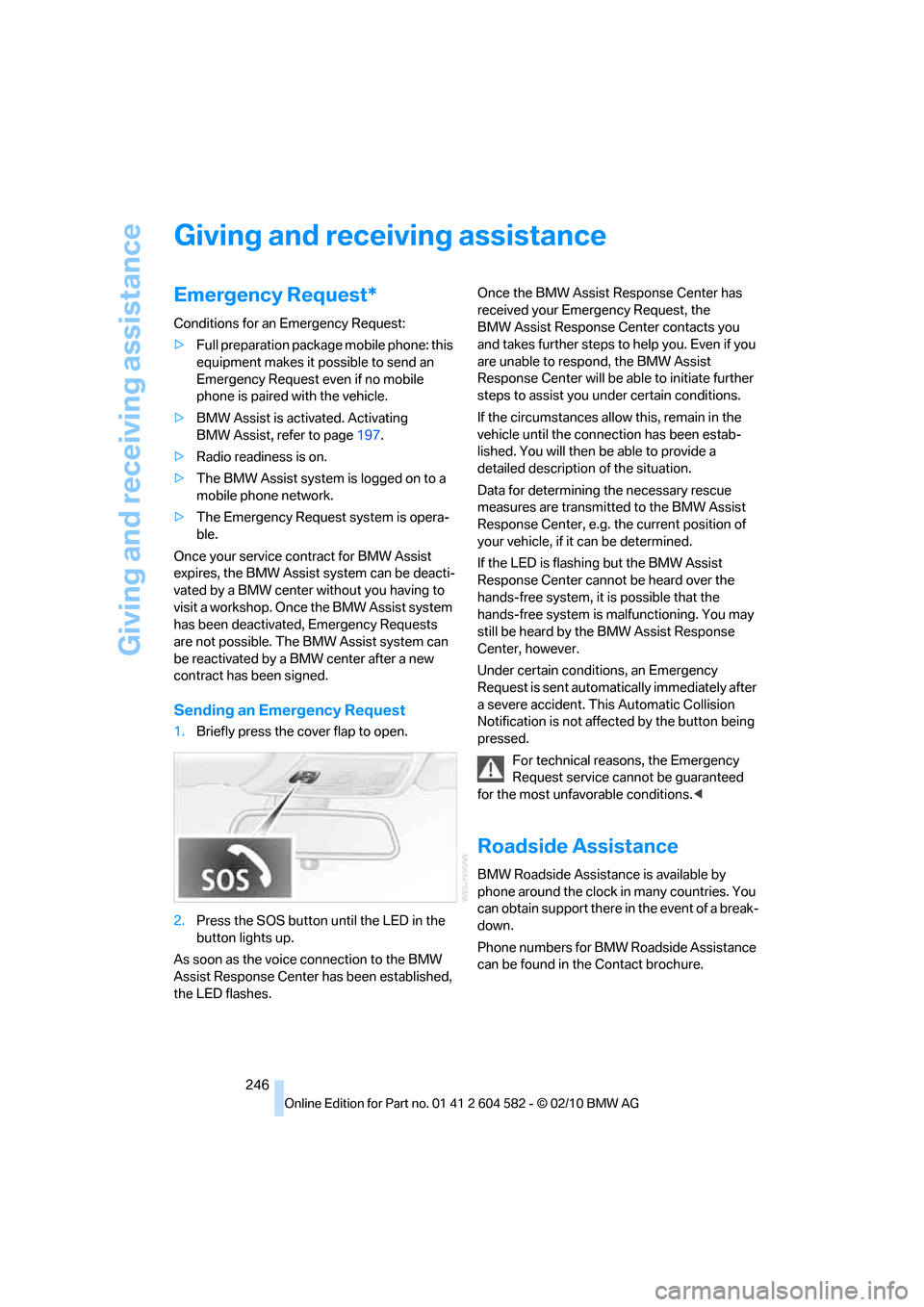
Sending an Emergency Request
1.Briefly press the cover flap to open.
2.Press the SOS button until the LED in the
button lights up.
As soon as the voice connection to the BMW
Assist Response Center has been established,
the LED flashes.Once the BMW Assist Response Center has
received your Emergency Request, the
BMW Assist Response Center contacts you
and takes further steps to help you. Even if you
are unable to respond, the BMW Assist
Response Center will be able to initiate further
steps to assist you under certain conditions.
If the circumstances allow this, remain in the
vehicle until the connection has been estab-
lished. You will then be able to provide a
detailed description of the situation.
Data for determining the necessary rescue
measures are transmitted to the BMW Assist
Response Center, e.g. the current position of
your vehicle, if it can be determined.
If the LED is flashing but the BMW Assist
Response Center cannot be heard over the
hands-free system, it is possible that the
hands-free system is malfunctioning. You may
still be heard by the BMW Assist Response
Center, however.
Under certain conditions, an Emergency
Request is sent automatically immediately after
a severe accident. This Automatic Collision
Notification is not affected by the button being
pressed.
For technical reasons, the Emergency
Request service cannot be guaranteed
for the most unfavorable conditions.<
Roadside Assistance
BMW Roadside Assistance is available by
phone around the clock in many countries. You
can obtain support there in the event of a break-
down.
Phone numbers for BMW Roadside Assistance
can be found in the Contact brochure.
Page 274 of 286
Everything from A to Z
272 Glass roof, electric37
– closing after electrical
malfunction38
– convenient operation28,29
– initializing38
– opening, closing38
– pinch protection system38
– power failure38
– raising37
– remote control28
Glove compartment110
GPS navigation, refer to
Navigation system130
Grills102
Gross vehicle weight, refer to
Weights257
H
Halogen lamps
– replacing bulbs239
Handbrake, refer to Parking
brake57
Hands-free system14
Hazard warning flashers14
HDC Hill Descent Control87
HD Radio154
Head airbags94
Headlamp control,
automatic97
Headlamp cover239
Headlamp flasher60
– indicator lamp11,13
Headlamps
– replacing bulbs239
Head restraints44
– rear, removing45
– sitting safely42
Heated
– mirrors48
– rear window104
– seats46
– steering wheel50
Heating
– mirrors48
– rear window104
– seats46
– steering wheel50Heating and ventilation, refer
to Climate102
Heavy loads, refer to Stowing
cargo126
Height, refer to
Dimensions255
Height adjustment
– seats43
– steering wheel50
High-beam assistant99
High beams99
– headlamp flasher99
– indicator lamp13
– replacing bulbs239
High beams and low beams,
automatic, refer to High-
beam assistant99
High-pressure
washer233,234
High water, refer to Driving
through water124
Highways, refer to Route
criteria140
Hill Descent Control HDC87
Hills124
Holders for cups112
Homepage BMW4
Hood225
Hooks for shopping
bags116,117
Horn10,11
Hotel function, refer to
Locking or unlocking
separately32
Hot exhaust system123
Hydraulic brake assist, refer to
Dynamic Brake Control85
Hydroplaning124
I
IBOC, refer to HD Radio154
Ice warning, refer to Outside
temperature warning71
Identification marks
– run-flat tires223
– tire coding221iDrive16
– adjusting brightness83
– changing date and time79
– changing language83
– changing settings83
– changing units of measure
and display format76
– controls16
– menu guidance17
– operating principle16
– overview16
– start menu17
– status information19
iDrive operating principle16
Ignition55
– switched off56
– switched on55
Ignition key, refer to Remote
control with integrated
key26
Ignition key position 1, refer to
Radio readiness55
Ignition key position 2, refer to
Ignition on55
Ignition lock55
Imprint2
Indicator and warning
lamps13
– Tire Pressure Monitor
TPM91
Inflation pressure, refer to Tire
inflation pressure208
Inflation pressure monitoring,
refer to Tire Pressure
Monitor TPM89
Initializing
– after power failure245
– compass, refer to
Calibrating110
– Flat Tire Monitor FTM88
– glass roof38
– panorama glass roof40
– radio, refer to Station,
storing154
– refer to Setting the time and
date79
Installation location
– telephone111