buttons BMW 323I SEDAN 2008 E90 Owner's Guide
[x] Cancel search | Manufacturer: BMW, Model Year: 2008, Model line: 323I SEDAN, Model: BMW 323I SEDAN 2008 E90Pages: 274, PDF Size: 8.88 MB
Page 172 of 274
CD player and CD changer
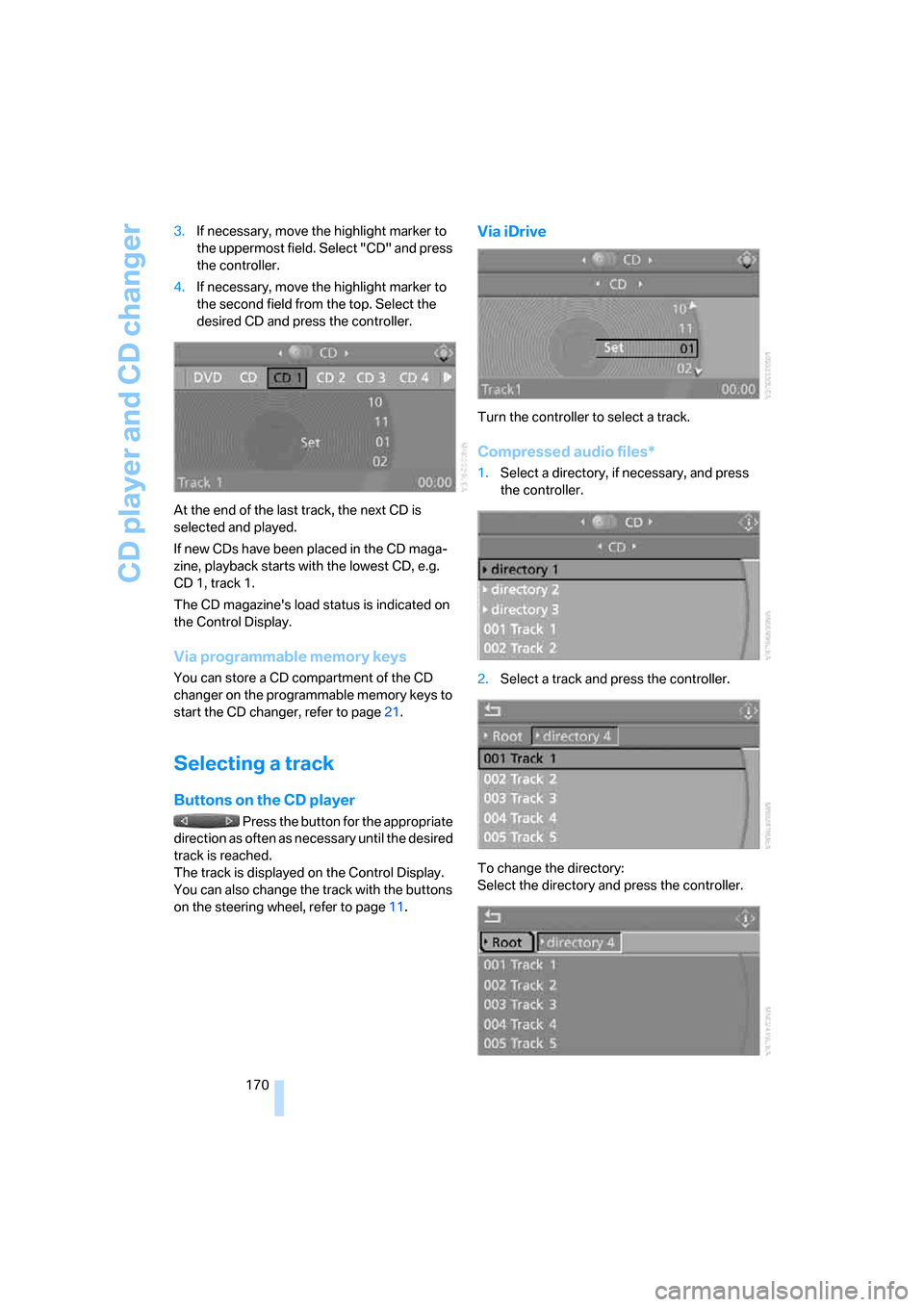
170 3.If necessary, move the highlight marker to
the uppermost field. Select "CD" and press
the controller.
4.If necessary, move the highlight marker to
the second field from the top. Select the
desired CD and press the controller.
At the end of the last track, the next CD is
selected and played.
If new CDs have been placed in the CD maga-
zine, playback starts with the lowest CD, e.g.
CD 1, track 1.
The CD magazine's load status is indicated on
the Control Display.
Via programmable memory keys
You can store a CD compartment of the CD
changer on the programmable memory keys to
start the CD changer, refer to page21.
Selecting a track
Buttons on the CD player
Press the button for the appropriate
direction as often as necessary until the desired
track is reached.
The track is displayed on the Control Display.
You can also change the track with the buttons
on the steering wheel, refer to page11.
Via iDrive
Turn the controller to select a track.
Compressed audio files*
1.Select a directory, if necessary, and press
the controller.
2.Select a track and press the controller.
To change the directory:
Select the directory and press the controller.
Page 175 of 274
Navigation
Entertainment
Driving tips
173Reference
At a glance
Controls
Communications
Mobility
Compressed audio files*
1.Select the current track and press the con-
troller.
2.Select the desired menu item:
>To play all the tracks in the current direc-
tory in random order, select "Random
directory" and press the controller.
>To play all the tracks on the CD in ran-
dom order, select "Random all" and
press the controller.
Stop random function:
1.Press the controller.
2.Select "Random directory" or "Random all"
and press the controller.
Fast forward/reverse
Buttons on the CD player:
Press and hold the button for the
corresponding direction.
The tracks can be heard, but reproduction is
distorted.
CD magazine
Sedan
Sports Wagon
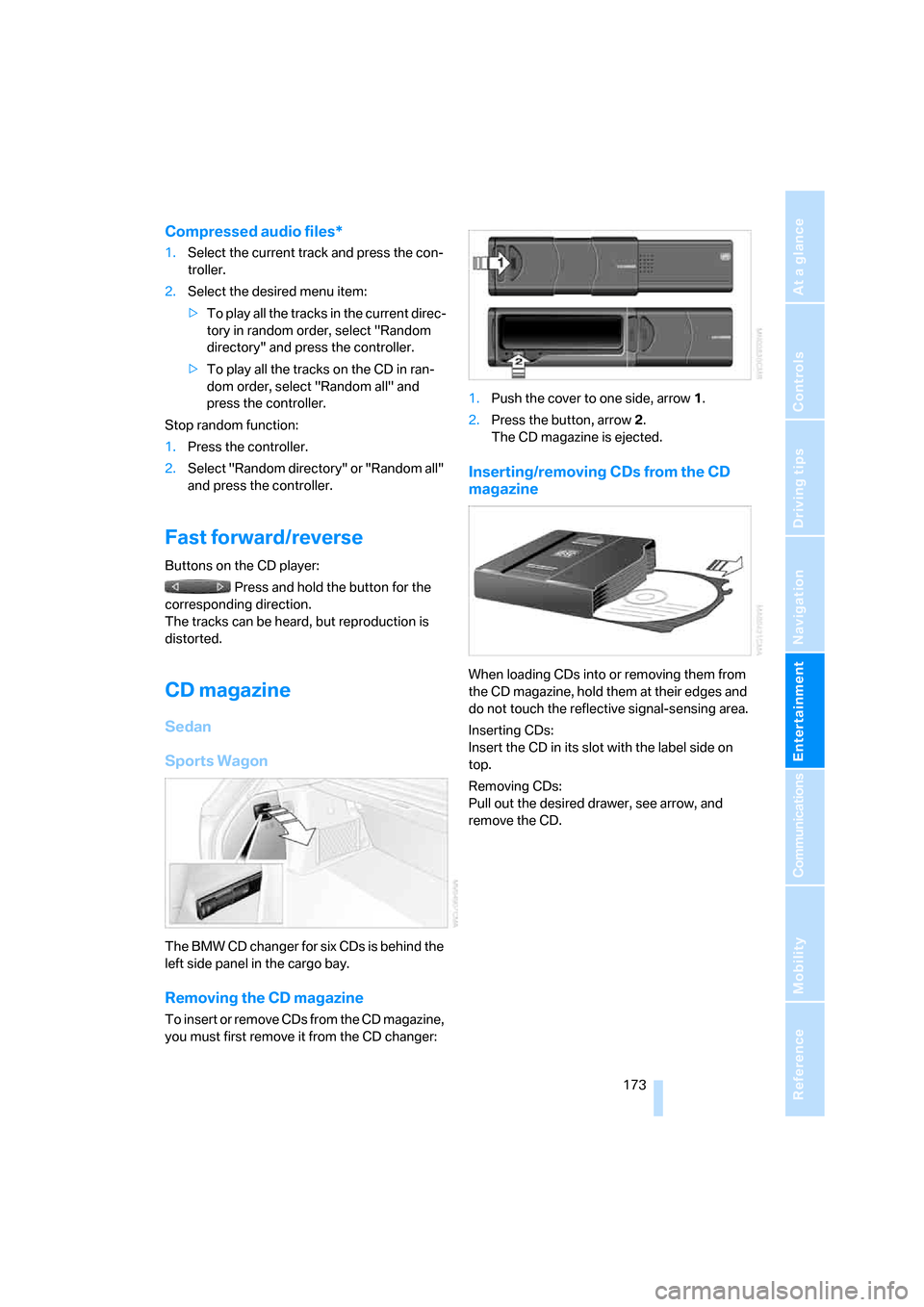
The BMW CD changer for six CDs is behind the
left side panel in the cargo bay.
Removing the CD magazine
T o i n s e r t o r r e m o v e C D s f r o m t h e C D m a g a z i n e ,
you must first remove it from the CD changer:1.Push the cover to one side, arrow 1.
2.Press the button, arrow 2.
The CD magazine is ejected.
Inserting/removing CDs from the CD
magazine
When loading CDs into or removing them from
the CD magazine, hold them at their edges and
do not touch the reflective signal-sensing area.
Inserting CDs:
Insert the CD in its slot with the label side on
top.
Removing CDs:
Pull out the desired drawer, see arrow, and
remove the CD.
Page 180 of 274
USB-audio interface
178
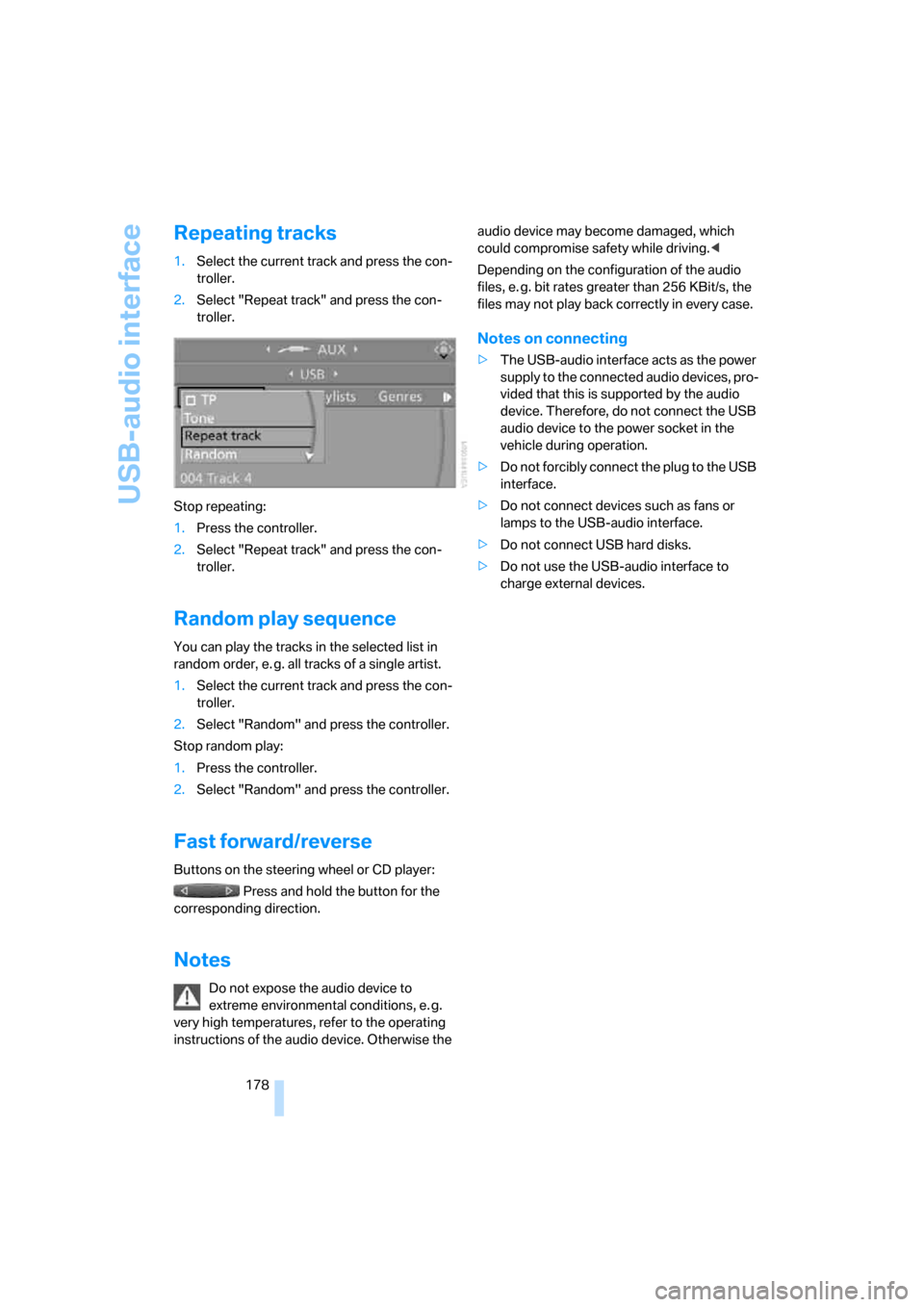
Repeating tracks
1.Select the current track and press the con-
troller.
2.Select "Repeat track" and press the con-
troller.
Stop repeating:
1.Press the controller.
2.Select "Repeat track" and press the con-
troller.
Random play sequence
You can play the tracks in the selected list in
random order, e. g. all tracks of a single artist.
1.Select the current track and press the con-
troller.
2.Select "Random" and press the controller.
Stop random play:
1.Press the controller.
2.Select "Random" and press the controller.
Fast forward/reverse
Buttons on the steering wheel or CD player:
Press and hold the button for the
corresponding direction.
Notes
Do not expose the audio device to
extreme environmental conditions, e. g.
very high temperatures, refer to the operating
instructions of the audio device. Otherwise the audio device may become damaged, which
could compromise safety while driving.<
Depending on the configuration of the audio
files, e. g. bit rates greater than 256 KBit/s, the
files may not play back correctly in every case.
Notes on connecting
>The USB-audio interface acts as the power
supply to the connected audio devices, pro-
vided that this is supported by the audio
device. Therefore, do not connect the USB
audio device to the power socket in the
vehicle during operation.
>Do not forcibly connect the plug to the USB
interface.
>Do not connect devices such as fans or
lamps to the USB-audio interface.
>Do not connect USB hard disks.
>Do not use the USB-audio interface to
charge external devices.
Page 184 of 274
Telephoning
182
Telephoning
The concept
Your BMW is equipped with a full mobile phone
preparation package. After pairing a suitable
mobile phone with the vehicle once, you can
operate the mobile phone via iDrive, the buttons
on the steering wheel or via voice commands.
Once a mobile phone has been paired with your
vehicle, it is automatically recognized as soon
as it is inside the vehicle while the engine is run-
ning or the ignition is switched on. You can
store the pairing data for up to four mobile
phones simultaneously. If several mobile
phones are detected at the same time, the
mobile phone last paired can be operated via
the vehicle.
Using the telephone inside
the vehicle
Using the snap-in adapter*
The so-called snap-in adapter, a holder for
mobile phones, allows you to charge the mobile
phone's battery and connect the mobile phone
to your vehicle's outside antenna. This ensures
better network reception and consistent repro-
duction quality. Please contact your
BMW center to find out for which mobile
phones there are snap-in adapters available.
For your safety
A car phone makes life more convenient in
many ways, and can even save lives in an emer-
gency. While you should consult your mobile
phone's separate Owner's Manual for a detailed
description of safety precautions and informa-
tion, we request that you direct your particular
attention to the following:
Only make entries when the traffic situa-
tion allows you to do so. Do not hold the
mobile phone in your hand while you are driving;
use the hands-free system instead. If you do
not observe this precaution, your being dis-tracted can endanger vehicle occupants and
other road users.<
Suitable mobile phones
Please ask your BMW center which mobile
phones with Bluetooth interface are supported
by the mobile phone preparation package and/
or which mobile phones are compatible with the
snap-in adapter. By virtue of their particular
software versions, these mobile phones sup-
port the functions described in this Owner's
Manual. Malfunctions may occur with other
mobile phones.
Care instructions
You can find what you need to know about car-
ing for your mobile phone in the separate Caring
for your vehicle brochure and in the mobile
phone Owner's Manual.
Operating options
You can operate the mobile phone* using:
>Buttons on the steering wheel, refer to
page10
>iDrive, refer to page187
>Voice commands, refer to page193
>Programmable memory keys, refer to
page21
Avoid operating a mobile phone recognized by
the vehicle via the mobile phone's keypad, oth-
erwise malfunctions may result.
Making phone calls with the
BMW Assist system*: BMW Assist
calls
You can use the BMW Assist System via the
hands-free unit for BMW Assist calls.
*
Page 189 of 274
187
Entertainment
Reference
At a glance
Controls
Driving tips Communications
Navigation
Mobility
Activating/deactivating the Bluetooth
link
The use of Bluetooth technology is not
permitted in all countries. Observe all
applicable local regulations. Temporarily deac-
tivate the Bluetooth link between the vehicle
and the mobile phone, if necessary.
If the Bluetooth link is deactivated, you can no
longer operate the mobile phone via the vehicle,
and other devices with a Bluetooth interface
can be used in combination with the mobile
phone, e.g. a laptop.<
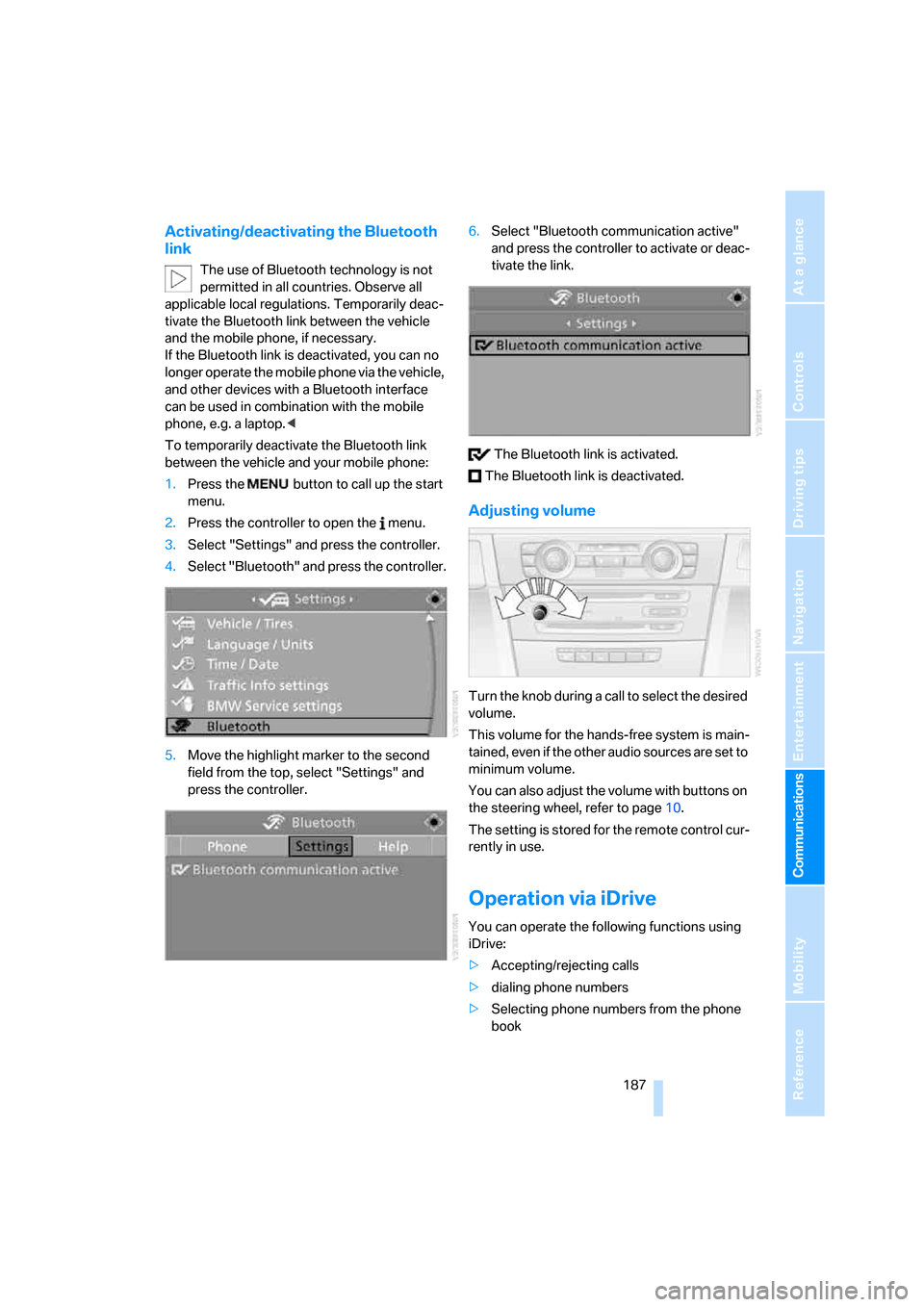
To temporarily deactivate the Bluetooth link
between the vehicle and your mobile phone:
1.Press the button to call up the start
menu.
2.Press the controller to open the menu.
3.Select "Settings" and press the controller.
4.Select "Bluetooth" and press the controller.
5.Move the highlight marker to the second
field from the top, select "Settings" and
press the controller.6.Select "Bluetooth communication active"
and press the controller to activate or deac-
tivate the link.
The Bluetooth link is activated.
The Bluetooth link is deactivated.
Adjusting volume
Turn the knob during a call to select the desired
volume.
This volume for the hands-free system is main-
tained, even if the other audio sources are set to
minimum volume.
You can also adjust the volume with buttons on
the steering wheel, refer to page10.
The setting is stored for the remote control cur-
rently in use.
Operation via iDrive
You can operate the following functions using
iDrive:
>Accepting/rejecting calls
>dialing phone numbers
>Selecting phone numbers from the phone
book
Page 197 of 274
195
Entertainment
Reference
At a glance
Controls
Driving tips Communications
Navigation
Mobility
Notes
Important for voice commands
For voice commands, bear in mind the follow-
ing:
>Pronounce the commands smoothly and at
normal volume, avoiding excessive empha-
ses and pauses.
>Keep the doors, windows and glass roof
closed to prevent interference from outside
noise.
>Avoid ambient noise in the vehicle while
speaking.
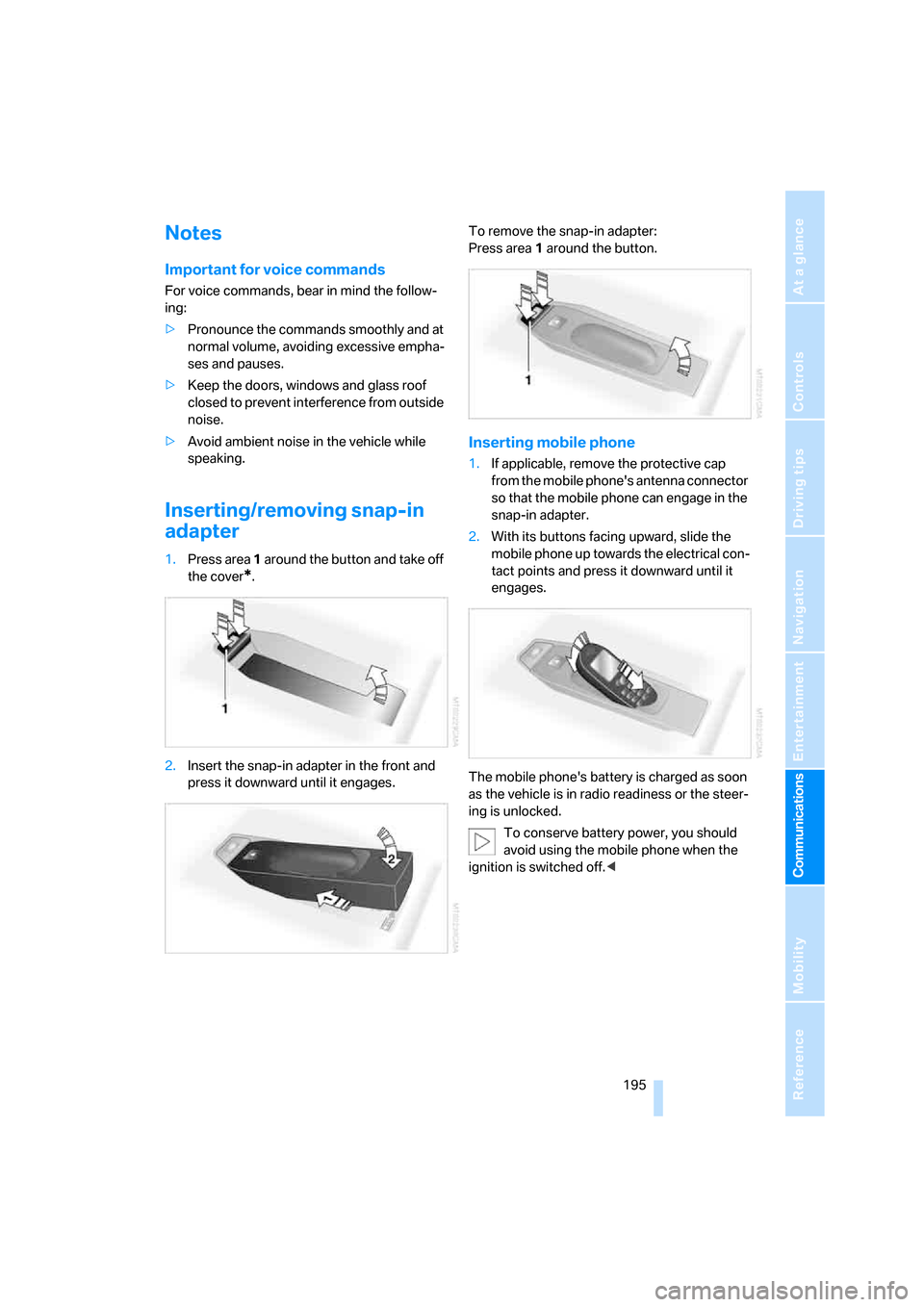
Inserting/removing snap-in
adapter
1.Press area 1 around the button and take off
the cover
*.
2.Insert the snap-in adapter in the front and
press it downward until it engages.To remove the snap-in adapter:
Press area 1 around the button.
Inserting mobile phone
1.If applicable, remove the protective cap
from the mobile phone's antenna connector
so that the mobile phone can engage in the
snap-in adapter.
2.With its buttons facing upward, slide the
mobile phone up towards the electrical con-
tact points and press it downward until it
engages.
The mobile phone's battery is charged as soon
as the vehicle is in radio readiness or the steer-
ing is unlocked.
To conserve battery power, you should
avoid using the mobile phone when the
ignition is switched off.<
Page 252 of 274
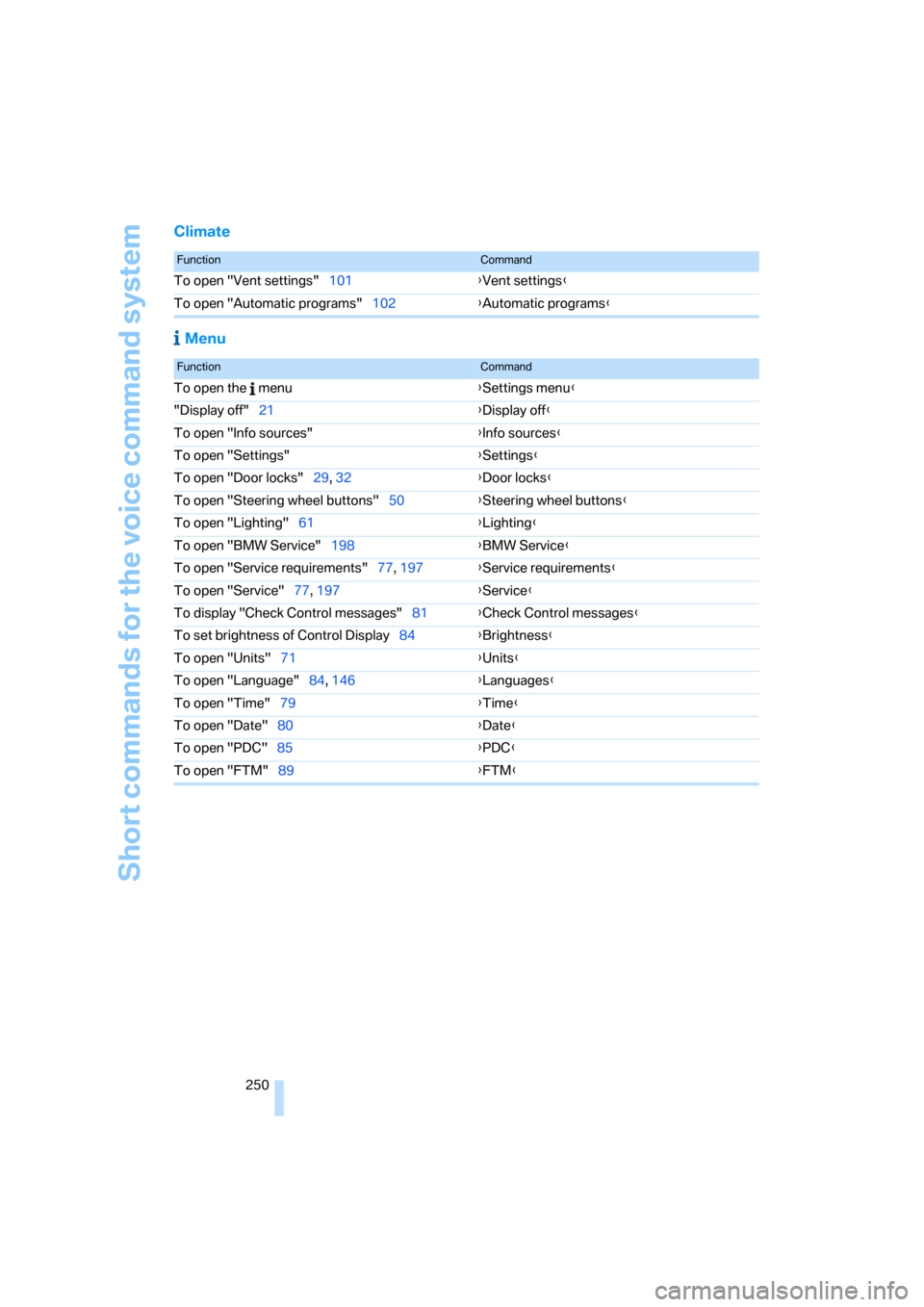
Short commands for the voice command system
250
Climate
Menu
FunctionCommand
To open "Vent settings"101{Vent settings}
To open "Automatic programs"102{Automatic programs}
FunctionCommand
To open the menu{Settings menu}
"Display off"21{Display off}
To open "Info sources"{Info sources}
To open "Settings"{Settings}
To open "Door locks"29, 32{Door locks}
To open "Steering wheel buttons"50{Steering wheel buttons}
To open "Lighting"61{Lighting}
To open "BMW Service"198{BMW Service}
To open "Service requirements"77, 197{Service requirements}
To open "Service"77, 197{Service}
To display "Check Control messages"81{Check Control messages}
To set brightness of Control Display84{Brightness}
To open "Units"71{Units}
To open "Language"84, 146{Languages}
To open "Time"79{Time}
To open "Date"80{Date}
To open "PDC"85{PDC}
To open "FTM"89{FTM}
Page 256 of 274
Everything from A - Z
254 Brake system120
– BMW Maintenance
System226
– breaking in120
– disc brakes122
Breakdown services, refer to
Roadside Assistance235
Breaking in the clutch120
Breaking in the differential,
refer to Engine and
differential120
Break-in period120
Brightness of the Control
Display84
"Brightness" on the Control
Display84
Bulb changing, refer to Lamps
and bulbs229
Button for starting the engine,
refer to Start/stop button56
Buttons on the steering
wheel11
C
California Proposition 65
warning6
"Call"190,201
Call
– accepting188
– displaying accepted190
– ending189
– missed190
– starting189
Calling
– from phone book189
– from Top 8 list190
– redialing190
Can holders, refer to Cup
holders111
Capacities246
Capacity of the cargo bay245
Car battery, refer to Vehicle
battery233
Car care, refer to Caring for
your vehicle brochure
Car-care products, refer to
Caring for your vehicle
brochure"Car Data"73
Care, refer to Caring for your
vehicle brochure
Cargo, securing124
Cargo bay114
– capacity245
– convenient access37
– folding up the floor
panel116
– lamp, refer to Interior
lamps99
– opening from inside33
– opening from outside33
– partition net114
– roll-up cover114
Cargo bay lid, refer to
Luggage compartment lid/
tailgate33
Cargo bay net, refer to
Partition net114
Cargo loading
– securing cargo124
– stowing cargo123
– vehicle123
Caring for artificial leather,
refer to Caring for your
vehicle brochure
Caring for leather, refer to
Caring for your vehicle
brochure
Caring for plastic, refer to
Caring for your vehicle
brochure
Caring for the carpet, refer to
Caring for your vehicle
brochure
Caring for the vehicle finish,
refer to Caring for your
vehicle brochure
Car jack
– jacking points233
Car key, refer to Integrated
key/remote control28
Car phone182
– installation location, refer to
Center armrest110
– refer to Mobile phone182
– refer to separate Owner's
ManualCar radio, refer to Radio160
Car wash122
– also refer to Caring for your
vehicle brochure
– with convenient access37
Catalytic converter, refer to
Hot exhaust system121
"Categories" for satellite
radio167
CBS Condition Based
Service226
"CD"156,169
CD changer169
– compressed audio files169
– controls156
– fast forward/reverse173
– installation location173
– playing a track171
– random order172
– repeating a track172
– selecting a CD169
– selecting a track170
– switching on/off156
– tone control157
– volume157
CD player169
– compressed audio files169
– controls156
– fast forward/reverse173
– playing a track171
– random order172
– repeating a track172
– selecting a track170
– switching on/off156
– tone control157
– volume157
Center armrest110
Center brake lamp
– replacing bulb233
Center console, refer to
Around the center
console14
"Central locking"30
Central locking
– from inside32
– from outside29
Central locking system29
– convenient access36
– hotel function34
Page 259 of 274
Reference 257
At a glance
Controls
Driving tips
Communications
Navigation
Entertainment
Mobility
DSC Dynamic Stability
Control86
DTC Dynamic Traction
Control87
– indicator/warning lamp87
DVD for navigation128
Dynamic Brake Control
DBC86
"Dynamic route" in
navigation141
Dynamic Stability Control
DSC
– indicator/warning lamp87
Dynamic Traction Control
DTC
– indicator/warning lamp87
E
EBV Electronic brake-force
distribution86
Eject button, refer to Buttons
on the CD player156
Electrical malfunction
– door lock31
– driver's door31
– fuel filler door206
– glass roof40
– luggage compartment lid/
tailgate33
– panorama glass roof42
Electric seat adjustment44
Electric steering wheel lock
– with convenient access37
Electronic oil level check222
Emergency actuation,
automatic transmission,
refer to Overriding selector
lever lock60
Emergency operation
– fuel filler door, manual
release206
Emergency operation, refer to
Closing manually
– glass roof40
– panorama glass roof42
Emergency operation, refer to
Manual operation
– door lock31Emergency release
– luggage compartment lid
from inside34
Emergency Request235
Emergency services, refer to
Roadside Assistance235
"Enabled services"202
"Enable services"203
"End call"189
Energy, saving
– saving fuel120
Energy-conscious driving,
refer to Energy Control72
Energy Control72
Engine
– breaking in120
– data242
– overheated, refer to Coolant
temperature72
– speed242
– starting57
– starting, convenient
access36
– switching off57
Engine compartment222
Engine coolant, refer to
Coolant224
Engine oil
– adding224
– BMW Maintenance
System226
– capacity246
– checking level222
– intervals between changes,
refer to Service
requirements76
"Engine oil level"223
Engine output, refer to Engine
data242
Engine speed, refer to Engine
data242
Engine starting, refer to
Starting the engine57
"Enter address"131
Entering a destination131
Entering a destination
country131
Entering a house number or
intersection133Entering an intersection132
Entering a street132
"Entertainment"156
Entry lamps, refer to Interior
lamps99
Environmentally friendly
driving, refer to Energy
Control72
"Equalizer", refer to Tone
control159
Equalizer, refer to Tone
control158
Error messages, refer to
Check Control81
"ESN"166
ESP Electronic Stability
Program, refer to DSC
Dynamic Stability
Control86
Event data recorders227
Exhaust system, refer to Hot
exhaust system121
Expanding the cargo bay114
Exterior mirrors49
– adjusting49
– automatic dimming
feature50
– automatic heating49
– folding in and out49
External audio device110
External audio device, refer to
AUX-In port175
Eyes
– for tow-starting and towing
away238
– for tying down loads124
F
Fader, tone control157
Failure messages, refer to
Check Control81
Failure of an electrical
consumer234
False alarm
– avoiding unintentional
alarm36
– switching off an alarm36
Page 261 of 274
Reference 259
At a glance
Controls
Driving tips
Communications
Navigation
Entertainment
Mobility
Head restraints45
– front, removing46
– rear, removing46
– sitting safely43
Heated
– mirrors49
– rear window103
– seats47
Heating
– mirrors49
– rear window103
– residual heat103
– seats47
Heating and ventilation, refer
to Climate100
Heating while at a standstill,
refer to Using residual
heat103
Heavy loads, refer to Stowing
cargo123
Height, refer to
Dimensions243
Height adjustment
– seats44
– steering wheel50
High beams98
– headlamp flasher98
– indicator lamp13
– replacing bulbs229
High Definition Radio163
High water, refer to Driving
through water122
Highways, refer to Route
criteria141
Hill Descent Control HDC87
Hills122
Holders for cups111
Home address140
"Home address" in
navigation141
Homepage BMW4
Hood221
Hooks for shopping
bags115,116
Horn10,11
Hotel function, refer to
Locking or unlocking
separately34
Hot exhaust system121"Hour memo"80
"House number" in
destination entry133
Hydraulic brake assist, refer to
Dynamic Brake Control
DBC86
Hydroplaning121
I
IBOC, refer to High Definition
Radio163
Ice warning, refer to Outside
temperature
warning71
ID3 tag, refer to Information
about the track171
Identification marks
– Run-Flat Tires219
– tire coding217
iDrive16
– adjusting brightness84
– assistance window20
– automatic climate
control101
– changing language84
– changing units of measure
and display format76
– confirming selection or
entry19
– controls16
– displays, menus17
– menu guidance17
– operating principle16
– overview16
– selecting a menu item19
– setting the date and time79
– start menu17
– status information20
– switching menu pages19
– symbols18
iDrive operating principle16
Ignition56
– switched off56
– switched on56
Ignition key, refer to Remote
control with integrated
key28Ignition key position 1, refer to
Radio readiness56
Ignition key position 2, refer to
Ignition on56
Ignition lock56
i menu18
Imprint2
Indicator and warning
lamps13
– Tire Pressure Monitor
TPM92
Individual air distribution101
Individually programmable
buttons on steering
wheel50
Inflation pressure, refer to Tire
inflation pressure208
Inflation pressure monitoring,
refer to Tire Pressure
Monitor TPM90
Information
– on another location136
– on country136
– on current position136
– on destination location136
Information menu, refer to
i menu18
"Information on
destination"138
"Info sources"77
Initializing
– active steering93
– after power failure234
– compass, refer to
Calibrating108
– Flat Tire Monitor FTM89
– glass roof40
– panorama glass roof42
"Input map"135
Installation location
– CD changer173
– navigation DVD drive128
– telephone110
Instructions for navigation
system, refer to Voice
instructions146
Instrument cluster12
Instrument lighting99