Symbol BMW 323I SEDAN 2010 E90 Service Manual
[x] Cancel search | Manufacturer: BMW, Model Year: 2010, Model line: 323I SEDAN, Model: BMW 323I SEDAN 2010 E90Pages: 274, PDF Size: 8.69 MB
Page 181 of 274
179
Entertainment
Reference
At a glance
Controls
Driving tips Communications
Navigation
Mobility
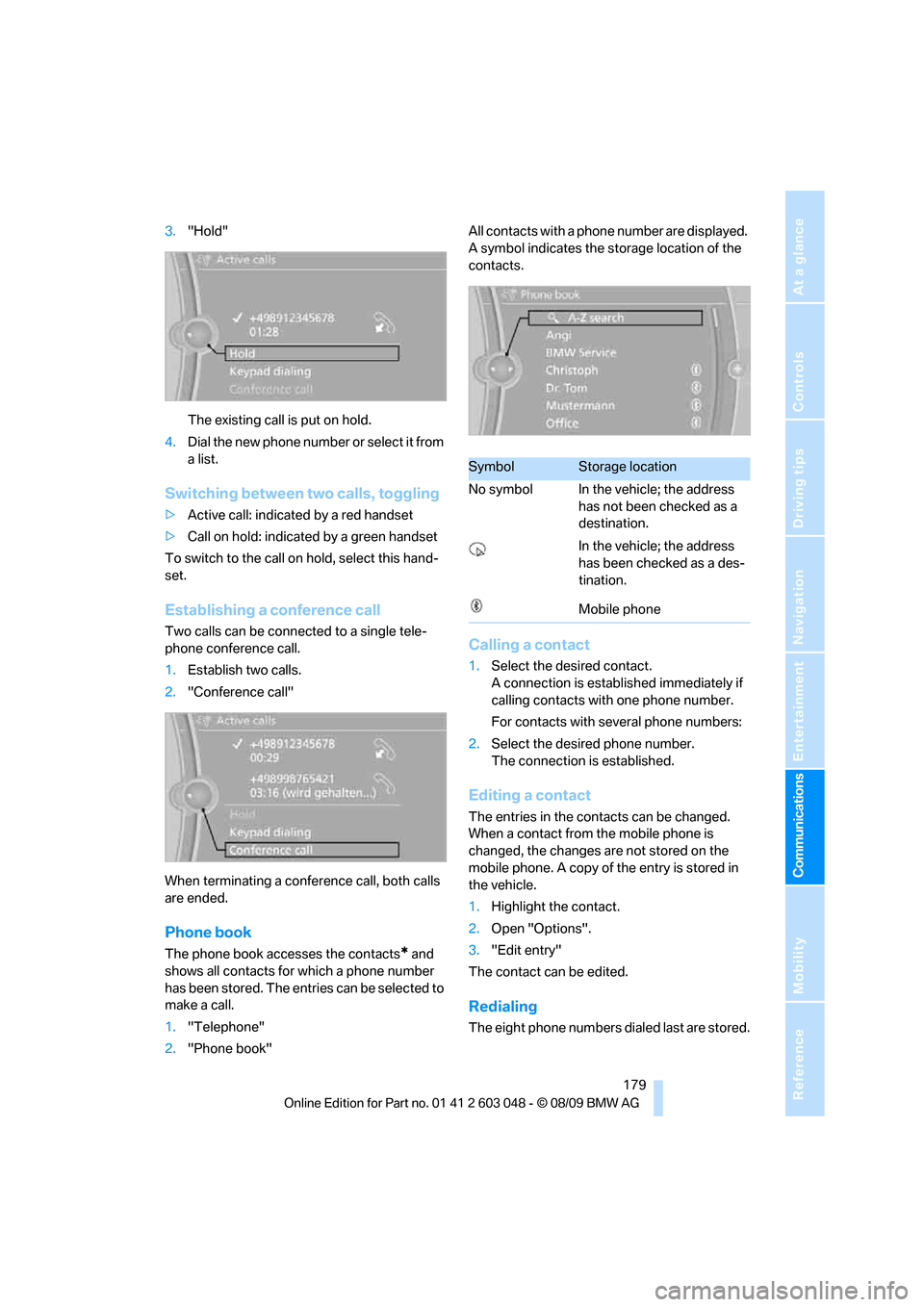
3."Hold"
The existing call is put on hold.
4.Dial the new phone number or select it from
a list.
Switching between two calls, toggling
>Active call: indicated by a red handset
>Call on hold: indicated by a green handset
To switch to the call on hold, select this hand-
set.
Establishing a conference call
Two calls can be connected to a single tele-
phone conference call.
1.Establish two calls.
2."Conference call"
When terminating a conference call, both calls
are ended.
Phone book
The phone book accesses the contacts* and
shows all contacts for which a phone number
has been stored. The entries can be selected to
make a call.
1."Telephone"
2."Phone book"All contacts with a phone number are displayed.
A symbol indicates the storage location of the
contacts.
Calling a contact
1.Select the desired contact.
A connection is established immediately if
calling contacts with one phone number.
For contacts with several phone numbers:
2.Select the desired phone number.
The connection is established.
Editing a contact
The entries in the contacts can be changed.
When a contact from the mobile phone is
changed, the changes are not stored on the
mobile phone. A copy of the entry is stored in
the vehicle.
1.Highlight the contact.
2.Open "Options".
3."Edit entry"
The contact can be edited.
Redialing
The eight phone numbers dialed last are stored.
SymbolStorage location
No symbol In the vehicle; the address
has not been checked as a
destination.
In the vehicle; the address
has been checked as a des-
tination.
Mobile phone
Page 188 of 274
Contacts
186
Contacts
You can create and edit contacts. The contacts
from the mobile phone
* are displayed as well if
this function is supported by the mobile phone.
The addresses can be used as destinations for
navigation and the phone numbers can be
dialed.
New contact
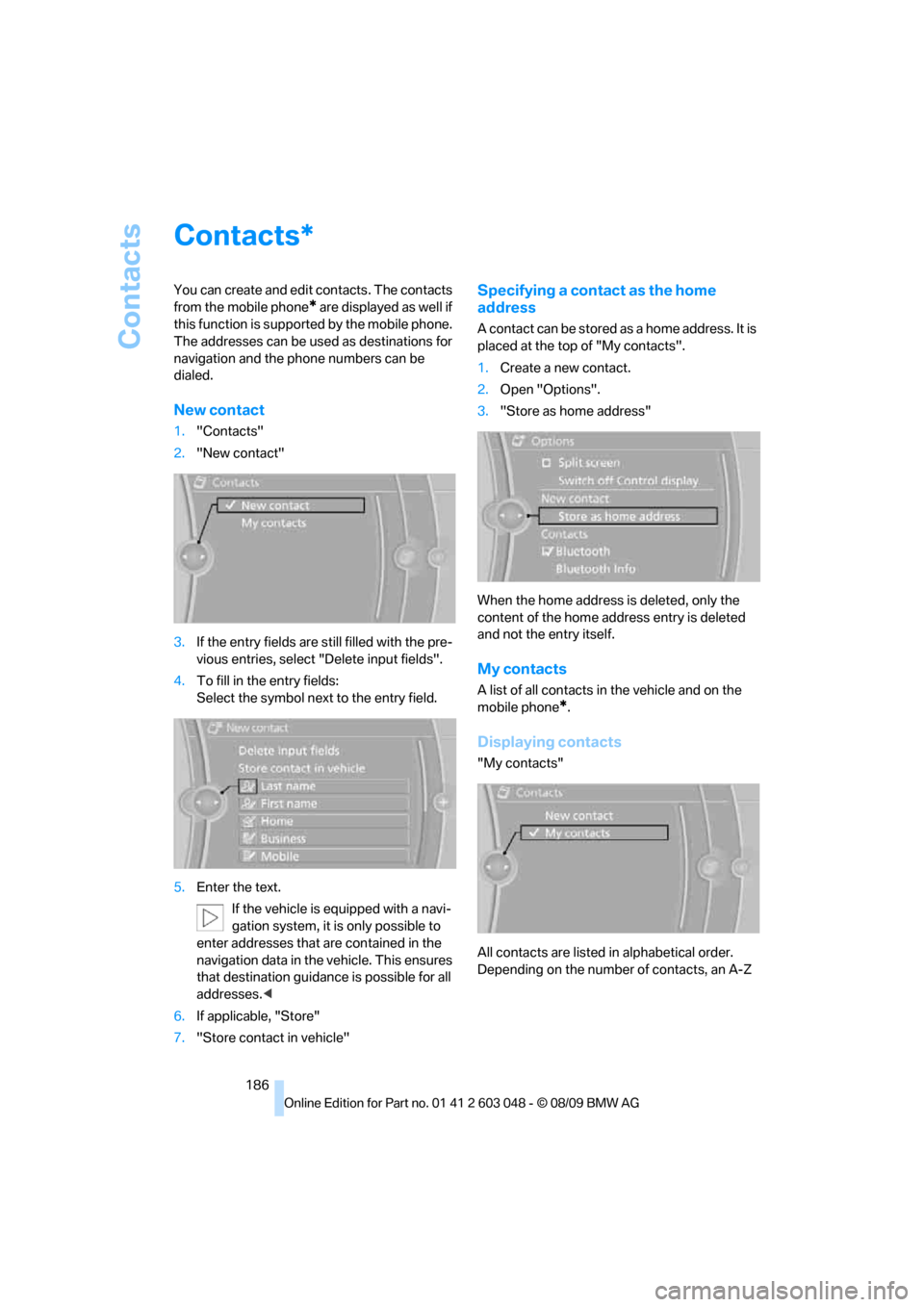
1."Contacts"
2."New contact"
3.If the entry fields are still filled with the pre-
vious entries, select "Delete input fields".
4.To fill in the entry fields:
Select the symbol next to the entry field.
5.Enter the text.
If the vehicle is equipped with a navi-
gation system, it is only possible to
enter addresses that are contained in the
navigation data in the vehicle. This ensures
that destination guidance is possible for all
addresses.<
6.If applicable, "Store"
7."Store contact in vehicle"
Specifying a contact as the home
address
A contact can be stored as a home address. It is
placed at the top of "My contacts".
1.Create a new contact.
2.Open "Options".
3."Store as home address"
When the home address is deleted, only the
content of the home address entry is deleted
and not the entry itself.
My contacts
A list of all contacts in the vehicle and on the
mobile phone
*.
Displaying contacts
"My contacts"
All contacts are listed in alphabetical order.
Depending on the number of contacts, an A-Z
*
Page 189 of 274
187
Entertainment
Reference
At a glance
Controls
Driving tips Communications
Navigation
Mobility
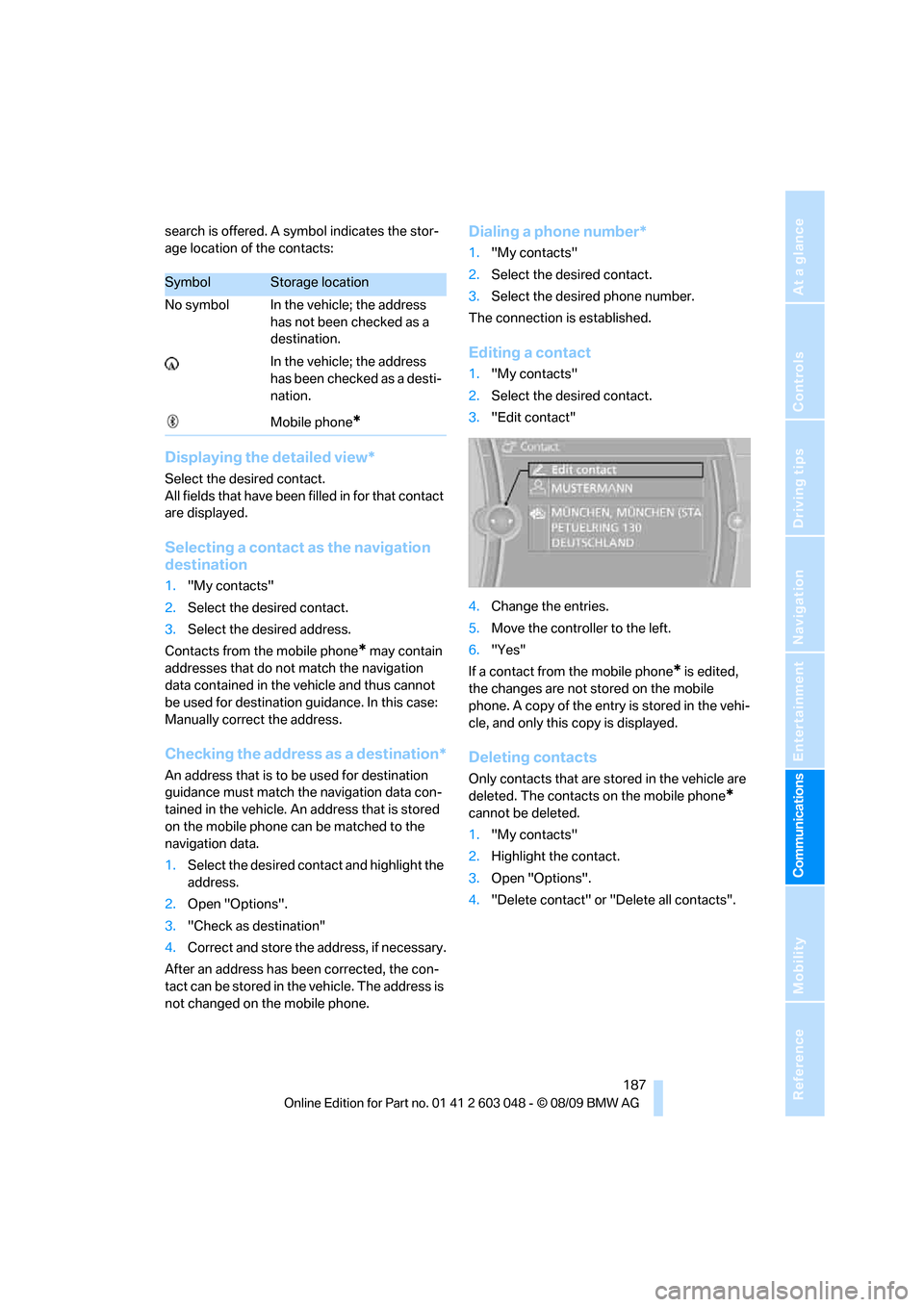
search is offered. A symbol indicates the stor-
age location of the contacts:
Displaying the detailed view*
Select the desired contact.
All fields that have been filled in for that contact
are displayed.
Selecting a contact as the navigation
destination
1."My contacts"
2.Select the desired contact.
3.Select the desired address.
Contacts from the mobile phone
* may contain
addresses that do not match the navigation
data contained in the vehicle and thus cannot
be used for destination guidance. In this case:
Manually correct the address.
Checking the address as a destination*
An address that is to be used for destination
guidance must match the navigation data con-
tained in the vehicle. An address that is stored
on the mobile phone can be matched to the
navigation data.
1.Select the desired contact and highlight the
address.
2.Open "Options".
3."Check as destination"
4.Correct and store the address, if necessary.
After an address has been corrected, the con-
tact can be stored in the vehicle. The address is
not changed on the mobile phone.
Dialing a phone number*
1."My contacts"
2.Select the desired contact.
3.Select the desired phone number.
The connection is established.
Editing a contact
1."My contacts"
2.Select the desired contact.
3."Edit contact"
4.Change the entries.
5.Move the controller to the left.
6."Yes"
If a contact from the mobile phone
* is edited,
the changes are not stored on the mobile
phone. A copy of the entry is stored in the vehi-
cle, and only this copy is displayed.
Deleting contacts
Only contacts that are stored in the vehicle are
deleted. The contacts on the mobile phone
*
cannot be deleted.
1."My contacts"
2.Highlight the contact.
3.Open "Options".
4."Delete contact" or "Delete all contacts".
SymbolStorage location
No symbol In the vehicle; the address
has not been checked as a
destination.
In the vehicle; the address
has been checked as a desti-
nation.
Mobile phone
*
Page 198 of 274
Refueling
196
Refueling
Always switch off the engine before refu-
eling; otherwise, fuel cannot be added to
the tank and a message will be displayed.<
Take all precautionary measures and
observe all applicable regulations when
handling fuel. Do not carry any spare fuel con-
tainers in your vehicle. They can develop a leak
and cause an explosion or cause a fire in the
event of an accident.<
Fuel filler flap
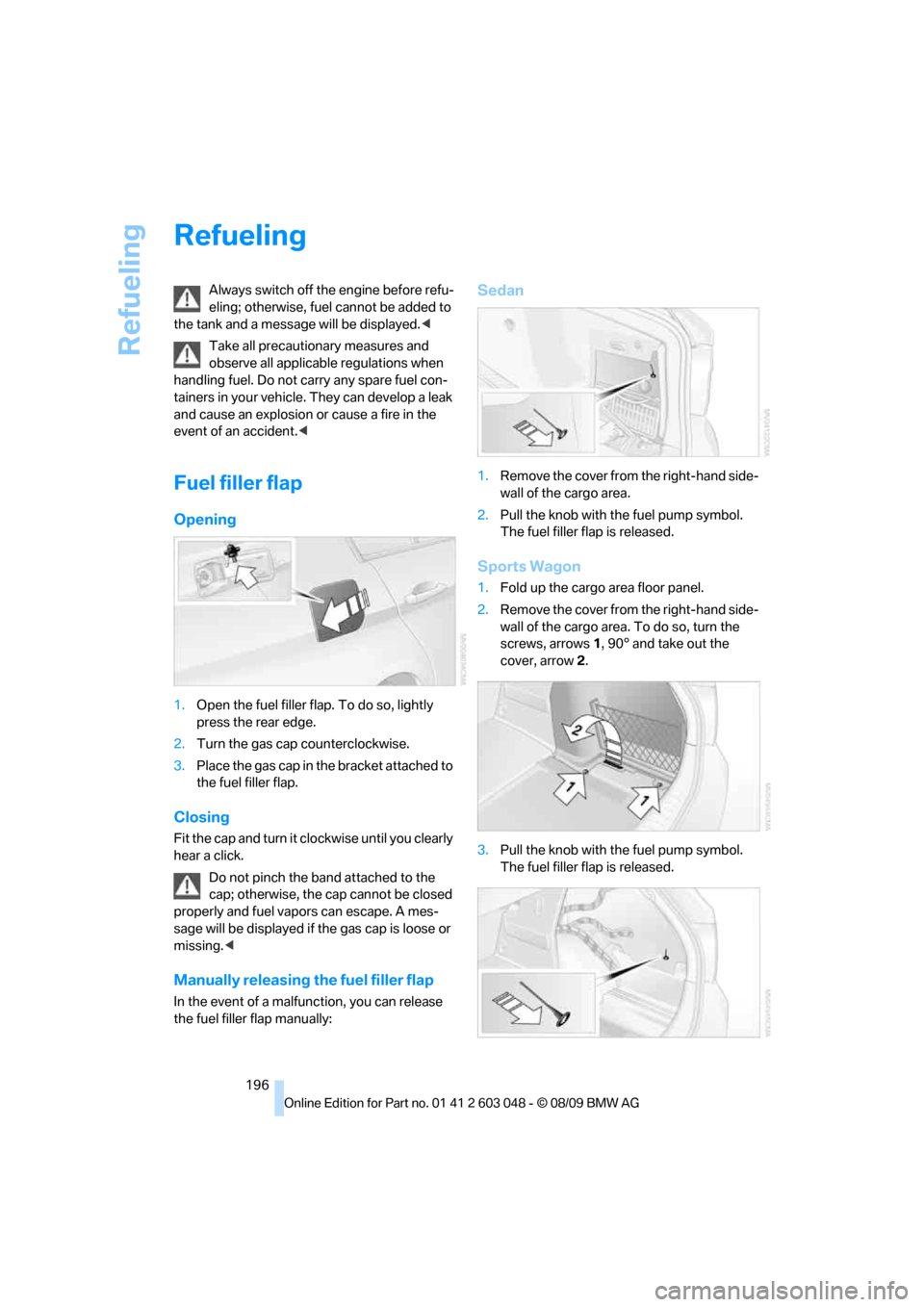
Opening
1.Open the fuel filler flap. To do so, lightly
press the rear edge.
2.Turn the gas cap counterclockwise.
3.Place the gas cap in the bracket attached to
the fuel filler flap.
Closing
Fit the cap and turn it clockwise until you clearly
hear a click.
Do not pinch the band attached to the
cap; otherwise, the cap cannot be closed
properly and fuel vapors can escape. A mes-
sage will be displayed if the gas cap is loose or
missing.<
Manually releasing the fuel filler flap
In the event of a malfunction, you can release
the fuel filler flap manually:
Sedan
1.Remove the cover from the right-hand side-
wall of the cargo area.
2.Pull the knob with the fuel pump symbol.
The fuel filler flap is released.
Sports Wagon
1.Fold up the cargo area floor panel.
2.Remove the cover from the right-hand side-
wall of the cargo area. To do so, turn the
screws, arrows 1, 90° and take out the
cover, arrow 2.
3.Pull the knob with the fuel pump symbol.
The fuel filler flap is released.
Page 217 of 274
Mobility
215Reference
At a glance
Controls
Driving tips
Communications
Navigation
Entertainment
heat when tested under controlled conditions
on a specified indoor laboratory test wheel.
Sustained high temperature can cause the
material of the tire to degenerate and reduce
tire life, and excessive temperature can lead to
sudden tire failure. The grade C corresponds to
a level of performance which all passenger car
tires must meet under the Federal Motor Vehi-
cle Safety Standard No. 109. Grades B and A
represent higher levels of performance on the
laboratory test wheel than the minimum
required by law.
The temperature grade for this tire is
established for a tire that is properly
inflated and not overloaded. Excessive speed,
underinflation, or excessive loading, either sep-
arately or in combination, can cause heat
buildup and possible tire failure.<
RSC – run-flat tires
You will recognize run-flat tires by a circular
symbol containing the letters RSC on the side
of the tire, refer to page216.
M+S
Winter and all-season tires.
These have better winter properties than sum-
mer tires.
XL
Designation for specially reinforced tires.
Tire condition
Inspect your tires frequently for tread wear,
signs of damage and for foreign objects lodged
in the tread. Check the tread depth.
Minimum tread depth
The tread depth should not drop below 1/8 in/
3 mm, although, for example, European legisla-
tion only specifies a minimum tread depth of
1/16 in/1.6 mm. At tread depths below 1/8 in/
3 mm there is an increased risk of high-speed
hydroplaning, even when only small amounts of
water are present on the road surface.
When winter tires wear down past a tread depth of 1/6 in/4 mm, they become perceptibly less
suitable for winter conditions. In the interest of
safety, new tires should be installed.
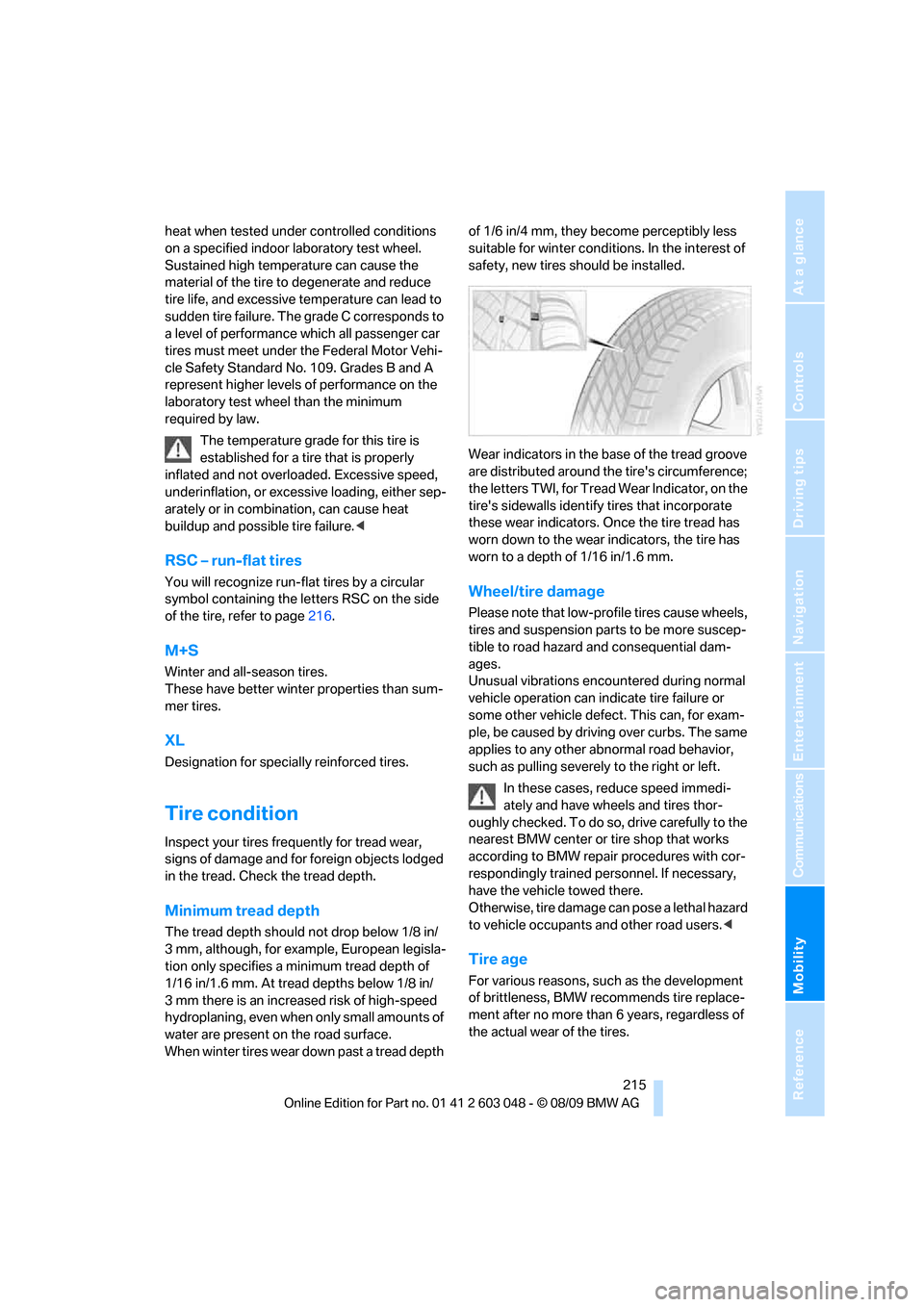
Wear indicators in the base of the tread groove
are distributed around the tire's circumference;
the letters TWI, for Tread Wear Indicator, on the
tire's sidewalls identify tires that incorporate
these wear indicators. Once the tire tread has
worn down to the wear indicators, the tire has
worn to a depth of 1/16 in/1.6 mm.
Wheel/tire damage
Please note that low-profile tires cause wheels,
tires and suspension parts to be more suscep-
tible to road hazard and consequential dam-
ages.
Unusual vibrations encountered during normal
vehicle operation can indicate tire failure or
some other vehicle defect. This can, for exam-
ple, be caused by driving over curbs. The same
applies to any other abnormal road behavior,
such as pulling severely to the right or left.
In these cases, reduce speed immedi-
ately and have wheels and tires thor-
oughly checked. To do so, drive carefully to the
nearest BMW center or tire shop that works
according to BMW repair procedures with cor-
respondingly trained personnel. If necessary,
have the vehicle towed there.
Otherwise, tire damage can pose a lethal hazard
to vehicle occupants and other road users.<
Tire age
For various reasons, such as the development
of brittleness, BMW recommends tire replace-
ment after no more than 6 years, regardless of
the actual wear of the tires.
Page 218 of 274
Wheels and tires
216 The manufacturing date of tires is contained in
the tire coding:
DOT ... 3209 means that the tire was manufac-
tured in week 32 of 2009.
Run-flat tires
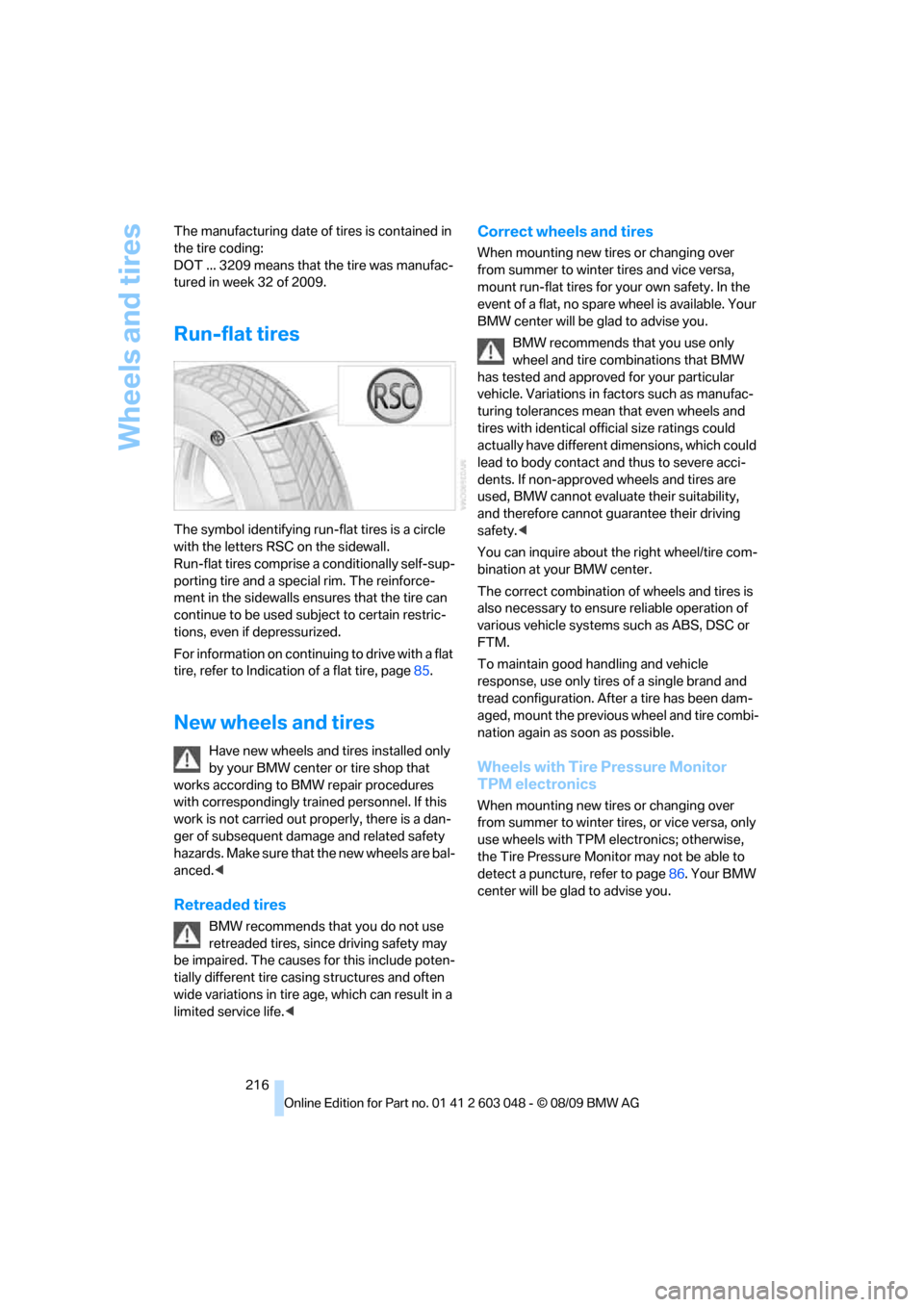
The symbol identifying run-flat tires is a circle
with the letters RSC on the sidewall.
Run-flat tires comprise a conditionally self-sup-
porting tire and a special rim. The reinforce-
ment in the sidewalls ensures that the tire can
continue to be used subject to certain restric-
tions, even if depressurized.
For information on continuing to drive with a flat
tire, refer to Indication of a flat tire, page85.
New wheels and tires
Have new wheels and tires installed only
by your BMW center or tire shop that
works according to BMW repair procedures
with correspondingly trained personnel. If this
work is not carried out properly, there is a dan-
ger of subsequent damage and related safety
h a z a r d s . M a k e s u re t h a t t h e n e w w h ee l s a r e b a l-
anced.<
Retreaded tires
BMW recommends that you do not use
retreaded tires, since driving safety may
be impaired. The causes for this include poten-
tially different tire casing structures and often
wide variations in tire age, which can result in a
limited service life.<
Correct wheels and tires
When mounting new tires or changing over
from summer to winter tires and vice versa,
mount run-flat tires for your own safety. In the
event of a flat, no spare wheel is available. Your
BMW center will be glad to advise you.
BMW recommends that you use only
wheel and tire combinations that BMW
has tested and approved for your particular
vehicle. Variations in factors such as manufac-
turing tolerances mean that even wheels and
tires with identical official size ratings could
actually have different dimensions, which could
lead to body contact and thus to severe acci-
dents. If non-approved wheels and tires are
used, BMW cannot evaluate their suitability,
and therefore cannot guarantee their driving
safety.<
You can inquire about the right wheel/tire com-
bination at your BMW center.
The correct combination of wheels and tires is
also necessary to ensure reliable operation of
various vehicle systems such as ABS, DSC or
FTM.
To maintain good handling and vehicle
response, use only tires of a single brand and
tread configuration. After a tire has been dam-
aged, mount the previous wheel and tire combi-
nation again as soon as possible.
Wheels with Tire Pressure Monitor
TPM electronics
When mounting new tires or changing over
from summer to winter tires, or vice versa, only
use wheels with TPM electronics; otherwise,
the Tire Pressure Monitor may not be able to
detect a puncture, refer to page86. Your BMW
center will be glad to advise you.
Page 222 of 274
Under the hood
220 The oil level must not be above the upper
marking of the dipstick. Too much oil will
harm the engine.<
Checking the engine oil level
electronically*
Your car is equipped with an electronic oil-level
monitor.
For a precise measurement and display of the
oil level, it is necessary that the engine be at
operating temperature, i.e. after uninterrupted
driving for at least approx. 6.5 miles/10 km. You
can have the oil level displayed while you are
driving, or while the vehicle is at a standstill on a
level surface and the engine is running.
Display in the instrument cluster
1.Push button 1 in the turn indicator lever up
or down repeatedly until the appropriate
symbol is shown in the display, accompa-
nied by the word "OIL".
2.Press button 2 in the turn indicator lever.
The oil level is checked and the reading dis-
played.
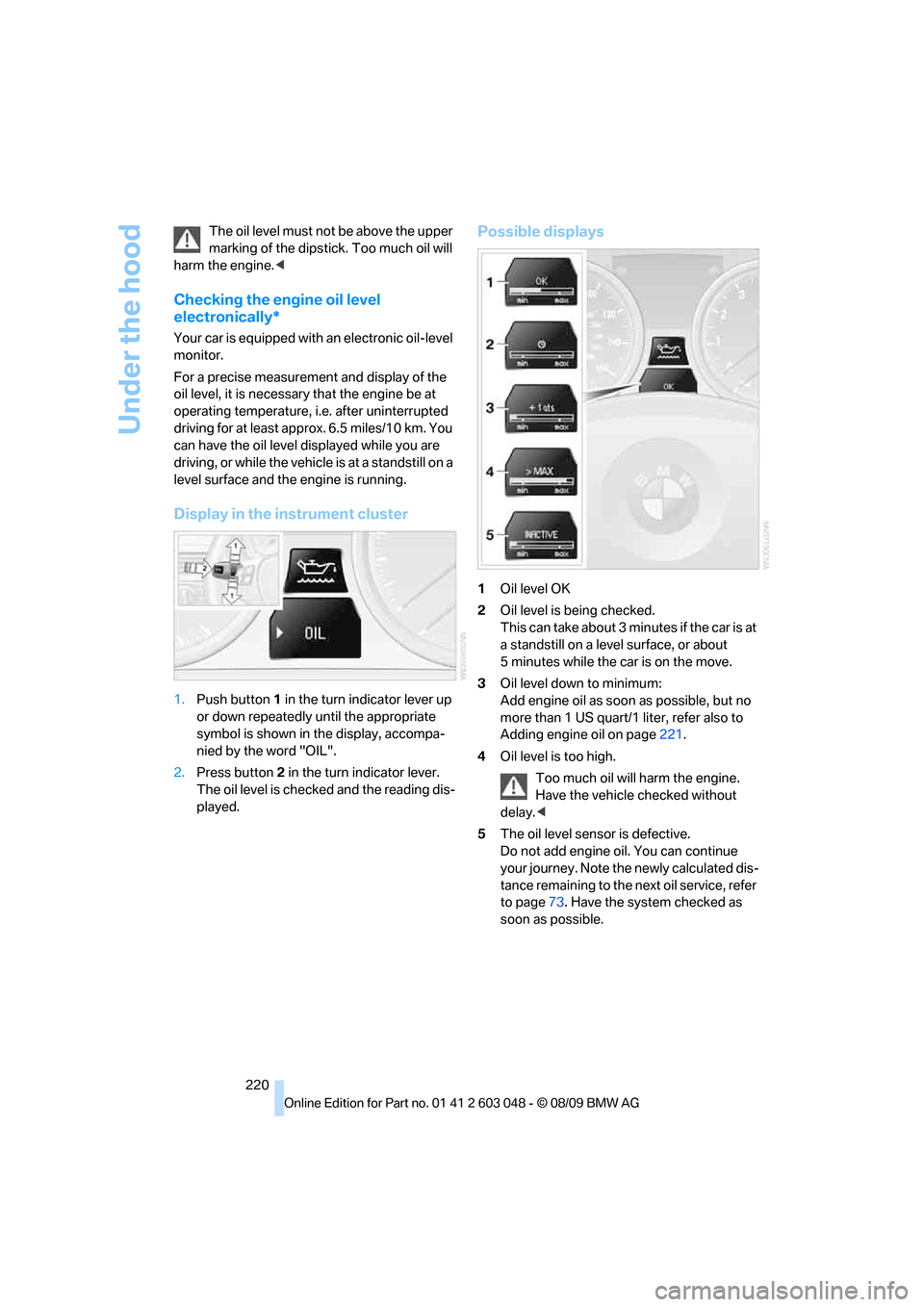
Possible displays
1Oil level OK
2Oil level is being checked.
This can take about 3 minutes if the car is at
a standstill on a level surface, or about
5 minutes while the car is on the move.
3Oil level down to minimum:
Add engine oil as soon as possible, but no
more than 1 US quart/1 liter, refer also to
Adding engine oil on page221.
4Oil level is too high.
Too much oil will harm the engine.
Have the vehicle checked without
delay.<
5The oil level sensor is defective.
Do not add engine oil. You can continue
your journey. Note the newly calculated dis-
tance remaining to the next oil service, refer
to page73. Have the system checked as
soon as possible.
Page 237 of 274
Mobility
235Reference
At a glance
Controls
Driving tips
Communications
Navigation
Entertainment
3.Release the bulb holder at the clip, see
arrow, and remove.
4.Apply gentle pressure to the bulb while
turning it to the left for removal and replace-
ment.
5.Re-engage the bulb holder so that it audibly
clicks into place.
6.Reattach the trim of the tailgate.
License plate lamp, center brake lamp,
parking/tail lamp and turn signal*
These lamps use LED technology for operation.
In the event of a malfunction, please contact
your BMW center or a workshop that works
according to BMW repair procedures with cor-
respondingly trained personnel.
Changing wheels
Your BMW is equipped with run-flat tires as
standard. This removes the need to change a
wheel immediately in the event of a puncture.
For information on continuing to drive with a
damaged tire, refer to Indication of a flat tire on
page85.
The symbol identifying run-flat tires is a circle
with the letters RSC on the sidewall, refer to
Run-flat tires, page216.
When mounting new tires or changing over
from summer to winter tires and vice versa,
mount run-flat tires for your own safety. In the
event of a flat, no spare wheel is available. Your
BMW center will be glad to advise you. Refer
also to New wheels and tires, page216.The tools for changing wheels are avail-
able as optional accessories from your
BMW center.<
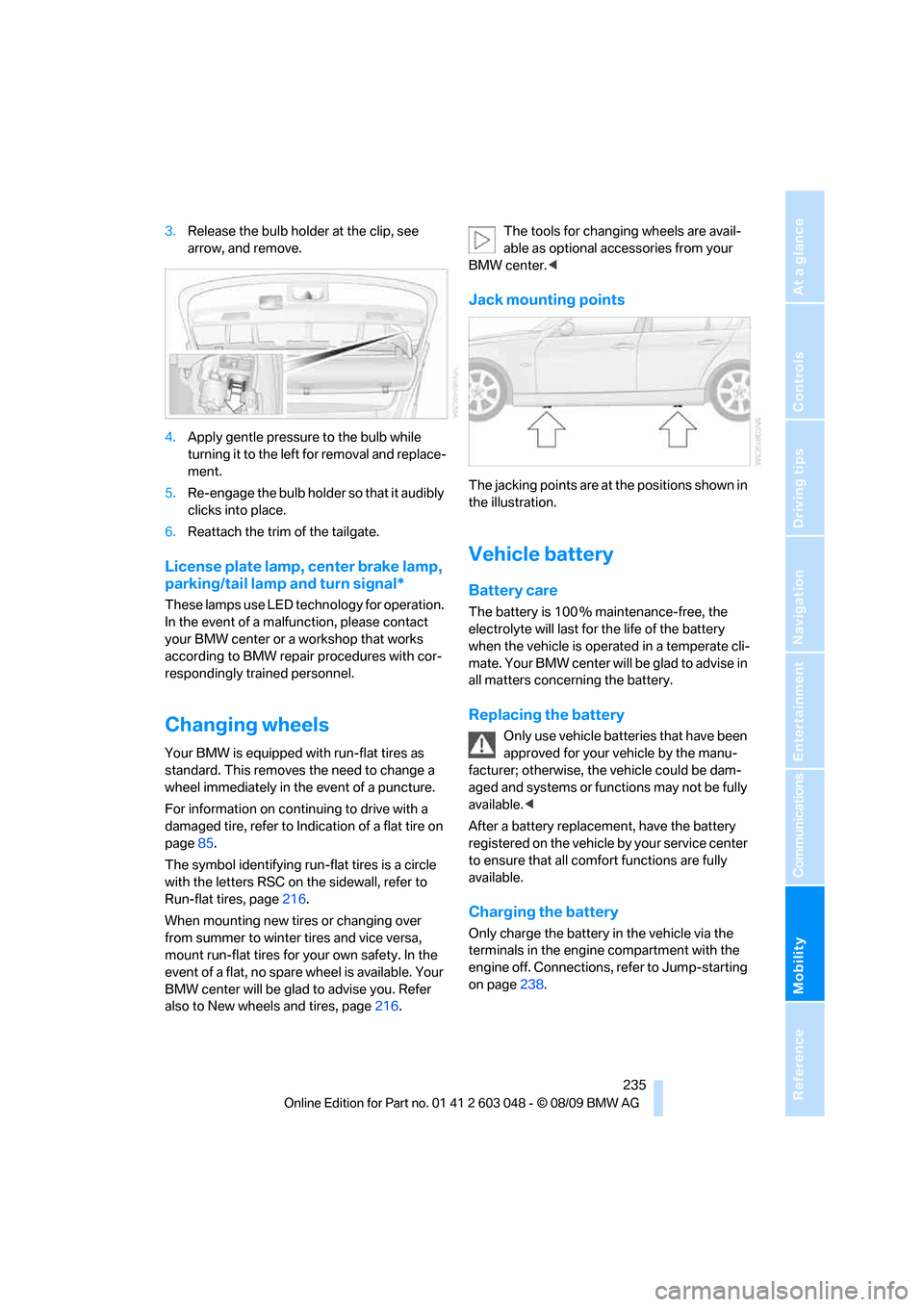
Jack mounting points
The jacking points are at the positions shown in
the illustration.
Vehicle battery
Battery care
The battery is 100 % maintenance-free, the
electrolyte will last for the life of the battery
when the vehicle is operated in a temperate cli-
mate. Your BMW center will be glad to advise in
all matters concerning the battery.
Replacing the battery
Only use vehicle batteries that have been
approved for your vehicle by the manu-
facturer; otherwise, the vehicle could be dam-
aged and systems or functions may not be fully
available.<
After a battery replacement, have the battery
registered on the vehicle by your service center
to ensure that all comfort functions are fully
available.
Charging the battery
Only charge the battery in the vehicle via the
terminals in the engine compartment with the
engine off. Connections, refer to Jump-starting
on page238.
Page 268 of 274
Everything from A - Z
266 Special destinations, entering
by name129
Speed
– run-flat tires85
– with winter tires217
Speed limit79
Speed limit warning, refer to
Speed limit79
Speedometer12
Speed Volume145
Split rear seat backrest, refer
to Expanding the cargo
area110
Split screen, refer to Control
Display, switching on/off19
Split screen content, refer to
Display for split screen
content, selecting19
Spray nozzles, refer to
Cleaning windshield and
headlamps60
Stability control, refer to
Driving stability control
systems82
Start/stop button54
– starting the engine55
– switching off the engine55
Starting, refer to Starting the
engine55
Starting assistance, refer to
Jump-starting238
Starting difficulties
– jump-starting238
Starting the engine
– start/stop button54
Start menu17
State/province, for
navigation125
Station, selecting
– radio147
Status of this Owner's Manual
at time of printing5
Steam jet225,226Steering wheel48
– adjustment48
– buttons on steering
wheel11
– heating49
– lock54
– locking with Comfort
Access34
Steering with variable ratio,
refer to Active steering88
Steptronic, refer to Automatic
transmission with
Steptronic56
Storage228
Storage compartments106
Storage nets111
Stored trip, calling up133
Storing a destination in the
address book127
Storing music162
Storing seat positions, refer to
Seat and mirror memory45
Storing tires217
Stowage, refer to Storage
compartments106
Street, entering,
navigation126
Summer tires, refer to Wheels
and tires201
Sun blinds105
Surface ice, refer to Outside
temperature warning69
Surround145
SVCD157
SW, waveband147
Switches, refer to Cockpit10
Switching off
– engine55
Switching off the engine
– start/stop button54
Switching on
– audio144
– CD changer144
– CD player144
– radio144
Switching the cooling function
on and off99
Switch-on times of parked car
ventilation, preselecting101Symbols4
– status information19
T
Tachometer69
Tailgate30
– Comfort Access35
– emergency operation, refer
to Opening manually31
– opening from inside30
– opening from outside31
– opening manually31
– remote control28
Tailgate, refer to Trunk lid/
tailgate30
Tail lamp
– replacing bulb235
Tail lamp, refer to Tail
lamps232
Tail lamps232
– replacing bulb233,234
Tank contents, refer to
Capacities248
Technical data244
– dimensions245
Technical modifications, refer
to For your own safety5
Telephone174
– installation location, refer to
Center armrest106
– refer to separate Owner's
Manual
TeleService188
TeleService Diagnosis190
TeleService Help190
Temperature
– automatic climate control98
– changing unit of measure73
– coolant, refer to Coolant
temperature70
Temperature display
– outside temperature69
– outside temperature
warning69
– setting the units73
Tempomat, refer to Cruise
control61