ecu BMW 325CI 2005 Owner's Manual
[x] Cancel search | Manufacturer: BMW, Model Year: 2005, Model line: 325CI, Model: BMW 325CI 2005Pages: 190, PDF Size: 2.79 MB
Page 129 of 190
129
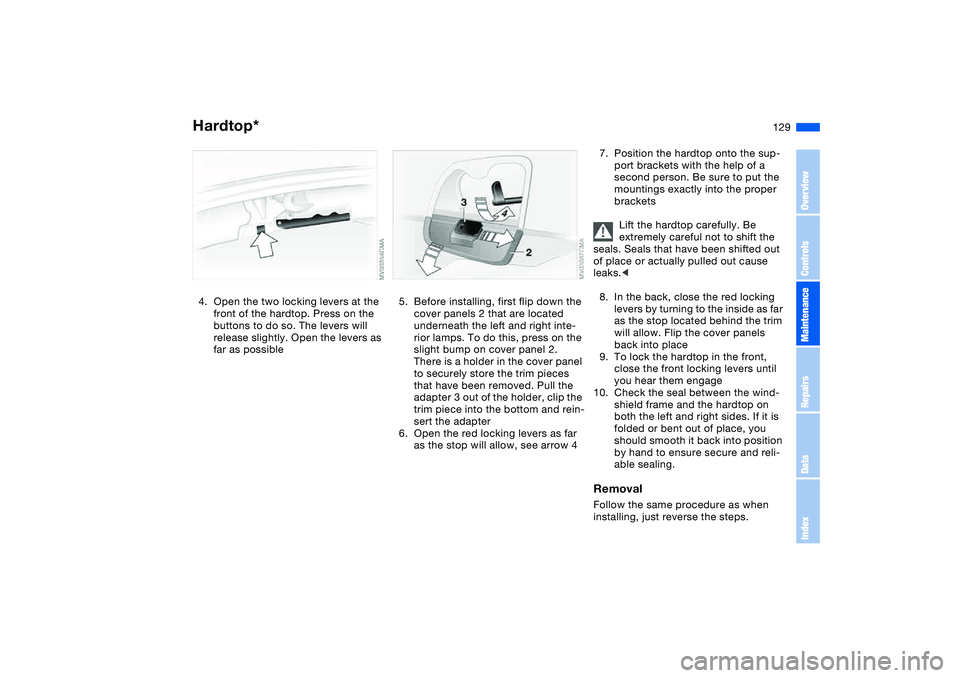
4. Open the two locking levers at the
front of the hardtop. Press on the
buttons to do so. The levers will
release slightly. Open the levers as
far as possible
5. Before installing, first flip down the
cover panels 2 that are located
underneath the left and right inte-
rior lamps. To do this, press on the
slight bump on cover panel 2.
There is a holder in the cover panel
to securely store the trim pieces
that have been removed. Pull the
adapter 3 out of the holder, clip the
trim piece into the bottom and rein-
sert the adapter
6. Open the red locking levers as far
as the stop will allow, see arrow 4
7. Position the hardtop onto the sup-
port brackets with the help of a
second person. Be sure to put the
mountings exactly into the proper
brackets
Lift the hardtop carefully. Be
extremely careful not to shift the
seals. Seals that have been shifted out
of place or actually pulled out cause
leaks.<
8. In the back, close the red locking
levers by turning to the inside as far
as the stop located behind the trim
will allow. Flip the cover panels
back into place
9. To lock the hardtop in the front,
close the front locking levers until
you hear them engage
10. Check the seal between the wind-
shield frame and the hardtop on
both the left and right sides. If it is
folded or bent out of place, you
should smooth it back into position
by hand to ensure secure and reli-
able sealing.RemovalFollow the same procedure as when
installing, just reverse the steps.
Hardtop*
OverviewControlsMaintenanceRepairsDataIndex
Page 138 of 190
138In the engine compartment
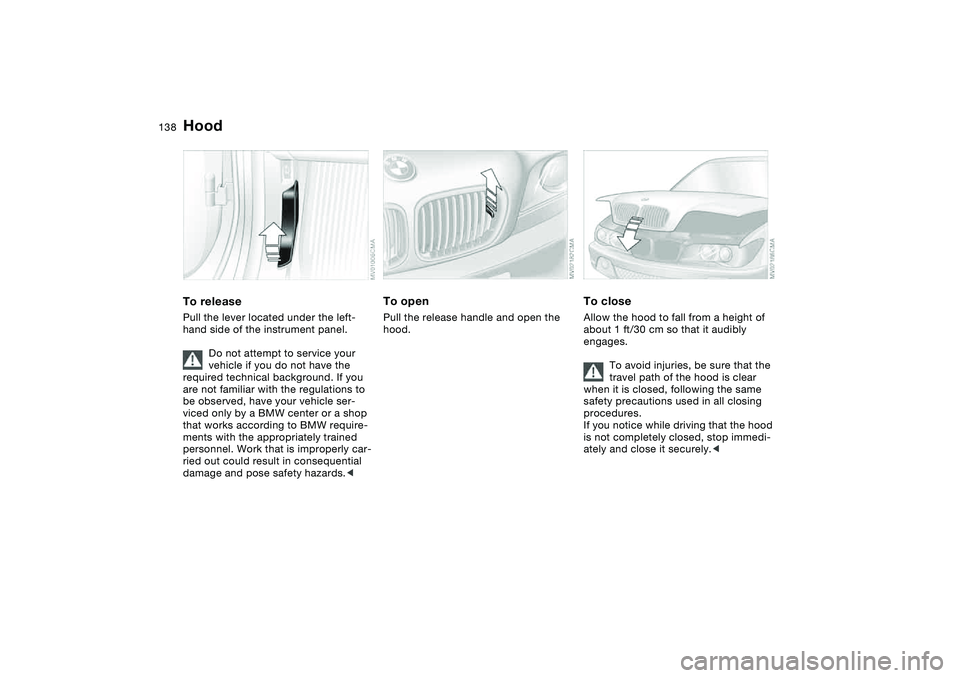
HoodTo releasePull the lever located under the left-
hand side of the instrument panel.
Do not attempt to service your
vehicle if you do not have the
required technical background. If you
are not familiar with the regulations to
be observed, have your vehicle ser-
viced only by a BMW center or a shop
that works according to BMW require-
ments with the appropriately trained
personnel. Work that is improperly car-
ried out could result in consequential
damage and pose safety hazards.<
To openPull the release handle and open the
hood.
To closeAllow the hood to fall from a height of
about 1 ft/30 cm so that it audibly
engages.
To avoid injuries, be sure that the
travel path of the hood is clear
when it is closed, following the same
safety precautions used in all closing
procedures.
If you notice while driving that the hood
is not completely closed, stop immedi-
ately and close it securely.<
Page 158 of 190

158
height and reduce its support capacity.
Do not lie under the vehicle or start the
engine when the vehicle is supported
by the jack. There is otherwise a risk of
fatal injury.<
Your BMW is equipped with a space-
saver spare tire designed for temporary
use in maintaining the vehicle's mobility
in an emergency.
To remove the space-saver spare
tire, lift the floor panel in the lug-
gage compartment completely out,
refer to page 35.<
What you will needIn order to avoid rattling noises later,
note the position of the tools when you
remove them and return them to their
original position when you are through
using them.
>Jack 1
Raise the floor panel in the luggage
compartment, refer to page 35, and
undo the jack.
When you have completed work, fold
the handle back and insert it in its
holder
>Chock 2
Located behind the jack on the wall
in the luggage compartment. Loosen
the wingnut to remove it
>Space-saver spare tire – next to jack
Loosen the wing nut by hand, remove
the storage shelf and take the wheel
out
>Lug wrench – in the onboard tool kit
on the underside of the luggage com-
partment lid, refer to page 152.Procedure1. Read and comply with the safety
precautions provided on the previ-
ous page
2. Secure the vehicle to prevent it
from rolling:
Place the chock against the rear
surface of the front tire on the side
opposite the side being raised. If
the vehicle is parked on a down-
ward slope, place the chock
securely in front of the tire. If the
Changing a wheel
Page 159 of 190
159
wheel must be changed on a sur-
face with a more severe slope, take
additional precautions to secure
the vehicle from rolling
3. Wheels with full wheel covers*:
reach into the ventilation openings
and pull the cover off
4. If your vehicle is equipped with
Individual light-alloy wheels*: insert
the wheel puller supplied with the
vehicle into the designated recess
of the cover, and pull the cover off
5. Loosen the lug bolts by rotating
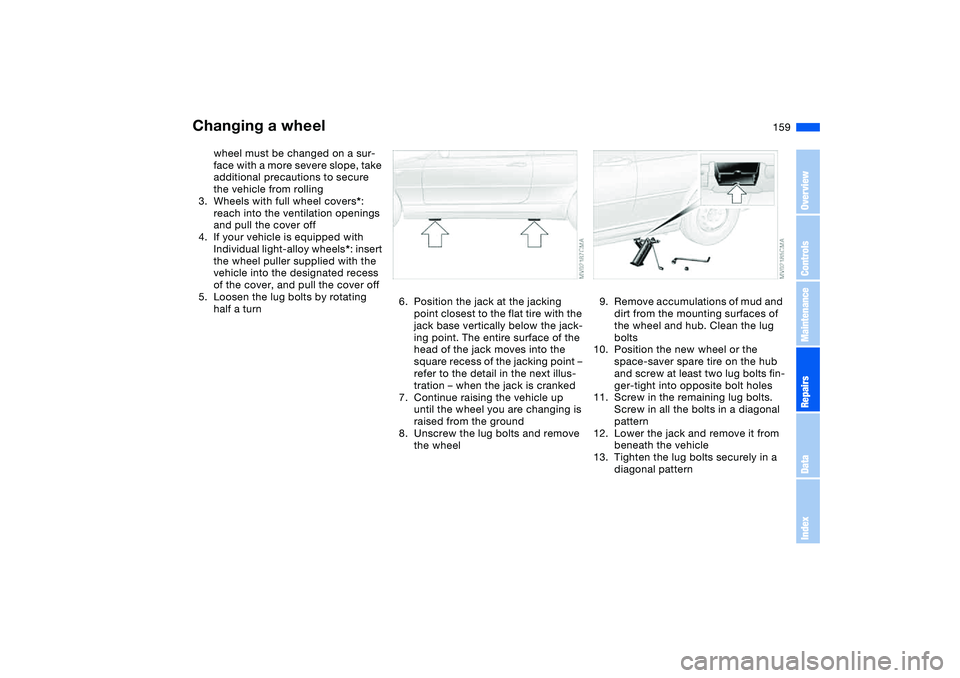
half a turn6. Position the jack at the jacking
point closest to the flat tire with the
jack base vertically below the jack-
ing point. The entire surface of the
head of the jack moves into the
square recess of the jacking point –
refer to the detail in the next illus-
tration – when the jack is cranked
7. Continue raising the vehicle up
until the wheel you are changing is
raised from the ground
8. Unscrew the lug bolts and remove
the wheel
9. Remove accumulations of mud and
dirt from the mounting surfaces of
the wheel and hub. Clean the lug
bolts
10. Position the new wheel or the
space-saver spare tire on the hub
and screw at least two lug bolts fin-
ger-tight into opposite bolt holes
11. Screw in the remaining lug bolts.
Screw in all the bolts in a diagonal
pattern
12. Lower the jack and remove it from
beneath the vehicle
13. Tighten the lug bolts securely in a
diagonal pattern
Changing a wheel
OverviewControlsMaintenanceRepairsDataIndex
Page 160 of 190
160
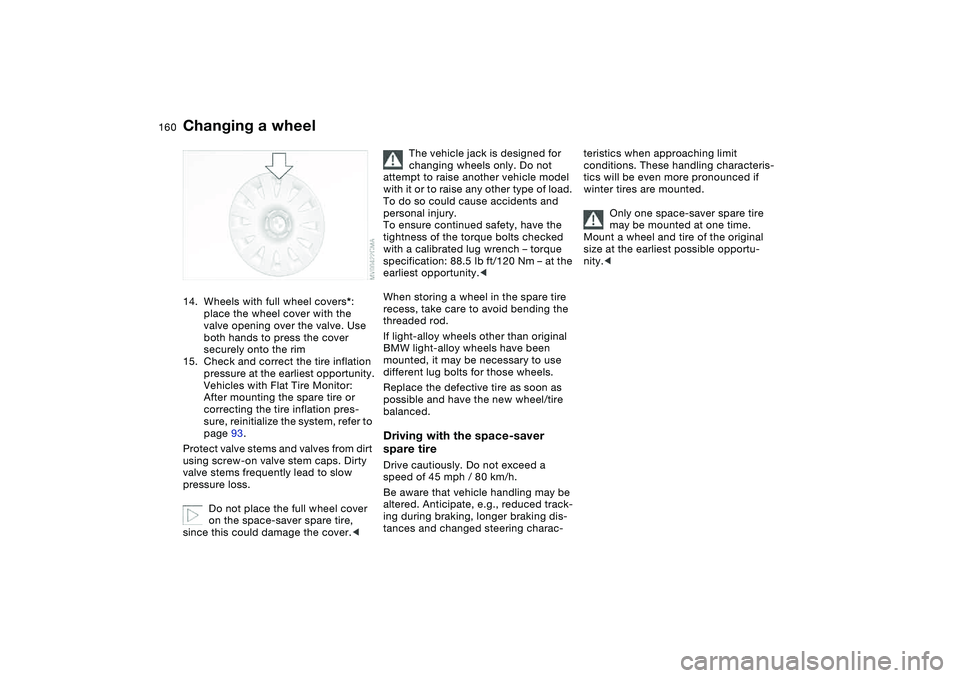
14. Wheels with full wheel covers*:
place the wheel cover with the
valve opening over the valve. Use
both hands to press the cover
securely onto the rim
15. Check and correct the tire inflation
pressure at the earliest opportunity.
Vehicles with Flat Tire Monitor:
After mounting the spare tire or
correcting the tire inflation pres-
sure, reinitialize the system, refer to
page 93.
Protect valve stems and valves from dirt
using screw-on valve stem caps. Dirty
valve stems frequently lead to slow
pressure loss.
Do not place the full wheel cover
on the space-saver spare tire,
since this could damage the cover.<
The vehicle jack is designed for
changing wheels only. Do not
attempt to raise another vehicle model
with it or to raise any other type of load.
To do so could cause accidents and
personal injury.
To ensure continued safety, have the
tightness of the torque bolts checked
with a calibrated lug wrench – torque
specification: 88.5 lb ft/120 Nm – at the
earliest opportunity.<
When storing a wheel in the spare tire
recess, take care to avoid bending the
threaded rod.
If light-alloy wheels other than original
BMW light-alloy wheels have been
mounted, it may be necessary to use
different lug bolts for those wheels.
Replace the defective tire as soon as
possible and have the new wheel/tire
balanced.
Driving with the space-saver
spare tireDrive cautiously. Do not exceed a
speed of 45 mph / 80 km/h.
Be aware that vehicle handling may be
altered. Anticipate, e.g., reduced track-
ing during braking, longer braking dis-
tances and changed steering charac-
teristics when approaching limit
conditions. These handling characteris-
tics will be even more pronounced if
winter tires are mounted.
Only one space-saver spare tire
may be mounted at one time.
Mount a wheel and tire of the original
size at the earliest possible opportu-
nity.<
Changing a wheel
Page 161 of 190
161
BatteryMaintenanceThe battery is completely maintenance-
free. This means that the original bat-
tery acid will normally last for the ser-
vice life of the battery under moderate
climate conditions. Your BMW center
will be glad to advise you if you have
any questions concerning the battery.
Please consult your BMW center
whenever you have any questions
concerning the battery.
Connect the charge cables to the termi-
nals in the engine compartment. For
terminal locations, refer to Jump-start-
ing on page 163.Disposal
After changing the battery, have
the old battery disposed of by
your BMW center or bring it to a recy-
cling point. Maintain the battery in an
upright position for transport and stor-
age. Secure the battery against tilting
during transport.<
Power lossAfter a temporary power loss, e.g. due
to a discharged battery, some equip-
ment will be limited in its use and will
have to be reinitialized. Individual set-
tings are also lost and must be reset:
>Seat and mirror memory
The position settings must be stored
again, refer to page 55
>Clock
must be reset, refer to page 87
>Radio
Stations must be reset, refer to the
Owner's Manual for Radio/Onboard
Computer
>Navigation system
The system will not be operable
immediately, refer to the Owner's
Manual for Radio/Onboard Com-
puter.
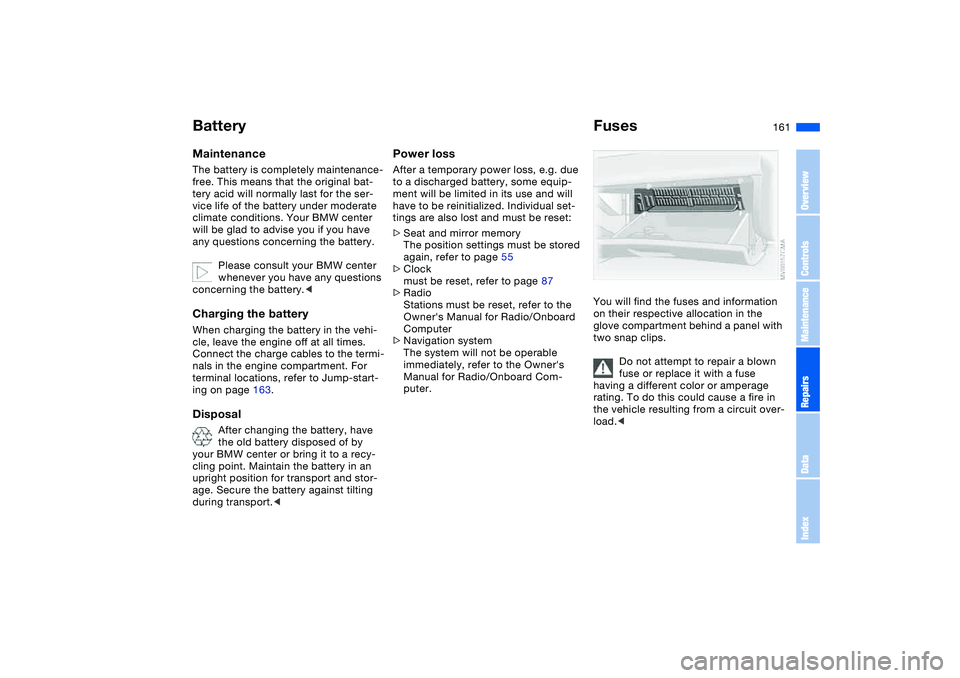
FusesYou will find the fuses and information
on their respective allocation in the
glove compartment behind a panel with
two snap clips.
Do not attempt to repair a blown
fuse or replace it with a fuse
having a different color or amperage
rating. To do this could cause a fire in
the vehicle resulting from a circuit over-
load.<
OverviewControlsMaintenanceRepairsDataIndex
Page 181 of 190
Everything from A to Z
181
Imprint 4
Indicator lamps 18
Indicator/warning lamp
airbags 18
alarm system 37
brakes 18, 19
Check Gas Cap 19
coolant 19, 85
DSC 19
Fasten safety belts 18
Flat Tire Monitor
18, 19, 93
reserve 85
rollover protection
system 19
Service Engine Soon 19
Individual air distribution 106
Individual settings, refer to
Vehicle Memory, Key
Memory 68
Inflation pressure monitor-
ing, refer to Flat Tire Moni-
tor 92
Inflation pressure, tires 130
INSPECTION 86
Instrument cluster 16
Instrument lighting 96
Instrument panel 14
Integrated universal remote
control 110
Interface socket for onboard
diagnostics (OBD) 148Interior lamps 98
remote control 30
Interior motion sensor 37
switching off 37
Interior rearview mirror 58
automatic dimming
feature 58
Interior temperature, adjust-
ment 102, 106
Interlock, refer to Steering
wheel lock 69
Intermittent mode, wipers 81
Interval display, service 86
J
Jack 157
Jacking points 158
Jump-starting 163
K
Key Memory 68
Keys 28
with remote control 28
Kickdown 74, 78
L
Lamp defect 153
Lamps and bulbs 153
Lashing down loads, refer to
Cargo loading 117
Lashing eyelets, refer to
Securing cargo 119Lashing fittings, refer to
Securing cargo 119
LATCH child-restraint
mounting system 64
Leather care, refer to the
Caring for your vehicle
brochure
Leaving the vehicle 71
LEDs light-emitting
diodes 157
Length, refer to
Dimensions 171
License plate lamp
bulb replacement 157
Light switch 95
Light-emitting diodes
(LEDs) 157
Lighter 113
LIGHTS ON warning 95
Lights, refer to Parking
lamps/Low beams 95
Load, determining the maxi-
mum 117
Load, refer to Cargo
loading 117
Loading
vehicle 117
Load-securing devices 119
Lock buttons on doors, refer
to Locking 32
Lock, steering wheel 69Locking
from inside 32
from outside 29, 31
Locking and unlocking
doors
from inside 32
from outside 29, 31
Low beams 95
automatic 95
bulb replacement 153
indicator lamp, defective
lamp 86
Lug bolts
key 158
torque 158
Luggage compartment
capacity 172
emergency operation,
refer to Manual
operation 33
enlarge volume 35
floor panel 35
lid 33
opening from outside 33
opening, remote
control 30
opening/closing, refer to
Luggage compartment
lid 33
remote control 30
volume 172
OverviewControlsMaintenanceRepairsDataIndex
Page 182 of 190
Everything from A to ZLuggage compartment lid 33
emergency operation 33
emergency release 34
indicator lamp 86
opening from inside the
vehicle 33
opening from outside 33
remote control 30
securing separately 33
unlocking manually 33
Luggage compartment light-
ing 33
Luggage rack, refer to Roof-
mounted luggage rack 120
Lumbar support 52
M
Maintenance 86, 146
Maintenance system 146
Malfunction
convertible top 46
door lock 31
fuel filler door 23
Malfunction displays 86
Manual convertible top 39
closing 42
opening 40
operation 39Manual operation
door lock 31
driver's door 31
fuel filler door 23
luggage compartment
lid 33
power convertible top 46
Manual transmission 72
Master keys 28
MC operation, refer to the
Owner's Manual for
Radio/Onboard Computer
MD operation, refer to the
Owner's Manual for
Radio/Onboard Computer
Memory, refer to Seat and
mirror memory 55
Memory, refer to Vehicle
Memory, Key Memory 68
Microfilter
air conditioning 103
automatic climate
control 108
Microphone 113
Mini disc operation, refer to
the Owner's Manual for
Radio/Onboard Computer
Mirrors 57
heated 57
memory, refer to Seat and
mirror memory 55
Mobile Service 163Modifications, technical,
refer to For your own
safety 5
Multifunction steering
wheel 21
Multifunction switch
turn signal indicator/head-
lamp flasher 80, 81
N
Navigation system, refer to
the Owner's Manual for
Radio/Onboard Computer
Neck restraints, refer to
Head restraints 52
Nets 112
Nozzles, refer to Ventilation
100, 104
Nylon rope, refer to Towing
the vehicle 165
O
OBD interface socket 148
Odometer 84
Oil
additives, refer to Adding
engine oil 143
capacity 173
dipstick 142
quality 143
specified engine oils 143
viscosity 143Oil change intervals, refer
to Service interval
display 146
Oil change intervals, refer to
the Service and Warranty
Information Booklet for US
models/Warranty and Ser-
vice Guide Booklet for
Canadian models
Oil consumption 142
Oil dipstick 142
Oil filter change 173
Oil level
checking 142
indicator lamp 18
Oil pressure
indicator lamp 18
OIL SERVICE 86
Oil types 143
Old batteries, refer to Dis-
posal 161
Onboard computer 88
Onboard computer, refer to
the Owner's Manual for
Onboard Computer
Onboard tool kit 152
Opening and closing
from outside 29
from the inside 32
via the door lock 31
via the remote control 29
Outlets, ventilation 100, 104
Page 184 of 190
Everything from A to ZSafety belt height adjust-
ment 54
Safety belts 54
seat-integrated safety belt
system 53
sitting safely 50
warning lamp 18
Safety systems, refer to
Antilock Brake
System 127
Dynamic Stability Control
(DSC) 91
Screwdriver, refer to
Onboard tool kit 152
Seat adjustment 51
BMW sports seat 51
power 51
Seat belt tensioner, refer to
Safety belts 54
Seat heating 57
Seat memory, refer to Seat
and mirror memory 55
Seat positions, storing 55
Seats 51
Securing cargo 119
Securing child-restraint sys-
tem 64
Securing the vehicle
from inside 32
from outside 29, 31Selector lever
automatic transmission 77
sequential manual gear-
box SMG 73
Selector lever lock, refer to
Shiftlock 73, 77
Selector lever positions
automatic transmission 77
sequential manual gear-
box SMG 73
Sequential manual gearbox
SMG 73
indicator lamp 19
Service and Warranty Infor-
mation Booklet 146
Service Engine Soon
warning lamp 19
Service interval display
86, 146
Shift paddles 74
Shifting gears
automatic transmission
with Steptronic 77
sequential manual gear-
box SMG 74
Shiftlock 73
Shiftlock, refer to Range
selection 77
Side airbags 59
Side turn signal indicators
bulb replacement 155Sitting safely
with airbags 50
with safety belts 50
Size 171
Ski bag 115
Slipstream deflector, refer to
Wind deflector 48
SMG sequential manual
gearbox 73
indicator lamp 19
Smokers' package, refer to
Ashtray 113
SOS, refer to Emergency
call 162
Space-saver spare tire
changing a wheel 157
Spare key 28
Spare tire 157
Spare wheel 160
Special oils 143
Specified oils 143
Speed gauge, refer to
Speedometer 16
Speedometer 16
SPORT button 76
Sport program
automatic transmission
with Steptronic 78
Sports seat 51
Stability control, refer to
Dynamic Stability Control
(DSC) 91Standing lamps 97
Starting difficulties
jump-starting 163
temperature 69
Starting help DSC 91
Starting the engine 69
Starting, refer to Starting the
engine 69
Status of the Owner's Man-
ual 5
Steering wheel lock 69
Steering wheel, adjusting 58
Steptronic, refer to Manual
operation 78
Storage compartments 112
Storage nets 112
Storing seat positions, refer
to Seat and mirror
memory 55
Storing tires 137
Surface ice, refer to Ice
warning 88
Switches, refer to
Cockpit 14
Switching off
engine 71
Symbols 4
Synthetic oils 143
T
Tachometer 84
Page 185 of 190
Everything from A to Z
185
Tail lamps
bulb replacement 155
Tail lamps, refer to Rear
lamps 155
Tank capacity, refer to Fuel
tank capacity 173
Tank indicator, refer to Fuel
gauge 85
Technical data 170
Technical modifications 5
Technical modifications,
refer to For your own
safety 5
Telephone hookup 113
Telephone, refer to the sep-
arate Owner's Manual
Television, refer to the
Owner's Manual for
Onboard Computer
Temperature
air conditioning 102
automatic climate
control 106
Temperature adjustment
102, 106
Temperature display
engine coolant 85
ice warning 88
outside temperature 88
setting units 88
Temperature layering
103, 107Tempomat, refer to Cruise
control 82
Thigh support area, adjust-
ing 51
Third brake lamp, refer to
Center high-mount brake
lamp 156
Threaded socket for towing
eyelet 165
Three-point safety belt 54
Tilt alarm sensor 37
switching off 37
Tilting passenger-side exte-
rior mirror 56
Time 87
Tire inflation pressure 130
Tire pressure monitoring,
refer to Flat Tire
Monitor 92
Tire replacement 157Tires
age 133
breaking in 124
changing 157
condition 134
damage 134
flat 157
inflation pressure 130
storing 137
tread 134, 135
tread wear indicators,
refer to Tire tread 135
winter tires 136
Tools, refer to Onboard tool
kit 152
Torque
engine 170
lug bolts 158
Tow bar 165
Tow rope 165
Towing 165
Towing eyelet 165
Towing the vehicle 165
Track width, refer to Dimen-
sions 171
Transmission
automatic transmission
with Steptronic 77
sequential manual gear-
box SMG 73
Transmission lock, refer to P
Park 77Transmission malfunction
automatic transmission
with Steptronic 79
sequential manual gear-
box SMG 75
Transport securing devices,
refer to Securing
cargo 119
Transporting children
safely 62
Trap protection
electric power windows 38
Tread depth, refer to Tire
tread 135
Tread depth, tires 135
Tread wear indicators in the
tires, refer to Tire
tread 135
Trip distance recorder, refer
to Trip odometer 84
Trip meter, refer to Trip
odometer 84
Trip odometer 84
Trunk lid, refer to Luggage
compartment lid 33
Trunk lighting, refer to Lug-
gage compartment light-
ing 33
Turn signal indicator 80, 81
bulb replacement 155
indicator lamp 20
OverviewControlsMaintenanceRepairsDataIndex