wheel BMW 325CI 2006 User Guide
[x] Cancel search | Manufacturer: BMW, Model Year: 2006, Model line: 325CI, Model: BMW 325CI 2006Pages: 174, PDF Size: 2.73 MB
Page 51 of 174
51 Passenger safety systems
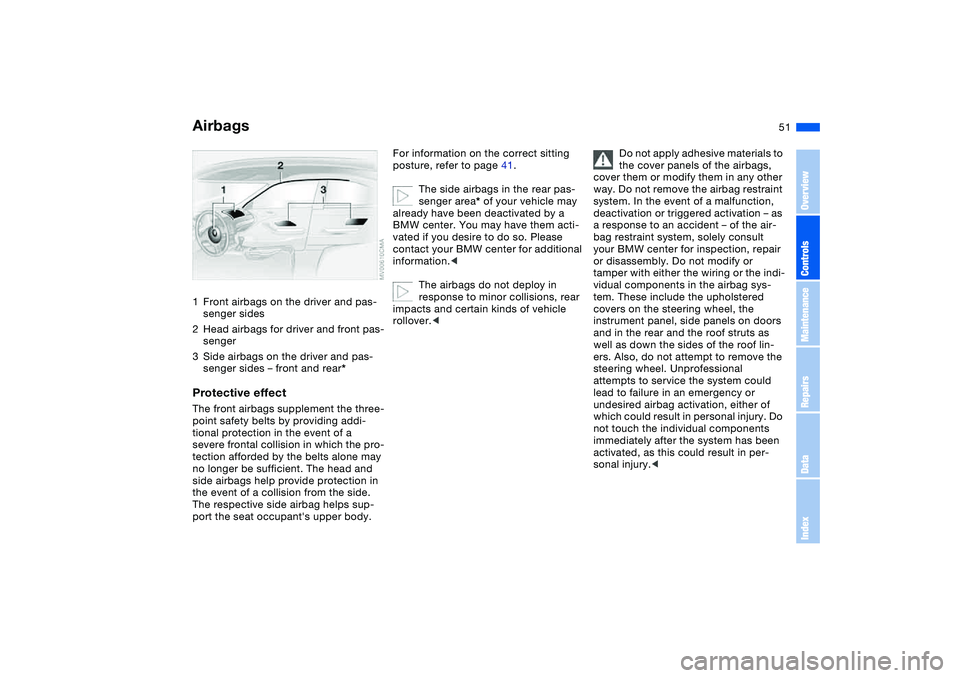
Airbags1Front airbags on the driver and pas-
senger sides
2Head airbags for driver and front pas-
senger
3Side airbags on the driver and pas-
senger sides – front and rear*Protective effectThe front airbags supplement the three-
point safety belts by providing addi-
tional protection in the event of a
severe frontal collision in which the pro-
tection afforded by the belts alone may
no longer be sufficient. The head and
side airbags help provide protection in
the event of a collision from the side.
The respective side airbag helps sup-
port the seat occupant's upper body.
For information on the correct sitting
posture, refer to page 41.
The side airbags in the rear pas-
senger area* of your vehicle may
already have been deactivated by a
BMW center. You may have them acti-
vated if you desire to do so. Please
contact your BMW center for additional
information.<
The airbags do not deploy in
response to minor collisions, rear
impacts and certain kinds of vehicle
rollover.<
Do not apply adhesive materials to
the cover panels of the airbags,
cover them or modify them in any other
way. Do not remove the airbag restraint
system. In the event of a malfunction,
deactivation or triggered activation – as
a response to an accident – of the air-
bag restraint system, solely consult
your BMW center for inspection, repair
or disassembly. Do not modify or
tamper with either the wiring or the indi-
vidual components in the airbag sys-
tem. These include the upholstered
covers on the steering wheel, the
instrument panel, side panels on doors
and in the rear and the roof struts as
well as down the sides of the roof lin-
ers. Also, do not attempt to remove the
steering wheel. Unprofessional
attempts to service the system could
lead to failure in an emergency or
undesired airbag activation, either of
which could result in personal injury. Do
not touch the individual components
immediately after the system has been
activated, as this could result in per-
sonal injury.<
OverviewControlsMaintenanceRepairsDataIndex
Page 59 of 174
59 Driving
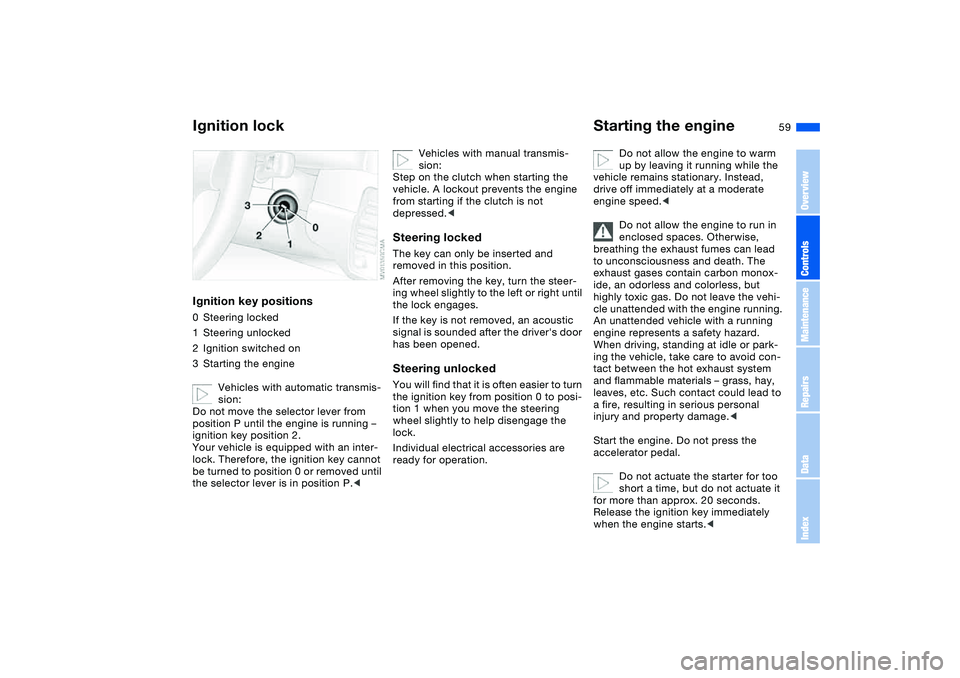
Ignition lockIgnition key positions0Steering locked
1Steering unlocked
2Ignition switched on
3Starting the engine
Vehicles with automatic transmis-
sion:
Do not move the selector lever from
position P until the engine is running –
ignition key position 2.
Your vehicle is equipped with an inter-
lock. Therefore, the ignition key cannot
be turned to position 0 or removed until
the selector lever is in position P.<
Vehicles with manual transmis-
sion:
Step on the clutch when starting the
vehicle. A lockout prevents the engine
from starting if the clutch is not
depressed.<
Steering lockedThe key can only be inserted and
removed in this position.
After removing the key, turn the steer-
ing wheel slightly to the left or right until
the lock engages.
If the key is not removed, an acoustic
signal is sounded after the driver's door
has been opened.Steering unlockedYou will find that it is often easier to turn
the ignition key from position 0 to posi-
tion 1 when you move the steering
wheel slightly to help disengage the
lock.
Individual electrical accessories are
ready for operation.
Starting the engine
Do not allow the engine to warm
up by leaving it running while the
vehicle remains stationary. Instead,
drive off immediately at a moderate
engine speed.<
Do not allow the engine to run in
enclosed spaces. Otherwise,
breathing the exhaust fumes can lead
to unconsciousness and death. The
exhaust gases contain carbon monox-
ide, an odorless and colorless, but
highly toxic gas. Do not leave the vehi-
cle unattended with the engine running.
An unattended vehicle with a running
engine represents a safety hazard.
When driving, standing at idle or park-
ing the vehicle, take care to avoid con-
tact between the hot exhaust system
and flammable materials – grass, hay,
leaves, etc. Such contact could lead to
a fire, resulting in serious personal
injury and property damage.<
Start the engine. Do not press the
accelerator pedal.
Do not actuate the starter for too
short a time, but do not actuate it
for more than approx. 20 seconds.
Release the ignition key immediately
when the engine starts.<
OverviewControlsMaintenanceRepairsDataIndex
Page 61 of 174
61
Switching off the engine
You should never remove the igni-
tion key when the vehicle is in
motion, as the steering lock could
engage.
When you leave the vehicle, always
remove the ignition key and engage the
steering lock.
Always engage the parking brake when
parking on slopes and inclined sur-
faces. Engaging a gear may not provide
adequate resistance to rolling.<
Vehicles with manual
transmissionTurn the ignition key to position 1 or 0.Automatic transmissionMove the selector lever into position P,
and turn the ignition key to position 1 or
0.SMG gearboxIf you turn the ignition key to position 1
or 0 with the selector lever in position
R, or in sequential mode, a gear auto-
matically remains engaged.
If you turn the ignition key to position 1
or 0 with the selector lever in neutral
position N, a warning tone and the
flashing gear indicator in the display
remind you that no gear is engaged to
secure the vehicle against rolling.
The warning stops after approx.
9 seconds.
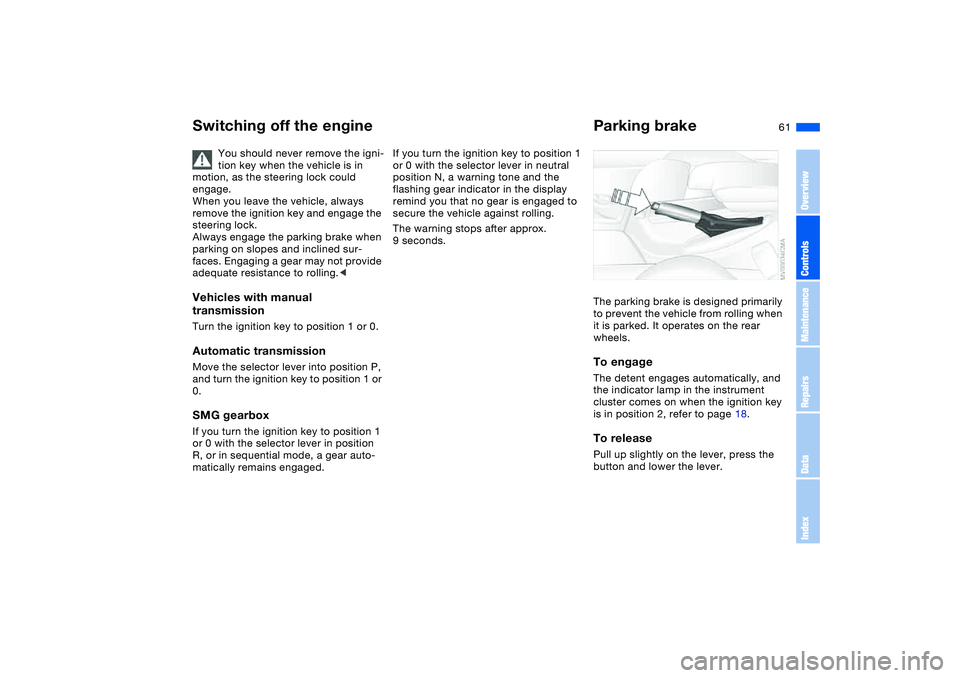
Parking brakeThe parking brake is designed primarily
to prevent the vehicle from rolling when
it is parked. It operates on the rear
wheels.To engageThe detent engages automatically, and
the indicator lamp in the instrument
cluster comes on when the ignition key
is in position 2, refer to page 18.To releasePull up slightly on the lever, press the
button and lower the lever.
OverviewControlsMaintenanceRepairsDataIndex
Page 63 of 174
63
Sequential manual gearbox SMG*The conceptThe sequential manual gearbox SMG is
an automated manual gearbox with
which clutching and shifting is assumed
by an electro-hydraulic system.
The SMG is operated via the selector
lever in the center console and two shift
paddles on the steering wheel.
It offers the following functions:
>Sequential mode: manual mode
>Drive mode: automatic operation
>Ability to choose between two differ-
ent driving programs: Standard,
Sport
>Operating safety through protection
against misshifting
>Automatic upshifts and downshifts in
the drive mode
>Automatic downshifts at minimum
engine rpm
>Kickdown function in the drive mode.
>Acceleration assistant, refer to
page 66
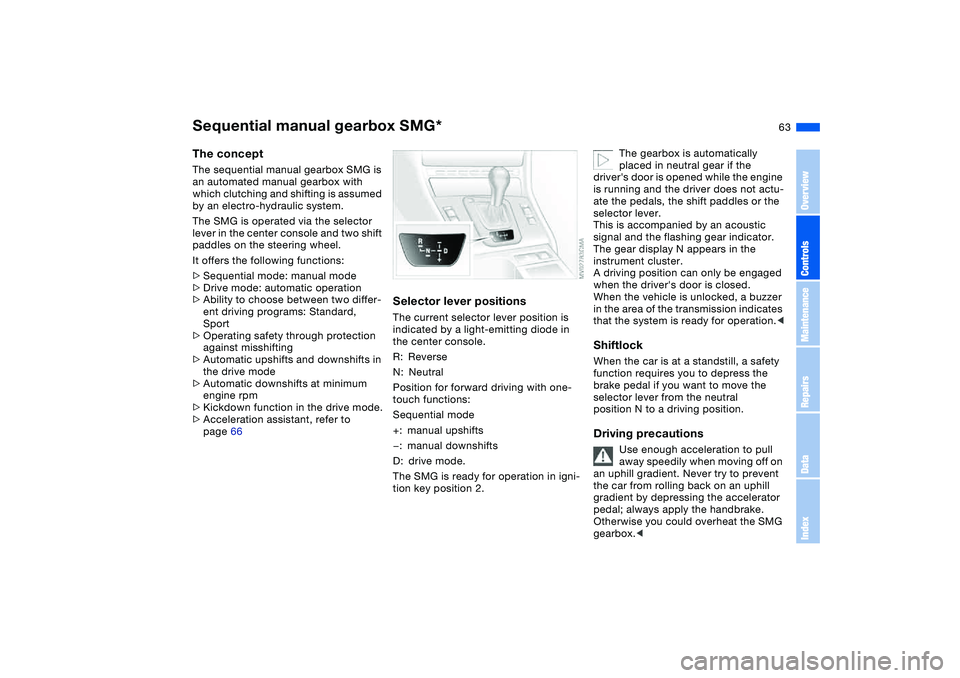
Selector lever positionsThe current selector lever position is
indicated by a light-emitting diode in
the center console.
R: Reverse
N: Neutral
Position for forward driving with one-
touch functions:
Sequential mode
+: manual upshifts
—: manual downshifts
D: drive mode.
The SMG is ready for operation in igni-
tion key position 2.
The gearbox is automatically
placed in neutral gear if the
driver's door is opened while the engine
is running and the driver does not actu-
ate the pedals, the shift paddles or the
selector lever.
This is accompanied by an acoustic
signal and the flashing gear indicator.
The gear display N appears in the
instrument cluster.
A driving position can only be engaged
when the driver's door is closed.
When the vehicle is unlocked, a buzzer
in the area of the transmission indicates
that the system is ready for operation.<
ShiftlockWhen the car is at a standstill, a safety
function requires you to depress the
brake pedal if you want to move the
selector lever from the neutral
position N to a driving position.Driving precautions
Use enough acceleration to pull
away speedily when moving off on
an uphill gradient. Never try to prevent
the car from rolling back on an uphill
gradient by depressing the accelerator
pedal; always apply the handbrake.
Otherwise you could overheat the SMG
gearbox.<
OverviewControlsMaintenanceRepairsDataIndex
Page 64 of 174
64
RReverseSelect only when the vehicle is station-
ary.NNeutralAlways engage before starting the
engine, refer to Starting the engine on
page 60.Sequential modeEach time the engine is started, the
sequential mode is activated as soon as
you move the selector lever into the for-
ward driving position while the brake is
depressed.
The gears are shifted via the shift pad-
dles or the selector lever.
It is also possible to drive off in second
gear, e.g. on snow-covered roads.DDrive modeIn the drive mode all forward gears are
shifted automatically.
To switch from sequential to drive
mode: tap the selector lever to the right
toward D.
For rapid acceleration, e.g. during
passing, depress the accelerator pedal
completely: kickdown.To switch back to sequential mode: tap
the selector lever again to the right
toward D or change the current gear via
the shift paddles or the selector lever.
KickdownYou can achieve maximum acceleration
using kickdown.
Depress the accelerator pedal past the
increased resistance point at the full-
throttle position.
Shifting gearsWith the selector lever:
>To upshift, tap the selector lever
toward +
>To downshift, tap the lever toward —.
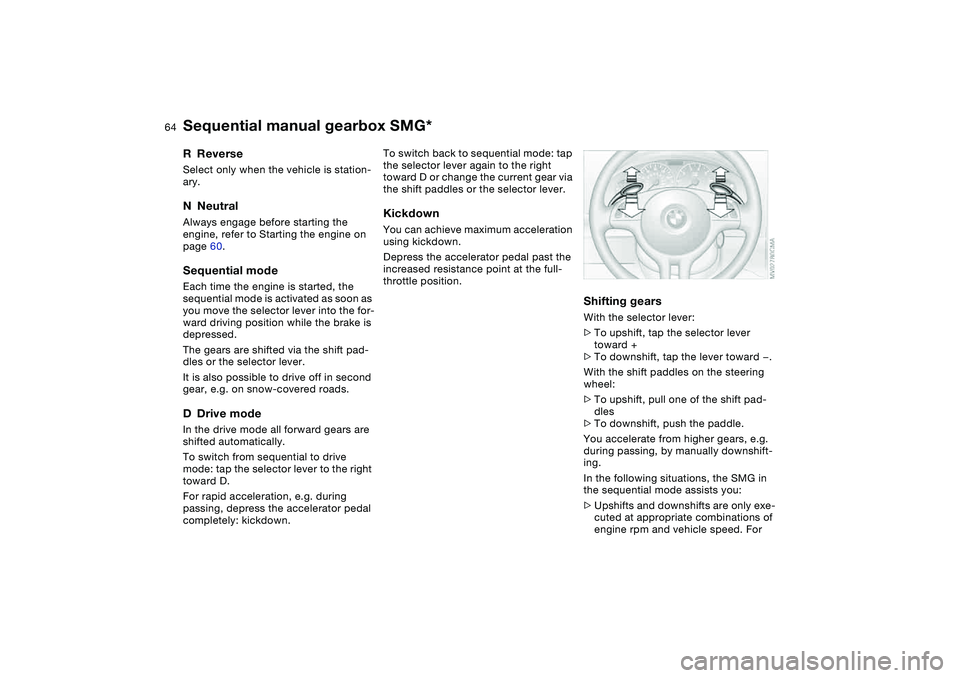
With the shift paddles on the steering
wheel:
>To upshift, pull one of the shift pad-
dles
>To downshift, push the paddle.
You accelerate from higher gears, e.g.
during passing, by manually downshift-
ing.
In the following situations, the SMG in
the sequential mode assists you:
>Upshifts and downshifts are only exe-
cuted at appropriate combinations of
engine rpm and vehicle speed. For
Sequential manual gearbox SMG*
Page 67 of 174
67
Automatic transmission with Steptronic*In addition to the fully automatic opera-
tion, you can also shift gears manually
with Steptronic, refer to page 68.
When you move the selector lever from
the D position to the left into the M/S
range, the performance-oriented shift
programs of the automatic transmission
are engaged. Steptronic enters the
manual selection mode and executes
the desired shift whenever you tap the
selector lever in the direction indicated
by + or –. Whenever you want to use
the automatic mode again, just shift the
selector lever toward the right to posi-
tion D.
Under normal operating conditions, fuel
consumption is lowest when driving in
position D.Selector lever positionsP R N D M/S + –Starting the engineThe engine can only be started in selec-
tor lever positions P – for Park – or N –
for Neutral.
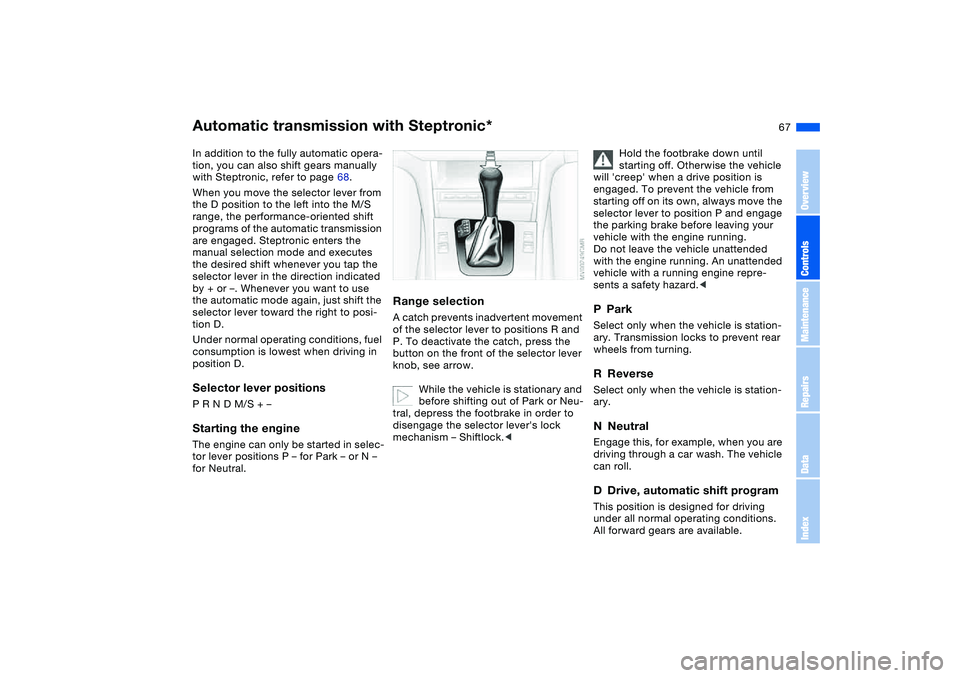
Range selectionA catch prevents inadvertent movement
of the selector lever to positions R and
P. To deactivate the catch, press the
button on the front of the selector lever
knob, see arrow.
While the vehicle is stationary and
before shifting out of Park or Neu-
tral, depress the footbrake in order to
disengage the selector lever's lock
mechanism – Shiftlock.<
Hold the footbrake down until
starting off. Otherwise the vehicle
will 'creep' when a drive position is
engaged. To prevent the vehicle from
starting off on its own, always move the
selector lever to position P and engage
the parking brake before leaving your
vehicle with the engine running.
Do not leave the vehicle unattended
with the engine running. An unattended
vehicle with a running engine repre-
sents a safety hazard.<
PParkSelect only when the vehicle is station-
ary. Transmission locks to prevent rear
wheels from turning.RReverseSelect only when the vehicle is station-
ary.NNeutralEngage this, for example, when you are
driving through a car wash. The vehicle
can roll.DDrive, automatic shift programThis position is designed for driving
under all normal operating conditions.
All forward gears are available.
OverviewControlsMaintenanceRepairsDataIndex
Page 72 of 174
72
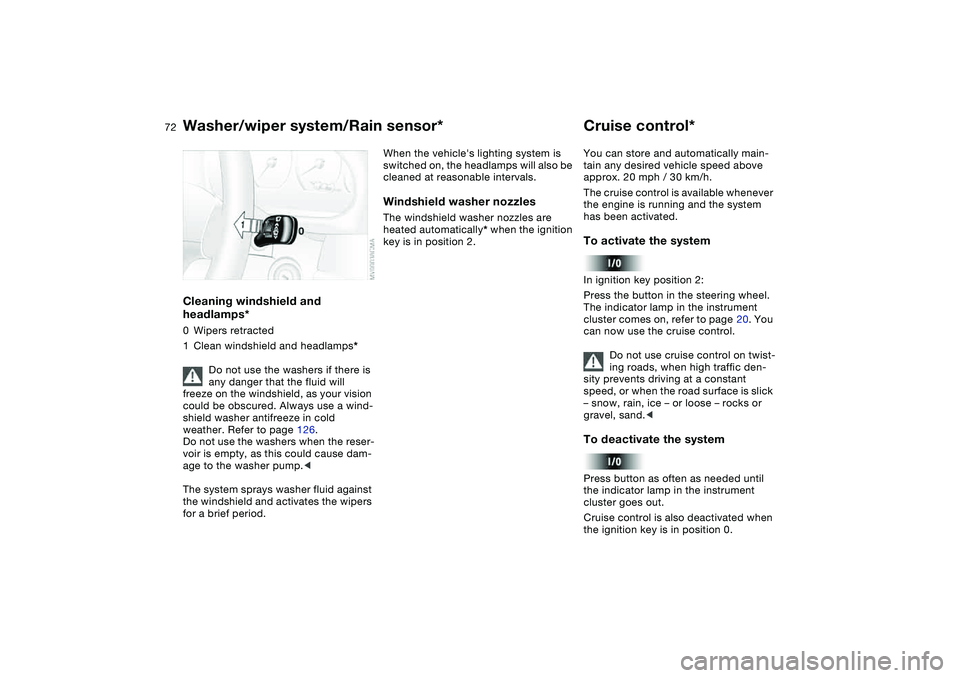
Cleaning windshield and
headlamps*0Wipers retracted
1Clean windshield and headlamps*
Do not use the washers if there is
any danger that the fluid will
freeze on the windshield, as your vision
could be obscured. Always use a wind-
shield washer antifreeze in cold
weather. Refer to page 126.
Do not use the washers when the reser-
voir is empty, as this could cause dam-
age to the washer pump.<
The system sprays washer fluid against
the windshield and activates the wipers
for a brief period.
When the vehicle's lighting system is
switched on, the headlamps will also be
cleaned at reasonable intervals.Windshield washer nozzlesThe windshield washer nozzles are
heated automatically* when the ignition
key is in position 2.
Cruise control*You can store and automatically main-
tain any desired vehicle speed above
approx. 20 mph / 30 km/h.
The cruise control is available whenever
the engine is running and the system
has been activated.To activate the systemIn ignition key position 2:
Press the button in the steering wheel.
The indicator lamp in the instrument
cluster comes on, refer to page 20. You
can now use the cruise control.
Do not use cruise control on twist-
ing roads, when high traffic den-
sity prevents driving at a constant
speed, or when the road surface is slick
– snow, rain, ice – or loose – rocks or
gravel, sand.
cluster goes out.
Cruise control is also deactivated when
the ignition key is in position 0.
Washer/wiper system/Rain sensor*
Page 82 of 174
82
Under these special circumstances
traction is increased by deactivating the
control systems that enhance traction
under normal conditions.Deactivating the DSC and the
DTCPress the DSC button as long as you
need to until the indicator lamp and the
yellow brake warning lamp light up, but
no more than 10 seconds.
The systems for enhancing stability and
traction are deactivated, and there is no
active braking intervention or torque
control.
To maintain vehicle stability,
always drive with the DSC acti-
vated whenever possible.
is deactivated.
The laws of physics cannot be
repealed even with DSC. It will
always be the driver's responsibility to
drive in a manner that matches road
conditions. This is why you should not
use the additional safety margin the
system provides as an excuse to take
risks.
Whenever the DTC is activated, the
DSC is switched off and DTC performs
minor stabilizing intervention.
Do not make any modifications to the
DSC system. Allow only authorized
technicians to perform service proce-
dures on the DSC.<
Flat Tire Monitor*The conceptAs you drive, the Flat Tire Monitor
keeps track of pressure levels in all four
tires. The system alerts you whenever
the inflation pressure of a tire falls sig-
nificantly below the pressure of another
tire.
The system actually detects pressure
loss by monitoring differences in the
relative speeds of the four wheels. It
interprets variations outside specified
limits as severe pressure loss, and then
responds by generating a warning.Functional requirementsIn order for the Flat Tire Monitor to learn
the correct tire inflation pressure,
please do the following:
1. Check the tire inflation pressures in
all tires
2. Compare them with the tire inflation
pressure table, refer to page 116,
and correct them, if necessary
3. Initialize the system.
Dynamic Stability Control (DSC)
Page 83 of 174
83
System limitations
The Flat Tire Monitor cannot pro-
vide you with advance warning of
sudden and severe tire damage caused
by external factors and does not detect
the balanced and very gradual pressure
loss that takes place in all four tires
over an extended period of time.<
On the other hand, the following situa-
tions can lead to a delayed detection of
pressure loss and even to the system
not functioning:
>Driving on snow-covered or slippery
roads
>Performance-oriented driving: slip at
the drive wheels, high levels of lateral
acceleration
>When driving with snow chains, false
warnings and undetected pressure
losses may occur
>When driving with a space-saver
spare tire, the Flat Tire Monitor can-
not function.
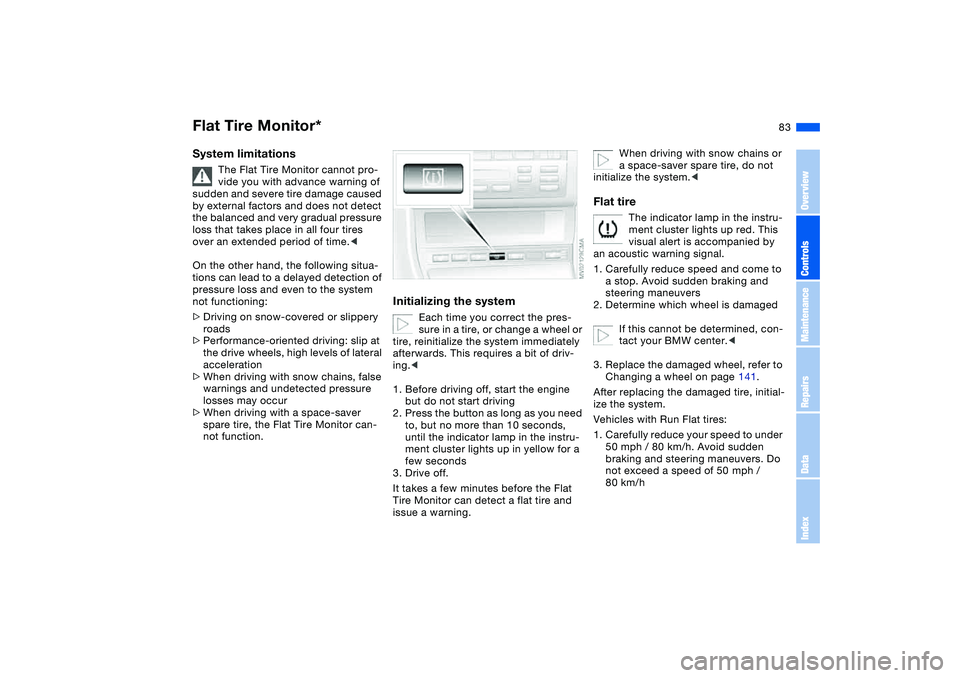
Initializing the system
Each time you correct the pres-
sure in a tire, or change a wheel or
tire, reinitialize the system immediately
afterwards. This requires a bit of driv-
ing.<
1. Before driving off, start the engine
but do not start driving
2. Press the button as long as you need
to, but no more than 10 seconds,
until the indicator lamp in the instru-
ment cluster lights up in yellow for a
few seconds
3. Drive off.
It takes a few minutes before the Flat
Tire Monitor can detect a flat tire and
issue a warning.
When driving with snow chains or
a space-saver spare tire, do not
initialize the system.<
Flat tire
The indicator lamp in the instru-
ment cluster lights up red. This
visual alert is accompanied by
an acoustic warning signal.
1. Carefully reduce speed and come to
a stop. Avoid sudden braking and
steering maneuvers
2. Determine which wheel is damaged
If this cannot be determined, con-
tact your BMW center.<
3. Replace the damaged wheel, refer to
Changing a wheel on page 141.
After replacing the damaged tire, initial-
ize the system.
Vehicles with Run Flat tires:
1. Carefully reduce your speed to under
50 mph / 80 km/h. Avoid sudden
braking and steering maneuvers. Do
not exceed a speed of 50 mph /
80 km/h
Flat Tire Monitor*
OverviewControlsMaintenanceRepairsDataIndex
Page 115 of 174
115
Antilock Brake System (ABS)The conceptABS keeps the wheels from locking
during braking, thereby enhancing
active driving safety.Braking with ABSIf you are in a situation that requires full
braking, you will exploit the full benefits
of the ABS system if you apply maxi-
mum pedal pressure: panic stop. Since
the vehicle maintains steering respon-
siveness, you can avoid possible obsta-
cles with a minimum of steering effort,
despite the full brake application.
Pulsation at the brake pedal combined
with sounds from the hydraulic circuits
indicates to the driver that ABS is in its
active mode.Dynamic Brake Control (DBC)DBC is included in the DSC, refer to
page 81.
The system responds to sudden, high-
intensity applications of force to the
brake pedal by automatically braking
the vehicle with maximum boost to
achieve the shortest-possible braking
distances during 'panic stops'. This
system exploits all the benefits of ABS.Do not reduce the pressure exerted
against the brake pedal until the brak-
ing maneuver has been completed.
DBC is deactivated when you release
the brake pedal.
Cornering Brake Control (CBC)CBC is an advanced engineering devel-
opment of ABS. When braking during
cornering with high lateral accelera-
tion, or when braking during a lane
change, vehicle stability is improved
and the steering response is enhanced.
OverviewControlsMaintenanceRepairsDataIndex