check engine light BMW 325I 2005 User Guide
[x] Cancel search | Manufacturer: BMW, Model Year: 2005, Model line: 325I, Model: BMW 325I 2005Pages: 166, PDF Size: 4.98 MB
Page 123 of 166
Reference
At a glance
Controls
Driving tips
Mobility
121
If BMW High Performance Synthetic Oil is not
available, you can add small quantities of other
synthetic oils in between oil changes. Only use
oils with the API SH specification or higher.
Your BMW Center will be glad to answer
any questions regarding BMW High Per-
formance Synthetic Oil or approved synthetic
oils.<
You can also call BMW of North America at
1-800-831-1117 or visit the website
www.bmwusa.com to obtain this information.
Viscosity ratings
Viscosity is a measure of an oil's flow rating and
is categorized in SAE classes.
Selecting the appropriate SAE class depends
on the regional climatic conditions in which you
normally drive your BMW.
Approved oils belong to the 5W-40 and
5W-30 classes.<
These oils can be used for driving at all outside
temperatures.
Coolant
Do not add coolant to the cooling system
when the engine is hot. Escaping coolant
can cause burns.<
Coolant is a mixture of water and an additive.
Not all commercially available additives are suit-
able for your BMW. Ask your BMW Center for
suitable additives.
Only use suitable additives, otherwise
engine damage may result. The additives
are hazardous to your health.<
Comply with the appropriate environ-
mental protection regulations when dis-
posing of coolant additives.<
Checking coolant level
1.The engine must be at ambient tempera-
ture.
2.Turn the cap of the expansion tank a little
counterclockwise to allow any accumulated pressure to escape, then continue turning
to open.
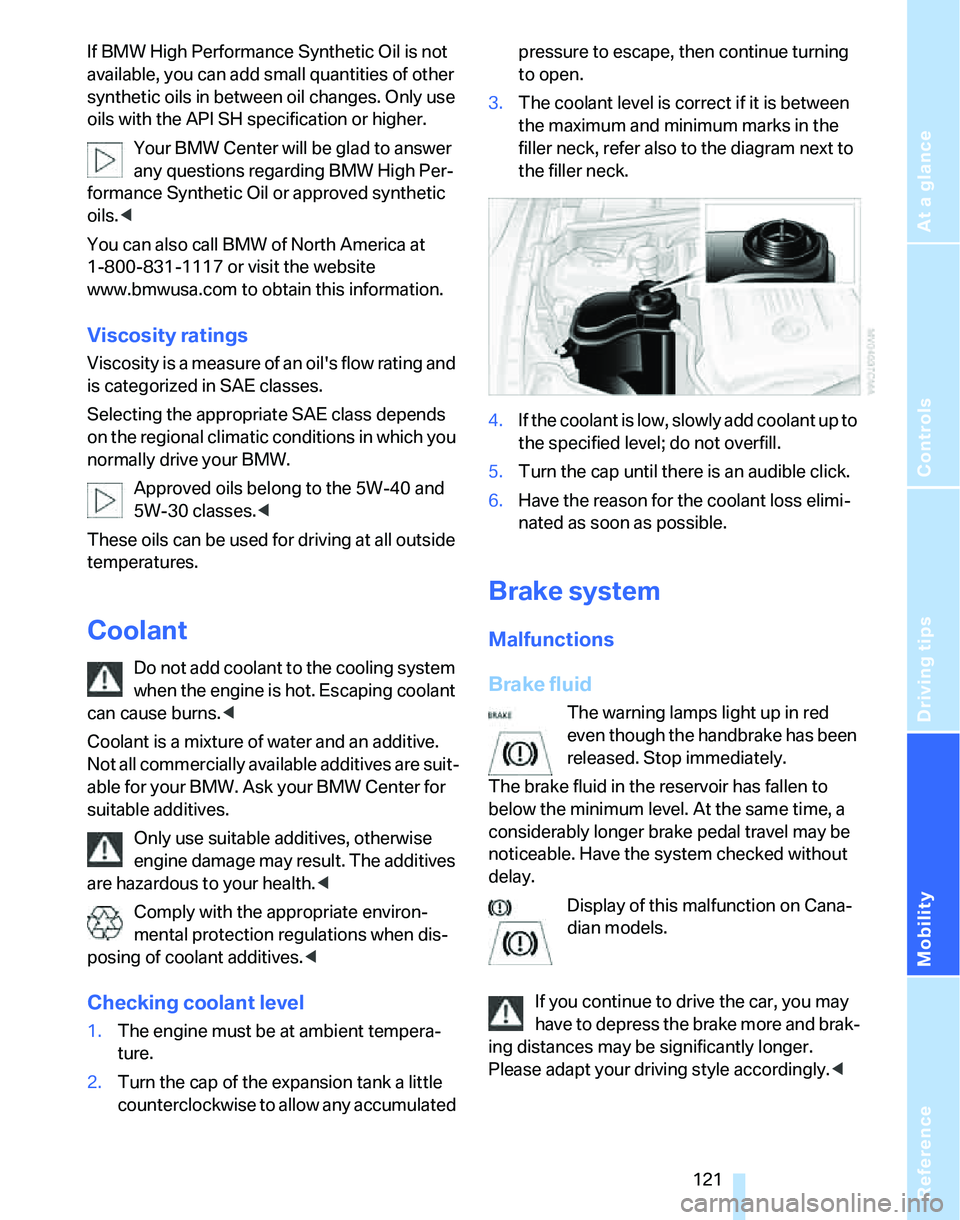
3.The coolant level is correct if it is between
the maximum and minimum marks in the
filler neck, refer also to the diagram next to
the filler neck.
4.If the coolant is low, slowly add coolant up to
the specified level; do not overfill.
5.Turn the cap until there is an audible click.
6.Have the reason for the coolant loss elimi-
nated as soon as possible.
Brake system
Malfunctions
Brake fluid
The warning lamps light up in red
even though the handbrake has been
released. Stop immediately.
The brake fluid in the reservoir has fallen to
below the minimum level. At the same time, a
considerably longer brake pedal travel may be
noticeable. Have the system checked without
delay.
Display of this malfunction on Cana-
dian models.
If you continue to drive the car, you may
have to depress the brake more and brak-
ing distances may be significantly longer.
Please adapt your driving style accordingly.<
Page 126 of 166
Maintenance
124
Socket for On-Board
Diagnosis OBD
Primary components that make up exhaust
emissions can be checked by a device via the
OBD socket.
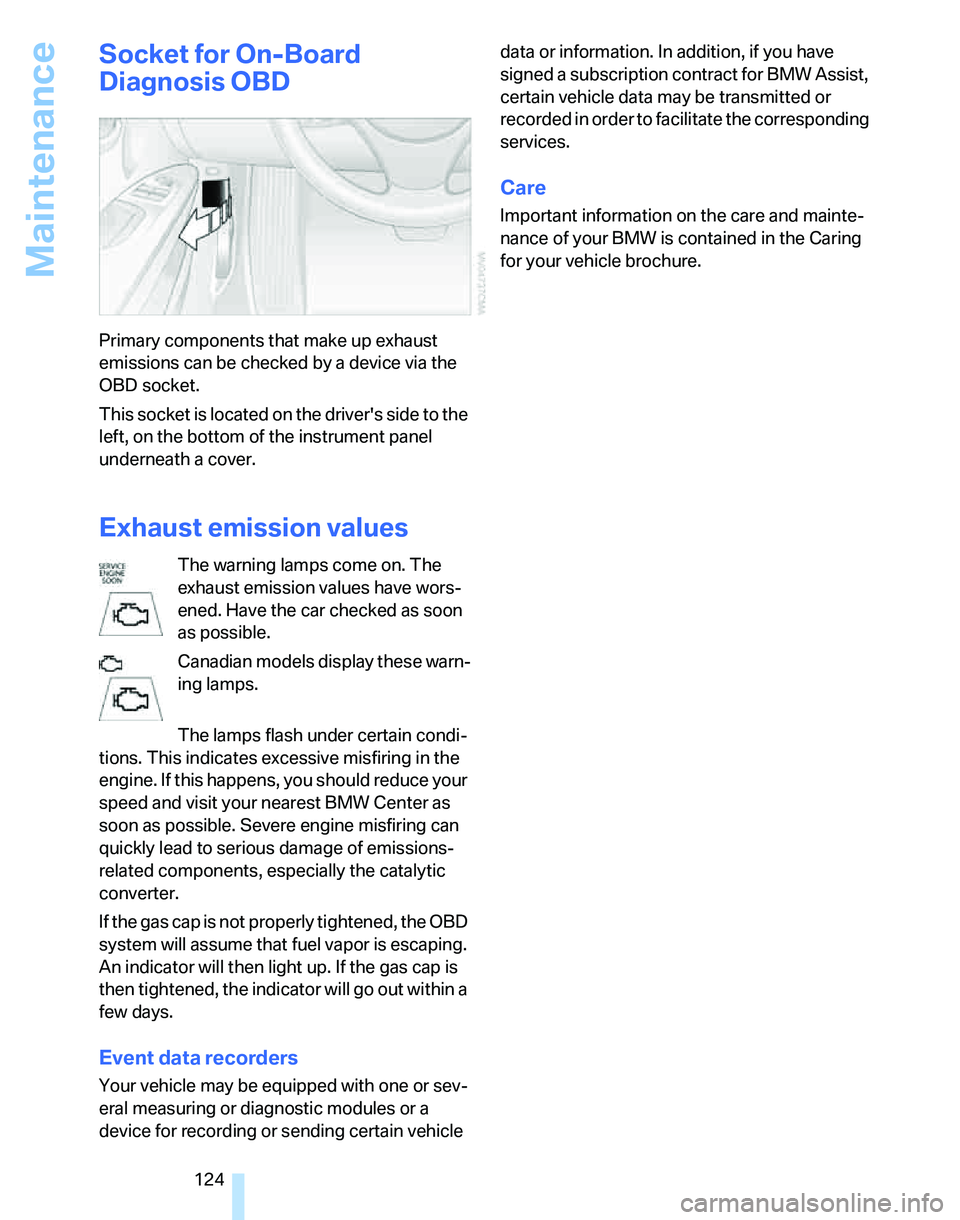
This socket is located on the driver's side to the
left, on the bottom of the instrument panel
underneath a cover.
Exhaust emission values
The warning lamps come on. The
exhaust emission values have wors-
ened. Have the car checked as soon
as possible.
Canadian models display these warn-
ing lamps.
The lamps flash under certain condi-
tions. This indicates excessive misfiring in the
engine. If this happens, you should reduce your
speed and visit your nearest BMW Center as
soon as possible. Severe engine misfiring can
quickly lead to serious damage of emissions-
related components, especially the catalytic
converter.
If the gas cap is not properly tightened, the OBD
system will assume that fuel vapor is escaping.
An indicator will then light up. If the gas cap is
then tightened, the indicator will go out within a
few days.
Event data recorders
Your vehicle may be equipped with one or sev-
eral measuring or diagnostic modules or a
device for recording or sending certain vehicle data or information. In addition, if you have
signed a subscription contract for BMW Assist,
certain vehicle data may be transmitted or
recorded in order to facilitate the corresponding
services.
Care
Important information on the care and mainte-
nance of your BMW is contained in the Caring
for your vehicle brochure.
Page 128 of 166
Replacing components
126 lasers, are officially designated as Class 1 light-
emitting diodes.
Do not remove the covers or expose the
eyes directly to the unfiltered light source
for several hours at a time, otherwise this could
cause irritation to the retina.<
Xenon lamps*
The service life of these bulbs is very long and
the probability of a failure is very low, provided
that they are not switched on and off an unusual
number of times. If a xenon lamp fails neverthe-
less, switch on the fog lamps and continue the
journey with great care, provided that local leg-
islation does not prohibit this.
Have work on the xenon lighting system
performed only by your BMW Center or a
workshop that works according to BMW repair
procedures with correspondingly trained per-
sonnel. Due to the high electrical voltages
present, there is a risk of potentially fatal acci-
dents if work is performed inappropriate.<
Parking lamps, roadside parking lamps
In the event of a malfunction, please contact
your BMW Center or a workshop that works
according to BMW repair procedures with cor-
respondingly trained personnel.
Halogen lamps
H7 bulb, 55 watts
Always wear gloves and eye protection;
the atmosphere within the H7 bulb is
pressurized. Otherwise there is a risk of injury if
the bulb is damaged.<
There are separate headlamp covers for low-
beam headlamps and high-beam headlamps.
Be careful when installing the covers, oth-
erwise leaks could occur and cause dam-
age to the headlamp system.<
For checking and adjusting headlamp
aim, please contact your BMW Center.<
Access to the lamps
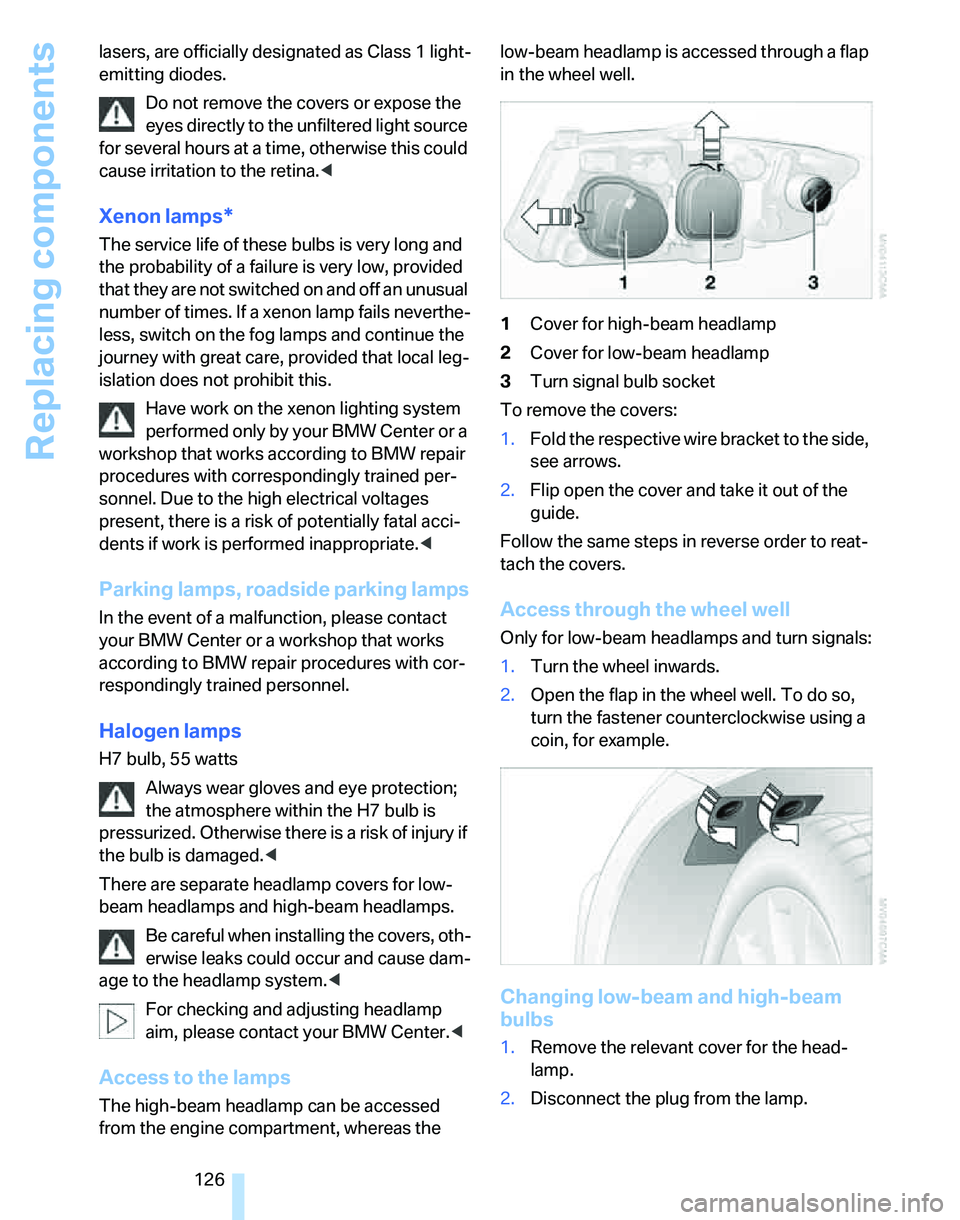
The high-beam headlamp can be accessed
from the engine compartment, whereas the low-beam headlamp is accessed through a flap
in the wheel well.
1Cover for high-beam headlamp
2Cover for low-beam headlamp
3Turn signal bulb socket
To remove the covers:
1.Fold the respective wire bracket to the side,
see arrows.
2.Flip open the cover and take it out of the
guide.
Follow the same steps in reverse order to reat-
tach the covers.
Access through the wheel well
Only for low-beam headlamps and turn signals:
1.Turn the wheel inwards.
2.Open the flap in the wheel well. To do so,
turn the fastener counterclockwise using a
coin, for example.
Changing low-beam and high-beam
bulbs
1.Remove the relevant cover for the head-
lamp.
2.Disconnect the plug from the lamp.
Page 135 of 166
Reference
At a glance
Controls
Driving tips
Mobility
133
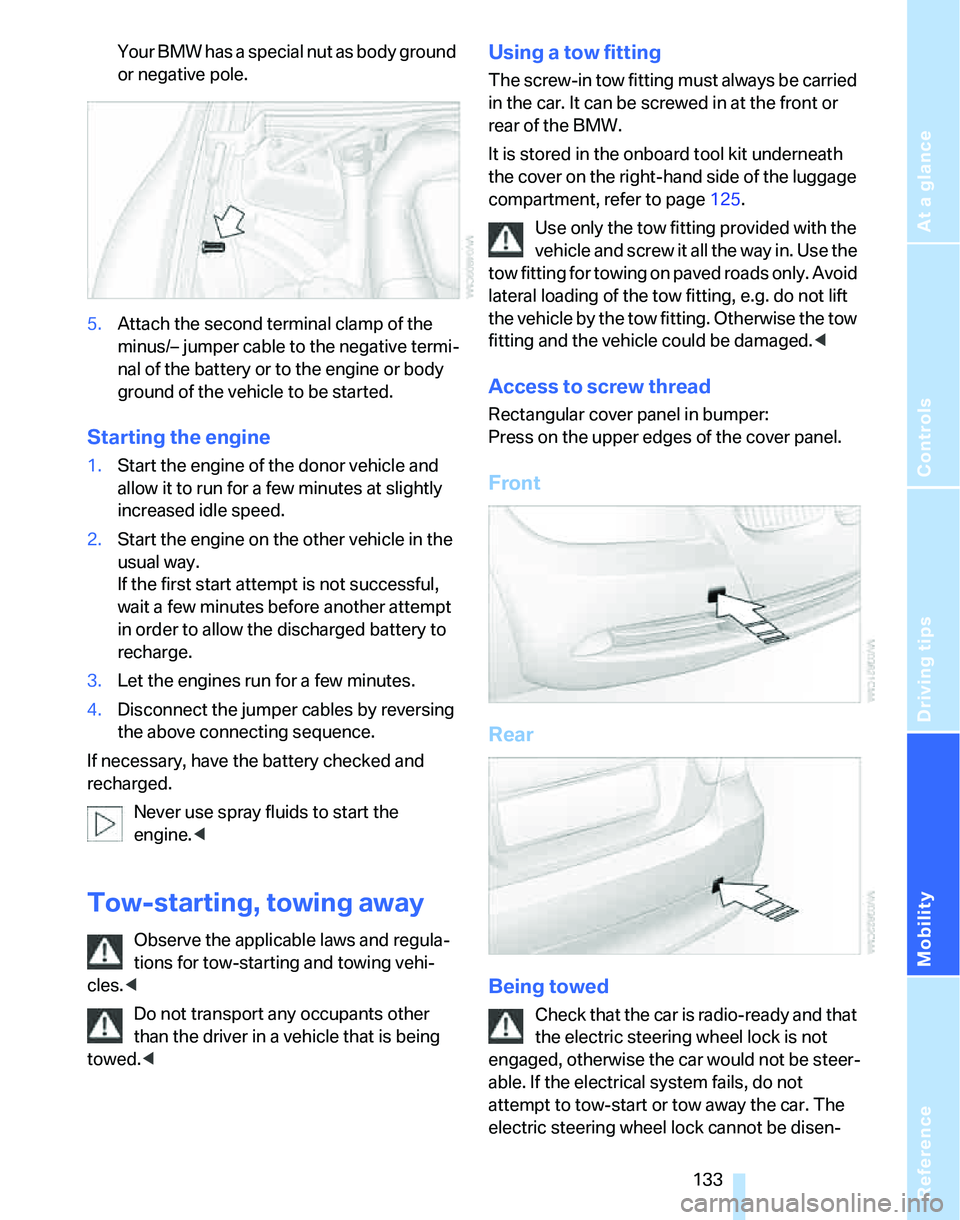
Your BMW has a special nut as body ground
or negative pole.
5.Attach the second terminal clamp of the
minus/– jumper cable to the negative termi-
nal of the battery or to the engine or body
ground of the vehicle to be started.
Starting the engine
1.Start the engine of the donor vehicle and
allow it to run for a few minutes at slightly
increased idle speed.
2.Start the engine on the other vehicle in the
usual way.
If the first start attempt is not successful,
wait a few minutes before another attempt
in order to allow the discharged battery to
recharge.
3.Let the engines run for a few minutes.
4.Disconnect the jumper cables by reversing
the above connecting sequence.
If necessary, have the battery checked and
recharged.
Never use spray fluids to start the
engine.<
Tow-starting, towing away
Observe the applicable laws and regula-
tions for tow-starting and towing vehi-
cles.<
Do not transport any occupants other
than the driver in a vehicle that is being
towed.<
Using a tow fitting
The screw-in tow fitting must always be carried
in the car. It can be screwed in at the front or
rear of the BMW.
It is stored in the onboard tool kit underneath
the cover on the right-hand side of the luggage
compartment, refer to page125.
Use only the tow fitting provided with the
vehicle and screw it all the way in. Use the
tow fitting for towing on paved roads only. Avoid
lateral loading of the tow fitting, e.g. do not lift
the vehicle by the tow fitting. Otherwise the tow
fitting and the vehicle could be damaged.<
Access to screw thread
Rectangular cover panel in bumper:
Press on the upper edges of the cover panel.
Front
Rear
Being towed
Check that the car is radio-ready and that
the electric steering wheel lock is not
engaged, otherwise the car would not be steer-
able. If the electrical system fails, do not
attempt to tow-start or tow away the car. The
electric steering wheel lock cannot be disen-
Page 139 of 166
Reference
At a glance
Controls
Driving tips
Mobility
137
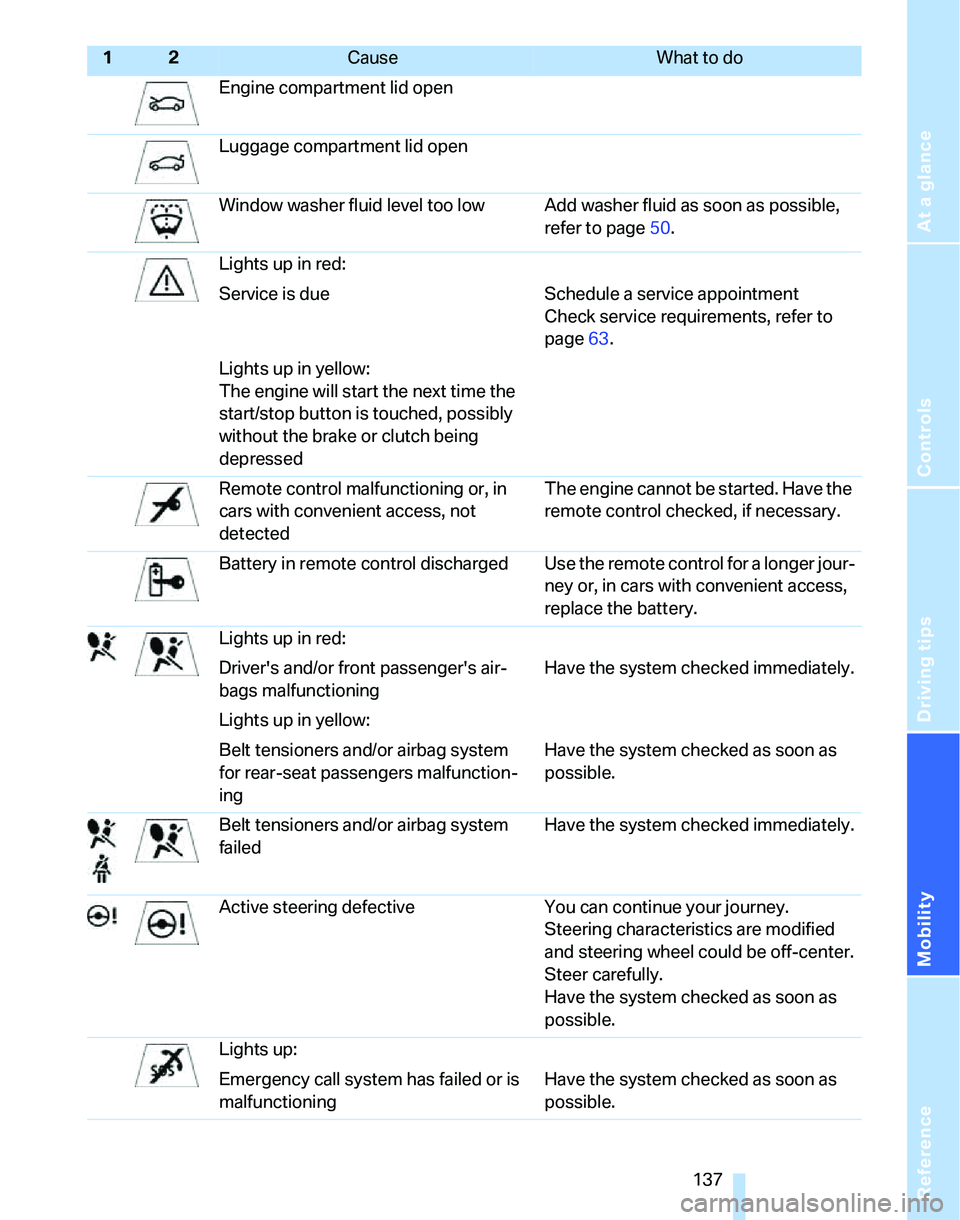
Engine compartment lid open
Luggage compartment lid open
Window washer fluid level too low Add washer fluid as soon as possible,
refer to page50.
Lights up in red:
Service is due Schedule a service appointment
Check service requirements, refer to
page63.
Lights up in yellow:
The engine will start the next time the
start/stop button is touched, possibly
without the brake or clutch being
depressed
Remote control malfunctioning or, in
cars with convenient access, not
detectedThe engine cannot be started. Have the
remote control checked, if necessary.
Battery in remote control discharged Use the remote control for a longer jour-
ney or, in cars with convenient access,
replace the battery.
Lights up in red:
Driver's and/or front passenger's air-
bags malfunctioningHave the system checked immediately.
Lights up in yellow:
Belt tensioners and/or airbag system
for rear-seat passengers malfunction-
ingHave the system checked as soon as
possible.
Belt tensioners and/or airbag system
failedHave the system checked immediately.
Active steering defective You can continue your journey.
Steering characteristics are modified
and steering wheel could be off-center.
Steer carefully.
Have the system checked as soon as
possible.
Lights up:
Emergency call system has failed or is
malfunctioningHave the system checked as soon as
possible.
12Cause What to do
Page 140 of 166
Indicator and warning lamps
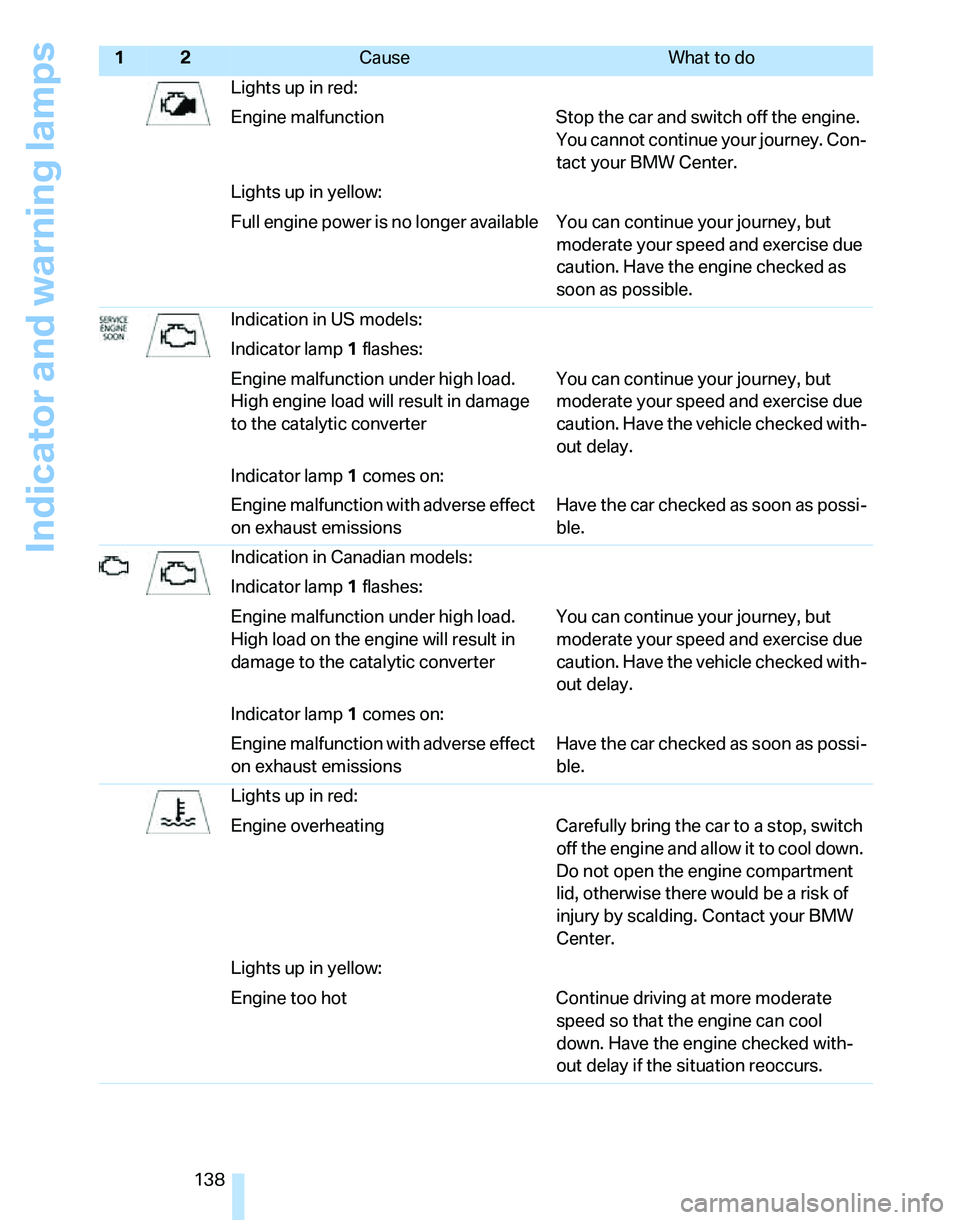
138Lights up in red:
Engine malfunction Stop the car and switch off the engine.
You cannot continue your journey. Con-
tact your BMW Center.
Lights up in yellow:
Full engine power is no longer available You can continue your journey, but
moderate your speed and exercise due
caution. Have the engine checked as
soon as possible.
Indication in US models:
Indicator lamp1 flashes:
Engine malfunction under high load.
High engine load will result in damage
to the catalytic converterYou can continue your journey, but
moderate your speed and exercise due
caution. Have the vehicle checked with-
out delay.
Indicator lamp1 comes on:
Engine malfunction with adverse effect
on exhaust emissionsHave the car checked as soon as possi-
ble.
Indication in Canadian models:
Indicator lamp1 flashes:
Engine malfunction under high load.
High load on the engine will result in
damage to the catalytic converterYou can continue your journey, but
moderate your speed and exercise due
caution. Have the vehicle checked with-
out delay.
Indicator lamp1 comes on:
Engine malfunction with adverse effect
on exhaust emissionsHave the car checked as soon as possi-
ble.
Lights up in red:
Engine overheating Carefully bring the car to a stop, switch
off the engine and allow it to cool down.
Do not open the engine compartment
lid, otherwise there would be a risk of
injury by scalding. Contact your BMW
Center.
Lights up in yellow:
Engine too hot Continue driving at more moderate
speed so that the engine can cool
down. Have the engine checked with-
out delay if the situation reoccurs.
12Cause What to do
Page 142 of 166
Indicator and warning lamps
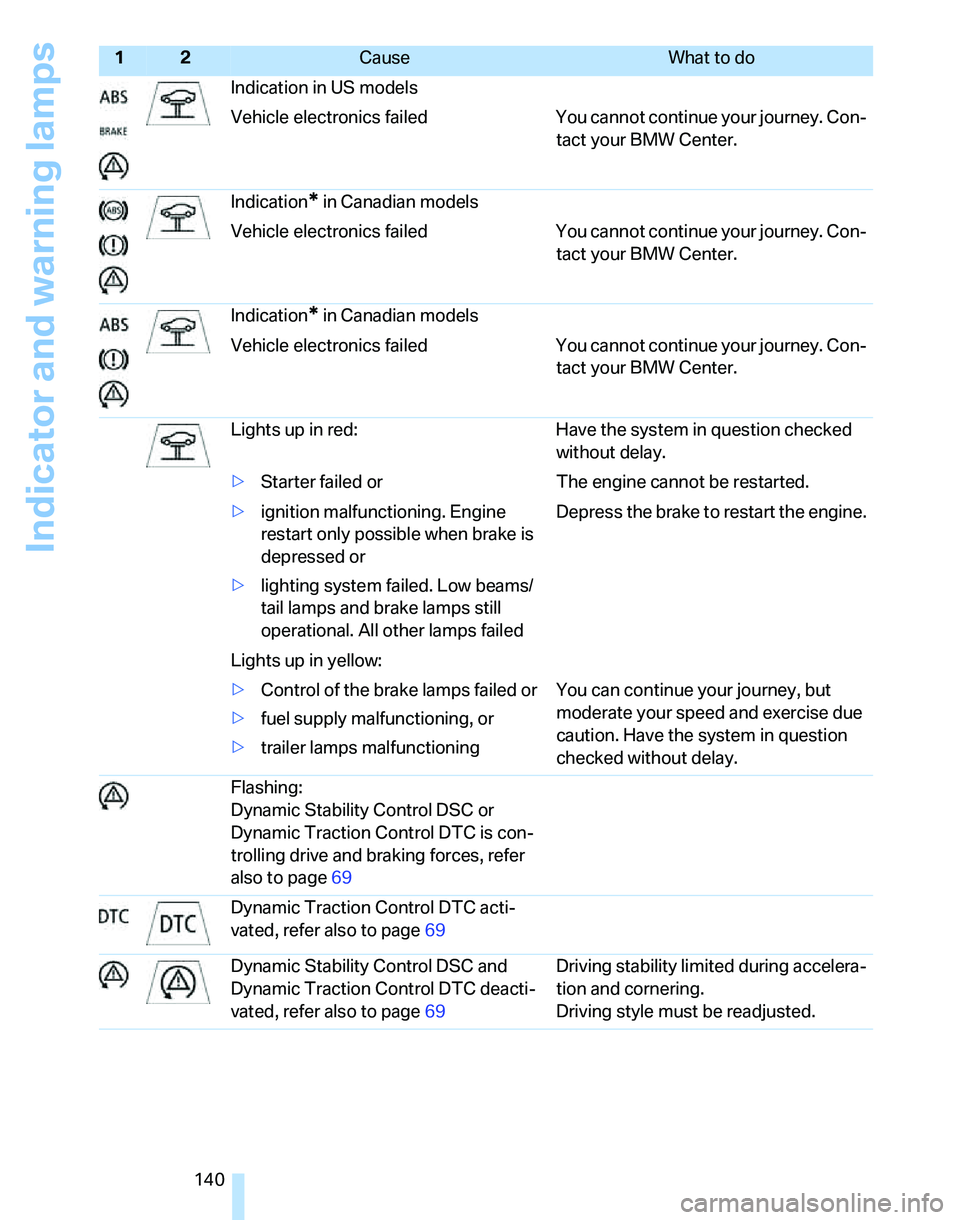
140Indication in US models
Vehicle electronics failed You cannot continue your journey. Con-
tact your BMW Center.
Indication
* in Canadian models
Vehicle electronics failed You cannot continue your journey. Con-
tact your BMW Center.
Indication
* in Canadian models
Vehicle electronics failed You cannot continue your journey. Con-
tact your BMW Center.
Lights up in red: Have the system in question checked
without delay.
>Starter failed or The engine cannot be restarted.
>ignition malfunctioning. Engine
restart only possible when brake is
depressed or
>lighting system failed. Low beams/
tail lamps and brake lamps still
operational. All other lamps failedDepress the brake to restart the engine.
Lights up in yellow:
>Control of the brake lamps failed or
>fuel supply malfunctioning, or
>trailer lamps malfunctioning You can continue your journey, but
moderate your speed and exercise due
caution. Have the system in question
checked without delay.
Flashing:
Dynamic Stability Control DSC or
Dynamic Traction Control DTC is con-
trolling drive and braking forces, refer
also to page69
Dynamic Traction Control DTC acti-
vated, refer also to page69
Dynamic Stability Control DSC and
Dynamic Traction Control DTC deacti-
vated, refer also to page69Driving stability limited during accelera-
tion and cornering.
Driving style must be readjusted.
12Cause What to do
Page 144 of 166
Indicator and warning lamps
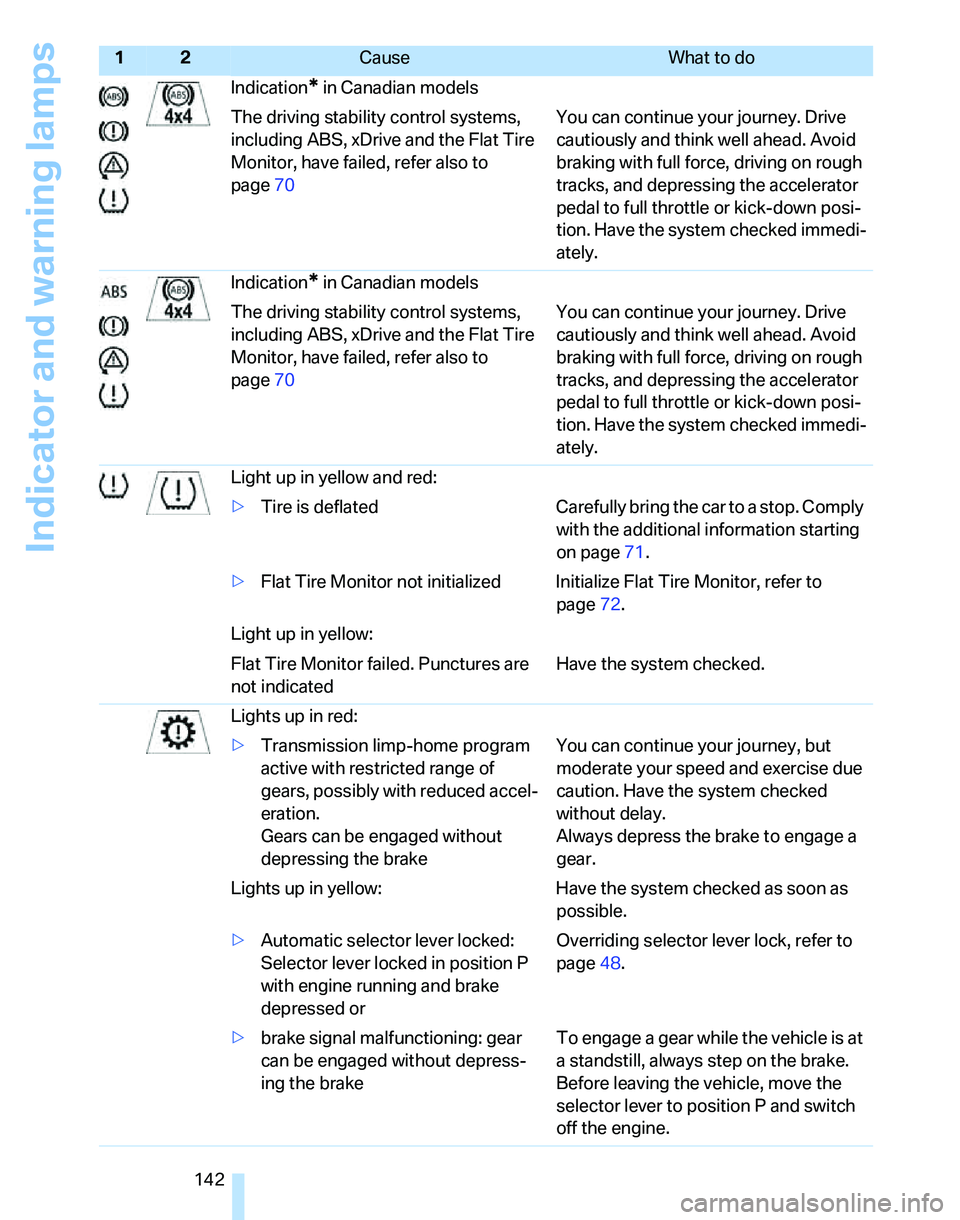
142Indication
* in Canadian models
The driving stability control systems,
including ABS, xDrive and the Flat Tire
Monitor, have failed, refer also to
page70You can continue your journey. Drive
cautiously and think well ahead. Avoid
braking with full force, driving on rough
tracks, and depressing the accelerator
pedal to full throttle or kick-down posi-
tion. Have the system checked immedi-
ately.
Indication
* in Canadian models
The driving stability control systems,
including ABS, xDrive and the Flat Tire
Monitor, have failed, refer also to
page70You can continue your journey. Drive
cautiously and think well ahead. Avoid
braking with full force, driving on rough
tracks, and depressing the accelerator
pedal to full throttle or kick-down posi-
tion. Have the system checked immedi-
ately.
Light up in yellow and red:
>Tire is deflated Carefully bring the car to a stop. Comply
with the additional information starting
on page71.
>Flat Tire Monitor not initialized Initialize Flat Tire Monitor, refer to
page72.
Light up in yellow:
Flat Tire Monitor failed. Punctures are
not indicatedHave the system checked.
Lights up in red:
>Transmission limp-home program
active with restricted range of
gears, possibly with reduced accel-
eration.
Gears can be engaged without
depressing the brakeYou can continue your journey, but
moderate your speed and exercise due
caution. Have the system checked
without delay.
Always depress the brake to engage a
gear.
Lights up in yellow: Have the system checked as soon as
possible.
>Automatic selector lever locked:
Selector lever locked in position P
with engine running and brake
depressed orOverriding selector lever lock, refer to
page48.
>brake signal malfunctioning: gear
can be engaged without depress-
ing the brakeTo engage a gear while the vehicle is at
a standstill, always step on the brake.
Before leaving the vehicle, move the
selector lever to position P and switch
off the engine.
12Cause What to do
Page 145 of 166
Reference
At a glance
Controls
Driving tips
Mobility
143
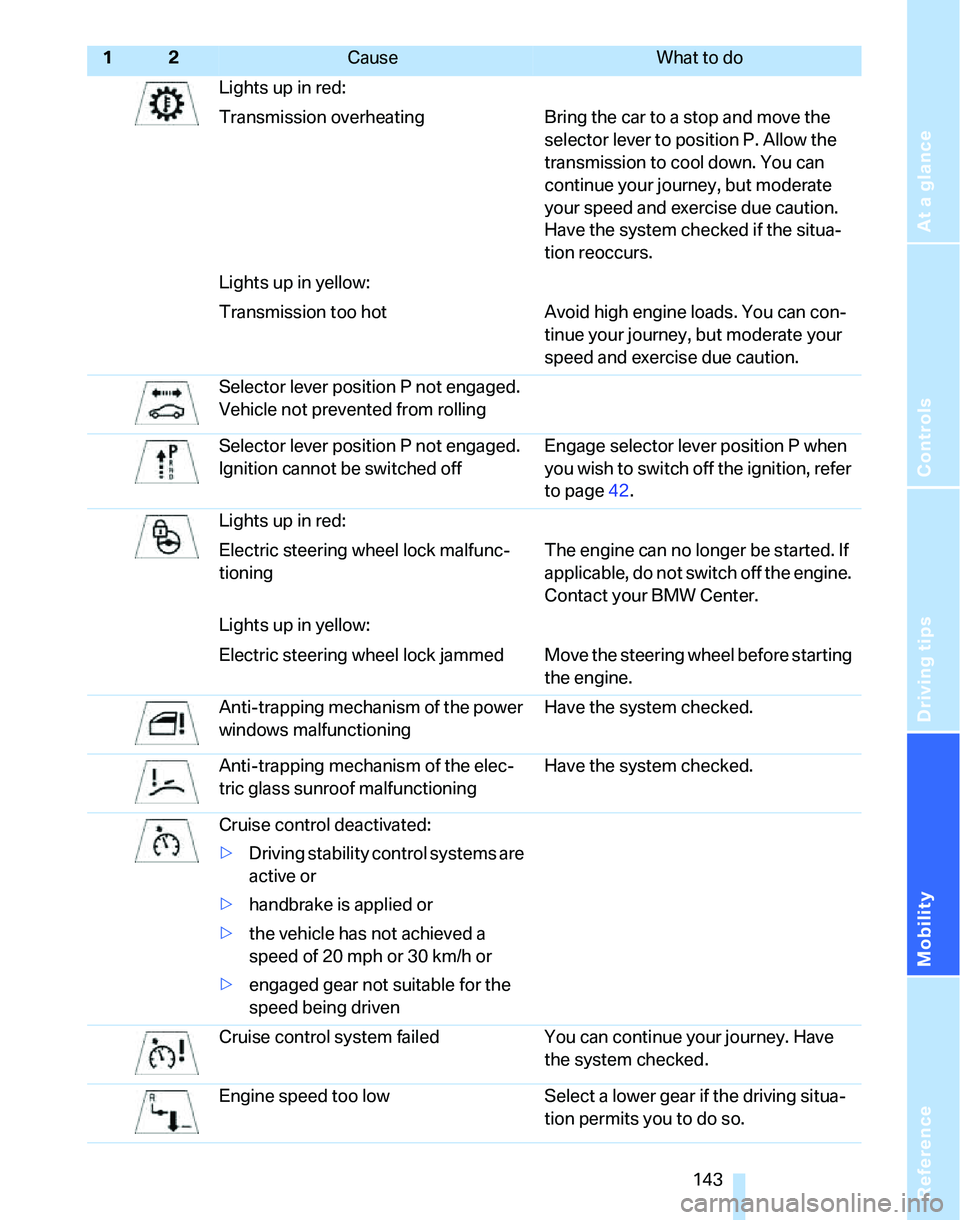
Lights up in red:
Transmission overheating Bring the car to a stop and move the
selector lever to position P. Allow the
transmission to cool down. You can
continue your journey, but moderate
your speed and exercise due caution.
Have the system checked if the situa-
tion reoccurs.
Lights up in yellow:
Transmission too hot Avoid high engine loads. You can con-
tinue your journey, but moderate your
speed and exercise due caution.
Selector lever position P not engaged.
Vehicle not prevented from rolling
Selector lever position P not engaged.
Ignition cannot be switched offEngage selector lever position P when
you wish to switch off the ignition, refer
to page42.
Lights up in red:
Electric steering wheel lock malfunc-
tioningThe engine can no longer be started. If
applicable, do not switch off the engine.
Contact your BMW Center.
Lights up in yellow:
Electric steering wheel lock jammed Move the steering wheel before starting
the engine.
Anti-trapping mechanism of the power
windows malfunctioningHave the system checked.
Anti-trapping mechanism of the elec-
tric glass sunroof malfunctioningHave the system checked.
Cruise control deactivated:
>Driving stability control systems are
active or
>handbrake is applied or
>the vehicle has not achieved a
speed of 20 mph or 30 km/h or
>engaged gear not suitable for the
speed being driven
Cruise control system failed You can continue your journey. Have
the system checked.
Engine speed too low Select a lower gear if the driving situa-
tion permits you to do so.
12Cause What to do
Page 146 of 166
Indicator and warning lamps
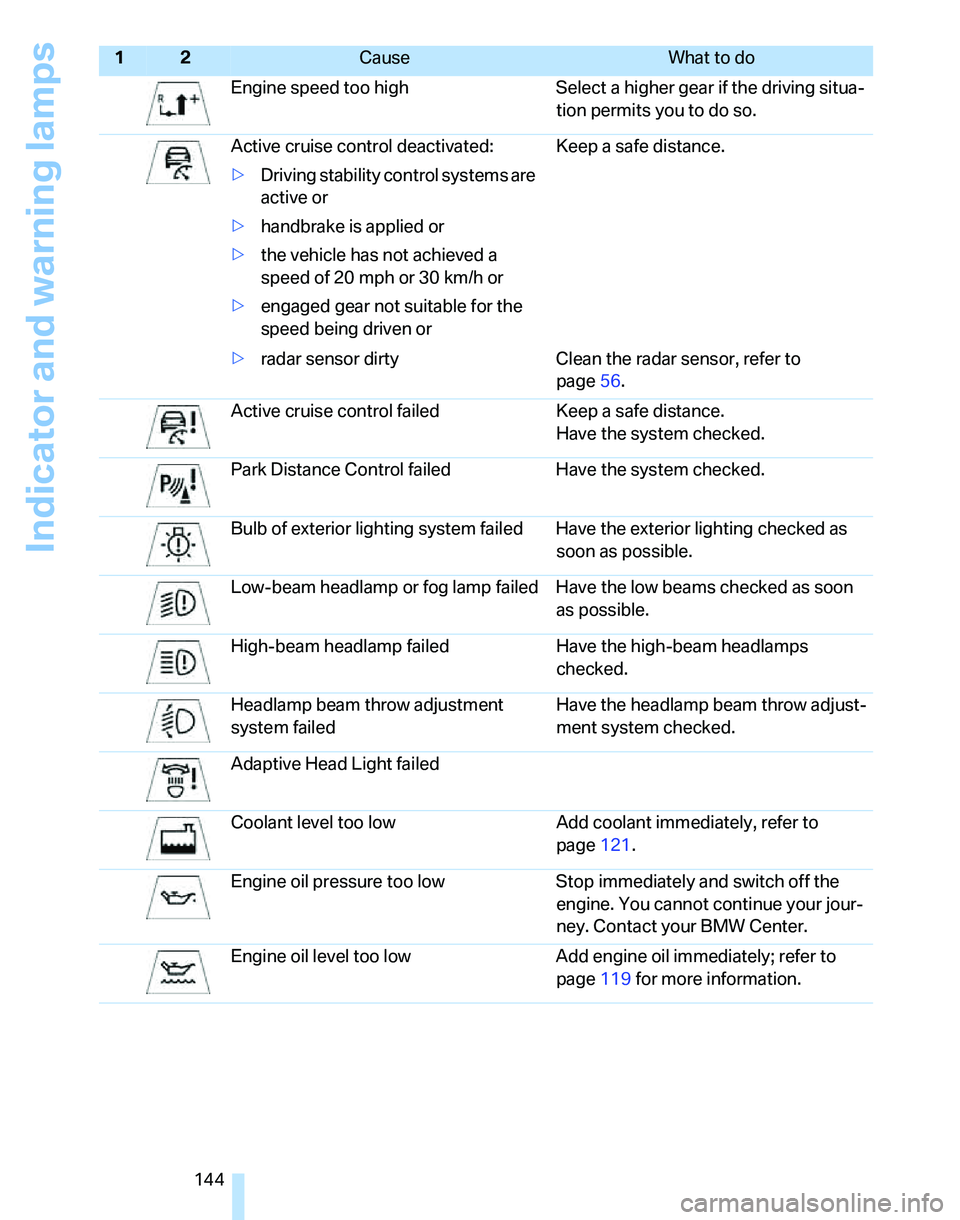
144Engine speed too high Select a higher gear if the driving situa-
tion permits you to do so.
Active cruise control deactivated:
>Driving stability control systems are
active or
>handbrake is applied or
>the vehicle has not achieved a
speed of 20 mph or 30 km/h or
>engaged gear not suitable for the
speed being driven orKeep a safe distance.
>radar sensor dirty Clean the radar sensor, refer to
page56.
Active cruise control failed Keep a safe distance.
Have the system checked.
Park Distance Control failed Have the system checked.
Bulb of exterior lighting system failed Have the exterior lighting checked as
soon as possible.
Low-beam headlamp or fog lamp failed Have the low beams checked as soon
as possible.
High-beam headlamp failed Have the high-beam headlamps
checked.
Headlamp beam throw adjustment
system failedHave the headlamp beam throw adjust-
ment system checked.
Adaptive Head Light failed
Coolant level too low Add coolant immediately, refer to
page121.
Engine oil pressure too low Stop immediately and switch off the
engine. You cannot continue your jour-
ney. Contact your BMW Center.
Engine oil level too low Add engine oil immediately; refer to
page119 for more information.
12Cause What to do