reset BMW 325I 2006 User Guide
[x] Cancel search | Manufacturer: BMW, Model Year: 2006, Model line: 325I, Model: BMW 325I 2006Pages: 246, PDF Size: 8.43 MB
Page 156 of 246
Radio
154
Disabling
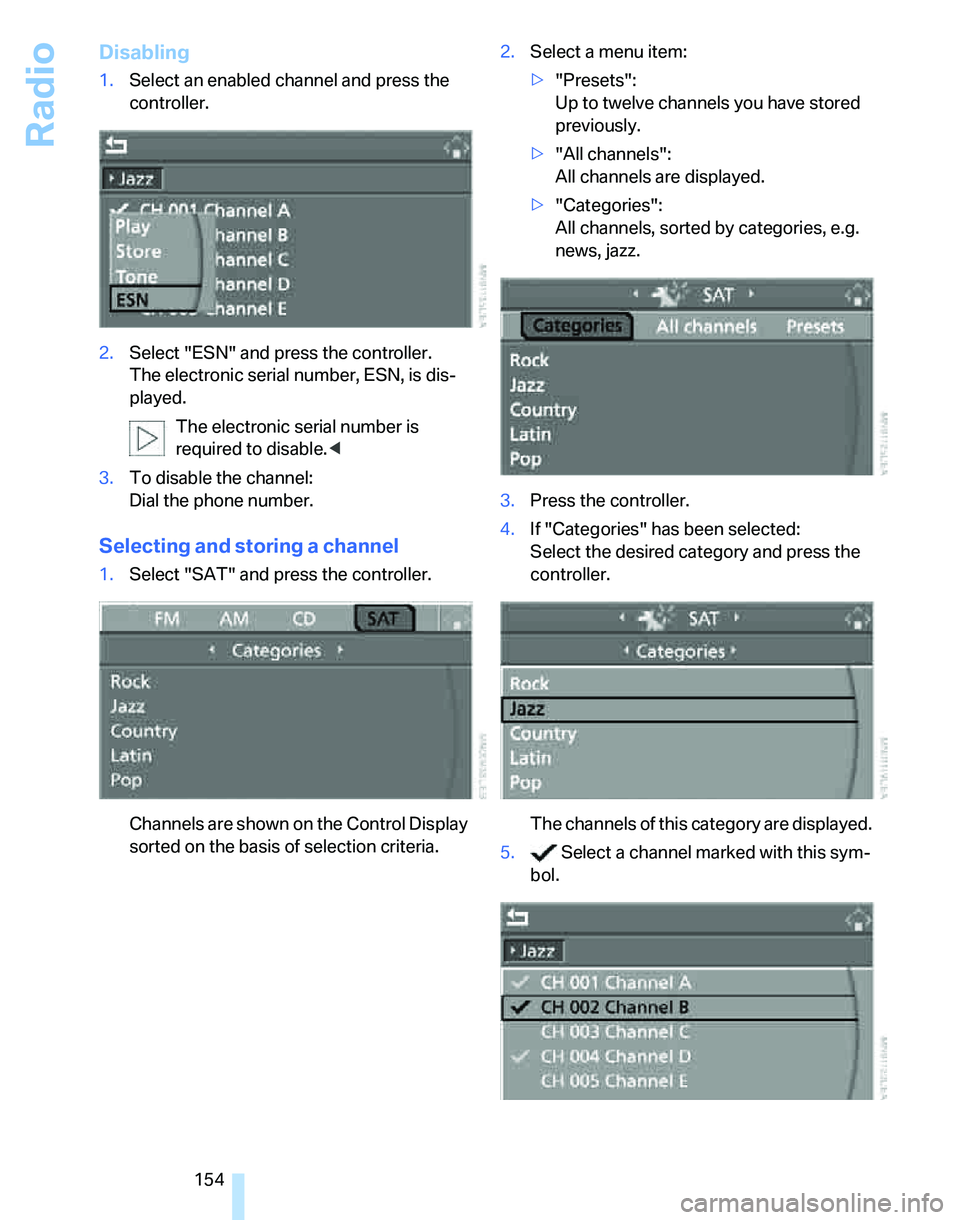
1.Select an enabled channel and press the
controller.
2.Select "ESN" and press the controller.
The electronic serial number, ESN, is dis-
played.
The electronic serial number is
required to disable.<
3.To disable the channel:
Dial the phone number.
Selecting and storing a channel
1.Select "SAT" and press the controller.
Channels are shown on the Control Display
sorted on the basis of selection criteria.2.Select a menu item:
>"Presets":
Up to twelve channels you have stored
previously.
>"All channels":
All channels are displayed.
>"Categories":
All channels, sorted by categories, e.g.
news, jazz.
3.Press the controller.
4.If "Categories" has been selected:
Select the desired category and press the
controller.
The channels of this category are displayed.
5. Select a channel marked with this sym-
bol.
Page 157 of 246
Navigation
Entertainment
Driving tips
155Reference
At a glance
Controls
Communications
Mobility
6.Press the controller.
Other menu items are displayed.
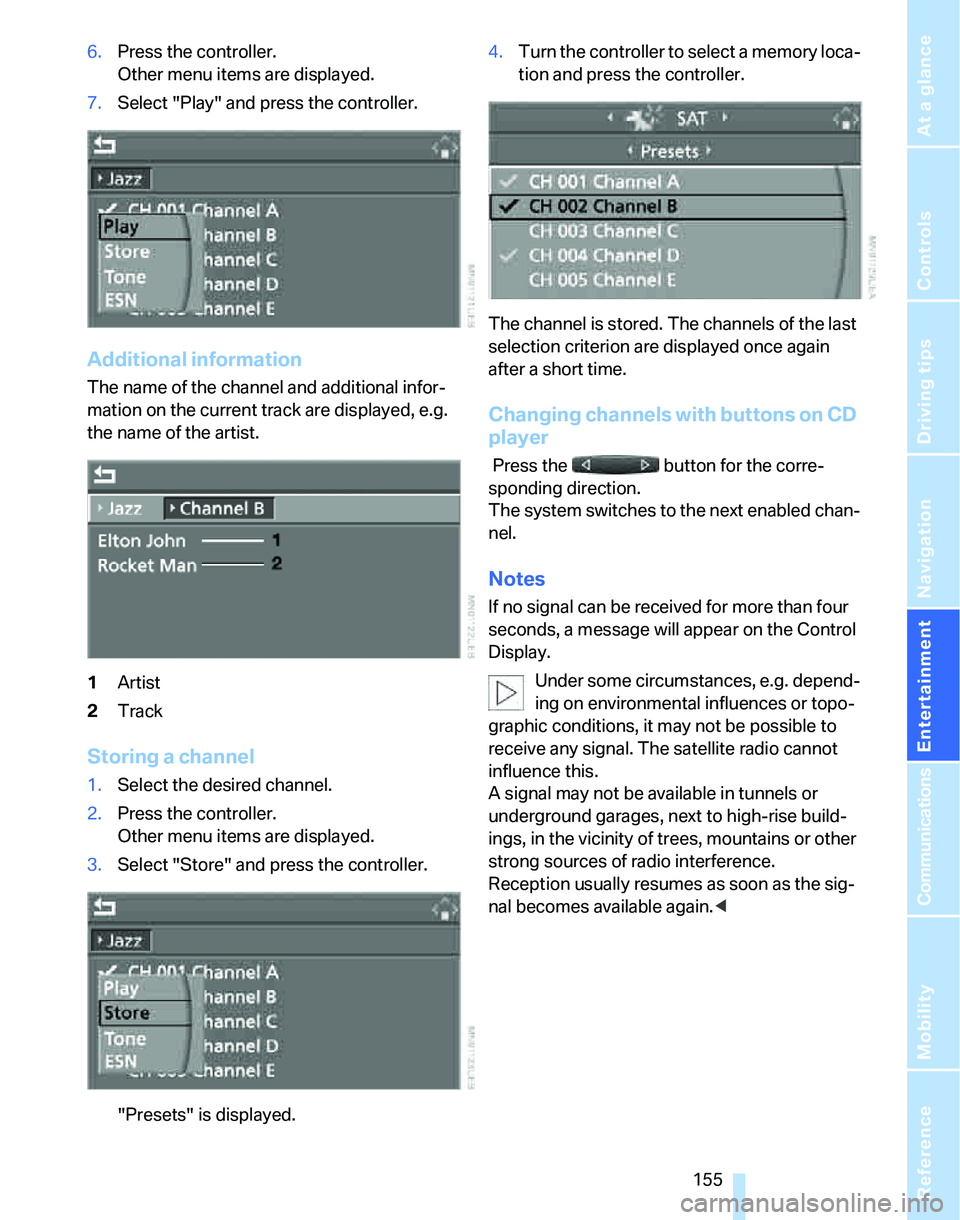
7.Select "Play" and press the controller.
Additional information
The name of the channel and additional infor-
mation on the current track are displayed, e.g.
the name of the artist.
1Artist
2Track
Storing a channel
1.Select the desired channel.
2.Press the controller.
Other menu items are displayed.
3.Select "Store" and press the controller.
"Presets" is displayed.4.Turn the controller to select a memory loca-
tion and press the controller.
The channel is stored. The channels of the last
selection criterion are displayed once again
after a short time.
Changing channels with buttons on CD
player
Press the button for the corre-
sponding direction.
The system switches to the next enabled chan-
nel.
Notes
If no signal can be received for more than four
seconds, a message will appear on the Control
Display.
Under some circumstances, e.g. depend-
ing on environmental influences or topo-
graphic conditions, it may not be possible to
receive any signal. The satellite radio cannot
influence this.
A signal may not be available in tunnels or
underground garages, next to high-rise build-
ings, in the vicinity of trees, mountains or other
strong sources of radio interference.
Reception usually resumes as soon as the sig-
nal becomes available again.<
Page 226 of 246
Short commands for the voice command system
224
Entertainment
FunctionCommand
Tone control145{Audio}
To switch on radio148{Radio on},
{FM on} or
{AM on}
To open "FM"148{FM menu}
To open "AM"148{AM menu}
To open "All stations"148{FM All stations}
To select radio station148{Station} name or
{Choose station}
To open "Presets"148{FM presets} or
{AM presets}
To select radio presets148{Choose preset}
To open "Manual"149{FM manual} or
{AM manual}or
{Choose frequency},
{Frequency ... Megahertz}
To open strongest radio station149{AM Autostore}
To open "WB"151{Weather Band menu}
To switch on Weather Band151{Weather Band on}
To select Weather Band station151{Choose Weather Band station}
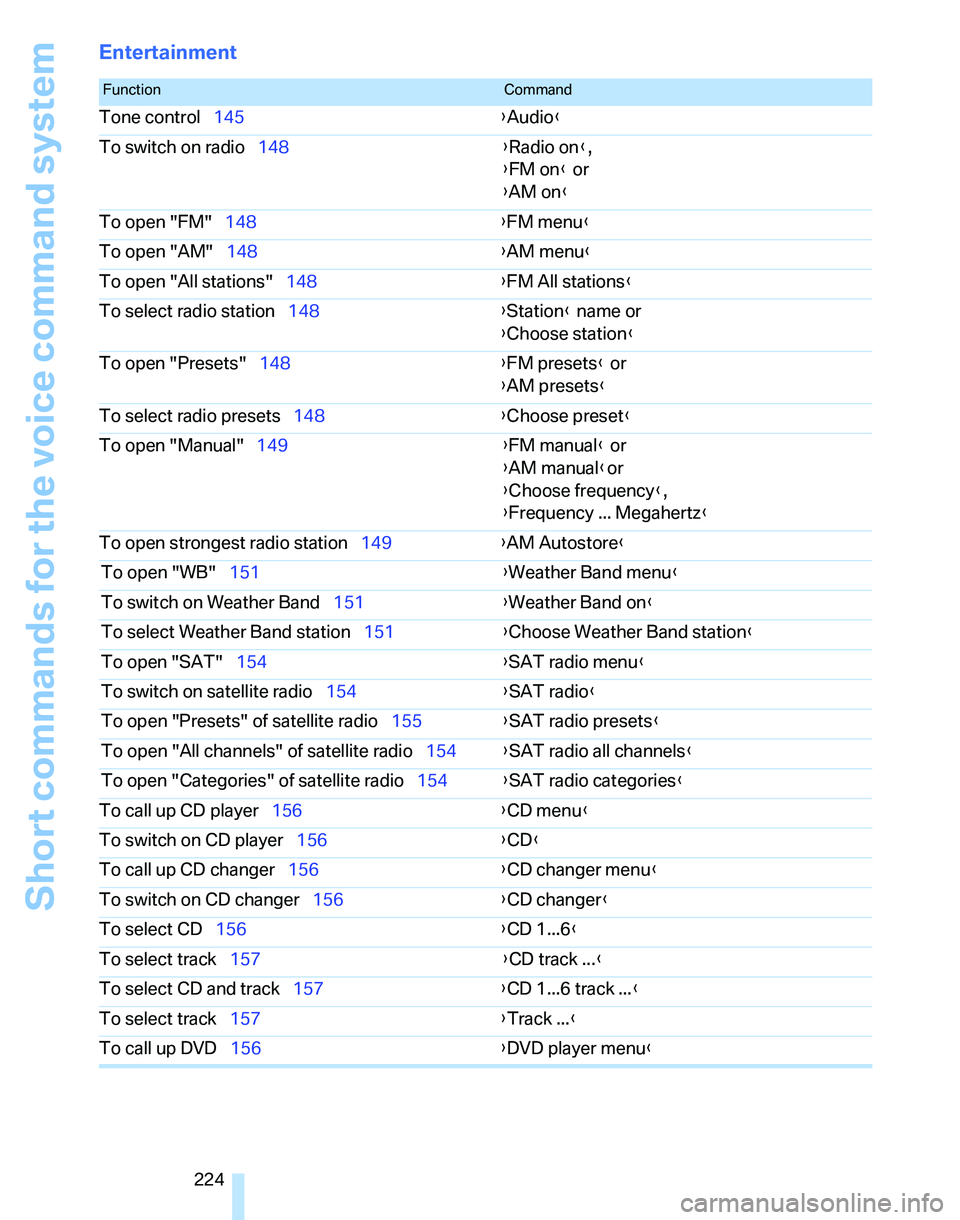
To open "SAT"154{SAT radio menu}
To switch on satellite radio154{
SAT radio}
To open "Presets" of satellite radio155{SAT radio presets}
To open "All channels" of satellite radio154{SAT radio all channels}
To open "Categories" of satellite radio154{SAT radio categories}
To call up CD player156{CD menu}
To switch on CD player156{CD}
To call up CD changer156{CD changer menu}
To switch on CD changer156{CD changer}
To select CD156{CD 1...6}
To select track157{CD track ...}
To select CD and track157{CD 1...6 track ...}
To select track157{Track ...}
To call up DVD156{DVD player menu}
Page 238 of 246
Everything from A - Z
236 Phone numbers
– deleting from phone
book173
– dialing171
– most recent numbers172
– selecting in phone book172
– Top 8172
Placing a call, refer to
telephone owner's manual
"Play" for audio mode157
"Play"
on the radio155
Pollen
– refer to Microfilter/activated-
charcoal filter for automatic
climate control101
Position
– displaying140
– storing132
Power failure209
Power windows37
– safety switch38
Power windows, refer to
Windows37
Preselecting the switch-on
times for parked car
ventilation/heating101
"Presets", calling up on
radio148
"Presets" on the radio154
Pressure, tires188
Pressure monitoring, tires88
– Flat Tire Monitor88
Protection function, refer to
Anti-trapping mechanism
– glass sunroof, electric39
– windows37
Providing medical assistance,
refer to First add pouch212
Puncture
– Flat Tire Monitor88
R
Radio
– autostore149
– controls144
– sampling stations149
– satellite radio153
– selecting the frequency
manually149
– selecting the
waveband144,148
– station search149
– station selection148
– stations with the best
reception149
– storing stations150
– switching on/off144
– tone control145
– volume145
– Weather Band151
Radio key, refer to Integrated
key/Remote control28
Radio position, refer to Radio
readiness52
Radio readiness52
– switched off52
– switched on52
Rain sensor59
"Random", random play160
"Random all" for audio
mode160
"Random directory" for audio
mode160
Reading lamps96
Rear lamps, refer to Tail
lamps207
– replacing bulbs208
Rear seats
– adjusting head restraints43
– folding head restraint down
and up43
Rear turn signals
– replacing bulbs208
Rear ventilation100
Rearview mirror, refer to
Mirrors45
Rear window defroster100
Rear window roller blind, refer
to Roller sun blinds106Rear window safety switch38
"Received calls"172
Receiving level of mobile
phone, refer to Status
information20
Reception
– radio stations151
Rechargeable flashlight106
Recirculated-air mode99
Recirculation of air, refer to
Recirculated-air mode99
Reclining seat, refer to
Backrest
41
Recording times, refer to
Stopwatch81
"Redial" for mobile phone172
Refueling186
Releasing
– hood198
Remaining distance, refer to
Cruising range70
Remote control28
– battery renewal37
– convenient access35
– garage door opener103
– luggage compartment lid31
– malfunctions31,36
– service data203
"Repeat directory" for audio
mode159
"Repeat" for audio mode159
"Repeat track" for audio
mode159
Replacement remote
control28
Replacing bulbs, refer to
Lamps and bulbs205
Replacing tires, refer to New
wheels and tires196
Reporting an accident, refer to
Initiating an emergency
call211
Reporting safety defects6
Reserve warning, refer to Fuel
gauge70
Reservoir for washer
systems60
Reset, refer to Resetting tone
settings147
Page 239 of 246
Reference 237
At a glance
Controls
Driving tips
Communications
Navigation
Entertainment
Mobility
"Reset" for stopwatch82
"Reset" for tone settings147
Residual heat mode99
Restraint systems
– for children49
– refer to Safety belts45
Reverse
– CD changer160
– CD player160
Reverse gear
– automatic transmission with
Steptronic58
– manual transmission55
– sequential manual gearbox
SMG55
Road map138
"Roadside Assistance"180
Roadside
Assistance180,211
Roadside parking lamps95
– replacing bulbs207
Roadworthiness test, refer to
Service requirements74
Roller blind
– sun blinds106
Roof load capacity220
Roof-mounted luggage
rack119
Rope, refer to Tow-starting,
towing away214
Rotary/pushbutton, refer to
iDrive16
Route134
– bypassing sections140
– changing134
– display137
– displaying arrow view137
– displaying map view138
– displaying town139
– list139
– selecting134
– selecting criteria134
Route selection134
RSC Runflat System
Component, refer to Run-
Flat Tires196
Runflat System Component
RSC, refer to Run-Flat
Tires196Run-Flat Tires196
– continuing driving with a
damaged tire89
– flat tire89
– new tires196
– replacing tires196
– tire pressures188
– winter tires197
Runflat Tyres, refer to Run-
Flat Tires196
S
Safety-belt height
adjustment45
Safety belts45
– damage45
– indicator lamp45
– reminder45
– sitting safely40
Safety systems
– airbags90
– Antilock Brake System
ABS84
– Dynamic Stability Control
DSC84
– safety belts45
Safety tires, refer to Run-Flat
Tires196
Sampling tracks
– scan158
Satellite radio153
– enabling153
– selecting channel154
– storing channel154
"SAT" for radio144,153
"Scan"
– sampling radio stations149
– sampling tracks on CD158
Scan
– CD changer158
– CD player158
– radio149
"Scan all" for audio mode159
"Scan directory" for audio
mode159
Screen, refer to iDrive
controls16Screw thread for tow
fitting213
SDARS, refer to Satellite
radio153
Seat adjustment
– electric41
– mechanical41
Seat and mirror memory44
Seat belt reminder, refer to
'Fasten safety belts'
reminder45
Seats40
– adjusting the seats41
– heating43
– sitting safely40
Securing cargo111
Securing the vehicle
– from inside32
– from outside30
"Select as destination"131
"Select current speed"81
Selecting an audio source144
Selecting distance for active
cruise control64
Selecting menu items19
Selecting new scale for
navigation138
Selecting the frequency
manually149
Selecting the route134
Selection options with
navigation system134
Selector lever
– automatic transmission with
Steptronic57
– sequential manual gearbox
SMG55
Selector lever lock, refer to
Shiftlock
– automatic transmission with
Steptronic57
– sequential manual gearbox
SMG55
Selector lever positions
– automatic transmission with
Steptronic57
– sequential manual gearbox
SMG55