warning BMW 325I SEDAN 2005 E90 Owner's Guide
[x] Cancel search | Manufacturer: BMW, Model Year: 2005, Model line: 325I SEDAN, Model: BMW 325I SEDAN 2005 E90Pages: 223, PDF Size: 7.49 MB
Page 85 of 223
Technology for driving comfort and safety
84
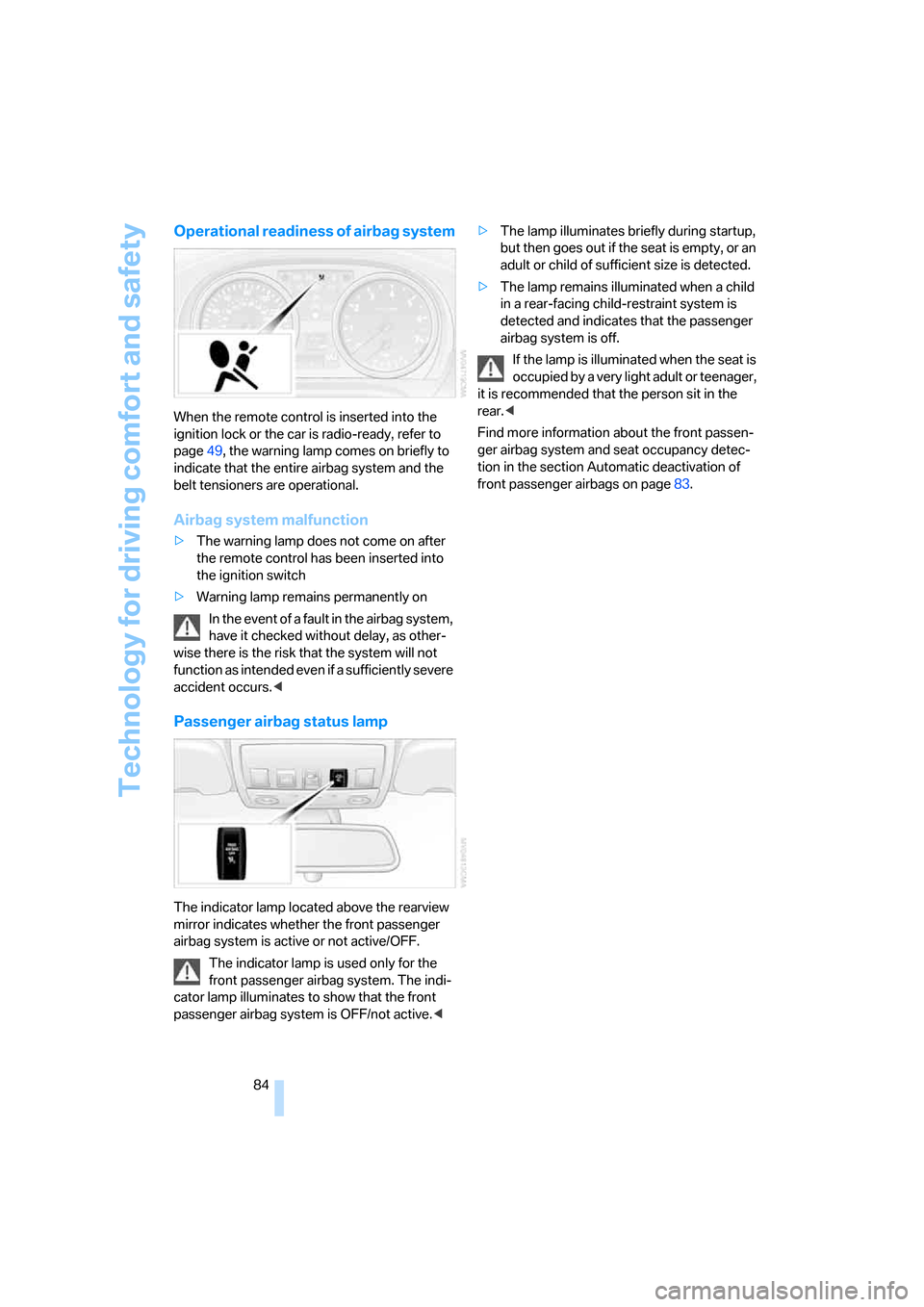
Operational readiness of airbag system
When the remote control is inserted into the
ignition lock or the car is radio-ready, refer to
page49, the warning lamp comes on briefly to
indicate that the entire airbag system and the
belt tensioners are operational.
Airbag system malfunction
>The warning lamp does not come on after
the remote control has been inserted into
the ignition switch
>Warning lamp remains permanently on
In the event of a fault in the airbag system,
have it checked without delay, as other-
wise there is the risk that the system will not
function as intended even if a sufficiently severe
accident occurs.<
Passenger airbag status lamp
The indicator lamp located above the rearview
mirror indicates whether the front passenger
airbag system is active or not active/OFF.
The indicator lamp is used only for the
front passenger airbag system. The indi-
cator lamp illuminates to show that the front
passenger airbag system is OFF/not active.<>The lamp illuminates briefly during startup,
but then goes out if the seat is empty, or an
adult or child of sufficient size is detected.
>The lamp remains illuminated when a child
in a rear-facing child-restraint system is
detected and indicates that the passenger
airbag system is off.
If the lamp is illuminated when the seat is
occupied by a very light adult or teenager,
it is recommended that the person sit in the
rear.<
Find more information about the front passen-
ger airbag system and seat occupancy detec-
tion in the section Automatic deactivation of
front passenger airbags on page83.
Page 142 of 223
Navigation
Entertainment
Driving tips
141Reference
At a glance
Controls
Communications
Mobility
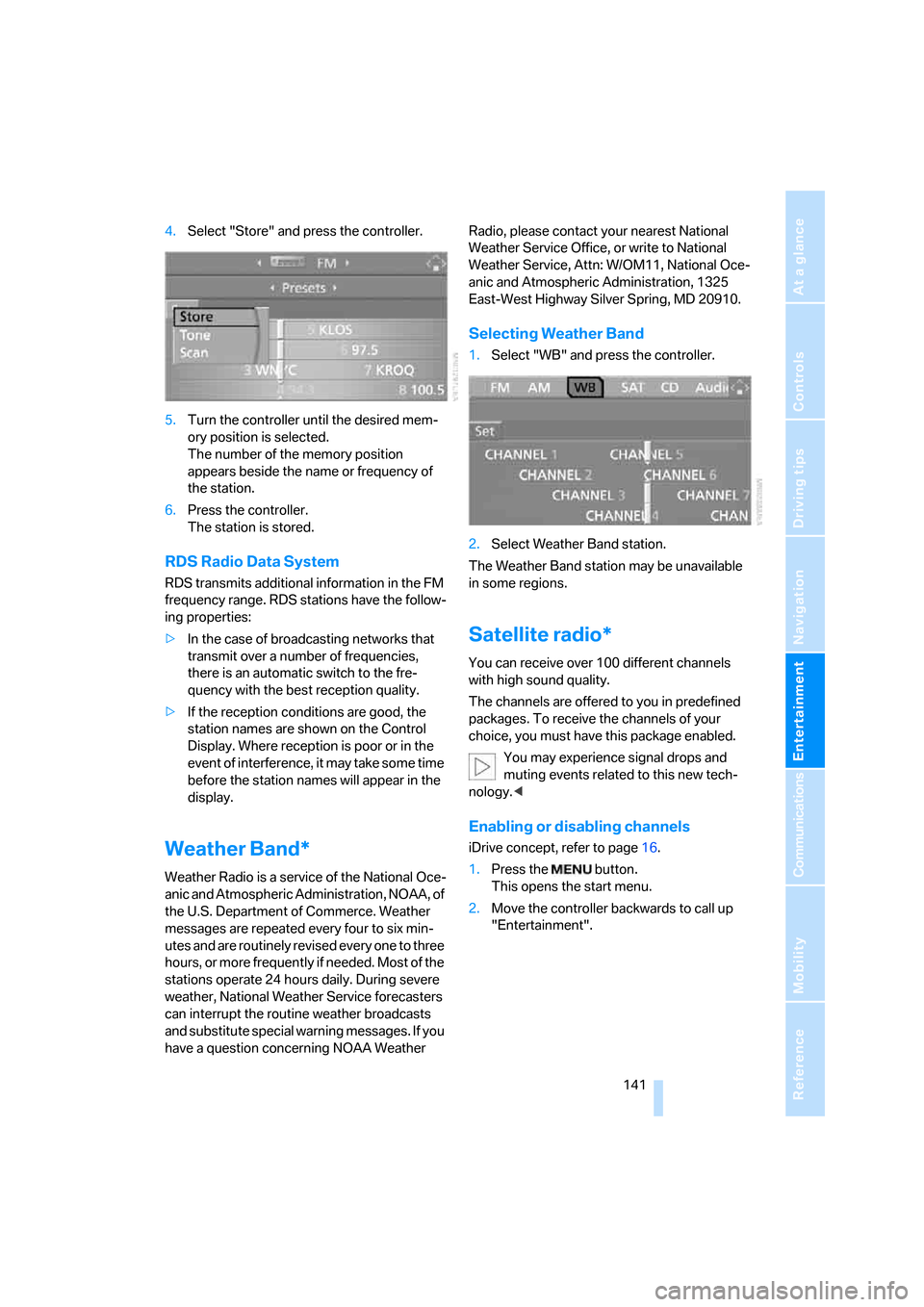
4.Select "Store" and press the controller.
5.Turn the controller until the desired mem-
ory position is selected.
The number of the memory position
appears beside the name or frequency of
the station.
6.Press the controller.
The station is stored.
RDS Radio Data System
RDS transmits additional information in the FM
frequency range. RDS stations have the follow-
ing properties:
>In the case of broadcasting networks that
transmit over a number of frequencies,
there is an automatic switch to the fre-
quency with the best reception quality.
>If the reception conditions are good, the
station names are shown on the Control
Display. Where reception is poor or in the
event of interference, it may take some time
before the station names will appear in the
display.
Weather Band*
Weather Radio is a service of the National Oce-
anic and Atmospheric Administration, NOAA, of
the U.S. Department of Commerce. Weather
messages are repeated every four to six min-
utes and are routinely revised every one to three
hours, or more frequently if needed. Most of the
stations operate 24 hours daily. During severe
weather, National Weather Service forecasters
can interrupt the routine weather broadcasts
and substitute special warning messages. If you
have a question concerning NOAA Weather Radio, please contact your nearest National
Weather Service Office, or write to National
Weather Service, Attn: W/OM11, National Oce-
anic and Atmospheric Administration, 1325
East-West Highway Silver Spring, MD 20910.
Selecting Weather Band
1.Select "WB" and press the controller.
2.Select Weather Band station.
The Weather Band station may be unavailable
in some regions.
Satellite radio*
You can receive over 100 different channels
with high sound quality.
The channels are offered to you in predefined
packages. To receive the channels of your
choice, you must have this package enabled.
You may experience signal drops and
muting events related to this new tech-
nology.<
Enabling or disabling channels
iDrive concept, refer to page16.
1.Press the button.
This opens the start menu.
2.Move the controller backwards to call up
"Entertainment".
Page 184 of 223
Mobility
183Reference
At a glance
Controls
Driving tips
Communications
Navigation
Entertainment
>"Please observe recalculated service inter-
val for engine oil"
Do not add engine oil. You can continue
your journey. Note the newly calculated dis-
tance remaining to the next oil service, refer
to page185. Have the system checked as
soon as possible.
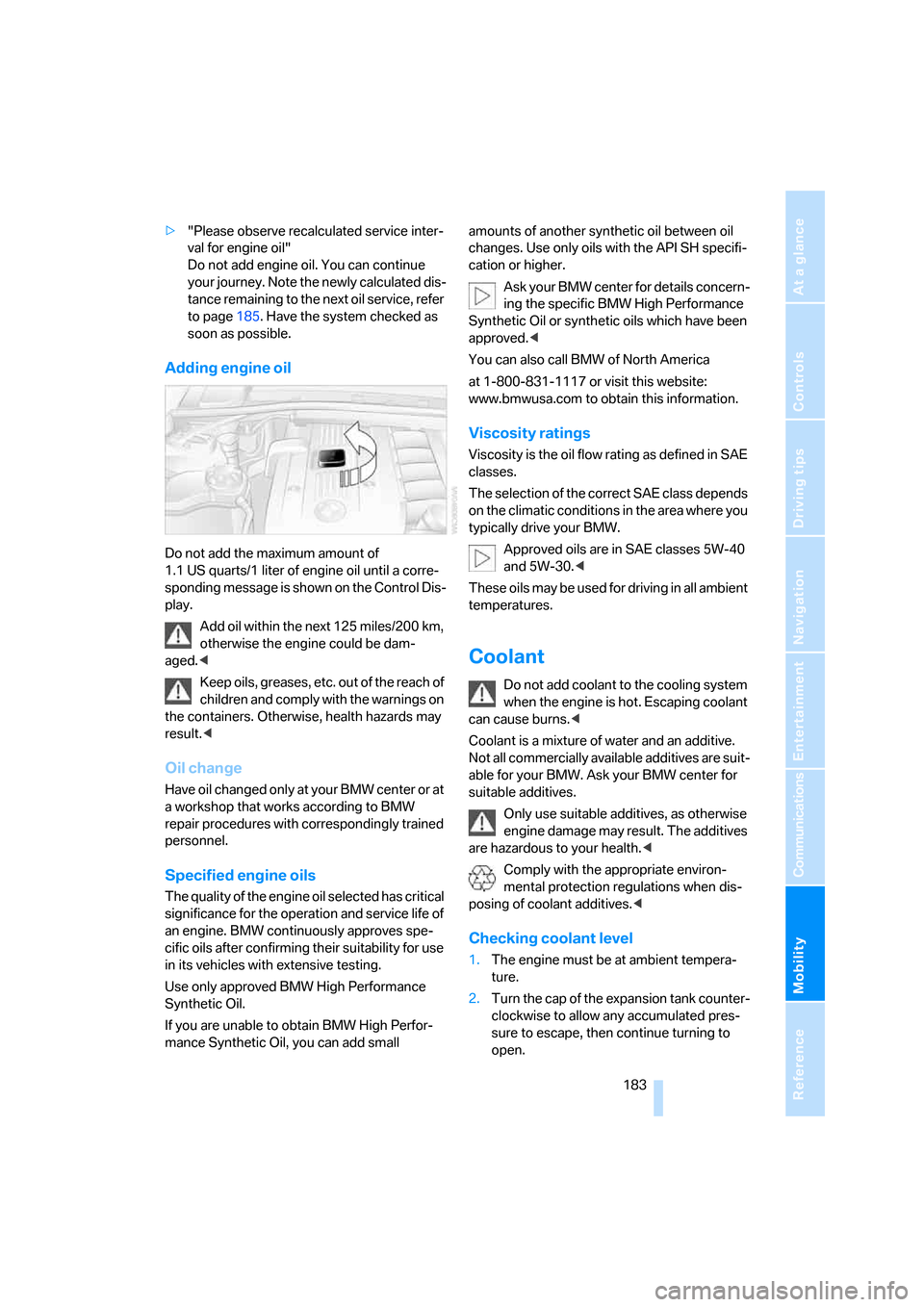
Adding engine oil
Do not add the maximum amount of
1.1 US quarts/1 liter of engine oil until a corre-
sponding message is shown on the Control Dis-
play.
Add oil within the next 125 miles/200 km,
otherwise the engine could be dam-
aged.<
Keep oils, greases, etc. out of the reach of
children and comply with the warnings on
the containers. Otherwise, health hazards may
result.<
Oil change
Have oil changed only at y our B MW c ente r o r a t
a workshop that works according to BMW
repair procedures with correspondingly trained
personnel.
Specified engine oils
The quality of the engine oil selected has critical
significance for the operation and service life of
an engine. BMW continuously approves spe-
cific oils after confirming their suitability for use
in its vehicles with extensive testing.
Use only approved BMW High Performance
Synthetic Oil.
If you are unable to obtain BMW High Perfor-
mance Synthetic Oil, you can add small amounts of another synthetic oil between oil
changes. Use only oils with the API SH specifi-
cation or higher.
Ask your BMW center for details concern-
ing the specific BMW High Performance
Synthetic Oil or synthetic oils which have been
approved.<
You can also call BMW of North America
at 1-800-831-1117 or visit this website:
www.bmwusa.com to obtain this information.
Viscosity ratings
Viscosity is the oil flow rating as defined in SAE
classes.
The selection of the correct SAE class depends
on the climatic conditions in the area where you
typically drive your BMW.
Approved oils are in SAE classes 5W-40
and 5W-30.<
These oils may be used for driving in all ambient
temperatures.
Coolant
Do not add coolant to the cooling system
when the engine is hot. Escaping coolant
can cause burns.<
Coolant is a mixture of water and an additive.
Not all commercially available additives are suit-
able for your BMW. Ask your BMW center for
suitable additives.
Only use suitable additives, as otherwise
engine damage may result. The additives
are hazardous to your health.<
Comply with the appropriate environ-
mental protection regulations when dis-
posing of coolant additives.<
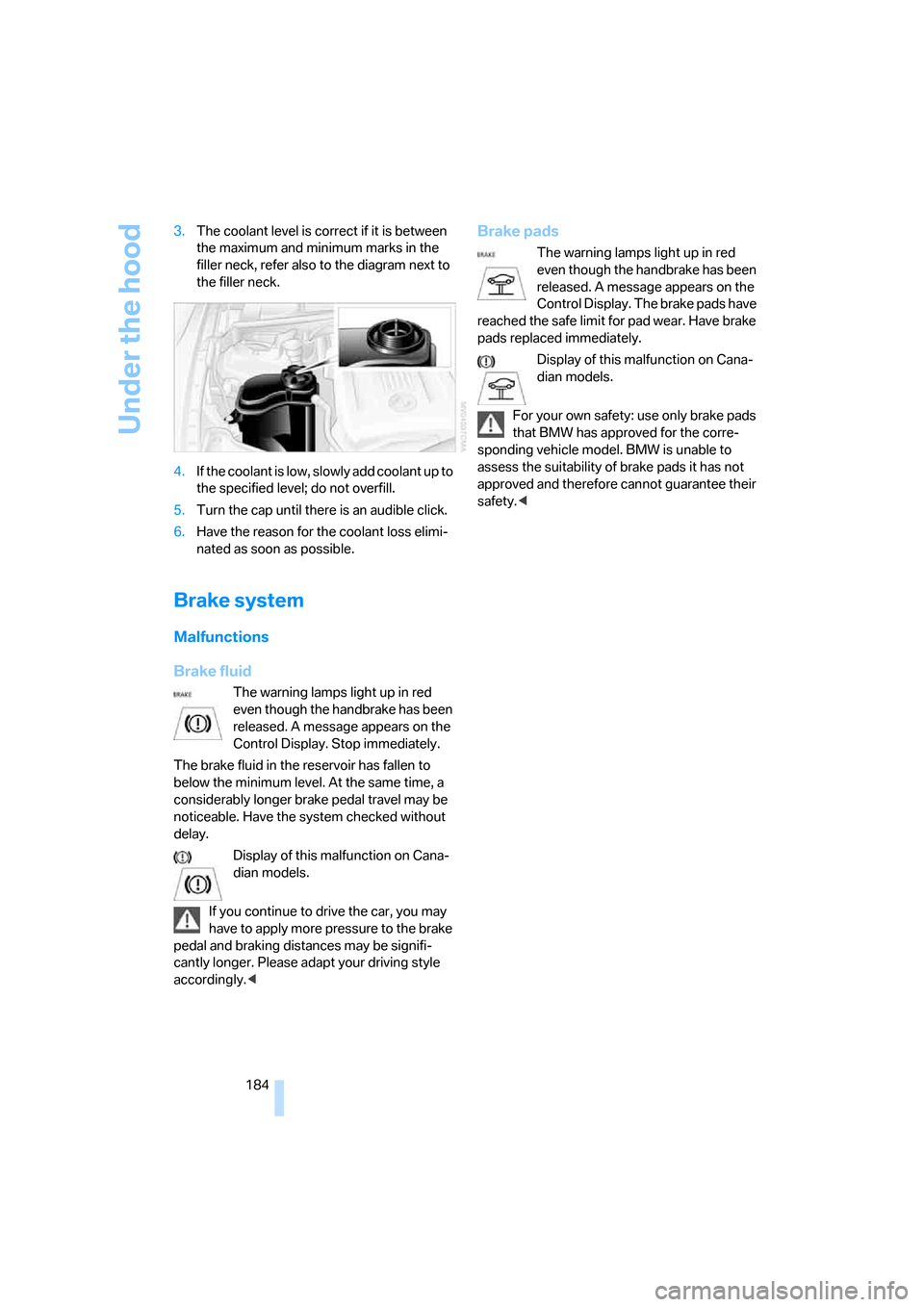
Checking coolant level
1.The engine must be at ambient tempera-
ture.
2.Turn the cap of the expansion tank counter-
clockwise to allow any accumulated pres-
sure to escape, then continue turning to
open.
Page 185 of 223
Under the hood
184 3.The coolant level is correct if it is between
the maximum and minimum marks in the
filler neck, refer also to the diagram next to
the filler neck.
4.If the coolant is low, slowly add coolant up to
the specified level; do not overfill.
5.Turn the cap until there is an audible click.
6.Have the reason for the coolant loss elimi-
nated as soon as possible.
Brake system
Malfunctions
Brake fluid
The warning lamps light up in red
even though the handbrake has been
released. A message appears on the
Control Display. Stop immediately.
The brake fluid in the reservoir has fallen to
below the minimum level. At the same time, a
considerably longer brake pedal travel may be
noticeable. Have the system checked without
delay.
Display of this malfunction on Cana-
dian models.
If you continue to drive the car, you may
have to apply more pressure to the brake
pedal and braking distances may be signifi-
cantly longer. Please adapt your driving style
accordingly.<
Brake pads
The warning lamps light up in red
even though the handbrake has been
released. A message appears on the
Control Display. The brake pads have
reached the safe limit for pad wear. Have brake
pads replaced immediately.
Display of this malfunction on Cana-
dian models.
For your own safety: use only brake pads
that BMW has approved for the corre-
sponding vehicle model. BMW is unable to
assess the suitability of brake pads it has not
approved and therefore cannot guarantee their
safety.<
Page 195 of 223
Giving and receiving assistance
194 you to have a first-aid kit and a warning triangle
in the car.<
Warning triangle*
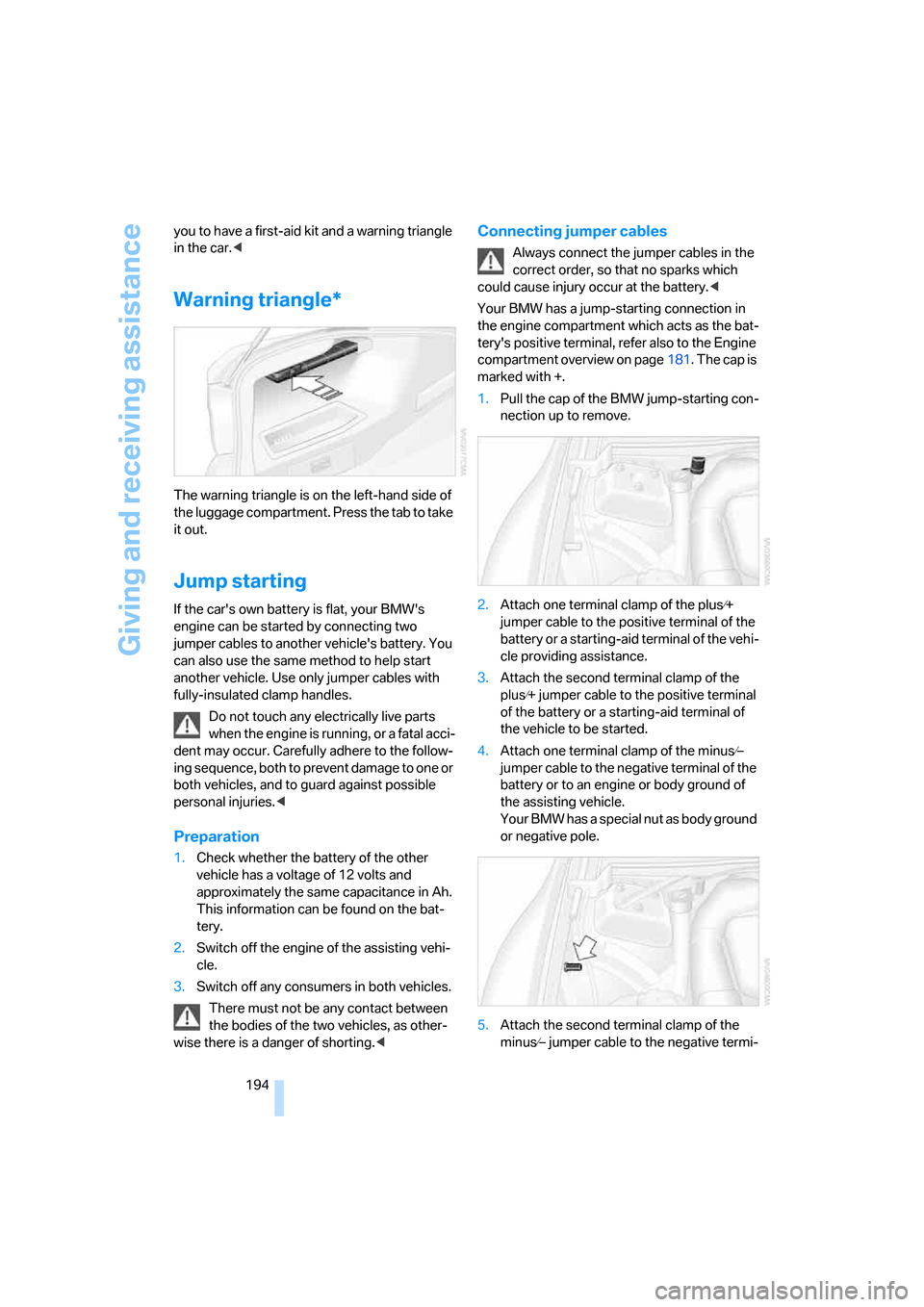
The warning triangle is on the left-hand side of
the luggage compartment. Press the tab to take
it out.
Jump starting
If the car's own battery is flat, your BMW's
engine can be started by connecting two
jumper cables to another vehicle's battery. You
can also use the same method to help start
another vehicle. Use only jumper cables with
fully-insulated clamp handles.
Do not touch any electrically live parts
when the engine is running, or a fatal acci-
dent may occur. Carefully adhere to the follow-
ing sequence, both to prevent damage to one or
both vehicles, and to guard against possible
personal injuries.<
Preparation
1.Check whether the battery of the other
vehicle has a voltage of 12 volts and
approximately the same capacitance in Ah.
This information can be found on the bat-
tery.
2.Switch off the engine of the assisting vehi-
cle.
3.Switch off any consumers in both vehicles.
There must not be any contact between
the bodies of the two vehicles, as other-
wise there is a danger of shorting.<
Connecting jumper cables
Always connect the jumper cables in the
correct order, so that no sparks which
could cause injury occur at the battery.<
Your BMW has a jump-starting connection in
the engine compartment which acts as the bat-
tery's positive terminal, refer also to the Engine
compartment overview on page181. The cap is
marked with +.
1.Pull the cap of the BMW jump-starting con-
nection up to remove.
2.Attach one terminal clamp of the plus⁄+
jumper cable to the positive terminal of the
battery or a starting-aid terminal of the vehi-
cle providing assistance.
3.Attach the second terminal clamp of the
plus⁄+ jumper cable to the positive terminal
of the battery or a starting-aid terminal of
the vehicle to be started.
4.Attach one terminal clamp of the minus⁄–
jumper cable to the negative terminal of the
battery or to an engine or body ground of
the assisting vehicle.
Your BMW has a special nut as body ground
or negative pole.
5.Attach the second terminal clamp of the
minus⁄– jumper cable to the negative termi-
Page 196 of 223
Mobility
195Reference
At a glance
Controls
Driving tips
Communications
Navigation
Entertainment
nal of the battery or to the engine or body
ground of the vehicle to be started.
Starting the engine
1.Start the engine of the donor vehicle and
allow it to run for a few minutes at an
increased idle speed.
2.Start the engine on the other vehicle in the
usual way.
If the first start attempt is not successful,
wait a few minutes before another attempt
in order to allow the discharged battery to
recharge.
3.Let the engines run for a few minutes.
4.Disconnect the jumper cables by reversing
the above connecting sequence.
If necessary, have your BMW center check and
recharge the battery.
Never use spray fluids to start the
engine.<
Tow-starting, towing away
Always observe all applicable towing laws
and regulations.<
Never allow passengers to ride in a towed
vehicle for any reason.<
Using a tow fitting
The screw-in tow fitting must always be carried
on the car. It can be screwed in at the front or
rear of the BMW.
It is stored in the onboard tool kit underneath
the cover on the right-hand side of the luggage
compartment, refer to page187.
In order to avoid damaging the tow fitting and
the vehicle, please follow these instructions:
use only the tow fitting provided with the vehi-
cle and screw it all the way in. Use the tow fitting
for towing only on roads. Avoid lateral loading of
the tow fitting, e.g. do not lift the vehicle by the
tow fitting.
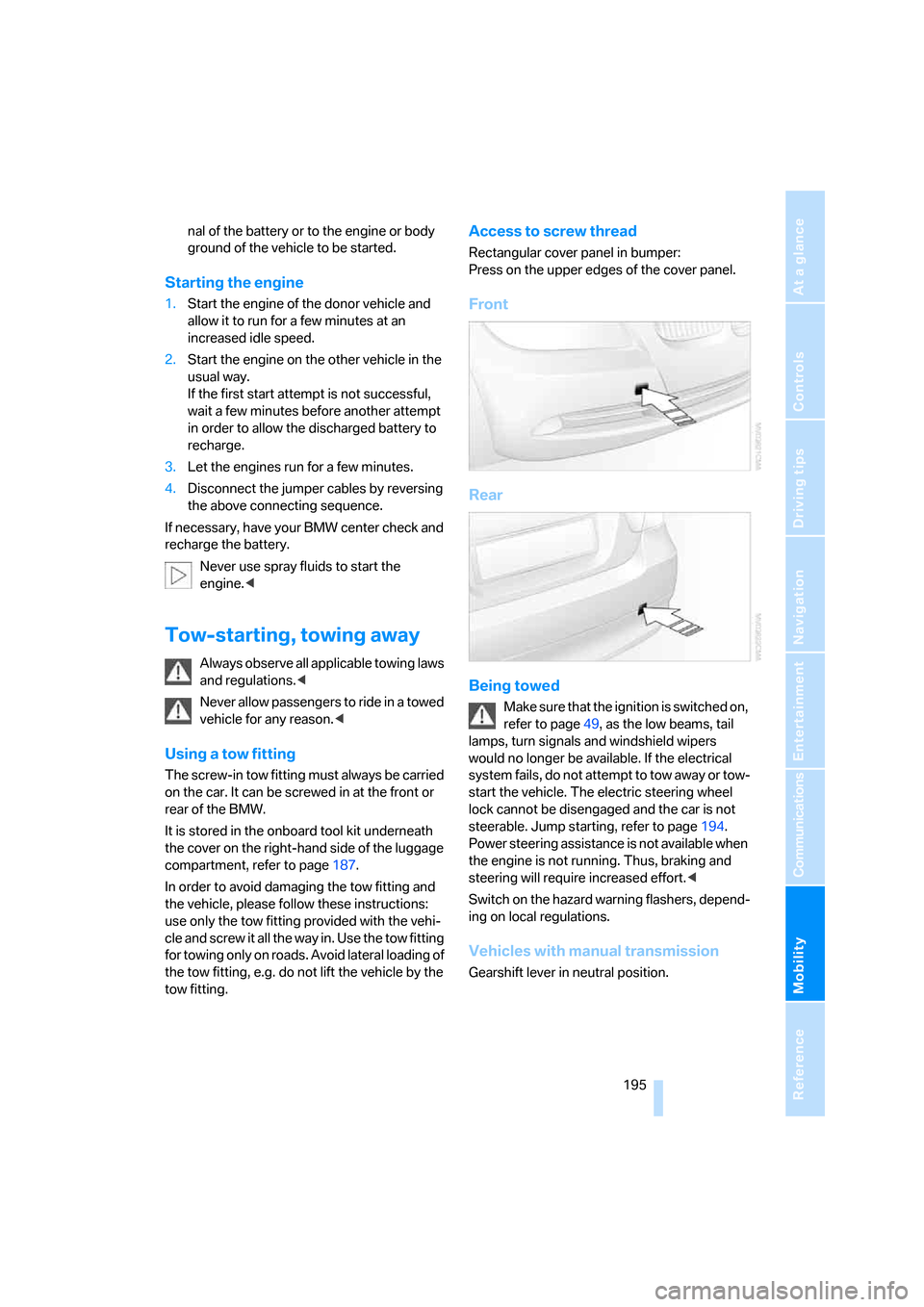
Access to screw thread
Rectangular cover panel in bumper:
Press on the upper edges of the cover panel.
Front
Rear
Being towed
Make sure that the ignition is switched on,
refer to page49, as the low beams, tail
lamps, turn signals and windshield wipers
would no longer be available. If the electrical
system fails, do not attempt to tow away or tow-
start the vehicle. The electric steering wheel
lock cannot be disengaged and the car is not
steerable. Jump starting, refer to page194.
Power steering assistance is not available when
the engine is not running. Thus, braking and
steering will require increased effort.<
Switch on the hazard warning flashers, depend-
ing on local regulations.
Vehicles with manual transmission
Gearshift lever in neutral position.
Page 197 of 223
Giving and receiving assistance
196
Vehicles with automatic transmission
Selector lever in position N.
Changing selector lever positions, refer to
page52.
Do not exceed a towing speed of 45 mph
or 70 km/h and a towing distance of
90 miles/150 km, as otherwise the automatic
transmission may be damaged.<
Towing methods
In some countries, towing with tow bars or
ropes is not permitted in public traffic.
Familiarize yourself with the regulations on tow-
ing in the respective country.
With tow bar
The towing vehicle must not be lighter
than the towed vehicle, otherwise it may
be impossible to maintain control.<
The tow fittings used should be on the same
side on both vehicles. Should it prove impossi-
ble to avoid mounting the tow bar at an angle,
please observe the following:
>Clearance and maneuvering capability will
be sharply limited during cornering.
>The tow bar will generate lateral forces if it is
attached offset.
Secure the tow bar to the tow fitting only.
Otherwise damage to other vehicle parts
could result.<
With tow rope
When starting off in the towing vehicle, make
sure that the tow rope is taut.
To avoid jerking and the associated
stresses on vehicle components when
towing, always use nylon ropes or nylon straps.
Secure the tow rope to the tow fitting only. Oth-
erwise damage to other vehicle parts could
result.<
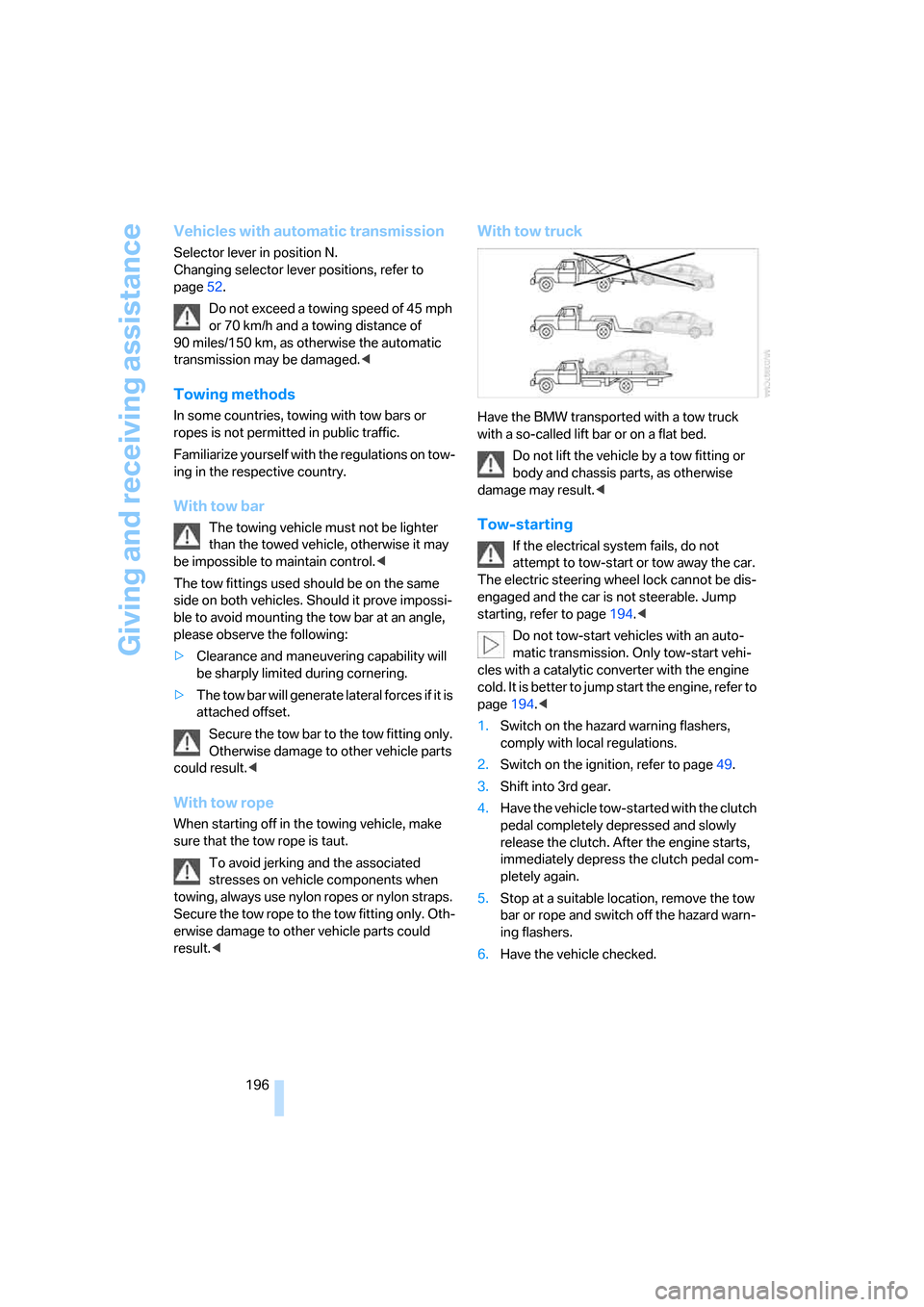
With tow truck
Have the BMW transported with a tow truck
with a so-called lift bar or on a flat bed.
Do not lift the vehicle by a tow fitting or
body and chassis parts, as otherwise
damage may result.<
Tow-starting
If the electrical system fails, do not
attempt to tow-start or tow away the car.
The electric steering wheel lock cannot be dis-
engaged and the car is not steerable. Jump
starting, refer to page194.<
Do not tow-start vehicles with an auto-
matic transmission. Only tow-start vehi-
cles with a catalytic converter with the engine
cold. It is better to jump start the engine, refer to
page194.<
1.Switch on the hazard warning flashers,
comply with local regulations.
2.Switch on the ignition, refer to page49.
3.Shift into 3rd gear.
4.Have the vehicle tow-started with the clutch
pedal completely depressed and slowly
release the clutch. After the engine starts,
immediately depress the clutch pedal com-
pletely again.
5.Stop at a suitable location, remove the tow
bar or rope and switch off the hazard warn-
ing flashers.
6.Have the vehicle checked.
Page 207 of 223
Everything from A - Z
206
Everything from A - Z
Index
"..." Identifies Control Display
texts used to select
individual functions and
refers you to the page where
these texts can be found.
A
ABS Antilock Brake
System78
ACC, refer to Active cruise
control57
Accessories, refer to The
individual vehicle5
Activated-charcoal filter for
automatic climate control92
Active cruise control57
– indicator lamps60
– malfunction61
– selecting distance59
– sensor61
Active steering81
– initializing the system82
– warning lamp82
Adaptive Head Light86
"Add digits" for portable
phone155
Additives
– coolant183
"Address book" in
navigation121
Address for navigation
– deleting122
– entering115
– selecting121
– storing current position121
"Add to destination list"118
Adjusting the temperature
with automatic climate
control90
Adjusting the tone during
audio operation, refer to
Tone control135Adjustment in audio mode
– front-to-rear135
– right/left balance135
Airbags82
– sitting safely38
– warning lamp84
Air distribution
– automatic90
– individual90
Air flow rate91
Airing, refer to Ventilation92
Air pressure, tires170
Air recirculation, refer to
Recirculated-air mode91
"Air recirculation on / off"45
Air vents89
AKI, refer to Fuel
specifications168
Alarm system34
– avoiding unintentional
alarms35
– interior motion sensor35
– switching off an alarm34
– tilt alarm sensor35
"All channels"
142
All-season tires, refer to
Winter tires179
"All stations", calling up on
radio138
"AM", waveband134,138
AM, waveband138
Ambient air, refer to
Recirculated-air mode91
Antenna for portable
phone152
Antifreeze
– coolant183
– washer fluid55
Antilock Brake System ABS
– indicator lamp79
Anti-theft alarm system, refer
to Alarm system34
Anti-theft system29Anti-trapping mechanism
– glass sunroof, electric37
– windows35
Approved axle loads, refer to
Weights201
Approved gross vehicle
weight, refer to Weights201
Armrest, refer to Center
armrest96
Arrival time
– computer66
– destination guidance125
"Arrow display" in
navigation126
Ashtray98
Assist, refer to BMW
Assist160
Assistance systems, refer to
Dynamic Stability Control
DSC78
Assistance window20
AUC Automatic recirculated-
air control91
Audio134
– controls134
– switching on/off134
– tone control135
– volume135
"Audio Aux"134
Audio device, external97
"Audio" tone settings135
"Auto. headlamps"85
Automatic
– air distribution90
– air flow rate90
– cruise control55,57
– headlamp control85
– service notification161
– storing of stations139
Automatic climate control89
– automatic air distribution90
– settings via iDrive90
Automatic curb monitor44
Page 208 of 223
Reference 207
At a glance
Controls
Driving tips
Communications
Navigation
Entertainment
Mobility
"Automatic programs" with
automatic climate control91
Automatic recirculated-air
control AUC91
Automatic station search139
Automatic transmission with
Steptronic51
– interlock51,52
– overriding selector lever
lock53
– shiftlock52
– sport program52
– towing away195
– tow-starting195
AUTO program for automatic
climate control90
"Autostore"
on the radio140
AUX-IN149
– port97
Average fuel consumption66
– setting the units68
Average speed65
"Avoid ferries" in
navigation124
Avoid freeways for
navigation123
"Avoid highways" in
navigation123
Avoiding unintentional
alarms35
"Avoid tollroads" in
navigation124
Axle loads, refer to
Weights201
"A - Z"154
B
Backrests, refer to Seats39
Backrest width adjustment40
Back seats, refer to Rear seats
– adjusting head restraints41
Backup lamps
– replacing bulbs190
Backup lamps, refer to Tail
lamps189
Balance, tone control135Bar, refer to Tow-starting,
towing away196
Bass, tone control135
Battery191
– charging191
– disposal191
– jump starting194
– temporary power failure191
Being towed195
Belts, refer to Safety belts43
Belt tensioner, refer to Safety
belts43
Beverage holders, refer to
Cup holders98
Black ice, refer to Ice
warning64
Blower, refer to Air flow
rate91
BMW Assist160
– enabling160
– services offered161
"BMW Contact"164
"BMW Contact
Numbers"164
BMW Maintenance
System185
"BMW Service"162
"BMW Service settings"161
Bottle holders, refer to Cup
holders98
Brake assist, refer to Dynamic
Brake Control78
Brake fluid184
– level too low184
– warning lamp184
Brake fluid, refer to Service
requirements69
Brake Force Display82
Brake hydraulics, refer to
Brakes184
Brake lamps
– Brake Force Display82
– replacing bulbs190
Brake pads, breaking in106
Brake rotors108
– brakes106
– breaking in106Brakes
– ABS78
– BMW Maintenance
System185
– brake fluid184
– brake pads184
– breaking in106
– handbrake51
– service requirements69
Brakes, refer to Braking
safely107
Brake system106
– BMW Maintenance
System185
– brake fluid184
– brake pads184
– breaking in106
– disc brakes108
Breakdown services, refer to
Roadside Assistance193
Breaking in the clutch106
Breaking in the
differential106
Break-in period106
"Brightness"76
Bulb changing, refer to Lamps
and bulbs187
Button for starting engine49
Buttons on steering wheel11
C
California Proposition 65
warning5
"Call"154
Call
– accepting153
– displaying accepted155
– ending154
– in absence155
– starting153
Calling
– from phone book154
– from Top 8 list155
– redialing155
Can holders, refer to Cup
holders98
Capacities201
Page 211 of 223
Everything from A - Z
210 Display lighting, refer to
Instrument lighting87
"Display off"21
Displays, refer to Instrument
cluster12
Displays and controls10
"Display settings"72
Disposal
– of coolant183
– vehicle battery191
Distance control, refer to
Active cruise control57
Distance remaining to service,
refer to Service
requirements69
"Distance to dest."66
Distance warning, refer to
PDC Park Distance
Control77
Door key, refer to Integrated
key/remote control28
Door lock31
Door locking, confirmation
signals31
"Door locks"30
Doors, emergency
operation31
DOT Quality Grades176
Draft-free ventilation92
Drinks holders, refer to Cup
holders98
Drive-off assistant80
Driving lamps, refer to Parking
lamps/low beams85
Driving notes106
Driving route, refer to
Displaying route126
Driving stability control
systems78
Driving through water107
Driving tips, refer to Driving
notes106
Dry air, refer to Cooling
function92
DSC Dynamic Stability
Control78
– indicator lamps79DTC Dynamic Traction
Control79
– indicator lamps79
DVD for navigation114
Dynamic Stability Control
DSC
– indicator lamps79
Dynamic Traction Control
DTC
– indicator lamps79
E
EBV Electronic brake-force
distribution78
Eject button, refer to Buttons
on the CD player134
Electrical malfunction
– door lock31
– fuel filler door168
– glass sunroof37
Electric seat adjustment39
Electronic brake-force
distribution78
Electronic oil level check181
Emergency call193
Emergency operation, refer to
Manual operation
– door lock31
– fuel filler door168
– glass sunroof37
– transmission lock, automatic
transmission53
Emergency release of luggage
compartment lid from
luggage compartment's
interior33
Emergency services, refer to
Roadside Assistance193
Emissions test, refer to
Service requirements69
"Enable services"161
"End call"154
Energy-conscious driving,
refer to Energy Control64
Energy Control64Engine
– breaking in106
– data200
– speed200
– starting49
– switching off50
Engine compartment181
Engine coolant, refer to
Coolant183
Engine oil
– adding183
– BMW Maintenance
System185
– checking level181
– intervals between changes,
refer to Service
requirements69
"Engine oil level"182
Engine output, refer to Engine
data200
Engine speed200
Engine starting, refer to
Starting the engine49
"Enter address"116
Entering destination116
Entering the address115
Entering the intersection117
"Entertainment"134
"Entertainment settings"135
Entry map for destination118
"Equalizer", refer to Tone
control136
Error messages, refer to
Check Control73
"ESN"142
ESP Electronic Stability
Program, refer to DSC
Dynamic Stability
Control78
Event data recorders186
Exhaust system, refer to Hot
exhaust system106
Exterior mirrors43
– adjusting43
– automatic dimming
feature107
– automatic heating44
External audio device97,149