parking BMW 325i TOURING 2003 E46 Owner's Manual
[x] Cancel search | Manufacturer: BMW, Model Year: 2003, Model line: 325i TOURING, Model: BMW 325i TOURING 2003 E46Pages: 166, PDF Size: 4.29 MB
Page 9 of 166
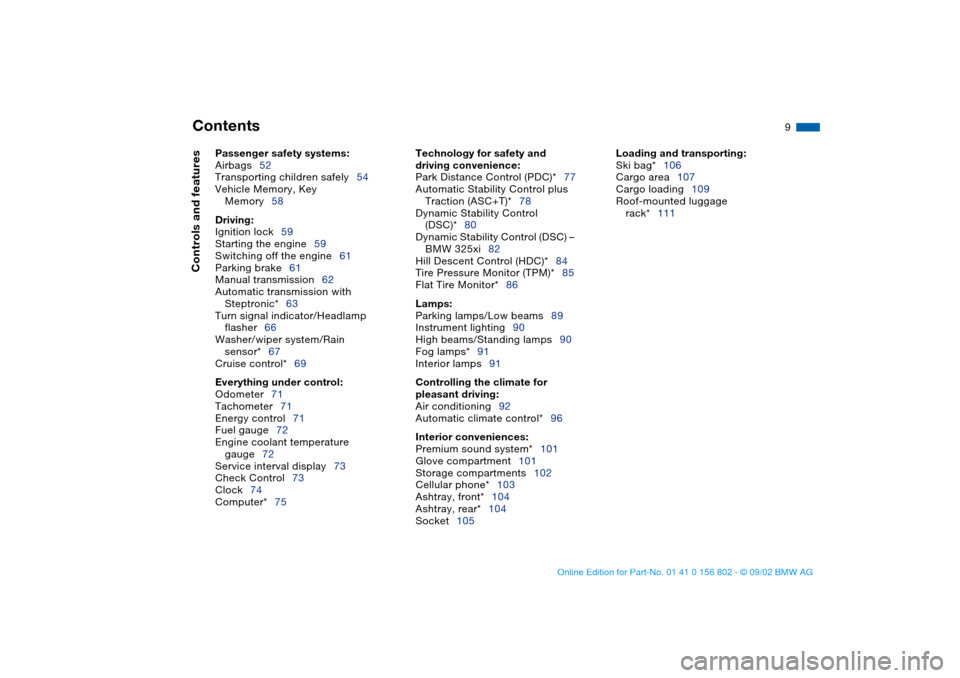
Contents
9
Passenger safety systems:
Airbags52
Transporting children safely54
Vehicle Memory, Key
Memory58
Driving:
Ignition lock59
Starting the engine59
Switching off the engine61
Parking brake61
Manual transmission62
Automatic transmission with
Steptronic*63
Turn signal indicator/Headlamp
flasher66
Washer/wiper system/Rain
sensor*67
Cruise control*69
Everything under control:
Odometer71
Tachometer71
Energy control71
Fuel gauge72
Engine coolant temperature
gauge72
Service interval display73
Check Control73
Clock74
Computer*75
Technology for safety and
driving convenience:
Park Distance Control (PDC)*77
Automatic Stability Control plus
Traction (ASC+T)*78
Dynamic Stability Control
(DSC)*80
Dynamic Stability Control (DSC) –
BMW 325xi82
Hill Descent Control (HDC)*84
Tire Pressure Monitor (TPM)*85
Flat Tire Monitor*86
Lamps:
Parking lamps/Low beams89
Instrument lighting90
High beams/Standing lamps90
Fog lamps*91
Interior lamps91
Controlling the climate for
pleasant driving:
Air conditioning92
Automatic climate control*96
Interior conveniences:
Premium sound system*101
Glove compartment101
Storage compartments102
Cellular phone*103
Ashtray, front*104
Ashtray, rear*104
Socket105
Loading and transporting:
Ski bag*106
Cargo area107
Cargo loading109
Roof-mounted luggage
rack*111
Controls and features
handbook.book Page 9 Saturday, July 27, 2002 1:36 PM
Page 15 of 166
15
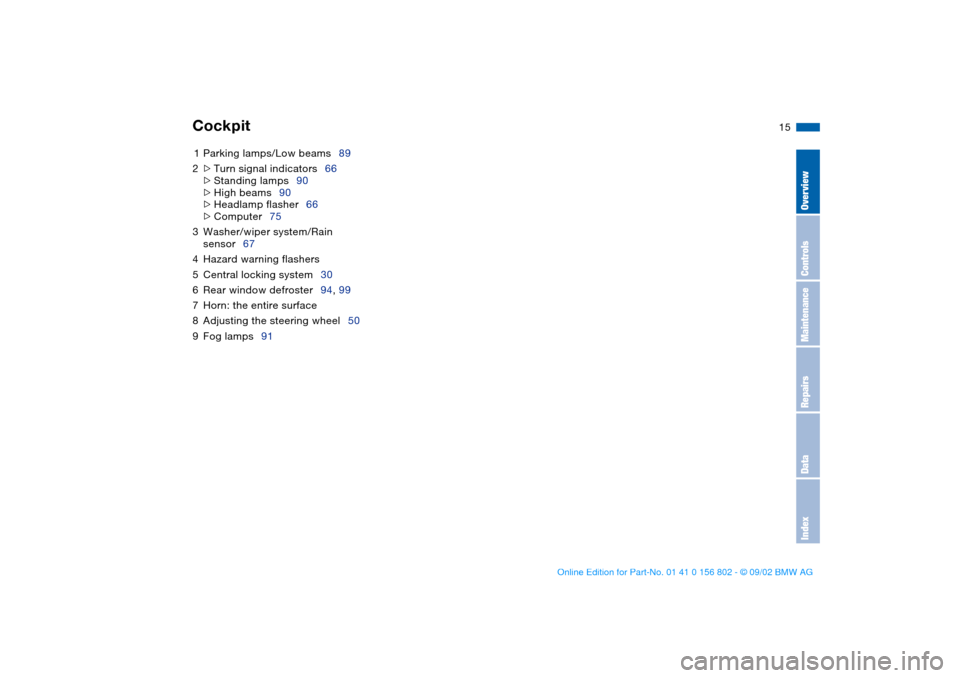
1Parking lamps/Low beams89
2
>
Turn signal indicators66
>
Standing lamps90
>
High beams90
>
Headlamp flasher66
>
Computer75
3Washer/wiper system/Rain
sensor67
4Hazard warning flashers
5Central locking system30
6Rear window defroster94, 99
7Horn: the entire surface
8Adjusting the steering wheel50
9Fog lamps91
Cockpit
OverviewControlsMaintenanceRepairsDataIndex
handbook.book Page 15 Saturday, July 27, 2002 1:36 PM
Page 18 of 166
18
Indicator and warning lamps
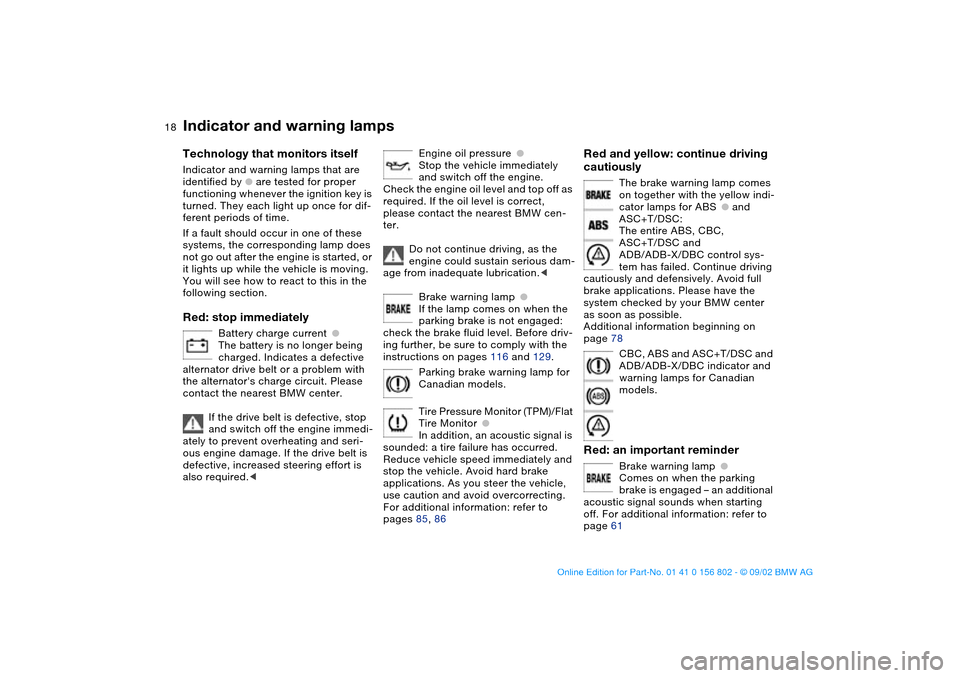
Technology that monitors itself
Indicator and warning lamps that are
identified by
●
are tested for proper
functioning whenever the ignition key is
turned. They each light up once for dif-
ferent periods of time.
If a fault should occur in one of these
systems, the corresponding lamp does
not go out after the engine is started, or
it lights up while the vehicle is moving.
You will see how to react to this in the
following section.
Red: stop immediately
Battery charge current
●
The battery is no longer being
charged. Indicates a defective
alternator drive belt or a problem with
the alternator's charge circuit. Please
contact the nearest BMW center.
If the drive belt is defective, stop
and switch off the engine immedi-
ately to prevent overheating and seri-
ous engine damage. If the drive belt is
defective, increased steering effort is
also required.
<
Engine oil pressure
●
Stop the vehicle immediately
and switch off the engine.
Check the engine oil level and top off as
required. If the oil level is correct,
please contact the nearest BMW cen-
ter.
Do not continue driving, as the
engine could sustain serious dam-
age from inadequate lubrication.
<
Brake warning lamp
●
If the lamp comes on when the
parking brake is not engaged:
check the brake fluid level. Before driv-
ing further, be sure to comply with the
instructions on pages 116 and 129.
Parking brake warning lamp for
Canadian models.
Tire Pressure Monitor (TPM)/Flat
Tire Monitor
●
In addition, an acoustic signal is
sounded: a tire failure has occurred.
Reduce vehicle speed immediately and
stop the vehicle. Avoid hard brake
applications. As you steer the vehicle,
use caution and avoid overcorrecting.
For additional information: refer to
pages 85, 86
Red and yellow: continue driving
cautiously
The brake warning lamp comes
on together with the yellow indi-
cator lamps for ABS
●
and
ASC+T/DSC:
The entire ABS, CBC,
ASC+T/DSC and
ADB/ADB-X/DBC control sys-
tem has failed. Continue driving
cautiously and defensively. Avoid full
brake applications. Please have the
system checked by your BMW center
as soon as possible.
Additional information beginning on
page 78
CBC, ABS and ASC+T/DSC and
ADB/ADB-X/DBC indicator and
warning lamps for Canadian
models.
Red: an important reminder
Brake warning lamp
●
Comes on when the parking
brake is engaged – an additional
acoustic signal sounds when starting
off. For additional information: refer to
page 61
handbook.book Page 18 Saturday, July 27, 2002 1:36 PM
Page 19 of 166
19
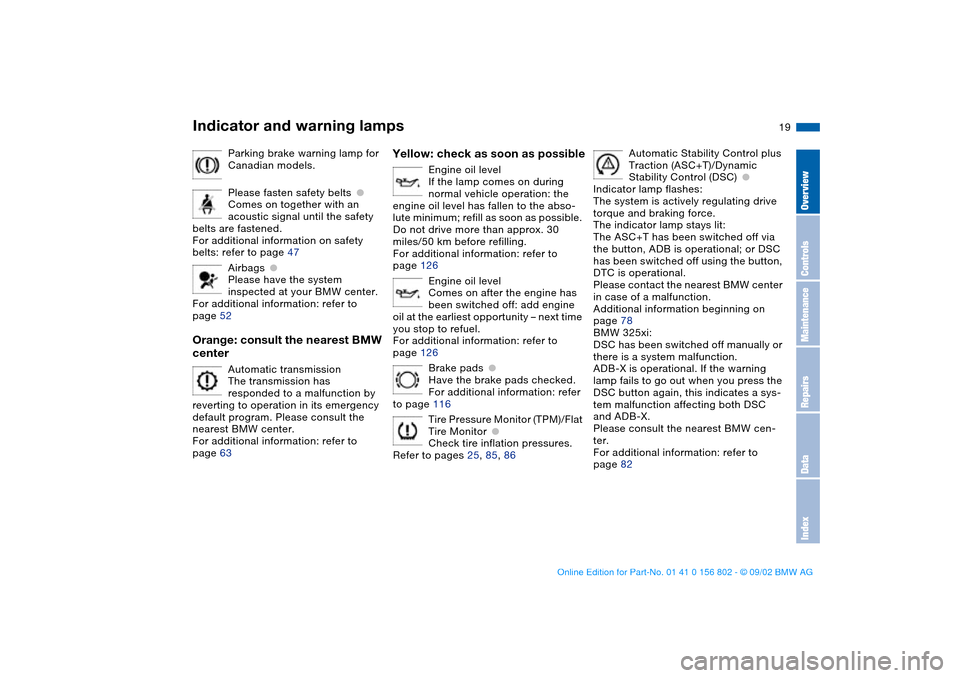
Parking brake warning lamp for
Canadian models.
Please fasten safety belts
●
Comes on together with an
acoustic signal until the safety
belts are fastened.
For additional information on safety
belts: refer to page 47
Airbags
●
Please have the system
inspected at your BMW center.
For additional information: refer to
page 52
Orange: consult the nearest BMW
center
Automatic transmission
The transmission has
responded to a malfunction by
reverting to operation in its emergency
default program. Please consult the
nearest BMW center.
For additional information: refer to
page 63
Yellow: check as soon as possible
Engine oil level
If the lamp comes on during
normal vehicle operation: the
engine oil level has fallen to the abso-
lute minimum; refill as soon as possible.
Do not drive more than approx. 30
miles/50 km before refilling.
For additional information: refer to
page 126
Engine oil level
Comes on after the engine has
been switched off: add engine
oil at the earliest opportunity – next time
you stop to refuel.
For additional information: refer to
page 126
Brake pads
●
Have the brake pads checked.
For additional information: refer
to page 116
Tire Pressure Monitor (TPM)/Flat
Tire Monitor
●
Check tire inflation pressures.
Refer to pages 25, 85, 86
Automatic Stability Control plus
Traction (ASC+T)/Dynamic
Stability Control (DSC)
●
Indicator lamp flashes:
The system is actively regulating drive
torque and braking force.
The indicator lamp stays lit:
The ASC+T has been switched off via
the button, ADB is operational; or DSC
has been switched off using the button,
DTC is operational.
Please contact the nearest BMW center
in case of a malfunction.
Additional information beginning on
page 78
BMW 325xi:
DSC has been switched off manually or
there is a system malfunction.
ADB-X is operational. If the warning
lamp fails to go out when you press the
DSC button again, this indicates a sys-
tem malfunction affecting both DSC
and ADB-X.
Please consult the nearest BMW cen-
ter.
For additional information: refer to
page 82
Indicator and warning lamps
OverviewControlsMaintenanceRepairsDataIndex
handbook.book Page 19 Saturday, July 27, 2002 1:36 PM
Page 30 of 166
30Opening and closing
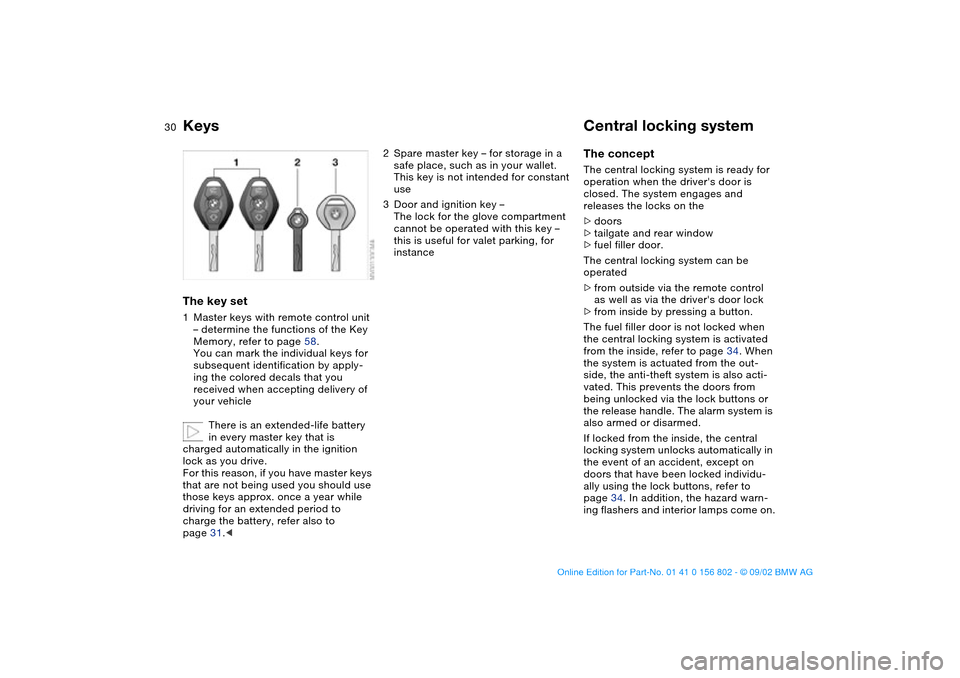
KeysThe key set1Master keys with remote control unit
– determine the functions of the Key
Memory, refer to page 58.
You can mark the individual keys for
subsequent identification by apply-
ing the colored decals that you
received when accepting delivery of
your vehicle
There is an extended-life battery
in every master key that is
charged automatically in the ignition
lock as you drive.
For this reason, if you have master keys
that are not being used you should use
those keys approx. once a year while
driving for an extended period to
charge the battery, refer also to
page 31.<
2Spare master key – for storage in a
safe place, such as in your wallet.
This key is not intended for constant
use
3Door and ignition key –
The lock for the glove compartment
cannot be operated with this key –
this is useful for valet parking, for
instance
Central locking systemThe conceptThe central locking system is ready for
operation when the driver's door is
closed. The system engages and
releases the locks on the
>doors
>tailgate and rear window
>fuel filler door.
The central locking system can be
operated
>from outside via the remote control
as well as via the driver's door lock
>from inside by pressing a button.
The fuel filler door is not locked when
the central locking system is activated
from the inside, refer to page 34. When
the system is actuated from the out-
side, the anti-theft system is also acti-
vated. This prevents the doors from
being unlocked via the lock buttons or
the release handle. The alarm system is
also armed or disarmed.
If locked from the inside, the central
locking system unlocks automatically in
the event of an accident, except on
doors that have been locked individu-
ally using the lock buttons, refer to
page 34. In addition, the hazard warn-
ing flashers and interior lamps come on.
handbook.book Page 30 Saturday, July 27, 2002 1:36 PM
Page 31 of 166
31
Opening and closing – via the remote controlThe conceptThe remote control gives you an excep-
tionally convenient method for unlock-
ing and locking your vehicle. Further-
more, it provides two additional
functions:
>To switch on interior lamps, refer to
page 32.
With this function you can also
search for the vehicle when parked in
an underground garage, for instance
>Opening the rear window, refer to
page 32.
The rear window will open slightly,
regardless of whether it was previ-
ously locked or unlocked.
Whenever you unlock or lock the vehi-
cle, you simultaneously deactivate/acti-
vate the anti-theft system, disarm/arm
the alarm system and switch the interior
lamps on/off.
You can have a signal set to con-
firm that the vehicle's locks have
engaged securely.<
Master keys with remote control
Persons or animals inside the
vehicle may be able to lock the
doors from the inside. For this reason,
always take the vehicle keys with you
so that the vehicle can be opened again
from the outside at any time.<
If it is no longer possible to lock
the vehicle via the remote control,
the battery is discharged. Use this key
while driving for an extended period in
order to recharge the battery. To pre-
vent unauthorized use of the remote
control, surrender only the door and
ignition key or the spare key when leav-
ing the vehicle for valet parking, for
example.
In the event of a system malfunction,
please contact your BMW center. You
can also obtain replacement keys
there.<
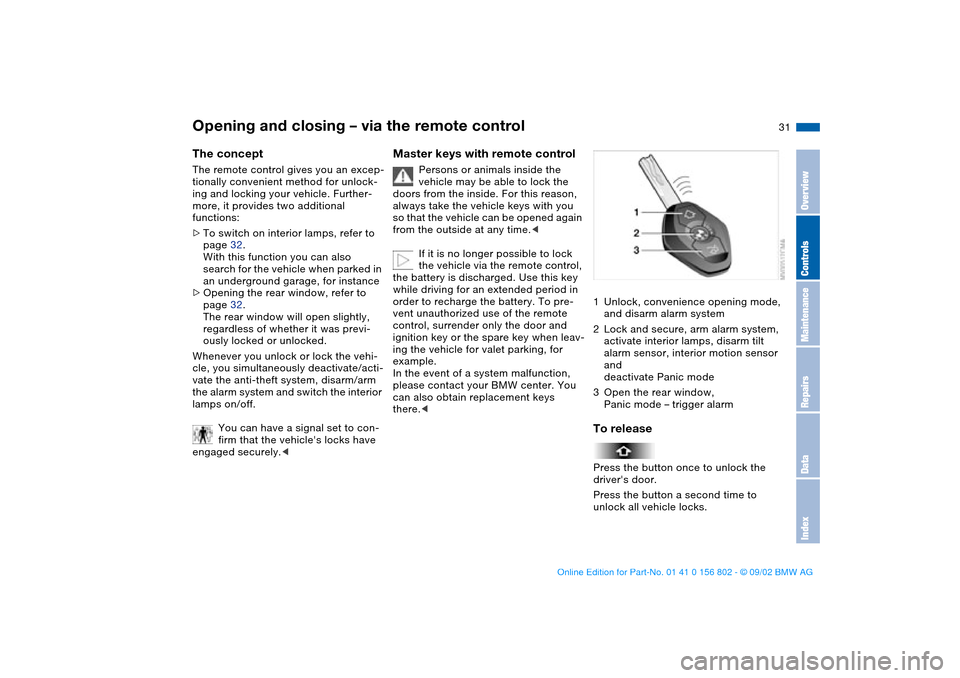
1Unlock, convenience opening mode,
and disarm alarm system
2Lock and secure, arm alarm system,
activate interior lamps, disarm tilt
alarm sensor, interior motion sensor
and
deactivate Panic mode
3Open the rear window,
Panic mode – trigger alarmTo releasePress the button once to unlock the
driver's door.
Press the button a second time to
unlock all vehicle locks.
OverviewControlsMaintenanceRepairsDataIndex
handbook.book Page 31 Saturday, July 27, 2002 1:36 PM
Page 49 of 166
49
Before activating the programmed
adjustment feature, ensure that
the footwell behind the driver's seat is
empty and unobstructed. If you fail to
do so, any persons, animals or objects
behind the seat could be injured or
damaged by a rearward movement of
the seat.<
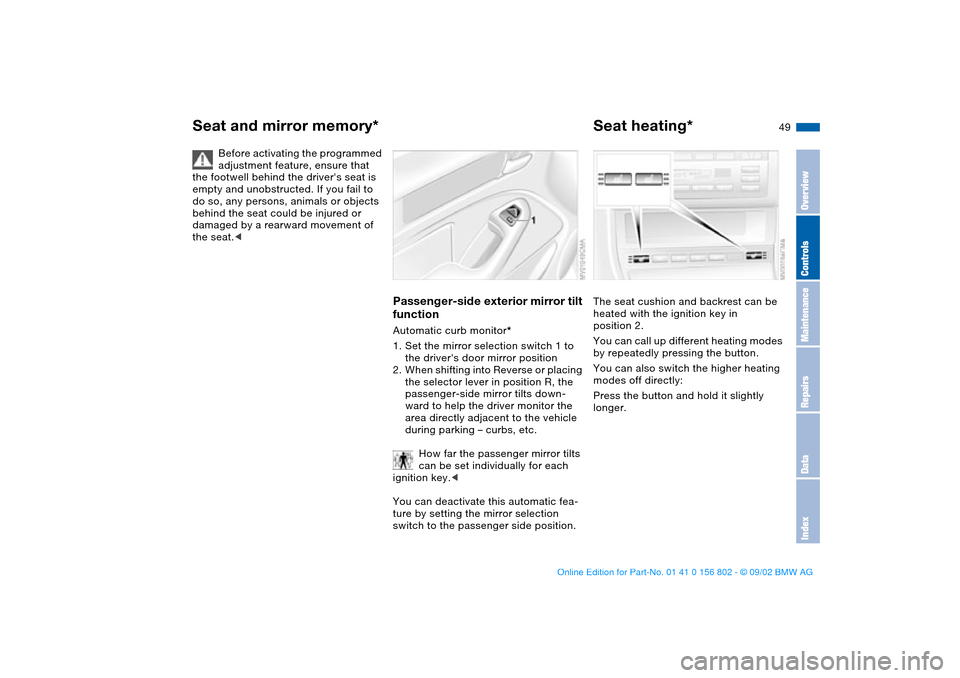
Passenger-side exterior mirror tilt
functionAutomatic curb monitor*
1. Set the mirror selection switch 1 to
the driver's door mirror position
2. When shifting into Reverse or placing
the selector lever in position R, the
passenger-side mirror tilts down-
ward to help the driver monitor the
area directly adjacent to the vehicle
during parking – curbs, etc.
How far the passenger mirror tilts
can be set individually for each
ignition key.<
You can deactivate this automatic fea-
ture by setting the mirror selection
switch to the passenger side position.
Seat heating*The seat cushion and backrest can be
heated with the ignition key in
position 2.
You can call up different heating modes
by repeatedly pressing the button.
You can also switch the higher heating
modes off directly:
Press the button and hold it slightly
longer.
Seat and mirror memory*
OverviewControlsMaintenanceRepairsDataIndex
handbook.book Page 49 Saturday, July 27, 2002 1:36 PM
Page 59 of 166
59 Driving
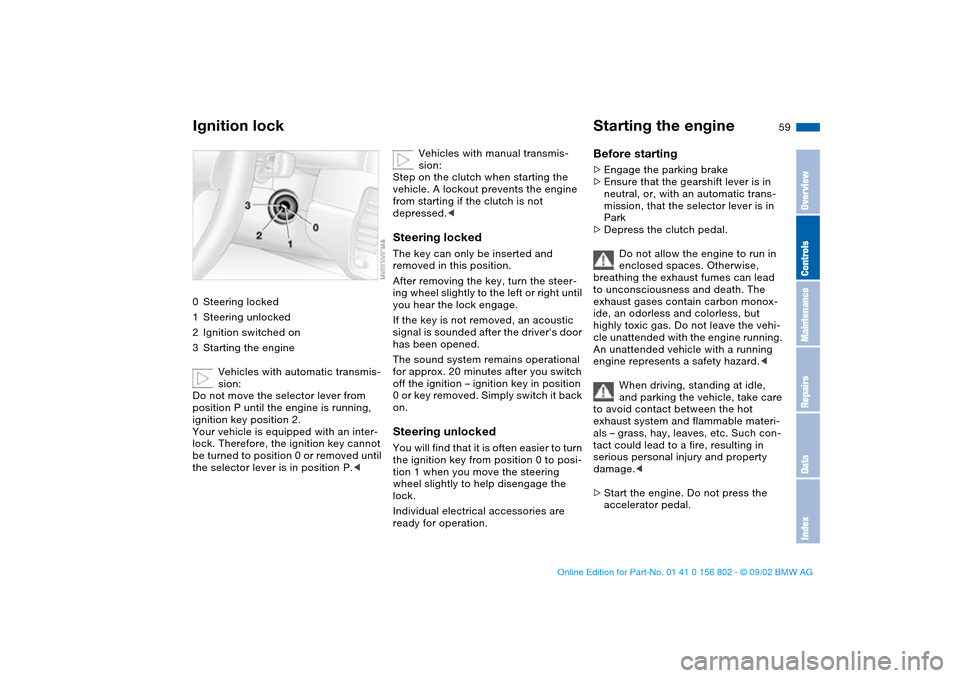
Ignition lock0Steering locked
1Steering unlocked
2Ignition switched on
3Starting the engine
Vehicles with automatic transmis-
sion:
Do not move the selector lever from
position P until the engine is running,
ignition key position 2.
Your vehicle is equipped with an inter-
lock. Therefore, the ignition key cannot
be turned to position 0 or removed until
the selector lever is in position P.<
Vehicles with manual transmis-
sion:
Step on the clutch when starting the
vehicle. A lockout prevents the engine
from starting if the clutch is not
depressed.<
Steering lockedThe key can only be inserted and
removed in this position.
After removing the key, turn the steer-
ing wheel slightly to the left or right until
you hear the lock engage.
If the key is not removed, an acoustic
signal is sounded after the driver's door
has been opened.
The sound system remains operational
for approx. 20 minutes after you switch
off the ignition – ignition key in position
0 or key removed. Simply switch it back
on.Steering unlockedYou will find that it is often easier to turn
the ignition key from position 0 to posi-
tion 1 when you move the steering
wheel slightly to help disengage the
lock.
Individual electrical accessories are
ready for operation.
Starting the engineBefore starting>Engage the parking brake
>Ensure that the gearshift lever is in
neutral, or, with an automatic trans-
mission, that the selector lever is in
Park
>Depress the clutch pedal.
Do not allow the engine to run in
enclosed spaces. Otherwise,
breathing the exhaust fumes can lead
to unconsciousness and death. The
exhaust gases contain carbon monox-
ide, an odorless and colorless, but
highly toxic gas. Do not leave the vehi-
cle unattended with the engine running.
An unattended vehicle with a running
engine represents a safety hazard.<
When driving, standing at idle,
and parking the vehicle, take care
to avoid contact between the hot
exhaust system and flammable materi-
als – grass, hay, leaves, etc. Such con-
tact could lead to a fire, resulting in
serious personal injury and property
damage.<
>Start the engine. Do not press the
accelerator pedal.
OverviewControlsMaintenanceRepairsDataIndex
handbook.book Page 59 Saturday, July 27, 2002 1:36 PM
Page 61 of 166
61
Switching off the engineTurn the ignition key to position 1 or 0.
You should never remove the igni-
tion key when the vehicle is in
motion, as the steering lock could
engage.
When you leave the vehicle, always
remove the ignition key and engage the
steering lock.
Vehicles with manual transmission:
Always engage the parking brake when
parking on slopes and inclined sur-
faces. Placing the lever in gear may not
provide adequate resistance to rolling.
Vehicles with automatic transmission:
Place the selector lever in Park.<
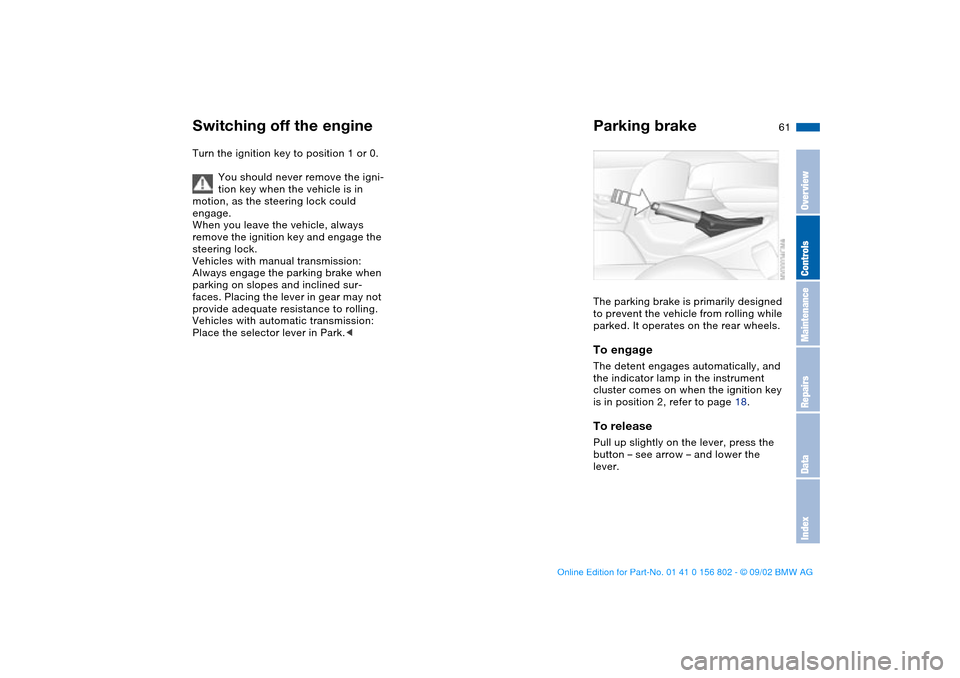
Parking brakeThe parking brake is primarily designed
to prevent the vehicle from rolling while
parked. It operates on the rear wheels.To engageThe detent engages automatically, and
the indicator lamp in the instrument
cluster comes on when the ignition key
is in position 2, refer to page 18.To releasePull up slightly on the lever, press the
button – see arrow – and lower the
lever.
OverviewControlsMaintenanceRepairsDataIndex
handbook.book Page 61 Saturday, July 27, 2002 1:36 PM
Page 62 of 166
62
If exceptional circumstances
make it necessary to engage the
parking brake while the vehicle is in
motion, do not pull it with excessive
pressure. Keep your thumb pressed
against the release button while care-
fully pulling the lever up.
Excessive pressure can lead to over-
braking and loss of traction – fishtailing
– at the rear.
The brake lamps do not come on when
the parking brake is engaged.
Vehicles with manual transmission:
Always engage the parking brake when
parking on slopes and inclined sur-
faces. Placing the lever in gear may not
provide adequate resistance to rolling.
Vehicles with automatic transmission:
Place the selector lever in Park.<
To avoid corrosion and one-sided
braking, apply the parking brake
lightly from time to time when coasting
to a standstill – at a traffic signal, for
instance – provided that it is safe to do
so.<
Manual transmission
Do not hold the vehicle in place on
slopes by slipping or "riding" the
clutch. Use the parking brake instead.
Riding the clutch leads to severe and
premature clutch wear.<
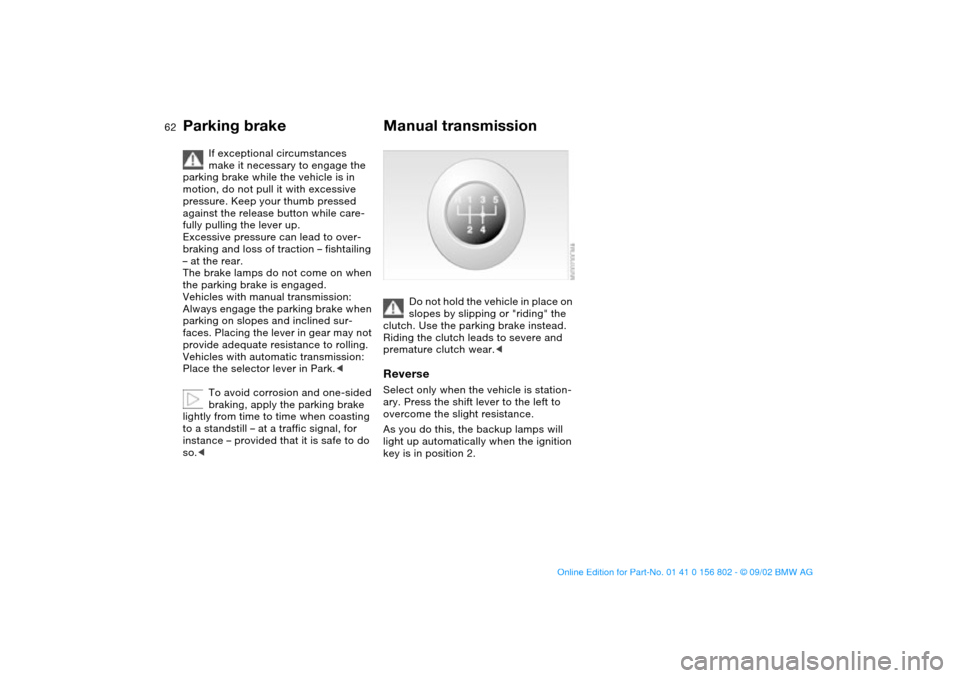
ReverseSelect only when the vehicle is station-
ary. Press the shift lever to the left to
overcome the slight resistance.
As you do this, the backup lamps will
light up automatically when the ignition
key is in position 2.
Parking brake
handbook.book Page 62 Saturday, July 27, 2002 1:36 PM