fog light BMW 325XI TOURING 2006 E91 Owner's Manual
[x] Cancel search | Manufacturer: BMW, Model Year: 2006, Model line: 325XI TOURING, Model: BMW 325XI TOURING 2006 E91Pages: 160, PDF Size: 4.86 MB
Page 12 of 160
Cockpit
10
Cockpit
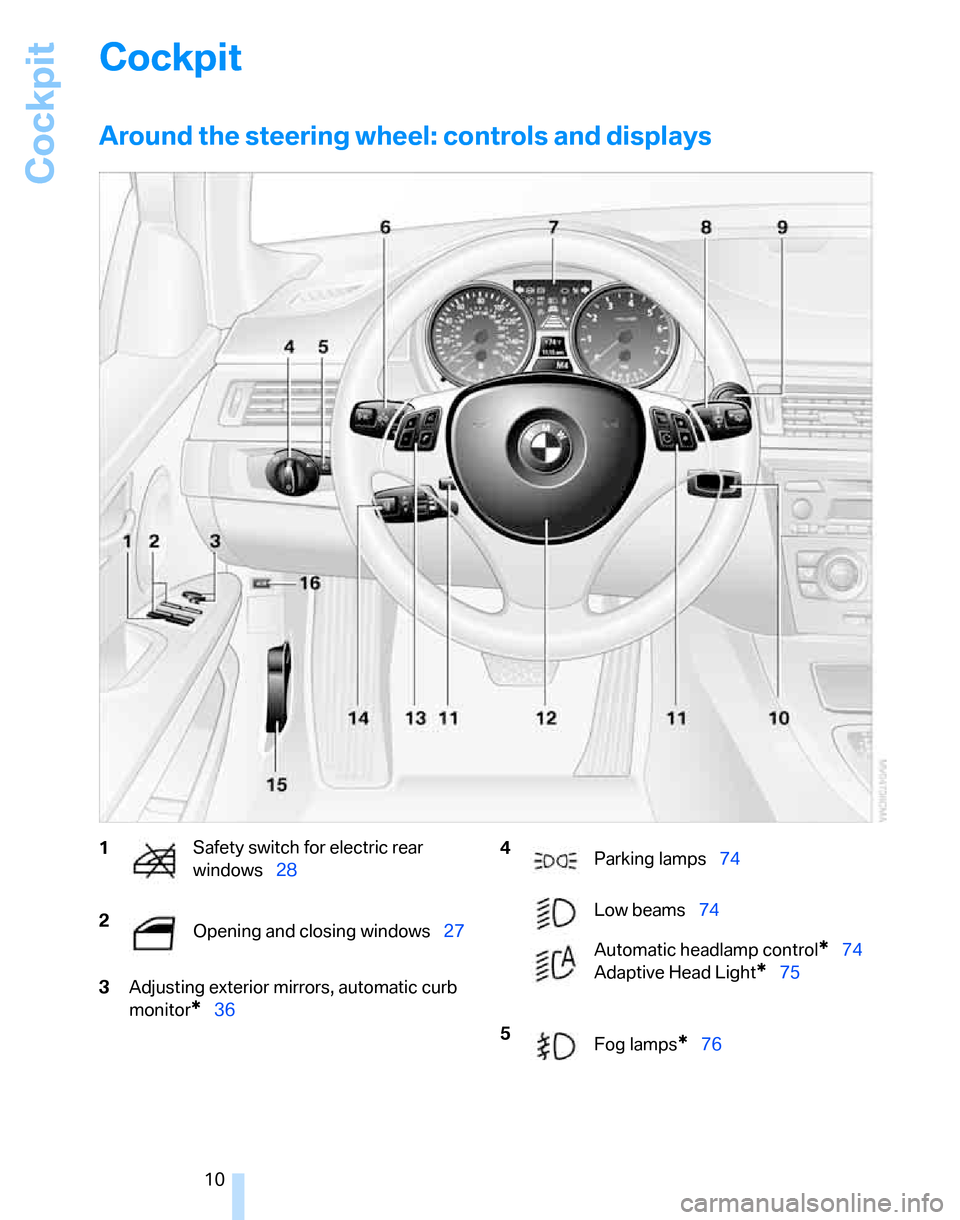
Around the steering wheel: controls and displays
3Adjusting exterior mirrors, automatic curb
monitor
*36
1Safety switch for electric rear
windows28
2
Opening and closing windows27 4
Parking lamps74
Low beams74
Automatic headlamp control
*74
Adaptive Head Light
*75
5
Fog lamps
*76
Page 53 of 160
Reference
At a glance
Controls
Driving tips
Mobility
51
ventional cruise control systems which you may
be accustomed to, you are strongly urged to
read all of the pages relating to this system
before use. Pay special attention to the System
limitations section beginning on page54.
Braking sensation
The system's automatic brake operation results
in a braking sensation that is slightly different
from what you feel when you brake the vehicle
yourself in a similar situation. Possible noises
during automatic deceleration are normal.
Manual transmission
You can shift gears while cruise control is acti-
vated. An indicator lamp notifies you that you
should shift gears when you drive for an
extended period at very high or very low engine
speeds, or the system is deactivated.
Range of applications
The minimum desired speed is 20 mph or
30 km/h, and the maximum desired speed is
110 mph or 180 km/h.
As with conventional cruise control sys-
tems, active cruise control in no way
diminishes or substitutes for the driver’s own
personal responsibility, alertness and aware-
ness in adjusting speed, braking or otherwise
controlling the vehicle. The driver should
decide when to use the system on the basis of
road, traffic, visibility, and weather conditions.
Active cruise control is intended for use on
highway-type roadways where traffic is moving
relatively smoothly. Do not use this system in
city driving; heavy traffic such as during rush
hour; on curvy, winding roads, slippery roads or
roads with sharp curves such as highway off-
ramps; during inclement weather such as snow,
strong rain or fog; or when entering inter-
changes, service/parking areas or toll booths.
It is also important to regulate your vehicle's
speed and distance setting within applicable
legal limits. Always be ready to take action or
apply the brakes if necessary, especially when
the system is actively following a vehicle in front
of you. Otherwise, driving conditions could result which violate the law or pose a risk of
accident.<
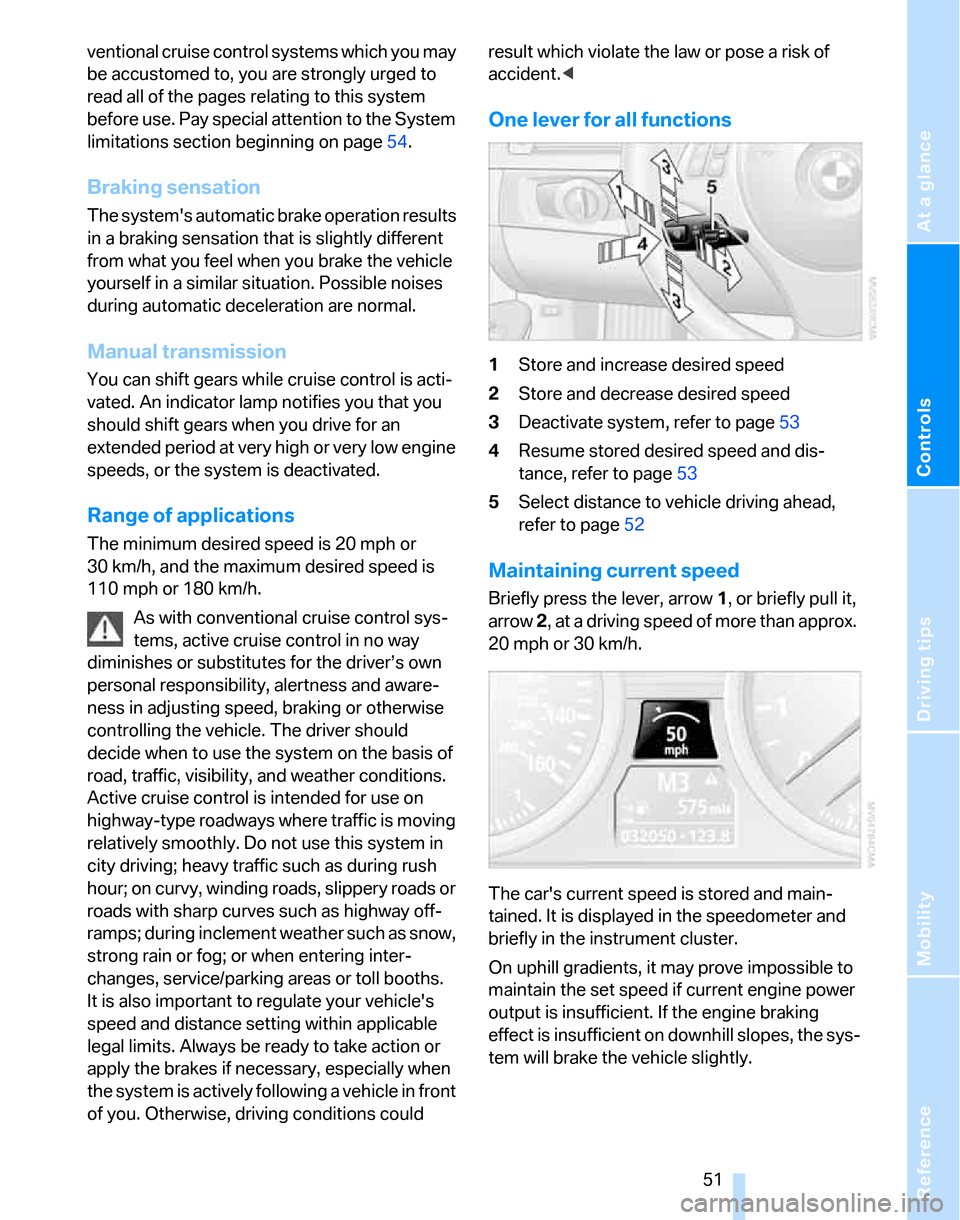
One lever for all functions
1Store and increase desired speed
2Store and decrease desired speed
3Deactivate system, refer to page53
4Resume stored desired speed and dis-
tance, refer to page53
5Select distance to vehicle driving ahead,
refer to page52
Maintaining current speed
Briefly press the lever, arrow 1, or briefly pull it,
arrow 2, at a driving speed of more than approx.
20 mph or 30 km/h.
The car's current speed is stored and main-
tained. It is displayed in the speedometer and
briefly in the instrument cluster.
On uphill gradients, it may prove impossible to
maintain the set speed if current engine power
output is insufficient. If the engine braking
effect is insufficient on downhill slopes, the sys-
tem will brake the vehicle slightly.
Page 73 of 160
Reference
At a glance
Controls
Driving tips
Mobility
71
intervention is simultaneously deactivated
when DSC is switched off, refer to page66.
Malfunction
The warning lamps come on. Active
steering is no longer operational. At
low speeds, greater steering wheel
movements are required, whereas at
higher speeds the vehicle reacts more sensi-
tively to steering wheel movements. Drive cau-
tiously and think well ahead. Have the system
checked.
If the warning lamp lights up during the first
engine starting following a power supply inter-
ruption, the system must be activated by being
initialized.
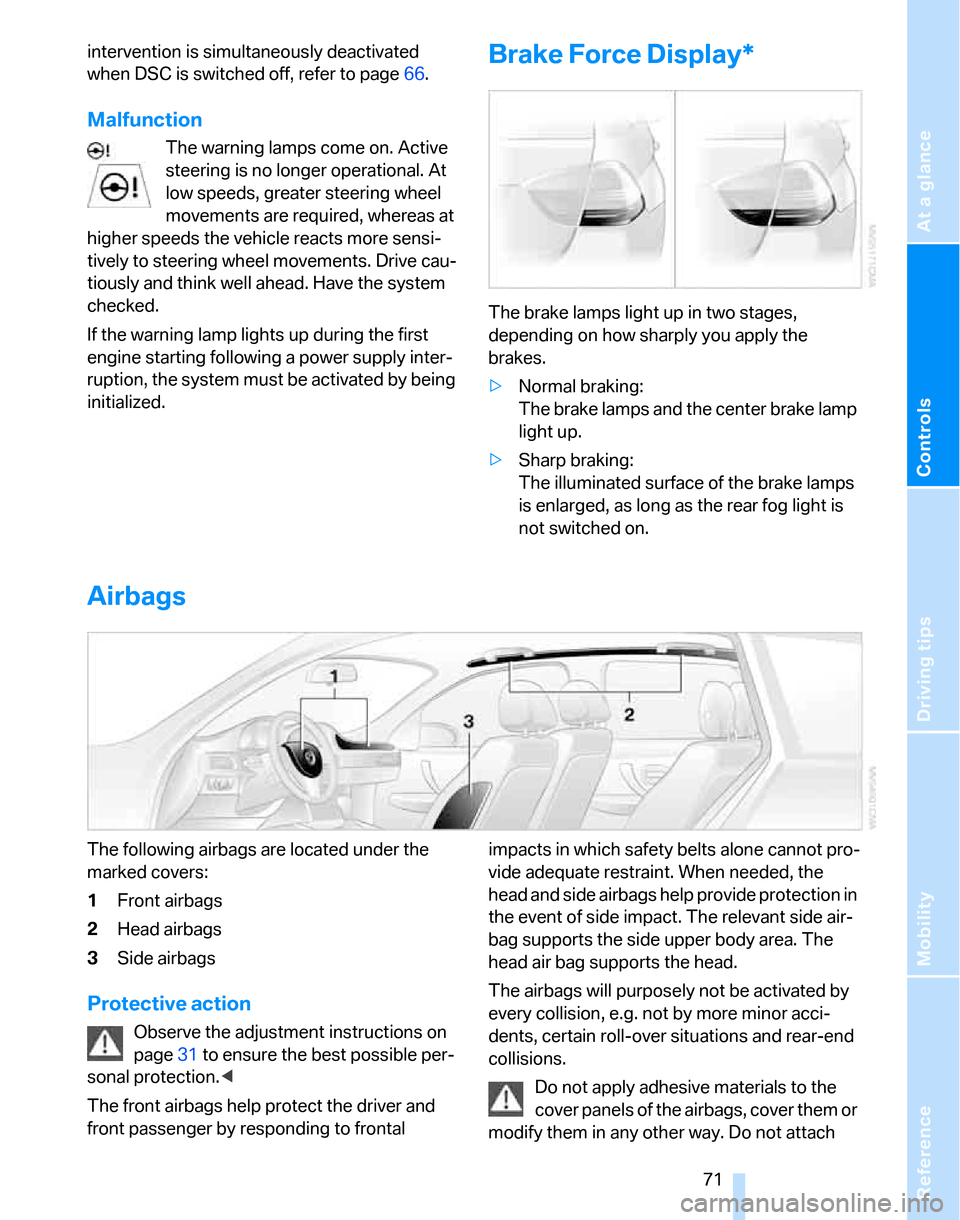
Brake Force Display*
The brake lamps light up in two stages,
depending on how sharply you apply the
brakes.
>Normal braking:
The brake lamps and the center brake lamp
light up.
>Sharp braking:
The illuminated surface of the brake lamps
is enlarged, as long as the rear fog light is
not switched on.
Airbags
The following airbags are located under the
marked covers:
1Front airbags
2Head airbags
3Side airbags
Protective action
Observe the adjustment instructions on
page31 to ensure the best possible per-
sonal protection.<
The front airbags help protect the driver and
front passenger by responding to frontal impacts in which safety belts alone cannot pro-
vide adequate restraint. When needed, the
head and side airbags help provide protection in
the event of side impact. The relevant side air-
bag supports the side upper body area. The
head air bag supports the head.
The airbags will purposely not be activated by
every collision, e.g. not by more minor acci-
dents, certain roll-over situations and rear-end
collisions.
Do not apply adhesive materials to the
cover panels of the airbags, cover them or
modify them in any other way. Do not attach
Page 76 of 160
Lamps
74
Lamps
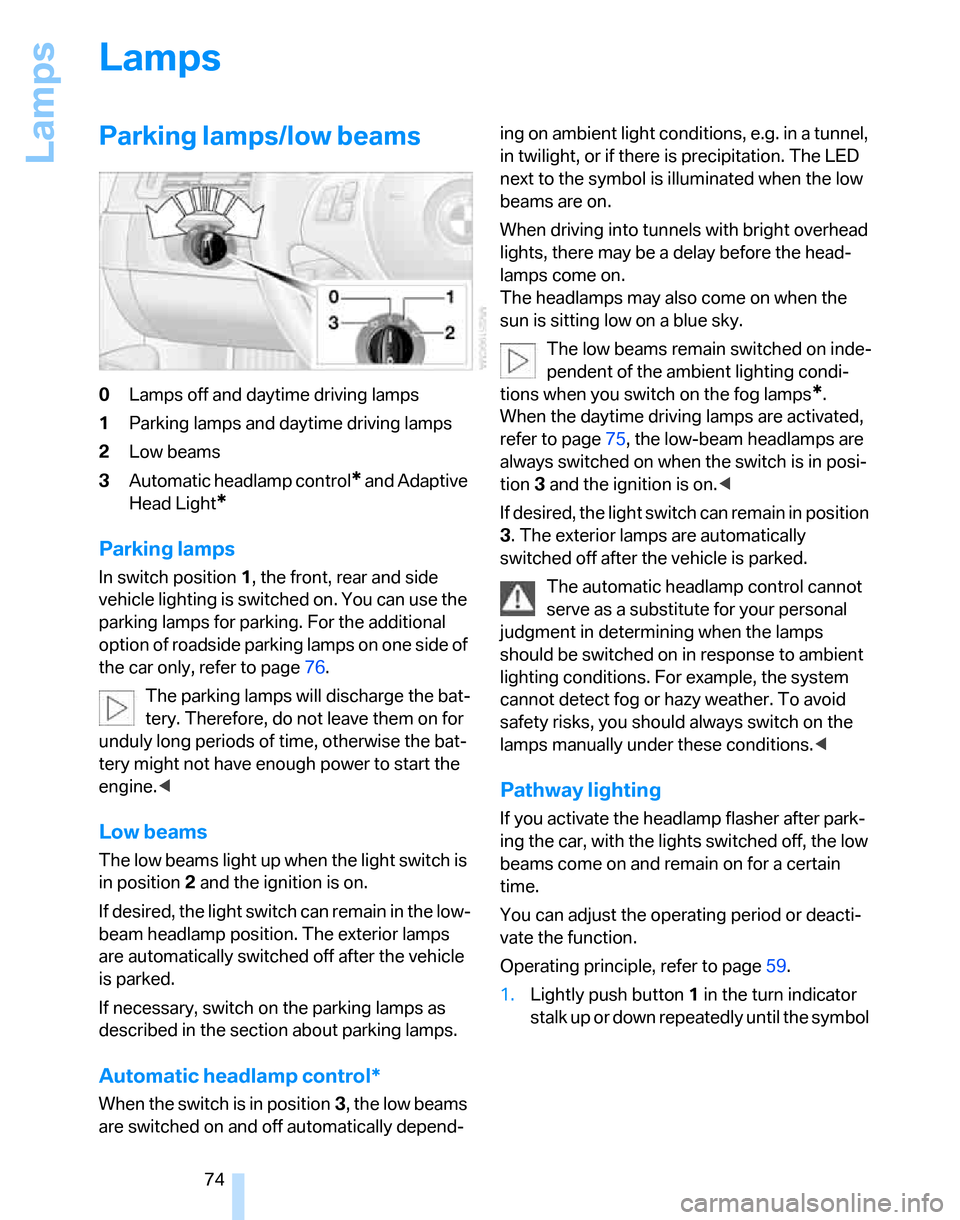
Parking lamps/low beams
0Lamps off and daytime driving lamps
1Parking lamps and daytime driving lamps
2Low beams
3Automatic headlamp control
* and Adaptive
Head Light
*
Parking lamps
In switch position1, the front, rear and side
vehicle lighting is switched on. You can use the
parking lamps for parking. For the additional
option of roadside parking lamps on one side of
the car only, refer to page76.
The parking lamps will discharge the bat-
tery. Therefore, do not leave them on for
unduly long periods of time, otherwise the bat-
tery might not have enough power to start the
engine.<
Low beams
The low beams light up when the light switch is
in position 2 and the ignition is on.
If desired, the light switch can remain in the low-
beam headlamp position. The exterior lamps
are automatically switched off after the vehicle
is parked.
If necessary, switch on the parking lamps as
described in the section about parking lamps.
Automatic headlamp control*
When the switch is in position3, the low beams
are switched on and off automatically depend-ing on ambient light conditions, e.g. in a tunnel,
in twilight, or if there is precipitation. The LED
next to the symbol is illuminated when the low
beams are on.
When driving into tunnels with bright overhead
lights, there may be a delay before the head-
lamps come on.
The headlamps may also come on when the
sun is sitting low on a blue sky.
The low beams remain switched on inde-
pendent of the ambient lighting condi-
tions when you switch on the fog lamps
*.
When the daytime driving lamps are activated,
refer to page75, the low-beam headlamps are
always switched on when the switch is in posi-
tion 3 and the ignition is on.<
If desired, the light switch can remain in position
3. The exterior lamps are automatically
switched off after the vehicle is parked.
The automatic headlamp control cannot
serve as a substitute for your personal
judgment in determining when the lamps
should be switched on in response to ambient
lighting conditions. For example, the system
cannot detect fog or hazy weather. To avoid
safety risks, you should always switch on the
lamps manually under these conditions.<
Pathway lighting
If you activate the headlamp flasher after park-
ing the car, with the lights switched off, the low
beams come on and remain on for a certain
time.
You can adjust the operating period or deacti-
vate the function.
Operating principle, refer to page59.
1.Lightly push button1 in the turn indicator
stalk up or down repeatedly until the symbol
Page 78 of 160
Lamps
76 of the road surface. Depending on the steering
angle and other parameters, the light from the
headlamp follows the course of the road.
Activating Adaptive Head Light
With the ignition on, turn the light switch to the
automatic headlamp control position, refer to
page74.
To avoid dazzling the drivers of oncoming vehi-
cles, Adaptive Head Light is not active when the
car is driven in reverse, and directs the light to
the front passenger's side when the vehicle is at
a standstill.
Malfunction
The LED next to the symbol for automatic head-
lamp control flashes. Adaptive Head Light is
malfunctioning or has failed. Have the system
checked as soon as possible.
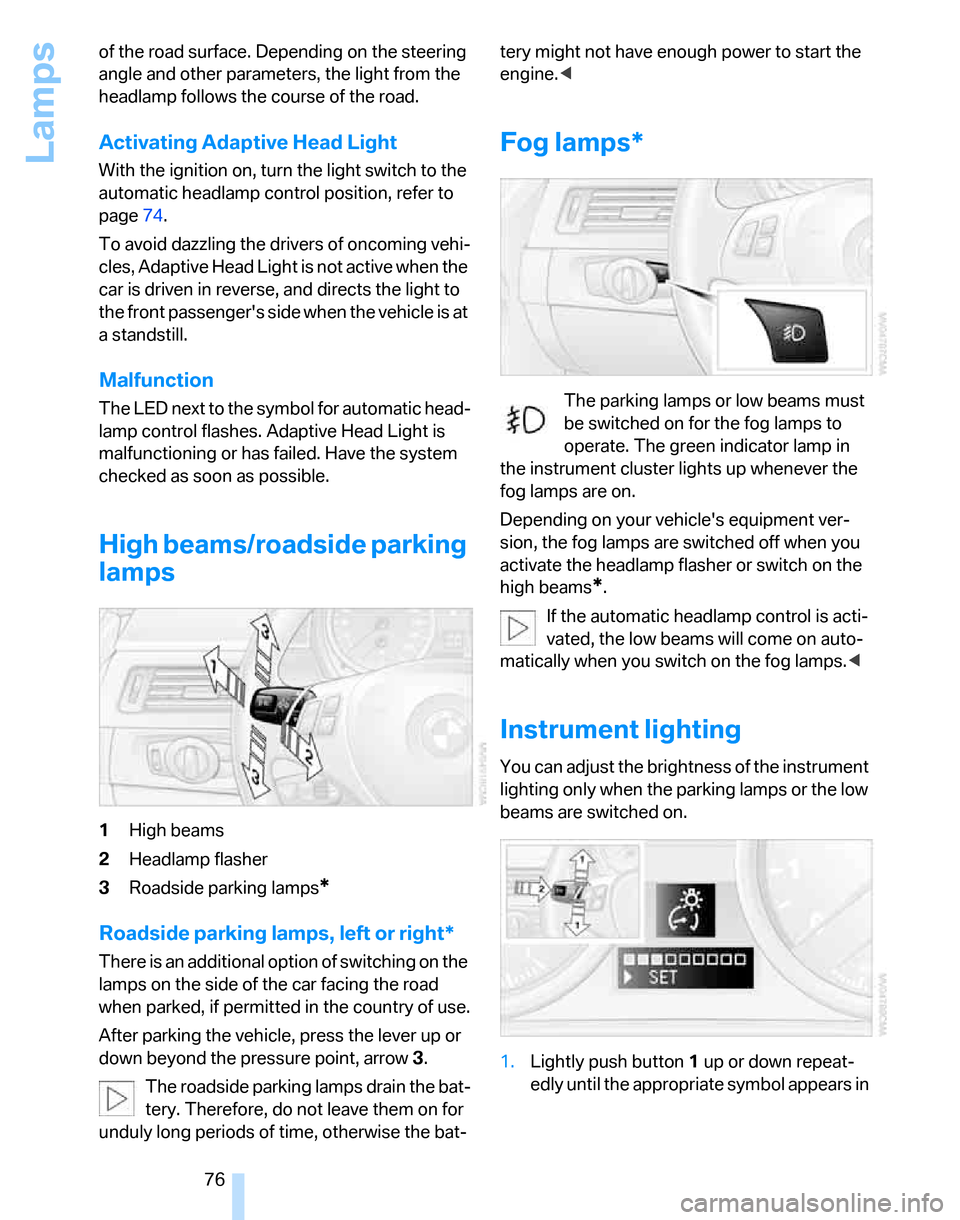
High beams/roadside parking
lamps
1High beams
2Headlamp flasher
3Roadside parking lamps
*
Roadside parking lamps, left or right*
There is an additional option of switching on the
lamps on the side of the car facing the road
when parked, if permitted in the country of use.
After parking the vehicle, press the lever up or
down beyond the pressure point, arrow 3.
The roadside parking lamps drain the bat-
tery. Therefore, do not leave them on for
unduly long periods of time, otherwise the bat-tery might not have enough power to start the
engine.<
Fog lamps*
The parking lamps or low beams must
be switched on for the fog lamps to
operate. The green indicator lamp in
the instrument cluster lights up whenever the
fog lamps are on.
Depending on your vehicle's equipment ver-
sion, the fog lamps are switched off when you
activate the headlamp flasher or switch on the
high beams
*.
If the automatic headlamp control is acti-
vated, the low beams will come on auto-
matically when you switch on the fog lamps.<
Instrument lighting
You can adjust the brightness of the instrument
lighting only when the parking lamps or the low
beams are switched on.
1.Lightly push button 1 up or down repeat-
edly until the appropriate symbol appears in
Page 122 of 160
Replacing components
120 any instructions provided by the bulb manufac-
turer.<
For care and maintenance of the headlamps,
please follow the instructions in the separate
Caring for your vehicle brochure.
If the routine for changing a particular
bulb is not described here, please contact
your BMW Center or a workshop that works
according to BMW repair procedures with cor-
respondingly trained personnel.<
Light-emitting diodes LEDs
Light-emitting diodes installed behind translu-
cent lenses serve as the light source for many of
the controls and displays in your vehicle. These
light-emitting diodes, which operate using a
concept similar to that applied in conventional
lasers, are officially designated as Class 1 light-
emitting diodes.
Do not remove the covers or expose the
eyes directly to the unfiltered light source
for several hours at a time, otherwise this could
cause irritation to the retina.<
Xenon lamps*
The service life of these bulbs is very long and
the probability of a failure is very low, provided
that they are not switched on and off an unusual
number of times. If a xenon lamp fails neverthe-
less, switch on the fog lamps and continue the
journey with great care, provided that local leg-
islation does not prohibit this.
Have work on the xenon lighting system
performed only by your BMW Center or a
workshop that works according to BMW repair
procedures with correspondingly trained per-
sonnel. Due to the high electrical voltages
present, there is a risk of potentially fatal acci-
dents if work is performed inappropriate.<
Parking lamps, roadside parking lamps
In the event of a malfunction, please contact
your BMW Center or a workshop that works
according to BMW repair procedures with cor-
respondingly trained personnel.
Halogen lamps
H7 bulb, 55 watts
Always wear gloves and eye protection;
the atmosphere within the H7 bulb is
pressurized. Otherwise there is a risk of injury if
the bulb is damaged.<
There are separate headlamp covers for low-
beam headlamps and high-beam headlamps.
Be careful when installing the covers, oth-
erwise leaks could occur and cause dam-
age to the headlamp system.<
For checking and adjusting headlamp
aim, please contact your BMW Center.<
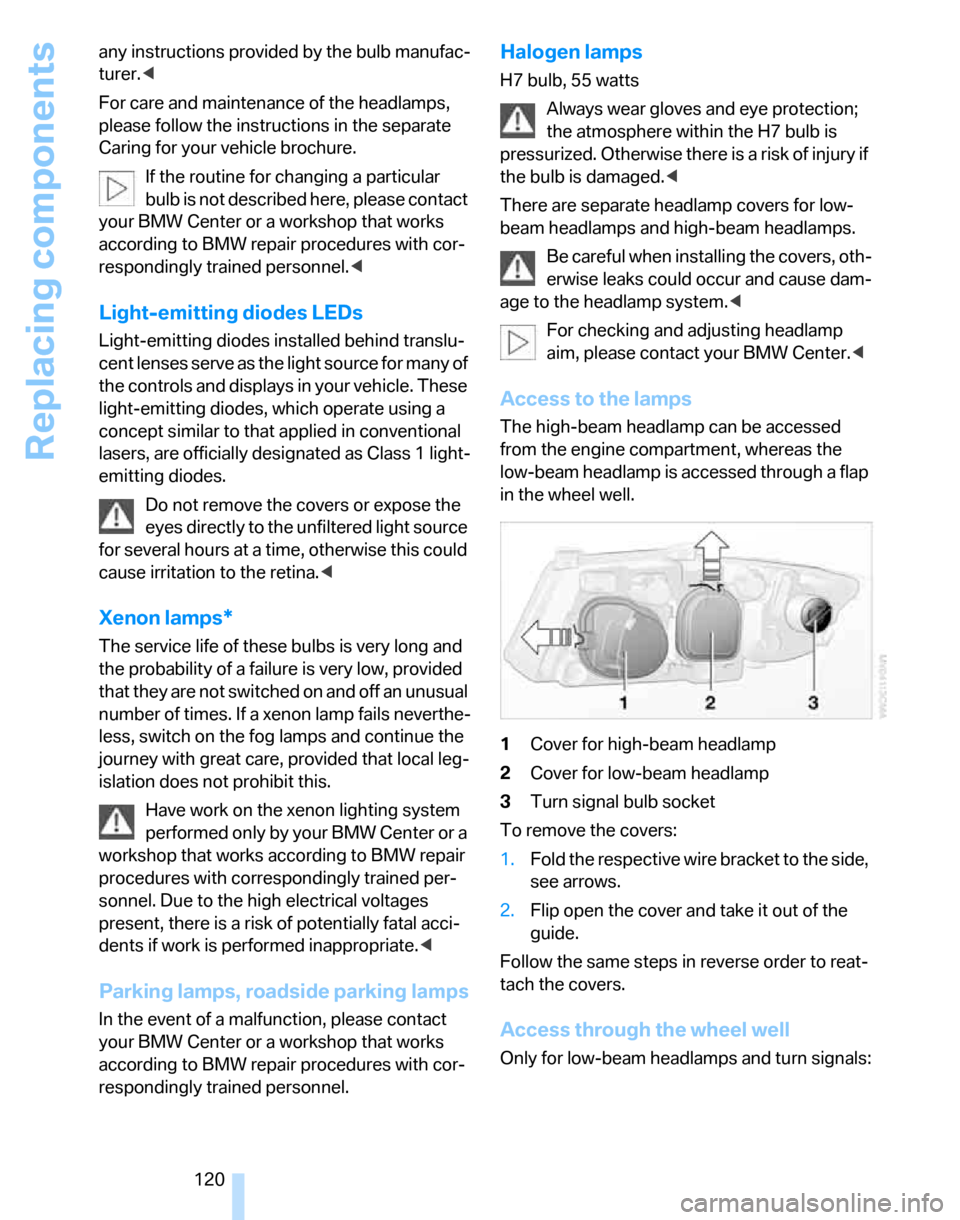
Access to the lamps
The high-beam headlamp can be accessed
from the engine compartment, whereas the
low-beam headlamp is accessed through a flap
in the wheel well.
1Cover for high-beam headlamp
2Cover for low-beam headlamp
3Turn signal bulb socket
To remove the covers:
1.Fold the respective wire bracket to the side,
see arrows.
2.Flip open the cover and take it out of the
guide.
Follow the same steps in reverse order to reat-
tach the covers.
Access through the wheel well
Only for low-beam headlamps and turn signals:
Page 132 of 160
Indicator and warning lamps
130
Indicator and warning lamps
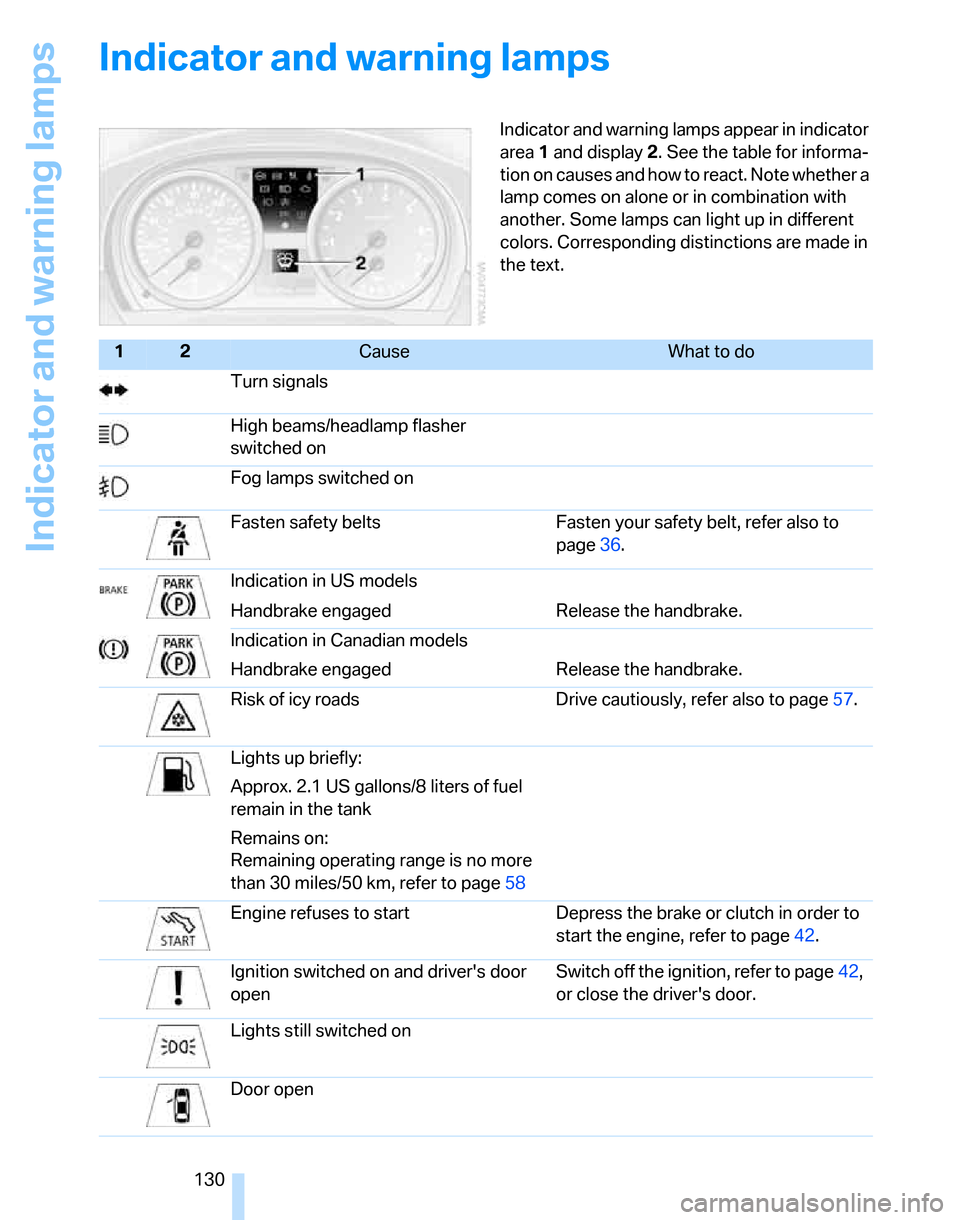
Indicator and warning lamps appear in indicator
area 1 and display 2. See the table for informa-
tion on causes and how to react. Note whether a
lamp comes on alone or in combination with
another. Some lamps can light up in different
colors. Corresponding distinctions are made in
the text.
12Cause What to do
Turn signals
High beams/headlamp flasher
switched on
Fog lamps switched on
Fasten safety belts Fasten your safety belt, refer also to
page36.
Indication in US models
Handbrake engaged Release the handbrake.
Indication in Canadian models
Handbrake engaged Release the handbrake.
Risk of icy roads Drive cautiously, refer also to page57.
Lights up briefly:
Approx. 2.1 US gallons/8 liters of fuel
remain in the tank
Remains on:
Remaining operating range is no more
than 30 miles/50 km, refer to page58
Engine refuses to start Depress the brake or clutch in order to
start the engine, refer to page42.
Ignition switched on and driver's door
openSwitch off the ignition, refer to page42,
or close the driver's door.
Lights still switched on
Door open
Page 140 of 160
Indicator and warning lamps
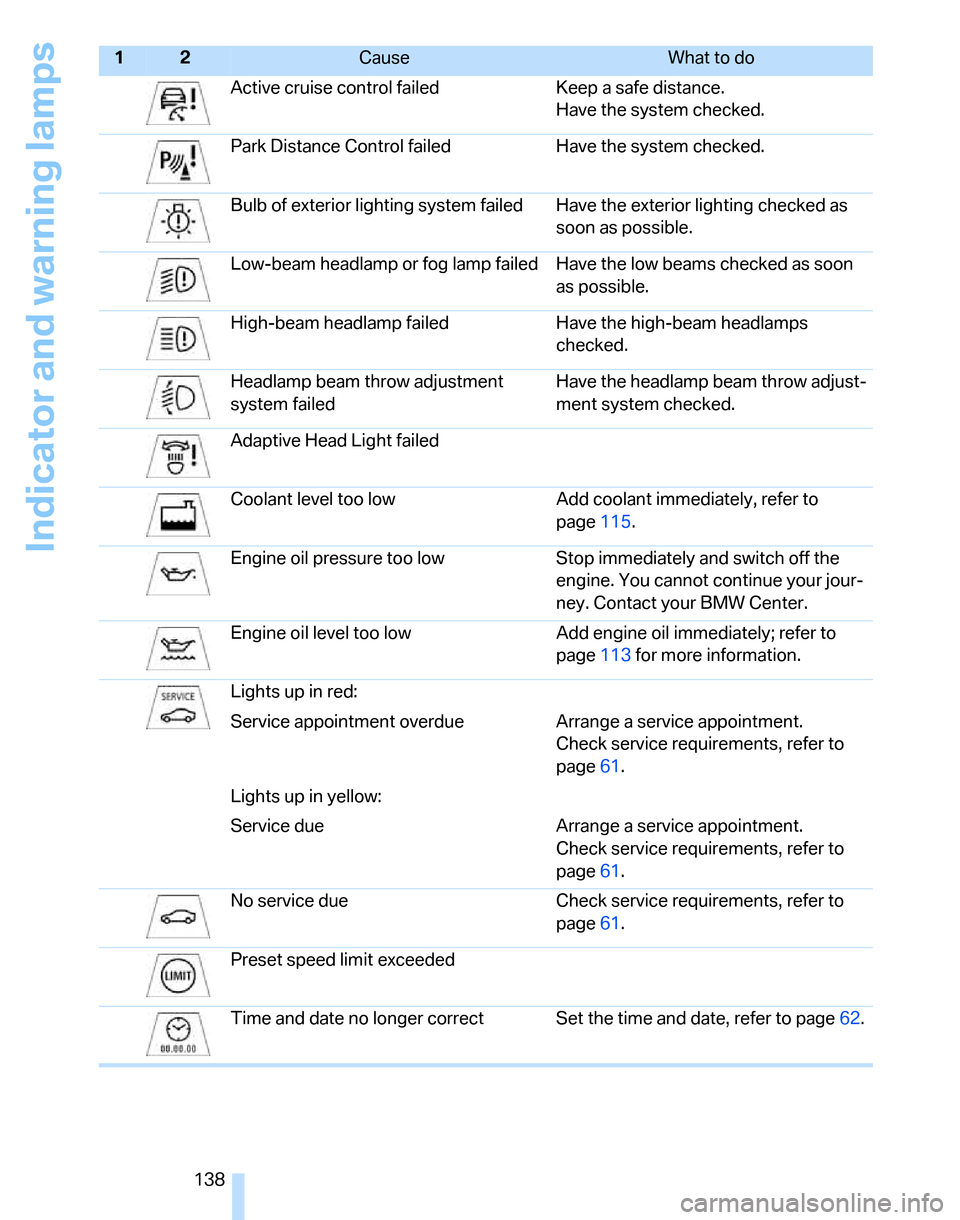
138Active cruise control failed Keep a safe distance.
Have the system checked.
Park Distance Control failed Have the system checked.
Bulb of exterior lighting system failed Have the exterior lighting checked as
soon as possible.
Low-beam headlamp or fog lamp failed Have the low beams checked as soon
as possible.
High-beam headlamp failed Have the high-beam headlamps
checked.
Headlamp beam throw adjustment
system failedHave the headlamp beam throw adjust-
ment system checked.
Adaptive Head Light failed
Coolant level too low Add coolant immediately, refer to
page115.
Engine oil pressure too low Stop immediately and switch off the
engine. You cannot continue your jour-
ney. Contact your BMW Center.
Engine oil level too low Add engine oil immediately; refer to
page113 for more information.
Lights up in red:
Service appointment overdue Arrange a service appointment.
Check service requirements, refer to
page61.
Lights up in yellow:
Service due Arrange a service appointment.
Check service requirements, refer to
page61.
No service due Check service requirements, refer to
page61.
Preset speed limit
exceeded
Time and date no longer correct Set the time and date, refer to page62.
12Cause What to do
Page 150 of 160
Everything from A to Z
148 Center brake lamp
– replacing bulbs123
Center console, refer to
Around the center
console14
Central locking
– from inside22
– from outside19
Central locking system19
– convenient access26
Changing bulbs119
Changing wheels123
Chassis number, refer to
Engine compartment113
Check Control63
Check Gas Cap104
Checking the air pressure,
refer to Tire inflation
pressure106
Child-restraint fixing system
LATCH40
Child-restraint systems39
Child-safety lock41
Child seats39
Chrome parts, care, refer to
Caring for your vehicle
brochure
Cigarette lighter89
– socket89
Cleaning, refer to Caring for
your vehicle brochure
Cleaning headlamps48
– washer fluid48
Clock57
– 12h/24h mode60
– setting time62
Closing
– from inside22
– from outside20
Clothes hooks88
Cockpit10
Cold start, refer to Starting the
engine43
Combined instrument, refer to
Instrument cluster12
Comfort Access, refer to
Convenient access26
Comfort area, refer to Around
the center console14Compartment for remote
control, refer to Ignition
lock42
Compass85
Computer58
Condensation, refer to When
the vehicle is parked98
Configuring settings, refer to
Personal Profile19
Confirmation signals for
locking/unlocking of the
vehicle21
Connecting vacuum cleaner,
refer to Connecting
electrical appliances
89
Consumption display
– average consumption58
Consumption indicator
– Energy Control58
Control Display
– settings59
Controls and displays10
Convenience operation
– windows20
Convenience start, refer to
Starting the engine43
Convenient access26
– replacing the battery27
– what to observe before
entering a car wash27
Convenient operation
– windows with convenient
access26
– with convenient access26
Coolant115
– adding115
– checking level115
Coolant temperature57
Cooling, maximum81
Cooling fluid, refer to
Coolant115
Cornering lamps, refer to
Adaptive Head Light75
Courtesy lamps77
Cruise control48
– active50
– malfunction50
Cruising range58
Cup holders88Curb weight, refer to
Weights144
Current consumption, refer to
Energy Control58
D
Dashboard, refer to
Cockpit10
Dashboard, refer to
Instrument cluster12
Dashboard lighting, refer to
Instrument lighting76
Data142
– capacities145
– dimensions143
– engine142
– weights144
Date
– setting63
Daytime driving lamps75
DBC Dynamic Brake
Control66
DCC, refer to Cruise
control48
Deactivating front passenger
airbags72
Deadlocking, refer to
Locking20
Decommissioning the vehicle
– refer to Caring for your
vehicle brochure
Defect
– door lock22
– fuel filler door104
– panorama glass roof30
Defogging windows80,83
Defrosting windows80,83
Defrosting windows and
removing condensation
– air conditioner80
– automatic climate control83
Defrosting windshield, refer to
Defrosting windows80,83
Defrost position, refer to
Defrosting windows80,83
Digital clock57
Digital compass85
Dimensions143
Page 152 of 160
Everything from A to Z
150 Filter
– refer to Microfilter/activated-
charcoal filter for automatic
climate control83
– refer to Microfilter for air
conditioner80
First aid pouch125
Fixture for remote control,
refer to Ignition lock42
Flashlight, refer to
Rechargeable flashlight87
Flash when locking/
unlocking21
Flat
– Run-Flat Tires110
Flat Tire Monitor FTM69
– indicating a flat tire70
– initializing the system69
– malfunction70
– snow chains69,111
– system limits69
Flat tires, refer to Tire
condition109
Fog lamps76
– indicator lamp76,130
Folding rear seat back90
Footbrake, refer to Braking
safely97
Footwell lamps77
For your own safety5
Front airbags71
Front seat adjustment31
FTM, refer to Flat Tire
Monitor69
Fuel105
– display58
– high-quality brands105
– quality105
– specifications105
– tank capacity145
Fuel clock, refer to Fuel
gauge58
Fuel consumption, refer to
Average fuel
consumption58
Fuel display, refer to Fuel
gauge58Fuel filler door104
– releasing in the event of
electrical malfunction104
Fuses124
G
Garage door opener, refer to
Integrated universal remote
control84
Gasoline, refer to Required
fuel105
Gasoline display, refer to Fuel
gauge58
Gasoline engine, checking oil
level113
Gear indicator
– automatic transmission with
Steptronic44
Gearshift lever
– automatic transmission with
Steptronic45
– manual transmission44
Gearshifts
– with automatic
transmission45
– with manual transmission44
General driving notes96
Glass sunroof, electric
– closing after electrical
malfunction30
– convenient operation20,22
– operation with convenient
access26
– remote control20
Glove compartment87
– rechargeable flashlight87
Grills, refer to Air vents78
Gross vehicle weight, refer to
Weights144
H
Halogen lamps
– replacing bulbs120
Handbrake44
– indicator lamp44
– manual release22Hand lamp, refer to
Rechargeable flashlight87
Hands-free system14
Hazard warning flashers14
Head airbags71
Headlamp control,
automatic74
Headlamp cover120
Headlamp flasher46
– indicator lamp11,14,130
Headlamps
– care, refer to Caring for your
vehicle brochure
– replacing bulbs120
Head restraints33
– sitting safely31
Heated
– mirrors37
– rear window79,83
– seats34
Heating78
– mirrors37
– rear window79,83
– seats34
Heating while at a standstill,
refer to Using residual
heat82
Heavy loads, refer to Stowing
cargo99
Height, refer to
Dimensions143
Height adjustment
– seats32
– steering wheel38
High beams76
– headlamp flasher76
– indicator lamp130
– replacing bulbs120
High water, refer to Driving
through water97
Hills97
Holders for cups88
Homepage4
Hood112
Horn10
Hot exhaust system96
Hydraulic brake assist, refer to
Dynamic Brake Control66
Hydroplaning
97