service indicator BMW 325XI TOURING 2006 E91 Owner's Manual
[x] Cancel search | Manufacturer: BMW, Model Year: 2006, Model line: 325XI TOURING, Model: BMW 325XI TOURING 2006 E91Pages: 160, PDF Size: 4.86 MB
Page 14 of 160
Cockpit
12
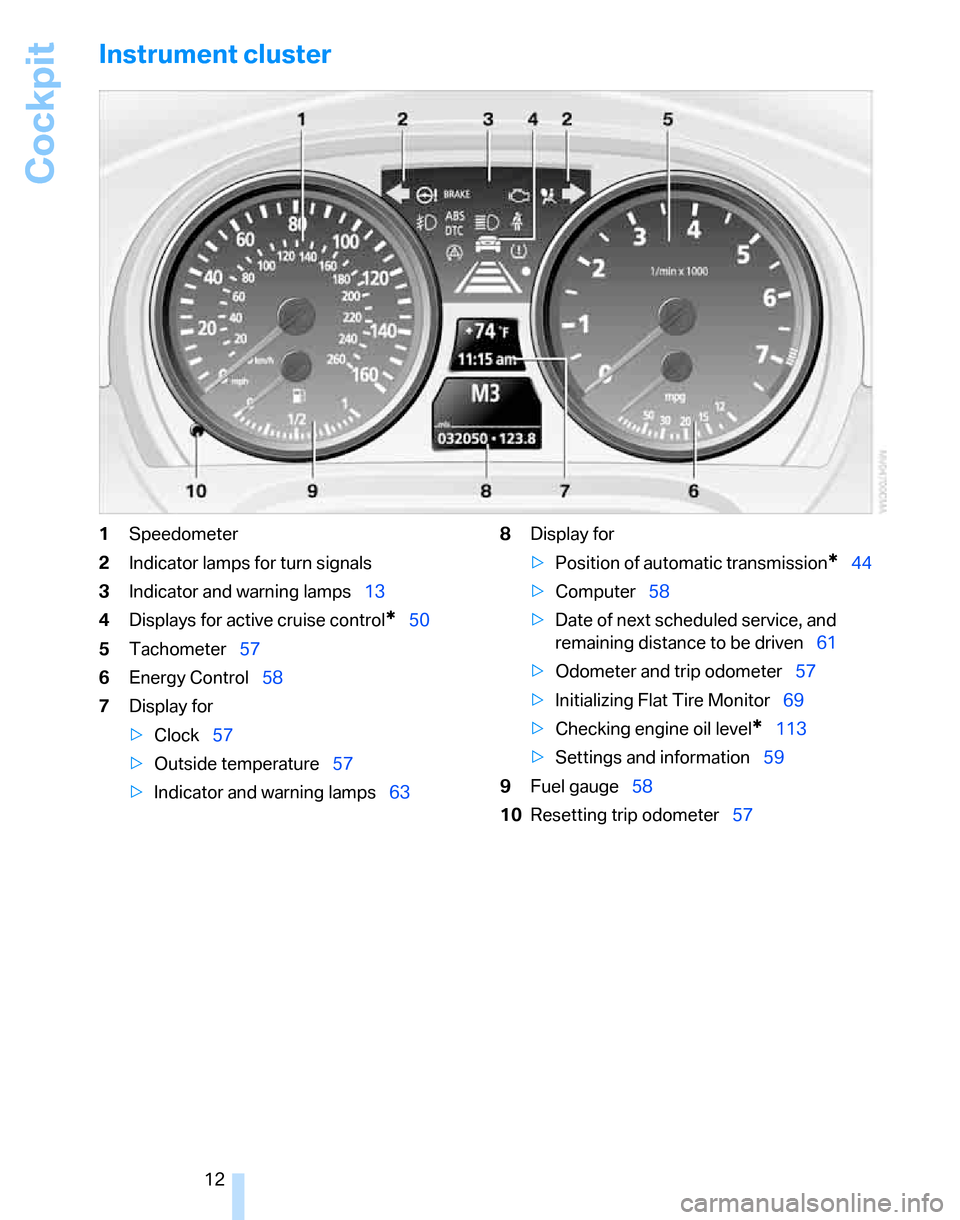
Instrument cluster
1Speedometer
2Indicator lamps for turn signals
3Indicator and warning lamps13
4Displays for active cruise control
*50
5Tachometer57
6Energy Control58
7Display for
>Clock57
>Outside temperature57
>Indicator and warning lamps638Display for
>Position of automatic transmission
*44
>Computer58
>Date of next scheduled service, and
remaining distance to be driven61
>Odometer and trip odometer57
>Initializing Flat Tire Monitor69
>Checking engine oil level
*113
>Settings and information59
9Fuel gauge58
10Resetting trip odometer57
Page 53 of 160
Reference
At a glance
Controls
Driving tips
Mobility
51
ventional cruise control systems which you may
be accustomed to, you are strongly urged to
read all of the pages relating to this system
before use. Pay special attention to the System
limitations section beginning on page54.
Braking sensation
The system's automatic brake operation results
in a braking sensation that is slightly different
from what you feel when you brake the vehicle
yourself in a similar situation. Possible noises
during automatic deceleration are normal.
Manual transmission
You can shift gears while cruise control is acti-
vated. An indicator lamp notifies you that you
should shift gears when you drive for an
extended period at very high or very low engine
speeds, or the system is deactivated.
Range of applications
The minimum desired speed is 20 mph or
30 km/h, and the maximum desired speed is
110 mph or 180 km/h.
As with conventional cruise control sys-
tems, active cruise control in no way
diminishes or substitutes for the driver’s own
personal responsibility, alertness and aware-
ness in adjusting speed, braking or otherwise
controlling the vehicle. The driver should
decide when to use the system on the basis of
road, traffic, visibility, and weather conditions.
Active cruise control is intended for use on
highway-type roadways where traffic is moving
relatively smoothly. Do not use this system in
city driving; heavy traffic such as during rush
hour; on curvy, winding roads, slippery roads or
roads with sharp curves such as highway off-
ramps; during inclement weather such as snow,
strong rain or fog; or when entering inter-
changes, service/parking areas or toll booths.
It is also important to regulate your vehicle's
speed and distance setting within applicable
legal limits. Always be ready to take action or
apply the brakes if necessary, especially when
the system is actively following a vehicle in front
of you. Otherwise, driving conditions could result which violate the law or pose a risk of
accident.<
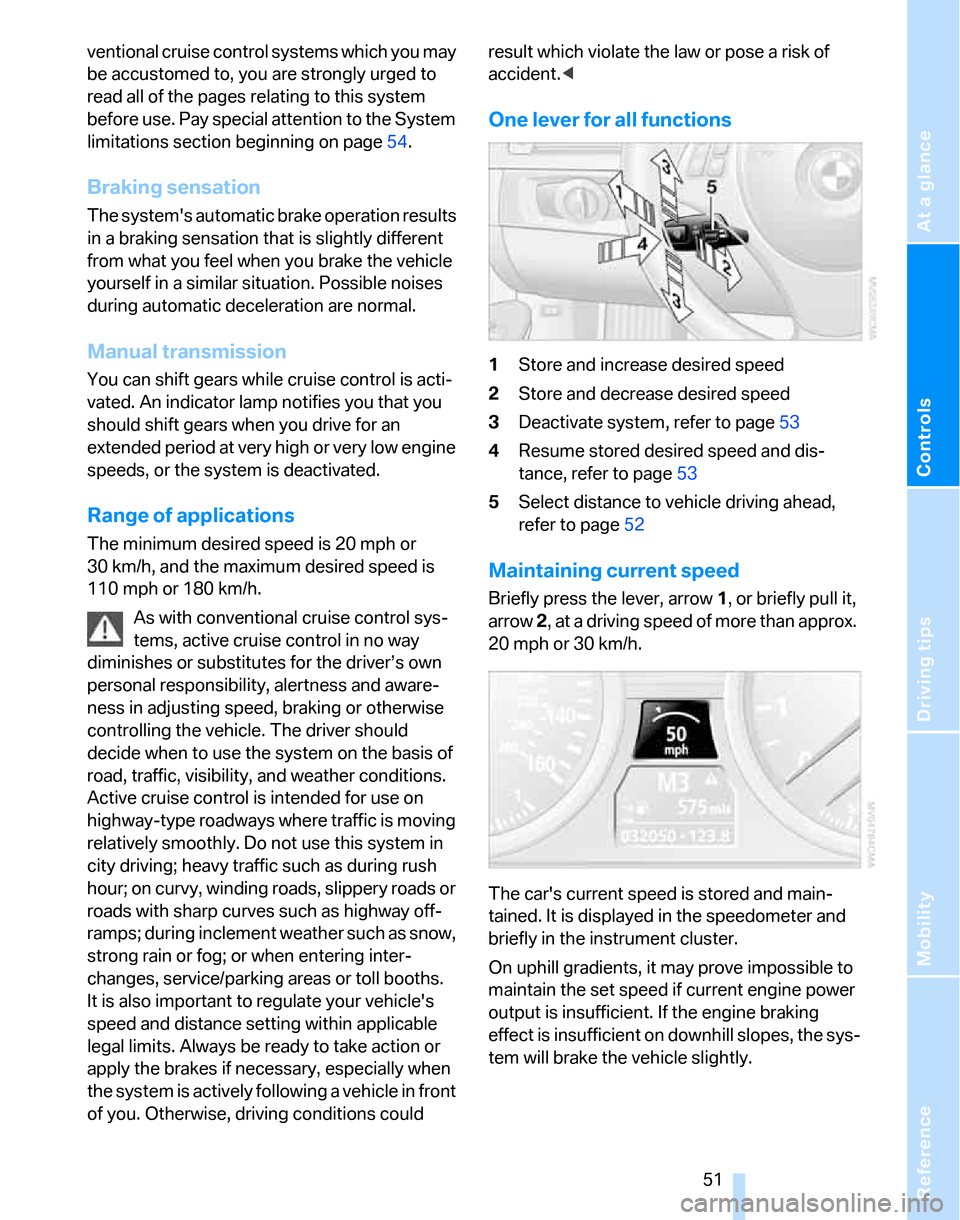
One lever for all functions
1Store and increase desired speed
2Store and decrease desired speed
3Deactivate system, refer to page53
4Resume stored desired speed and dis-
tance, refer to page53
5Select distance to vehicle driving ahead,
refer to page52
Maintaining current speed
Briefly press the lever, arrow 1, or briefly pull it,
arrow 2, at a driving speed of more than approx.
20 mph or 30 km/h.
The car's current speed is stored and main-
tained. It is displayed in the speedometer and
briefly in the instrument cluster.
On uphill gradients, it may prove impossible to
maintain the set speed if current engine power
output is insufficient. If the engine braking
effect is insufficient on downhill slopes, the sys-
tem will brake the vehicle slightly.
Page 61 of 160
Reference
At a glance
Controls
Driving tips
Mobility
59
To reset average fuel consumption: press the
button in the turn indicator stalk for approx.
2seconds.
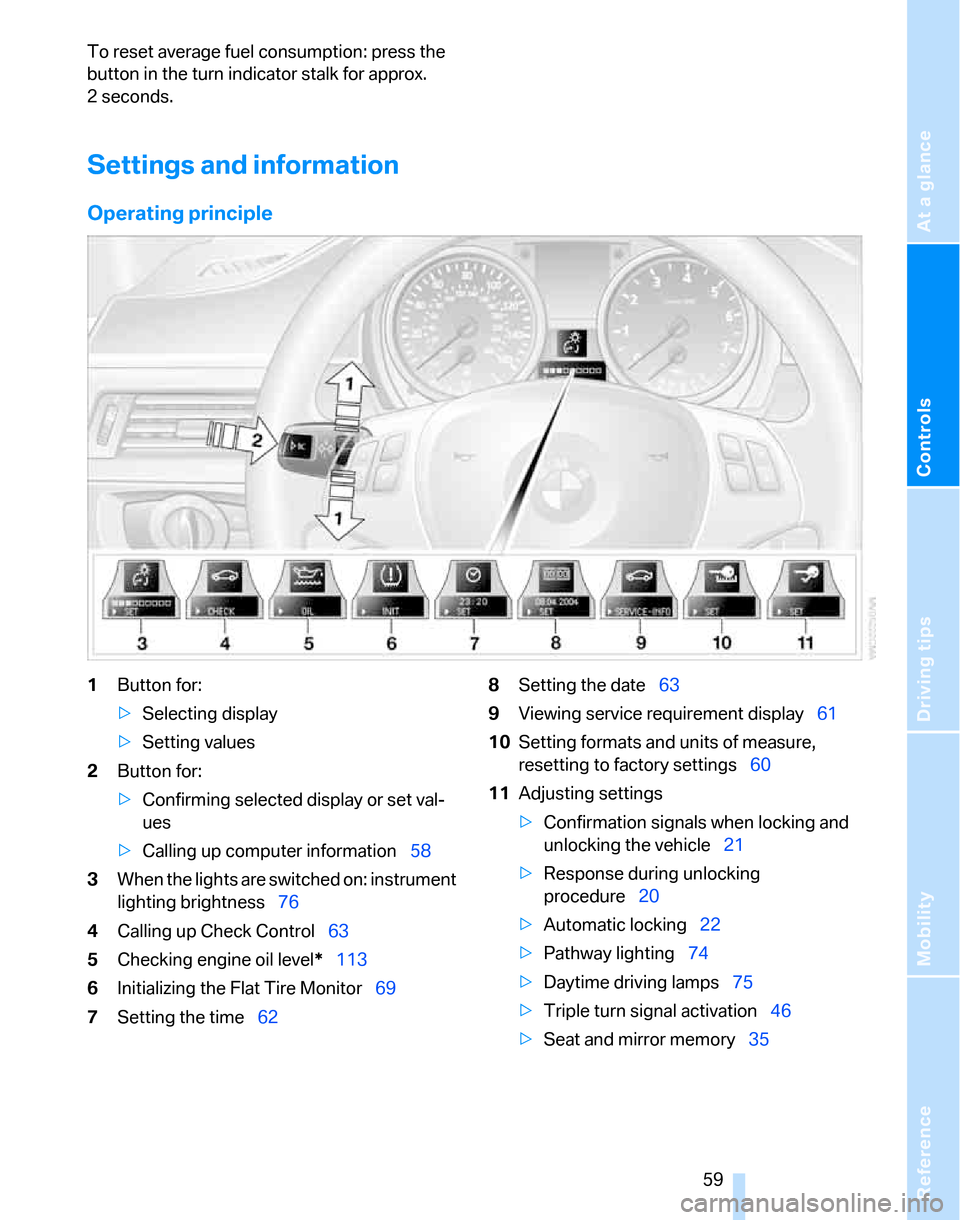
Settings and information
Operating principle
1Button for:
>Selecting display
>Setting values
2Button for:
>Confirming selected display or set val-
ues
>Calling up computer information58
3When the lights are switched on: instrument
lighting brightness76
4Calling up Check Control63
5Checking engine oil level*113
6Initializing the Flat Tire Monitor69
7Setting the time628Setting the date63
9Viewing service requirement display61
10Setting formats and units of measure,
resetting to factory settings60
11Adjusting settings
>Confirmation signals when locking and
unlocking the vehicle21
>Response during unlocking
procedure20
>Automatic locking22
>Pathway lighting74
>Daytime driving lamps75
>Triple turn signal activation46
>Seat and mirror memory35
Page 63 of 160
Reference
At a glance
Controls
Driving tips
Mobility
61
4.Press button 2 until is displayed.
The settings are reset.
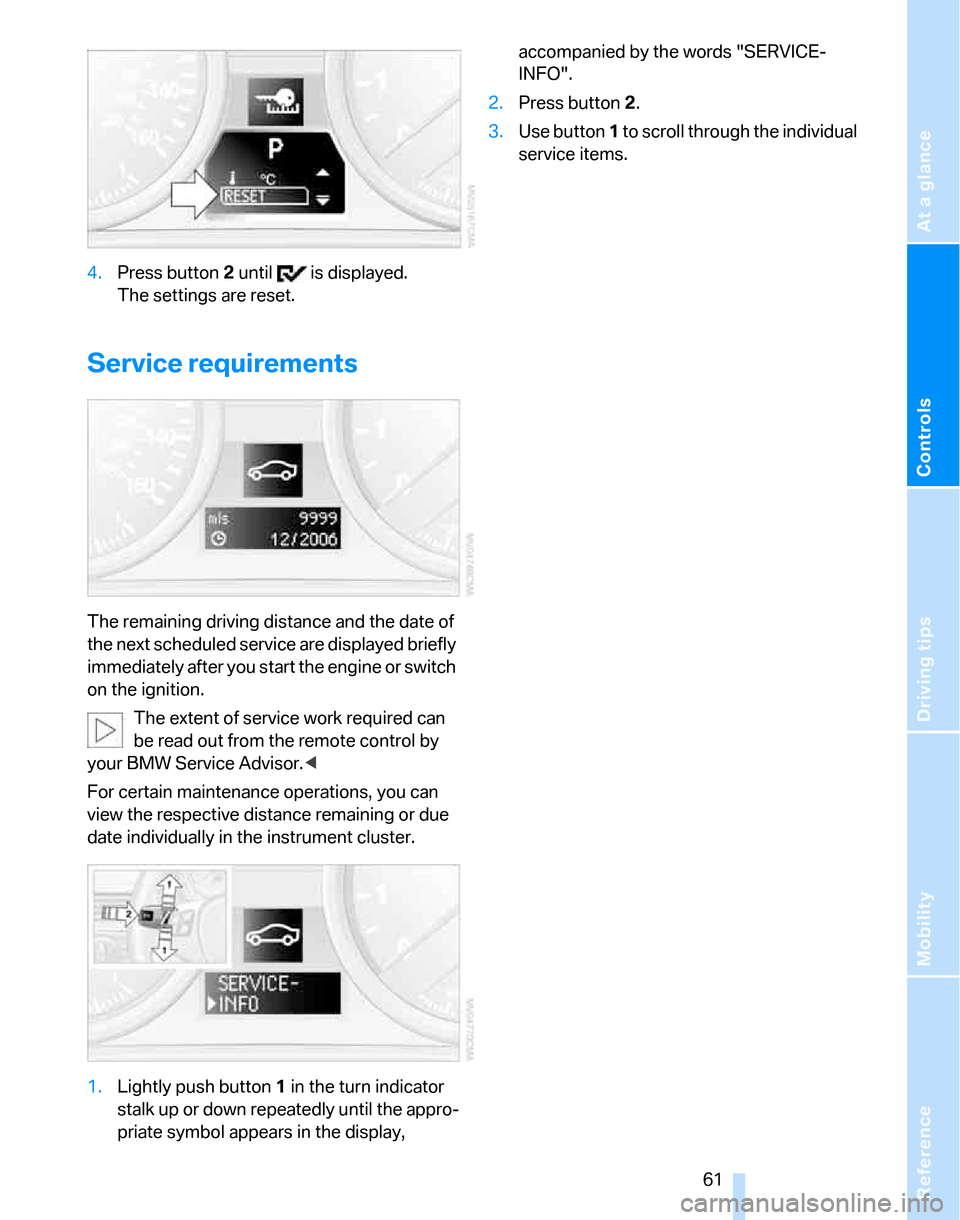
Service requirements
The remaining driving distance and the date of
the next scheduled service are displayed briefly
immediately after you start the engine or switch
on the ignition.
The extent of service work required can
be read out from the remote control by
your BMW Service Advisor.<
For certain maintenance operations, you can
view the respective distance remaining or due
date individually in the instrument cluster.
1.Lightly push button 1 in the turn indicator
stalk up or down repeatedly until the appro-
priate symbol appears in the display, accompanied by the words "SERVICE-
INFO".
2.Press button 2.
3.Use button 1 to scroll through the individual
service items.
Page 64 of 160
Everything under control
62
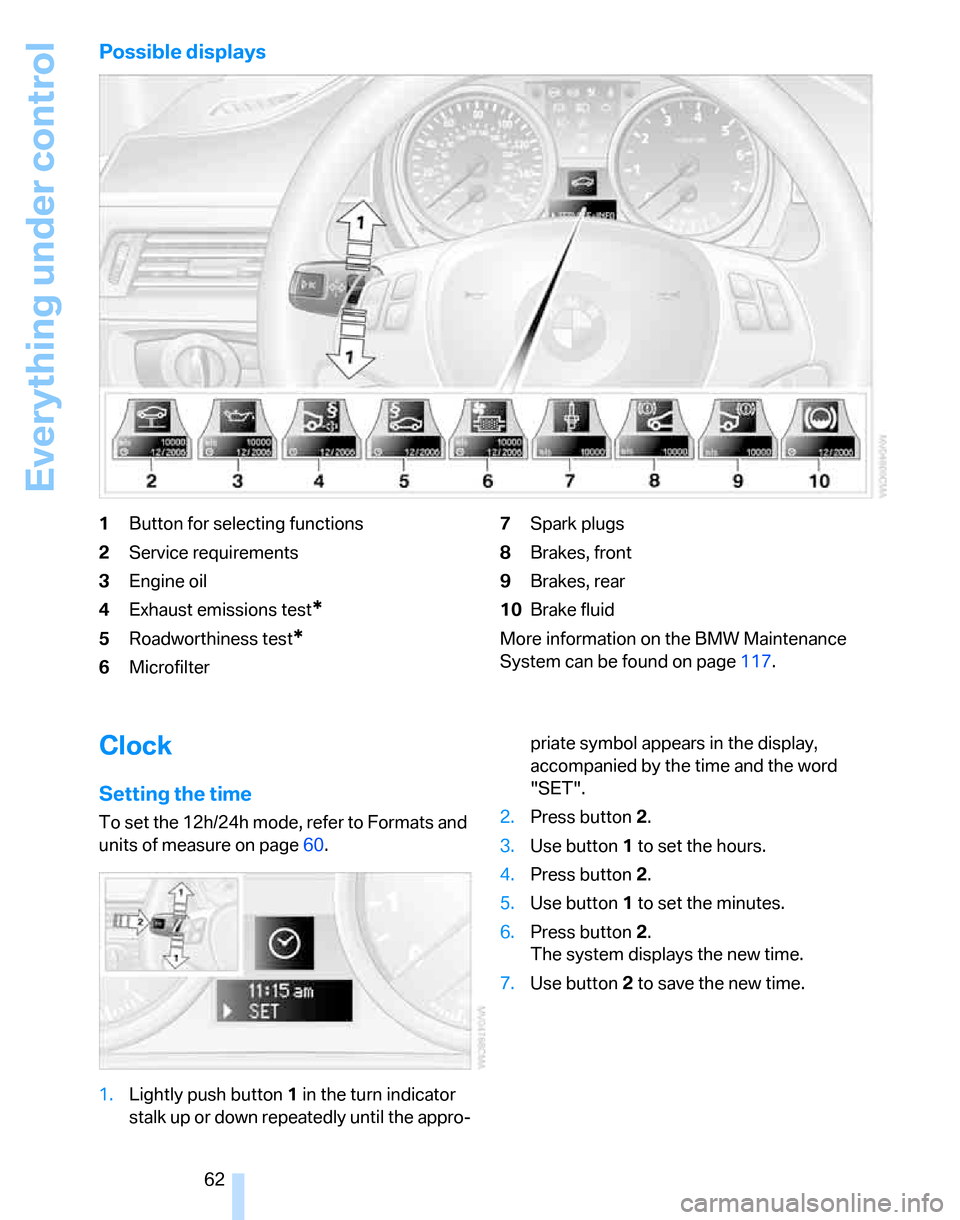
Possible displays
1Button for selecting functions
2Service requirements
3Engine oil
4Exhaust emissions test
*
5Roadworthiness test*
6Microfilter7Spark plugs
8Brakes, front
9Brakes, rear
10Brake fluid
More information on the BMW Maintenance
System can be found on page117.
Clock
Setting the time
To set the 12h/24h mode, refer to Formats and
units of measure on page60.
1.Lightly push button 1 in the turn indicator
stalk up or down repeatedly until the appro-priate symbol appears in the display,
accompanied by the time and the word
"SET".
2.Press button 2.
3.Use button 1 to set the hours.
4.Press button 2.
5.Use button 1 to set the minutes.
6.Press button 2.
The system displays the new time.
7.Use button 2 to save the new time.
Page 74 of 160
Technology for driving comfort and safety
72 seat covers, cushions or other objects not spe-
cifically approved for seats with integral side air-
bags to the front seats. Do not hang items of
clothing such as coats or jackets over the back-
rests. Do not attempt to remove the airbag
retention system from the vehicle. Do not mod-
ify the individual components of the system or
its wiring in any way. This includes the uphol-
stered covers on the steering wheel, instrument
panel, seats and roof posts, as well as the sides
of the roof lining. Do not attempt to remove or
dismantle the steering wheel.
Do not touch the individual components imme-
diately after the system has been triggered,
because there is a danger of burns.
In the event of malfunctions, deactivation, or
triggering of the airbag restraint system, have
the testing, repair, removal, and disposal of air-
bag generators executed only by a BMW Cen-
ter or a workshop that works according to BMW
repair procedures with correspondingly trained
personnel and has the required explosives
licenses. Unprofessional attempts to service
the system could lead to failure in an emer-
gency or undesired airbag activation, either of
which could result in personal injury.<
Warning notices and information about the air-
bags can also be found on the sun visors.
Automatic deactivation of the front
passenger airbags
An analysis of the impression in the front pas-
senger seat cushion determines whether and
how the seat is occupied. The front and side air-
bags for the front passenger are activated or
deactivated by the system accordingly.
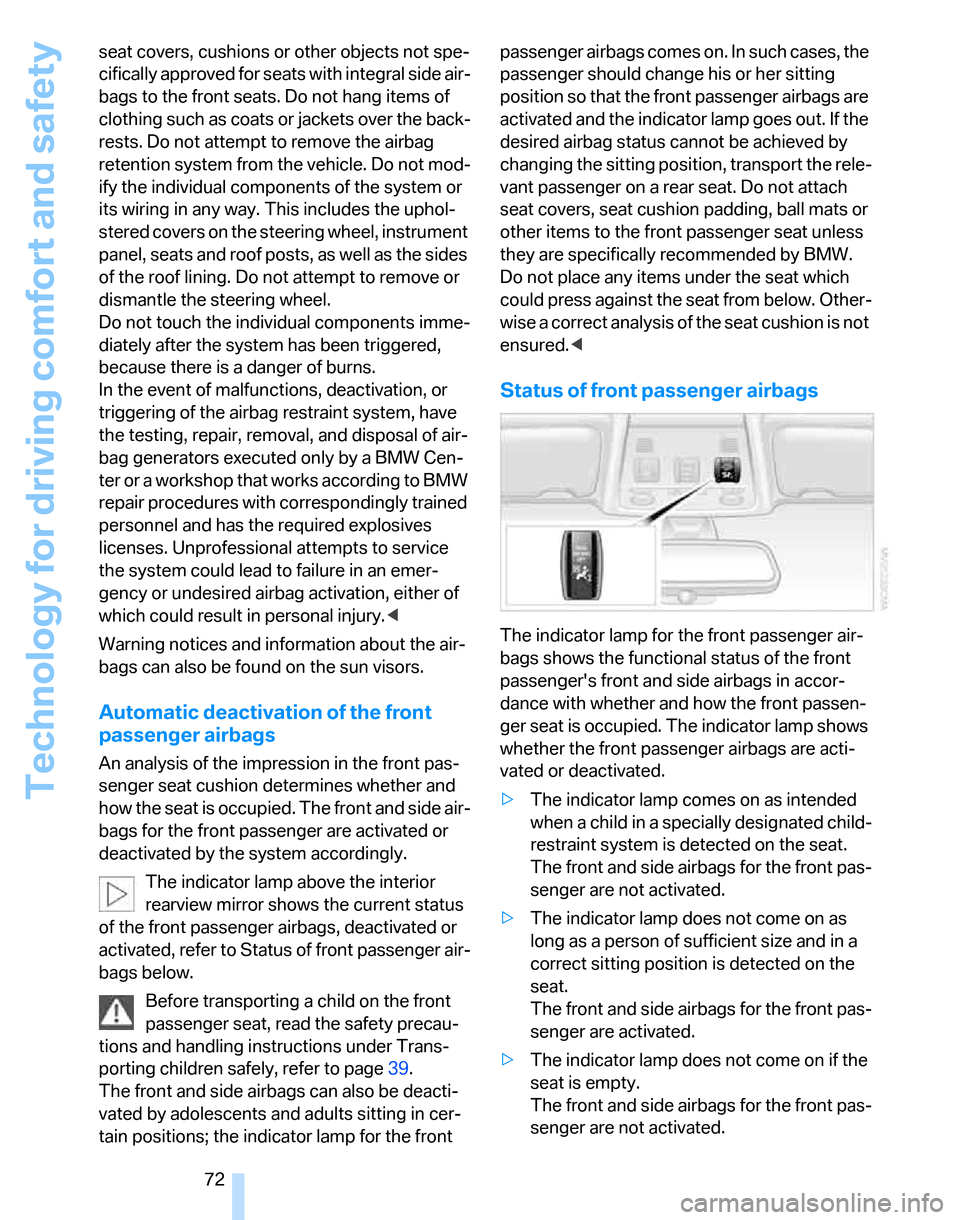
The indicator lamp above the interior
rearview mirror shows the current status
of the front passenger airbags, deactivated or
activated, refer to Status of front passenger air-
bags below.
Before transporting a child on the front
passenger seat, read the safety precau-
tions and handling instructions under Trans-
porting children safely, refer to page39.
The front and side airbags can also be deacti-
vated by adolescents and adults sitting in cer-
tain positions; the indicator lamp for the front passenger airbags comes on. In such cases, the
passenger should change his or her sitting
position so that the front passenger airbags are
activated and the indicator lamp goes out. If the
desired airbag status cannot be achieved by
changing the sitting position, transport the rele-
vant passenger on a rear seat. Do not attach
seat covers, seat cushion padding, ball mats or
other items to the front passenger seat unless
they are specifically recommended by BMW.
Do not place any items under the seat which
could press against the seat from below. Other-
wise a correct analysis of the seat cushion is not
ensured.<
Status of front passenger airbags
The indicator lamp for the front passenger air-
bags shows the functional status of the front
passenger's front and side airbags in accor-
dance with whether and how the front passen-
ger seat is occupied. The indicator lamp shows
whether the front passenger airbags are acti-
vated or deactivated.
>The indicator lamp comes on as intended
when a child in a specially designated child-
restraint system is detected on the seat.
The front and side airbags for the front pas-
senger are not activated.
>The indicator lamp does not come on as
long as a person of sufficient size and in a
correct sitting position is detected on the
seat.
The front and side airbags for the front pas-
senger are activated.
>The indicator lamp does not come on if the
seat is empty.
The front and side airbags for the front pas-
senger are not activated.
Page 120 of 160
Maintenance
118
Socket for On-Board
Diagnosis OBD
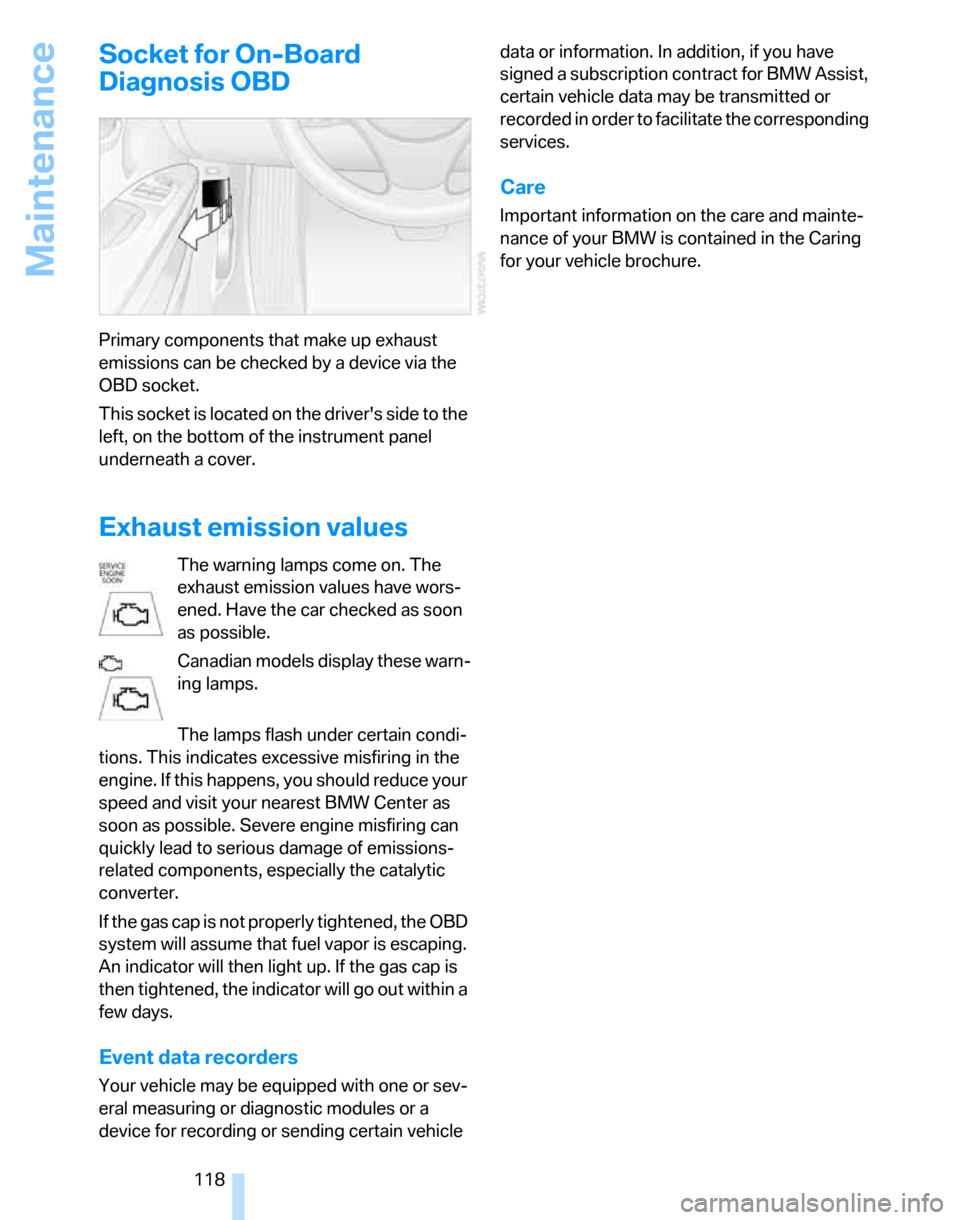
Primary components that make up exhaust
emissions can be checked by a device via the
OBD socket.
This socket is located on the driver's side to the
left, on the bottom of the instrument panel
underneath a cover.
Exhaust emission values
The warning lamps come on. The
exhaust emission values have wors-
ened. Have the car checked as soon
as possible.
Canadian models display these warn-
ing lamps.
The lamps flash under certain condi-
tions. This indicates excessive misfiring in the
engine. If this happens, you should reduce your
speed and visit your nearest BMW Center as
soon as possible. Severe engine misfiring can
quickly lead to serious damage of emissions-
related components, especially the catalytic
converter.
If the gas cap is not properly tightened, the OBD
system will assume that fuel vapor is escaping.
An indicator will then light up. If the gas cap is
then tightened, the indicator will go out within a
few days.
Event data recorders
Your vehicle may be equipped with one or sev-
eral measuring or diagnostic modules or a
device for recording or sending certain vehicle data or information. In addition, if you have
signed a subscription contract for BMW Assist,
certain vehicle data may be transmitted or
recorded in order to facilitate the corresponding
services.
Care
Important information on the care and mainte-
nance of your BMW is contained in the Caring
for your vehicle brochure.
Page 140 of 160
Indicator and warning lamps
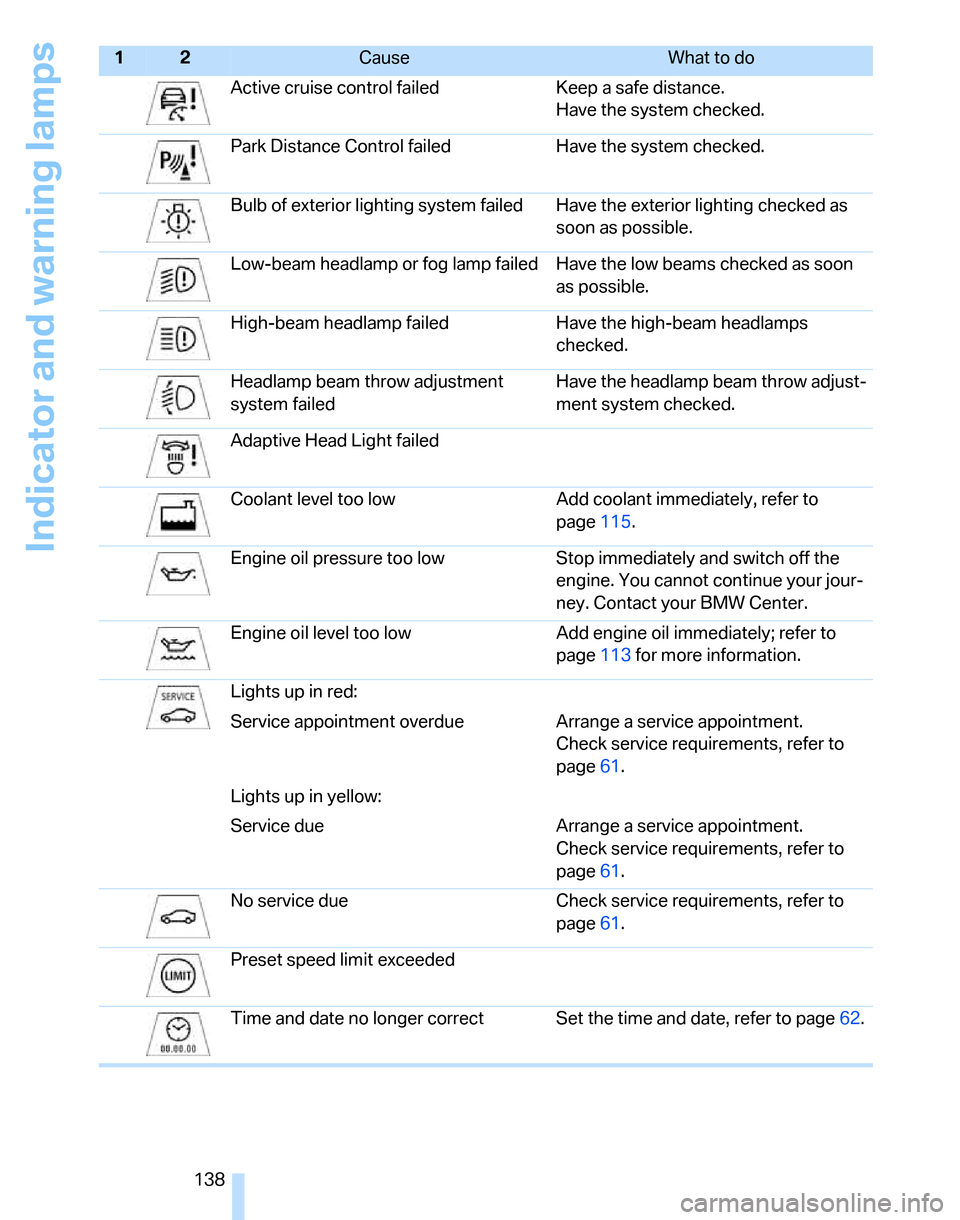
138Active cruise control failed Keep a safe distance.
Have the system checked.
Park Distance Control failed Have the system checked.
Bulb of exterior lighting system failed Have the exterior lighting checked as
soon as possible.
Low-beam headlamp or fog lamp failed Have the low beams checked as soon
as possible.
High-beam headlamp failed Have the high-beam headlamps
checked.
Headlamp beam throw adjustment
system failedHave the headlamp beam throw adjust-
ment system checked.
Adaptive Head Light failed
Coolant level too low Add coolant immediately, refer to
page115.
Engine oil pressure too low Stop immediately and switch off the
engine. You cannot continue your jour-
ney. Contact your BMW Center.
Engine oil level too low Add engine oil immediately; refer to
page113 for more information.
Lights up in red:
Service appointment overdue Arrange a service appointment.
Check service requirements, refer to
page61.
Lights up in yellow:
Service due Arrange a service appointment.
Check service requirements, refer to
page61.
No service due Check service requirements, refer to
page61.
Preset speed limit
exceeded
Time and date no longer correct Set the time and date, refer to page62.
12Cause What to do
Page 151 of 160
Reference
At a glance
Controls
Driving tips
Mobility
149
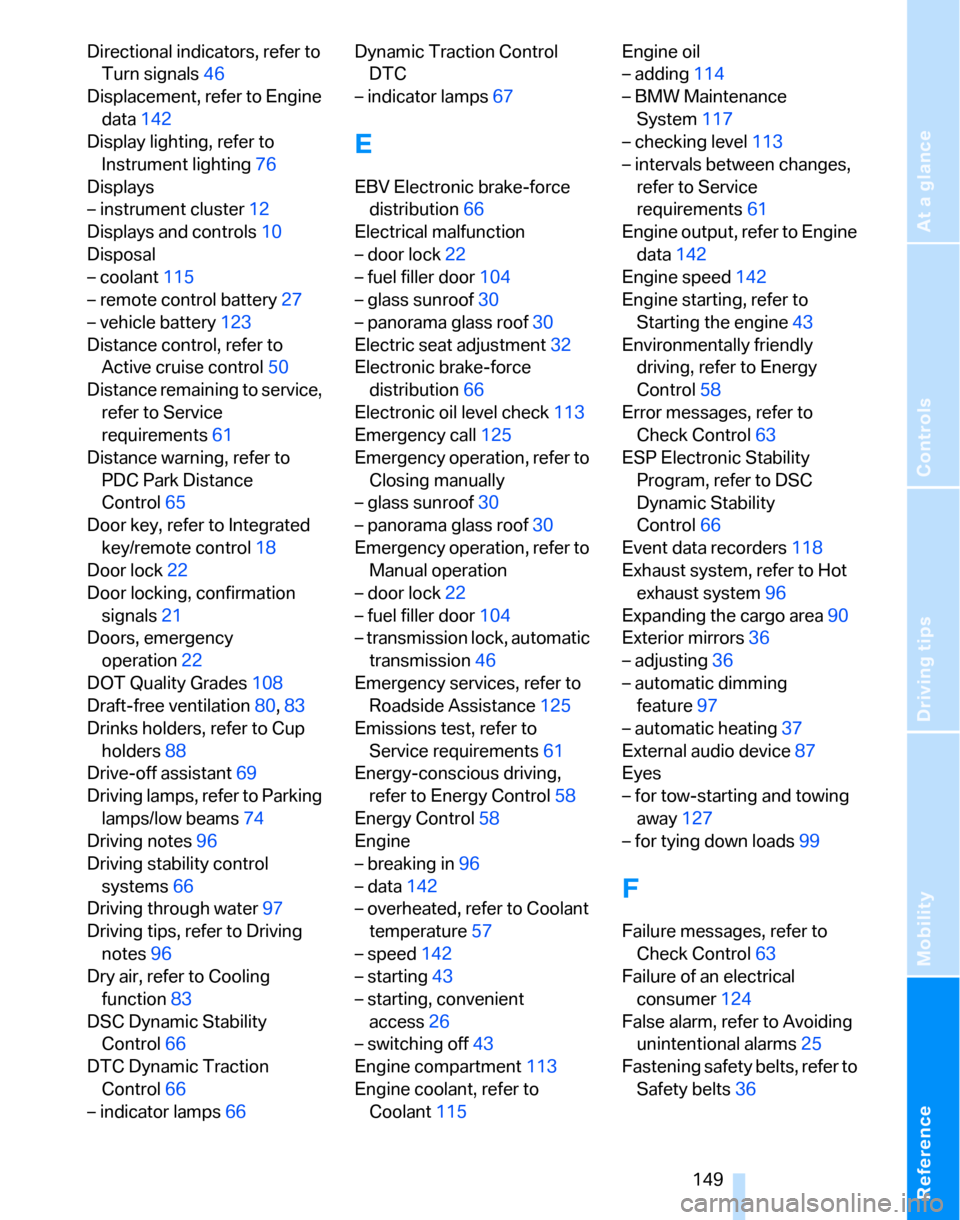
Directional indicators, refer to
Turn signals46
Displacement, refer to Engine
data142
Display lighting, refer to
Instrument lighting76
Displays
– instrument cluster12
Displays and controls10
Disposal
– coolant115
– remote control battery27
– vehicle battery123
Distance control, refer to
Active cruise control50
Distance remaining to service,
refer to Service
requirements61
Distance warning, refer to
PDC Park Distance
Control65
Door key, refer to Integrated
key/remote control18
Door lock22
Door locking, confirmation
signals21
Doors, emergency
operation22
DOT Quality Grades108
Draft-free ventilation80,83
Drinks holders, refer to Cup
holders88
Drive-off assistant69
Driving lamps, refer to Parking
lamps/low beams74
Driving notes96
Driving stability control
systems66
Driving through water97
Driving tips, refer to Driving
notes96
Dry air, refer to Cooling
function83
DSC Dynamic Stability
Control66
DTC Dynamic Traction
Control66
– indicator lamps66Dynamic Traction Control
DTC
– indicator lamps67
E
EBV Electronic brake-force
distribution66
Electrical malfunction
– door lock22
– fuel filler door104
– glass sunroof30
– panorama glass roof30
Electric seat adjustment32
Electronic brake-force
distribution66
Electronic oil level check113
Emergency call125
Emergency operation, refer to
Closing manually
– glass sunroof30
– panorama glass roof30
Emergency operation, refer to
Manual operation
– door lock22
– fuel filler door104
– transmission lock, automatic
transmission46
Emergency services, refer to
Roadside Assistance125
Emissions test, refer to
Service requirements61
Energy-conscious driving,
refer to Energy Control58
Energy Control58
Engine
– breaking in96
– data142
– overheated, refer to Coolant
temperature57
– speed142
– starting43
– starting, convenient
access26
– switching off43
Engine compartment113
Engine coolant, refer to
Coolant115Engine oil
– adding114
– BMW Maintenance
System117
– checking level113
– intervals between changes,
refer to Service
requirements61
Engine output, refer to Engine
data142
Engine speed142
Engine starting, refer to
Starting the engine43
Environmentally friendly
driving, refer to Energy
Control58
Error messages, refer to
Check Control63
ESP Electronic Stability
Program, refer to DSC
Dynamic Stability
Control66
Event data recorders118
Exhaust system, refer to Hot
exhaust system
96
Expanding the cargo area90
Exterior mirrors36
– adjusting36
– automatic dimming
feature97
– automatic heating37
External audio device87
Eyes
– for tow-starting and towing
away127
– for tying down loads99
F
Failure messages, refer to
Check Control63
Failure of an electrical
consumer124
False alarm, refer to Avoiding
unintentional alarms25
Fastening safety belts, refer to
Safety belts36
Page 153 of 160
Reference
At a glance
Controls
Driving tips
Mobility
151
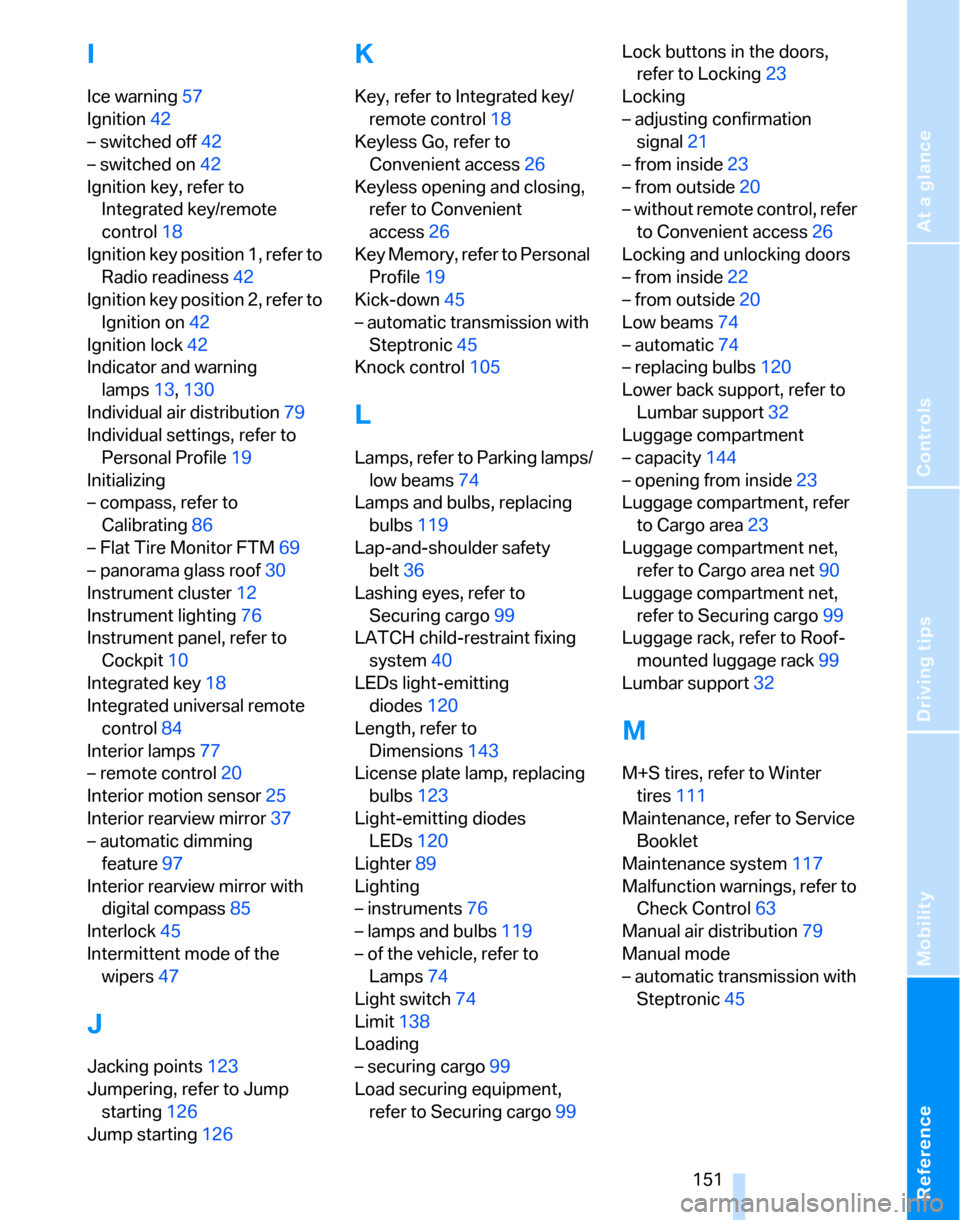
I
Ice warning57
Ignition42
– switched off42
– switched on42
Ignition key, refer to
Integrated key/remote
control18
Ignition key position 1, refer to
Radio readiness42
Ignition key position 2, refer to
Ignition on42
Ignition lock42
Indicator and warning
lamps13,130
Individual air distribution79
Individual settings, refer to
Personal Profile19
Initializing
– compass, refer to
Calibrating86
– Flat Tire Monitor FTM69
– panorama glass roof30
Instrument cluster12
Instrument lighting76
Instrument panel, refer to
Cockpit10
Integrated key18
Integrated universal remote
control84
Interior lamps77
– remote control20
Interior motion sensor25
Interior rearview mirror37
– automatic dimming
feature97
Interior rearview mirror with
digital compass85
Interlock45
Intermittent mode of the
wipers47
J
Jacking points123
Jumpering, refer to Jump
starting126
Jump starting126
K
Key, refer to Integrated key/
remote control18
Keyless Go, refer to
Convenient access26
Keyless opening and closing,
refer to Convenient
access26
Key Memory, refer to Personal
Profile19
Kick-down45
– automatic transmission with
Steptronic45
Knock control105
L
Lamps, refer to Parking lamps/
low beams74
Lamps and bulbs, replacing
bulbs119
Lap-and-shoulder safety
belt36
Lashing eyes, refer to
Securing cargo99
LATCH child-restraint fixing
system40
LEDs light-emitting
diodes120
Length, refer to
Dimensions143
License plate lamp, replacing
bulbs123
Light-emitting diodes
LEDs120
Lighter89
Lighting
– instruments76
– lamps and bulbs119
– of the vehicle, refer to
Lamps74
Light switch74
Limit138
Loading
– securing cargo99
Load securing equipment,
refer to Securing cargo99Lock buttons in the doors,
refer to Locking23
Locking
– adjusting confirmation
signal21
– from inside23
– from outside20
– without remote control, refer
to Convenient access26
Locking and unlocking doors
– from inside22
– from outside20
Low beams74
– automatic74
– replacing bulbs120
Lower back support, refer to
Lumbar support32
Luggage compartment
– capacity144
– opening from inside23
Luggage compartment, refer
to Cargo area23
Luggage compartment net,
refer to Cargo area net90
Luggage compartment net,
refer to Securing cargo99
Luggage rack, refer to Roof-
mounted luggage rack99
Lumbar support32
M
M+S tires, refer to Winter
tires111
Maintenance, refer to Service
Booklet
Maintenance system117
Malfunction warnings, refer to
Check Control63
Manual air distribution79
Manual mode
– automatic transmission with
Steptronic45