lights BMW 328D XDRIVE SPORTS WAGON 2014 Workshop Manual
[x] Cancel search | Manufacturer: BMW, Model Year: 2014, Model line: 328D XDRIVE SPORTS WAGON, Model: BMW 328D XDRIVE SPORTS WAGON 2014Pages: 244, PDF Size: 7.28 MB
Page 206 of 244
correspondingly trained personnel and other
authorized persons. Otherwise, use may result
in operating problems for the vehicle.◀
Position
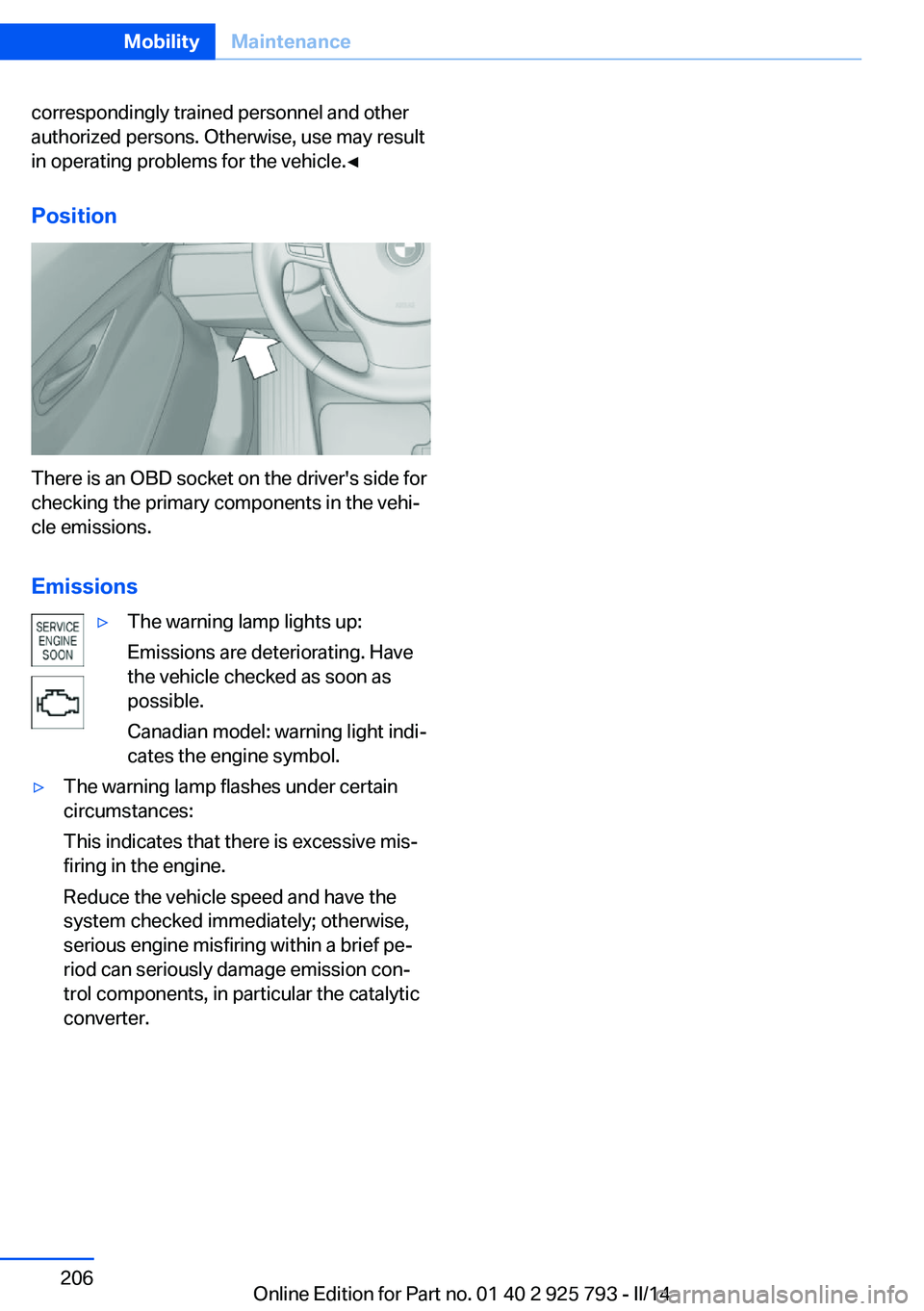
There is an OBD socket on the driver's side for
checking the primary components in the vehi‐
cle emissions.
Emissions
▷The warning lamp lights up:
Emissions are deteriorating. Have
the vehicle checked as soon as
possible.
Canadian model: warning light indi‐
cates the engine symbol.▷The warning lamp flashes under certain
circumstances:
This indicates that there is excessive mis‐
firing in the engine.
Reduce the vehicle speed and have the
system checked immediately; otherwise,
serious engine misfiring within a brief pe‐
riod can seriously damage emission con‐
trol components, in particular the catalytic
converter.Seite 206MobilityMaintenance206
Online Edition for Part no. 01 40 2 925 793 - II/14
Page 208 of 244
Lamp and bulb replacementHints
Lamps and bulbs
Lamps and bulbs make an essential contribu‐
tion to vehicle safety.
The manufacturer of the vehicle recommends
that you entrust corresponding procedures to
the service center if you are unfamiliar with them or they are not described here.
You can obtain a selection of replacement
bulbs at the service center.
Danger of burns
Only change bulbs when they are cool;
otherwise, there is the danger of getting
burned.◀
Working on the lighting system
When working on the lighting system,
you should always switch off the lights af‐
fected to prevent short circuits.
To avoid possible injury or equipment damage
when replacing bulbs, observe any instructions
provided by the bulb manufacturer.◀
Do not perform work/bulb replacement
on xenon headlamps
Have any work on the xenon lighting system,
including bulb replacement, performed only by
a service center. Due to the high voltage present in the system, there is the danger of
fatal injuries if work is carried out improperly.◀
Do not touch the bulbs
Do not touch the glass of new bulbs with
your bare hands, as even minute amounts of
contamination will burn into the bulb's surface
and reduce its service life.
Use a clean tissue, cloth or something similar,
or hold the bulb by its base.◀Light-emitting diodes (LEDs)
Some items of equipment use light-emitting
diodes installed behind a cover as a light
source.
These light-emitting diodes, which are related
to conventional lasers, are officially designated
as Class 1 light-emitting diodes.
Do not remove the covers
Do not remove the covers, and never
stare into the unfiltered light for several hours;
otherwise, irritation of the retina could result.◀
Headlamp glass
Condensation can form on the inside of the ex‐
ternal lamps in cool or humid weather. When
driving with the light switched on, the conden‐
sation evaporates after a short time. The head‐
lamp glasses do not need to be changed.
If the headlamps do not dim despite driving
with the light switched on, increasing humidity
forms, e. g. water droplets in the light, have the
service center check this.
Headlamp setting The headlamp adjustments can be affected by
changing lamps and bulbs. Therefore after a
change, have the headlamp setting checked
and corrected by Service.Seite 208MobilityReplacing components208
Online Edition for Part no. 01 40 2 925 793 - II/14
Page 209 of 244
Front lamps, bulb replacement
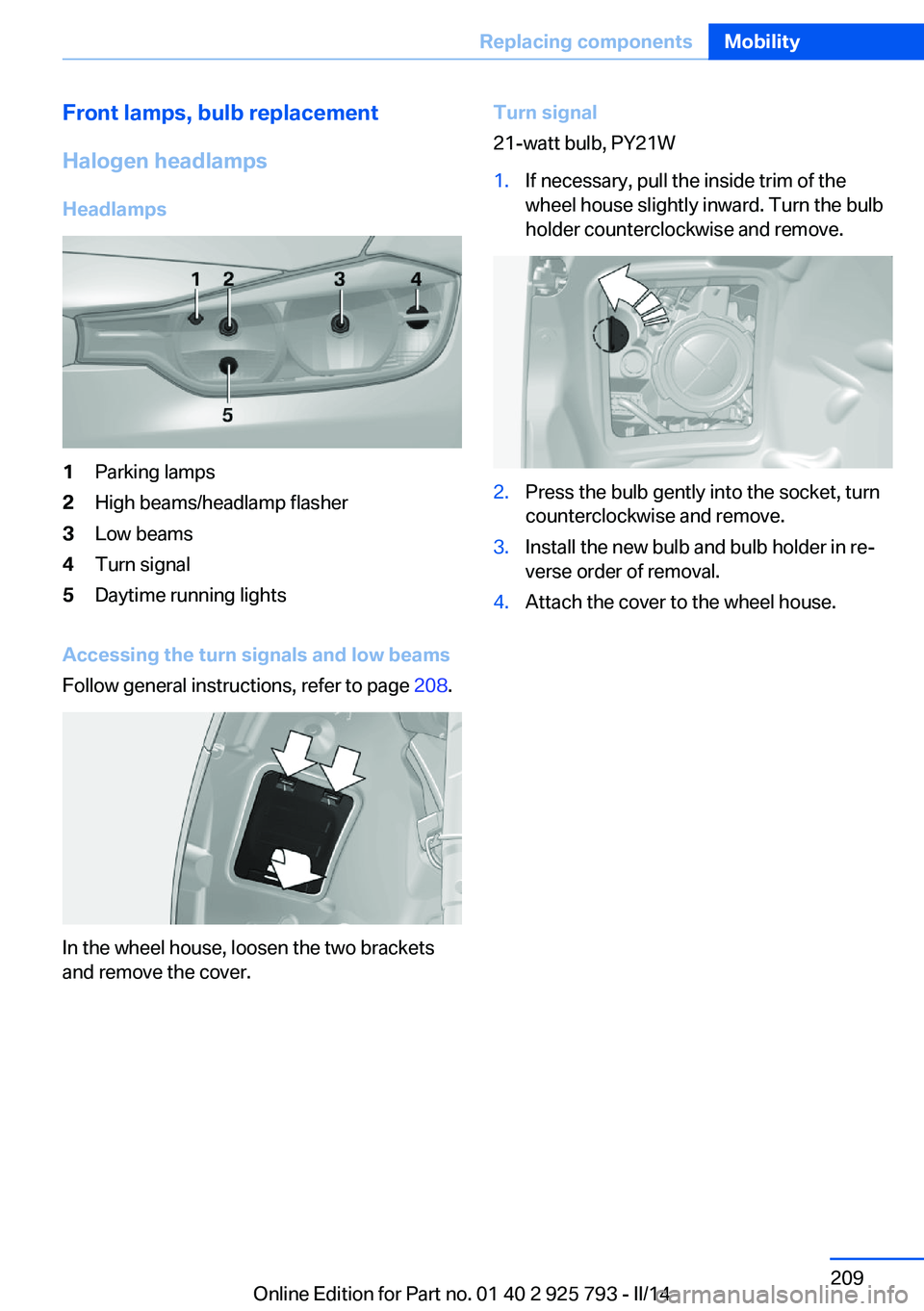
Halogen headlamps Headlamps1Parking lamps2High beams/headlamp flasher3Low beams4Turn signal5Daytime running lights
Accessing the turn signals and low beams
Follow general instructions, refer to page 208.
In the wheel house, loosen the two brackets
and remove the cover.
Turn signal
21-watt bulb, PY21W1.If necessary, pull the inside trim of the
wheel house slightly inward. Turn the bulb
holder counterclockwise and remove.2.Press the bulb gently into the socket, turn
counterclockwise and remove.3.Install the new bulb and bulb holder in re‐
verse order of removal.4.Attach the cover to the wheel house.Seite 209Replacing componentsMobility209
Online Edition for Part no. 01 40 2 925 793 - II/14
Page 210 of 244
Low beams
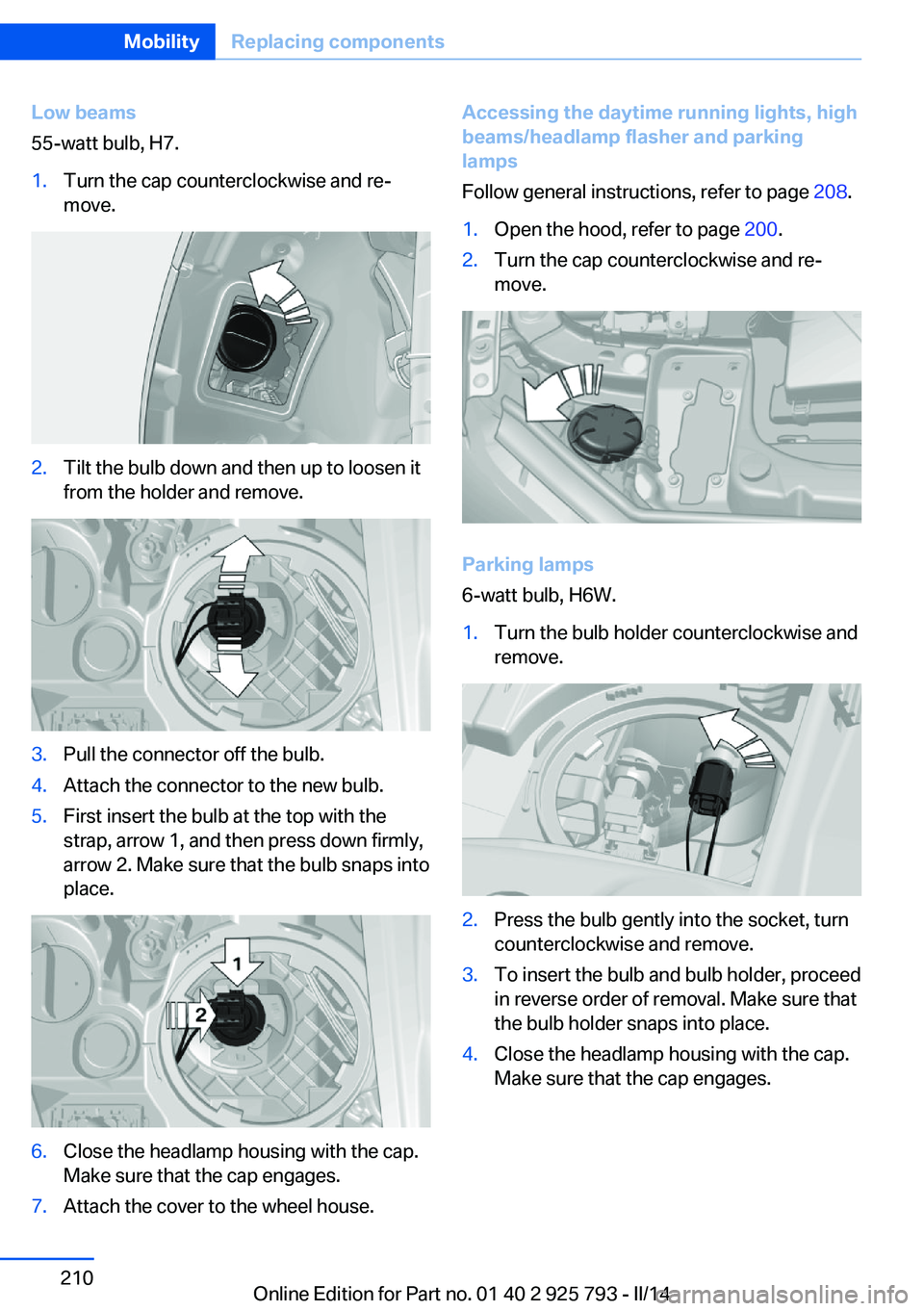
55-watt bulb, H7.1.Turn the cap counterclockwise and re‐
move.2.Tilt the bulb down and then up to loosen it
from the holder and remove.3.Pull the connector off the bulb.4.Attach the connector to the new bulb.5.First insert the bulb at the top with the
strap, arrow 1, and then press down firmly,
arrow 2. Make sure that the bulb snaps into
place.6.Close the headlamp housing with the cap.
Make sure that the cap engages.7.Attach the cover to the wheel house.Accessing the daytime running lights, high
beams/headlamp flasher and parking
lamps
Follow general instructions, refer to page 208.1.Open the hood, refer to page 200.2.Turn the cap counterclockwise and re‐
move.
Parking lamps
6-watt bulb, H6W.
1.Turn the bulb holder counterclockwise and
remove.2.Press the bulb gently into the socket, turn
counterclockwise and remove.3.To insert the bulb and bulb holder, proceed
in reverse order of removal. Make sure that
the bulb holder snaps into place.4.Close the headlamp housing with the cap.
Make sure that the cap engages.Seite 210MobilityReplacing components210
Online Edition for Part no. 01 40 2 925 793 - II/14
Page 211 of 244

High beams/headlamp flasher
55-watt bulb, H7.1.Tilt the bulb down and then up to loosen it
from the holder and remove.2.Pull the connector off the bulb.3.Attach the connector to the new bulb.4.First insert the bulb at the top with the
strap, arrow 1, and then press down firmly,
arrow 2. Make sure that the bulb snaps into
place.5.Close the headlamp housing with the cap.
Make sure that the cap engages.Daytime running lights
24-watt bulb, PW24W.1.If necessary, remove the high beam bulb
connector.2.Remove the bulb holder.3.Remove the bulb from the bulb holder.4.To insert the new bulb, proceed in reverse
order of removal. During insertion, the bot‐
tom of the bulb holder must be facing
downward. Make sure that the bulb holder
snaps into place.5.Attach the high beam bulb connector.6.Close the headlamp housing with the cap.
Make sure that the cap engages.
Xenon headlamps
Xenon headlamps
Because of the long life of these bulbs, the
likelihood of failure is very low. Switching the
lamps on and off frequently shortens their life.
If a bulb fails, switch on the front fog lamps and
continue the trip with great care. Comply with
local regulations.
Do not perform work/bulb replacement
on xenon headlamps
Have any work on the xenon lighting system,
including bulb replacement, performed only by
a service center. Due to the high voltage
present in the system, there is the danger of
fatal injuries if work is carried out improperly.◀
For checking and adjusting headlamp aim,
please contact your BMW center.
Seite 211Replacing componentsMobility211
Online Edition for Part no. 01 40 2 925 793 - II/14
Page 212 of 244
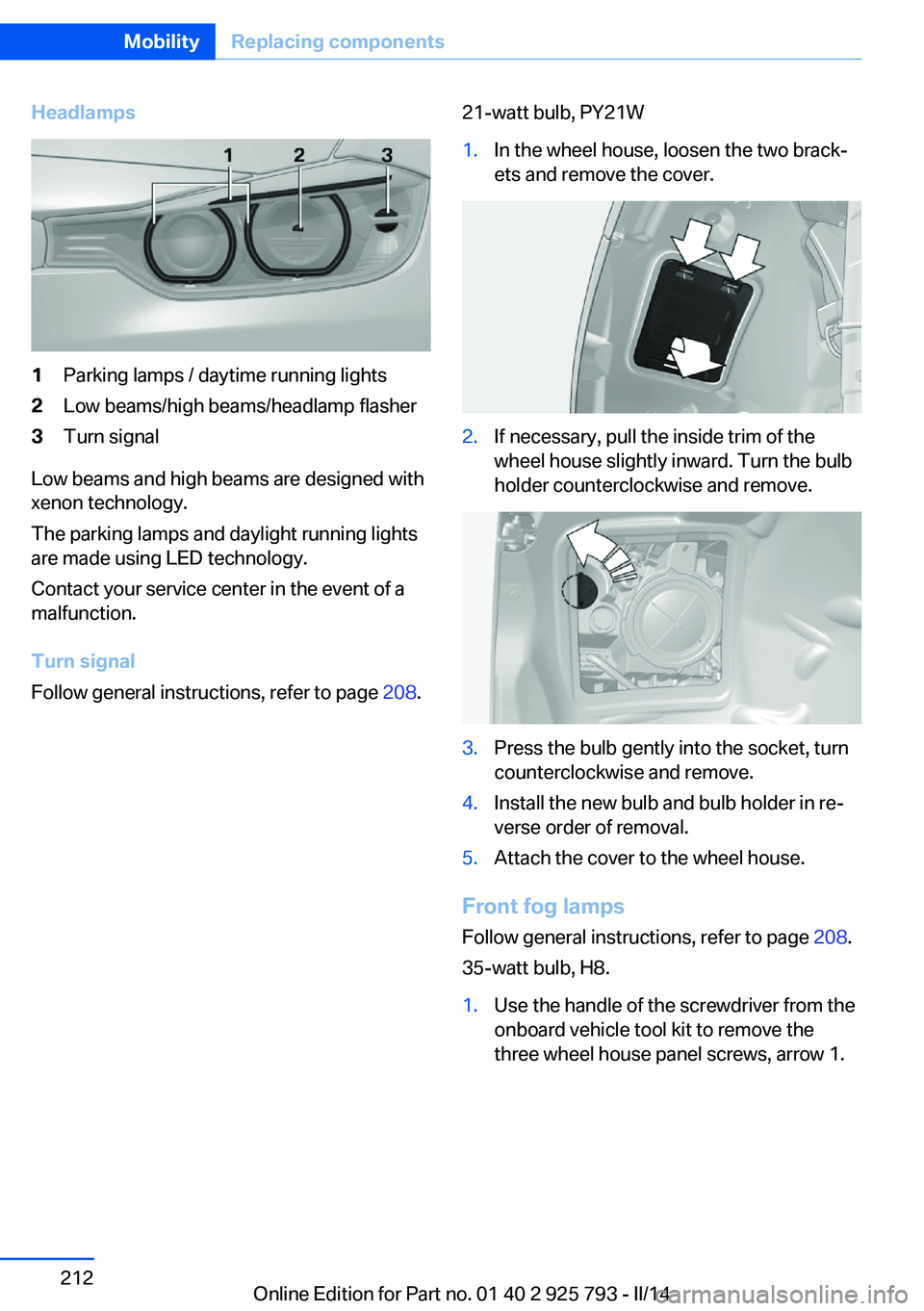
Headlamps1Parking lamps / daytime running lights2Low beams/high beams/headlamp flasher3Turn signal
Low beams and high beams are designed with
xenon technology.
The parking lamps and daylight running lights
are made using LED technology.
Contact your service center in the event of a
malfunction.
Turn signal
Follow general instructions, refer to page 208.
21-watt bulb, PY21W1.In the wheel house, loosen the two brack‐
ets and remove the cover.2.If necessary, pull the inside trim of the
wheel house slightly inward. Turn the bulb
holder counterclockwise and remove.3.Press the bulb gently into the socket, turn
counterclockwise and remove.4.Install the new bulb and bulb holder in re‐
verse order of removal.5.Attach the cover to the wheel house.
Front fog lamps
Follow general instructions, refer to page 208.
35-watt bulb, H8.
1.Use the handle of the screwdriver from the
onboard vehicle tool kit to remove the
three wheel house panel screws, arrow 1.Seite 212MobilityReplacing components212
Online Edition for Part no. 01 40 2 925 793 - II/14
Page 219 of 244
Breakdown assistanceVehicle equipment
All standard, country-specific and optional
equipment that is offered in the model series is
described in this chapter. Therefore, equip‐
ment is also described that is not available in a
vehicle, e. g., because of the selected optional
equipment or country variant. This also applies
for safety-related functions and systems.
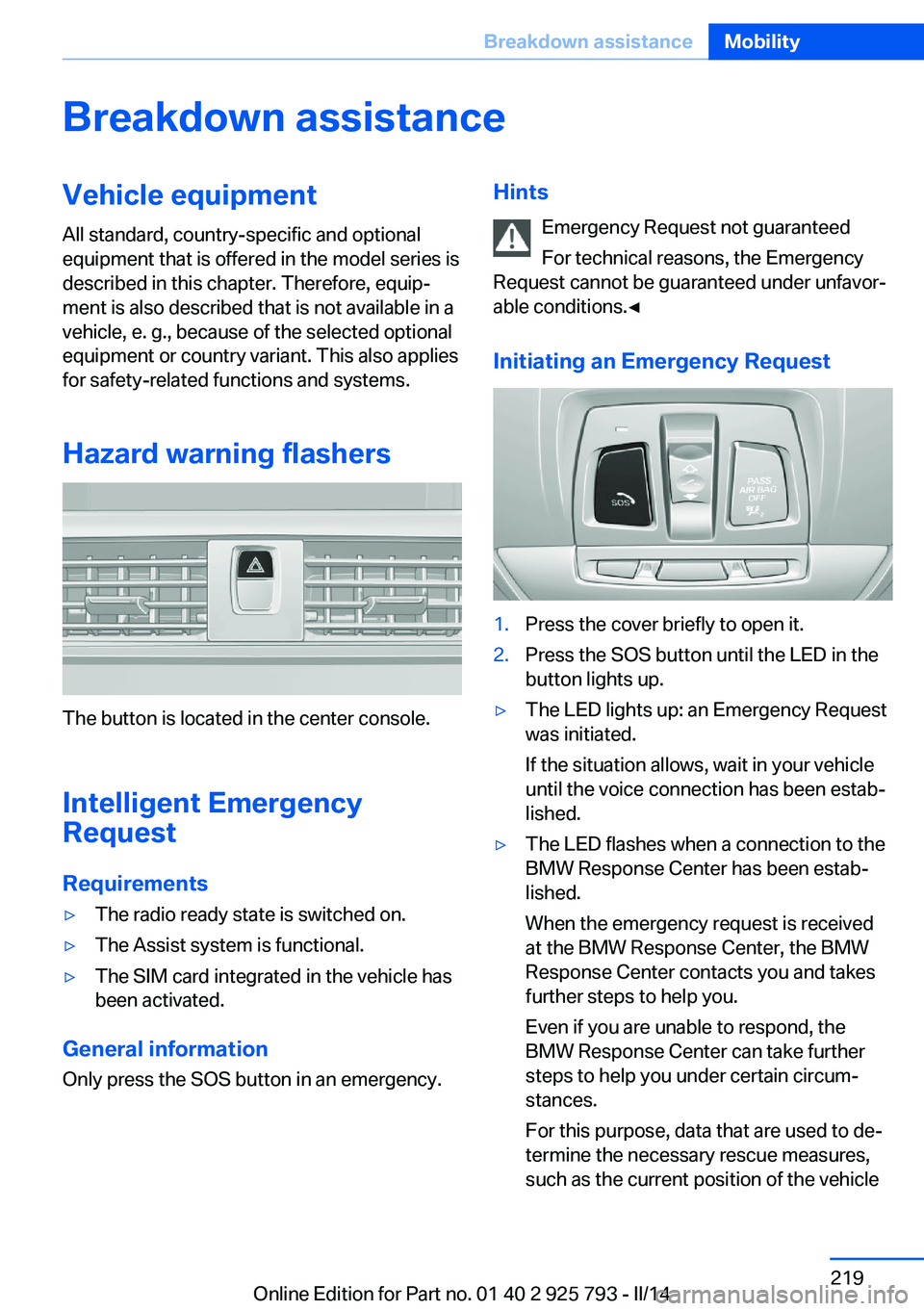
Hazard warning flashers
The button is located in the center console.
Intelligent Emergency
Request
Requirements
▷The radio ready state is switched on.▷The Assist system is functional.▷The SIM card integrated in the vehicle has
been activated.
General information
Only press the SOS button in an emergency.
Hints
Emergency Request not guaranteed
For technical reasons, the Emergency
Request cannot be guaranteed under unfavor‐
able conditions.◀
Initiating an Emergency Request1.Press the cover briefly to open it.2.Press the SOS button until the LED in the
button lights up.▷The LED lights up: an Emergency Request
was initiated.
If the situation allows, wait in your vehicle
until the voice connection has been estab‐
lished.▷The LED flashes when a connection to the
BMW Response Center has been estab‐
lished.
When the emergency request is received
at the BMW Response Center, the BMW
Response Center contacts you and takes
further steps to help you.
Even if you are unable to respond, the
BMW Response Center can take further
steps to help you under certain circum‐
stances.
For this purpose, data that are used to de‐
termine the necessary rescue measures,
such as the current position of the vehicleSeite 219Breakdown assistanceMobility219
Online Edition for Part no. 01 40 2 925 793 - II/14
Page 234 of 244
Everything from A to Z
IndexA ABS, Antilock Brake Sys‐ tem 115
ACC, Active Cruise Control with Stop & Go 120
Acceleration Assistant, refer to Launch Control 73
Accessories and parts 7
Activated-charcoal filter 147
Active Blind Spot Detec‐ tion 112
Active Cruise Control with Stop & Go, ACC 120
Adaptive brake lights, refer to Brake force display 114
Adaptive Light Control 91
Additives, oil 202
Adjustments, seats/head re‐ straints 48
After washing vehicle 226
Airbags 95
Airbags, indicator/warning light 96
Air circulation, refer to Recir‐ culated-air mode 143, 146
Air, dehumidifying, refer to Cooling function 143, 146
Air distribution, manual 143, 147
Air flow, air conditioner 143
Air flow, automatic climate control 147
Air pressure, tires 191
Air vents, refer to Ventila‐ tion 147
Alarm system 42
Alarm, unintentional 43
All around the center con‐ sole 14
All around the headliner 15 All around the steering
wheel 12
All-season tires, refer to Win‐ ter tires 197
All-wheel-drive 116
Alternating-code hand-held transmitter 150
Alternative oil types 203
Antifreeze, washer fluid 70
Antilock Brake System, ABS 115
Anti-slip control, refer to DSC 115
Approved axle load 232
Approved engine oils 203
Arrival time 86
Ash tray 153
Assistance, Roadside Assis‐ tance 220
Assistance when driving off 119
Assist system information, on Control Display 88
AUTO intensity 146
Automatic car wash 225
Automatic climate con‐ trol 142
Automatic climate control with enhanced features 145
Automatic Cruise Control with Stop & Go 120
Automatic Curb Monitor 56
Automatic deactivation, front passenger airbags 97
Automatic headlamp con‐ trol 91
Automatic locking 42
Automatic recirculated-air control 146
Automatic tailgate 37 Automatic transmission with
Steptronic 70
AUTO program, automatic cli‐ mate control 145
AUTO program, climate con‐ trol 143
AUTO program, intensity 146
Auto Start/Stop function 64
Average fuel consumption 85
Average speed 85
Axle loads, weights 232
B Backrest curvature, refer to Lumbar support 50
Backrest, width 50
Band-aids, refer to First aid kit 220
Bar for tow-starting/ towing 223
Battery replacement, vehicle battery 216
Battery replacement, vehicle remote control 32
Battery, vehicle 216
Belts, safety belts 51
Beverage holder, cu‐ pholder 161
Blinds, sun protection 45
BMW Advanced Diesel 187
BMW Assist, see user's manual for Navigation, En‐
tertainment and Communi‐
cation
BMW Homepage 6
BMW Internet page 6
BMW maintenance sys‐ tem 205
Bonus range, ECO PRO 176 Seite 234ReferenceEverything from A to Z234
Online Edition for Part no. 01 40 2 925 793 - II/14
Page 235 of 244
Bottle holder, refer to Cu‐pholder 161
Brake assistant 115
Brake discs, breaking in 168
Brake force display 114
Brake lamps, brake force dis‐ play 114
Brake lights, adaptive 114
Brake pads, breaking in 168
Braking, hints 169
Breakdown assis‐ tance 219, 220
Breaking in 168
Brightness of Control Dis‐ play 88
Bulb replacement 208
Bulb replacement, front 209
Bulb replacement, halogen headlamps 209
Bulb replacement, rear 213
Bulb replacement, xenon headlamps 211
Bulbs and lamps 208
Button, RES 123
Button, Start/Stop 62
Bypassing, refer to Jump- starting 220
C
California Proposition 65 Warning 7
Camera, care 228
Camera, rearview cam‐ era 132
Camera, Side View 134
Camera, Top View 136
Can holder, refer to Cu‐ pholder 161
Car battery 216
Car care products 226
Care, displays 228
Care, vehicle 226
Cargo 171
Cargo area 155
Cargo area, enlarging 156 Cargo area, storage compart‐
ments 162
Cargo cover 155
Cargo, securing 172
Cargo straps, securing cargo 172
Car key, refer to Remote con‐ trol 32
Carpet, care 228
Car wash 225
Catalytic converter, refer to Hot exhaust system 169
CBS Condition Based Serv‐ ice 205
CD/Multimedia, see user's manual for Navigation, En‐
tertainment and Communi‐
cation
Center armrest 160
Center console 14
Central locking system 37
Central screen, refer to Con‐ trol Display 16
Changes, technical, refer to Safety 7
Changing parts 207
Changing wheels 216
Changing wheels/tires 196
Check Control 77
Checking the oil level elec‐ tronically 201
Children, seating position 58
Children, transporting safely 58
Child restraint fixing sys‐ tem 58
Child restraint fixing system LATCH 59
Child restraint fixing systems, mounting 58
Child safety locks 61
Child seat, mounting 58
Child seats 58
Chrome parts, care 227
Cigarette lighter 153
Cleaning, displays 228 Climate control 142, 145
Clock 80
Closing/opening via door lock 36
Closing/opening with remote control 35
Clothes hooks 161
Coasting 178
Coasting with engine decou‐ pled, coasting 178
Coasting with idling en‐ gine 178
Cockpit 12
Cold starting, refer to Starting the engine 63
Collision warning with braking function 107
Collision warning with City Braking function 104
Combination switch, refer to Turn signals 66
Combination switch, refer to Wiper system 67
Comfort Access 39
COMFORT program, Dy‐ namic Driving Control 118
Compartments in the doors 160
Compass 151
Computer 84
Condensation on win‐ dows 147
Condensation under the vehi‐ cle 170
Condition Based Service CBS 205
Configuring drive pro‐ gram 118
Confirmation signal 41
ConnectedDrive, see user's manual for Navigation, En‐
tertainment and Communi‐
cation
ConnectedDrive Services
Connecting electrical devi‐ ces 153 Seite 235Everything from A to ZReference235
Online Edition for Part no. 01 40 2 925 793 - II/14
Page 236 of 244
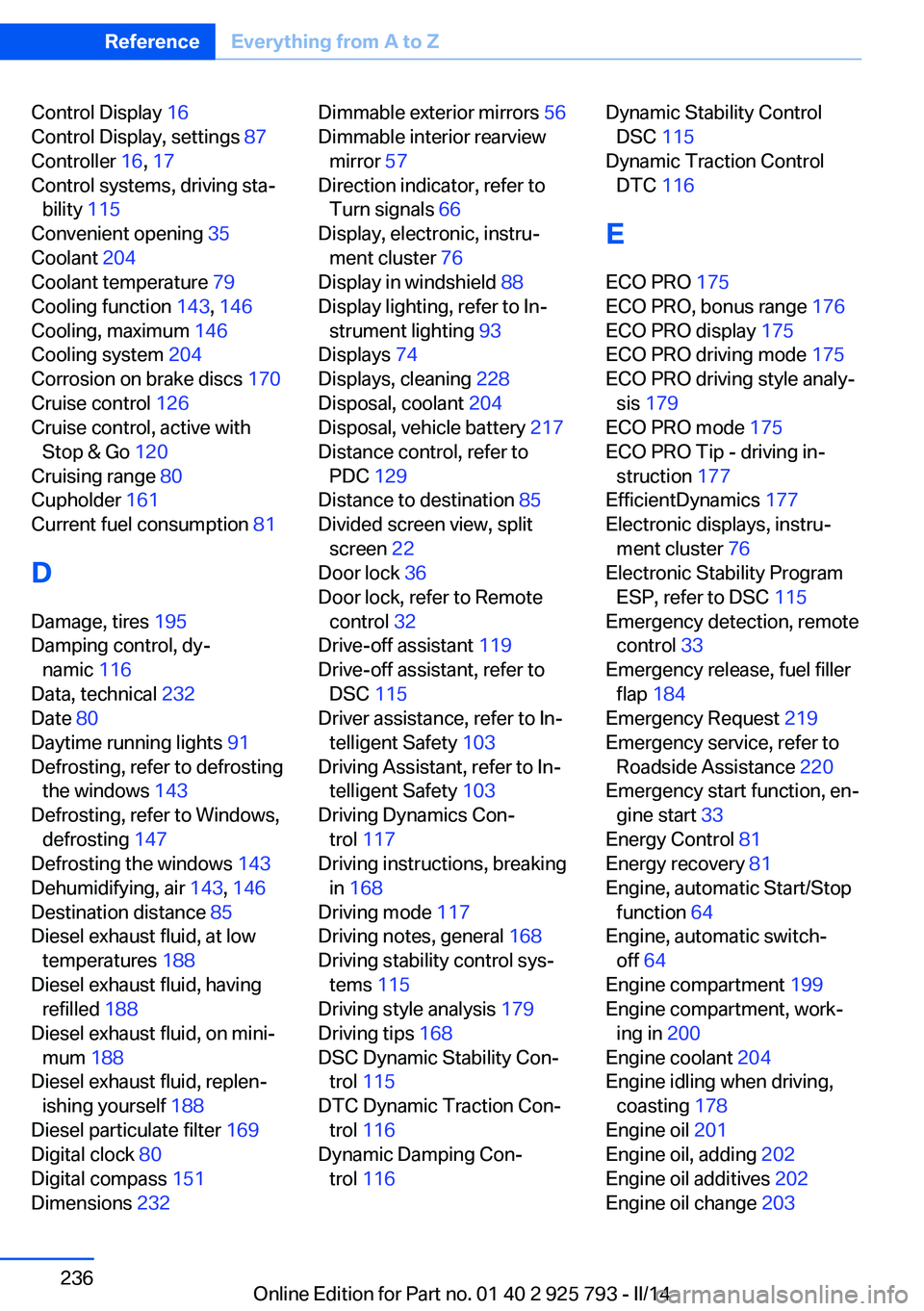
Control Display 16
Control Display, settings 87
Controller 16, 17
Control systems, driving sta‐ bility 115
Convenient opening 35
Coolant 204
Coolant temperature 79
Cooling function 143, 146
Cooling, maximum 146
Cooling system 204
Corrosion on brake discs 170
Cruise control 126
Cruise control, active with Stop & Go 120
Cruising range 80
Cupholder 161
Current fuel consumption 81
D
Damage, tires 195
Damping control, dy‐ namic 116
Data, technical 232
Date 80
Daytime running lights 91
Defrosting, refer to defrosting the windows 143
Defrosting, refer to Windows, defrosting 147
Defrosting the windows 143
Dehumidifying, air 143, 146
Destination distance 85
Diesel exhaust fluid, at low temperatures 188
Diesel exhaust fluid, having refilled 188
Diesel exhaust fluid, on mini‐ mum 188
Diesel exhaust fluid, replen‐ ishing yourself 188
Diesel particulate filter 169
Digital clock 80
Digital compass 151
Dimensions 232 Dimmable exterior mirrors 56
Dimmable interior rearview mirror 57
Direction indicator, refer to Turn signals 66
Display, electronic, instru‐ ment cluster 76
Display in windshield 88
Display lighting, refer to In‐ strument lighting 93
Displays 74
Displays, cleaning 228
Disposal, coolant 204
Disposal, vehicle battery 217
Distance control, refer to PDC 129
Distance to destination 85
Divided screen view, split screen 22
Door lock 36
Door lock, refer to Remote control 32
Drive-off assistant 119
Drive-off assistant, refer to DSC 115
Driver assistance, refer to In‐ telligent Safety 103
Driving Assistant, refer to In‐ telligent Safety 103
Driving Dynamics Con‐ trol 117
Driving instructions, breaking in 168
Driving mode 117
Driving notes, general 168
Driving stability control sys‐ tems 115
Driving style analysis 179
Driving tips 168
DSC Dynamic Stability Con‐ trol 115
DTC Dynamic Traction Con‐ trol 116
Dynamic Damping Con‐ trol 116 Dynamic Stability Control
DSC 115
Dynamic Traction Control DTC 116
E
ECO PRO 175
ECO PRO, bonus range 176
ECO PRO display 175
ECO PRO driving mode 175
ECO PRO driving style analy‐ sis 179
ECO PRO mode 175
ECO PRO Tip - driving in‐ struction 177
EfficientDynamics 177
Electronic displays, instru‐ ment cluster 76
Electronic Stability Program ESP, refer to DSC 115
Emergency detection, remote control 33
Emergency release, fuel filler flap 184
Emergency Request 219
Emergency service, refer to Roadside Assistance 220
Emergency start function, en‐ gine start 33
Energy Control 81
Energy recovery 81
Engine, automatic Start/Stop function 64
Engine, automatic switch- off 64
Engine compartment 199
Engine compartment, work‐ ing in 200
Engine coolant 204
Engine idling when driving, coasting 178
Engine oil 201
Engine oil, adding 202
Engine oil additives 202
Engine oil change 203 Seite 236ReferenceEverything from A to Z236
Online Edition for Part no. 01 40 2 925 793 - II/14