170 BMW 328i 1997 E36 Owner's Guide
[x] Cancel search | Manufacturer: BMW, Model Year: 1997, Model line: 328i, Model: BMW 328i 1997 E36Pages: 759
Page 201 of 759
5
.
Slowly
add
coolant
until
it
spills
from
bleed
screws
.
When
coolant
spillíng
from
bleed
screws
is
free
of
air
bubbies,
tighten
screws
.
6
.
Run
engine
until
it
reaches
operatíng
temperature
.
Af-
ter
engine
has
cooled,
recheck
coolant
level
and
top
up
as
necessary
.
CAUTION-
Always
use
genuine
BMW
coolant
or
its
equiva-
lent
to
avoid
the
formation
of
harmful,
clogging
de-
posits
in
the
cooling
system
.
Use
of
other
antifreeze
solutions
may
be
harmful
to
the
cooling
system
.
Tightening
Torque
"
Radiator
bleed
screw
to
thermostat
housing
...
.
.
........
8
Nm
(71
in-lb)
Belt-driven
cooling
fan,
replacing
1
.
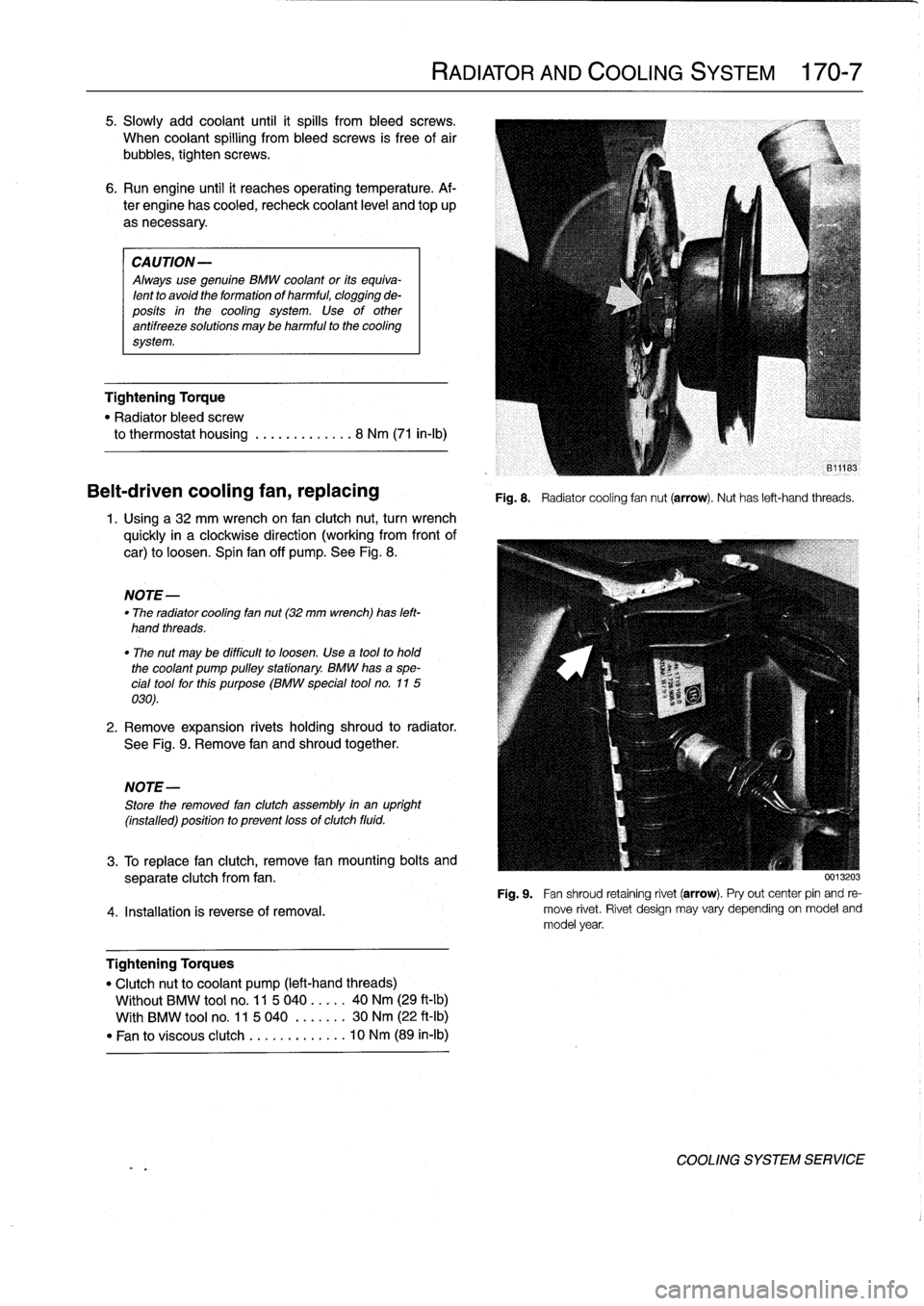
Usinga32
mm
wrench
on
fan
clutch
nut,
turn
wrench
quickly
in
a
clockwise
direction
(working
from
front
of
car)
to
loosen
.
Spin
fan
off
pump
.
See
Fig
.
8
.
NOTE-
"
The
radiator
cooling
fan
nut(32
mm
wrench)
has
left-
hand
threads
.
"
The
nut
may
be
difficult
to
loosen
.
Use
a
tool
to
hold
the
coolant
pump
pulleystationary
.
BMW
hasa
spe-
cial
tool
forthis
purpose
(BMW
special
tool
no
.
115
030)
.
2
.
Remove
expansion
rivets
holding
shroud
to
radiator
.
See
Fig
.
9
.
Remove
fan
and
shroud
together
.
NOTE-
Store
the
removed
fan
clutch
assembly
in
an
upright
(installed)
positionto
prevent
lossof
clutch
fluid
.
RADIATOR
AND
COOLING
SYSTEM
170-
7
Fig
.
8
.
Radiatorcooling
fannut
(arrow)
.
Nuthas
left-hand
threads
.
3
.
To
replace
fan
clutch,
remove
fan
mounting
bolts
and
separate
clutch
from
fan
.
Fig
.
9
.
Fan
shroud
retaining
rivet
(arrow)
.
Pryout
center
pin
and
re
4
.
Installation
is
reverse
of
rernoval
.
move
rivet
.
Rivet
design
may
vary
depending
on
model
and
model
year
.
Tightening
Torques
"
Clutchnut
to
coolant
pump
(left-hand
threads)
Wíthout
BMW
tool
no
.
11
5
040
.....
40
Nm
(29
ft-lb)
With
BMW
tool
no
.
11
5
040
.
......
30
Nm
(22
ft-Ib)
"
Fan
to
viscous
clutch
...
.
..
.
......
10
Nm
(89
in-lb)
0013203
COOLING
SYSTEM
SERVICE
Page 202 of 759
170-8
RADIATOR
AND
COOLING
SYSTEM
Electric
cooling
fan,
replacing
On
late
4-cylinder
models
(M44
engine)
with
manual
trans-
mission,
the
primary
cooling
fan
is
electrically
operated
and
is
mounted
on
the
engine
side
of
the
radiator
.
1
.
If
necessary,
remove
cover
from
top
of
radiator
.
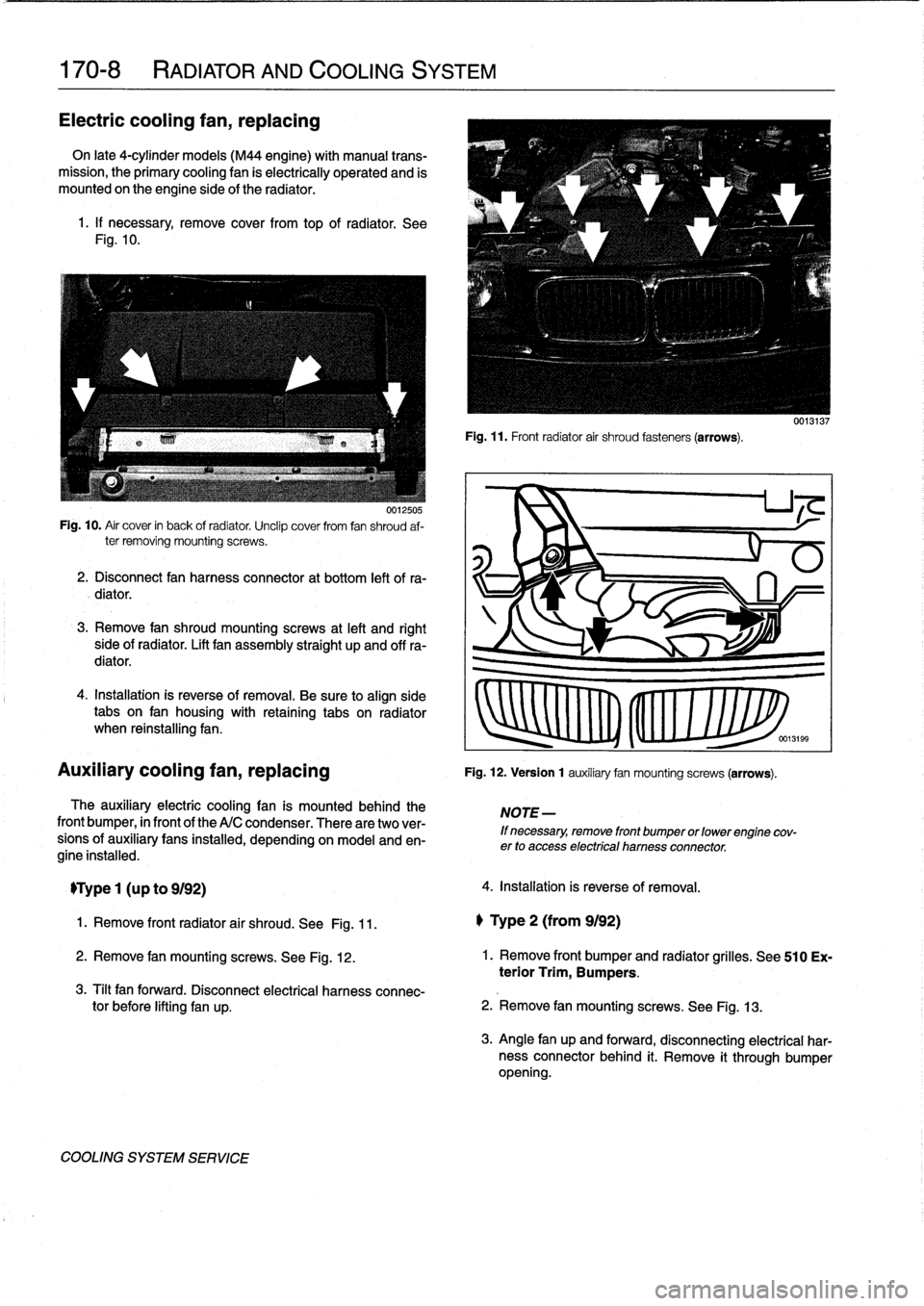
See
Fig
.
10
.
0012505
Fig
.
10
.
Air
cover
in
back
of
radiator
.
Unclip
cover
from
fan
shroud
af-
ter
removing
mounting
screws
.
2
.
Disconnect
fan
harness
connector
at
bottom
left
of
ra-
diator
.
3
.
Remove
fan
shroud
mountingscrews
at
left
and
right
side
of
radiator
.
Lift
fan
assembly
straight
up
and
offra-
diator
.
4
.
Installation
is
reverse
of
removal
.
Be
sure
to
align
side
tabs
on
fan
housíng
with
retaining
tabs
on
radiator
when
reinstalling
fan
.
Auxiliary
cooling
fan,
replacing
The
auxiliary
electric
cooling
fan
is
mounted
behind
the
front
bumper,
in
front
of
the
A/C
condenser
.
There
aretwo
ver-
sions
of
auxiliary
fans
installed,
depending
on
model
and
en-
gine
installed
.
TType
1
(u
p
to
9192)
1
.
Remove
front
radiator
air
shroud
.
See
Fig
.
11
.
2
.
Remove
fan
mountingscrews
.
See
Fig
.
12
.
3
.
Tilt
fan
forward
.
Disconnect
electrical
harness
connec-
tor
before
lifting
fan
up
.
COOLING
SYSTEM
SERVICE
Fig
.
11
.
Front
radiator
air
shroud
fasteners
(arrows)
.
Fig
.
12
.
Version
1
auxiliary
fan
mountingscrews
(arrows)
.
NOTE
-
If
necessary,
remove
front
bumper
or
lowerengine
cov-
erto
access
electrical
harnessconnector
.
4
.
Installation
is
reverse
of
removal
.
l)
Type
2
(from
9192)
2
.
Remove
fan
mounting
screws
.
See
Fig
.
13
.
0013137
1.
Remove
front
bumper
and
radiator
grilles
.
See
510
Ex-
terior
Trim,
Bumpers
.
3
.
Angle
fan
up
and
forward,
disconnecting
electrical
har-
nessconnectorbehind
it
.
Remove
it
through
bumper
opening
.
Page 203 of 759
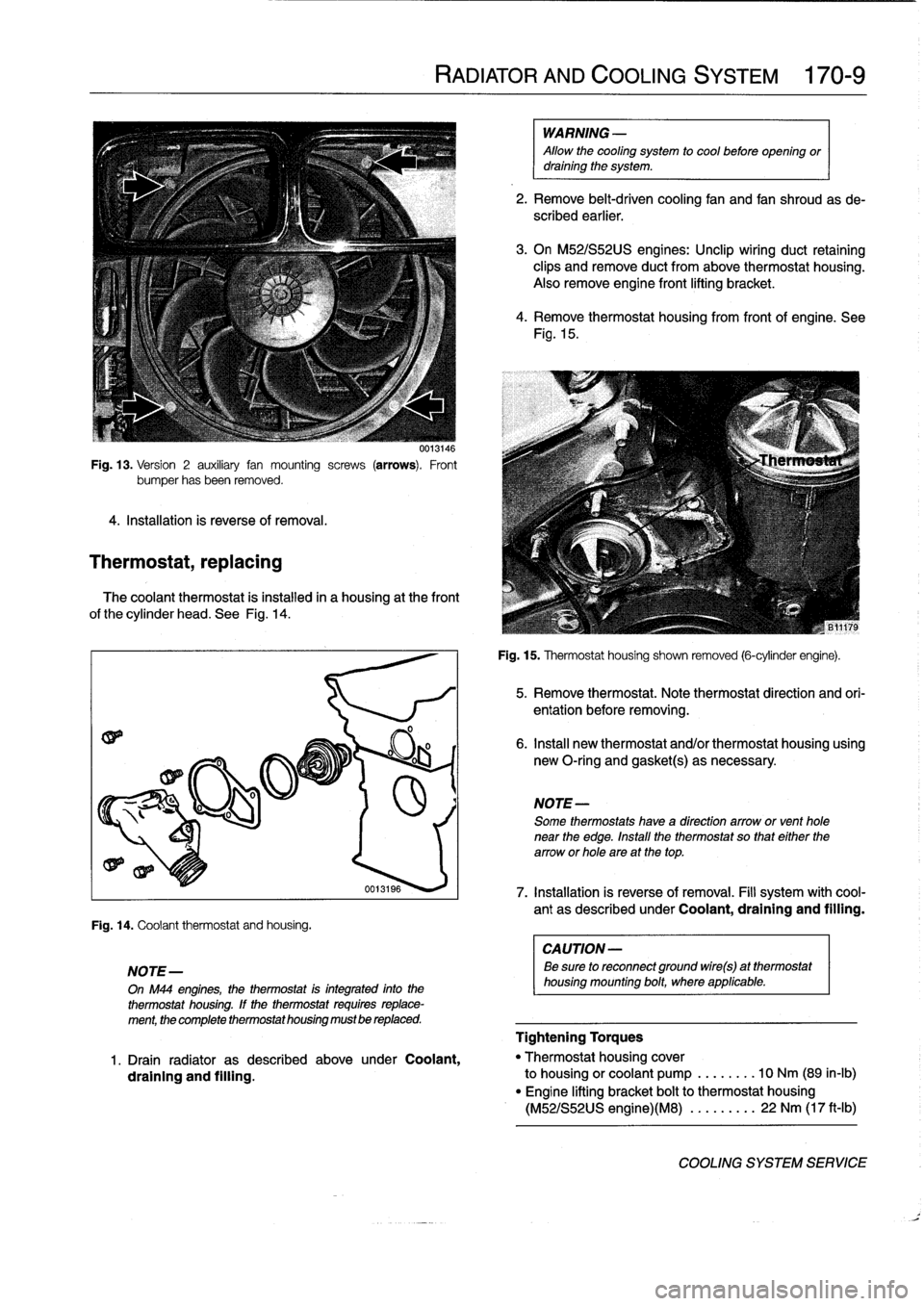
Fig
.
13
.
Version
2
auxiliary
fan
mounting
screws
(arrows)
.
Front
bumper
hasbeen
removed
.
4
.
Installation
is
reverse
of
removal
.
Thermostat,
replacing
0013146
The
coolant
thermostat
is
instalied
in
a
housing
at
the
front
of
the
cylinder
head
.
See
Fig
.
14
.
Fig
.
14
.
Coolantthermostat
and
housíng
.
NOTE-
On
M44
engines,
the
thermostat
is
integrated
into
the
thermostat
housíng
.
If
the
thermostat
requiresreplace-
ment,
the
complete
thermostathousing
mustbe
replaced
.
RADIATOR
AND
COOLING
SYSTEM
170-
9
WARNING
-
Allow
the
cooling
system
to
cool
before
opening
ordraining
the
system
.
2
.
Remove
belt-driven
cooling
fan
and
fan
shroudas
de-
scribed
earlier
.
3
.
On
M52/S52US
engines
:
Unclip
wiring
duct
retaining
clips
and
remove
duct
from
above
thermostat
housing
.
Also
remove
engine
front
lifting
bracket
.
4
.
Remove
thermostat
housing
from
front
of
engine
.
See
Fig
.
15
.
Fig
.
15
.
Thermostat
housíng
shown
removed
(6-cylinder
engine)
.
NOTE-
Some
thermostats
have
a
direction
arrowor
venthole
near
the
edge
.
Install
the
thermostat
so
that
either
the
arrow
or
hole
are
at
thetop
.
CAUTION
-
Be
sure
to
reconnect
ground
wire(s)
at
thermostat
housing
mounting
bolt,
where
applicable
.
5
.
Remove
thermostat
.
Note
thermostat
direction
and
ori-
entation
before
removing
.
6
.
Insta¡¡
new
thermostat
and/or
thermostat
housing
using
new
O-ring
and
gasket(s)
as
necessary
.
oo131ss
7
.
Installation
is
reverseof
removal
.
Fill
system
with
cool-
ant
as
described
under
Coolant,draining
and
filling
.
Tightening
Torques
1
.
Drain
radiator
as
described
above
under
Coolant,
"
Thermostat
housing
cover
draining
and
filling
.
to
housing
orcoolant
pump
..
..
....
10
Nm
(89
in-lb)
"
Engine
lifting
bracket
bolt
to
thermostat
housing
(M52/S52US
engine)(M8)
....
..
...
22
Nm
(17
ft-Ib)
COOLING
SYSTEM
SERVICE
Page 204 of 759
170-10
RADIATOR
AND
COOLING
SYSTEM
Coolant
pump,
replacing
The
engine
coolant
pump
is
mounted
in
the
frontof
the
en-
gine
on
the
timing
cover
.
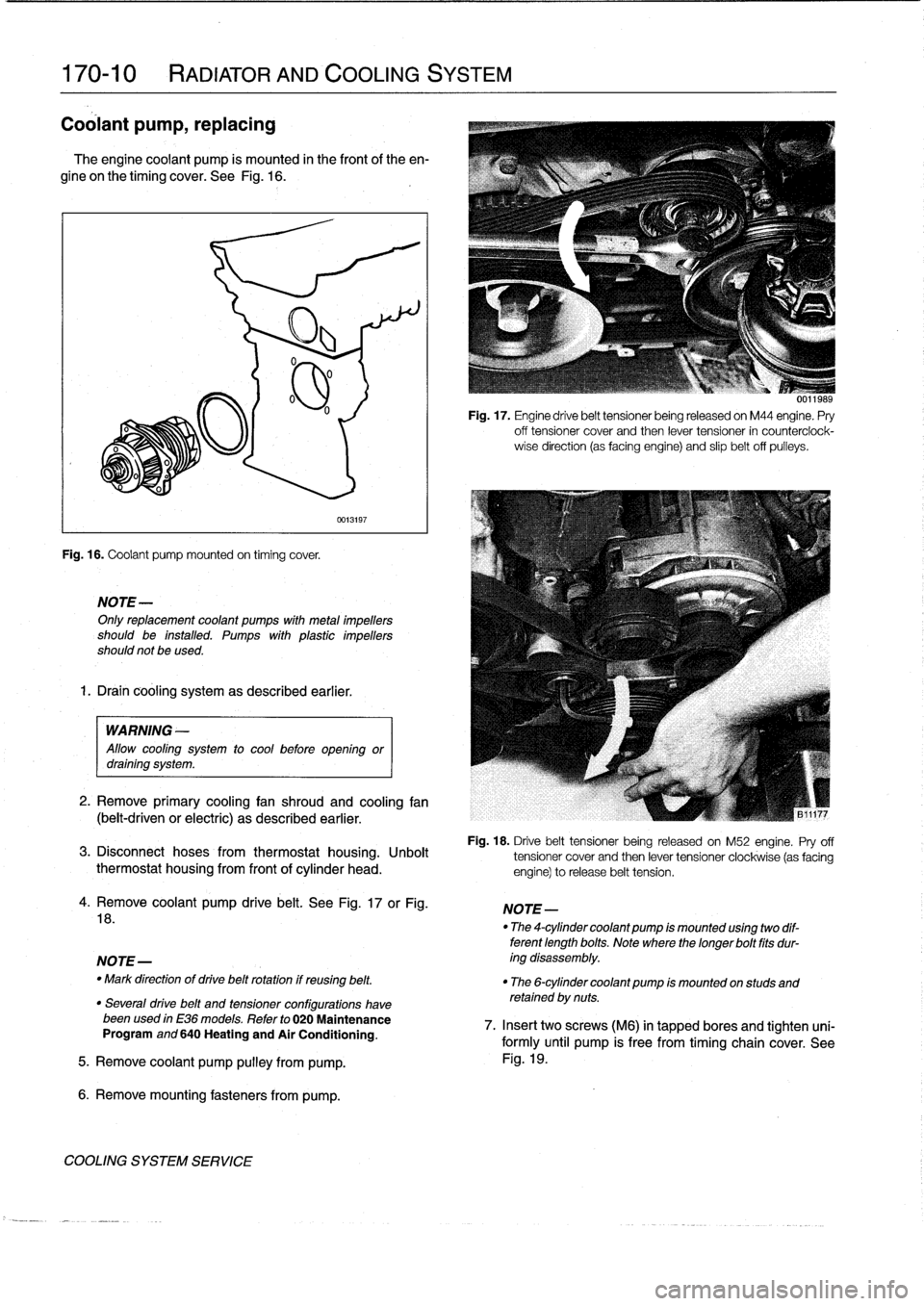
See
Fig
.
16
.
Fig
.
16
.
Coolant
pump
mounted
on
timing
cover
.
NOTE-
Onlyreplacement
coolant
pumps
with
metal
¡mpellers
should
be
installed
.
Pumps
with
plastic
impellers
should
not
be
used
.
1.
Drain
cooling
system
as
described
earlier
.
0013197
WARNING
-
Allow
cool¡ng
system
to
cool
before
open¡ngor
drain¡ng
system
.
2
.
Remove
primary
cooling
fan
shroud
and
cooling
fan
(belt-driven
or
electric)
as
described
earlier
.
Fig
.
17
.
Engine
drive
belt
tensioner
being
released
on
M44
engine
.
Pry
off
tensioner
cover
and
then
lever
tensioner
in
counterciock-
wise
direction
(as
facing
engine)
and
slip
belt
off
pulleys
.
Fig
.
18
.
Drive
belt
tensioner
being
released
on
M52
engine
.
Pry
off
3
.
Disconnect
hoses
from
thermostat
housing
.
Unbolt
tensioner
cover
and
then
lever
tensioner
clockwise
(as
facing
thermostat
housing
from
front
of
cylinder
head
.
engine)torelease
belt
tension
.
4
.
Remove
coolant
pump
drive
belt
.
See
Fig
.
17
or
Fig
.
18
.
NOTE-
-
Mark
direction
of
drive
belt
rotation
if
reusing
belt
.
"
The
6-cylinder
coolant
pump
¡s
mounted
on
studs
and
retained
by
nuts
.
"
Severa¡
drive
belt
and
tensioner
configurations
havebeenused
in
E36
models
.
Refer
to
020
Maintenance
Program
and
640
Heating
and
Air
Conditioning
.
5
.
Remove
coolant
pump
pulley
from
pump
.
6
.
Remove
mounting
fasteners
from
pump
.
COOLING
SYSTEM
SERVICE
NOTE-
"
The
4-cylinder
coolant
pump
¡s
mounted
us¡ng
two
dif-
terent
length
bolts
.
Note
where
thelonger
bolt
fits
dur-
ing
disassembly
.
0011989
7
.
Insert
twoscrews
(M6)
in
tapped
bores
and
tighten
uni-
formly
until
pump
is
free
from
timing
chain
cover
.
See
Fig
.
19
.
Page 205 of 759
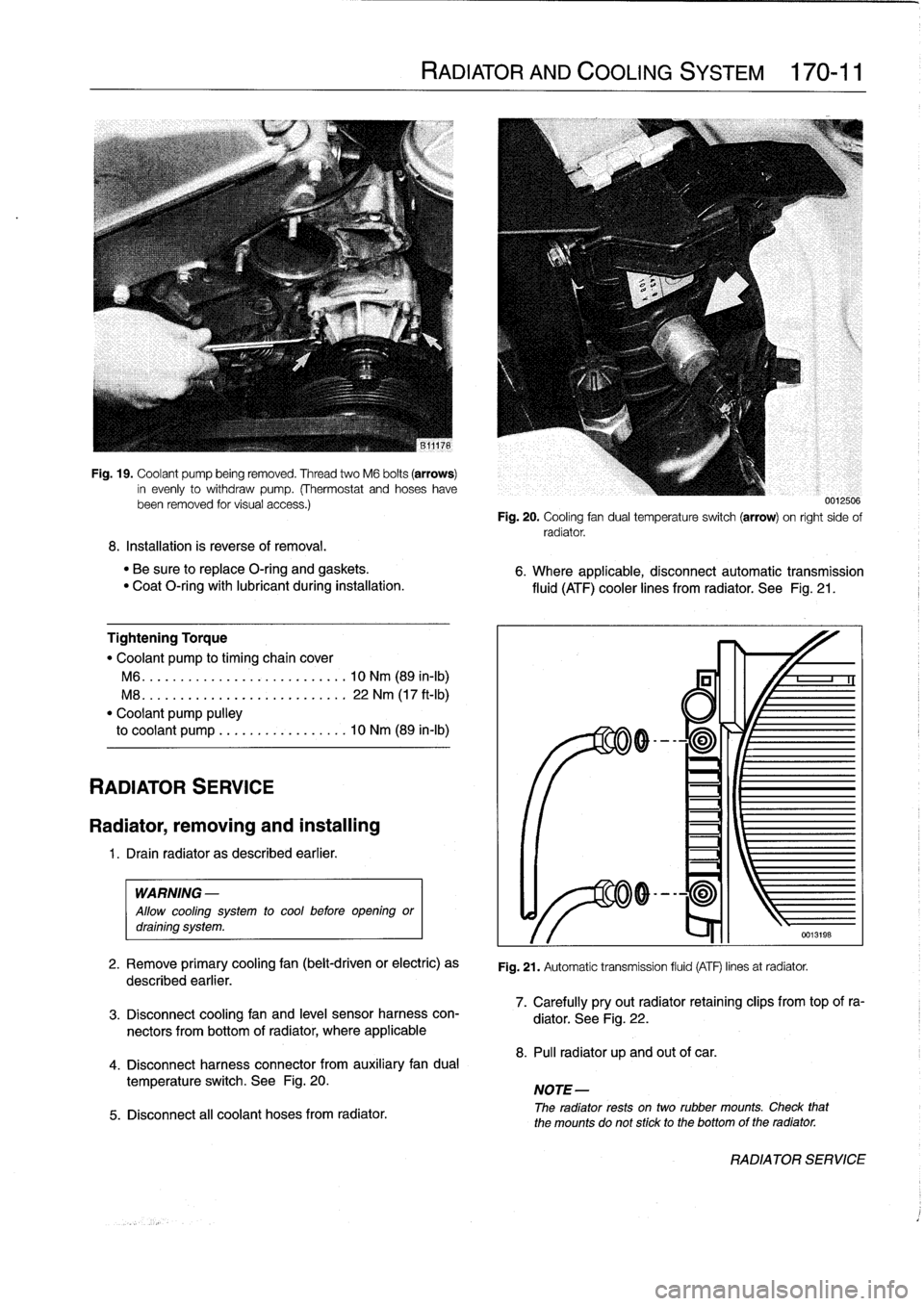
Fig
.
19
.
Coolant
pump
being
removed
.
Thread
two
M6
bolts
(arrows)
in
evenly
to
withdraw
pump
.
(Thermostat
and
hoseshavebeen
removed
tor
visual
access
.)
8
.
Installation
is
reverse
of
removal
.
"
Be
sure
to
replace
O-ring
and
gaskets
.
"
Coat
O-ring
with
lubricant
during
installation
.
Tightening
Torque
"
Coolant
pump
to
timing
chaincover
M6
...
.
...................
..
.
.
10
Nm
(89
in-lb)
M8
.
..
.
....................
.
.
.
22
Nm
(17
ft-Ib)
"
Coolant
pump
pulley
to
coolant
pump
.................
10
Nm
(89
in-lb)
RADIATOR
SERVICE
Radiator,
removing
and
installing
1
.
Drain
radiator
as
described
earlier
.
WARNING
-
Allow
cooling
system
to
cool
before
opening
ordraining
system
.
2
.
Remove
primary
cooling
fan
(belt-driven
or
electric)
as
described
earlier
.
3
.
Disconnect
coolingfan
and
leve¡
sensor
harness
con-
nectors
from
bottom
of
radiator,
where
applicable
4
.
Disconnect
harness
connector
from
auxiliary
fandual
temperature
switch
.
See
Fig
.
20
.
5
.
Disconnect
all
coolant
hoses
from
radiator
.
RADIATOR
AND
COOLING
SYSTEM
170-11
0012500
Fig
.
20
.
Cooling
fan
dual
temperatura
switch
(arrow)
on
right
sido
of
radiator
.
6
.
Where
applicable,
disconnectautomatic
transmission
fluid
(ATF)
cooler
lines
from
radiator
.
See
Fig
.
21
.
Fig
.
21
.
Automatic
transmission
fluid
(ATF)
linos
at
radiator
.
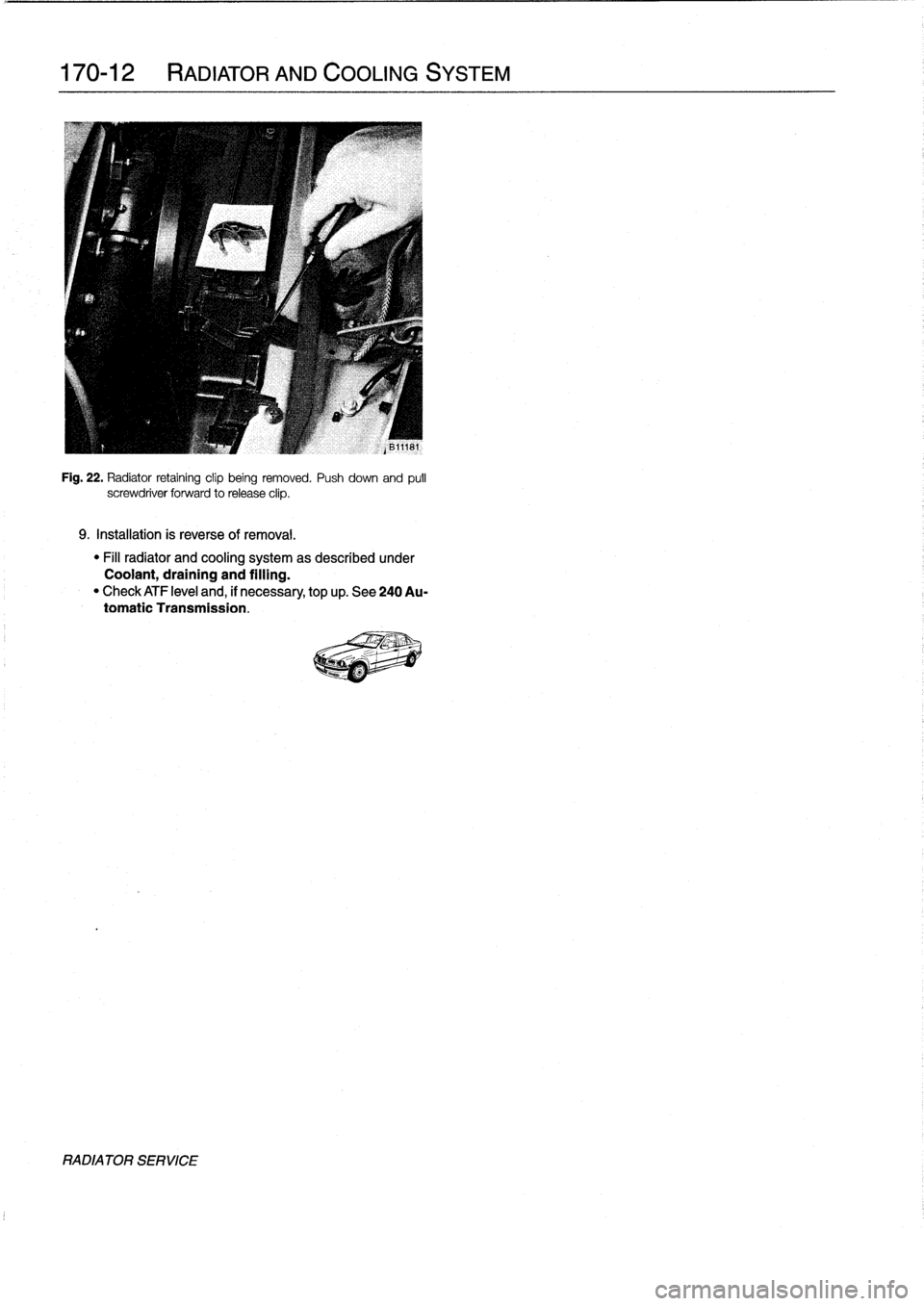
7
.
Carefully
pryout
radiator
retaining
clips
from
top
of
ra-
diator
.
See
Fig
.
22
.
8
.
Pul¡
radiator
up
and
out
of
car
.
NOTE-
The
radiator
rests
ontwo
rubber
mounts
.
Check
that
the
mounts
do
not
stick
to
the
bottomof
the
radiator
.
RADIATOR
SERVICE
Page 206 of 759
170-12
RADIATOR
AND
COOLING
SYSTEM
Fig
.
22
.
Radiator
retaining
clip
being
removed
.
Push
down
and
pulí
screwdriver
forward
to
release
clip
.
9
.
Installation
is
reverse
of
removal
.
"
Fill
radiator
and
cooling
system
as
described
under
Coolant,
draining
and
filling
.
"
Check
ATF
leve¡
and,
if
necessary,
top
up
.
See
240
Au-
tomatic
Transmission
.
RADIATORSERVICE
Page 218 of 759
210-
4
CLUTCH
Clutch,
removing
1
.
Remove
transmission
fromengine
.
See230
Manual
Transmission
.
2
.
Remove
release
bearing
from
transmission
inputshaft
.
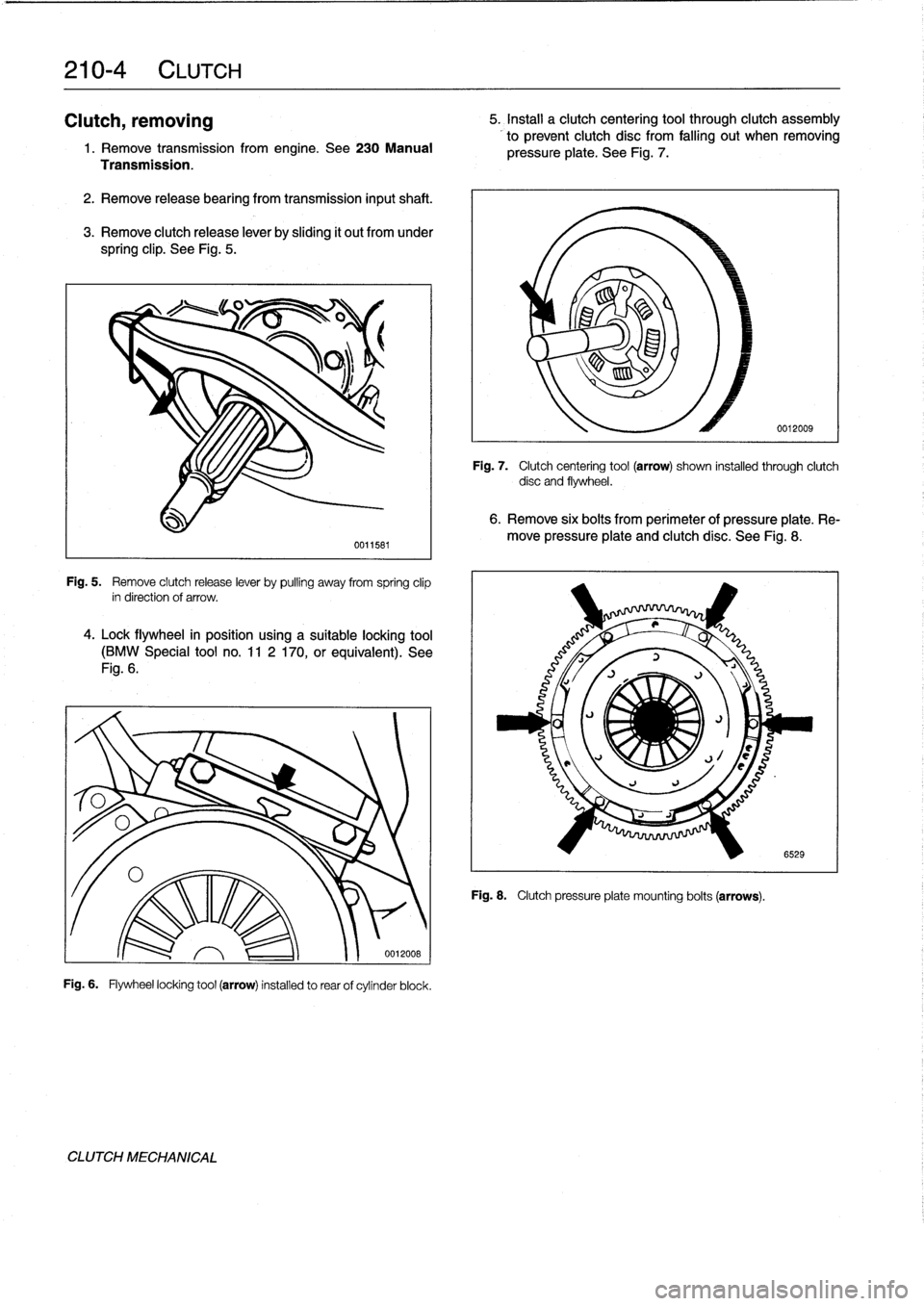
3
.
Remove
clutch
release
lever
by
sliding
it
out
from
under
spring
clip
.
See
Fig
.
5
.
Fig
.
5
.
Remove
clutch
release
lever
by
pulling
away
from
spring
clip
in
direction
of
arrow
.
4
.
Lock
flywheel
in
posítion
using
a
suitable
locking
tool
(BMW
Special
tool
no
.
11
2
170,or
equivalent)
.
See
Fig
.
6
.
Fig
.
6
.
Flywheel
locking
tool
(arrow)
installed
to
rear
of
cylinder
block
.
CLUTCH
MECHANICAL
0011581
0012008
5
.
Install
a
clutch
centering
tool
through
clutch
assembly
to
prevent
clutch
disc
from
falling
out
when
removing
pressure
plate
.
See
Fig
.
7
.
Fig
.
7
.
Clutch
centering
tool
(arrow)
shown
installed
through
clutch
disc
and
flywheel
.
6
.
Remove
six
bolts
from
perimeter
of
pressure
plate
.
Re-
move
pressure
plate
and
clutch
disc
.
See
Fig
.
8
.
Fig
.
8
.
Clutch
pressure
plate
mounting
bolts
(arrows)
.
0012009
6529
Page 312 of 759
410-4
FENDERS,
ENGINE
HOOD
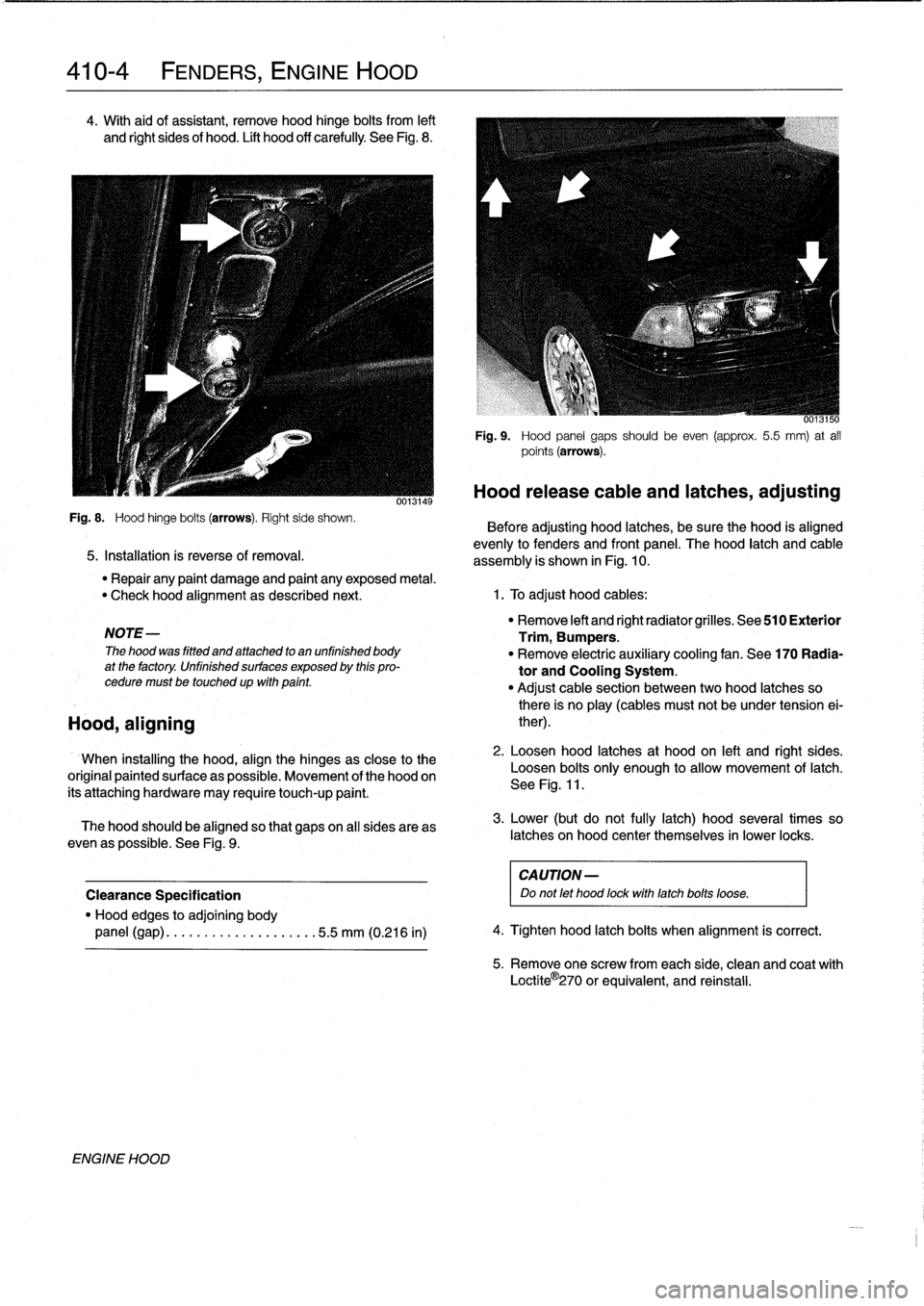
4
.
With
aid
of
assistant,
remove
hood
hinge
bolts
from
left
and
Rght
sides
of
hood
.
Lift
hood
off
carefully
See
Fig
.
8
.
Fig
.
8
.
Hood
hinge
bolts
(arrows)
.
Right
side
shown
.
5
.
Installation
is
reverse
of
removal
.
NOTE-
The
hood
was
fitted
and
attached
to
an
unfinished
body
at
the
factory
.
Unfinished
surfaces
exposed
by
this
pro-
cedure
must
betouchedup
wfth
pafnt
.
Hood,
aligning
ENGINE
HOOD
0013149
6013150
Fig
.
9
.
Hood
panel
gaps
should
be
even
(approx
.
5
.5
mm)
at
all
points
(arrows)
.
Hood
release
cable
and
latches,
adjusting
Before
adjusting
hood
latches,
be
sure
the
hood
is
aligned
evenly
to
fenders
and
front
panel
.
The
hood
latch
and
cable
assembly
is
shown
in
Fig
.
10
.
"
Repair
any
paint
damage
and
paint
any
exposed
metal
.
"
Check
hood
alignment
as
described
next
.
1
.
To
adjust
hood
cables
:
When
installing
the
hood,
align
the
hinges
as
close
to
the
original
paintedsurface
as
possible
.
Movement
of
the
hood
on
its'attaching
hardware
may
require
touch-up
paint
.
The
hood
should
be
aligned
so
that
gapson
all
sides
areas
even
as
possible
.
See
Fig
.
9
.
Clearance
Specification
"
Hood
edges
to
adjoining
body
panel
(gap)
........
..
..
..
.....
.5
.5
mm
(0.216
in)
"
Remove
left
and
right
radiator
grilles
.
See
510
Exterior
Trim,
Bumpers
.
"
Remove
electric
auxíliary
cooling
fan
.
See
170
Radia-
tor
and
Cooling
System
.
"
Adjust
cable
section
between
two
hood
latches
so
there
is
no
play
(cables
must
not
be
under
tension
ei-
ther)
.
2
.
Loosen
hood
latches
at
hood
on
left
and
right
sides
.
Loosen
bolts
only
enough
to
allow
movement
of
latch
.
See
Fig
.
11
.
3
.
Lower
(but
do
not
fully
latch)
hood
severa¡
times
so
latches
on
hood
center
themselves
in
lower
locks
.
CA
UTION-
Do
not
let
hood
fockwith
latchbolts
loose
.
4
.
Tighten
hood
latch
bolts
when
alignment
is
correct
.
5
.
Remove
one
screw
fromeach
side,
clean
and
coat
with
Loctite
O
270
or
equivalent,
and
reinstall
.
Page 369 of 759
4
.
Rear
adjustment
:
Loosen
rear
adjusting
wedges
and
push
in
or
out
until
rear
of
sunroof
is
aligned
correctly
withroof-top
.
See
Fig
.
5
.
0013103
Fig
.
5
.
Adjust
rear
of
sunroof
by
loosening
nuts
1
and3
.
Push
adjust-
íng
wedges2
in
or
out
to
achieve
correctheight
.
NOTE-
"
Push
sunroofforward
before
retightening
wedge
fas-
teners
.
0013170
Fig
.
6
.
Adjust
front
of
sunroof
by
loosening
screw
(arrow)
.
Push
sun-
roof
up
or
down
to
achieve
correctheight
.
SUNROOF
540-
3
NOTE-
Use
Loctite®
270
or
an
equivalent
thread
sealing
com-
pound
when
reinstalling
theretaining
screws
.
Alterna-
tively,
install
new
screws
.
6
.
Open
sunroof
slightly
.
Rear
of
sunroofshould
be2
to
3
mm
below
surface
of
roof
.
7
.
Slide
sunroof
liner
slowly
and
carefully
forward
out
of
roof
cavity
as
far
as
possible
.
Sunroof
Height
Adjustment
Specifications
"
Rear
........
....
.
.
flush/1
mm
higher
than
roof
top
"
Front
...
..
.
....
..
.
..
flush/l
mm
lower
than
roof
top
Tightening
Torque
"
Front
orrear
adjusting
fasteners
...
...
6
Nm
(53
in-lb)
Sunroof
motor,
removing
and
installing
"
Use
Loctite®270
oran
equivalent
thread
sealing
com-
pound
when
reinstalling
the
retaining
fasteners
.
Alter-
The
sunroofshould
be
in
theclosed
posítion
before
remov-
natively,install
new
fasteners
.
ing
or
installing
the
sunroof
motor
.
If
necessary,
manually
5
.
Front
adjustment
:
Loosen
retaining
screws,
then
push
close
the
sunroof
panel
as
described
under
Sunroof
panel,
frontof
sunroof
panel
up
or
down
until
it
is
aligned
cor-
emergency
ciosing
.
rectly
with
roof-top
.
Retighten
screws
.
See
Fig
.
6
.
1
.
With
ignition
switch
off,
Rmove
access
panel
from
be-low
sunroof
motor
.
Refer
to
Fig
.
2
.
2
.
Remove
sunroof
motormountingscrews
.
See
Fig
.
7
.
0011825
Fig
.
7
.
Sunroof
motor
mountingscrews
(A
and
B)
.
Screw
at
A
is
longer
than
screws
at
B
.
SLIDE-TILT
SUNROOF
Page 437 of 759
INSTRUMENT
CLUSTER
....
.
.
.
.
.
...
.
..
620-1
Instrument
cluster,
seif-testing
.
.
.......
.
..
620-1
Instrument
cluster,
removing
and
installing
...
620-1
Instrument
cluster
bulbs,
replacing
.
.
.
.
.
.
...
620-2
GENERAL
This
repair
group
covers
removal
and
installation
of
the
in-
strument
cluster
and
the
Multi-information
Display
(MID)
mod-
ule
.
Bulb
replacement
information
for
these
units
is
also
included
here
.
NOTE
-
A
quick
check
of
the
temperature
gauge
and
its
electri-
cal
circuitis
given
in
170
Radiator
and
Cooling
Sys-
tem
.
Use
this
procedure
to
diagnosea
faulty
temperature
gauge
INSTRUMENT
CLUSTER
When
servicing
the
instrument
cluster,
always
disconnect
the
negative
(-)
cable
from
the
battery
and
insulate
the
cable
end
to
prevent
accidental
re-connection
.
Instrument
cluster,
seif-testing
Severa¡
different
versions
of
the
basic
instrument
cluster
havebeen
fitted
in
E36
cars
.
It
is
possibleto
perform
an
instru-
ment
cluster
test
and
display
system
test
information
.
Some
of
the
information
displayed
by
the
instrument
cluster
during
seif-testing
is
used
for
interna¡
BMW
organizationpur-
poses,
suchasmatching
the
correct
instrument
cluster
com-
ponents
during
parts
replacement
.
Other
functions
test
the
various
instrument
modules
.
Self-test
is
also
used
to
recode
the
instrument
cluster
after
removal
.
In
later
production
vehicles
(1996
and
later)
the
test
results
canbe
downioaded,
via
the
diagnostic
plug,
byan
authorized
BMW
dealertechnician
.
1
.
Turn
ignition
to
"radio"position
.
2
.
Press
and
hold
reset
button
on
trip-odometer
untiltrip-
odometer
display
shows
numerical
codes
.
620
Instruments
4
.
Turn
off
ignition
.
Instrument
cluster,
removing
and
installing
INSTRUMENTS
620-1
GENERAL
.....
.
.
.
.
.
.
.
.
.
.........
.
....
620-1
Odometer
coding
plug,
replacing
.....
.
.
.
.
.
.
620-2
Vehicle
speed
sender,
replacing
...
.
.
.
.
.
.
.
.
620-3
MULTI-INFORMATION
DISPLAY
(MID)
.
.
.
620-4
Multi-Information
Display,
removing
and
installing
..
.
....
.
.........
620-4
3
.
With
each
subsequent
press
of
the
button,
a
different
function
is
tested
.
Some
functions
will
activate
need1e
gauges
.
1
.
Disconnect
negative
(-)
cable
from
battery
and
cover
terminal
with
insulating
material
.
CAUTION-
Prior
to
disconnectiog
the
battery,
read
the
battery
disconnection
cautionsgiven
at
the
front
of
this
manual
on
page
vi¡¡
.
2
.
Remove
airbag
unit
from
steering
wheel
.
See
721
Air-
bag
System
(SRS)
.
Store
unit
in
a
safe
place
.
WARNING
-
The
airbag
is
an
explosive
devfce
and
should
be
treated
with
extreme
caution
.
Improper
handling
of
the
airbag
could
cause
serious
injury
or
death
.
Store
the
airbag
with
the
horn
pad
facing
up
.
If
stored
facing
down,
accidental
deployment
couldpropel
it
vfolently
into
the
air,
causing
injury
.
3
.
With
front
wheels
pointed
straight
ahead,
remove
steer-
ing
wheel
.
See
320
Steering
and
Wheel
Alignment
.
4
.
Remove
instrument
cluster
retaining
screws
.
See
Fig
.
1
.
5
.
Place
a
towel
over
steering
column
.
Carefully
tilt
top
of
cluster
out
of
dash
panel
.
Unlock
and
disconnect
har-
ness
connectors
from
back
of
cluster
.
See
Fig
.
2
.
INSTRUMENT
CLUSTER