wheel BMW 328I 2007 Workshop Manual
[x] Cancel search | Manufacturer: BMW, Model Year: 2007, Model line: 328I, Model: BMW 328I 2007Pages: 268, PDF Size: 8.8 MB
Page 225 of 268
Mobility
223Reference
At a glance
Controls
Driving tips
Communications
Navigation
Entertainment
pressurized. Otherwise there is a risk of injury if
the bulb is damaged.<
There are separate headlamp covers for low-
beam headlamps and high-beam headlamps.
Be careful when installing the covers, oth-
erwise leaks could occur and cause dam-
age to the headlamp system.<
For checking and adjusting headlamp
aim, please contact your BMW center.<
Access to the lamps
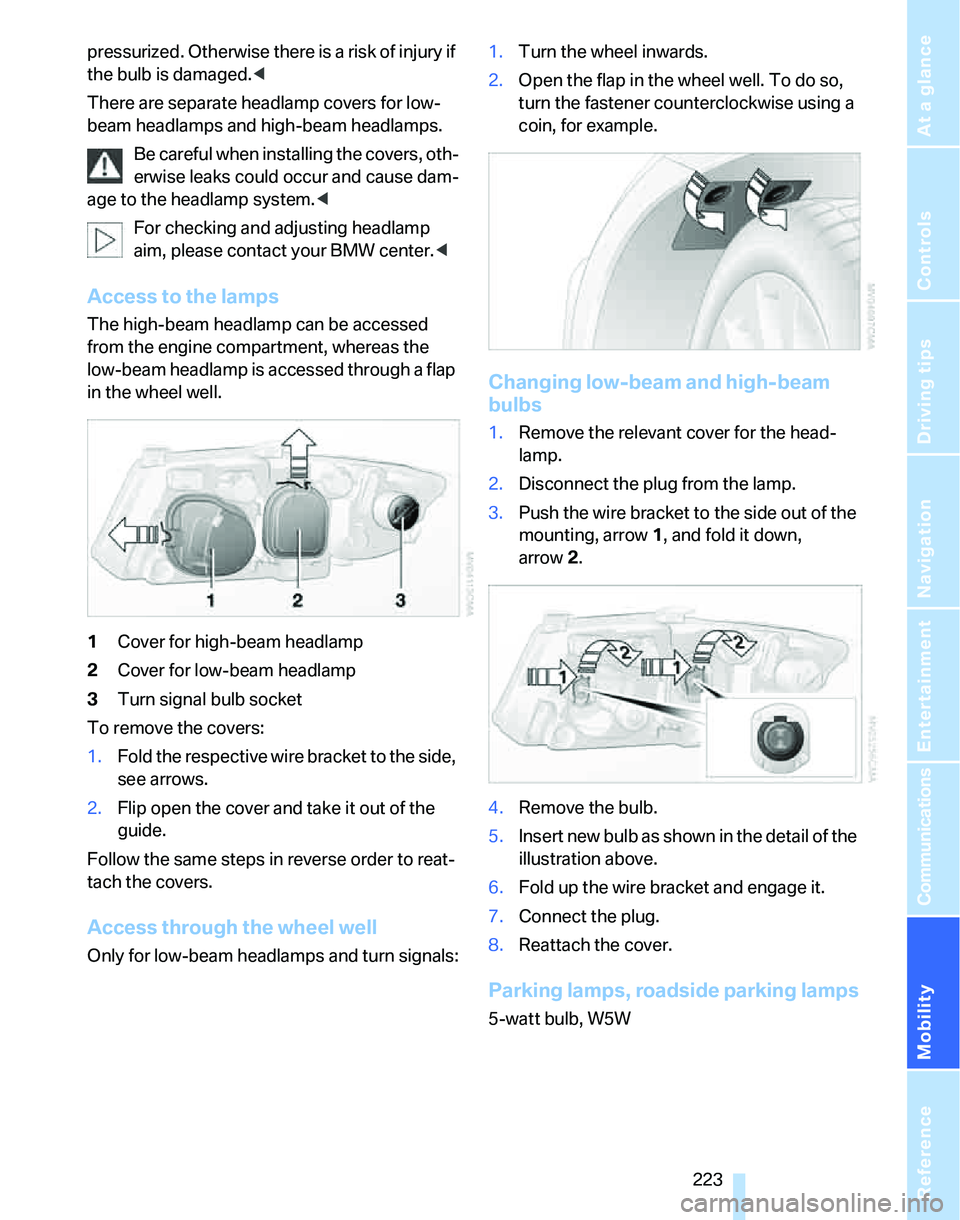
The high-beam headlamp can be accessed
from the engine compartment, whereas the
low-beam headlamp is accessed through a flap
in the wheel well.
1Cover for high-beam headlamp
2Cover for low-beam headlamp
3Turn signal bulb socket
To remove the covers:
1.Fold the respective wire bracket to the side,
see arrows.
2.Flip open the cover and take it out of the
guide.
Follow the same steps in reverse order to reat-
tach the covers.
Access through the wheel well
Only for low-beam headlamps and turn signals:1.Turn the wheel inwards.
2.Open the flap in the wheel well. To do so,
turn the fastener counterclockwise using a
coin, for example.
Changing low-beam and high-beam
bulbs
1.Remove the relevant cover for the head-
lamp.
2.Disconnect the plug from the lamp.
3.Push the wire bracket to the side out of the
mounting, arrow1, and fold it down,
arrow2.
4.Remove the bulb.
5.Insert new bulb as shown in the detail of the
illustration above.
6.Fold up the wire bracket and engage it.
7.Connect the plug.
8.Reattach the cover.
Parking lamps, roadside parking lamps
5-watt bulb, W5W
Page 226 of 268
Replacing components
224 1.Remove the cover for the high-beam head-
lamp.
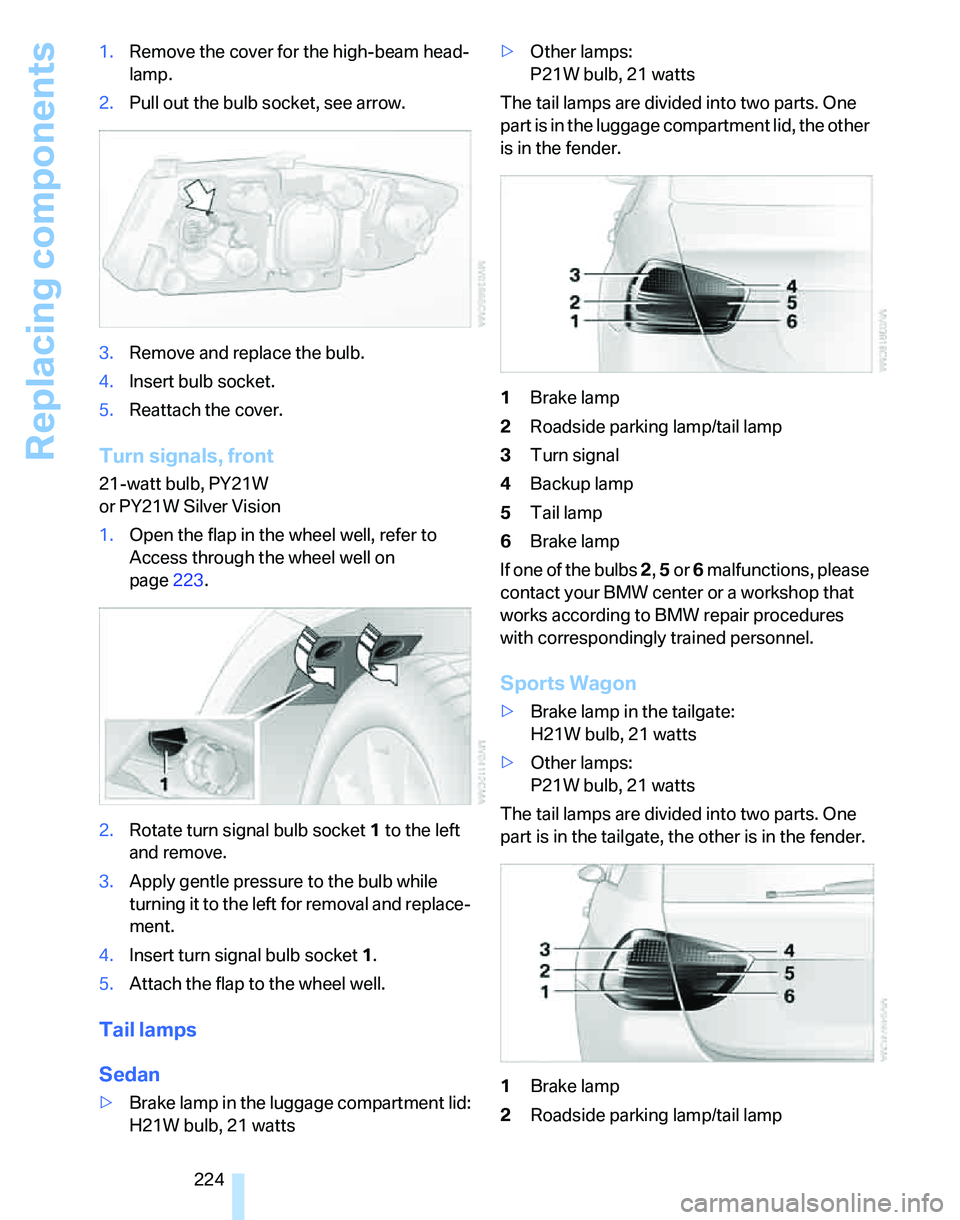
2.Pull out the bulb socket, see arrow.
3.Remove and replace the bulb.
4.Insert bulb socket.
5.Reattach the cover.
Turn signals, front
21-watt bulb, PY21W
or PY21W Silver Vision
1.Open the flap in the wheel well, refer to
Access through the wheel well on
page223.
2.Rotate turn signal bulb socket 1 to the left
and remove.
3.Apply gentle pressure to the bulb while
turning it to the left for removal and replace-
ment.
4.Insert turn signal bulb socket 1.
5.Attach the flap to the wheel well.
Tail lamps
Sedan
>Brake lamp in the luggage compartment lid:
H21W bulb, 21 watts>Other lamps:
P21W bulb, 21 watts
The tail lamps are divided into two parts. One
part is in the luggage compartment lid, the other
is in the fender.
1Brake lamp
2Roadside parking lamp/tail lamp
3Turn signal
4Backup lamp
5Tail lamp
6Brake lamp
If one of the bulbs 2, 5 or 6 malfunctions, please
contact your BMW center or a workshop that
works according to BMW repair procedures
with correspondingly trained personnel.
Sports Wagon
>Brake lamp in the tailgate:
H21W bulb, 21 watts
>Other lamps:
P21W bulb, 21 watts
The tail lamps are divided into two parts. One
part is in the tailgate, the other is in the fender.
1Brake lamp
2Roadside parking lamp/tail lamp
Page 229 of 268
Mobility
227Reference
At a glance
Controls
Driving tips
Communications
Navigation
Entertainment
Changing wheels
Your BMW is equipped with Run-Flat Tires as
standard. This removes the need to change a
wheel immediately in the event of a puncture.
For information on continuing to drive with a
damaged tire, refer to Indication of a flat tire on
page91.
The symbol identifying Run-Flat Tires is a circle
with the letters RSC on the sidewall, refer to
Run-Flat Tires, page212.
When mounting new tires or changing over
from summer to winter tires and vice versa,
mount Run-Flat Tires for your own safety. In the
event of a flat, no spare wheel is available. Your
BMW center will be glad to advise you. Refer
also to New wheels and tires, page212.
The tools for changing wheels are avail-
able as optional accessories from your
BMW center.<
Jack mounting points
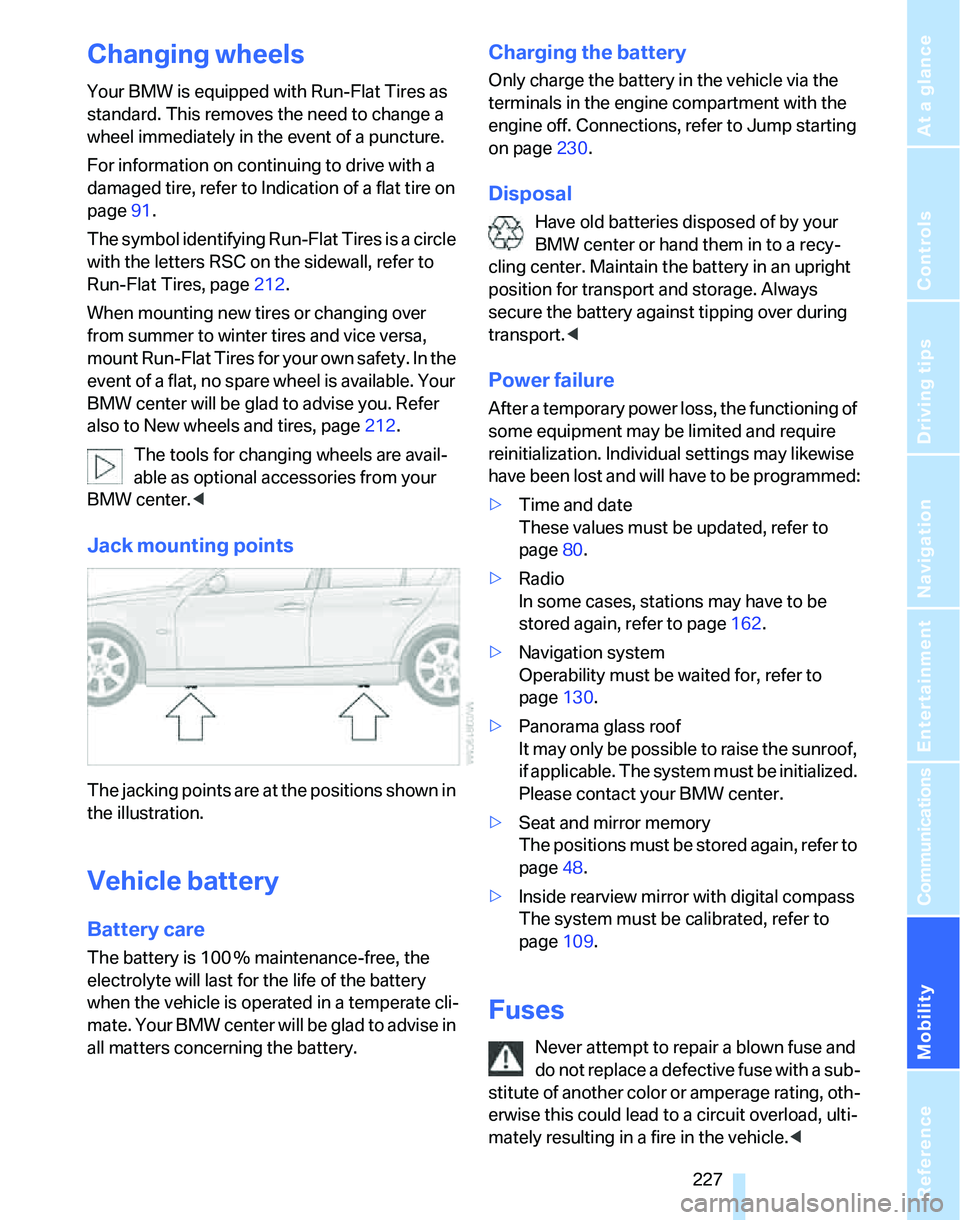
The jacking points are at the positions shown in
the illustration.
Vehicle battery
Battery care
The battery is 100 % maintenance-free, the
electrolyte will last for the life of the battery
when the vehicle is operated in a temperate cli-
mate. Your BMW center will be glad to advise in
all matters concerning the battery.
Charging the battery
Only charge the battery in the vehicle via the
terminals in the engine compartment with the
engine off. Connections, refer to Jump starting
on page230.
Disposal
Have old batteries disposed of by your
BMW center or hand them in to a recy-
cling center. Maintain the battery in an upright
position for transport and storage. Always
secure the battery against tipping over during
transport.<
Power failure
After a temporary power loss, the functioning of
some equipment may be limited and require
reinitialization. Individual settings may likewise
have been lost and will have to be programmed:
>Time and date
These values must be updated, refer to
page80.
>Radio
In some cases, stations may have to be
stored again, refer to page162.
>Navigation system
Operability must be waited for, refer to
page130.
>Panorama glass roof
It may only be possible to raise the sunroof,
if applicable. The system must be initialized.
Please contact your BMW center.
>Seat and mirror memory
The positions must be stored again, refer to
page48.
>Inside rearview mirror with digital compass
The system must be calibrated, refer to
page109.
Fuses
Never attempt to repair a blown fuse and
do not replace a defective fuse with a sub-
stitute of another color or amperage rating, oth-
erwise this could lead to a circuit overload, ulti-
mately resulting in a fire in the vehicle.<
Page 234 of 268
Giving and receiving assistance
232 the vehicle by the tow fitting. Otherwise the tow
fitting and the vehicle could be damaged.<
Access to screw thread
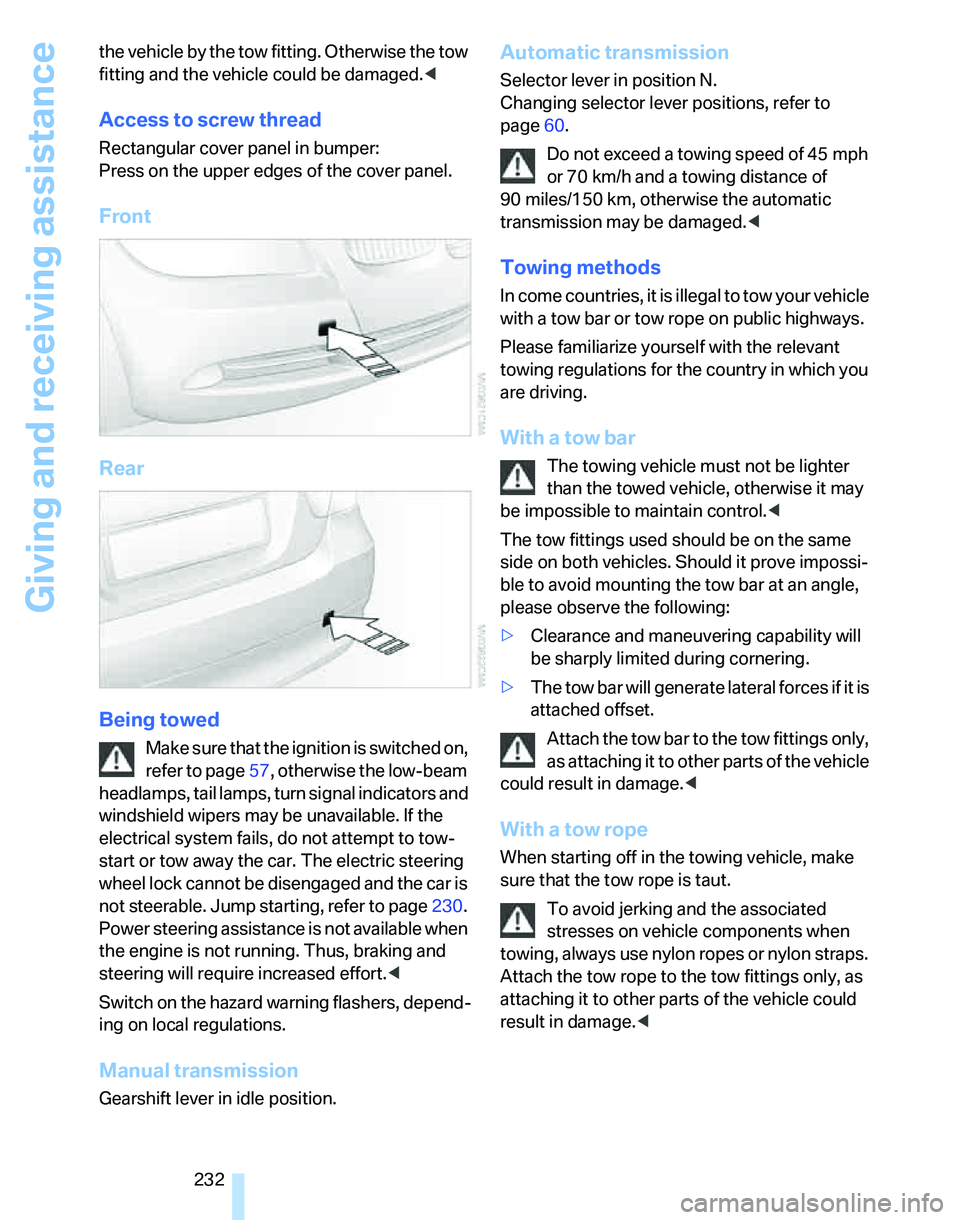
Rectangular cover panel in bumper:
Press on the upper edges of the cover panel.
Front
Rear
Being towed
Make sure that the ignition is switched on,
refer to page57, otherwise the low-beam
headlamps, tail lamps, turn signal indicators and
windshield wipers may be unavailable. If the
electrical system fails, do not attempt to tow-
start or tow away the car. The electric steering
wheel lock cannot be disengaged and the car is
not steerable. Jump starting, refer to page230.
Power steering assistance is not available when
the engine is not running. Thus, braking and
steering will require increased effort.<
Switch on the hazard warning flashers, depend-
ing on local regulations.
Manual transmission
Gearshift lever in idle position.
Automatic transmission
Selector lever in position N.
Changing selector lever positions, refer to
page60.
Do not exceed a towing speed of 45 mph
or 70 km/h and a towing distance of
90 miles/150 km, otherwise the automatic
transmission may be damaged.<
Towing methods
In come countries, it is illegal to tow your vehicle
with a tow bar or tow rope on public highways.
Please familiarize yourself with the relevant
towing regulations for the country in which you
are driving.
With a tow bar
The towing vehicle must not be lighter
than the towed vehicle, otherwise it may
be impossible to maintain control.<
The tow fittings used should be on the same
side on both vehicles. Should it prove impossi-
ble to avoid mounting the tow bar at an angle,
please observe the following:
>Clearance and maneuvering capability will
be sharply limited during cornering.
>The tow bar will generate lateral forces if it is
attached offset.
Attach the tow bar to the tow fittings only,
as attaching it to other parts of the vehicle
could result in damage.<
With a tow rope
When starting off in the towing vehicle, make
sure that the tow rope is taut.
To avoid jerking and the associated
stresses on vehicle components when
towing, always use nylon ropes or nylon straps.
Attach the tow rope to the tow fittings only, as
attaching it to other parts of the vehicle could
result in damage.<
Page 235 of 268
Mobility
233Reference
At a glance
Controls
Driving tips
Communications
Navigation
Entertainment
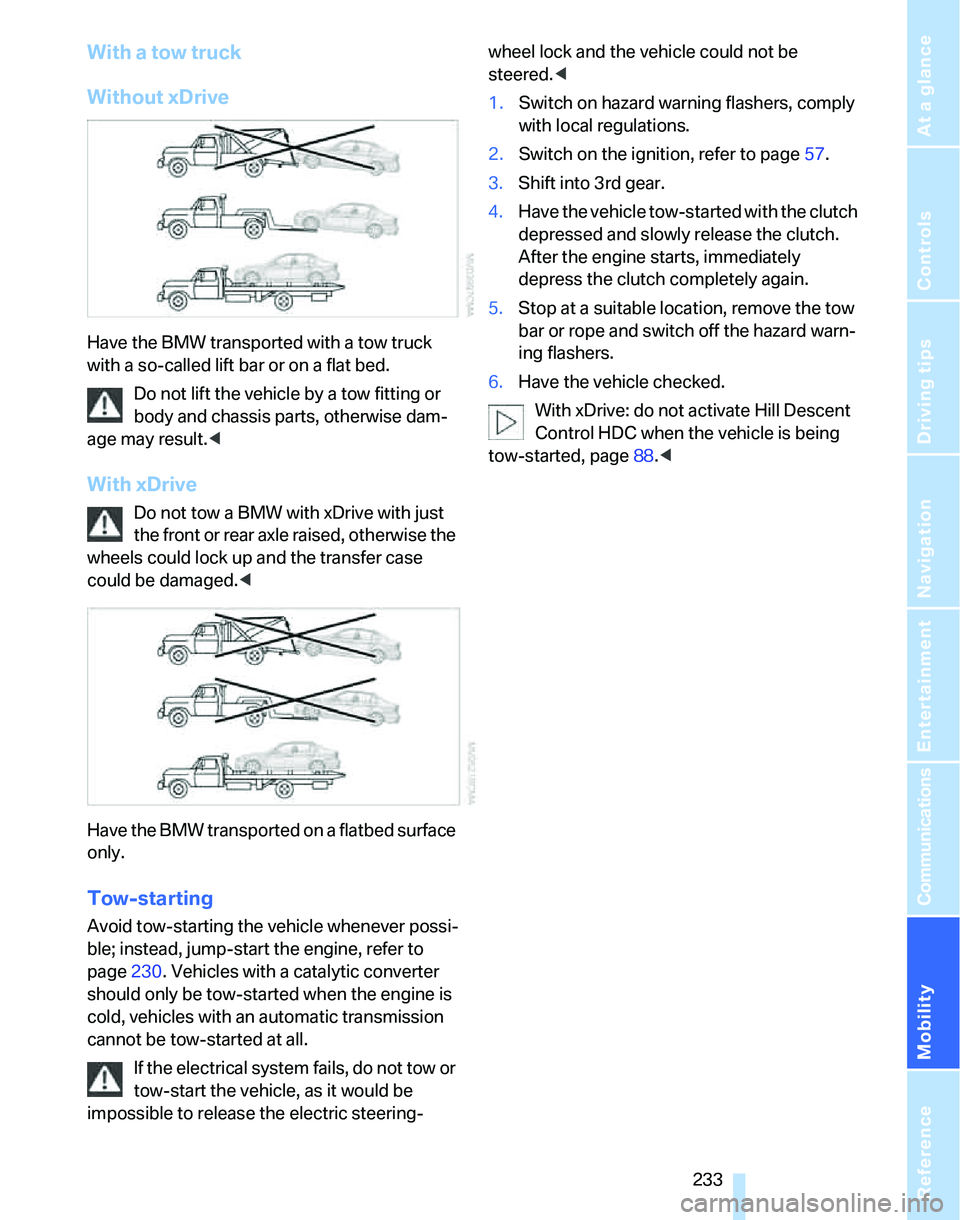
With a tow truck
Without xDrive
Have the BMW transported with a tow truck
with a so-called lift bar or on a flat bed.
Do not lift the vehicle by a tow fitting or
body and chassis parts, otherwise dam-
age may result.<
With xDrive
Do not tow a BMW with xDrive with just
the front or rear axle raised, otherwise the
wheels could lock up and the transfer case
could be damaged.<
Have the BMW transported on a flatbed surface
only.
Tow-starting
Avoid tow-starting the vehicle whenever possi-
ble; instead, jump-start the engine, refer to
page230. Vehicles with a catalytic converter
should only be tow-started when the engine is
cold, vehicles with an automatic transmission
cannot be tow-started at all.
If the electrical system fails, do not tow or
tow-start the vehicle, as it would be
impossible to release the electric steering-wheel lock and the vehicle could not be
steered.<
1.Switch on hazard warning flashers, comply
with local regulations.
2.Switch on the ignition, refer to page57.
3.Shift into 3rd gear.
4.Have the vehicle tow-started with the clutch
depressed and slowly release the clutch.
After the engine starts, immediately
depress the clutch completely again.
5.Stop at a suitable location, remove the tow
bar or rope and switch off the hazard warn-
ing flashers.
6.Have the vehicle checked.
With xDrive: do not activate Hill Descent
Control HDC when the vehicle is being
tow-started, page88.<
Page 247 of 268
Reference 245
At a glance
Controls
Driving tips
Communications
Navigation
Entertainment
Mobility
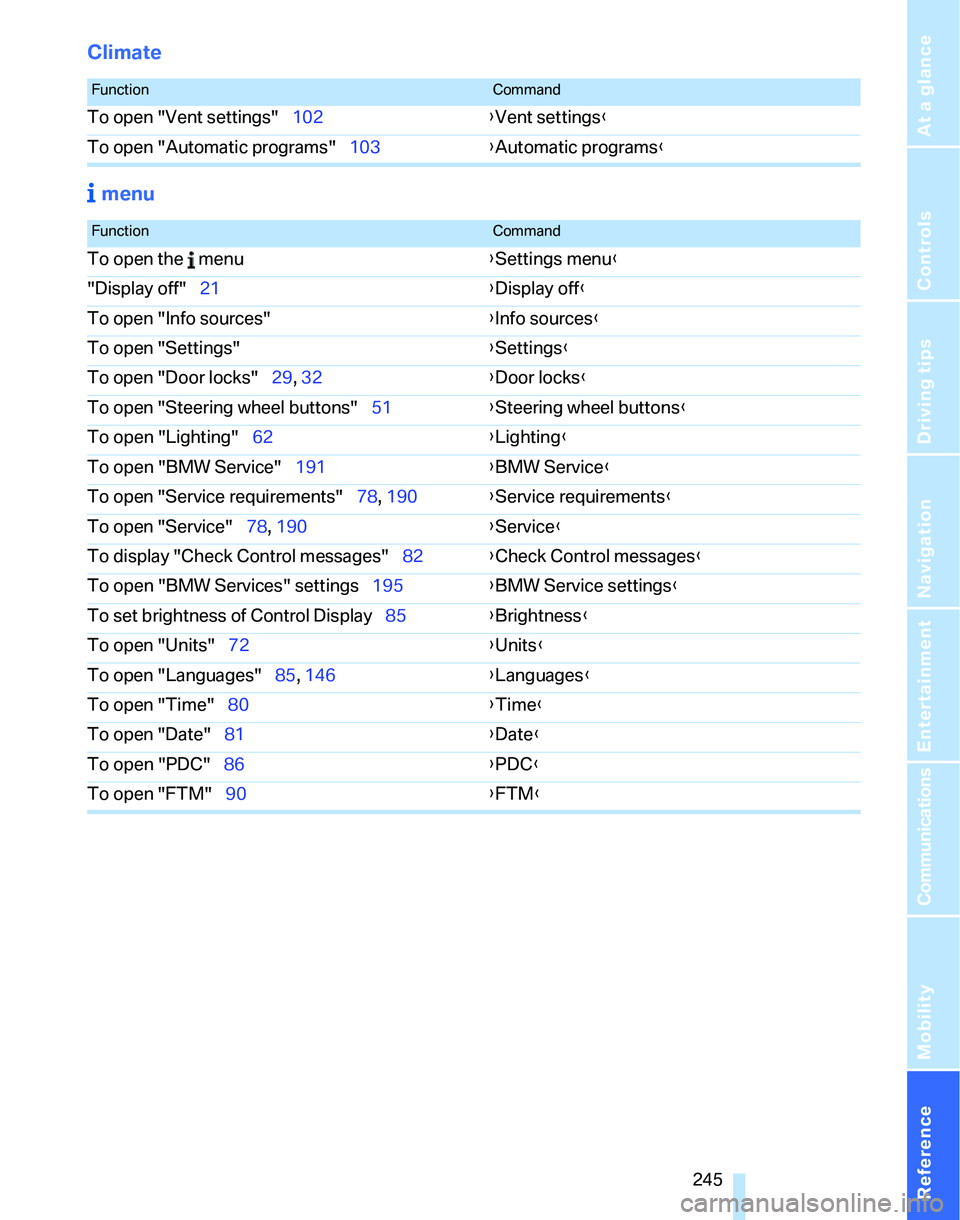
Climate
menu
FunctionCommand
To open "Vent settings"102{Vent settings}
To open "Automatic programs"103{Automatic programs}
FunctionCommand
To open the menu{Settings menu}
"Display off"21{Display off}
To open "Info sources"{Info sources}
To open "Settings"{Settings}
To open "Door locks"29, 32{Door locks}
To open "Steering wheel buttons"51{Steering wheel buttons}
To open "Lighting"62{Lighting}
To open "BMW Service"191{BMW Service}
To open "Service requirements"78, 190{Service requirements}
To open "Service"78, 190{Service}
To display "Check Control messages"82{Check Control messages}
To open "BMW Services" settings195{BMW Service settings}
To set brightness of Control Display85{Brightness}
To open "Units"72{Units}
To open "Languages"85, 146{Languages}
To open "Time"80{Time}
To open "Date"81{Date}
To open "PDC"86{PDC}
To open "FTM"90{FTM}
Page 248 of 268
Everything from A - Z
246
Everything from A - Z
Index
"..." Identifies Control Display
texts used to select
individual functions and
refers you to the page where
these texts can be found.
A
ABS Antilock Brake
System87
ACC, refer to Active cruise
control66
Accident, refer to Initiating an
Emergency Request
call229
Activated-charcoal filter for
automatic climate
control105
"Activation time"105
Active cruise control66
– indicator lamps68
– malfunction69
– selecting distance67
– sensor69
Active steering94
– warning lamp94
Adaptive Head Light99
"Add digits" on the mobile
phone183
Additives
– coolant217
"Address book" in
navigation139
Address for navigation
– deleting140
– entering131,134,139
– selecting139
– storing139
– storing current position139
"Add to destination
list"134,136Adjusting temperature inside
the car, refer to Automatic
climate control102
Adjusting the thigh support45
Adjusting the tone during
audio operation, refer to
Tone control157
Adjustment in audio mode
– front-to-rear157
– right/left balance157
Airbags95
– indicator/warning lamp96
– sitting safely44
Air conditioning mode
– automatic climate
control102
– ventilation104
Air distribution
– automatic103
– individual102
Air flow rate103
Airing, refer to Ventilation104
Air pressure, refer to Tire
inflation pressure202
Air recirculation, refer to
Recirculated-air mode
103
"Air recirculation on / off"52
Air supply
– automatic climate
control102
– ventilation104
Air vents101
AKI, refer to Fuel
specifications201
Alarm system35
– avoiding unintentional
alarms36
– interior motion sensor36
– switching off an alarm36
– tilt alarm sensor36
"All channels" for satellite
radio164All-season tires, refer to
Winter tires213
"All stations", displaying with
the radio160
All-wheel drive, refer to
xDrive88
"AM", waveband156,160
Ambient air, refer to
Recirculated-air mode103
Antenna for mobile phone176
Antifreeze
– coolant217
– washer fluid63
Anti-theft alarm system, refer
to Alarm system35
Anti-theft system29
Approved axle loads, refer to
Weights239
Approved gross vehicle
weight, refer to Weights239
Armrest, refer to Center
armrest110
Arrival time, refer to
Computer74
Arrival time, refer to Starting
destination guidance143
"Arrow display" in
navigation144
Arrow view for navigation144
Ashtray
– front112
– rear112
Assistance systems, refer to
Driving stability control
systems87
Assistance window20
– refer to iDrive20
AUC Automatic recirculated-
air control103
"Audio"159
Page 250 of 268
Everything from A - Z
248 Brakes
– ABS87
– BMW Maintenance
System219
– breaking in122
– parking brake59
– service requirements77
Brakes, refer to Braking
safely123
Brake system122
– BMW Maintenance
System219
– breaking in122
– disc brakes123
Breakdown services, refer to
Roadside Assistance229
Breaking in the clutch122
Breaking in the differential,
refer to Engine and
differential122
Break-in period122
Brightness of the Control
Display85
"Brightness"on the control
display85
Bulb changing, refer to Lamps
and bulbs222
Burned fuel
– refer to Average
consumption74
Button for starting the engine,
refer to Start/stop button57
Buttons on the steering
wheel11
C
California Proposition 65
warning6
"Call"183,194
Call
– accepting181
– displaying accepted183
– ending182
– in absence183
– starting181Calling
– from phone book182
– from Top 8 list183
– redialing183
Can holders, refer to Cup
holders111
Capacities241
Capacity of the cargo bay239
Car battery, refer to Vehicle
battery227
Car care, refer to Caring for
your vehicle brochure
Car-care products, refer to
Caring for your vehicle
brochure
"Car Data"74
Care, refer to Caring for your
vehicle brochure
Cargo, securing125
Cargo bay114
– capacity239
– convenient access37
– folding up the floor
panel117
– lamp, refer to Interior
lamps100
– opening from inside33
– opening from outside33
– partition net115
– roll-up cover114
Cargo bay lid, refer to
Luggage compartment lid/
tailgate32
Cargo bay net, refer to
Partition net115
Cargo loading
– securing cargo125
– stowing cargo125
– vehicle124
Caring for artificial leather,
refer to Caring for your
vehicle brochure
Caring for leather, refer to
Caring for your vehicle
brochure
Caring for plastic, refer to
Caring for your vehicle
brochureCaring for the carpet, refer to
Caring for your vehicle
brochure
Caring for the vehicle finish,
refer to Caring for your
vehicle brochure
Car jack
– jacking points227
Car key, refer to Integrated
key/remote control28
Car phone176
– installation location, refer to
Center armrest110
– refer to Mobile phone176
– refer to separate Owner's
Manual
Car radio, refer to Radio160
Car wash124
– also refer to Caring for your
vehicle brochure
– with convenient access38
Catalytic converter, refer to
Hot exhaust system122
"Categories" for satellite
radio164
CBS Condition Based
Service219
"CD"156,166
CD changer166
– compressed audio files166
– controls156
– fast forward/reverse170
– installation location170
– playing a track168
– random order169
– repeating a track169
– selecting a CD166
– selecting a track167
– switching on/off156
– tone control157
– volume157
Page 251 of 268
Reference 249
At a glance
Controls
Driving tips
Communications
Navigation
Entertainment
Mobility
CD player166
– compressed audio files166
– controls156
– fast forward/reverse170
– playing a track168
– random order169
– repeating a track169
– selecting a track167
– switching on/off156
– tone control157
– volume157
Center armrest110
Center brake lamp
– replacing bulbs226
Center console, refer to
Around the center
console14
"Central locking"30
Central locking
– from inside32
– from outside29
Central locking system29
– convenient access36
– hotel function34
Changes, technical, refer to
For your own safety5
Changing bulbs, refer to
Lamps and bulbs222
Changing the language on the
Control Display85
Changing the measurement
units on the Control
Display77
Changing wheels227
Chassis number, refer to
Engine compartment215
Check Control82
"Check Control
messages"84
Check Gas Cap200
Child-restraint fixing system
LATCH55
Child-restraint systems53
Child-safety lock56
Child seats, refer to
Transporting children
safely53Chrome parts, care, refer to
Caring for your vehicle
brochure
Cigarette lighter, refer to
Lighter112
Cleaning, refer to Caring for
your vehicle brochure
Cleaning headlamps63
– washer fluid64
"Climate"102
Clock72
– 12h/24h mode81
– setting time80
Closing
– from inside32
– from outside
29
Clothes hooks111
Cockpit10
Cold start, refer to Starting the
engine58
Combined instrument, refer to
Instrument cluster12
Comfort access, refer to
Convenient access36
Comfort area, refer to Around
the center console14
"Communication"181,191,
192,193
Compact disc, refer to
– CD changer166
– CD player166
Compartment for remote
control, refer to Ignition
lock57
Compass108
Computer74
– displays on Control
Display74
– hour signal81
Computer, refer to iDrive16
"Concert hall" for Tone
control158
"Concierge"193
Concierge service193
Condensation, refer to When
the vehicle is parked124
Condition Based Service
CBS219Configuring settings, refer to
Personal Profile28
Confirmation signals for
locking/unlocking the
vehicle30
Connecting vacuum cleaner,
refer to Connecting
electrical appliances112
Consumption, refer to
Average consumption74
Consumption display
– average consumption74
Consumption indicator
– Energy Control73
"Continue guidance to
destination?"144
Control Center, refer to
iDrive16
Control Display
– brightness85
– changing the language85
– switching off/on21
Control Display, refer to
iDrive16
Controller, refer to iDrive16
Controls and displays10
Control unit, refer to iDrive16
Convenient access36
– replacing the battery
38
– what to observe before
entering a car wash38
Convenient operation
– glass sunroof30
– glass sunroof with
convenient access37
– windows30
– windows with convenient
access37
Coolant217
– checking level218
Coolant temperature73
Cooling, maximum103
Cooling fluid, refer to
Coolant217
Cooling system, refer to
Coolant217
Cornering lamps, refer to
Adaptive Head Light99
Correct tires212
Page 253 of 268
Reference 251
At a glance
Controls
Driving tips
Communications
Navigation
Entertainment
Mobility
Distance control, refer to
Active cruise control66
Distance remaining to service,
refer to Service
requirements77
"Distance to dest."75
Distance warning, refer to
PDC Park Distance
Control86
Door key, refer to Remote
control with integrated
key28
Door lock31
"Door locks"29,31,32,78
Doors, emergency
operation31
DOT Quality Grades210
Draft-free ventilation104
Drinks holders, refer to Cup
holders111
Drive-off assistance, refer to
Dynamic Stability Control
DSC87
Drive-off assistant89
Driving around a traffic
jam150
Driving lamps, refer to Parking
lamps/low beams97
Driving notes122
Driving off on hills, refer to
Drive-off assistant89
Driving route, refer to
Displaying route144
Driving stability control
systems87
Driving through water123
Driving tips, refer to Driving
notes122
Dry air, refer to Cooling
function104
DSC Dynamic Stability
Control87
DTC Dynamic Traction
Control88
– indicator/warning lamp88
DVD for navigation130
Dynamic Brake Control
DBC87"Dynamic route" in
navigation142
Dynamic Stability Control
DSC
– indicator/warning lamp88
Dynamic Traction Control
DTC
– indicator/warning lamp88
E
EBV Electronic brake-force
distribution87
Eject button, refer to Buttons
on the CD player156
Electric
– seat adjustment45
Electrical malfunction
– door lock31
– driver's door31
– fuel filler door200
– glass sunroof40
– luggage compartment lid/
tailgate33
– panorama glass roof42
Electric seat adjustment45
Electric steering wheel
lock57
– with convenient access37
Electronic brake-force
distribution EBV87
Electronic oil level check215
Emergency actuation,
automatic transmission,
refer to Overriding selector
lever lock61
Emergency call229
Emergency operation
– fuel filler door, manual
release200
Emergency operation, refer to
Closing manually
– glass sunroof40
– panorama glass roof42
Emergency operation, refer to
Manual operation
– door lock31Emergency release
– luggage compartment lid
from inside34
Emergency services, refer to
Roadside Assistance229
Emissions test, refer to
Service requirements77
"Enable services"196
"End call"182
Energy-conscious driving,
refer to Energy Control73
Energy Control73
Engine
– breaking in122
– data236
– overheated, refer to Coolant
temperature73
– speed236
– starting58
– starting, convenient
access36
– switching off58
Engine compartment215
Engine coolant, refer to
Coolant217
Engine oil
– adding217
– BMW Maintenance
System219
– capacity
241
– checking level215
– intervals between changes,
refer to Service
requirements77
"Engine oil level"216
Engine output, refer to Engine
data236
Engine speed, refer to Engine
data236
Engine starting, refer to
Starting the engine58
"Enter address"132
Entering a destination
country132
Entering a house number or
intersection133
Entering a street133
Entering destination132
Entering the address134