electric BMW 328I 2011 E90 User Guide
[x] Cancel search | Manufacturer: BMW, Model Year: 2011, Model line: 328I, Model: BMW 328I 2011 E90Pages: 286, PDF Size: 8.25 MB
Page 57 of 286
Controls
55Reference
At a glance
Driving tips
Communications
Navigation
Entertainment
Mobility
Driving
Ignition lock
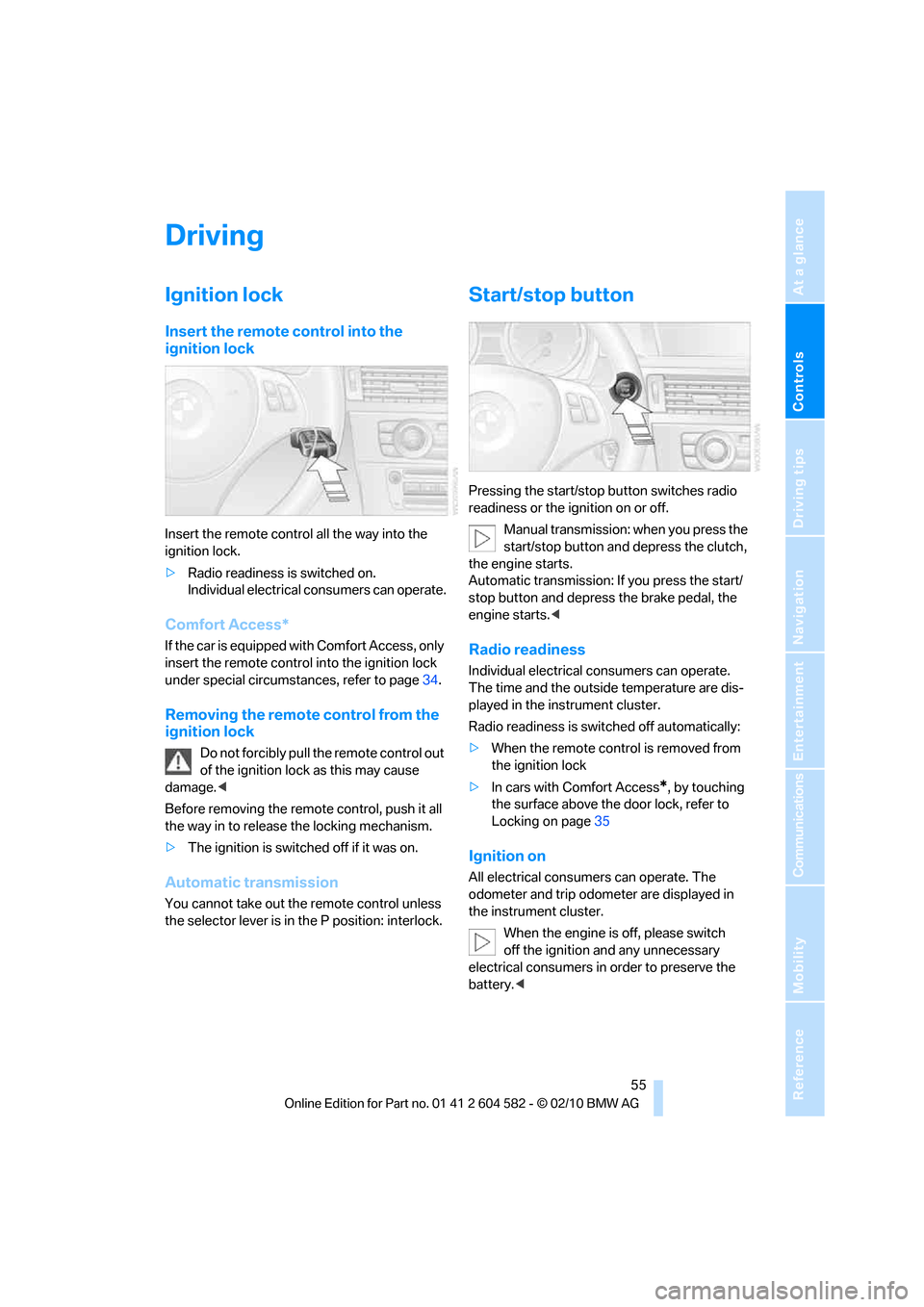
Insert the remote control into the
ignition lock
Insert the remote control all the way into the
ignition lock.
>Radio readiness is switched on.
Individual electrical consumers can operate.
Comfort Access*
If the car is equipped with Comfort Access, only
insert the remote control into the ignition lock
under special circumstances, refer to page34.
Removing the remote control from the
ignition lock
Do not forcibly pull the remote control out
of the ignition lock as this may cause
damage.<
Before removing the remote control, push it all
the way in to release the locking mechanism.
>The ignition is switched off if it was on.
Automatic transmission
You cannot take out the remote control unless
the selector lever is in the P position: interlock.
Start/stop button
Pressing the start/stop button switches radio
readiness or the ignition on or off.
Manual transmission: when you press the
start/stop button and depress the clutch,
the engine starts.
Automatic transmission: If you press the start/
stop button and depress the brake pedal, the
engine starts.<
Radio readiness
Individual electrical consumers can operate.
The time and the outside temperature are dis-
played in the instrument cluster.
Radio readiness is switched off automatically:
>When the remote control is removed from
the ignition lock
>In cars with Comfort Access
*, by touching
the surface above the door lock, refer to
Locking on page35
Ignition on
All electrical consumers can operate. The
odometer and trip odometer are displayed in
the instrument cluster.
When the engine is off, please switch
off the ignition and any unnecessary
electrical consumers in order to preserve the
battery.<
Page 115 of 286
Controls
113Reference
At a glance
Driving tips
Communications
Navigation
Entertainment
Mobility
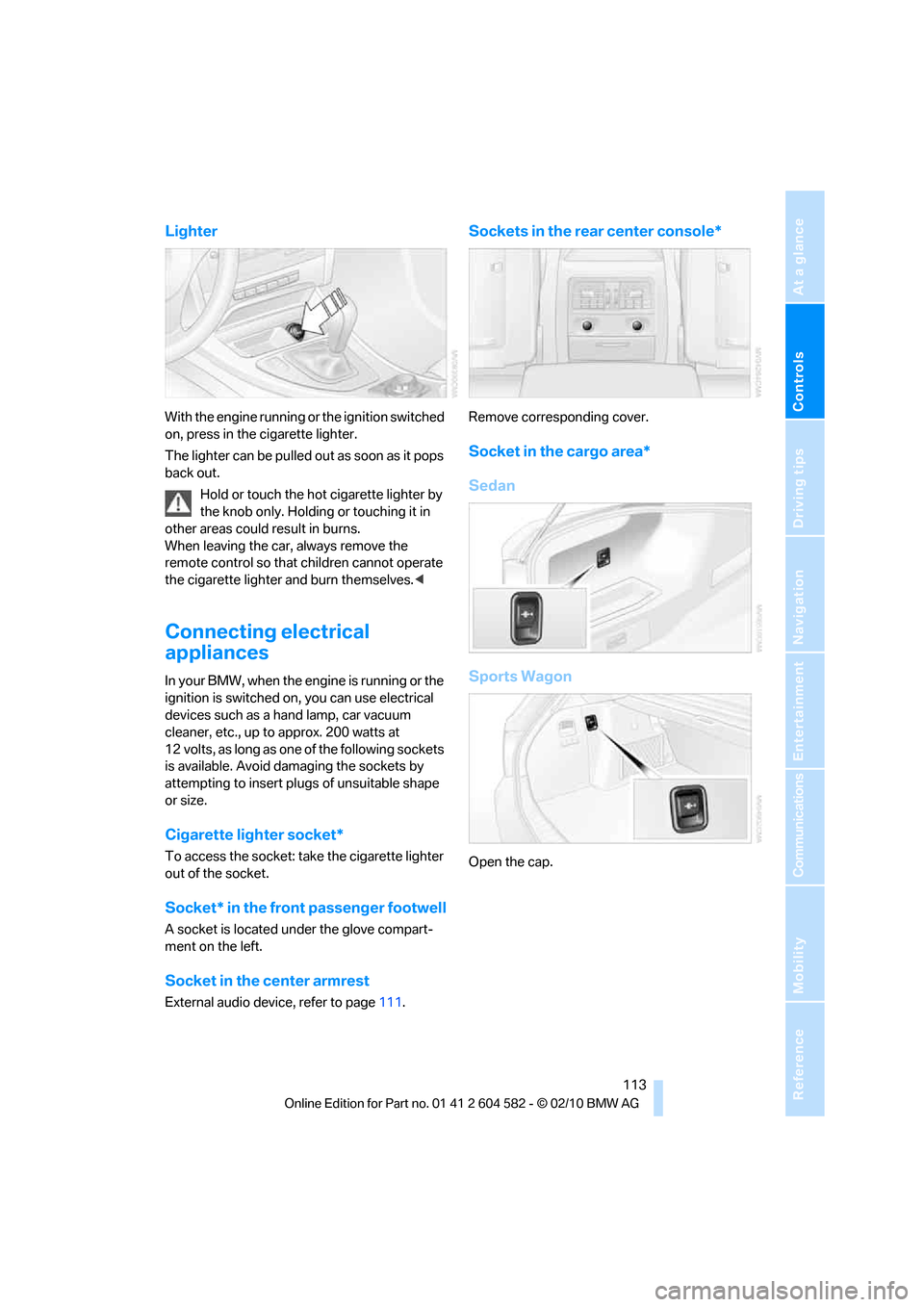
Lighter
With the engine running or the ignition switched
on, press in the cigarette lighter.
The lighter can be pulled out as soon as it pops
back out.
Hold or touch the hot cigarette lighter by
the knob only. Holding or touching it in
other areas could result in burns.
When leaving the car, always remove the
remote control so that children cannot operate
the cigarette lighter and burn themselves.<
Connecting electrical
appliances
In your BMW, when the engine is running or the
ignition is switched on, you can use electrical
devices such as a hand lamp, car vacuum
cleaner, etc., up to approx. 200 watts at
12 volts, as long as one of the following sockets
is available. Avoid damaging the sockets by
attempting to insert plugs of unsuitable shape
or size.
Cigarette lighter socket*
To access the socket: take the cigarette lighter
out of the socket.
Socket* in the front passenger footwell
A socket is located under the glove compart-
ment on the left.
Socket in the center armrest
External audio device, refer to page111.
Sockets in the rear center console*
Remove corresponding cover.
Socket in the cargo area*
Sedan
Sports Wagon
Open the cap.
Page 126 of 286
Things to remember when driving
124
Diesel particulate filter*
The diesel particulate filter collects soot parti-
cles and burns them periodically at high tem-
peratures. This cleaning process takes several
minutes. During cleaning, you may notice that
the engine temporarily runs less smoothly and
that a somewhat higher engine speed is neces-
sary to achieve the accustomed performance.
Also, noises may be heard and a slight amount
of smoke may emerge from the exhaust, even
for a short period after the engine is switched
off.
Hydroplaning
When driving on wet or slushy roads,
reduce road speed. If you do not, a wedge
of water can form between tires and road sur-
face. This situation, known as hydroplaning,
means that the tire can completely lose contact
with the road surface, so that neither the car can
be steered nor the brake be properly applied.<
The risk of hydroplaning increases with declin-
ing tread depth on the tires, refer also to Mini-
mum tread depth on page222.
Driving through water
Drive through water on the road only if it is
not deeper than 1 ft/30 cm, and then only
at walking speed at the most. Otherwise, the
vehicle's engine, the electrical systems and the
transmission may be damaged.<
Use the parking brake on inclines
On inclines, do not hold the vehicle for a
lengthy period using the clutch; use the
parking brake instead. Otherwise, greater
clutch wear will result.<
For more information about the drive-off
assistant, refer to page87.
Braking safely
Your BMW is equipped with ABS as a standard
feature. Applying the brakes fully is the most
effective way of braking in situations in which
this is necessary. Since the vehicle maintains
steering responsiveness, you can still avoid
possible obstacles with a minimum of steering
effort.
Pulsation of the brake pedal, combined with
sounds from the hydraulic circuits, indicate that
ABS is in its active mode.
Driving in wet conditions
When roads are wet or there is heavy rain,
briefly exert gentle pressure on the brake pedal
every few miles. Monitor traffic conditions to
ensure that this maneuver does not endanger
other road users. The heat generated in this
process helps dry the pads and rotors to ensure
that full braking efficiency will then be available
when you need it.
Hills
To prevent overheating and the resulting
reduced efficiency of the brake system,
drive long or steep downhill gradients in the
gear in which the least braking is required. Even
light but consistent brake pressure can lead to
high temperatures, brake wear and possibly
even brake failure.<
You can increase the engine's braking effect by
shifting down, all the way to first gear if neces-
sary. This strategy helps you avoid placing
excessive loads on the brake system. Down-
shifting in manual mode of the automatic trans-
mission, refer to page59.
Never drive with the clutch held down,
with the transmission in neutral or with
the engine switched off; otherwise, engine
braking action will not be present or there will be
no power assistance to the brakes or steering.
Never allow floor mats, carpets or any other
objects to protrude into the area around the
pedals; otherwise, pedal function could be
impaired.<
Page 194 of 286
Telephone
192
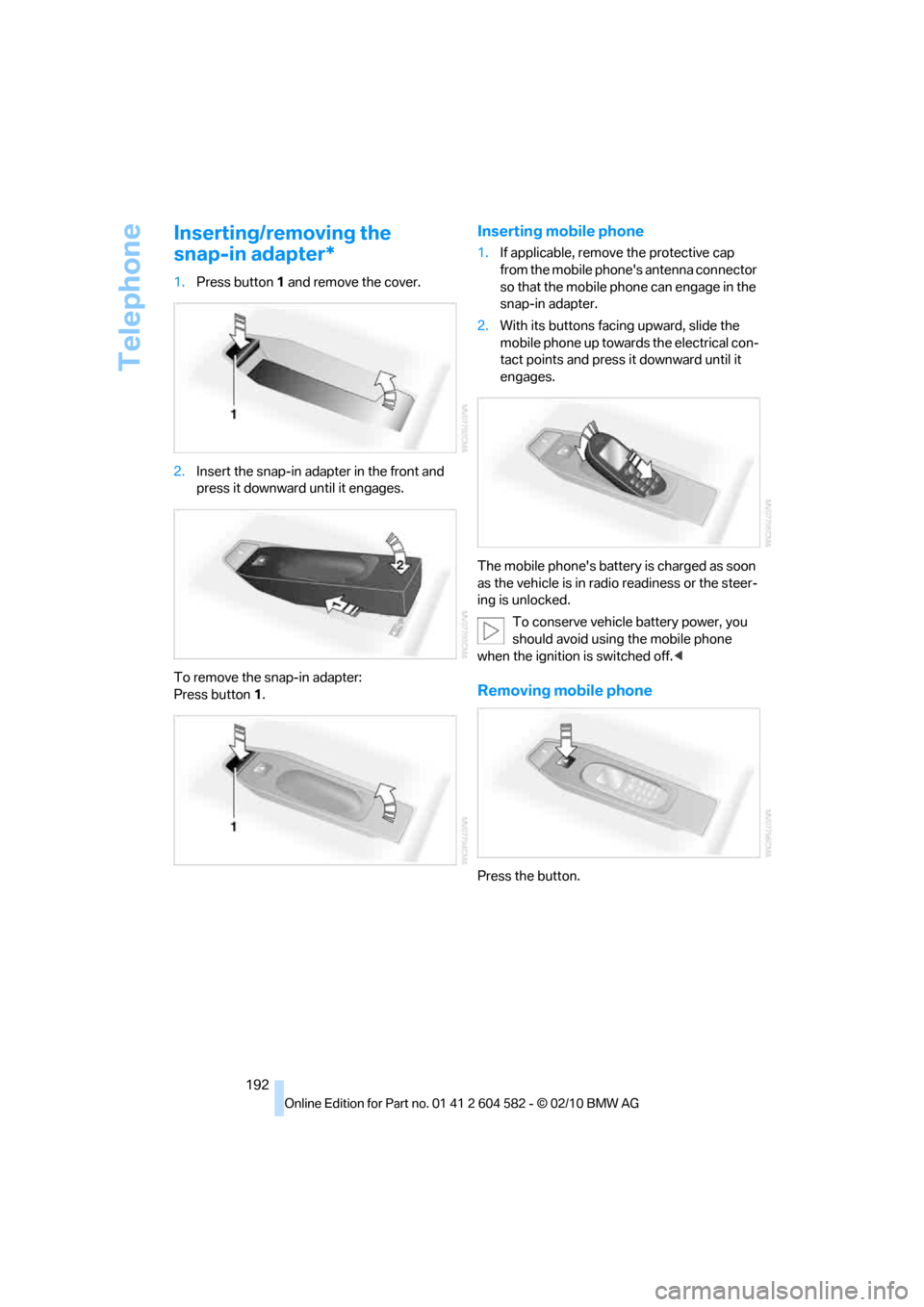
Inserting/removing the
snap-in adapter*
1.Press button1 and remove the cover.
2.Insert the snap-in adapter in the front and
press it downward until it engages.
To remove the snap-in adapter:
Press button 1.
Inserting mobile phone
1.If applicable, remove the protective cap
from the mobile phone's antenna connector
so that the mobile phone can engage in the
snap-in adapter.
2.With its buttons facing upward, slide the
mobile phone up towards the electrical con-
tact points and press it downward until it
engages.
The mobile phone's battery is charged as soon
as the vehicle is in radio readiness or the steer-
ing is unlocked.
To conserve vehicle battery power, you
should avoid using the mobile phone
when the ignition is switched off.<
Removing mobile phone
Press the button.
Page 238 of 286
Care
236
Displays
To clean displays, e.g. of the radio or instrument
cluster, use a cleaning cloth for displays or
a soft, non-abrasive, lint-free cloth.
Avoid applying excessive pressure when
cleaning the displays; otherwise, damage
may occur.<
Do not use chemical or abrasive house-
hold cleaning agents. Keep all types of
fluid away from the device. Otherwise, surfaces
or electrical components may be corroded or
damaged.<
CD/DVD drives
Do not use a cleaning CD, as it may
damage parts of the drive.<
Vehicle storage
If your vehicle is to be decommissioned for
longer than three months, your BMW center or
a workshop that operates according to BMW
specifications will be glad to advise you.
Page 240 of 286
Replacing components
238
Lamps and bulbs
Lamps and bulbs make an essential contribu-
tion to vehicle safety. They should, therefore,
be handled carefully. BMW recommends hav-
ing your BMW center perform any work that you
do not feel competent to perform yourself or
that is not described here.
Never touch the glass of new bulbs with
your bare fingers, as even minute
amounts of contamination will burn into the
bulb's surface and reduce its service life. Use a
clean tissue, cloth or something similar, or hold
the bulb by its base.<
You can obtain a selection of replacement bulbs
at your BMW center.
Only change bulbs while they are cool to
the touch; otherwise, you could suffer
burns.<
When working on electrical systems,
always begin by switching off the con-
sumer in question; otherwise, short-circuits
could result. To avoid possible injury or equip-
ment damage when replacing bulbs, observe
any instructions provided by the bulb manufac-
turer.<
For care of the headlamps, please follow the
instructions in the chapter entitled 'Care'.
If the routine for changing a particular
bulb is not described here, please contact
your BMW center or a workshop that works
according to BMW repair procedures with cor-
respondingly trained personnel.<
Light-emitting diodes LED
Light-emitting diodes installed behind translu-
cent lenses serve as the light source for many of
the controls, displays, and equipment in your
vehicle. These light-emitting diodes, which
operate using a concept similar to that applied
in conventional lasers, are officially designated
as Class 1 light-emitting diodes.
Do not remove the covers or expose the
eyes directly to the unfiltered light source
for several hours; otherwise, this could cause
irritation of the retina.<
Headlight lenses
In cool or humid weather, condensation may
form on the interior of outside lamps. When the
light is switched on, the condensation will dis-
appear after a short time. The headlight lenses
do not need to be replaced.
At high humidities, e.g. water droplets may form
in the lights; have these checked by your BMW
center.,
Xenon lamps*
These bulbs have a very long service life and are
highly unlikely to fail. If a xenon lamp fails never-
theless, switch on the fog lamps and continue
the journey with great care, provided that local
legislation does not prohibit this.
Have any work on the xenon lamp system,
including bulb replacements, performed
only by a BMW center or a workshop that works
according to BMW repair procedures with cor-
respondingly trained personnel. Otherwise, if
such work is carried out improperly, the high
voltage in the system presents the danger of
fatal injuries.<
Replacing parking lamps, roadside
parking lamps, and daytime running
lights
H8 bulb, 35 watts
1.Switch off the lamps and take the remote
control out of the ignition lock.
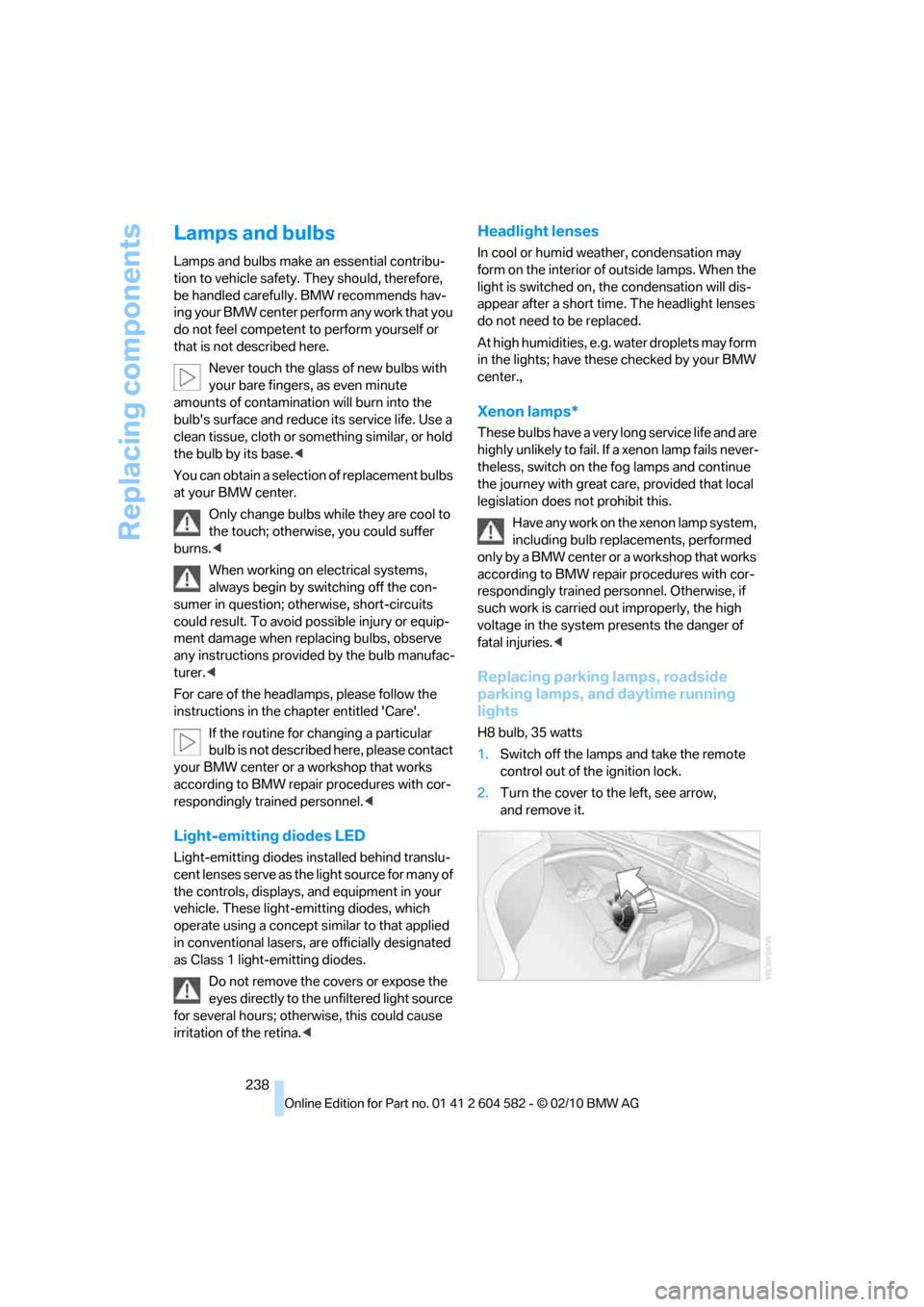
2.Turn the cover to the left, see arrow,
and remove it.
Page 249 of 286
Mobility
247Reference
At a glance
Controls
Driving tips
Communications
Navigation
Entertainment
First aid pouch*
Some of the articles contained in the first aid
pouch have a limited service life. Therefore,
check the expiration dates of the contents reg-
ularly and replace any items in good time, if nec-
essary.
Sedan
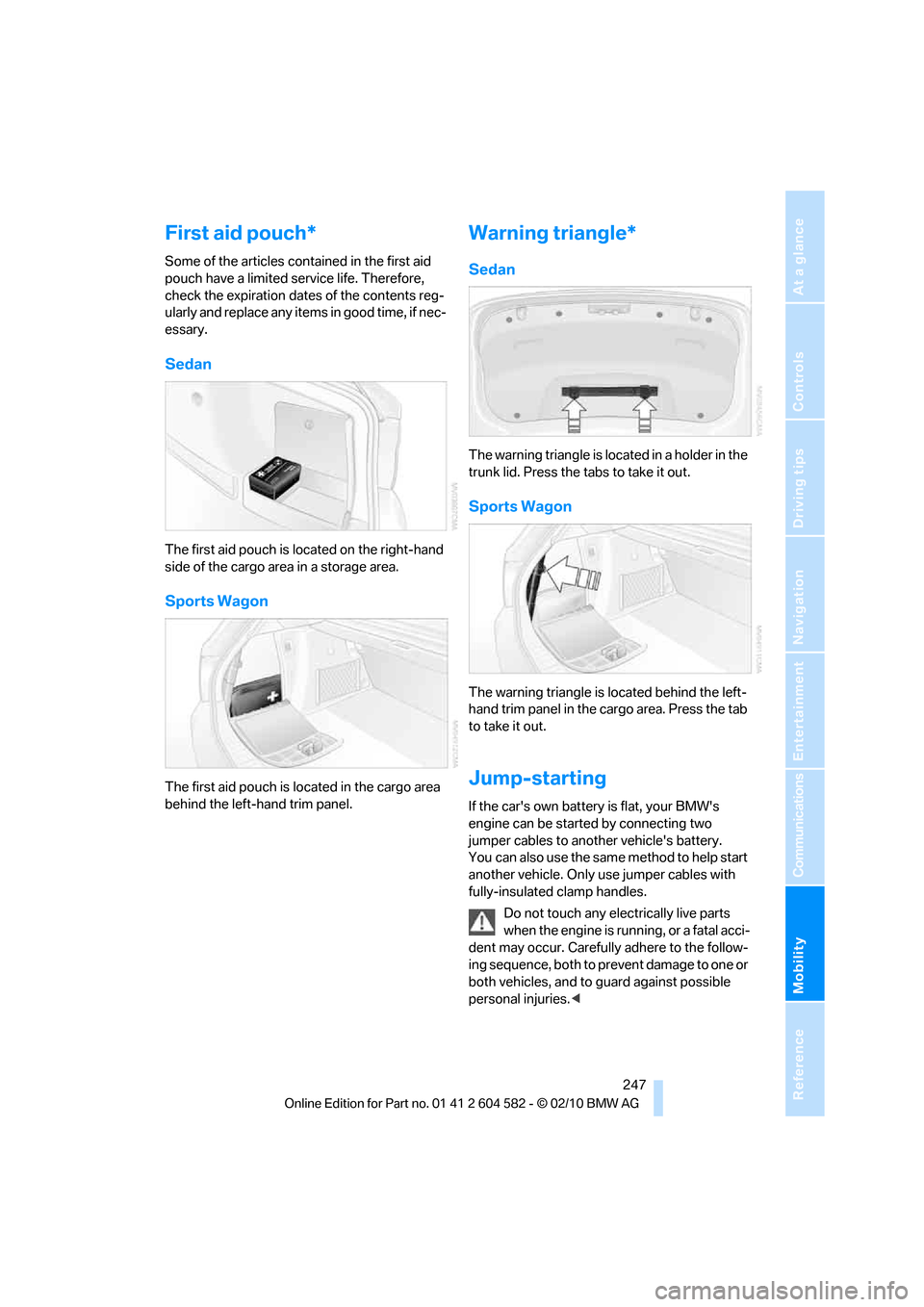
The first aid pouch is located on the right-hand
side of the cargo area in a storage area.
Sports Wagon
The first aid pouch is located in the cargo area
behind the left-hand trim panel.
Warning triangle*
Sedan
The warning triangle is located in a holder in the
trunk lid. Press the tabs to take it out.
Sports Wagon
The warning triangle is located behind the left-
hand trim panel in the cargo area. Press the tab
to take it out.
Jump-starting
If the car's own battery is flat, your BMW's
engine can be started by connecting two
jumper cables to another vehicle's battery.
You can also use the same method to help start
another vehicle. Only use jumper cables with
fully-insulated clamp handles.
Do not touch any electrically live parts
when the engine is running, or a fatal acci-
dent may occur. Carefully adhere to the follow-
ing sequence, both to prevent damage to one or
both vehicles, and to guard against possible
personal injuries.<
Page 271 of 286
Reference 269
At a glance
Controls
Driving tips
Communications
Navigation
Entertainment
Mobility
Computer73
– displays on Control
Display74
Computer, refer to iDrive16
Concierge service196
Condensation, refer to When
the vehicle is parked125
Condition Based Service
CBS231
Configuring settings, refer to
Personal Profile26
Confirmation signals for
locking/unlocking the
vehicle28
Congestion
– refer to Route, bypassing
sections141
Connecting vacuum cleaner,
refer to Connecting
electrical appliances113
Consumption, refer to
Average fuel
consumption73
Consumption display
– Energy Control72
Contacts
– creating193
Control Center, refer to
iDrive16
Control Display, refer to
iDrive16
– adjusting brightness83
– switching on/off19
Controller, refer to iDrive16
Controls and displays10
Control unit, refer to iDrive16
Convenient operation
– glass roof28
– windows28
Coolant230
– checking level230
Coolant temperature72
Cooling, maximum103
Cooling fluid, refer to
Coolant230
Cooling system, refer to
Coolant230
Copyright2Corner-illuminating lamps
– replacing bulbs239
Corner-illuminating lamps,
refer to Adaptive light
control98
Cornering lamps, refer to
Adaptive light control98
Correct tires223
Country codes DVD163
Courtesy lamps, refer to
Interior lamps101
Criteria for route140
Cross-hairs in navigation136
Cruise control62
– active64
– malfunction64
Cruise control, refer to Active
cruise control64
Cruising range73
Cupholders112
Curb weight, refer to
Weights257
Current fuel consumption,
refer to Energy Control72
Current playback
– external devices176
– of music collection170
Customer Relations198
D
Dashboard, refer to
Cockpit10
Dashboard, refer to
instrument cluster12
Dashboard lighting, refer to
Instrument lighting101
Data, technical254
– capacities258
– dimensions255
– engine254
– weights257
Data memory232
Data transfer199
Date
– date format80
– setting80
Daytime running lights98
– replacing bulbs238DBC Dynamic Brake
Control85
Deactivating front passenger
airbags95
Deadlocking, refer to
Locking28
Defect
– door lock30
– fuel filler flap202
– glass roof38
– panorama glass roof40
Destination, entering by town/
city name131
Destination address
– entering131,137
Destination entry via BMW
Assist136
Destination for navigation
– entering by voice137
– entering via map136
– entry131
– home address134
– manual entry131
Destination guidance140
– bypassing a route
section141
– changing specified
route140
– continuing140
– starting140
– voice instructions142
– volume of voice
instructions142
Diesel exhaust fluid205
Diesel fuel204
Diesel particulate filter124
Digital clock71
Digital compass109
Digital radio, refer to HD
Radio154
Dimensions255
Dipstick, engine oil227
Directional indicators, refer to
Turn signals60
Direction instructions, refer to
Voice instructions142
Directory for navigation, refer
to Address book133
Page 272 of 286
Everything from A to Z
270 Displacement, refer to Engine
data254
Display, refer to iDrive
controls16
Display lighting, refer to
Instrument lighting101
Displays
– on the Control Display16
Displays, refer to Instrument
cluster12
Displays and controls10
Disposal
– coolant230
– remote control battery36
– vehicle battery244
Distance remaining to service,
refer to Service
requirements76
Distance warning, refer to
Park Distance Control
PDC84
Door key, refer to Remote
control with integrated
key26
Door lock29
Doors, emergency
operation30
DOT Quality Grades221
Draft-free ventilation105
Drinks holders, refer to
Cupholders112
Drive-off assistance, refer to
Dynamic Stability Control
DSC85
Drive-off assistant87
Driving lamps, refer to Parking
lamps/low beams97
Driving notes122
Driving off on hills, refer to
Drive-off assistant87
Driving stability control
systems85
Driving through water124
Driving tips, refer to Driving
notes122
Dry air, refer to Cooling
function104
DSC Dynamic Stability
Control85DTC Dynamic Traction
Control86
– indicator/warning lamp86
DVD
– country codes163
– settings164
– video playback163
DVD menu164
DVD player, refer to CD
player161
DVD video163
Dynamic Brake Control
DBC85
Dynamic destination
guidance141
Dynamic Stability Control
DSC85
– indicator/warning lamp86
Dynamic Traction Control
DTC
– indicator/warning lamp86
E
EBV Electronic brake-force
distribution85
Eject button, refer to Buttons
on the CD/DVD player150
Electrical malfunction
– door lock30
– driver's door30
– fuel filler flap202
– glass roof38
– panorama glass roof40
– trunk lid32
Electric seat adjustment43
Electric steering wheel lock
– with Comfort Access35
Electronic brake-force
distribution EBV85
Electronic oil level check227
Electronic Stability Program
ESP, refer to Dynamic
Stability Control DSC85
Emergency actuation,
automatic transmission,
refer to Overriding selector
lever lock60Emergency operation
– fuel filler flap, manual
release202
Emergency operation, refer to
Closing manually
– glass roof38
– panorama glass roof40
Emergency operation, refer to
Manual operation
– door lock30
Emergency release
– trunk lid from inside32
Emergency Request246
Emergency services, refer to
Roadside Assistance246
Energy, saving
– saving fuel122
Energy-conscious driving,
refer to Energy Control72
Energy Control72
Engine
– breaking in122
– data254
– overheated, refer to Coolant
temperature72
– speed254
– starting56
– starting, Comfort Access34
– switching off56
Engine compartment226
Engine coolant, refer to
Coolant230
Engine oil
– adding229
– alternative oil types229
– BMW Maintenance
System231
– capacity258
– checking level227
– dipstick
227
– intervals between changes,
refer to Service
requirements76
Engine output, refer to Engine
data254
Engine speed, refer to Engine
data254
Engine starting, refer to
Starting the engine56
Page 273 of 286
Reference 271
At a glance
Controls
Driving tips
Communications
Navigation
Entertainment
Mobility
Entering special destinations
by name136
Entering the postal code for
navigation132
Entry lamps, refer to Interior
lamps101
Entry map for destination136
Environmentally friendly
driving, refer to Energy
Control72
Equalizer, tone setting151
Error messages, refer to
Check Control80
ESP Electronic Stability
Program, refer to Dynamic
Stability Control DSC85
Exhaust system, refer to Hot
exhaust system123
Expanding the cargo area115
Extended connectivity of the
music player in the mobile
phone174
Exterior mirrors48
– adjusting48
– automatic dimming
feature49
– automatic heating48
– folding in and out48
External audio device111
External devices
– random sequence176
Eyes
– for tow-starting and towing
away249
– for tying down loads126
F
Failure messages, refer to
Check Control80
Failure of an electrical
consumer245
False alarm
– avoiding unintentional
alarm34
– switching off an alarm34
Fastening safety belts, refer to
Safety belts47Fastest route for
navigation140
Fast forward
– CD changer163
– CD player163
Filter
– refer to Microfilter/activated-
charcoal filter for automatic
climate control105
First aid pouch247
Fixture for remote control,
refer to Ignition lock55
Flash when locking/
unlocking28
Flat tire
– run-flat tires223
– Tire Pressure Monitor
TPM89
Flat Tire Monitor FTM88
– indicating a flat tire89
– indicator/warning lamp89
– initializing the system88
– snow chains88,224
– system limits88
Flat tires, refer to Tire
condition222
Fluid reservoir, refer to
Washer fluid reservoir62
FM, waveband153
Fog lamps100
– indicator lamp13,100
Folding rear seat backrest115
Folding up the floor panel117
Footbrake, refer to Braking
safely124
Footwell lamps, refer to
Interior lamps101
For your own safety5
Four-wheel drive, refer to
xDrive86
Free memory capacity, music
collection171
Front airbags94
FTM, refer to Flat Tire
Monitor88Fuel203
– additives204
– average consumption73
– gauge72
– high-quality brands
203
– quality203
– specifications203
– tank contents, refer to
Capacities258
Fuel clock, refer to Fuel
gauge72
Fuel consumption indicator
– average fuel
consumption73
Fuel display, refer to Fuel
gauge72
Fuel-efficient driving, refer to
Energy Control72
Fuel filler flap202
– releasing in the event of
electrical malfunction202
Fuses245
G
Garage door opener, refer to
Integrated universal remote
control107
Gasoline
– refer to Average
consumption73
Gasoline, refer to Required
fuel203
Gasoline display, refer to Fuel
gauge72
Gas station
recommendations142
Gear indicator, automatic
transmission with
Steptronic58
Gearshift lever
– automatic transmission with
Steptronic58
– manual transmission57
Gearshifts
– automatic transmission with
Steptronic58
– manual transmission57
General driving notes123