con BMW 328I 2011 E90 Owner's Manual
[x] Cancel search | Manufacturer: BMW, Model Year: 2011, Model line: 328I, Model: BMW 328I 2011 E90Pages: 286, PDF Size: 8.25 MB
Page 251 of 286
Mobility
249Reference
At a glance
Controls
Driving tips
Communications
Navigation
Entertainment
Using a tow fitting
The screw-in tow fitting must always be carried
in the car. It can be screwed in at the front or
rear of the BMW.
Sedan: it is stored in the onboard vehicle tool kit
underneath the cover on the right-hand side of
the cargo area, refer to page237.
Sports Wagon: it is stored in the onboard vehi-
cle tool kit underneath the cover on the left-
hand side of the cargo area, refer to page237.
Use only the tow fitting provided with the
vehicle and screw it all the way in. Use the
tow fitting for towing on paved roads only. Avoid
lateral loading of the tow fitting, e.g. do not lift
the vehicle by the tow fitting. Otherwise, the
tow fitting and the vehicle could be damaged.<
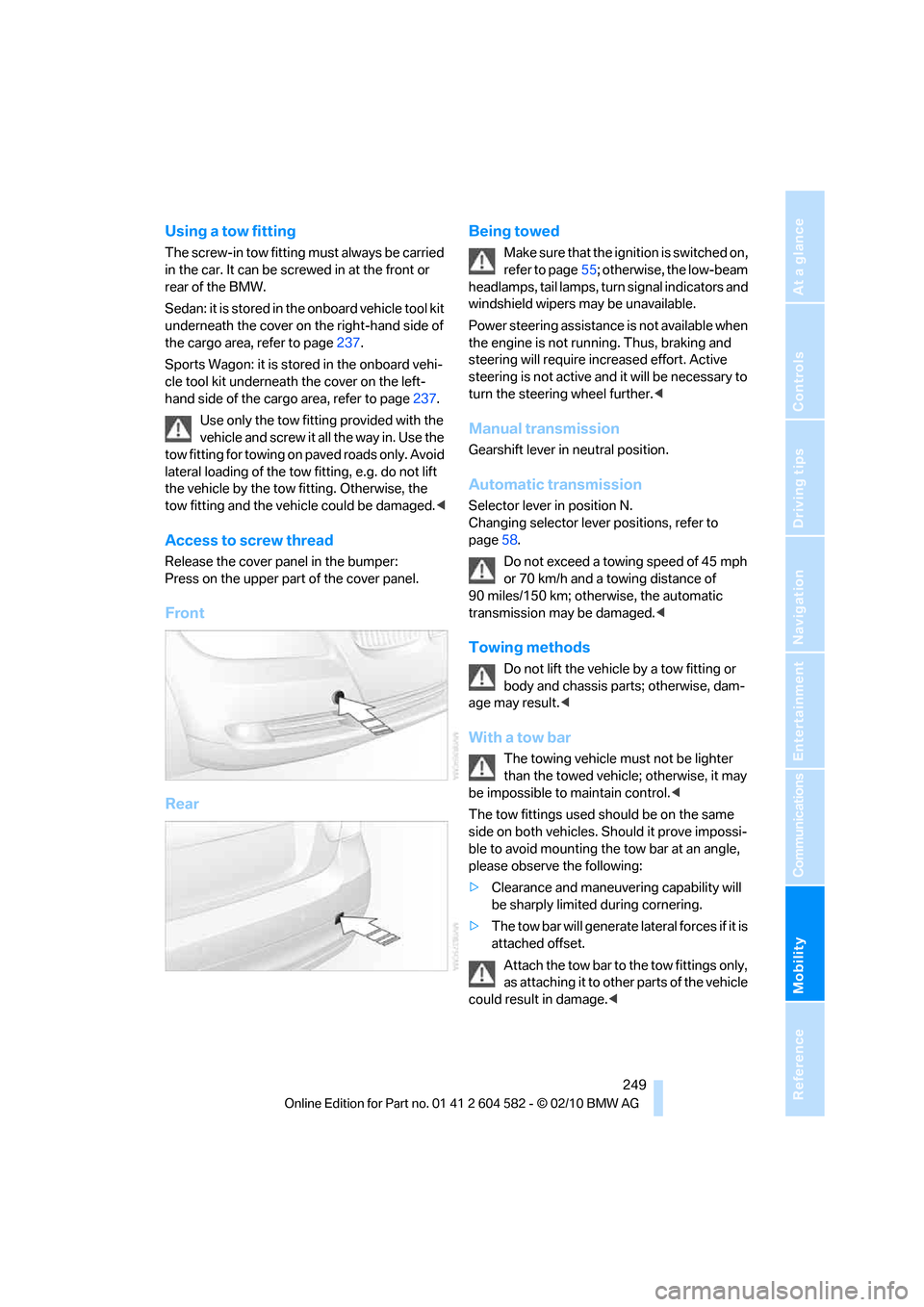
Access to screw thread
Release the cover panel in the bumper:
Press on the upper part of the cover panel.
Front
RearBeing towed
Make sure that the ignition is switched on,
refer to page55; otherwise, the low-beam
headlamps, tail lamps, turn signal indicators and
windshield wipers may be unavailable.
Power steering assistance is not available when
the engine is not running. Thus, braking and
steering will require increased effort. Active
steering is not active and it will be necessary to
turn the steering wheel further.<
Manual transmission
Gearshift lever in neutral position.
Automatic transmission
Selector lever in position N.
Changing selector lever positions, refer to
page58.
Do not exceed a towing speed of 45 mph
or 70 km/h and a towing distance of
90 miles/150 km; otherwise, the automatic
transmission may be damaged.<
Towing methods
Do not lift the vehicle by a tow fitting or
body and chassis parts; otherwise, dam-
age may result.<
With a tow bar
The towing vehicle must not be lighter
than the towed vehicle; otherwise, it may
be impossible to maintain control.<
The tow fittings used should be on the same
side on both vehicles. Should it prove impossi-
ble to avoid mounting the tow bar at an angle,
please observe the following:
>Clearance and maneuvering capability will
be sharply limited during cornering.
>The tow bar will generate lateral forces if it is
attached offset.
Attach the tow bar to the tow fittings only,
as attaching it to other parts of the vehicle
could result in damage.<
Page 252 of 286
Giving and receiving assistance
250
With a tow rope
When starting off in the towing vehicle, make
sure that the tow rope is taut.
To avoid jerking and the associated
stresses on vehicle components when
towing, always use nylon ropes or nylon straps.
Attach the tow rope to the tow fittings only, as
attaching it to other parts of the vehicle could
result in damage.<
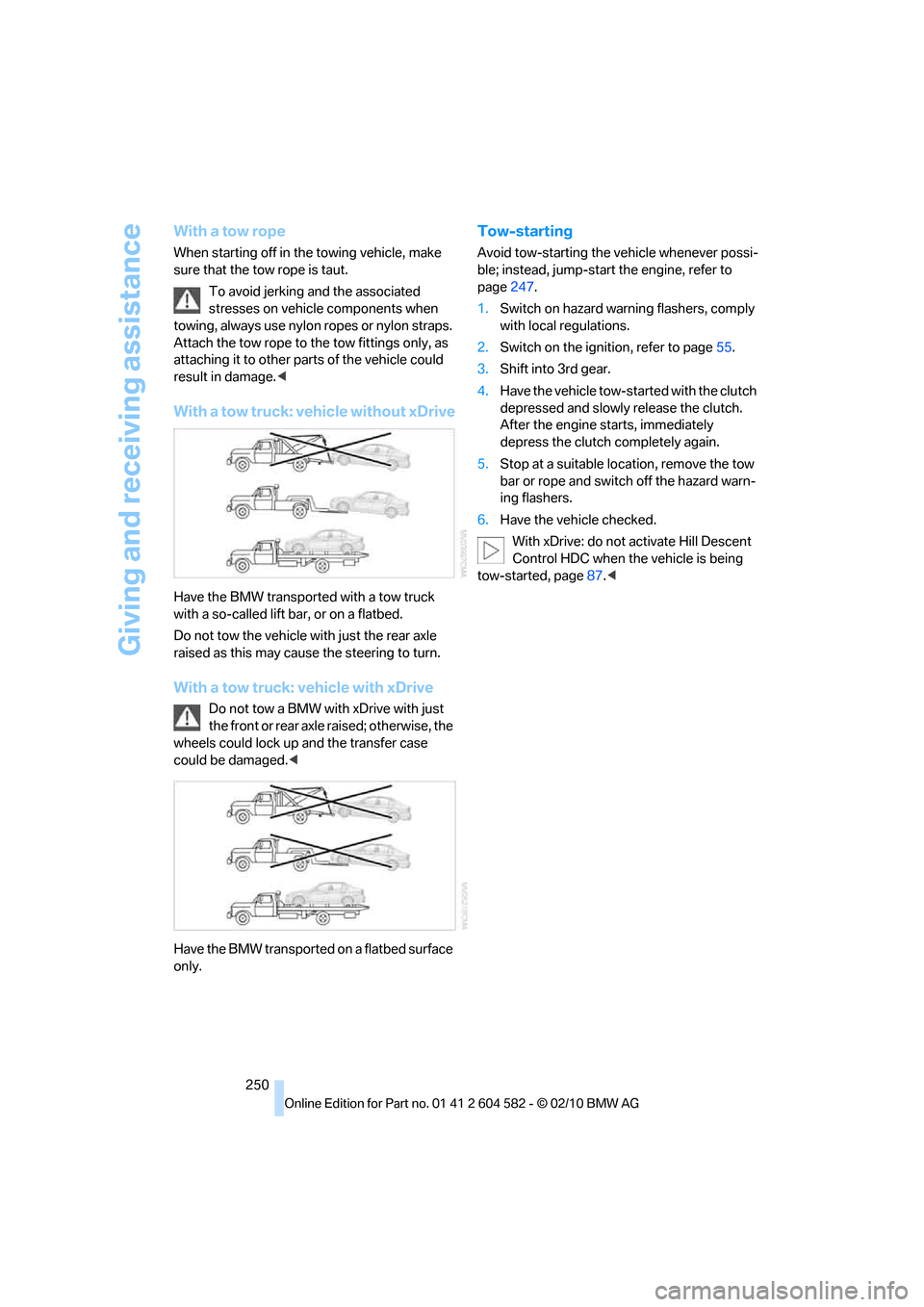
With a tow truck: vehicle without xDrive
Have the BMW transported with a tow truck
with a so-called lift bar, or on a flatbed.
Do not tow the vehicle with just the rear axle
raised as this may cause the steering to turn.
With a tow truck: vehicle with xDrive
Do not tow a BMW with xDrive with just
the front or rear axle raised; otherwise, the
wheels could lock up and the transfer case
could be damaged.<
Have the BMW transported on a flatbed surface
only.
Tow-starting
Avoid tow-starting the vehicle whenever possi-
ble; instead, jump-start the engine, refer to
page247.
1.Switch on hazard warning flashers, comply
with local regulations.
2.Switch on the ignition, refer to page55.
3.Shift into 3rd gear.
4.Have the vehicle tow-started with the clutch
depressed and slowly release the clutch.
After the engine starts, immediately
depress the clutch completely again.
5.Stop at a suitable location, remove the tow
bar or rope and switch off the hazard warn-
ing flashers.
6.Have the vehicle checked.
With xDrive: do not activate Hill Descent
Control HDC when the vehicle is being
tow-started, page87.<
Page 253 of 286
Mobility
251Reference
At a glance
Controls
Driving tips
Communications
Navigation
Entertainment
Page 255 of 286
Reference
This chapter contains technical data,
short commands for the voice activation
system and an index that will help you find
information most quickly.
Reference
Page 257 of 286
Reference 255
At a glance
Controls
Driving tips
Communications
Navigation
Entertainment
Mobility
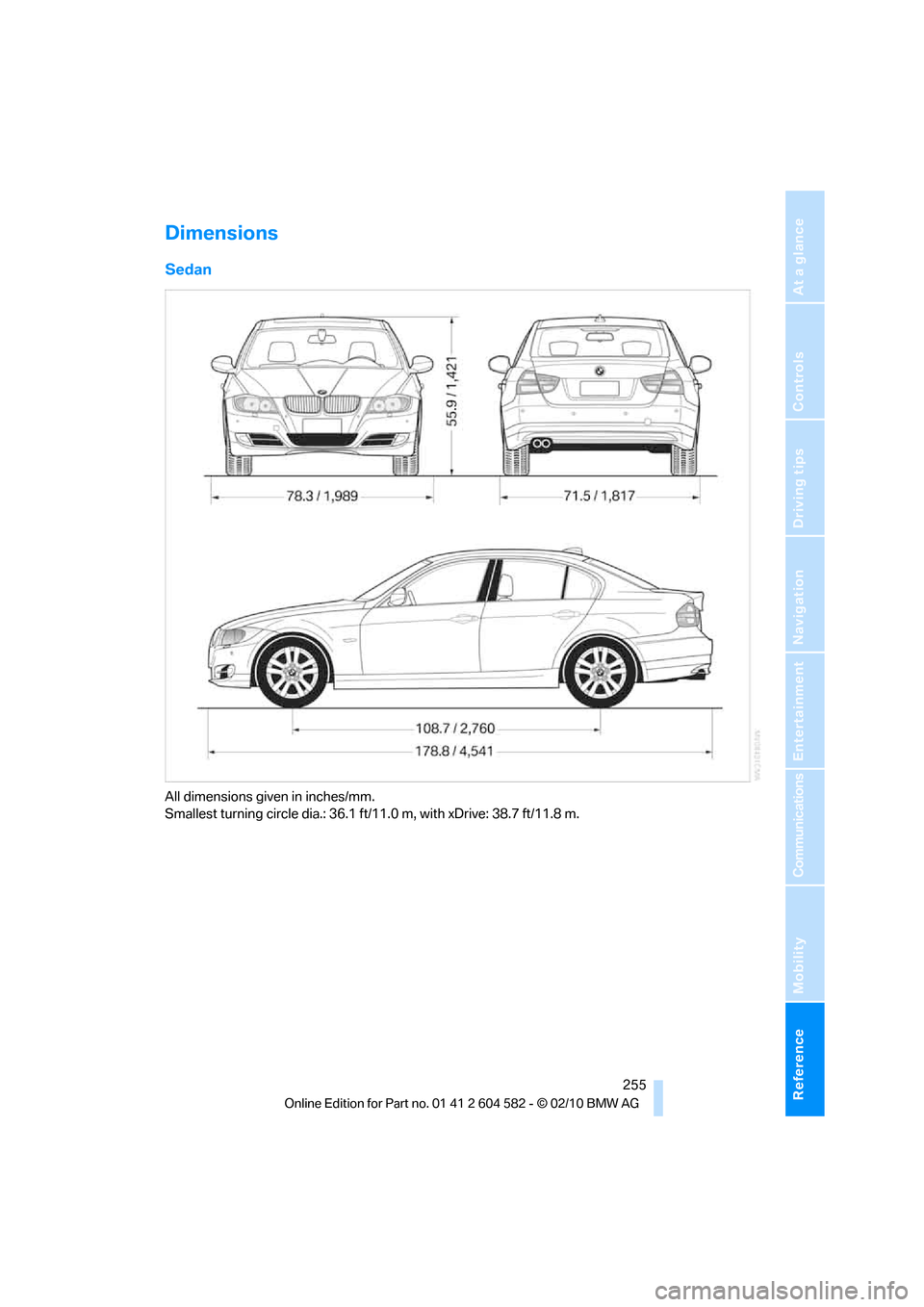
Dimensions
Sedan
All dimensions given in inches/mm.
Smallest turning circle dia.: 36.1 ft/11.0 m, with xDrive: 38.7 ft/11.8 m.
Page 259 of 286
Reference 257
At a glance
Controls
Driving tips
Communications
Navigation
Entertainment
Mobility
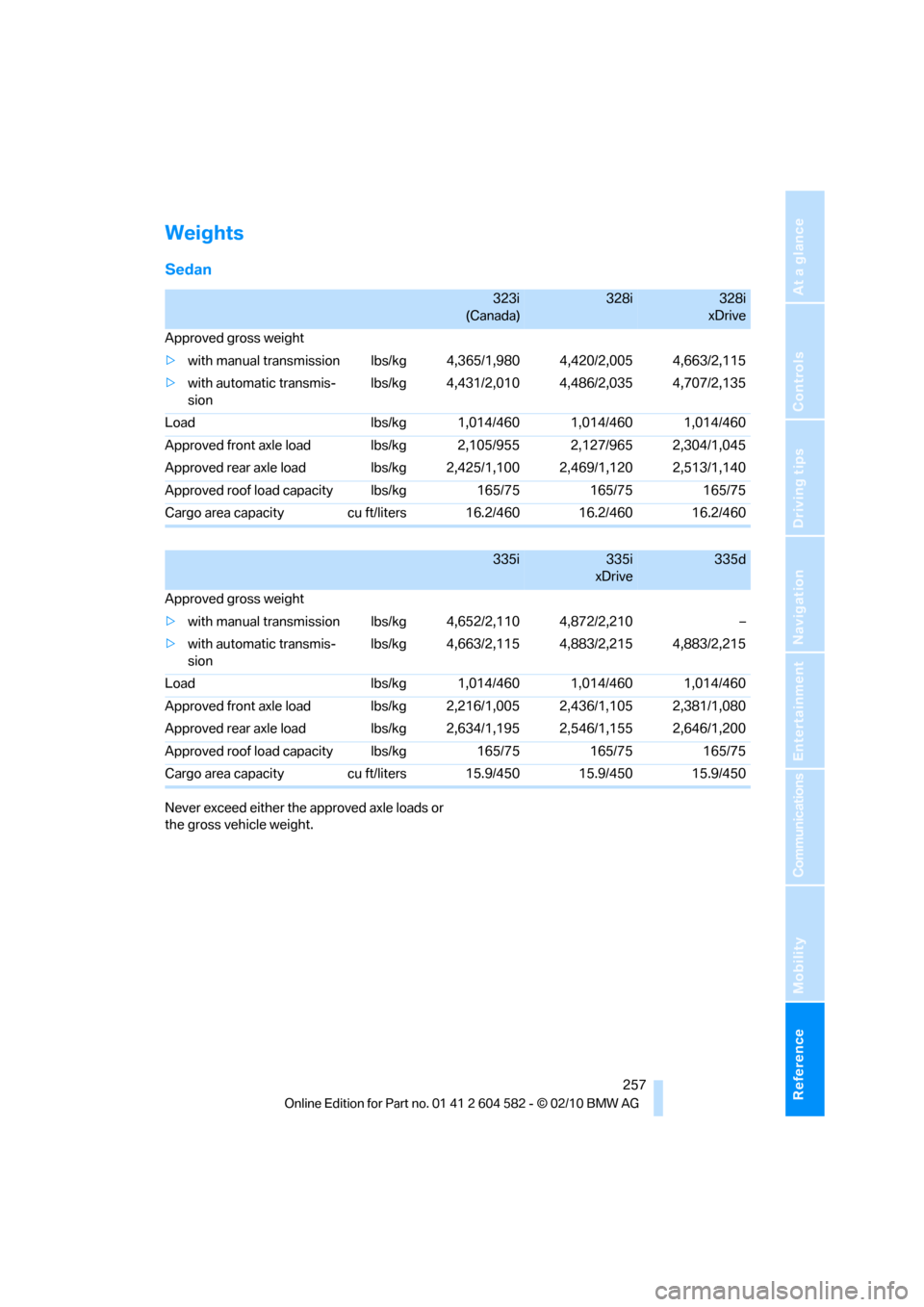
Weights
Sedan
Never exceed either the approved axle loads or
the gross vehicle weight.
323i
(Canada)328i328i
xDrive
Approved gross weight
>with manual transmission lbs/kg 4,365/1,980 4,420/2,005 4,663/2,115
>with automatic transmis-
sion lbs/kg 4,431/2,010 4,486/2,035 4,707/2,135
Load lbs/kg 1,014/460 1,014/460 1,014/460
Approved front axle load lbs/kg 2,105/955 2,127/965 2,304/1,045
Approved rear axle load lbs/kg 2,425/1,100 2,469/1,120 2,513/1,140
Approved roof load capacity lbs/kg 165/75 165/75 165/75
Cargo area capacity cu ft/liters 16.2/460 16.2/460 16.2/460
335i335i
xDrive335d
Approved gross weight
>with manual transmission lbs/kg 4,652/2,110 4,872/2,210 –
>with automatic transmis-
sion lbs/kg 4,663/2,115 4,883/2,215 4,883/2,215
Load lbs/kg 1,014/460 1,014/460 1,014/460
Approved front axle load lbs/kg 2,216/1,005 2,436/1,105 2,381/1,080
Approved rear axle load lbs/kg 2,634/1,195 2,546/1,155 2,646/1,200
Approved roof load capacity lbs/kg 165/75 165/75 165/75
Cargo area capacity cu ft/liters 15.9/450 15.9/450 15.9/450
Page 261 of 286
Reference 259
At a glance
Controls
Driving tips
Communications
Navigation
Entertainment
Mobility
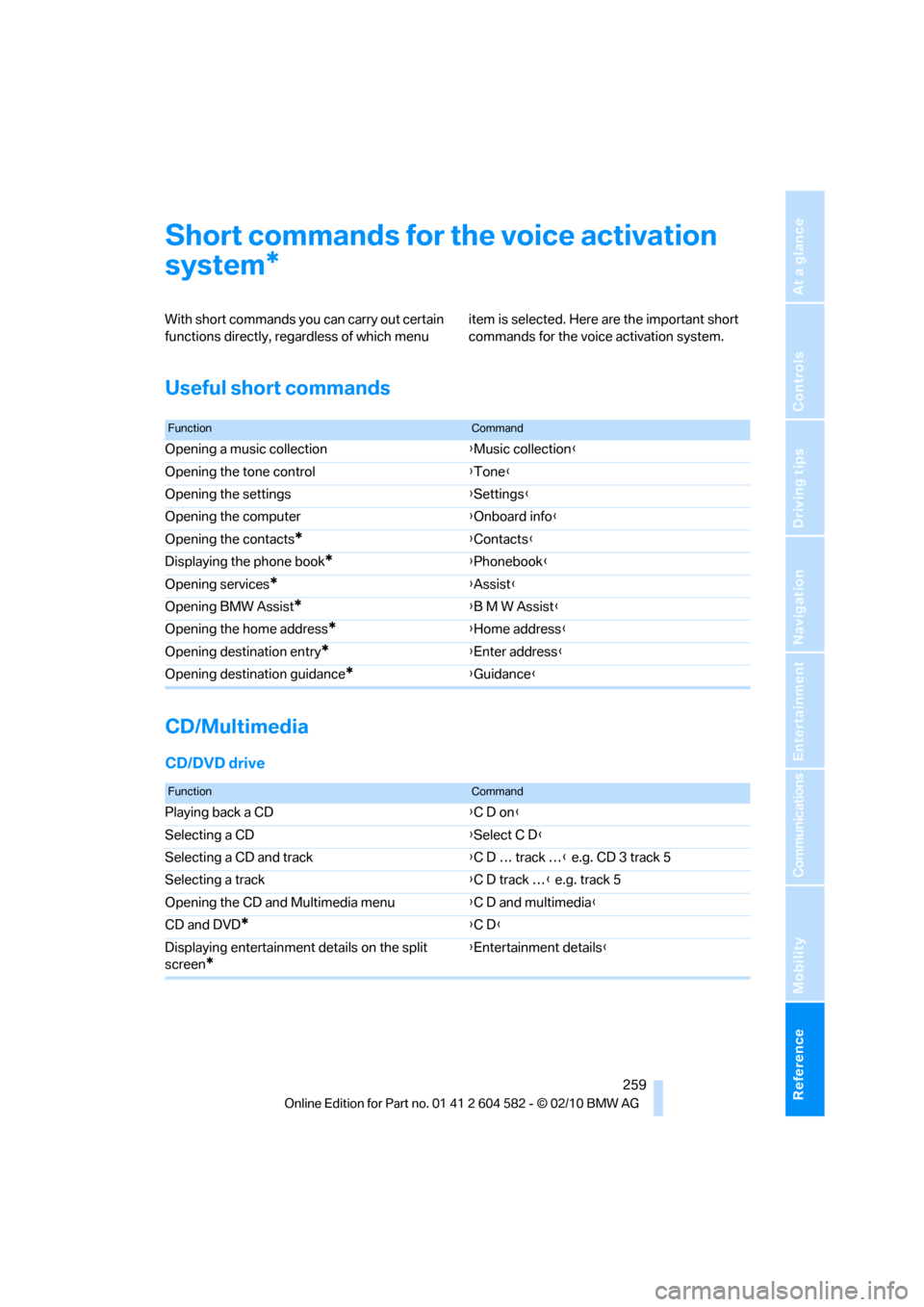
Short commands for the voice activation
system
With short commands you can carry out certain
functions directly, regardless of which menu item is selected. Here are the important short
commands for the voice activation system.
Useful short commands
CD/Multimedia
CD/DVD drive
*
FunctionCommand
Opening a music collection{Music collection}
Opening the tone control{Tone}
Opening the settings{Settings}
Opening the computer{Onboard info}
Opening the contacts
*{Contacts}
Displaying the phone book
*{Phonebook}
Opening services
*{Assist}
Opening BMW Assist
*{B M W Assist}
Opening the home address
*{Home address}
Opening destination entry
*{Enter address}
Opening destination guidance
*{Guidance}
FunctionCommand
Playing back a CD{C D on}
Selecting a CD{Select C D}
Selecting a CD and track{C D … track …} e.g. CD 3 track 5
Selecting a track{C D track …} e.g. track 5
Opening the CD and Multimedia menu{C D and multimedia}
CD and DVD
*{C D}
Displaying entertainment details on the split
screen
*
{Entertainment details}
Page 262 of 286
Short commands for the voice activation system
260
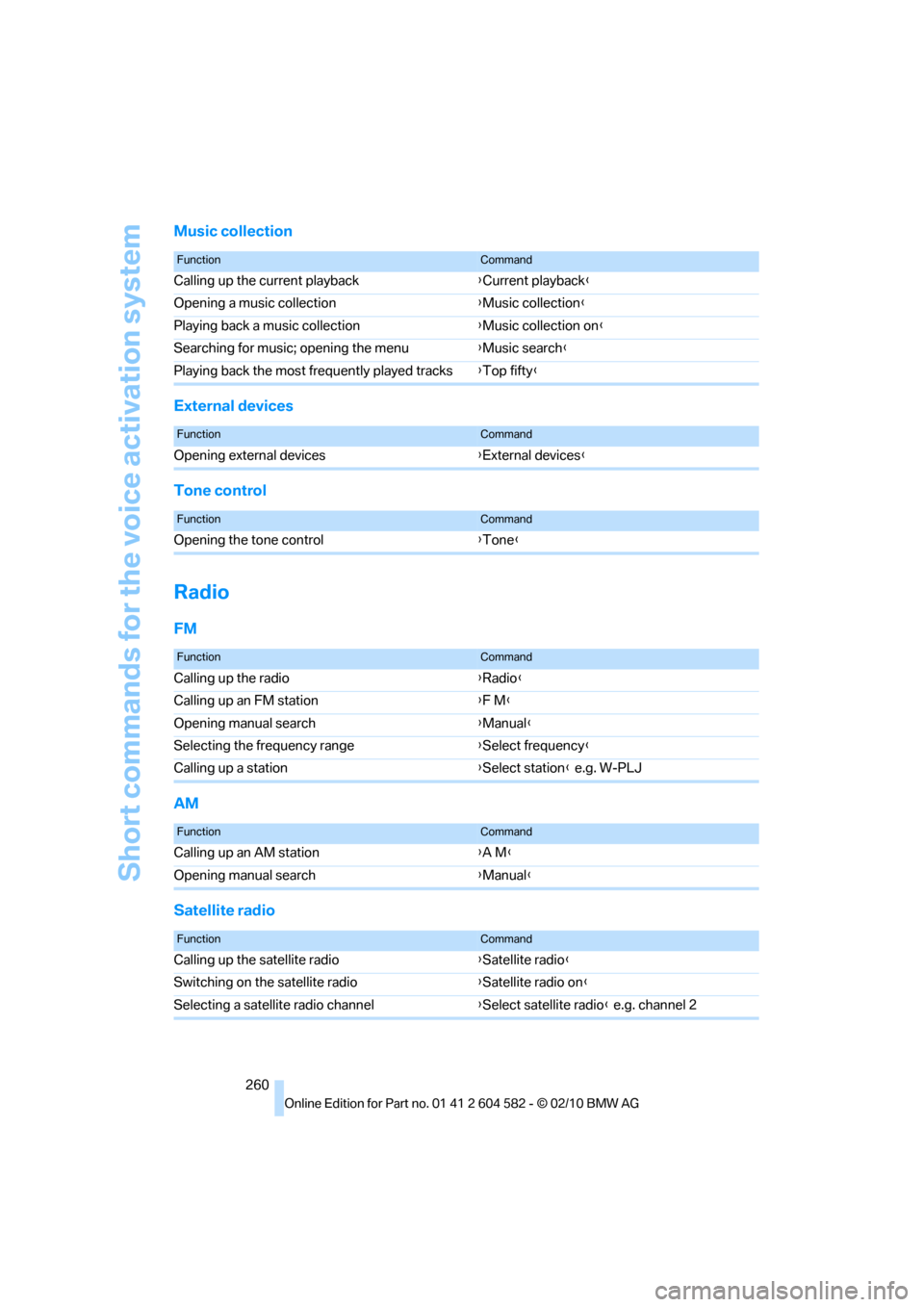
Music collection
External devices
Tone control
Radio
FM
AM
Satellite radio
FunctionCommand
Calling up the current playback{Current playback}
Opening a music collection{Music collection}
Playing back a music collection{Music collection on}
Searching for music; opening the menu{Music search}
Playing back the most frequently played tracks{Top fifty}
FunctionCommand
Opening external devices{External devices}
FunctionCommand
Opening the tone control{Tone}
FunctionCommand
Calling up the radio{Radio}
Calling up an FM station{F M}
Opening manual search{Manual}
Selecting the frequency range{Select frequency}
Calling up a station{Select station} e.g. W-PLJ
FunctionCommand
Calling up an AM station{A M}
Opening manual search{Manual}
FunctionCommand
Calling up the satellite radio{Satellite radio}
Switching on the satellite radio{Satellite radio on}
Selecting a satellite radio channel{Select satellite radio} e.g. channel 2
Page 263 of 286
Reference 261
At a glance
Controls
Driving tips
Communications
Navigation
Entertainment
Mobility
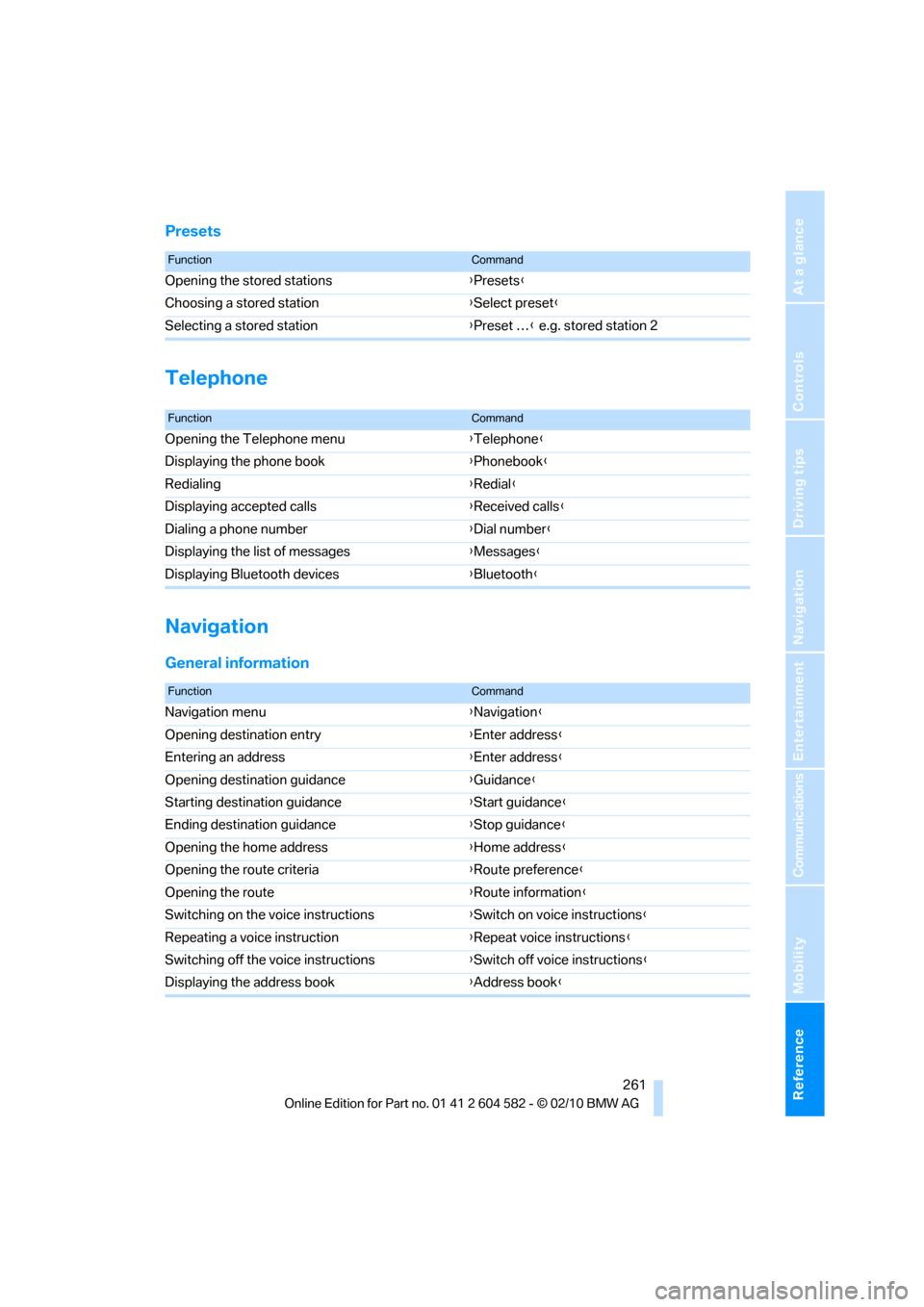
Presets
Telephone
Navigation
General information
FunctionCommand
Opening the stored stations{Presets}
Choosing a stored station{Select preset}
Selecting a stored station{Preset …} e.g. stored station 2
FunctionCommand
Opening the Telephone menu{Telephone}
Displaying the phone book{Phonebook}
Redialing{Redial}
Displaying accepted calls{Received calls}
Dialing a phone number{Dial number}
Displaying the list of messages{Messages}
Displaying Bluetooth devices{Bluetooth}
FunctionCommand
Navigation menu{Navigation}
Opening destination entry{Enter address}
Entering an address{Enter address}
Opening destination guidance{Guidance}
Starting destination guidance{Start guidance}
Ending destination guidance{Stop guidance}
Opening the home address{Home address}
Opening the route criteria{Route preference}
Opening the route{Route information}
Switching on the voice instructions{Switch on voice instructions}
Repeating a voice instruction{Repeat voice instructions}
Switching off the voice instructions{Switch off voice instructions}
Displaying the address book{Address book}
Page 264 of 286
Short commands for the voice activation system
262
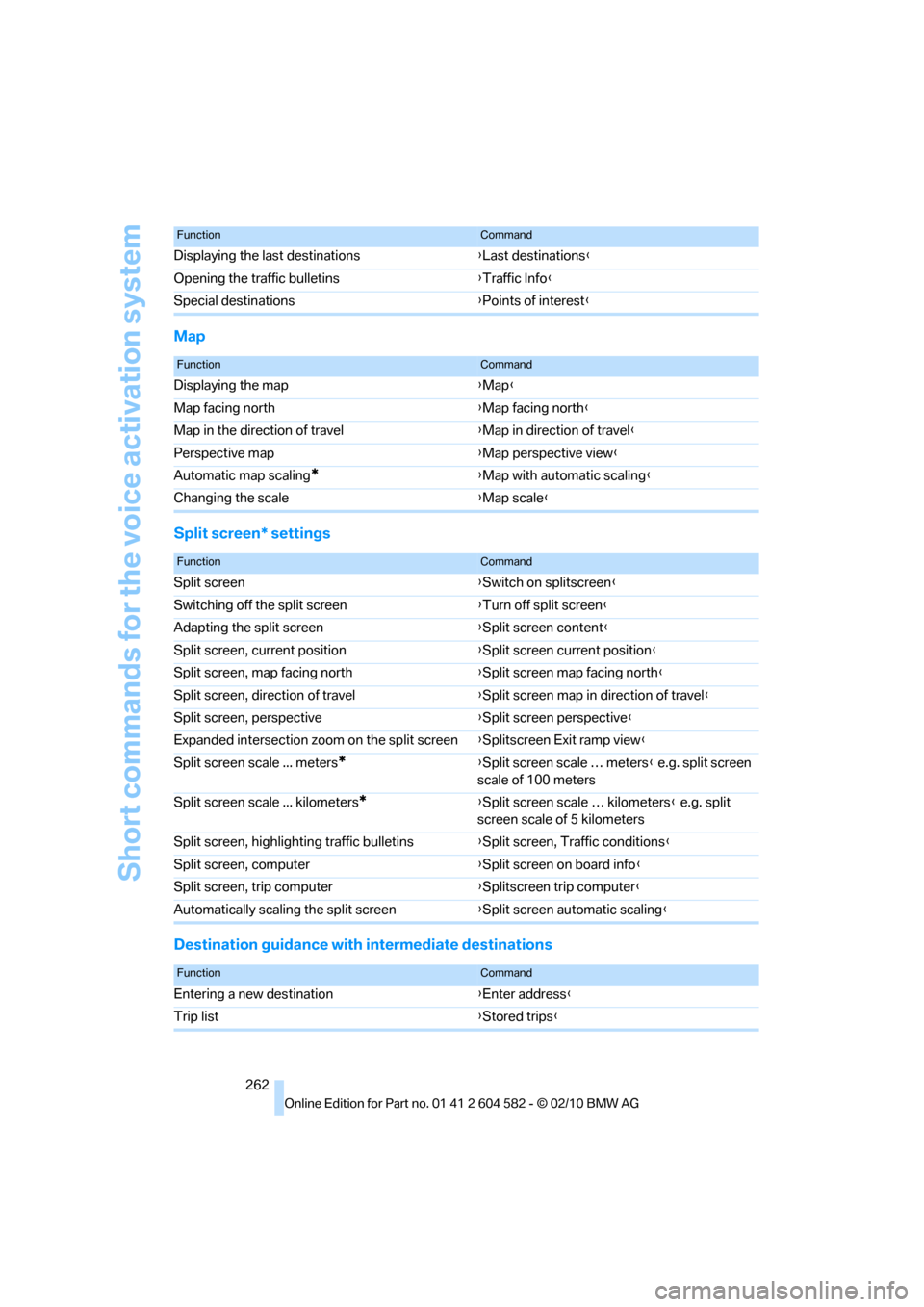
Map
Split screen* settings
Destination guidance with intermediate destinations
Displaying the last destinations{Last destinations}
Opening the traffic bulletins{Traffic Info}
Special destinations{Points of interest}
FunctionCommand
FunctionCommand
Displaying the map{Map}
Map facing north{Map facing north}
Map in the direction of travel{Map in direction of travel}
Perspective map{Map perspective view}
Automatic map scaling
*{Map with automatic scaling}
Changing the scale{Map scale}
FunctionCommand
Split screen{Switch on splitscreen}
Switching off the split screen{Turn off split screen}
Adapting the split screen{Split screen content}
Split screen, current position{Split screen current position}
Split screen, map facing north{Split screen map facing north}
Split screen, direction of travel{Split screen map in direction of travel}
Split screen, perspective{Split screen perspective}
Expanded intersection zoom on the split screen{Splitscreen Exit ramp view}
Split screen scale ... meters
*{Split screen scale … meters} e.g. split screen
scale of 100 meters
Split screen scale ... kilometers
*{Split screen scale … kilometers} e.g. split
screen scale of 5 kilometers
Split screen, highlighting traffic bulletins{Split screen, Traffic conditions}
Split screen, computer{Split screen on board info}
Split screen, trip computer{Splitscreen trip computer}
Automatically scaling the split screen{Split screen automatic scaling}
FunctionCommand
Entering a new destination{Enter address}
Trip list{Stored trips}